

10 migliori alternative al CRM HubSpot per agenzie nel 2026

Elenco delle alternative a HubSpot CRM


Le migliori alternative a HubSpot CRM offrono un database clienti flessibile, integrazioni semplici e strumenti che si adattano al flusso di lavoro del tuo team. Se stai cercando il miglior CRM, probabilmente desideri una generazione di lead più efficace, un controllo migliore del tuo imbuto di vendita e funzionalità come l'automazione del marketing via e-mail, che supportino sia i team di vendita sia quelli di marketing. Molte piattaforme offrono un ecosistema più ampio di integrazioni, una maggiore facilità d'uso e opzioni come un CRM gratuito per iniziare senza costi iniziali elevati. Con così tante opzioni disponibili, questa guida ti aiuta a confrontare le principali alternative a HubSpot per il 2026, così potrai scegliere quella più adatta alle esigenze della tua azienda.
Cos'è HubSpot CRM?
HubSpot CRM è una piattaforma software CRM basata sul cloud che aiuta i team a organizzare i contatti, monitorare le trattative e gestire le pipeline di vendita. È progettata per ottimizzare i flussi di lavoro con strumenti per la reportistica, l'automazione e la gestione delle campagne e-mail da un sistema centralizzato. Noto per la sua facilità d'uso e scalabilità, HubSpot è spesso considerato un CRM conveniente che supporta i team di vendita, marketing e assistenza. Aiuta le aziende a centralizzare i dati, migliorare la comunicazione e automatizzare le attività di routine durante la crescita.
Tabella di confronto delle alternative a HubSpot CRM
Questa tabella di confronto riassume i dettagli dei prezzi delle mie migliori alternative a HubSpot CRM.
| Tool | Best For | Trial Info | Price | ||
|---|---|---|---|---|---|
| 1 | Ideale come CRM tutto-in-uno per piccole imprese | Piano gratuito + demo gratuita disponibile | Da $11.04/utente/mese (fatturazione biennale) | Website | |
| 2 | Ideale per CRM con automazione del marketing | Prova gratuita di 14 giorni + demo gratuita disponibile | A partire da $15/mese (con fatturazione annuale) | Website | |
| 3 | Ideale per la personalizzazione avanzata del CRM | Prova gratuita di 30 giorni + piano gratuito disponibile | Da $25/utente/mese (fatturato annualmente) | Website | |
| 4 | Ideale per CRM per le vendite potenziato dall'IA | Prova gratuita di 21 giorni + demo gratuita disponibile | Da $9/utente/mese (fatturazione annuale) | Website | |
| 5 | Ideale per CRM con gestione progetti | Piano gratuito disponibile | Da $7/utente/mese (fatturazione annuale) | Website | |
| 6 | Ideale per la gestione visiva delle pipeline di vendita | Prova gratuita di 14 giorni disponibile | Da $14/utente/mese (fatturazione annuale) | Website | |
| 7 | Ideale per CRM con workflow di progetto | Prova gratuita disponibile | Da $29/utente/mese (fatturazione annuale) | Website | |
| 8 | Ideale per flussi di lavoro CRM flessibili | Prova gratuita di 14 giorni + demo gratuita disponibile | A partire da $18/postazione/mese (con fatturazione annuale) | Website | |
| 9 | Ideale per l'inserimento dati CRM automatizzato | Prova gratuita di 30 giorni + demo gratuita disponibile | Da $29/utente/mese (fatturazione annuale) | Website | |
| 10 | Ideale per l'integrazione CRM con Google Workspace | Prova gratuita di 14 giorni disponibile | Da $29/utente/mese | Website |
Perché fidarsi dei nostri consigli sui software
Il nostro team testa e recensisce software dal 2012. In quanto project manager noi stessi, sappiamo quanto sia difficile — e importante — scegliere il software giusto.
Per questa guida, abbiamo valutato gli strumenti attraverso test pratici e ricerche indipendenti, assegnando un punteggio agli strumenti in base ai nostri criteri di selezione. Ci basiamo inoltre sulle competenze di leader di pensiero del settore e di professionisti attivi nella gestione dei progetti.
Le nostre recensioni riflettono il nostro giudizio editoriale umano, non un discorso di vendita.
Revisori esperti:
Recensioni delle alternative a HubSpot CRM
Di seguito trovi i miei riepiloghi dettagliati delle migliori alternative a HubSpot CRM entrate nel mio elenco. Le mie recensioni offrono uno sguardo approfondito sulle funzionalità, le integrazioni e i prezzi di ciascuna piattaforma, per aiutarti a trovare quella più adatta a te.

Ideale come CRM tutto-in-uno per piccole imprese
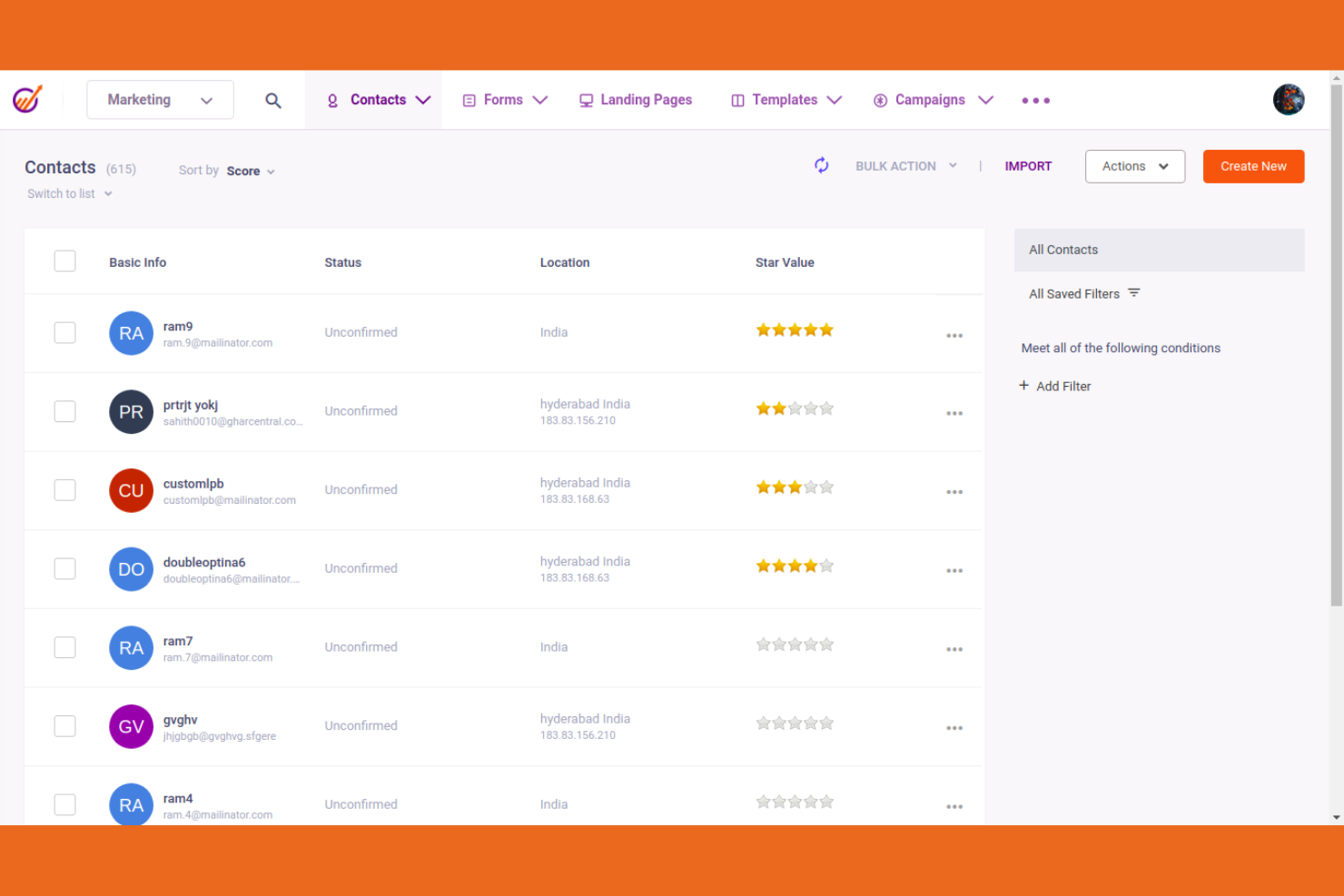
EngageBay riunisce strumenti CRM, di marketing e di helpdesk in un'unica piattaforma per piccole imprese e startup. Lo troverai particolarmente utile se desideri gestire i contatti, automatizzare le campagne e supportare i clienti senza dover gestire più sistemi.
Per chi è più indicato EngageBay?
EngageBay è una buona soluzione per piccoli team e startup che desiderano strumenti integrati di CRM, marketing e helpdesk in un'unica piattaforma.
Perché EngageBay è una valida alternativa a HubSpot CRM
Ho scelto EngageBay perché raggruppa marketing, vendite e helpdesk in un unico posto, così il mio team non deve passare da uno strumento all'altro per gestire l'intero ciclo di vita del cliente. Apprezzo la visione a 360 gradi del contatto, che mostra ogni interazione avuta con un potenziale cliente attraverso email, chat e ticket di supporto, ancora prima di prendere in mano il telefono. L'helpdesk integrato permette anche al mio team di gestire i ticket di supporto senza uscire dal CRM, così tutte le informazioni rilevanti restano collegate al record del contatto. Per piccoli team che devono fare molto anche con risorse limitate, questa integrazione è davvero utile.
Funzionalità principali di EngageBay
- Più pipeline di vendita: ti consente di creare pipeline separate per prodotto, area geografica o qualsiasi parametro personalizzato per monitorare le trattative in modo indipendente.
- Gamification delle vendite: pubblica classifiche e monitora le performance dei venditori con strumenti di definizione degli obiettivi e feedback, per mantenere alta la motivazione dei team.
- Analisi delle proposte: monitora in tempo reale le visite, i download e i tassi di click-through delle proposte così puoi vedere come i potenziali clienti interagiscono con i tuoi documenti.
- Reportistica personalizzata: genera report secondo criteri personalizzati per monitorare le attività dei venditori e misurare le performance rispetto agli obiettivi.
Integrazioni EngageBay
EngageBay offre oltre 30 integrazioni native, inclusi Gmail, Outlook, Mailgun, Xero, QuickBooks, Stripe, Shopify, Zapier, Twilio e SendGrid. È disponibile un'API per integrazioni personalizzate.
Pros and Cons
Pros:
- Integra CRM, marketing e helpdesk in un'unica soluzione
- Lead scoring integrato per la priorità di vendita
- Automazione di marketing via Email e SMS disponibile
Cons:
- L'automazione dei flussi di lavoro può essere lenta a volte
- Gli articoli della knowledge base possono essere obsoleti

Ideale per CRM con automazione del marketing
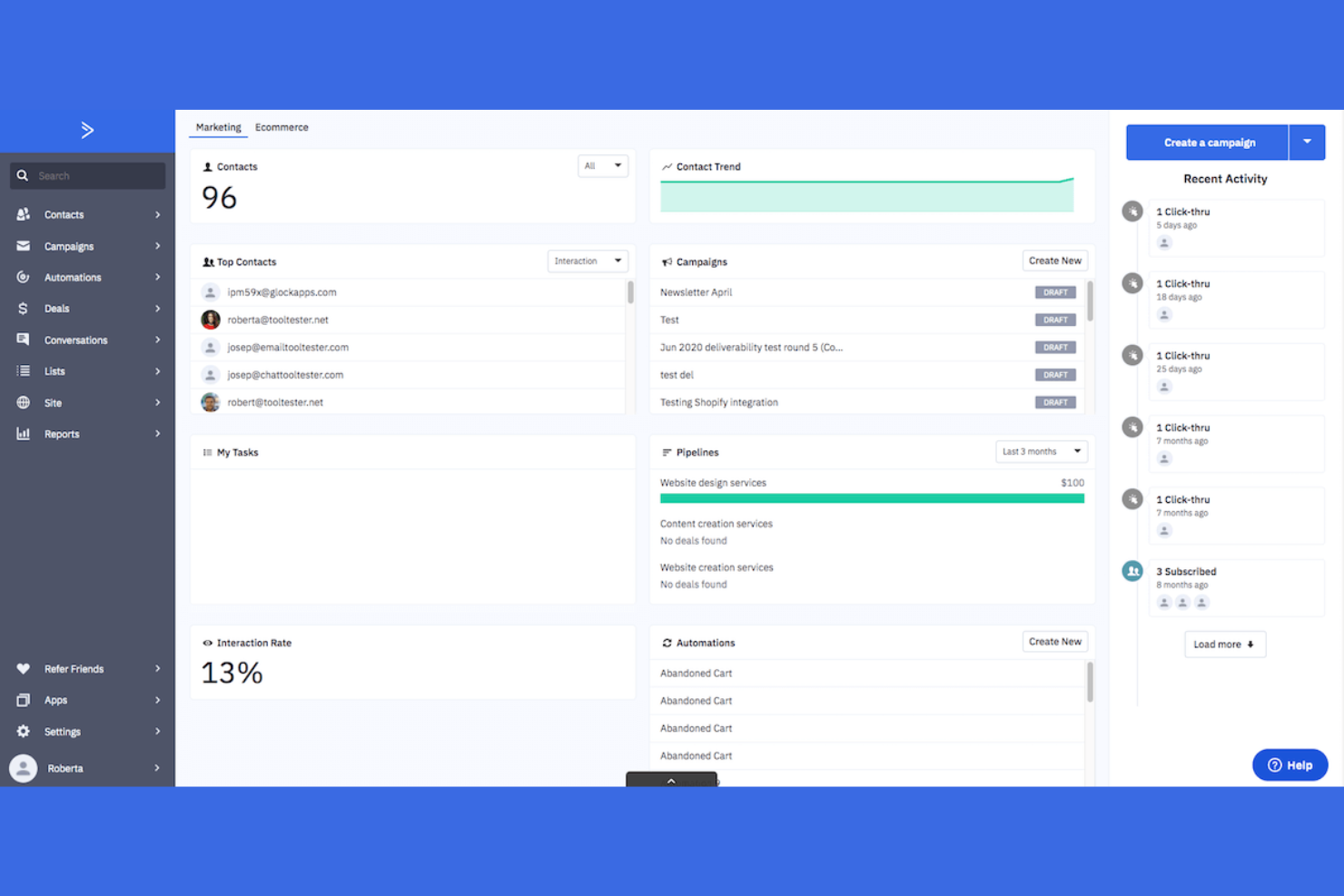
ActiveCampaign è una piattaforma CRM per le vendite e di automazione del marketing pensata per le piccole imprese e i team di vendita che desiderano gestire i contatti, automatizzare i follow-up e monitorare le trattative in un unico posto. Ritengo che la troverai particolarmente utile se hai bisogno di collegare l'email marketing al database dei clienti e alla pipeline di vendita.
Per chi è più adatto ActiveCampaign?
ActiveCampaign è una buona scelta per le piccole imprese e i team di vendita che desiderano combinare CRM, automazione delle vendite ed email marketing in un'unica piattaforma.
Perché ActiveCampaign è una buona alternativa al CRM di HubSpot
Ho scelto ActiveCampaign perché l'automazione delle vendite e quella del marketing risiedono nella stessa piattaforma, quindi non c'è alcuna interruzione tra la fase di coltivazione di un lead e il suo avanzamento nella pipeline. Apprezzo il fatto che il punteggio dei lead faccia emergere automaticamente i contatti con maggiori probabilità di conversione, consentendo al mio team di concentrarsi sulle trattative giuste al momento giusto. La funzione email 1:1 ci permette di inviare comunicazioni personalizzate direttamente dal CRM e di monitorare aperture, risposte e clic senza uscire dalla piattaforma. Anche l'instradamento delle vendite assegna automaticamente le trattative al rappresentante giusto in base a regole personalizzate, mantenendo così la pipeline in movimento senza dover effettuare smistamenti manuali.
Funzionalità principali di ActiveCampaign
- Segmentazione dei contatti: Raggruppa i contatti in base al comportamento, alla fase della trattativa o ai dati dei campi personalizzati per comunicazioni mirate.
- Report sulle vendite: Monitora le prestazioni della pipeline e l'attività dei rappresentanti tramite dashboard personalizzate.
- Note condivise: Consente ai membri del team di aggiungere e visualizzare note sulle trattative e sui contatti per una collaborazione più efficace.
- Email di notifica: Invia avvisi istantanei quando si verificano modifiche importanti alle trattative, mantenendo i rappresentanti informati in tempo reale.
Integrazioni di ActiveCampaign
ActiveCampaign offre oltre 900 integrazioni native, tra cui Salesforce, Shopify, WooCommerce, Facebook, Google Analytics, Calendly, Stripe, Unbounce, Eventbrite e Slack. Si collega a Zapier e mette a disposizione un'API per le integrazioni personalizzate.
Pros and Cons
Pros:
- Combina i flussi di lavoro del CRM e dell'automazione del marketing
- Segmentazione avanzata dei contatti per comunicazioni mirate
- Integrazioni native con piattaforme di e-commerce
Cons:
- Il generatore di flussi di lavoro può sembrare complesso
- L'editor dei modelli email può risultare limitante

Ideale per la personalizzazione avanzata del CRM
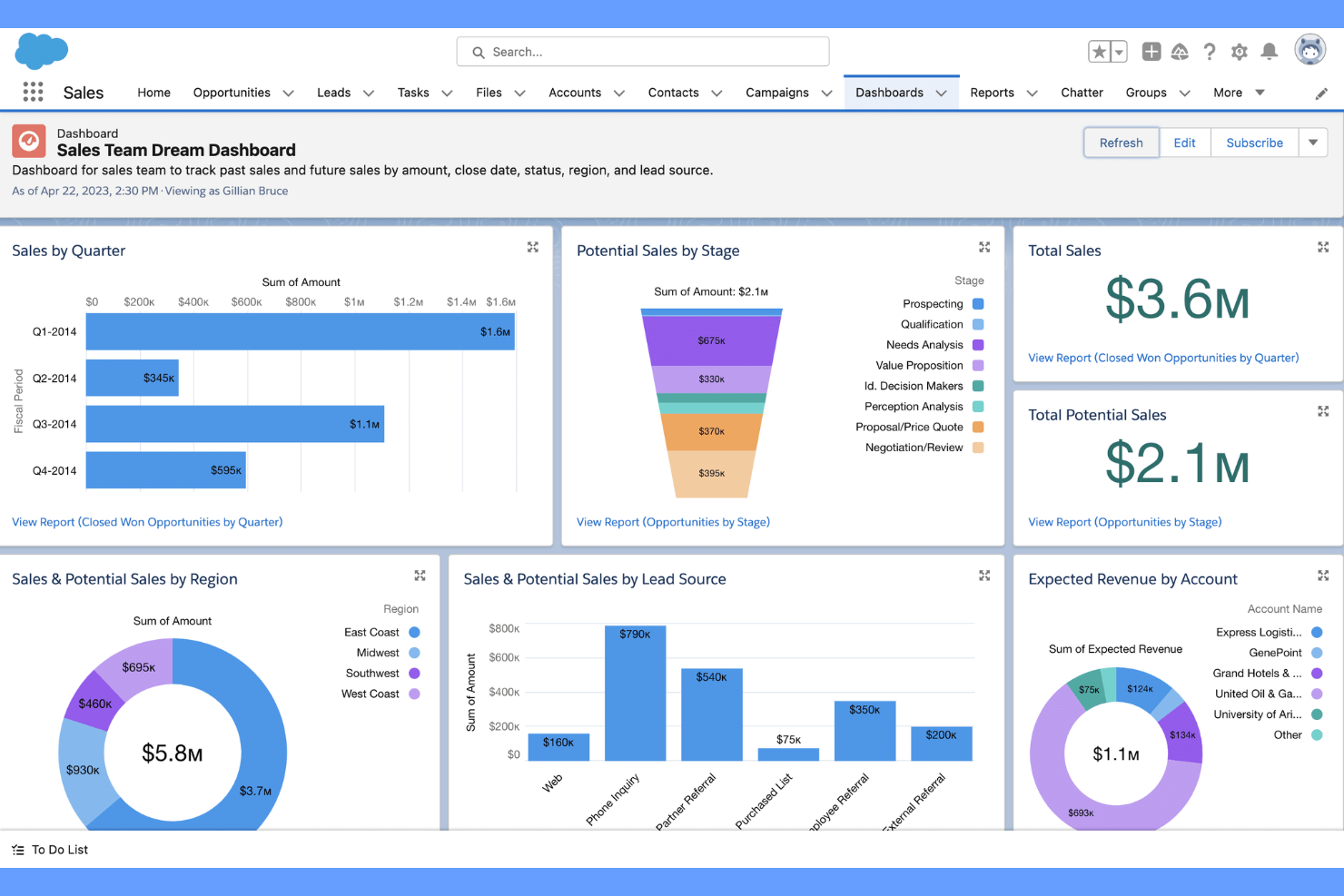
Salesforce è una piattaforma CRM basata sul cloud progettata per team che necessitano di una profonda personalizzazione e automazione avanzata nel loro database clienti. È ideale per aziende in crescita o imprese che desiderano adattare i flussi di lavoro, gestire processi di vendita complessi e collegare dati tra diversi reparti.
Per chi è Salesforce?
Salesforce è adatto ad aziende di medie e grandi dimensioni che necessitano di un CRM personalizzabile per supportare operazioni complesse di vendita, assistenza o marketing.
Perché Salesforce è una buona alternativa a HubSpot CRM
Ho scelto Salesforce perché la sua profondità di personalizzazione è difficile da eguagliare quando serve un database clienti che si adatti esattamente al proprio flusso di lavoro. Mi piace come Flow Builder consenta di automatizzare processi di vendita multi-step senza dover scrivere codice, risparmiando al mio team l'aggiornamento manuale dei record su vari account. Apprezzo anche Einstein Analytics, che offre analisi approfondite e dati previsionali direttamente nella visualizzazione pipeline. Per i team che hanno superato la struttura di HubSpot, Salesforce offre la flessibilità di creare qualcosa che rispecchi davvero il modo in cui opera la propria azienda.
Funzionalità principali di Salesforce
- Gestione dei contatti: Archivia e organizza dettagliati profili cliente, tra cui cronologia attività, comunicazioni e relazioni tra account.
- Monitoraggio delle opportunità: Monitora le trattative attraverso fasi di pipeline personalizzabili con aggiornamenti di stato in tempo reale.
- AppExchange marketplace: Accedi a migliaia di app e integrazioni preconfezionate per estendere le funzionalità del CRM.
- Report e dashboard: Crea report personalizzati e dashboard visivi per monitorare le performance di vendita e i dati dei clienti.
Integrazioni Salesforce
Salesforce offre centinaia di integrazioni native tramite il suo AppExchange marketplace, inclusi Google Workspace, Slack, Mailchimp e altro ancora. È disponibile un'API per integrazioni personalizzate.
Pros and Cons
Pros:
- Flussi di lavoro altamente personalizzabili per cicli di vendita complessi
- Automazione avanzata per la gestione di lead e trattative
- Capacità di reportistica e analisi approfondite
Cons:
- Configurazione e setup richiedono molto tempo
- La personalizzazione richiede spesso il coinvolgimento di sviluppatori


Freshsales è una piattaforma CRM pensata per i team di vendita che desiderano avere telefono integrato, email e approfondimenti basati sull'IA in un unico posto. Ritengo sia una valida scelta per le aziende che devono gestire lead, automatizzare l’outreach e monitorare le trattative senza dover utilizzare più strumenti.
A chi è più adatto Freshsales?
Freshsales è perfetto per team di vendita di piccole e medie dimensioni che vogliono strumenti di comunicazione integrati e analisi delle trattative guidate dall'IA.
Perché Freshsales è una valida alternativa a HubSpot CRM
Ho scelto Freshsales perché include direttamente nel CRM un dialer telefonico e l’email integrati, così il mio team non ha bisogno di uno strumento di telefonia separato per effettuare e registrare le chiamate. Freddy AI, il livello di intelligenza artificiale incorporato in Freshsales, mostra in tempo reale i punteggi di intenzione dei lead e raccomandazioni sulle trattative. Mi piace che i commerciali possano vedere quali lead hanno maggiori probabilità di conversione senza uscire dalla piattaforma. Per i team che passano da HubSpot e cercano comunicazione e approfondimenti IA in un’unica soluzione, Freshsales riunisce tutto sotto lo stesso tetto.
Funzionalità principali di Freshsales
- Sequenze di vendita: Automatizza l’outreach a più fasi impostando una serie di email programmate e attività di follow-up per ogni contatto.
- Arricchimento automatico del profilo: Freshsales recupera automaticamente dati pubblici disponibili per completare le schede di contatto e azienda.
- Pipeline di vendita multiple: Crea pipeline separate per prodotti, regioni o processi di vendita diversi all’interno dello stesso account.
- Analisi vinto-perso: Monitora nel tempo i motivi per cui le trattative vengono vinte o perse per individuare schemi ricorrenti nel team di vendita.
Integrazioni di Freshsales
Freshsales offre integrazioni native con Google Workspace, Microsoft 365, Mailchimp, QuickBooks, Xero, DocuSign, Slack, Zapier e fornisce un’API per integrazioni personalizzate.
Pros and Cons
Pros:
- Telefono ed email integrati per le attività commerciali
- Freddy AI suggerisce le prossime azioni sulle trattative
- Arricchimento automatico del profilo per le schede contatto
Cons:
- La configurazione delle automazioni dei flussi di lavoro può risultare complessa
- Automazione marketing limitata rispetto a HubSpot


ClickUp unisce la gestione dei progetti e il CRM in un'unica piattaforma, rendendolo particolarmente adatto per i team che desiderano gestire le relazioni con i clienti insieme ad attività e flussi di lavoro. Apprezzerai la sua flessibilità se hai bisogno di personalizzare le pipeline, automatizzare i processi e centralizzare i dati dei clienti.
Per chi è ideale ClickUp?
ClickUp è una soluzione adatta per team trasversali in startup e aziende in crescita che desiderano gestire il lavoro dei clienti e il CRM da un'unica piattaforma.
Perché ClickUp è una valida alternativa a HubSpot CRM
Ho scelto ClickUp perché permette al mio team di gestire le relazioni con i clienti e la consegna dei progetti senza dover passare da uno strumento all'altro. Mi piace che sia possibile creare un CRM completamente personalizzato utilizzando i campi personalizzati di ClickUp, le viste elenco e i collegamenti tra record, in modo che le schede clienti siano collegate direttamente alle attività e ai deliverable in corso. In pratica, ciò significa che il mio team può monitorare un'opportunità nella vista pipeline e assegnare immediatamente attività di onboarding allo stesso record cliente. Le Automazioni di ClickUp ci consentono inoltre di attivare la creazione di task, aggiornamenti di stato e notifiche in base all'attività CRM, mantenendo così i flussi di lavoro dei clienti sempre aggiornati senza interventi manuali.
Funzionalità principali di ClickUp
- AI Notetaker: Trascrive automaticamente le riunioni e genera riepiloghi e azioni collegate alle attività.
- Vista carico di lavoro: Visualizza la capacità del team su attività e progetti per aiutare a bilanciare le assegnazioni.
- Clips: Registra schermo e voce direttamente in ClickUp per condividere feedback asincroni senza programmare una riunione.
- Dashboard: Crea panoramiche visive dello stato dei progetti, dei progressi del team e dei principali indicatori utilizzando dati task in tempo reale.
Integrazioni ClickUp
ClickUp offre oltre 50 integrazioni native, tra cui Slack, GitHub, GitLab, HubSpot, Everhour, Toggl, Google Drive, OneDrive, Outlook, Google Calendar e Zoom. Si integra anche con Zapier e fornisce un'API per integrazioni personalizzate.
Pros and Cons
Pros:
- Unisce CRM e gestione progetti in un solo strumento
- Automazioni per attivare flussi di lavoro clienti
- AI integrata per note e riassunti delle riunioni
Cons:
- Funzionalità CRM da configurare manualmente
- Strumenti limitati per lead scoring e segmentazione

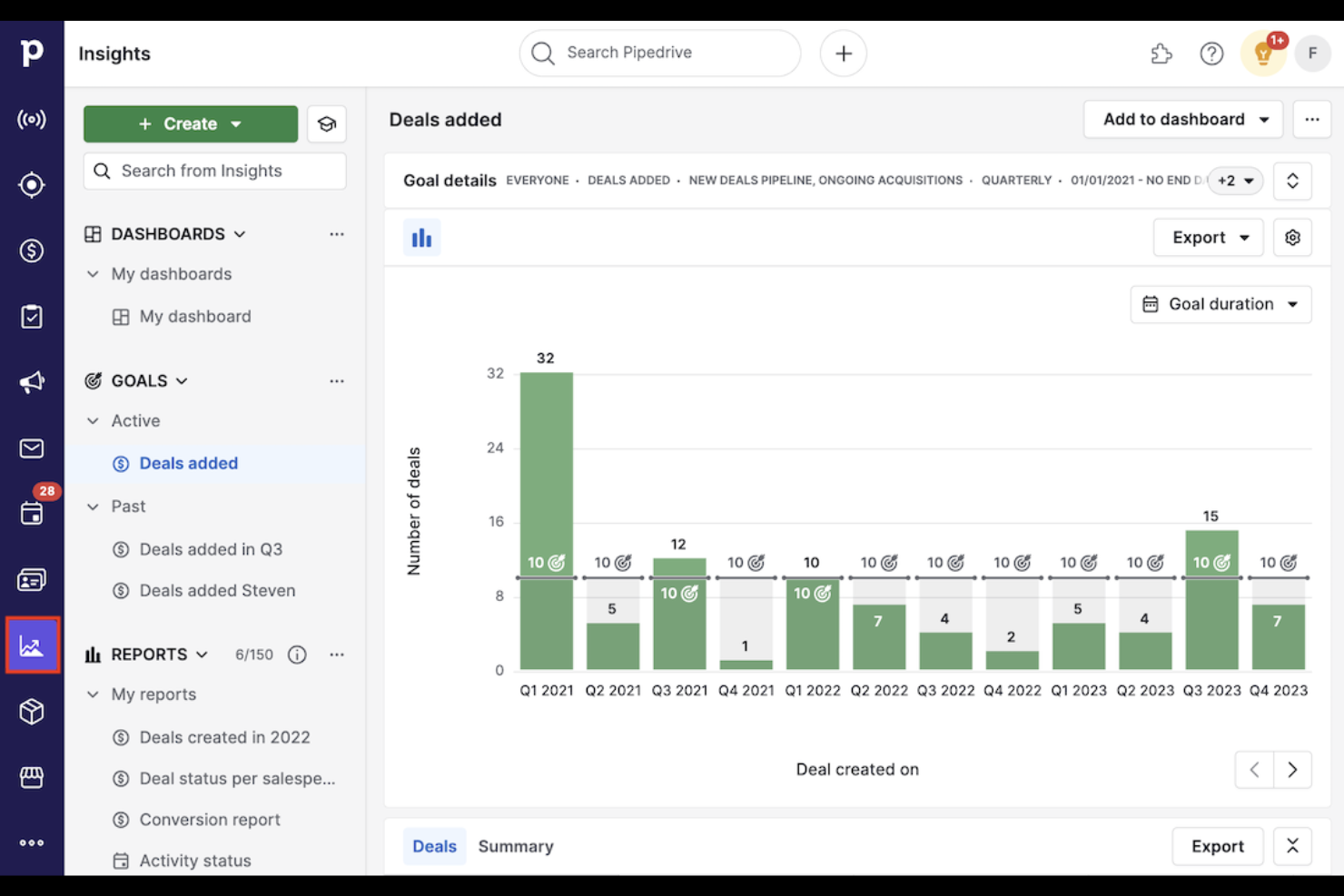
Pipedrive è un CRM orientato alle vendite, progettato per team che desiderano una pipeline visiva e drag-and-drop per gestire trattative e attività. Ritengo che sia particolarmente adatto a piccole imprese e organizzazioni guidate dalle vendite che necessitano di un monitoraggio chiaro delle trattative e di approfondimenti azionabili.
Per chi è ideale Pipedrive?
Pipedrive è indicato per team commerciali di piccole e medie dimensioni che desiderano un approccio visivo e orientato alle attività per la gestione delle trattative.
Perché Pipedrive è una valida alternativa a HubSpot CRM
Ho scelto Pipedrive perché la sua pipeline visiva offre ai team commerciali una vista immediata e intuitiva di ogni trattativa e della sua posizione. Apprezzo come la bacheca drag-and-drop consente al mio team di spostare le trattative tra le varie fasi senza dover navigare tra i menu o aggiornare più campi. Il modello di vendita basato sulle attività di Pipedrive mantiene inoltre i venditori concentrati sulla prossima azione relativa a ogni trattativa, riducendo il rischio di perdere opportunità. Per i team che trovano l’interfaccia di HubSpot troppo articolata, l’impostazione mirata di Pipedrive è un punto di forza reale.
Funzionalità principali di Pipedrive
- Smart Docs: Crea, invia e monitora documenti condivisibili e contratti pronti per la firma elettronica direttamente dalla scheda della trattativa.
- Componente aggiuntivo LeadBooster: Acquisisci e qualifica contatti utilizzando chatbot, chat dal vivo, strumenti di ricerca e moduli web integrati nel CRM.
- Assistente alle vendite AI: Ricevi consigli personalizzati sulle trattative e suggerimenti sulle prestazioni in base all’attività presente nella pipeline.
- Componente aggiuntivo Campaigns: Crea e invia campagne di email marketing segmentate con modelli drag-and-drop e analisi in tempo reale.
Integrazioni di Pipedrive
Pipedrive offre oltre 500 integrazioni nel marketplace, incluse quelle native con Slack, QuickBooks, Trello, Zoom, Gmail, Microsoft Teams, PandaDoc, Leadfeeder, JustCall e Outfunnel. Si collega con Zapier e offre un'API per integrazioni personalizzate.
Pros and Cons
Pros:
- Pipeline visiva che rende semplice il monitoraggio delle trattative
- Promemoria attività che mantengono i commerciali concentrati sulle priorità
- Strumenti di previsione delle vendite e reportistica integrati
Cons:
- Nessuno strumento di automazione marketing integrato
- Template email limitati senza componenti aggiuntivi

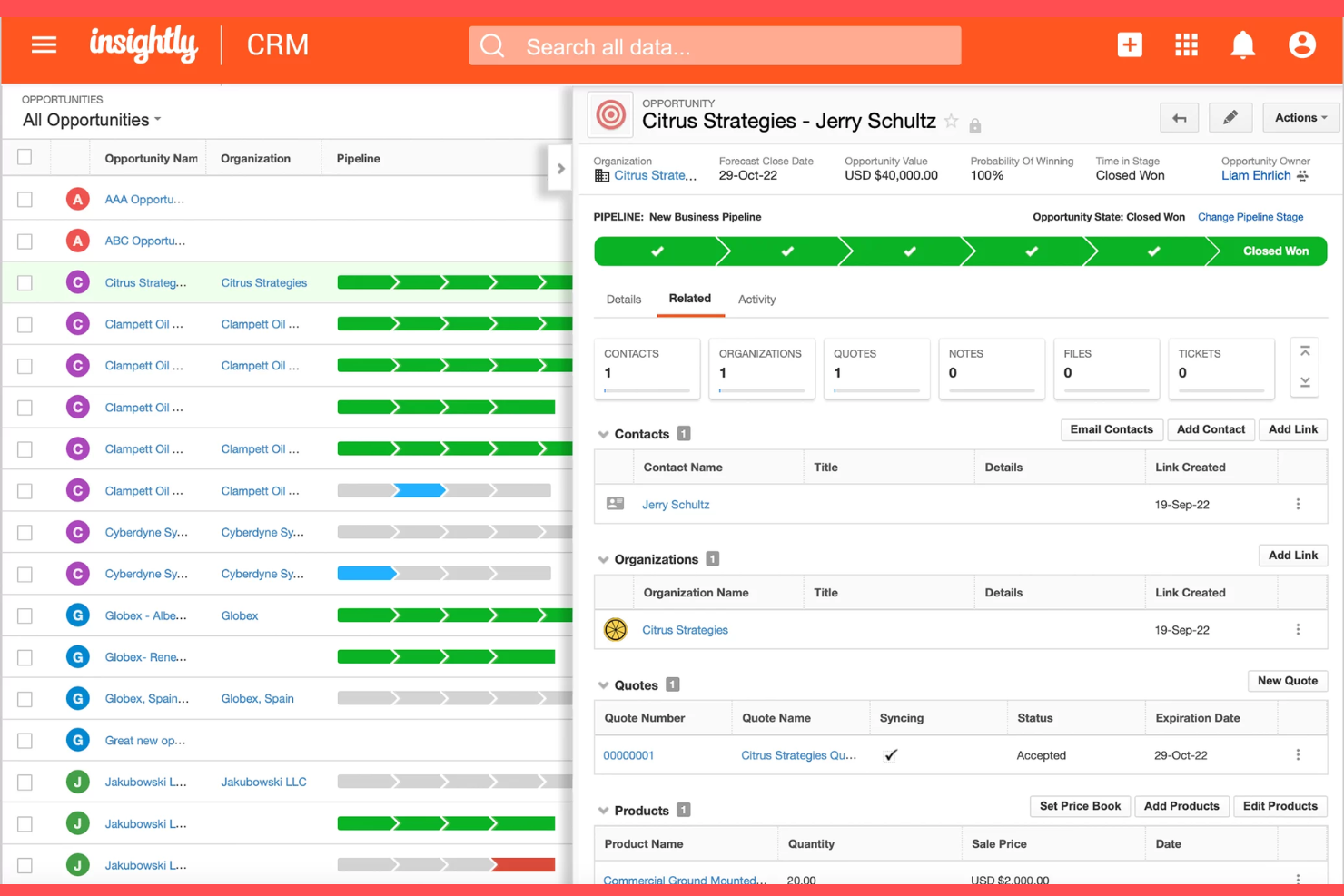
Insightly è una piattaforma CRM che combina vendite, gestione dei progetti e automazione dei flussi di lavoro in un unico sistema. Penso che lo troverai particolarmente utile se la tua squadra ha bisogno di gestire sia le relazioni con i clienti sia i progetti senza dover cambiare strumenti.
Per chi è ideale Insightly?
Insightly è adatto ad aziende in crescita che vogliono gestire sia le relazioni con i clienti sia la consegna dei progetti in un'unica piattaforma.
Perché Insightly è una valida alternativa a HubSpot CRM
Ho scelto Insightly perché è uno dei pochi CRM che trasforma una trattativa vinta direttamente in un progetto senza alcun passaggio manuale. Mi piace come il livello di project management consenta al mio team di assegnare attività, impostare traguardi e monitorare le consegne all'interno della stessa piattaforma in cui gestiamo contatti e pipeline. In pratica, questo significa che il mio team può far passare un cliente da potenziale a progetto attivo senza perdere alcun contesto o cambiare strumenti. Per le aziende in crescita che gestiscono sia vendite che delivery, questa continuità è difficile da trovare altrove.
Funzionalità principali di Insightly
- Regole di convalida e permessi: Imposta regole di validazione sui campi e controlli di accesso basati sui ruoli per mantenere i dati CRM precisi e coerenti.
- Prodotti, listini prezzi e preventivi: Crea cataloghi di prodotti, configura prezzi e genera preventivi PDF personalizzati direttamente dalle opportunità.
- AI Copilot: Utilizza l'IA basata su prompt per riassumere i record, evidenziare informazioni chiave e automatizzare attività ripetitive sui dati direttamente nel CRM.
- Dashboard di performance condivisibili: Crea e condividi fino a 100 dashboard personalizzate con il piano Professional per monitorare i KPI dei team in tempo reale.
Integrazioni Insightly
Insightly offre centinaia di integrazioni native tramite AppConnect, tra cui Microsoft, DocuSign, Shopify, Unbounce, PandaDoc, Netsuite, QuickBooks e Google, con API disponibile per integrazioni personalizzate.
Pros and Cons
Pros:
- Gestione progetti integrata per il lavoro post-vendita
- Oggetti personalizzati per dati specifici di settore
- AppConnect per l'automazione avanzata dei flussi di lavoro
Cons:
- Nessuna chat dal vivo o chatbot integrati
- Opzioni di personalizzazione della pipeline limitate

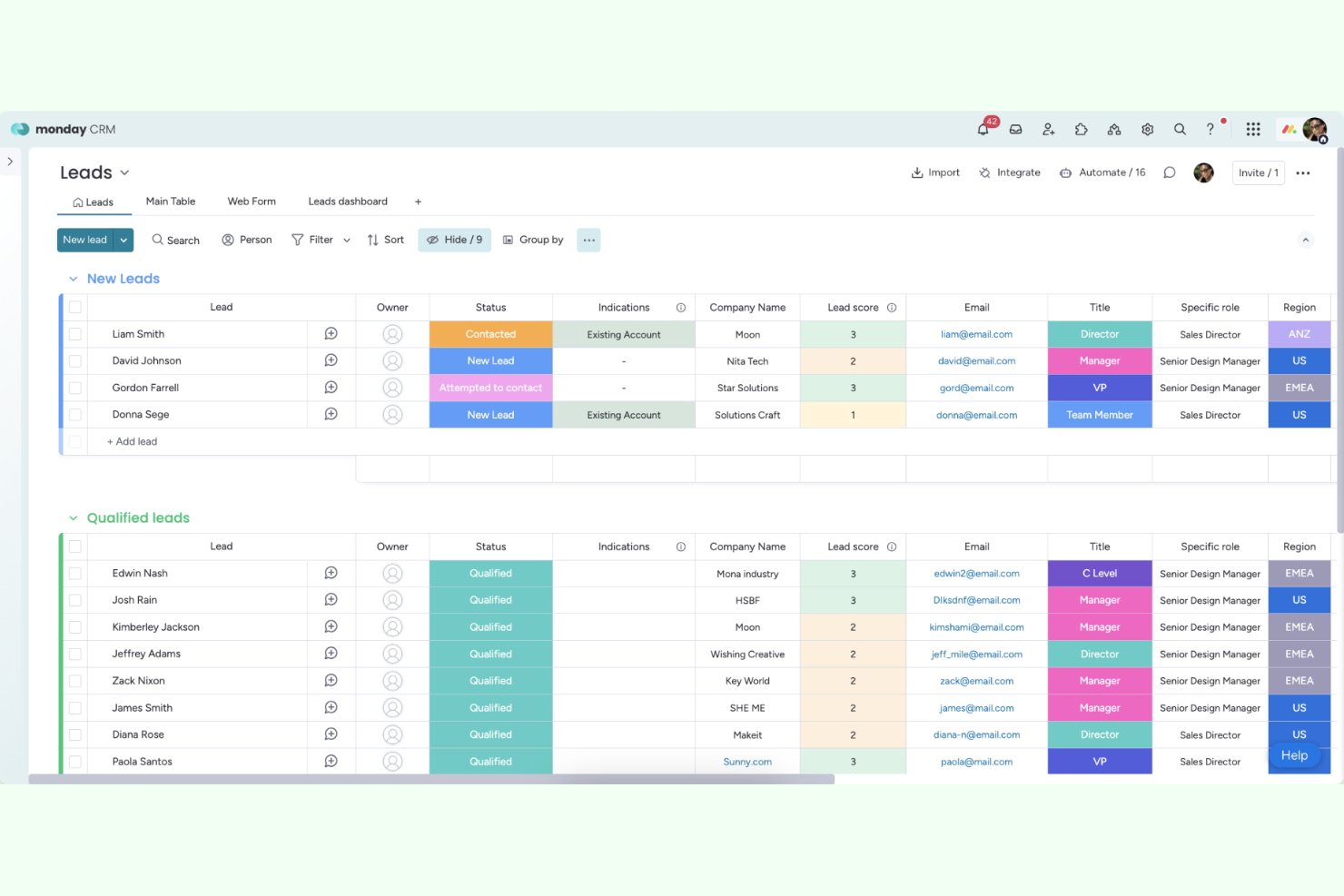
monday CRM è una piattaforma CRM flessibile basata sul Work OS di monday.com, progettata per i team che desiderano personalizzare i flussi di lavoro delle vendite e gestire i dati dei clienti in un unico luogo. Ritengo che sia particolarmente adatta alle aziende che hanno bisogno di un sistema visivo e adattabile per monitorare i lead, le trattative e le relazioni con i clienti.
Per chi è più adatto monday CRM?
monday CRM è adatto ai team di piccole e medie dimensioni che desiderano adattare i processi di vendita e la gestione dei dati dei clienti ai propri flussi di lavoro specifici.
Perché monday CRM è una buona alternativa a HubSpot CRM
Ho scelto monday CRM perché è basato sullo stesso Work OS che il mio team utilizza già per la gestione dei progetti, il che significa che i flussi di lavoro delle vendite e della consegna risiedono sulla stessa piattaforma. La personalizzazione senza codice è ciò che lo distingue: posso trascinare e rilasciare le fasi delle trattative, aggiungere campi personalizzati e creare automazioni senza toccare una sola riga di codice. Mi piace anche AI Notetaker, che ascolta le chiamate e prepara automaticamente le e-mail di follow-up. Per i team che desiderano un CRM che si adatti al proprio processo invece di costringerli ad adattarsi, monday CRM è un'opzione davvero flessibile.
Funzionalità principali di monday CRM
- Agenti di vendita IA: agenti autonomi che acquisiscono e qualificano i contatti e fissano appuntamenti direttamente dal CRM, 24 ore su 24.
- Sequenze di e-mail: crea e invia sequenze di e-mail personalizzate e attivate automaticamente ai contatti in ogni fase del ciclo di vendita.
- Pannelli di controllo in tempo reale: monitora le prestazioni dei rappresentanti e gli obiettivi del team con pannelli di controllo personalizzabili che si aggiornano in tempo reale.
- Campagne di marketing integrate: crea, avvia e monitora le campagne di e-mail marketing direttamente all'interno di monday CRM senza dover cambiare strumento.
Integrazioni di monday CRM
monday CRM offre integrazioni native con Salesforce, HubSpot, Slack, Google Workspace, Zoom, Xero e QuickBooks, oltre a connettersi con Zapier. È disponibile un'API per le integrazioni personalizzate.
Pros and Cons
Pros:
- Automazione senza codice per i flussi di lavoro delle vendite
- AI Notetaker per i riepiloghi delle chiamate e i follow-up
- Monitoraggio integrato delle e-mail e delle attività
Cons:
- Funzionalità avanzate di automazione del marketing limitate
- Il monitoraggio delle e-mail a volte non rileva alcune attività

Ideale per l'inserimento dati CRM automatizzato
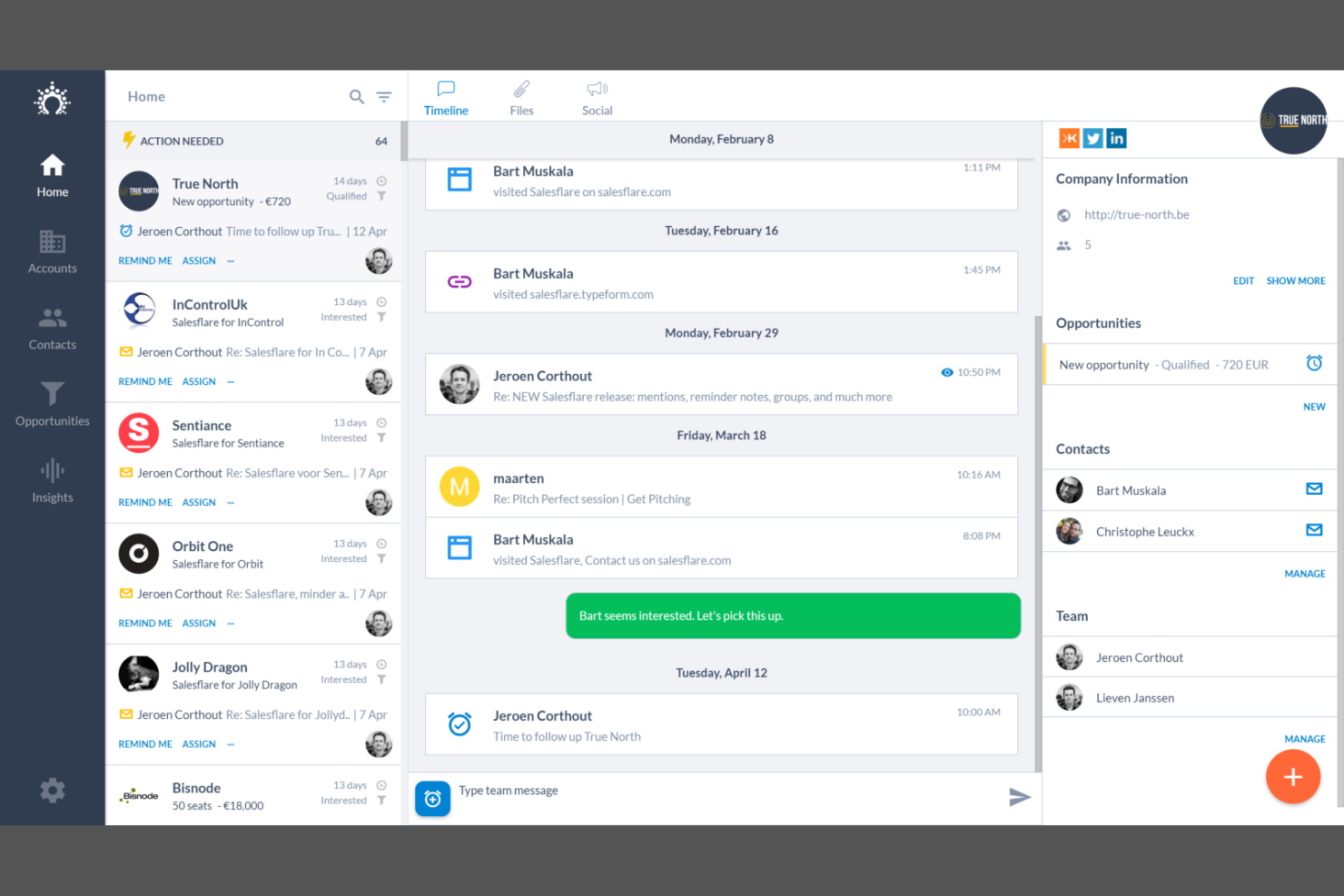
Salesflare è un CRM progettato per le piccole imprese B2B che desiderano automatizzare l'inserimento dei dati e mantenere le informazioni sui clienti aggiornate con il minimo sforzo manuale. Lo considero una scelta valida per i team di vendita che hanno bisogno di un database clienti che importi automaticamente email, riunioni e dati di contatto.
A chi è più adatto Salesflare?
Salesflare è indicato per i piccoli team di vendita B2B che desiderano una raccolta dati CRM automatizzata.
Perché Salesflare è una valida alternativa a HubSpot CRM
Ho scelto Salesflare perché elimina l'inserimento manuale dei dati che rende la maggior parte dei CRM un secondo lavoro. Collegandolo a email e calendario, registra automaticamente ogni interazione, arricchisce le schede dei contatti e mostra promemoria per i follow-up senza richiedere alcun intervento da parte mia. Apprezzo anche la funzione di intelligence sulle relazioni, che mostra chi nel mio team conosce già un contatto: utile quando bisogna coordinare le attività di outreach tra i membri di un piccolo team commerciale. Per i team B2B che vogliono un database clienti sempre aggiornato in autonomia, Salesflare è una soluzione realmente pratica.
Funzionalità principali di Salesflare
- Sincronizzazione firme email: Importa automaticamente i dettagli di contatto dalle firme delle email nei tuoi record CRM.
- Lead finder: Cerca e aggiungi nuovi lead B2B direttamente in Salesflare senza bisogno di uno strumento di prospecting separato.
- Segmenti salvati: Salva liste filtrate di contatti o account da poter riutilizzare e su cui lavorare in seguito.
- Tracciamento email e web: Monitora quando i contatti aprono le email, cliccano sui link e visitano il tuo sito web.
Integrazioni di Salesflare
Salesflare offre integrazioni native con Google Workspace, Slack, Mailchimp, Trello e si collega con Zapier. È disponibile un'API per integrazioni personalizzate.
Pros and Cons
Pros:
- Raccolta automatica di dati di contatto e attività
- Riepiloghi di riunioni e chiamate basati su intelligenza artificiale
- Intuizioni sulle relazioni tra i membri del team di vendita
Cons:
- Automazione marketing limitata rispetto a HubSpot
- Nessun dialer telefonico integrato

Copper
Ideale per l'integrazione CRM con Google Workspace
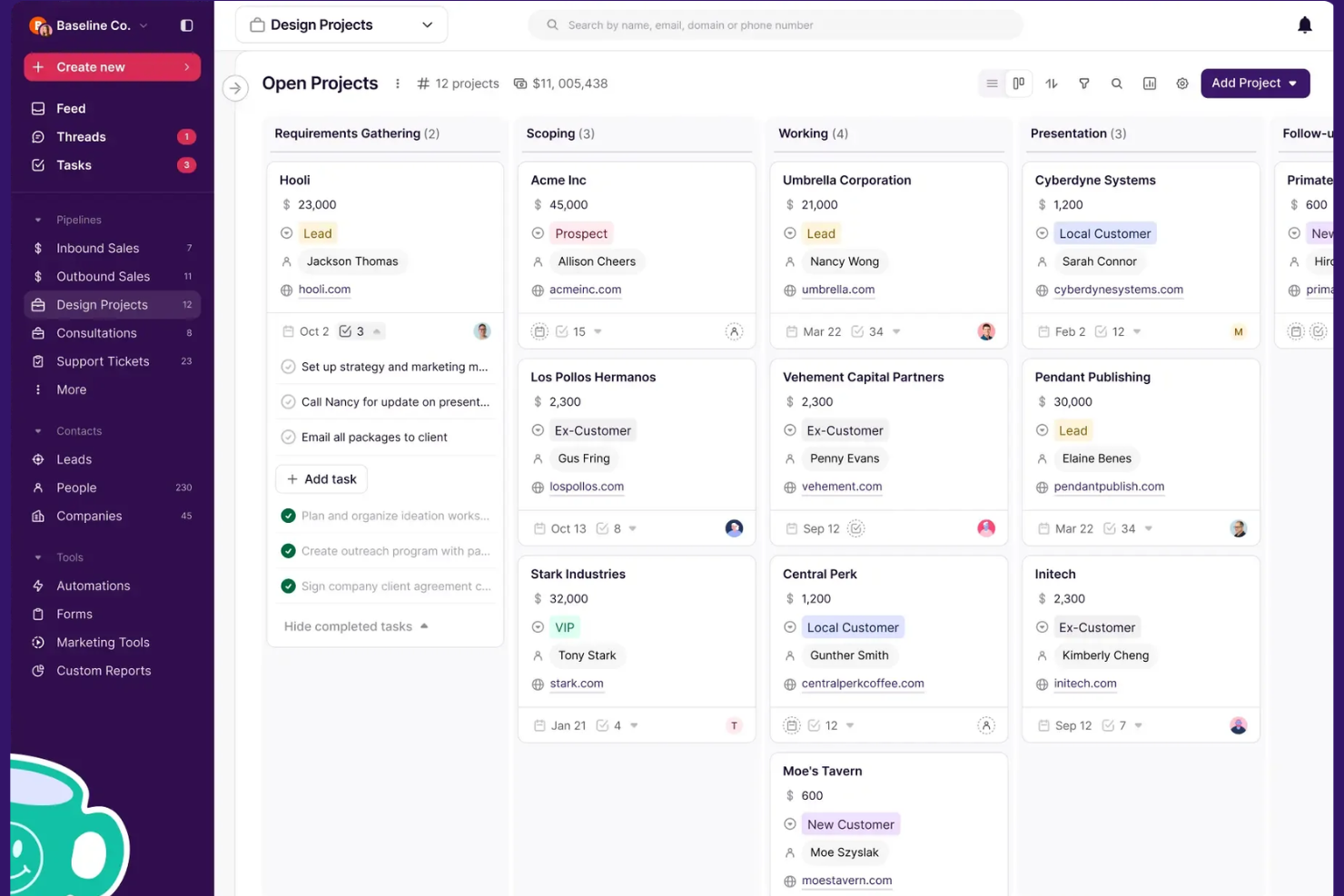
Copper è un CRM progettato per i team che lavorano in Google Workspace e desiderano un database clienti che sembri un'estensione naturale di Gmail e Google Calendar. Penso che sia particolarmente adatto alle aziende che vogliono gestire contatti, trattative e comunicazioni senza lasciare le app di Google.
Per chi è ideale Copper?
Copper è adatto a piccole e medie imprese che si affidano quotidianamente a Google Workspace per le proprie operazioni.
Perché Copper è una buona alternativa a HubSpot CRM
Ho scelto Copper perché è l'unico CRM costruito specificamente per Google Workspace, e questa distinzione è importante quando il tuo team lavora principalmente su Gmail. I record dei contatti si popolano automaticamente dai dati di Gmail, quindi non c'è bisogno di inserimenti manuali quando un nuovo lead ti invia una mail. Mi piace anche che puoi gestire trattative, attività e follow-up direttamente dentro Gmail tramite l'estensione Chrome di Copper, senza aprire un'app separata. Per i team già orientati a Google Workspace, questo livello di integrazione nativa è qualcosa che HubSpot semplicemente non offre.
Funzionalità principali di Copper
- Arricchimento contatti tramite IA: Compila automaticamente i profili di contatto con numeri di telefono, indirizzi email e dettagli social quando viene aggiunto un nuovo contatto.
- Scanner di biglietti da visita: Scatta una foto a un biglietto da visita dal cellulare e Copper crea immediatamente una nuova scheda contatto.
- Dashboard di reportistica personalizzata: Crea e modifica dashboard di vendita con KPI, filtri e grafici personalizzati, inclusi report su tasso di successo, motivo di perdita e conversione dei lead.
- Sincronizzazione bidirezionale con Google Contacts: Le modifiche apportate in Copper si riflettono automaticamente in Google Contacts e viceversa, mantenendo i dati coerenti su entrambe le piattaforme.
Integrazioni di Copper
Copper offre integrazioni native con Google Workspace, Slack, Mailchimp, QuickBooks, Xero, e si collega tramite Zapier. È disponibile un'API per integrazioni personalizzate.
Pros and Cons
Pros:
- Integrazione profonda con Gmail e Google Calendar
- Acquisizione automatica di contatti e attività
- Resoconti di riunioni e chiamate basati su IA
Cons:
- Mancano funzionalità avanzate di gestione progetti
- L'app mobile non offre tutta la funzionalità CRM
Altre alternative a HubSpot CRM
Ecco alcune alternative aggiuntive a HubSpot CRM che non sono entrate nel mio elenco, ma che vale comunque la pena prendere in considerazione:
- Attio
Ideale per la gestione collaborativa dei dati CRM
- Zoho CRM
Ideale per coinvolgimento multicanale dei clienti
- NetHunt CRM
Ideale per CRM basati su Gmail


Come valuto le alternative a HubSpot CRM
Divido la mia valutazione in criteri di base—il sistema collega un affare vinto a un progetto attivo?—e fattori distintivi che separano le opzioni migliori da tutte le altre.
Funzionalità fondamentali (requisiti essenziali per questo elenco)
Quando seleziono gli strumenti per il mio elenco, assegno a ciascuno un punteggio su una scala da 0 (non offre la funzionalità) a 5 (eccelle in quest'area) per ogni funzionalità fondamentale elencata di seguito. Poi calcolo il punteggio totale dello strumento e lo converto in percentuale. Ogni strumento deve raggiungere un punteggio totale minimo del 65% per essere preso in considerazione.
- Gestione dei contatti e degli affari: cerco fasi degli affari e schede dei contatti personalizzabili, come la possibilità di gestire pipeline separate per i nuovi affari e per i rinnovi dei clienti.
- Integrazione tra progetto e CRM: il passaggio dall'affare concluso al progetto attivo è l'aspetto più importante: verifico se attività, traguardi e budget sono collegati alla scheda dell'affare.
- Automazione della pipeline di vendita: l'automazione dovrebbe gestire le transizioni tra le fasi e la creazione delle attività, ad esempio assegnando automaticamente un'attività di avvio quando un affare passa allo stato "chiuso-vinto".
- Monitoraggio di e-mail e comunicazioni: valuto se le e-mail e le note delle riunioni vengono registrate sia nel contatto sia nel progetto, così i team responsabili della consegna dispongono di tutto il contesto relativo al cliente.
- Report e dashboard: dashboard personalizzabili che combinano i dati della pipeline con le metriche dei progetti offrono alla dirigenza una visione unica dei ricavi e dello stato delle attività di consegna.
- Integrazioni di terze parti: verifico la disponibilità di connessioni native a strumenti come Asana, Jira, QuickBooks e Slack, oltre all'accesso a un'API aperta per creare flussi di lavoro personalizzati.
Dopo aver ottenuto un elenco di strumenti che soddisfano questi criteri, valuto ciò che distingue ogni piattaforma.
Fattori distintivi (ciò che differenzia i fornitori)
Ecco come confronto i diversi fornitori:
Funzionalità di rilievo
Il monitoraggio del tempo collegato alle schede del CRM è un importante fattore distintivo. Cerco strumenti che consentano ai team responsabili della consegna di registrare le ore fatturabili a fronte di contatti e progetti specifici, in modo che la redditività per cliente sia visibile senza esportare i dati in un foglio di calcolo. Anche i portali per i clienti si distinguono: quando una piattaforma consente di condividere aggiornamenti sul progetto o raccogliere approvazioni tramite un portale personalizzato collegato alla scheda dell'affare, si riducono le e-mail di aggiornamento sullo stato. Valuto inoltre i generatori di proposte integrati che alimentano direttamente la creazione del progetto una volta concluso un affare.
Oltre le funzionalità
La trasparenza dei prezzi è importante in questo caso. Molti team abbandonano HubSpot perché i costi aumentano rapidamente quando aggiungono utenti o sbloccano funzionalità come l'automazione, quindi verifico se le capacità essenziali sono disponibili solo nei piani superiori. Valuto anche la rapidità con cui un team può effettuare la migrazione: gli strumenti dotati di procedure guidate integrate per l'importazione da HubSpot o di modelli di servizi preconfigurati riducono la durata della transizione. Anche la scalabilità è un fattore che considero, soprattutto per le agenzie che gestiscono più account di clienti o unità aziendali e hanno bisogno di autorizzazioni basate sui ruoli per mantenere separati i compiti dei team responsabili della consegna e quelli dei team di vendita.
Perché cercare un'alternativa a HubSpot CRM?
Sebbene HubSpot CRM sia una buona scelta per la gestione di un database clienti, ci sono diversi motivi per cui alcuni utenti cercano soluzioni alternative. Potresti essere alla ricerca di alternative a HubSpot CRM perché…
- Hai bisogno di funzionalità più avanzate per la gestione dei progetti
- Desideri una personalizzazione più approfondita per flussi di lavoro specifici del settore
- Hai bisogno di prezzi più flessibili o di piani più economici
- Hai bisogno di integrazioni native con strumenti aziendali di nicchia
- Desideri un maggiore controllo sull'hosting dei dati o sulla privacy
- Hai bisogno di un supporto migliore per processi di vendita complessi
Se ti riconosci in una di queste situazioni, sei nel posto giusto. Il mio elenco contiene diverse opzioni di database clienti più adatte ai team che affrontano queste difficoltà con HubSpot CRM e cercano soluzioni alternative.
Funzionalità principali di HubSpot CRM
Ecco alcune delle funzionalità principali di HubSpot CRM, per aiutarti a mettere a confronto ciò che offrono le soluzioni alternative:
- Gestione dei contatti: Archivia, organizza e segmenta tutte le informazioni sui clienti e sui lead in un unico database centralizzato, rendendo semplice tenere traccia di ogni interazione e aggiornare i record man mano che le relazioni evolvono.
- Gestione della pipeline: Visualizza e gestisci il processo di vendita con pipeline personalizzabili, che consentono di spostare le trattative tra le varie fasi, assegnare i responsabili e prevedere i ricavi.
- Monitoraggio e modelli di email: Tieni traccia di quando i contatti aprono le tue email e utilizza modelli predefiniti o personalizzati per velocizzare le attività di contatto e mantenere la coerenza all'interno del team.
- Monitoraggio di attività e compiti: Crea, assegna e monitora compiti, chiamate, riunioni e note collegati a contatti o trattative specifici, così nulla viene trascurato.
- Dashboard di report: Crea e condividi dashboard in tempo reale che mostrano le metriche relative a vendite, attività e produttività, aiutandoti a monitorare le prestazioni e individuare le tendenze.
- Chat dal vivo e chatbot: Interagisci con i visitatori del sito web in tempo reale tramite la chat dal vivo oppure automatizza le risposte e la raccolta dei lead utilizzando i chatbot integrati.
- Automazione del marketing: Configura flussi di lavoro automatizzati per la gestione dei contatti tramite email, l'assegnazione di punteggi ai lead e le attività di follow-up, così da semplificare i processi di marketing e vendita.
- Gestione dei documenti: Archivia, condividi e monitora i documenti di vendita all'interno del CRM, così il tuo team ha sempre accesso ai materiali più aggiornati e può vedere quando i potenziali clienti interagiscono con i file.
- Marketplace delle integrazioni: Collega HubSpot CRM a centinaia di altri strumenti aziendali, tra cui piattaforme di posta elettronica, calendari, contabilità e assistenza clienti, per centralizzare i tuoi flussi di lavoro.
- App mobile: Accedi ai dati del tuo CRM, gestisci le attività e comunica con i clienti ovunque ti trovi utilizzando l'app mobile di HubSpot per iOS e Android.