

10 alternative a WorkflowMax per la gestione dei lavori nel 2026

10 Elenco delle migliori alternative a WorkflowMax


Gestire i progetti può essere difficile. Devi destreggiarti tra scadenze, risorse e dinamiche del team. È del tutto naturale cercare uno strumento di gestione dei progetti che si adatti davvero alle tue esigenze.
Se WorkflowMax non soddisfa le tue aspettative, non sei il solo. Forse non dispone di tutte le funzionalità necessarie o non è abbastanza intuitivo. Ti capisco: vuoi un software che ti semplifichi la vita, non che la renda più complicata.
Esplorare le alternative a WorkflowMax può aprire nuove possibilità. Condividerò recensioni imparziali delle migliori opzioni, che potrebbero adattarsi meglio alle esigenze del tuo team.
Troverai informazioni sulle funzionalità, sulla facilità d'uso e sugli aspetti che distinguono ogni opzione. Troviamo la soluzione giusta per le tue esigenze di gestione dei progetti.
Che cos'è WorkflowMax?
WorkflowMax di BlueRock è un software di gestione dei progetti progettato per aiutarti a gestire i tuoi progetti dall'inizio alla fine. Viene utilizzato comunemente da professionisti creativi, commercialisti e consulenti che devono tenere traccia del tempo, delle attività e della fatturazione. Le funzionalità di monitoraggio del tempo, gestione dei lavori e fatturazione ti aiutano a organizzare il lavoro, gestire il team e rispettare le scadenze. Nel complesso, WorkflowMax offre una soluzione centralizzata per gestire efficacemente i tuoi progetti.
Riepilogo delle migliori alternative a WorkflowMax
Questa tabella comparativa riassume le funzionalità e i dettagli sui prezzi delle mie migliori alternative a WorkflowMax, per aiutarti a trovare quella più adatta al tuo budget e alle esigenze della tua attività.
| Tool | Best For | Trial Info | Price | ||
|---|---|---|---|---|---|
| 1 | Ideale per sostituire più strumenti | Prova gratuita di 7 giorni e piano gratuito disponibili | A partire da $39/mese | Website | |
| 2 | Ideale per semplici bacheche di attività | Prova gratuita di 14 giorni | A partire da $5/utente/mese (con fatturazione annuale) | Website | |
| 3 | Idéal pour la cohérence de la marque et la collaboration | Démonstration gratuite disponible | Tarification sur demande | Website | |
| 4 | Idéal pour les entrepreneurs | Website | |||
| 5 | Ideale per freelance che gestiscono contratti | Prova gratuita di 7 giorni | Da $9/utente/mese (con fatturazione annuale) | Website | |
| 6 | Ideale per la comunicazione nelle piccole imprese | Prova gratuita di 30 giorni + demo gratuita disponibile | A partire da $15/utente/mese | Website | |
| 7 | Ideale per progetti con chat integrata | Piano gratuito + prova gratuita disponibili | A partire da $69/organizzazione/mese | Website | |
| 8 | Ideale per il monitoraggio del tempo e la fatturazione | Piano gratuito + prova gratuita di 30 giorni disponibile | A partire da $9/postazione/mese (con fatturazione annuale) | Website | |
| 9 | Ideale per CRM e progetti modulari | Prova gratuita di 14 giorni + demo gratuita disponibile | A partire da $15/utente/mese (fatturati annualmente) | Website | |
| 10 | Ideale per grandi agenzie pubblicitarie | Demo gratuita disponibile | A partire da $47/utente/mese | Website |
Perché fidarsi dei nostri consigli sui software
Il nostro team testa e recensisce software dal 2012. In quanto project manager noi stessi, sappiamo quanto sia difficile — e importante — scegliere il software giusto.
Per questa guida, abbiamo valutato gli strumenti attraverso test pratici e ricerche indipendenti, assegnando un punteggio agli strumenti in base ai nostri criteri di selezione. Ci basiamo inoltre sulle competenze di leader di pensiero del settore e di professionisti attivi nella gestione dei progetti.
Le nostre recensioni riflettono il nostro giudizio editoriale umano, non un discorso di vendita.
Revisori esperti:
Recensioni delle migliori alternative a WorkflowMax
Di seguito trovi i miei riepiloghi dettagliati delle migliori alternative a WorkflowMax incluse nel mio elenco ristretto. Le mie recensioni offrono uno sguardo approfondito alle funzionalità principali, ai vantaggi e agli svantaggi, alle integrazioni e ai casi d’uso ideali di ogni strumento, per aiutarti a trovare quello più adatto a te.

Flowlu
Ideale per sostituire più strumenti

Flowlu è un software di gestione aziendale tutto-in-uno progettato per le piccole e medie imprese. Fornisce strumenti per la gestione dei progetti, il CRM, la fatturazione e la gestione finanziaria.
Perché Flowlu è una buona alternativa a WorkflowMax: Flowlu offre una soluzione conveniente con funzionalità integrate di CRM e gestione dei progetti. Consente di gestire le relazioni con i clienti e i progetti in un unico luogo, riducendo la necessità di utilizzare più strumenti. Le funzionalità di fatturazione e gestione finanziaria aiutano a tenere sotto controllo le finanze aziendali in modo efficiente. Questo rende Flowlu ideale per le aziende che desiderano ridurre i costi e gestire le proprie attività.
Funzionalità e integrazioni distintive:
Le funzionalità includono la gestione delle attività per organizzare il lavoro, la mappatura mentale per il brainstorming e la pianificazione e una base di conoscenza per archiviare informazioni importanti. Queste funzionalità aiutano il team a collaborare e a rimanere informato.
Le integrazioni includono Slack, Google Calendar, Trello, Dropbox, Stripe, PayPal, Mailchimp e altro.
Pros and Cons
Pros:
- Conveniente per le piccole imprese
- CRM e gestione dei progetti integrati
- Gestione finanziaria integrata
Cons:
- L'interfaccia può risultare disordinata per alcuni utenti
- Può essere complesso da imparare e configurare

Trello
Ideale per semplici bacheche di attività
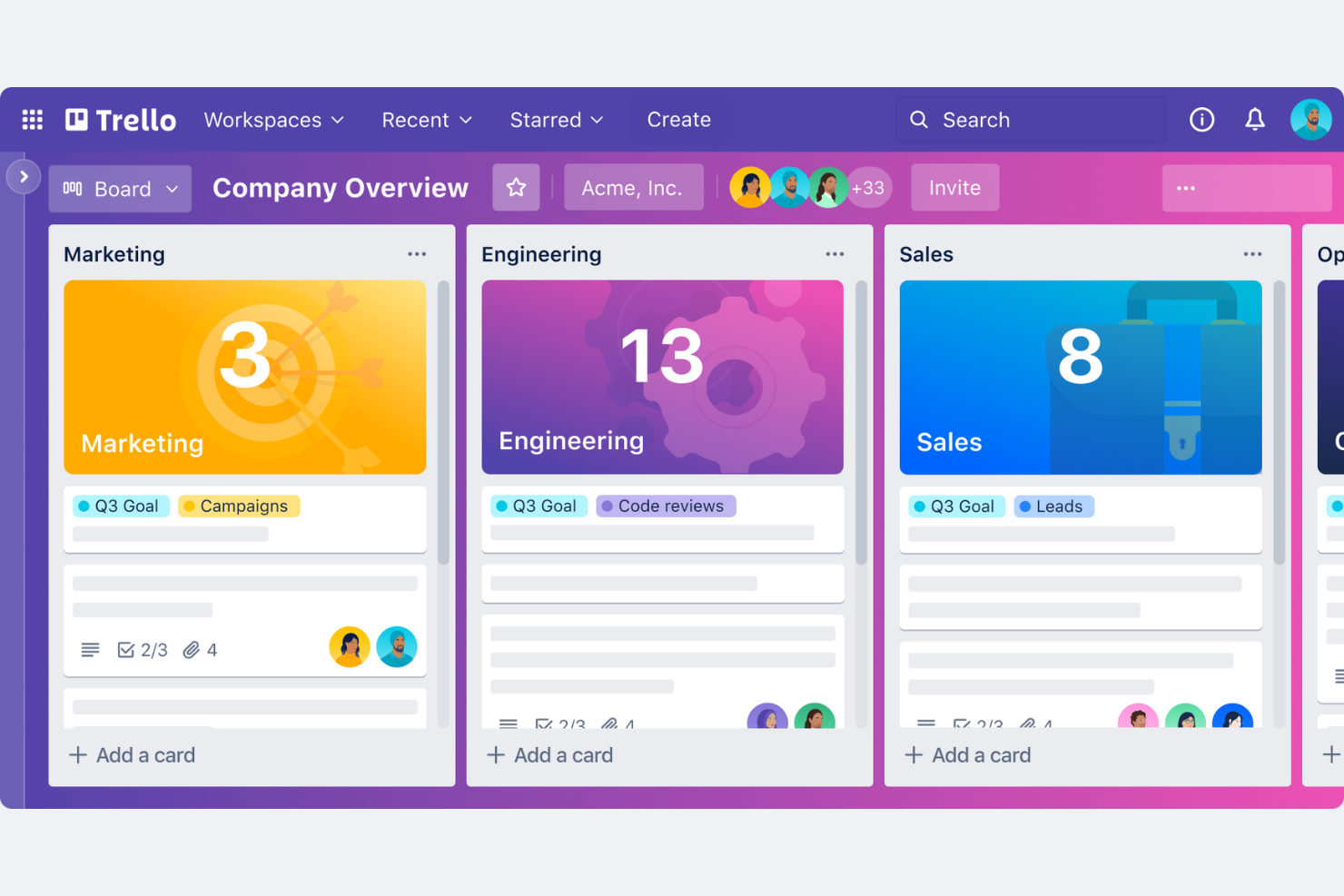
Trello è uno strumento visivo per la gestione dei progetti che utilizza bacheche, elenchi e schede per aiutare i team a organizzare attività e progetti. È progettato per piccole aziende e team che cercano un modo semplice per gestire i flussi di lavoro e collaborare.
Perché Trello è una buona alternativa a WorkflowMax: Trello offre un'interfaccia intuitiva che i piccoli team possono adottare rapidamente. Il sistema visivo delle bacheche consente di vedere l'intero progetto a colpo d'occhio. È flessibile e permette di personalizzare le bacheche in base al proprio flusso di lavoro. La semplicità di Trello lo rende ideale per le piccole aziende che hanno bisogno di una soluzione semplice per la gestione dei progetti.
Funzionalità e integrazioni principali:
Le funzionalità includono bacheche personalizzabili in base al proprio flusso di lavoro, la funzionalità di trascinamento per una gestione semplice delle attività e liste di controllo per mantenere le attività organizzate. Queste funzionalità aiutano il tuo team a tenere sotto controllo le attività senza sentirsi sopraffatto.
Le integrazioni includono Slack, Google Drive, Microsoft Teams, Dropbox, GitHub, Evernote, Salesforce, Jira, GitLab, Zapier e altro.
Pros and Cons
Pros:
- Facile da usare per i piccoli team
- Interfaccia visiva intuitiva
- Adozione rapida
Cons:
- Può essere troppo semplice per i progetti di grandi dimensioni
- Nessun monitoraggio integrato del tempo

Asana
Idéal pour la cohérence de la marque et la collaboration
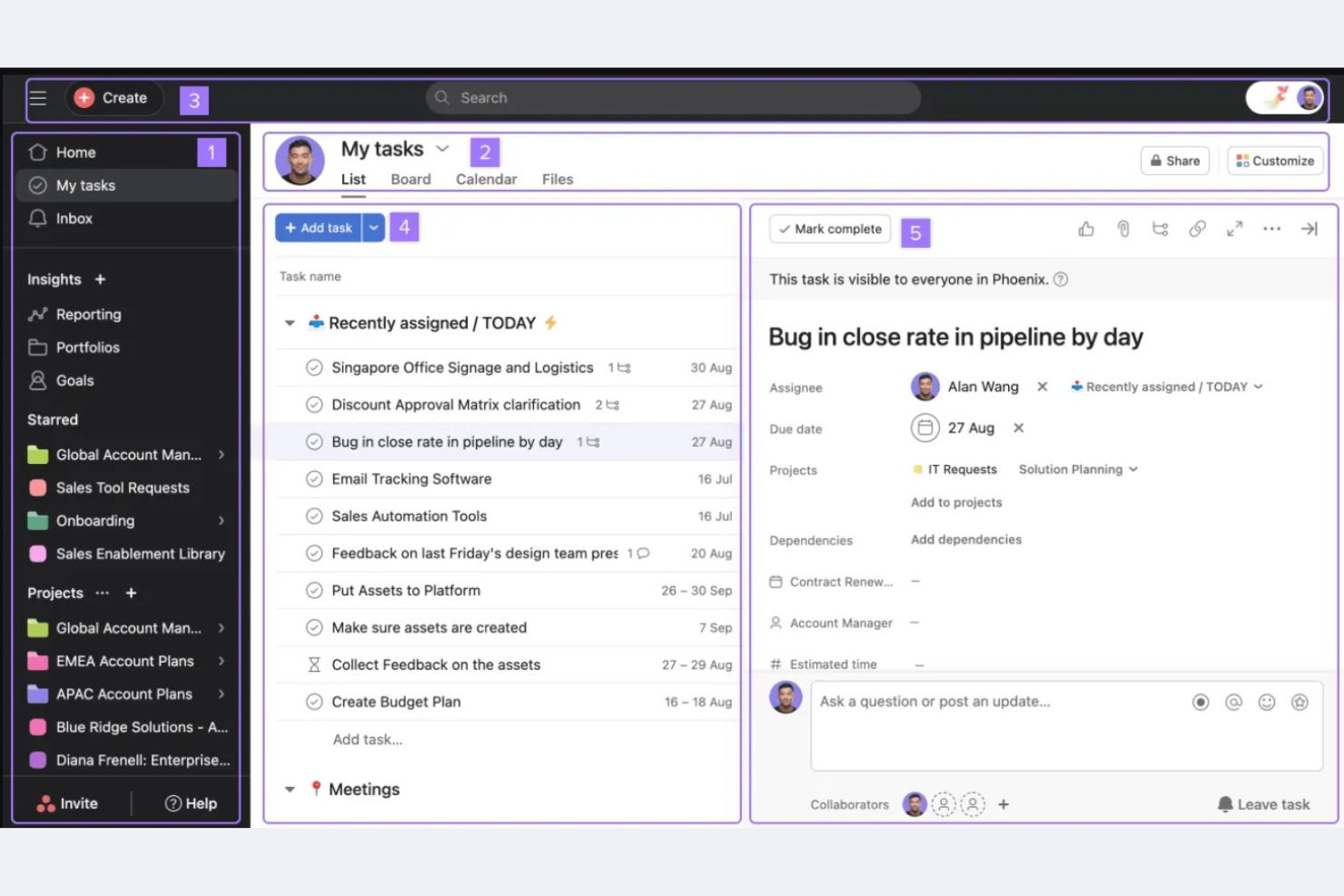
Frontify est une plateforme de gestion de marque conçue pour les spécialistes du marketing et les responsables de marque qui souhaitent maintenir la cohérence de leur marque dans toutes leurs communications. Elle aide les équipes à gérer les ressources de marque, les directives et les projets au même endroit.
Pourquoi c'est une bonne alternative à Filecamp : Les outils de Frontify dédiés à la cohérence de la marque et à la collaboration permettent à votre équipe d'accéder facilement aux directives de la marque et de les mettre à jour. Ses fonctionnalités de gestion des ressources numériques vous permettent d'organiser et de partager les ressources de marque. L'environnement collaboratif de la plateforme prend en charge les retours et les modifications en temps réel, afin que tout le monde reste aligné sur les normes de la marque. Ces fonctionnalités font de Frontify une option solide pour les équipes qui se concentrent sur le maintien d'une image de marque cohérente.
Fonctionnalités et intégrations remarquables :
Les fonctionnalités comprennent des directives de marque personnalisables qui peuvent aider votre équipe à respecter les normes de la marque. De plus, les outils d'analyse de Frontify vous fournissent des indicateurs de performance qui vous indiquent comment votre contenu est utilisé. Vous pouvez également utiliser ses flux de travail de commentaires et d'approbation pour accélérer l'achèvement des projets.
Les intégrations comprennent Adobe Creative Cloud, Slack, Sketch, Figma, monday.com, et bien plus encore.
Pros and Cons
Pros:
- Favorise la cohérence de la marque
- Outils de collaboration en temps réel
- Directives de marque personnalisables
Cons:
- Nécessite un temps de configuration initial
- Pas idéal pour les projets sans lien avec la marque
Avaza
Idéal pour les entrepreneurs

Bonsai
Ideale per freelance che gestiscono contratti
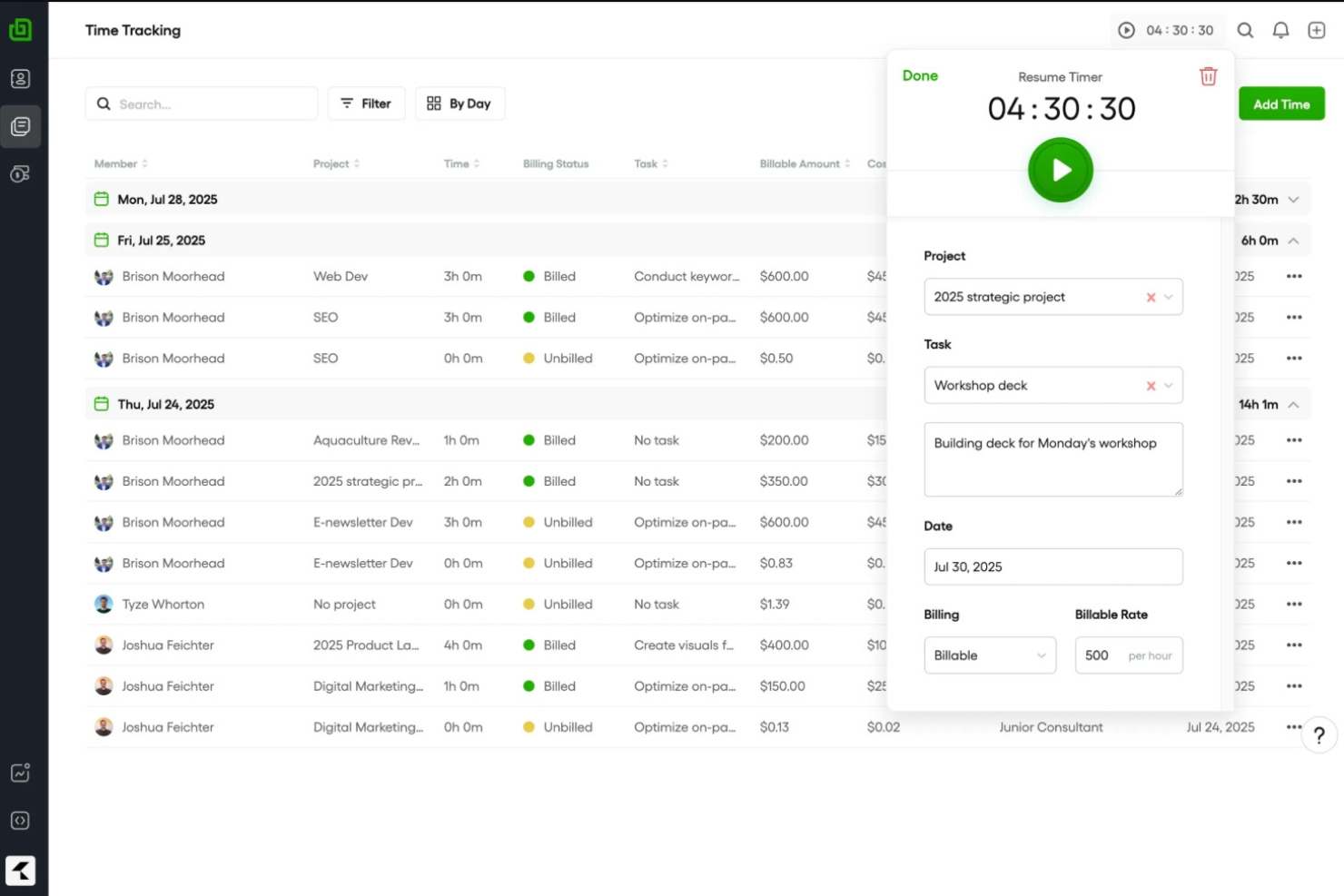
Bonsai è una piattaforma progettata per freelance e aziende di servizi, che offre strumenti per gestire contratti, proposte e pagamenti. Aiuta a ottimizzare il flusso di lavoro integrando il monitoraggio del tempo, la fatturazione e la gestione dei clienti.
Perché Bonsai è una buona alternativa a WorkflowMax: Bonsai si concentra su freelance e aziende di servizi, offrendo modelli di contratto e strumenti per creare proposte. La funzione di fatturazione aiuta a ricevere i pagamenti puntualmente, mentre il monitoraggio del tempo garantisce una fatturazione accurata. Configurazione rapida con requisiti minimi la rende un'ottima scelta per chi ha bisogno di uno strumento completo per la gestione dei servizi senza un lungo processo di inserimento iniziale.
Funzionalità e integrazioni principali:
Le funzionalità includono promemoria automatici per garantire pagamenti puntuali, un portale clienti per facilitare la comunicazione e strumenti per la gestione fiscale che semplificano le attività finanziarie. Queste funzionalità aiutano a rimanere organizzati e a concentrarsi sulla crescita dell'attività. Le integrazioni disponibili dipendono dal piano; per l'integrazione con Xero è necessario il piano Elite.
Le integrazioni includono QuickBooks, Xero, Zapier, Google Calendar, Calendly e altro.
Pros and Cons
Pros:
- I modelli di contratto integrati riducono i tempi di configurazione legale
- Proposte, fatturazione e pagamenti sono gestiti in un unico flusso di lavoro
- Inserimento iniziale rapido con configurazione minima richiesta
Cons:
- Nessuna integrazione nei piani Base o Essential
- Mancano opzioni avanzate per la reportistica
Basecamp
Ideale per la comunicazione nelle piccole imprese
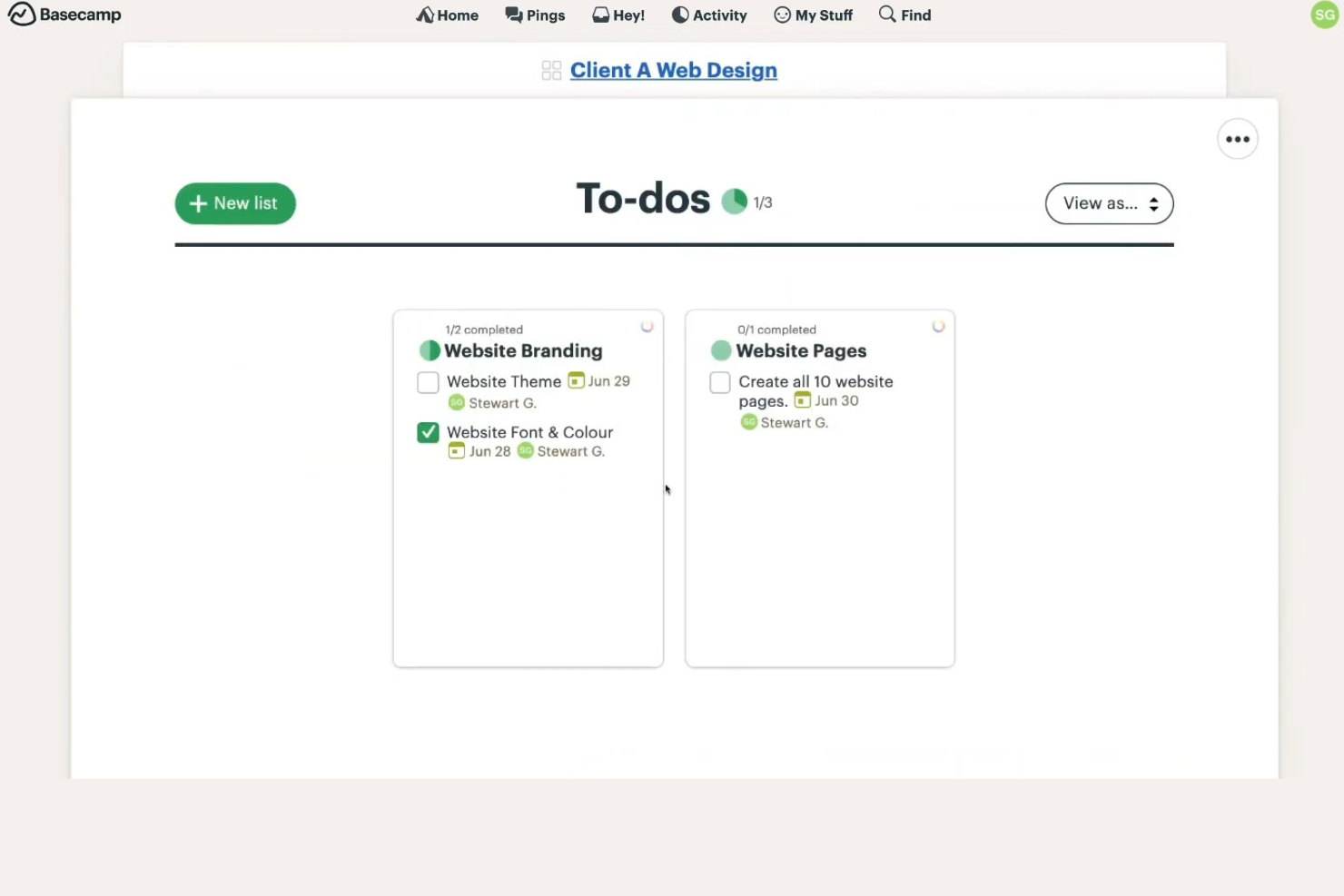
Basecamp è uno strumento di gestione dei progetti e collaborazione tra team progettato per piccole imprese e team. Aiuta gli utenti a organizzare i progetti, assegnare attività e comunicare in modo efficace.
Perché Basecamp è una buona alternativa a WorkflowMax: Basecamp offre un'interfaccia semplice e facile da utilizzare per le piccole imprese. Fornisce elenchi di attività, bacheche dei messaggi e strumenti di pianificazione per mantenere il team sulla buona strada. La piattaforma centralizzata consente una comunicazione fluida e la condivisione dei documenti. La semplicità di Basecamp garantisce che anche gli utenti non tecnici possano gestire i progetti in modo efficiente.
Funzionalità e integrazioni principali:
Le funzionalità includono check-in automatici per gli aggiornamenti del team, archiviazione dei file per conservare tutto in un unico posto e una funzionalità Grafico a colline per visualizzare l'avanzamento del progetto. Queste funzionalità aiutano il team a rimanere organizzato e a comunicare in modo efficace.
Le integrazioni includono Zapier, Harvest, Everhour e altro.
Pros and Cons
Pros:
- Interfaccia semplice
- Comunicazione centralizzata
- Condivisione efficace dei documenti
Cons:
- Mancanza di flussi di lavoro avanzati integrati
- Le funzionalità di gestione delle attività non includono dipendenze o strutture avanzate di gestione dei progetti

Bitrix24
Ideale per progetti con chat integrata
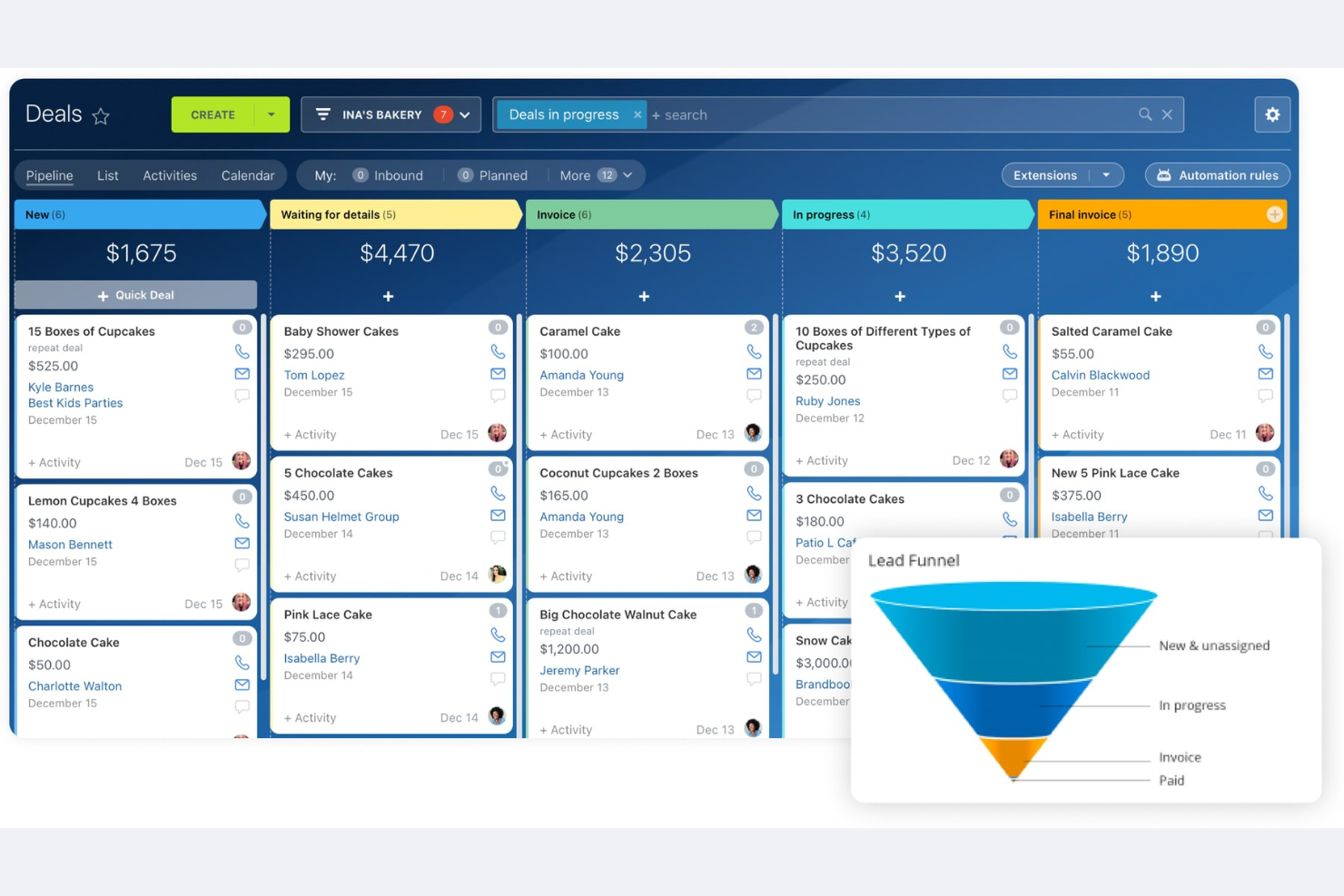
Bitrix24 è una piattaforma di gestione aziendale tutto-in-uno che si rivolge ad aziende di qualsiasi dimensione, offrendo strumenti per CRM, gestione dei progetti, comunicazione e collaborazione. Aiuta i team a gestire le attività, comunicare e automatizzare i flussi di lavoro in modo efficiente.
Perché Bitrix24 è una buona alternativa a WorkflowMax: Bitrix24 offre una soluzione tutto-in-uno che combina la gestione dei progetti con strumenti CRM e di comunicazione. Puoi gestire attività e progetti mantenendo il team connesso tramite le funzionalità di comunicazione integrate. Gli strumenti di automazione consentono di semplificare i processi e aumentare la produttività. Questo lo rende ideale per le aziende che cercano uno spazio di lavoro integrato per gestire diverse funzioni.
Funzionalità e integrazioni distintive:
Le funzionalità includono l'automazione delle attività per ridurre il lavoro manuale, una intranet social per la collaborazione del team e un sistema di gestione dei documenti per mantenere i file organizzati. Queste funzionalità aiutano il team a lavorare in modo efficiente e a rimanere connesso.
Le integrazioni includono Google Drive, Microsoft Office, Mailchimp, Dropbox, Xero e altro ancora.
Pros and Cons
Pros:
- Suite completa di strumenti
- CRM e comunicazione integrati
- Intranet social per la collaborazione
Cons:
- Curva di apprendimento più ripida
- Può richiedere molte risorse

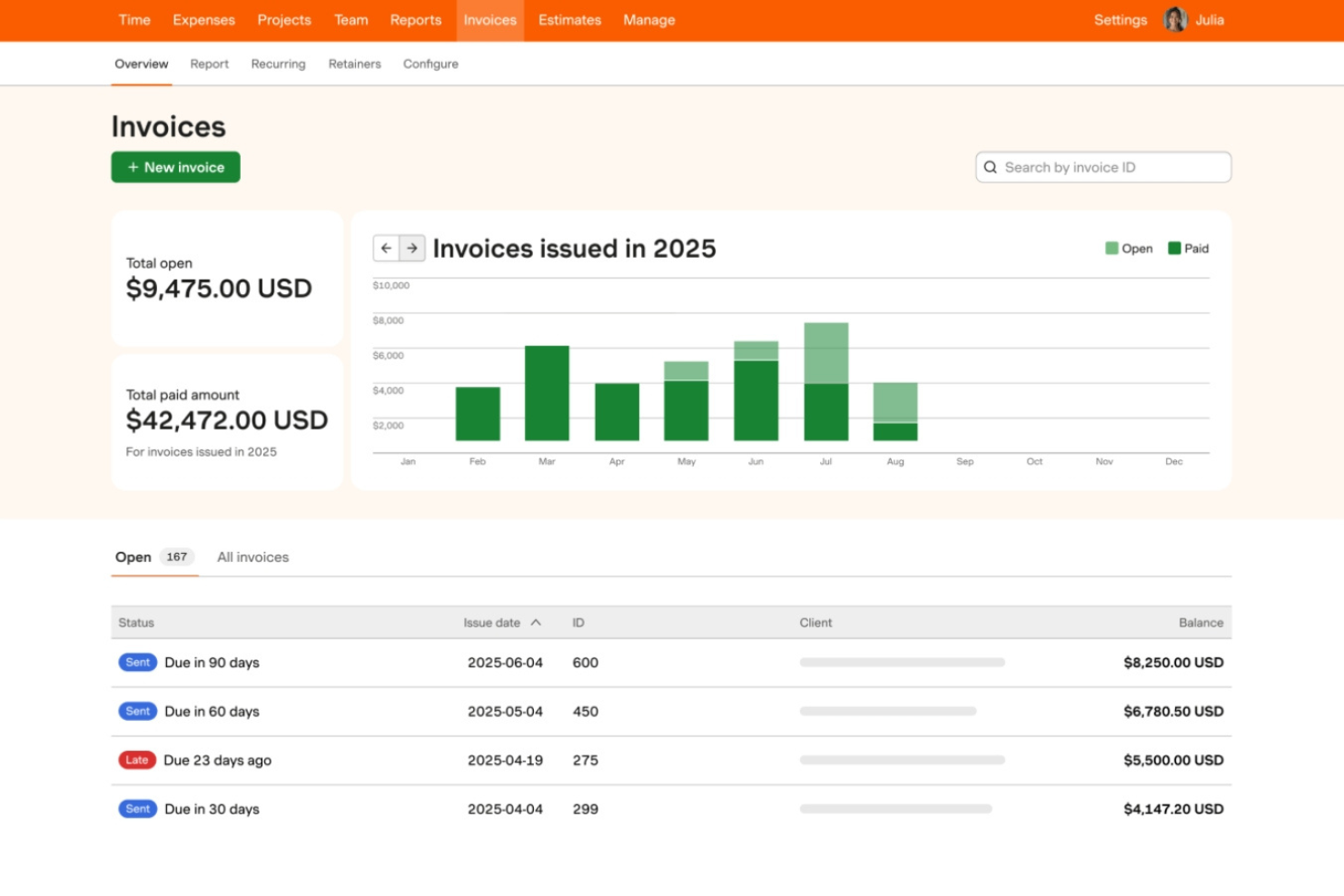
Harvest è un software di monitoraggio del tempo e fatturazione progettato per aiutare liberi professionisti, consulenti e piccole imprese a gestire le ore fatturabili e le spese. Consente agli utenti di monitorare il tempo, generare fatture e ottenere informazioni sui costi dei progetti.
Perché Harvest è una buona alternativa a WorkflowMax: Harvest offre un monitoraggio del tempo facile da usare, risultando ideale per chi si concentra sulla gestione delle ore fatturabili. La funzione di fatturazione aiuta a creare e inviare rapidamente le fatture, permettendo di ricevere i pagamenti più velocemente. Gli strumenti di reportistica forniscono informazioni sui costi dei progetti e sulle prestazioni del team. Questo lo rende uno strumento prezioso per le aziende che devono tenere sotto stretto controllo il tempo e le finanze.
Funzionalità e integrazioni distintive:
Le funzionalità includono il monitoraggio delle spese per semplificare la gestione finanziaria, report dettagliati per ottenere informazioni migliori e l'approvazione dei fogli presenze per semplificare i processi del team. Queste funzionalità aiutano a gestire le finanze e a migliorare l'efficienza dei progetti.
Le integrazioni includono Asana, JIRA, Trello, Slack, Zapier, Basecamp, GitHub, Google Calendar e altro.
Pros and Cons
Pros:
- Ideale per piccole imprese o liberi professionisti
- Monitoraggio del tempo facile da usare
- Processo di fatturazione rapido
Cons:
- Funzionalità limitate di gestione dei progetti
- Personalizzazione avanzata carente

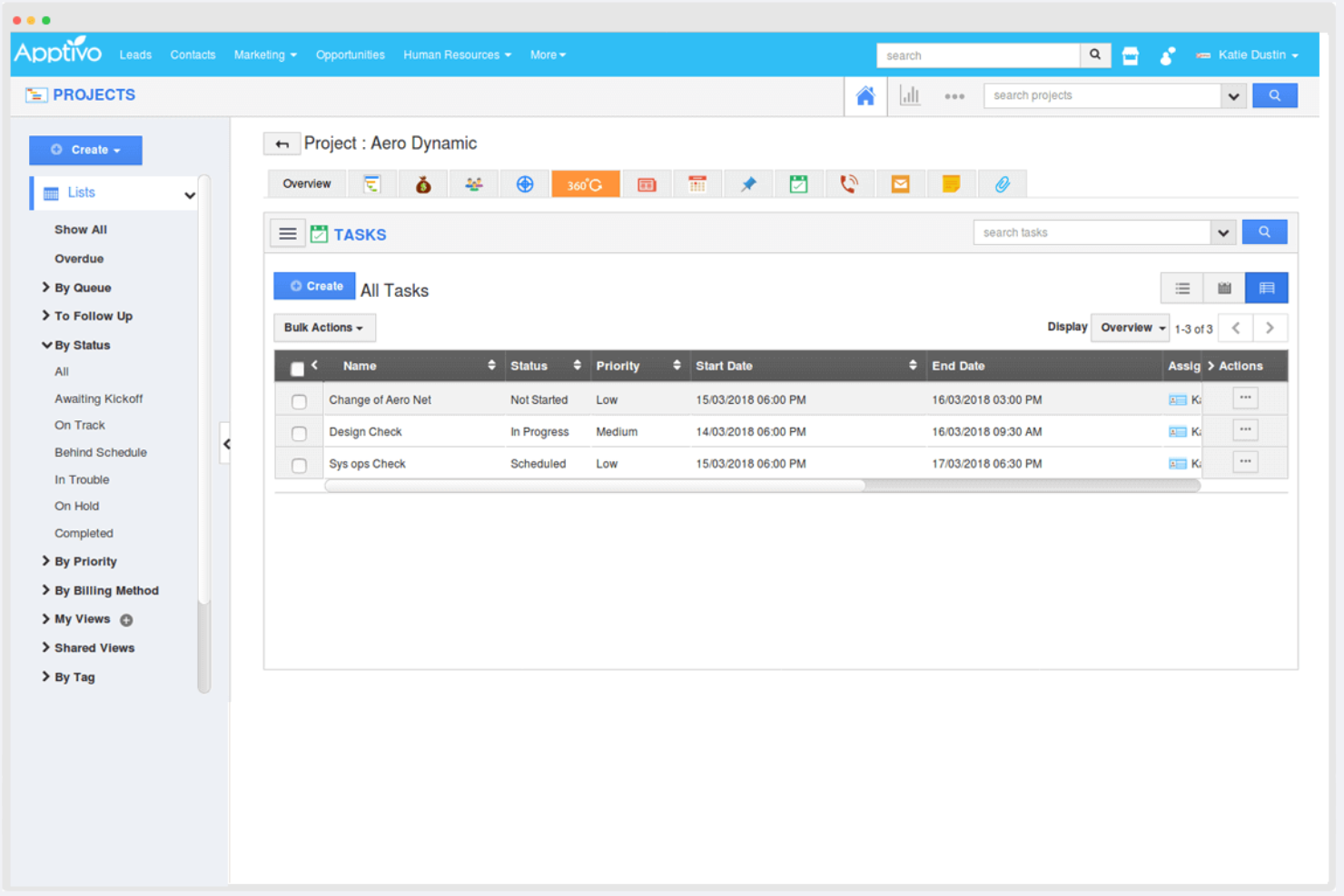
Apptivo è un software gestionale aziendale che si rivolge alle piccole e medie imprese, offrendo una suite di app per CRM, gestione dei progetti, fatturazione e altro ancora. Aiuta le aziende a gestire le proprie operazioni in modo efficiente, fornendo strumenti personalizzabili adatti a diverse esigenze aziendali.
Perché Apptivo è una buona alternativa a WorkflowMax: Apptivo offre un elevato livello di personalizzazione, rendendolo ideale per le aziende che necessitano di soluzioni su misura. Le sue funzionalità CRM e di gestione dei progetti consentono di monitorare i lead e gestire i progetti in un unico luogo. Gli strumenti di fatturazione e gestione delle spese aiutano a ottimizzare i processi finanziari. Questa flessibilità supporta diverse operazioni aziendali, offrendo una soluzione gestionale tutto-in-uno.
Funzionalità e integrazioni distintive:
Le funzionalità includono una pipeline di vendita per monitorare i lead, strumenti di gestione dei progetti per organizzare le attività e funzionalità di reportistica per ottenere informazioni utili sull'azienda. Queste funzionalità aiutano il team a gestire le attività e a prendere decisioni informate.
Le integrazioni includono Office 365, Slack, QuickBooks, PayPal, Dropbox, RingCentral, G Suite, Xero, Stripe e altro ancora.
Pros and Cons
Pros:
- Supporta diverse operazioni
- Gestione centralizzata delle attività
- Gestione finanziaria flessibile
Cons:
- Richiede tempo per la personalizzazione
- Potrebbe richiedere conoscenze tecniche

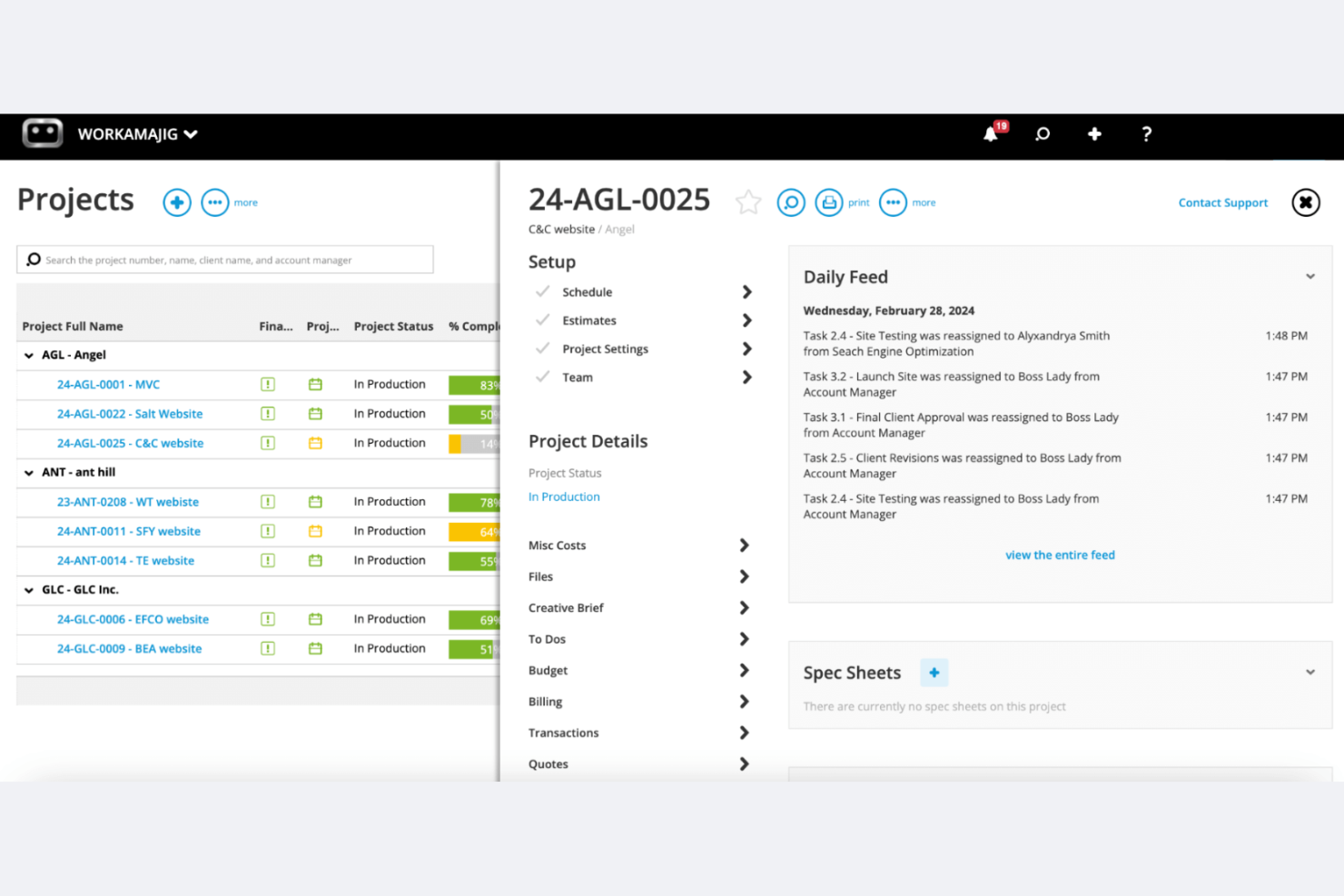
Workamajig è un software di gestione dei progetti progettato per agenzie pubblicitarie e di marketing. Offre gestione dei progetti, CRM per le vendite e gestione delle risorse in un unico sistema.
Perché Workamajig è una valida alternativa a WorkflowMax: Workamajig è pensato per agenzie creative grandi o in crescita e squadre creative interne, offrendo funzionalità come contabilità completamente integrata, CRM e strumenti dettagliati per la reportistica. Queste funzionalità ti aiutano a gestire progetti, risorse e finanze senza dover combinare più strumenti. Consente alle squadre più grandi o distribuite di monitorare i costi dei progetti, il tempo e la redditività, tutto all'interno di un'unica piattaforma nativa.
Funzionalità e integrazioni distintive:
Le funzionalità includono la contabilità nativa, assistenza specializzata con formazione e strumenti di reportistica in tempo reale. Queste funzionalità aiutano la tua squadra a gestire le finanze, ottenere informazioni utili e assicurarsi che i progetti siano completati nei tempi previsti.
Le integrazioni includono BIONIC, Edenred Pay, AvidXchange, Avalara, Google Calendar e altro.
Pros and Cons
Pros:
- Pensato per agenzie pubblicitarie grandi e in crescita
- Funzionalità di contabilità integrate
- Assistenza specializzata disponibile
Cons:
- Processo di configurazione complesso
- Curva di apprendimento più ripida rispetto agli strumenti di gestione dei progetti più semplici
Altre alternative a WorkflowMax
Ecco alcune alternative aggiuntive a WorkflowMax che non sono state incluse nel mio elenco ristretto, ma che vale comunque la pena prendere in considerazione:
- ManyRequests
Ideale per creare portali clienti personalizzati con il proprio marchio
- Quire
Ideale per i team Agile e Scrum
- ROLL
Ideale per la gestione creativa dei progetti


Come Valuto le Alternative a WorkflowMax
Divido ogni valutazione in due livelli: la base, come il calcolo dei costi dei lavori, le schede orarie e la fatturazione che uno strumento deve soddisfare, e i fattori differenzianti come il supporto alla migrazione e la sincronizzazione con Xero che distinguono i migliori.
Funzionalità Principali (Requisiti Minimi per questa Lista)
Quando seleziono gli strumenti per la mia lista, valuto ognuno su una scala da 0 (non offre la funzionalità) a 5 (eccelle in quest'area) per ciascuna delle funzioni principali elencate sotto. Successivamente, calcolo il punteggio totale dello strumento in percentuale. Ogni strumento deve raggiungere un punteggio minimo totale del 65% per essere preso in considerazione.
- Gestione di Lavori & Progetti: Cerco la creazione strutturata di lavori con attività, traguardi e monitoraggio dello stato, in modo che il team possa seguire un progetto dalla fase iniziale fino alla consegna.
- Rilevamento del Tempo & Schede Orarie: Lo strumento dovrebbe permettere al personale di registrare ore fatturabili e non fatturabili per lavori o attività specifiche tramite timer, schede orarie o inserimento da mobile.
- Preventivi & Fatturazione: Valuto se sia possibile preparare un preventivo per il cliente, ottenere l’approvazione e convertirlo in una fattura legata al tempo registrato o a tariffe fisse.
- Calcolo dei Costi & Budgeting: Ogni strumento dovrebbe consentire di impostare un budget di progetto e confrontare il lavoro, le spese e i costi effettivi rispetto al budget man mano che il lavoro procede.
- Integrazione con Software Contabili: Qui è importante una sincronizzazione nativa con Xero o QuickBooks, poiché la maggior parte degli utenti di WorkflowMax dipende da questo collegamento per fatture e pagamenti.
- Report su Lavori in Corso & Redditività: Controllo la presenza di report su lavori in corso, margini dei progetti e tassi di utilizzo che aiutino i titolari degli studi a individuare tempestivamente i lavori non redditizi.
Una volta che ho una lista di strumenti che soddisfano questi criteri, considero ciò che distingue ogni piattaforma.
Fattori Differenzianti (Cosa Distingue i Fornitori)
Ecco come confronto e metto a confronto i vari fornitori:
Funzionalità Eccezionali
Pianificazione delle risorse e della capacità è un grande elemento distintivo. Cerco strumenti che mostrino la disponibilità del personale e il carico di lavoro su lavori simultanei, in modo che i responsabili possano evitare il sovraccarico. Un portale clienti aggiunge inoltre valore reale, consentendo ai clienti di approvare i preventivi o verificare l’avanzamento dei progetti senza continue email. Per i team tecnici e le squadre sul campo, un'app mobile che supporti la rilevazione delle ore e delle spese direttamente in loco fa una grande differenza nell’accuratezza del calcolo dei costi dei lavori.
Oltre le Funzionalità
Il supporto alla migrazione è particolarmente importante in questo periodo. Verifico se i fornitori offrono strumenti di importazione dedicati o percorsi di migrazione guidata per trasferire anagrafiche clienti, storico lavori e registrazioni orarie da WorkflowMax. L’aderenza al settore è un altro parametro che considero: uno strumento progettato per agenzie creative potrebbe non essere adatto a uno studio di ingegneria, quindi valuto se template e flussi di lavoro siano in linea col verticale specifico. Considero anche la trasparenza dei prezzi, in particolare come i costi aumentano all'aumentare del numero di utenti nel team, dai pochi alle decine.
Perché cercare un'alternativa a WorkflowMax?
Sebbene WorkflowMax sia una buona scelta come software di gestione dei progetti, esistono diversi motivi per cui alcuni utenti cercano soluzioni alternative. I motivi per cui potresti cercare un'alternativa a WorkflowMax includono:
- Hai bisogno di più opzioni di personalizzazione
- Il tuo team richiede strumenti di reportistica migliori
- Desideri maggiori possibilità di integrazione
- La tua attività si sta espandendo a livello globale
- Hai bisogno di un'interfaccia utente più semplice
- Il tuo team ha bisogno del supporto per la metodologia Agile
Se ti riconosci in una di queste situazioni, sei nel posto giusto. Il mio elenco include diverse opzioni di software per la gestione dei progetti più adatte rispetto a WorkflowMax ai team che affrontano queste difficoltà.
Funzionalità principali di WorkflowMax
Ecco alcune delle funzionalità principali di WorkflowMax, che ti aiuteranno a confrontare ciò che offrono le soluzioni alternative:
- Stima e preventivi dei lavori: Crea preventivi e stime personalizzabili per semplificare il processo di vendita.
- Monitoraggio del tempo: Registra accuratamente le ore fatturabili per assicurarti di massimizzare i ricavi del tuo team.
- Fatturazione: Genera fatture professionali per accelerare i pagamenti e gestire il flusso di cassa.
- Gestione dei contatti: Monitora i contatti e le pipeline di vendita per ottimizzare le attività di sviluppo aziendale.
- Gestione dei progetti: Supervisiona attività e scadenze da un'unica piattaforma per mantenere i progetti nei tempi previsti.
- Gestione dei documenti: Accesso centralizzato ai documenti importanti dei progetti per recuperarli e collaborare facilmente.
- Report e dashboard: Utilizza dati in tempo reale per prendere decisioni informate e migliorare le prestazioni aziendali.
- Opzioni di personalizzazione: Personalizza fatture, report e altri documenti in base alle esigenze specifiche della tua azienda.
- Integrazioni: Collegati a software di contabilità basati sul cloud, come Xero e QuickBooks, per migliorare l'efficienza e ridurre il lavoro manuale.
Qual è il prossimo passo:
Se stai cercando un software per la gestione dei progetti, contatta gratuitamente un consulente di SoftwareSelect per ricevere consigli.
Compili un modulo e partecipi a una breve conversazione durante la quale il consulente approfondirà le specifiche delle tue esigenze. In seguito riceverai una selezione ristretta di software da valutare. Ti assisteranno anche durante l'intero processo di acquisto, comprese le negoziazioni sui prezzi.