

Le 10 migliori alternative a Google Moduli per il 2026

Elenco delle alternative a Google Forms


Una valida alternativa a Google Forms offre un maggiore controllo sulla progettazione dei moduli, sulla raccolta dei dati e sulle integrazioni rispetto al semplice strumento per la creazione di moduli online di Google. Se stai cercando alternative a Google Forms, probabilmente ti stai imbattendo in limitazioni relative alla personalizzazione, all'automazione dei flussi di lavoro o all'analisi dei dati e hai bisogno di uno strumento adatto alle esigenze specifiche del tuo team. Questo elenco ti aiuterà a confrontare rapidamente le migliori opzioni per il 2026, così potrai trovare uno strumento per la creazione di moduli in linea con le esigenze del tuo progetto, il tuo stack tecnologico e il tuo stile di collaborazione.
Che cos'è Google Forms?
Google Forms è uno strumento gratuito per la creazione di moduli online che consente agli utenti di creare sondaggi, quiz e moduli per la raccolta dei dati. Fa parte di Google Workspace e si integra con Google Sheets per l'analisi dei dati in tempo reale. Responsabili di progetto, educatori e team utilizzano Google Forms per raccogliere rapidamente feedback, gestire le iscrizioni agli eventi e creare flussi di lavoro semplici. Sebbene sia facile da usare, le sue opzioni di personalizzazione, logica e integrazione sono limitate rispetto a quelle di strumenti più avanzati per la creazione di moduli.
Riepilogo delle migliori alternative a Google Forms
Questa tabella comparativa riassume i dettagli sui prezzi delle migliori alternative a Google Forms che ho selezionato, per aiutarti a trovare quella più adatta al tuo budget e alle esigenze della tua attività.
| Tool | Best For | Trial Info | Price | ||
|---|---|---|---|---|---|
| 1 | Ideale per strumenti di analisi dei sondaggi | Piano gratuito disponibile | Da $30/utente/mese (fatturato annualmente) | Website | |
| 2 | Ideale per design ottimizzati per dispositivi mobili | Disponibile piano gratuito | Da $19/mese (fatturazione annuale) | Website | |
| 3 | Ideale per ramificazioni avanzate nei sondaggi | Piano gratuito + demo gratuita disponibile | Da $19.99/mese (fatturato annualmente) | Website | |
| 4 | Ideale per la personalizzazione drag-and-drop | Piano gratuito + demo gratuita disponibile | Da $16,25/mese (fatturato annualmente) | Website | |
| 5 | Ideale per l'integrazione con CRM | Piano gratuito disponibile + demo gratuita disponibile | Da $10/mese (fatturazione annuale) | Website | |
| 6 | Ideale con l’ecosistema Microsoft 365 | Prova gratuita di 30 giorni | Da $9.99/utente/mese (Microsoft 365 Business Basic o incluso nei piani Microsoft 365) | Website | |
| 7 | Ideale per invii di moduli illimitati | Prova gratuita di 7 giorni | Da ₹7,931/3mesi + 18% GST | Website | |
| 8 | Ideale per esperienze di moduli conversazionali | Disponibile piano gratuito | Da $99/anno (fatturato annualmente) | Website | |
| 9 | Ideale per il supporto ai campi calcolati | Prova gratuita di 14 giorni + piano gratuito disponibile | Da $19/mese | Website | |
| 10 | Ideale per flussi di lavoro con moduli precompilati | Piano gratuito disponibile | Da $15/mese | Website |
Perché fidarsi dei nostri consigli sui software
Il nostro team testa e recensisce software dal 2012. In quanto project manager noi stessi, sappiamo quanto sia difficile — e importante — scegliere il software giusto.
Per questa guida, abbiamo valutato gli strumenti attraverso test pratici e ricerche indipendenti, assegnando un punteggio agli strumenti in base ai nostri criteri di selezione. Ci basiamo inoltre sulle competenze di leader di pensiero del settore e di professionisti attivi nella gestione dei progetti.
Le nostre recensioni riflettono il nostro giudizio editoriale umano, non un discorso di vendita.
Recensioni delle alternative a Google Forms
Di seguito trovi i miei riepiloghi dettagliati delle alternative a Google Forms incluse nel mio elenco. Le mie recensioni offrono una panoramica approfondita delle funzionalità, delle integrazioni e dei casi d’uso migliori di ogni strumento, per aiutarti a trovare quello più adatto alle tue esigenze.

Ideale per strumenti di analisi dei sondaggi
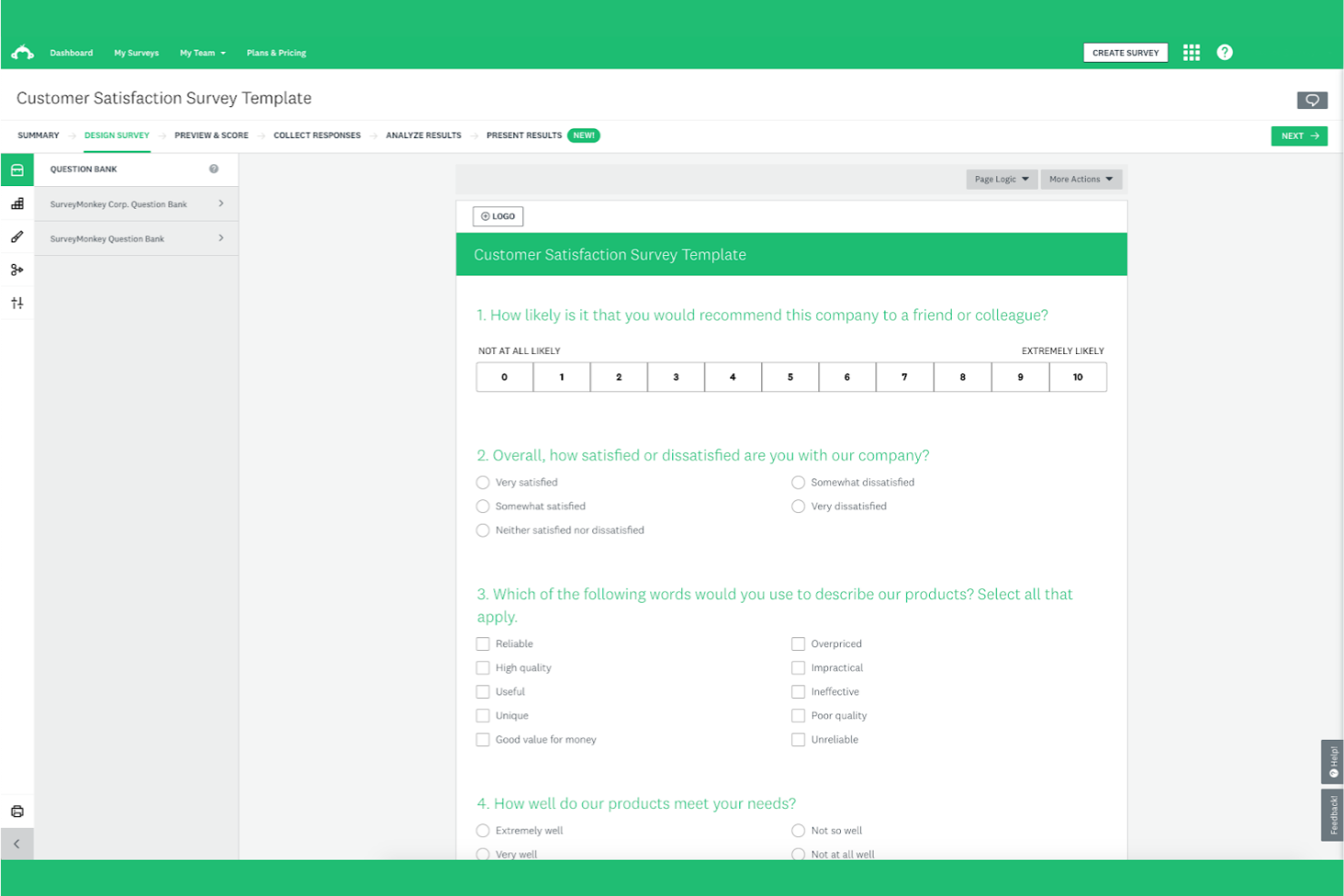
Per i team che necessitano di analisi avanzate dai loro sondaggi, SurveyMonkey offre un insieme di funzionalità che va oltre i moduli di base e i costruttori gratuiti. È particolarmente utile per ricercatori, professionisti del marketing e delle risorse umane che desiderano approfondire i dati e le tendenze delle risposte. SurveyMonkey si distingue da Google Forms per il suo robusto cruscotto di analisi, i report personalizzati e gli strumenti integrati per la segmentazione dei dati e il benchmarking.
Perché SurveyMonkey è una buona alternativa a Google Forms
Quando hai bisogno di qualcosa di più della semplice raccolta dati di base, SurveyMonkey offre strumenti di analisi avanzati che lo distinguono da Google Forms. Ho scelto SurveyMonkey perché offre un'analisi dettagliata delle risposte, inclusi incroci e filtri, che aiutano a individuare schemi nei dati. La piattaforma offre anche strumenti di benchmarking, così puoi confrontare i tuoi risultati con gli standard del settore o con sondaggi precedenti. Per i team orientati a ottenere insight concreti dai dati dei sondaggi, le funzionalità analitiche di SurveyMonkey lo rendono una valida alternativa.
Funzionalità principali di SurveyMonkey
Altre caratteristiche che rendono SurveyMonkey una scelta flessibile includono:
- Question Bank: Accesso a una libreria di domande scritte da esperti da aggiungere ai tuoi sondaggi.
- Personalizzazione del branding: Aggiungi il logo della tua organizzazione, i colori e i temi ai sondaggi.
- Logica del sondaggio: Utilizza funzioni di salto logico e ramificazione per creare percorsi personalizzati nei sondaggi.
- Supporto multilingue: Crea sondaggi in più lingue per raggiungere un pubblico più ampio.
Integrazioni
Le integrazioni includono Salesforce, Mailchimp, Google Sheets, Tableau, Marketo, Zendesk ed Eventbrite.
Pros and Cons
Pros:
- Intuitivo costruttore drag-and-drop
- Vasta libreria di modelli predefiniti
- Generazione di sondaggi alimentata da AI
Cons:
- Logica avanzata disponibile solo nei piani a pagamento
- Risposte lente dal supporto clienti

Ideale per design ottimizzati per dispositivi mobili

Se stai cercando un creatore di moduli che dia priorità all'usabilità mobile, forms.app merita attenzione. È stato progettato per team e aziende che necessitano di moduli che si presentino e funzionino bene su qualsiasi dispositivo, specialmente per il lavoro sul campo, eventi o feedback dei clienti in movimento. A differenza di Google Forms, forms.app offre modelli mobile-first e strumenti di design reattivo che ti aiutano a creare moduli ottimizzati per smartphone e tablet.
Perché forms.app è una valida alternativa a Google Forms
Per i team che hanno bisogno che i moduli funzionino perfettamente sui dispositivi mobili, forms.app si distingue come una valida alternativa a Google Forms. Ho scelto forms.app perché offre modelli mobile-first e un editor di design reattivo, così ogni modulo si adatta automaticamente a diverse dimensioni di schermo. La piattaforma include anche una funzionalità di anteprima dal vivo, che ti permette di vedere esattamente come apparirà il tuo modulo su smartphone e tablet prima di condividerlo. Se l'accessibilità mobile è una priorità fondamentale per i tuoi moduli online, forms.app offre funzionalità che li mantengono facili da usare su qualsiasi dispositivo.
Funzionalità principali di forms.app
Altre caratteristiche che rendono forms.app uno strumento versatile includono:
- Logica condizionale: Imposta regole per mostrare o nascondere domande in base alle risposte precedenti.
- Riscossione pagamenti: Accetta pagamenti direttamente tramite i tuoi moduli usando gateway di pagamento integrati.
- Incorporamento modulo: Incorpora i moduli sul tuo sito web o condividili tramite un link diretto.
- Caricamento file: Permetti ai rispondenti di caricare file o immagini come parte dell'invio del modulo.
Integrazioni
Le integrazioni includono Google Sheets, Slack, Google Drive, Trello, Zapier e Microsoft Teams.
Pros and Cons
Pros:
- Costruttore estremamente adatto al mobile
- Generazione moduli tramite IA
- Modelli puliti e moderni
Cons:
- Analisi approfondite limitate
- Limiti ristretti sulle risposte nel piano gratuito

Ideale per ramificazioni avanzate nei sondaggi

ProProfs Survey Maker è pensato per team che necessitano di una logica avanzata per i sondaggi e percorsi dettagliati per i rispondenti. È particolarmente indicato per ricercatori, professionisti delle risorse umane e insegnanti che vogliono creare sondaggi complessi e adattivi, andando oltre il semplice ramificarsi di Google Forms. Se devi personalizzare le domande in base alle risposte precedenti o creare moduli di feedback multilivello, questo strumento offre la flessibilità che cerchi.
Perché ProProfs Survey Maker è una valida alternativa a Google Forms
Ciò che distingue ProProfs Survey Maker è la sua logica di ramificazione avanzata, che consente di creare esperienze di sondaggio altamente personalizzate. Puoi impostare percorsi condizionali in modo che i rispondenti vedano solo le domande rilevanti in base alle loro risposte precedenti, una funzione che Google Forms gestisce in modo molto più limitato. Apprezzo la possibilità di inserire una logica multilivello nei tuoi moduli, facilitando la raccolta di feedback o dati più sfumati. Questo rende ProProfs Survey Maker una scelta solida per chiunque abbia bisogno di maggiore controllo sul flusso del sondaggio e sulla sequenza delle domande.
Funzionalità principali di ProProfs Survey Maker
Altre funzionalità che rendono ProProfs Survey Maker utile per la creazione di moduli includono:
- Libreria di domande: Accedi a un'ampia raccolta di domande predefinite per velocizzare la creazione dei sondaggi e mantenere la coerenza.
- Branding personalizzato: Aggiungi il tuo logo, colori e temi per uniformare ogni modulo all'identità della tua organizzazione.
- Reportistica in tempo reale: Visualizza risposte e analisi man mano che arrivano, con dashboard visive e opzioni di esportazione.
- Supporto multilingue: Crea moduli e sondaggi in più lingue per raggiungere un pubblico più vasto.
Integrazioni
Le integrazioni includono Salesforce, Mailchimp, HubSpot, Google Analytics, Slack, Zapier, Google Sheets, Shopify, PayPal e Stripe.
Pros and Cons
Pros:
- Vasta libreria di domande pronte all'uso
- Builder di sondaggi drag-and-drop facile da usare
- Reportistica visiva in tempo reale
Cons:
- Interfaccia datata e disordinata
- Costo elevato per le funzionalità avanzate

Wufoo
Ideale per la personalizzazione drag-and-drop

Wufoo offre un approccio visivo e trascina-e-rilascia per la creazione di moduli online. È particolarmente indicato per i team che desiderano personalizzare layout, branding e flussi di lavoro senza toccare il codice—specialmente in ambito marketing, risorse umane o gestione eventi. A differenza di Google Forms, Wufoo permette di progettare moduli con tipi di campo avanzati, temi personalizzati e logica flessibile, così da poter adattare i moduli alle esigenze del tuo marchio e del tuo processo.
Perché Wufoo è una valida alternativa a Google Forms
Se vuoi avere maggiore controllo sull'aspetto e la struttura dei tuoi moduli, Wufoo è una scelta solida. Ho scelto Wufoo perché il suo builder trascina-e-rilascia consente di disporre i campi, le sezioni e gli elementi di branding esattamente come desideri. La piattaforma supporta anche temi personalizzati e tipi di campo avanzati, così puoi creare moduli che rispecchiano il tuo marchio e raccogliere i dati di cui hai bisogno. Per i team che danno importanza alla personalizzazione visiva e alla flessibilità del layout, Wufoo offre opzioni molto più avanzate rispetto a Google Forms.
Funzionalità Principali di Wufoo
Altre funzionalità che rendono Wufoo un generatore di moduli flessibile includono:
- Notifiche in tempo reale: Ricevi avvisi email istantanei quando qualcuno invia un modulo.
- Caricamento file: Consenti ai rispondenti di allegare documenti, immagini o altri file alle loro risposte.
- Reportistica e analisi: Accedi a strumenti integrati per visualizzare e analizzare le risposte ai moduli.
- Integrazione dei pagamenti: Raccogli pagamenti direttamente tramite i moduli usando Stripe, PayPal o Authorize.Net.
Integrazioni
Le integrazioni includono Salesforce, Mailchimp, Dropbox, PayPal, Stripe, Campaign Monitor, Constant Contact e QuickBooks.
Pros and Cons
Pros:
- Builder drag-and-drop semplice
- Integrazione pagamenti senza interruzioni
- Ampia gamma di template predefiniti
Cons:
- Limiti rigidi agli invii
- Funzionalità limitate nel piano gratuito

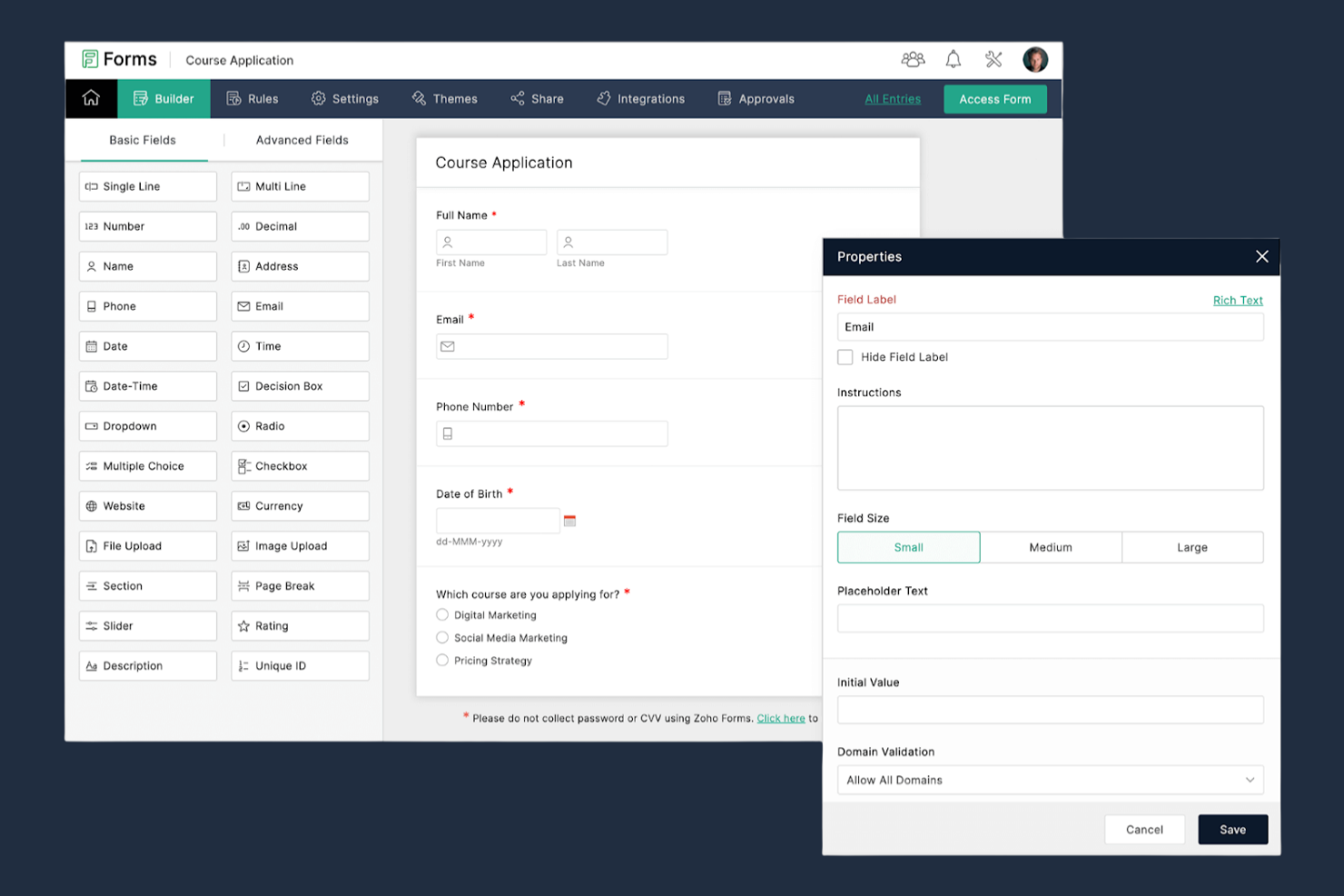
Se cerchi un generatore di moduli che si colleghi direttamente al tuo CRM, Zoho Forms merita attenzione. È pensato per team di vendita, marketing e supporto che hanno bisogno di acquisire lead e sincronizzare i dati con Zoho CRM o altre app aziendali. Zoho Forms si distingue da Google Forms offrendo integrazione CRM incorporata, flussi di lavoro automatizzati e un routing avanzato dei dati per gli utenti business.
Perché Zoho Forms è una valida alternativa a Google Forms
A differenza di Google Forms, Zoho Forms è costruito con un'integrazione nativa con il CRM al centro, il che lo rende una scelta ideale per i team che devono acquisire e gestire lead. Ho scelto Zoho Forms perché consente di inviare automaticamente le risposte del modulo a Zoho CRM, assegnare attività e attivare azioni di follow-up senza intervento manuale. Puoi anche mappare i campi del modulo direttamente ai campi del CRM, garantendo coerenza dei dati e riducendo errori. Per le aziende che si affidano alla gestione in tempo reale dei lead e dei dati dei clienti, Zoho Forms offre automazione e connettività che Google Forms non fornisce.
Funzionalità principali di Zoho Forms
Altre funzionalità che rendono Zoho Forms una soluzione versatile includono:
- Modelli personalizzabili: Scegli da una libreria di modelli predefiniti per diversi casi d'uso e settori.
- Logica condizionale: Mostra o nascondi campi, sezioni o pagine in base alle risposte degli utenti.
- App mobile: Crea, modifica e gestisci moduli ovunque tu sia grazie alle app dedicate per iOS e Android.
- Firme digitali: Raccogli firme legalmente vincolanti direttamente nei tuoi moduli.
Integrazioni
Le integrazioni includono Zoho CRM, Zoho Desk, Zoho Campaigns, Zoho Analytics, Zoho Creator, Google Sheets e Slack.
Pros and Cons
Pros:
- Integrazione profonda con l'ecosistema Zoho
- Raccolta dati mobile offline
- Approvazioni avanzate a più livelli
Cons:
- Interfaccia poco intuitiva per principianti
- Personalizzazione dello stile limitata

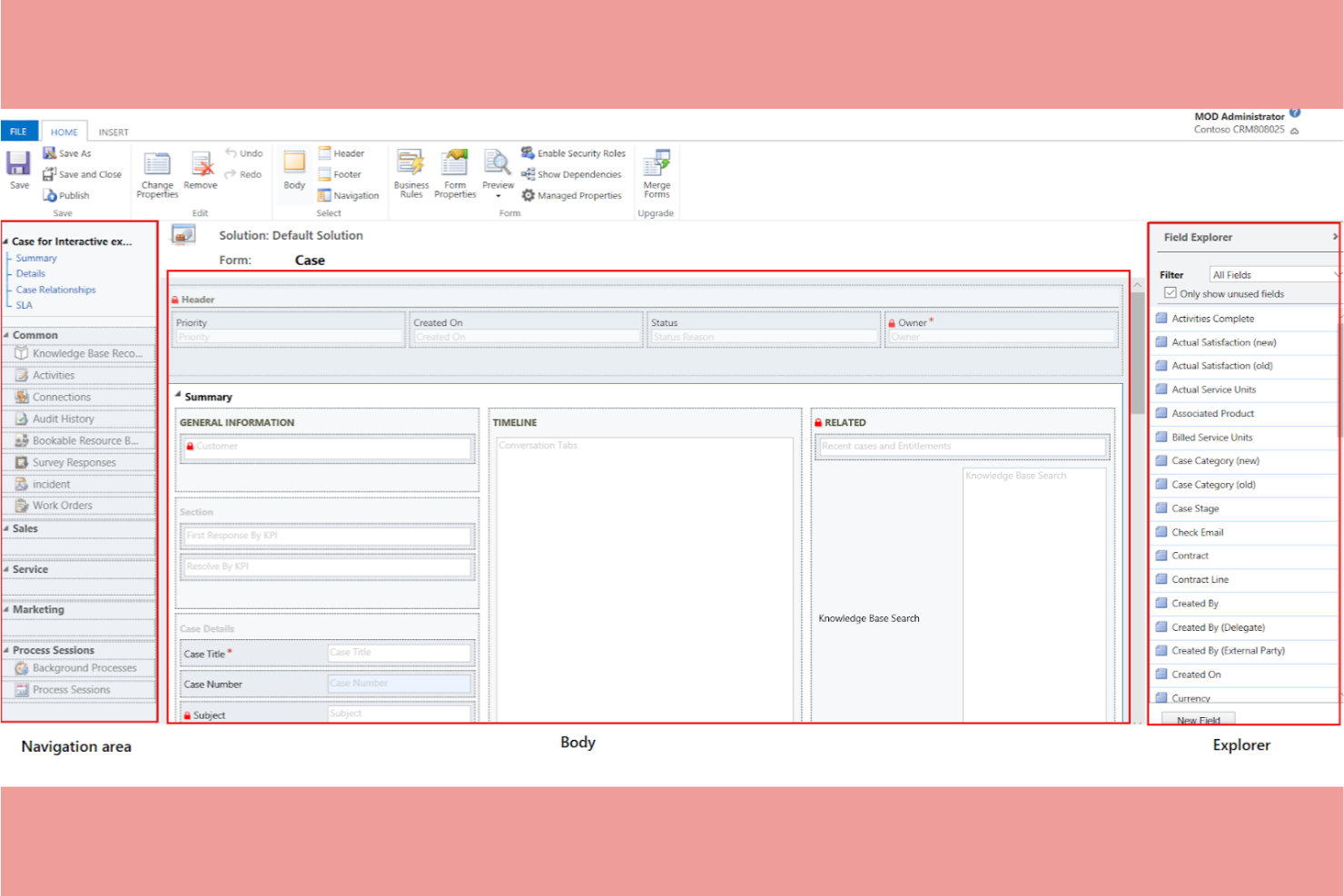
Per i team che già utilizzano Microsoft 365, Microsoft Forms offre uno strumento di creazione moduli che si integra perfettamente nel flusso di lavoro esistente. È particolarmente utile per i reparti IT, le risorse umane e gli educatori che desiderano raccogliere dati e feedback senza uscire dall’ecosistema Microsoft. A differenza di Google Forms, Microsoft Forms si collega nativamente con strumenti come Excel, SharePoint e Teams, facilitando la gestione dei dati e la collaborazione.
Perché Microsoft Forms è una valida alternativa a Google Forms
Se la vostra organizzazione fa affidamento su Microsoft 365, Microsoft Forms offre facilità d’uso nella creazione e condivisione di moduli. Apprezzo la possibilità di esportare automaticamente le risposte su Excel per analisi e reportistica in tempo reale. Lo strumento permette anche di incorporare i moduli direttamente in Teams o SharePoint, facilitando la raccolta di feedback nei luoghi dove il vostro team già lavora. Per chi investe nell’ecosistema Microsoft, queste integrazioni rendono Microsoft Forms una valida alternativa a Google Forms.
Funzionalità principali di Microsoft Forms
Altre funzioni che rendono Microsoft Forms utile per la creazione di moduli includono:
- Logica ramificata: Mostra o nascondi le domande in base alle risposte precedenti per personalizzare l’esperienza del modulo.
- Domande randomizzate: Mescola l’ordine delle domande per ridurre i bias nelle risposte a sondaggi e quiz.
- Caricamento di file: Consenti ai rispondenti di caricare file direttamente tramite il modulo per compiti o documentazioni.
- Notifiche sulle risposte: Configura avvisi automatici via email ogni volta che vengono inviate nuove risposte.
Integrazioni
Le integrazioni includono Microsoft Excel, Microsoft Teams, SharePoint, OneDrive, Power Automate e Azure Active Directory.
Pros and Cons
Pros:
- Interfaccia altamente intuitiva e semplice
- Costruttore di moduli e quiz con intelligenza artificiale
- Design mobile-responsive di default
Cons:
- Strumenti di design e branding limitati
- Logica condizionale di base

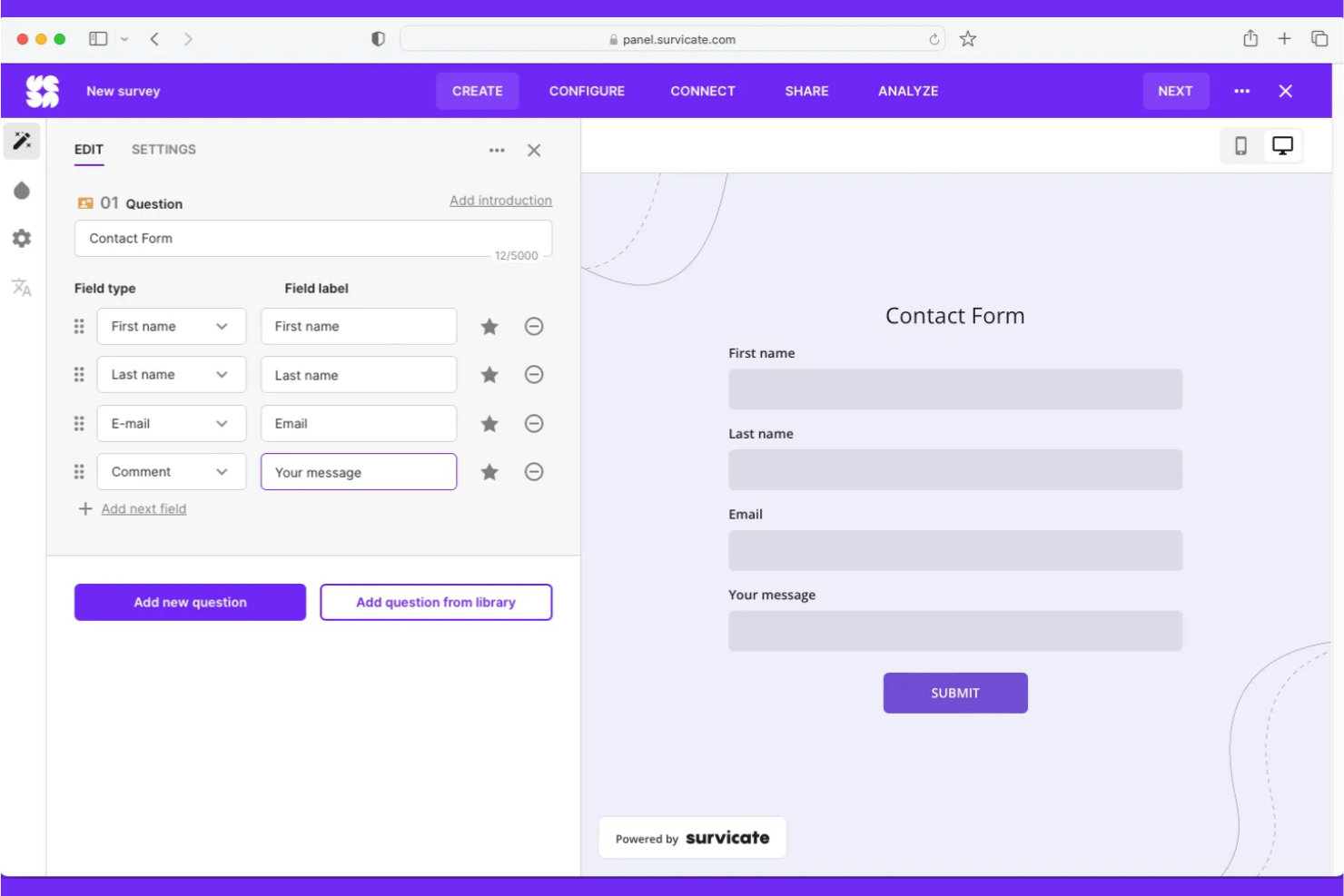
Tally si distingue per i team e i creatori che hanno bisogno di raccogliere risposte illimitate senza limiti di invio. È una scelta eccellente per team di marketing, educatori e organizzatori di eventi che gestiscono sondaggi o registrazioni ad alto volume. A differenza di Google Forms, Tally offre invii illimitati anche con il piano gratuito, rendendolo ideale per progetti dove il limite di risposte è un problema.
Perché Tally è una valida alternativa a Google Forms
A differenza di molti altri costruttori di moduli che limitano il numero di risposte che puoi raccogliere, Tally ti permette di accettare invii illimitati anche nel piano gratuito. Questo è particolarmente utile per i team che gestiscono sondaggi su larga scala, registrazioni a eventi o moduli di feedback senza preoccuparsi di raggiungere un tetto massimo. Apprezzo anche il fatto che Tally supporti funzionalità avanzate come logica condizionale e raccolta di pagamenti, così puoi creare moduli più complessi man mano che le tue esigenze crescono. Per chiunque abbia bisogno di raccogliere un grande volume di risposte senza interruzioni, Tally è un'alternativa pratica a Google Forms.
Funzionalità principali di Tally
Altre caratteristiche che rendono Tally interessante per la creazione di moduli includono:
- Supporto dominio personalizzato: Pubblica i moduli utilizzando il tuo dominio personalizzato per un aspetto professionale.
- Campo di caricamento file: Permetti ai partecipanti di allegare file direttamente tramite i tuoi moduli.
- Campi nascosti: Inserisci dati nei moduli tramite parametri URL per tracciamento o personalizzazione.
- Supporto Webhook: Invia risposte del modulo ad altri strumenti o flussi di lavoro in tempo reale.
Integrazioni
Le integrazioni includono Google Sheets, Slack, Airtable, Notion, HubSpot, Mailchimp, Zapier, Salesforce, Trello e Asana.
Pros and Cons
Pros:
- Logiche avanzate anche sul piano gratuito
- Focus sulla privacy e conforme al GDPR
- Integrazione fluida con Notion e Airtable
Cons:
- Forte aumento di prezzo per le funzioni Pro
- Nessun supporto per invio moduli offline


Se desideri creare moduli che sembrano più conversazioni che semplici sondaggi statici, Tripetto merita attenzione. È pensato per marketer, educatori e team di prodotto che vogliono aumentare il coinvolgimento con moduli interattivi basati su logiche personalizzate. Tripetto si distingue da Google Forms offrendo interfacce in stile chat e conversazionali che guidano i partecipanti passo dopo passo.
Perché Tripetto è una valida alternativa a Google Forms
Tripetto adotta un approccio diverso permettendo di creare moduli conversazionali che imitano un dialogo reale. Ciò è particolarmente utile se desideri aumentare il tasso di risposta o offrire un'esperienza più coinvolgente agli utenti. Mi piace che Tripetto offra diagrammi di flusso visivi per progettare la logica delle domande e supporti layout di modulo in stile chat, classico e autoscorrimento. Per i team che vogliono andare oltre i semplici sondaggi statici, il formato conversazionale di Tripetto è una valida alternativa a Google Forms.
Funzionalità principali di Tripetto
Altre funzionalità che rendono Tripetto interessante per la creazione di moduli includono:
- Opzione di auto-ospitalità: Distribuisci i moduli Tripetto sui tuoi server per il pieno controllo dei dati.
- Stile CSS personalizzato: Personalizza l’aspetto e la sensazione dei moduli tramite CSS personalizzato.
- Supporto multilingua: Crea moduli in più lingue per raggiungere un pubblico più ampio.
- Blocchi calcolatrice: Aggiungi logica di calcolo ai moduli per quiz, preventivi o punteggi.
Integrazioni
Le integrazioni includono Google Sheets, Slack, Mailchimp, HubSpot, Salesforce e Shopify.
Pros and Cons
Pros:
- Stili di moduli conversazionali
- Opzioni di privacy tramite auto-ospitalità
- Ramificazione logica avanzata
Cons:
- Nessun gateway di pagamento nativo
- Lento con moduli molto grandi
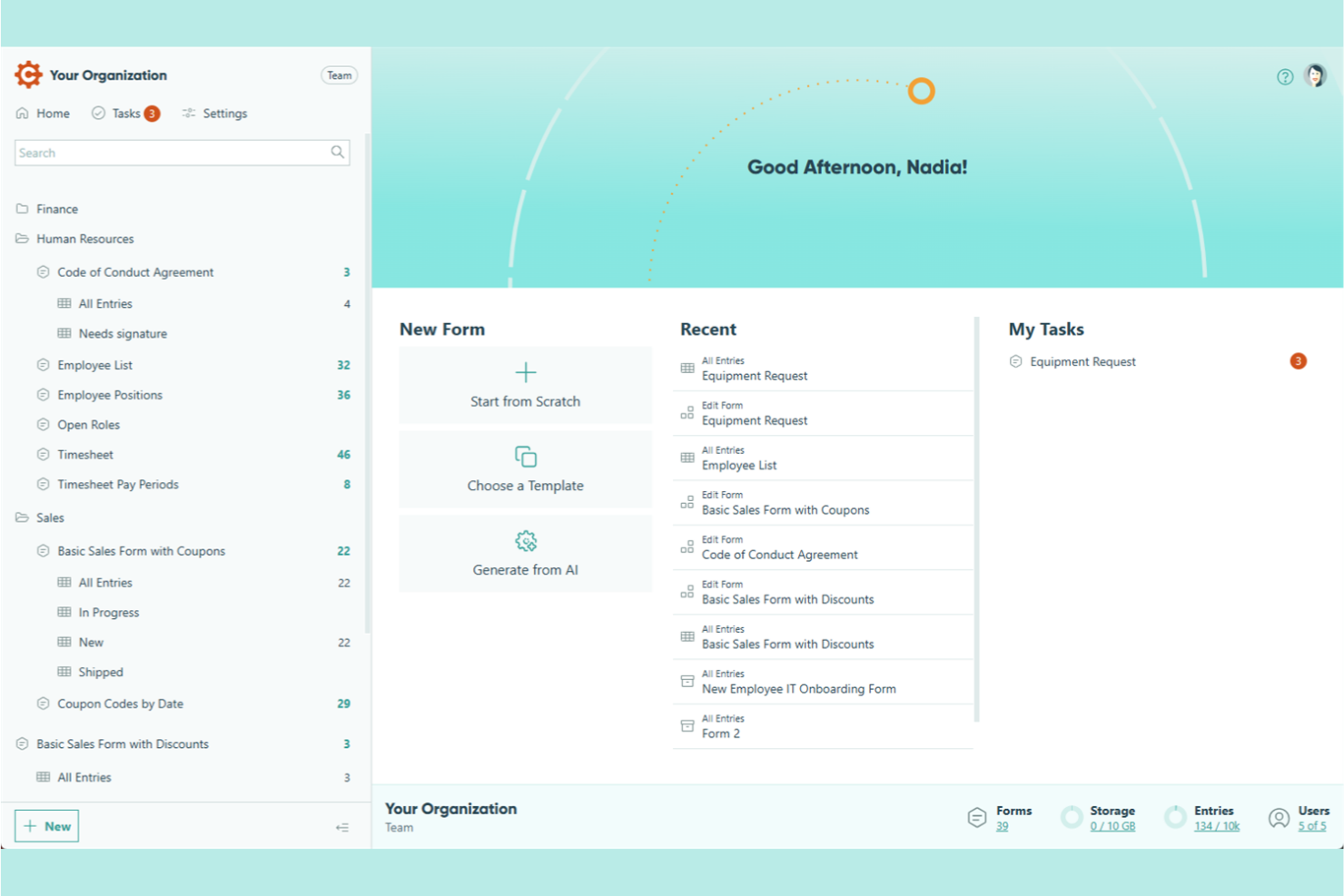
Per i team che necessitano di calcoli avanzati e logica nei loro moduli, Cognito Forms è un ottimo concorrente. È particolarmente utile per i team finanziari, la gestione degli ordini e per chiunque abbia bisogno di automatizzare prezzi o punteggi complessi all'interno di un modulo. A differenza di Google Forms, Cognito Forms supporta campi calcolati che permettono di creare moduli con calcoli in tempo reale, logica condizionale e contenuto dinamico.
Perché Cognito Forms è una valida alternativa a Google Forms
Cognito Forms è una scelta eccellente se hai bisogno di moduli che possano gestire calcoli complessi e contenuti dinamici. Ho scelto Cognito Forms perché consente di creare campi calcolati che sommano automaticamente valori, applicano formule o generano output personalizzati in base alle risposte degli utenti. Puoi anche utilizzare la logica condizionale per mostrare o nascondere campi, rendendo i moduli più interattivi e reattivi. Per chi necessita di qualcosa in più rispetto alla semplice raccolta dati, Cognito Forms offre funzionalità di calcolo avanzate che Google Forms non possiede.
Caratteristiche principali di Cognito Forms
Altre funzionalità che rendono Cognito Forms interessante per la creazione di moduli includono:
- Moduli multi-pagina: Suddividi moduli lunghi in più pagine per migliorare il tasso di completamento.
- Campi per caricamento file: Consenti ai rispondenti di allegare documenti, immagini o altri file direttamente alle loro risposte.
- Crittografia dei dati: Proteggi le informazioni sensibili con la crittografia integrata delle risposte ai moduli.
- Automazione del flusso di lavoro: Imposta flussi di approvazione e notifiche per gestire efficacemente le risposte ai moduli.
Integrazioni
Le integrazioni includono Microsoft Power Automate, Zapier (per integrazioni estese), PayPal, Stripe, Square, Dropbox, OneDrive e Mailchimp.
Pros and Cons
Pros:
- Potente logica condizionale
- Compliance sicura GDPR e HIPAA
- Campi di calcolo avanzati
Cons:
- Prestazioni lente del builder backend
- Funzionalità di ricerca limitate


Se hai bisogno di inviare moduli con dati precompilati, Fillout è progettato proprio per questo tipo di flusso di lavoro. È particolarmente adatto per i team operativi, il supporto clienti e per chiunque abbia la necessità di personalizzare i moduli su larga scala. A differenza di Google Forms, Fillout consente di generare link unici con campi precompilati, facilitando la raccolta di risposte accurate e contestualizzate.
Perché Fillout è una valida alternativa a Google Forms
Fillout adotta un approccio diverso rispetto a Google Forms focalizzandosi sui flussi di lavoro con moduli precompilati. Puoi generare link unici ai moduli con campi specifici già popolati, ideale per inviare moduli personalizzati a clienti o membri del team. Apprezzo il fatto che Fillout supporti anche la mappatura dinamica dei dati, permettendo così di automatizzare il riempimento delle informazioni specifiche degli utenti dal tuo database o CRM. Questo lo rende una scelta ottimale per chi vuole ottimizzare la raccolta dati e ridurre gli errori di inserimento manuale.
Funzionalità principali di Fillout
Altre funzionalità che rendono Fillout utile per la creazione di moduli includono:
- Editor drag-and-drop per moduli: Crea e personalizza moduli in modo visuale senza bisogno di programmare.
- Logica condizionale: Mostra o nascondi domande in base alle risposte precedenti per guidare i rispondenti.
- Branding personalizzato: Aggiungi logo, colori, font e stili per allinearti all’identità della tua organizzazione.
- Moduli a più fasi: Suddividi i moduli lunghi in più pagine per migliorare il tasso di completamento.
Integrazioni
Le integrazioni includono Google Sheets, Slack, HubSpot, Salesforce, Microsoft Teams, Trello, Airtable e Asana.
Pros and Cons
Pros:
- Integrazioni profonde con database
- Logica condizionale avanzata
- Livello gratuito generoso per le risposte
Cons:
- Personalizzazione del design limitata
- Nessuna app mobile dedicata
Altre alternative a Google Forms
Ecco alcune ulteriori alternative a Google Forms che non sono state incluse nel mio elenco, ma che vale comunque la pena prendere in considerazione:
- Fluent Forms
Ideale per l'integrazione con siti WordPress
- Jotform
Ideale per varietà di modelli
- HubSpot Forms
Il migliore per gli strumenti di automazione del marketing


Come valuto le alternative a Google Forms
Divido la mia valutazione in requisiti di base, come la logica condizionale e le integrazioni con gli strumenti di gestione dei progetti, e fattori distintivi che separano gli strumenti per l'acquisizione dei dati dei clienti, i report sul campo o i flussi di approvazione.
Funzionalità fondamentali (requisiti essenziali per questo elenco)
Quando seleziono gli strumenti per il mio elenco, assegno a ciascuno un punteggio su una scala da 0 (non offre la funzionalità) a 5 (eccelle in quest'area) per ogni funzionalità fondamentale elencata di seguito. Poi converto il punteggio totale dello strumento in una percentuale. Ogni strumento deve raggiungere un punteggio totale minimo del 65% per essere preso in considerazione.
- Creatore di moduli personalizzabile: verifico la disponibilità di diversi tipi di campi e modelli adatti all'acquisizione dei dati dei progetti, come il caricamento di file per i documenti di progetto, i selettori di data per le scadenze e i menu a discesa per i livelli di priorità.
- Logica condizionale e ramificazione: i moduli che indirizzano una "segnalazione di bug" lungo un percorso e una "richiesta di funzionalità" lungo un altro fanno risparmiare ore di valutazione manuale; per questo verifico quanto siano flessibili le regole di ramificazione.
- Automazione dei flussi di lavoro e delle attività: verifico se l'invio di un modulo può generare automaticamente un'attività, assegnare un responsabile o avviare una catena di approvazione senza richiedere uno strumento di automazione separato.
- Integrazioni con gli strumenti di gestione dei progetti: in questo caso sono importanti le connessioni native a piattaforme come Asana, Jira o ClickUp; valuto se i dati confluiscono nelle bacheche e negli elenchi delle attività arretrate o se finiscono semplicemente in un foglio di calcolo.
- Gestione delle risposte e report: cerco la possibilità di filtrare, applicare tag e visualizzare le risposte in un pannello di controllo centralizzato, soprattutto per monitorare nel tempo il volume delle richieste e lo stato delle richieste.
- Collaborazione e autorizzazioni: i team che condividono moduli di acquisizione dei dati hanno bisogno di accessi basati sui ruoli, in modo che un cliente possa inviare il modulo ma non modificarlo; valuto quanto siano granulari questi livelli di autorizzazione.
Una volta ottenuto un elenco di strumenti che soddisfano questi criteri, considero ciò che distingue ciascuna piattaforma.
Fattori distintivi (ciò che differenzia i fornitori)
Ecco come confronto i diversi fornitori:
Funzionalità distintive
I campi per la firma elettronica sono importanti quando i moduli gestiscono modifiche contrattuali o approvazioni di traguardi che richiedono una firma documentata. Cerco anche funzionalità per inserire dinamicamente le risposte e per precompilare i campi: recuperare il nome di un cliente o l'ID di un progetto da una risposta precedente e inserirlo nel modulo successivo fa risparmiare tempo a chi risponde e mantiene coerenti i dati. Per i team delle agenzie che inviano moduli di acquisizione dei dati a clienti esterni, le opzioni con marchio personalizzato e i domini personalizzati rendono l'esperienza professionale anziché generica.
Oltre le funzionalità
I modelli di prezzo variano ampiamente: alcuni strumenti applicano un costo per modulo, altri per invio o per utente; per questo valuto quale struttura sia più adatta ai team che gestiscono decine di moduli di acquisizione dei dati con volumi imprevedibili. Anche la profondità delle integrazioni è importante, oltre alla semplice disponibilità di un connettore: verifico se i dati fluiscono in entrambe le direzioni tra lo strumento per i moduli e la piattaforma di gestione dei progetti o se gli invii vengono trasferiti in una sola direzione. Per i team che raccolgono dati sensibili dei clienti attraverso moduli di acquisizione dei dati dei progetti, esamino le certificazioni di conformità come SOC 2 e GDPR insieme al supporto SSO.
Perché cercare un'alternativa a Google Forms?
Sebbene Google Forms sia una buona scelta per la creazione di moduli online, ci sono diversi motivi per cui alcuni utenti cercano soluzioni alternative. Potresti cercare un'alternativa a Google Forms perché…
- Hai bisogno di opzioni più avanzate per la personalizzazione e l'identità del marchio
- Vuoi raccogliere pagamenti o firme direttamente tramite i moduli
- Hai bisogno di funzionalità più avanzate per l'analisi dei dati o la reportistica
- Hai bisogno di integrazioni con strumenti esterni all'ecosistema Google
- Vuoi un maggiore controllo sulla privacy dei dati e sulla loro posizione di archiviazione
- Hai bisogno di un supporto migliore per flussi di lavoro complessi o per la logica condizionale
Se ti riconosci in una di queste situazioni, sei nel posto giusto. Il mio elenco include diverse opzioni per la creazione di moduli online, più adatte ai team che affrontano queste difficoltà con Google Forms e cercano soluzioni alternative.
Funzionalità principali di Google Forms
Ecco alcune delle funzionalità principali di Google Forms, che ti aiuteranno a mettere a confronto ciò che offrono le soluzioni alternative:
- Interfaccia semplice per creare moduli con il trascinamento della selezione
- Molteplici tipi di domande, tra cui scelta multipla, menu a discesa e scala lineare
- Raccolta delle risposte in tempo reale e grafici riepilogativi
- Esportazione automatica dei dati in Google Sheets
- Logica condizionale di base per diramare le domande
- Condivisione facile tramite link, email o incorporamento nel sito web
- Collaborazione integrata con altri utenti di Google Workspace
- Temi e tavolozze di colori personalizzabili
- Supporto per il caricamento di file per raccogliere documenti o immagini
- Utilizzabile gratuitamente con un account Google
Cosa succede dopo:
Se stai cercando alternative a Google Forms, contatta un consulente di SoftwareSelect per ricevere consigli gratuiti.
Compili un modulo e fai una breve conversazione durante la quale il consulente approfondirà le tue esigenze specifiche. Poi riceverai una rosa ristretta di software da valutare. Ti assisteranno persino durante l'intero processo di acquisto, comprese le negoziazioni sul prezzo.