

I 10 migliori software per la gestione dei flussi di lavoro documentali recensiti per il 2026

10 Selezione dei migliori software per i flussi di lavoro dei documenti


La gestione dei documenti dovrebbe essere semplice. Il tuo team ha bisogno di un processo chiaro per le approvazioni, il controllo delle versioni e la collaborazione, senza i ritardi o la confusione che derivano dal monitoraggio manuale.
Il software per i flussi di lavoro dei documenti è progettato per mantenere tutto in movimento. Fa sì che i documenti arrivino alle persone giuste al momento giusto, monitora automaticamente i progressi e riduce gli scambi di comunicazioni non necessari.
In questo articolo ho esaminato i migliori software per i flussi di lavoro dei documenti disponibili sul mercato per aiutarti a trovare la soluzione più adatta. Il mio elenco mette in evidenza gli strumenti che migliorano l'efficienza, mantengono i file organizzati e semplificano la gestione dei documenti per il tuo team. Qui puoi esaminare le opzioni disponibili e scegliere il software migliore per il tuo team.
Perché fidarsi dei nostri consigli sui software
Il nostro team testa e recensisce software dal 2012. In quanto project manager noi stessi, sappiamo quanto sia difficile — e importante — scegliere il software giusto.
Per questa guida, abbiamo valutato gli strumenti attraverso test pratici e ricerche indipendenti, assegnando un punteggio agli strumenti in base ai nostri criteri di selezione. Ci basiamo inoltre sulle competenze di leader di pensiero del settore e di professionisti attivi nella gestione dei progetti.
Le nostre recensioni riflettono il nostro giudizio editoriale umano, non un discorso di vendita.
Revisori esperti:
Tabella comparativa dei software per i flussi di lavoro dei documenti
La tabella seguente confronta i dettagli sui prezzi delle mie migliori selezioni di software per i flussi di lavoro dei documenti.
| Tool | Best For | Trial Info | Price | ||
|---|---|---|---|---|---|
| 1 | Ideale per l'instradamento automatico dei documenti | Demo gratuita disponibile | Da $399/mese (fatturato annualmente) | Website | |
| 2 | Ideale per strumenti di flusso di lavoro strutturati | Prova gratuita di 14 giorni + demo gratuita disponibile | Prezzi su richiesta | Website | |
| 3 | Ideale per workflow documentali multilingue | Demo gratuita disponibile | Prezzo su richiesta | Website | |
| 4 | Ideale per l’automazione dei documenti basata su IA | Prova gratuita disponibile + demo gratuita | Prezzo su richiesta | Website | |
| 5 | Ideale per la raccolta dati sul campo | Prova gratuita di 14 giorni + demo gratuita disponibile | Da $20/utente/mese | Website | |
| 6 | Ideale per la gestione dei contratti e la firma elettronica | Piano gratuito disponibile | Da $10/utente/mese | Website | |
| 7 | Miglior archivio cloud o on-premise | Prova gratuita + demo gratuita disponibili | Prezzo su richiesta | Website | |
| 8 | Ideale con servizi professionali disponibili | Demo gratuita disponibile | Prezzi su richiesta | Website | |
| 9 | Ideale per l'automazione di documenti complessi e ad alto volume | Demo gratuita disponibile | Prezzo su richiesta | Website | |
| 10 | Ideale per la creazione illimitata di workflow | Prova gratuita di 7 giorni disponibile | Da $99/mese (utenti illimitati) | Website |
Recensioni dei migliori software per i flussi di lavoro dei documenti
Di seguito trovi una panoramica dettagliata di ciascuno dei migliori software per i flussi di lavoro dei documenti inclusi nella mia selezione. Ho illustrato il loro caso d’uso migliore, le funzionalità più significative e i relativi vantaggi e svantaggi. Ho inoltre aggiunto uno screenshot dell’interfaccia di ciascuna piattaforma per darti un’idea di cosa aspettarti.

altaFlow
Ideale per l'instradamento automatico dei documenti

airSlate Workflow è una piattaforma di automazione dei flussi di lavoro documentali senza codice che aiuta le organizzazioni a creare, instradare e gestire i documenti con maggiore precisione. Supporta settori come sanità, legale, istruzione e finanza offrendo strumenti per la gestione dei contratti, firme elettroniche e processi guidati dalla conformità.
Perché ho scelto airSlate Workflow: Ho selezionato questo strumento per le sue funzioni intelligenti di automazione che permettono ai documenti di attraversare i flussi di lavoro senza supervisione manuale. I trigger possono avviare i flussi da sistemi come i CRM, garantendo che le attività vengano completate puntualmente e che i registri rimangano aggiornati. Ho apprezzato anche la funzionalità 'fill', che pre-compila moduli e contratti con dati provenienti dai sistemi collegati, riducendo errori e risparmiando tempo allo staff da inserimenti ripetitivi.
Caratteristiche distintive e integrazioni di airSlate Workflow
Le caratteristiche distintive includono la sincronizzazione bidirezionale dei dati nativa che scrive automaticamente nei sistemi collegati i dati dei documenti completati, un generatore di workflow no-code per configurare la generazione di documenti, l'instradamento, le approvazioni e le firme elettroniche, e controlli di governance integrati quali SSO, controllo degli accessi basato sui ruoli, tracciabilità delle attività e politiche configurabili di conservazione dei dati. La firma elettronica è inclusa in tutti i piani senza tariffe per busta, garantendo flussi documentali sicuri e conformi nei settori regolamentati.
Le integrazioni includono Salesforce, NetSuite, Microsoft Dynamics e SharePoint.
Pros and Cons
Pros:
- Accessibile anche a utenti non tecnici grazie a un'interfaccia chiara
- Ampie opzioni di integrazione con CRM e database
- Flussi di lavoro personalizzabili su misura per le esigenze dell'organizzazione
Cons:
- Fatturazione separata per ogni workspace può risultare costosa
- Curva di apprendimento per le configurazioni di automazione avanzate

Ideale per strumenti di flusso di lavoro strutturati

Document360 è una piattaforma di knowledge base con funzionalità di automazione del flusso di lavoro progettata per aiutare i team a creare, organizzare e gestire la documentazione. Supporta una vasta gamma di casi d'uso, dai documenti di processo interni ai centri assistenza rivolti ai clienti, con controlli robusti per ruoli, approvazioni e pubblicazione.
Perché ho scelto Document360: Ho scelto Document360 perché combina una gestione della conoscenza intuitiva con strumenti strutturati per il flusso di lavoro, rendendo semplice la gestione di progetti documentali complessi. Il suo builder di workflow personalizzati consente ai team di impostare processi di approvazione e personalizzare la collaborazione tra i reparti. Mi sono piaciuti anche la ricerca assistita dall'IA, i widget di aiuto incorporati e le analisi che forniscono intuizioni su cosa leggono gli utenti—e quali contenuti potrebbero richiedere miglioramenti.
Funzionalità e integrazioni principali di Document360:
Le funzionalità principali includono un builder di workflow personalizzato, gestione del glossario, accesso con controllo dei ruoli, help center integrati, generatore di alberi decisionali e analisi con strumenti di ottimizzazione SEO.
Le integrazioni comprendono Zendesk, Freshdesk, Intercom, Drift, Slack, GitHub, Make, Salesforce e Microsoft Teams.
Pros and Cons
Pros:
- Funzionalità intelligenti di gestione dei file
- Offre reporting e analisi avanzati
- Fornisce un robusto controllo delle versioni con audit trail
Cons:
- Può risultare costoso per team con budget limitato
- La maggior parte delle integrazioni è disponibile solo nei piani di livello superiore
New Product Updates from Document360

Document360 Adds Bulk Mirroring, Eddy AI Citations, and Unified SSO
Document360 adds bulk article mirroring, citations in Eddy AI chatbot responses, and a unified Enterprise SSO setup. These updates improve content reuse, answer verification, and access management. For more information, visit Document360’s official site.
 .
.
Doxis
Ideale per workflow documentali multilingue
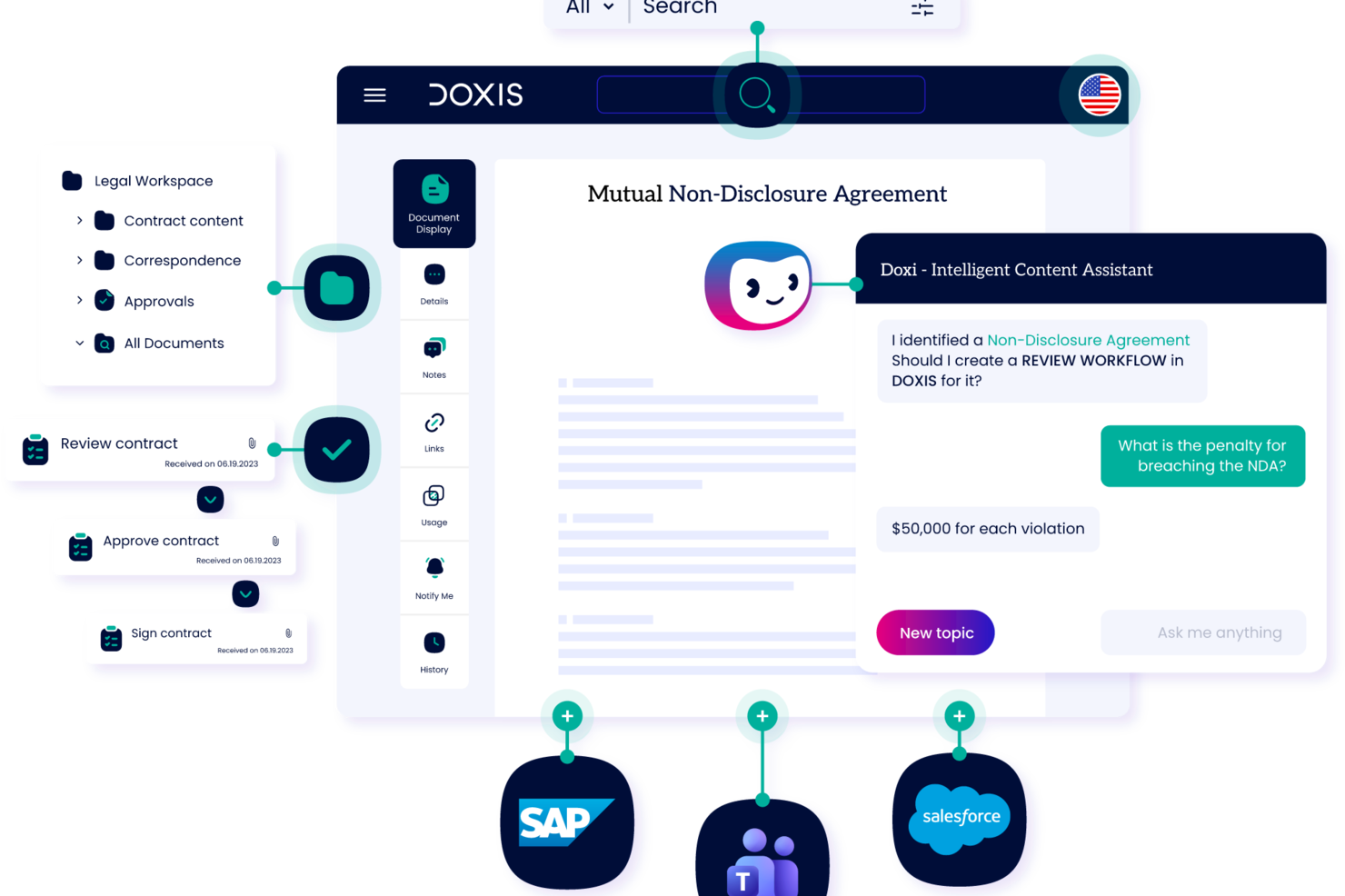
Doxis è una piattaforma di gestione dei contenuti aziendali e workflow documentali che integra acquisizione dei documenti, classificazione basata su IA, automazione dei processi, collaborazione tra team e archiviazione a lungo termine in un unico sistema unificato.
Per chi è Doxis?
Doxis è particolarmente indicato per grandi aziende e organizzazioni di medie dimensioni con operazioni complesse e ad alto volume di documenti, distribuite su più dipartimenti o sedi geografiche.
Perché ho scelto Doxis
Ho scelto Doxis tra i migliori per i workflow documentali multilingue perché è una delle poche piattaforme che offre una soluzione davvero pronta all’uso a livello globale. La piattaforma è disponibile in 13 lingue, tra cui arabo, cinese e russo, così le interfacce utente e i metadati dei documenti del mio team sono visualizzati nella lingua locale di ciascun utente. Inoltre, la sua architettura compatibile con Unicode e il modello di distribuzione multitenant permettono ai team internazionali di lavorare da un’unica piattaforma centralizzata, senza dover mantenere istanze regionali separate.
- Acquisizione documenti basata su IA: Estrae metadati, classifica i documenti e li indirizza in base al contenuto tramite OCR integrato e apprendimento automatico.
- Workflow builder senza codice: Business Studio consente di progettare e distribuire processi documentali personalizzati e app di gestione dei contenuti senza scrivere codice.
- Controllo delle versioni: Tiene traccia delle revisioni dei documenti e archivia le versioni precedenti, affinché il tuo team possa consultare lo storico delle modifiche e ripristinare le bozze precedenti in qualsiasi momento.
- Archiviazione a prova di audit: Conserva i documenti finali in un archivio inviolabile conforme agli standard di records management, compresi criteri di conservazione e regole di eliminazione.
Integrazioni di Doxis
Doxis offre connettori nativi per SAP, Salesforce, Microsoft 365, Microsoft SharePoint, Microsoft Outlook, Oracle e Infor, oltre a soluzioni HR come ADP e servizi directory come LDAP. Una REST API è disponibile per integrazioni personalizzate. Il supporto Zapier non è documentato.
Pros and Cons
Pros:
- Classificazione guidata da IA che estrae dati dai documenti senza intervento manuale
- Opzioni flessibili per distribuire e personalizzare i componenti
- Archiviazione inviolabile con controlli di conservazione e registri
Cons:
- Principalmente adatto ad aziende di grandi dimensioni, meno indicato per team piccoli
- La migrazione dei dati spesso non rispetta le tempistiche previste

TrailHQ
Ideale per l’automazione dei documenti basata su IA
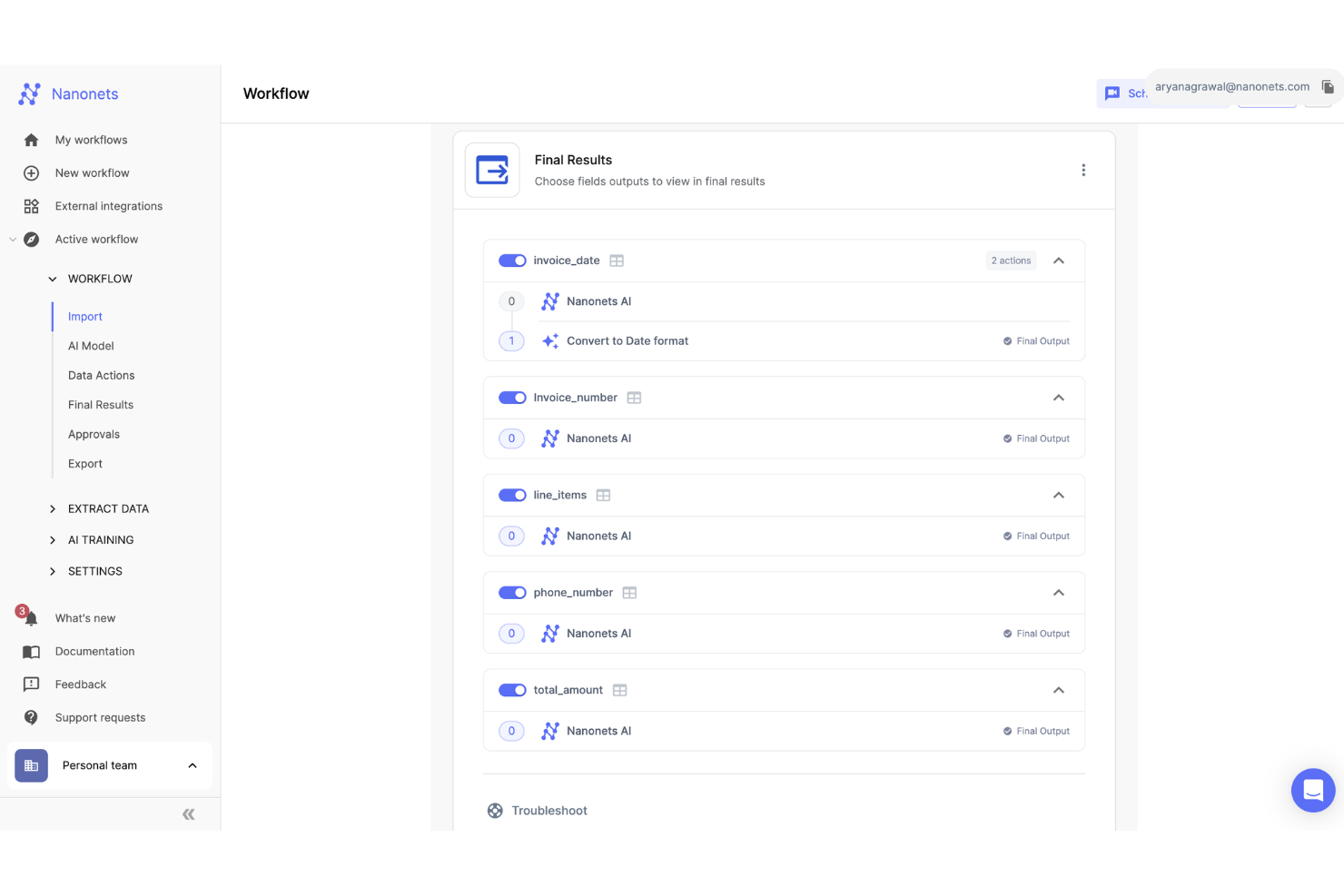
Nanonets è una piattaforma guidata dall’IA progettata per automatizzare il trattamento dei documenti e i flussi di lavoro di estrazione dati, risultando particolarmente vantaggiosa per settori come finanza, sanità e logistica.
Perché ho scelto Nanonets: Utilizza l’intelligenza artificiale per automatizzare processi documentali complessi, come la raccolta dati da fatture e ordini d’acquisto. Questa automazione si estende ai flussi di lavoro per la contabilità fornitori, la riconciliazione finanziaria e la gestione dei sinistri nel settore assicurativo. Sfruttando l’apprendimento automatico e la tecnologia di Riconoscimento Ottico dei Caratteri (OCR), Nanonets gestisce con efficienza dati non strutturati, assicurando che anche le operazioni più complesse vengano gestite con precisione. A ciò si aggiungono i flussi di lavoro IA con supervisione umana, che permettono di integrare il controllo umano nei processi automatizzati dove necessario.
Funzionalità e integrazioni di spicco di Nanonets
Funzionalità distintive includono l’estrazione di informazioni da dati non strutturati, la conformità a GDPR, SOC 2 e HIPAA e una piattaforma senza codice che rende l’accesso più facile a una vasta gamma di utenti.
Le integrazioni includono Quickbooks, Salesforce, Google Sheets, Dropbox e Zapier.
Pros and Cons
Pros:
- Funzionalità di estrazione dati
- Compatibile con diversi linguaggi di programmazione
- API semplice per un’integrazione facilitata
Cons:
- Rispetto a strumenti più avanzati, Nanonets offre meno opzioni di personalizzazione
- Potrebbe non essere adatto a progetti di apprendimento automatico su larga scala con dataset molto grandi

Fluix
Ideale per la raccolta dati sul campo

Fluix è una piattaforma di gestione documentale e automazione dei flussi di lavoro senza codice. Può essere utilizzata da vari tipi di squadre sul campo per la raccolta dati e l'elaborazione di moduli.
Perché ho scelto Fluix: La creazione di moduli è semplificata dall'interfaccia drag-and-drop del software, così puoi creare diversi tipi di documenti per raccogliere dati da clienti, partner e utenti sul campo. È una soluzione adatta per squadre che svolgono ispezioni, squadre di vendita sul campo e altri fornitori di servizi. Puoi far firmare documenti, aggiungere immagini con georeferenziazione e annotare file in movimento. Una volta raccolti i dati, puoi creare flussi di lavoro per i tuoi processi aziendali nel sistema e automatizzare attività ripetitive.
Caratteristiche distintive e integrazioni di Fluix
Caratteristiche distintive includono valori dinamici che possono essere implementati nei moduli, i quali possono essere usati per personalizzare i flussi di lavoro successivi. Il builder dei flussi di lavoro consente anche la logica condizionale, per collegare regole specifiche basate su valori inseriti nei moduli. Sulla piattaforma sono disponibili anche template predefiniti e personalizzati, per velocizzare il processo di creazione dei moduli.
Integrazioni includono PowerBI, Tableau, Airtable, Smartsheet, Microsoft 365, Dropbox, Google Drive, Trello, monday.com, Asana, Salesforce, Pipedrive, NetSuite e Slack, tra gli altri. Zapier, Integromat e Automate possono essere utilizzati per costruire ulteriori integrazioni personalizzate.
Pros and Cons
Pros:
- Creazione moduli, raccolta dati e automazione dei flussi di lavoro in un'unica soluzione
- Interfaccia drag-and-drop facile da imparare
- Utilizzabile da qualsiasi dispositivo
Cons:
- Alcune discrepanze tra le versioni mobile e desktop
- Alcune funzionalità sono disponibili come componenti aggiuntivi a pagamento
Docusign
Ideale per la gestione dei contratti e la firma elettronica

DocuSign è un'azienda che offre diversi prodotti per la gestione dei documenti, inclusi software per la firma elettronica e per la gestione del ciclo di vita dei contratti (CLM).
Perché ho scelto DocuSign: Un piano semplice per una singola persona può aiutare i lavoratori autonomi a gestire i propri contratti aziendali e a firmare documenti digitalmente. Allo stesso tempo, un piano a livello aziendale può essere personalizzato per soddisfare le tue esigenze specifiche e offrirti supporto live 24/7. Il software è flessibile ed è adatto praticamente a qualsiasi dimensione aziendale in ogni settore. Può supportare i processi contrattuali di clienti, dipendenti, legali e partner. Gli utenti possono creare e archiviare modelli per usi futuri, auto-popolare i campi con dati dal proprio CRM o da altre fonti, e impostare promemoria per le azioni necessarie.
Funzionalità e integrazioni distintive di DocuSign
Funzionalità distintive includono la possibilità di gestire documenti in 14 lingue diverse e facilitare le firme elettroniche in 44 lingue differenti. Si tratta di uno strumento utile per aziende che operano a livello globale o in aree multilingue. Sono disponibili diversi tipi di campi per i moduli, tra cui selezioni a discesa, campi di approvazione/rifiuto e campi per il disegno a mano.
Integrazioni includono Google Workspace, Microsoft Suite, SAP, Oracle, Salesforce, Zoom, Workday, Stripe, Apple e centinaia di altre.
Pros and Cons
Pros:
- Possibilità di creare e archiviare modelli
- Interfaccia utente amichevole e facile da imparare
- Flessibile per soddisfare le esigenze di diversi settori e dimensioni aziendali
Cons:
- Personalizzazione limitata
- Regole e instradamento non possono essere salvati come parte del modello

FileHold
Miglior archivio cloud o on-premise

FileHold è un sistema di gestione documentale che offre soluzioni di archiviazione sia cloud che on-premise per i file aziendali. Può supportare la scansione dei documenti, la gestione dei record e i flussi di lavoro per la revisione e l'approvazione.
Perché ho scelto FileHold: Che tu voglia affidare l'archiviazione dei tuoi file al cloud o mantenerla sotto il tuo controllo, puoi utilizzare questo software per tutte le tue esigenze di gestione documentale. Il software dispone di controlli di versione e ruoli utente per la gestione degli accessi e la sicurezza. È possibile etichettare i documenti e acquisire metadati per una ricerca e una gestione dei file più facile. È disponibile anche una vista calendario per vedere in quale fase del ciclo di vita si trovano i vari documenti e avvisare le parti interessate quando è necessario intervenire sui documenti.
Funzionalità distintive e integrazioni di FileHold
Funzionalità distintive includono la localizzazione linguistica del software, che consente alle aziende che operano in altre lingue di personalizzare la piattaforma in base alle proprie necessità. È possibile implementare anche la personalizzazione del marchio per adattare il sistema all'identità aziendale. Sono inoltre acquistabili diverse funzionalità aggiuntive, come account ospite, più archivi documentali e sequenze di numerazione personalizzate per la denominazione dei file.
Integrazioni includono Adobe Acrobat, DocuSign, Kodak Alaris, Kofax Capture, Microsoft Dynamics, Microsoft Office, QuickBooks, SAP, Sage e Salesforce, tra gli altri. È disponibile anche un'API per configurare ulteriori integrazioni.
Pros and Cons
Pros:
- Sono disponibili anche servizi di consulenza offerti dall'azienda
- Portale di formazione web accessibile a tutti gli utenti
- Opzioni di prova, finanziamento, pay-per-use e acquisto tramite partnership
Cons:
- Personalizzazione dei flussi di lavoro limitata
- Sistema robusto, necessita di un periodo di apprendimento

OpenText
Ideale con servizi professionali disponibili

OpenText offre una vasta gamma di strumenti software per le aziende, inclusi Document Centric Workflow, una piattaforma cloud per la gestione documentale e l'automazione dei flussi di lavoro.
Perché ho scelto OpenText: Semplice ma potente, questo software mette a disposizione sia una gestione documentale basata su cloud sia funzioni di gestione dei flussi di lavoro e delle approvazioni. Gli utenti possono inviare file per revisione o approvazione direttamente dalla scheda documento, aggiungendo eventuali note contestuali prima di assegnarli a uno stakeholder designato. È possibile impostare anche le date di scadenza, assicurando che i team rispettino le tempistiche su qualsiasi tipo di documento su cui stiano lavorando. L’accesso ai file può essere gestito sulla base del documento, campo, modello, livello di indice o applicazione.
Funzionalità principali e integrazioni di OpenText
Funzionalità principali includono servizi di consulenza professionale offerti dall'azienda. Le piccole imprese o le organizzazioni con risorse limitate possono trarre vantaggio dall'esternalizzare la strategia di gestione documentale o alcuni aspetti del processo. Il team di esperti dell’azienda può aiutarti a implementare la soluzione e garantire la conformità alle normative vigenti.
Integrazioni non sono attualmente elencate dal fornitore del software.
Pros and Cons
Pros:
- Formazione sul prodotto disponibile
- Supporto all’implementazione disponibile
- Sono disponibili servizi di consulenza
Cons:
- Uno dei molti software forniti dall’azienda (non specializzato)
- Potrebbe essere troppo semplice per alcuni casi d’uso

Ideale per l'automazione di documenti complessi e ad alto volume
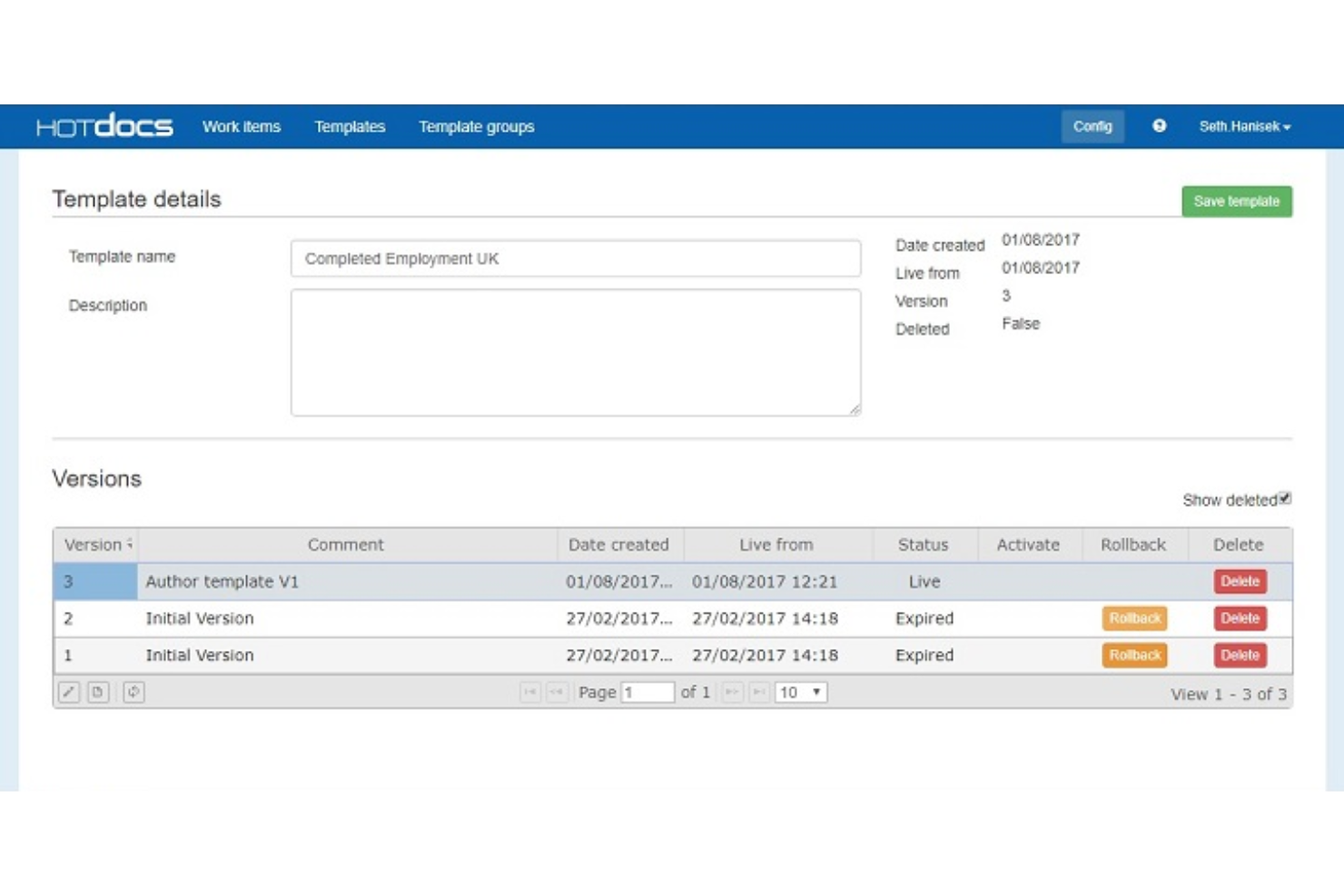
HotDocs è una soluzione software per l'automazione dei documenti progettata per semplificare la creazione di documenti complessi e personalizzati. È spesso utilizzato nei settori legale, finanziario e governativo per automatizzare la produzione di vari tipi di documenti, come contratti, moduli giudiziari, richieste di prestito e proposte di vendita.
Perché ho scelto HotDocs: HotDocs eccelle nell'automazione dei processi complessi di composizione documentale. Ciò include la possibilità di generare tabelle espandibili, aree di testo condizionali ed eseguire calcoli sofisticati all'interno dei documenti. Questi elementi dinamici garantiscono che i documenti siano non solo accurati, ma anche adattati a esigenze specifiche senza richiedere numerose modifiche manuali.
Caratteristiche e integrazioni distintive di HotDocs
Le caratteristiche distintive includono la logica condizionale, che aiuta gli utenti a creare documenti dinamici grazie all'inserimento di istruzioni if/then. Offre inoltre tracce di audit e automazione dei flussi di lavoro per attività ripetitive come la revisione, l'approvazione e l'archiviazione dei documenti.
Le integrazioni includono Salesforce, Microsoft Dynamics, Sage, Microsoft 365, Microsoft Word, Tabs3, CARET Legal, Actionstep, Amicus Attorney e AbacusLaw.
Pros and Cons
Pros:
- Ideale per la gestione documentale end-to-end
- Potenti capacità di automazione dei documenti
- Modelli personalizzabili
Cons:
- Può essere costoso per le piccole imprese
- Può essere difficile imparare a creare i modelli

Ideale per la creazione illimitata di workflow
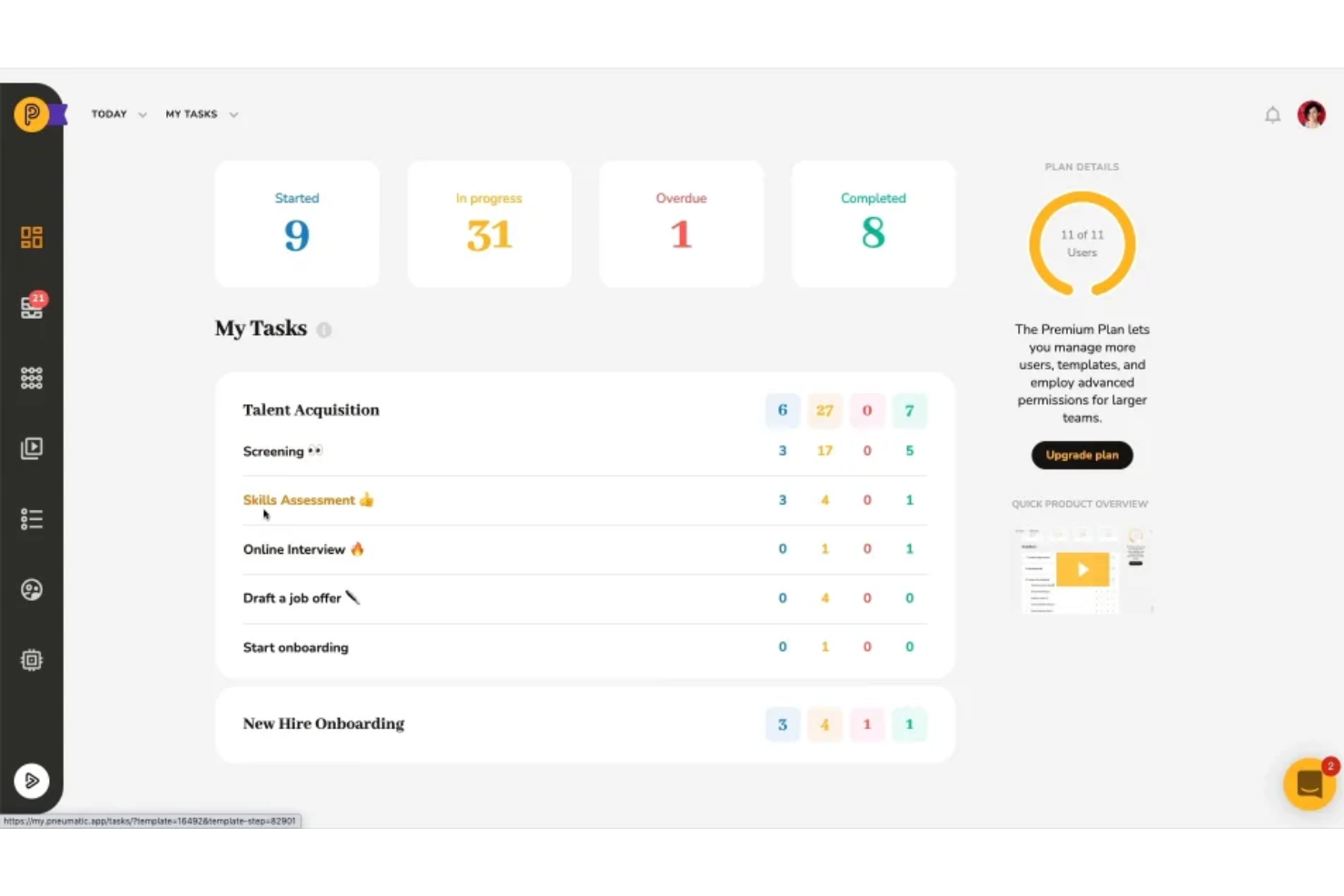
Pneumatic Workflow è uno strumento di gestione dei flussi di lavoro progettato per aiutare le aziende ad automatizzare e gestire i propri processi in modo efficiente. Permette agli utenti di creare, perfezionare ed evolvere i processi aziendali in workflow ripetibili, supportando varie funzioni in diversi settori.
Perché ho scelto Pneumatic: Il software consente la creazione di workflow illimitati, permettendo così alle aziende di scalare i propri processi senza preoccuparsi di raggiungere un limite. La funzione di workflow automatizzato è anche molto potente e consente di configurare una volta i processi ripetitivi e farli eseguire automaticamente. Questa automazione si estende anche all'assegnazione dei compiti, che vengono attribuiti automaticamente ai collaboratori rilevanti non appena il task precedente viene completato. Inoltre, le capacità di gestione documentale del software facilitano la gestione e il monitoraggio dei documenti all'interno del workflow.
Caratteristiche principali e integrazioni di Pneumatic
Le funzionalità principali includono un generatore di workflow tramite intelligenza artificiale che crea flussi di lavoro quando gli utenti descrivono ciò di cui hanno bisogno. Offre inoltre una vasta gamma di modelli di workflow personalizzabili per funzioni di diversi settori. Tra le altre funzionalità vi sono l'accesso per ospiti per la collaborazione, la logica condizionale nei workflow, flussi di lavoro basati su video e cruscotti.
Le integrazioni comprendono Gmail, Slack, Google Sheets, Trello, Google Docs, PandaDoc, Google Forms, Typeform, HubSpot, Google Calendar, Microsoft Outlook e ClickUp.
Pros and Cons
Pros:
- Modelli di workflow personalizzabili
- Notifiche in tempo reale
- Generatore di flussi di lavoro tramite intelligenza artificiale
Cons:
- L'app mobile è meno completa rispetto alla versione desktop
- Potrebbe non essere ideale per aziende di grandi dimensioni con sistemi complessi
Altri software per i flussi di lavoro dei documenti
Ecco alcune altre opzioni che non sono state incluse nell’elenco dei migliori software per i flussi di lavoro dei documenti:
- PandaDoc
Ideale per un’interfaccia semplice
- Amazon WorkDocs
Ideale per la sincronizzazione dei contenuti
- Kofax
Ideale per una selezione modulare dei prodotti
- Applied Innovation
Migliori capacità di analisi avanzata
- Document Logistix
Ideale per la flessibilità
- DocuPipe
Ideale per abilitare flussi di lavoro AI guidati dai documenti
- Jotform
Ideale per la collaborazione sui documenti
- Doxis AI.dp.
Ideale per avanzate funzionalità OCR
- Jotform Workflows
Ideale per l'automazione dei flussi di lavoro senza codice
- Wrike
Ideale per diversi tipi di workflow
- GoodDay
Ideale per l'integrazione tra documenti e task


Come valuto i software di gestione dei flussi documentali
Divido la mia valutazione in due livelli: le funzionalità di base che uno strumento deve avere—come l'instradamento per l'approvazione e i registri di controllo—e i fattori differenzianti che distinguono un fornitore rispetto a un altro.
Funzionalità di base (requisiti minimi per questa lista)
Queste funzionalità di base costituiscono i criteri di accettazione per l'inclusione nella mia lista di software per la gestione dei flussi documentali:
- Automazione documentale e modelli: Verifico se è possibile compilare automaticamente contratti o lettere d'offerta estraendo dati da un CRM, modulo o database—non semplicemente inserendo valori in campi statici.
- Flussi di lavoro e instradamento delle approvazioni: Sono fondamentali flussi a più passaggi con logiche condizionali—come l'escalation di un ordine d'acquisto alla finanza solo quando l'importo supera una certa soglia.
- Funzionalità di firma elettronica: Valuto se le firme elettroniche native rispettano gli standard ESIGN, UETA o eIDAS e supportano la firma multiparte con verifica dell'identità.
- Gestione delle versioni e registri di audit: Ogni modifica, approvazione e commento deve essere marcata temporalmente e tracciabile—soprattutto per i team che gestiscono SOW o documenti sensibili per la conformità.
- Collaborazione e controlli di accesso: Cerco permessi basati sui ruoli che consentano, ad esempio, di condividere un NDA con consulenti esterni per la revisione, senza esporre file di progetto non correlati.
- Integrazioni con terze parti: La connessione con strumenti come Salesforce, Google Workspace o un HRIS deve essere nativa—non dipendere da soluzioni alternative o esportazioni manuali di file CSV.
Valuto ogni fornitore su una scala da 0 (funzionalità assente) a 5 (eccellente in quest'area) per ogni criterio.
I fornitori devono raggiungere un punteggio medio minimo per essere considerati per la mia lista. Da lì valuto cosa distingue ogni piattaforma.
Fattori differenzianti (cosa distingue i fornitori)
Una volta selezionata la mia lista, ecco come confronto e metto in evidenza le differenze tra i vari fornitori nel settore dei software per la gestione dei flussi documentali:
Funzionalità distintive
Spiccano le funzionalità di intelligenza artificiale applicata ai documenti, specialmente quando gli strumenti estraggono e classificano automaticamente i dati contrattuali a supporto dei team di conformità. Cerco anche strumenti di negoziazione integrati nella piattaforma, con funzionalità native di redlining: quando legali e stakeholder aziendali possono collaborare e negoziare senza uscire dalla piattaforma, si risparmia tempo e si riducono gli errori. Infine, dashboard analitici che visualizzano colli di bottiglia, tempi di ciclo delle approvazioni e attività utenti hanno un reale impatto per i responsabili delle operazioni che guidano il miglioramento continuo dei processi.
Oltre le funzionalità
Le certificazioni di conformità come SOC 2 Tipo II e HIPAA sono importanti—soprattutto per i team che gestiscono tramite piattaforma moduli di accettazione pazienti o accordi finanziari. Valuto inoltre come i prezzi variano all'aumentare del volume documentale, perché uno strumento utilizzabile da un team di 20 persone può diventare troppo costoso per 500 utenti. La velocità di implementazione è un altro fattore chiave; librerie di workflow preimpostati e risorse di onboarding self-service possono ridurre significativamente i tempi di avvio rispetto alle piattaforme che richiedono servizi professionali per ogni rollout.
Come scegliere il software per i flussi di lavoro dei documenti
È facile perdersi in lunghi elenchi di funzionalità e strutture tariffarie complesse. Per aiutarti a rimanere concentrato mentre affronti il tuo processo di selezione del software, unico per le tue esigenze, ecco un elenco di fattori da tenere a mente:
| Fattore | Cosa considerare |
| Scalabilità | Assicurati che il software possa crescere insieme alla tua attività. Cerca soluzioni in grado di gestire volumi crescenti di documenti, utenti e flussi di lavoro senza problemi di prestazioni. Le opzioni basate sul cloud offrono spesso una scalabilità flessibile. |
| Integrazioni | Il software per i flussi di lavoro dovrebbe connettersi perfettamente agli strumenti che il tuo team utilizza già, come CRM, ERP o piattaforme di archiviazione cloud (Google Drive, Dropbox). Il supporto per le API è un vantaggio per le connessioni personalizzate. |
| Personalizzazione | Ogni azienda ha esigenze di flussi di lavoro uniche. Assicurati che il software consenta di modificare i modelli, creare percorsi di approvazione personalizzati e regolare le autorizzazioni in base ai tuoi processi. |
| Facilità d'uso | Un software complesso rallenta l'adozione. Cerca interfacce intuitive, strumenti per la creazione tramite trascinamento e requisiti di formazione minimi, così il tuo team potrà diventare operativo rapidamente. |
| Budget | Confronta le strutture tariffarie: abbonamento o acquisto una tantum. Tieni conto dei costi per utenti aggiuntivi, integrazioni e funzionalità premium per evitare costi nascosti. |
| Misure di sicurezza | I tuoi documenti contengono dati sensibili. Cerca crittografia, controlli degli accessi, registri di audit e conformità agli standard di settore (ad es. GDPR, HIPAA) per proteggere le tue informazioni. |
| Funzionalità di automazione | L'automazione delle approvazioni, delle notifiche e dell'instradamento dei documenti fa risparmiare tempo. Cerca funzionalità basate sull'intelligenza artificiale o automazioni basate su regole per ridurre al minimo il lavoro manuale. |
| Funzionalità di collaborazione | Il tuo team ha bisogno di modifica in tempo reale, controllo delle versioni e monitoraggio dei commenti. Assicurati che il software supporti la collaborazione simultanea senza conflitti tra i dati. |
Tendenze del software per i flussi di lavoro documentali
Nella mia ricerca, ho raccolto innumerevoli aggiornamenti di prodotto, comunicati stampa e registri delle versioni di diversi fornitori di software per i flussi di lavoro documentali. Ecco alcune delle tendenze emergenti che sto tenendo d'occhio:
- Elaborazione dei documenti basata sull'intelligenza artificiale: Sempre più strumenti utilizzano l'intelligenza artificiale per estrarre dati, riconoscere schemi e aggiungere automaticamente tag ai documenti. Questo riduce l'inserimento manuale dei dati e accelera l'elaborazione. Alcuni strumenti software per l'elaborazione intelligente dei documenti e software per la documentazione dei processi offrono la classificazione dei documenti basata sull'intelligenza artificiale e approvazioni automatizzate.
- Blockchain per la verifica dei documenti: Alcune piattaforme stanno aggiungendo registri di audit basati sulla blockchain per verificare l'autenticità dei documenti. Questa soluzione è particolarmente utile per contratti, documenti legali e settori soggetti a rigorosi requisiti di conformità, nei quali sono importanti registri a prova di manomissione.
- Strumenti per la creazione di flussi di lavoro senza codice: I fornitori stanno rendendo più semplice per i team creare e modificare i flussi di lavoro senza il supporto dell'IT. Le interfacce con funzionalità di trascinamento consentono agli utenti di configurare approvazioni, instradamento e notifiche dei documenti mediante semplici regole basate sulla logica.
- Funzionalità di firma elettronica integrate: Sempre più strumenti per la gestione e la raccolta dei documenti includono ora strumenti di firma elettronica integrati invece di affidarsi a integrazioni di terze parti con software per la firma elettronica. Questo rende le approvazioni più rapide e mantiene tutto in un unico sistema, senza costi aggiuntivi.
- Controlli granulari degli accessi e della conformità: Con l'aumento delle preoccupazioni relative alla sicurezza dei dati, i fornitori stanno aggiungendo impostazioni delle autorizzazioni più precise, registri di audit e funzionalità specifiche per la conformità (ad es. SOC 2, HIPAA, ISO 27001). Alcuni strumenti ora consentono anche accessi a tempo limitato o restrizioni basate sulla posizione.
Che cos'è il software per i flussi di lavoro documentali?
Il software per i flussi di lavoro documentali è uno strumento che aiuta a gestire e automatizzare il flusso dei documenti all'interno di un'organizzazione. Organizza il modo in cui i documenti vengono creati, revisionati, approvati e archiviati, sostituendo i processi manuali e basati sulla carta con processi digitali. Questo software include generalmente funzionalità per monitorare l'avanzamento dei documenti, configurare gerarchie di approvazione e avvisare le parti interessate quando è richiesto il loro contributo.
Gli strumenti per i flussi di lavoro documentali possono inoltre contribuire a ottimizzare i processi aziendali, rendendoli più efficienti e meno soggetti a errori. Le aziende beneficiano di una comunicazione e di una collaborazione migliori, poiché i membri del team possono accedere facilmente ai documenti e lavorarci contemporaneamente. Inoltre, questi strumenti supportano la conformità alle normative sulla conservazione dei documenti mantenendo archivi documentali ordinati e sicuri. Ciò rende il software per i flussi di lavoro documentali una risorsa preziosa per qualsiasi organizzazione che desideri ottimizzare i processi relativi ai documenti.
Funzionalità del software per i flussi di lavoro documentali
Quando scegli un software per i flussi di lavoro documentali, presta attenzione alle seguenti funzionalità principali:
- Instradamento automatizzato: I documenti passano attraverso flussi di lavoro predefiniti in base a determinati trigger, riducendo i passaggi manuali e i ritardi nelle approvazioni.
- Controllo delle versioni: Tiene traccia delle modifiche, consentendo agli utenti di visualizzare, confrontare e ripristinare le versioni precedenti dei documenti quando necessario.
- Accesso basato sui ruoli: Garantisce che solo gli utenti autorizzati possano visualizzare, modificare o approvare i documenti in base alle relative autorizzazioni.
- Supporto per la firma elettronica: Consente agli utenti di firmare digitalmente i documenti, accelerando le approvazioni senza richiedere strumenti esterni.
- OCR (riconoscimento ottico dei caratteri): Converte i documenti scansionati o basati su immagini in testo ricercabile e modificabile.
- Tracce di controllo: Registra ogni azione eseguita su un documento, garantendo visibilità e conformità ai requisiti normativi.
- Gestione dei modelli: Consente agli utenti di creare e riutilizzare modelli di documenti standardizzati per garantire uniformità.
- Strumenti di collaborazione: Consentono a più utenti di commentare, modificare e revisionare i documenti in tempo reale.
- Flussi di lavoro condizionali: Consentono ai flussi di lavoro di diramarsi in base a condizioni specifiche, come soglie di approvazione o tipi di documento.
- Estrazione dei dati: Recupera automaticamente le informazioni principali dai documenti, riducendo l'inserimento manuale dei dati e gli errori.
Vantaggi del software per i flussi di lavoro documentali
L'implementazione di un software per i flussi di lavoro documentali offre diversi vantaggi al tuo team e alla tua azienda. Ecco alcuni dei vantaggi che puoi aspettarti:
- Approvazioni più rapide: L'instradamento automatizzato e le firme elettroniche riducono i ritardi, mantenendo progetti e processi in movimento.
- Meno errori: Funzionalità come il controllo delle versioni e l'estrazione dei dati aiutano a ridurre gli errori causati dall'inserimento manuale e dalla comunicazione inefficace.
- Maggiore sicurezza: L'accesso basato sui ruoli e le tracce di controllo garantiscono che solo gli utenti autorizzati possano visualizzare o modificare i documenti, proteggendo le informazioni sensibili.
- Collaborazione migliorata: La modifica, i commenti e le notifiche in tempo reale facilitano il lavoro dei team sui documenti condivisi.
- Conformità più semplice: I registri di controllo integrati e i modelli standardizzati aiutano a rispettare le normative di settore e i requisiti di conservazione dei documenti.
- Meno documenti cartacei: I flussi di lavoro digitali sostituiscono i documenti fisici, riducendo i costi di stampa, archiviazione e amministrazione.
- Maggiore visibilità: I cruscotti e le funzionalità di monitoraggio consentono di vedere a che punto del processo si trovano i documenti e di individuare i colli di bottiglia.
Costi e prezzi del software per i flussi di lavoro documentali
La scelta di un software per i flussi di lavoro documentali richiede la conoscenza dei diversi modelli di prezzo e dei piani disponibili. I costi variano in base alle funzionalità, alle dimensioni del team, ai componenti aggiuntivi e ad altri fattori. La tabella seguente riassume i piani più comuni, i relativi prezzi medi e le funzionalità generalmente incluse nel software per i flussi di lavoro documentali:
Tabella comparativa dei piani per il software per i flussi di lavoro documentali
| Tipo di piano | Prezzo medio | Funzionalità comuni |
|---|---|---|
| Piano gratuito | $0 | Archiviazione di base dei documenti, automazione limitata dei flussi di lavoro, strumenti di collaborazione di base e accesso limitato per gli utenti. |
| Piano personale | $5-$15/user/month | Maggiore spazio di archiviazione, semplici flussi di lavoro di approvazione, supporto per la firma elettronica, autorizzazioni basate sui ruoli e integrazioni di base. |
| Piano aziendale | $20-$50/user/month | Automazione avanzata dei flussi di lavoro, spazio di archiviazione illimitato, registri di controllo, modelli personalizzati e accesso API. |
| Piano per grandi aziende | $50-$100+/user/month | Automazione basata sull'intelligenza artificiale, verifica tramite blockchain, strumenti avanzati per la conformità, assistenza dedicata e approvazioni multilivello. |
Domande frequenti sul software per i flussi di lavoro documentali
Ecco le risposte ad alcune delle domande più comuni sulla gestione dei documenti:
Che cos'è un flusso di lavoro documentale?
Un flusso di lavoro documentale è il percorso che un documento compie dalla creazione fino alla modifica, all’approvazione, alla distribuzione, alla firma e all’archiviazione. Ogni fase dei flussi di lavoro documentali è importante e contribuisce a una gestione efficace dei documenti e alla conformità. I processi del flusso di lavoro che implementi varieranno a seconda del tipo di documento, delle persone coinvolte e dei processi aziendali generali. Ad esempio, un flusso di lavoro per un contratto potrebbe essere il seguente:
\u003col\u003e
\u003cli\u003eRedigere il contratto oppure aggiornare un modello di contratto.\u003c/li\u003e
\u003cli\u003eAggiungere i dati di contatto delle parti interessate.\u003c/li\u003e
\u003cli\u003eInviare il contratto agli stakeholder interni per l’approvazione.\u003c/li\u003e
\u003cli\u003eCondividerlo con gli stakeholder esterni per la revisione.\u003c/li\u003e
\u003cli\u003eNegoziare clausole o dettagli specifici.\u003c/li\u003e
\u003cli\u003eFinalizzare il contratto modificato.\u003c/li\u003e
\u003cli\u003eInviare il contratto agli stakeholder interni per la firma.\u003c/li\u003e
\u003cli\u003eInviare il contratto agli stakeholder esterni per la firma.\u003c/li\u003e
\u003cli\u003eArchiviare il contratto firmato e finalizzato in un archivio documentale.\u003c/li\u003e
\u003cli\u003eAggiungere clausole specifiche a una libreria di clausole per utilizzarle in futuro.\u003c/li\u003e
\u003c/ol\u003e
Qual è il modo migliore per gestire i documenti?
Non esiste un unico modo corretto per gestire i documenti o eseguire i flussi di lavoro documentali. Tuttavia, avere un sistema di gestione documentale con processi standardizzati e stakeholder designati è una buona pratica. Puoi anche implementare la formazione dei dipendenti e disporre di documentazione che delinei le procedure per l’instradamento, l’archiviazione e la gestione dei file.
La cosa più importante è assicurarsi di rispettare tutte le leggi o i regolamenti pertinenti in materia di conformità e che i processi siano efficienti. L’utilizzo di un software di gestione documentale può contribuire a semplificare e automatizzare alcuni elementi dei processi, facendo risparmiare tempo al team e riducendo i rischi e le possibilità di errore umano.
Quali tipi di documenti può gestire il software per i flussi di lavoro documentali?
I tipi di documenti su cui è possibile lavorare e che possono essere gestiti con un software per i flussi di lavoro documentali variano, ma possono includere una qualsiasi delle seguenti categorie:
\u003cul\u003e
\u003cli\u003eContratti e accordi\u003c/li\u003e
\u003cli\u003eDocumenti relativi alla conformità\u003c/li\u003e
\u003cli\u003eProposte e preventivi\u003c/li\u003e
\u003cli\u003eReport e presentazioni\u003c/li\u003e
\u003cli\u003ePolitiche aziendali\u003c/li\u003e
\u003cli\u003eDocumenti delle risorse umane\u003c/li\u003e
\u003cli\u003eFatture e ordini di acquisto\u003c/li\u003e
\u003cli\u003eDocumentazione tecnica\u003c/li\u003e
\u003c/ul\u003e
Quali sono le funzionalità comuni dei software per i flussi di lavoro documentali?
Oltre alle funzionalità chiave elencate nei miei criteri di selezione, ecco alcune altre funzionalità comuni che puoi trovare in una soluzione di gestione documentale:
\u003col\u003e
\u003cli\u003e\u003cstrong\u003eCreazione di documenti:\u003c/strong\u003e potresti essere in grado di creare nuovi documenti direttamente nella piattaforma e utilizzare modelli e librerie di clausole per accelerare il processo. Alcuni software possono persino offrire funzionalità di redazione basate sull’intelligenza artificiale.\u003c/li\u003e
\u003cli\u003e\u003cstrong\u003eStrumenti di collaborazione:\u003c/strong\u003e la possibilità di lavorare su un documento insieme ad altri membri del team può supportare il processo di sviluppo dei documenti. Potrebbero essere disponibili commenti, tag e revisioni per facilitare il lavoro di squadra virtuale.\u003c/li\u003e
\u003cli\u003e\u003cstrong\u003eFlussi di lavoro automatizzati:\u003c/strong\u003e molte di queste soluzioni software dispongono di un generatore di flussi di lavoro con funzionalità di trascinamento, modelli di flusso di lavoro o notifiche personalizzate per avvisare i membri del team quando è il loro turno di modificare, approvare o firmare un documento.\u003c/li\u003e
\u003cli\u003e\u003cstrong\u003eCondivisione dei file:\u003c/strong\u003e la maggior parte degli strumenti consente di inviare in modo sicuro documenti digitali alle parti interessate, tramite e-mail, Dropbox, Google Drive o direttamente attraverso il software. L’archiviazione cloud facilita la condivisione virtuale dei documenti.\u003c/li\u003e
\u003cli\u003e\u003cstrong\u003eFirma elettronica:\u003c/strong\u003e la possibilità di firmare documenti elettronici è una funzionalità comune degli strumenti di gestione documentale. Ciò consente alle parti interne ed esterne di firmare contratti, accordi, preventivi e altri file.\u003c/li\u003e
\u003cli\u003e\u003cstrong\u003eControllo delle versioni:\u003c/strong\u003e per tenere traccia delle modifiche apportate ai documenti nel tempo, molte opzioni software includono registri di controllo e cronologie delle versioni. Molte offrono una panoramica completa di firme, approvazioni e modifiche apportate ai file.\u003c/li\u003e
\u003cli\u003e\u003cstrong\u003eGestione documentale:\u003c/strong\u003e molte soluzioni di gestione documentale basate sul cloud dispongono di strumenti per aiutarti a digitalizzare i documenti cartacei. Offrono inoltre funzionalità di indicizzazione e un archivio ricercabile per mantenere organizzati e tracciati tutti i documenti aziendali.\u003c/li\u003e
\u003cli\u003e\u003cstrong\u003eFunzionalità di sicurezza:\u003c/strong\u003e infine, la maggior parte degli strumenti offre funzionalità di sicurezza come crittografia e autorizzazioni di accesso. Insieme alle funzioni di ricerca avanzata e all’architettura dei file, queste funzionalità migliorano la governance documentale della tua azienda.\u003c/li\u003e
\u003c/ol\u003e
Come si documenta un processo di flusso di lavoro?
La documentazione dei processi del flusso di lavoro inizia imparando a conoscere i diagrammi di flusso di lavoro. Questi diagrammi offrono una panoramica visiva di tutti i passaggi necessari per completare un progetto o un’iniziativa. Di solito vengono creati sotto forma di diagramma di flusso, mostrando come ogni attività o fase si collega a quella successiva. Per documentare il processo del flusso di lavoro utilizzando un diagramma, riunisciti con il tuo team e rispondi alle seguenti domande:
\u003col\u003e
\u003cli\u003eQuali sono le fasi dell’iniziativa?\u003c/li\u003e
\u003cli\u003eQuali sono le singole attività all’interno di ogni fase?\u003c/li\u003e
\u003cli\u003eQuali input devono essere trasformati? Quali sono gli output?\u003c/li\u003e
\u003cli\u003eChi è responsabile del completamento di ciascuna attività? Sono necessarie corsie?\u003c/li\u003e
\u003cli\u003eQuali sono le dipendenze tra le attività?\u003c/li\u003e
\u003cli\u003eQuanto tempo dovrebbe richiedere ciascuna attività?\u003c/li\u003e
\u003cli\u003eQuali sono i potenziali ostacoli o colli di bottiglia in questo processo?\u003c/li\u003e
\u003cli\u003eQuali sono i risultati finali di questo processo?\u003c/li\u003e
\u003c/ol\u003e
Puoi ripetere le domande secondo necessità per approfondire il processo o le sue diverse fasi. Alcuni software per i flussi di lavoro documentali includono generatori di flussi di lavoro che aiutano a creare una rappresentazione visiva del processo. Spesso è anche possibile automatizzare alcune attività e fasi utilizzando il software.
Quali sono alcuni strumenti alternativi per i flussi di lavoro?
Esistono molti tipi di strumenti per i flussi di lavoro progettati per aiutare le aziende a gestire i processi in modo efficiente. Che tu debba automatizzare attività ripetitive, semplificare i processi di approvazione o rappresentare visivamente i flussi di lavoro, esiste un software adatto allo scopo. Ecco alcuni tipi alternativi di software per i flussi di lavoro:
\u003c!– wp:list –\u003e
\u003cul class=\u0022wp-block-list\u0022\u003e
\u003cli style=\u0022list-style-type: none\u0022\u003e
\u003cul class=\u0022wp-block-list\u0022\u003e\u003c!– wp:list-item –\u003e
\u003cli\u003e\u003ca href=\u0022https://thedigitalprojectmanager.com/tools/best-workflow-automation-software/\u0022\u003eSoftware per l’automazione dei flussi di lavoro\u003c/a\u003e\u003c/li\u003e
\u003c/ul\u003e
\u003c/li\u003e
\u003c/ul\u003e
\u003c!– /wp:list-item –\u003e \u003c!– wp:list-item –\u003e
\u003cul class=\u0022wp-block-list\u0022\u003e
\u003cli style=\u0022list-style-type: none\u0022\u003e
\u003cul class=\u0022wp-block-list\u0022\u003e
\u003cli\u003e\u003ca href=\u0022https://thedigitalprojectmanager.com/tools/best-approval-workflow-software/\u0022\u003eSoftware per i flussi di lavoro di approvazione\u003c/a\u003e\u003c/li\u003e
\u003c/ul\u003e
\u003c/li\u003e
\u003c/ul\u003e
\u003c!– /wp:list-item –\u003e \u003c!– wp:list-item –\u003e
\u003cul class=\u0022wp-block-list\u0022\u003e
\u003cli style=\u0022list-style-type: none\u0022\u003e
\u003cul class=\u0022wp-block-list\u0022\u003e
\u003cli\u003e\u003ca href=\u0022https://thedigitalprojectmanager.com/tools/best-workflow-diagram-software/\u0022\u003eSoftware per i diagrammi dei flussi di lavoro\u003c/a\u003e\u003c/li\u003e
\u003c/ul\u003e
\u003c/li\u003e
\u003c/ul\u003e
\u003c!– /wp:list-item –\u003e