

10 migliori software di fatturazione nel 2026

Elenco dei migliori software di fatturazione


Il software di fatturazione ti permette di creare, inviare e monitorare le fatture, così puoi ricevere i pagamenti più velocemente e tenere in ordine la fatturazione. Se stai cercando il miglior software di fatturazione, probabilmente sei stanco di sollecitare i pagamenti, gestire fogli di calcolo o avere a che fare con processi manuali macchinosi.
Lo strumento giusto può aiutarti a gestire i clienti, automatizzare i promemoria e gestire i pagamenti, offrendoti al contempo una visione chiara del flusso di cassa. In questa guida troverai le migliori piattaforme di fatturazione per 2026, così potrai scegliere quella più adatta al tuo flusso di lavoro e riprendere finalmente il controllo della fatturazione.
Perché fidarsi dei nostri consigli sui software
Il nostro team testa e recensisce software dal 2012. In quanto project manager noi stessi, sappiamo quanto sia difficile — e importante — scegliere il software giusto.
Per questa guida, abbiamo valutato gli strumenti attraverso test pratici e ricerche indipendenti, assegnando un punteggio agli strumenti in base ai nostri criteri di selezione. Ci basiamo inoltre sulle competenze di leader di pensiero del settore e di professionisti attivi nella gestione dei progetti.
Le nostre recensioni riflettono il nostro giudizio editoriale umano, non un discorso di vendita.
Revisori esperti:
Riepilogo dei migliori software di fatturazione
Questa tabella comparativa riassume i dettagli dei prezzi dei migliori software di fatturazione che ho selezionato, per aiutarti a trovare quello più adatto al tuo budget e alle esigenze della tua attività.
| Tool | Best For | Trial Info | Price | ||
|---|---|---|---|---|---|
| 1 | Ideale per modelli di fattura personalizzabili | Piano gratuito disponibile | Da $14/mese | Website | |
| 2 | Ideale per opzioni di pagamento flessibili per i clienti | Piano gratuito disponibile | Da $0.30/transazione | Website | |
| 3 | Ideale per tenere traccia del tempo e delle spese | Piano gratuito disponibile | A partire da $9.99/mese | Website | |
| 4 | Ideale per automatizzare la fatturazione ricorrente | Prova gratuita di 7 giorni + demo gratuita disponibile | Da $9/utente/mese (fatturazione annuale) | Website | |
| 5 | Ideale per l'integrazione del tempo fatturabile | Prova gratuita di 30 giorni + piano gratuito + demo gratuita disponibile | Da $9/utente/mese (fatturato annualmente) | Website | |
| 6 | Ideale per la fatturazione mobile su iOS e Android | Disponibile piano gratuito | Da $19/mese | Website | |
| 7 | Ideale per portali self-service per i clienti | Gratuito | Gratuito | Website | |
| 8 | Ideale per il supporto di metodi di pagamento globali | Non disponibile | A partire da 2,9% + 30¢ per transazione | Website | |
| 9 | Ideale per la condivisione delle fatture su WhatsApp | Piano gratuito disponibile | Da $11/mese (fatturato annualmente) | Website | |
| 10 | Ideale per notifiche istantanee sullo stato della fattura | Piano gratuito disponibile | Da $7.60/mese (fatturazione annuale) | Website |
Recensioni dei migliori software di fatturazione
Di seguito trovi i miei riepiloghi dettagliati dei software di fatturazione inclusi nel mio elenco. Le mie recensioni offrono uno sguardo approfondito sulle funzionalità, sui casi d’uso migliori e sulle integrazioni di ogni piattaforma, per aiutarti a trovare quella più adatta alle tue esigenze.

Ideale per modelli di fattura personalizzabili

Invoice Ninja è una piattaforma di fatturazione basata su cloud per liberi professionisti e piccole imprese che offre funzionalità di creazione fatture, monitoraggio del tempo, gestione delle spese e gestione dei clienti.
A chi è più adatto Invoice Ninja?
Liberi professionisti, agenzie e piccole imprese che desiderano strumenti flessibili per la creazione di fatture e la gestione della fatturazione ai clienti.
Perché ho scelto Invoice Ninja
Ho scelto Invoice Ninja tra i migliori perché posso personalizzare completamente i modelli di fattura utilizzando l'editor drag-and-drop e i campi personalizzati. Apprezzo che il mio team possa aggiungere il branding aziendale, modificare i layout e includere variabili dinamiche per ogni cliente. In pratica, ciò significa che possiamo creare fatture che corrispondono al nostro marchio e alle esigenze dei clienti senza bisogno di soluzioni alternative.
Funzionalità principali di Invoice Ninja
- Monitoraggio del tempo: Traccia le ore fatturabili direttamente sulla piattaforma.
- Gestione delle spese: Registra e categorizza le spese per ogni cliente o progetto.
- Portale clienti: Permetti ai clienti di visualizzare fatture, preventivi e cronologia dei pagamenti.
- Supporto multivaluta: Invia fatture e accetta pagamenti in diverse valute.
Integrazioni di Invoice Ninja
Invoice Ninja offre integrazioni native con PayPal, Stripe, WePay e GoCardless per l'elaborazione dei pagamenti e si collega con Zapier. È disponibile una API per integrazioni personalizzate.
Pros and Cons
Pros:
- Open source per controllo self-hosted
- Opzioni avanzate di personalizzazione CSS
- Anteprima PDF in tempo reale durante la modifica
Cons:
- Configurazione tecnica per utenti self-hosted
- La conversione da preventivo a fattura richiede il piano a pagamento

PayPal
Ideale per opzioni di pagamento flessibili per i clienti
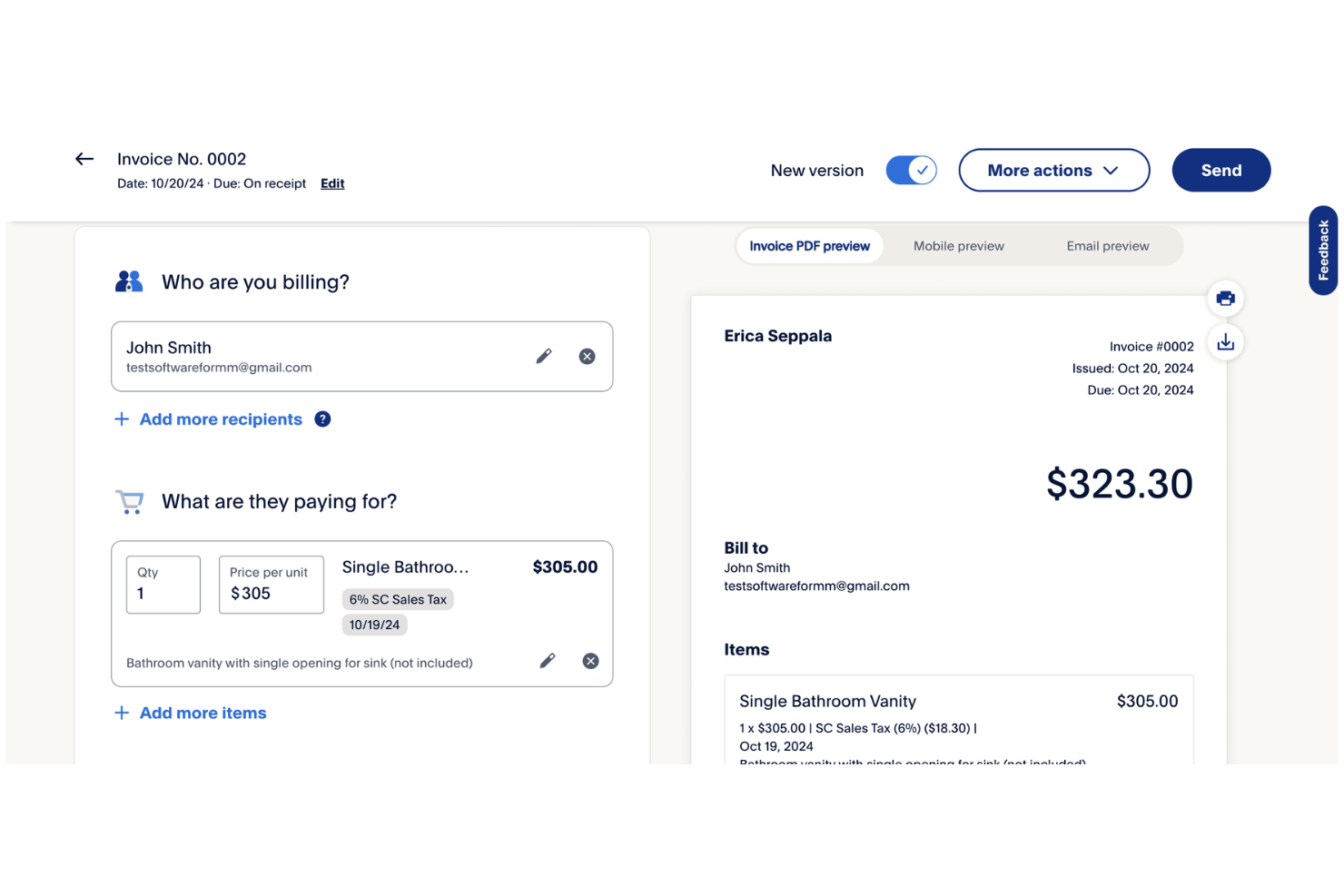
PayPal è un software di fatturazione online che ti consente di creare, inviare e gestire le fatture offrendo allo stesso tempo un sistema di pagamento integrato per carte di credito, carte di debito, PayPal e Venmo.
A chi è più adatto PayPal?
Liberi professionisti e piccole imprese che desiderano offrire ai clienti una vasta gamma di opzioni di pagamento.
Perché ho scelto PayPal
Ho scelto PayPal tra i migliori perché posso permettere ai clienti di pagare le fatture tramite carte di credito, carte di debito, PayPal o anche Venmo. Mi piace il fatto che posso aggiungere pagamenti parziali o mance direttamente nelle fatture, una richiesta frequente dei miei clienti. Il mio team utilizza PayPal per inviare fatture a clienti in diversi paesi e ricevere pagamenti in più valute senza necessità di configurazioni aggiuntive.
Caratteristiche principali di PayPal
- Cruscotto di monitoraggio delle fatture: Monitora in tempo reale le fatture inviate, visualizzate e pagate.
- Modelli di fattura personalizzabili: Aggiungi il tuo logo, i dettagli aziendali e le voci di spesa.
- Promemoria di pagamento automatici: Pianifica promemoria per sollecitare i clienti sui pagamenti in sospeso.
- Fatturazione multivaluta: Crea e invia fatture in oltre 25 valute.
Integrazioni di PayPal
PayPal offre integrazioni native con QuickBooks, Xero, WooCommerce, Shopify, BigCommerce, Salesforce e FreshBooks. È disponibile un'API per integrazioni personalizzate.
Pros and Cons
Pros:
- Accetta pagamenti tramite PayPal, Venmo e carte
- Riconoscimento immediato del marchio per la fiducia del cliente
- Offre pagamenti parziali e opzioni di mancia
Cons:
- Le commissioni di transazione sono più alte rispetto ai concorrenti
- Blocchi frequenti dell'account per importi elevati
Ideale per tenere traccia del tempo e delle spese
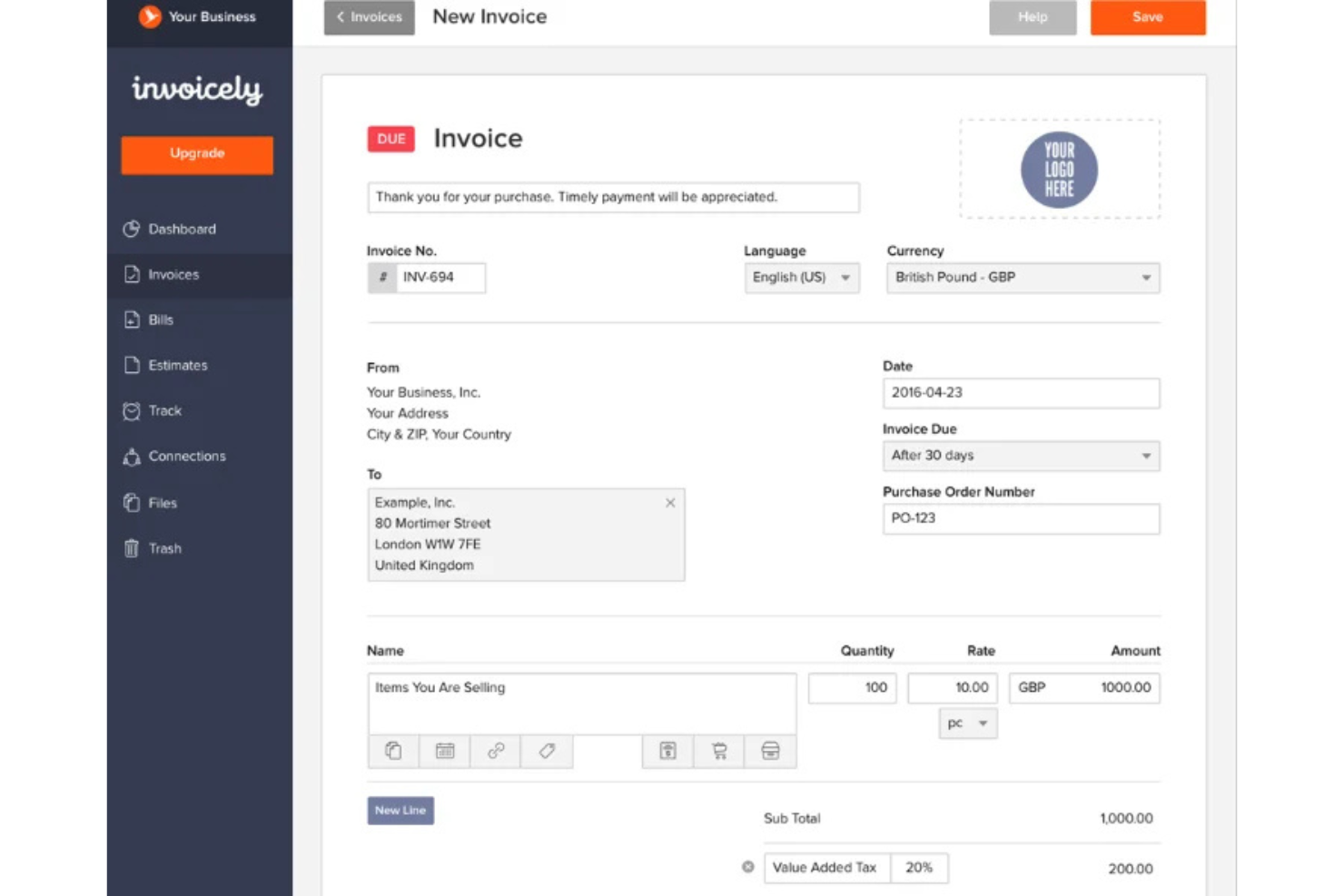
invoicely è una piattaforma software di fatturazione basata sul cloud che consente di creare fatture, tenere traccia delle ore fatturabili, gestire le spese e utilizzare più valute per piccole imprese e liberi professionisti.
Per chi è più adatto invoicely?
Liberi professionisti e piccole imprese che hanno bisogno di tenere traccia del tempo e delle spese oltre alla fatturazione.
Perché ho scelto invoicely
Ho scelto invoicely come una delle soluzioni migliori perché mi consente di tenere traccia delle ore fatturabili e delle spese direttamente all'interno di ogni fattura. Mi piace poter registrare il tempo dedicato a più progetti e convertire automaticamente quelle ore in voci della fattura. Il mio team riesce a gestire chilometraggio, spese e fatture ricorrenti tutto in un unico posto.
Caratteristiche principali di invoicely
- Supporto per più valute: Crea e invia fatture in oltre 160 valute.
- Branding personalizzato: Aggiungi il tuo logo, i tuoi colori e i dati della tua attività a ogni fattura.
- Integrazione dei pagamenti online: Accetta pagamenti tramite PayPal, Stripe e altri gateway.
- Gestione dei clienti: Memorizza i dati di contatto dei clienti e visualizza lo storico delle fatture per ciascun cliente.
Integrazioni di invoicely
invoicely offre integrazioni native con PayPal e Stripe per l'elaborazione dei pagamenti. È disponibile un'API per le integrazioni personalizzate.
Pros and Cons
Pros:
- Monitoraggio delle spese in più valute
- Registrazione delle ore fatturabili per progetto
- Calcolo automatico di imposte e sconti
Cons:
- Branding limitato nel piano gratuito
- Limite di cinque clienti nel piano base

Bonsai
Ideale per automatizzare la fatturazione ricorrente

Bonsai è una piattaforma software per la fatturazione dedicata a liberi professionisti e piccole imprese che offre fatturazione, gestione dei contratti, CRM per i clienti, monitoraggio del tempo e riscossione automatica dei pagamenti in un unico sistema.
Per chi è più indicato Bonsai?
Liberi professionisti e titolari di piccole imprese che hanno bisogno di automatizzare le fatture ricorrenti e gestire la fatturazione dei clienti da un'unica piattaforma.
Perché ho scelto Bonsai
Ho scelto Bonsai tra i migliori perché posso impostare fatture ricorrenti automatiche per i clienti, così la fatturazione avviene in modo programmato senza intervento manuale. Apprezzo che Bonsai mi permetta di collegare contratti e proposte direttamente alle fatture, mantenendo tutto organizzato in un unico luogo. Il mio team utilizza la programmazione dei pagamenti e i promemoria automatici per ridurre i mancati pagamenti e mantenere il flusso di cassa prevedibile.
Caratteristiche principali di Bonsai
- Portale cliente: I clienti possono visualizzare e pagare le fatture online.
- Supporto multivaluta: Emissione di fatture in diverse valute per clienti globali.
- Monitoraggio delle spese: Monitora e categorizza le spese insieme alle fatture.
- Strumenti di calcolo delle tasse: Calcola e aggiunge automaticamente le tasse alle fatture.
Integrazioni di Bonsai
Bonsai offre integrazioni native con QuickBooks, Zapier e Calendly, e mette a disposizione un'API per integrazioni personalizzate.
Pros and Cons
Pros:
- Contratti intelligenti con firma elettronica integrata
- Fatture auto-generate da proposte firmate
- Impostazioni automatiche di applicazione delle penali per ritardi
Cons:
- Nessun white-labeling nei piani base
- Creazione manuale dei progetti dalle proposte

Harvest
Ideale per l'integrazione del tempo fatturabile
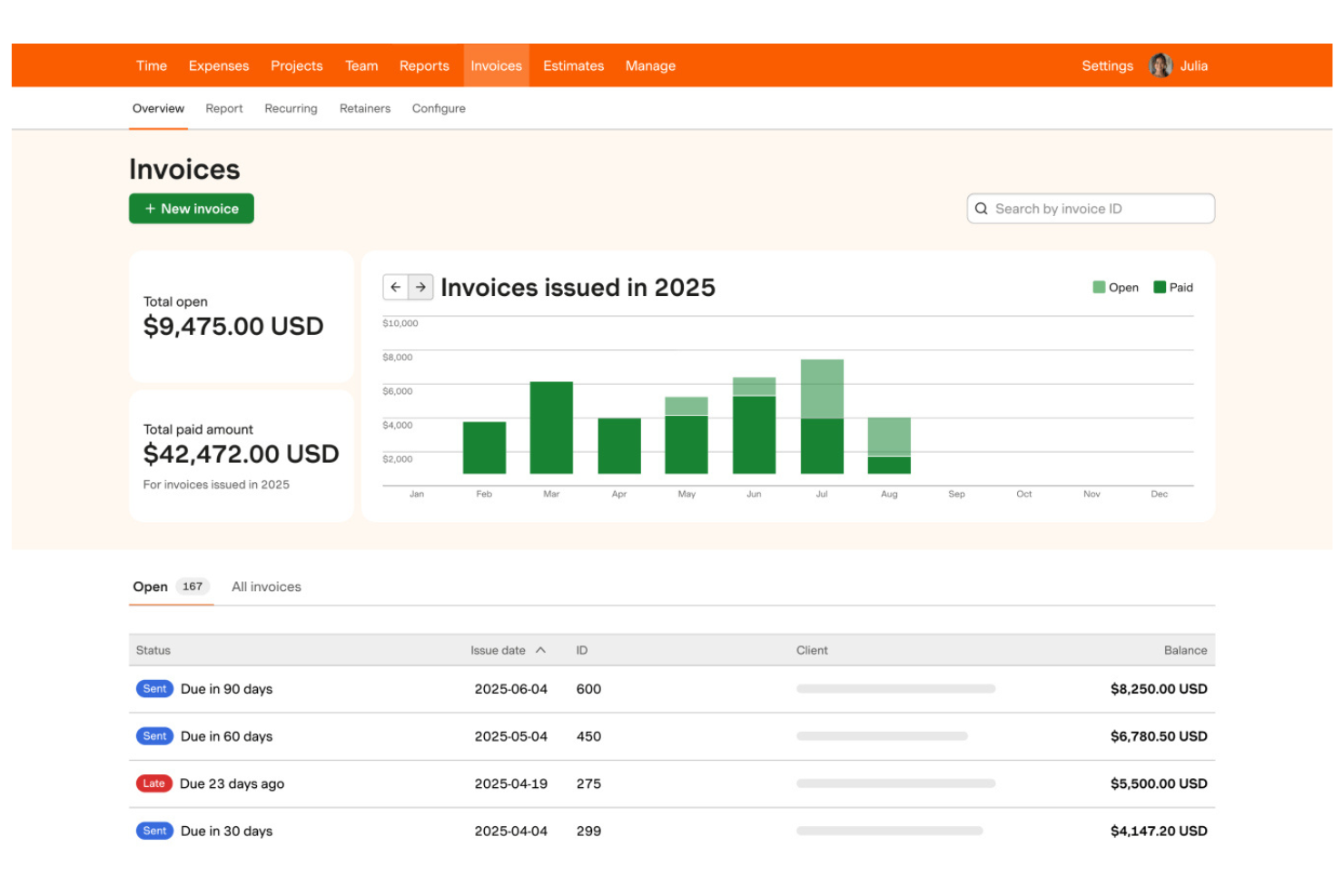
Harvest è un software per la registrazione del tempo e la fatturazione che consente ai team di tracciare le ore fatturabili, generare fatture dai fogli ore, gestire le spese e monitorare i budget di progetto in un'unica piattaforma.
Per chi è ideale Harvest?
Liberi professionisti e piccole agenzie che hanno bisogno di registrare le ore fatturabili e fatturare i clienti in base al tempo lavorato.
Perché ho scelto Harvest
Ho scelto Harvest tra i migliori perché posso trasformare le ore lavorate registrate in fatture con pochi clic, semplificando la fatturazione precisa ai clienti. Il mio team utilizza la funzione integrata di rilevazione delle spese per aggiungere costi rimborsabili direttamente alle fatture. Mi piace anche che Harvest permetta di monitorare i budget di progetto insieme alla fatturazione, così so sempre dove siamo a livello finanziario.
Caratteristiche principali di Harvest
- Promemoria di pagamento automatici: Invia promemoria programmati ai clienti per fatture non pagate.
- Fatturazione multi-valuta: Crea e invia fatture in diverse valute.
- Personalizzazione delle fatture: Aggiungi il tuo logo e modifica colori e layout delle fatture.
- Storico dettagliato delle fatture: Visualizza una cronologia delle creazioni, modifiche e pagamenti delle fatture.
Integrazioni Harvest
Harvest offre integrazioni native con QuickBooks Online, Xero, Stripe, PayPal, Asana, Trello, Basecamp, Slack e Google Workspace. Si collega anche a Zapier e fornisce un'API per integrazioni personalizzate.
Pros and Cons
Pros:
- Barre di avanzamento visive per il budget di progetto
- Conversione delle ore in fattura con un clic
- Integrazione diretta con i principali strumenti di project management
Cons:
- Assenza di un sistema di elaborazione pagamenti nativo
- Nessun portale clienti integrato per i pagamenti

Wave
Ideale per la fatturazione mobile su iOS e Android

Wave è un software di fatturazione basato su cloud che ti permette di creare, personalizzare e inviare fatture, gestire i contatti dei clienti, accettare pagamenti online e monitorare le entrate da una dashboard web o da app mobile.
Per chi è consigliato Wave?
Professionisti freelance e titolari di piccole imprese che desiderano gestire fatturazione e pagamenti dai propri dispositivi mobili.
Perché ho scelto Wave
Ho selezionato Wave tra i migliori perché posso fatturare i clienti, inviare promemoria di pagamento e accettare pagamenti direttamente dal telefono, sia su iOS che su Android. Apprezzo il fatto che l'app mobile mi permetta di creare e inviare fatture ovunque mi trovi, monitorare lo stato dei pagamenti e persino scansionare ricevute per la gestione delle spese. Il mio team utilizza le notifiche mobile di Wave per rimanere aggiornato sulle attività relative alle fatture senza dover effettuare l'accesso da desktop.
Funzionalità principali di Wave
- Modelli di fattura personalizzabili: Scegli e personalizza i modelli di fattura per adattarli al tuo brand.
- Calcolo automatico delle tasse: Applica e traccia automaticamente le imposte sulle fatture.
- Fatturazione multivaluta: Invia fatture e accetta pagamenti in diverse valute.
- Gestione dei clienti: Archivia e organizza i dettagli di contatto dei clienti all'interno della piattaforma.
Integrazioni di Wave
Le integrazioni native non sono elencate pubblicamente.
Pros and Cons
Pros:
- Fatturazione illimitata senza quota mensile
- App mobile supporta fatturazione e pagamenti
- Elaborazione dei pagamenti integrata per carte di credito
Cons:
- Commissioni elevate per pagamenti istantanei
- Nessuna funzione automatizzata di monitoraggio del tempo

Ideale per portali self-service per i clienti

Zoho Invoice è un software di fatturazione basato su cloud che consente di creare e inviare fatture, automatizzare i promemoria di pagamento, gestire le spese e offrire portali rivolti ai clienti per la gestione self-service dell’account.
A chi è più adatto Zoho Invoice?
Liberi professionisti e piccole imprese che desiderano offrire ai clienti un portale self-service per gestire fatture e pagamenti.
Perché ho scelto Zoho Invoice
Ho scelto Zoho Invoice tra i migliori perché posso dare ai clienti un portale personale dove consultare, scaricare e pagare direttamente le fatture. Mi piace che il mio team possa automatizzare i promemoria di pagamento e permettere ai clienti di monitorare lo storico dei pagamenti senza doverci contattare via email. Il portale permette inoltre ai clienti di aggiornare i propri dati di contatto e visualizzare le transazioni passate, risparmiandoci tempo nelle comunicazioni di andata e ritorno.
Funzionalità principali di Zoho Invoice
- Monitoraggio del tempo: Tieni traccia delle ore fatturabili e convertile in fatture.
- Gestione delle spese: Registra, categorizza e allega ricevute alle spese.
- Fatturazione multivaluta: Crea e invia fatture in più valute.
- Modelli di fattura personalizzati: Progetta e personalizza il layout delle fatture in base al tuo marchio.
Integrazioni di Zoho Invoice
Zoho Invoice offre integrazioni native con Zoho Books, Zoho CRM, Stripe, PayPal, Square, Razorpay e Slack. È disponibile una API per integrazioni personalizzate.
Pros and Cons
Pros:
- Portale completo per il pagamento self-service dei clienti
- Opzione di spedizione automatica delle fatture tramite posta ordinaria
- Integrazione profonda con le app dell’ecosistema Zoho
Cons:
- Limite di fatturato annuo per il piano gratuito
- Opzioni limitate di mappatura di domini personalizzati

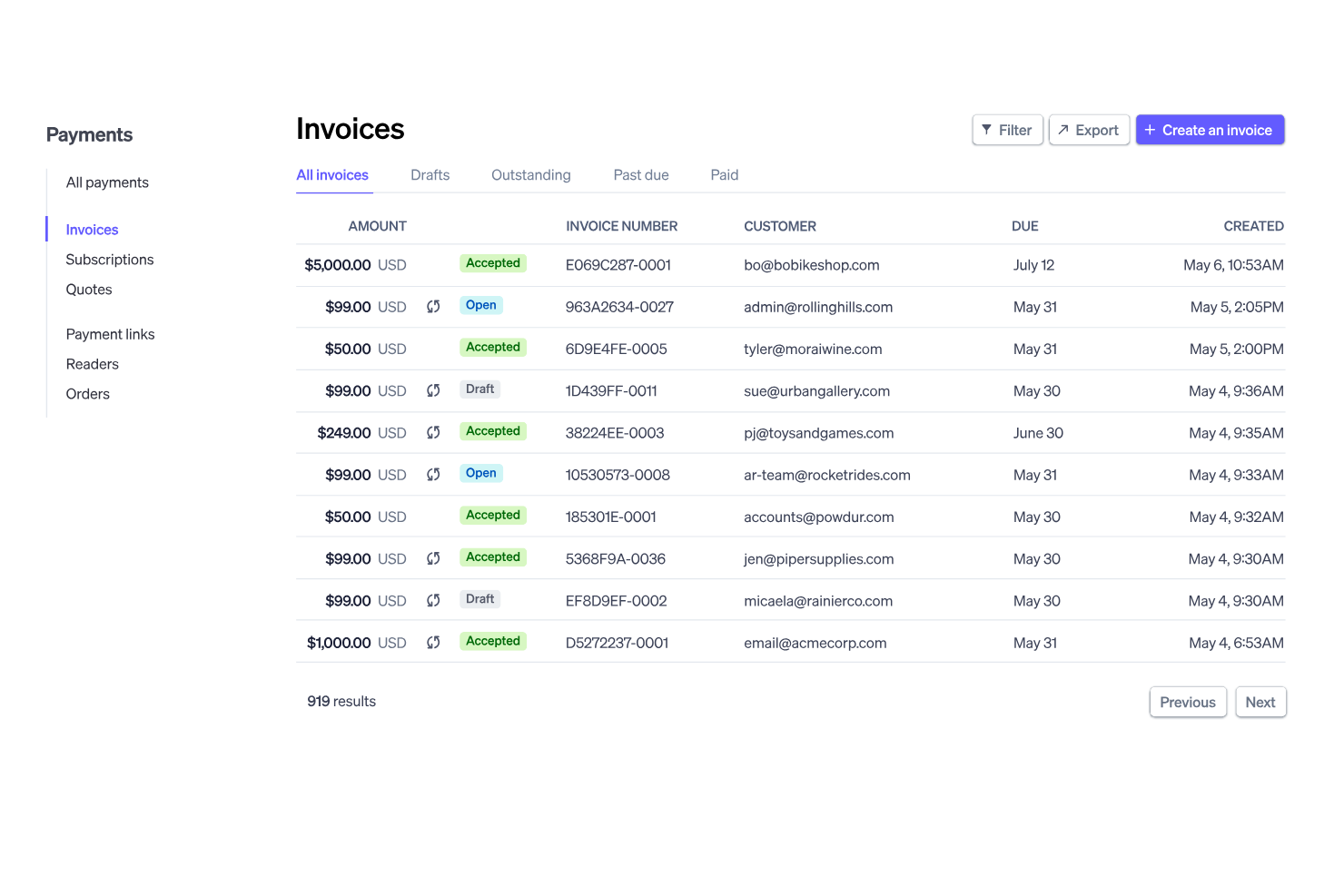
Stripe Invoicing è una piattaforma di fatturazione online che consente di creare, inviare e gestire fatture supportando un'ampia gamma di metodi di pagamento e flussi di lavoro di fatturazione automatizzata.
A chi è più adatto Stripe Invoicing?
Aziende globali e venditori online che hanno bisogno di accettare pagamenti in più valute e metodi di pagamento.
Perché ho scelto Stripe Invoicing
Ho scelto Stripe Invoicing tra i migliori perché posso inviare fatture che supportano decine di metodi di pagamento globali, comprese carte, bonifici bancari e portafogli locali. Il mio team utilizza il calcolo delle tasse integrato e la conversione automatica delle valute per fatturare clienti in diversi paesi. Mi piace anche la possibilità di automatizzare i promemoria di pagamento e la riconciliazione per le transazioni internazionali.
Funzionalità principali di Stripe Invoicing
- Modelli di fattura personalizzati: Crea e personalizza i layout delle fatture per adattarli al tuo marchio.
- Link di pagamento con un clic: Aggiungi link di pagamento sicuri direttamente alle fatture per pagamenti online rapidi.
- Monitoraggio dello stato delle fatture: Tieni traccia in tempo reale quando le fatture vengono visualizzate, pagate o sono scadute.
- Creazione multipla di fatture: Genera e invia più fatture contemporaneamente tramite caricamento CSV o API.
Integrazioni Stripe Invoicing
Stripe Invoicing offre integrazioni native con QuickBooks, Xero, NetSuite, FreshBooks e Salesforce. È disponibile un'API per integrazioni personalizzate.
Pros and Cons
Pros:
- Supporta oltre 135 valute per la fatturazione
- Accetta ACH, SEPA, carte e portafogli locali
- Ritentativi intelligenti per pagamenti con carta non riusciti
Cons:
- Commissioni di transazione più alte rispetto ai bonifici bancari
- Opzioni limitate di personalizzazione dei modelli di fattura


Refrens è una piattaforma di software per la fatturazione che consente di creare, personalizzare e inviare fatture, gestire i dati dei clienti, monitorare i pagamenti e gestire preventivi e ordini di acquisto.
Per chi è più adatto Refrens?
Freelance e piccole imprese in India che hanno bisogno di inviare fatture e promemoria di pagamento direttamente tramite WhatsApp.
Perché ho scelto Refrens
Ho scelto Refrens tra i migliori perché posso inviare le fatture direttamente ai clienti su WhatsApp, velocizzando la comunicazione e i cicli di pagamento. Mi piace che Refrens mi permetta di tracciare la consegna della fattura e lo stato di lettura direttamente dalla dashboard. Il mio team usa i link di pagamento integrati e i modelli di fattura già pronti per la GST per gestire la conformità e le riscossioni per i clienti in India.
Funzionalità principali di Refrens
- Gestione dei preventivi: Crea, invia e monitora i preventivi insieme alle fatture.
- Creazione di ordini di acquisto: Genera e gestisce ordini di acquisto per clienti e fornitori.
- Supporto multivaluta: Emissione di fatture in diverse valute per clienti internazionali.
- Monitoraggio delle spese: Registra e categorizza le spese aziendali all'interno della piattaforma.
Integrazioni di Refrens
Le integrazioni native non sono elencate pubblicamente.
Pros and Cons
Pros:
- Invio diretto delle fatture tramite WhatsApp
- Strumenti integrati per preventivi e ordini d'acquisto
- Il piano gratuito include fatture illimitate
Cons:
- Reportistica di base rispetto alle suite contabili
- Meno collegamenti con app di terze parti

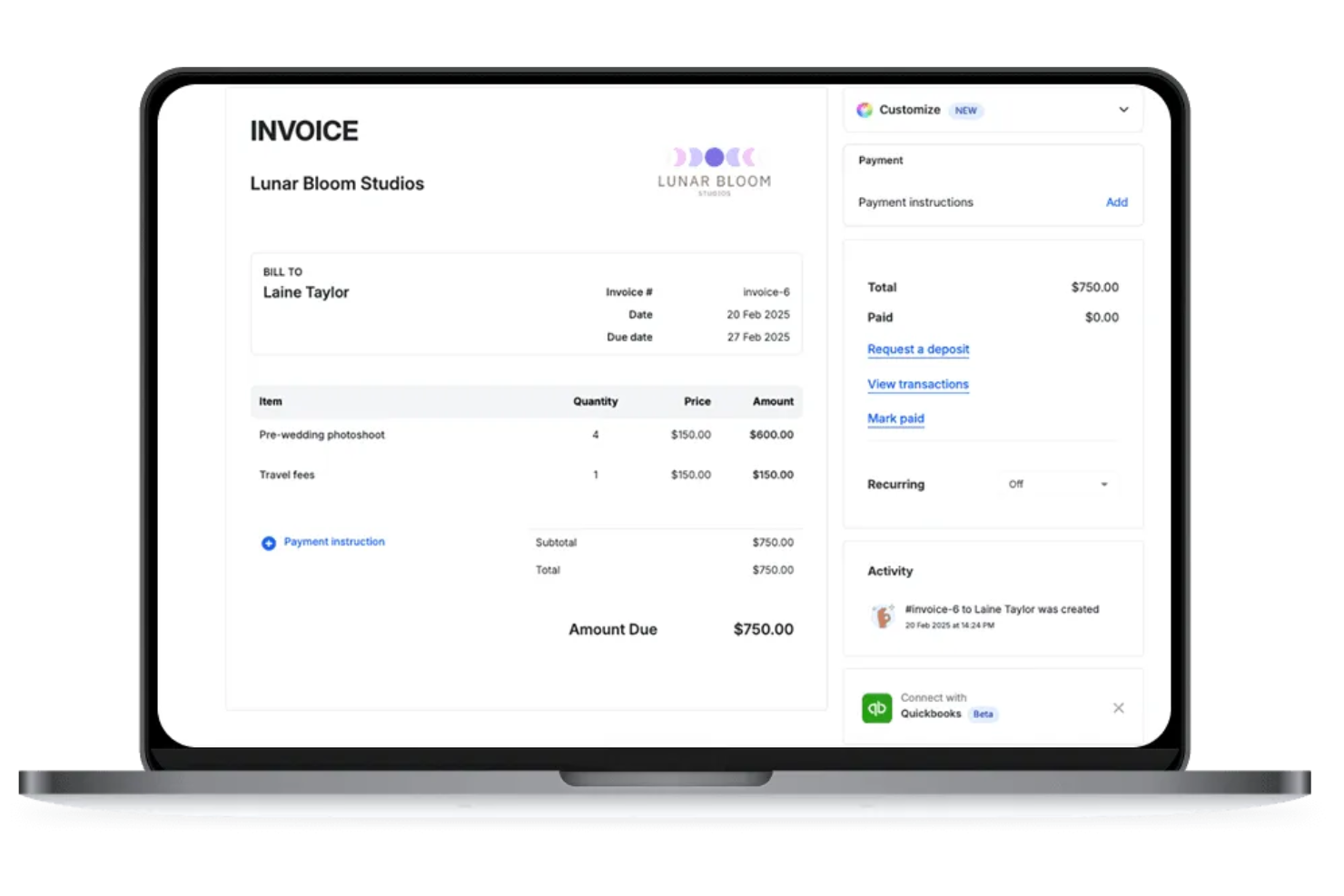
Bookipi è un software di fatturazione pensato principalmente per dispositivi mobili che ti consente di creare, inviare e gestire fatture, preventivi e ricevute, monitorando in tempo reale i pagamenti e l’attività dei clienti.
A Chi è Più Adatto Bookipi?
A freelance e piccoli imprenditori che necessitano di fatturazione mobile e tracciamento dei pagamenti in tempo reale.
Perché Ho Scelto Bookipi
Ho scelto Bookipi tra i migliori perché ricevo notifiche push istantanee quando i clienti visualizzano, pagano o interagiscono con le mie fatture. Mi piace poter tenere traccia in tempo reale dello stato delle fatture dal mio telefono, cosa che mi aiuta a gestire meglio i pagamenti. Il mio team utilizza Bookipi per inviare fatture e ricevere aggiornamenti immediati, così non perdiamo mai un pagamento.
Caratteristiche Principali di Bookipi
- Supporto multivaluta: Crea e invia fatture in più valute.
- Conversione preventivo in fattura: Trasforma i preventivi approvati direttamente in fatture.
- Dashboard di tracciamento pagamenti: Monitora in un unico posto fatture in sospeso, pagate e scadute.
- Generazione fattura PDF: Scarica e condividi le fatture come documenti PDF professionali.
Integrazioni Bookipi
Le integrazioni native non sono chiaramente documentate. Bookipi offre un’API per integrazioni personalizzate.
Pros and Cons
Pros:
- Conferme di lettura istantanee per le fatture inviate
- Interfaccia mobile-first per fatturazione in loco
- Raccolta firma direttamente su schermo del dispositivo mobile
Cons:
- Limite di 30 giorni per documenti nel piano gratuito
- Esportazione dati limitata per software fiscali
Altri software di fatturazione
Ecco alcune opzioni aggiuntive di software di fatturazione che non sono state incluse nel mio elenco, ma che vale comunque la pena prendere in considerazione:


Come Valuto i Software di Fatturazione DPM
Divido la mia valutazione in due livelli: i criteri di base che ogni strumento deve soddisfare—come la fatturazione legata ai progetti e il monitoraggio dei tempi di fatturazione—e i fattori di differenziazione che determinano il miglior abbinamento.
Funzionalità Principali (Requisiti Minimi per Questa Lista)
Quando seleziono gli strumenti per la mia lista, valuto ognuno su una scala da 0 (non offre la funzionalità) a 5 (eccelle in questo ambito) per ciascuna funzionalità principale elencata di seguito. Successivamente, calcolo il punteggio totale dello strumento convertendolo in percentuale. Ogni strumento deve raggiungere un punteggio totale minimo del 65% per essere considerato per l'inclusione.
- Fatturazione Basata su Progetto: Controllo se le fatture possono essere collegate a specifici progetti, traguardi o deliverable—non solo generate come documenti indipendenti scollegati dal lavoro svolto.
- Fatturazione per Tempo e Spese: Le ore e le spese di progetto tracciate dovrebbero confluire nelle voci di fattura, preferibilmente con tariffe fatturabili configurabili per ogni membro del team o ruolo.
- Integrazione con la Gestione Progetti: Sia nativa sia tramite connettori per strumenti come Asana o Jira, valuto quanto i dati di project management siano integrati nei flussi di lavoro di fatturazione.
- Canoni e Fatturazione Ricorrente: Le agenzie che gestiscono canoni mensili hanno bisogno di tracciamento del prelievo e fatture generate automaticamente, quindi cerco impostazioni di fatturazione ricorrente flessibili.
- Gestione Clienti e Pagamenti: Analizzo come i clienti ricevono e pagano le fatture—accesso al portale, gateway di pagamento supportati, promemoria automatici e supporto multivaluta sono tutti elementi importanti.
- Report Finanziari e Sincronizzazione Contabile: I report sulla redditività dei progetti e la sincronizzazione bidirezionale con piattaforme come QuickBooks o Xero aiutano a mantenere allineate fatturazione e contabilità.
Una volta che ho una lista di strumenti che soddisfano i criteri, valuto ciò che distingue ciascuna piattaforma.
Fattori Differenzianti (Cosa Distingue i Fornitori)
Ecco come confronto i diversi fornitori:
Caratteristiche Distintive
Gli avvisi di superamento budget sono fondamentali quando si gestiscono più progetti cliente contemporaneamente—cerco strumenti che segnalino quando un progetto rischia di diventare una perdita prima che sia troppo tardi. Le analisi dell’utilizzo delle risorse aggiungono un ulteriore livello, mostrando ore fatturabili vs. non fatturabili per membro del team, così puoi regolare il personale anche a metà sprint. Valuto anche i flussi di approvazione per timesheet e bozze di fattura, poiché le agenzie con più project manager necessitano di una revisione prima che qualcosa arrivi al cliente.
Oltre le Caratteristiche
L’ecosistema di integrazione è una delle prime cose che controllo—strumenti come Harvest e Scoro si collegano in modo diverso con QuickBooks, Xero e piattaforme di project management, e le lacune qui creano inserimenti manuali di dati che vanificano lo scopo dello strumento. Anche la struttura dei prezzi è molto importante per le agenzie, specialmente se sono disponibili licenze per collaboratori esterni a un costo inferiore rispetto alle licenze complete. Valuto anche il supporto all’onboarding, poiché la migrazione da fogli di calcolo o da strumenti legacy a ciclo di progetto già avviato può bloccare la fatturazione se la transizione non è ben supportata.
Come scegliere il software di fatturazione
È facile perdersi tra lunghi elenchi di funzionalità e strutture tariffarie complesse. Per aiutarti a rimanere concentrato mentre affronti il tuo particolare processo di selezione del software, ecco una lista di fattori da tenere presenti:
| Fattore | Cosa considerare |
|---|---|
| Scalabilità | Il software sarà in grado di gestire più clienti, fatture e utenti man mano che la tua attività cresce? Cerca eventuali limiti al numero di utenti o fatture. |
| Integrazioni | Si collega in modo nativo agli strumenti di contabilità, gestione delle relazioni con i clienti o pagamento? Verifica la compatibilità con gli strumenti che già utilizzi. |
| Personalizzazione | Puoi adattare i modelli di fattura, i flussi di lavoro e l'identità del marchio alle esigenze della tua attività? Evita gli strumenti con formati rigidi. |
| Facilità d'uso | Il tuo gruppo di lavoro e i tuoi clienti troveranno l'interfaccia intuitiva? Provala con utenti reali prima di prendere una decisione. |
| Implementazione e avviamento | Quanto tempo servirà per iniziare a utilizzare il software? Considera la migrazione dei dati, la formazione e le risorse disponibili per l'avviamento. |
| Costo | I livelli tariffari sono chiari e prevedibili con la crescita della tua attività? Fai attenzione ai costi nascosti o agli addebiti per utenti o fatture aggiuntivi. |
| Misure di sicurezza | Il software offre crittografia, controlli degli accessi e conformità agli standard sulla privacy dei dati? Informati sui registri di controllo e sulle certificazioni. |
| Disponibilità dell'assistenza | Quali canali di assistenza vengono offerti e in quali orari? Valuta se hai bisogno di supporto 24 ore su 24, 7 giorni su 7, o di una gestione dedicata dell'account. |
Che cos'è il software di fatturazione?
Il software di fatturazione è uno strumento digitale che aiuta le aziende a creare, inviare e gestire le fatture relative a beni o servizi. Automatizza i processi di fatturazione, monitora i pagamenti e organizza le informazioni sui clienti in un unico posto.
I gruppi di lavoro utilizzano il software di fatturazione per ridurre il lavoro manuale, migliorare la precisione e mantenere registri chiari ai fini contabili e di conformità.
Caratteristiche
Quando selezioni un software per la fatturazione, presta attenzione alle seguenti caratteristiche principali:
- Creazione delle fatture: Crea e personalizza le fatture con il tuo marchio, gli addebiti dettagliati e i termini di pagamento, quindi inviale direttamente ai clienti.
- Fatturazione ricorrente: Configura fatture automatiche per i clienti abituali o per i servizi in abbonamento, riducendo l'inserimento manuale dei dati e i mancati pagamenti.
- Monitoraggio dei pagamenti: Controlla quali fatture sono state pagate, sono scadute o sono ancora insolute e ricevi aggiornamenti in tempo reale sullo stato dei pagamenti.
- Elaborazione dei pagamenti online: Consenti ai clienti di pagare le fatture tramite gateway di pagamento integrati, come carte di credito o bonifici bancari.
- Gestione dei clienti: Archivia e organizza i dati di contatto dei clienti, la cronologia della fatturazione e i registri delle comunicazioni in un unico luogo.
- Monitoraggio delle spese: Registra e categorizza le spese aziendali, quindi collegale alle fatture o ai progetti per una fatturazione accurata.
- Supporto multivaluta: Emetti fatture e accetta pagamenti in valute diverse per servire i clienti internazionali.
- Calcolo delle imposte: Applica automaticamente alle fatture le aliquote fiscali corrette in base alla località o al tipo di prodotto.
- Modelli personalizzabili: Personalizza layout, colori e loghi delle fatture affinché corrispondano all'identità del tuo marchio.
- Report e analisi: Genera report finanziari su ricavi, fatture insolute e tendenze dei pagamenti per supportare le decisioni aziendali.
Funzionalità comuni di intelligenza artificiale nei software per la fatturazione
Oltre alle funzionalità standard dei software per la fatturazione elencate sopra, molte di queste soluzioni stanno integrando l'intelligenza artificiale con funzionalità come:
- Estrazione automatizzata dei dati: L'intelligenza artificiale analizza ricevute, bollette o e-mail per estrarre i dati rilevanti delle fatture, riducendo l'inserimento manuale dei dati e gli errori.
- Previsione intelligente dei pagamenti: L'intelligenza artificiale analizza la cronologia dei pagamenti dei clienti per prevedere quando è probabile che le fatture vengano pagate, aiutando a pianificare il flusso di cassa.
- Rilevamento delle anomalie: L'intelligenza artificiale segnala modelli di fatturazione insoliti o potenziali frodi monitorando i dati delle fatture alla ricerca di incoerenze o valori anomali.
- Elaborazione del linguaggio naturale per le richieste: Le funzionalità di chat o ricerca basate sull'intelligenza artificiale consentono agli utenti di porre domande sulle fatture o sui pagamenti in linguaggio naturale e ottenere risposte immediate.
- Categorizzazione automatizzata delle fatture: L'intelligenza artificiale classifica le fatture per tipo, cliente o progetto, facilitando l'organizzazione e la reportistica.
- Pianificazione personalizzata dei promemoria: L'intelligenza artificiale determina il momento e la frequenza ottimali per inviare promemoria di pagamento in base al comportamento del cliente e alle risposte precedenti.
Vantaggi
L'implementazione di un software per la fatturazione offre diversi vantaggi al tuo team e alla tua azienda. Eccone alcuni:
- Cicli di fatturazione più rapidi: La creazione e l'invio automatici delle fatture ti aiutano a ricevere i pagamenti più rapidamente riducendo i passaggi manuali.
- Monitoraggio migliorato dei pagamenti: Gli aggiornamenti sullo stato in tempo reale e i promemoria facilitano il monitoraggio delle fatture insolute e scadute.
- Riduzione degli errori manuali: I calcoli integrati, i modelli e l'estrazione dei dati basata sull'intelligenza artificiale riducono al minimo gli errori nella fatturazione e nella reportistica.
- Migliore esperienza per i clienti: I portali per i clienti e le opzioni di pagamento online offrono ai clienti maggiore flessibilità e trasparenza.
- Semplificazione della conformità: I calcoli automatici delle imposte e i registri di controllo aiutano a mantenere l'organizzazione e a soddisfare i requisiti normativi.
- Processi scalabili: L'accesso multiutente e l'automazione dei flussi di lavoro supportano la crescita dell'azienda senza aumentare il carico amministrativo.
- Informazioni finanziarie utili: Le funzionalità di report e analisi offrono una visione chiara dei ricavi, del flusso di cassa e delle tendenze dei pagamenti.
Costi e prezzi
La scelta di un software per la fatturazione richiede la comprensione dei diversi modelli e piani tariffari disponibili. I costi variano in base alle funzionalità, alle dimensioni del team, ai componenti aggiuntivi e ad altri fattori. La tabella seguente riassume i piani più comuni, i relativi prezzi medi e le funzionalità tipicamente incluse nelle soluzioni software per la fatturazione:
Tabella comparativa dei piani per i software di fatturazione
| Tipo di piano | Prezzo medio | Funzionalità comuni |
|---|---|---|
| Piano gratuito | $0 | Creazione di fatture di base, gestione limitata dei clienti, report semplici e assistenza via email. |
| Piano personale | $5-$15/user/month | Fatture illimitate, monitoraggio dei pagamenti, modelli di base, pagamenti online e monitoraggio di base delle spese. |
| Piano aziendale | $20-$40/user/month | Accesso multiutente, report avanzati, fatturazione ricorrente, integrazioni e modelli personalizzabili. |
| Piano aziendale | $50-$100/user/month | Sicurezza avanzata, assistenza dedicata, automazione dei flussi di lavoro, integrazioni personalizzate e accesso API. |
Domande frequenti sul software di fatturazione
Ecco alcune risposte alle domande comuni sul software di fatturazione:
Il software di fatturazione può gestire più valute e lingue?
Sì, molte soluzioni di fatturazione supportano funzionalità multivaluta e multilingua. Questo è particolarmente utile per gli imprenditori che lavorano con clienti internazionali o operano in regioni diverse, poiché contribuisce a garantire che le fatture professionali siano accurate e facili da comprendere per i clienti.
Quanto è sicuro il software di fatturazione per la conservazione dei dati finanziari?
La maggior parte dei software di fatturazione utilizza la crittografia, i controlli degli accessi e regolari verifiche di sicurezza per proteggere i dati finanziari e le informazioni sul conto bancario. Verifica sempre la conformità a standard come GDPR o SOC 2 e chiedi informazioni su funzionalità come i registri di controllo e le autorizzazioni degli utenti per mantenere al sicuro le informazioni sensibili.
È possibile automatizzare le fatture ricorrenti e i promemoria di pagamento?
Sì, la maggior parte delle moderne piattaforme per app di fatturazione consente di programmare fatture ricorrenti e configurare promemoria automatici per i pagamenti dopo una scadenza mancata. Questo riduce il lavoro di follow-up manuale, aiuta a evitare i mancati pagamenti e mantiene prevedibile il flusso di cassa.
Quali integrazioni dovrei cercare in un software di fatturazione?
Cerca integrazioni con il software di contabilità, il CRM e gli strumenti di gestione dei progetti. Dovresti inoltre assicurarti che si colleghi a gateway di pagamento come Apple Pay e Google Pay o persino a un sistema POS se gestisci transazioni di persona. Queste connessioni aiutano a evitare l’inserimento duplicato dei dati e mantengono collegati i processi finanziari della tua azienda.
Quanto è facile migrare da fogli di calcolo o da un altro strumento di fatturazione?
La maggior parte dei fornitori offre una transizione intuitiva tramite strumenti di importazione, modelli o assistenza durante l’implementazione per aiutarti a migrare i dati. Che tu stia passando da un foglio di calcolo manuale o da uno strumento di fatturazione gratuito, verifica la disponibilità di guide dettagliate o servizi di migrazione per rendere più semplice la transizione e gestire l’intero processo di fatturazione.