


Avis sur Accelo : avantages, inconvénients, fonctionnalités et tarifs



Accelo is a great choice for professional services teams seeking a unified platform to manage client communications, service delivery, resource utilization, billing, and project profitability.
If you’re comparing tools to replace a patchwork of spreadsheets, time-tracking software, and standalone billing systems, Accelo is a comprehensive professional services automation (PSA) platform built for B2B service teams that want one system to manage projects, resources, and client work. With Accelo, you’ll gain real-time visibility into project profitability, delivery risks, and actionable insights into bottlenecks that are slowing your teams down.
In this review, I’ll break down Accelo’s strengths, limitations, and whether its “quote-to-cash” approach fits the needs of teams that want reliable project resource management without increasing administrative overhead.
Accelo Evaluation Summary

- Pricing upon request
- Free demo available
Pourquoi faire confiance à nos recommandations de logiciels
Notre équipe teste et évalue des logiciels depuis 2012. En tant que chefs de projet nous-mêmes, nous savons à quel point il est difficile — et important — de choisir le bon logiciel.
Pour ce guide, nous avons évalué les outils grâce à des tests pratiques et une recherche indépendante, en notant les outils selon nos critères de sélection. Nous nous appuyons également sur les enseignements de leaders d’opinion du secteur et de professionnels de la gestion de projet en activité.
Nos avis reflètent notre jugement éditorial humain, et non un argumentaire de vente.
Réviseurs experts:
Accelo Overview
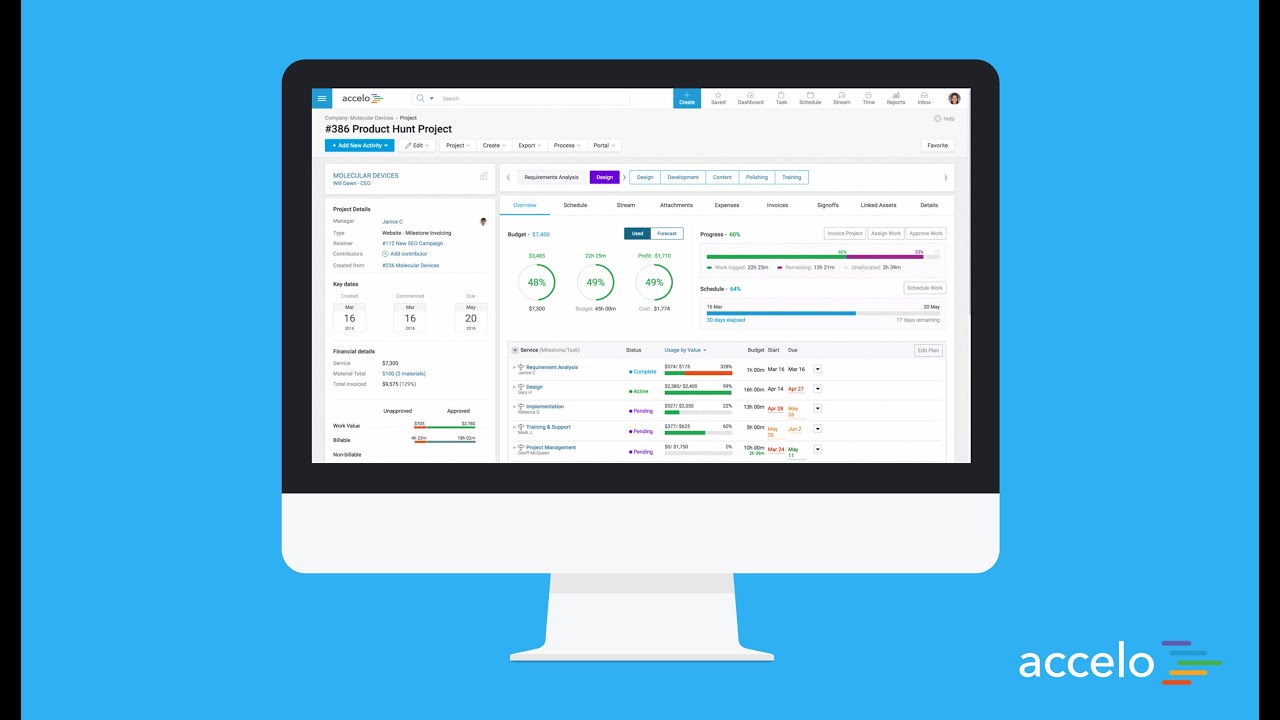
Accelo is a unified PSA platform for service teams that want their project management software, time tracking, client communication, and billing to work together rather than operate as disconnected workflows. Instead of stitching tools together, Accelo serves as a single source of truth where project plans, budgets, schedules, and client activity stay aligned as work moves from quote to kickoff to delivery.
What stands out is Accelo’s focus on operational control, AKA professional services automation (PSA), that guides service delivery across teams and directly affects profitability. Their niche is supporting a variety of work structures to address the full range of client work on a single platform. Built for teams that switch between handling recurring client work, multi-phase projects, one-time projects, ad-hoc requests, and ongoing retainers, Accelo provides transparency across the organization.
pros
-
Unifies operations in one platform, from project management and resource management, to CRM, billing, and time tracking.
-
Automates billable time capture, expense tracking, and invoicing workflows, and provides real-time visibility into budgets, utilization, and margins.
-
Adaptable to a wide range of service-based business models, including fixed-fee projects, ongoing retainers, or both.
cons
-
Accelo packs a lot of information into each screen, which can be overwhelming at first and may add to the learning curve for teams used to lightweight tools.
-
While standard reports cover most use cases, teams with niche metrics or complex multi-project views may find themselves wanting more flexibility.
-
While the mobile app allows time logging and basic project viewing, full project management and resource planning still require the web version.
Is Accelo Right For Your Needs?
Who Would be a Good Fit for Accelo?
Accelo tends to resonate with professional services teams that have outgrown lightweight project management software and now need tighter control over budgets, resources, service delivery and project profitability. Accelo is especially useful when you’re juggling a mix of project types—fixed-fee engagements, monthly retainers, ongoing support work—and you want a PSA platform that keeps financials and delivery aligned without adding enterprise-level complexity.
-
Engineering and Architectural Firms
Firms with multi-phase, highly structured projects benefit from Accelo’s configurable workflows and milestone tracking. Its ability to connect project resource management, budget burn, and time tracking gives engineering leaders a clearer sense of whether each phase is pacing toward its goals.
-
IT Services & Consulting Firms
IT and technology service providers often operate with recurring contracts, SLAs, and consulting projects running in parallel. Accelo’s real-time visibility into workloads, profitability, and contract performance helps leaders make better decisions about staffing, utilization, and whether a project is veering off plan.
-
Marketing, Advertising, and Creative Agencies
Agencies that manage a mix of campaign work, production schedules, and recurring client support appreciate how Accelo automates time capture, client updates, and budget alerts. The platform helps recover billable hours that often slip through the cracks and reduces the administrative load that creative teams typically struggle with.
-
Managed Service Providers
Benefit from Accelo’s ability to join ticketing, quoting, invoicing, and project management in one platform, streamlining workflows and saving significant time.
-
Legal and Financial Advisory Practices
The platform’s robust billing, retainer management, and reporting features help maintain compliance and client transparency.
-
Accounting & Business Consulting Firms
Consulting teams often rely on strong coordination between sales, delivery, and finance. Accelo’s integrated sales pipelines, scopes, and delivery workflows help reduce friction during handoffs and ensure actual work matches what was sold, making invoicing cleaner and client communication smoother.
Who Would be a Bad Fit for Accelo?
Accelo may not be the best choice for businesses that need industry-specific functionalities outside of professional services, or for anyone who needs a simpler, more intuitive tool. Also, if your business thrives on mobility, Accelo may be restrictive due to the mobile app’s lack of functionality compared to its desktop version.
-
Logistics Companies
Supply chain tracking and on-site resource planning, essential to logistics, aren’t supported by Accelo’s service-oriented design.
-
Solo Consultants
The platform can be overly complex and costly for individuals or very small teams with fewer clients.
-
Retail Businesses
You won’t find tools for sales tracking, stock control, or customer point-of-sale systems.
-
Education Institutions
Lacks student management and learning workflow features needed for academic setups.
-
Manufacturing Companies
Accelo lacks production planning, inventory management, and logistics features crucial to your workflows.
-
Large Enterprises
You might need deeper customization, advanced reporting, and ERP-level integrations that Accelo doesn’t offer.
Notre méthodologie d'évaluation
Comment nous testons et notons les outils
Nous avons passé des années à construire, affiner et améliorer notre système de test et de notation de logiciels. Notre grille d’évaluation est conçue pour capturer les subtilités de la sélection de logiciels et ce qui rend un outil efficace, en mettant l’accent sur les aspects critiques de la prise de décision. Ci-dessous, vous pouvez voir exactement comment notre processus de test et de notation fonctionne sur sept critères. Cela nous permet de fournir une évaluation impartiale des logiciels selon leur fonctionnalité principale, leurs fonctionnalités remarquables, leur facilité d’utilisation, l’onboarding, le support client, les intégrations, les avis clients et le rapport qualité/prix.
Fonctionnalités principales (25 % du score final)
Le point de départ de notre évaluation est toujours la fonctionnalité principale de l’outil. Dispose-t-il des fonctionnalités et caractéristiques de base attendues par l’utilisateur ? Certaines de ces fonctionnalités de base sont-elles réservées aux formules tarifaires supérieures ? Nous nous attendons à ce qu’un outil soit à la hauteur des capacités de base de ses concurrents.
Fonctionnalités remarquables (25 % du score final)
Ensuite, nous évaluons les fonctionnalités remarquables et peu communes qui vont au-delà de la fonctionnalité de base habituellement retrouvée dans ce type d’outils. Un score élevé reflète des fonctionnalités spécialisées ou uniques qui rendent le produit plus rapide, plus efficace, ou offrent une valeur supplémentaire à l’utilisateur. Nous évaluons également la facilité d’intégration avec d’autres outils couramment présents dans l’environnement technique pour étendre la puissance et l’utilité du logiciel. Les outils offrant de nombreuses intégrations natives, des connexions tierces et un accès API pour créer des intégrations personnalisées obtiennent la meilleure note.
Facilité d’utilisation (10 % du score final)
Nous considérons la rapidité et la facilité d’exécution des tâches principales à l’aide de l’outil. Un logiciel bien noté est conçu intelligemment, intuitif à utiliser, propose des applications mobiles, fournit des modèles et simplifie les tâches relativement complexes.
Onboarding (10 % du score final)
Nous savons à quel point l’adoption rapide par l’équipe est cruciale lors de la mise en place d’une nouvelle plateforme. Nous évaluons donc la facilité avec laquelle un utilisateur peut apprendre et utiliser le logiciel avec un minimum de formation. Nous vérifions la rapidité avec laquelle un membre peut s’installer et démarrer sans expérience préalable. Les solutions ayant une note élevée nécessitent peu ou pas de support.
Support client (10 % du score final)
Nous examinons la rapidité et la facilité d’obtention d’une aide par téléphone, chat en direct ou base de connaissances. Les outils et sociétés proposant un support en temps réel obtiennent la meilleure note, tandis que les chatbots sont les moins bien notés.
Avis clients (10 % du score final)
Au-delà de nos propres tests et évaluations, nous tenons compte du net promoter score des clients actuels et passés. Nous étudions la probabilité, pour eux, de choisir à nouveau l’outil pour ses fonctionnalités principales. Un logiciel ayant une note élevée reflète un score NPS élevé de la part des utilisateurs actuels ou passés.
Rapport qualité/prix (10 % du score final)
Enfin, en tenant compte de tous les autres critères, nous comparons le prix moyen des forfaits d’entrée de gamme aux fonctionnalités principales et considérons la valeur des autres critères d’évaluation. Un logiciel qui en offre davantage pour moins cher sera mieux noté.
Core Features
Project Management
Accelo supports structured project delivery with planning tools, task tracking, milestones, and budget visibility. Project managers can monitor progress in real time and keep scope, timelines, and resources aligned within one project management software platform.
Client Relationship Management (CRM)
Accelo’s built-in CRM keeps client data, pipelines, emails, and activity in one place, making it easier to track opportunities and maintain continuity as work moves from sales to delivery. For companies already using HubSpot CRM, Accelo integrates seamlessly, eliminating duplicate manual entry from prospect to contract to project delivery and invoicing.
Time Tracking and Billing
Billable hours flow directly from timesheets into project budgets and invoices. Automated billing rules help teams reduce admin overhead and ensure accurate, timely invoicing across projects and retainers.
Workflow Automation
Accelo automates repetitive tasks such as assignments, notifications, and status updates, so teams spend less time on manual processes and more time on client work.
Resource Management
The platform provides visibility into team capacity and availability, supporting more accurate scheduling and project resource management across simultaneous engagements.
Reporting and Analytics
Dashboards and configurable reports surface profitability, utilization, workload, and financial performance, giving leaders the insight needed for confident, data-driven decisions.

Standout Features
Quote-to-Cash Automation
Accelo simplifies the entire quote-to-cash process by connecting sales proposals, contracts, project delivery, billable hours, and invoicing in one automated workflow, reducing handoff errors, shortening billing cycles, and giving teams a clearer view of revenue as work progresses.
Client Portal
Accelo’s client portal provides a transparent, self-serve experience where clients can check project status, view invoices, approve work, and access shared communications. It reduces back-and-forth emails and helps build trust through consistent visibility.

Ease of Use
Accelo is approachable for most teams, but its all-in-one structure means there’s more to learn upfront than with lightweight project management software. New users may need time to get comfortable with the depth of features, especially if they’re coming from simpler tools or a patchwork of apps.
The payoff is that once teams understand how the pieces connect—projects, time, billing, and client activity—the platform becomes noticeably faster to work in. Clear documentation, in-app guidance, and responsive support help shorten the onboarding curve, and many users find that Accelo’s functionality ultimately streamlines their day-to-day workflow.

Onboarding
Accelo’s onboarding blends self-paced learning with hands-on support, so teams can move at their own speed while still getting expert guidance when it counts. The platform includes clear tutorials, step-by-step checklists, and a searchable help center that’s genuinely useful, not just superficial articles.
For businesses with more complex delivery models, Accelo offers personalized onboarding and training sessions. These tailored sessions walk teams through real workflows—projects, retainers, billing, and resource planning—so everyone understands how the system fits into their day-to-day work. Many teams reach meaningful value within a few weeks.

Customer Support
Accelo’s support team is responsive and knowledgeable, with multiple channels—live chat, email, and a detailed help center—available when you need them. Users often highlight how quickly issues are resolved and how practical the guidance is, especially during onboarding or workflow setup. The combination of searchable documentation, community forums, and real human expertise makes it easier for teams to stay productive without prolonged downtime.

Integrations
Accelo integrates with your existing tech stack, including popular platforms like HubSpot, Slack, Google Workspace, Microsoft 365, QuickBooks, Xero, and other communication and accounting apps. Data syncs cleanly between systems, reducing manual entry. For teams with unique requirements, Accelo’s API supports custom integrations to connect internal systems or specialized apps without patchwork workarounds.

Value for Money
Accelo offers strong value for service teams because it replaces a stack of separate tools—project management software, time tracking, CRM, billing, and reporting—with one connected platform. For organizations trying to reduce tool sprawl, this consolidation alone can lower costs and simplify operations. Add automation, real-time visibility, and fewer integration failures, and the return on investment becomes even greater as the team scales.
- Professional: Includes core project and client management, basic automation, and time tracking suitable for small teams beginning to centralize operations.
- Business: Adds retainer and ticket management features for growing service teams managing ongoing client work.
- Advanced: Provides enhanced automation, advanced reporting, and customization options tailored for scaling organizations with complex workflows.

New Product Updates from Accelo

Accelo Rebuilds Mobile App for Project and Time Management
Accelo’s rebuilt iOS and Android app lets users review assigned work, update task details, create new tasks, and manage timesheets from mobile devices. Changes sync back to Accelo so project managers can work from more current delivery data. Highlights include:
- My Work View: Review assigned tasks across projects by deadline, status, and completion.
- Task Updates: Edit priorities, due dates, assignments, estimates, and status from mobile.
- Task Creation: Create new work with project, assignee, date, and effort details.
- Mobile Timesheets: Log, edit, review, and submit time from the app.
- Task Filters: Filter work by client, project, deadline, priority, and workflow status.
- Automatic Sync: Keep mobile updates synchronized with Accelo project records.
Visit Accelo’s official site for more details.
 for more details.
Accelo Adds Quote Designer and Pipeline Management
Accelo is extending the client lifecycle with new quoting tools and clearer pipeline visibility. Teams can generate client-ready quotes from existing scoped work, track progress, and improve sales oversight without leaving Accelo. Highlights include:
- Quote Designer: Create branded client-ready quotes from work already scoped in Accelo.
- Pipeline Views: Review opportunity value, win probability, quote status, expiration date, client, and owner.
- Quote Status Tracking: Track proposals through Published, Sent, Approved, and Declined stages.
- Version History: Preserve previous quote versions and reasons for changes.
- Audit Log: Review quote activity and changes across the proposal lifecycle.
- Quote Revisions: Update existing quotes without recreating them or losing prior history.
Visit Accelo’s official site for more details.
Accelo Specs
- API
- Billing/Invoicing
- Budgeting
- CRM Integration
- Dashboards
- Data Export
- Data Import
- Document Management
- Expense Tracking
- External Integrations
- Financial Analysis
- Forecasting
- Gantt Charts
- Inventory Tracking
- Multi-Currency
- Multi-User
- Notifications
- Project Management
- Resource Management
- Scheduling
- Status Notifications
- Task Scheduling/Tracking
- Time Management
- Workflow Management
Accelo FAQs
How does Accelo help reduce tool sprawl?
Does Accelo offer a free trial?
How accurate is Accelo’s time tracking and profitability reporting?
How customizable is Accelo for specific business needs?
How does Accelo handle data security and compliance?
Can Accelo scale as my service business grows?
What makes Accelo different from other project management software or PSA tools?
Does Accelo support both project-based and retainer work?
Accelo Company Overview & History
Accelo is a professional services automation (PSA) platform designed to help service businesses manage projects, resources, billing, and client work in one connected system. For more than a decade, Accelo has focused specifically on the needs of agencies, consultancies, IT service providers, and other project-based organizations that rely on accurate time tracking, resource utilization, and profitability insights.
Accelo continues to invest in the professional services industry and strengthened its capabilities in 2025 with the acquisition of Forecast PSA, a leader in AI-driven forecasting and capacity planning. Today, Accelo is a leading solution for professional services automation, helping organizations around the world reduce operational overhead, gain a more predictive view of their work, and make data-driven decisions across the entire delivery cycle. Accelo is based in Denver, Colorado, with offices in Wollongong, Australia, the United Kingdom, and Denmark.
Et maintenant ?
Vous souhaitez échanger avec d'autres chefs de projet digital pour partager des ressources et des bonnes pratiques ? Rejoignez notre communauté de membres et accédez à plus de 100 modèles, exemples et ressources, et connectez-vous avec des centaines d'autres chefs de projet digital sur Slack.