



Smartsheet vs. ClickUp: Comparación experta y reseñas 2026



Smartsheet ofrece una plataforma versátil con funcionalidades robustas para optimizar la gestión de proyectos de tu equipo. ClickUp, por otro lado, proporciona un conjunto integral para mejorar la gestión de recursos, el seguimiento del tiempo y la productividad general. Si bien ambas herramientas buscan mejorar los flujos de trabajo de proyectos, se diferencian en las opciones de personalización y capacidades de integración, lo que puede afectar la eficiencia de tu equipo.
En este artículo, descubrirás cómo se comparan estas herramientas de software de gestión de proyectos en cuanto a características, pros y contras, precios y más.
Smartsheet vs. ClickUp: An Overview
Smartsheet


ClickUp
Por qué puedes confiar en nosotros
Llevamos probando y evaluando software de gestión de proyectos desde 2012. Como gestores de proyectos, sabemos lo crítico y difícil que es tomar la mejor decisión al seleccionar software.
Invertimos en una investigación profunda para ayudar a nuestra audiencia a tomar decisiones de compra más informadas. Hemos probado más de 2,000 herramientas para diferentes escenarios de gestión de proyectos y redactado más de 1,000 reseñas detalladas. Conoce cómo mantenemos la transparencia y nuestra metodología de revisión de software.
Smartsheet vs. ClickUp Pricing Comparison
| Smartsheet | ClickUp | |
|---|---|---|
| Free Trial | 30-day free trial | Free plan available |
| Pricing | From $9/user/month (billed annually) | From $7/user/month (billed annually) |
Precios y costes ocultos de Smartsheet vs. ClickUp
El precio de Smartsheet sigue un modelo de suscripción escalonado, con posibles costes ocultos por complementos premium e integraciones que pueden sorprenderte. Por su parte, el precio de ClickUp ofrece una estructura flexible que comienza con un plan gratuito, con cargos adicionales por funciones avanzadas y aumento de almacenamiento. Para seleccionar la herramienta adecuada al presupuesto de tu proyecto, evalúa las necesidades específicas de tu equipo, prevé el uso y considera la escalabilidad a largo plazo de las funciones que se alineen con tus objetivos laborales.
Smartsheet vs. ClickUp Feature Comparison
Con las amplias capacidades de generación de informes de Smartsheet, puedes simplificar el seguimiento de proyectos complejos, siendo invaluable para operaciones a gran escala donde las decisiones basadas en datos son cruciales. La gestión de tareas personalizable y los documentos colaborativos de ClickUp son ideales para equipos ágiles que necesitan flexibilidad para gestionar flujos de trabajo dinámicos, permitiéndote adaptarte rápidamente a los cambios en los requisitos del proyecto. Ambas herramientas ofrecen fortalezas únicas que se adaptan a distintos estilos de gestión de proyectos, mejorando tu trabajo diario de maneras diferentes.
| Smartsheet | ClickUp | |
|---|---|---|
| API | ||
| Batch Permissions & Access | ||
| Budgeting | ||
| Calendar Management | ||
| Collaboration Support | ||
| Contact Management | ||
| Contact Sharing | ||
| Customer Management | ||
| Dashboard | ||
| Dashboards | ||
| Data Export | ||
| Data Import | ||
| Data Visualization | ||
| Dependency Tracking | ||
| Document Sharing | ||
| Expense Tracking | ||
| External Integrations | ||
| File Sharing | ||
| Gantt Charts | ||
| Kanban Boards | ||
| Multi-User | ||
| Notifications | ||
| Project Management | ||
| Resource Management | ||
| Scheduling | ||
| Task Scheduling/Tracking | ||
| Third-Party Plugins/Add-Ons | ||
| Time Management | ||
| Travel Management | ||
| Workflow Management |
Integraciones de Smartsheet vs. ClickUp
| Integración | Smartsheet | ClickUp |
|---|---|---|
| Microsoft Office 365 | ✅ | ✅ |
| Google Workspace | ✅ | ✅ |
| Slack | ✅ | ✅ |
| Adobe Creative Cloud | ✅ | ❌ |
| Power BI | ✅ | ❌ |
| Tableau | ✅ | ❌ |
| Zoom | ❌ | ✅ |
| Microsoft Teams | ❌ | ✅ |
| API | ✅ | ✅ |
| Zapier | ✅ | ✅ |
Con la integración de Smartsheet con Adobe Creative Cloud, puedes agilizar la aprobación de diseños en proyectos de marketing, lo que lo convierte en una opción perfecta para equipos creativos que gestionan múltiples activos. Mientras tanto, la integración de ClickUp con Zoom es ideal para equipos remotos que necesitan videollamadas sin complicaciones dentro de su flujo de trabajo de gestión de proyectos. Ambas integraciones aumentan la productividad al incorporar herramientas esenciales directamente en tus operaciones diarias.
Smartsheet vs. ClickUp Seguridad, Cumplimiento y Fiabilidad
| Factor | Smartsheet | ClickUp |
|---|---|---|
| Encriptación de datos | Smartsheet encripta los datos en tránsito y en reposo usando cifrado AES-256. | ClickUp protege los datos con cifrado AES-256 tanto en tránsito como en reposo. |
| Cumplimiento normativo | Smartsheet cumple con GDPR y HIPAA, ofreciendo funciones de protección de datos. | ClickUp cumple con los estándares GDPR y proporciona herramientas para la gestión de la privacidad de los datos. |
| Fiabilidad del tiempo de actividad | Smartsheet garantiza un 99.9% de tiempo de actividad, respaldado por una infraestructura robusta. | ClickUp asegura un 99.99% de tiempo de actividad, apoyado por una red de servidores confiable. |
Smartsheet y ClickUp priorizan la seguridad y el cumplimiento normativo, pero ClickUp ofrece una fiabilidad de tiempo de actividad ligeramente superior. Para evaluar estas herramientas, analiza el impacto directo de cada función en tus necesidades de seguridad de datos, prioriza el cumplimiento de las regulaciones de tu sector y revisa las garantías de tiempo de actividad para asegurar el acceso constante de tu equipo.
Smartsheet vs. ClickUp Facilidad de uso
| Factor | Smartsheet | ClickUp |
|---|---|---|
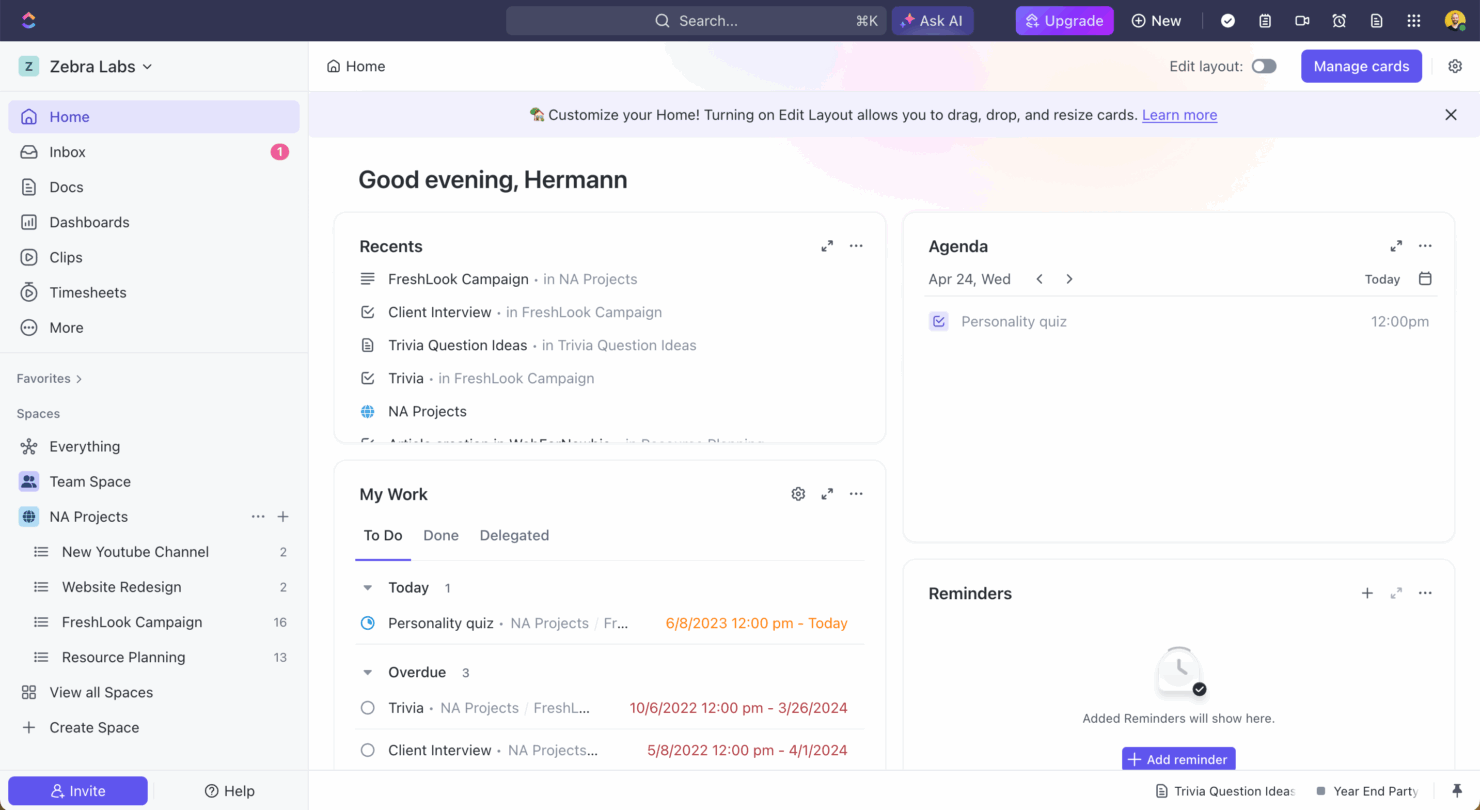
| Interfaz de usuario | Smartsheet ofrece una interfaz similar a una hoja de cálculo que facilita la navegación para los usuarios de Excel. | ClickUp brinda una interfaz personalizable, permitiendo adaptar las vistas según tu flujo de trabajo. |
| Experiencia de incorporación | La incorporación de Smartsheet incluye tutoriales guiados y una base de conocimientos para empezar. | ClickUp ofrece recorridos interactivos y plantillas para agilizar el proceso de incorporación. |
| Configuración | Smartsheet requiere una configuración mínima, con plantillas disponibles para lanzar proyectos rápidamente. | La configuración de ClickUp es sencilla, con funciones de arrastrar y soltar para organizar tareas fácilmente. |
La interfaz de Smartsheet, parecida a Excel, es intuitiva para quienes ya están familiarizados con hojas de cálculo, pero su complejidad puede suponer un reto para los nuevos usuarios. La interfaz personalizable y la configuración sencilla de ClickUp ofrecen flexibilidad, aunque podría resultar abrumador para quienes buscan simplicidad.
Smartsheet vs ClickUp: Pros & Cons
Smartsheet
- Gives your team a lot of flexibility with how you set up sheets, dashboards, and workflows
- Proofing and approval tools can help you better collaborate with your team
- Handles complex projects and cross-team coordination better than most tools
- It takes time to set up and isn’t very intuitive for new users
- Interactive spreadsheets don’t automatically sync changes
- You can’t easily build simple task lists without doing extra setup
ClickUp
- Extensive task management features keep your projects organized and on track
- Real-time collaboration makes team communication more effective
- Built-in automations reduce manual work and speed up your workflow
- Users often find the learning curve steep due to its rich feature set
- Some users report occasional performance lags when managing large projects
- Mobile app can be less intuitive than the desktop version
Best Use Cases for Smartsheet and ClickUp
Smartsheet
- Marketing Teams You can manage campaign timelines, creative approvals, and content calendars in one place using built-in forms, reminders, and dashboards.
- Construction Projects Smartsheet is great for tracking tasks, permits, and inspections across vendors and crews using Gantt charts and status columns.
- PMO Departments You get a clear portfolio view of all your projects, timelines, and risks with built-in reports and resource views.
- Healthcare Operations Smartsheet helps you track compliance tasks, training, and onboarding with audit-ready logs and approval workflows.
- IT Teams Smartsheet is useful for managing system rollouts, support requests, and change logs with forms, automations, and sheet linking.
- Mid-Sized & Enterprise-Level Companies You get enough structure to handle complex operations and scale without needing a full custom solution.
ClickUp
- Creative agencies ClickUp's customizable dashboards and task automation features can help you manage client projects, track feedback and revisions, and keep creative teams aligned.
- Tech startups ClickUp supports agile development with sprints and real-time collaboration features that can help teams iterate quickly.
- Marketing teams You can streamline campaign planning and execution using ClickUp’s task dependencies and timelines.
- Remote teams ClickUp's real-time updates and collaboration tools keep everyone on the same page, no matter where they are.
- Product managers ClickUp’s roadmaps and goal-tracking features help you align development with business objectives.
- Freelancers You can track your tasks and deadlines efficiently with ClickUp’s simple task and time management tools.
¿Quién debería usar Smartsheet y quién debería usar ClickUp?
En mi opinión, Smartsheet es ideal para equipos de sectores como la construcción o la fabricación que requieren un seguimiento detallado de proyectos y prefieren una interfaz similar a una hoja de cálculo. Considero que ClickUp es adecuado para equipos creativos o startups tecnológicas que necesitan flexibilidad y una amplia gama de funciones personalizables para adaptarse a proyectos dinámicos. Desde mi perspectiva, Smartsheet es mejor para quienes adoptan un enfoque estructurado, mientras que ClickUp es perfecto para quienes prosperan en un entorno más ágil.
Differences Between Smartsheet and ClickUp
| Smartsheet | ClickUp | |
|---|---|---|
| Automation | Smartsheet offers automation through workflows for repetitive tasks. | ClickUp provides automation features with customizable triggers and actions. |
| Integrations | Smartsheet integrates with Adobe and Power BI, useful for creative and data teams. | ClickUp integrates with Zoom and Microsoft Teams, ideal for remote collaboration. |
| Pricing | Smartsheet has a tiered subscription with additional costs for premium features. | ClickUp offers a flexible pricing structure with options for advanced features. |
| Reporting | Smartsheet provides extensive reporting capabilities for data-driven projects. | ClickUp includes basic reporting with a focus on customizable dashboards. |
| User Interface | Smartsheet uses a spreadsheet-like interface, familiar to Excel users. | ClickUp offers a customizable interface, allowing you to tailor your workspace. |
| Visit SmartsheetOpens new window | Read ClickUp ReviewOpens new window |
Similarities Between Smartsheet and ClickUp
| Cloud-Access | Smartsheet and ClickUp are cloud-based, ensuring you can access your projects from anywhere, with Smartsheet providing robust mobile app support and ClickUp offering a web app interface. |
|---|---|
| Collaboration | Both platforms support team collaboration with features like comments and file sharing; Smartsheet integrates with email notifications, while ClickUp offers real-time chat. |
| Customization | Both tools offer customization, letting you tailor dashboards and views. Smartsheet uses templates, while ClickUp provides drag-and-drop customization. As you can guess, this customization comes with a learning curve price. |
| Integrations | Smartsheet and ClickUp support multiple integrations through Zapier and APIs, enabling you to connect with other tools your team uses. |
| Task Management | Both Smartsheet and ClickUp allow you to create, assign, and track tasks, with Smartsheet focusing on grid-based task lists and ClickUp offering flexible views like lists and Kanban boards. |
| Visit SmartsheetOpens new window Read ClickUp ReviewOpens new window | |