

Los 10 mejores asistentes virtuales de IA en 2026

Lista de los mejores asistentes virtuales de IA


Los asistentes virtuales de IA son herramientas digitales que gestionan tareas, responden preguntas y automatizan flujos de trabajo mediante inteligencia artificial. Si buscas formas de ahorrar tiempo y mantener los proyectos encaminados, encontrar la opción adecuada puede marcar la diferencia. Esta guía deja de lado el entusiasmo exagerado y la complejidad para ayudarte a comparar los mejores asistentes virtuales de IA disponibles hoy, de modo que puedas elegir mejor y mantener a tu equipo centrado en lo que más importa.
Por qué confiar en nuestras recomendaciones de software
Nuestro equipo lleva probando y evaluando software desde 2012. Como gestores de proyectos, sabemos lo difícil —y lo importante— que es elegir el software adecuado.
Para esta guía, evaluamos las herramientas mediante pruebas prácticas e investigación independiente, puntuando las herramientas según nuestros criterios de selección. También nos basamos en la experiencia de líderes de opinión del sector y de profesionales en activo de la gestión de proyectos.
Nuestras reseñas reflejan nuestro criterio editorial humano, no un discurso de ventas.
Revisores expertos:
Tabla comparativa de asistentes virtuales de IA
Esta tabla comparativa resume los detalles de precios de mis principales selecciones de asistentes virtuales de IA para empresas.
| Tool | Best For | Trial Info | Price | ||
|---|---|---|---|---|---|
| 1 | Ideal para grabaciones de reuniones sujetas a gobernanza | Plan gratuito disponible | Desde $7/usuario/mes (facturado anualmente) | Website | |
| 2 | Ideal para redactar a partir del contexto del espacio de trabajo | Plan gratuito disponible | Desde $20/usuario/mes | Website | |
| 3 | Ideal para usar IA dentro de las aplicaciones de Workspace | Prueba gratuita de 14 días | Desde $7/usuario/mes | Website | |
| 4 | Ideal para la transcripción de reuniones en directo | Plan gratuito disponible | Desde $16.99/usuario/mes | Website | |
| 5 | La mejor opción para usar IA en las aplicaciones de Office | Prueba gratuita de 1 mes | Desde $30/usuario/mes (facturado anualmente) | Website | |
| 6 | Ideal para crear tareas mediante voz | Plan gratuito disponible | Desde $9/usuario/mes | Website | |
| 7 | La mejor opción para el bloqueo de tiempo diario automático | Prueba gratuita disponible | Desde $19/usuario/mes (facturado anualmente) | Website | |
| 8 | Ideal para predecir riesgos en la entrega de proyectos | Prueba gratuita de 14 días | Desde $10/usuario/mes (facturado anualmente) | Website | |
| 9 | Ideal para agentes de IA colaborativos basados en roles | Demostración gratuita disponible | Precios bajo solicitud | Website | |
| 10 | Ideal para acciones en el espacio de trabajo que tienen en cuenta el contexto | Prueba gratuita de 14 días | Desde $9/usuario/mes (facturado anualmente) | Website |
Reseñas de los mejores asistentes virtuales de IA
A continuación se presentan mis resúmenes detallados de los mejores asistentes virtuales de IA que llegaron a mi lista final. Mis reseñas ofrecen una visión detallada de las características, capacidades y mejores casos de uso de cada herramienta para ayudarte a encontrar la más adecuada para ti.

Fellow
Ideal para grabaciones de reuniones sujetas a gobernanza
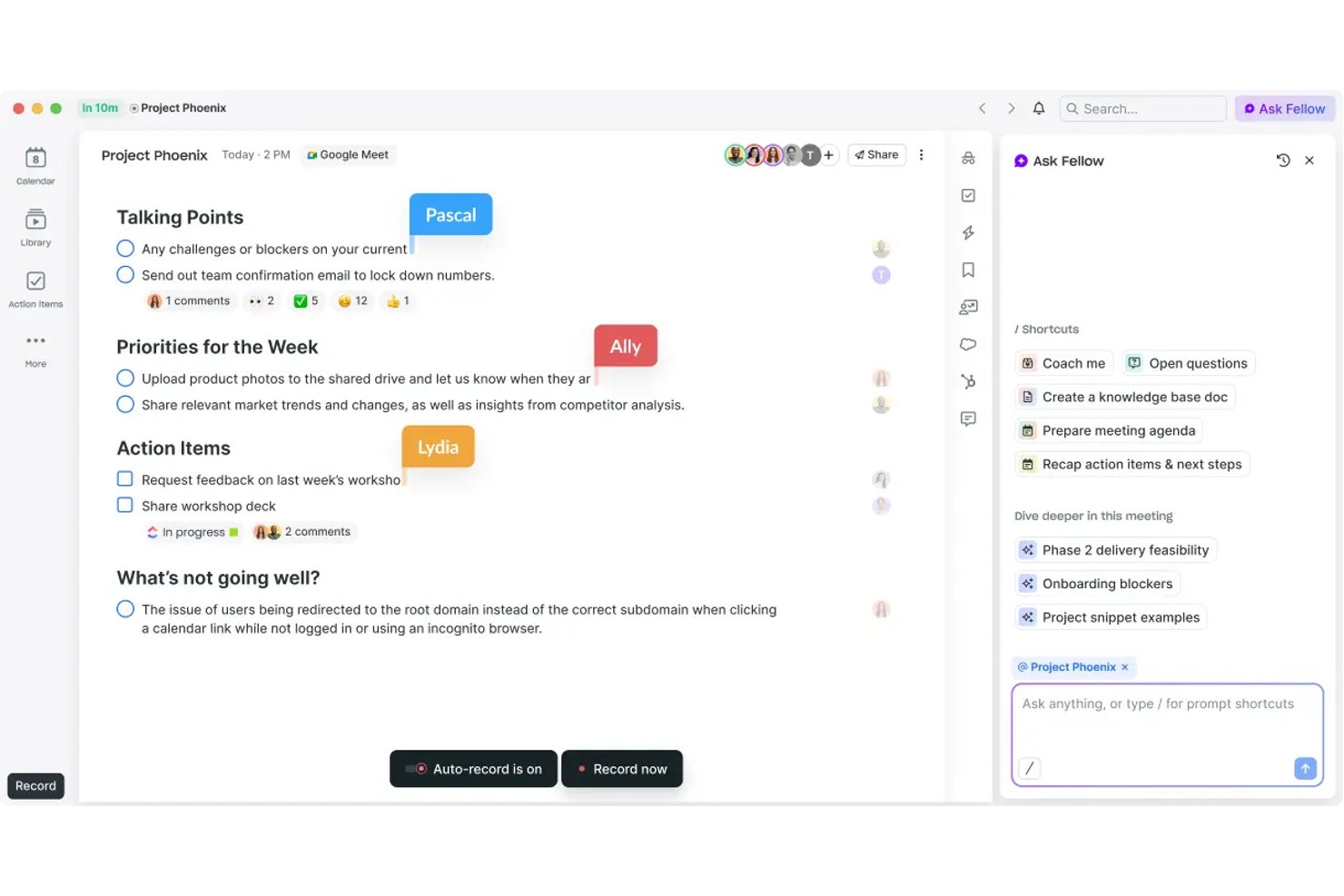
Fellow es un asistente de reuniones basado en IA creado para equipos que priorizan la gobernanza, y ofrece grabación con bot y sin bot, transcripción en 99 idiomas, captura de elementos de acción y una biblioteca de reuniones con función de búsqueda en Zoom, Microsoft Teams y Google Meet.
¿Para quién es más adecuado Fellow?
Fellow es una excelente opción para equipos empresariales de sectores regulados —finanzas, atención sanitaria y servicios jurídicos— en los que el cumplimiento normativo de las reuniones, los registros de auditoría y la gobernanza de datos no son opcionales.
Por qué elegí Fellow
Fellow merece estar entre los mejores de mi lista porque se toma muy en serio las grabaciones de reuniones sujetas a gobernanza. Puedo pausar y reanudar la grabación durante una llamada, y los segmentos pausados se eliminan por completo; además, puedo aplicar la redacción de MNPI a las transcripciones antes de distribuirlas. Funciones como la captura del consentimiento, la retención de cero días y un registro de auditoría preparado para la Regla 17a-4 de la SEC lo distinguen de cualquier otro asistente de reuniones basado en IA que haya utilizado.
Funciones principales de Fellow
- IA conversacional Ask Fellow: Permite consultar reuniones y notas anteriores mediante lenguaje natural.
- Redacción de agendas de reuniones con IA: Genera automáticamente agendas estructuradas a partir de los detalles de la invitación o de conversaciones anteriores.
- Integraciones de gestión de proyectos: Se conecta de forma nativa con herramientas como Asana, Jira, Linear y ClickUp para sincronizar directamente los elementos de acción.
- Panel de análisis del espacio de trabajo: Realiza un seguimiento del volumen de reuniones, la asistencia y la actividad de toma de notas de los equipos.
Integraciones de Fellow
Fellow ofrece más de 50 integraciones nativas, incluidas Asana, Jira, Linear, ClickUp, Monday.com, Trello, GitHub, Slack, Microsoft Teams, Google Workspace y Salesforce. Hay una API disponible para integraciones personalizadas.
Pros and Cons
Pros:
- La redacción de MNPI mantiene las transcripciones sensibles preparadas para auditorías
- Ask Fellow responde a consultas sobre reuniones en lenguaje natural
- La grabación sin bot evita que participantes no invitados se unan a las llamadas
Cons:
- La IA se limita únicamente a los flujos de trabajo de reuniones
- La funcionalidad de la aplicación móvil está por detrás de la versión de escritorio
Ideal para redactar a partir del contexto del espacio de trabajo
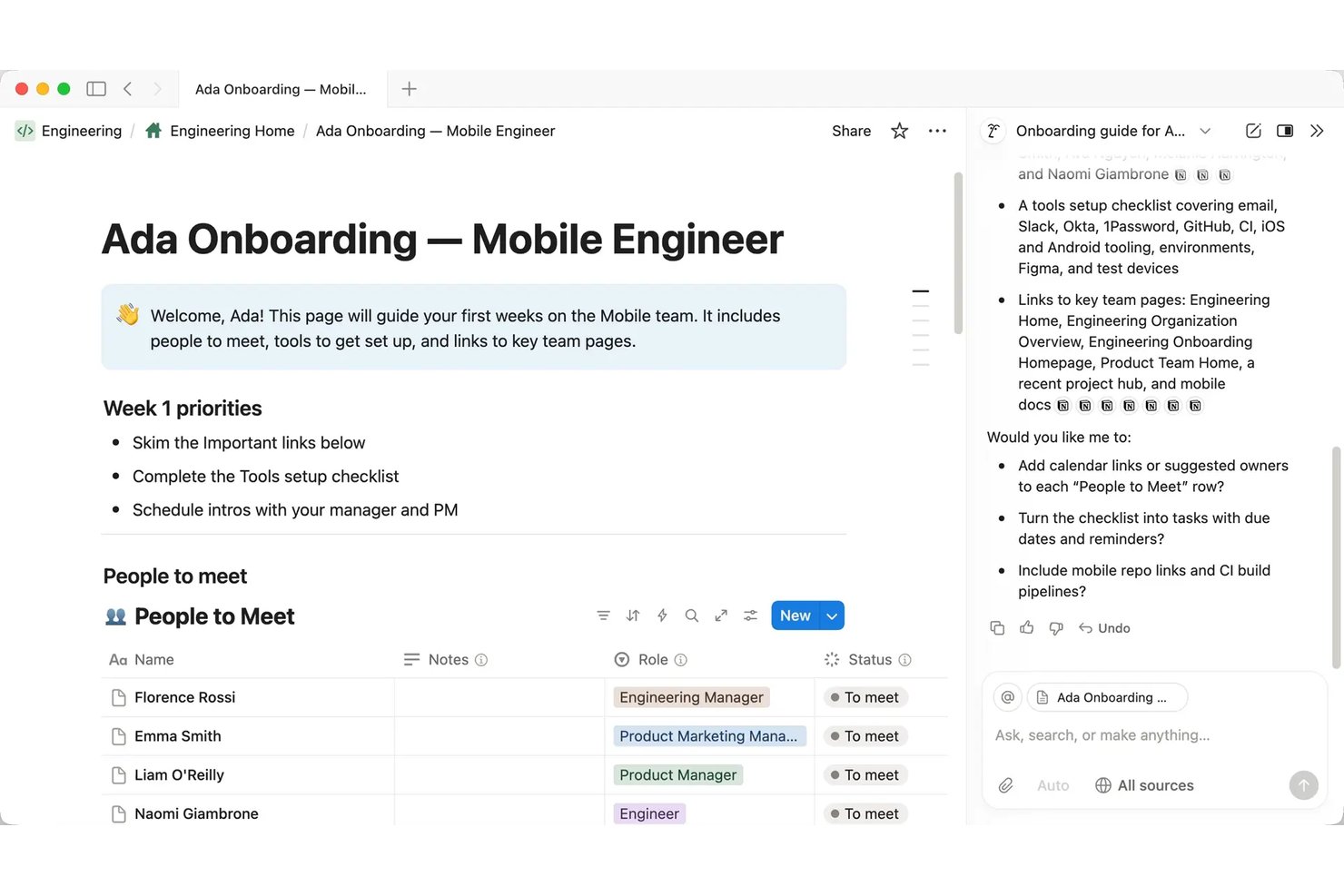
Notion AI es un asistente de IA nativo del espacio de trabajo integrado en Notion que se encarga de redactar documentos, transcribir y resumir reuniones, automatizar tareas de varios pasos y recuperar conocimientos entre aplicaciones mediante una interfaz conversacional.
¿Para quién es más adecuado Notion AI?
Notion AI es una opción excelente para responsables de proyectos y equipos multifuncionales que ya gestionan su documentación, wikis y seguimiento de proyectos dentro de Notion.
Por qué elegí Notion AI
Elegí Notion AI como una de las mejores opciones porque la IA redacta a partir del contenido real de tu espacio de trabajo, no desde una página en blanco. Cuando le pido que redacte un informe sobre el estado de un proyecto, utiliza las notas de las reuniones, las bases de datos de tareas y los informes que ya están en mi espacio de trabajo. Notas de reuniones con IA gestiona la transcripción automáticamente, así que el contexto que necesito ya está recopilado antes de empezar a redactar. La función Autocompletado amplía esta capacidad al completar campos de bases de datos como el estado del proyecto, el responsable y la prioridad directamente a partir del contenido documentado.
Características principales de Notion AI
- Búsqueda empresarial (beta): Te permite consultar Slack, Google Drive, GitHub, Microsoft Teams, Jira y más desde Notion.
- Agentes personalizados: Automatiza flujos de trabajo de equipo de varios pasos con acciones de agentes programadas o activadas en tu espacio de trabajo.
- Modo de investigación (beta): Ofrece investigaciones extensas del espacio de trabajo y de la web, con fuentes citadas, sin salir de Notion.
- Arquitectura independiente del modelo: Te permite cambiar los modelos o proveedores de IA para cualquier flujo de trabajo de agentes.
Integraciones de Notion AI
Notion AI ofrece integraciones nativas con Slack, Google Drive, GitHub, Microsoft Teams, Jira, Box, OneDrive y Salesforce. También se conecta con Zapier y proporciona una API para integraciones personalizadas.
Pros and Cons
Pros:
- Redacta automáticamente a partir del contenido existente del espacio de trabajo
- Resume las notas de las reuniones sin salir de Notion
- Los agentes de IA ejecutan flujos de trabajo de varios pasos de forma autónoma
Cons:
- Menor eficacia fuera del ecosistema del espacio de trabajo de Notion
- No tiene interfaz de voz para interactuar con las manos libres
Ideal para usar IA dentro de las aplicaciones de Workspace
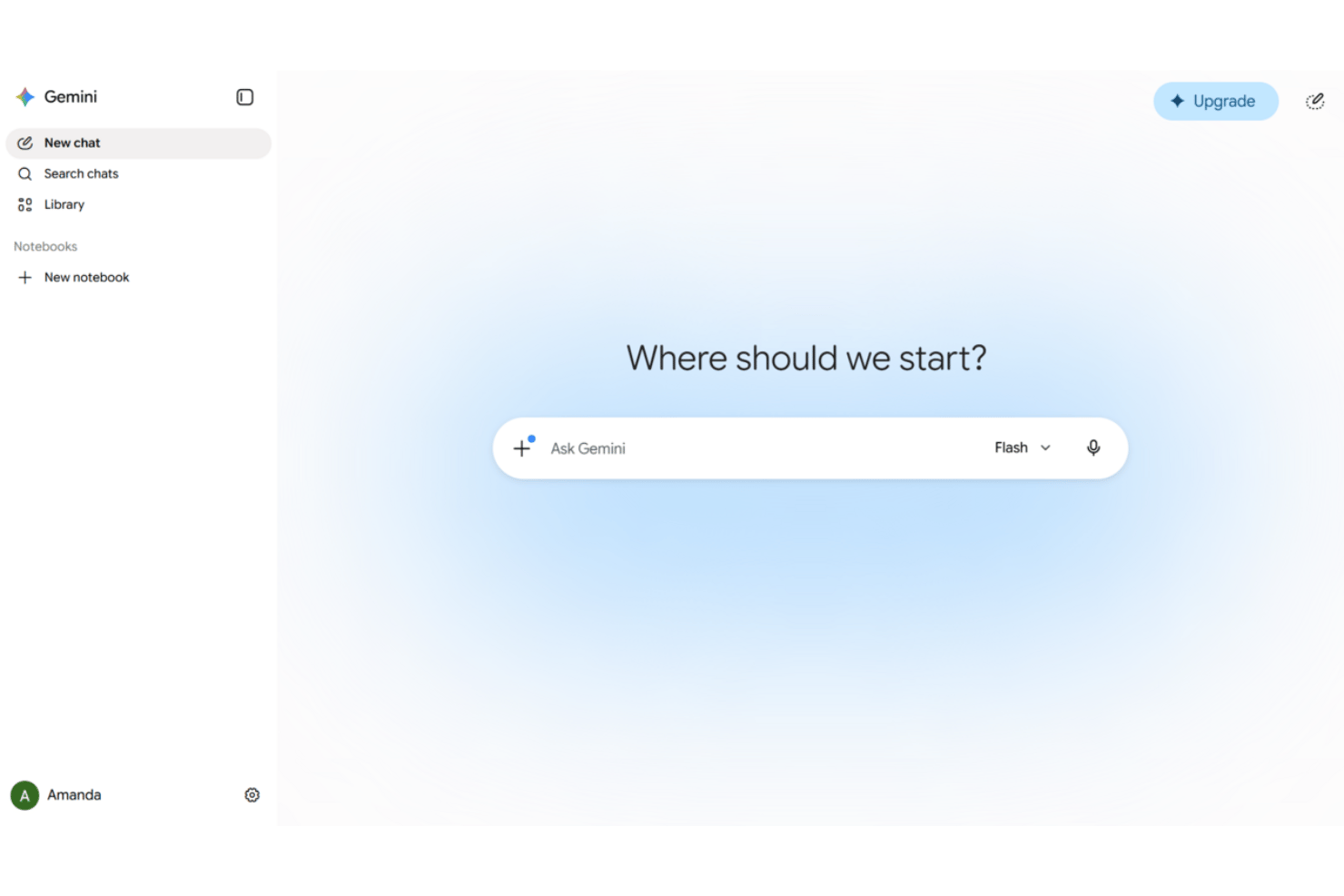
Google Gemini es un asistente virtual de IA integrado en las aplicaciones de Google Workspace—Gmail, Docs, Sheets, Meet y Drive—que ofrece chat conversacional, redacción de documentos, toma de notas en reuniones y automatización basada en agentes en las herramientas empresariales conectadas.
¿Para quién es mejor Google Gemini?
Google Gemini es una opción excelente para equipos de proyectos que ya realizan su trabajo dentro de Google Workspace y quieren asistencia de IA sin cambiar de herramientas.
Por qué elegí Google Gemini
Google Gemini ocupa un lugar en mi lista de favoritos por lo natural que resulta utilizarlo como asistente de IA dentro de las herramientas que los equipos de proyectos ya usan. Utilizo Gemini en Meet para capturar automáticamente notas y elementos de acción sin necesidad de un complemento de terceros, y en Gmail puedo consultar Drive y mi calendario desde la misma barra lateral mientras redacto una respuesta. Workspace Studio es donde se vuelve realmente útil para los flujos de trabajo de gestión de proyectos: he creado flujos que automatizan la preparación de reuniones y distribuyen los correos electrónicos de seguimiento sin escribir código.
Características principales de Google Gemini
- Entrada y salida multimodales: Acepta y procesa voz, texto, imágenes y vídeo en las aplicaciones de Workspace compatibles.
- Gemini Notebook para sintetizar investigaciones: Permite recopilar, organizar y resumir información de varias fuentes en un único espacio de trabajo asistido por IA.
- Automatización basada en agentes con conectores prediseñados: Se conecta con plataformas como Salesforce, Jira, SAP y Microsoft 365 para realizar acciones automatizadas con datos.
- Cumplimiento normativo y prevención de pérdida de datos integrados: Incluye medidas avanzadas de protección de la privacidad y controles de DLP alineados con los estándares empresariales.
Integraciones de Google Gemini
Google Gemini ofrece integraciones nativas con Gmail, Google Drive, Google Calendar, Google Meet, Salesforce, Jira, SAP y Microsoft 365. Hay una API disponible para integraciones personalizadas.
Pros and Cons
Pros:
- Está profundamente integrado en todas las aplicaciones de Workspace
- Captura automáticamente notas de reuniones y elementos de acción
- Resume cadenas largas de correos electrónicos y documentos de Drive
Cons:
- Es menos útil fuera del ecosistema de Google
- Las funciones basadas en agentes requieren planes de pago de nivel superior

Otter.ai
Ideal para la transcripción de reuniones en directo
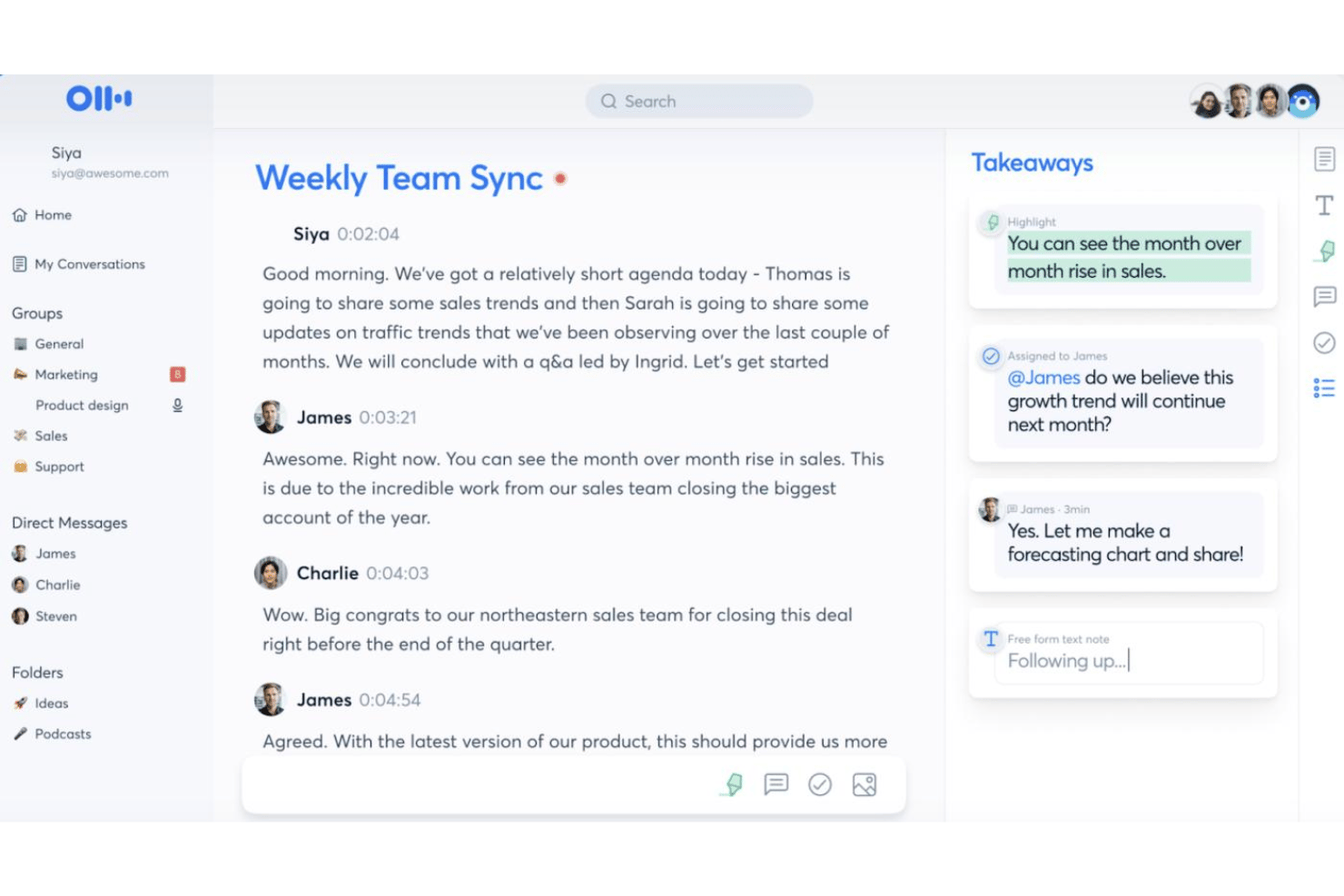
Otter.ai es un asistente de reuniones con IA que combina transcripción en directo, resúmenes automatizados de reuniones, captura de elementos de acción y una interfaz de chat con IA que te permite consultar todo tu historial de reuniones.
¿Para quién es más adecuado Otter.ai?
Otter.ai es una opción natural para los equipos que celebran un gran número de reuniones y necesitan transcripciones precisas y fáciles de buscar sin tomar notas manualmente.
Por qué elegí Otter.ai
Otter.ai se gana un lugar en mi lista de favoritos porque su transcripción en directo va más allá de simplemente capturar palabras. El agente de reuniones con IA se une a las llamadas y responde preguntas en tiempo real utilizando todo tu historial de reuniones, así que no solo estás grabando una reunión, sino que estás creando una base de conocimientos consultable. También me gusta la captura automatizada de diapositivas, que sincroniza las diapositivas del presentador directamente con la transcripción para conservar todo el contexto de cualquier reunión en un solo lugar.
Funciones principales de Otter.ai
- Chat de reuniones con IA: Interactúa con las transcripciones de las reuniones mediante una interfaz conversacional para consultar detalles o solicitar resúmenes.
- Vocabulario personalizado: Añade términos del sector, acrónimos y nombres exclusivos para mejorar la precisión de la transcripción.
- Colaboración en el espacio de trabajo: Comparte transcripciones y notas de reuniones con tus compañeros en tiempo real dentro de un espacio de trabajo compartido.
- Integraciones con terceros: Conecta con aplicaciones como Slack, Salesforce, HubSpot, Notion y Google Workspace para ampliar la compatibilidad con tus flujos de trabajo.
Integraciones de Otter.ai
Otter.ai ofrece integraciones nativas con Zoom, Microsoft Teams, Google Meet, Slack, Salesforce, HubSpot y Google Workspace. También se integra con Notion y se conecta con Zapier. Hay una API disponible para integraciones personalizadas.
Pros and Cons
Pros:
- La precisión de la transcripción en tiempo real es constantemente alta
- Consultas de chat con IA en todo el historial de reuniones
- Captura automatizada de elementos de acción durante las reuniones en directo
Cons:
- Automatización limitada de los flujos de trabajo de gestión de proyectos
- Las respuestas de la IA se limitan únicamente al contenido de las reuniones

La mejor opción para usar IA en las aplicaciones de Office
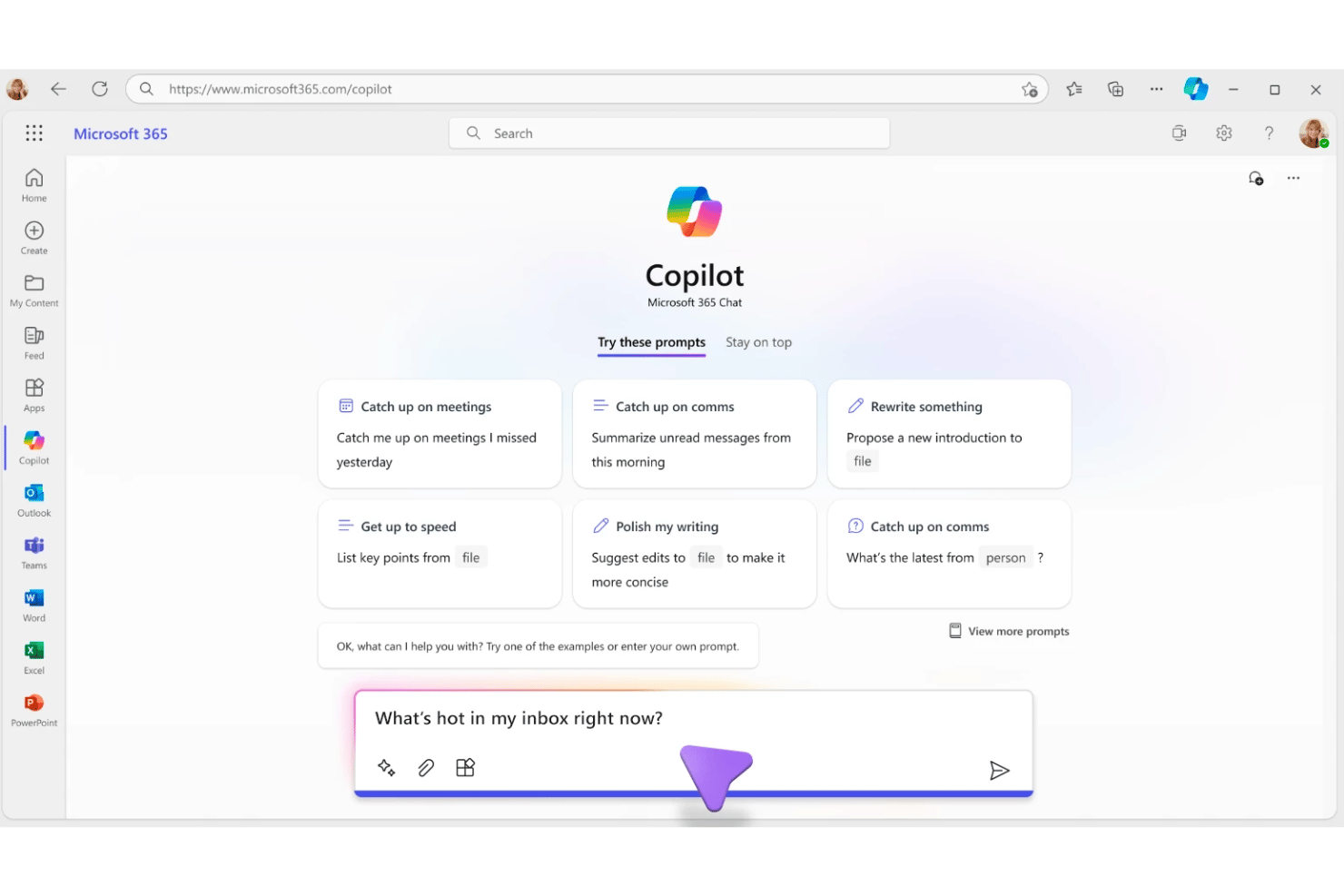
Microsoft 365 Copilot es un asistente de IA generativa integrado en el conjunto de aplicaciones Microsoft 365 que combina chat en lenguaje natural, redacción de documentos, resúmenes de reuniones y automatización de tareas en Word, Excel, PowerPoint, Outlook y Teams.
¿Para quién es más adecuado Microsoft 365 Copilot?
Es una opción natural para equipos empresariales y de mercado medio que ya trabajan dentro del ecosistema de Microsoft 365 y quieren integrar la IA directamente en sus flujos de trabajo existentes.
Por qué elegí Microsoft 365 Copilot
Elegí Microsoft 365 Copilot como uno de los mejores porque ningún otro asistente de IA está tan profundamente integrado en las aplicaciones donde realmente se lleva a cabo el trabajo de los proyectos. Utilizo Work IQ para extraer simultáneamente el contexto de correos electrónicos, transcripciones de reuniones y archivos, y luego consultarlo todo en un único hilo de Copilot Chat. El enrutamiento inteligente de modelos selecciona automáticamente el LLM adecuado para cada tarea, por lo que obtengo resultados con capacidad de razonamiento para solicitudes complejas y respuestas rápidas para consultas sencillas.
Características principales de Microsoft 365 Copilot
- Búsqueda empresarial universal: Localiza al instante información en tus correos electrónicos, archivos, reuniones y conversaciones.
- Cuadernos de Copilot: Agrupa archivos, chats y notas, lo que te permite generar resúmenes o recapitulaciones cuando lo necesites.
- Integración con la tienda de agentes: Te permite implementar agentes de IA prediseñados de Microsoft y sus socios, o crear agentes personalizados.
- Personalización adaptada al rol: Adapta las sugerencias y respuestas contextuales en función de tu puesto y de la actividad del proyecto.
Integraciones de Microsoft 365 Copilot
Microsoft 365 Copilot ofrece integraciones nativas en todo el ecosistema de Microsoft, incluidos Microsoft 365, Teams, Outlook, Word, Excel, PowerPoint, SharePoint y Azure. También ofrece un catálogo de integraciones de socios a través de la tienda de agentes y proporciona una API para integraciones personalizadas.
Pros and Cons
Pros:
- Contexto profundo en todas las aplicaciones de Microsoft 365
- Resume al instante las reuniones de Teams y las tareas pendientes
- Redacta documentos y correos electrónicos sin cambiar de herramienta
Cons:
- Las respuestas pueden parecer genéricas sin contexto del proyecto
- Interacción de voz limitada en comparación con los asistentes independientes
Ideal para crear tareas mediante voz
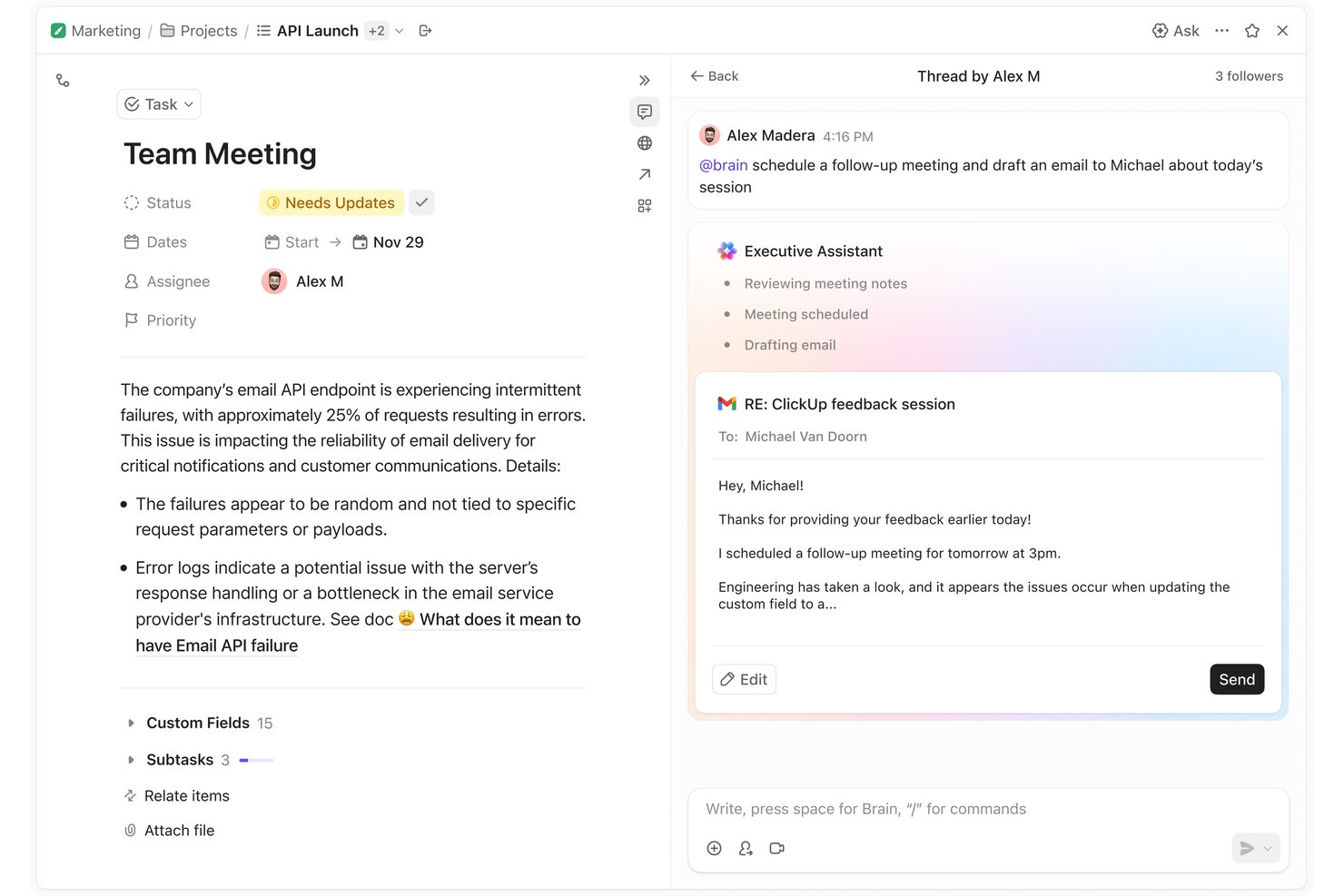
ClickUp Brain es un asistente virtual de IA integrado en la plataforma de gestión del trabajo de ClickUp, que combina IA multimodelo (GPT, Claude, Gemini), entrada de voz, agentes autónomos, memoria contextual y redacción de documentos.
¿Para quién es más adecuado ClickUp Brain?
Es una opción ideal para los responsables de proyectos y los equipos multifuncionales que ya gestionan su trabajo en ClickUp y quieren una IA capaz de actuar directamente sobre los datos activos de sus proyectos.
Por qué elegí ClickUp Brain
Elegí ClickUp Brain como uno de los mejores porque su función de entrada de voz Hablar a texto en la aplicación de escritorio está diseñada para sustituir por completo al teclado, no solo para complementarlo. Puedo dictar una nueva tarea, añadir contexto y asignarla a un compañero sin escribir una sola palabra. Como Brain² mantiene el contexto activo en todo mi espacio de trabajo, las tareas creadas por voz llegan al proyecto correcto con los detalles adecuados ya adjuntos.
Características principales de ClickUp Brain
- Superagentes: compañeros de trabajo de IA a los que se pueden asignar tareas, programar y mencionar directamente dentro del espacio de trabajo.
- Cerebro de la empresa autoactualizable: memoria persistente que captura y adapta los flujos de trabajo, el estilo de comunicación y el contexto de los proyectos de tu equipo.
- Motor de IA multimodelo: dirige instantáneamente las consultas a GPT, Claude o Gemini para optimizar las respuestas en cada interacción.
- Búsqueda conectada: consulta en tiempo real los datos del espacio de trabajo y de plataformas integradas como Slack, Google Drive, Jira y Confluence.
Integraciones de ClickUp Brain
ClickUp Brain ofrece integraciones nativas con Slack, Google Drive, Jira, GitHub, Confluence, Dropbox, Box, OneDrive, Microsoft Teams y Gmail. Hay una API disponible para crear integraciones personalizadas.
Pros and Cons
Pros:
- Creación de tareas mediante voz directamente en el espacio de trabajo
- Consulta datos activos de proyectos sin cambiar de aplicación
- Resume documentos e hilos dentro de ClickUp
Cons:
- Brain solo funciona dentro del ecosistema de ClickUp
- La velocidad de respuesta disminuye con consultas complejas del espacio de trabajo

Motion
La mejor opción para el bloqueo de tiempo diario automático
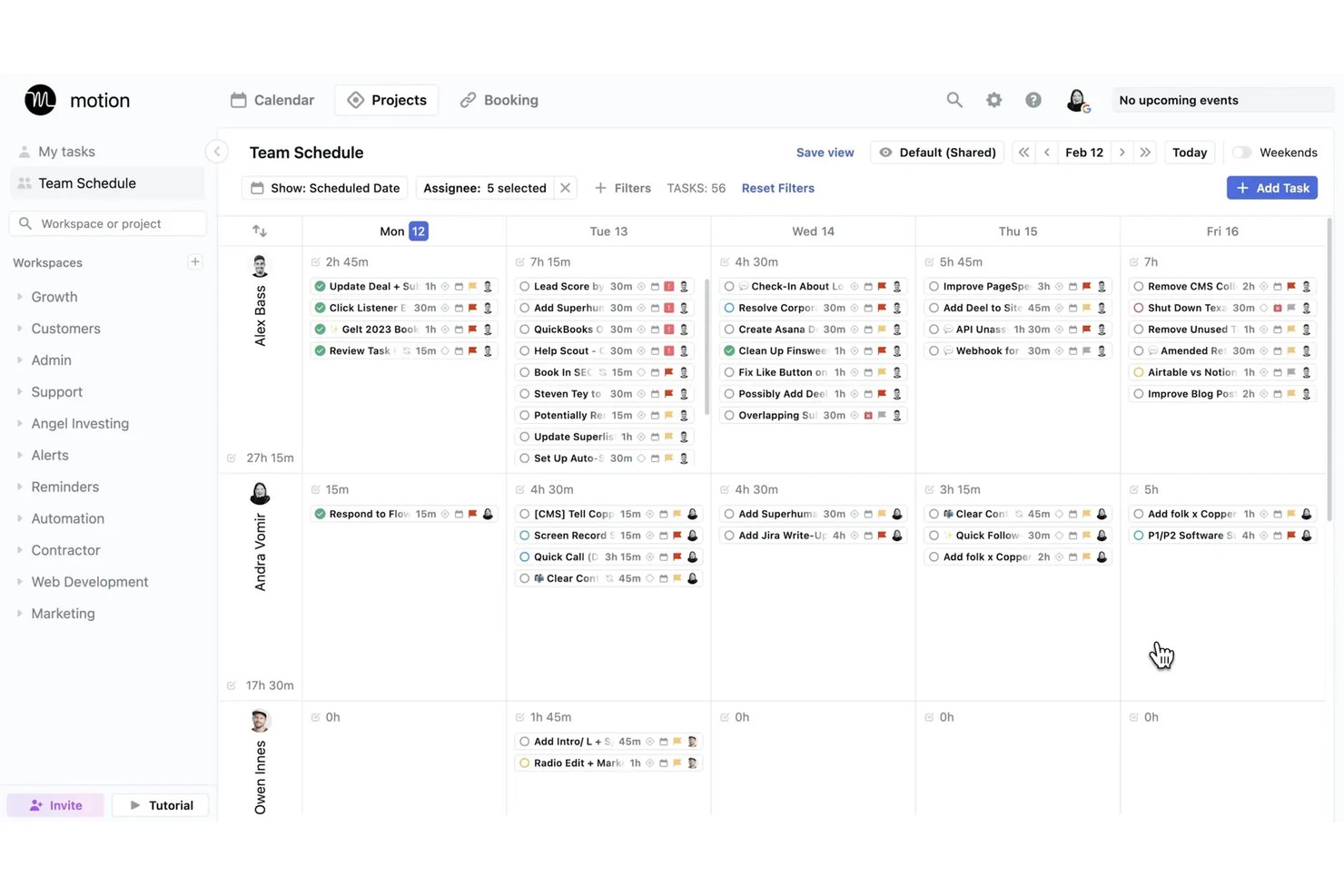
Motion es una plataforma de asistente virtual con IA que programa tareas automáticamente, gestiona calendarios, transcribe reuniones y genera proyectos y documentos mediante un conjunto de agentes de IA especializados por función.
¿Para quién es mejor Motion?
Motion es una excelente opción para gerentes de proyectos y equipos pequeños que necesitan que la IA se encargue de las decisiones diarias de priorización y programación que consumen tiempo de trabajo concentrado.
Por qué elegí Motion
Elegí Motion como una de las mejores opciones porque su motor de bloqueo de tiempo automático realmente elimina la carga diaria de decidir en qué trabajar y cuándo. Cuando aparece una nueva reunión en mi calendario o cambia una fecha límite, Motion recalcula todo mi horario en cuestión de segundos, en lugar de dejarme reorganizar las tareas manualmente. También confío en el tomador de notas con IA para capturar los elementos de acción durante las reuniones, que luego se incorporan directamente a mi plan de tareas programadas.
Funciones principales de Motion
- Asistente de documentos con IA: Convierte notas y documentación de proyectos en tareas, proyectos o enlaces para compartir.
- Tomador de notas de reuniones con IA: Transcribe y resume reuniones, y luego genera elementos de acción automáticamente.
- Empleados de IA: Implementa agentes de IA especializados para tareas como asistencia ejecutiva, ventas o gestión de proyectos.
- Vista de Gantt: Visualiza los cronogramas, las dependencias y el progreso de todos los proyectos activos.
Integraciones de Motion
Motion ofrece integraciones nativas con Google Calendar, Outlook, Office 365, iCloud, Zoom, Google Meet, Microsoft Teams, Slack, HubSpot y Salesforce. También es compatible con Zapier y proporciona una API para integraciones personalizadas.
Pros and Cons
Pros:
- Reprograma automáticamente las tareas cuando cambian las prioridades
- Las notas de reuniones con IA capturan automáticamente los elementos de acción
- Agentes de IA especializados para trabajos específicos según la función
Cons:
- Experiencia limitada en la aplicación móvil en comparación con la versión de escritorio
- La programación con IA funciona mejor para usuarios individuales
Ideal para predecir riesgos en la entrega de proyectos
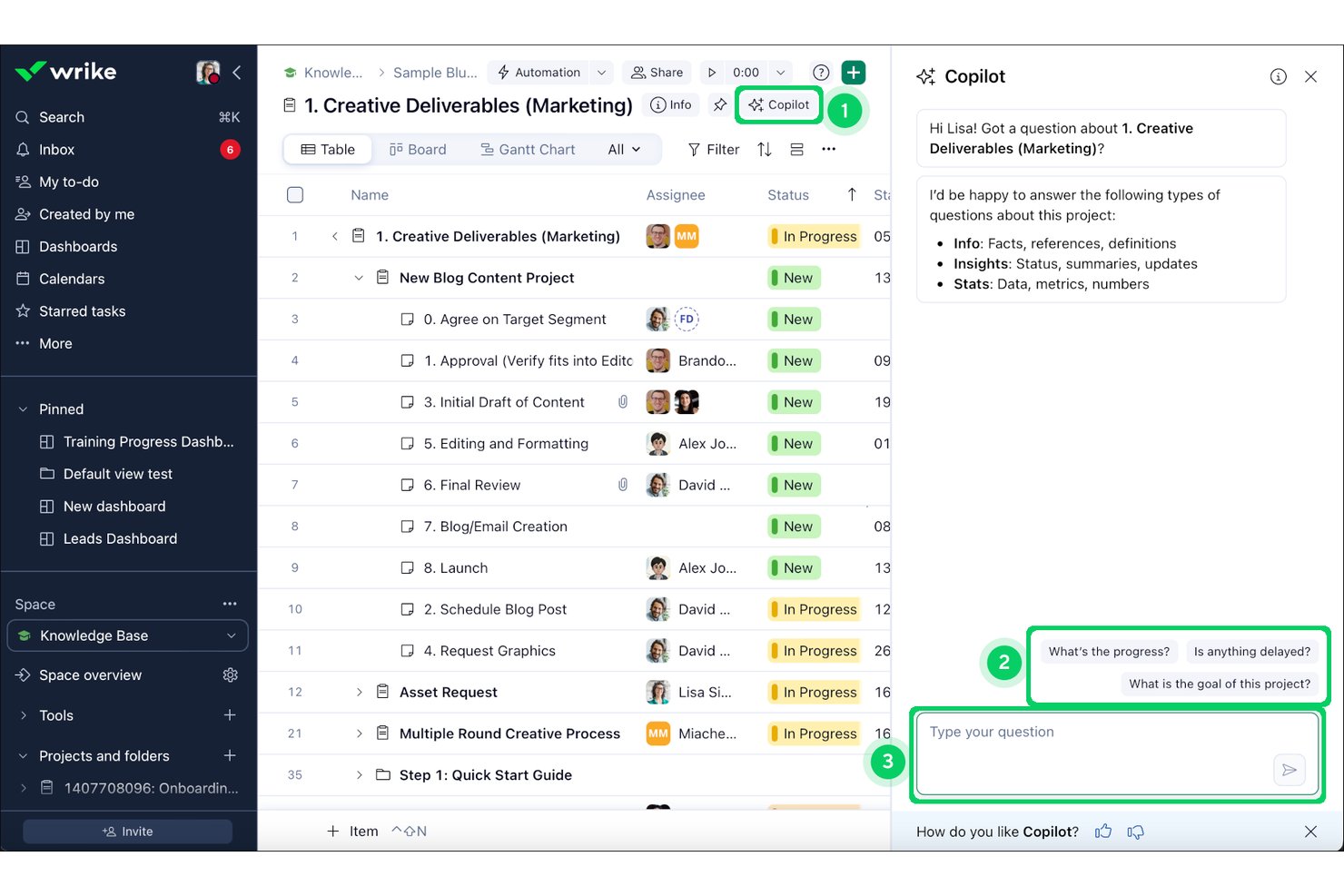
Wrike Copilot es un asistente de IA integrado en la plataforma de Wrike que permite a los equipos de proyecto consultar datos de proyectos en tiempo real, resumir hilos de comentarios, generar actualizaciones de estado y detectar riesgos mediante una conversación en lenguaje natural.
¿Para quién es más adecuado Wrike Copilot?
Es una opción excelente para equipos de PMO empresariales y directores de programas que gestionan carteras complejas y con múltiples equipos dentro del ecosistema de Wrike.
Por qué elegí Wrike Copilot
Elegí Wrike Copilot como una de las mejores opciones por la forma en que utiliza el Gráfico de Inteligencia del Trabajo, creado a partir de 500 mil millones de puntos de datos históricos, para señalar de forma proactiva los hitos en riesgo antes de que se conviertan en bloqueos. Cuando consulto a Copilot sobre los riesgos de un sprint, muestra recursos sobrecargados, dependencias estancadas e hitos retrasados en tiempo real. Ese nivel de análisis proactivo es lo que lo diferencia de los asistentes de IA que solo responden a lo que ya sabes que debes preguntar.
Funciones principales de Wrike Copilot
- Interfaz de chat de lenguaje natural con múltiples turnos: Permite interactuar con los datos y las actualizaciones de los proyectos en tiempo real dentro de Wrike.
- Resumen de documentos y comentarios con IA: Resume hilos y documentos extensos directamente dentro de las tareas y los proyectos.
- Integraciones nativas de gestión de proyectos: Se conecta con herramientas como Slack, Teams, Google Workspace, Salesforce y otras para las operaciones de proyectos entre plataformas.
- Memoria contextual basada en roles: Proporciona respuestas y perspectivas basadas en el contexto específico de la carpeta, el proyecto o el usuario que selecciones.
Integraciones de Wrike Copilot
Wrike Copilot ofrece cientos de integraciones nativas a través de las integraciones integradas y el mercado de aplicaciones de Wrike, incluidas Google Workspace, Microsoft 365, Salesforce, Slack, Jira, GitHub, Adobe Creative Cloud, Zoom, Box y Dropbox. También es compatible con Zapier y proporciona una API para integraciones personalizadas.
Pros and Cons
Pros:
- Predice riesgos de entrega utilizando datos históricos de proyectos
- Resume hilos de comentarios extensos dentro de las tareas
- Redacta actualizaciones de estado a partir de datos de proyectos en tiempo real
Cons:
- Limitado únicamente a la plataforma de Wrike
- No permite introducir consultas de IA por voz
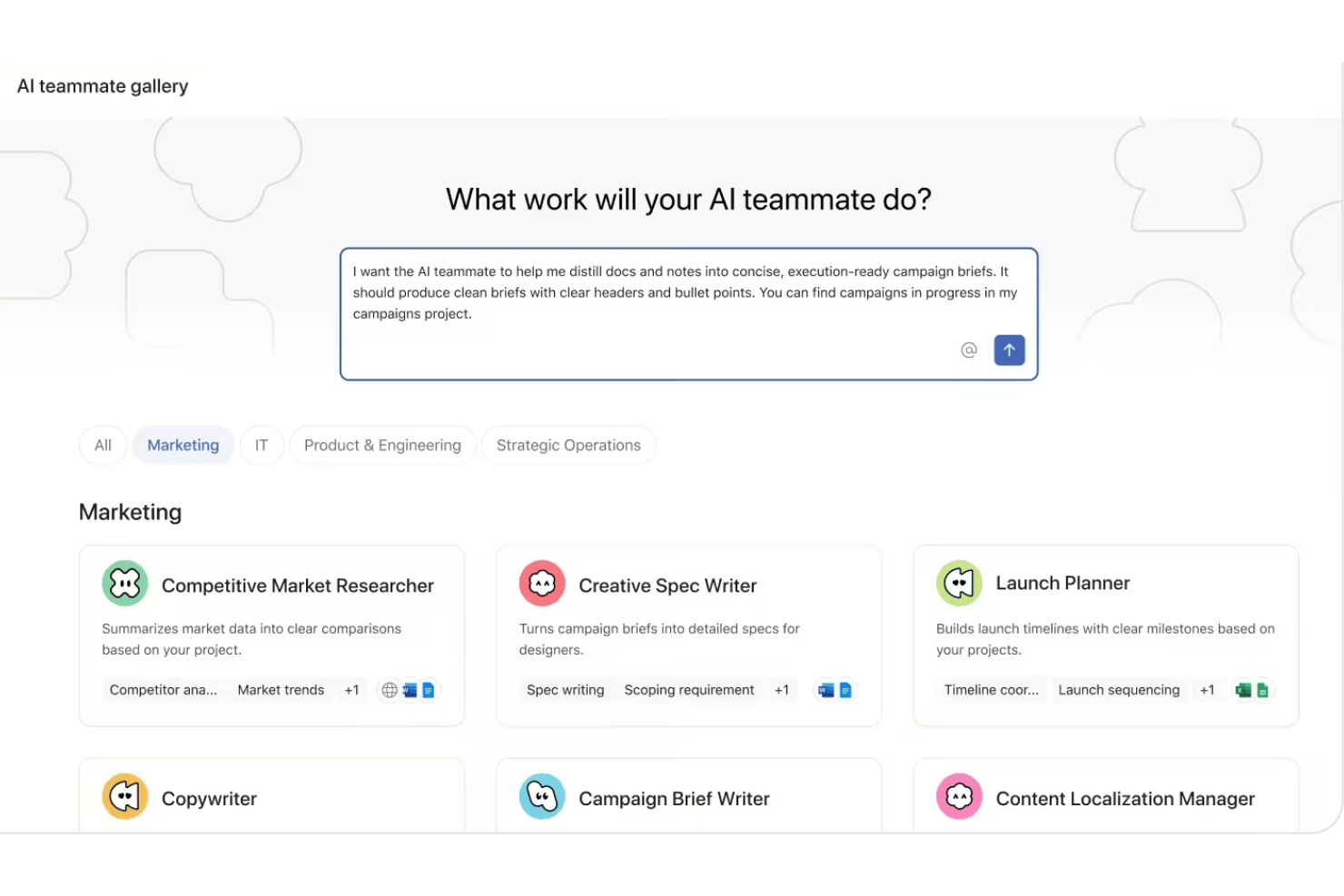
Asana AI Teammates es una capa de agentes de IA basados en roles integrada en la plataforma de gestión del trabajo de Asana, que permite a los equipos de proyecto asignar trabajo a agentes de IA, automatizar tareas administrativas de los proyectos y redactar y resumir documentación de proyectos.
¿Para quién es más adecuado Asana AI Teammates?
Es una opción sólida para equipos empresariales y del mercado medio con estructuras de PMO establecidas que necesitan agentes de IA que operen simultáneamente en múltiples funciones.
Por qué elegí Asana AI Teammates
Asana AI Teammates se ha ganado un puesto en mi lista de finalistas por la forma en que sus agentes están estructurados en torno a funciones laborales reales, en lugar de tipos de tareas genéricos. Me gustan especialmente los agentes de entrenamiento de sprints y de informes de estado, a los que mi equipo puede asignar trabajo directamente dentro de los proyectos de Asana, igual que a un miembro humano del equipo. Lo que realmente lo diferencia es el gráfico de trabajo, que proporciona a cada agente un contexto persistente en todos los proyectos conectados, por lo que no parte de cero en cada interacción.
Características principales de Asana AI Teammates
- Generador de compañeros de equipo personalizados: Crea agentes de IA adaptados a flujos de trabajo únicos mediante una sencilla interfaz sin código.
- Contexto del gráfico de trabajo: Los agentes de IA acceden a datos estructurados de proyectos, objetivos y equipos, obteniendo contexto del gráfico de trabajo de Asana.
- Lectura de archivos adjuntos: Los agentes pueden leer y procesar archivos adjuntos de documentos para resumir o extraer detalles de los proyectos.
- Gobernanza de nivel empresarial: Los administradores controlan el acceso a los datos, los permisos y los registros de auditoría de todas las acciones de los compañeros de equipo de IA.
Integraciones de Asana AI Teammates
Asana AI Teammates ofrece integraciones nativas con Jira, Microsoft 365, Google Workspace, Slack, Salesforce, Tableau y Power BI. Hay una API disponible para integraciones personalizadas.
Pros and Cons
Pros:
- Los agentes operan de forma nativa dentro de proyectos activos de Asana
- Los agentes específicos para cada rol cubren distintas funciones de los proyectos
- Los puntos de control humanos mantienen las acciones de la IA bajo supervisión
Cons:
- Actualmente está limitado a los suscriptores del plan AI Studio Pro
- Todavía está en fase beta y no se ha confirmado su disponibilidad general

Ideal para acciones en el espacio de trabajo que tienen en cuenta el contexto
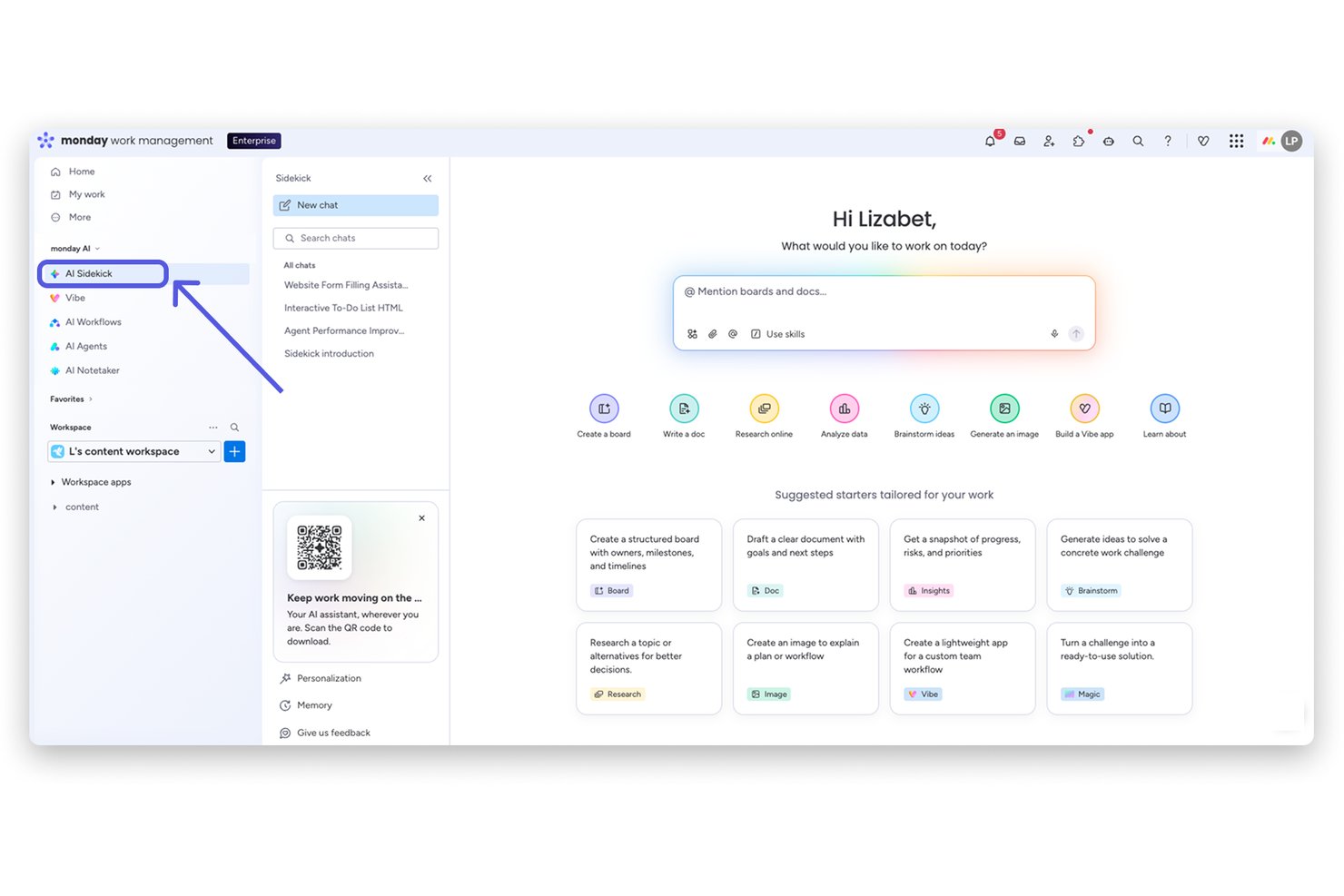
monday sidekick es un asistente de IA integrado directamente en la plataforma monday.com que te permite crear flujos de trabajo, automatizar tareas, generar documentos y obtener información sobre proyectos mediante conversaciones en lenguaje natural dentro de tu espacio de trabajo.
¿Para quién es más adecuado monday sidekick?
monday sidekick es una opción muy adecuada para gerentes de proyectos y equipos multifuncionales que ya gestionan su trabajo dentro de monday.com y quieren incorporar la IA en sus flujos de trabajo existentes.
Por qué elegí monday sidekick
monday sidekick ocupa un lugar en mi lista de favoritos porque no se limita a responder preguntas, sino que actúa directamente sobre los datos de tu espacio de trabajo. Me gusta especialmente la función Rutinas, que permite programar tareas de IA recurrentes, como resúmenes semanales de tableros o comprobaciones de estado, sin necesidad de indicaciones manuales. Cuando le pido a Sidekick que cree un plan de proyecto, crea elementos, asigna responsables y establece fechas límite dentro de mis tableros reales, no en un documento separado y desconectado del lugar donde se lleva a cabo el trabajo.
Funciones principales de monday sidekick
- Motor de IA multimodelo: Permite a los usuarios acceder a Claude, GPT, Gemini y otros modelos de IA destacados para realizar consultas sobre proyectos y generar resultados.
- Asistente de IA móvil: Ofrece funciones de IA conversacional y entrada de voz en dispositivos móviles para gestionar proyectos desde cualquier lugar.
- Rutinas de IA programadas: Automatiza tareas recurrentes, como resúmenes de tableros, actualizaciones de estado o extracción de datos, con una frecuencia establecida.
- Panel de lienzo adaptado al espacio de trabajo: Proporciona un documento editable junto al chat para redactar, resumir y organizar contenido de proyectos.
Integraciones de monday sidekick
monday sidekick ofrece integraciones nativas con Slack, Google Workspace, Microsoft Teams, Salesforce, HubSpot, Zoom, GitHub, Zendesk y Trello. También es compatible con Zapier y proporciona una API para integraciones personalizadas.
Pros and Cons
Pros:
- Actúa directamente sobre los datos activos de los tableros
- Permite elegir entre varios modelos de IA
- Ejecuta rutinas de IA programadas sin indicaciones manuales
Cons:
- No puede obtener contexto de herramientas externas
- Las consultas complejas de varios pasos a veces producen errores
Otros asistentes virtuales de IA
Estas son algunas opciones adicionales de asistentes virtuales de IA que no llegaron a mi lista final, pero que aún vale la pena consultar:
- Fireflies.ai
Ideal para análisis de inteligencia conversacional
- Atlassian Rovo
La mejor opción para la búsqueda empresarial de conocimientos entre aplicaciones
- Fathom
Ideal para resúmenes de reuniones personalizables
- Granola
Ideal para perfeccionar notas colaborativas sin bots
- Zoom AI Companion
Ideal para asistencia en reuniones dentro de la plataforma


How I Evaluate AI Virtual Assistants
An AI virtual assistant needs to do more than surface a chatbot—it should handle things like drafting status updates, capturing action items, or flagging blockers without you having to dig for answers. I split my evaluation into two layers: the core functionality a tool must have to qualify, and the differentiating factors that separate one option from another.
Core Functionality (Table Stakes For This List)
When I'm selecting tools for my list, I rank each one on a scale from 0 (does not offer the functionality) to 5 (excels in this area) for each core functionality listed below. Then, I calculate the tool's total score into a percentage. Each tool needs to achieve a minimum total score of 65% to be considered for inclusion.
- Conversational Interface: I evaluate whether you can ask things like "What's overdue on Project X?" and get useful, contextual answers in a multi-turn exchange.
- Generative AI Engine: The AI should produce contextual outputs—like sprint summaries or risk assessments—not just template-based responses from a library.
- Task & Meeting Automation: I look for tools that create tasks from meeting notes, send follow-up reminders, and handle scheduling without manual input.
- Project Tool Integrations: Connections to platforms like Jira, Slack, and Google Calendar matter so the assistant can pull and act on real project data.
- Contextual Memory: I check whether the assistant remembers past interactions and project details across sessions, so you're not re-explaining context each time.
- Summarization & Drafting: The tool should condense meeting transcripts or long threads into briefs and draft artifacts like status reports or stakeholder updates.
Once I have a list of tools that meet the criteria, I consider what sets each platform apart.
Differentiating Factors (What Sets Vendors Apart)
Here's how I compare and contrast different vendors:
Standout Features
Proactive intelligence is a big differentiator—I look for assistants that flag at-risk tasks or nudge you about approaching deadlines before you have to ask. Custom workflow automation also matters, especially tools that let you build multi-step flows like auto-assigning tasks when a sprint kicks off, without needing engineering support. I also evaluate how well an assistant retains context across sessions so it can reference past project decisions without you repeating yourself.
Beyond Features
Integration ecosystem is one of the first things I evaluate—an assistant that can't pull data from your existing stack (Jira, Confluence, Slack, Google Calendar) will create more busywork than it eliminates. Security and compliance controls also deserve close attention, especially LLM data usage policies and audit logging, since these tools often process sensitive project data. I also consider time-to-value: how quickly your team can get a working setup without weeks of fine-tuning or heavy vendor onboarding.
Cómo elegir asistentes virtuales de IA
Es fácil perderse entre largas listas de características y estructuras de precios complejas. Para ayudarte a mantener la concentración mientras completas tu proceso particular de selección de software, aquí tienes una lista de factores que debes tener en cuenta:
| Factor | Qué debes considerar |
|---|---|
| Escalabilidad | ¿El asistente gestiona el volumen actual y futuro de tus proyectos, equipos y departamentos? Presta atención a los aumentos de costes o a la ralentización a medida que añades usuarios o proyectos. |
| Integraciones | ¿Hasta qué punto se conecta con tus herramientas de gestión de proyectos, chat, calendario y documentos? Las integraciones nativas y sólidas reducen el trabajo manual y los flujos de trabajo desconectados. |
| Personalización | ¿Puedes adaptar las automatizaciones, los flujos de trabajo y las respuestas a las rutinas y necesidades de generación de informes de tu equipo? Busca reglas flexibles y opciones con poco o ningún código. |
| Facilidad de uso | ¿Tu equipo realmente lo utilizará o la interfaz dificulta la incorporación? Da prioridad a las opciones con una configuración intuitiva, menús claros y orientación útil. |
| Implementación e incorporación | ¿Cuánto tiempo pasará antes de que veas resultados? Busca bots con plantillas, recursos de formación o asistencia específica para acelerar la puesta en marcha sin sobrecargar a tus administradores. |
| Coste | ¿El precio aumenta según el uso real o el tamaño del equipo? Ten en cuenta los complementos, los mínimos y si las funciones avanzadas están limitadas a niveles superiores. |
| Medidas de seguridad | ¿Se mantendrán protegidos los datos confidenciales de tus proyectos? Busca cifrado, acceso basado en roles, registros de auditoría y controles sobre el uso de datos por parte de los modelos de lenguaje de gran tamaño. |
| Disponibilidad de asistencia | Si surgen problemas, ¿puedes contactar fácilmente con el servicio de asistencia? Confirma los tiempos del SLA, la ayuda integrada en la aplicación o el chat en directo para evitar retrasos en los proyectos si la herramienta tiene algún problema. |
¿Qué son los asistentes virtuales de IA?
Los asistentes virtuales de IA son herramientas digitales que utilizan inteligencia artificial para automatizar tareas, responder preguntas y gestionar flujos de trabajo mediante lenguaje natural. Estos asistentes se encargan de todo, desde programar reuniones y tomar notas hasta redactar actualizaciones de proyectos, ayudando a los equipos a trabajar de forma más eficiente sin una intervención manual constante. Se conectan con tus aplicaciones principales, comprenden el contexto del proyecto y personalizan su asistencia según tus necesidades.
Características de los asistentes virtuales de IA
Al seleccionar un asistente virtual de IA, presta atención a las siguientes características clave:
- Interfaz conversacional: Permite interactuar mediante comandos de chat o de voz, lo que facilita obtener actualizaciones, asignar tareas o hacer preguntas relacionadas con el proyecto en lenguaje sencillo.
- Respuestas de IA generativa: Utiliza un modelo de lenguaje de gran tamaño para crear resúmenes, redactar documentos del proyecto y proporcionar recomendaciones adaptadas a tu contexto.
- Automatización de tareas: Crea tareas automáticamente, establece recordatorios, envía seguimientos y programa reuniones, todo activado desde tus conversaciones o la actividad del proyecto.
- Integraciones con herramientas de proyectos: Se conecta fácilmente con plataformas como Jira, Asana, Slack y Google Workspace para mostrar y actualizar la información del proyecto directamente en tu flujo de trabajo.
- Memoria contextual: Recuerda detalles clave de interacciones anteriores, lo que le permite ofrecer sugerencias más relevantes, evitar preguntas redundantes y adaptarse a tus proyectos en curso.
- Resumen de documentos: Condensa documentos extensos, mensajes o notas de reuniones en resúmenes concisos, lo que te ahorra tiempo al revisar actualizaciones o preparar informes.
- Personalización: Aprende tu estilo de comunicación, tus preferencias y tus proyectos recurrentes, y personaliza sus respuestas y sugerencias para adaptarse a tu forma única de trabajar.
- Extracción de elementos de acción: Identifica y registra decisiones, próximos pasos y elementos de acción de las conversaciones, lo que facilita el seguimiento y garantiza la responsabilidad.
- Medidas de seguridad: Protege los datos confidenciales mediante cifrado, controles de acceso y opciones de cumplimiento normativo para mantener segura la información de tu proyecto.
- Accesibilidad móvil: Ofrece aplicaciones móviles o un diseño adaptable para que puedas utilizar el asistente estés donde estés, garantizando asistencia allí donde trabajes.
Beneficios de los asistentes virtuales de IA
Implementar asistentes virtuales de IA proporciona varios beneficios para tu equipo y tu empresa. Estos son algunos de los que puedes esperar:
- Reducción de la carga administrativa: Automatiza tareas rutinarias como las notas de reuniones, los seguimientos y las actualizaciones de estado, para que los equipos dediquen menos tiempo al trabajo administrativo manual.
- Decisiones de proyecto más rápidas: Muestra al instante datos clave del proyecto, obstáculos y elementos de acción mediante consultas en lenguaje natural y resúmenes de documentos.
- Seguimiento coherente de las tareas: Registra y organiza las asignaciones y decisiones de las conversaciones, mantiene a los equipos alineados y minimiza los elementos de acción omitidos.
- Asistencia personalizada para proyectos: Aprende el flujo de trabajo y las preferencias de comunicación de tu equipo, y adapta las sugerencias y respuestas a cada usuario o proyecto.
- Colaboración mejorada: Se conecta con tus principales herramientas de proyectos y comunica las actualizaciones entre canales, lo que facilita que los equipos distribuidos estén sincronizados.
- Accesibilidad desde cualquier lugar: Ofrece opciones móviles y de voz para que los gestores de proyectos y las partes interesadas reciban asistencia donde y cuando se realice el trabajo.
- Mayor seguridad de los datos: Protege la información del proyecto y de la empresa mediante cifrado, controles de acceso y medidas de seguridad preparadas para el cumplimiento normativo.
Costes y precios de los asistentes virtuales de IA
Seleccionar asistentes virtuales de IA requiere comprender los distintos modelos de precios y planes disponibles. Los costes varían según las funciones, el tamaño del equipo, los complementos y otros factores. La tabla siguiente resume los planes habituales, sus precios medios y las funciones que suelen incluir las soluciones de asistentes virtuales de IA:
Tabla comparativa de planes para asistentes virtuales de IA
| Tipo de plan | Precio medio | Funciones habituales |
|---|---|---|
| Plan gratuito | $0 | Funciones básicas de chat, automatización limitada de tareas y asistencia estándar. |
| Plan personal | $5–$25/user/month | Chat con varios turnos, resumen de documentos, integraciones sencillas y automatización de tareas personales. |
| Plan empresarial | $20–$60/user/month | Herramientas de colaboración en equipo, integraciones con herramientas de proyectos, automatización de flujos de trabajo y controles de administración. |
| Plan corporativo | $50–$150/user/month | Seguridad avanzada, asistencia para el cumplimiento normativo, flujos de trabajo personalizados, acceso a la API, incorporación guiada y asistencia prioritaria. |
Preguntas frecuentes sobre asistentes virtuales de IA
Aquí tienes algunas respuestas a preguntas frecuentes sobre los asistentes virtuales de IA:
¿Cómo se integran los asistentes virtuales de IA con las herramientas de gestión de proyectos existentes?
La mayoría de los asistentes virtuales de IA se conectan directamente con plataformas de proyectos como Jira, Asana o Trello mediante integraciones integradas o API. Esto les permite obtener datos del proyecto, actualizar el estado y automatizar tareas mientras trabajas, minimizando las interrupciones en tus flujos de trabajo.
¿Pueden los asistentes virtuales de IA gestionar información confidencial o sensible?
Sí, siempre que la solución ofrezca medidas de seguridad como cifrado, opciones de cumplimiento y controles de acceso. Es importante revisar las políticas de privacidad y las certificaciones de seguridad de cada herramienta para asegurarte de que se ajustan a los requisitos de tu empresa.
¿Qué tipos de tareas pueden automatizar los asistentes virtuales de IA?
Los asistentes virtuales de IA gestionan la programación de reuniones, la captura de elementos de acción, las notificaciones de recordatorio, la redacción de informes y las actualizaciones de estado, todo ello activado por tus indicaciones en lenguaje natural o por cambios continuos en el proyecto.
¿Los asistentes virtuales de IA requieren mucha configuración o capacitación?
No, la mayoría de los asistentes modernos ofrecen una configuración con poco código o sin código e incluyen guías o plantillas de incorporación. Algunas herramientas incluso personalizan las sugerencias a medida que aprenden tus procesos con el tiempo, lo que reduce la configuración manual.
¿Son adecuados los asistentes virtuales de IA para equipos que trabajan en distintas ubicaciones?
Sí, estos asistentes están diseñados para ayudar a equipos distribuidos. Se sincronizan entre dispositivos, comunican actualizaciones en tiempo real y funcionan con tus principales plataformas de mensajería y colaboración.