

Las 10 mejores alternativas a Docusign analizadas en 2026

Selección de las mejores alternativas a Docusign


Gestionar contratos y aprobaciones forma parte de mantener los proyectos en marcha, pero perseguir firmas y hacer un seguimiento del estado de los documentos puede ralentizarlo todo. Si DocuSign no es la opción adecuada para tu equipo, ya sea por el precio, las integraciones o las limitaciones del flujo de trabajo, hay muchas alternativas competentes que merece la pena considerar.
Según mi experiencia probando plataformas de firma electrónica, las mejores opciones hacen mucho más que recopilar firmas. Facilitan una colaboración más fluida, registros de auditoría más claros, plazos de respuesta más rápidos y menos cuellos de botella cuando los documentos necesitan revisión, aprobación y ejecución. He analizado tanto alternativas gratuitas a DocuSign como competidores de pago para ayudarte a comparar las mejores opciones.
En este artículo, te presentaré los principales competidores de DocuSign, destacando qué hace mejor cada herramienta y cómo sus funciones ayudan en los flujos de trabajo reales de los proyectos. Encontremos la opción adecuada para tu equipo.
¿Qué es DocuSign?
DocuSign es un software de gestión documental y firma electrónica que te ayuda a gestionar acuerdos electrónicos de forma eficiente. Los profesionales del ámbito jurídico, inmobiliario y financiero lo utilizan habitualmente como una herramienta rápida y segura para firmar documentos.
Funciones como la firma a distancia, el seguimiento en tiempo real y el cumplimiento de las normas legales agilizan los flujos de trabajo y garantizan la seguridad.
Tabla comparativa de alternativas a DocuSign
Esta tabla comparativa destaca los detalles de precios de mis principales alternativas a DocuSign.
| Tool | Best For | Trial Info | Price | ||
|---|---|---|---|---|---|
| 1 | La mejor opción para la integración con QuickBooks Online | Plan gratuito disponible | Desde $10/remitente/mes (facturado anualmente) | Website | |
| 2 | Ideal para el cumplimiento legal y las plantillas | Prueba gratuita disponible | Desde $20/mes; los planes de API comienzan en $49/mes | Website | |
| 3 | Ideal para la gestión de contratos impulsada por IA | Demostración gratuita disponible | Precio bajo solicitud | Website | |
| 4 | Ideal para flujos de trabajo de firma electrónica sencillos y de bajo coste | Prueba gratuita disponible | Desde $4/mes | Website | |
| 5 | Mejor opción para la automatización de documentos dentro de los flujos de trabajo de CRM | Prueba gratuita de 14 días + plan gratuito + demo gratuita disponible | Desde $19/usuario/mes (facturado anualmente) | Website | |
| 6 | Ideal para la integración con Dropbox | Prueba gratuita disponible | Desde $9.99/usuario/mes (facturado anualmente) | Website | |
| 7 | Ideal para firmas electrónicas en sectores regulados | Plan gratuito + prueba gratuita de 14 días + demostración disponible | Desde $10/usuario/mes | Website | |
| 8 | Ideal para la verificación de identidad de nivel empresarial | Demostración gratuita disponible | Precio bajo consulta | Website | |
| 9 | La mejor opción para la seguridad mediante cifrado de extremo a extremo | Plan gratuito + prueba gratuita de 30 días + demostración disponible | Desde $10/usuario/mes | Website | |
| 10 | Ideal para firmas electrónicas de código abierto alojadas por cuenta propia | Plan gratuito disponible | Desde $9.99/mes (facturado anualmente) | Website |
Por qué confiar en nuestras recomendaciones de software
Nuestro equipo lleva probando y evaluando software desde 2012. Como gestores de proyectos, sabemos lo difícil —y lo importante— que es elegir el software adecuado.
Para esta guía, evaluamos las herramientas mediante pruebas prácticas e investigación independiente, puntuando las herramientas según nuestros criterios de selección. También nos basamos en la experiencia de líderes de opinión del sector y de profesionales en activo de la gestión de proyectos.
Nuestras reseñas reflejan nuestro criterio editorial humano, no un discurso de ventas.
Revisores expertos:
Análisis de las mejores alternativas a DocuSign
A continuación se incluyen mis resúmenes detallados de las mejores alternativas a DocuSign que han entrado en mi selección. Mis análisis ofrecen una visión detallada de las funciones principales, ventajas y desventajas, integraciones y casos de uso ideales de cada herramienta para ayudarte a encontrar la mejor opción para ti.

Signwell
La mejor opción para la integración con QuickBooks Online

A diferencia de Adobe Sign, que es una excelente opción para grandes corporaciones, SignWell es una herramienta de firma electrónica diseñada para pequeñas y medianas empresas que necesitan capacidades eficientes para firmar documentos. Ayuda a los usuarios a crear, gestionar y firmar documentos en línea, lo que hace que el proceso sea rápido y jurídicamente vinculante.
Por qué es una buena alternativa a Docusign: SignWell ofrece integración con QuickBooks Online, lo que resulta beneficioso para las empresas que ya utilizan QuickBooks para sus necesidades contables. La plataforma proporciona plantillas personalizables que ahorran tiempo y garantizan un formato uniforme de los documentos. Las notificaciones en tiempo real mantienen a tu equipo actualizado sobre el estado de los documentos, lo que ayuda a evitar retrasos. Con un enfoque en la simplicidad, SignWell garantiza que puedas gestionar documentos sin complejidad innecesaria.
Características e integraciones destacadas:
Características incluyen registros de auditoría, que proporcionan historiales detallados de las interacciones con los documentos. La plataforma permite configurar flujos de trabajo de firma, garantizando que los documentos se firmen en el orden correcto y con los permisos adecuados. También apreciarás el editor de arrastrar y soltar para personalizar documentos fácilmente.
Integraciones incluyen QuickBooks Online, Google Drive, Dropbox, Zapier, Microsoft 365 y más.
Pros and Cons
Pros:
- Se integra con QuickBooks Online
- Editor sencillo de arrastrar y soltar
- Proporciona registros de auditoría
Cons:
- Capacidades básicas de generación de informes
- No es ideal para grandes empresas

Ideal para el cumplimiento legal y las plantillas

Signaturely es una plataforma que proporciona firmas electrónicas gratuitas y legalmente vinculantes. Está dirigida tanto a particulares como a empresas, y ayuda a los usuarios a gestionar y firmar documentos de forma rápida y segura.
Por qué es una buena alternativa a Docusign: Signaturely se centra en el cumplimiento legal y ofrece una variedad de plantillas que ahorran tiempo y son fáciles de usar. Los recordatorios automáticos garantizan que los documentos no queden sin firmar, mientras que su interfaz fácil de usar simplifica la gestión del papeleo. Estas funciones están dirigidas a equipos y organizaciones que buscan una solución de firma electrónica sencilla y fiable.
Funciones e integraciones destacadas:
Las funciones incluyen recordatorios automáticos para documentos sin firmar, capacidades de gestión documental y plantillas que ahorran tiempo. Signaturely también admite operaciones sin papel, en consonancia con los objetivos medioambientales.
Las integraciones incluyen Google Drive, Dropbox, OneDrive, Box, Microsoft Teams, Zapier y otras.
Pros and Cons
Pros:
- Garantía de cumplimiento legal
- Recordatorios automáticos
- Plantillas que ahorran tiempo
Cons:
- Opciones de personalización limitadas
- No es ideal para grandes empresas

Juro
Ideal para la gestión de contratos impulsada por IA
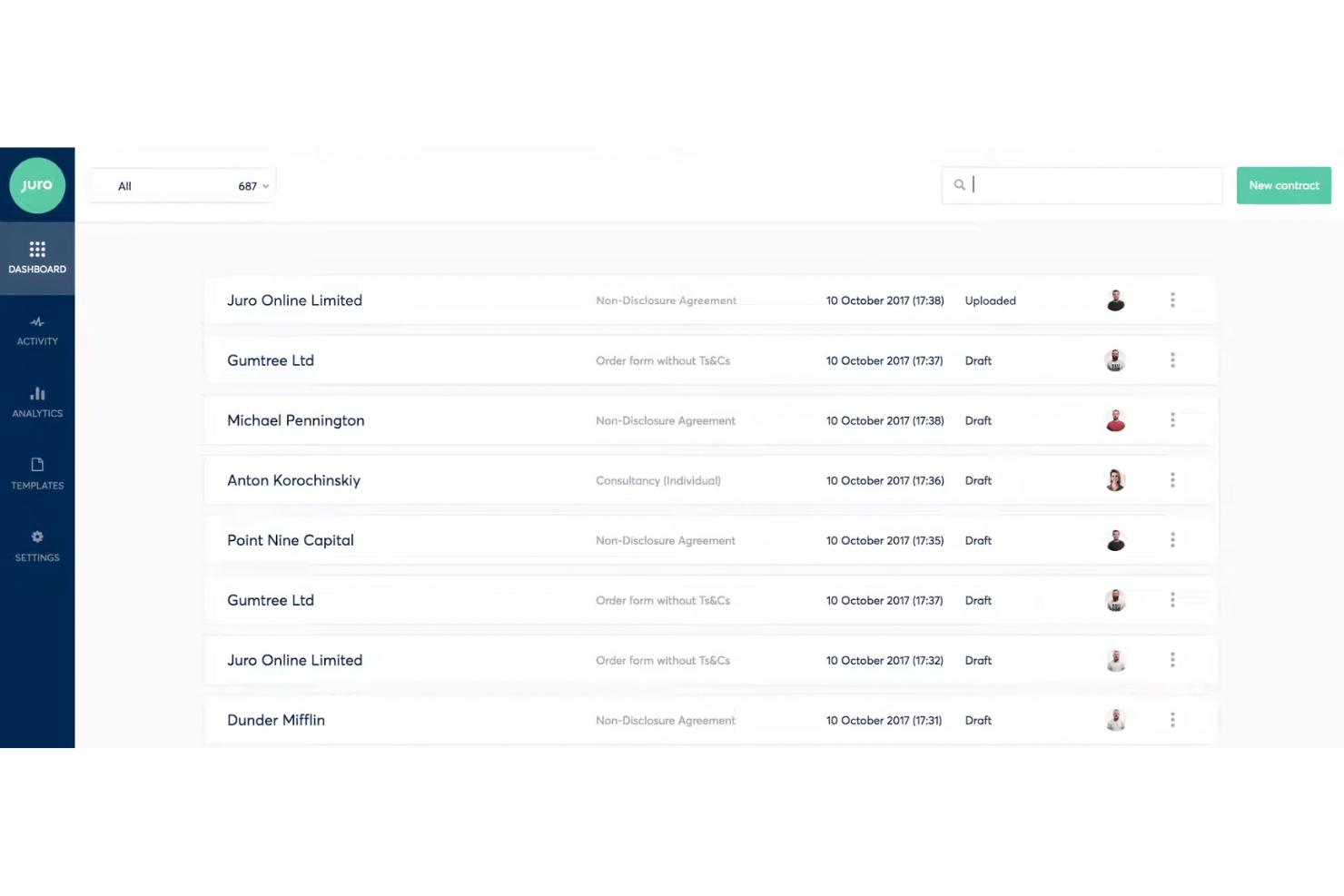
Juro es una plataforma inteligente de gestión de contratos diseñada para equipos jurídicos, de RR. HH., compras, ventas y finanzas. Ayuda a estos equipos a gestionar los contratos de forma eficiente mediante la revisión con IA y la gestión autónoma.
Por qué es una buena alternativa a Docusign: Juro ofrece revisión de contratos impulsada por IA y un repositorio inteligente para datos contractuales, lo que favorece una mayor eficiencia en la gestión de contratos. A diferencia de Docusign, Juro está pensado para equipos que buscan funciones más avanzadas de automatización de contratos. Las capacidades de gestión autónoma y la configuración rápida lo hacen atractivo para los usuarios que desean sustituir los sistemas tradicionales de gestión de contratos.
Funciones e integraciones destacadas:
Las funciones incluyen revisión de contratos con IA, gestión autónoma de contratos y un repositorio inteligente para datos contractuales. Juro también prioriza la seguridad mediante medidas de nivel empresarial.
Las integraciones incluyen Salesforce, HubSpot, ChatGPT, Slack, Google Drive, Zapier, Greenhouse y más.
Pros and Cons
Pros:
- Automatización de contratos impulsada por IA
- Altos estándares de seguridad
- Repositorio de datos eficiente
Cons:
- Carece de amplias opciones de personalización
- No es ideal para empresas muy pequeñas

Ideal para flujos de trabajo de firma electrónica sencillos y de bajo coste

SignRequest es una herramienta de firma electrónica ideal para pequeñas y medianas empresas que buscan optimizar sus procesos de firma de documentos. Proporciona una plataforma sencilla para crear y gestionar firmas electrónicas legalmente vinculantes.
Por qué es una buena alternativa a Docusign: SignRequest ofrece una solución sencilla y rentable para las firmas electrónicas, lo que la hace accesible para equipos y empresas pequeños. La plataforma hace hincapié en un diseño fácil de usar, por lo que tu equipo puede aprender a utilizarla rápidamente. Con SignRequest, puedes hacer un seguimiento sencillo del estado de los documentos y enviar recordatorios para garantizar que se completen a tiempo. Su enfoque en la simplicidad y la asequibilidad la distingue de alternativas más complejas.
Funciones e integraciones destacadas:
Las funciones incluyen plantillas personalizables, que te permiten adaptar los documentos a necesidades específicas. La plataforma admite varias opciones de idioma, lo que la hace versátil para equipos internacionales. También encontrarás útiles los registros de auditoría para mantener un registro detallado de las interacciones con los documentos.
Las integraciones incluyen Google Drive, Slack, Zapier, HubSpot, Gmail, Google Workspace y más.
Pros and Cons
Pros:
- Rentable para pequeñas empresas
- Admite varios idiomas
- Proporciona registros de auditoría
Cons:
- Funciones básicas de generación de informes
- Carece de amplias opciones de personalización
PandaDoc
Mejor opción para la automatización de documentos dentro de los flujos de trabajo de CRM
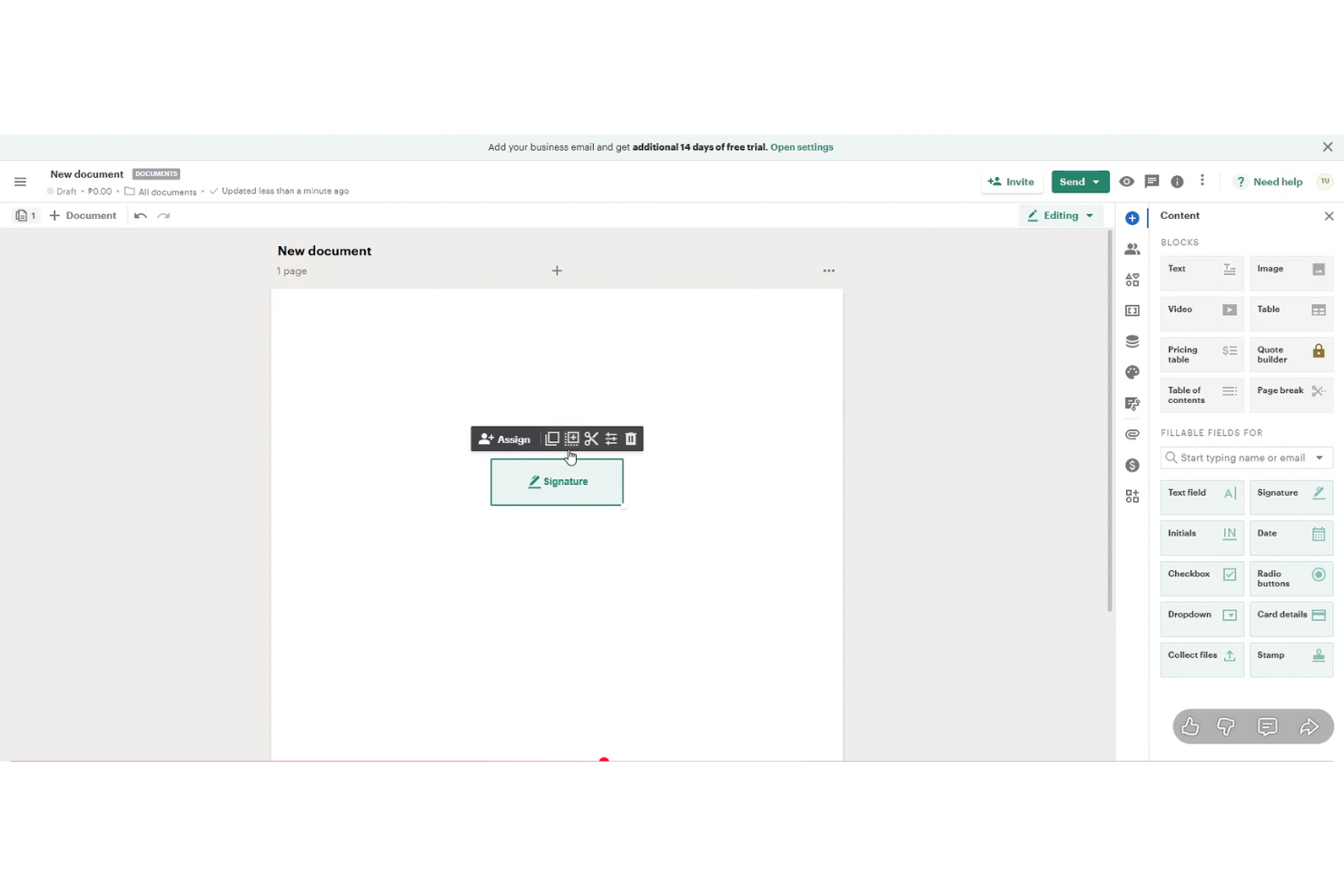
PandaDoc es un software de automatización de documentos dirigido a equipos de ventas, profesionales del marketing y empresas que necesitan crear, enviar y firmar documentos electrónicamente de manera eficiente. Admite flujos de trabajo mediante la automatización de la generación de documentos y la mejora de la colaboración.
Por qué es una buena alternativa a Docusign: PandaDoc ofrece funciones avanzadas de automatización de documentos que simplifican la creación y gestión de documentos. Sus capacidades de integración con sistemas de gestión de relaciones con los clientes (CRM) permiten a tu equipo conectar los flujos de trabajo de documentos con los sistemas CRM. El software proporciona plantillas personalizables, que ahorran tiempo y garantizan la coherencia en tus documentos. Las funciones de colaboración en tiempo real mejoran el trabajo en equipo y la comunicación.
Funciones e integraciones destacadas:
Las funciones incluyen una biblioteca de contenido, que te ayuda a almacenar y reutilizar elementos de documentos. El software también proporciona análisis para hacer un seguimiento del rendimiento y la interacción con los documentos. Apreciarás el editor de arrastrar y soltar para personalizar documentos fácilmente.
Las integraciones incluyen Salesforce, HubSpot, Zoho CRM, Pipedrive, Microsoft Dynamics, Dropbox, Zapier, Slack, QuickBooks y más.
Pros and Cons
Pros:
- Potentes funciones de automatización de documentos
- Colaboración en tiempo real
- Editor sencillo de arrastrar y soltar
Cons:
- Configuración inicial larga
- No es ideal para equipos muy pequeños


Dropbox Sign (anteriormente HelloSign) es una herramienta de firma electrónica diseñada para empresas y equipos que buscan firmar documentos electrónicamente y gestionar acuerdos de manera eficiente, de forma similar a Acrobat Pro. Sus principales usuarios incluyen profesionales del ámbito legal, financiero y de ventas que necesitan funciones fiables para firmar documentos.
Por qué es una buena alternativa a DocuSign: Dropbox Sign se integra con Dropbox, por lo que es perfecto para los usuarios que ya dependen de Dropbox para el almacenamiento. Su sencilla interfaz y sus funciones fáciles de usar favorecen la productividad de los equipos acostumbrados al entorno de Dropbox. Gracias a su enfoque en la seguridad y el cumplimiento normativo, ofrece tranquilidad a las empresas que gestionan documentos confidenciales.
Funciones e integraciones destacadas:
Las funciones incluyen plantillas personalizables, registros de auditoría y opciones de firma presencial. Puedes realizar un seguimiento sencillo del estado de los documentos mediante notificaciones y recordatorios automáticos. La plataforma también admite funciones de gestión de equipos, lo que te ayuda a organizar y supervisar los flujos de trabajo de documentos.
Las integraciones incluyen Adobe Acrobat, Microsoft 365, Zapier y otras.
Pros and Cons
Pros:
- Se integra eficazmente con Dropbox
- Sólidas funciones de seguridad
- Admite la firma presencial
Cons:
- Puede requerir una cuenta de Dropbox
- No es ideal para grandes empresas


Zoho Sign es una solución de firma electrónica diseñada para empresas y profesionales que buscan firmar documentos digitalmente. Atiende a sectores que requieren altos estándares de cumplimiento y privacidad en la gestión documental, como las finanzas y la atención sanitaria.
Por qué es una buena alternativa a DocuSign: Zoho Sign ofrece sólidas funciones de cumplimiento normativo, lo que lo hace adecuado para sectores con estrictos requisitos de privacidad. La plataforma proporciona cifrado y registros de auditoría para garantizar la seguridad de los datos. Los flujos de trabajo personalizables permiten a tu equipo adaptar el proceso de firma para satisfacer necesidades específicas. Su integración con otros productos de Zoho mejora la productividad y la gestión de datos.
Funciones e integraciones destacadas:
Funciones incluyen opciones de envío masivo, que permiten enviar documentos a varios destinatarios a la vez. La plataforma ofrece un registro de auditoría para garantizar la transparencia y la responsabilidad. También encontrarás útil la biblioteca de plantillas para crear documentos uniformes y profesionales rápidamente.
Integraciones incluyen Zoho CRM, Zoho Forms, Google Drive, Dropbox, OneDrive, Box, Microsoft 365, Zapier y más.
Pros and Cons
Pros:
- Sólido cumplimiento normativo
- Garantiza la seguridad de los datos
- Opciones de envío masivo disponibles
Cons:
- No es ideal para equipos muy pequeños
- Funciones básicas de generación de informes


OneSpan Sign (anteriormente eSignLive) es una solución de firma electrónica diseñada para empresas que requieren capacidades de firma electrónica seguras, conformes y escalables, de manera similar a Acrobat Sign. Atiende principalmente a instituciones financieras, organismos gubernamentales y grandes empresas que necesitan soluciones fiables para la firma de documentos.
Por qué es una buena alternativa a DocuSign: OneSpan Sign es conocida por sus sólidas funciones de seguridad, lo que la hace ideal para sectores preocupados por la protección de datos. La plataforma cumple con estrictos estándares de seguridad, y los métodos avanzados de autenticación y los registros de auditoría proporcionan una capa adicional de seguridad. Estas funciones hacen que OneSpan Sign sea especialmente adecuada para empresas que priorizan la seguridad y el cumplimiento normativo.
Funciones e integraciones destacadas:
Las funciones incluyen métodos avanzados de autenticación, que permiten verificar eficazmente la identidad de los firmantes. La plataforma ofrece registros de auditoría detallados para realizar un seguimiento de la actividad de los documentos y garantizar la transparencia. También te beneficiarás de opciones de implementación flexibles, tanto si prefieres soluciones basadas en la nube como locales.
Las integraciones incluyen Salesforce, Microsoft Dynamics 365, SharePoint, Google Drive, Oracle Fusion y más.
Pros and Cons
Pros:
- Altos estándares de seguridad
- Opciones avanzadas de autenticación
- Adecuada para grandes empresas
Cons:
- Opciones de personalización rígidas
- La interfaz parece compleja y poco intuitiva

eSignly
La mejor opción para la seguridad mediante cifrado de extremo a extremo

eSignly es un software de firma electrónica diseñado para empresas y particulares que necesitan una forma segura y eficiente de firmar documentos en línea. Sus funciones principales incluyen proporcionar firmas electrónicas legalmente vinculantes, garantizar la seguridad de los documentos y mantener el cumplimiento de las normas internacionales.
Por qué es una buena alternativa a DocuSign: eSignly hace hincapié en un sólido cifrado de extremo a extremo, lo que ofrece una seguridad superior para sus documentos. La plataforma cumple con normativas como el RGPD y la HIPAA, proporcionando seguridad adicional a las empresas que gestionan información confidencial. Las plantillas y los campos de firma personalizables mejoran la flexibilidad, y el enfoque del software en la seguridad garantiza que sus documentos permanezcan confidenciales y protegidos durante todo el proceso de firma.
Características destacadas e integraciones:
Las características incluyen validez legal para las firmas electrónicas, lo que garantiza que se reconozcan como vinculantes. La plataforma proporciona un cifrado sólido para proteger la autenticidad y confidencialidad de los documentos. También puede utilizar recordatorios automatizados para mantener el proceso de firma encaminado.
Las integraciones incluyen Dropbox, Google Drive, OneDrive, Box, Salesforce, Microsoft Teams, Slack, Zoom y más.
Pros and Cons
Pros:
- Seguridad mediante cifrado sólido
- Cumple con las normativas
- Recordatorios automatizados
Cons:
- Funciones básicas de análisis
- Opciones limitadas de personalización avanzada

OpenSign
Ideal para firmas electrónicas de código abierto alojadas por cuenta propia

OpenSign es una plataforma de firma electrónica de PDF de código abierto para personas, equipos y organizaciones que quieren tener más control sobre la firma digital. Te ayuda a firmar, almacenar y proteger documentos en línea, además de hacer un seguimiento de lo que ocurre con cada documento.
Por qué OpenSign es una buena alternativa a Docusign: Con OpenSign, obtienes firmas digitales ilimitadas en un plan gratuito, en lugar de preocuparte por los límites de sobres. Como es de código abierto, tu equipo puede alojarlo por sí mismo y mantener el control sobre los datos y la configuración. Los certificados de finalización y los registros de acceso integrados proporcionan pruebas claras de quién firmó cada documento y cuándo, sin complementos adicionales.
Características e integraciones destacadas:
Características incluyen compatibilidad con la firma de archivos PDF cifrados, archivos DOCX e imágenes, para que puedas gestionar muchos tipos de documentos en un solo lugar. Puedes ajustar las fuentes y los colores de los campos de formulario, rotar páginas y confiar en el guardado automático mientras configuras documentos para no perder tu trabajo. Tu equipo también puede usar perfiles públicos y plantillas para permitir que las personas inicien por sí mismas acuerdos habituales sin preparar cada documento desde cero.
Integraciones incluyen Gmail, AWS S3, DigitalOcean Spaces y más.
Pros and Cons
Pros:
- Código abierto
- Firmas ilimitadas
- API flexible
Cons:
- La configuración del alojamiento propio requiere conocimientos técnicos
- Pocas herramientas para flujos de trabajo complejos
Otras alternativas a DocuSign
Estas son algunas alternativas adicionales a DocuSign que no han entrado en mi selección, pero que aun así merece la pena conocer:
- eSignatures
La mejor opción por sus precios rentables
- airSlate SignNow
Ideal para firmar documentos desde el móvil
- Documenso
La mejor opción para el control del código fuente de firmas electrónicas


Cómo evalúo las alternativas a DocuSign
Divido cada evaluación en requisitos básicos—como firmas legalmente vinculantes y enrutamiento multiparte—y diferenciadores que separan una herramienta de otra para los equipos de gestión de proyectos.
Funcionalidad básica (imprescindibles para esta lista)
Al seleccionar herramientas para mi lista, califico cada una en una escala de 0 (no ofrece la funcionalidad) a 5 (destaca en esta área) para cada funcionalidad básica listada a continuación. Luego calculo el puntaje total de la herramienta como un porcentaje. Cada herramienta debe lograr una puntuación total mínima del 65% para ser considerada.
- Firmas electrónicas legalmente vinculantes: Verifico el cumplimiento de ESIGN, UETA y eIDAS para asegurar que los SOW y órdenes de cambio firmados tengan validez en distintas jurisdicciones.
- Plantillas de documentos y reutilización: Las plantillas reutilizables con acceso compartido para el equipo son importantes aquí—piensa en plantillas NDA y SOW que tu PMO utiliza en cada proyecto.
- Flujos de firma multiparte: Evalúo las opciones de enrutamiento para firmas secuenciales y paralelas, ya que la mayoría de los contratos de proyectos involucran múltiples aprobadores y clientes.
- Rastreo de estatus y auditoría: Un registro inalterable con estado de firmantes en tiempo real ayuda a los gestores de proyectos a identificar cuellos de botella antes de que retrasen un hito.
- Integraciones con herramientas de PM: Conexiones nativas con herramientas como Asana, Jira o Smartsheet—además de acceso por API o Zapier—permiten que los pasos de firma se mantengan dentro de los flujos de trabajo existentes.
- Campos rellenables y preparación de documentos: El editor de campos debe admitir firmas, iniciales, fechas, texto y casillas para que puedas preparar un documento completo sin salir de la plataforma.
Una vez que tengo una lista de herramientas que cumplen con estos criterios, considero qué distingue a cada plataforma.
Factores diferenciadores (lo que distingue a los proveedores)
Así es como comparo y contrasto los diferentes proveedores:
Características destacadas
El envío masivo es fundamental cuando necesitas incorporar decenas de subcontratistas o distribuir términos actualizados a una lista de proveedores. También analizo la firma móvil y sin conexión, ya que los coordinadores de proyectos en campo a menudo deben recolectar firmas en sitio sin conectividad fiable. Vale la pena evaluar el análisis contractual por IA—las herramientas que pueden extraer fechas clave, entregas y montos de los acuerdos entrantes ahorran tiempo real a los gestores durante los ciclos de revisión de contratos.
Más allá de las características
La estructura de precios es muy relevante aquí. El precio por sobre puede dispararse rápidamente para los PMO que procesan grandes volúmenes de órdenes de cambio, por lo que evalúo si la plataforma ofrece alternativas como planes por usuario o de envíos ilimitados. Las certificaciones de cumplimiento como SOC 2 e ISO 27001 también son importantes, especialmente para equipos que gestionan proyectos en industrias reguladas. Además, considero el tiempo hasta generar valor—plantillas preconfiguradas y una incorporación autoservicio permiten a tu equipo comenzar a recolectar firmas en días, no semanas.
¿Por qué buscar una alternativa a DocuSign?
Aunque DocuSign ofrece gestión documental y firmas electrónicas, hay varios motivos por los que algunos usuarios buscan soluciones alternativas. Es posible que estés buscando una alternativa a DocuSign porque…
- Necesitas opciones de precios más asequibles.
- Tu equipo quiere una mejor integración con las herramientas existentes.
- Buscas funciones de seguridad mejoradas.
- Necesitas cumplir normativas específicas.
- Tu empresa necesita más opciones de personalización.
Si alguna de estas situaciones te resulta familiar, has llegado al lugar adecuado. Mi lista incluye varias opciones de gestión documental y firma electrónica, incluido el software de firma electrónica con IA, más adecuadas para equipos que afrontan estos desafíos con DocuSign y buscan soluciones alternativas.
Funciones
Estas son algunas de las características clave de Docusign que te ayudarán a contrastar y comparar lo que ofrecen las soluciones alternativas:
- Firma electrónica: Envía, firma y realiza un seguimiento de los documentos de forma eficiente para optimizar tu flujo de trabajo.
- Plantillas: Crea plantillas reutilizables para ahorrar tiempo y estandarizar tus documentos.
- Formularios web: Recopila datos fácilmente con formularios interactivos, acelerando el proceso de firma.
- Acciones masivas: Gestiona varios documentos a la vez para equilibrar tu carga de trabajo.
- Firma móvil: Firma documentos desde cualquier dispositivo, lo que resulta práctico para tu equipo en tiempo real.
- Autenticación: Verifica la identidad de los firmantes mediante varios métodos de autenticación para garantizar la seguridad.
- Registro de auditoría: Conserva un historial completo de las interacciones con los documentos para garantizar la transparencia y el cumplimiento normativo.
- Cumplimiento normativo: Cumple las normativas del sector, proporcionando tranquilidad en relación con los requisitos legales.
- Integraciones: Conéctate con varias plataformas para mejorar tu conjunto de tecnologías existente.
- Marca personalizada: Modifica los correos electrónicos y las páginas web con tu logotipo y tus colores para mantener la coherencia de la marca.