

2026’nın En İyi 10 Yapay Zekâ Destekli Esnek Masa Rezervasyon Yazılımı

En İyi Yapay Zekâlı Paylaşımlı Masa Rezervasyon Yazılımları Kısa Listesi


Yapay zekâlı paylaşımlı masa rezervasyon yazılımları, ekibinizin masa rezervasyonu yapma ve çalışma alanı uygunluğunu yönetme biçimini otomatikleştirmek ve optimize etmek için yapay zekâ kullanır. Esnek oturma düzenlerini yönetmenin daha akıllı yollarını arıyor, rezervasyon çakışmalarını azaltmak ve hibrit ekiplerin bağlantıda kalmasını sağlamak istiyorsanız doğru yerdesiniz.
Bu rehberde, değişen programlara ve çalışma alanı ihtiyaçlarına uyum sağlamanıza yardımcı olan özellikleri nedeniyle seçilmiş, yapay zekâ destekli en iyi masa rezervasyon platformlarını bulacaksınız. En iyi seçeneklerinizi karşılaştırmaya ve ekibinizin iş akışına en uygun olanı bulmaya hazır olun.
Why Trust Our Software Recommendations
Our team has been testing and reviewing software since 2012. As project managers ourselves, we know how difficult—and important—it is to choose the right software.
For this guide, we evaluated tools using hands-on testing and independent research, scoring tools using our selection criteria. We also draw on insights from industry thought leaders and practicing project management experts.
Our reviews reflect our human editorial judgment, not a sales pitch.
Expert reviewers:
Yapay Zekâlı Paylaşımlı Masa Rezervasyon Yazılımları Karşılaştırma Tablosu
Bu karşılaştırma tablosu, yapay zekâlı paylaşımlı masa rezervasyon yazılımı seçimlerim arasındaki en iyi seçenekler için fiyatlandırma ayrıntılarını özetlemektedir:
| Tool | Starting Price | Website | |
|---|---|---|---|
| Best for delegated booking for teams and executives | 4.6 out of 5 | $3000/year Not available | Website |
| Best for neighborhood-based seating | 4.8 out of 5 | $1.79/user/month 7-day free trial + free demo available | Website |
| Best for filtering desks by amenities | 4.5 out of 5 | $99/month Free demo available | Website |
| Best for Microsoft Teams integration | 4.7 out of 5 | $13.50/month 30-day free trial + free demo available | Website |
| Best for booking directly within Slack | 5.0 out of 5 | $2.50/user/month Free trial + free demo available | Website |
| Best for customizable user permissions | 5.0 out of 5 | €1.59/resource/month 30-day free trial available | Website |
| Best for workspace analytics | — | Pricing upon request Free demo available | Website |
| Best with automated desk assignments | — | Pricing upon request Free demo available | Website |
| Best for real-time floorplan views | — | Pricing upon request Free demo available | Website |
| Best for device management | — | $49/desk/year Free plan + 90-day free trial available | Website |
En İyi Yapay Zekâlı Paylaşımlı Masa Rezervasyon Yazılımları İncelemeleri
Aşağıda, kısa listeme giren yapay zekâlı paylaşımlı masa rezervasyon yazılımlarına ilişkin ayrıntılı özetlerimi bulabilirsiniz. İncelemelerim, size en uygun seçeneği bulmanıza yardımcı olmak için her platformun özelliklerine, en iyi kullanım alanlarına ve entegrasyonlarına ayrıntılı bir bakış sunuyor.
Tactic
Best for delegated booking for teams and executives
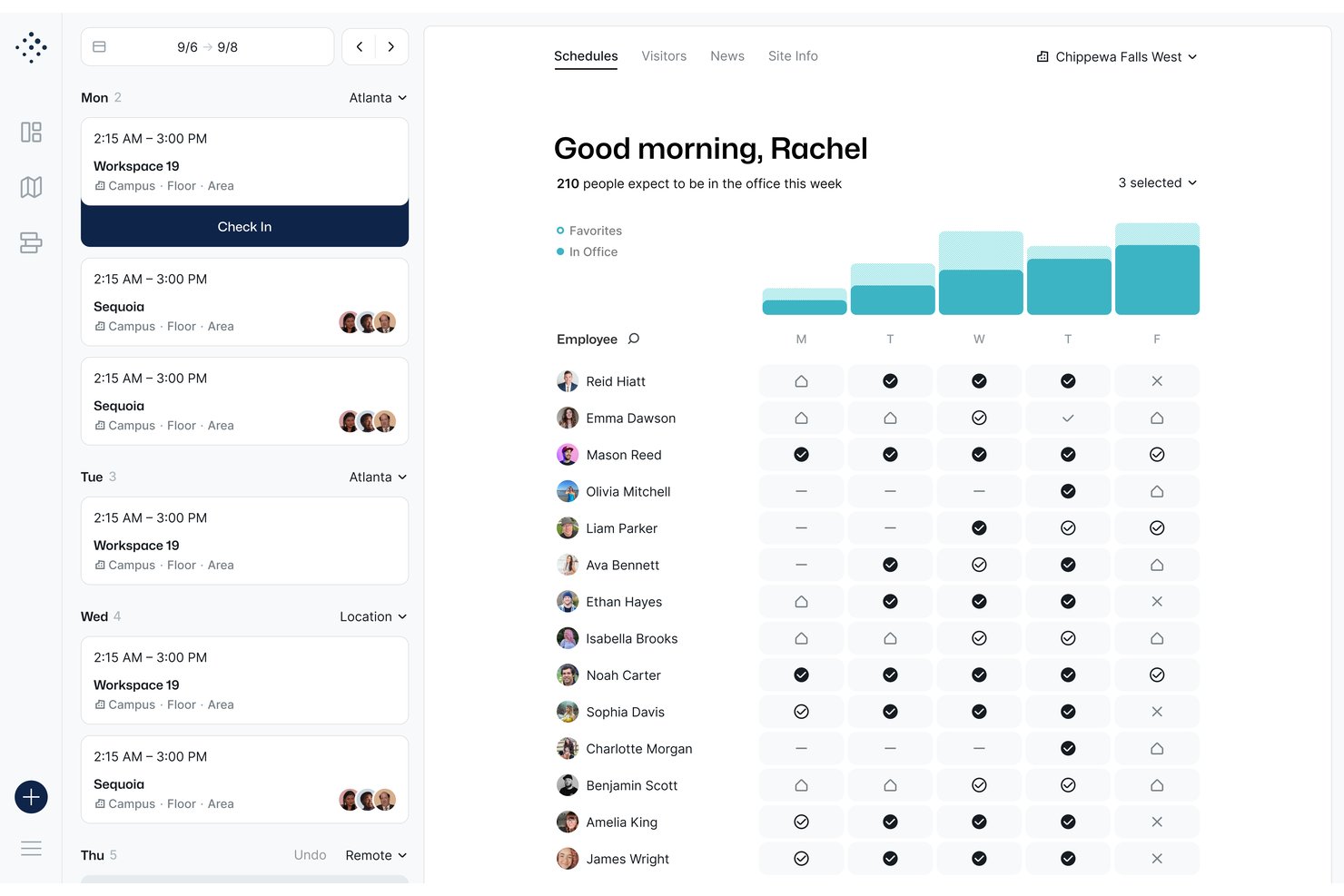
Tactic is a modular AI hot desk booking platform that combines interactive floor plan booking, delegated reservations, team neighborhood coordination, and workplace utilization analytics across hybrid office environments.
Who Is Tactic Best For?
Tactic is a strong fit for mid-size to enterprise organizations running hybrid work programs where admins, EAs, or team leads need to manage desk reservations on behalf of others.
Why I Picked Tactic
I've included Tactic in my top picks because its delegated booking feature is genuinely rare in this space. Admins and EAs can reserve desks for any team member, including executives, directly from the platform. Tactic's Tessa AI adds another layer, letting anyone book a desk with a natural-language request like "standing desk near my team tomorrow." Team neighborhoods keep project groups physically co-located during sprint cycles without manual coordination.
Tactic Key Features
- Interactive floor plan booking: Users can reserve desks, rooms, or resources directly from real-time office maps with visual filters and multi-location support.
- Office insights dashboard: Utilization analytics provide occupancy, booking patterns, and no-show tracking for workspace planning.
- Calendar integrations: Two-way sync with Google Calendar and Outlook brings desk reservations into existing scheduling workflows.
- Custom resource management: Book and manage office assets like parking spaces, lockers, phone booths, or equipment alongside desks and rooms.
Tactic Integrations
Tactic offers native integrations with Google Calendar, Outlook, Slack, Microsoft Teams, Zoom, Microsoft 365, and provides an API for custom integrations.
Pros and Cons
Pros:
- Team neighborhood clustering for project co-location
- Natural language desk booking via Tessa AI
- Delegated booking for admins and executives
Cons:
- Mobile app experience reported as inconsistent
- Analytics depth lags behind enterprise-focused competitors
Best for neighborhood-based seating
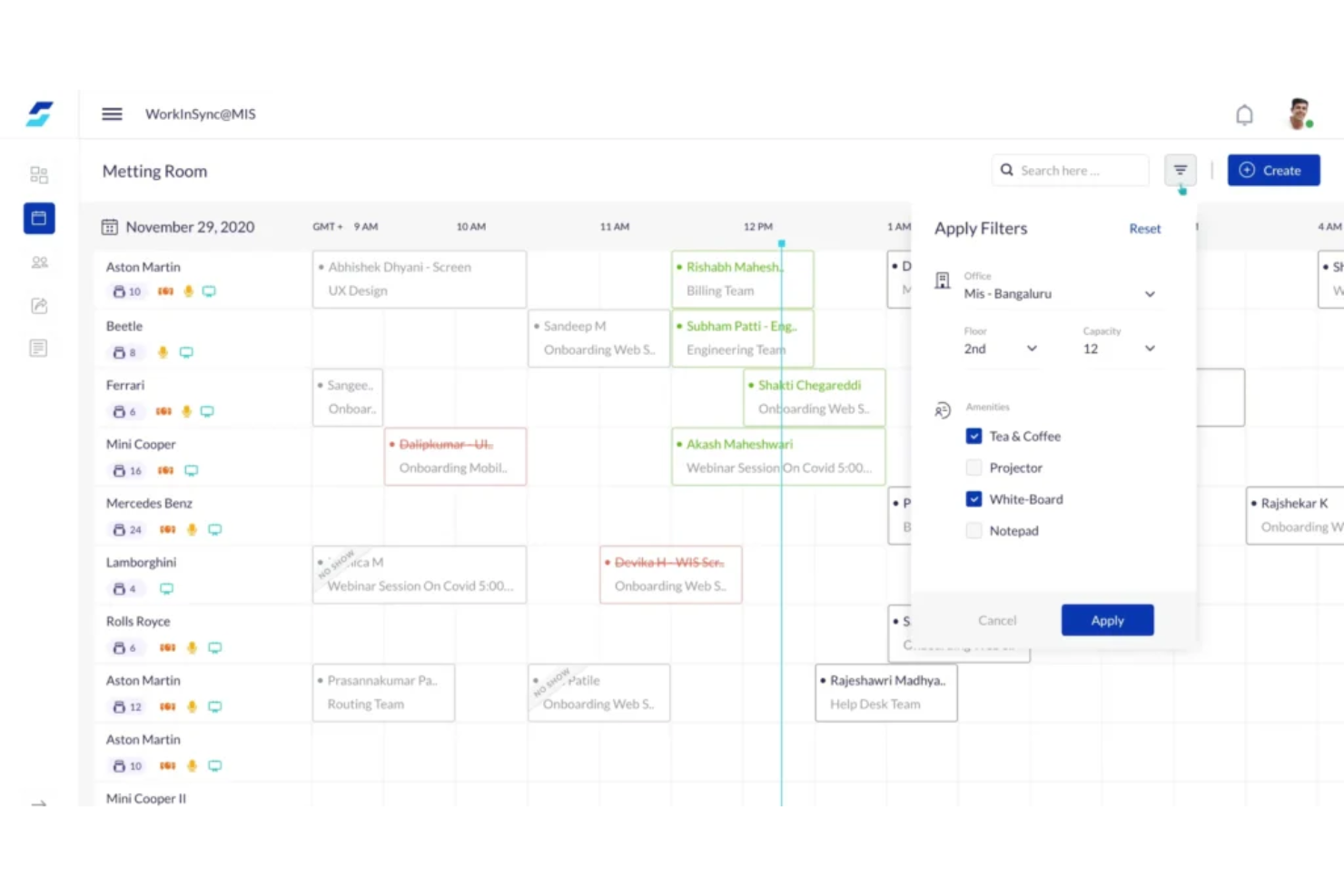
WorkInSync is a workplace management platform for AI-powered desk booking, space scheduling, visitor management, and employee experience tools designed for flexible office environments.
Who Is WorkInSync Best For?
Large organizations and enterprises managing flexible seating across multiple office locations.
Why I Picked WorkInSync
I picked WorkInSync as one of the best because I can set up neighborhood-based seating zones and assign teams to specific areas, which helps manage large, flexible offices. I like that I can automate desk allocation rules and use the interactive floor plan to visualize seat availability. My team uses the mobile app to book desks and coordinate in-office schedules on the go.
WorkInSync Key Features
- Contactless check-in: Employees can check in using QR codes or mobile devices.
- Real-time occupancy dashboard: View live data on desk and space usage across locations.
- Visitor management system: Register, track, and manage office visitors from a single interface.
- Automated health screening: Collect and verify employee health declarations before entry.
WorkInSync Integrations
WorkInSync offers native integrations with Microsoft Teams, Outlook, Google Workspace, Slack, Okta, and Active Directory.
Pros and Cons
Pros:
- Includes automated health screening workflows
- Built-in sanitization status tracking toggle
- Integrated employee commute shuttle tracking
Cons:
- No automatic WiFi-based check-in feature
- Lacks native desktop task reminders
YAROOMS
Best for filtering desks by amenities
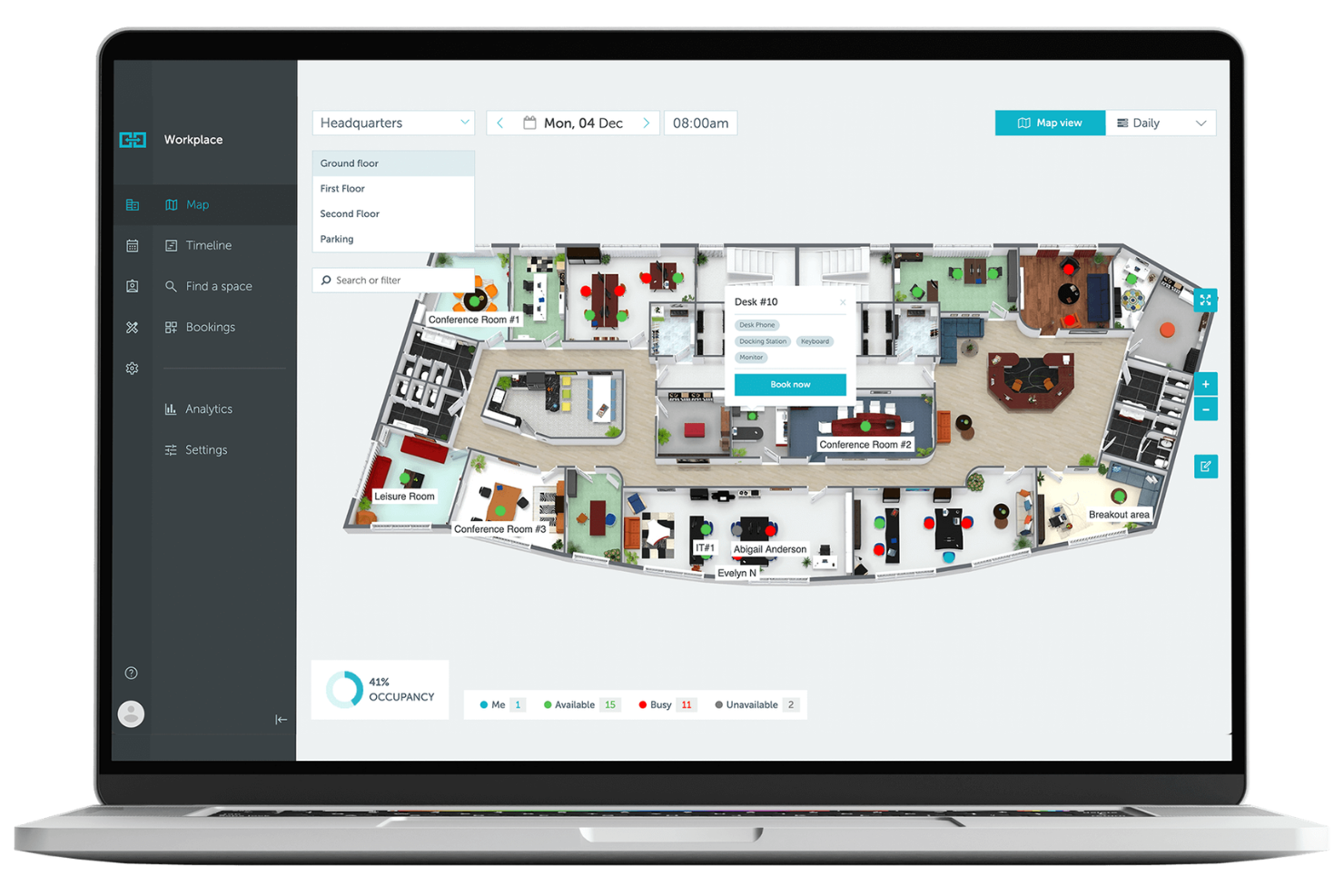
YAROOMS is a workspace management platform for AI-powered desk booking that lets teams reserve desks, manage office resources, set booking policies, and view real-time availability across locations.
Who Is YAROOMS Best For?
Facility managers and workplace teams at mid-size and enterprise organizations who need advanced desk filtering and resource management.
Why I Picked YAROOMS
I picked YAROOMS as one of the best because I can filter available desks by amenities like monitors, standing desks, or proximity to windows. My team uses the visual floor plan to quickly spot and reserve workspaces that match our preferences. I also like that I can set booking rules based on department or user group, which helps us manage shared resources more efficiently.
YAROOMS Key Features
- Mobile booking app: Reserve desks and manage bookings from your phone.
- Outlook and Google Calendar sync: Automatically sync desk reservations with your calendar.
- Contactless QR code check-in: Check in to your reserved desk using a QR code.
- Real-time occupancy dashboard: Monitor workspace usage and desk availability live.
YAROOMS Integrations
YAROOMS offers native integrations with Microsoft 365, Google Workspace, Okta, Azure Active Directory, and Zapier.
Pros and Cons
Pros:
- Offers CO2 and occupancy sensor integrations
- Supports recurring bookings for hybrid schedules
- Offers amenity-based desk filtering
Cons:
- Floorplan visuals are less interactive
- No AI-powered desk assignment
Best for Microsoft Teams integration
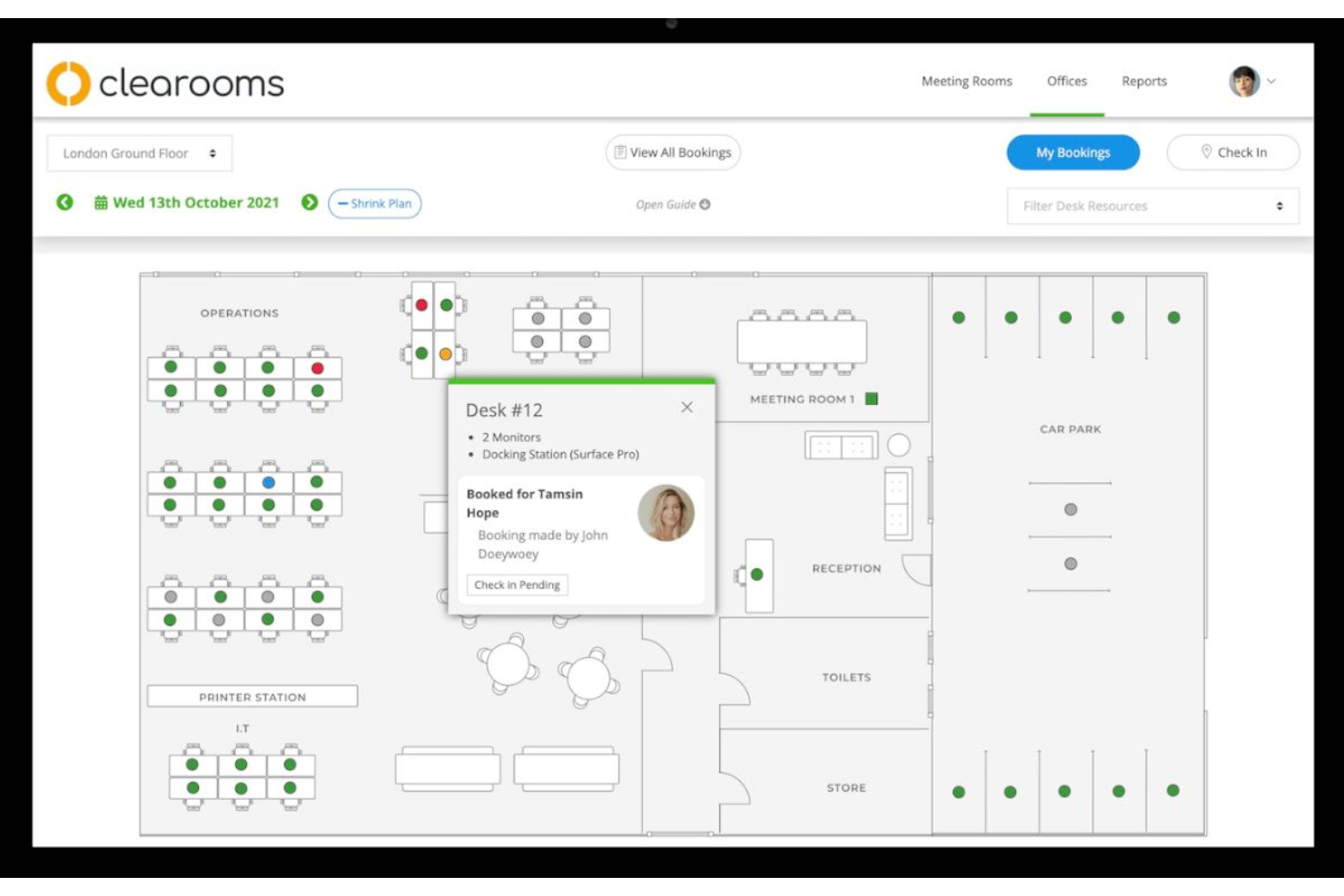
Clearooms is a desk and meeting room booking platform designed for organizations that want to manage workspace reservations, interactive floor plans, and resource scheduling in one system.
Who Is Clearooms Best For?
IT and facilities teams at Microsoft-centric organizations that need to coordinate desk and meeting room bookings.
Why I Picked Clearooms
I picked Clearooms as one of the best because I can book desks and meeting rooms directly from Microsoft Teams, which keeps my team’s workflow in one place. I like that I can sync bookings with Outlook calendars and use interactive floor plans to find available spaces. My team also relies on the QR code check-in feature to manage attendance and avoid no-shows.
Clearooms Key Features
- Capacity management: Set and enforce workspace occupancy limits for desks and rooms.
- Desk release automation: Automatically frees up unused desks after a set period.
- Visitor management: Register and track guests entering the workspace.
- Custom booking rules: Configure booking permissions and restrictions by user or group.
Clearooms Integrations
Clearooms has native integrations across the Microsoft ecosystem, including Microsoft Teams, Microsoft 365, and Outlook. An API is available for custom integrations.
Pros and Cons
Pros:
- Hardware agnostic room console support
- Built-in parking space management
- Pricing based on desk count
Cons:
- Limited advanced AI occupancy forecasting
- Floor plan drafts require 48-hour turnaround

Officely
Best for booking directly within Slack
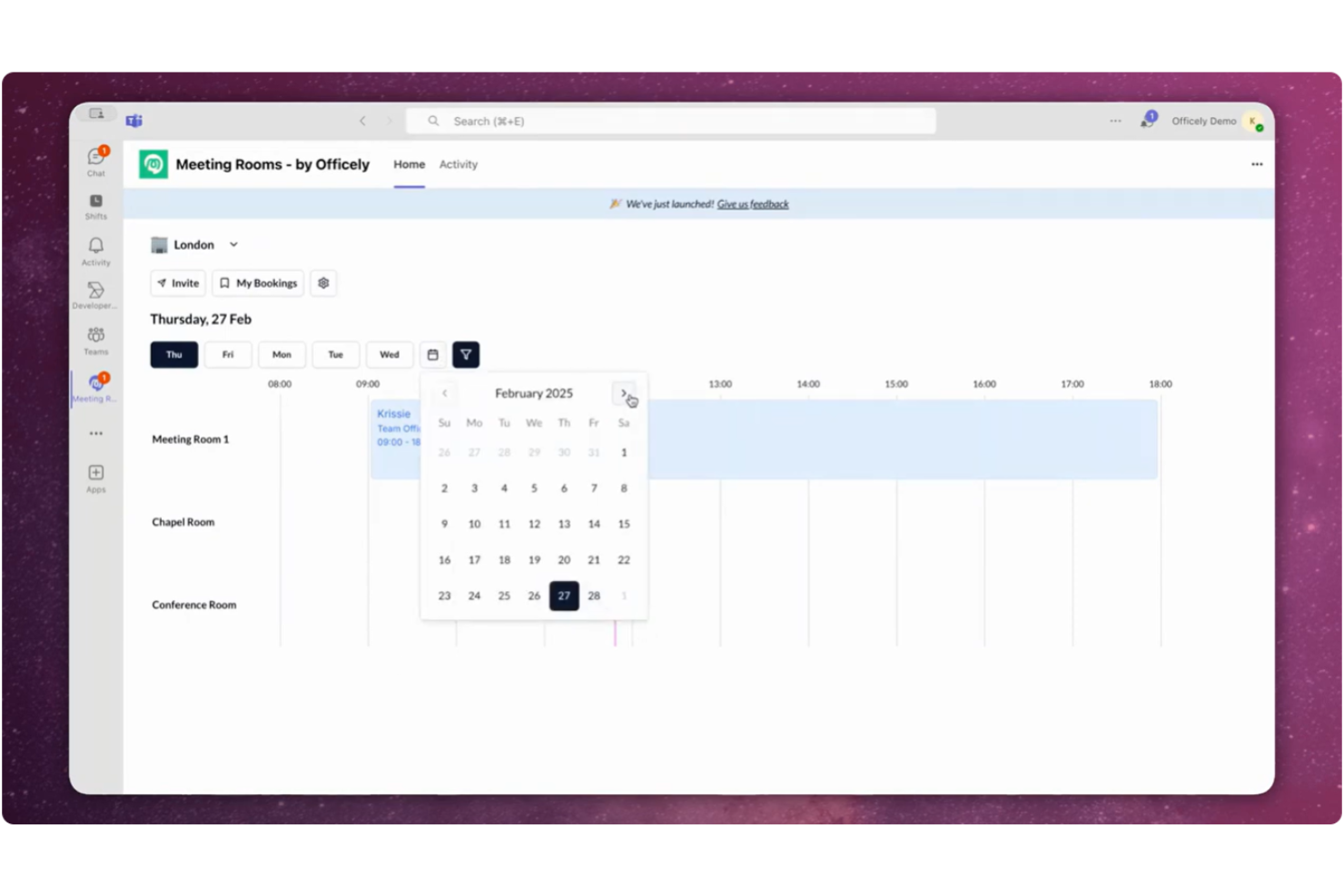
Officely is a desk booking software solution that lets teams manage workspace reservations, office schedules, and desk assignments directly from within Slack.
Who Is Officely Best For?
Hybrid teams that already use Slack as their main communication and collaboration platform.
Why I Picked Officely
I picked Officely as one of the best because I can book desks, set office schedules, and manage team attendance directly inside Slack without switching apps. I like that I can automate desk assignments and send reminders to my team through Slack channels. My team uses the daily check-in prompts to coordinate who’s coming in and keep everyone updated in real time.
Officely Key Features
- Interactive office map: View and select available desks on a visual floor plan.
- COVID-19 health screening: Collect health declarations before team members book a desk.
- Team neighborhood zones: Assign specific desk areas to different teams or departments.
- Visitor management: Register and track guests coming into the office.
Officely Integrations
Officely offers a native integration with Slack, Google Calendar, BambooHR, Deel, and more.
Pros and Cons
Pros:
- Team-specific desk assignment zones
- Personalized office day recommendations
- Direct Slack integration for booking desks
Cons:
- Limited employee engagement reporting
- Visitor management is basic and manual

Flexopus
Best for customizable user permissions
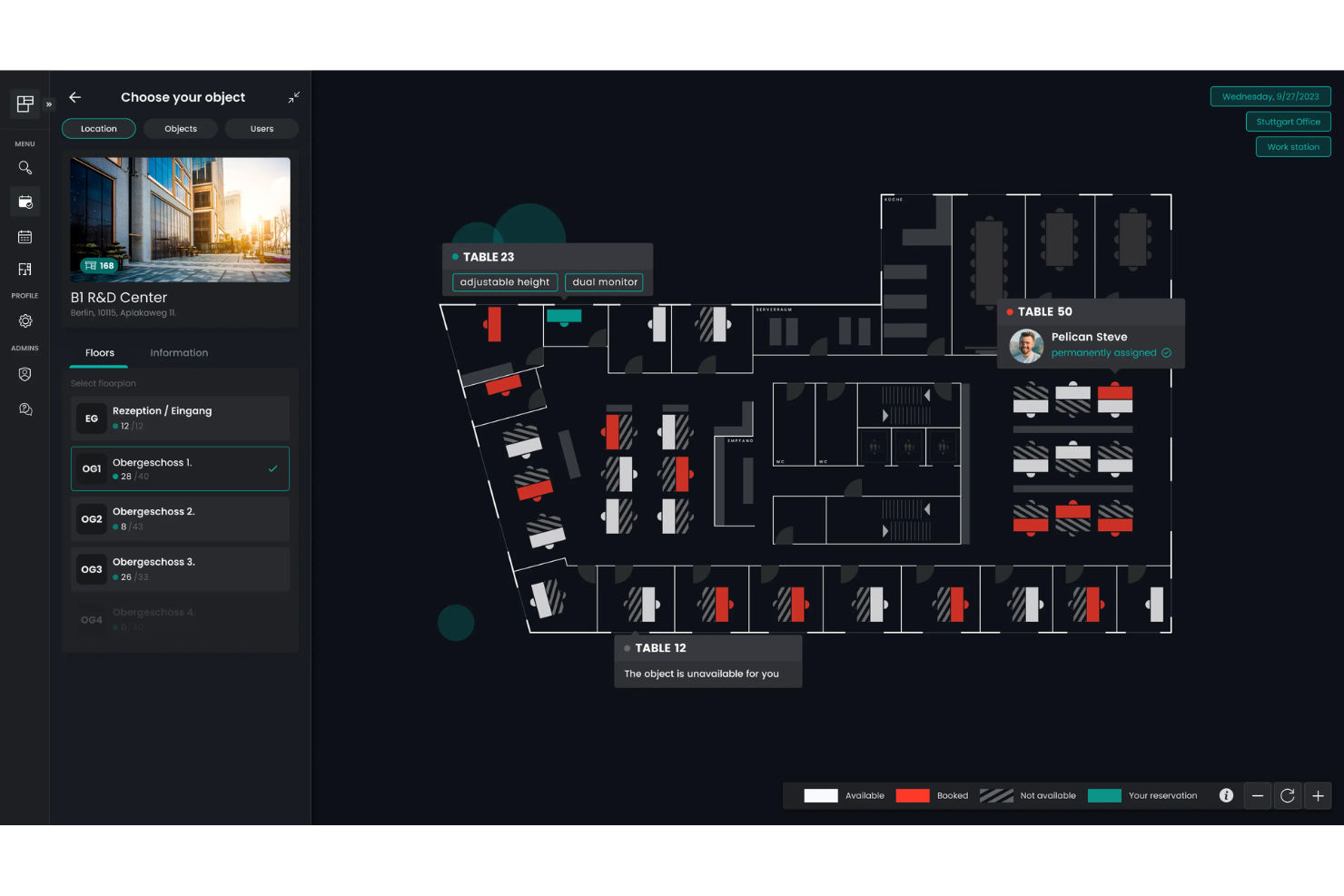
Flexopus is a desk-sharing and AI hot desk booking platform that offers interactive floor plans, booking management, visitor registration, and advanced permission controls for flexible workspace environments.
Who Is Flexopus Best For?
Facility managers and IT teams at mid-sized and large organizations who need granular control over workspace access and booking permissions.
Why I Picked Flexopus
I picked Flexopus as one of the best because I can set up detailed user roles and permissions for different teams, departments, or locations. I like that I can restrict or grant booking access based on user groups, which helps my team manage sensitive or high-demand spaces. My team uses its audit logs to track who books which desks and when, so we always have a clear record of workspace usage.
Flexopus Key Features
- Interactive floor plans: Users can view and select available desks on a digital office map.
- QR code desk check-in: Employees check in to their reserved desks using QR codes.
- Visitor management: Register and track external guests entering the workspace.
- Recurring bookings: Set up repeating desk reservations for regular schedules.
Flexopus Integrations
Flexopus offers native integrations with Microsoft Teams, Google Calendar, Webex, Personio, and Okta, and provides a REST API for custom integrations.
Pros and Cons
Pros:
- Integrated IT asset service requests
- Data hosting exclusively in Germany
- Resource-based pricing without user limits
Cons:
- Requires manual floor plan image uploads
- Admin dashboard lacks mobile optimization

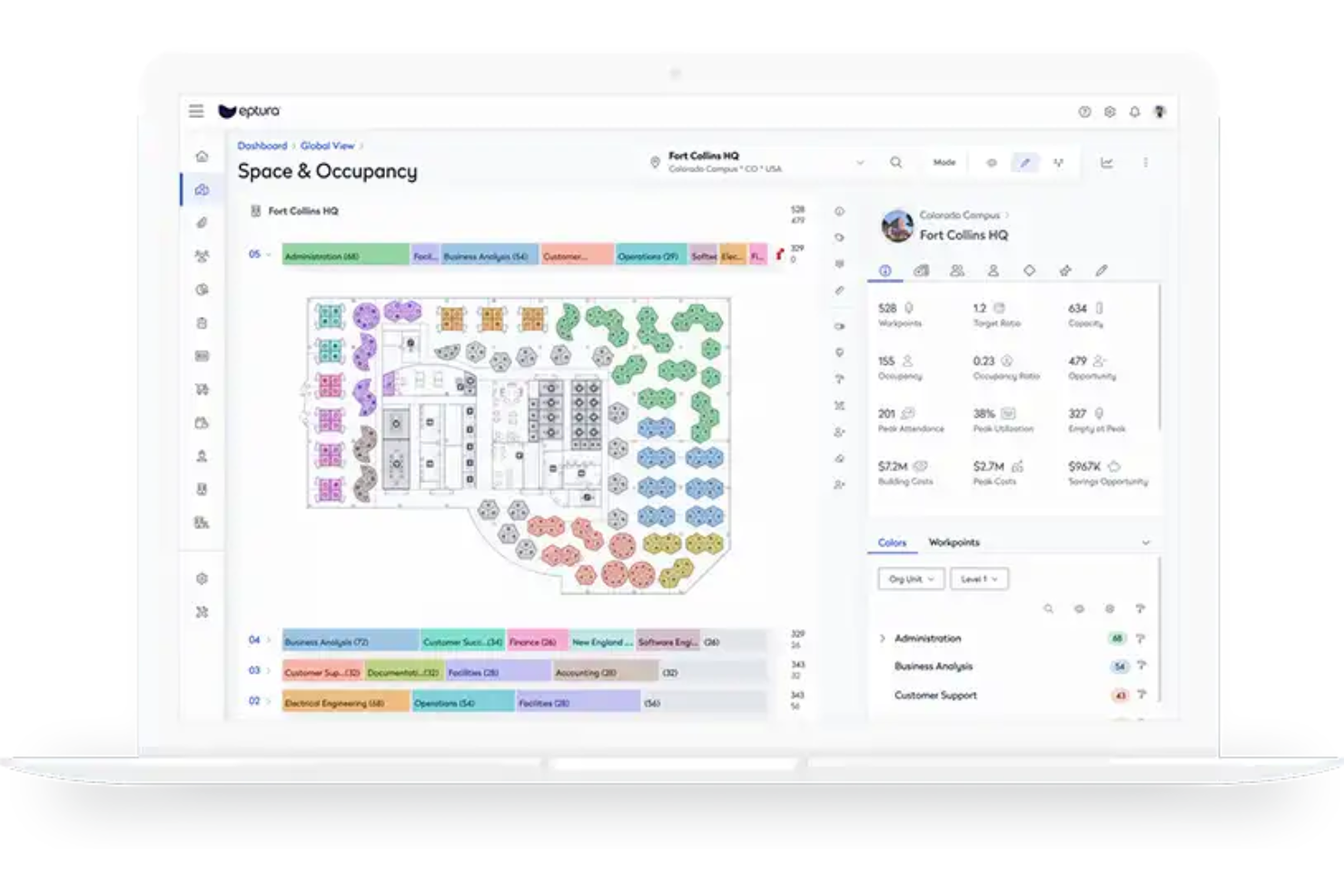
Eptura Engage is a workplace management platform for AI-powered desk booking, space reservations, visitor management, and workplace analytics designed for flexible office environments.
Who Is Eptura Engage Best For?
Facility managers and workplace teams at large enterprises seeking advanced workspace analytics and desk booking.
Why I Picked Eptura Engage
I picked Eptura Engage as one of the best because I can access granular workspace analytics that show real-time and historical desk usage patterns. I like that I can visualize occupancy trends and space utilization through customizable dashboards. My team uses its AI-driven booking engine to optimize desk assignments and monitor how different areas of the office are used over time.
Eptura Engage Key Features
- Mobile desk booking app: Reserve desks and spaces directly from a mobile device.
- Visitor management system: Register and track guests entering the workplace.
- Interactive floor plans: View and select available desks on a digital office map.
- Automated check-in and check-out: Enable touchless entry and exit for employees and visitors.
Eptura Engage Integrations
Eptura Engage offers native integrations with Microsoft 365, Google Workspace, Okta, and Slack.
Pros and Cons
Pros:
- Integrated asset service request portal
- Interactive kiosk for walk-up bookings
- Badge swipe access control integration
Cons:
- No public pricing for smaller teams
- Minimum contract for enterprise-level features


Robin is an AI-powered desk booking platform designed for hybrid workplaces, offering automated desk assignments, interactive floor plans, and real-time availability management.
Who Is Robin Best For?
Facilities managers and workplace teams at mid-size to large organizations looking to automate desk assignments and manage flexible seating.
Why I Picked Robin
I picked Robin as one of the best because its AI-driven desk assignment engine automatically allocates desks based on team preferences and booking patterns. I like how the platform visualizes real-time desk availability on interactive floor plans, making it easy to manage dynamic seating. My team is able to set up recurring desk assignments and quickly adapt to changing schedules without manual intervention.
Robin Key Features
- Visitor management: Register guests and track visitor flow directly within the platform.
- Desk check-in via mobile app: Enable users to check in to their reserved desks using a mobile device.
- Analytics dashboard: Access workspace usage data and booking trends in real time.
- Neighborhoods and zones: Group desks into neighborhoods or zones for team-based seating arrangements.
Robin Integrations
Robin offers native integrations with Microsoft Outlook, Microsoft Teams, Google Workspace, Slack, Zoom, Okta, and Rippling.
Pros and Cons
Pros:
- Mobile app supports on-the-go desk check-in
- Interactive floor plans for real-time booking
- Automated desk assignments based on usage patterns
Cons:
- No built-in wayfinding for large offices
- Visitor management requires higher-tier plans
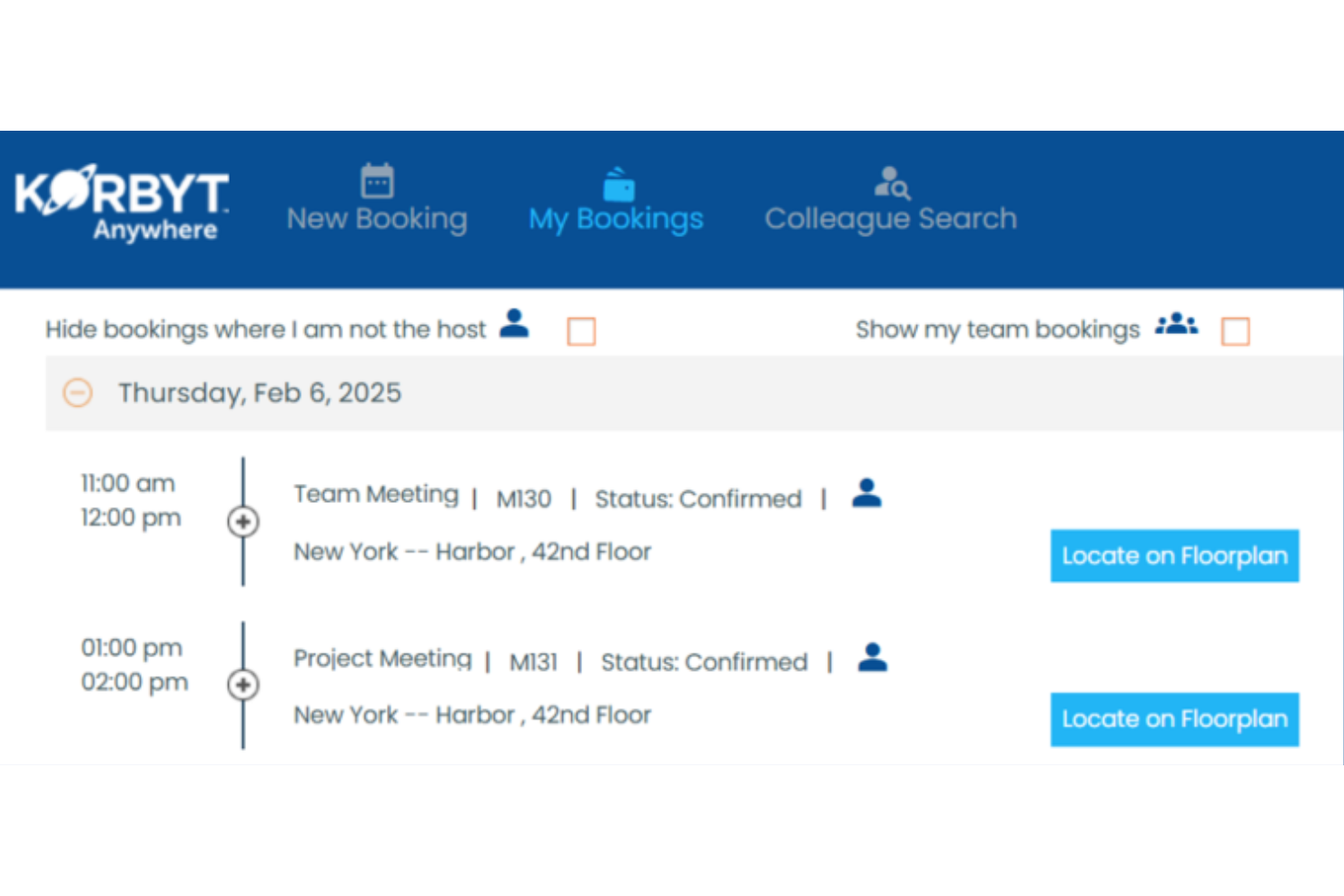
Korbyt is a workplace experience platform for AI-powered desk booking that combines interactive floorplan mapping, workspace reservations, occupancy analytics, and visitor management.
Who Is Korbyt Best For?
Facility and workplace managers at large enterprises who need real-time visibility into desk and space usage.
Why I Picked Korbyt
I picked Korbyt as one of the best because I can see real-time floorplan views that update as desks are booked or released, which helps my team quickly spot available spaces. I like using the interactive map to filter by amenities and location, so I can match people to the right workspace. I also rely on the occupancy heatmaps to monitor usage patterns throughout the day.
Korbyt Key Features
- AI-powered desk assignment: Uses algorithms to suggest optimal desk assignments based on preferences and availability.
- Mobile booking app: Lets users reserve desks and manage bookings from their smartphones.
- Visitor management integration: Coordinates guest check-ins and workspace access.
- Automated cleaning notifications: Triggers cleaning requests after desk usage for hygiene compliance.
Korbyt Integrations
Integrations include Dropbox, Microsoft 365, Outlook, Salesforce, and more.
Pros and Cons
Pros:
- Offers occupancy analytics for optimization
- Supports multi-location and multi-floor management
- Interactive maps make desk selection visual
Cons:
- Advanced analytics require higher-tier plans
- Limited calendar integration options

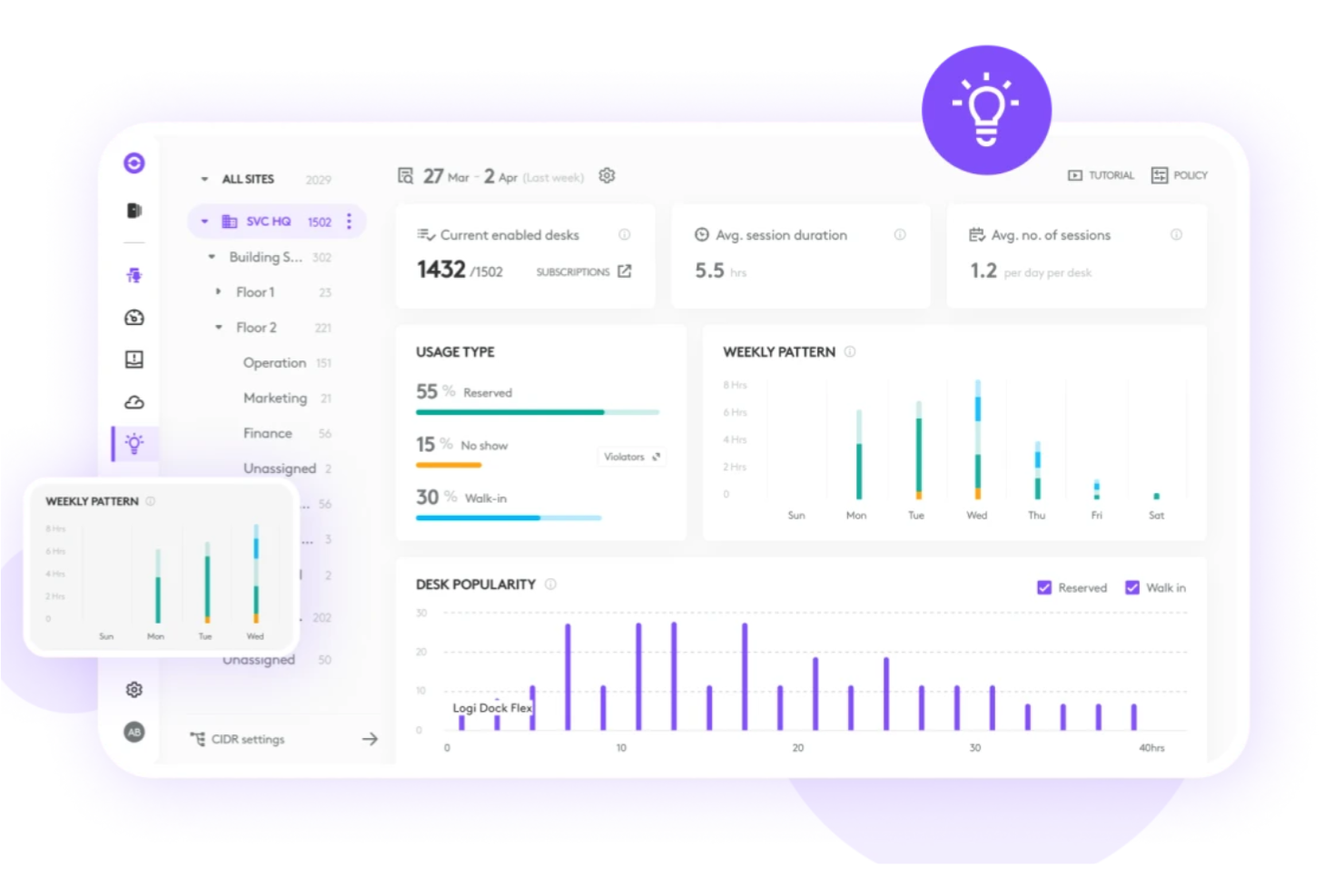
Logitech Desk Booking is a workspace management platform for booking desks, managing devices, monitoring occupancy, and analyzing workspace usage across hybrid office environments.
Who Is Logitech Desk Booking Best For?
IT and facilities teams at mid-size and large organizations managing hybrid workspaces and connected devices.
Why I Picked Logitech Desk Booking
I picked Logitech Desk Booking as one of the best because I can manage both workspace reservations and connected devices from a single dashboard. I like how the platform provides detailed workspace analytics, letting my team monitor occupancy and device usage trends. My team is able to automate desk assignments and proactively address device issues using real-time data from Logitech Sync.
Logitech Desk Booking Key Features
- QR code desk check-in: Users scan a QR code to confirm their desk reservation on arrival.
- Interactive floor plan view: Visualize and select available desks directly from a digital office map.
- Single sign-on (SSO) support: Employees log in securely using their existing company credentials.
- Admin role management: Assign different access levels and permissions to workspace administrators.
Logitech Desk Booking Integrations
Logitech Desk Booking offers native integrations with Microsoft 365, Google Workspace, Azure AD, Okta, and ServiceNow.
Pros and Cons
Pros:
- QR code check-in for contactless desk access
- Real-time occupancy data for each workspace
- Device health monitoring built into the platform
Cons:
- Analytics export options are restricted
- Limited branding customization
Diğer Yapay Zekâlı Paylaşımlı Masa Rezervasyon Yazılımları
İşte kısa listeme giremeyen ancak yine de göz atmaya değer bazı ek yapay zekâlı paylaşımlı masa rezervasyon yazılımı seçenekleri:
- Eden
For hourly desk reservations
- anny
With interactive 3D office maps
- OfficeSpace
With badge integration for check-in
- Skedda
For self-service desk scheduling rules
- Envoy
With visitor management integration
- deskbird
For booking via mobile and web apps
- Kadence
For automated recurring desk reservations
- Archie
For analytics on workspace utilization
- DeskFlex
With room and desk booking in one platform
- HybridHero
For occupancy insights by department


How I Evaluate AI Hot Desk Booking Software
I look for platforms where AI goes beyond a marketing label—it should suggest desks based on project teams, predict space demand from upcoming schedules, or flag underused capacity. I split my evaluation into core functionality every tool needs to qualify and the differentiating factors that separate a good fit from a great one.
Core Functionality (Table Stakes For This List)
When I'm selecting tools for my list, I rank each one on a scale from 0 (does not offer the functionality) to 5 (excels in this area) for each core functionality listed below. Then, I calculate the tool's total score into a percentage. Each tool needs to achieve a minimum total score of 55% to be considered for inclusion.
- AI-Driven Desk Recommendations: I evaluate whether the AI goes beyond simple filters to actually suggest desks based on factors like team proximity, past booking habits, or project assignments.
- Hot Desk Booking Engine: The booking flow should cover search, reservation, modification, and cancellation across locations, including support for recurring bookings and check-in/out.
- Interactive Floor Plans: I look for real-time visual maps where users can spot open desks, filter by amenities, and book directly from the floor plan rather than scrolling through a list.
- Team & Project Co-location: This matters when sprint teams or cross-functional squads need to sit together. I check whether the tool supports group bookings tied to a project or team.
- AI Utilization Analytics: Dashboards should surface AI-generated insights on occupancy trends and space demand, not just raw booking counts that require manual interpretation.
- Calendar & PM Integrations: I look at how well the tool syncs with Google Calendar, Outlook, and project management platforms like Jira or Asana to keep desk bookings aligned with team schedules.
Once I have a list of tools that meet the criteria, I consider what sets each platform apart.
Differentiating Factors (What Sets Vendors Apart)
Here's how I compare and contrast different vendors:
Standout Features
AI neighborhood planning is a big differentiator—I look for tools that auto-cluster project squads into shared zones based on collaboration patterns. Scenario modeling also matters for PMO leads forecasting space needs against upcoming project pipelines. Predictive no-show detection adds real value too, freeing up desks in real time so sprint teams waiting for space can grab open seats without manual coordination.
Beyond Features
Integration depth matters a lot here. I evaluate how well a platform connects with project management tools like Jira or Asana and identity providers like Okta or Azure AD for seamless user provisioning. Scalability is another key factor—if your teams span multiple offices and time zones, the tool needs to handle that under a single tenant. I also consider implementation support, especially floor plan digitization and change management resources that help drive adoption across teams.
Yapay Zekâlı Paylaşımlı Masa Rezervasyon Yazılımı Nasıl Seçilir?
Uzun özellik listeleri ve karmaşık fiyatlandırma yapıları içinde kaybolmak kolaydır. Kendinize özgü yazılım seçimi sürecinizde ilerlerken odağınızı korumanıza yardımcı olmak için göz önünde bulundurmanız gereken faktörlerin bir kontrol listesi aşağıda yer alıyor:
| Faktör | Göz önünde bulundurulması gerekenler |
| Ölçeklenebilirlik | Yazılım, mevcut ve gelecekteki ofis büyüklüğünüzü, konumlarınızı ve kullanıcı artışınızı destekleyebilecek mi? |
| Entegrasyonlar | Takviminiz, kimlik sağlayıcınız ve iş birliği araçlarınızla yerel olarak bağlantı kurabiliyor mu? |
| Özelleştirilebilirlik | Rezervasyon kurallarını, izinleri ve çalışma alanı düzenlerini politikalarınıza uyacak şekilde özelleştirebilir misiniz? |
| Kullanım kolaylığı | Ekibiniz yazılımı hızlı bir şekilde benimseyecek mi, yoksa günlük görevler için eğitim ve destek gerekli olacak mı? |
| Uygulama ve işe alıştırma | Kurulum ne kadar sürecek ve sağlayıcı geçiş için hangi kaynakları veya desteği sunuyor? |
| Maliyet | Fiyatlandırma kademeleri açık mı ve kullanım alışkanlıklarınızla bütçe kısıtlamalarınıza uyuyor mu? |
| Güvenlik önlemleri | Araç, kuruluşunuzun güvenlik ihtiyaçları doğrultusunda SSO, veri şifreleme ve uyumluluk sunuyor mu? |
| Destek erişilebilirliği | Hangi destek kanalları sunuluyor ve yanıt süreleri çalışma saatleriniz için kabul edilebilir mi? |
Yapay Zekâlı Paylaşımlı Masa Rezervasyon Yazılımı Nedir?
Yapay zekâlı paylaşımlı masa rezervasyon yazılımı, kuruluşların ortak çalışma alanlarında esnek masa rezervasyonlarını yönetmesine yardımcı olmak için yapay zekâ kullanan dijital bir platformdur. Masa atamalarını otomatikleştirir, gerçek zamanlı uygunluğu izler ve değişen doluluk düzenlerine uyum sağlar. Bu araçlar, çalışanların ihtiyaçlarına ve tercihlerine göre masa bulmasını, rezerve etmesini ve masalara giriş yapmasını kolaylaştırarak hibrit çalışma modellerini destekler.
Yapay Zekâlı Paylaşımlı Masa Rezervasyon Yazılımlarının Özellikleri
Yapay zekâlı paylaşımlı masa rezervasyon yazılımı seçerken aşağıdaki temel özelliklere dikkat edin:
- Yapay zekâ destekli masa atama: Kullanıcı tercihleri, ekip yakınlığı veya rezervasyon geçmişine göre masa önermek ya da masaları otomatik olarak atamak için algoritmalar kullanır.
- Gerçek zamanlı uygunluk takibi: Kullanıcıların hangi çalışma alanlarının o anda boş veya rezerve edilmiş olduğunu görebilmesi için güncel masa durumunu gösterir.
- Etkileşimli kat planları: Kullanıcıların gerçek ofis düzenini yansıtan dijital bir harita üzerinde masaları görmesine ve seçmesine olanak tanır.
- Otomatik rezervasyon kuralları: Yöneticilerin kimlerin, ne zaman ve ne kadar süreyle rezervasyon yapabileceğine ilişkin politikalar belirlemesine olanak tanır; esnek veya sabit programları destekler.
- Takvim entegrasyonu: Masa rezervasyonlarını toplantılar ve çalışma programlarıyla uyumlu hâle getirmek için Google Takvim veya Microsoft Outlook gibi araçlarla senkronize olur.
- QR koduyla giriş: Kullanıcıların masadaki QR kodunu tarayarak rezervasyonlarını ve kullanım durumlarını doğrulamasını sağlar.
- Analiz ve raporlama: Çalışma alanı planlamasına yön vermek için masa kullanımı, doluluk eğilimleri ve rezervasyon modelleri hakkında içgörüler sunar.
- Tek oturum açma (SSO): Kuruluşunuzun kimlik sağlayıcısına bağlanarak güvenli kimlik doğrulamayı destekler.
- Mobil uygulama erişimi: Kullanıcıların hareket hâlindeyken esneklik sağlamak üzere rezervasyonları akıllı telefonlarından yapmasına, değiştirmesine veya iptal etmesine olanak tanır.
- Ziyaretçi yönetimi entegrasyonu: Ziyaretçilerin çalışma alanına erişimini yönetmek için masa rezervasyonlarını konuk girişleriyle koordine eder.
Yapay Zekâ Destekli Esnek Masa Rezervasyon Yazılımının Faydaları
Yapay zekâ destekli esnek masa rezervasyon yazılımını uygulamak, ekibiniz ve işletmeniz için çeşitli faydalar sağlar. Yararlanabileceğiniz birkaç faydayı aşağıda bulabilirsiniz:
- Çalışma alanının kullanımının optimize edilmesi: Yapay zekâ destekli öneriler ve gerçek zamanlı takip, masaların verimli kullanılmasını sağlamaya ve boşa harcanan alanı azaltmaya yardımcı olur.
- Sadeleştirilmiş masa yönetimi: Otomatik rezervasyon kuralları ve etkileşimli kat planları, yöneticilerin ve çalışanların rezervasyonları kolayca yönetmesini sağlar.
- Geliştirilmiş çalışan deneyimi: Hızlı rezervasyon, mobil erişim ve kişiselleştirilmiş masa atamaları esnek çalışmayı destekler ve memnuniyeti artırır.
- Veriye dayalı karar alma: Analiz ve raporlama özellikleri, çalışma alanı planlaması ve maliyet kontrolü için uygulanabilir içgörüler sunar.
- Gelişmiş güvenlik ve uyumluluk: Tek oturum açma ve erişim kontrolleri, hassas verilerin korunmasına yardımcı olur ve kurumsal güvenlik politikalarını destekler.
- İş akışlarıyla entegrasyon: Takvim ve ziyaretçi yönetimi entegrasyonları, masa rezervasyonlarını toplantılar ve konuk erişimiyle uyumlu hâle getirir.
- Daha hızlı işe alıştırma ve benimseme: Sezgisel arayüzler ve yönlendirmeli işe alıştırma kaynakları, ekiplerin en az kesintiyle çalışmaya başlamasına yardımcı olur.
Yapay Zekâ Destekli Esnek Masa Rezervasyon Yazılımının Maliyetleri ve Fiyatlandırması
Yapay zekâ destekli esnek masa rezervasyon yazılımı seçmek, mevcut çeşitli fiyatlandırma modellerinin ve planların anlaşılmasını gerektirir. Fiyatlar ücretsiz esnek masa rezervasyon araçları ile özelliklere, ekip büyüklüğüne, eklentilere ve daha fazlasına göre ölçeklenen ücretli planlar arasında değişir. Aşağıdaki tabloda, yaygın planlar, bunların ortalama fiyatları ve yapay zekâ destekli esnek masa rezervasyon yazılımı çözümlerinde bulunan tipik özellikler özetlenmektedir:
Yapay Zekâ Destekli Esnek Masa Rezervasyon Yazılımı İçin Plan Karşılaştırma Tablosu
| Plan Türü | Ortalama Fiyat | Yaygın Özellikler |
| Ücretsiz Plan | $0 | Temel masa rezervasyonu, sınırlı kullanıcı sayısı, basit kat planı ve e-posta desteği. |
| Kişisel Plan | $5-$10/kullanıcı/ay | Masa rezervasyonu, mobil uygulama erişimi, takvim entegrasyonu ve temel analizler. |
| İşletme Planı | $10-$25/kullanıcı/ay | Gelişmiş rezervasyon kuralları, etkileşimli kat planları, SSO, raporlama, entegrasyonlar ve yönetici denetimleri. |
| Kurumsal Plan | $25-$50/kullanıcı/ay | Özel iş akışları, API erişimi, gelişmiş analizler, özel destek, işe alıştırma yardımı ve uyumluluk araçları. |
Yapay Zekâ Destekli Esnek Masa Rezervasyon Yazılımı SSS'leri
Yapay zekâ destekli esnek masa rezervasyon yazılımı hakkında sık sorulan bazı soruların yanıtları:
Yapay zekâ, esnek masa rezervasyon yazılımını nasıl geliştirir?
Yapay zekâ, masa atamalarını otomatikleştirerek, talebi öngörerek ve kullanıcı tercihleriyle ekip ihtiyaçlarına göre en uygun oturma düzenini önererek modern masa rezervasyon sistemini geliştirir. Lojistik işlemlerini yönetmesi için bir yapay zekâ asistanı kullanıldığında kuruluşlar, ofis kapasitesiyle ilgili tahmin yürütme gerekliliğini ortadan kaldırabilir, manuel iş yükünü azaltabilir ve çalışma alanının daha iyi kullanılmasını sağlayabilir.
Yapay zekâ ayrıca masa kullanımını önceden rezerve etme stratejilerini destekleyerek mevcut alanın daha dinamik ve verimli kullanılmasına olanak tanır.
Yapay zekâ destekli esnek masa rezervasyon yazılımı mevcut araçlarımızla entegre olabilir mi?
Evet, yapay zekâ destekli esnek masa rezervasyon yazılımlarının çoğu Google Workspace, Microsoft 365, Slack ve kimlik sağlayıcıları gibi popüler araçlarla entegre olabilir. Bu entegrasyonlar, bir masa rezervasyon çözümünün çalışan takvimleriyle ve ofis genelindeki dijital tabelalarla senkronize edilmesine yardımcı olur. Bu bağlantı sayesinde bir çalışan sabit bir masada veya esnek bir çalışma istasyonunda olsun, konumu ve uygunluğu tüm iş birliği platformlarında gerçek zamanlı olarak güncellenir.
Yapay zekâ destekli esnek masa rezervasyon yazılımı güvenli midir?
Evet, saygın yapay zekâ destekli esnek masa rezervasyon yazılımları tek oturum açma, şifreleme ve sıkı GDPR uyumluluğu uygulayarak veri korumaya öncelik verir. Güvenli bir kullanıcı deneyimi sunmak için bu araçlar, kat planlarını yalnızca yetkili kişilerin görüntüleyebilmesini veya değiştirebilmesini sağlayan erişim denetimleri sunar. Bir tedarikçinin güvenlik belgelerini her zaman inceleyerek kuruluşunuzun gereksinimlerini karşıladığından emin olun.
Bu platformlardan ne tür analizler bekleyebilirim?
Doluluk oranları, rezervasyon eğilimleri ve en yoğun kullanım zamanları hakkında ayrıntılı analizler bekleyebilirsiniz. Bu analizler, ofis düzeni ve kapasite planlaması hakkında bilinçli kararlar vermenize yardımcı olarak gayrimenkul kullanımını optimize etmek için son derece değerlidir. Ofisin yerinde nasıl kullanıldığını anlayarak fiziksel alanınızı gerçek iş yeri ihtiyaçları ve gelecekteki yatırımlarla daha iyi uyumlu hâle getirebilirsiniz.
Yapay zekâ destekli esnek masa rezervasyon yazılımının uygulanması ne kadar sürer?
Uygulama genellikle birkaç gün ile birkaç hafta arasında sürer. Çoğu sağlayıcı, ofisinizi hızlıca planlamanıza yardımcı olacak şablonlar içeren, kullanımı kolay bir başlangıç süreci sunar. Süre çoğunlukla oda planlama gereksinimlerinizin karmaşıklığına ve kaç departmanın yeni sisteme geçiş yaptığına bağlıdır.
Çalışanlar mobil cihazlarından masa rezerve edebilir mi?
Evet, yapay zekâ destekli esnek masa rezervasyon yazılımlarının çoğu mobil uygulamalar veya duyarlı web arayüzleri sunarak çalışanların akıllı telefonlarından ya da tabletlerinden rezervasyon yapmasına, rezervasyonlarını değiştirmesine veya iptal etmesine olanak tanır. Bu özellik, hareket hâlindeyken esnek masa yönetimini destekler.