

2026’da Kodsuz Otomasyon için En İyi 10 Workato Alternatifi

En İyi Workato Alternatifleri Kısa Listesi


Projeleri yönetiyorsanız birden fazla araç ve sistemi bir arada kullanmanın ne kadar zahmetli olduğunu bilirsiniz. Hizmet Olarak Entegrasyon Platformu (iPaaS), uygulamalarınızı birbirine bağlayıp iş akışlarını otomatikleştirerek yardımcı olabilir; ancak Workato ihtiyaçlarınızı karşılamıyor olabilir.
Workato'nun sunmadığı özellikleri arıyor veya farklı fiyatlandırma modeli seçenekleri istiyor olabilirsiniz. Nedeni ne olursa olsun, alternatif entegrasyon araçlarını incelemek ekibiniz için akıllıca bir adımdır.
Bu makalede Workato alternatifleri arasından en iyi seçimlerimi paylaşacağım. Tarafsız bir rehber sunmak için bu araçları test edip inceledim. Çeşitli işletme ve otomasyon ihtiyaçlarına hitap eden çözümler bulacak, böylece bilinçli bir karar verebileceksiniz.
Workato Nedir?
Workato, uygulamaları birbirine bağlayan ve işletme kullanıcılarının iş akışları oluşturmasına yardımcı olan bir iPaaS'tir. Genellikle üretkenliği artırmak isteyen BT profesyonelleri, proje yöneticileri ve işletme operasyonları ekipleri tarafından kullanılır. Sürükle ve bırak otomasyonu, önceden oluşturulmuş bağlayıcılar ve gerçek zamanlı veri senkronizasyonu gibi özellikler karmaşık entegrasyonları basitleştirmeye ve operasyonel verimliliği artırmaya yardımcı olur. Genel olarak Workato, ekibinizin otomasyon sayesinde daha akıllı ve hızlı çalışmasını sağlayarak değer sunar.
Workato Alternatifleri Karşılaştırma Tablosu
Aşağıdaki tabloda en iyi Workato alternatifleri için fiyatlandırma ayrıntıları karşılaştırılmaktadır.
| Tool | Starting Price | Website | |
|---|---|---|---|
| Best for visual workflow builders | 4.7 out of 5 | $9/month Free plan available | Website |
| Best for AI-driven automation | 4.4 out of 5 | $99/month 30-day free trial | Website |
| Best for AI-powered data management | 4.3 out of 5 | Pricing upon request 30-day free trial available | Website |
| Best for hybrid cloud integration needs | — | $200/month 30-day free trial + free demo available | Website |
| Best for large enterprises using Oracle systems | — | Pricing upon request 30-day free trial + free demo available | Website |
| Best for no-code automation | — | $19.99/month Free plan available | Website |
| Best for API-led integrations | — | $2,000/month 30-day free trial + demo available | Website |
| Best for complex SaaS workflow automation | — | Pricing upon request Free demo available | Website |
| Best for user-friendly integration | — | Pricing upon request 30-day free trial available | Website |
| Best for quick integration solutions | — | $1,499/month Free trial + free demo available | Website |
Yazılım Önerilerimize Neden Güvenebilirsiniz?
Ekibimiz 2012’den beri yazılımları test ediyor ve inceliyor. Biz de proje yöneticisi olduğumuz için doğru yazılımı seçmenin ne kadar zor ve önemli olduğunu biliyoruz.
Bu rehber için araçları uygulamalı testler ve bağımsız araştırmalarla değerlendirdik ve seçim kriterlerimize göre puanladık. Ayrıca sektörün fikir önderlerinin ve alanında çalışan proje yönetimi uzmanlarının görüşlerinden de yararlanıyoruz.
İncelemelerimiz bir satış konuşması değil, editör ekibimizin kendi değerlendirmesidir.
Uzman inceleyenler:
En İyi Workato Alternatifleri İncelemeleri
Aşağıda kısa listeme giren en iyi Workato alternatiflerinin ayrıntılı özetlerini bulabilirsiniz. İncelemelerim, size en uygun aracı bulmanıza yardımcı olmak için her aracın temel özelliklerine, artılarına ve eksilerine, entegrasyonlarına ve ideal kullanım alanlarına ayrıntılı bir bakış sunar.

Make
Best for visual workflow builders
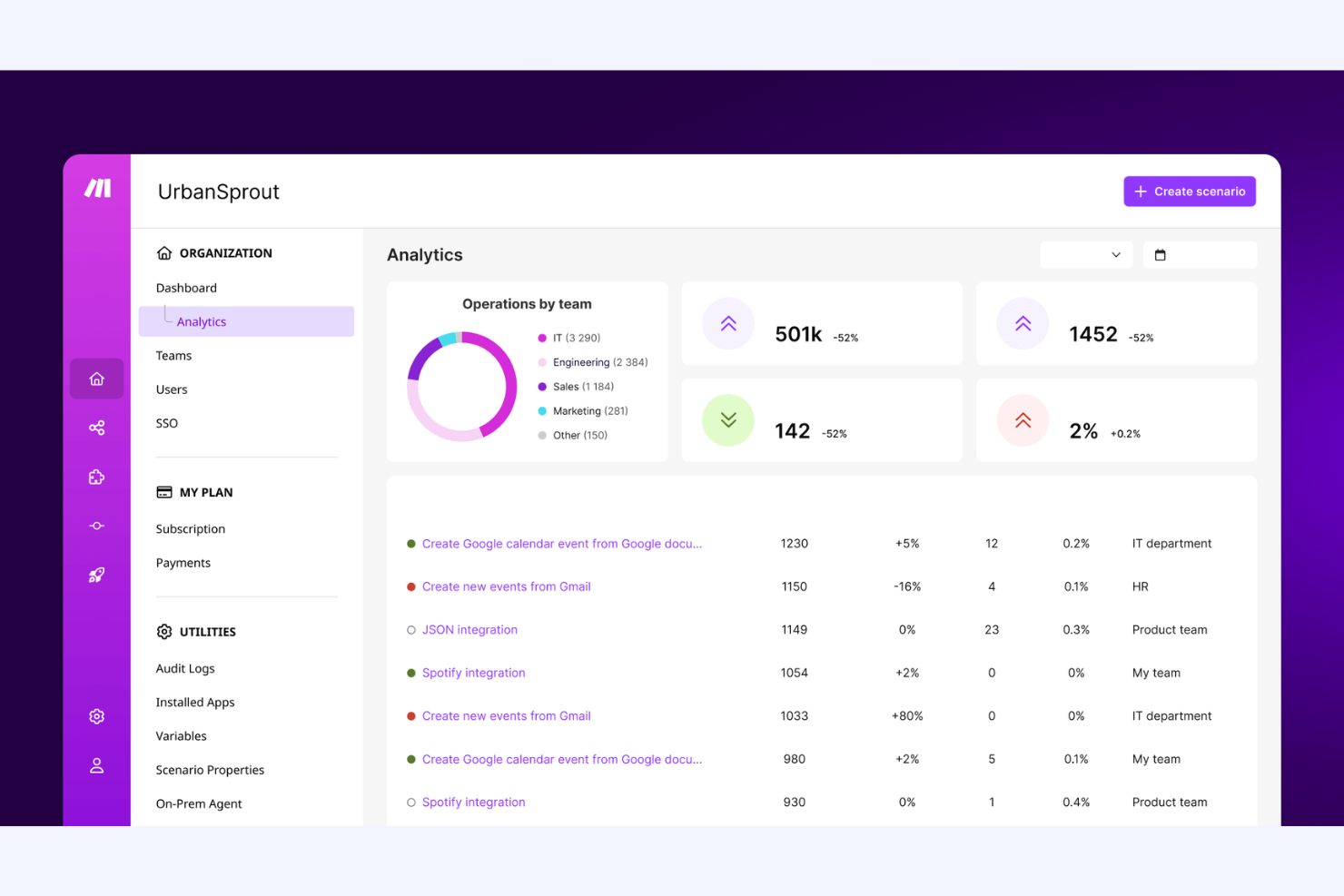
Make is an Integration Platform as a Service that enables users to automate workflows and connect applications. It's used by businesses and developers to enhance productivity and streamline operations.
Why Make is a good Workato alternative: Make fits teams that prefer to see and control every step of a workflow. You can build multi-step scenarios using a visual canvas with clear logic paths. It supports advanced routing, filtering, and data handling in one view. This works well if your team wants hands-on control instead of recipe-based automation.
Standout Features and Integrations:
Features include a drag-and-drop scenario builder that shows the full workflow layout. It supports error handling and execution controls at each step. You can also review run history to troubleshoot and adjust logic over time.
Integrations include Google Sheets, Slack, Airtable, Notion, Google Gmail, Google Drive, Shopify, HubSpot CRM, Stripe, OpenAI, and more.
Pros and Cons
Pros:
- Flexible scenario building
- Fine-grained logic control
- Clear visual workflow design
Cons:
- Requires logic planning
- Error-handling can be complicated

Boomi
Best for AI-driven automation
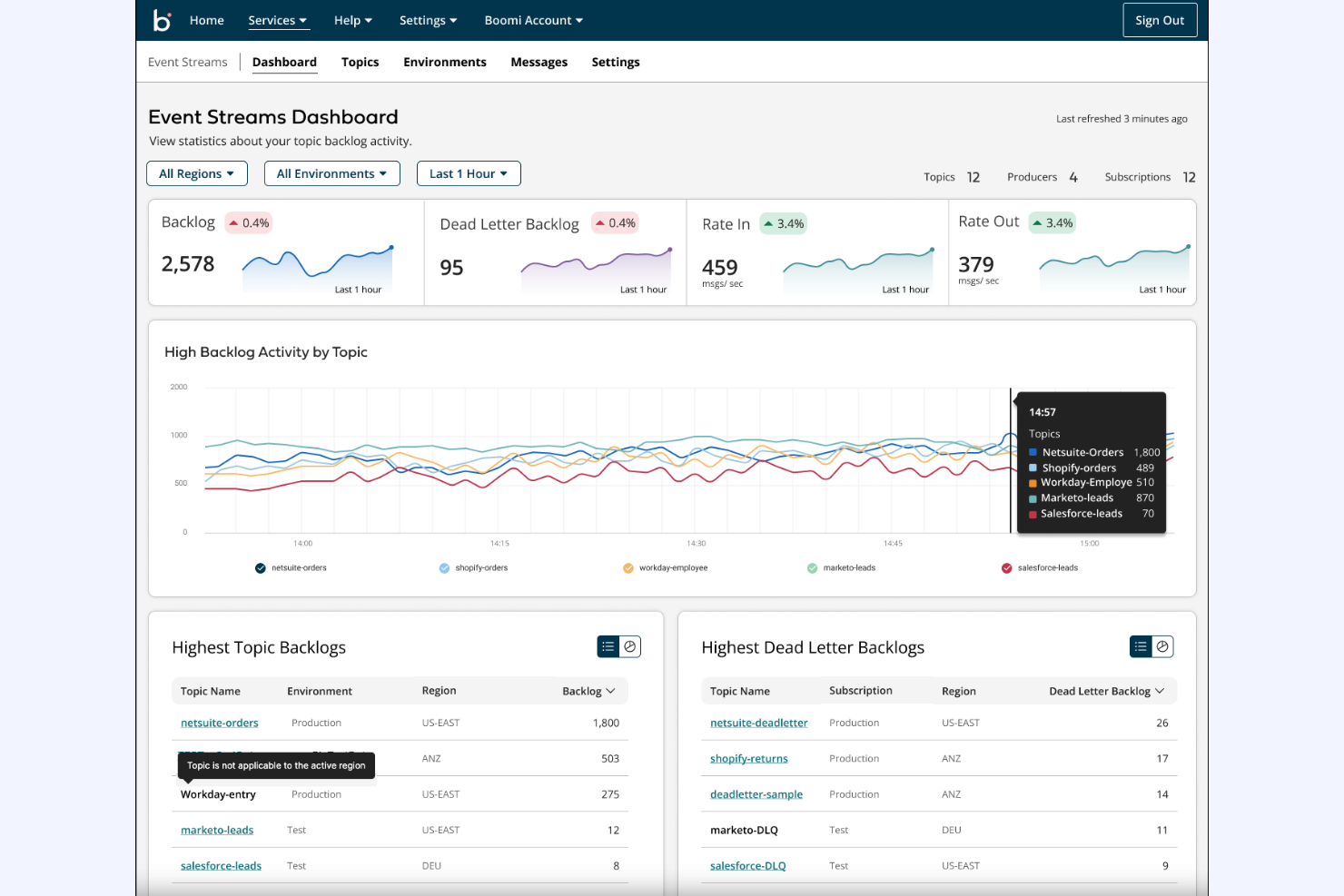
Boomi is an integration platform that connects applications and automates processes for various business functions. It's widely used by IT professionals and business operations teams to increase productivity and efficiency.
Why Boomi is a good Workato alternative: Boomi's AI-driven automation, low-code development, and real-time integrations support quick and efficient workflow management. These features help your team automate complex tasks with ease. The platform's versatility across industries, including finance, healthcare, and retail, makes it a solid choice for diverse business needs. It's compliant with a number of standards, including SOC 2, GDPR, and HIPAA.
Standout Features and Integrations:
Features include pre-built connectors that allow you to automate data exchange between applications and data sources, access to over 300 million self-learning integrations, and automatic platform updates that deploy synchronized changes to your integration processes. These tools allow non-technical users to integrate and automate without extensive coding knowledge.
Integrations include SAP, Salesforce, AWS, NetSuite, Google Drive, Microsoft Teams, Oracle, Workday, ServiceNow, Slack, and more.
Pros and Cons
Pros:
- Supports real-time data integration
- Low-code development platform
- Automated data mapping and suggestions
Cons:
- Complicated user interface
- Expensive pricing tiers
Best for AI-powered data management

Informatica is a data integration platform that helps businesses manage and process data across various systems. It's primarily used by large enterprises and IT professionals looking to strengthen data-driven decision-making.
Why Informatica is a good Workato alternative: Informatica offers AI-powered data management, enabling your team to automate and optimize data workflows. Its focus on data quality and governance ensures reliable data processing. The platform's scalability makes it suitable for enterprises needing broad data solutions.
Standout Features and Integrations:
Features include AI-driven automation, advanced data quality tools for ensuring data accuracy, and cloud data integration for straightforward access. These features support your team in maintaining high data standards.
Integrations include Salesforce, SAP, Microsoft Azure, Google Analytics, Oracle, Snowflake, Tableau, IBM, Workday, and more.
Pros and Cons
Pros:
- Massive library of prebuilt transformations
- Focus on data quality
- Strong data management capabilities
Cons:
- Legacy design lacks flexibility
- Requires significant IT infrastructure

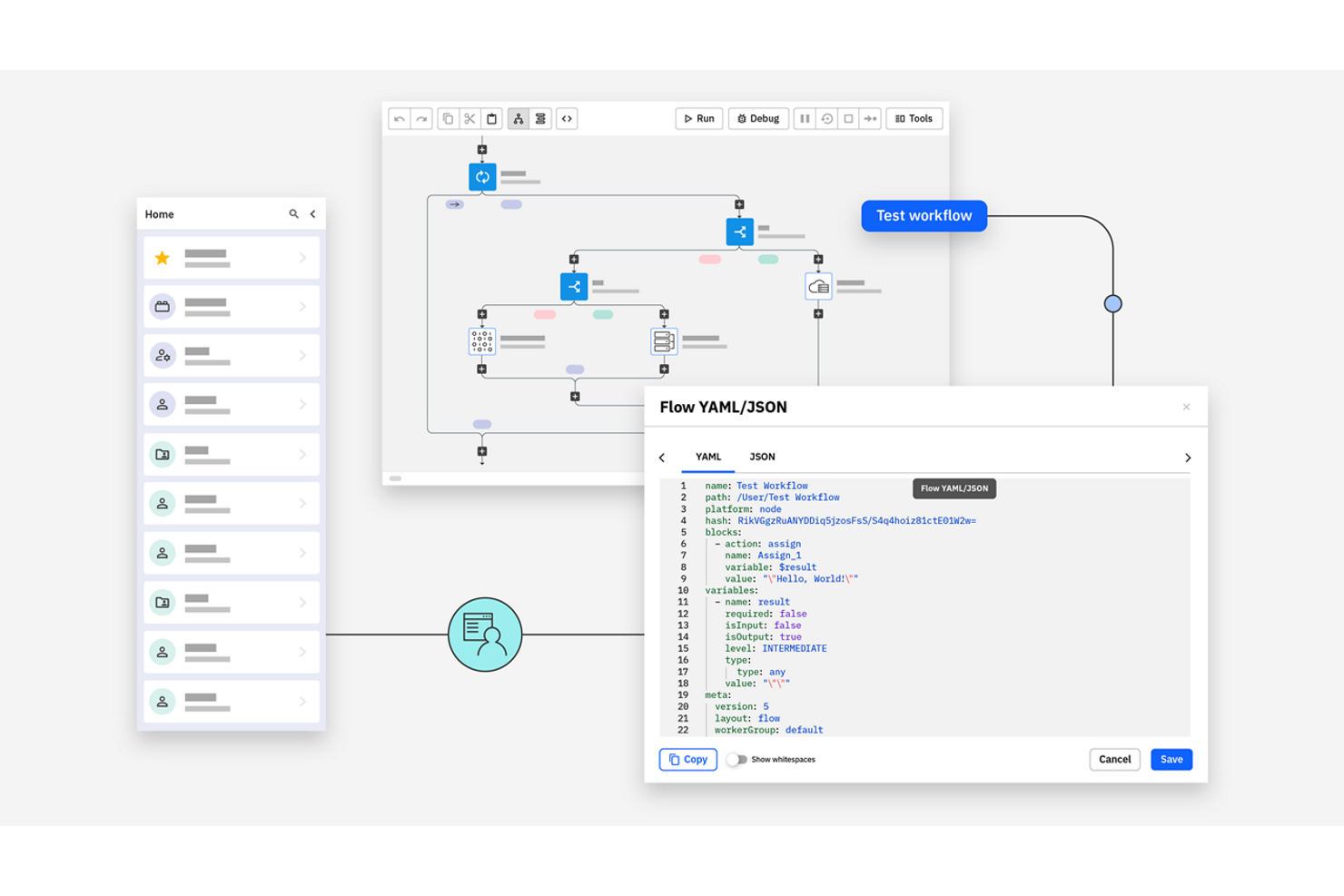
IBM App Connect provides enterprise integration and automation software for organizations running mixed cloud and on-premises systems. It's used by large teams that need to connect applications, manage APIs, and automate processes across environments.
Why IBM App Connect is a good Workato alternative: IBM App Connect supports hybrid cloud setups where your team runs workloads across on-premises and cloud systems. You can build integrations and workflows that span different environments without moving everything to one platform. It includes tools for application integration, messaging, and API management under shared governance. This suits teams that need tighter control across distributed systems rather than cloud-only automation.
Standout Features and Integrations:
Features include centralized policy management to control how integrations run across environments. It supports event-based messaging for real-time data handling. You can also manage integration lifecycles with monitoring and version control tools.
Integrations include AWS, Salesforce, Microsoft Teams, Microsoft Dynamics 365, Mailchimp, monday.com, Shopify, Dropbox, Google Gmail, HubSpot, and more.
Pros and Cons
Pros:
- High scalability for enterprises
- Works well with on-premises systems
- Strong hybrid cloud support
Cons:
- Heavy platform footprint
- Requires skilled admins


Oracle Cloud Infrastructure (OCI) is a cloud platform that provides enterprise software for integration, automation, and data management. It's used by large organizations that need integration capabilities that can connect systems, automate processes, and manage complex data flows.
Why Oracle Cloud Infrastructure is a good Workato alternative: OCI fits teams that already run core systems on Oracle technology. You can build integrations, automate workflows, and manage data movement inside the same cloud environment. It supports complex enterprise processes with built-in governance and control tools. This works well if your team wants automation tightly aligned with Oracle systems rather than a standalone platform.
Standout Features and Integrations:
Features include visual integration design tools that help your team build and manage flows. It supports event-driven automation for business processes. You can also monitor and manage integrations with built-in tracking and error handling.
Integrations include Amazon S3, HubSpot, Microsoft Outlook, Salesforce, SAP, ServiceNow, Spotify, Workday, and more.
Pros and Cons
Pros:
- Fits Oracle-based ecosystems
- Handles complex process logic
- Scales well for large enterprises
Cons:
- Slower onboarding for teams
- Heavy setup effort

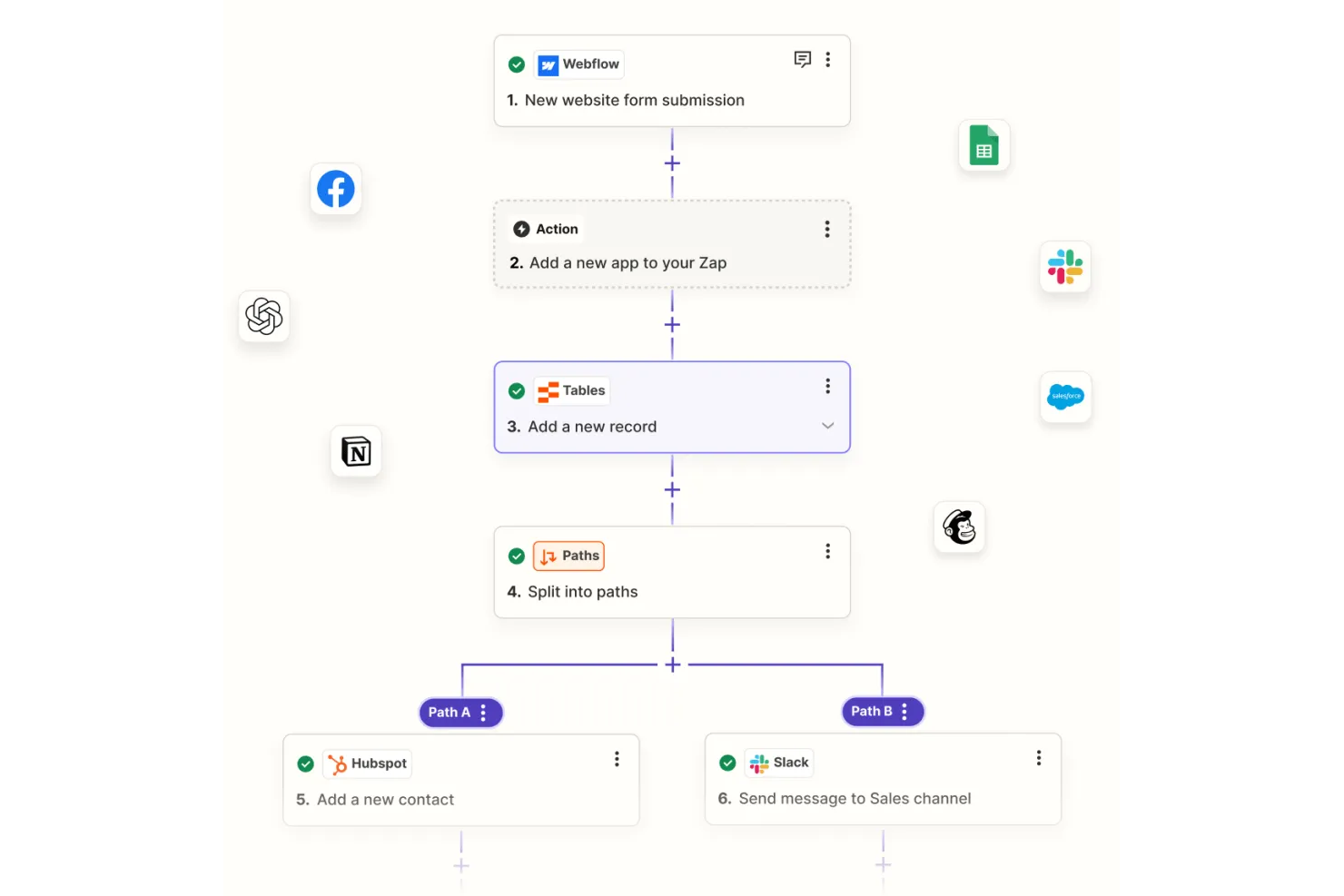
Zapier is an automation tool that connects various apps and services to automate workflows without needing any coding. It's popular among small businesses, freelancers, and teams looking to save time on repetitive tasks, such as syncing emails to a CRM.
Why Zapier is a good Workato alternative: Zapier's no-code automation platform is user-friendly, allowing you to set up workflows and pipelines quickly. With its intuitive interface, you can create Zaps to automate tasks across different applications. The platform is accessible to those with minimal technical knowledge, making it perfect for teams that need simple, efficient automation solutions.
Standout Features and Integrations:
Features include a simple drag-and-drop editor for creating workflows, customizable templates to get you started quickly, and built-in task history for monitoring. These tools make it easy for your team to automate tasks and focus on more important work.
Integrations include Google Gmail, Slack, Trello, Google Sheets, Mailchimp, Stripe, HubSpot, Facebook Lead Ads, Notion, Salesforce, and more.
Pros and Cons
Pros:
- Large selection of templates
- No coding required
- Intuitive user experience
Cons:
- Can get costly with scale
- App restrictions on free plan

MuleSoft is an integration platform that focuses on connecting applications, data, and devices with an API-led approach. It's primarily used by IT teams and developers to facilitate smooth communication between systems and elevate digital transformation initiatives.
Why MuleSoft is a good Workato alternative: MuleSoft offers API-led connectivity, which allows your team to design, build, and manage custom integrations efficiently. The platform provides Anypoint Studio, a user-friendly interface for creating integration flows, and Anypoint Exchange, a library of pre-built connectors and templates. These features make it an ideal choice for businesses that rely heavily on API integrations for their operations. It also offers enterprise-grade security features.
Standout Features and Integrations:
Features include a visual interface for building integrations, an extensive API management suite, and advanced monitoring tools. These enable your team to effectively manage and optimize the performance of your integrations without extensive coding.
Integrations include Salesforce, SAP, AWS, Microsoft Dynamics 365, Oracle, ServiceNow, Workday, Zendesk, Slack, Google Drive, and more.
Pros and Cons
Pros:
- Supports complex integrations
- Extensive library of connectors
- Strong API management capabilities
Cons:
- Consumption-based pricing by API calls
- Requires Java or XML knowledge


Tray is an integration and automation platform built for teams that need to connect SaaS tools and automate complex processes. It's used by technical teams that manage large volumes of workflow logic and data movement.
Why Tray is a good Workato alternative: Tray fits teams that build advanced automation across many SaaS tools. You can create multi-step workflows with detailed logic and data handling. It supports custom connectors and reusable workflow components for scale and helps simplify Extract Transform Load (ETL) tasks. This works well if your team needs deep control over SaaS automation rather than guided recipes.
Standout Features and Integrations:
Features include a visual workflow builder designed for advanced logic control. It supports custom scripting for handling complex data cases. You can also manage workflow versions and execution at scale.
Integrations include Salesforce, HubSpot, Slack, Zendesk, NetSuite, ServiceNow, Atlassian Jira, Workday, Snowflake, Marketo, and more.
Pros and Cons
Pros:
- Strong customization options
- Scales well for SaaS teams
- Handles complex workflow logic
Cons:
- Less suited for small teams
- Excessive control for simple use cases

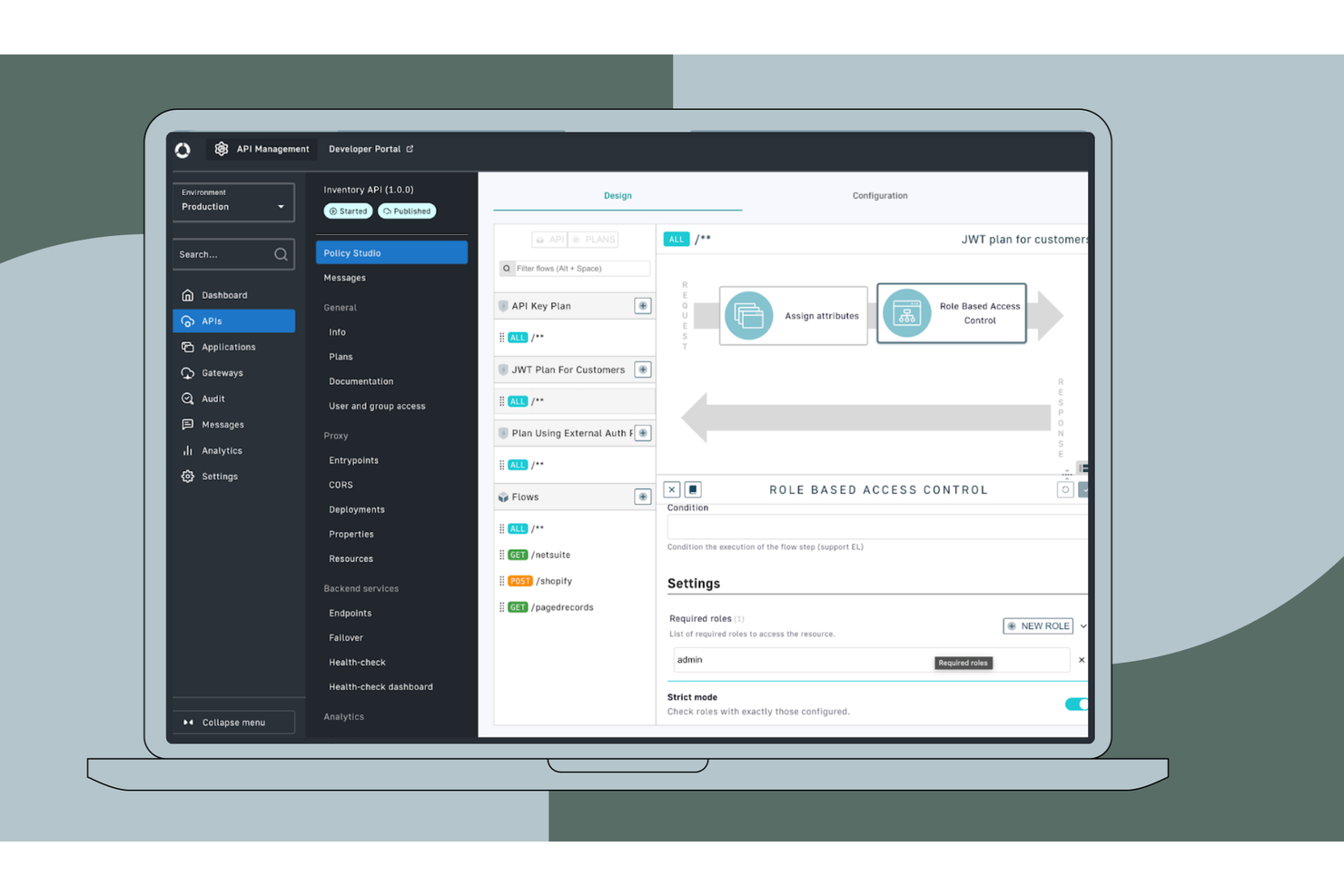
Celigo is an integration platform that simplifies connecting applications and automating workflows for businesses. It's primarily used by IT professionals and business teams looking to upgrade operational efficiency.
Why Celigo is a good Workato alternative: Celigo offers a user-friendly interface that makes it easy for your team to create and manage integrations. The platform's IT-governed templates and customization options allow for quick setup and adjustments. Its intuitive design supports efficient workflow automation without needing extensive coding knowledge.
Standout Features and Integrations:
Features include AI-guided design and reusable intelligence for creating integrations, pre-built connectors for common workflows, and a single platform for every integration to simplify operations. These features help your team implement and manage integrations effectively.
Integrations include Snowflake, PostgreSQL, Google BigQuery, NetSuite Analytics Warehouse, Shopify, Amazon, Zendesk, Freshdesk, Drift, and more.
Pros and Cons
Pros:
- Visual designer for integrations
- Role-based permission setting for flows
- Easy to customize workflows
Cons:
- Complex for non-tech users
- Requires occasional technical support
New Product Updates from Celigo
Celigo Adds Microsoft Fabric Warehouse Integration
Celigo introduces a native Microsoft Fabric Warehouse connector and Data Ingestion sync support with automated schema creation, bulk loading, and upserts. These features help teams transfer and manage data in Microsoft Fabric Warehouse. For more information, visit Celigo’s official site.
 .

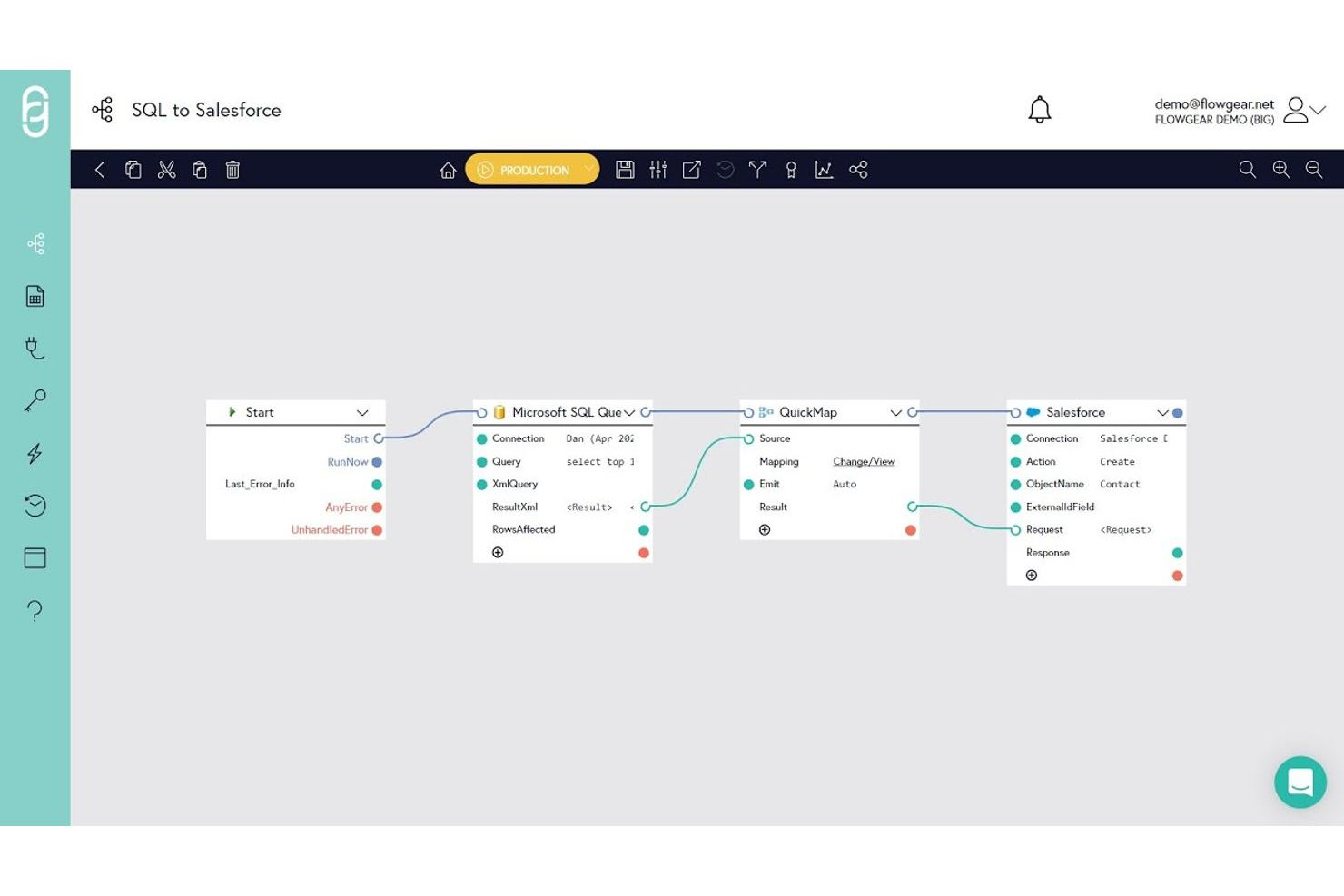
Flowgear is an integration platform that enables businesses to connect applications and automate workflows efficiently. It's mainly used by IT teams and businesses looking to improve operational efficiency without extensive coding.
Why Flowgear is a good Workato alternative: Flowgear offers quick integration solutions with its drag-and-drop interface and pre-built connectors. This platform allows your team to set up integrations rapidly, reducing the time spent on manual processes. Its flexibility in handling various data sources makes it suitable for businesses needing fast and adaptable solutions.
Standout Features and Integrations:
Features include a visual designer for creating workflows, real-time data processing for immediate updates, and in-depth logging for monitoring integrations. These tools help your team manage and optimize integrations effectively.
Integrations include Oracle NetSuite, Salesforce, SAP S/4HANA Cloud, Acumatica, Microsoft Dynamics 365 CRM, Sage, Shopify, HubSpot, Microsoft Azure, and more.
Pros and Cons
Pros:
- Flexible data handling
- Secure local database access without VPNs
- Quick setup process
Cons:
- Large number of nodes to manage
- Limited customization options
Diğer Workato Alternatifleri
Kısa listeme giremeyen ancak yine de incelemeye değer bazı ek Workato alternatifleri şunlardır:
- Jitterbit iPaaS
For AI-powered enterprise automation
- Skyvia
For all-in-one data integration
- Unito
For team collaboration sync
- SnapLogic
For real-time data integration


How I Evaluate Workato Alternatives
I split my evaluation into two layers: the baseline functionality any iPaaS tool must hit—like visual workflow builders and native PM connectors—and the differentiators that set the best options apart.
Core Functionality (Table Stakes For This List)
When I'm selecting tools for my list, I rank each one on a scale from 0 (does not offer the functionality) to 5 (excels in this area) for each core functionality listed below. Then, I calculate the tool's total score into a percentage. Each tool needs to achieve a minimum total score of 65% to be considered for inclusion.
- Pre-Built App Connectors: I check the connector library for depth across PM, CRM, ITSM, and finance apps—especially tools like Jira, Asana, Salesforce, and ServiceNow.
- Visual Workflow Automation Builder: The builder should support conditional branching and multi-step logic so PM ops teams can design syncs without writing code.
- Triggers & Actions Framework: I evaluate whether automations can fire on real-time events, run on schedules, and chain multiple actions in a single workflow.
- Data Transformation & Mapping: Field mapping between tools like Monday and HubSpot often requires reformatting—I look for formula support and lookup tables.
- API & Webhook Support: For apps without native connectors, I check REST/SOAP API access and webhook options to confirm you can build custom connections.
- Monitoring & Error Handling: Execution logs, auto-retries, and failure alerts matter when a broken sync between your PM tool and billing system stalls a sprint.
Once I have a list of tools that meet this criteria, I consider what sets each platform apart.
Differentiating Factors (What Sets Vendors Apart)
Here's how I compare and contrast different vendors:
Standout Features
Pre-built recipe templates are a big differentiator—they let PM ops teams spin up common automations like a Jira-to-Slack status sync in minutes instead of building from scratch. I also look for human-in-the-loop steps, where a workflow pauses for approval via Slack or Teams before promoting a project to the next phase. Governance features like sandbox environments and role-based access matter when multiple teams build automations across a shared PMO toolchain.
Beyond Features
Pricing model matters a lot here. Some platforms charge per task or workflow run, which can get unpredictable when your PMO scales automations across dozens of projects. I evaluate whether the licensing structure stays manageable as volume grows. Time-to-value is another factor I weigh—platforms with strong PM-focused templates and low learning curves let ops teams ship their first automation in days, not weeks. I also check for SOC 2 and ISO 27001 certifications, especially when workflows move sensitive project data between systems.
Neden Workato Alternatifi Aramalısınız?
Workato iyi bir Hizmet Olarak Entegrasyon Platformu (iPaaS) seçeneği olsa da bazı kullanıcıların alternatif çözümler aramasının çeşitli nedenleri vardır. Workato alternatifi arıyor olabilirsiniz çünkü…
- Daha esnek fiyatlandırma seçeneklerine ihtiyacınız vardır
- Ekibiniz daha basit kullanıcı arayüzlerine ihtiyaç duyuyordur
- Daha iyi müşteri desteği arıyorsunuzdur
- Daha gelişmiş veri analizlerine ihtiyacınız vardır
- İşletmeniz kısıtlı bölgelerde faaliyet gösteriyordur
- Daha kolay işe alıştırma süreçleri arıyorsunuzdur
Bunlardan biri sizin durumunuzu anlatıyorsa doğru yere geldiniz. Listemde, Workato ile ilgili bu zorluklarla karşılaşan ve alternatif çözümler arayan ekipler için daha uygun olan çeşitli Hizmet Olarak Entegrasyon Platformu (iPaaS) seçenekleri yer alıyor.
Workato'nun Temel Özellikleri
Alternatif çözümlerin sunduklarını karşılaştırmanıza yardımcı olmak için Workato'nun temel özelliklerinden bazıları şunlardır:
- Entegrasyon ve otomasyon: Verimliliği artırmak için çeşitli uygulamaları birbirine bağlar ve iş akışlarını otomatikleştirir.
- Güvenlik ve uyumluluk: Verileri korumak için güçlü güvenlik önlemleri ve yönetişim protokolleri sağlar.
- Yapay zekâ destekli çözümler: Gerçek zamanlı tanılama ve içgörüler sunarak iş akışlarını iyileştirmek için yapay zekâ kullanır.
- Evrensel bağlantı: Geniş kapsamlı bağlantı için modern SaaS, şirket içi sistemler ve eski altyapılarla entegre olur.
- Aracı özellikleri: Akıllı aracıları tasarlamak ve yönetmek için düşük kodlu bir ortam sunar.
- Kurumsal MCP: Kurumsal becerilerin ve iş akışlarının oluşturulmasını, paylaşılmasını ve güvenli biçimde kullanıma sunulmasını destekler.
- Orkestrasyon yetenekleri: Gerçek zamanlı iş operasyonları için iş akışlarını, uygulamaları, verileri ve API'leri yönetir.
- Operasyonel şeffaflık: Yerleşik tanılama özellikleriyle performansın ve sistem durumunun gerçek zamanlı takibini sağlar.
- Sürekli çalışan altyapı: Sıfır kesintiyle yükseltmeler ve otomatik ölçeklendirme sayesinde yüksek kullanılabilirlik sağlar.
- Destek ve kaynaklar: Yardım için 7/24 küresel destek ve kapsamlı kullanıcı kaynaklarına erişim sunar.
- Robotic Process Automation (RPA): Tekrarlanan, kurallara dayalı görevleri otomatikleştirmek için botlar kullanır.