

2026’da İncelenen Küçük İşletmeler İçin En İyi 10 Müşteri Portalı Yazılımı

Küçük İşletmeler için En İyi Müşteri Portalı Yazılımları Kısa Listesi


Küçük bir işletmeyi yönetmek, özellikle müşteri ilişkilerini ve proje teslim tarihlerini aynı anda takip etmek, hiç de kolay değildir. Kendinizi e-postaların altında kalmış ve herkesin aynı fikirde olmasını sağlamakta zorlanırken bulabilirsiniz. İşte müşteri portalı yazılımı bu noktada yardımınıza yetişir.
Yazılımları inceleme deneyimime göre bu araçlar iletişimi kolaylaştırabilir, belgeleri düzenleyebilir ve ekibinizin müşterilerinizle uyum içinde çalışmasını sağlayabilir. İş birliği için merkezi bir alan sunarak projeleri yönetmeyi ve müşteri beklentilerini karşılamayı kolaylaştırırlar.
Bu makalede, küçük işletmelere özel müşteri portalı yazılımları arasından en iyi seçimlerimi paylaşacağım. Tarafsız incelemeler, ayrıntılı karşılaştırmalar ve her aracı öne çıkaran özelliklere ilişkin bilgiler bulacaksınız. Projelerinizi yönetmeyi biraz daha kolaylaştıralım.
Why Trust Our Software Recommendations
Our team has been testing and reviewing software since 2012. As project managers ourselves, we know how difficult—and important—it is to choose the right software.
For this guide, we evaluated tools using hands-on testing and independent research, scoring tools using our selection criteria. We also draw on insights from industry thought leaders and practicing project management experts.
Our reviews reflect our human editorial judgment, not a sales pitch.
Expert reviewers:
Küçük İşletmeler için Müşteri Portalı Yazılımları Karşılaştırma Tablosu
Bu karşılaştırma tablosu, küçük işletmeler için en iyi müşteri portalı yazılımı seçimlerimin fiyatlandırma ayrıntılarını özetlemektedir:
| Tool | Starting Price | Website | |
|---|---|---|---|
| Best for construction client approvals and sign-off | 4.2 out of 5 | €5.50/active project/month 14-day free trial | Website |
| Best for project updates and invoice access | — | $12/user/month Free plan + 14-day free trial | Website |
| Best for global business operations | 4.4 out of 5 | $5,000/year Free trial + free demo available | Book Demo |
| Best for financial management | 4.8 out of 5 | $12/user/month Free plan + 7-day free trial + free demo available | Website |
| Best for all-in-one business management | 4.8 out of 5 | $19/month 14-day free trial | Website |
| Best for small service providers | 4.4 out of 5 | $29/month Free demo + 14-day free trial available | Website |
| Best for database management | 4.4 out of 5 | $49/month Free trial available | Website |
| Best for customer support teams | — | $19/agent/month Free trial + free demo available | Website |
| Best for workflow automation | — | $19.99/month Free plan available | Website |
| Best for appointment-based businesses | 5.0 out of 5 | $85/month Free demo + free trial available | Website |
Küçük İşletmeler için En İyi Müşteri Portalı Yazılımları İncelemesi
Aşağıda, kısa listeme giren küçük işletmeler için en iyi müşteri portalı yazılımlarına ilişkin ayrıntılı özetlerimi bulabilirsiniz. İncelemelerim, size en uygun aracı bulmanıza yardımcı olmak için her aracın temel özelliklerine, artılarına ve eksilerine, entegrasyonlarına ve ideal kullanım alanlarına yakından bakmaktadır.

Ziggu
Best for construction client approvals and sign-off
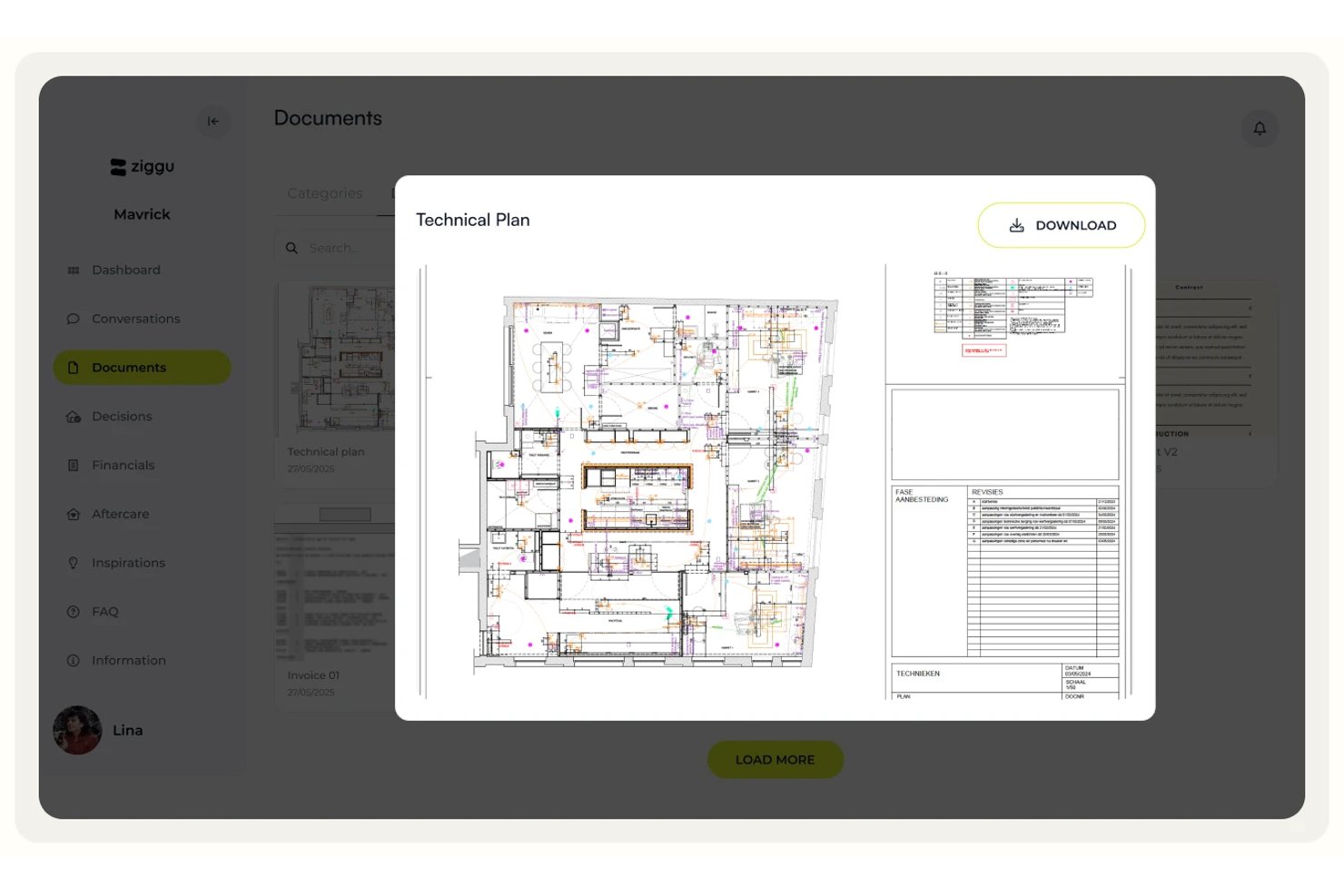
Ziggu is a project-based client portal built for construction and real estate teams, offering milestone tracking, document management, client approvals with digital sign-off, and centralized communication in a branded portal.
Who Is Ziggu Best For?
Ziggu is built for construction and real estate teams that need a structured way to manage client approvals, document sign-off, and project communication in one branded portal.
Why I Picked Ziggu
I picked Ziggu as one of the best because its Decisions & Approvals feature handles something most client portals skip: structured, digitally signed sign-off with a timestamped audit trail. When a client approves a proposal, that action is logged and stored as immutable proof, which removes ambiguity entirely. I also like that automatic reminders go out for pending approvals, so nothing stalls waiting on a client to respond.
Ziggu Key Features
- Milestone timeline: A real-time project timeline that advances automatically as workflow triggers fire, giving clients a clear view of past, current, and upcoming phases.
- Centralized conversations inbox: All client messages and internal team notes are organized within each project, replacing scattered emails and keeping full context in one place.
- Client task delegation: Tasks can be assigned directly to clients with deadlines and automated reminders for overdue items, keeping client-side responsibilities on track.
- Financial overview module: Clients can view invoice statuses, payment schedules, and budget breakdowns directly inside the portal, reducing payment delays and back-and-forth.
Ziggu Integrations
Ziggu offers integrations with HubSpot, Salesforce, Microsoft Dynamics 365, Exact Online, SharePoint, Google Drive, Dropbox, and Power BI. A public REST API supports custom connections, while construction tools include Archisnapper and LetsBuild.
Pros and Cons
Pros:
- Assign tasks directly to clients
- Unlimited client invitations on all plans
- Digital sign-off with audit trail
Cons:
- Construction terminology may confuse non-industry users
- Minimum project requirements exclude solo businesses

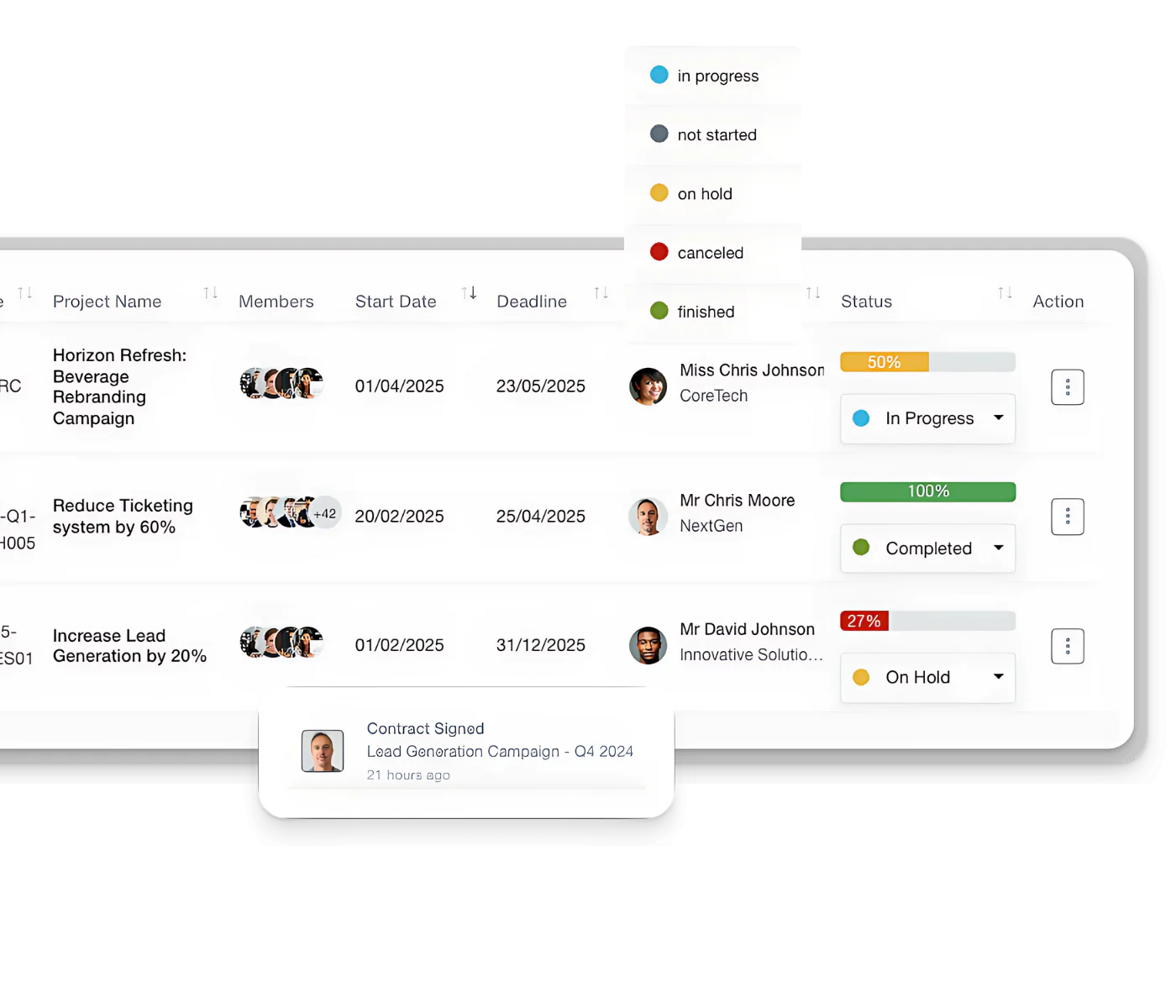
Olqan is a business operating system with a built-in client portal that connects project delivery, invoicing, contracts, and client access in a single platform.
Who Is Olqan Best For?
Olqan is a strong fit for small business owners and freelancers who need to manage projects, send invoices, and give clients a single place to track both.
Why I Picked Olqan
I picked Olqan as one of the best because it keeps project updates and invoice access inside a single client-facing portal, so clients aren't chasing you across email threads to find where things stand. I like that you can control exactly which task details clients see, including status updates, file attachments, and comments, while their invoices sit in the same login. That combination of project visibility and billing in one place is what sets it apart for small business owners managing client relationships end to end.
Olqan Key Features
- Client role permissions: A default client role lets you set module-level access to None, View, Add, Update, or Delete for each part of the platform.
- Contracts and e-signatures: The Team Plan includes built-in contract creation and e-signature collection without a third-party tool.
- Integrated ticketing system: Clients can submit feedback, approvals, and support requests through a ticketing system connected to their portal.
- CRM-style client records: Each client record stores contact details, company info, preferred language, login access settings, and notes in one place.
Olqan Integrations
Olqan has native integrations with QuickBooks, PayPal, and Stripe, plus a Google Calendar integration for syncing leads, tasks, and events. Other listed integrations include Microsoft Outlook, Dropbox, Google Drive, Slack, Microsoft Teams, and Xero; API availability isn't documented.
Pros and Cons
Pros:
- Combines client access with broader business workflows
- Reviewers praise clear, easy-to-navigate dashboards
- Clients see project updates and invoices together
Cons:
- Client approval trails aren't clearly documented
- Reviewers want a phone app for access

Moxo
Best for global business operations
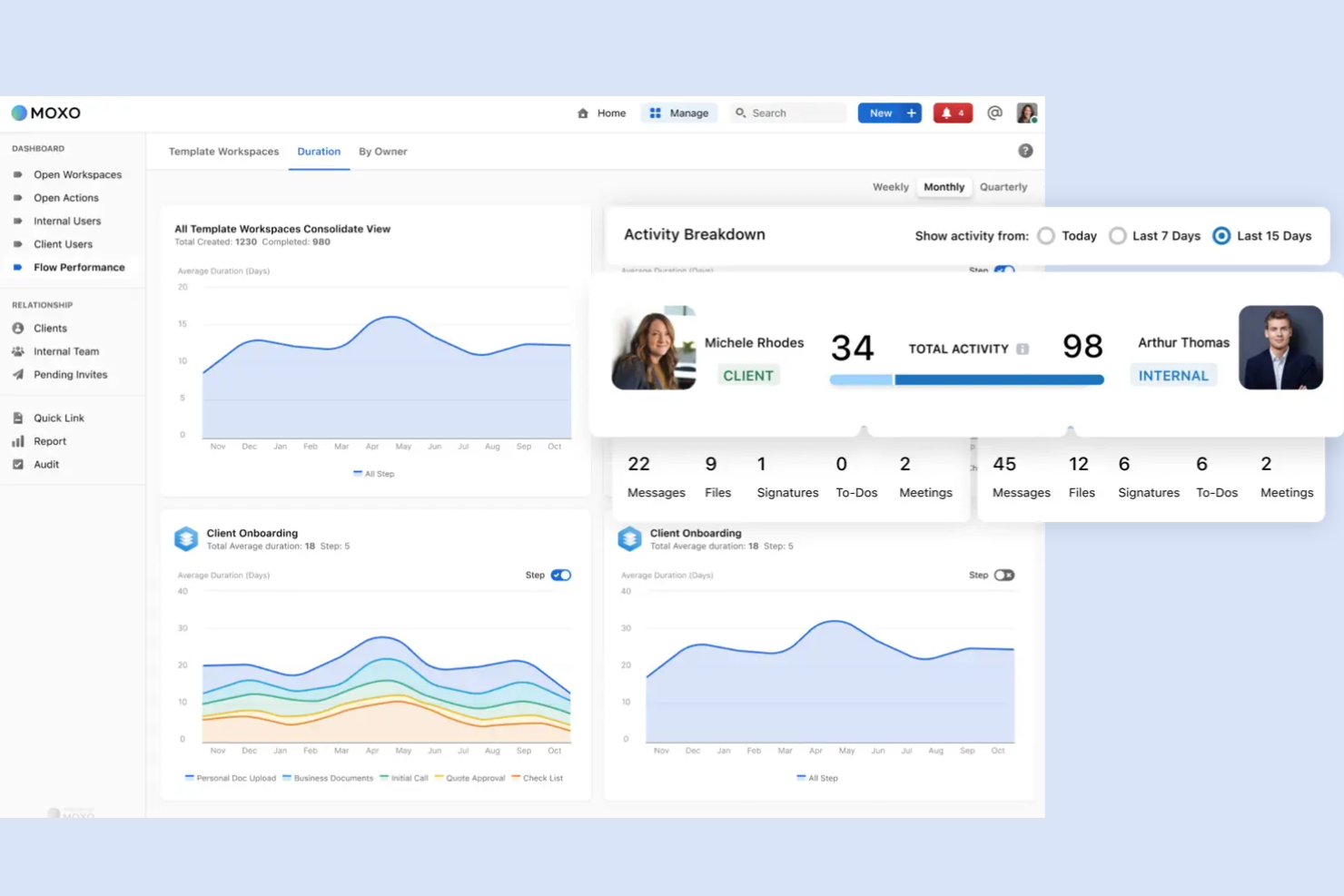
Moxo is a client interaction hub designed for businesses that operate globally. It offers tools for communication, collaboration, and workflow management, making it suitable for teams that need to coordinate across different regions.
Why I picked Moxo: Moxo provides a unified platform for managing client interactions worldwide, supporting global business operations. It offers features such as secure messaging, which enables your team to communicate with clients across different time zones. The task management tool helps you keep projects on track, regardless of location. Additionally, Moxo's digital signature capability ensures that documents are signed and processed efficiently.
Standout Features and Integrations:
Features include a virtual data room for secure document storage and sharing. The video conferencing tool allows for face-to-face meetings. Moxo also offers a client onboarding feature that simplifies the process of bringing new clients into your system.
Integrations include Salesforce, Slack, Stripe, QuickBooks, Box, HubSpot, and more.
Pros and Cons
Pros:
- Secure document handling
- Supports global operations
- Structured client workflows
Cons:
- Heavier than needed for SMBs
- Requires process definition

Flowlu
Best for financial management
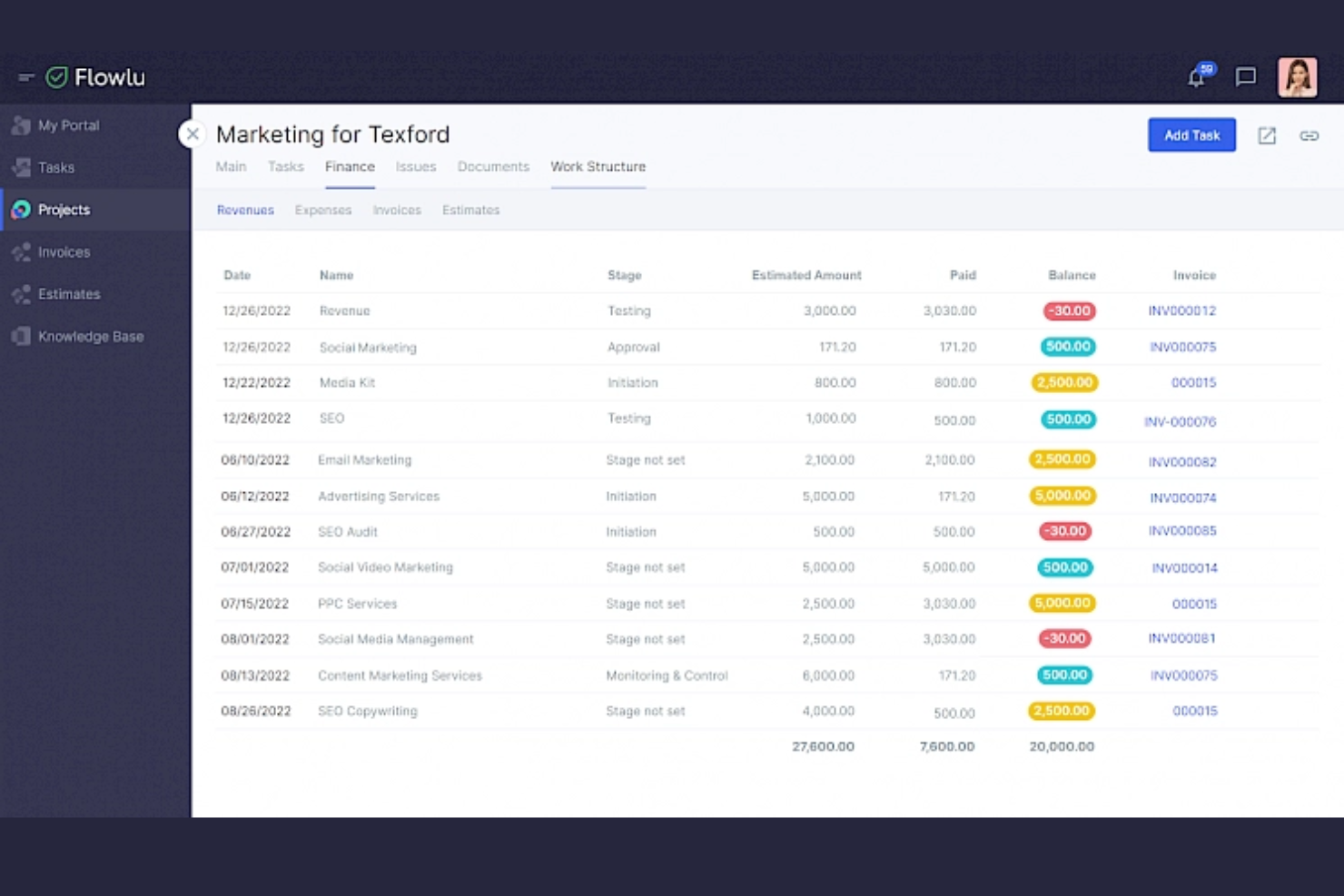
Flowlu is an all-in-one business management software designed for small to medium-sized businesses. It provides tools for project management, CRM, and financial management.
Why I picked Flowlu: Flowlu offers financial management features, including invoicing and expense tracking, making it ideal for businesses focused on financial oversight. The software also provides project and task management capabilities, ensuring that your team stays on track. Its CRM features help you maintain strong client relationships and manage interactions effectively.
Standout Features and Integrations:
Features include customizable dashboards that give you an overview of your business performance. The time tracking tool helps you monitor project progress and billable hours. Additionally, the knowledge base feature allows your team to store and share important information, fostering collaboration.
Integrations include Slack, Google Drive, Dropbox, Microsoft Outlook, Mailchimp, Trello, and more.
Pros and Cons
Pros:
- Supports growing teams
- Links projects to billing
- Strong financial visibility
Cons:
- Feature depth varies
- Not design-focused

Best for all-in-one business management
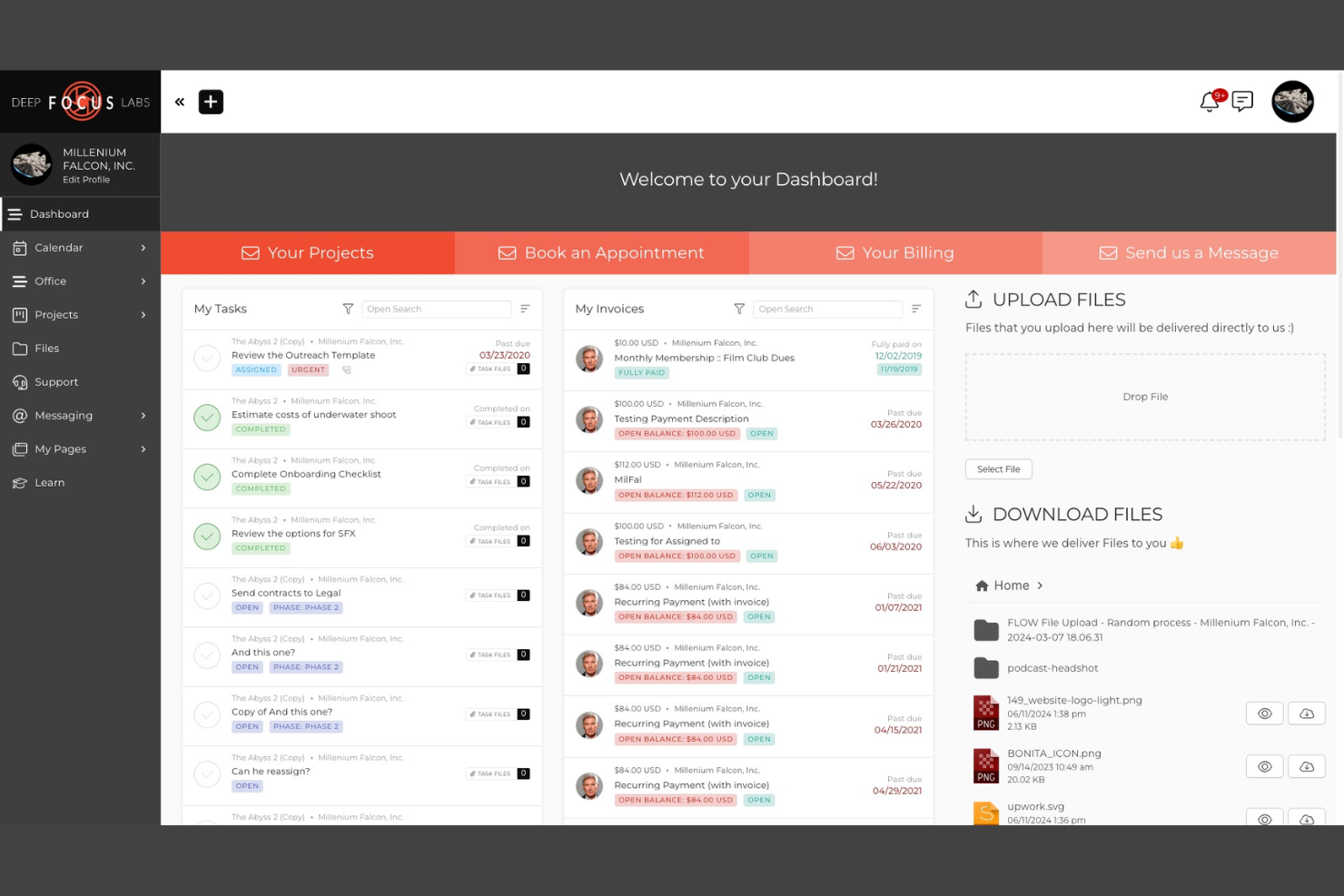
SuiteDash is an all-in-one business software solution aimed at small to medium-sized businesses. It offers a suite of tools that centralize project management, client communication, and business operations.
Why I picked SuiteDash: SuiteDash provides a unique all-in-one platform, eliminating the need for multiple separate tools. It includes features such as automated CRM, secure client portals, and onboarding processes that are tailored for efficient business management. The software's flexibility allows for extensive white-labeling, providing a personalized experience for your clients. Additionally, its unlimited pricing model means you can grow your team and client base without additional costs.
Standout Features and Integrations:
Features include learning modules that help you deliver training programs, dynamic proposals with eSignature capabilities, and support tickets for managing customer inquiries. The file exchange feature securely shares documents between clients and staff, and the secure messaging system ensures secure messaging to keep client conversations in one place.
Integrations include QuickBooks Online, Stripe, PayPal, Zoom, Google Calendar, Zapier, and more.
Pros and Cons
Pros:
- Strong white-labeling control
- Scales without per-user limits
- Handles many workflows centrally
Cons:
- Overcomplicated for simple needs
- Implementation requires upfront planning

vCita
Best for small service providers
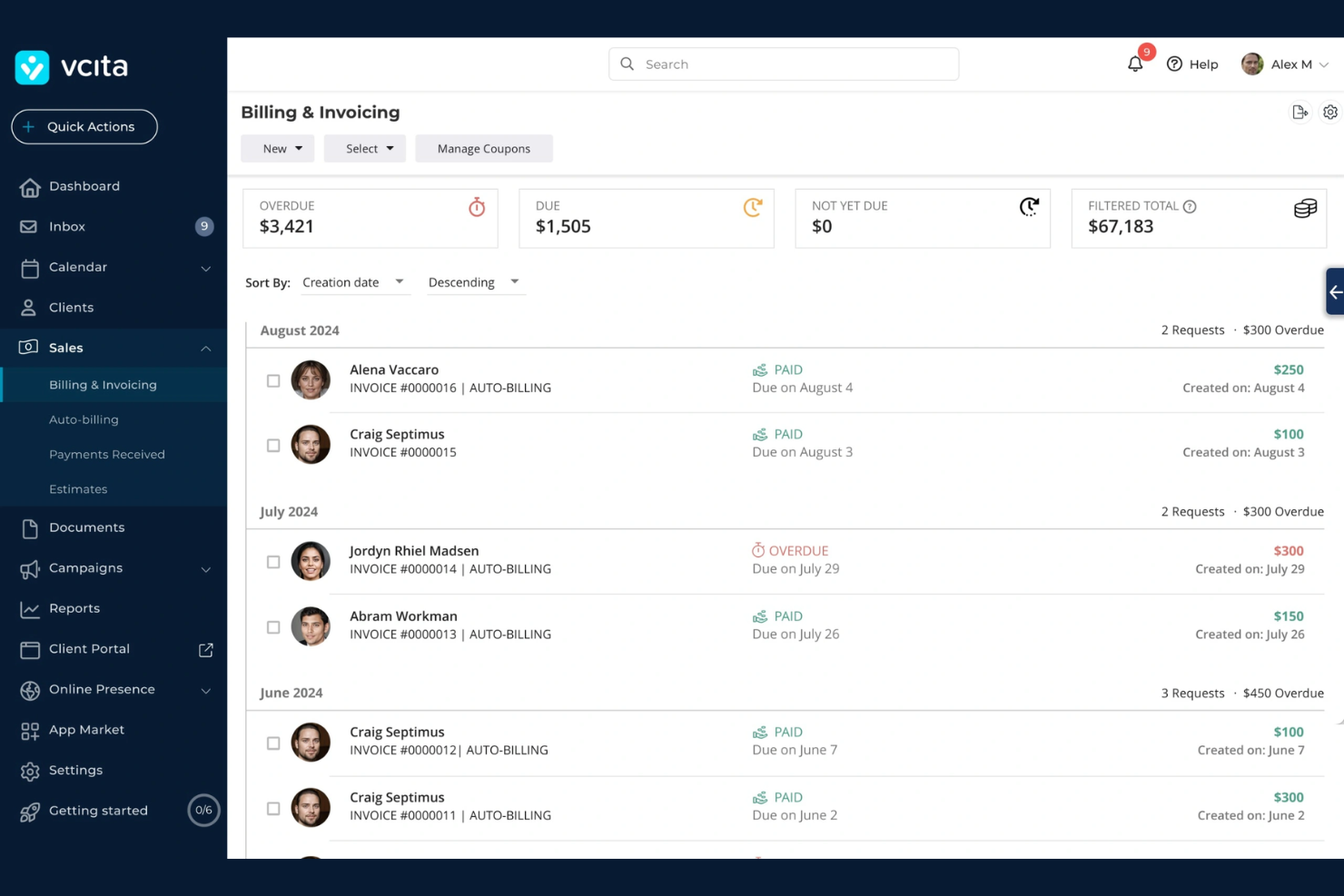
vcita is a business management and client engagement platform aimed at small service providers. It facilitates scheduling, client communication, and payment processing, optimizing the day-to-day operations of service-based businesses.
Why I picked vcita: vcita is tailored to meet the needs of small service providers with its suite of client engagement tools. It offers online scheduling so that your clients can book appointments. The platform also provides a customer portal, where clients can make payments and access their records. Its CRM capabilities help you manage client relationships.
Standout Features and Integrations:
Features include automated email and SMS reminders to reduce no-shows and improve client communication. The invoicing and billing feature simplifies financial transactions, and the marketing tools help you engage clients through campaigns. You can also track client interactions, providing insights into client behavior.
Integrations include QuickBooks, PayPal, Stripe, Zoom, Square, Zapier, and more.
Pros and Cons
Pros:
- Simple payment system
- Booking speeds up scheduling
- Built for service workflows
Cons:
- Scaling beyond services is hard
- Limited flexibility for agencies

Knack
Best for database management
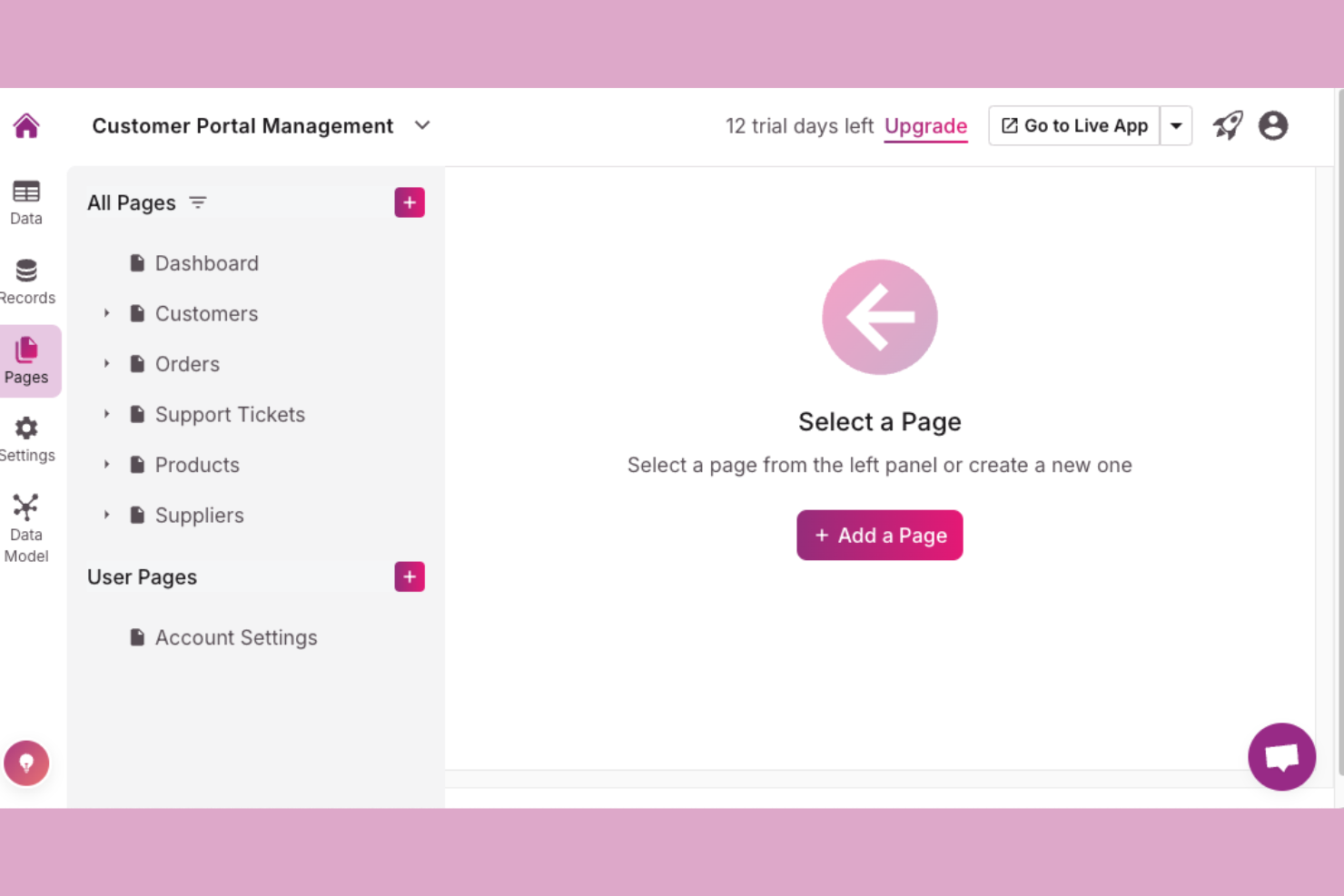
Knack is a database management platform tailored for small to medium-sized businesses looking to organize and manage data efficiently. It helps users build custom applications to simplify data processes and improve business operations.
Why I picked Knack: Knack excels in providing a user-friendly interface for building custom database applications. It offers tools for creating forms, reports, and dashboards, making data management intuitive and accessible. The platform allows you to customize workflows, ensuring that your business processes align with your specific needs. Additionally, Knack's drag-and-drop builder simplifies app creation, making it accessible even if you lack technical expertise.
Standout Features and Integrations:
Features include custom data structures that allow you to tailor your database to fit unique business requirements. The real-time reporting feature provides valuable insights into your data, helping you make informed decisions. Knack also offers user roles and permissions to control who accesses different parts of your database.
Integrations include Mailchimp, QuickBooks, Google Drive, Dropbox, PayPal, Salesforce, Slack, Stripe, HubSpot, and more.
Pros and Cons
Pros:
- Scales with complexity
- Fits operational databases
- Data-driven portal design
Cons:
- Requires admin ownership
- Basic visual design

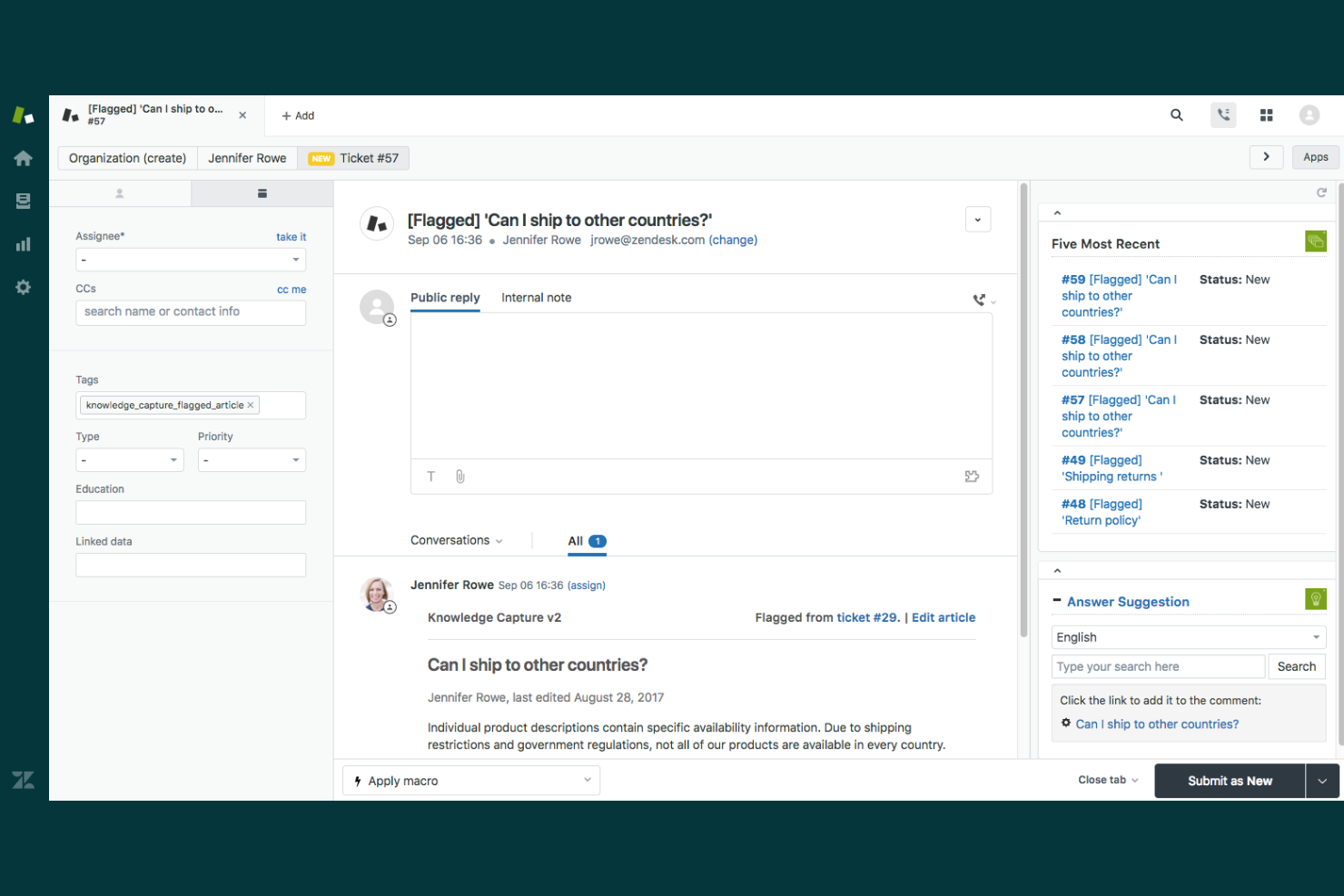
Zendesk is a customer service platform widely used by support teams to manage customer interactions and inquiries. It offers tools for ticketing, tracking, and resolving customer issues efficiently.
Why I picked Zendesk: Zendesk excels in providing a solution tailored for customer support teams. It includes features such as a centralized ticketing system and a customizable help center, making it ideal for managing customer inquiries. The platform's reporting and analytics tools help your team track performance and improve service quality. Its scalability ensures it can grow with your business, accommodating increasing customer demands.
Standout Features and Integrations:
Features include a knowledge base that empowers customers to find answers independently, live chat for real-time customer interaction, and community forums to engage users and gather feedback. The automation tools reduce repetitive tasks, and the mobile app keeps your team connected on the go.
Integrations include Slack, Shopify, Harvest, Pipedrive, Sprout Social, and more.
Pros and Cons
Pros:
- Proven support workflows
- Reliable at high volumes
- Strong ticket organization logic
Cons:
- Not project-oriented
- Customization needs training

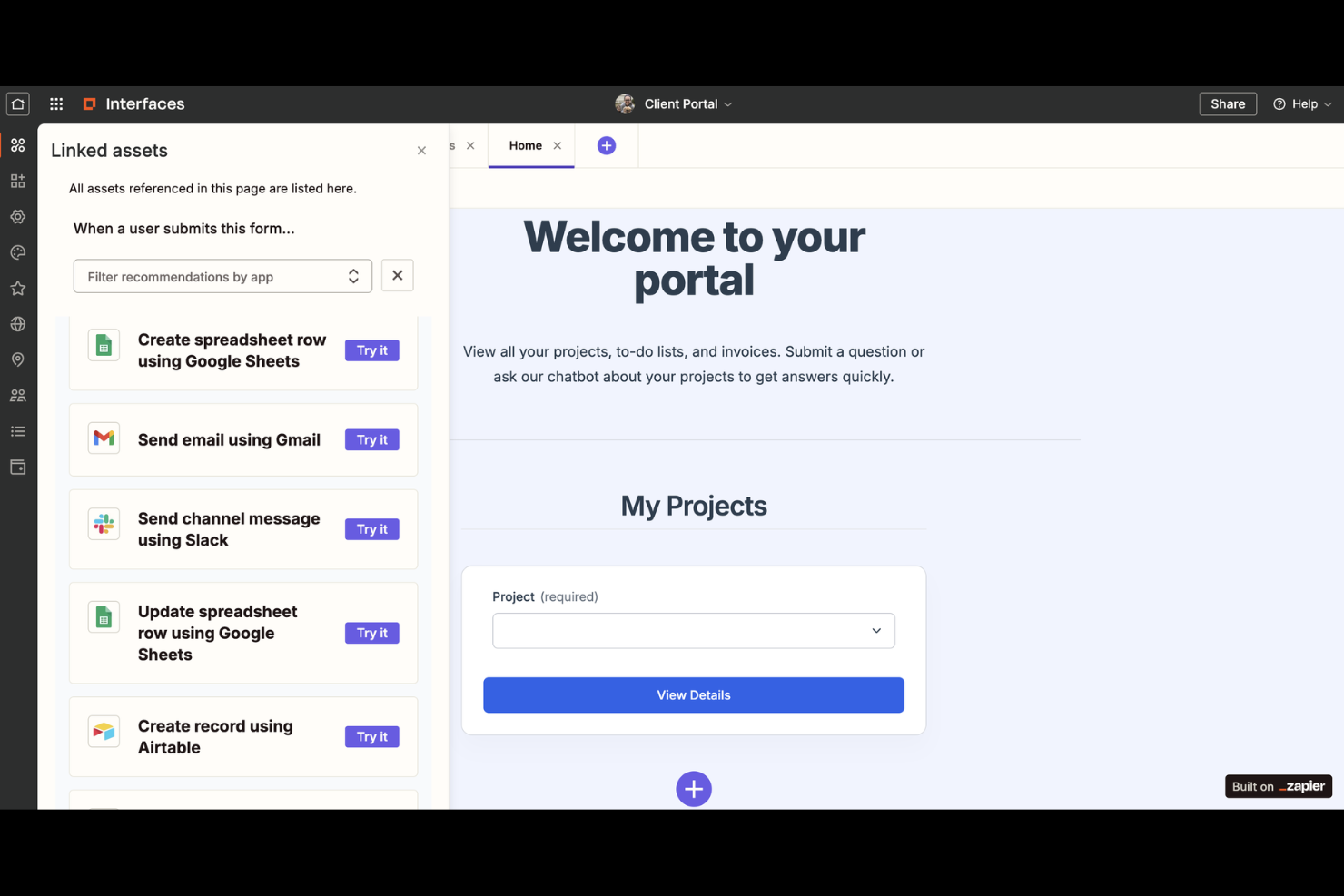
Zapier is an online automation tool that connects your favourite apps and services to automate repetitive tasks. It's widely used by businesses and teams looking to improve efficiency by automating workflows without needing any code.
Why I picked Zapier: Zapier enables your team to automate workflows across different apps, saving time and reducing manual work. It supports thousands of integrations, making it adaptable to various business needs. You can set up "Zaps," which are automated workflows triggered by specific events. Its simplicity and flexibility make it an ideal tool for automating tasks in small business environments.
Standout Features and Integrations:
Features include multi-step Zaps that allow you to automate complex workflows. The conditional logic feature lets you create Zaps that only run when certain conditions are met. Additionally, Zapier provides a collaborative workspace for teams to share and manage Zaps together, improving team productivity.
Integrations include Slack, Trello, Mailchimp, Salesforce, HubSpot, Notion, Airtable, Webflow, and more.
Pros and Cons
Pros:
- Deploys automation quickly
- Automates repetitive handoffs
- Connects tools without coding
Cons:
- Errors need monitoring
- Not a native portal

Thryv
Best for appointment-based businesses
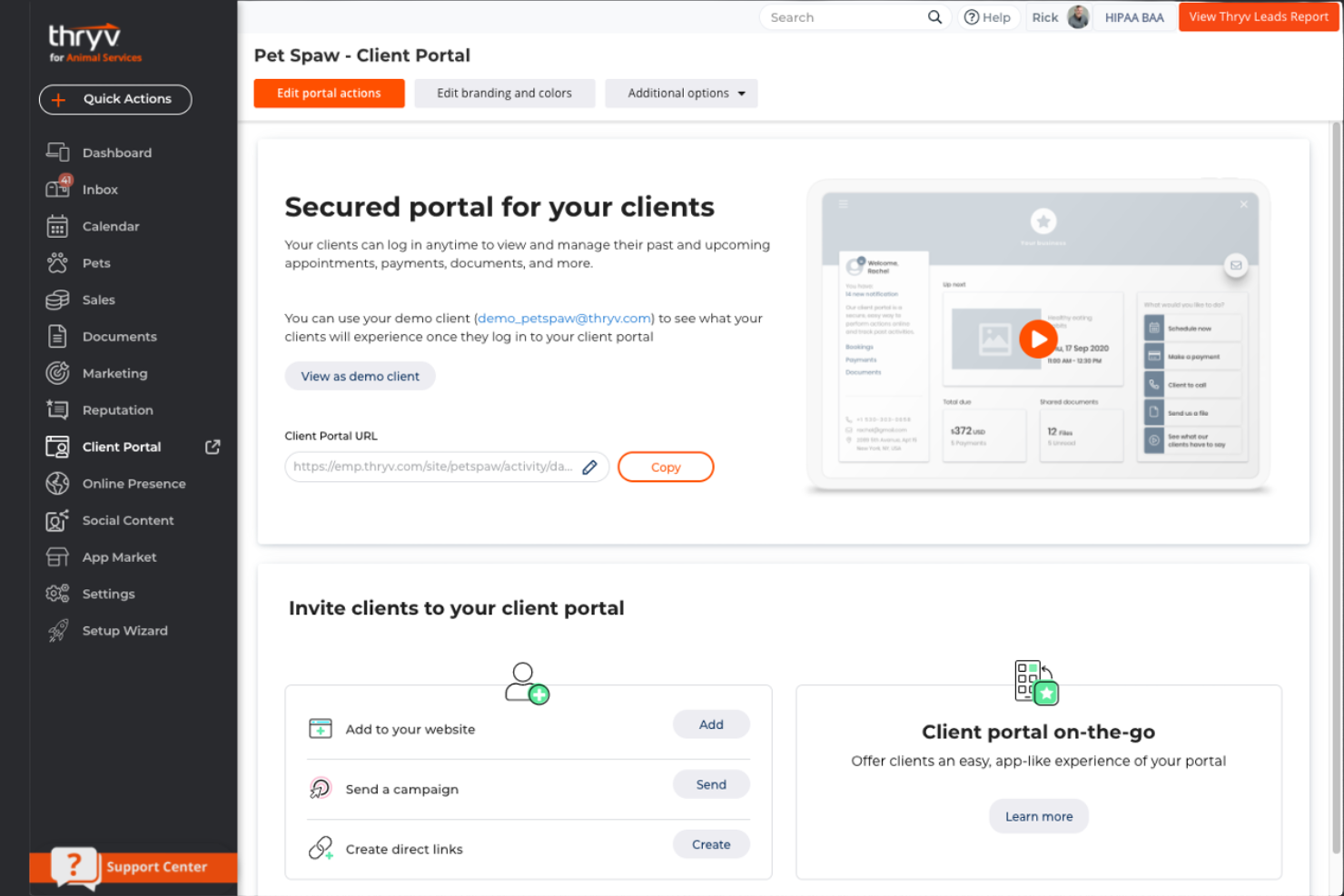
Thryv is a business management platform tailored for small businesses, particularly those that rely on appointment scheduling. It helps manage customer relationships, appointments, and payments, facilitating operations for service-based businesses.
Why I picked Thryv: Thryv integrates appointment scheduling with client management, making it ideal for appointment-based businesses. It offers online booking, allowing clients to schedule appointments at their convenience. The platform also includes automated reminders to reduce no-shows, and its payment processing feature simplifies transactions. Thryv's dashboard lets you oversee your business operations from one place.
Standout Features and Integrations:
Features include a customer communication hub that centralizes messages across channels. The marketing automation tools help nurture client relationships through targeted campaigns. Thryv's document storage feature ensures that important files are organized and accessible, improving operational efficiency.
Integrations include QuickBooks Online, PayPal, Constant Contact, Stripe, Indeed, Xero, and more.
Pros and Cons
Pros:
- Marketing tools included
- Central client communication
- Strong appointment handling
Cons:
- Limited customization depth
- Expensive for small teams


How I Evaluate Client Portal Software for Small Business
I split my evaluation into two layers: the baseline every tool must clear—think secure client logins, file approvals, and branded portals—and the differentiators that determine real-world fit.
Core Functionality (Table Stakes For This List)
When I'm selecting tools for my list, I rank each one on a scale from 0 (does not offer the functionality) to 5 (excels in this area) for each core functionality listed below. Then, I calculate the tool's total score into a percentage. Each tool needs to achieve a minimum total score of 65% to be considered for inclusion.
- Secure Client Access: I check whether each tool offers individual client logins with role-based permissions, so a client sees only their project data and files—not another client's.
- File Sharing & Approvals: I look for two-way document sharing with version history and approval workflows, like a designer routing final assets to a client for sign-off.
- Project Visibility for Clients: Each portal should give clients a real-time view of milestones, task progress, and timelines without needing your team to send manual status updates.
- Client Communication Hub: I evaluate whether messaging, comments, and notifications are centralized within project context rather than scattered across email threads.
- Custom Branding Options: Your portal should look like yours. I check for logo, color, and domain customization so clients see a professional, branded experience.
- Onboarding & Intake Tools: I look for built-in intake forms, questionnaires, or document requests that help you collect what you need from new clients before a project kicks off.
Once I have a list of tools that meet this criteria, I consider what sets each platform apart.
Differentiating Factors (What Sets Vendors Apart)
Here's how I compare and contrast different vendors:
Standout Features
Built-in invoicing and payment collection within the portal stands out—when a client can approve a deliverable and pay the related invoice in the same place, it cuts down on follow-up. Task delegation to clients also matters, especially for projects where you're waiting on client-side assets or approvals with a hard deadline. Trigger-based automations round things out for small teams. A tool that auto-sends an onboarding questionnaire when a new client is added saves hours of manual setup each month.
Beyond Features
Pricing structure matters a lot here. I look at whether a tool charges per client, per user, or offers a flat rate—small agencies managing dozens of clients can hit cost walls fast with per-client models. Integration coverage is another big one; your portal needs to connect with tools like QuickBooks, Slack, or Google Workspace without relying on workarounds. I also evaluate time-to-value. A three-person consultancy can't afford weeks of setup, so I check for pre-built templates and self-serve onboarding that get a portal live in a day, not a quarter.
Küçük İşletmeler için Müşteri Portalı Yazılımı Nasıl Seçilir
Uzun özellik listeleri ve karmaşık fiyatlandırma yapıları içinde kaybolmak kolaydır. Kendinize özgü yazılım seçim sürecinizde ilerlerken odağınızı korumanıza yardımcı olmak için aklınızda bulundurmanız gereken faktörlerin bir kontrol listesi burada:
| Faktör | Dikkat Edilmesi Gerekenler |
|---|---|
| Ölçeklenebilirlik | Yazılım işletmenizle birlikte büyüyebilir mi? Ekibiniz genişledikçe daha fazla kullanıcıyı veya veriyi işleyip işleyemeyeceğini değerlendirin. Sınırsız kullanıcı veya depolama seçenekleri gibi ölçeklenebilirlik göstergelerini arayın. |
| Entegrasyonlar | Mevcut araçlarınıza bağlanabiliyor mu? Aksaklıkları önlemek için CRM'nizi, e-postanızı ve ödeme sistemlerinizi destekleyip desteklemediğini kontrol edin. Eksik entegrasyonlar verimsizliklere ve manuel geçici çözümlere yol açabilir. |
| Özelleştirilebilirlik | Yazılımı ihtiyaçlarınıza ne ölçüde uyarlayabilirsiniz? Marka değişikliklerine veya iş akışı düzenlemelerine izin verip vermediğini değerlendirin. Sınırlı özelleştirilebilirlik, aracın kendinize özgü süreçlerinize uymayabileceği anlamına gelebilir. |
| Kullanım kolaylığı | Yazılım ekibiniz için sezgisel mi? Eğitim süresini en aza indiren kullanıcı dostu bir arayüz arayın. Karmaşık sistemler hayal kırıklığına ve verimliliğin azalmasına yol açabilir. |
| Uygulama ve işe alıştırma | Ne kadar hızlı başlayabilirsiniz? Sorunsuz bir geçiş sağlamak için eğitimler veya destek gibi sunulan kaynakları değerlendirin. Zorlu işe alıştırma süreci, ekibinizin yazılımı kullanmaya başlamasını geciktirebilir. |
| Maliyet | Fiyatlandırma bütçenize uyuyor mu? Maliyeti özellikler ve destek düzeyleriyle karşılaştırın. Bütçenizi zorlayabilecek gizli ücretlere veya maliyetlere karşı dikkatli olun. |
| Güvenlik önlemleri | Verileriniz ve müşteri bilgileriniz korunuyor mu? Yazılımın sektör standartlarına uyup uymadığını ve şifreleme sunup sunmadığını doğrulayın. Yetersiz güvenlik veri ihlallerine ve müşterilerin güvenini kaybetmenize yol açabilir. |
| Destek erişilebilirliği | Müşteri desteğine ne kadar kolay ulaşılabiliyor? Gerektiğinde desteğe birden fazla kanaldan ulaşabildiğinizden emin olun. Sınırlı destek seçenekleri çözülemeyen sorunlara ve hizmet kesintilerine yol açabilir. |
Küçük İşletmeler için Müşteri Portalı Yazılımı Nedir?
Küçük işletmeler için müşteri portalı yazılımı, işletmelerin güvenli bir çevrimiçi platform üzerinden müşteri etkileşimlerini ve iletişimlerini yönetmesine olanak tanıyan bir araçtır. Genellikle müşterilerle verimli bir şekilde iş birliği yapması gereken proje yöneticileri, hizmet sağlayıcılar ve küçük işletme sahipleri gibi profesyoneller tarafından kullanılır. Dosya paylaşımı, randevu planlama ve faturalandırma özellikleri müşteri bilgilerini düzenler, iletişimi geliştirir ve idari görevleri basitleştirir. Genel olarak bu araçlar müşteri ilişkilerini ve işletme operasyonlarını iyileştirir.
Özellikler
Küçük işletmeler için müşteri portalı yazılımı seçerken aşağıdaki temel özelliklere dikkat edin:
- Güvenli müşteri iletişimi: Siz ve müşterileriniz arasında özel mesajlaşmayı kolaylaştırarak tüm etkileşimlerin gizli ve korumalı olmasını sağlar.
- Dosya paylaşımı ve depolama: Dosyaları depolamanıza ve paylaşmanıza olanak tanıyarak önemli müşteri belgelerine erişmeyi ve bunları yönetmeyi kolaylaştırır.
- Randevu planlama: Müşterilerin doğrudan randevu almasını sağlayarak karşılıklı yazışmaları azaltır ve zamandan tasarruf ettirir.
- Faturalandırma ve ödeme işlemleri: Müşterilerin faturaları çevrimiçi olarak görüntüleyip ödemesine olanak tanıyarak faturalandırmayı ve finansal işlemleri basitleştirir.
- Özelleştirilebilir müşteri portalları: Müşteri deneyimini markanıza uyacak şekilde şekillendirmenize olanak tanıyarak profesyonel görünümü ve müşteri memnuniyetini geliştirir.
- Görev yönetimi: Proje görevlerini düzenlemenize ve takip etmenize yardımcı olarak tüm ekip üyelerinin ve müşterilerin aynı bilgiye sahip olmasını sağlar.
- Otomatik hatırlatıcılar: Yaklaşan randevular ve son tarihler için bildirimler göndererek randevuya gelmeme ve son tarihlerin kaçırılması durumlarını azaltır.
- Entegrasyon özellikleri: Kullandığınız diğer araçlara ve sistemlere bağlanarak manuel veri girişi olmadan sorunsuz bir iş akışı sağlar.
- Kullanıcı rolleri ve izinleri: Portal içindeki bilgilere erişimi kontrol ederek her kullanıcının yalnızca kendisiyle ilgili olanları görmesini sağlar.
- Dijital imza: Müşterilerin belgeleri elektronik olarak imzalamasına olanak tanıyarak onay sürecini hızlandırır ve evrak işlerini azaltır.
Faydalar
Küçük işletmeler için müşteri portalı yazılımını uygulamak, ekibiniz ve işletmeniz için çeşitli faydalar sağlar. Yararlanabileceğiniz birkaç fayda şunlardır:
- Geliştirilmiş iletişim: Güvenli mesajlaşma özellikleri, müşterilerle açık ve gizli iletişim kurulmasını sağlayarak yanlış anlaşılmaları azaltır.
- Artırılmış verimlilik: Otomatikleştirilmiş planlama ve hatırlatmalar, manuel görevleri en aza indirerek ve herkesin programa uygun ilerlemesini sağlayarak zaman kazandırır.
- Geliştirilmiş müşteri memnuniyeti: Özelleştirilebilir portallar kişiselleştirilmiş bir deneyim sunar ve bu da daha iyi müşteri ilişkileri kurulmasını sağlayabilir.
- Sadeleştirilmiş faturalandırma: Entegre faturalama ve ödeme işleme özellikleri, finansal işlemleri daha kolay ve hızlı hâle getirerek nakit akışını iyileştirir.
- Daha iyi organizasyon: Merkezi dosya depolama ve görev yönetimi, belgeleri ve projeleri düzenli tutarak bilgilerin kolayca bulunmasını sağlar.
- Daha güçlü veri güvenliği: Kullanıcı rolleri ve izinleri, hassas bilgileri koruyarak yalnızca yetkili kullanıcıların erişebilmesini sağlar.
- Daha hızlı onaylar: Dijital imza özellikleri, belge onay sürecini hızlandırarak proje takvimlerindeki gecikmeleri azaltır.
Maliyetler & Fiyatlandırma
Küçük işletmeler için müşteri portalı yazılımı seçmek, mevcut çeşitli fiyatlandırma modellerinin ve planların anlaşılmasını gerektirir. Maliyetler; özelliklere, ekip büyüklüğüne, eklentilere ve daha fazlasına bağlı olarak değişir. Aşağıdaki tablo, küçük işletmelere yönelik müşteri portalı yazılımlarında yaygın planları, bunların ortalama fiyatlarını ve tipik olarak sunulan özellikleri özetlemektedir:
Küçük İşletmeler İçin Müşteri Portalı Yazılımı Plan Karşılaştırma Tablosu
| Plan Türü | Ortalama Fiyat | Yaygın Özellikler |
| Ücretsiz Plan | $0 | Temel dosya paylaşımı, sınırlı müşteri etkileşimleri ve minimum düzeyde özelleştirme. |
| Bireysel Plan | $5–$25/kullanıcı/ay | Güvenli mesajlaşma, temel planlama ve belge depolama. |
| İşletme Planı | $25–$75/kullanıcı/ay | Gelişmiş planlama, faturalama ve özelleştirilebilir müşteri portalları. |
| Kurumsal Plan | $50-750/kullanıcı/ay | Tam entegrasyon özellikleri, gelişmiş güvenlik özellikleri ve özel destek. |
Küçük İşletmeler için Müşteri Portalı Yazılımı SSS
Küçük işletmeler için müşteri portalı yazılımı hakkında sık sorulan soruların bazı yanıtları:
Müşteri portalı yazılımı ile CRM arasındaki fark nedir?
Müşteri portalı yazılımı, işletmeniz ile müşterileriniz arasındaki iletişimi ve iş birliğini kolaylaştırmaya odaklanır. Belgeleri paylaşmak, planlama yapmak ve mesajlaşmak için güvenli bir platform sunar. Buna karşılık CRM (müşteri ilişkileri yönetimi) sistemi, müşteri yaşam döngüsü boyunca müşteri etkileşimlerini ve verilerini yönetmek ve analiz etmek için tasarlanmıştır. Her ikisi de müşteri ilişkilerini geliştirebilse de müşteri portalı yazılımı daha çok doğrudan etkileşimle, CRM ise iş ilişkilerini geliştirmek amacıyla verileri yönetmek ve analiz etmekle ilgilidir. Müşteri yönetimine daha kapsamlı bir yaklaşım için her ikisini birlikte kullanmanız faydalı olabilir.
Müşteri portalı yazılımı mevcut sistemlerimizle entegre olabilir mi?
Evet, çoğu müşteri portalı yazılımı çözümü çeşitli mevcut sistemlerle entegrasyon özellikleri sunar. Yazılımın CRM sistemleri, e-posta platformları ve ödeme işlemcileri gibi mevcut araçlarınızla entegrasyonu destekleyip desteklemediğini kontrol edin. Entegrasyonlar, manuel veri girişini azaltarak ve tüm sistemlerinizin verimli bir şekilde birlikte çalışmasını sağlayarak iş akışınızı kolaylaştırabilir. Satın almadan önce, şu anda kullandığınız araçları listeleyin ve yazılım sağlayıcısıyla entegrasyon uyumluluğunu doğrulayın.
Müşteri portalı yazılımı güvenli midir?
Evet, müşteri portalı yazılımı hassas müşteri verilerini korumak için güvenlik göz önünde bulundurularak tasarlanır. Şifreleme, iki faktörlü kimlik doğrulama ve düzenli güvenlik güncellemeleri sunan yazılımları tercih edin. Bu özelliklerin mevcut olduğundan emin olmak, verilerinizi yetkisiz erişime karşı korumaya yardımcı olur. Ayrıca yazılımın GDPR gibi sektör standartlarına ve düzenlemelerine uygunluğunu sorgulamanız, güvenlik gereksinimlerinizi karşıladığından emin olmanız açısından faydalı olacaktır.
Müşteri portalı yazılımının işletmem için uygun olup olmadığını nasıl anlarım?
İşletmenizin ihtiyaçlarını, müşteri etkileşimi sıklığını ve mevcut iletişim yöntemlerinizi değerlendirin. Müşteri iletişimlerini ve verilerini yönetmenin giderek zorlaştığını veya müşteri etkileşimini optimize etmek istediğinizi fark ederseniz müşteri portalı yazılımı faydalı olabilir. Belge paylaşımı, faturalandırma veya randevu planlama gibi ihtiyaç duyduğunuz belirli özellikleri göz önünde bulundurun ve işletmeniz için en uygun seçeneği bulmak üzere farklı yazılım seçeneklerini karşılaştırın. Karar vermeden önce yazılımın işlevselliğini test etmek için ücretsiz denemelerden veya demolarından yararlandığınızdan emin olun.