

2026’da İncelenen En İyi 10 Yapay Zekâ Zaman Takibi Yazılımı

En İyi Yapay Zekâ Zaman Takibi Yazılımları Kısa Listesi


En iyi yapay zekâ zaman takibi yazılımları, zaman kayıtlarını otomatikleştirmenize, faturalandırılabilir saatleri doğru şekilde takip etmenize ve ekip verimliliği hakkında gerçek zamanlı içgörüler elde etmenize olanak tanır. Bunlar olmadan manuel zaman çizelgelerini uzlaştırmak, eksik girişlerin peşine düşmek ve hatalı raporlamayla uğraşmak zorunda kalırsınız; bunların tümü projeleri geciktirir ve maliyetleri artırır.
Birden fazla yapay zekâ zaman takibi aracını bizzat test edip inceledim ve bunların son teslim tarihlerini, ekip hesap verebilirliğini ve kaynak tahsisini nasıl olumlu yönde etkileyebileceğini değerlendirdim. İşte zaman yönetiminizi geliştirmenize ve projeleri daha az hatayla zamanında teslim etmenize yardımcı olacak en iyi yapay zekâ iş akışı otomasyonu yazılımları için seçimlerim.
Why Trust Our Software Recommendations
Our team has been testing and reviewing software since 2012. As project managers ourselves, we know how difficult—and important—it is to choose the right software.
For this guide, we evaluated tools using hands-on testing and independent research, scoring tools using our selection criteria. We also draw on insights from industry thought leaders and practicing project management experts.
Our reviews reflect our human editorial judgment, not a sales pitch.
Expert reviewers:
Yapay Zekâ Zaman Takibi Yazılımları Karşılaştırma Tablosu
Bu karşılaştırma tablosu, en iyi yapay zekâ zaman takibi araçları seçimlerim için fiyatlandırma ayrıntılarını özetlemektedir:
| Tool | Starting Price | Website | |
|---|---|---|---|
| Best for billing-focused project reporting | 4.7 out of 5 | $9/user/month Free plan available; 30-day free trial; Free demo available | Book Demo |
| Best for automating timesheet workflows | 4.6 out of 5 | $9/user/month Free plan + 14-day trial available | Book Demo |
| Best for integrated break tracking | 4.5 out of 5 | $6.42/user/month Free trial available | Website |
| Best for plain-language report building | 4.6 out of 5 | $9/user/month Free plan + 30-day trial available | Website |
| Best for lightweight team tracking | 4.9 out of 5 | $7/seat/month Free 21-day trial + free plan for up to 3 users | Website |
| Best for automatic time tracking | 4.7 out of 5 | $9/user/month Free 14-day trial + free demo available | Website |
| Best for attendance and payroll integration | 4.8 out of 5 | Pricing upon request Free plan + free demo available | Website |
| Best for offline time tracking | 4.6 out of 5 | $14/month 14-day free trial | Website |
| Best for freelancers and agencies | 4.9 out of 5 | $8/user/month Free trial available | Website |
| Best for legal industry compliance | 4.0 out of 5 | Pricing upon request Free demo available | Website |
En İyi Yapay Zekâ Zaman Takibi Yazılımları İncelemesi
En iyi yapay zekâ zaman takibi yazılımları için seçimlerimin her biriyle ilgili ayrıntılı özetlerimi okuyun. Size en uygun olanı bulabilmeniz için temel özellikleri, artıları ve eksileri, entegrasyonları ve kullanım alanlarını ele alıyorum.

Toggl
Best for billing-focused project reporting
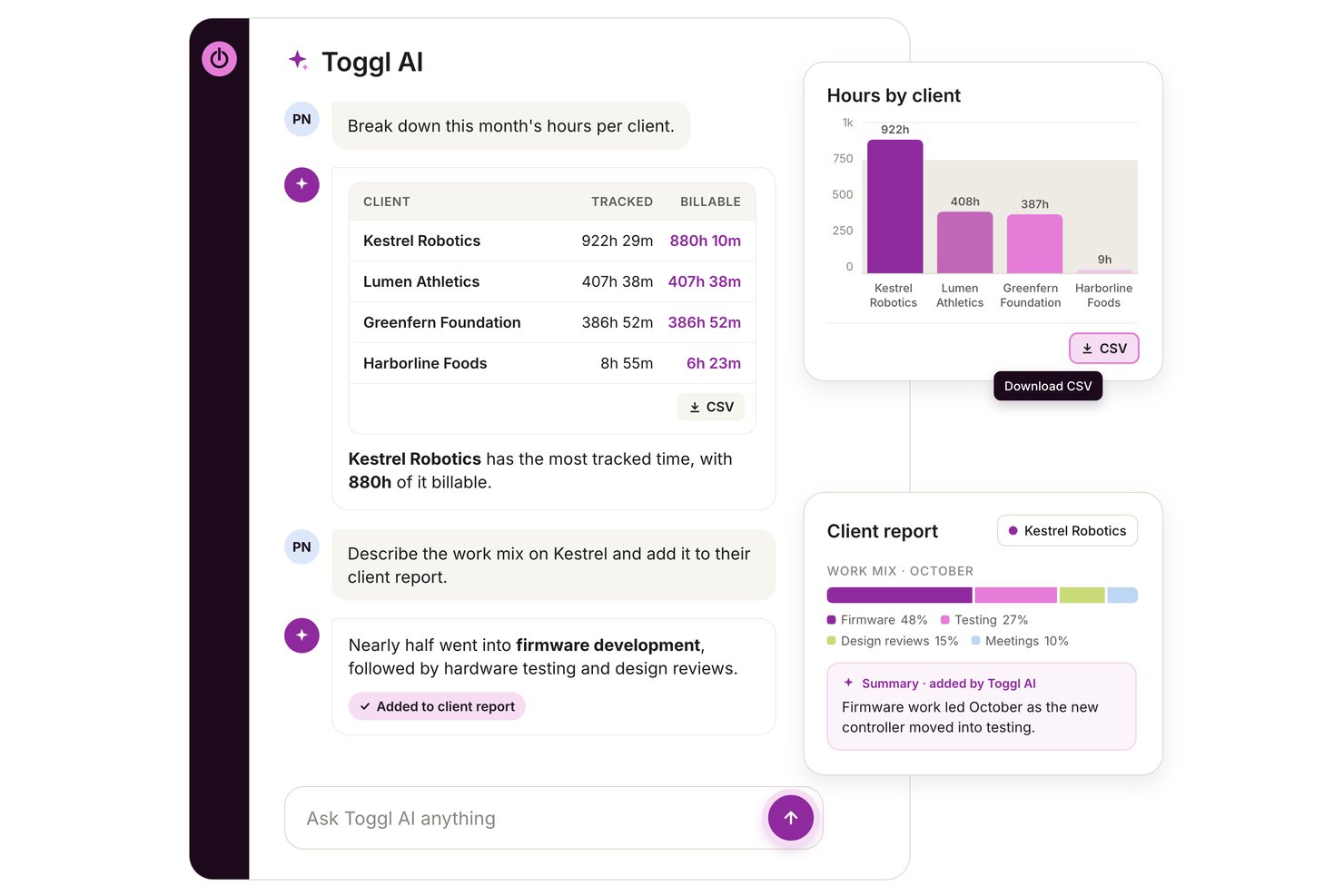
Toggl is a time tracking platform that combines automated activity capture, AI-assisted reporting, project budgeting, and profitability analysis for teams and freelancers.
Who Is Toggl Best For?
Toggl is a strong fit for freelancers, consultants, and project-led teams who need to connect tracked time directly to client billing and project profitability.
Why I Picked Toggl
I've included Toggl in my top picks because its profitability reporting goes deeper than most time trackers I've tested. At the Premium tier, you get project dashboards that show actual time against estimates, projected finish dates, and margin breakdowns across clients, tasks, and team members, which makes it genuinely useful for billing-focused work. I also like that Toggl AI lets you query that data in plain language and pull the results into a downloadable chart without touching a report filter.
Toggl Key Features
- Toggl AI answers: Ask plain-language questions about your workspace time, budgets, and capacity, and get answers drawn directly from your data.
- Timesheet approvals: Submit and approve timesheets on a weekly or monthly cycle, with approved periods locked from further edits.
- Keyword-based autotracker: Link keywords to projects so Toggl prompts you to log time whenever a matching window title appears in the foreground.
- MCP server connection: Connect Toggl to MCP-compatible AI assistants like Claude or Cursor to read and update tasks, projects, and time entries from outside the app.
Toggl Integrations
Toggl offers native integrations with Google Calendar, Outlook Email & Calendar, Asana, Jira, and Slack. It also supports custom connections through its REST API, webhooks, MCP server, and CLI.
Pros and Cons
Pros:
- Trust-based tracking avoids screen surveillance
- AI answers turn workspace data into charts
- Project reports expose time allocation and bottlenecks
Cons:
- Auto-tracked entries can need manual correction
- Activity categorization depends on manually set rules

Best for automating timesheet workflows
monday AI Workspace is a work management platform that combines project tracking, AI-powered automation, and native time tracking to help teams log hours, manage workloads, and route timesheet approvals across projects.
Who Is monday AI Workspace Best For?
It's a strong fit for project managers and PMO teams who already run their work inside monday.com and want to automate timesheet approvals without switching tools.
Why I Picked monday AI Workspace
I picked monday AI Workspace because its automation engine covers the full timesheet cycle, not just the time entry itself. I like that you can trigger timer starts from a task status change, route completed timesheets through an approval chain, and have the system automatically remind anyone who hasn't submitted. My team uses it specifically to eliminate the back-and-forth that usually comes with weekly timesheet collection.
monday AI Workspace Key Features
- AI-powered dashboards: Gain access to dashboards that surface project timelines, workload, and resource allocation insights using AI.
- Advanced project automation: Build complex workflow automations for task assignments, project dependencies, and notifications without coding.
- Native project management boards: Manage tasks, priorities, and milestones using customizable, visual board layouts.
- Multi-platform integrations: Connect with leading tools like Jira, Slack, Zoom, and Google Drive to centralize data and automate information flow.
monday AI Workspace Integrations
monday AI Workspace offers hundreds of native integrations through its built-in integrations and marketplace, including Slack, Jira, Google Drive, Zoom, Outlook, Typeform, and Salesforce. It also supports Zapier and provides an API for custom integrations.
Pros and Cons
Pros:
- AI-powered dashboards for resource forecasting
- Automations trigger timers from board status
- Direct timesheet approvals built into workflows
Cons:
- Lacks AI-driven time entry categorization
- No passive activity-based time tracking
New Product Updates from monday AI Workspace
monday AI Workspace Adds Human Approval Routing
monday AI Workspace adds a human-in-the-loop approval block to AI Workflows, sending approval requests and routing workflow paths based on responses. For more information, visit monday AI Workspace's official site.
 .

DeskTime
Best for integrated break tracking
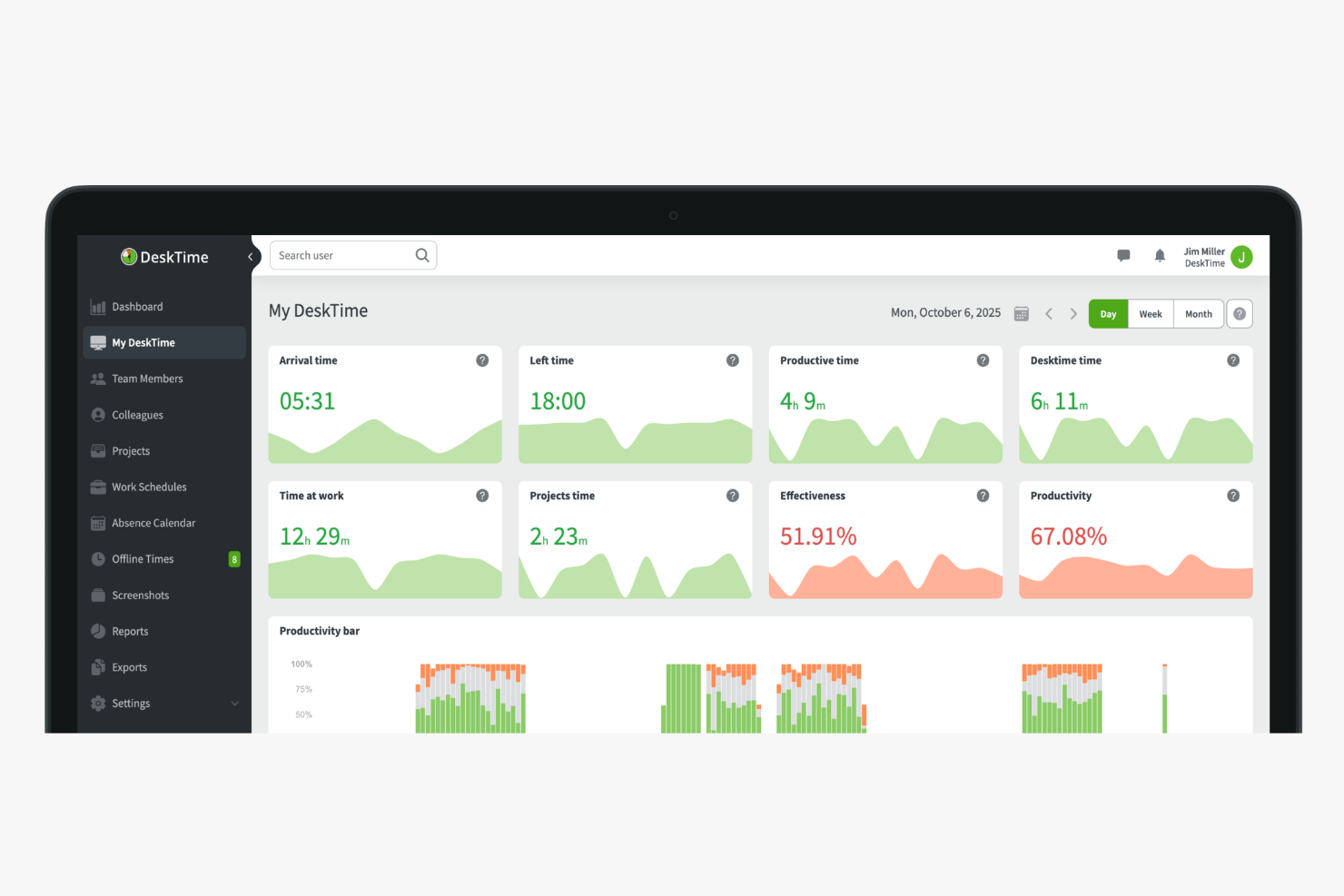
DeskTime is an automatic time tracking and productivity monitoring tool that logs app and URL usage, generates AI-powered work summaries, and tracks shift schedules across teams.
Who Is DeskTime Best For?
DeskTime is a good fit for managers of remote or hybrid teams who need visibility into how work hours are spent across distributed workforces.
Why I Picked DeskTime
DeskTime earns its spot on my shortlist for integrated break tracking because it's one of the few time trackers that treats breaks as a first-class part of the workday, not an afterthought. The break time reminder feature sends automatic nudges to employees throughout the day, prompting them to step away at regular intervals without any manual setup on my end. I also like the private time feature, which lets team members pause all tracking when they need a personal moment, so that lunch break browsing or a quick personal errand doesn't show up alongside their productive work hours. That combination means I get accurate time data and my team gets the autonomy to take real breaks.
DeskTime Key Features
- Screenshot monitoring: Captures random screenshots at set intervals to give managers a visual record of on-screen activity during work hours.
- GPS location tracking: Logs employee location via the mobile app, useful for tracking field workers or distributed teams on the go.
- Late arrival alerts: Notifies managers automatically when an employee clocks in after their scheduled start time.
- Daily productivity timeline: Displays a colour-coded breakdown of each employee's active, idle, and away time across the full workday.
DeskTime Integrations
Integrations include Google Calendar, Outlook Calendar, Trello, Gitlab, Asana, Jira, and Zapier.
Pros and Cons
Pros:
- Built-in Pomodoro timer for focus sessions
- Categorizes activity as productive or unproductive
- Tracks time automatically without manual input
Cons:
- Project switching requires manual input
- Lacks predictive web category filtering
Beebole
Best for plain-language report building
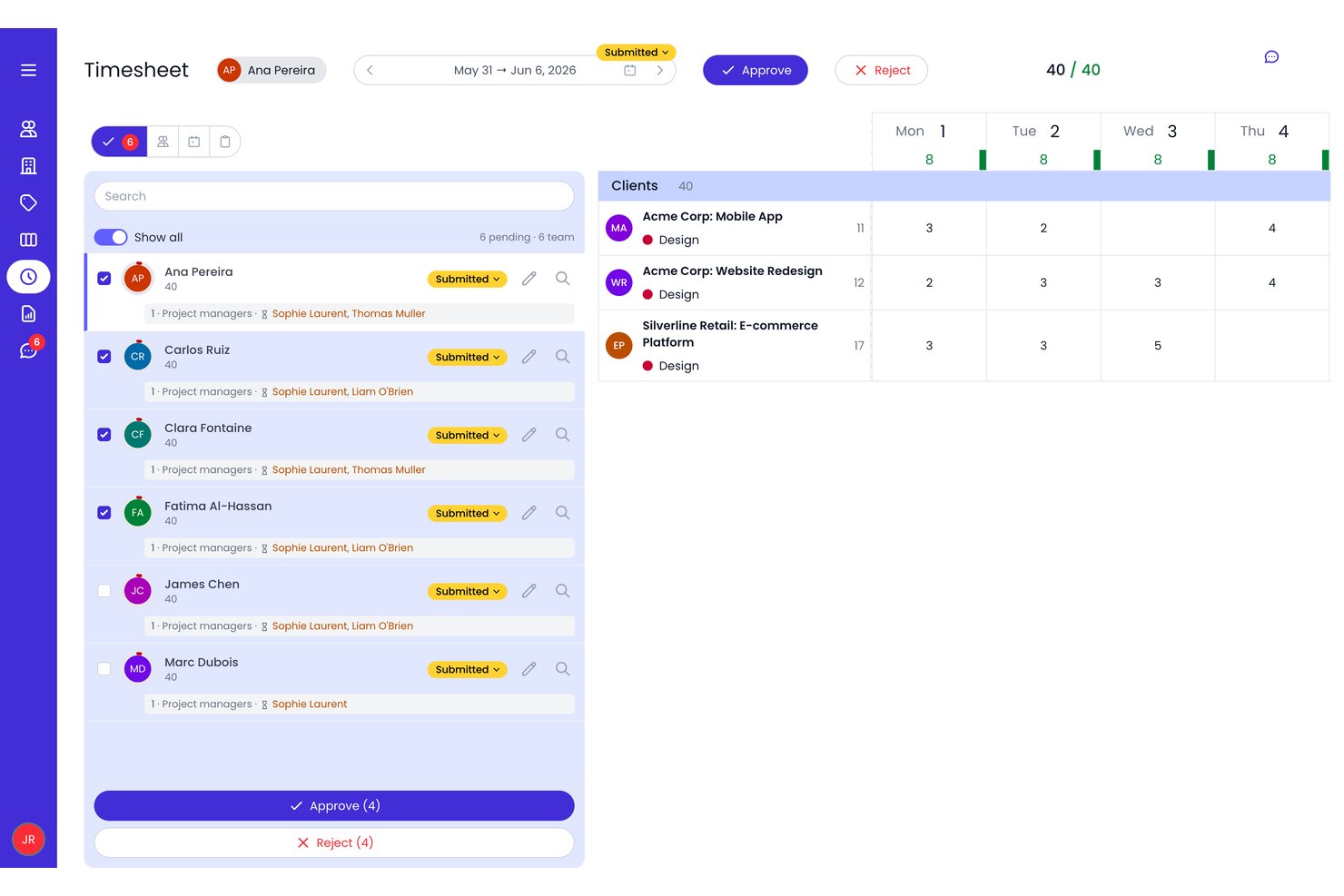
Beebole is a time tracking and project planning tool that combines AI-suggested time entries, resource scheduling, and reporting across projects, tasks, and clients.
Who Is Beebole Best For?
Beebole is a strong fit for agency and project leads who need to track billable hours across clients, manage project budgets, and pull detailed financial reports without heavy setup.
Why I Picked Beebole
I picked Beebole as one of the best because its AI report builder genuinely changes how fast you can get from raw time data to a client-ready breakdown. Instead of clicking through filters, you describe the report you need in plain language and Beebole builds it. I also like that it flags unusual timesheets automatically, catching things like hours logged on non-working days or totals well outside the norm, before approvals go through.
Beebole Key Features
- Resource scheduling: Allocate team members to projects by availability and skill, with tentative bookings supported while plans are still being finalized.
- Multi-level timesheet approvals: Route timesheets through configurable approval workflows with defined approver sequences and multiple review levels.
- Audit trail: Track every change to time entries, including who made the change, when, and the old-to-new value for edits.
- Budget Status report: View actual time, billing, and costs against project targets, with subproject rollups and a forecast bar for planned effort remaining.
Beebole Integrations
Beebole lists integrations with hundreds of apps, including Asana, Google Calendar, Outlook Calendar, Google Sheets, Excel, QuickBooks Online, Xero, Linear, and BambooHR. It also supports GraphQL, webhooks, and an MCP server for custom integrations.
Pros and Cons
Pros:
- Opt-in drafts avoid screenshot monitoring
- Flexible reports support client-specific analysis
- Plain-language reports speed client breakdowns
Cons:
- No AI productivity or focus recommendations
- AI suggestions require manual acceptance

Traqq
Best for lightweight team tracking

Traqq makes my list for teams that want lightweight but reliable time tracking, especially when they don't need a complicated setup. I think it's a fit for remote or hybrid teams who just want automated activity recording, optional screenshots, and clear reports—without a lot of manual input.
What I appreciate most is how it quietly tracks work in the background and keeps things simple, so you get the visibility you need with minimal interruptions.
Traqq’s Best For
- Remote and hybrid teams needing simple activity tracking
- Managers who want oversight without detailed manual timesheets
Traqq’s Not Great For
- Teams requiring advanced project management or budgeting tools
- Organizations needing deep integrations with HR or payroll systems
What sets Traqq apart
Traqq approaches time tracking by running in the background and removing manual data entry from the picture. Unlike tools like Toggl, which expect users to start and stop timers for each task, Traqq quietly tracks activity so teams can focus on their work. I notice this works best when you want a lightweight record of hours and activity without building complicated workflows or creating new habits.
Tradeoffs with Traqq
Traqq optimizes for simplicity and automated tracking, but you lose out on granular task breakdowns and detailed project planning. This means it won't suit teams that need forecasting, budgeting, or complex workflow management.
Pros and Cons
Pros:
- Includes PTO and leave management
- Non-intrusive activity tracking
- Intuitive user interface
Cons:
- Basic reporting capabilities
- Limited advanced features

Timely
Best for automatic time tracking

Timely makes this list because it brings real, fully automatic time tracking into the workflow—no manual timers or tracking required. I like how it builds a private timeline of every app, meeting, and website I work with throughout the day, then lets me confirm what belongs on my timesheet.
Teams that struggle to track project hours accurately without adding admin work are going to appreciate how Timely actually captures all that time by itself. This comes in handy once you’ve realized that fragmented, manual entry just doesn’t cut it when you need dependable project reporting.
Timely’s Best For
- Teams that want fully automatic time tracking
- Agencies and consultancies billing time across many projects
Timely’s Not Great For
- Organizations needing detailed task-level breakdowns
- Teams that require built-in payroll or invoicing features
What sets Timely apart
Timely focuses on making time tracking invisible. Instead of manual start-stop buttons like Toggl or Harvest, it quietly captures activity in the background and builds a private daily timeline. I notice this helps when you want to focus on your work, not the process of tracking time. Timely expects you to review and approve entries, not record them as you go.
Tradeoffs with Timely
By optimizing for automatic capture and privacy, Timely sacrifices task-level tracking detail. If your workflow demands granular breakdowns or time-on-task analysis, results start feeling less precise.
Pros and Cons
Pros:
- Helpful productivity insights
- Simplifies project management
- Accurate AI-generated timesheets
Cons:
- Limited customization options
- Setup can be time-consuming

Jibble
Best for attendance and payroll integration

Jibble is on my list because it's rare to see AI-powered time tracking so tightly linked with attendance, scheduling, and payroll processing. I recommend it when you need automated timesheets to flow directly into payroll calculations, especially for organizations dealing with hourly workforces or shift rosters.
What I like is how Jibble ties facial recognition clock-ins to pay rules, so you can cut out time theft and keep reporting accurate.
Jibble’s Best For
- Companies managing hourly staff and shifts across locations
- Organizations that need payroll and attendance tightly integrated
Jibble’s Not Great For
- Teams with salaried or project-based time tracking needs
- Businesses needing advanced project analytics or costing
What sets Jibble apart
Jibble is designed for organizations that need clock-ins to drive both attendance tracking and payroll, instead of relying on task-based or manual entry tools like Toggl or ClickUp. It builds work around biometric and geolocation check-ins, expecting teams to treat clock-in data as the primary source of truth. In practice, I see it working best when you want no ambiguity between recorded time and what gets sent to payroll.
Tradeoffs with Jibble
Jibble optimizes for compliance and payroll-linked attendance. You give up deeper project time analysis, so if you need granular task costing, you hit limits fast.
Pros and Cons
Pros:
- Facial Automated reminders for clock-ins
- GPS tracking for remote teams
- Facial recognition capability
Cons:
- Not ideal for complex projects
- Limited offline functionality

Memtime
Best for offline time tracking

Memtime earns a spot on my shortlist because it’s one of the best tools for capturing work time offline—even when you’re completely disconnected. When I tested this, Memtime tracked my activities locally, letting me review and allocate time accurately once I got back online. I like that you can reconstruct a precise timeline from local data, which helps teams who can’t always be connected or need to track sensitive offline work.
Memtime’s Best For
- Individuals or teams needing accurate offline time tracking
- Professionals working with sensitive or non-networked data
Memtime’s Not Great For
- Teams that require real-time collaboration features
- Businesses wanting built-in advanced AI time suggestions
What sets Memtime apart
Memtime stands out because it records everything you do locally, even when you’re offline. This isn’t like RescueTime or Timely, where you depend on cloud syncing to produce a timeline of your activities. I find this works best for people who move between offices without reliable internet or need to track sensitive work on air-gapped machines.
Tradeoffs with Memtime
Memtime optimizes for reliable offline tracking, but you lose out on features tied to cloud-based AI and real-time sync. That means you don’t get live collaboration or remote management functions.
Pros and Cons
Pros:
- Ideal for remote workers
- Detailed productivity reports
- Automatic activity tracking
Cons:
- Limited collaboration tools
- Basic customization options

Clockk
Best for freelancers and agencies
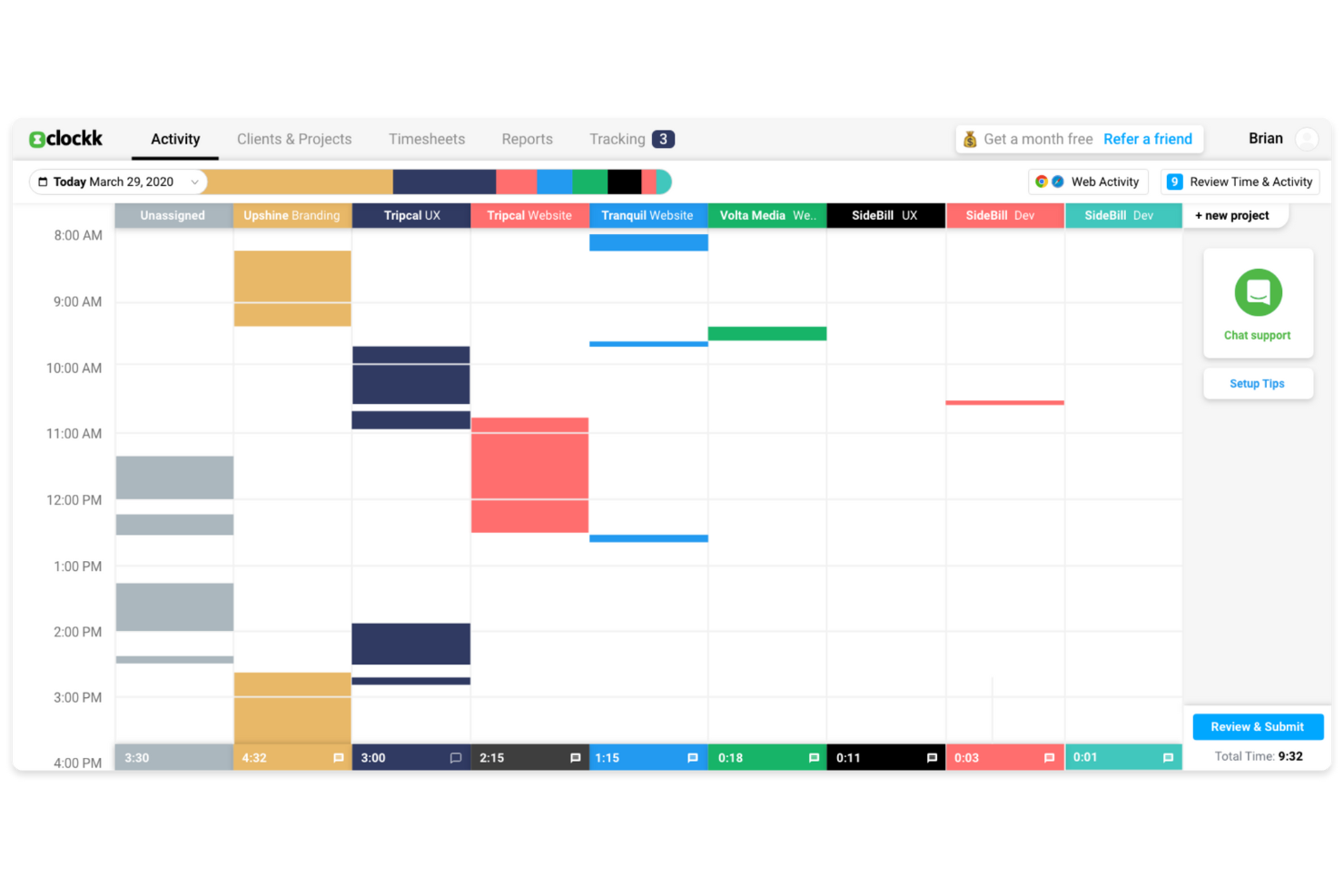
Clockk makes my list because it’s one of the few AI time tracking tools that actually learns from your work patterns, which is perfect when you’re juggling different projects for several clients. I especially appreciate how I can let Clockk automatically track which apps and websites I use throughout the day, then see time attributed to specific projects with almost no manual effort.
Freelancers and agencies who switch between tasks all day usually spend too much time reconstructing their hours; with Clockk’s automatic project tagging and AI-driven time allocation, that friction basically disappears.
Clockk’s Best For
- Freelancers or agencies managing multiple client projects
- People who need automatic, AI-driven time allocation
Clockk’s Not Great For
- Teams that need strict, real-time timesheet approvals
- Manual time entry or specialized task-level billing
What Sets Clockk Apart
Clockk focuses on automating time tracking by watching what you do in the background and assigning work to projects for you. Unlike manual tools like Toggl where you punch in every task, Clockk expects people to work naturally, switching between clients throughout the day without interruption. In practice, this feels different from ClickUp or monday.com, which make you log activities or categorize them in the moment.
Tradeoffs with Clockk
Clockk optimizes for hands-off, automatic time capture, so you lose the precision of manual time entries. If you need to track exactly what was done on each task, the automated approach can make your records feel less exact.
Pros and Cons
Pros:
- Automatic time categorization
- Visual timeline feature
- Ideal for freelancers
Cons:
- Not suitable for large teams
- Requires internet connection

Intapp Time
Best for legal industry compliance

Intapp Time makes this list because it covers the compliance and audit challenges legal teams deal with daily. What sticks out to me is the way it automatically captures activities, applies firm-specific compliance rules, and flags risky billing entries before submission. When I’m working with firms that need airtight compliance and billing accuracy, this is the tool I recommend.
I appreciate how you get AI-powered activity capture that’s purpose-built for the legal industry, not just generic tracking.
Intapp Time’s Best For
- Legal teams needing automated, compliant time tracking
- Firms facing strict billing or regulatory requirements
Intapp Time’s Not Great For
- Companies outside legal or professional services
- Teams wanting basic, lightweight time tracking only
What sets Intapp Time apart
Intapp Time is meant for legal professionals who need automatic, audit-ready time capture baked into everyday workflows. Unlike basic time tracking tools, it expects you to work inside systems where billing, compliance, and detailed client matter management are non-negotiable. In my experience, this works best for firms that structure billable work around regulations, not just project hours.
Tradeoffs with Intapp Time
Intapp Time optimizes for regulatory detail and compliance, which makes it less practical for teams wanting a fast, simple timer or casual time logging.
Pros and Cons
Pros:
- Ideal for legal professionals
- Automated time capture
- Compliance-focused features
Cons:
- May require setup assistance
- Learning curve for new users
Diğer Yapay Zekâ Zaman Takibi Yazılımları
Kısa listeme girmeyen, ancak yine de göz atmaya değer bazı ek yapay zekâ zaman takibi yazılımı seçenekleri şunlardır:
- ZeroTime
For real-time project updates
- Rize
For personal productivity insights
- Laurel
For privacy-focused tracking
- MonitUp
For remote team management
- Connecteam
For mobile-first teams
- BigTime
For professional service firms
- GoodDay
For agile workflow support
- TimeCamp
For budget management tools
- Deputy
For shift scheduling
- Intelogos
For real-time work analytics
- ClickUp
For task management integration
- EARLY
For deadline reminders


How I Evaluate AI Time Tracking Software
Any tool can slap an AI label on a basic timer, so I look for platforms where the AI actually reduces manual work and improves accuracy in ways you'd notice on day one. I split my evaluation into core functionality every tool needs to make the list and differentiating factors that separate good fits from great ones.
Core Functionality (Table Stakes For This List)
When I'm selecting tools for my list, I rank each one on a scale from 0 (does not offer the functionality) to 5 (excels in this area) for each core functionality listed below. Then, I calculate the tool's total score into a percentage. Each tool needs to achieve a minimum total score of 65% to be considered for inclusion.
- Automated Time Capture: I check whether the tool passively tracks activity across desktop apps, browsers, and calendars so team members aren't stopping mid-task to start a timer.
- AI Time Entry Categorization: Smart tagging matters here—I look for AI that maps captured time to the right project, client, or billing code based on context and learned patterns.
- Project Management Integration: The tool should sync with platforms like Jira, Asana, or monday.com so tracked time flows directly to the correct task or sprint.
- AI-Powered Timesheet Generation: I evaluate whether the tool auto-drafts timesheets from tracked activity, giving users something to review and approve rather than build from scratch.
- Predictive Insights & Forecasting: Tools that surface budget burn rates, flag time entry anomalies, or project workload capacity using historical data score higher in my evaluation.
- Billable Hours & Reporting: I look for clear billable vs. non-billable separation with project- or client-level reports that are ready for invoicing or profitability reviews.
Once I have a list of tools that meet this criteria, I consider what sets each platform apart.
Differentiating Factors (What Sets Vendors Apart)
Here's how I compare and contrast different vendors:
Standout Features
Meeting and calendar intelligence is a big differentiator—I look for tools that pull time from video calls and calendar events and map it to the right project automatically. For PMs who spend half their day in cross-functional syncs, this alone can recapture hours of lost billable time. Privacy controls also matter for team adoption; passive tracking stalls when employees can't control what's visible to managers. A conversational reporting assistant adds real value too, letting you query time data naturally instead of building custom reports from scratch.
Beyond Features
AI model transparency is something I evaluate closely—I want to know how the tool categorizes time and whether you can audit and correct its suggestions over time. Data privacy also weighs heavily, especially for teams handling client work under strict compliance requirements like GDPR or SOC 2. Pricing structure matters for agencies and consultancies with fluctuating headcount, where you need a model that scales without locking you into annual commitments for short-term contractors.
Yapay Zekâ Zaman Takibi Yazılımı Nasıl Seçilir?
Uzun özellik listeleri ve karmaşık fiyatlandırma yapıları arasında kaybolmak kolaydır. Doğru yazılım aracını seçerken odağınızı korumanıza yardımcı olmak için göz önünde bulundurmanız gereken faktörlerin kontrol listesi aşağıdadır:
| Faktör | Dikkat Edilmesi Gerekenler |
|---|---|
| Ölçeklenebilirlik | Yazılım işletmenizle birlikte büyüyecek mi? Kullanıcı sınırlarını ve ölçeği artırmanın kolaylığını göz önünde bulundurun. Ekibiniz büyüdükçe fiyatlandırma modelinin karşılanamayacak kadar pahalı hale gelmeyeceğinden emin olun. |
| Entegrasyonlar | Araç mevcut sistemlerinizle entegre oluyor mu? İş akışının sorunsuz entegrasyonunu sürdürmek için proje yönetimi, muhasebe ve iletişim araçlarınızla uyumluluğu kontrol edin. |
| Özelleştirilebilirlik | Yazılımı özel ihtiyaçlarınıza uyacak şekilde uyarlayabilir misiniz? Panoları, raporları ve ayarları iş akışlarınıza ve iş süreçlerinize uygun şekilde özelleştirme olanağı sunan araçları arayın. |
| Kullanım kolaylığı | Arayüz ekibiniz için sezgisel mi? Dik bir öğrenme eğrisi benimsemeyi yavaşlatabilir. Sade bir düzene ve anlaşılır gezinmeye sahip yazılımları arayın. |
| Uygulama ve işe alıştırma | Çalışmaya başlamanız ne kadar sürecek? Sorunsuz bir geçişi kolaylaştırmak için eğitim videoları, ürün tanıtımları ve müşteri desteği gibi kaynakların bulunabilirliğini göz önünde bulundurun. |
| Maliyet | Fiyatlandırma bütçenize uygun mu? Gizli ücretler ile ek özellikler veya kullanıcılar için alınan ilave ücretler dahil olmak üzere toplam maliyeti değerlendirin. Bütçenize uygun esnek fiyatlandırma modellerini arayın. |
| Güvenlik önlemleri | Yazılım verilerinizi nasıl koruyor? Şifreleme, veri yedekleme ve güvenlik standartlarına uyumluluk özelliklerini arayın. Hassas bilgilerinizin güvende kaldığından emin olun. |
| Destek bulunabilirliği | Hangi destek seçenekleri mevcut? İhtiyaç duyduğunuzda yardım alabilmek için 7/24 destek, canlı sohbet ve yanıt sürelerinin bulunabilirliğini göz önünde bulundurun. |
Yapay Zekâ Zaman Takibi Yazılımı Nedir?
Yapay zekâ zaman takibi yazılımı, görevlerde zamanın nasıl harcandığını otomatik olarak kaydeden ve analiz eden bir araçtır. Verimliliği artırmak ve zamanı etkili bir şekilde yönetmek için serbest çalışanlar, proje yöneticileri ve uzaktan çalışan ekipler tarafından yaygın olarak kullanılır.
Otomatik izleme, raporlama ve entegrasyon özellikleri; doğru faturalandırma, iş yükü yönetimi ve üretkenlik içgörüleri sağlar. Genel olarak bu araçlar zaman kazandırır ve ekibin çalışma düzenleri hakkında değerli içgörüler sunabilir.
Yapay Zekâ Zaman Takip Yazılımının Özellikleri
Yapay zekâ zaman takip yazılımı seçerken aşağıdaki temel özelliklere dikkat edin:
- Otomatik zaman kaydı: Görevlerde harcanan zamanı otomatik olarak kaydeder; bu da manuel veri girişi hatalarını azaltır ve zaman kazandırır.
- Gerçek zamanlı izleme: Çalışma etkinlikleriyle ilgili güncel veriler sunarak bilgi sahibi olmanıza ve zamanında kararlar almanıza yardımcı olur.
- Özelleştirilebilir raporlar: Raporları özel ihtiyaçlarınıza göre düzenlemenize olanak tanır ve üretkenlik ile zaman kullanımı hakkında içgörüler sunar.
- Entegrasyon özellikleri: Sorunsuz iş akışı entegrasyonunu sürdürmek için proje yönetimi veya muhasebe yazılımı gibi kullandığınız diğer araçlara bağlanır.
- Gizlilik kontrolleri: Hassas verileri korumak ve çalışan gizliliğini sürdürmek için bulanıklaştırılmış ekran görüntüleri gibi özellikler sunar.
- Uyumluluk uyarıları: Sektör standartlarına ve düzenlemelere uyulmasına yardımcı olmak için gerçek zamanlı bildirimler sunar.
- Mobil erişim: Hareket hâlindeyken izleme ve raporlama olanağı sağlar; bu da uzaktan çalışan veya seyahat eden ekip üyeleri için esneklik anlamına gelir.
- Kullanıcı dostu arayüz: Ekibinizin kolayca benimseyip etkili bir şekilde kullanmasını sağlayan sezgisel bir tasarıma sahiptir.
- Bütçe yönetimi araçları: Maliyetleri takip etmeye, proje bütçelerini yönetmeye ve finansal denetim ile verimliliği sürdürmeye yardımcı olur.
- Görev yönetimi entegrasyonu: Uyumlu bir iş akışı sağlamak için zaman takibini görev yönetimiyle birleştirir.
Yapay Zekâ Zaman Takip Yazılımının Faydaları
Yapay zekâ zaman takip yazılımının uygulanması ekibiniz ve işletmeniz için çeşitli faydalar sağlar. Yararlanabileceğiniz bazı faydalar şunlardır:
- Artan üretkenlik: Otomatik izleme ve gerçek zamanlı veriler verimsizlikleri belirlemeye yardımcı olur; böylece ekibiniz önceliği yüksek görevlere odaklanabilir.
- Doğru faturalandırma: Otomatik zaman kaydı, faturalandırılabilir her saati kaydeder ve faturalardaki tutarsızlıkları azaltır.
- Daha güçlü uyumluluk: Gerçek zamanlı uyarılar ve uyumluluk özellikleri, ekibinizin ekstra çaba harcamadan sektör standartlarına uymasına yardımcı olur.
- Daha iyi kaynak yönetimi: Özelleştirilebilir raporlar ve entegrasyon özellikleri, zaman kullanımı hakkında içgörüler sunarak kaynakları verimli bir şekilde tahsis etmenizi sağlar.
- Artan esneklik: Mobil erişim ve görev yönetimi araçlarıyla entegrasyon, ekibinizin her yerden verimli çalışmasına olanak tanır.
- Gizliliğin korunması: Bulanıklaştırılmış ekran görüntüleri gibi özellikler hassas verileri korur ve güven ile emniyeti sürdürür.
- Maliyet tasarrufu: Zaman takibini otomatikleştirip manuel hataları azaltarak yönetim maliyetlerinden tasarruf edebilir ve finansal denetimi iyileştirebilirsiniz.
Yapay Zekâ Zaman Takip Yazılımının Maliyetleri ve Fiyatlandırması
Yapay zekâ zaman takip yazılımının maliyetleri; özelliklere, ekip büyüklüğüne, eklentilere ve daha birçok etkene göre değişir. Aşağıdaki tabloda yapay zekâ zaman takip yazılımı çözümlerinde yaygın planlar, ortalama fiyatlar ve genellikle sunulan özellikler özetlenmiştir:
Yapay Zekâ Zaman Takip Yazılımı Plan Karşılaştırma Tablosu
| Plan Türü | Ortalama Fiyat | Yaygın Özellikler |
|---|---|---|
| Ücretsiz Plan | $0/user/month | Temel zaman takibi, sınırlı raporlama ve belirli araçlarla entegrasyon. |
| Kişisel Plan | $5-$15/user/month | Otomatik izleme, mobil erişim ve özelleştirilebilir raporlar. |
| İşletme Planı | $20-$40/user/month | Gelişmiş raporlama, ekip iş birliği araçları ve bütçe yönetimi özellikleri. |
| Kurumsal Plan | $50-$100/user/month | Tam özelleştirme, özel destek ve uyumluluk yönetimi özellikleri. |
Yapay Zekâ Zaman Takibi Yazılımı SSS
Yapay zekâ zaman takibi yazılımı hakkında sık sorulan soruların bazı yanıtları burada yer alıyor:
Faturalandırma için yapay zekâ zaman takibi ne kadar doğrudur?
Yapay zekâ; uygulama etkinliğini, fare ve klavye girdilerini ve belge değişikliklerini izleyerek kullanılan süreyi kaydedebilir. Genellikle boşta kalma sürelerini işaretler ve etkin olunmayan süreleri düzeltir; bu da hatalı faturalandırmayı azaltmanıza yardımcı olur. Ancak kusursuz değildir. Faturalandırmadan önce kayıtları gözden geçirip düzenlediğinizden emin olun.
Yapay zekâ zaman takibi araçları güvenli midir?
Çoğu yapay zekâ zaman takibi aracı, şifreleme ve diğer veri koruma önlemlerini sunar. Bir araç seçerken verilerinizin güvende kalması için yaygın güvenlik standartlarına ve gizlilik politikalarına uygun olduğundan emin olun.
Yapay zekâ zaman takibi yazılımı diğer araçlarla entegre olabilir mi?
Evet, yapay zekâ zaman takibi yazılımlarının çoğu proje yönetimi, muhasebe ve iletişim platformları gibi diğer araçlarla entegre olabilir. Bu entegrasyon iş akışlarınızı iyileştirir ve tüm araçlarınızın sorunsuz bir şekilde birlikte çalışmasını sağlar.
Zaman takibi için yapay zekâ kullanmanın faydaları nelerdir?
Yapay zekâ zaman takibi süreci otomatikleştirir, manuel hataları azaltır ve zaman kazandırır. Verimlilik hakkında gerçek zamanlı bilgiler sunar ve kaynak tahsisini optimize etmeye yardımcı olur. Bu da daha iyi verimlilik ve daha doğru faturalandırma sağlar.
Yapay zekâ zaman takibi çoklu görevleri veya bağlam değiştirmeyi nasıl ele alır?
Yapay zekâ zaman takibi sistemleri genellikle pencere değişikliklerini, uygulama odağındaki değişimleri veya dosya değişikliklerini algılayarak çalışmayı bölümlere ayırır. İlgili görevleri gruplandırır ve bölümleri birleştirmenize veya yeniden atamanıza olanak tanır. Bazen örtüşmeleri veya yanlış sınıflandırmaları düzeltmeniz gerekir.