

2026’da İncelenen En İyi 10 Yapay Zekâ Proje Analitiği Aracı

En İyi Yapay Zekâ Proje Analitiği Araçları Kısa Listesi


Projeleri yönetmek kolay değildir. Son teslim tarihleri, kaynak açıkları ve değişen önceliklerle uğraşırsınız; bir de bir şekilde herkesin uyum içinde ve memnun kalmasını sağlamanız beklenir. Yapay zekâ proje analitiği araçları, karmaşık verileri gerçekten kullanabileceğiniz içgörülere dönüştürerek bu yükü hafifletebilir.
İş akışınıza (ve bütçenize) uygun olanı bulmanıza yardımcı olmak için çeşitli seçenekleri test edip inceledim. Aşağıda her aracın hangi konularda başarılı olduğunu, nerelerde yetersiz kalabileceğini ve kimler için en uygun olduğunu bulabilirsiniz.
İster küçük bir ekip yönetiyor ister karmaşık bir iş akışını yürütüyor olun, burada daha çok çalışmadan daha akıllı çalışmanıza yardımcı olabilecek bir araç var. Haydi başlayalım.
Why Trust Our Software Recommendations
Our team has been testing and reviewing software since 2012. As project managers ourselves, we know how difficult—and important—it is to choose the right software.
For this guide, we evaluated tools using hands-on testing and independent research, scoring tools using our selection criteria. We also draw on insights from industry thought leaders and practicing project management experts.
Our reviews reflect our human editorial judgment, not a sales pitch.
Expert reviewers:
Yapay Zekâ Proje Analitiği Araçları Karşılaştırma Tablosu
Bu karşılaştırma tablosu, en iyi yapay zekâ proje analitiği seçeneklerimin fiyatlandırma ayrıntılarını özetlemektedir.
| Tool | Starting Price | Website | |
|---|---|---|---|
| Best for enterprise agencies | 4.6 out of 5 | Pricing upon request Not available | Book Demo |
| Best for Microsoft integration | 4.6 out of 5 | $10.00 30-day free trial available | Website |
| Best for database projects | 4.6 out of 5 | $20/user/month Free plan + free demo available | Website |
| Best for resource management | 4.6 out of 5 | Pricing upon request Free demo available | Website |
| Best for client management | 4.4 out of 5 | $9.99/user/month Free plan + 14-day free trial + free demo available | Website |
| Best for software teams | 4.3 out of 5 | $8.48/user/month Free plan available | Website |
| Best for task management | — | $12/user/month Free plan + trial + demo available | Website |
| Best for flexible organization | — | $10/user/month Free plan + trial available | Website |
| Best for team collaboration | — | $10.99/user/month Free plan available | Website |
| Best for AI-powered risk detection | 4.6 out of 5 | $9/user/month Free plan + 14-day trial available | Book Demo |
En İyi Yapay Zekâ Proje Analitiği Araçları İncelemeleri
Aşağıda, kısa listeme giren en iyi yapay zekâ proje analitiği araçlarının ayrıntılı özetlerini bulabilirsiniz. İncelemelerim, size en uygun aracı bulmanıza yardımcı olmak için her aracın temel özelliklerine, avantajlarına & dezavantajlarına, entegrasyonlarına ve ideal kullanım alanlarına ayrıntılı bir bakış sunuyor.

Best for enterprise agencies
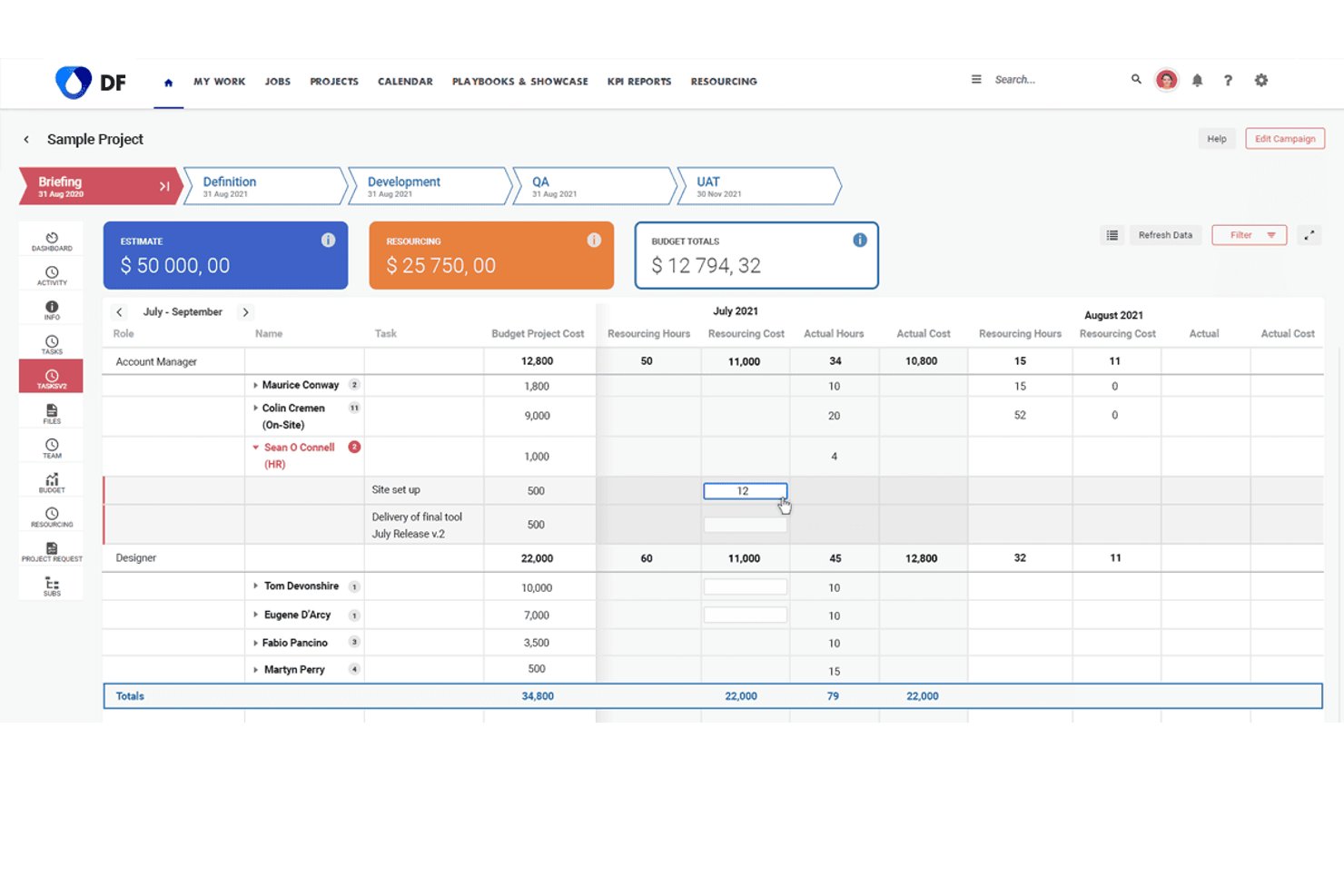
Screendragon is an enterprise work management platform that combines AI-powered workflow orchestration, predictive resource forecasting, and real-time operational analytics for marketing and agency teams.
Who Is Screendragon Best For?
Screendragon suits enterprise marketing and creative agencies managing high volumes of complex projects, approvals, and cross-functional teams at scale.
Why I Picked Screendragon
I picked Screendragon as one of the best because its built-in AI Agents surface real-time capacity, resourcing, and performance insights directly inside live workflows. For enterprise agencies running dozens of concurrent campaigns, the ML-based resource forecasting projects demand 3 to 6 months ahead, keeping planning grounded in data. I also like that every AI agent operates within defined governance rules and audit trails, which matters when you're managing compliance-heavy approval processes at scale.
Screendragon Key Features
- No-code workflow builder: Build and customize project workflows without development using visual templates and drag-and-drop steps.
- Centralized review and approval hub: Manage creative, marketing, and compliance approvals in one place with audit trails and annotation support.
- Dynamic forms: Capture project, resource, and budget data at intake using forms that adapt fields, layout, and language as needed.
- Native integrations with ERP and PM tools: Connect directly to platforms like Jira, Salesforce, SAP, Microsoft Dynamics, and Google Drive for unified project data.
Screendragon Integrations
Screendragon offers native integrations with HubSpot, Microsoft Power BI, Ziflow, Brandfolder, Workato, and Smartsheet. An API is available for custom integrations.
Pros and Cons
Pros:
- Real-time capacity analytics across concurrent campaigns
- AI governance with audit trails built in
- ML-based resource forecasting spans months ahead
Cons:
- Setup requires significant configuration time
- AI features skew toward marketing over PMO

Best for Microsoft integration

Microsoft Planner is a project management solution ideal for teams that heavily use Microsoft products. It helps with planning, scheduling, and tracking projects, providing tools to improve productivity.
Why I picked Microsoft Planner: It integrates with other Microsoft products with ease, making it a natural fit for teams already using Office 365. The tool provides Gantt charts for detailed project scheduling and task dependencies to manage project timelines effectively. Its resource management features help allocate resources efficiently, and the reporting capabilities offer insights into project progress. These features make it perfect for teams that want to use Microsoft integration.
Standout Features & Integrations
Features include a timeline view for visualizing project schedules, a task board to track tasks visually, and customizable templates to get started quickly. The project portfolio management feature helps you oversee multiple projects, and the collaboration tools enable teams to work together efficiently.
Integrations include Microsoft Teams, SharePoint, OneDrive, Outlook, Excel, Power BI, Azure DevOps, Dynamics 365, Yammer, and Planner.
Pros and Cons
Pros:
- Detailed reporting tools
- Customizable project templates
- Strong resource management
Cons:
- Requires access to the Microsoft ecosystem
- Can be complex for small teams

Airtable
Best for database projects

Airtable is a no-code work and data management platform that combines spreadsheet familiarity with database structure. It helps teams organize projects, manage structured data, and build custom workflows supported by artificial intelligence tools such as AI agents and natural-language prompts.
Why I picked Airtable: It offers a flexible database-style design that supports structured project information while enabling AI-powered workflows. Teams can use natural language processing to generate app components, connect data across tables, and automate actions without technical expertise. Its AI agents help analyze data analytics outputs, surface relationships within large datasets, and support complex workflows at scale, making it useful for teams handling data-heavy projects.
Standout Features & Integrations
Features include form, grid, calendar, and gallery views; linked records for modeling relationships; and rich field types for advanced data analysis. AI capabilities include app generation, AI agents that can interpret thousands of records, and access to machine learning models from OpenAI, Llama, Gemini, Anthropic, and others. Automation tools allow teams to orchestrate workflows using natural language commands.
Integrations include Slack, Google Drive, Dropbox, Zapier, Trello, Asana, Evernote, Box, Microsoft Teams, and Jira.
Pros and Cons
Pros:
- Multiple adaptable project views
- AI agents for complex workflows
- Flexible no-code data modeling
Cons:
- Occasional performance issues
- Limited advanced reporting

Forecast
Best for resource management

Forecast is an AI-powered project and resource management platform built for teams that need structured scheduling, capacity planning, and workload visibility. It unifies financials, resourcing, and project delivery with artificial intelligence that analyzes performance and helps teams plan more effectively.
Why I picked Forecast: It has a strong focus on resource allocation supported by ai analytics that assess capacity, match skills to project needs, and highlight risks before they affect timelines or budgets. Its AI-driven utilization summaries and predictive alerts help teams understand data analytics tied to billable hours, demand, and workload. These capabilities make Forecast a fit for teams that need accurate resource planning supported by data-informed insights.
Standout Features & Integrations
Features include a project timeline for reviewing schedules, budget management for tracking financial performance, and AI-powered task prediction that anticipates workload changes. Risk alerts highlight potential overruns, and intelligent resource matching analyzes algorithms to recommend the right people for upcoming tasks. Real-time dashboards provide data analysis across utilization, timelines, and financials.
Integrations include Slack, Google Drive, Dropbox, Microsoft Teams, Zapier, Jira, QuickBooks, Xero, HubSpot, and Trello.
Pros and Cons
Pros:
- Helpful risk prediction alerts
- Clear utilization insights
- AI resource matching
Cons:
- Limited integration capabilities
- Requires training for full utilization
Best for client management

Teamwork.com is a project and client-delivery platform built for teams managing billable work across multiple accounts. It supports task coordination, resource planning, and workload visibility, with artificial intelligence features that help analyze project data and improve decision-making.
Why I picked Teamwork.com: Its ability to support client-focused projects through structured permissions, billing tools, and resource visibility. Its TeamworkAI features—such as AI utilization summaries, smart filtering, and AI project setup—help surface data analytics tied to billable hours, workloads, and profitability. These capabilities make it useful for teams handling client relationships while needing clearer insight into project performance.
Standout Features & Integrations
Features include workload management for balancing assignments, project portfolio views, billing and invoicing tools, and collaboration options for shared communication. TeamworkAI supports AI project wizards, smart assignment suggestions, and fast filtering using natural language prompts. Dashboards provide data analysis on utilization and budget performance.
Integrations include Slack, Google Drive, Dropbox, Microsoft Teams, Zapier, Trello, HubSpot, QuickBooks, Xero, and FreshBooks.
Pros and Cons
Pros:
- Strong billing and invoicing
- Project templates available
- Client permissions feature
Cons:
- Faulty and unreliable notifications
- Complex and cumbersome interface

Jira
Best for software teams

Jira is an AI project management tool tailored for software development teams. It helps manage software projects with features like bug tracking, Agile project management, and issue tracking.
Why I picked Jira: It’s equipped with features specifically designed for software teams, such as Scrum and Kanban boards that help visualize work in progress. Its Atlassian Intelligence features assist with generating actionable insights, creating JQL filters using natural language, and helping teams interpret metrics from development pipelines. This combination of structured Agile tooling and AI-assisted analytics makes Jira a strong fit for software teams needing visibility across complex projects.
Standout Features & Integrations
Features include backlog prioritization, sprint planning tools, dependency mapping, customizable templates, and AI-supported JQL generation. Reporting tools provide summaries and dashboards that help teams review cycle times, deployments, and other software delivery metrics. The drag-and-drop interface makes it easy to manage tasks, and the detailed permission settings ensure secure data access within your team.
Integrations include Slack, Microsoft Teams, GitHub, Bitbucket, Confluence, Trello, Google Drive, Dropbox, Zendesk, and Salesforce.
Pros and Cons
Pros:
- Scalable for large teams
- Detailed reporting options
- Customizable workflows
Cons:
- Requires regular maintenance
- Complex setup process


ClickUp is a work and task management platform designed for teams needing structured task organization, multiple view options, and unified workspace tools. It supports teams across industries and now includes AI-driven features through ClickUp Brain and AI agents that help teams interpret work data and automate routine steps.
Why I picked ClickUp: Its strong focus on detailed task organization supported by task types, priorities, custom fields, and multiple view modes. Its AI-assisted features, such as automated scheduling, task summaries, and performance insights, help teams manage raw data tied to deadlines, workload, and progress. These capabilities support teams that want flexible task structures improved by actionable insights and automation for day-to-day task management.
Standout Features & Integrations
Features include time tracking, recurring tasks, mind maps for visual planning, and a document editor for creating or updating project content. ClickUp Brain offers AI-powered summaries, automated time-blocking, and natural-language task creation, while AI agents can assist with prioritization and information retrieval.
Integrations include Slack, Google Drive, Dropbox, Microsoft Teams, Zoom, GitHub, Zapier, Trello, Asana, and Evernote.
Pros and Cons
Pros:
- Strong task organization features
- AI tools for summaries and scheduling
- Multiple task view options
Cons:
- Frequent updates can disrupt workflow
- Occasional lag with complex projects


Notion is an all-in-one workspace platform that combines documents, databases, and task management into one customizable environment. Its artificial intelligence features, including AI agents and natural-language actions, help teams structure information, automate work, and analyze project data from a single location.
Why I picked Notion: Its adaptable structure, which allows teams to design custom databases, pages, and workflows supported by AI features. Notion’s AI agents assist with summarizing project updates, generating content from raw data, and helping interpret data analytics stored across linked databases. Its flexibility allows teams to build project hubs, task dashboards, and documentation systems that align with evolving project needs.
Standout Features & Integrations
Features include AI agents that automate tasks, AI search across workspace content, and natural-language tools for drafting documents or generating task updates. Teams can use databases, Kanban boards, and calendars to organize work, while integrations with connected apps help consolidate project data analysis. Collaboration tools support shared editing and cross-team visibility.
Integrations include Slack, Google Drive, Dropbox, Microsoft Teams, Zapier, Trello, Asana, Evernote, GitHub, and Typeform.
Pros and Cons
Pros:
- Strong knowledge-management features
- AI tools for workspace automation
- Flexible database-driven structure
Cons:
- Limited advanced analytics
- Requires training for full utilization

Asana is a project and work management platform designed to help teams coordinate tasks, timelines, and collaborative workflows. It supports teams of all sizes and now includes AI Teammates, which assist with complex work and generate data-driven insights for project analysis.
Why I picked Asana: It’s focus on collaboration-supported work management combined with AI-driven capabilities that assist teams in handling project data, tasks, and dependencies. Its AI Teammates can analyze raw data, summarize updates, flag risks, and support smarter decisions, aligning well with team-centered project execution. These AI-supported workflows complement Asana’s structure of task assignments, timelines, and visual boards, making it well-suited for collaborative teams needing actionable insights without relying on technical skills.
Standout Features & Integrations
Features include AI Teammates that can coordinate deliverables, analyze performance data, surface risks, and generate summaries across projects. Additional features include timeline views for planning, task dependencies, custom fields for tracking metrics, and mobile access for managing tasks on the go. Asana AI Studio also supports creating custom AI assistants for specific roles within a team.
Integrations include Slack, Microsoft Teams, Google Drive, Dropbox, Salesforce, Zapier, Trello, Zendesk, GitHub, and Adobe Creative Cloud.
Pros and Cons
Pros:
- User-friendly interface
- AI Teammates for data insights
- Structured collaboration tools
Cons:
- Limited advanced analytics
- Some features require higher-tier plans

Best for AI-powered risk detection
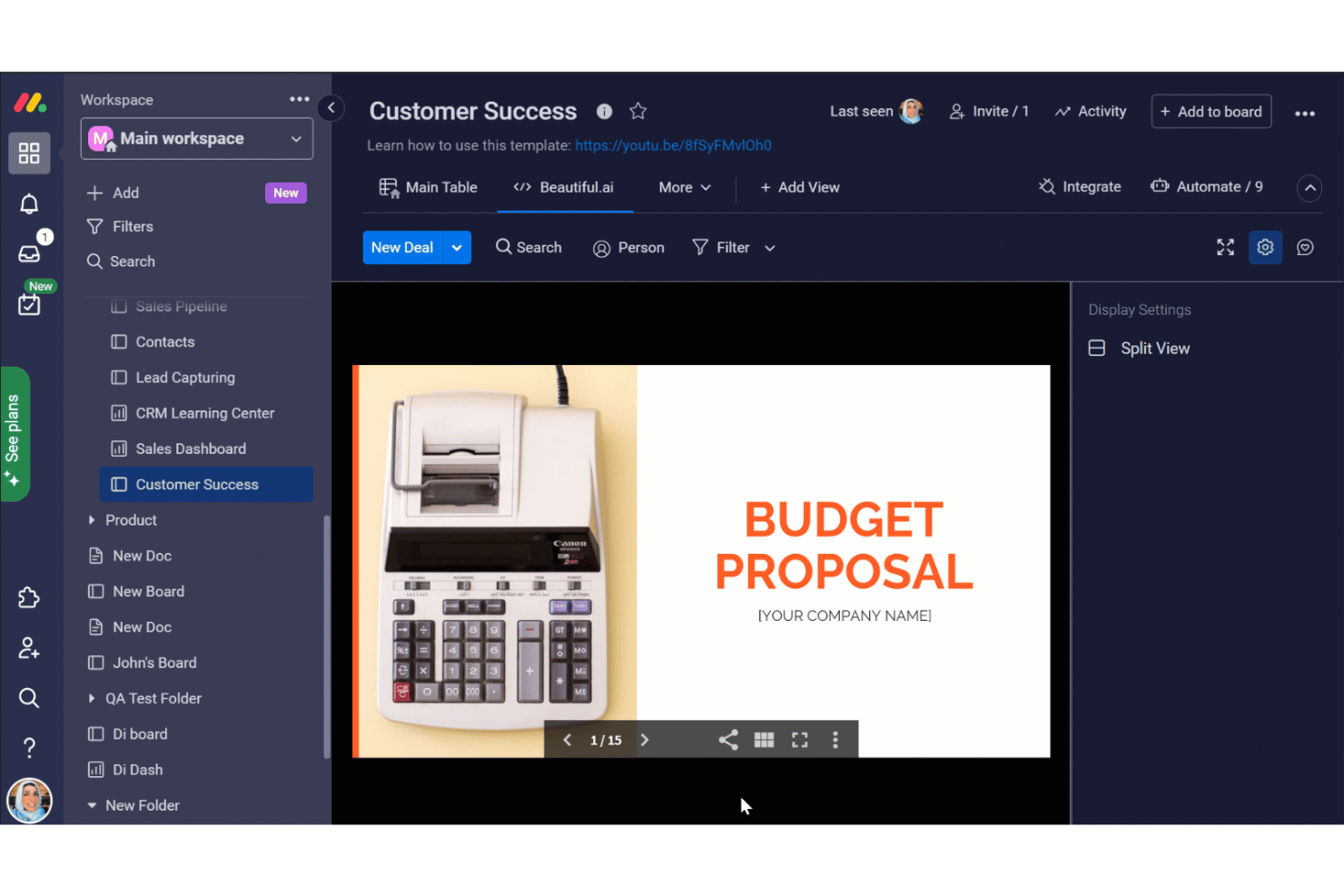
monday AI Workspace is an AI work platform that combines project and portfolio management with predictive risk detection, real-time dashboards, and AI-generated status summaries across teams and workstreams.
####Who Is monday AI Workspace Best For?
It's a strong fit for PMO directors and portfolio managers at mid-to-large organizations who need AI-driven risk visibility across multiple concurrent projects.
Why I Picked monday AI Workspace
monday AI Workspace earns its spot on my shortlist because of how it handles portfolio-wide risk detection. I like that the AI Risk Insights feature scans every linked project board daily, reviewing task statuses, update threads, and activity logs to assign low, medium, or high risk scores with plain-language explanations attached. On top of that, the Project Analyzer agent monitors projects in real time, flagging dependencies and surfacing risks before they turn into blockers.
monday AI Workspace Key Features
- AI workflow builder: Lets you design and automate custom workflows using natural language prompts and AI logic.
- Sidekick AI assistant: Provides contextual project updates, summaries, and answers to natural language queries about your data.
- Portfolio management view: Allows you to track dozens or hundreds of projects in a single workspace with flexible reporting and filters.
- Native integrations hub: Connects out-of-the-box with tools like Jira, Salesforce, HubSpot, and Google Workspace for unified data across sources.
monday AI Workspace Integrations
monday AI Workspace offers hundreds of native integrations through its built-in integrations and marketplace, including Jira, Salesforce, HubSpot, Slack, GitHub, Zendesk, Google Workspace, Microsoft 365, Teams, and Zoom. It also supports Zapier and provides an API for custom integrations.
Pros and Cons
Pros:
- Portfolio dashboards support deep drill-downs by workstream
- Sidekick generates plain-language project status summaries instantly
- AI risk scoring updates across all projects daily
Cons:
- Historical benchmarking lacks cross-organization pattern analysis
- AI features limited to higher-tier paid plans
New Product Updates from monday AI Workspace
monday AI Workspace Adds Human Approval Routing
monday AI Workspace adds a human-in-the-loop approval block to AI Workflows, sending approval requests and routing workflow paths based on responses. For more information, visit monday AI Workspace's official site.
 .
Diğer Yapay Zekâ Proje Analitiği Araçları
İşte kısa listeme giremeyen ancak yine de göz atmaya değer bazı ek yapay zekâ proje analitiği seçenekleri:
- Smartsheet
For spreadsheet users
- Wrike
For custom workflows
- Zoho Projects
For budget tracking
- Adobe Workfront
For marketing teams
- Kantata
For professional services
- Scoro
For business management


How I Evaluate AI Project Analytics Tools
I only include tools that deliver real AI value—like flagging a schedule slip weeks out—not platforms with an AI label on static charts. I split my evaluation into core functionality a tool must have to qualify and differentiating factors that separate the best fit for different PMO needs.
Core Functionality (Table Stakes For This List)
When I'm selecting tools for my list, I rank each one on a scale from 0 (does not offer the functionality) to 5 (excels in this area) for each core functionality listed below. Then, I calculate the tool's total score into a percentage. Each tool needs to achieve a minimum total score of 65% to be considered for inclusion.
- AI-Driven Predictive Forecasting: I look for ML models that predict delivery dates, budget trajectories, and resource demand—not just trendlines drawn from a two-week sprint.
- Automated Risk Detection: The tool should surface at-risk work items using AI scoring or anomaly detection, like flagging a creeping dependency chain before it delays a release.
- Real-Time Project Analytics: Live dashboards with drill-down capability matter here. I evaluate whether a PMO leader can move from portfolio health down to task-level bottlenecks in a few clicks.
- AI-Generated Insights & Summaries: I check whether the platform produces natural language summaries—things like weekly stakeholder updates or sprint retrospectives—pulled directly from project data.
- Data Integration & Connectivity: Tools need solid connectors to platforms teams already use, like Jira, Asana, monday.com, or MS Project, so analytics reflect real work and not stale imports.
- Historical Benchmarking & Trends: I evaluate whether the tool lets you compare current project performance against past baselines, helping PMOs spot patterns like recurring estimation gaps across similar initiatives.
Once I have a list of tools that meet this criteria, I consider what sets each platform apart.
Differentiating Factors (What Sets Vendors Apart)
Here's how I compare and contrast different vendors:
Standout Features
Scenario simulation is a big differentiator—I look for tools that let you model a scope change or resource shift and see the predicted ripple across your portfolio before making a call. A conversational AI assistant adds real value when a program manager can ask "which projects are likely to miss Q3 targets?" and get an answer without building a custom report. I also evaluate whether a tool goes beyond flagging risks to recommending specific actions, like suggesting task reprioritization when a critical path shifts.
Beyond Features
AI governance matters more here than in most software categories. I evaluate whether vendors are transparent about how project data trains their models and whether you can opt out. Time-to-value is another factor I weigh—some platforms need months of historical data ingestion before predictions become useful, while others deliver insights within weeks. I also consider how well a tool scales across portfolios, especially for enterprise PMOs managing hundreds of concurrent projects across distributed teams.
Yapay Zekâ Proje Analitiği Araçları Nasıl Seçilir?
Uzun özellik listeleri ve karmaşık fiyatlandırma yapıları arasında kaybolmak kolaydır. Kendinize özgü yazılım seçim sürecinizi yürütürken odağınızı korumanıza yardımcı olmak için göz önünde bulundurmanız gereken faktörleri içeren bir kontrol listesi hazırladım:
| Faktör | Göz önünde bulundurulması gerekenler |
|---|---|
| Ölçeklenebilirlik | Araç ekibinizle birlikte büyüyebilir mi? Ek maliyet olmadan artan proje boyutlarını ve kullanıcı sayılarını destekleyip desteklemediğini kontrol edin. Büyüdükçe daha karmaşık projelerin üstesinden gelip gelemeyeceğini değerlendirin. |
| Entegrasyonlar | Mevcut araçlarınıza bağlanabiliyor mu? İş akışında kesintileri önlemek için kullandığınız yazılımla entegre olduğundan emin olun. En sık kullandığınız uygulamalarla yerel entegrasyonlar sunan araçları tercih edin. |
| Özelleştirilebilirlik | İhtiyaçlarınıza uyacak şekilde düzenleyebilir misiniz? Özelleştirilebilir alanlar, gösterge panoları ve raporlar arayın. İş akışlarınıza uyum sağlama esnekliğini sınırlayan araçlardan kaçının. |
| Kullanım kolaylığı | Ekibiniz için kullanıcı dostu mu? Arayüzün sezgisel olduğundan ve çok az eğitim gerektirdiğinden emin olun. Mümkünse bir tanıtım aracılığıyla aracın gezinme yapısını ve düzenini test edin. |
| Uygulama ve kullanıma alıştırma | Başlamak ne kadar sürüyor? Kurulum için gereken zamanı ve kaynakları değerlendirin. Mevcut destek, eğitim materyalleri ve kullanıma alıştırma yardımını kontrol edin. |
| Maliyet | Bütçenize uygun mu? Fiyatlandırma planlarını karşılaştırın ve gizli ücretler de dâhil olmak üzere toplam sahip olma maliyetini göz önünde bulundurun. Maliyeti gerçekten ihtiyaç duyduğunuz özelliklerle karşılaştırarak değerlendirin. |
| Güvenlik önlemleri | Verilerinizi koruyor mu? Şifreleme, kullanıcı izinleri ve veri düzenlemelerine uyumluluk özelliklerini arayın. Sağlayıcının veri güvenliğine öncelik verdiğinden emin olun. |
| Destek erişilebilirliği | İhtiyaç duyduğunuzda yardım alabiliyor musunuz? 7/24 destek ve birden fazla iletişim yöntemi sunulup sunulmadığını kontrol edin. Destek ekibinin kalitesini ve yanıt verme hızını değerlendirin. |
Yapay Zekâ Proje Analitiği Araçları Nedir?
AI proje analitiği araçları, karar verme süreçlerini ve verimliliği geliştirmek amacıyla ekiplerin proje verilerini analiz etmesine yardımcı olan araçlardır. Bu araçlar genellikle veri odaklı içgörülerden yararlanan proje yöneticileri, ekip liderleri ve veri analistleri tarafından kullanılır. Tahmine dayalı analitik, gerçek zamanlı raporlama ve kaynak yönetimi gibi özellikler projelerin planlanmasına, izlenmesine ve optimize edilmesine yardımcı olur. Genel olarak bu araçlar, proje sonuçlarını ve kaynak tahsisini iyileştiren değerli içgörüler sağlar.
Özellikler
AI proje analitiği yazılımı seçerken aşağıdaki temel özelliklere dikkat edin:
- Tahmine dayalı analitik: Proje sonuçlarını öngörmek için veri eğilimlerini analiz ederek ekiplerin bilinçli kararlar almasına yardımcı olur.
- Gerçek zamanlı raporlama: Proje durumu hakkında güncel içgörüler sunarak hızlı düzenlemeler ve müdahaleler yapılmasını sağlar.
- Kaynak yönetimi: Ekip iş yükünü ve proje zaman çizelgelerini optimize etmek için kaynakları verimli şekilde tahsis eder.
- Özelleştirilebilir panolar: Kullanıcıların görünümleri ve raporları kendi özel ihtiyaçlarına ve tercihlerine göre uyarlamasına olanak tanır.
- Görev otomasyonu: Zaman kazanmak ve manuel hataları azaltmak için tekrarlayan görevleri otomatikleştirir.
- Veri görselleştirme: Daha iyi kavrayış için karmaşık verileri kolay anlaşılır görsel biçimlere dönüştürür.
- Gantt grafikleri: AI destekli Gantt grafik araçlarını kullanarak proje ilerlemesini ve bağımlılıklarını izlemek için görsel bir zaman çizelgesi sunar.
- İş birliği araçları: Platform içinde ekip iletişimini ve bilgi paylaşımını kolaylaştırır.
- Bütçe takibi: Finansal hedeflere ulaşılmasını sağlamak için proje giderlerini izler.
- Güvenlik önlemleri: Şifreleme ve veri düzenlemelerine uyum yoluyla hassas verileri korur.
Faydalar
AI proje analitiğini uygulamak, ekibiniz ve işletmeniz için çeşitli faydalar sağlar. Yararlanmayı bekleyebileceğiniz birkaç fayda şunlardır:
- Geliştirilmiş karar verme: Tahmine dayalı analitiğe ve gerçek zamanlı verilere erişim, ekibinizin bilinçli seçimleri hızlı bir şekilde yapmasına yardımcı olur.
- Geliştirilmiş verimlilik: Görev otomasyonu manuel çalışmayı azaltarak ekibinizin yüksek öncelikli görevlere odaklanmasını sağlar.
- Daha iyi kaynak tahsisi: Kaynak yönetimi özellikleri, ekibinizin ne aşırı yük altında kalmasını ne de kapasitesinin altında kullanılmasını sağlar.
- Artırılmış şeffaflık: Gerçek zamanlı raporlama ve özelleştirilebilir panolar, projeye dahil olan herkes için proje durumu hakkında net içgörüler sunar.
- Maliyet kontrolü: Bütçe takibi, giderleri kontrol altında tutarak ekibinizin finansal hedeflere ulaşmasına yardımcı olur.
- Daha güçlü iş birliği: Yerleşik iş birliği araçları, ekip üyeleri arasındaki iletişimi ve bilgi paylaşımını kolaylaştırır.
- Veri güvenliği: Güvenlik önlemleri hassas proje verilerini koruyarak veri düzenlemelerine uyumu sağlar.
Maliyetler ve Fiyatlandırma
Bir AI proje analitiği aracı seçmek, mevcut çeşitli fiyatlandırma modellerinin ve planların anlaşılmasını gerektirir. Maliyetler özelliklere, ekip büyüklüğüne, eklentilere ve daha fazlasına göre değişir. Aşağıdaki tablo, AI proje analitiği çözümlerinde yaygın planları, bunların ortalama fiyatlarını ve genellikle içerilen özellikleri özetlemektedir:
AI Proje Analitiği İçin Plan Karşılaştırma Tablosu
| Plan Türü | Ortalama Fiyat | Yaygın Özellikler |
|---|---|---|
| Ücretsiz Plan | $0 | Temel görev yönetimi, sınırlı raporlama ve iş birliği araçları. |
| Kişisel Plan | $7-$20/kullanıcı/ay | Görev yönetimi, temel analitik, özel panolar ve sınırlı entegrasyonlar. |
| İşletme Planı | $10-$50/kullanıcı/ay | Gelişmiş analitik, kaynak yönetimi, otomasyon özellikleri ve iyileştirilmiş güvenlik önlemleri. |
| Kurumsal Plan | $60-$125/kullanıcı/ay | Kapsamlı analitik, sınırsız entegrasyonlar, öncelikli destek ve tam özelleştirme. |
Yapay Zekâ Proje Analitiği SSS
Yapay zekâ proje analitiği hakkında sık sorulan soruların bazı yanıtları:
Yapay zekâ proje döngüsünün 5 adımı nelerdir?
Yapay zekâ proje döngüsü; Problemi Kapsamlandırma, Veri Edinimi, Veri Keşfi, Modelleme ve Değerlendirme adımlarını içerir. Her adım, yapay zekâ geliştirme sürecinin yapılandırılmasında önemlidir. Bu aşamaları anlamak, proje hedeflerinizi karşılayan etkili ve amaca yönelik yapay zekâ çözümleri geliştirmenize yardımcı olur.
Bir yapay zekâ projesine başlamadan önce hangi soruların yanıtlanması gerekir?
Bir yapay zekâ projesine başlamadan önce hangi sorunu çözmeye çalıştığınızı belirleyin. Yanıtları hızlandırmak veya talebi tahmin etmek gibi hedefleriniz konusunda net olun. Bu netlik, odaklanmanıza ve doğru yapay zekâ yöntemlerini seçmenize yardımcı olarak projenin işletmenizin ihtiyaçlarıyla uyumlu olmasını sağlar.
Yapay zekâ proje yönetimini nasıl geliştirebilir?
Yapay zekâ, öngörücü analizler sunarak, rutin görevleri otomatikleştirerek ve gerçek zamanlı içgörüler sağlayarak proje yönetimini geliştirir. Bu özellikler, proje yöneticilerinin bilinçli kararlar almasına, kaynakları verimli bir şekilde tahsis etmesine ve projeleri planlandığı şekilde ilerletmesine yardımcı olur; böylece genel üretkenlik ve sonuçlar iyileşir.
Yapay zekâ proje analitiğinden en çok hangi sektörler yararlanır?
Finans, sağlık ve imalat gibi sektörler yapay zekâ proje analitiğinden büyük ölçüde yararlanır. Bu sektörler, büyük veri kümelerini analiz etmek, operasyonları optimize etmek ve eğilimleri tahmin etmek için yapay zekâyı kullanır. Yapay zekâ araçları, veri odaklı kararlar almalarına, verimliliği artırmalarına ve rekabet avantajlarını korumalarına yardımcı olur.
Yapay zekâ projelerinde veri gizliliğini nasıl sağlarsınız?
Veri gizliliğini sağlamak; şifreleme ve erişim denetimleri gibi güçlü güvenlik önlemlerinin uygulanmasını gerektirir. GDPR gibi veri koruma düzenlemelerine uyulması önemlidir. Düzenli denetimler ve izleme, veri bütünlüğünün korunmasına ve yapay zekâ projelerindeki hassas bilgilerin güvence altına alınmasına yardımcı olur.