

2026’da İncelenen En İyi 10 Yapay Zekâ Müşteri Teslimat Aracı

10 En İyi Yapay Zekâlı Müşteri Teslimatı Araçları Kısa Listesi


Müşteri teslimatını yönetmek nadiren yalnızca zaman çizelgeleriyle ilgilidir. Süreç aynı zamanda müşterileri sorunsuz bir şekilde işe dâhil etmeyi, ekipler arasındaki çalışmaları koordine etmeyi, iletişimi açık tutmayı ve teslimat başladıktan sonra hiçbir şeyin gözden kaçmamasını sağlamayı da içerir.
Yapay zekâlı müşteri teslimatı araçları, ekiplerin bu iş akışlarını daha etkili bir şekilde yönetmesine yardımcı olur. Otomasyon, merkezi iletişim, ortak görünürlük ve manuel çabayı azaltıp tutarlılığı artıran yapay zekâ destekli içgörüler gibi özelliklerle müşteriye yönelik teslimatı destekler.
Bu makalede, yapay zekâlı müşteri teslimatı araçları için en iyi seçimlerimi paylaşacağım. Her seçeneği bağımsız olarak inceleyerek teslimat iş akışlarını, müşteri iş birliğini ve günlük uygulamayı ne kadar iyi desteklediğine odaklandım. Verimliliği artırıyor veya müşteri iletişimini güçlendiriyor olmanız fark etmeksizin, farklı teslimat modellerine ve ekip boyutlarına uygun seçenekler bulacaksınız.
Why Trust Our Software Recommendations
Our team has been testing and reviewing software since 2012. As project managers ourselves, we know how difficult—and important—it is to choose the right software.
For this guide, we evaluated tools using hands-on testing and independent research, scoring tools using our selection criteria. We also draw on insights from industry thought leaders and practicing project management experts.
Our reviews reflect our human editorial judgment, not a sales pitch.
Expert reviewers:
Yapay Zekâlı Müşteri Teslimatı Araçları Karşılaştırma Tablosu
Bu karşılaştırma tablosu, yapay zekâlı müşteri teslimatı araçları için en iyi seçimlerime ait fiyatlandırma ayrıntılarını özetlemektedir.
| Tool | Best For | Trial Info | Price | ||
|---|---|---|---|---|---|
| 1 | Best for AI-first customer onboarding teams | 14-day free trial | From €59/user/month | Website | |
| 2 | Best for AI-driven customer service | Free plan + 15-day free trial + free demo available | From $25/user/month (billed annually) | Website | |
| 3 | Best for AI-driven task automation | Free plan + 14-day trial + demo available | From $10/user/month (billed annually) | Website | |
| 4 | Best for client onboarding | Free plan + free demo available | From $350/month (billed annually) | Website | |
| 5 | Best for project management | 14-day free trial + free demo available | From $45/month (billed annually) | Website | |
| 6 | Best for data compliance | Free demo available | From $59/seat/month (billed annually) | Website | |
| 7 | Best for remote teams | Free plan + 14-day free trial + free demo available | From $9.99/user/month (billed annually) | Website | |
| 8 | Best for project planning | 14-day free trial | From $26/user/month (billed annually) | Website | |
| 9 | Best for creative agencies | Free plan + free demo + free 14-day trial available | From $29/user/month (billed annually) | Website | |
| 10 | Best for team collaboration | Free demo available | From $3/user/month (billed annually) | Website |

En İyi Yapay Zekâlı Müşteri Teslimatı Aracı İncelemeleri
Aşağıda, kısa listemde yer alan en iyi yapay zekâlı müşteri teslimatı araçlarına ilişkin ayrıntılı özetlerimi bulabilirsiniz. İncelemelerim, her aracın temel özelliklerine, artılarına ve eksilerine, entegrasyonlarına ve ideal kullanım alanlarına kapsamlı bir bakış sunarak sizin için en iyi aracı bulmanıza yardımcı olur.

Best for AI-first customer onboarding teams
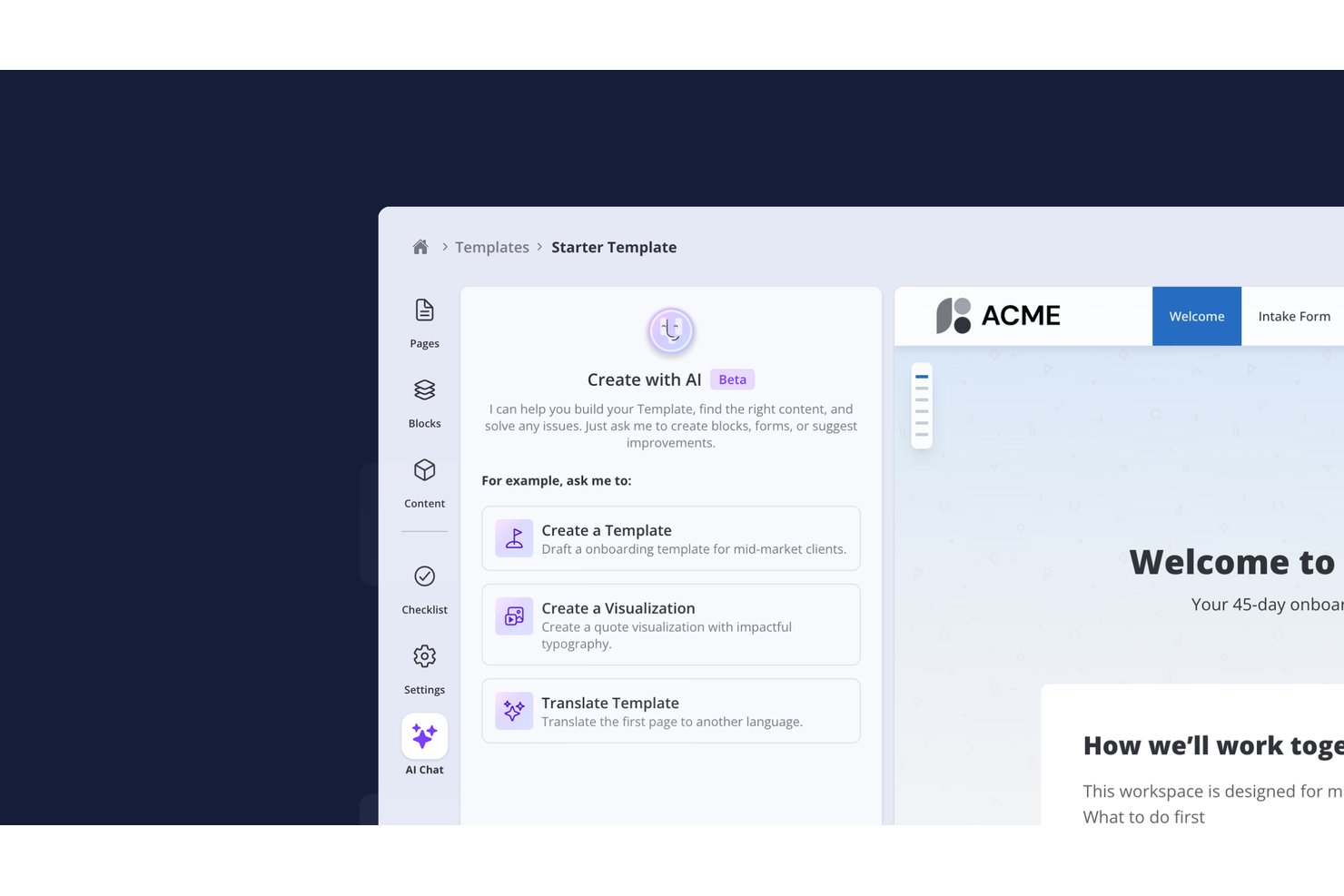
- Valuecase is a customer onboarding platform that combines no-login customer-facing Spaces with plans, tasks, forms and progress tracking across every account, and uses AI to build templates, run automations and keep clients moving. An MCP server lets Claude, ChatGPT or custom agents work directly with onboarding data.
Who Is Valuecase Best For?
Valuecase is a strong fit for customer success and onboarding teams that need to deliver a polished, low-friction client experience without asking clients to create yet another account.
Why I Picked Valuecase
Valuecase stands out by pairing zero-friction client access with intelligent AI execution. Clients join onboarding spaces instantly via a shared link—no login required. Meanwhile, AI automations eliminate manual chasing: Valuecase AI auto-adjusts timelines from meeting transcripts, sends smart reminders, and leverages an MCP server so Claude or ChatGPT can read and act on live account data.
Valuecase Key Features
- Mutual action plans: Shared task lists where both your team and the client have assigned ownership, due dates, and dependencies tracked in one place.
- Onboarding risk scoring: A dashboard that flags stalled or at-risk client projects by combining task completion rates, CRM data, and engagement signals.
- MCP server integration: Connects Valuecase directly to AI tools like Claude and ChatGPT so you can build templates, manage workflows, and send follow-ups via natural language prompts.
- Meeting briefing generation: Pulls context from Google Calendar, HubSpot, and Google Drive to prepare a pre-meeting summary before each client call.
- Customer-facing AI agent: Configurable AI agent answers customer questions about tasks, timeline, and other key delivery questions.
Valuecase Integrations
Valuecase offers native integrations with HubSpot, Salesforce, Slack, Microsoft Teams, Gmail, Loom, and Zoom, plus MCP-based connections to Claude, ChatGPT, Cursor, Jira, Linear, and ClickUp. It connects with Zapier, Make, and Albato, and provides an API for custom integrations.
Pros and Cons
Pros:
- MCP connects with AI tools for automation
- AI generates branded status reports automatically
- No-login client portal increases client adoption
Cons:
- No built-in time tracking or billing
- No native meeting transcription included

Best for AI-driven customer service
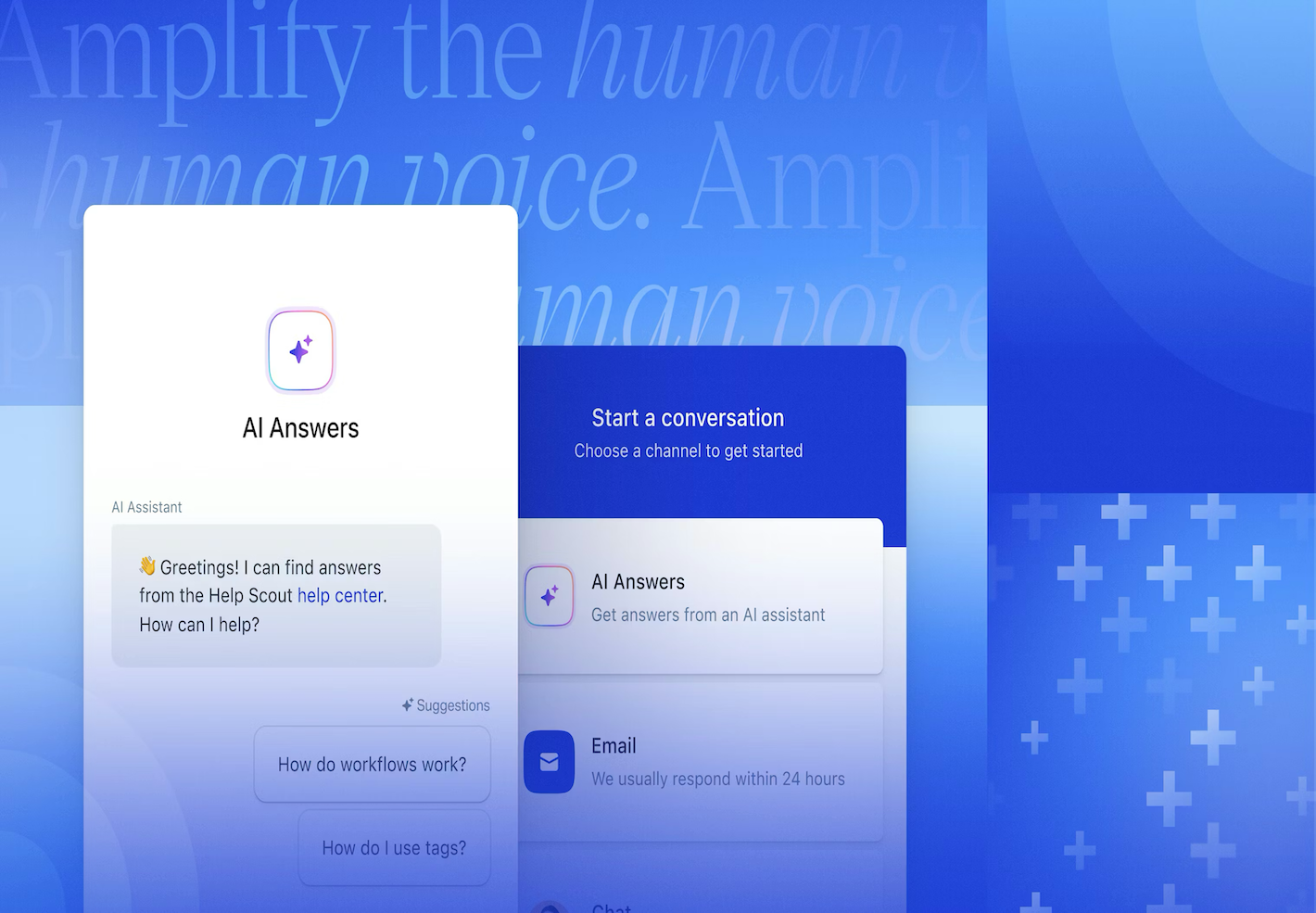
Help Scout is an AI-enhanced help desk platform for teams that support clients at scale. It centralizes support requests so agents can deliver consistent, personalized replies without juggling tools.This makes it a good choice for organizations that want to enhance their client communication without sacrificing quality or efficiency.
Why I Picked Help Scout
I picked Help Scout for its ability to blend AI-driven automation with personalized customer service. Help Scout's AI Answers feature stands out, automating responses to common queries and allowing your team to concentrate on more nuanced customer needs. Additionally, the Inbox Assistant provides contextual support and drafts replies, enhancing your team's efficiency without compromising the personal touch that clients appreciate.The result is faster throughput with fewer template-style replies.
Help Scout Key Features
In addition to its AI tools, I also found these features beneficial:
- Beacon: An embeddable support widget that offers immediate assistance to customers via live chat, contact forms, and knowledge base articles.
- Workflows: Automate repetitive tasks like assigning conversations and sending follow-up emails, ensuring your team can focus on more critical tasks.
- Docs: Create a public help center to provide customers with easy access to self-service support, integrating seamlessly with Beacon.
- Customer Profiles: View comprehensive profiles and interaction history to give agents context, enhancing the quality of customer interactions.
Help Scout Integrations
Integrations include Salesforce, HubSpot, Jira, Slack, Shopify, Mailchimp, WooCommerce, Stripe, Trello, and Google Apps. Users can also create custom apps and integrations using the Help Scout API.
Pros and Cons
Pros:
- Quick to implement and onboard new agents
- Collision detection prevents duplicate replies
- Shared inbox supports cross-team collaboration
Cons:
- Limited native tooling for complex ticket hierarchies
- Knowledge base customization varies by plan
New Product Updates from Help Scout

Help Scout Adds Automatic Conversation Reassignment
Help Scout can now automatically unassign conversations when the assigned teammate has been away long enough, keeping replies moving so others can pick them up. For more information, visit Help Scout's official site.
 .

Wrike
Best for AI-driven task automation

For teams seeking an AI client delivery tool that reduces busywork and enhances productivity, Wrike offers a compelling solution. With its robust automation and AI capabilities, Wrike allows your team to focus on essential tasks by minimizing routine actions and streamlining workflows. This tool is particularly appealing to businesses across industries like creative production, marketing, and agile planning, where efficient project management and collaboration are crucial.
Why I Picked Wrike
I picked Wrike for its unique AI-driven automation and task management capabilities that resonate with those seeking AI client delivery tools. Wrike AI offers generative AI for project planning, text editing, and translation, which can significantly enhance your team's efficiency. The no-code automations feature further simplifies task management by reducing manual input, making it an excellent choice for teams looking to optimize their project workflows.
Wrike Key Features
In addition to its AI and automation capabilities, Wrike provides several features that enhance its utility as a client delivery tool:
- Mindmapping: Facilitates ideation and visual collaboration among your team, helping to organize thoughts and strategies effectively.
- Work Views: Offers multiple visualization options, including Gantt charts and Kanban boards, to track project progress and status.
- Dashboards and Analytics: Provides real-time insights into project metrics, allowing you to make informed decisions quickly.
- Request Forms: Customizable forms streamline the process of gathering project requirements, ensuring that your team has all the necessary information upfront.
Wrike Integrations
Wrike integrates with a plethora of applications, including Salesforce, HubSpot, NetSuite, QuickBooks, Jira, GitHub, and Microsoft Teams. These integrations enable seamless connectivity across your existing tools, enhancing Wrike's functionality as an AI client delivery tool.
Pros and Cons
Pros:
- Enterprise-grade security and global support
- Highly customizable workflows and request forms
- Generative AI supports planning and content
Cons:
- Automation setup not always intuitive
- Interface can feel complex at scale
New Product Updates from Wrike

Wrike Redesigns Workspace Search With New Filters
Wrike introduces a redesigned Workspace Search interface with recent search shortcuts, item type and location filters, and parent-task context. These updates help users find relevant work items and navigate search results efficiently. For more information, visit Wrike’s official site.

Dock
Best for client onboarding

Dock is a client onboarding and collaboration platform designed to help teams structure how new client work begins. It provides a centralized space for sharing documents, tracking onboarding tasks, and maintaining communication as projects move from kickoff into delivery.
Why I picked Dock: I picked Dock for client onboarding because it helps teams create a clear, organized starting point for client work. Customizable client portals give clients visibility into onboarding tasks and materials, while shared workspaces reduce confusion around what's needed and when.
Dock's task tracking and document feedback features help teams manage early delivery steps without relying on scattered emails or disconnected tools. This structure supports smoother transitions from onboarding into active delivery.
Standout features & integrations:
Features include customizable client portals for onboarding workflows, document feedback tools that allow clients to comment directly on shared files, and task-tracking that provides visibility into onboarding progress.
Integrations include Salesforce, HubSpot, Zoom, Gong, Chorus, Fathom, Loom, Slack, Google Drive, Microsoft SharePoint, Notion, Confluence, Asana, ClickUp, Jira, and Linear.
Pros and Cons
Pros:
- Visibility into onboarding progress and handoffs
- Clear task organization during early delivery stages
- Customizable portals for client onboarding
Cons:
- Limited functionality without an internet connection
- Initial setup may take time for complex onboarding workflows

ProofHub
Best for project management

ProofHub is an all-in-one project management and team collaboration software designed for teams across various industries. It helps with task management, collaboration, and project tracking, providing a centralized platform for efficient project management.
Why I picked ProofHub: I picked ProofHub for project management because it provides a centralized workspace for coordinating delivery tasks and team communication. Its task management and collaboration tools help teams stay aligned on priorities and timelines, especially when managing multiple client projects.
ProofHub's dashboards and time-tracking features give managers visibility into progress and effort, enabling more predictable delivery without relying on multiple disconnected tools.
Standout features & integrations:
Features include an online proofing tool that streamlines feedback and approvals, project templates for setting up repeatable workflows, and notes that allow teams to capture and organize ideas in one place.
Integrations include Google Drive, Dropbox, Box, OneDrive, FreshBooks, QuickBooks, Zapier, Slack, Microsoft Outlook, and iCal.
Pros and Cons
Pros:
- Online proofing simplifies feedback and approvals
- Time tracking supports workload and billing visibility
- Centralized dashboards for tracking delivery progress
Cons:
- Interface design may feel basic for some teams
- Advanced reporting options are limited

Pylon
Best for data compliance

Pylon is an AI-assisted B2B support platform designed for teams that manage client communication and support through shared channels such as Slack and Microsoft Teams. It centralizes conversations, support requests, and account context, which helps teams maintain control over sensitive client data during delivery and support.
Why I picked Pylon: I chose Pylon for data compliance because it helps teams manage client communication in environments where data access and visibility must be tightly controlled. Centralizing support conversations and account context reduces the risk of information being scattered across unmanaged channels.
Pylon's AI-assisted knowledge management helps teams respond consistently, while its account intelligence provides context that supports more accurate and compliant handling of client requests. For organizations delivering services through shared collaboration tools, this structure supports both efficiency and governance.
Standout features & integrations:
Features include AI-assisted knowledge management that surfaces relevant information during support interactions, account intelligence that provides visibility into client activity, and workflow automation that reduces manual handling of routine requests.
Integrations include Salesforce, Jira, Slack, Microsoft Teams, Zendesk, HubSpot, Google Workspace, Twilio, Discord, and Asana.
Pros and Cons
Pros:
- Reduces fragmentation across shared collaboration channels
- Supports consistent handling of support requests
- Centralizes client communication in controlled environments
Cons:
- Requires ongoing configuration and maintenance
- Limited functionality without an internet connection

Best for remote teams

Teamwork.com is a project management platform designed for remote teams. It supports internal coordination through task management, time tracking, and project planning, which can be essential for keeping client delivery on schedule for distributed teams.
Why I picked Teamwork.com: I picked Teamwork.com for remote teams because it helps distributed teams coordinate work that underpins client delivery. Time tracking and task management provide structure for day-to-day execution, while project templates make it easier to standardize delivery across similar client engagements.
Teamwork's workload management tools provide visibility into team capacity, helping managers balance resources and avoid delivery bottlenecks. For organizations with remote or hybrid teams, this internal clarity supports more predictable client outcomes.
Standout features & integrations:
Features include detailed time tracking for accurate work logging, Gantt charts for visual project timelines, and file-sharing tools to keep delivery-related documents accessible to the team.
Integrations include Slack, Trello, HubSpot, QuickBooks, Zapier, Google Drive, Dropbox, Xero, Microsoft Teams, and Salesforce.
Pros and Cons
Pros:
- Project templates support repeatable delivery workflows
- Workload management helps balance delivery capacity
- Supports coordination across remote and hybrid teams
Cons:
- Customization options are more limited than those of some competitors
- The interface can feel overwhelming for new users


Motion.io is a client onboarding platform used by agencies, consultants, and B2B service teams to structure how delivery begins. It focuses on setting up projects, collecting information, and aligning expectations early through client portals, task management, and automated file requests.
Why I picked Motion.io: I picked Motion.io for project planning because it helps teams standardize how client work is set up before delivery starts. White-labeled client portals give clients visibility into tasks and requirements, while automated file collection and reminders reduce delays during onboarding.
Motion.io also supports consistency through AI-assisted SOP generation, which helps teams document and reuse delivery processes. Centralizing early-stage coordination reduces friction and sets clearer expectations for both teams and clients.
Standout features & integrations:
Features include automated document collection to gather required files upfront, centralized task management to track onboarding progress, and AI-assisted SOP creation to support repeatable delivery processes.
Integrations include Salesforce, Slack, Microsoft Teams, Google Workspace, Dropbox, Trello, HubSpot, QuickBooks, Zendesk, and Asana.
Pros and Cons
Pros:
- Centralizes early-stage delivery visibility
- Automates task reminders and file requests
- Streamlines client onboarding and delivery setup
Cons:
- Some teams may need technical support during rollout
- Requires initial setup and ongoing configuration


Kitchen.co is a client portal platform designed for creative agencies and service-based teams that deliver client work. It brings together project tracking, client requests, task management, and communication, helping teams manage creative delivery without relying on fragmented tools.
Why I picked Kitchen.co: I picked Kitchen.co for creative agencies because it supports the way creative work is delivered to clients. Organized folders and Kanban boards help teams manage changing priorities, while built-in client requests keep new work from getting lost in email or chat threads.
Kitchen.co's visual feedback and approval tools enable clients to comment directly on assets, speeding up revisions and reducing miscommunication. Branding and white-labeling options also make it easier for agencies to present a polished client experience.
Standout features & integrations:
Features include flexible task and request management that adapts as project needs change, visual feedback and approval tools for creative assets, and invoicing features that support customizable billing workflows.
Integrations include Google Drive, Dropbox, OneDrive, Stripe, PayPal, QuickBooks, and Xero.
Pros and Cons
Pros:
- Enables direct visual feedback and approvals
- Makes it easier to reprioritize creative work
- Supports flexible billing and invoicing workflows
Cons:
- Some teams may need technical support during configuration
- Requires ongoing setup and updates

Assembly
Best for team collaboration

Assembly is a platform designed for tech-enabled professional service firms such as consulting, accounting, and marketing teams. It provides a centralized client portal that brings together communication, document sharing, and billing, helping teams coordinate delivery work with clients more effectively.
Why I picked Assembly: I picked Assembly for team collaboration because it provides a shared space where internal teams and clients can work together during delivery. Its branded client portal consolidates communication, files, and billing information in one place, helping reduce back-and-forth and missed handoffs.
Assembly's automation features support client onboarding and contract workflows, while secure file sharing and invoicing tools help teams manage delivery tasks without relying on scattered email threads or disconnected systems.
Standout features & integrations:
Features include automated client onboarding workflows, invoicing tools for tracking and managing payments, and secure file sharing to support collaboration on delivery-related documents.
Integrations include Salesforce, Slack, Microsoft Teams, Google Workspace, Dropbox, QuickBooks, Trello, HubSpot, Xero, and Mailchimp.
Pros and Cons
Pros:
- Secure file sharing for client-facing documents
- Automates onboarding and administrative workflows
- Centralized client portal for delivery collaboration
Cons:
- Pricing may be a consideration for smaller teams
- Requires ongoing setup and maintenance
Diğer Yapay Zekâlı Müşteri Teslimatı Araçları
Kısa listeme giremeyen ancak yine de göz atmaya değer bazı ek yapay zekâlı müşteri teslimatı aracı seçenekleri şunlardır:
- Bynder
For digital asset management
- Accelo
For service businesses
- Freshdesk
For customer support teams
- monday AI Workspace
With AI-powered resource optimization
- Clinked
For secure client portals


How I Evaluate AI Client Delivery Tools
Every tool on this list needs to deliver AI that actually moves the needle—think auto-generated client reports from live project data, not just a chatbot bolted onto a task board. I split my evaluation into core functionality every tool must have to qualify and differentiating factors that separate good options from great ones.
Core Functionality (Table Stakes For This List)
When I'm selecting tools for my list, I rank each one on a scale from 0 (does not offer the functionality) to 5 (excels in this area) for each core functionality listed below. Then, I calculate the tool's total score into a percentage. Each tool needs to achieve a minimum total score of 65% to be considered for inclusion.
- AI-Generated Status Reporting: I look for tools that pull live project data and turn it into client-ready updates, not ones that just templatize a manual summary.
- Predictive Risk & Delivery Insights: The AI should flag timeline slippage, budget risk, or scope creep early enough for PMs to act before a client ever notices.
- Client-Facing Collaboration Portal: I check whether clients get a dedicated space for approvals, milestone visibility, and deliverable review rather than just a shared link.
- AI Meeting & Comms Automation: Tools that transcribe calls, extract action items, and draft follow-up emails save hours of admin across weekly client syncs.
- Deliverable & Workflow Management: I evaluate how well the tool structures multi-phase delivery workflows with dependencies, approvals, and repeatable templates.
- Integrations & Data Sync: The platform should connect to the PM, communication, and file-sharing tools teams already use so AI has real data to work with.
Once I have a list of tools that meet this criteria, I consider what sets each platform apart.
Differentiating Factors (What Sets Vendors Apart)
Here's how I compare and contrast different vendors:
Standout Features
Sentiment analysis is a big one for me—tools that scan client emails and call transcripts to flag satisfaction dips give delivery leads a real head start on retention. I also look for profitability intelligence that ties time, scope, and budget data together to forecast margins per engagement. Resource forecasting AI rounds things out by predicting capacity gaps across accounts, which is invaluable when you're staffing multiple concurrent client projects.
Beyond Features
Data security and client confidentiality matter a lot in this space—I check whether a vendor's AI data policies clearly state that client project data won't train shared models. For delivery teams juggling multiple accounts, that's table stakes. Time-to-value is another factor I weigh heavily. Tools that offer pre-built delivery templates and fast portal setup let PMs onboard new clients in days, not weeks. Pricing structure also matters; I look at whether AI features are bundled or metered, since usage-based costs can spike fast across active engagements.
Yapay Zekâlı Müşteri Teslimatı Araçları Nasıl Seçilir?
Uzun özellik listeleri ve karmaşık fiyatlandırma katmanları dikkatinizi kolayca dağıtabilir. Odaklanmayı sürdürmek için araçları, reklamını yaptıkları özelliklerin sayısına göre değil, gerçek teslimat iş akışlarınızı nasıl desteklediklerine göre değerlendirmek yararlı olur. Seçenekleri karşılaştırırken aşağıdaki faktörleri pratik bir kontrol listesi olarak kullanın.
| Faktör | Dikkat Edilmesi Gerekenler |
|---|---|
| Ölçeklenebilirlik | Araç işletmenizle birlikte büyüyecek mi? Büyük fiyatlandırma veya performans ödünleri olmadan ek kullanıcıları, daha yüksek teslimat hacimlerini ve daha karmaşık iş akışlarını desteklemesine dikkat edin. |
| Entegrasyonlar | Zaten kullandığınız araçlarla bağlantı kuruyor mu? Manuel çalışmayı önlemek için CRM'niz, iletişim platformlarınız, dosya depolama ve faturalandırma sistemlerinizle entegrasyonlara öncelik verin. |
| Özelleştirilebilirlik | Aracı teslimat sürecinize uyarlayabilir misiniz? Panoların, iş akışlarının, alanların ve müşteriye yönelik portalların ekibinizin çalışma biçimine uyacak şekilde yapılandırılıp yapılandırılamadığını kontrol edin. |
| Kullanım kolaylığı | Arayüz ekibiniz ve müşterileriniz için sezgisel mi? Daha kısa bir öğrenme süresi, benimsenmeyi ve teslimat tutarlılığını doğrudan etkileyebilir. |
| Uygulama ve işe alıştırma | Ne kadar hızlı başlayabilirsiniz? Özellikle ekibinizin kullanıma sunma süreci için sınırlı zamanı varsa, anlaşılır kurulum yönergeleri, şablonlar ve erişilebilir destek arayın. |
| Maliyet | Fiyatlandırma, sunulan değerle uyumlu mu? Eklentiler, kullanıcı sınırları ve temel teslimat özelliklerinin daha yüksek katmanların arkasında olup olmadığı dâhil olmak üzere toplam sahip olma maliyetini değerlendirin. |
| Güvenlik önlemleri | Müşteri verileri ve teslimat çıktıları korunuyor mu? Şifreleme, erişim denetimleri ve GDPR gibi ilgili veri koruma standartlarıyla uyuma dikkat edin. |
Yapay Zekâlı Müşteri Teslimatı Araçları Nedir?
Yapay zekâ istemci teslimi araçları, ekiplerin işe alım ve koordinasyondan iletişim, iş birliği ve sürekli desteğe kadar çalışmaların istemcilere nasıl teslim edileceğini yönetmesine yardımcı olan yazılım platformlarıdır. Yalnızca dahili görev takibine odaklanan araçların aksine, bu platformlar teslimatın düzenli ve şeffaf kalmasını sağlayan istemciye yönelik iş akışlarını destekler.
Yapay zekâ özellikleri genellikle rutin teslimat görevlerine yardımcı olmak veya teslimat faaliyetlerinin görünürlüğünü artırmak için kullanılır. Örneğin yinelenen adımları otomatikleştirmek, talepleri daha verimli şekilde yönlendirmek ya da ekiplerin tutarlı yanıtlar vermesine yardımcı olan bağlamsal bilgileri öne çıkarmak.
İstemci teslimatı birden fazla aşamayı kapsadığından, yapay zekâ istemci teslimi araçları çoğu zaman çeşitli yazılım kategorilerinde yer alır. Bazıları işe alım ve kuruluma, bazıları yürütme veya desteğe, bazıları da varlıklar, onaylar ya da iş birliği aracılığıyla teslimatı mümkün kılmaya odaklanır. Bunları bir araya getiren özellik, çalışmalar ekiplerden istemcilere aktarılırken sürtüşmeyi azaltmadaki rolleridir.
Özellikler
Yapay zekâ istemci teslimi araçlarını seçerken aşağıdaki temel özelliklere dikkat edin:
- Otomatik görev yönetimi: Görevleri otomatik olarak düzenlemeye ve atamaya yardımcı olur, manuel çalışmayı azaltır ve teslimatın planlandığı şekilde ilerlemesini sağlar.
- Gerçek zamanlı analizler: Teslimat ilerlemesi ve ekip faaliyetleri hakkında görünürlük sağlayarak ekiplerin sorunları erkenden belirlemesine ve uyum içinde kalmasına yardımcı olur.
- İstemci iletişimi özellikleri: Netliği artırmak ve bağlam kaybını azaltmak için istemci iletişimini portallar, destek talepleri veya paylaşılan ileti dizileri aracılığıyla merkezileştirir.
- Özelleştirilebilir gösterge panelleri: Ekiplerin görünümleri, alanları ve iş akışlarını çalışmaların teslim edilme ve izlenme biçimine uyacak şekilde yapılandırmasına olanak tanır.
- Belge paylaşımı ve geri bildirim: Dosyaların paylaşılmasını ve geri bildirim ya da onayların doğrudan teslimat iş akışları içinde toplanmasını destekler.
- Diğer araçlarla entegrasyon: Teslimat süreçleri arasındaki sürekliliği korumak için CRM'ler, iletişim platformları, dosya depolama ve faturalandırma araçları gibi mevcut sistemlere bağlanır.
- Güvenlik önlemleri: Erişim denetimleri, izinler, şifreleme ve ilgili veri koruma standartlarıyla uyum aracılığıyla istemci verilerini korur.
- Proje takip araçları: Ekiplerin teslimat durumunu ve son tarihleri izlemesine yardımcı olan görsel zaman çizelgeleri veya ilerleme göstergeleri sunar.
- Zaman takibi: Kapasite planlamasını, faturalandırma doğruluğunu veya dahili raporlamayı desteklemek için görevlerde ya da projelerde harcanan zamanı izler.
- Özelleştirilebilir istemci portalları: İstemcilerin ilerlemeyi görüntüleyebileceği, talepler gönderebileceği ve teslimatla ilgili materyallere erişebileceği, paylaşılan ve markalı bir alan sağlar.
Faydalar
Yapay zekâ istemci teslimi araçlarının uygulanması, ekiplerin teslimat iş akışlarını daha tutarlı ve daha az manuel çabayla yönetmesine yardımcı olabilir. Yaygın faydalar şunlardır:
- Artırılmış verimlilik: Rutin görevlerin ve iş akışlarının otomatikleştirilmesi manuel koordinasyonu azaltır; ekiplerin yönetime daha az, iş teslimine daha fazla zaman ayırmasına yardımcı olur.
- Daha şeffaf istemci iletişimi: Merkezileştirilmiş iletişim ve istemciye yönelik alanlar, teslimat süreci boyunca şeffaflığı artırır ve yanlış iletişimi azaltır.
- Daha iyi teslimat görünürlüğü: Gösterge panelleri, takip araçları ve gerçek zamanlı güncellemeler ekiplerin ilerlemeyi izlemesine, darboğazları belirlemesine ve çalışmaların programa uygun şekilde ilerlemesini sağlamasına yardımcı olur.
- Daha tutarlı teslimat süreçleri: Şablonlar, iş akışları ve otomasyon tekrarlanabilir teslimat yaklaşımlarını destekleyerek projeler veya istemciler arasındaki değişkenliği azaltır.
- Geliştirilmiş iş birliği: Paylaşılan çalışma alanları ve geri bildirim araçları, dahili ekiplerin ve istemcilerin parçalı araçlara veya e-posta ileti dizilerine güvenmeden iş birliği yapmasını kolaylaştırır.
- Veriye dayalı karar alma: Analizler ve raporlama; teslimat performansı, iş yükleri ve yanıt kalıpları hakkında içgörü sağlayarak ekiplerin bilinçli düzenlemeler yapmasına yardımcı olur.
- Daha güçlü veri işleme uygulamaları: Yerleşik izinler, erişim denetimleri ve güvenlik özellikleri istemci bilgilerinin korunmasına ve uyumluluk gereksinimlerinin desteklenmesine yardımcı olur.
- Daha öngörülebilir faturalandırma ve kaynak planlaması: Zaman takibi ve ilerleme göstergeleri daha doğru faturalandırmayı, kapasite planlamasını ve teslimat tahminlerini destekler.
Maliyetler ve Fiyatlandırma
Yapay zekâ istemci teslimi araçlarının maliyetleri; ekip büyüklüğü, özellik seti, teslimatın karmaşıklığı ve istemciye yönelik portalların ya da gelişmiş iş akışlarının dahil olup olmadığı gibi etkenlere göre değişir. Fiyatlandırma genellikle abonelik planları üzerinden yapılandırılır; daha yüksek seviyeler daha fazla özelleştirme, entegrasyon veya destek sunar.
Aşağıdaki tablo, yaygın fiyatlandırma seviyelerini ve genel olarak neleri içerdiğini açıklar.
Yapay Zekâ İstemci Teslimi Araçları İçin Plan Karşılaştırma Tablosu
| Plan Türü | Ortalama Fiyat | Yaygın Özellikler |
|---|---|---|
| Ücretsiz Plan | $0 | Temel görev veya talep yönetimi, sınırlı depolama ve temel destek. |
| Bireysel Plan | $5–$25/kullanıcı/ay | Temel görev yönetimi, temel raporlama, sınırlı entegrasyonlar ve küçük ekip desteği. |
| İşletme Planı | $30–$60/kullanıcı/ay | Gelişmiş iş akışları, müşteri iletişim araçları, özelleştirilebilir panolar ve geliştirilmiş güvenlik özellikleri. |
| Kurumsal Plan | $70–$150/kullanıcı/ay | Tam özelleştirme, gelişmiş analizler, özel destek ve teslimat sistemleri genelinde kapsamlı entegrasyonlar. |
Yapay Zekâ Müşteri Teslimat Araçları SSS
Yapay zekâ müşteri teslimat araçları hakkında sık sorulan bazı soruların yanıtları:
Yapay zekâ müşteri teslimat araçlarını kullanmaktan en çok hangi sektörler yararlanır?
Yapay zekâ müşteri teslimat araçları, devam eden müşteri çalışmalarını veya projeleri yöneten kuruluşlar için en kullanışlı araçlardır. Buna pazarlama ve yaratıcı ajanslar, danışmanlık firmaları, profesyonel hizmet sağlayıcıları, BT hizmetleri ve B2B yazılım şirketleri dahildir.
Bu araçlar ekiplerin teslimatı koordine etmesine, müşteri iletişimini yönetmesine ve zaman çizelgelerinin, devirlerin ve beklentilerin önemli olduğu müşteri çalışmalarında görünürlüğü korumasına yardımcı olur.
Yapay zekâ müşteri teslimat araçları mevcut yazılımlarla entegre olabilir mi?
Evet. Yapay zekâ müşteri teslimat araçlarının çoğu CRM’ler, iletişim platformları, dosya depolama araçları ve faturalandırma yazılımları gibi yaygın olarak kullanılan iş sistemleriyle entegre olur.
Bir platform seçmeden önce, manuel çalışmayı azaltmak ve teslimat iş akışlarının bağlantılı kalmasını sağlamak için ekibinizin dayandığı entegrasyonları desteklediğini doğrulayın.
Yapay zekâ müşteri teslimat araçları kapsamlı bir eğitim gerektirir mi?
Çoğu durumda hayır. Birçok platform hızlı bir şekilde benimsenmek üzere tasarlanır ve kurulum kılavuzları, şablonlar ve uygulama içi yardım gibi başlangıç kaynakları sunar.
Bununla birlikte, karmaşık teslimat iş akışlarını veya müşteri portallarını destekleyen araçlar kurulum sırasında ek yapılandırma gerektirebilir. Demolardan veya sağlayıcı desteğinden yararlanmak, ekiplerin daha kısa sürede değer elde etmesine yardımcı olabilir.
Yapay zekâ müşteri teslimat araçları veri güvenliğini nasıl ele alır?
Veri güvenliği platforma göre değişir, ancak araçların çoğu erişim kontrolleri, izinler, şifreleme ve düzenli güncellemeler gibi güvenlik önlemlerini içerir. Bazıları ayrıca GDPR gibi veri koruma standartlarına uyumluluğu destekler.
Müşteri teslimatı genellikle hassas bilgiler içerdiğinden, ekipler her sağlayıcının güvenlik belgelerini inceleyerek bunların gereksinimleriyle uyumlu olduğundan emin olmalıdır.