

2026’da İncelenen En İyi 10 Ücretsiz Belge Yönetim Yazılımı

En İyi Ücretsiz Belge Yönetimi Yazılımları Kısa Listesi


En iyi ücretsiz belge yönetimi yazılımları, ek maliyet veya karmaşıklık yaratmadan dijital dosyalarınızı tek bir yerde düzenlemenize, depolamanıza ve bunlara erişmenize yardımcı olur. Belgeler sürücülere, e-posta yazışmalarına ve masaüstü klasörlerine dağılmış olduğunda sürüm denetimi bozulur, onaylar gecikir ve ekibiniz doğru dosyayı bulmak için zaman kaybeder.
İyi bir ücretsiz araç dosyalarınızı merkezileştirir, bunlara kimlerin erişip düzenleyebileceğini kontrol etmenizi sağlar ve önemli kayıtların izini asla kaybetmemenizi güvence altına alır. Proje yöneticisi olarak sahip olduğum uzmanlığı kullanarak 15'ten fazla belge yönetimi aracını test ettim ve bu kılavuzda, size hiçbir maliyet çıkarmadan işletmenizin ihtiyaçlarını karşılayan en iyi ücretsiz seçenekleri paylaşacağım.
Why Trust Our Software Recommendations
Our team has been testing and reviewing software since 2012. As project managers ourselves, we know how difficult—and important—it is to choose the right software.
For this guide, we evaluated tools using hands-on testing and independent research, scoring tools using our selection criteria. We also draw on insights from industry thought leaders and practicing project management experts.
Our reviews reflect our human editorial judgment, not a sales pitch.
Expert reviewers:
Ücretsiz Belge Yönetimi Yazılımları Karşılaştırma Tablosu
Kısa listeme giren araçların her biri için temel maliyetler şunlardır:
| Tool | Starting Price | Website | |
|---|---|---|---|
| Best for enterprise use | 4.6 out of 5 | Pricing upon request Free demo available | Website |
| Best for secure storage | 4.3 out of 5 | $7/user/month Free plan + trial + demo available | Website |
| Best for document sharing | 4.3 out of 5 | $5.78/user/month Free plan + 7-day trial available | Website |
| Best for document office suite | 4.4 out of 5 | $20/admin/month Free plan + 30-day free trial available | Website |
| Best for business apps integration | 4.2 out of 5 | $31.10/user/month Free plan + free trial + free demo available | Website |
| Best for team collaboration | 4.2 out of 5 | $69/month Free plan + 15-day cloud trial + 30-day On-Premise trial + free demo available | Website |
| Best for open-source access | — | Pricing upon request Free demo available | Website |
| Best for knowledge management | — | Pricing upon request Free demo available | Website |
| Best for creative teams | — | $12/user/month Free tiral available | Website |
| Best for workflow automation | — | $30/user/month 30-day free trial | Website |
En İyi Ücretsiz Belge Yönetimi Yazılımları İncelemeleri
Kısa listeme giren en iyi ücretsiz belge yönetimi yazılımlarına ilişkin ayrıntılı özetlerim burada yer alıyor. Her araç için temel özellikleri, artıları ve eksileri, entegrasyonları ve kullanım alanlarını ele alıyorum. Bu araçlardan bazıları tamamen ücretsiz bir sürüm sunarken bazıları ücretsiz deneme süresi sunuyor. İncelemelerimin her birine nelerin ücretsiz olduğuna dair bir not ekledim.

Best for enterprise use
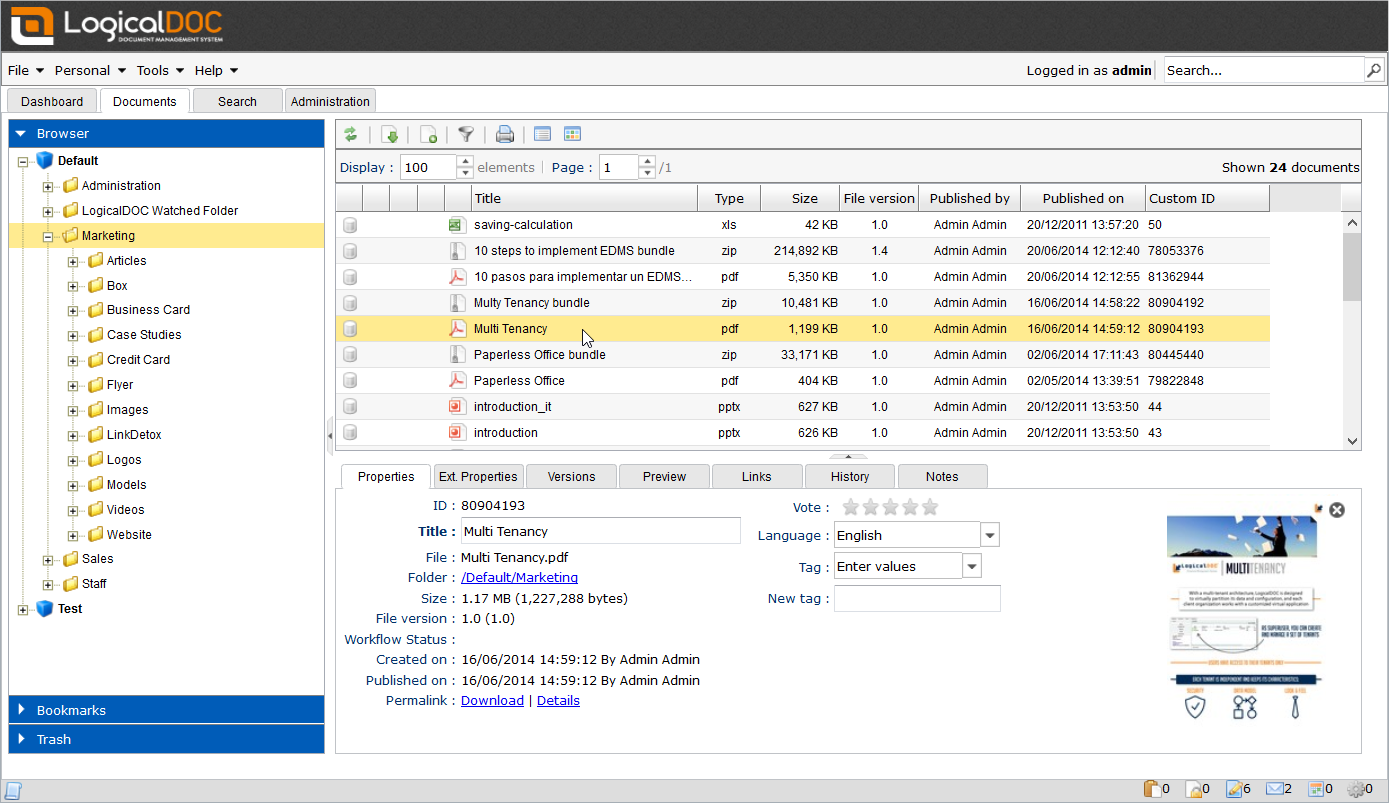
LogicalDOC is a document management system aimed at enterprises that need a secure, efficient way to manage and share documents. Its main users are organizations that want to improve document accessibility, collaboration, and compliance with industry standards.
Why I picked LogicalDOC: LogicalDOC offers a free community edition that provides essential document management features. You can manage documents with ease using its intuitive interface. The software allows for document versioning, so you can track changes and maintain control over document revisions. It’s open-source, so you can customize the software to meet your specific enterprise needs.
Standout features & integrations:
Features include advanced search capabilities and the ability to automate document workflows to streamline processes and improve efficiency.
Integrations include Microsoft Office, Google Drive, Dropbox, and Docusign.
What's free?
LogicalDOC offers a free community edition with basic document management features.
Pros and Cons
Pros:
- Automation of document workflows
- Advanced search functionality
- Open-source customization options
Cons:
- Not all features in free version
- Limited support for free version

Box
Best for secure storage

Box is a cloud content management and file sharing service for businesses and individuals who need secure storage and collaboration tools. It's ideal if you need strong security and compliance alongside the ability to manage and share files across teams.
Why I picked Box: Box offers a free plan that provides secure cloud storage with advanced encryption to protect sensitive documents. You can store up to 10GB of data, which is sufficient for personal use or small projects. The free version includes basic collaboration tools, so your team can share and comment on files easily.
Standout features & integrations:
Features include advanced security controls that help you manage who can access your files as well as the ability to automate workflows and streamline document approval processes.
Integrations include Microsoft Office 365, Google Workspace, Slack, Zoom, Salesforce, Adobe Sign, Docusign, Okta, IBM, and ServiceNow.
What's free?
Box offers a free-forever plan with 10GB of storage, though it limits file uploads to 250MB each.
Pros and Cons
Pros:
- Real-time commenting on files
- Supports 10GB of data storage
- Secure storage with encryption
Cons:
- Some users find setup complex
- File upload limit of 250MB

Best for document sharing

Confluence is a team workspace that lets teams create, share, and manage content. It's for teams that need a centralized platform for document sharing and project collaboration.
Why I picked Confluence: Confluence's free plan lets you create and share documents with up to 10 users, which makes it ideal for small teams. The space and page organization features help you keep information structured and accessible. There are also customizable templates, you can use to start new projects or documentation. The real-time editing feature lets your team collaborate on documents simultaneously and improve productivity.
Standout features & integrations:
Features include a powerful search function that helps you find documents quickly and efficiently. You can also create dynamic pages with embedded multimedia and dynamic content. The permissions settings let you control who can view or edit documents.
Integrations include Jira, Trello, Slack, Microsoft Teams, and Dropbox.
What's free?
Confluence offers a free-forever plan for up to 10 users with limited storage and features.
Pros and Cons
Pros:
- Strong document organization
- Real-time editing capabilities
- Customizable templates for projects
Cons:
- Storage restrictions in free version
- Limited to 10 users in free plan

Best for document office suite

ONLYOFFICE is an online office suite for businesses and teams that need document management, collaboration, and productivity tools in one place. You can use it to create, edit, and share documents, spreadsheets, and presentations.
Why I picked ONLYOFFICE: ONLYOFFICE offers a free plan with both office suite and document management features, which makes it ideal for teams that need both. You can create and edit documents with familiar tools like word processors, spreadsheets, and presentation editors. The collaborative editing feature lets multiple team members work on the same document simultaneously. With its open-source nature, you can customize and extend functionalities to fit your team's needs.
Standout features & integrations:
Features include customizable access rights that let you control who can view or edit documents. The document versioning feature helps you track changes and revert to previous versions if needed. You can also embed documents into websites for easy sharing and access.
Integrations include Nextcloud, ownCloud, Alfresco, Confluence, SharePoint, WordPress, Moodle, Liferay, and Drupal.
What's free?
ONLYOFFICE offers a free-forever plan with essential office suite and document management features.
Pros and Cons
Pros:
- Embedding documents into websites
- Document version control
- Collaborative editing in real-time
Cons:
- May need technical knowledge for customization
- Initial setup may be complex

Odoo
Best for business apps integration

Odoo is a comprehensive business management software that provides a suite of apps to help you manage your operations. Its main users include small to medium-sized enterprises that need an integrated approach to managing documents, clients, and sales.
Why I picked Odoo: Odoo's free version lets you manage documents within a larger system of business applications. It also supports essential features like document sharing and collaboration. This integration capability is a key differentiator if you want to unify your operations.
Standout features & integrations:
Features include a user-friendly interface that simplifies document uploading and organization. You can automate document workflows to maintain efficient handling and processing, and use reporting tools to track document usage and performance.
Integrations include PayPal, Amazon, eBay, and Microsoft Outlook.
What's free?
Odoo has a free-forever plan for one app (the document management app in this case).
Pros and Cons
Pros:
- Comprehensive reporting tools
- Automated workflows for efficiency
- Integration with other Odoo apps
Cons:
- Requires setup for full functionality
- Limited to one app in free plan
Bitrix24
Best for team collaboration
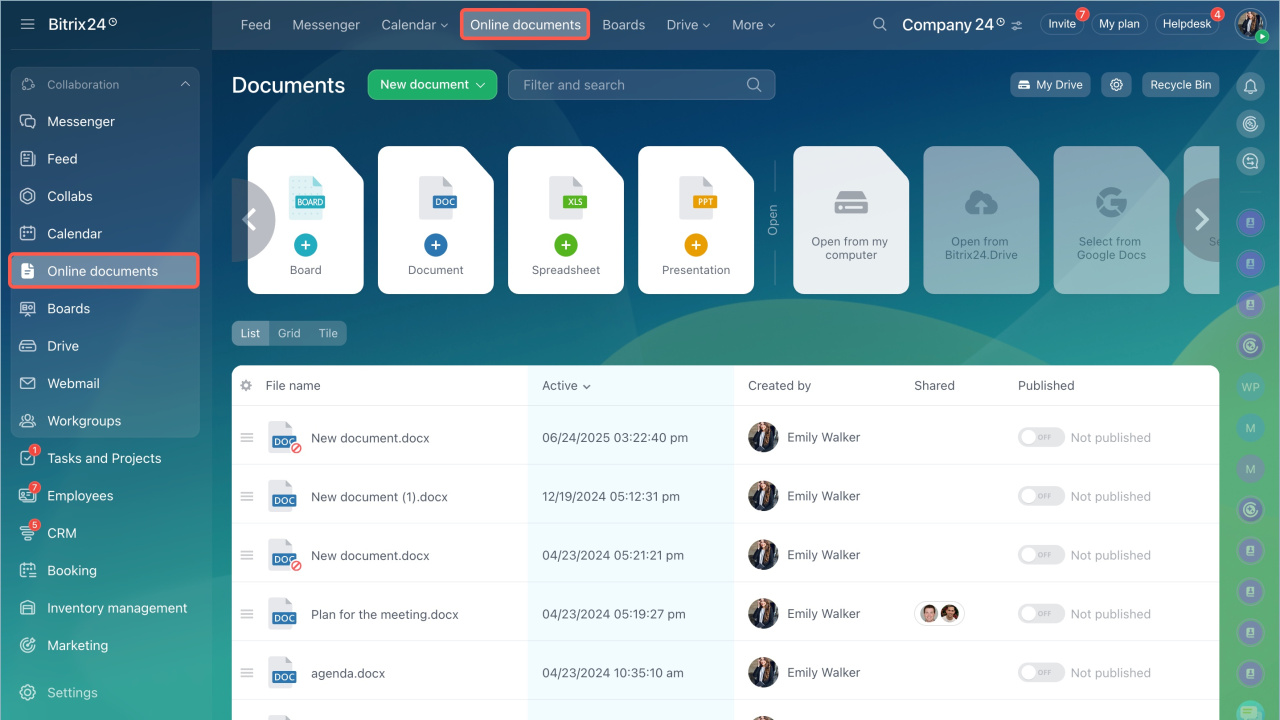
Bitrix24 is a comprehensive business tool that combines project management, communication, and document management functionalities. It's designed for small to medium-sized businesses that want to improve collaboration and streamline their workflows.
Why I picked Bitrix24: Bitrix24's free plan offers unlimited users, which makes it suitable for growing teams. You get access to task management features that help keep your team organized. The free version also includes document management, and you can store and share files with ease.
Standout features & integrations:
Features include customer relationship management (CRM) tools and a calendar feature that helps your team schedule and track important events. You can also automate routine tasks.
Integrations include Mailchimp, Google Drive, Microsoft Office, Dropbox, Xero, and Zapier.
What's free?
Bitrix24 offers a free-forever plan with unlimited users, though storage is capped at 5GB.
Pros and Cons
Pros:
- Supports workflow automation
- CRM functionality included
- Unlimited users in free plan
Cons:
- Limited customer support in free plan
- Storage limit of 5GB


OpenDocMan is a free, open-source document management system primarily for web use. Its main users are organizations that want a PHP-based solution for managing documents efficiently. The system supports centralized storage, access control, and document tracking.
Why I picked OpenDocMan: OpenDocMan is entirely free and open-source, and you can customize it to fit your specific needs. You can manage various file types via the minimalist interface, and it offers robust user management features.
Standout features & integrations:
Features include web-based access, fine-grained user permissions, and automated installation. This lets you manage document workflows efficiently and maintain existing business rules.
Integrations include MySQL and support for various file types.
What's free?
OpenDocMan offers a free-forever plan with no user limit, though it relies on community support for troubleshooting.
Pros and Cons
Pros:
- Multi-language support
- Supports multiple file types
- Free and open-source customization
Cons:
- Reliance on community support
- Limited compared to commercial options

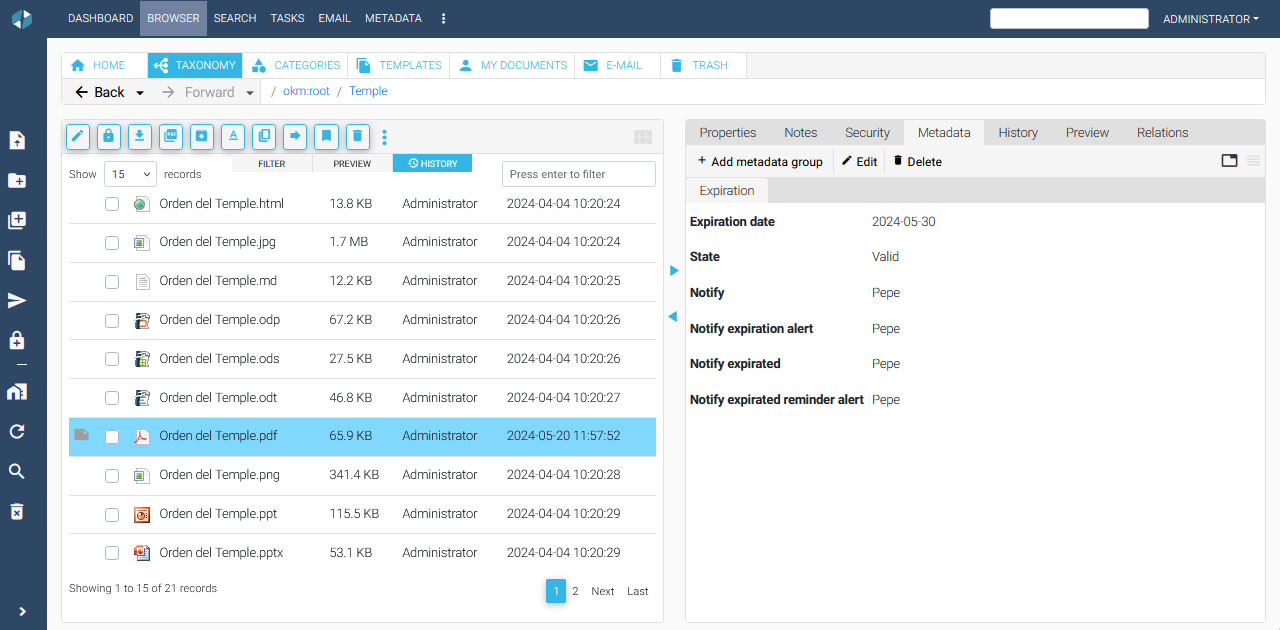
OpenKM is an open-source document management system for organizations that need to manage, maintain, and govern documents. Its main users include businesses that want to improve organization, accountability, and compliance with regulatory requirements.
Why I picked OpenKM: OpenKM offers a free plan that provides a range of features to support knowledge management. It includes automatic cataloging, which lets you set rules for document handling. The advanced preview supports various file formats. With version control and tracking, you can easily manage document changes and maintain an audit trail.
Standout features & integrations:
Features include OCR, which converts scanned documents into editable formats, and modules that offer functionalities like multitenancy and digital signatures. The system also supports advanced preview for multiple file formats.
Integrations include an API so you can build custom integrations.
What's free?
OpenKM offers a free-forever plan with basic features.
Pros and Cons
Pros:
- Detailed audit trails
- Comprehensive document lifecycle management
- Open-source flexibility
Cons:
- Limited support options
- Requires technical setup


Hightail is a file-sharing and collaboration platform for creative teams who need to share large files and gather feedback. It helps you improve creative workflows and collaboration among team members.
Why I picked Hightail: Hightail's free plan is best for creative teams that need to send large files. You can easily share projects and gather feedback with its simple interface. The visual feedback tool lets team members comment directly on images and videos for clear communication. You can also track file activity to make sure everyone is up to date on project progress.
Standout features & integrations:
Features include collaboration tools that let you manage feedback and approvals in one place and file tracking that lets you see who has viewed or downloaded your content.
Integrations include Adobe Creative Cloud, Microsoft OneDrive, Google Drive, and Dropbox.
What's free?
Hightail offers a limited free plan with a maximum file size of 100MB and basic sharing features.
Pros and Cons
Pros:
- File activity tracking available
- Simple interface for file sharing
- Visual feedback on images and videos
Cons:
- Limited customization in free version
- Limited to 100MB file size


airSlate Workflow is a cloud-based automation platform for businesses that need to automate document workflows and improve business processes. It's ideal if you want to reduce manual tasks and improve efficiency in document management.
Why I picked airSlate Workflow: airSlate Workflow offers a free plan that includes essential workflow automation tools, so you can automate your document processes. You can design custom workflows to fit your specific business needs via a simple drag-and-drop editor.
Standout features & integrations:
Features include a document generation tool that lets you create documents automatically based on templates. The e-signature feature lets you collect signatures digitally, and you can also track document progress in real-time.
Integrations include Salesforce, Microsoft Dynamics 365, Google Drive, Microsoft Office, Dropbox, Box, QuickBooks, and NetSuite.
What's free?
airSlate Workflow offers a limited free trial with access to basic workflow automation features.
Pros and Cons
Pros:
- Supports digital signatures
- Automates repetitive document tasks
- Drag-and-drop workflow editor
Cons:
- May require training for new users
- Some setup complexity
Diğer Belge Yönetimi Yazılımları
Ücretsiz planlar veya deneme sürümleri sunan bazı ek belge yönetimi yazılımı seçenekleri şunlardır. Bu araçlar kısa listeme girmemiş olsa da yine de göz atmaya değer:
- FormKiQ
For API access
- Connecteam
For deskless teams
- Dropbox
For easy-file sharing
- Google Docs
For real-time collaboration
- Notion
For all-in-one workspace
- monday.com
For project tracking
- Mayan EDMS
For self hosted document control


How I Evaluate Free Document Management Software
I check every option against two layers: core criteria a tool must meet—like version control and external sharing—and differentiating factors that separate the right fit for project teams.
Core Functionality (Table Stakes For This List)
When I'm selecting tools for my list, I rank each one on a scale from 0 (does not offer the functionality) to 5 (excels in this area) for each core functionality listed below. Then, I calculate the tool's total score into a percentage. Each tool needs to achieve a minimum total score of 65% to be considered for inclusion.
- Free Plan Availability: I look for a genuinely free tier—not a 14-day trial—that gives project teams enough storage and seats to manage real documents over time.
- Centralized Document Storage: Every tool should let you organize files into project-based folders or workspaces, so deliverables like SOWs and status reports live in one place.
- Version Control: I evaluate how each platform handles revisions, checking whether you can view prior versions, restore earlier drafts, and track who changed what.
- File Sharing & Collaboration: Teams need to share documents with clients, contractors, and cross-functional partners, so I check for external sharing, co-editing, and commenting.
- Access Permissions & Security: Role-based controls matter when sensitive project files are involved. I look at whether you can restrict access at the folder or individual file level.
- Search & Metadata Tagging: Finding the right document across dozens of project folders is a daily task. I check for full-text search, tag support, and filtering options.
Once I have a list of tools that meet this criteria, I consider what sets each platform apart.
Differentiating Factors (What Sets Vendors Apart)
Here's how I compare and contrast different vendors:
Standout Features
Workflow automation is a big differentiator. I look for tools that can route a document through an approval chain without manual follow-up, like pushing a project brief from draft to stakeholder sign-off. I also evaluate how well each platform connects to project management tools like Jira or Asana, since linking documents directly to tasks saves time hunting for files. For teams with field-based staff, mobile access with offline sync matters. Pulling up specs or plans on-site without a connection is a real advantage.
Beyond Features
Free plan limits deserve close attention. I check storage caps and user seat restrictions to see whether a growing project team will hit a wall within months. Security is another factor I weigh—especially whether audit logs and encryption are available on the free tier, since project documents often include contracts and sensitive deliverables. Guest access also matters. If external stakeholders like clients or vendors need to review files, I look at whether that requires a paid seat or is supported on the free plan.
Ücretsiz Belge Yönetimi Yazılımı Nasıl Seçilir?
Karmaşık özellik listeleri ve fiyatlandırma yapıları, ücretsiz bir belge yönetimi yazılımıyla gerçekte ne elde ettiğinizi anlamanızı zorlaştırabilir. Yazılım seçme süreciniz üzerinde çalışırken odağınızı korumanıza yardımcı olmak için göz önünde bulundurmanız gereken bazı faktörleri aşağıda bulabilirsiniz:
| Faktör | Dikkat Edilmesi Gerekenler |
|---|---|
| Ücretsiz teklifin kapsamı | Ücretsiz planda hangi özelliklerin bulunduğunu kontrol edin. Gizli maliyetler olmadan temel ihtiyaçlarınızı karşıladığından emin olun. |
| Ölçeklenebilirlik | Yazılımın ekibinizle birlikte büyüyüp büyüyemeyeceğini değerlendirin. İhtiyaçlarınız arttıkça yükseltme veya kullanıcı ekleme seçenekleri arayın. |
| Entegrasyonlar | Verimliliğinizi artırmak için yazılımın Google Workspace veya Slack gibi hâlihazırda kullandığınız araçlarla entegre olduğundan emin olun. |
| Kullanım kolaylığı | Kullanıcı arayüzünü ve gezinmeyi değerlendirin. Ekibinizin kapsamlı bir eğitim almadan kullanmaya başlayabilmesi için arayüz sezgisel olmalıdır. |
| Güvenlik | Hassas belgeleri korumak için şifreleme ve erişim denetimleri gibi özellikleri arayın. |
| Destek | Özellikle yardıma ihtiyaç duyacağınızı öngörüyorsanız, sohbet, e-posta veya telefon yoluyla müşteri desteğinin mevcut olup olmadığını kontrol edin. |
| Özelleştirme | Belirli iş akışlarınıza ve tercihlerinize uyacak şekilde sistemi uyarlayabilmeniz için yazılımın özelleştirmeye izin verip vermediğini belirleyin. |
| Depolama sınırları | Ücretsiz sürümdeki depolama sınırlarının farkında olun ve bunların belge hacmi ihtiyaçlarınızla uyumlu olduğundan emin olun. |
Ücretsiz Belge Yönetimi Yazılımı Nedir?
Belge yönetimi yazılımı, bireylerin ve işletmelerin dijital belgeleri düzenlemesine, depolamasına ve geri almasına yardımcı olan bir araçtır. Ücretsiz seçenekler genellikle depolama, dosya paylaşımı ve sürüm denetimi gibi temel özellikleri içerir; ancak depolama alanını veya kullanıcı sayısını çoğu zaman sınırlar.
Bu araçlar genellikle ücretsiz e-imza yazılımı ile birlikte kullanılır ve yüksek maliyetlere katlanmadan belgeleri yönetmesi gereken proje yöneticileri, yöneticiler ve küçük işletme sahipleri tarafından tercih edilir. Depolama, iş birliği ve güvenlik özellikleri belgeleri düzenlemeye, ekip çalışmasını kolaylaştırmaya ve hassas bilgileri korumaya yardımcı olur.
Ücretsiz Belge Yönetimi Yazılımının Özellikleri
Belge yönetimi yazılımlarında yaygın olarak bulunan özellikleri ve bunlardan hangilerinin genellikle ücretsiz ve ücretli planlara dahil edildiğini inceleyelim.
Genellikle Ücretsiz Belge Yönetimi Yazılımı Özellikleri
- Depolama: Kullanıcıların dijital dosyaları tek bir yerde saklamasını ve belgeleri kolayca düzenleyip bunlara erişmesini sağlar.
- Dosya paylaşımı: İş birliğini ve iletişimi kolaylaştırmak için kullanıcıların belgeleri başkalarıyla paylaşmasını sağlar.
- Sürüm denetimi: Belgelerde yapılan değişiklikleri izler; böylece kullanıcılar önceki sürümlere erişebilir ve düzenleme geçmişini koruyabilir.
- Temel iş birliği: Yorum yapma ve ortak düzenleme gibi araçlarla ekiplerin belgeler üzerinde birlikte çalışmasını sağlar.
- Arama işlevi: Zamandan tasarruf etmek ve verimliliği artırmak için kullanıcıların anahtar kelimeleri veya filtreleri kullanarak belgeleri hızlıca bulmasına yardımcı olur.
- Erişim izinleri: Veri güvenliğini korumak amacıyla yöneticilerin belgeleri kimlerin görüntüleyebileceğini veya düzenleyebileceğini kontrol etmesini sağlar.
- Mobil erişim: Kullanıcıların mobil cihazlar aracılığıyla hareket hâlindeyken belgelere erişmesini ve belgeleri yönetmesini sağlar.
Genellikle Ücretli Belge Yönetimi Yazılımı Özellikleri
- Gelişmiş güvenlik: Hassas verileri korumak için şifreleme ve iki faktörlü kimlik doğrulama gibi ek güvenlik önlemleri sunar.
- İş akışı otomasyonu: Tekrarlayan görevleri ve belge iş akışlarını kolaylaştırır; AI belge yönetimi yazılımı sınıflandırma, arama ve yönlendirme işlemlerini destekler.
- Özelleştirilebilir panolar: Kullanıcıların belge etkinliğini ve performansını izlemesine yardımcı olmak için kişiselleştirilmiş görünümler ve analizler sunar.
- Üçüncü taraf uygulamalarla entegrasyon: İşlevselliği ve operasyonları geliştirmek için CRM veya ERP sistemleri gibi diğer araçlara bağlanır.
- Gelişmiş raporlama: Karar alma ve strateji planlamasına yardımcı olmak için belge kullanımı ve performansı hakkında ayrıntılı raporlar oluşturur.
- E-imza özellikleri: Onay süreçlerini hızlandırmak ve kâğıt kullanımını azaltmak için kullanıcıların belgeleri dijital olarak imzalamasını sağlar.
- Üst veri etiketleme: Aranabilirliği ve düzeni geliştirmek için kullanıcıların belgeleri etiketlerle kategorilere ayırmasını sağlar.
Ücretsiz Belge Yönetimi Yazılımının Faydaları
Ücretsiz belge yönetimi yazılımını uygulamak ekibiniz ve işletmeniz için çeşitli faydalar sağlar. Yararlanabileceğiniz birkaç fayda şunlardır:
- Maliyet tasarrufu: Ücretsiz planlar pahalı yazılımlara duyulan ihtiyacı ortadan kaldırır; böylece bütçenizi etkilemeden belgeleri yönetebilirsiniz.
- Gelişmiş düzen: Depolama ve sürüm denetimi gibi özellikler belgelerinizin düzenli ve kolayca geri alınabilir olmasını sağlar.
- Daha iyi iş birliği: Dosya paylaşımı ve temel iş birliği araçları, ekibinizin farklı konumlardan bile verimli bir şekilde birlikte çalışmasını sağlar.
- Artırılmış erişilebilirlik: Mobil erişim, esnekliği artırmak için ekibinizin hareket hâlindeyken belgelere erişip bunları yönetebilmesini sağlar.
- Veri güvenliği: Erişim izinleri, belgelerinizin kimlerin görüntüleyebileceğini veya düzenleyebileceğini kontrol ederek hassas bilgileri korur.
- Zaman verimliliği: Arama işlevi ve üst veri etiketleme, zamandan tasarruf etmek ve üretkenliği artırmak için belgelerin hızlıca geri alınmasını sağlar.
Ücretsiz Belge Yönetimi Yazılımının Maliyetleri ve Fiyatlandırması
Bu makaleye ücretsiz olarak sunulan en iyi belge yönetimi yazılımı seçeneklerini arayarak geldiğinizi biliyorum. Ancak ücretsiz planlar yalnızca sınırlı özellikler sunduğundan, gelecekte planınızı yükseltmeniz gerekebilir. Ayrıca açık kaynaklı belge yönetimi yazılımı gibi ücretsiz yazılımlar, teknik ekibinizden ek dahili destek gerektirebilir ve bu da beklenmedik maliyetlere yol açabilir.
Aşağıdaki tablo, belge yönetimi yazılımı çözümlerinde yaygın planları, ortalama fiyatlarını ve genellikle sunulan özellikleri özetlemektedir:
Belge Yönetimi Yazılımı İçin Plan Karşılaştırma Tablosu
| Plan Türü | Ortalama Fiyat | Yaygın Özellikler |
|---|---|---|
| Ücretsiz Plan | $0 | Temel depolama, dosya paylaşımı, sürüm denetimi ve erişim izinleri. |
| Bireysel Plan | $5-$15/kullanıcı/ay | Artırılmış depolama, gelişmiş arama, mobil erişim ve temel entegrasyonlar. |
| İşletme Planı | $20-$50/kullanıcı/ay | İş akışı otomasyonu, gelişmiş güvenlik, özel panolar ve iş birliği araçları. |
| Kurumsal Plan | $60-$100/kullanıcı/ay | Sınırsız depolama, kurumsal düzeyde güvenlik, gelişmiş entegrasyonlar ve özel destek. |
Ücretsiz Belge Yönetimi Yazılımı Hakkında FAQ
Ücretsiz belge yönetimi yazılımı hakkında sık sorulan bazı soruların yanıtlarını burada bulabilirsiniz:
Ücretsiz bir belge yönetim sistemi var mı?
Evet, kullanılabilen çeşitli ücretsiz belge yönetim sistemleri vardır. Bu çözümler genellikle depolama ve dosya paylaşımı gibi temel özellikleri ücretsiz olarak sunar. Ancak depolama alanı veya kullanıcı sayısı konusunda sınırlamaları olabilir; bu nedenle genellikle küçük ekipler ya da kişisel kullanım için daha uygundurlar.
Ücretsiz belge yönetimi yazılımı ne kadar güvenlidir?
Ücretsiz belge yönetimi yazılımı genellikle parola koruması ve kullanıcı erişim denetimleri gibi temel güvenlik özelliklerini içerir. Bu özellikler belirli bir güvenlik düzeyi sağlasa da ücretli planlardaki özellikler kadar kapsamlı olmayabilir. Güvenlik düzeyinin özel ihtiyaçlarınızı karşılayıp karşılamadığını değerlendirin.
Ücretsiz bir plandan yükseltme yapabilir miyim?
Çoğu ücretsiz belge yönetimi yazılımı çözümü, ücretli bir plana yükseltme seçeneği sunar. Yükseltme genellikle daha fazla depolama, gelişmiş güvenlik ve daha fazla iş birliği aracı gibi ek özellikler sağlar. Yükseltmenin gerekli olup olmadığını belirlemek için ekibinizin büyümesini ve ihtiyaç duyduğu özellikleri göz önünde bulundurun.
Ücretsiz belge yönetimi yazılımının sınırlamaları nelerdir?
Ücretsiz belge yönetimi yazılımı genellikle daha düşük depolama kapasitesi, daha az entegrasyon ve temel destek seçenekleri gibi sınırlamalarla birlikte gelir. Bu kısıtlamalar, daha büyük ekipleri veya karmaşık belge yönetimi ihtiyaçları olan işletmeleri etkileyebilir. Bu sınırlamaların ekibinizin gereksinimleriyle uyumlu olup olmadığını değerlendirin.
Ücretsiz belge yönetim sistemleri entegrasyonları nasıl ele alır?
Ücretsiz belge yönetim sistemleri, ücretli muadillerine kıyasla sınırlı entegrasyon özellikleri sunabilir. Genellikle Google Workspace veya Microsoft Office gibi popüler araçlarla temel entegrasyonları destekler. Ekibiniz entegrasyonlara büyük ölçüde güveniyorsa, daha güçlü bağlantı seçenekleri için ücretli çözümleri değerlendirmeniz gerekebilir.
Ücretsiz planlarda müşteri desteği mevcut mu?
Ücretsiz planlar için müşteri desteği genellikle ücretli planlara kıyasla sınırlıdır. SSS, topluluk forumları veya e-posta desteği gibi temel destek kaynaklarına erişiminiz olabilir. Canlı sohbet veya telefon desteği gibi daha kapsamlı destek için ücretli bir plana yükseltmeniz gerekebilir.