

2026’da İncelenen En İyi 10 Geliştirici Verimliliği Aracı

10 En İyi Geliştirici Verimliliği Araçları Kısa Listesi


Bir geliştirici ekibini yönetmek, aynı anda bir düzine işi birden yürütmek gibi hissettirebilir. Son teslim tarihleriyle, kod kalitesiyle ve herkesin aynı anlayışta kalmasını sağlamakla uğraşırsınız. Geliştirici verimliliği araçları hayatınızı biraz kolaylaştırabilir. Ekibinizin daha hızlı kod yazmasına, daha iyi iş birliği yapmasına ve olağan baş ağrıları olmadan ilerlemeyi takip etmesine yardımcı olurlar.
İşe yarayan ve yaramayanları tarafsız bir şekilde değerlendirebilmek için bu araçları test edip incelemeye zaman ayırdım. Bu makalede, özellikle günlük proje yönetiminde gerçekten fark yaratan araçlara odaklanarak en iyi seçimlerimi paylaşacağım. İster kod incelemeleriyle ister zaman takibiyle ilgileniyor olun, ekibinizin en iyi performansı göstermesine yardımcı olacak bir seçenek mutlaka vardır.
Why Trust Our Software Recommendations
Our team has been testing and reviewing software since 2012. As project managers ourselves, we know how difficult—and important—it is to choose the right software.
For this guide, we evaluated tools using hands-on testing and independent research, scoring tools using our selection criteria. We also draw on insights from industry thought leaders and practicing project management experts.
Our reviews reflect our human editorial judgment, not a sales pitch.
Expert reviewers:
Geliştirici Verimliliği Araçları Karşılaştırma Tablosu
Aşağıdaki tabloda, en iyi geliştirici verimliliği aracı seçimlerimin fiyatlandırma ayrıntıları karşılaştırılmaktadır.
| Tool | Starting Price | Website | |
|---|---|---|---|
| Best for time tracking | 4.8 out of 5 | $4.99/user/month Free plan + 7-day trial + demo available | Website |
| Best for Java development | 4.6 out of 5 | $19.90/user/month 45-day free trial available | Website |
| Best for GitHub-native AI-assistance | 4.8 out of 5 | $10/user/month Free plan available | Website |
| Best for API testing | — | $9/month Free plan available | Website |
| Best for CI/CD pipelines | — | $6/user/month Free plan + 30-day free trial available | Website |
| Best for delivery performance alerts | — | $15/dev/month “Free forever” trial for up to 8 devs | Website |
| Best for privacy-first, local AI code completion | 4.6 out of 5 | $39/user/month Free demo available | Website |
| Best for developer experience insights | — | Pricing upon request Free demo available | Website |
| Best for workflow bottleneck metrics | — | $45/developer/month 14-day free trial + free plan + free demo available | Website |
| Best for AI-powered security scanning | — | $25/developer/month Free plan + free demo available | Website |
En İyi Geliştirici Verimliliği Araçları İncelemeleri
Aşağıda, kısa listeme giren en iyi geliştirici verimliliği araçlarının ayrıntılı özetlerini bulabilirsiniz. İncelemelerim, size en uygun aracı bulmanıza yardımcı olmak için her aracın temel özelliklerine, artılarına ve eksilerine, entegrasyonlarına ve ideal kullanım alanlarına ayrıntılı bir bakış sunuyor.

Clockify
Best for time tracking

Clockify is a time-tracking software designed for teams and freelancers to monitor work hours and productivity. It helps businesses track time spent on tasks and projects, making it easier to manage resources and improve efficiency.
Why I picked Clockify: It offers time-tracking features for developers who need precise time management. Clockify allows you to log hours manually or use an automatic timer, providing flexibility in how your team records their work. You can generate detailed reports to analyze productivity and time allocation.
Standout Features and Integrations:
Features include time tracking through both manual entry and automatic timers, detailed reporting for productivity analysis, and a user-friendly interface that suits teams of all sizes. It also offers project tracking to monitor progress and budget management tools to keep projects on track financially.
Integrations include Asana, Trello, Atlassian Jira, monday.com, Intuit QuickBooks, and more.
Pros and Cons
Pros:
- Suitable for teams of all sizes
- Detailed reporting options
- Flexible time logging
Cons:
- Requires consistent manual input
- Can be overwhelming for beginners

Best for Java development
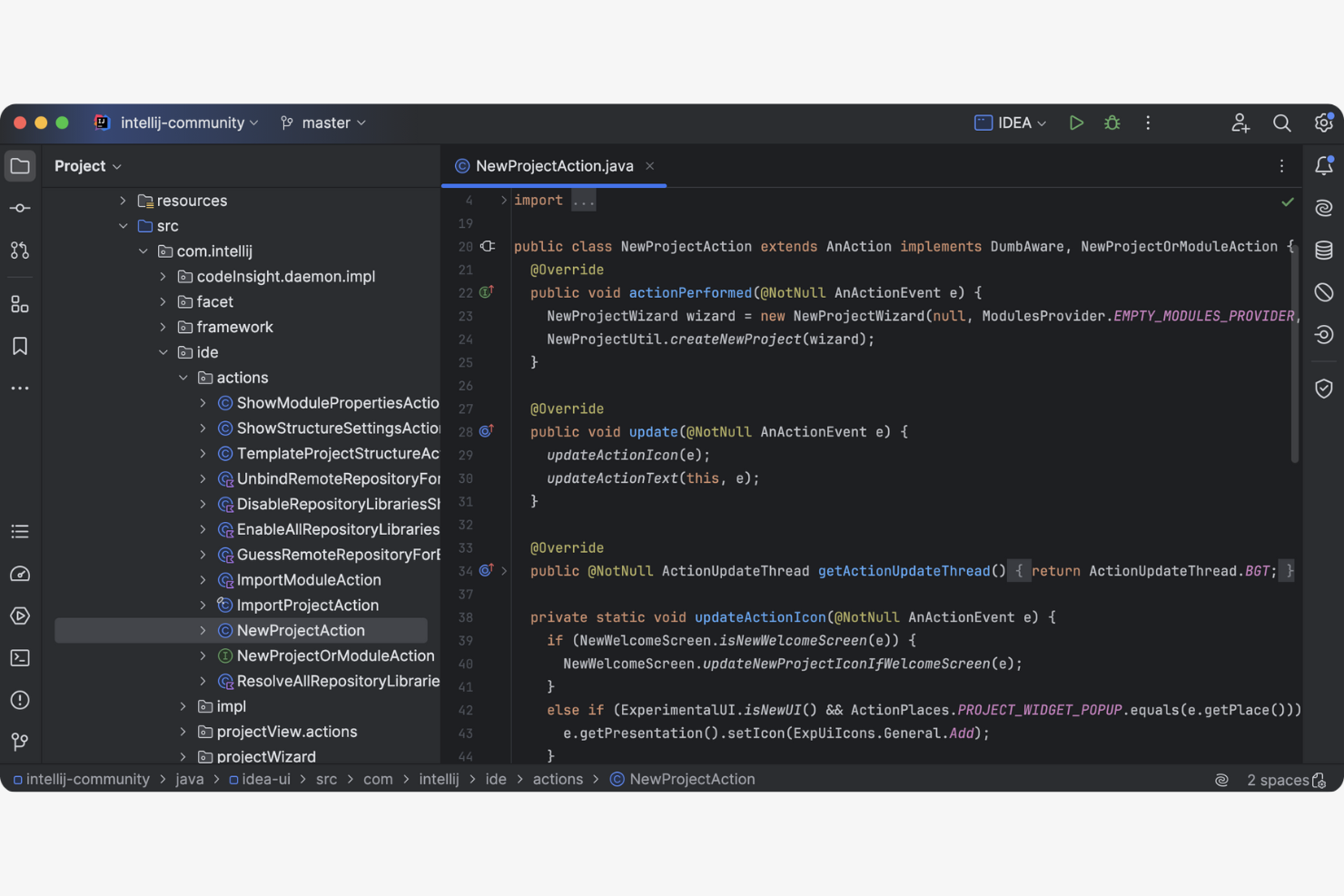
IntelliJ IDEA is an IDE primarily used by Java developers to test, debug, and write code. It offers a range of tools that facilitate coding, refactoring, and code analysis.
Why I picked IntelliJ IDEA: It excels in Java development, providing features that improve coding efficiency and accuracy. The tool integrates well with various build systems and version control systems.
Standout Features and Integrations:
Features include intelligent autocomplete that predicts what you're going to write next, saving time and reducing errors. It offers on-the-fly code analysis, providing instant feedback on your code quality. Additionally, its advanced refactoring tools make it easy to improve and maintain your codebase.
Integrations include Git, GitHub, Maven, Gradle, Docker, Jenkins, and more.
Pros and Cons
Pros:
- Supports advanced refactoring
- Provides on-the-fly code analysis
- Offers intelligent code completion
Cons:
- Limited to Java-centric features
- Can be resource-intensive
Best for GitHub-native AI-assistance
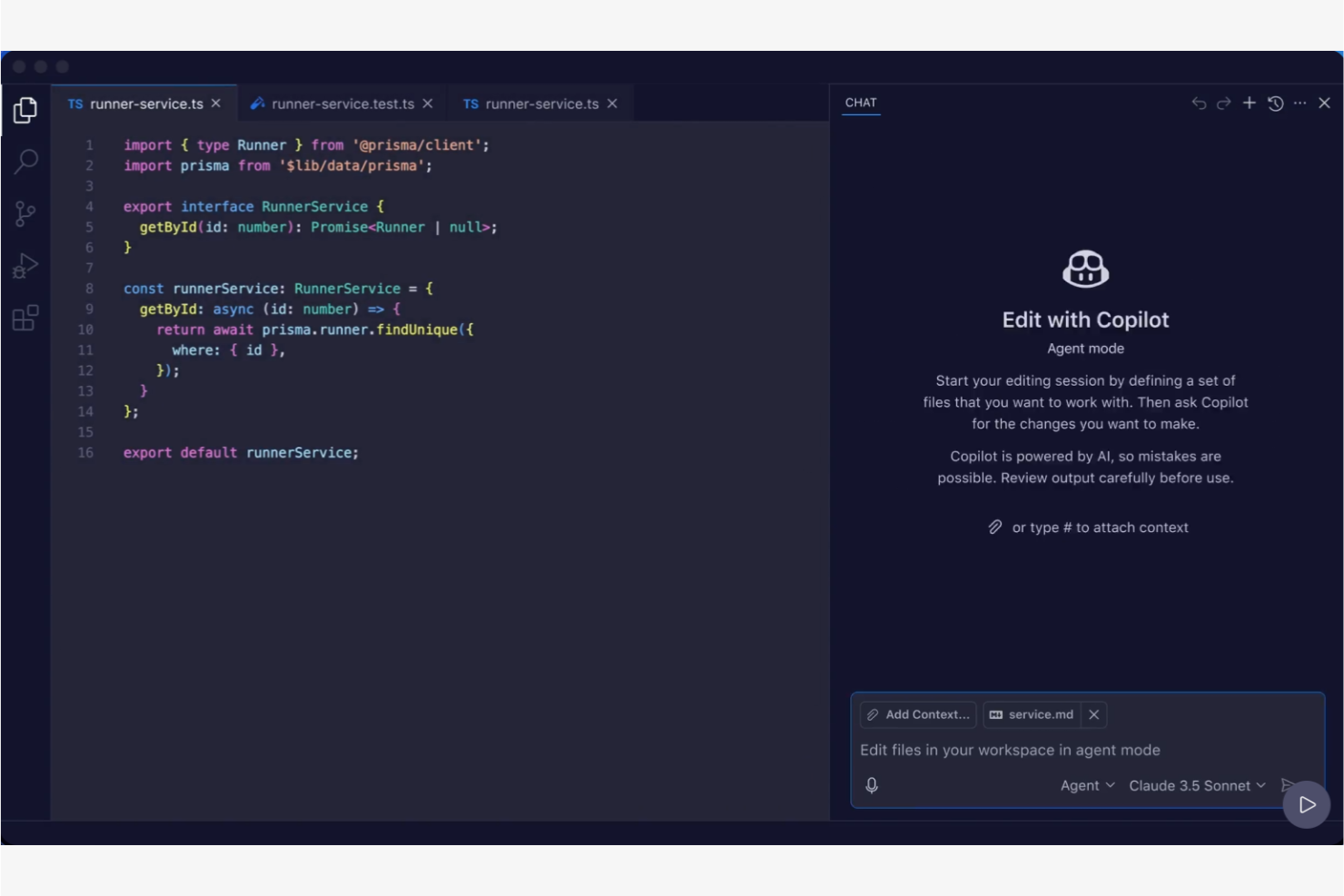
GitHub Copilot is an AI tool designed primarily for developers. It provides contextual code suggestions and task automation, making it a valuable tool for software development teams.
Why I picked GitHub Copilot: This tool offers AI-powered coding and integrates with popular integrated development environments (IDEs), including VS Code. Features such as Autofix address code vulnerabilities and add to GitHub Copilot’s utility in maintaining code quality.
Standout Features and Integrations:
Features include real-time, contextual code suggestions that adapt to your coding style, support for a wide range of programming languages (including JavaScript and TypeScript), and the ability to automate repetitive coding tasks. It also offers a code-referencing tool to identify open source licenses, and filters to block insecure or offensive code.
Integrations include Visual Studio Code, JetBrains, Neovim, GitHub, and more.
Pros and Cons
Pros:
- Provides contextual code suggestions
- Integrates with popular IDEs
- Supports multiple languages
Cons:
- Limited free tier features
- Occasional buggy code suggestions

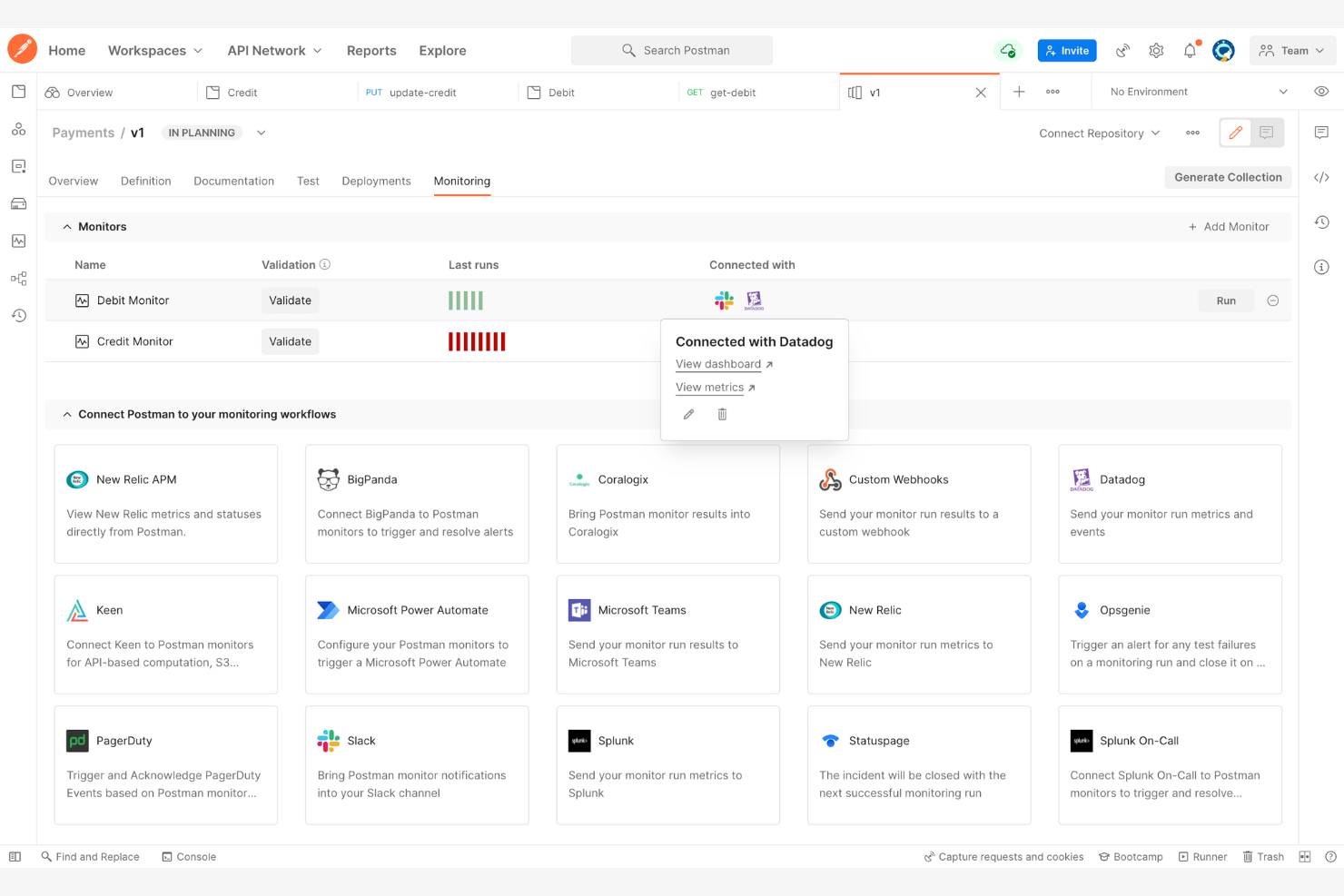
Postman is a collaboration platform for API development used by developers to design, test, and document APIs. It serves software development teams by offering tools that facilitate API lifecycle management.
Why I picked Postman: It excels in API testing, providing tools that simplify the process of designing and testing APIs.
Standout Features and Integrations:
Features include a user-friendly interface and pre-built templates that simplify API request creation and management. Automated testing features ensure your APIs perform as expected, catching potential issues early. Collaboration tools allow your team to share and review API documentation efficiently, improving team productivity.
Integrations include GitHub, GitLab, Jenkins, Slack, Microsoft Teams, and more.
Pros and Cons
Pros:
- Supports team collaboration
- Offers automated testing
- Simplifies API request creation
Cons:
- Mandatory account and cloud dependence
- Can be resource-intensive to operate

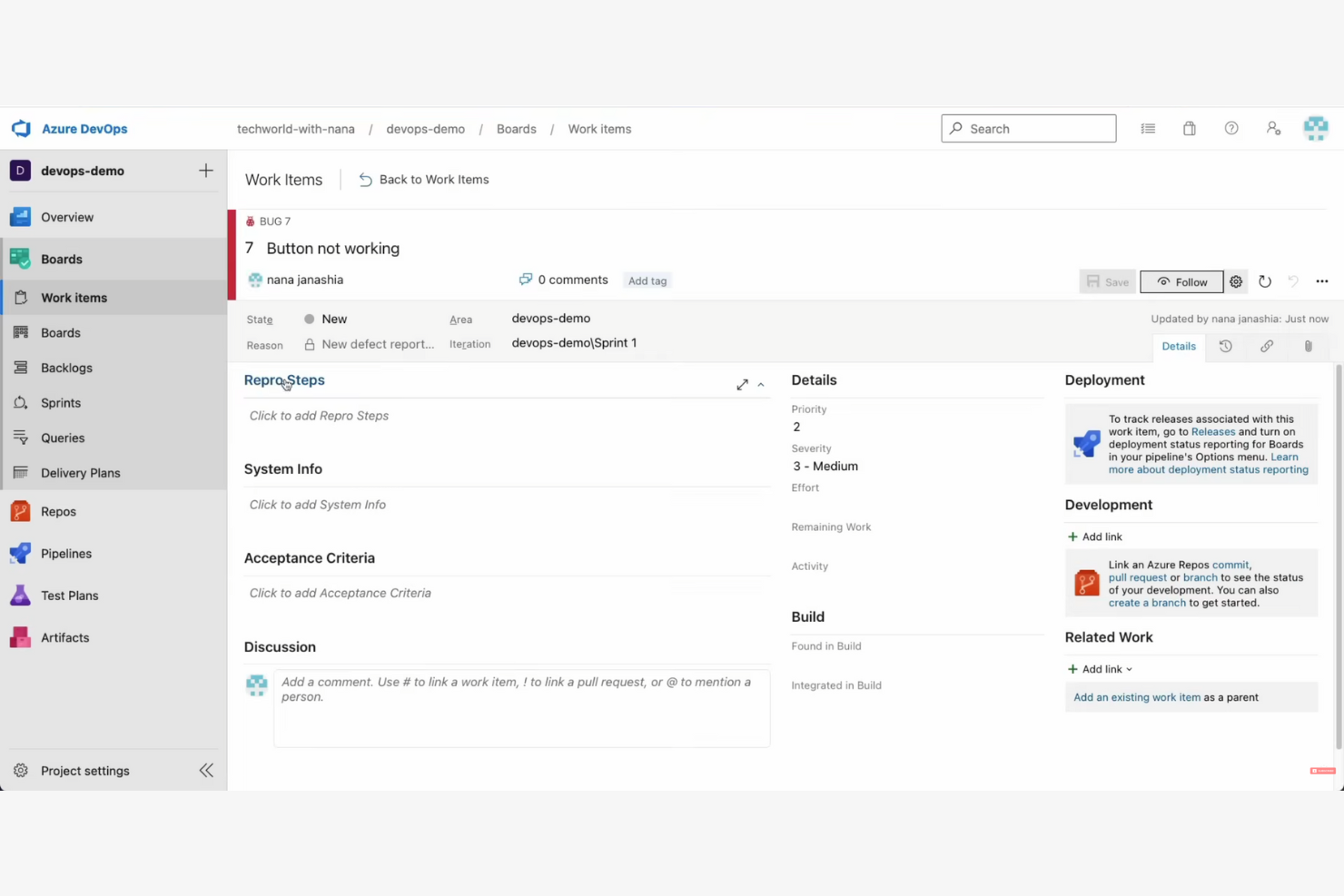
Microsoft Azure DevOps is a suite of development tools designed for teams to plan, develop, and deliver software applications. It caters mainly to software development teams, providing tools for continuous integration and continuous delivery (CI/CD), project management, and collaboration.
Why I picked Microsoft Azure DevOps: It excels in CI/CD pipelines, offering tools that support the software development lifecycle. The platform supports multiple languages and integrates with a variety of tools, making it versatile for different projects.
Standout Features and Integrations:
Features include Microsoft Azure Pipelines, which automate builds and deployments across multiple platforms. Microsoft Azure Boards offer project tracking and management capabilities, which help you organize work items across sprints. The platform also provides test plans for ensuring software quality through automated testing.
Integrations include GitHub, Slack, Docker, Jenkins, Jira, and more.
Pros and Cons
Pros:
- Offers test plans for quality assurance
- Automates builds and deployments
- Supports multiple languages
Cons:
- Microsoft focus makes multi-cloud scenarios complex
- Teams often require significant time to adapt to the platform
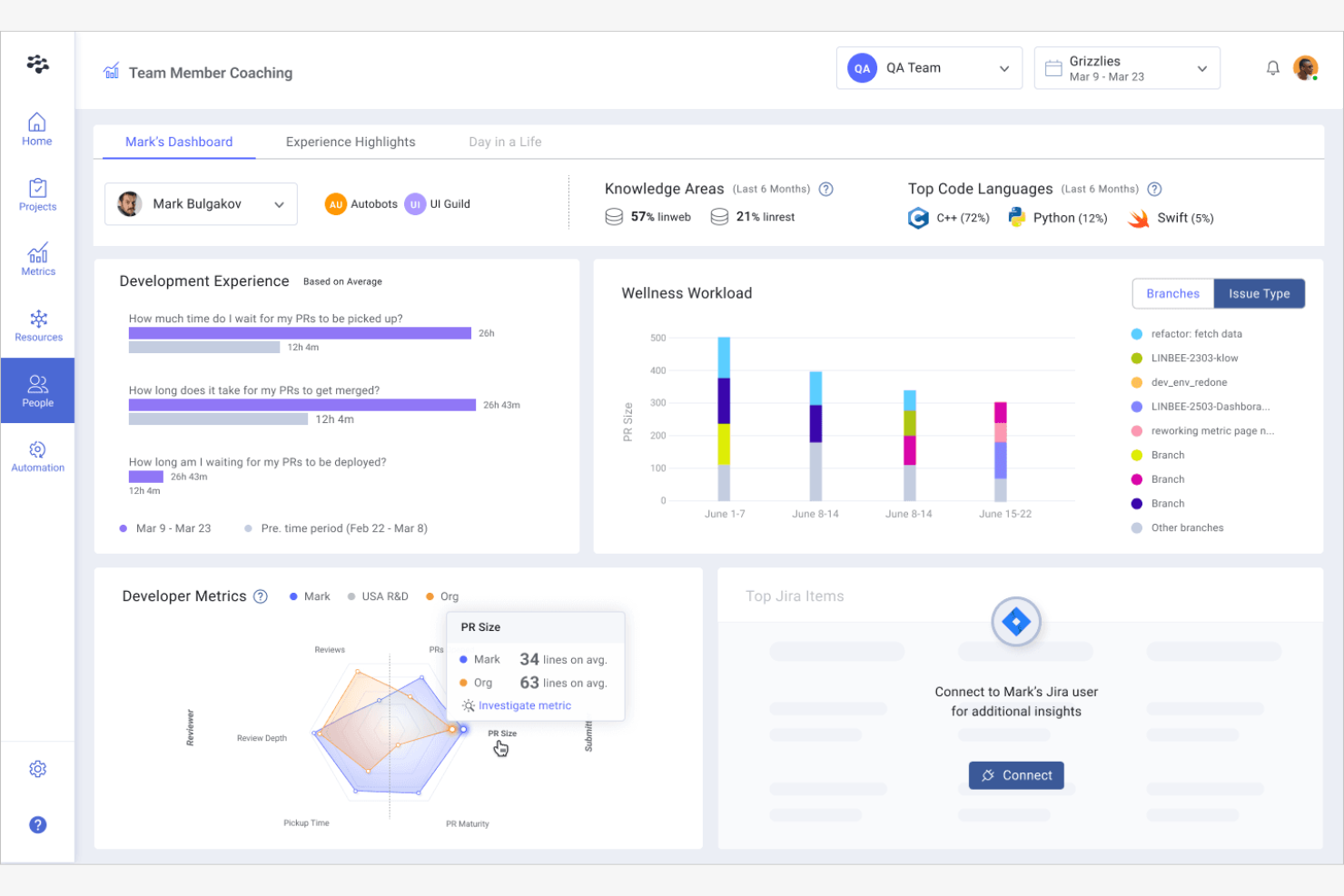
LinearB is a developer analytics tool designed to provide insights into development processes for engineering teams.
Why I picked LinearB: It specializes in engineering analytics, offering tools that help your team understand and improve their workflow.
Standout Features and Integrations:
Features include real-time metrics that track pull request cycle time and deployment frequency, helping teams measure their productivity. It offers project delivery insights that align engineering efforts with business objectives. LinearB also provides workflow optimization tools that identify bottlenecks and suggest improvements.
Integrations include GitHub, GitLab, Bitbucket, Atlassian Jira, Slack, and more.
Pros and Cons
Pros:
- Identifies bottlenecks
- Offers project delivery insights
- Provides real-time metrics
Cons:
- High cost for smaller teams
- Limited non-engineering data
Tabnine
Best for privacy-first, local AI code completion
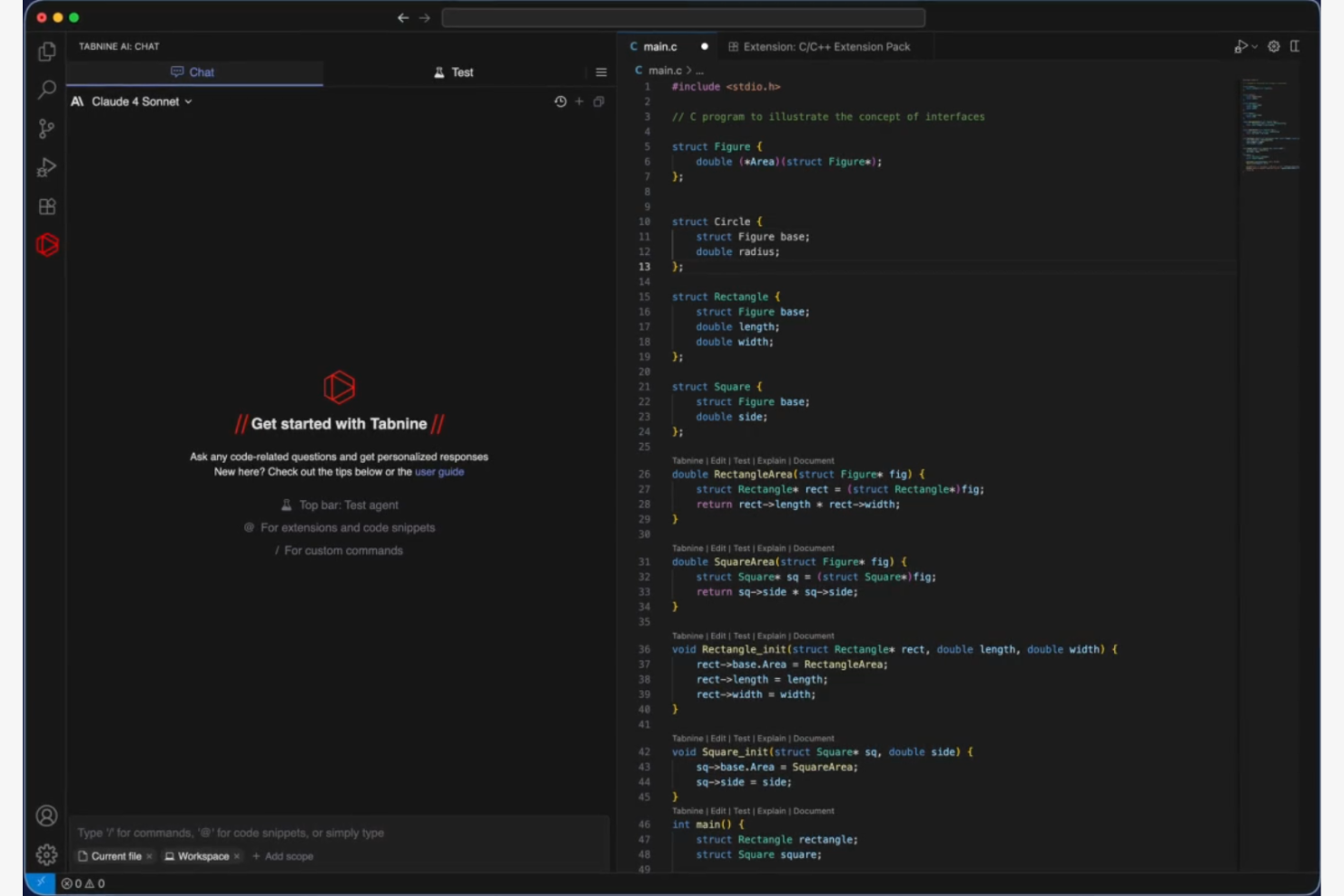
Tabnine is an AI coding assistant designed for enterprises, providing secure coding solutions across various environments, such as SaaS and on-premises. It serves developers by integrating with popular IDEs and aligning with organizational coding standards.
Why I picked Tabnine: Tabnine integrates into your development environment, making it easy to use without disrupting your workflow. Its AI capabilities learn your coding style, offering personalized suggestions that improve over time. The tool also includes code explanation to help maintain high coding standards.
Standout features and Integrations:
Features include real-time code suggestions that adapt to your coding style, support for multiple programming languages, and a feature that explains code snippets. It also offers model fine-tuning to align with your team's specific coding standards.
Integrations include Visual Studio Code, JetBrains, Neovim, and more.
Pros and Cons
Pros:
- Fine-tunes models for consistency
- Offers code explanation
- Adapts to your coding style
Cons:
- Privacy concerns with cloud code
- High memory and CPU usage

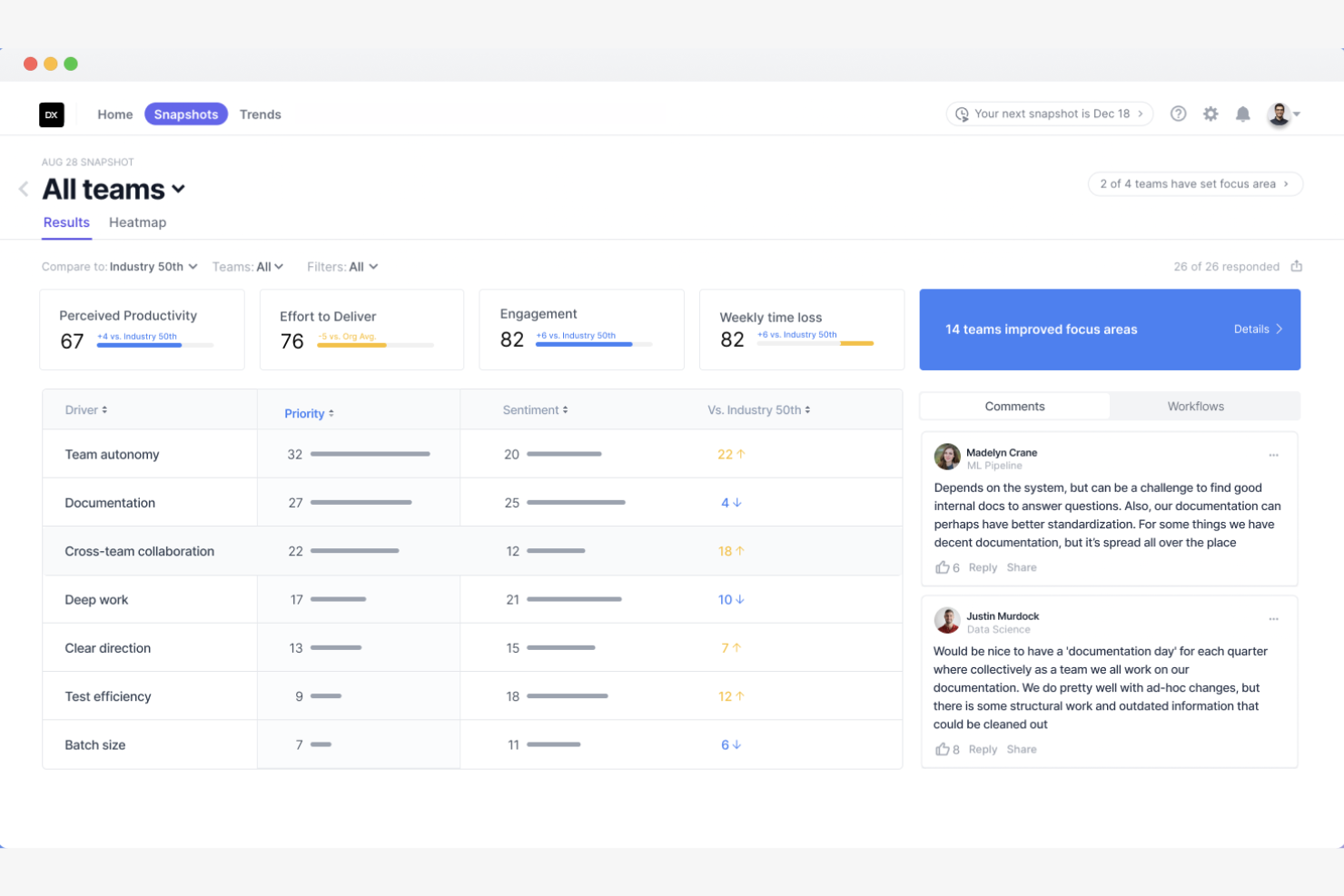
DX is a developer intelligence platform that primarily serves software engineering teams by providing tools for measuring developer productivity and tracking productivity metrics.
Why I picked DX: It offers valuable insights into developer workflows. It provides custom reporting and dashboards that align engineering efforts with business goals. Additionally, AI integration offers recommendations to optimize engineering workflows.
Standout Features and Integrations:
Features include developer experience tools that analyze workflows to identify friction points, DORA metrics to measure output, and AI transformation tracking to monitor technology adoption. It also provides engineering acceleration tools, such as software catalogs and scorecards.
Integrations include GitHub Copilot, GitLab, Jira, Microsoft Azure DevOps, and more.
Pros and Cons
Pros:
- Includes engineering scorecards
- Provides AI recommendations
- Offers custom reporting
Cons:
- Limited to engineering metrics
- Requires data integration
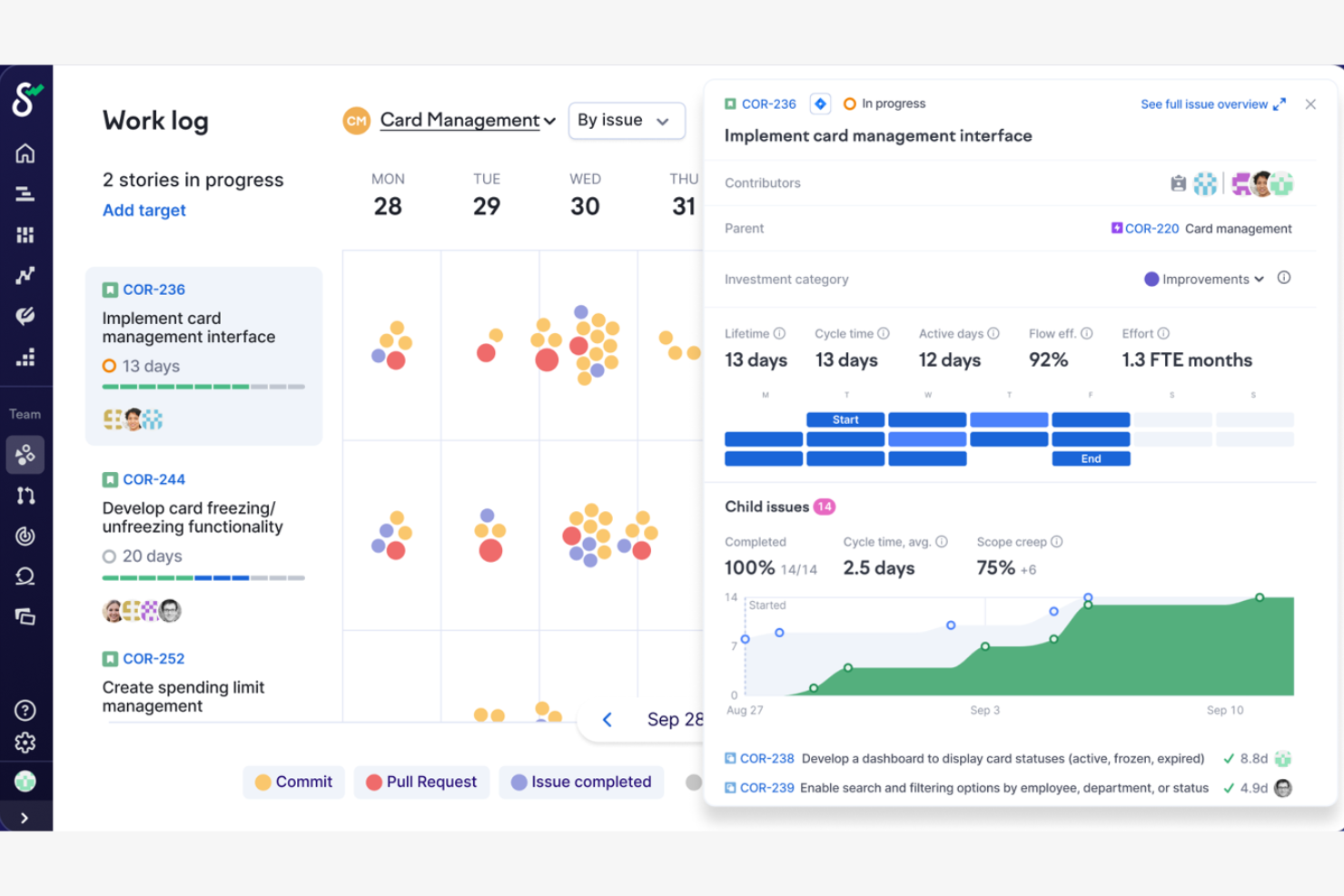
Swarmia is a tool designed to help software development teams track productivity metrics. It helps teams identify bottlenecks and improve collaboration by providing actionable insights into their development processes.
Why I picked Swarmia: It delivers detailed team productivity metrics that help you understand and improve your team's workflow.
Standout Features and Integrations:
Features include customizable dashboards that provide insights into cycle time and deployment frequency. It offers tools for setting and tracking team goals, helping align efforts with business objectives. Additionally, Swarmia provides insights into code review processes and work distribution, aiding in workflow optimization.
Integrations include GitHub, GitLab, Atlassian Jira, Slack, Linear, and more.
Pros and Cons
Pros:
- Tracks deployment frequency
- Offers customizable dashboards
- Supports goal setting
Cons:
- Can feel like micromanagement
- Requires high GitHub/Jira hygiene
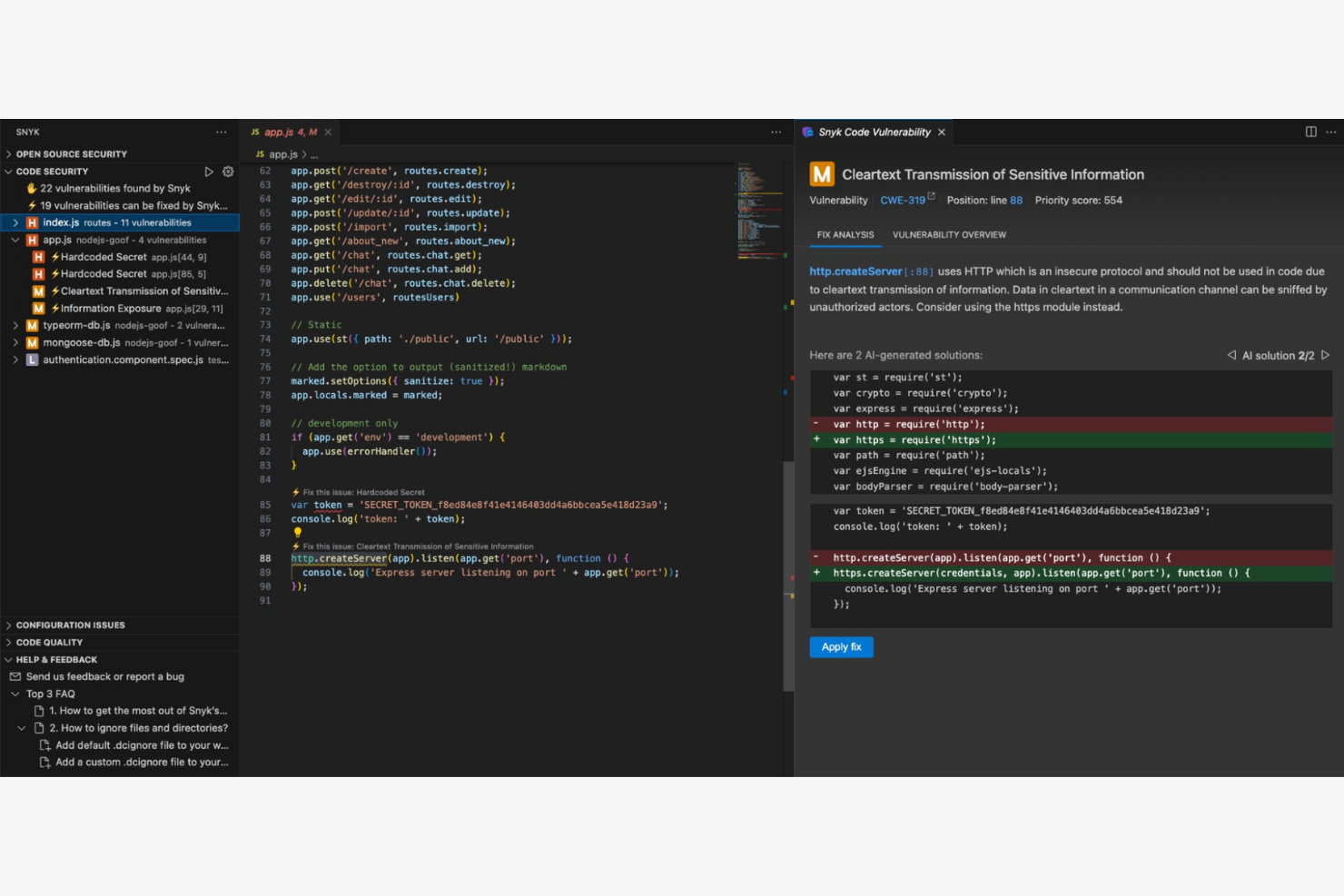
Snyk DeepCode AI is a code review tool that uses AI to help developers identify and fix bugs in their code. It serves software development teams by improving code quality and reducing the time spent on manual code reviews.
Why I picked Snyk DeepCode AI: It excels in code review automation, providing insights that help your team catch bugs early. Its AI engine learns from millions of open-source projects, ensuring that recommendations are relevant and up-to-date. Automating the code review process frees up your team to focus on more complex tasks.
Standout Features and Integrations:
Features include real-time code analysis that identifies bugs and dependency issues and suggests improvements. It provides AI-driven insights that are constantly updated with new data from open-source projects. The tool also offers a user-friendly interface that makes it easy for your team to review and implement suggestions.
Integrations include GitHub, Bitbucket, GitLab, Visual Studio Code, and more.
Pros and Cons
Pros:
- Automates the code review process
- Highly security-focused
- Offers real-time code analysis
Cons:
- AI-fix features is expensive for small teams
- Can be complex to configure and fine-tune Access to some
Diğer Geliştirici Verimliliği Araçları
İşte kısa listeme giremeyen ancak yine de göz atmaya değer bazı ek geliştirici verimliliği aracı seçenekleri:
- Sourcegraph Amp
For code search and navigation
- Notion
For customizable knowledge workspaces
- Swimm
For code documentation
- Jira
For agile project management
- Flow
For low-code workflow automation
- Spacelift
For infrastructure automation
- Chrono Platform
For billing and time tracking
- Greptile
For code search efficiency
- Port
For microservices management
- GitPrime
For engineering performance analytics


How I Evaluate Developer Productivity Tools
When PRs stall and sprint velocity tanks, these tools should tell you exactly why—I split my evaluation into baseline requirements and the differentiators that separate good from great.
Core Functionality (Table Stakes For This List)
When I'm selecting tools for my list, I rank each one on a scale from 0 (does not offer the functionality) to 5 (excels in this area) for each core functionality listed below. Then, I calculate the tool's total score into a percentage. Each tool needs to achieve a minimum total score of 65% to be considered for inclusion.
- Engineering Metrics & Analytics: I check whether a tool tracks DORA metrics like cycle time and deployment frequency, not just vanity stats like raw commit counts.
- Git & Repo Integration: Real-time connections with GitHub, GitLab, or Bitbucket matter here—I look for how deeply a tool pulls PR and branch-level data.
- Project Management Tool Sync: I evaluate whether code activity maps back to Jira tickets or Linear issues so you can tie commits to actual sprint work.
- Workflow Automation: Tools that auto-assign PR reviewers, trigger CI/CD runs, or nudge stale reviews in Slack score higher in my evaluation.
- Bottleneck & Blocker Detection: I look for tools that flag where work gets stuck—like PRs waiting days for review or deployments queued behind failing tests.
- Team & Sprint Reporting: Dashboards need to be customizable enough that an engineering manager can build a sprint summary and a VP can get a capacity forecast.
Once I have a list of tools that meet this criteria, I consider what sets each platform apart.
Differentiating Factors (What Sets Vendors Apart)
Here's how I compare and contrast different vendors:
Standout Features
I pay close attention to AI-powered insights—tools like LinearB and Jellyfish use machine learning to flag delivery risks before they derail a sprint. Investment allocation tracking is another big differentiator. It shows whether your team's effort goes toward new features or gets swallowed by tech debt. I also look for developer experience surveys that pair sentiment data with hard metrics. They give you a fuller picture of team health beyond what cycle time alone reveals.
Beyond Features
Ethical measurement matters here. If a tool exposes individual contributor stats without guardrails, you risk turning a productivity platform into a surveillance tool—and that erodes trust fast. I evaluate whether vendors offer aggregated reporting and clear documentation on scoring methodology. Tech stack depth is equally important. A tool that connects to your CI/CD pipeline, incident management, and observability stack gives a much richer picture than one limited to Git and Jira alone. For enterprise teams, I also check for SOC 2 Type II compliance and SSO support.
Geliştirici Verimliliği Araçları Nasıl Seçilir?
Uzun özellik listeleri ve karmaşık fiyatlandırma yapıları içinde kaybolmak kolaydır. Size özgü yazılım seçim sürecini yürütürken odağınızı korumanıza yardımcı olmak için göz önünde bulundurmanız gereken faktörleri aşağıdaki kontrol listesinde bulabilirsiniz:
| Faktör | Göz önünde bulundurulması gerekenler |
| Ölçeklenebilirlik | Araç ekibinizle birlikte büyüyebilir mi? Kullanıcı sınırlarını ve özelliklerin ölçeklenebilirliğini göz önünde bulundurun. Projeleriniz genişledikçe artan iş yüklerini kaldırabildiğinden emin olun. |
| Entegrasyonlar | Mevcut araçlarınızla çalışıyor mu? Sorunsuz bir iş akışı sağlamak için sürüm kontrol sistemleri ve proje yönetimi araçları gibi mevcut yazılımlarla uyumluluğunu kontrol edin. |
| Özelleştirilebilirlik | İhtiyaçlarınıza göre uyarlayabilir misiniz? Özel süreçlerinize ve ekip tercihlerine uyacak şekilde özelleştirilebilir panolar veya iş akışları sunan araçları tercih edin. |
| Kullanım kolaylığı | Ekibiniz için kullanımı sezgisel mi? Öğrenme eğrisini ve arayüz tasarımını değerlendirin. Kullanıcı dostu bir araç zaman kazandırır ve hayal kırıklığını azaltır. |
| Uygulama ve işe alışma | Ekibiniz ne kadar hızlı çalışmaya başlayabilir? Sorunsuz bir geçiş sağlamak için işe alışma aşamasında eğitim materyallerinin ve desteğin bulunabilirliğini değerlendirin. |
| Maliyet | Bütçenize uygun mu? Kullanıcı ücretleri ve olası gizli maliyetler de dahil olmak üzere fiyatlandırma planlarını karşılaştırın. Yalnızca en düşük fiyatı değil, sunduğu değeri de göz önünde bulundurun. |
| Güvenlik önlemleri | Verileriniz korunuyor mu? Hassas bilgileri güvence altına almak için şifreleme, erişim kontrolleri ve sektör standartlarına uygunluk gibi özellikleri kontrol edin. |
| Destek bulunabilirliği | Gerektiğinde yardım alabilecek misiniz? İhtiyaç duyduğunuzda yardım alabilmenizi sağlamak için sağlayıcının destek saatlerini, yanıt sürelerini ve mevcut iletişim kanallarını göz önünde bulundurun. |
Geliştirici Verimliliği Araçları Nedir?
Geliştirici verimliliği araçları, tekrarlayan görevleri otomatikleştirerek ve iş birliğini geliştirerek geliştiricilerin ve yazılım ekiplerinin daha verimli çalışmasına yardımcı olmak üzere tasarlanmış yazılım çözümleridir. Bu araçlar, kod kalitesini iyileştirmek, projeleri yönetmek ve ilerlemeyi takip etmek için yazılım geliştiricileri, proje yöneticileri ve BT profesyonelleri tarafından yaygın olarak kullanılır. Kod analizi, sürüm kontrolü ve proje yönetimi özellikleri, iş akışının ve ekip verimliliğinin geliştirilmesini destekler. Genel olarak bu araçlar, ekiplerin yüksek kaliteli yazılımları daha hızlı ve daha az hatayla teslim etmesine yardımcı olur.
Özellikler
Geliştirici verimliliği araçlarını seçerken aşağıdaki temel özelliklere dikkat edin:
- Kod analizi: Kodda hata olup olmadığını otomatik olarak tarar ve iyileştirmeler önererek yüksek kod kalitesinin korunmasına yardımcı olur.
- Sürüm kontrolü: Kodda zaman içinde yapılan değişiklikleri yöneterek ekipler arasında iş birliğini ve değişikliklerin izlenmesini sağlar.
- Proje yönetimi: Görevleri ve zaman çizelgelerini düzenleyerek ekiplerin programa uymasına ve teslim tarihlerine yetişmesine yardımcı olur.
- Otomatik test: İşlevselliği doğrulamak ve hataları erkenden yakalamak için kod üzerinde testler çalıştırır; böylece manuel test çalışmalarını azaltır.
- İş birliği araçları: Ekip üyeleri arasındaki iletişimi ve paylaşımı kolaylaştırarak proje koordinasyonunu ve ekip çalışmasını geliştirir.
- Özelleştirilebilir panolar: Kullanıcıların arayüzü ihtiyaçlarına göre uyarlamasına olanak tanıyarak kullanılabilirliği ve verimliliği artırır.
- Entegrasyon özellikleri: Diğer araçlara ve platformlara bağlanarak farklı sistemler arasında sorunsuz bir iş akışı sağlar.
- Güvenlik önlemleri: Hassas verileri şifreleme ve erişim denetimleriyle koruyarak sektör standartlarına uyumu sağlar.
- Gerçek zamanlı geri bildirim: Kod ve proje durumu hakkında anında içgörüler sağlayarak hızlı ayarlamalar yapılmasına ve karar alınmasına olanak tanır.
Avantajlar
Geliştirici verimliliği araçlarının uygulanması, ekibiniz ve işletmeniz için çeşitli avantajlar sağlar. Yararlanabileceğiniz avantajlardan bazıları şunlardır:
- Geliştirilmiş kod kalitesi: Kod analizi özelliklerine sahip araçlar hataları erkenden yakalamaya ve iyileştirmeler önermeye yardımcı olarak daha temiz ve güvenilir kod elde edilmesini sağlar.
- Daha güçlü iş birliği: İş birliği araçları ve entegrasyon özellikleri, ekip üyelerinin iletişim kurup birlikte çalışmasını sağlayarak genel ekip verimliliğini artırır.
- Zaman tasarrufu: Otomatik test ve sürüm kontrolü manuel görevleri azaltarak geliştiricilerin daha karmaşık çalışmalara odaklanması için zaman kazandırır.
- Daha iyi proje yönetimi: Proje yönetimi özellikleri görevleri ve zaman çizelgelerini düzenlemeye yardımcı olarak projelerin planlandığı şekilde ilerlemesini ve teslim tarihlerine uyulmasını sağlar.
- Artırılmış güvenlik: Güvenlik önlemleri hassas verileri koruyarak ekibinizin sektör standartlarına uymasına ve veri ihlallerinden kaçınmasına yardımcı olur.
- Gerçek zamanlı içgörüler: Gerçek zamanlı geri bildirim gibi özellikler proje durumunu anında görünür kılarak hızlı karar alınmasına ve ayarlamalar yapılmasına olanak tanır.
Maliyetler ve Fiyatlandırma
Geliştirici verimliliği araçlarını seçmek, mevcut çeşitli fiyatlandırma modellerinin ve planların anlaşılmasını gerektirir. Maliyetler özelliklere, ekip büyüklüğüne, eklentilere ve diğer unsurlara göre değişir. Aşağıdaki tabloda geliştirici verimliliği araçları çözümlerinde yaygın olarak sunulan planlar, bu planların ortalama fiyatları ve tipik özellikleri özetlenmiştir:
Geliştirici Verimliliği Araçları için Plan Karşılaştırma Tablosu
| Plan Türü | Ortalama Fiyat | Yaygın Özellikler |
| Ücretsiz Plan | $0 | Temel kod düzenleme, sürüm kontrolü ve sınırlı entegrasyonlar. |
| Kişisel Plan | $5-$39/kullanıcı/ay | Gelişmiş kod tamamlama, proje yönetimi araçları ve iş birliği özellikleri. |
| İşletme Planı | $7.99-$50/ kullanıcı/ay | Özelleştirilebilir panolar, otomatik test ve öncelikli destek. |
| Kurumsal Plan | $12-$105/ kullanıcı/ay | Kapsamlı güvenlik önlemleri, tam entegrasyon özellikleri ve özel hesap yönetimi. |
Geliştirici Üretkenliği Araçları SSS
Geliştirici üretkenliği araçları hakkında sık sorulan soruların bazı yanıtları burada yer alıyor:
Geliştirici üretkenliği araçları ekip iş birliğini nasıl geliştirir?
Geliştirici üretkenliği araçları; paylaşılan çalışma alanları, gerçek zamanlı iletişim ve entegre görev yönetimi gibi özellikler sunarak ekip iş birliğini geliştirir. Bu araçlar, ekip üyelerinin aynı bilgilere ve güncellemelere erişmesini sağlayarak iletişim hatalarını azaltır. Örneğin, yerleşik sohbet işlevlerine sahip araçlar hızlı soru ve yanıt alışverişi sağlayarak ekiplerin uyum içinde çalışmasına yardımcı olur. Merkezi bir platform sayesinde ekibiniz proje ilerlemesini takip edebilir, görevler atayabilir ve belgeleri paylaşabilir; böylece herkes aynı bilgilere sahip olur.
Geliştiriciler için yeni üretkenlik araçlarını benimserken karşılaşılan yaygın zorluklar nelerdir?
Yaygın zorluklar arasında değişime direnç, eski sistemlerle uyumluluk sorunları ve dik bir öğrenme eğrisi bulunur. Eğitim sağlayarak, yeni araçların mevcut iş akışlarınıza uyduğundan emin olarak ve geçiş sırasında destek sunarak bu zorlukların üstesinden gelebilirsiniz. Açık iletişim ve anlaşılır belgeler sürecin daha sorunsuz ilerlemesine yardımcı olur.
Geliştirici üretkenliği araçları uzaktan çalışan ekipler için uygun mudur?
Evet, geliştirici üretkenliği araçları uzaktan çalışan ekipler için uygundur. Bu araçlar bulut tabanlı erişim sunarak ekip üyelerinin farklı konumlardan iş birliği yapmasına olanak tanır. Video konferans, dosya paylaşımı ve sanal beyaz tahtalar gibi özellikler, uzaktan çalışan ekiplerin etkili bir şekilde birlikte çalışmasına yardımcı olur. Örneğin, sürüm denetimini destekleyen araçlar tüm ekip üyelerinin en güncel kod tabanı üzerinde çalışmasını sağlayarak hataları ve çakışmaları en aza indirir. Sorunsuz iletişim ve iş birliğini kolaylaştıran bu araçlar, uzaktan çalışmayı daha verimli ve yönetilebilir hâle getirir.
Geliştirici üretkenliği araçlarını mevcut yazılımlarla entegre ederken nelere dikkat etmeliyim?
Geliştirici üretkenliği araçlarını mevcut yazılımlarla entegre ederken uyumluluğu ve entegrasyon kolaylığını göz önünde bulundurun. Aracın mevcut sistemleriniz için API’leri veya bağlayıcıları destekleyip desteklemediğini kontrol edin. Entegrasyon için gereken çabayı ve iş akışınızda oluşabilecek olası kesintileri değerlendirin. Örneğin, bazı araçlar GitHub veya Atlassian Jira gibi popüler platformlarla kullanıma hazır entegrasyonlar sunarak süreci kolaylaştırabilir. Mevcut teknoloji yığınınızı anlamak ve onunla uyumlu araçları seçmek, entegrasyon sürecinde zaman kazanmanızı ve sorunları önlemenizi sağlar.
Geliştirici üretkenliği araçlarının yatırım getirisini nasıl ölçebilirim?
Bir aracı kullanıma sunmadan önce ve sunduktan sonra dağıtım sıklığı, hata çözüm süreleri ve kod inceleme tamamlanma süreleri gibi temel ölçümleri takip edin. Benimseme oranlarını izleyin ve araçların geliştirici memnuniyetini ve proje teslimini nasıl etkilediğine ilişkin geri bildirim toplayın. Nicel veriler ve ekip görüşleri birlikte yatırımınızın gerçek değerini ortaya koyar.
Geliştirici üretkenliği araçlarının etkililiğini nasıl ölçebilirim?
Geliştirici üretkenliği araçlarının etkililiğini ölçmek için kod kalitesi, dağıtıma kadar geçen süre ve ekip memnuniyeti gibi temel performans göstergelerini (KPI’lar) takip edin. Bu ölçümleri zaman içinde izlemek için yerleşik analiz ve raporlama özelliklerini kullanın. Örneğin, aracınız otomatik test sunuyorsa sürüm öncesinde yakalanan hata sayısını takip edebilirsiniz. Bu KPI’ları düzenli olarak gözden geçirmek, aracın ekibinizin ihtiyaçlarını karşılayıp karşılamadığını ve iş hedeflerinize katkıda bulunup bulunmadığını değerlendirmenize yardımcı olur. Sürekli iyileştirme sağlamak için yaklaşımınızı bu içgörülere göre ayarlayın.