

2026’da İncelenen En İyi 10 Belge Sürüm Kontrolü Yazılımı

10 En İyi Belge Sürüm Kontrolü Yazılımları


Belgeleri yönetmek, özellikle birden fazla belge sürümünü takip etmekte ve ekibinizdeki herkesin aynı bilgilerden haberdar olmasını sağlamakta zorlanıyorsanız, baş ağrısına dönüşebilir. Neyse ki bu yükü hafifletmek için belge sürüm kontrolü yazılımları mevcut.
Deneyimlerime göre doğru araç, hataları azaltıp iş birliğini geliştirerek belgeleri ele alış biçiminizi değiştirebilir. Bu makalede, en iyi seçeneklerden oluşan tarafsız bir liste sunmak için çeşitli yazılım çözümlerini bağımsız olarak test edip inceledim.
Burada, her biri kendine özgü güçlü yönleri nedeniyle seçilmiş en iyi tercihlerimi bulacaksınız. İster kullanımı kolay arayüzler ister belirli sektör uyumluluğu arıyor olun, burada size uygun bir seçenek var. Bu makalenin sonunda, belge yönetiminizi daha basit ve verimli hâle getirmenize hangi aracın en iyi şekilde yardımcı olacağını biliyor olmalısınız.
Why Trust Our Software Recommendations
Our team has been testing and reviewing software since 2012. As project managers ourselves, we know how difficult—and important—it is to choose the right software.
For this guide, we evaluated tools using hands-on testing and independent research, scoring tools using our selection criteria. We also draw on insights from industry thought leaders and practicing project management experts.
Our reviews reflect our human editorial judgment, not a sales pitch.
Expert reviewers:
Belge Sürüm Kontrolü Yazılımları Karşılaştırma Tablosu
Bu karşılaştırma tablosu, en iyi belge sürüm kontrolü yazılımı seçimlerim için fiyatlandırma ayrıntılarını özetlemektedir:
| Tool | Starting Price | Website | |
|---|---|---|---|
| Best for difference viewer | 4.7 out of 5 | Pricing upon request 14-day free trial + free demo available | Website |
| Best for document lifecycle automation | 4.8 out of 5 | Pricing upon request Free demo available | Website |
| Best for healthcare document management | 5.0 out of 5 | Pricing upon request Free demo available | Website |
| Best for multilingual support | 4.6 out of 5 | Pricing upon request Free demo available | Website |
| Best for collaborative PDF reviews | 4.5 out of 5 | $19.99/user/month 7-day free trial | Website |
| Best for metadata-driven organization | 4.4 out of 5 | $65/user/month Free demo available | Website |
| Best for engineering document control | 4.5 out of 5 | Pricing upon request Free demo available | Website |
| Best for open-source adaptability | — | Pricing upon request Free demo available | Website |
| Best for real-time document editing | — | Pricing upon request Free demo available | Website |
| Best for integration with Microsoft Office | — | Pricing upon request Free demo available | Website |
En İyi Belge Sürüm Kontrolü Yazılımları İncelemeleri
Aşağıda, kısa listeme giren en iyi belge sürüm kontrolü yazılımlarının ayrıntılı özetlerini bulabilirsiniz. İncelemelerim, size en uygun aracı bulmanıza yardımcı olmak için her aracın temel özelliklerine, artılarına ve eksilerine, entegrasyonlarına ve ideal kullanım alanlarına net bir bakış sunar.

Best for difference viewer

Document360 is a documentation platform that supports version-controlled knowledge base creation, making it ideal for organizations that need to manage frequent content updates across teams and departments. It offers tools for internal and external documentation, SOPs, user guides, and more.
Why I picked Document360: Document360 stood out for its robust version control features at both the article and project levels. The platform automatically tracks every change, maintains detailed audit trails, and allows teams to fork and publish new versions while preserving historical accuracy. I also liked its difference viewer, which highlights edits across versions to make revisions easier to track and review. These features are especially useful for teams working in fast-paced environments or regulated industries.
Standout Features & Integrations:
Features include automatic version creation when a document is forked, a difference viewer to compare document changes, and project-level versioning to manage large-scale content updates without disrupting published material. Role-based permissions and audit trails further support secure collaboration.
Integrations include Zendesk, Freshdesk, Intercom, Drift, Slack, GitHub, Make, Salesforce, and Microsoft Teams.
Pros and Cons
Pros:
- Smart file management features
- Offers powerful reporting and analytics
- Provides robust version control with audit trails
Cons:
- Support for large media files needs improvement
- Most integrations are only available on higher-tier plans
New Product Updates from Document360

Document360 Adds Feedback APIs, MCP Tools, and Zendesk Authentication
Document360 adds feedback APIs, expanded MCP tools, Zendesk account authentication, and the ability to reopen closed feedback. These updates help teams manage feedback, automate knowledge base tasks, and control integration access. For more information, visit Document360’s official site.
 .
Doxis
Best for document lifecycle automation

Doxis is an enterprise content services platform that combines AI-powered version control, document lifecycle management, check-in/check-out controls, audit trails, and role-based approval workflows.
Who Is Doxis Best For?
Doxis is built for large enterprises with 100+ users that manage high volumes of documents across complex, multi-stakeholder processes.
Why I Picked Doxis
I picked Doxis as one of the best because its AI-powered content understanding layer goes beyond basic version tracking. The platform automatically classifies and tags incoming documents, then routes them through version-controlled approval workflows without manual setup. I particularly like the commit-and-diff model, which saves only the changed parts of a document as a new version, keeping version history precise and audit-ready at every stage of the document lifecycle.
Doxis Key Features
- Automated check-in/check-out controls: Locks documents during editing to prevent conflicting changes by other users.
- Role-based access permissions: Lets you control who can view, edit, or approve each document version.
- Exportable audit trails: Generates complete, exportable logs of all document changes, author actions, and approval steps.
- Multi-system integration: Connects with platforms like SAP, Salesforce, and Microsoft Dynamics to centralize project files.
Doxis Integrations
Doxis offers native integrations with SAP, Salesforce, Microsoft 365, and Microsoft Dynamics, and provides an API for custom integrations.
Pros and Cons
Pros:
- Supports on-premise and cloud deployment options
- Granular audit trails for strict compliance
- Automates document classification
Cons:
- Complex setup for smaller project teams
- Implementation requires IT involvement

DocTract
Best for healthcare document management
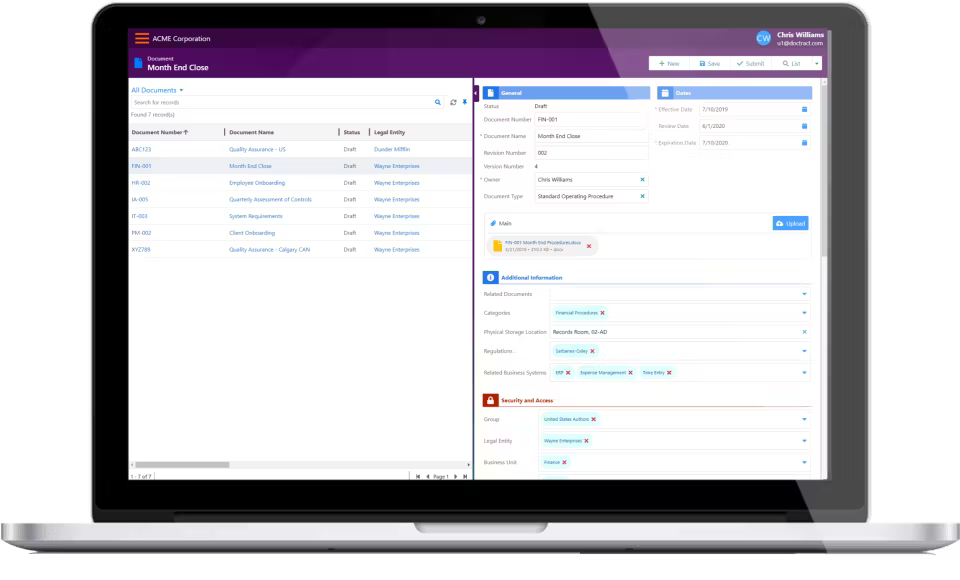
DocTract is a cloud-based policy management platform designed to assist organizations in efficiently handling their policy and procedure documents. It serves various industries, including healthcare, by providing tools for document creation, revision, approval, and distribution.
Why I picked DocTract: DocTract offers features tailored for healthcare organizations, such as automated workflows that ensure the right personnel review and approve documents promptly. The platform also provides a clinical library with full-text search that allows staff to quickly access necessary documents. Additionally, DocTract's version control maintains a complete audit trail, which is crucial for compliance in healthcare settings.
Standout features & integrations:
Features include automated email notifications to alert staff of new or updated policies, customizable employee portals for easy access to relevant documents, and the ability to generate compliance binders that compile necessary documents for audits.
Integrations include Microsoft Word, Microsoft Excel, SharePoint, Box, and Google Drive.
Pros and Cons
Pros:
- Comprehensive compliance tracking
- Effective policy management
- Focus on healthcare compliance
Cons:
- Complex for non-healthcare users
- Limited customizability

Best for multilingual support

LogicalDOC is a document management system designed for businesses that operate in multilingual environments. It facilitates document organization and retrieval while catering to global teams with diverse language needs.
Why I picked LogicalDOC: LogicalDOC offers extensive multilingual support, making it ideal for teams operating in diverse linguistic environments. The system's interface is available in multiple languages, which allows your team members to work in their preferred language. Additionally, LogicalDOC employs specialized indexing algorithms to manage documents in various languages and ensure accurate retrieval regardless of the document's language.
Standout Features & Integrations:
Features include version control that automatically manages multiple versions of a document as changes occur and role-based access control to ensure that only authorized personnel can access or modify certain documents.
Integrations include Microsoft Office, Google Drive, Dropbox, Box, and SharePoint.
Pros and Cons
Pros:
- Supports global teams
- Advanced search capabilities
- Intuitive user interface
Cons:
- Limited mobile functionality
- Regular updates needed

Best for collaborative PDF reviews

Adobe Acrobat is a strong option for teams that need to review, approve, and secure PDF documents without losing track of edits and feedback. It combines commenting, document comparison, permissions, and e-signature workflows in one platform, which makes it especially useful for business teams managing controlled document reviews.
Who Is Adobe Acrobat Best For?
Teams in legal, finance, or operations who need centralized control over PDF documents and workflows.
Why I Picked Adobe Acrobat
I picked Adobe Acrobat because it gives your team a structured way to review PDFs together through shared comments, markup tools, and tracked review workflows. You can collect feedback in one document, monitor reviewer activity, and keep discussions tied to the exact content being reviewed. I also like that it includes version comparison tools, which help you check changes between PDF files when you need to confirm edits or review updates. For teams handling approval-heavy documents, these features make it easier to manage collaborative PDF reviews with more control and visibility.
Adobe Acrobat Key Features
Some other features in Adobe Acrobat support secure document review and control across business teams:
- PDF comparison tools: Compare two versions of a PDF to identify changes and review edits more efficiently.
- Shared review tools: Collect comments and annotations from multiple reviewers in one shared document workflow.
- Admin controls: Manage user access, product assignments, and organizational settings through Adobe Admin Console.
- Batch actions: Apply tasks like watermarking, conversion, and file preparation across multiple PDFs at once.
Adobe Acrobat Integrations
Integrations include Microsoft 365, Google Workspace, Microsoft Teams, SharePoint, and Box.
Pros and Cons
Pros:
- Detailed audit trails for compliance tracking
- Supports granular permission and access controls
- Native integration with Microsoft 365 and Teams
Cons:
- Bulk document actions can be slow with large files
- Advanced features require separate enterprise licensing

M-Files
Best for metadata-driven organization

M-Files is a document management platform designed to help businesses organize, store, and track their files efficiently. Instead of relying on traditional folder structures, it categorizes documents based on metadata, making information easier to find and manage.
Why I picked M-Files: The platform’s metadata-driven approach allows your team to find documents based on content, not just location. This feature reduces time spent searching for files and improves workflow efficiency. M-Files also offers version control, which helps ensure that your team works with the most current documents available. Additionally, compliance support features help meet industry regulations, providing peace of mind.
Standout Features & Integrations:
Features include a check-out and check-in functionality that prevents conflicting edits by allowing only one user to modify a document at a time. Additionally, M-Files offers advanced document comparison tools that can enable you to compare different versions or documents to identify changes and maintain accuracy.
Integrations include Microsoft Office, Salesforce, SharePoint, SAP, QuickBooks, Google Drive, Microsoft Dynamics, Outlook, AutoCAD, and DocuSign.
Pros and Cons
Pros:
- Reduces file search time
- Strong compliance support
- Metadata-driven document organization
Cons:
- May need frequent updates
- Initial setup is complex

Best for engineering document control
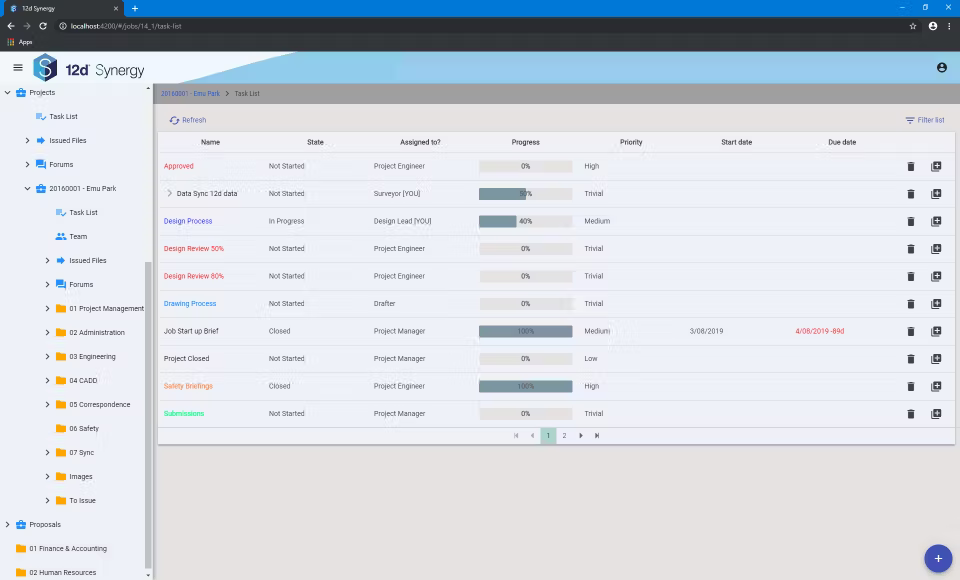
12d Synergy is a document management software tailored for engineering and construction firms. It helps teams manage complex project documents and collaborate effectively.
Why I picked 12d Synergy: 12d Synergy is made for engineering workflows, with features like CAD integration and version control to keep your team on track with accurate project data. The platform also offers file locking to prevent document conflicts during collaboration and the ability to handle large files for detailed engineering documents.
Standout Features & Integrations:
Features include side-by-side version comparison that lets your team quickly identify differences between document revisions without manual checks. A built-in approval workflow ensures that only authorized changes are published. Furthermore, version branching allows teams to work on different iterations of a document simultaneously.
Integrations include AutoCAD, Revit, MicroStation, Civil 3D, Microsoft Office, SharePoint, Outlook, SQL Server, and Azure.
Pros and Cons
Pros:
- Prevents document conflicts
- Supports large file management
- Designed for engineering workflows
Cons:
- Steep learning curve
- Regular updates needed


OpenKM is an open-source document management system suited for businesses seeking customizable solutions. It serves organizations that need flexible document handling and storage capabilities.
Why I picked OpenKM: OpenKM's open-source nature allows your team to adapt and customize the system to fit specific organizational needs. Its modular architecture lets you add or modify features to help the platform evolve with your requirements. Additionally, OpenKM offers a plug-in architecture that makes it easy to extend functionalities to support various file formats and integrations.
Standout Features & Integrations:
Features include document indexing, which makes it easier for your team to organize and retrieve files. The platform also offers an integrated BPM engine to define and reuse business logic, and automatic tasks that apply validation rules and actions on documents.
Integrations include Microsoft Office, Google Drive, Dropbox, Alfresco, and SharePoint.
Pros and Cons
Pros:
- Efficient workflow automation
- Comprehensive document management tool
- Highly adaptable open-source platform
Cons:
- Complex customization process
- Limited support for non-technical users


Collabora Online is an open-source office suite that enables collaborative editing of documents directly in your web browser. It's designed for organizations seeking a self-hosted solution to maintain control over their data while facilitating real-time collaboration.
Why I picked Collabora Online: Collabora Online’s real-time collaboration feature allows your team to work together on documents without delays. The software supports multiple file formats, making it versatile for various document types. It also offers strong version control, which ensures that changes are tracked and managed effectively.
Standout Features & Integrations:
Features include a familiar user interface that minimizes the learning curve, extensive formatting tools for creating professional documents, and the ability to add comments and track changes, facilitating effective collaboration.
Integrations include Nextcloud, ownCloud, Seafile, Moodle, Alfresco, SharePoint, EGroupware, JupyterHub, Mattermost, and Zimbra.
Pros and Cons
Pros:
- Versatile document management
- Customizable open-source platform
- Real-time collaboration
Cons:
- Can be resource-intensive
- Requires technical expertise

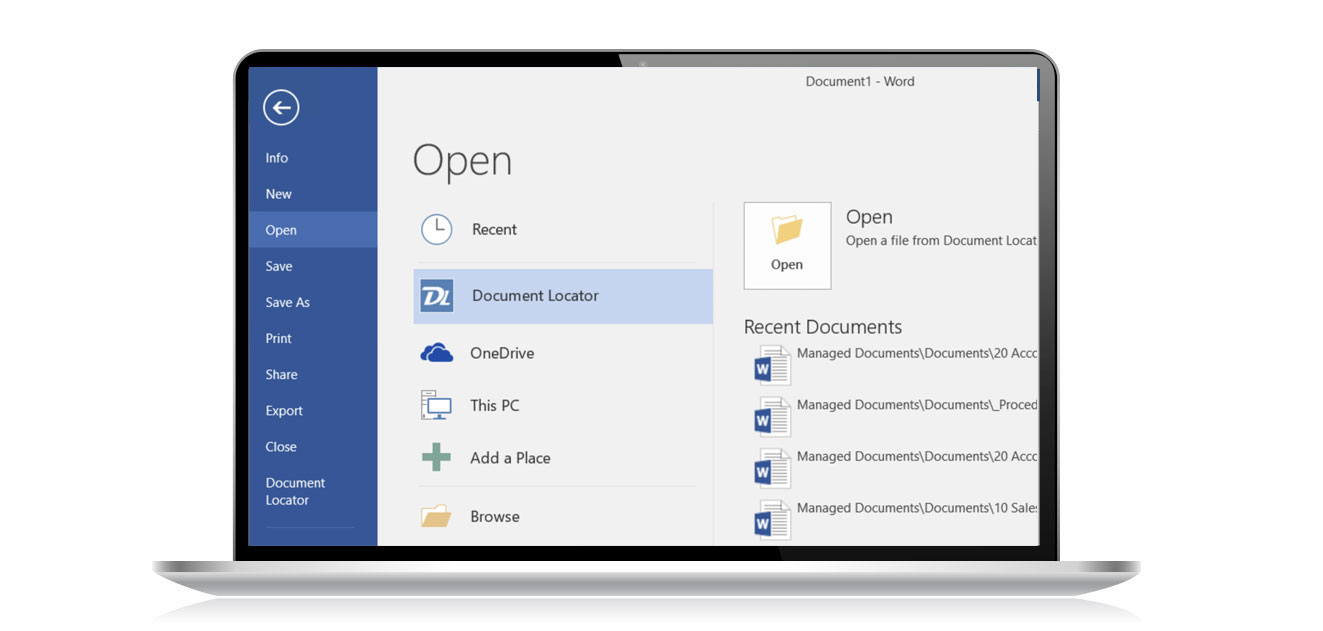
Document Locator is a document management software tailored for businesses that heavily rely on Microsoft Office. It helps users manage documents efficiently by integrating directly with familiar tools like Word and Excel.
Why I picked Document Locator: Document Locator integrates with Microsoft Office, so your team can manage documents within the apps they already use. It additionally provides version control features, automated workflows, and drag-and-drop functionality to simplify document handling. The platform also includes document scanning to digitize physical files for easier management.
Standout Features & Integrations:
Features include check-in/check-out controls to prevent version conflicts, ensuring that multiple users don’t overwrite each other’s changes. Additionally, Document Locator supports automated version numbering, which reduces manual errors and ensures that teams always work with the latest file.
Integrations include Microsoft Office, SharePoint, Active Directory, and Windows Explorer.
Pros and Cons
Pros:
- Strong version control
- Document scanning feature
- Seamless Microsoft Office integration
Cons:
- No mobile app support
- May feel overwhelming initially
Diğer Belge Sürüm Kontrolü Yazılımları
Kısa listeme giremeyen ancak yine de göz atmaya değer bazı ek belge sürüm kontrolü yazılımı seçenekleri şunlardır:
- Virtual Cabinet
For secure client portals
- isoTracker
For compliance-focused industries
- QT9 QMS
For quality management teams
- Qualityze Suite
For compliance with ISO standards
- Paradigm 3
For customizable workflows
- Procore
For construction project documents
- Copado
For Salesforce version control
- Google Workspace
For real-time collaboration
- DocuWare
For cloud document management
- Microsoft SharePoint
For enterprise document sharing
- Alfresco
For open-source enterprise solutions
- MasterControl
For FDA compliance
- Accruent
For engineering teams


How I Evaluate Document Version Control Software
I evaluate document version control tools across two layers: the baseline must-haves—like automated version history and rollback—and the differentiators that set the best options apart for PM teams.
Core Functionality (Table Stakes For This List)
When I'm selecting tools for my list, I rank each one on a scale from 0 (does not offer the functionality) to 5 (excels in this area) for each core functionality listed below. Then, I calculate the tool's total score into a percentage. Each tool needs to achieve a minimum total score of 65% to be considered for inclusion.
- Version History Tracking: I check whether each revision is automatically captured with author attribution and timestamps, so you can trace exactly who changed a project spec and when.
- Rollback & Restore: The ability to revert to any prior version matters—especially when a stakeholder approves edits that later need to be undone mid-sprint without losing intermediate work.
- Check-In/Check-Out Controls: I evaluate how the tool handles concurrent access, looking for document locking that prevents two engineers from overwriting each other's updates to a shared requirements doc.
- Version Comparison: Side-by-side or redline comparison between versions is something I look for, since spotting what changed between draft rounds of a deliverable saves hours of manual review.
- Access Permissions & Approvals: I consider whether the tool supports role-based permissions paired with approval workflows, like gating a final project plan version behind sign-off from a PMO lead.
- Audit Trail & Change Logs: A full, exportable log of document activity is key for teams that need to demonstrate compliance during audits or provide clients with a documented history of deliverable changes.
Once I have a list of tools that meet the criteria, I consider what sets each platform apart.
Differentiating Factors (What Sets Vendors Apart)
Here's how I compare and contrast different vendors:
Standout Features
Automated version numbering is a big one—I look for tools that tie major/minor version increments to approval milestones, so a project charter automatically jumps from v1.2 to v2.0 after PMO sign-off. Real-time co-authoring with built-in conflict resolution also matters when multiple contributors are editing a shared deliverable at once. For teams with field staff, I evaluate mobile and offline access so coordinators on-site can check out drawings and sync changes later.
Beyond Features
Integrations with your existing PM stack matter a lot—I check whether a tool connects natively with platforms like Jira, Asana, or Smartsheet so version-controlled docs stay linked to the tasks they belong to. Compliance certifications are another key factor, especially for teams in regulated industries where SOC 2 or ISO 27001 can make or break a vendor decision. I also evaluate how well each platform scales across project portfolios, since a PMO managing dozens of concurrent programs needs multi-workspace support without performance issues.
Belge Sürüm Kontrolü Yazılımı Nasıl Seçilir?
Uzun özellik listeleri ve karmaşık fiyatlandırma yapıları arasında kaybolmak kolaydır. Kendinize özgü yazılım seçim süreciniz boyunca odaklanmanızı sağlamak için aşağıda göz önünde bulundurmanız gereken faktörlerin bir kontrol listesi yer alıyor:
| Faktör | Dikkat Edilmesi Gerekenler |
| Ölçeklenebilirlik | Yazılımın ekibinizle birlikte büyüyebildiğinden emin olun. Artan belge hacimlerini ve kullanıcı sayısını performans sorunları yaşamadan yönetebilen çözümleri arayın |
| Entegrasyonlar | Aracın Microsoft Office, Google Workspace veya ekibinizin kullandığı diğer proje yönetimi araçları gibi mevcut sistemlerinizle entegre olup olmadığını kontrol edin |
| Özelleştirilebilirlik | Yazılımı süreçlerinize uyacak şekilde ne kadar kolay uyarlayabileceğinizi değerlendirin. Özelleştirilebilir iş akışları ve kullanıcı panoları gibi özellikleri arayın |
| Kullanım Kolaylığı | Ekibinizin kolayca benimseyebileceği, sezgisel ve kullanımı kolay bir yazılım seçin. Kullanıcı dostu bir arayüz eğitim süresini azaltır ve üretkenliği artırır |
| Bütçe | Yazılımın maliyetini bütçenizle uyumlu hâle getirin. Yalnızca abonelik ücretini değil, kurulum veya destek gibi ek maliyetleri de göz önünde bulundurun |
| Güvenlik Önlemleri | Yazılımın hassas belgeleri korumak için güçlü güvenlik önlemlerine sahip olduğundan emin olun. Şifreleme ve erişim denetimleri gibi özellikler temel öneme sahiptir |
| Destek Hizmetleri | Ekibinize yardımcı olmak için 7/24 yardım, özel müşteri yöneticileri ve kapsamlı bilgi tabanları gibi mevcut destek seçeneklerini değerlendirin |
| Uyumluluk | Yazılımın, kuruluşunuzun uyması gereken ISO veya FDA düzenlemeleri gibi sektöre özgü uyumluluk gerekliliklerini karşıladığını doğrulayın |
Belge Sürüm Denetimi Yazılımındaki Trendler
Araştırmam sırasında farklı belge sürüm denetimi yazılımı sağlayıcılarının sayısız ürün güncellemesini, basın bültenini ve sürüm kaydını inceledim. Takip ettiğim yeni trendlerden bazıları şunlar:
- Yapay Zekâ Destekli İçgörüler: Yapay zekâ, belge kullanım kalıplarını analiz etmek ve iyileştirmeler önermek için kullanılıyor. Bu, ekiplerin iş akışlarını optimize etmesine ve darboğazları belirlemesine yardımcı olur. Örneğin bazı sağlayıcılar, daha hızlı erişim için sık kullanılan belgeleri öne çıkaran yapay zekâ araçları sunuyor.
- Güvenlik için Blok Zinciri: Belge güvenliğini ve özgünlüğünü artırmak için blok zinciri teknolojisi araştırılıyor. Belge değişikliklerinin değiştirilemez bir kaydını sağlayarak şeffaflık ve güven oluşturuyor. Sağlayıcılar, belge bütünlüğünü doğrulamak için blok zincirini kullanmaya başlıyor.
- Gelişmiş İş Birliği Araçları: Sağlayıcılar artık gerçek zamanlı iş birliği özelliklerini geliştirmeye odaklanıyor. Buna, ekiplerin uzaktan çalışırken bile daha etkili bir şekilde birlikte çalışmasına olanak tanıyan eş zamanlı düzenleme ve gelişmiş yorum sistemleri de dâhil.
- Kullanıcı Deneyimine Odaklanma: Çok az eğitim gerektiren, daha sezgisel arayüzler tasarlamaya yönelik bir değişim var. Sağlayıcılar, araçlarını daha erişilebilir hâle getirmek ve öğrenme eğrisini azaltmak için kullanıcı odaklı tasarıma yatırım yapıyor.
- Sürdürülebilirlik Özellikleri: Bazı sağlayıcılar, işletmelerin karbon ayak izlerini takip etmelerine ve azaltmalarına yardımcı olan özellikler sunuyor. Buna, kâğıt kullanımını en aza indirmek için dijital belgeleri daha verimli yönetmeye yönelik araçlar da dâhil.
Belge Sürüm Denetimi Yazılımı Nedir?
Belge sürüm denetimi yazılımı, kullanıcıların gerektiğinde önceki sürümlere erişebilmesi, bunları inceleyebilmesi ve geri dönebilmesi için dijital dosyalardaki değişiklikleri takip eden bir araçtır. Proje yöneticileri, BT ekipleri ve uyumluluk görevlileri bu araçları doğruluğu korumak, veri kaybını önlemek ve iş birliğini geliştirmek için kullanır.
Sürüm geçmişi, erişim denetimleri ve otomatik yedeklemeler ekiplerin düzenli kalmasına, hataları azaltmasına ve düzenleyici gereklilikleri karşılamasına yardımcı olur. Genel olarak bu araçlar kayıtların tutarlılığını korur, ekip çalışmasını kolaylaştırır ve belgelerin zaman içinde güvenilir kalmasını sağlar.
Belge Sürüm Denetimi Yazılımının Özellikleri
Belge sürüm denetimi yazılımı seçerken aşağıdaki temel özelliklere dikkat edin:
- Sürüm takibi: Kullanıcıların değişiklikleri izlemesini ve doğruluk ile tutarlılığı güvence altına alarak önceki belge sürümlerine geri dönmesini sağlar.
- Erişim denetimi: Yalnızca yetkili personelin belgeleri görüntüleyebilmesini veya düzenleyebilmesini sağlamak için kullanıcı izinlerini yönetir.
- İş birliği araçları: Ekip çalışmasını ve iletişimi kolaylaştırmak için eş zamanlı düzenleme ve yorum yapma gibi özellikler sunar.
- Denetim izleri: Uyumluluk ve hesap verebilirlik amaçları doğrultusunda belge değişikliklerinin kaydını tutar.
- Otomatik iş akışları: Belge onay süreçlerini geliştirerek manuel çabayı azaltır ve işlemleri hızlandırır. Bunu gerçekleştirmek için belge otomasyonu yazılımı da kullanabilirsiniz.
- Üst veri yönetimi: Belgeleri konum yerine içeriğe göre düzenler; bu da dosyaları bulmayı ve yönetmeyi kolaylaştırır.
- Güvenlik önlemleri: Hassas bilgileri şifreleme ve diğer güvenlik önlemleriyle korur.
- Entegrasyon olanakları: İşlevselliği artırmak için Microsoft Office veya Google Workspace gibi diğer iş sistemlerine bağlanır.
- Özelleştirilebilirlik: Kullanıcıların yazılımı belirli iş süreçlerine ve gereksinimlerine uyacak şekilde düzenlemesine olanak tanır.
- Uyumluluk desteği: Belge yönetimi uygulamalarının sektöre özgü standartları ve düzenlemeleri karşılamasını sağlar.
Belge Sürüm Denetimi Yazılımının Faydaları
Bir belge sürüm denetimi sistemi uygulamak, ekibiniz ve işletmeniz için çeşitli faydalar sağlayabilir. Yararlanabileceğiniz bazı faydalar şunlardır:
- Gelişmiş doğruluk: Sürüm takibi, ekibinizin her zaman en güncel belgelerle çalışmasını sağlayarak hataları azaltır.
- Gelişmiş güvenlik: Erişim denetimi ve şifreleme, hassas bilgileri yetkisiz erişime karşı korur.
- Daha iyi iş birliği: Eş zamanlı düzenleme ve yorum yapma gibi iş birliği araçları, ekip çalışmasını daha verimli ve uyumlu hâle getirir.
- Artan uyumluluk: Denetim izleri ve uyumluluk desteği, hesap verebilirliği ve düzenlemelere bağlılığı güvence altına alarak sektör standartlarının karşılanmasına yardımcı olur.
- Kolaylaştırılmış süreçler: Otomatik iş akışları belge onaylarını hızlandırır; bu da zaman kazandırır ve manuel iş yükünü azaltır.
- Daha kolay belge erişimi: Üst veri yönetimi dosyaları içeriğe göre düzenleyerek ihtiyaç duyduğunuz şeyi daha hızlı bulmanızı sağlar.
- Özelleştirilebilir çözümler: Özelleştirilebilirlik, yazılımı belirli iş gereksinimlerinize ve süreçlerinize uyacak şekilde düzenlemenize olanak tanır.
Belge Sürüm Denetimi Yazılımının Maliyetleri ve Fiyatlandırması
Belge sürüm denetimi yazılımı seçerken mevcut çeşitli fiyatlandırma modellerini ve planları anlamak gerekir. Seçenekler ücretsiz sürüm denetimi yazılımından daha gelişmiş ücretli planlara kadar uzanır. Maliyetler özelliklere, ekip büyüklüğüne, eklentilere ve daha fazlasına göre değişir. Aşağıdaki tabloda, yaygın planlar, ortalama fiyatları ve belge sürüm denetimi yazılımı çözümlerinde genellikle bulunan özellikler özetlenmektedir:
Belge Sürüm Denetimi Yazılımı İçin Plan Karşılaştırma Tablosu
| Plan Türü | Ortalama Fiyat | Yaygın Özellikler |
| Ücretsiz Plan | $0 | Temel sürüm takibi, sınırlı depolama ve topluluk desteği |
| Bireysel Plan | $5 - $25/kullanıcı/ay | Gelişmiş sürüm takibi, erişim denetimi ve temel iş birliği araçları |
| İşletme Planı | $25 - $50/kullanıcı/ay | Tam kapsamlı iş birliği araçları, otomatik iş akışları, üst veri yönetimi ve gelişmiş güvenlik önlemleri |
| Kurumsal Plan | $50 - $100/kullanıcı/ay | Özel entegrasyonlar, uyumluluk desteği, gelişmiş güvenlik özellikleri ve özel müşteri desteği |
Belge Sürüm Denetimi Yazılımı Hakkında Sık Sorulan Sorular
Belge sürüm denetimi yazılımı hakkında sık sorulan soruların bazı yanıtlarını burada bulabilirsiniz:
Belgelerde sürüm denetimi nasıl yönetilir?
Etkili içerik yönetimi için, herkesin en güncel sürümün hangisi olduğunu bilmesi amacıyla net dosya adlandırma kuralları kullanarak başlayın. Yetkisiz değişiklikleri önlemek için düzenleme erişimini sınırlayın ve kapsamlı bir geçmiş tutmak üzere tüm düzenlemeleri izleyin. Ekibiniz genelinde tutarlılığı sağlamak için değişiklikleri onaylamaya yönelik bir inceleme süreci uygulayın.
Ayrıca tüm dosya sürümlerini merkezi ve güvenli bir yerde saklayabilir, karmaşayı önlemek için dosyaların eski sürümlerini arşivleyebilirsiniz. Ekip üyelerini bu uygulamalar konusunda eğitmek, tutarlılığın ve verimliliğin korunmasına yardımcı olur.
Belge kontrol sistemi ne yapmanıza olanak tanır?
Belge kontrol sistemi, belirli dosyalara erişimi denetlemenize olanak tanır ve yalnızca yetkili kişilerin bu dosyaları görüntüleyebilmesini, düzenleyebilmesini veya silebilmesini sağlar. Bu, bilgi sızıntısı riskini azaltmaya ve belgelerinizin bütünlüğünü korumaya yardımcı olur.
Sürüm denetimi iş birliğini nasıl geliştirebilir?
Sürüm denetimi, birden fazla kullanıcının birbirlerinin değişikliklerinin üzerine yazmadan aynı belge üzerinde eş zamanlı çalışmasına olanak tanıyarak iş birliğini geliştirir. Düzenlemelerin geçmişini tutar; böylece ekibiniz değişiklikleri kimin ve ne zaman yaptığını izleyebilir, bu da hesap verebilirliği ve şeffaflığı destekler.
Belge sürüm denetimi yazılımı mevcut araçlarla nasıl entegre olur?
Çoğu belge sürüm denetimi yazılımı, ekibinizin hâlihazırda kullandığı Microsoft Office, Google Workspace veya proje yönetimi platformları gibi araçlarla entegre olur. Bu entegrasyon, mevcut iş akışınızı değiştirmeden yeni sürümleri yönetmenizi sağlar ve belge değişikliklerini takip etmeyi kolaylaştırır.
Belge sürüm denetimi yazılımı büyük dosyaları yönetebilir mi?
Evet, birçok sürüm denetimi aracı büyük dosyaları verimli bir şekilde yönetebilir. Bu araçlar genellikle yalnızca yapılan değişiklikleri depolamak için ikili fark alma gibi yöntemler kullanır; bu da alandan tasarruf sağlar ve performansın yüksek kalmasına yardımcı olur.
Belge sürüm denetimi yazılımı belge çakışmalarını nasıl yönetir?
İki kişi aynı belgenin aynı bölümünü aynı anda düzenlediğinde çakışmalar meydana gelebilir. Sürüm denetimi yazılımı genellikle bu çakışmalar konusunda sizi uyarır ve bunları çözmeniz için araçlar sunar; böylece belgelerinizin doğruluğu korunur.