

2026’da İncelenen En İyi 10 Belge Otomasyonu Yazılımı

En İyi Belge Otomasyonu Yazılımları Kısa Listesi


Bir projeyi yönetmek, sayısız belgeyi aynı anda takip etmek anlamına gelir ve muhtemelen tekrarlayan görevler ile manuel veri girişiyle uğraşmaktan yoruldunuz. İşte belge otomasyonu yazılımları tam bu noktada devreye girer.
Deneyimlerime göre bu araçlar zamandan tasarruf etmenizi, hataları azaltmanızı ve ekibinizin gerçekten önemli olan işlere odaklanmasına yardımcı olur. Sizin için en iyi seçenekleri bulmak amacıyla çeşitli yazılım çözümlerini test edip inceledim.
Bu makalede, önde gelen belge otomasyonu çözümlerine ilişkin tarafsız değerlendirmelerimi paylaşacağım. Her birinin güçlü ve zayıf yönlerini ve onu benzersiz kılan özellikleri keşfedeceksiniz.
Why Trust Our Software Recommendations
Our team has been testing and reviewing software since 2012. As project managers ourselves, we know how difficult—and important—it is to choose the right software.
For this guide, we evaluated tools using hands-on testing and independent research, scoring tools using our selection criteria. We also draw on insights from industry thought leaders and practicing project management experts.
Our reviews reflect our human editorial judgment, not a sales pitch.
Expert reviewers:
Belge Otomasyonu Yazılımları Karşılaştırma Tablosu
Bu karşılaştırma tablosu, en iyi belge otomasyonu yazılımı seçeneklerim için fiyatlandırma ayrıntılarını özetlemektedir:
| Tool | Starting Price | Website | |
|---|---|---|---|
| Best for screen recording-based documentation | — | $40/month 10-day free trial + free demo available | Website |
| Best for end-to-end document automation | 4.5 out of 5 | $399/month Free demo available | Website |
| Best for non-complex workflows | 4.7 out of 5 | Pricing upon request 14-day free trial + free demo available | Website |
| Best for reducing document errors | 4.3 out of 5 | Pricing upon request Free demo available | Website |
| Best for multilingual document workflows | 4.8 out of 5 | Pricing upon request Free demo available | Website |
| Best for OCR capabilities | 4.9 out of 5 | Pricing upon request Free trial available + free demo | Website |
| Best for app integrations | 4.7 out of 5 | $19.99/month Free plan available; 14-day free trial | Book Demo |
| Best for small business automation | 4.8 out of 5 | $11/user/month 14-day free trial + free demo available | Website |
| Best with AI-powered document insights | 4.5 out of 5 | $19.99/user/month 7-day free trial | Website |
| Best for compliance management | 4.4 out of 5 | $65/user/month Free demo available | Website |
En İyi Belge Otomasyonu Yazılımları İncelemeleri
Aşağıda, en iyi belge otomasyonu yazılımı seçimlerime ilişkin ayrıntılı özetlerimi bulabilirsiniz. İncelemelerim, sizin için en uygun seçeneği bulmanıza yardımcı olmak amacıyla her aracın temel özelliklerine, avantajlarına & dezavantajlarına, entegrasyonlarına ve ideal kullanım alanlarına ayrıntılı bir bakış sunmaktadır.


TruPeer earns a spot here because it’s uniquely set up for teams that want to document workflows or training with direct, visual context. When you need to show and not just tell, screen recording is a game changer.
I like that you can turn screen captures into step-by-step guides so teammates or clients see every detail, not just descriptions. This works best when you’re standardizing complex processes or onboarding users who need to see each click.
TruPeer’s Best For
- Teams documenting workflows using visual, step-by-step guides
- Onboarding or training where screen demonstrations add clarity
TruPeer’s Not Great For
- Automating high-volume, text-based document generation
- Legal or compliance-heavy use cases needing audit trails
What sets TruPeer apart
TruPeer is different because it makes documentation a visual-first process, focusing on capturing real workflows as they happen. Instead of typing step-by-step instructions like you would in Google Docs or Confluence, you record your screen and turn those exact actions into explainer guides. This approach is a good match if you need clarity for onboarding or for technical handoff, especially when written instructions leave room for misinterpretation.
Tradeoffs with TruPeer
TruPeer optimizes for visual clarity, but that means you lose automation for creating high-volume, template-driven text documents, so routine paperwork remains manual.
Pros and Cons
Pros:
- Works well for training, support, and process documentation
- Easy to update content without re-recording everything
- Saves time on manual documentation and editing
Cons:
- Not ideal if you only need text-based docs
- Limited control compared to fully manual documentation tools

altaFlow
Best for end-to-end document automation

altaFlow makes my shortlist because of its true end-to-end automation for document workflows. When I see teams that need to design, route, eSign, and store documents within a single system, this platform handles every stage without extra tools. I like that you can build advanced workflows using drag-and-drop bots, letting you automate approvals, data capture, and notifications in a way most platforms just can’t match.
What sets altaFlow apart is how it combines document creation, workflow logic, and integration with eSignature—all built into one environment. This works especially well for organizations managing high volumes of repeatable document processes, like HR onboarding or client contract approval.
altaFlow’s Best For
- Organizations automating end-to-end document workflows
- Teams needing integrated eSignature, approvals, and data capture
altaFlow’s Not Great For
- Simple document generation without workflow automation
- Users needing advanced analytics or reporting features
What sets altaFlow apart
altaFlow approaches document automation differently from options like Google Workspace or DocuSign. It’s built for teams that want to automate the entire process, from generation through approvals and signatures, without juggling multiple tools. In practice, you design workflows visually and orchestrate each stage, making it work well when you need to standardize and move high volumes of documents.
Tradeoffs with altaFlow
altaFlow optimizes for detailed process automation, but setup takes time and upfront planning. As a result, quick document edits or ad-hoc changes are slower and less convenient than with basic editors.
Pros and Cons
Pros:
- No-code builder supports custom workflows
- Integrates with popular CRMs and business apps
- Strong document generation and contract lifecycle tools
Cons:
- Limited customization compared to enterprise-grade platforms
- Initial setup can feel complex

Best for non-complex workflows

Document360 is one of my top picks for teams dealing with straightforward document automation. When I see teams who need to set up or update knowledge bases, SOPs, or FAQs without complicated branching workflows, this is the tool I recommend.
What I appreciate most is how quickly you can publish structured documentation with category management and version tracking, all without the usual process overhead.
Document360’s Best For
- Building non-technical knowledge bases or FAQs
- Teams with clear, linear documentation needs
Document360’s Not Great For
- Automating complex, multi-step document workflows
- Organizations needing advanced workflow customization
What sets Document360 apart
Document360 builds around a no-fuss documentation model where publishing and maintaining reference material is central. Unlike big platforms like Confluence that expect lots of integrations and layers, Document360 aims for fast setup and clear navigation. I find this suits teams that value ready-to-use knowledge bases or SOP libraries rather than collaborative documentation projects.
Tradeoffs with Document360
By keeping things straightforward, Document360 limits your ability to design or automate complex document workflows. If you want branching approvals or dynamic document creation, you need a more specialized platform.
Pros and Cons
Pros:
- Provides robust version control with audit trails
- Offers powerful reporting and analytics
- Smart file management features
Cons:
- Most integrations are only available on higher-tier plans
- Can be pricey for teams on a budget
New Product Updates from Document360

Document360 Adds Feedback APIs, MCP Tools, and Zendesk Authentication
Document360 adds feedback APIs, expanded MCP tools, Zendesk account authentication, and the ability to reopen closed feedback. These updates help teams manage feedback, automate knowledge base tasks, and control integration access. For more information, visit Document360’s official site.
 .

Best for reducing document errors

Mitratech Hotdocs earns a spot on my list for its strong track record in reducing document errors, especially in legal and compliance-heavy contexts. I like that you can turn even the most complex document templates into automated workflows using conditional logic and guided interviews.
Hotdocs comes through when you have hundreds of contracts, agreements, or disclosures that need to be perfectly consistent, every time. The platform’s scenario-based automation means teams avoid manual mistakes and version drift without relying on extra layers of review.
Hotdocs’s Best For
- Legal, finance, or compliance teams needing consistent document output
- Organizations automating complex, rules-driven contracts or forms
Hotdocs’s Not Great For
- Teams seeking basic, fill-in-the-blank templates
- Small businesses with minimal document automation needs
What sets Hotdocs apart
Hotdocs makes document automation much more about structured rules than simple templates. Instead of focusing on quick fill-outs like you get with Google Docs or DocuSign, Hotdocs expects you to design interviews and logic that drive exactly how documents are built. This works well when your process relies on consistent compliance and every piece of language matters.
Tradeoffs with Hotdocs
Hotdocs optimizes for precision and control, but that comes with setup complexity that slows down smaller teams who just want fast template editing.
Pros and Cons
Pros:
- Robust integration capabilities with legal and business tools
- Flexible deployment options (cloud, desktop, hybrid)
- Centralized template management for better compliance
Cons:
- Steep learning curve for beginners
- Limited advanced features in the basic version
Doxis
Best for multilingual document workflows

Doxis is an enterprise document automation platform that uses AI for capture, classification, workflow routing, and audit-proof archiving across SAP, Microsoft 365, and other connected business systems.
Who is Doxis Best For?
Doxis suits enterprise teams in industries such as finance, manufacturing, and the public sector that need to automate document-heavy processes at scale.
Why I Picked Doxis
I picked Doxis as one of the best for multilingual document workflows because of how it handles cross-border collaboration at the platform level. The Doxis iRoom lets you invite external users and work across teams in 13 languages, which matters when you're coordinating document processes across regional offices or international suppliers. On top of that, Doxis AI.dp uses natural language processing to extract and classify document data across languages, so your automation workflows don't break down when content arrives in different languages.
Doxis Key Features
- Doxis Business Studio: A no-code app builder for configuring document workflows, release processes, and automation rules without developer support.
- Automated invoice processing: Captures, extracts, and routes incoming invoices through a configurable purchase-to-pay workflow, featuring approval escalation.
- Audit-proof archiving: Stores documents with automated retention policies and tamper-proof logs to meet compliance requirements.
- Enterprise search: Allows users to find information across document content, metadata, and connected systems from a single query interface.
Doxis Integrations
Doxis offers certified native integrations with SAP, Salesforce, and the Microsoft ecosystem, including Microsoft 365, SharePoint, Outlook, and Teams. It also integrates with ServiceNow and Workday. A REST API supports custom integrations, along with add-ins for Microsoft Office and the Doxis SmartBridge connector for SAP and Salesforce. Zapier support is not clearly documented.
Pros and Cons
Pros:
- AI extraction leverages custom-trained machine learning models
- Addresses the unique automation needs of different departments
- Handles the entire document lifecycle within a single platform
Cons:
- Certain features are still lacking despite initial sales assurances
- Complex customizations often need coordination with support

TrailHQ
Best for OCR capabilities

Nanonets works especially well for organizations that need reliable OCR and data extraction from scanned documents, invoices, or forms. When I tested its OCR model builder and saw how quickly it adapts to new document layouts, I realized how much time it saves teams with variable paperwork. I appreciate that you can customize extraction logic and automate complex document workflows without a lot of pre-formatting.
Nanonets’ Best For
- Teams processing high volumes of scanned invoices or forms
- Organizations needing customizable OCR data extraction workflows
Nanonets’ Not Great For
- Businesses dealing mostly with digital-native documents
- Teams that require deep document editing or collaboration features
What sets Nanonets apart
Nanonets is built around training custom OCR models so you can automate document processing even when formats vary. Unlike something like ABBYY FlexiCapture which assumes predefined templates, Nanonets expects you to teach the model what to look for as new document types appear. In practice, I see this working well for companies that deal with a lot of paperwork that changes over time, especially when standard OCR tools start breaking.
Tradeoffs with Nanonets
Nanonets optimizes for handling many changing document types, but you lose built-in document collaboration and editing tools, so teams focused on back-and-forth markup or annotation need another solution.
Pros and Cons
Pros:
- High accuracy rate
- Strong customer support
- No-code platform
Cons:
- Limited customization options
- Learning curve for new users

Zapier
Best for app integrations

Zapier makes the cut for document automation because it connects hundreds of platforms where documents live, trigger, and generate. When I need to move data between cloud document editors, e-signatures, or storage systems, Zapier’s workflows (“Zaps”) save tons of time.
What I like is how you can automate things like PDF generation from form fills or push signed contract PDFs from sign-off tools straight into team drives, without manual steps. This works best when you’ve got scattered tools and need documents to flow between them without missing a beat.
Zapier’s Best For
- Automating document flows between multiple disconnected cloud platforms
- Teams needing no-code automation for cross-tool document triggers
Zapier’s Not Great For
- Complex document assembly with heavy template logic
- Companies needing tight, in-app document editing or approval workflows
What sets Zapier apart
Zapier takes a different approach from suites like Google Workspace by focusing on linking together many specialized tools instead of keeping all work in one ecosystem. You build workflows that push documents, data, or files automatically between apps instead of managing each step by hand. This works well for teams that keep running into limitations with native integrations or need documents to automatically move across silos.
Tradeoffs with Zapier
Zapier optimizes for automation across lots of tools, but that means you give up tight controls and deep customization found in purpose-built document management systems. If you need granular editing or approval steps inside the flow, it often feels patched together.
Pros and Cons
Pros:
- Easy to set up
- Reduces manual data entry
- Connects a wide range of apps
Cons:
- Limited functionality without paid plan
- Requires ongoing management

Cflow
Best for small business automation
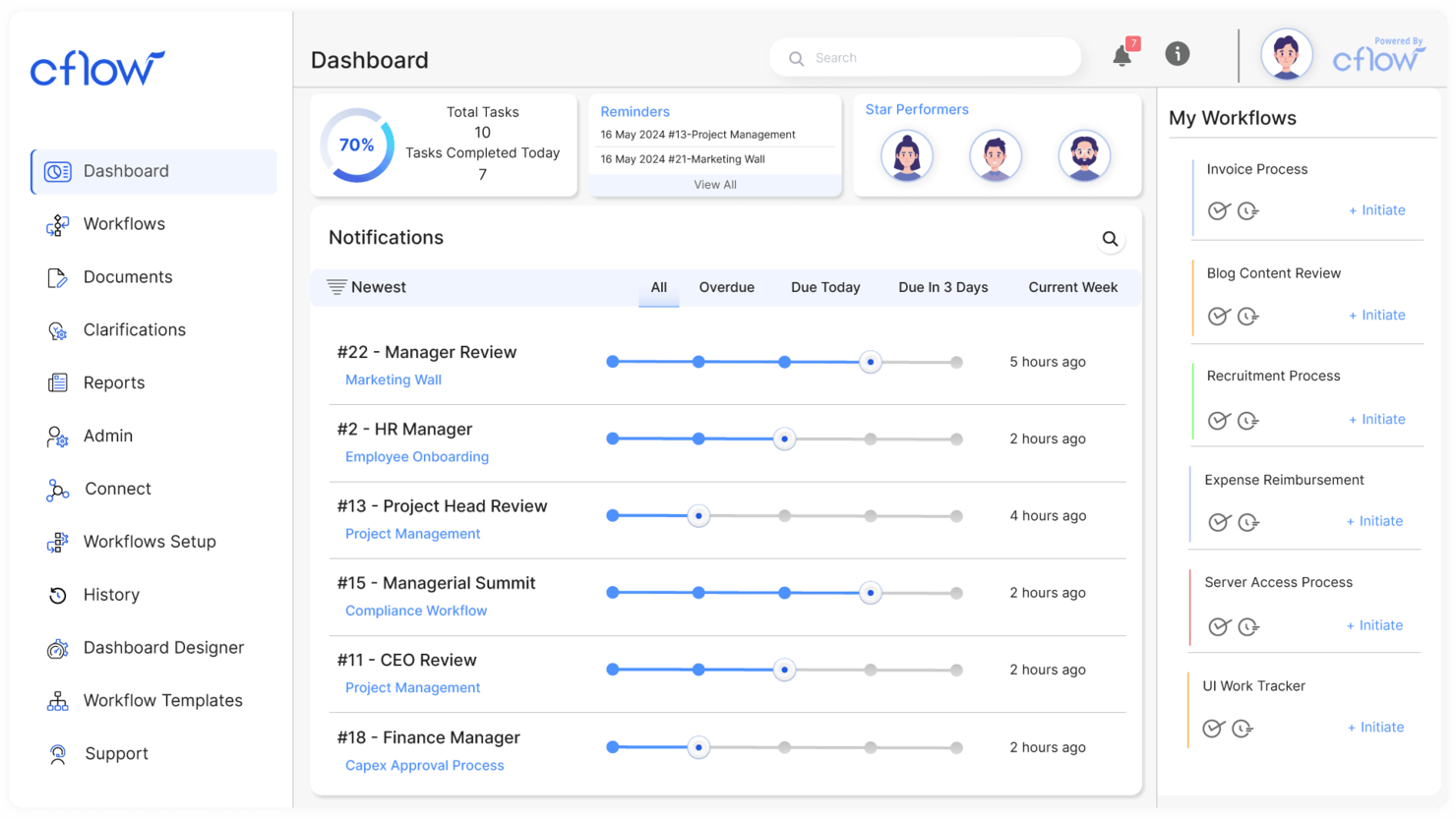
Cflow makes the cut because it’s designed for small businesses that need to replace manual document processes with automated workflows. When I see teams struggling with paper-driven approval cycles and scattered docs, this is often where I send them.
What I appreciate is how you can set up conditional routing, document templates, and digital signatures without IT support. It handles document-heavy tasks like onboarding and purchase requests with simple, visual workflow design.
Cflow’s Best For
- Small businesses automating document approvals and routing
- Teams that need no-code workflow design for documents
Cflow’s Not Great For
- Enterprises with highly complex, custom document integrations
- Organizations needing advanced analytics or compliance tracking
What sets Cflow apart
Cflow builds its workflow automation around step-by-step document processes, assuming you want to visually map and automate each approval or handoff. I see small businesses getting value here because it gives them template-driven design rather than the blank-canvas approach you find in tools like Google Workspace or monday.com. Cflow expects you to define who touches each document and when, making accountability really clear.
Tradeoffs with Cflow
Cflow optimizes for simplicity and easy automation, but that limits how much you can customize complex logic or data integrations. For advanced reporting or highly specific compliance needs, it can come up short.
Pros and Cons
Pros:
- Quick setup process
- User-friendly interface
- Suitable for small teams
Cons:
- Not ideal for large enterprises
- Limited advanced features

Best with AI-powered document insights
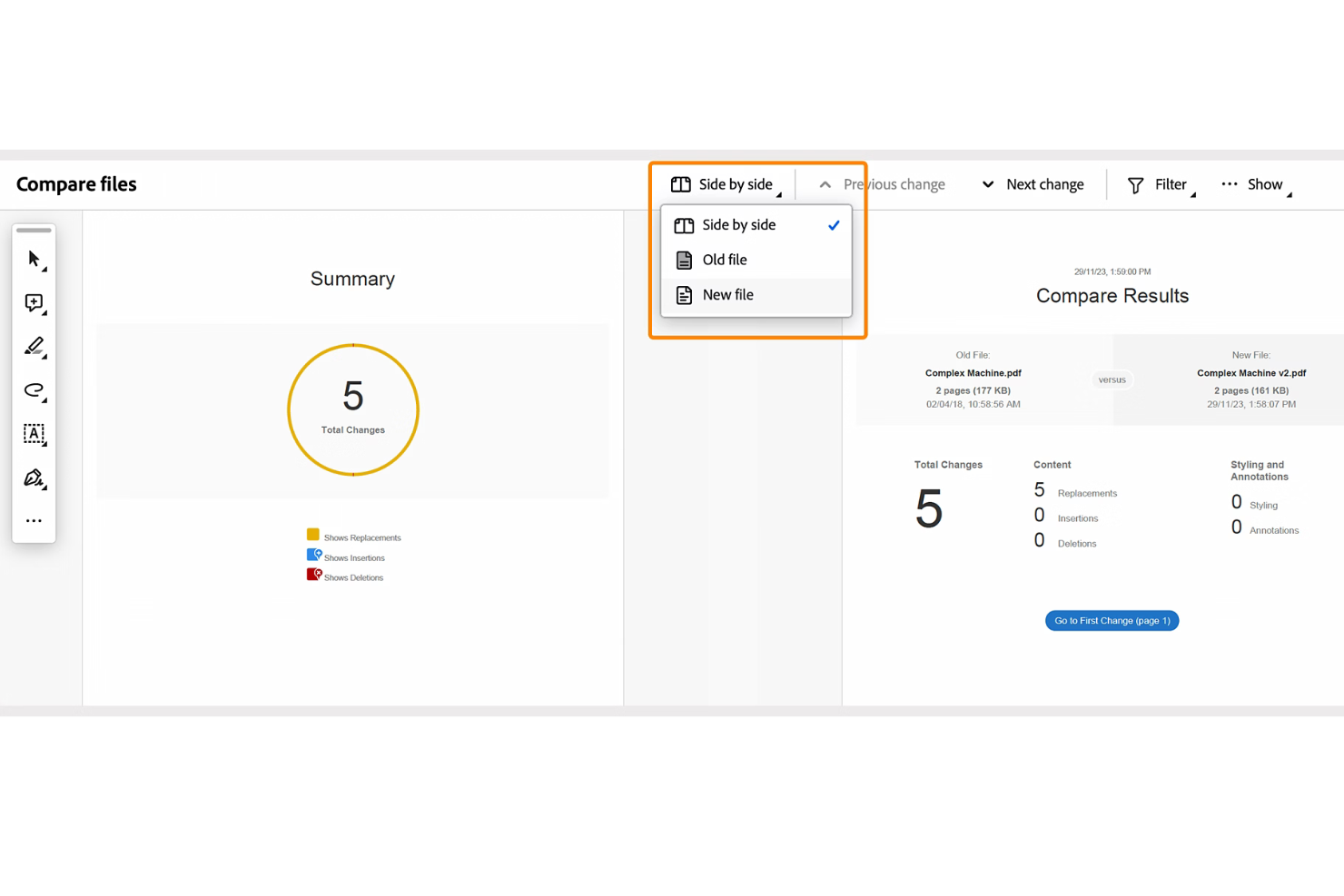
Adobe Acrobat makes the cut because it brings AI-powered document insights to large-scale document automation. I see teams using it to quickly extract key data, summarize long contracts, and organize complex PDF libraries using AI. I like how the built-in Liquid Mode and generative summaries make handling high-volume or legally dense documents much less of a slog.
What stands out is how Acrobat lets you automate classification, redaction, and search across massive archives—especially when compliance matters.
Adobe Acrobat’s Best For
- Legal, compliance, and finance teams needing AI-powered document insights
- Organizations automating PDF processing, summarization, or redaction at scale
Adobe Acrobat’s Not Great For
- Teams that need contract generation or e-signature workflow tools
- Small groups handling only basic or occasional PDF edits
What sets Adobe Acrobat apart
Acrobat approaches document automation through precise control of PDFs and deep AI-driven insights, rather than wide-ranging workflow automation like DocuSign or monday.com. I see teams reaching for Acrobat when they need to organize, classify, and manipulate large volumes of documents, especially for compliance or audits.
The focus here is on extracting meaning and structure from complex PDFs, not on broader project flows.
Tradeoffs with Adobe Acrobat
Acrobat optimizes for document intelligence and control over PDFs, but falls short if you want to automate full contract lifecycles or integrate with comprehensive e-signature workflows. You end up layering another tool if your process depends on native document creation or collaboration.
Pros and Cons
Pros:
- Offers granular permission controls for documents
- Enables secure digital signatures and tracking
- Handles multilingual OCR and text extraction
Cons:
- API access is restricted to enterprise subscriptions
- Collaboration tools lack real-time editing

M-Files
Best for compliance management
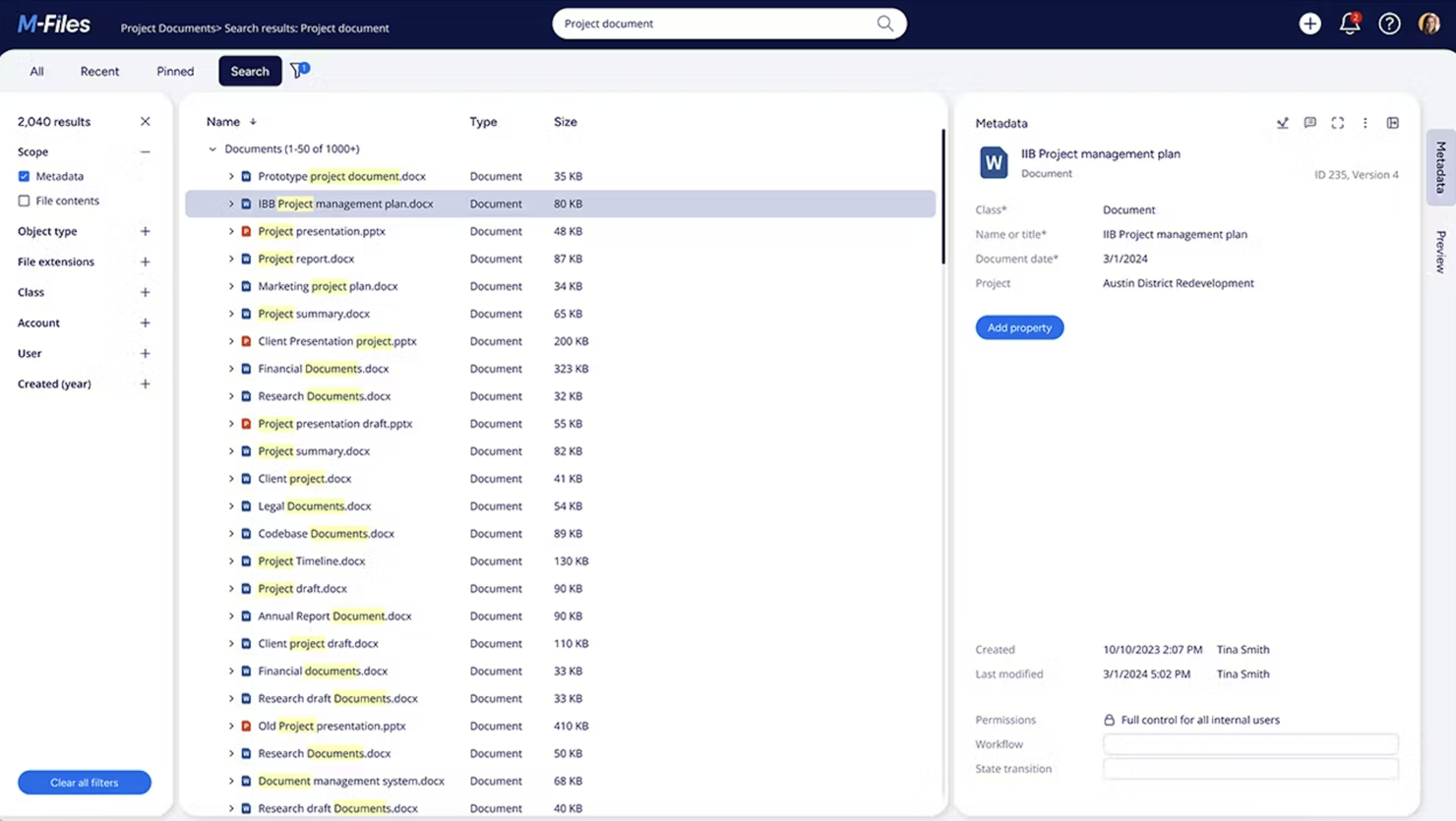
M-Files earns a spot on my list because of how tightly compliance is integrated with document automation. I’ve seen organizations use its metadata-driven structure to enforce document control across high-stakes industries like finance or pharma. What I appreciate most is the way M-Files lets you build automated workflows that link records management, audit trails, and versioning directly to compliance requirements—no workarounds or bolt-ons needed.
M-Files’ Best For
- Organizations with strict regulatory and audit requirements
- Teams automating compliance-driven document workflows
M-Files’ Not Great For
- Small teams with simple document handling needs
- Teams wanting extensive document collaboration features
What sets M-Files apart
M-Files approaches document automation by treating every file as a managed object with metadata, not just a filename and folder location. Unlike Google Drive, which relies on file paths and open sharing, M-Files expects you to classify documents by type, status, and compliance needs. In practice, I often see regulated industries use M-Files to ensure that every document follows a set process and access is tightly controlled.
Tradeoffs with M-Files
M-Files optimizes for tight control, so flexibility around ad hoc sharing and collaborative editing is limited. If your workflow relies on fast, informal sharing or simultaneous edits, you’ll likely hit friction.
Pros and Cons
Pros:
- Provides detailed audit trails
- Automated document workflows
- Metadata-driven organization
Cons:
- May need regular updates
- Requires training for new users
Diğer Belge Otomasyonu Yazılımları
İşte kısa listeme giremeyen ancak yine de incelemeye değer bazı ek belge otomasyonu yazılımı seçenekleri:
- Square 9
For enterprise document management
- Rossum
For invoice processing
- Formstack
For form generation
- PandaDoc
For sales teams
- Inkit
For print and mail automation
- Docupilot
For template-based documents
- DocuPipe
With AI-powered document standardization
- Doxis AI.dp.
For handling diverse document types
- HotDocs
For legal document creation
- Revver
For secure document storage


How I Evaluate Document Automation Software
I split my evaluation into baseline criteria—things like template logic, data merging, and approval workflows—and differentiators that separate the best tools from the rest.
Core Functionality (Table Stakes For This List)
When I'm selecting tools for my list, I rank each one on a scale from 0 (does not offer the functionality) to 5 (excels in this area) for each core functionality listed below. Then, I calculate the tool's total score into a percentage. Each tool needs to achieve a minimum total score of 65% to be considered for inclusion.
- Template Library & Builder: I look for platforms where you can build, organize, and reuse templates with dynamic merge fields—like a SOW template that auto-fills client name, deliverables, and timelines.
- Conditional Logic & Rules: The best tools let you set if/then rules so a single template adapts per scenario, such as including different payment terms based on project type.
- Data Integration & Merging: I evaluate how well each tool pulls live data from PM platforms, CRMs, or spreadsheets to populate documents without manual copy-pasting between systems.
- Workflow & Approval Automation: Multi-step routing matters here—I check whether you can set up sequential or parallel approvals, like having a project lead review before a client signs off.
- E-Signature & Delivery: Whether native or through integrations with tools like DocuSign or Adobe Sign, I look for signature capture, signer role assignment, and delivery tracking in one flow.
- Document Output & Format Control: Exported documents need to look polished and consistent. I evaluate format options (PDF, DOCX), branding controls, and version tracking across revisions.
Once I have a list of tools that meet this criteria, I consider what sets each platform apart.
Differentiating Factors (What Sets Vendors Apart)
Here's how I compare and contrast different vendors:
Standout Features
AI-assisted drafting is a big differentiator—tools that generate a first-pass SOW or summarize a change order from project notes save real time during peak delivery cycles. I also evaluate collaborative redlining, since project teams often negotiate scope or terms with clients directly inside a document. Analytics round out my comparison: dashboards tracking approval bottlenecks and document cycle times help PMOs spot process gaps before they delay a milestone.
Beyond Features
Integration depth matters here—I check whether a tool connects natively with PM platforms like Jira, Asana, or Smartsheet, not just CRMs. Security is another key lens, especially for teams handling client contracts; I look for SOC 2 compliance, role-based access controls, and SSO support. Implementation effort also factors in. A PMO rolling out document automation across multiple teams needs guided onboarding and template migration support, not just a knowledge base.
Belge Otomasyonu Yazılımı Nasıl Seçilir?
Uzun özellik listeleri ve karmaşık fiyatlandırma yapıları içinde kaybolmak kolaydır. Kendinize özgü yazılım seçme sürecinizde ilerlerken odağınızı korumanıza yardımcı olmak için göz önünde bulundurmanız gereken faktörleri aşağıda bir kontrol listesi şeklinde derledik:
| Faktör | Dikkat Edilmesi Gerekenler |
|---|---|
| Ölçeklenebilirlik | Yazılımın şirketinizle birlikte büyüyebildiğinden emin olun. Performanstan ödün vermeden artan belge hacimlerini ve ek kullanıcıları işleyip işleyemediğini kontrol edin. |
| Entegrasyonlar | CRM, ERP veya bulut depolama çözümleri gibi mevcut sistemlerinize bağlanabilen araçları tercih edin. Bu, iş akışlarını kolaylaştırır ve ekibinizin manuel veri girişi yapma ihtiyacını azaltır. |
| Özelleştirilebilirlik | Şablonları ve iş akışlarını işletmenizin özel ihtiyaçlarına uyacak şekilde düzenlemenize olanak tanıyan bir yazılım seçin. Bu esneklik zamandan tasarruf sağlayabilir ve verimliliği artırabilir. |
| Kullanım Kolaylığı | Minimum düzeyde eğitim gerektiren, kullanımı kolay arayüzleri tercih edin. Çalışanların kesinti süresini azaltmak ve üretkenliği en üst düzeye çıkarmak için sisteme hızlıca uyum sağlayabildiğinden emin olun. |
| Bütçe | Abonelik ücretleri, kurulum masrafları ve olası ek özellikler dahil olmak üzere toplam maliyetleri değerlendirin. Çözümün ihtiyaçlarınızı karşılarken mali kısıtlarınıza uygun olduğundan emin olun. |
| Güvenlik Önlemleri | Güçlü güvenlik özellikleri sunan yazılımlara öncelik verin. Hassas bilgilerinizi korumak için veri şifreleme, erişim denetimleri ve GDPR gibi standartlara uyumluluk özelliklerini arayın. |
| Destek | Sunulan müşteri desteğinin düzeyini göz önünde bulundurun. Ekibinizin başarılı olmasına yardımcı olmak için 7/24 destek, eğitim materyallerinin bulunabilirliği ve destek ekibinin hızlı yanıt verip vermediğini kontrol edin. |
Belge Otomasyonu Yazılımlarındaki Trendler
Araştırmam sırasında farklı belge otomasyonu yazılımı sağlayıcılarından sayısız ürün güncellemesi, basın bülteni ve sürüm günlüğü derledim. İşte göz önünde bulundurduğum yeni ortaya çıkan trendlerden bazıları:
- Yapay zekâ destekli içgörüler: Sağlayıcılar, belge verilerini analiz edebilen ve eyleme geçirilebilir içgörüler sunabilen yapay zekâ özellikleri sunuyor. Bu, kalıpları belirlemenize ve süreçleri optimize etmenize yardımcı olur. Bazı araçlar ayrıca trendleri öngörmek ve karar alma süreçlerini iyileştirmek için tahmine dayalı analizler de sunar.
- Blok zinciri entegrasyonu: Araçlar, belge güvenliğini ve özgünlüğünü iyileştirmek için blok zinciri teknolojisini kullanıyor. Bu trend, belge bütünlüğünün kritik önem taşıdığı finans ve hukuk gibi sektörler için özellikle önemlidir.
- Ses tanıma: Sesle etkinleştirilen belge yönetimi giderek yaygınlaşıyor. Bu özellik, belgeleri ellerinizi kullanmadan yönetmenize ve almanıza olanak tanır; bu da özellikle yoğun çalışma ortamlarında erişilebilirliği ve verimliliği artırır.
- İş birliği: Daha fazla araç, belgeler üzerinde gerçek zamanlı düzenleme ve iş birliği olanağı sunuyor. Bu trend, ekibinizin konumdan bağımsız olarak birlikte çalışmasına olanak tanıyarak uzaktan çalışmayı destekler.
- Çevre dostu özellikler: Kâğıt kullanımını azaltmaya yönelik ilgi giderek artıyor. Sağlayıcılar, dijital imzaları ve elektronik belgeleri teşvik eden özellikler sunuyor. Bu, işletmeniz çevresel etkinizi azaltmak istiyorsa oldukça faydalıdır.
Belge Otomasyonu Yazılımı Nedir?
Belge oluşturma yazılımının aksine belge otomasyonu yazılımı, önceden tanımlanmış kurallar ve iş akışlarını kullanarak belge oluşturma, yönetme ve işleme sürecinin tamamını kolaylaştıran bir araçtır. Bu araçlar, zamandan tasarruf etmek ve hataları azaltmak için hukuk, finans ve iş sektörlerindeki profesyoneller tarafından yaygın olarak kullanılır.
Yapay zekâ destekli içgörüler, gerçek zamanlı iş birliği ve çevre dostu seçenekler gibi özellikler verimliliğe, iş birliğine ve sürdürülebilirliğe yardımcı olur. Genel olarak bu araçlar, üretkenliği artırarak ve belge işlemedeki doğruluğu koruyarak önemli bir değer sunar.
Belge Otomasyonu Yazılımının Özellikleri
Belge otomasyonu yazılımı seçerken aşağıdaki temel özelliklere dikkat edin:
- Yapay zekâ destekli içgörüler: Bu özellik, eyleme geçirilebilir içgörüler sunmak, süreçleri optimize etmenize ve bilinçli kararlar almanıza yardımcı olmak için belge verilerini analiz eder.
- İş birliği: Ekip çalışmasını ve üretkenliği artırmak için birden fazla kullanıcının belgeleri aynı anda düzenlemesine ve bu belgeler üzerinde iş birliği yapmasına olanak tanır.
- Otomatik iş akışları: Tekrarlayan görevleri otomatikleştirerek ve manuel müdahale ile hataları azaltarak belge işlemeyi kolaylaştırır.
- Özelleştirilebilir şablonlar: Belge şablonlarını belirli iş ihtiyaçlarına göre uyarlama olanağı sunar; bu da zamandan tasarruf sağlar ve tutarlılığı korur.
- Üst veriye dayalı düzenleme: Belgeleri üst verilere göre düzenler; bu da daha hızlı ve doğru belge alımı anlamına gelir.
- Denetim izleri: Sorumluluğu ve uyumluluğu korumak için belge geçmişini takip eder; bu, düzenlemeye tabi sektörler için zorunludur.
- Güvenlik önlemleri: Hassas bilgileri korumak ve GDPR gibi standartlara uyumluluğu sürdürmek için veri şifreleme ve erişim denetimleri gibi özellikler sunar.
Belge Otomasyonu Yazılımının Faydaları
Belge otomasyonu yazılımının uygulanması ekibiniz ve işletmeniz için çeşitli faydalar sağlar. Yararlanabileceğiniz avantajlardan bazıları şunlardır:
- Artan verimlilik: Belge iş akışlarını otomatikleştirmek manuel görevleri azaltır; bu da zamandan tasarruf sağlar ve ekibinizin daha önemli işlere odaklanmasına olanak tanır.
- Geliştirilmiş doğruluk: Yapay zekâ destekli içgörüler ve otomatik veri çıkarma gibi özellikler hataları en aza indirerek belgelerinizin doğru ve güvenilir olmasını sağlar.
- Daha iyi iş birliği: Gerçek zamanlı iş birliği araçları, ekibinizin nerede bulunduğundan bağımsız olarak etkili bir şekilde birlikte çalışmasını sağlar.
- Maliyet tasarrufu: Kâğıt kullanımını ve manuel iş gücünü azaltmak giderleri düşürür; böylece operasyonlarınız daha uygun maliyetli hâle gelir.
- Daha güçlü güvenlik: Blok zinciri ve güvenlik önlemleri gibi özellikler sayesinde belgeleriniz yetkisiz erişime ve veri ihlallerine karşı korunur.
- Çevresel etki: Çevre dostu seçenekler dijital süreçleri teşvik eder; böylece karbon ayak izinizi azaltabilir ve sürdürülebilirlik hedeflerini destekleyebilirsiniz.
- Daha iyi uyumluluk: Denetim izleri ve üst veriye dayalı düzenleme, sektör düzenlemelerine ve standartlarına uyumluluğun korunmasına yardımcı olur ve hukuki riskleri azaltır.
Belge Otomasyonu Yazılımının Maliyetleri ve Fiyatlandırması
Belge otomasyonu yazılımı seçmek, mevcut çeşitli fiyatlandırma modellerinin ve planların anlaşılmasını gerektirir. Maliyetler özelliklere, ekip büyüklüğüne, eklentilere ve diğer unsurlara göre değişir. Aşağıdaki tablo, belge otomasyonu yazılımı çözümlerinde yaygın olarak sunulan planları, ortalama fiyatlarını ve genellikle dâhil edilen özellikleri özetlemektedir:
Belge Otomasyonu Yazılımı için Plan Karşılaştırma Tablosu
| Plan Türü | Ortalama Fiyat | Yaygın Özellikler |
|---|---|---|
| Ücretsiz Plan | $0 | Temel belge oluşturma, sınırlı depolama ve topluluk desteği |
| Kişisel Plan | $5-$25/kullanıcı/ay | Belge şablonları, temel entegrasyonlar ve e-posta desteği |
| İşletme Planı | $30-$60/kullanıcı/ay | Gelişmiş iş akışları, daha iyi güvenlik özellikleri ve öncelikli destek |
| Kurumsal Plan | $70-$120/kullanıcı/ay | Özelleştirilebilir çözümler, özel hesap yönetimi ve kapsamlı uyumluluk araçları |
Belge Otomasyonu Yazılımı SSS
Belge otomasyonu yazılımı hakkında sık sorulan bazı soruların yanıtları:
Belgeleme süreçlerini nasıl otomatikleştirebilirim?
Belgeleme sürecini otomatikleştirmek birkaç adım içerir. Gürültü azaltma gibi ön işleme teknikleriyle belge kalitesini iyileştirerek başlayın. Sayfaları ayırmak ve içeriği belirlemek için sınıflandırma özelliğini kullanın. Verileri doğru bir şekilde yakalamak için çıkarma araçlarından yararlanın, ardından doğruluğundan emin olmak amacıyla verileri kurallar ve yapay zekâ kullanarak doğrulayın.
Belge otomasyonunda hangi veriler kullanılır?
Belge otomasyonu çeşitli kaynaklardan veri alır ve bu verileri belge şablonlarına ekler. Bu şablonlar metin, tablolar, grafikler ve görseller içerebilir. Kullanılan veriler belgenin amacına ve tamamlanması için gereken bilgilere bağlıdır.
Belge otomasyonu uzmanı ne iş yapar?
Belge otomasyonu uzmanı, süreç otomasyonu araçlarını uygular ve yönetir. Bu araçları tasarlar, planlar ve kullanıma sunar; eğitim verir, bakım ve yükseltme işlemlerini yürütür. Bu rol, belge süreçlerinin verimli olmasını ve kuruluşun ihtiyaçlarını karşılamasını sağlar.
Belge otomasyonu uyumluluğu nasıl geliştirebilir?
Belge otomasyonu, belgelerinizin mevzuat standartlarını karşılamasını sağlayarak uyumluluğu geliştirir. Otomatik iş akışları insan hatasını azaltır ve denetim izleri belge değişikliklerinin geçmişini sunar. Bu, ekibinizin hesap verebilirliği sürdürmesine ve yasal gerekliliklere uymasına yardımcı olur.
Belge otomasyonu verimliliği nasıl etkiler?
Belge otomasyonu, manuel görevleri ve hataları azaltarak verimliliği artırır. Ekibinizin daha yüksek değer sağlayan faaliyetlere odaklanmasına ve zamanı ve kaynakları daha verimli kullanmasına olanak tanır. Otomatik iş akışları ayrıca belge işleme ve onay süreçlerini hızlandırır.
Belge otomasyonundan en çok hangi sektörler yararlanır?
Finans, hukuk ve sağlık hizmetleri gibi sektörler belge otomasyonundan büyük ölçüde yararlanır. Bu sektörler yüksek miktarda belge işler ve yüksek doğruluk ile uyumluluk gerektirir. Otomasyon, bu gereksinimlerin verimli ve güvenli bir şekilde yönetilmesine yardımcı olur.