

2026’da İncelenen Animasyon İçin En İyi 10 Dijital Medya Varlık Yönetimi Yazılımı

Animasyon için En İyi Dijital Medya Varlık Yönetimi Yazılımları Kısa Listesi


Animasyon projelerini yönetmek gerçekten baş ağrıtıcı olabilir. Birden fazla dosyayla ilgilenir, ekip iş birliğini yönetir ve her şeyi programa uygun tutmaya çalışırsınız. Animasyon için dijital medya varlık yönetimi yazılımı yardımcı olabilir. Varlıklarınızı düzenli ve erişilebilir tutarak yaratıcılığa odaklanmanızı sağlar.
Yazılımları inceleme deneyimimde, mevcut en iyi seçeneklere tarafsız bir bakış sunmayı amaçlıyorum. Temel özellikleri, hedef kullanıcıları ve her aracı öne çıkaran unsurları ayrıntılı şekilde ele alacağım. Bu çözümlerin ekibinizin özel ihtiyaçlarına nasıl uyabileceğini göreceksiniz.
Proje yönetimiyle ilgili zorluklarınızı hafifletmek için en iyi seçimlerimi keşfetmek ve doğru yazılımı bulmak üzere yazıyı okumaya devam edin.
Why Trust Our Software Recommendations
Our team has been testing and reviewing software since 2012. As project managers ourselves, we know how difficult—and important—it is to choose the right software.
For this guide, we evaluated tools using hands-on testing and independent research, scoring tools using our selection criteria. We also draw on insights from industry thought leaders and practicing project management experts.
Our reviews reflect our human editorial judgment, not a sales pitch.
Expert reviewers:
Karşılaştırma Tablosu: Animasyon için Dijital Medya Varlık Yönetimi Yazılımları
Bu karşılaştırma tablosu, animasyon için en iyi dijital medya varlık yönetimi yazılımı seçimlerimin fiyatlandırma ayrıntılarını özetlemektedir:
| Tool | Starting Price | Website | |
|---|---|---|---|
| Best for robust file organization | 4.7 out of 5 | $100/month 7-day free trial + free demo available | Website |
| Best for managing rich media libraries | 4.6 out of 5 | Pricing upon request Free demo available | Website |
| Best for brand consistency | 4.5 out of 5 | $300/user/month Free trial + demo available | Website |
| Best for data management | 4.5 out of 5 | Pricing upon request Free demo available | Website |
| Best for distributed marketing | 4.1 out of 5 | Pricing upon request Free demo available | Website |
| Best for AI-driven asset management | 4.5 out of 5 | $213/month 14-day free trial | Website |
| Best for marketing operations | 3.2 out of 5 | Pricing upon request Free demo available | Website |
| Best for content velocity | — | Pricing upon request Not available | Website |
| Best for content services | — | Pricing upon request 30-day free trial | Website |
| Best for open-source DAM | — | $403/month Free plan available | Website |
Animasyon için En İyi Dijital Medya Varlık Yönetimi Yazılımları İncelemesi
Kısa listeme giren animasyon için en iyi dijital medya varlık yönetimi yazılımlarına ilişkin ayrıntılı özetlerim aşağıda yer almaktadır. İncelemelerim, size en uygun aracı bulmanıza yardımcı olmak için her aracın temel özelliklerine, artılarına & eksilerine, entegrasyonlarına ve ideal kullanım alanlarına ayrıntılı bir bakış sunmaktadır.

Pics.io
Best for robust file organization
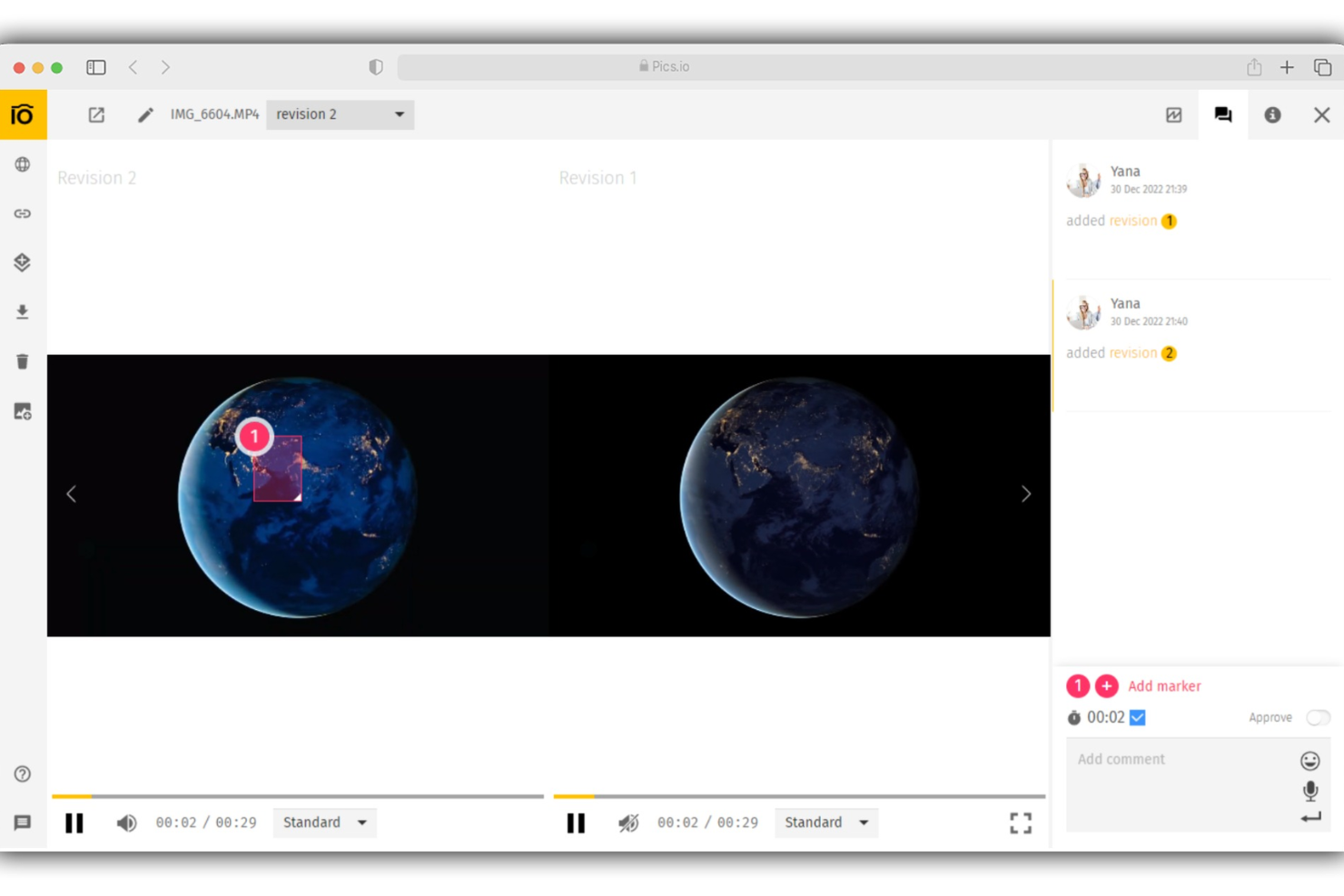
Pics.io is a Digital Asset Management (DAM) tool that assists businesses in managing, organizing, and collaborating on a variety of media assets. It supports numerous file formats, including vector files, raster images, raw photos, text documents, and audio and video files.
Why I picked Pics.io:
I chose Pics.io for its robust file organization capabilities and secure storage options. It allows users to assign assets, enhance product asset delivery using visual markers, and set up permissions for various roles within an organization. This level of organization and security is essential in animation, where multiple teams often work on different aspects of a project simultaneously.
Standout features & integrations:
Features include approval statuses, real-time collaboration and feedback tools, and version control that allows users to manage multiple versions of an asset, track edits, and revert to previous versions if needed. You can also attach keywords and metadata to assets for easy searching.
Integrations include Google Drive, Slack, Trello, Adobe Creative Cloud, Amazon S3, Dropbox, Shopify, Zapier, Google Workspace, ClickUp, and Figma.
Pros and Cons
Pros:
- Allows for collaboration on assets
- Easy asset search functions
- Supports a wide range of file types
Cons:
- Limited platform customization
- No previews for zip files
New Product Updates from Pics.io
Pics.io Adds Filtered Audit Trail CSV Exports
Pics.io now lets you export Audit Trail logs to CSV and apply filters before exporting, making it easier to analyze and share activity history. For more information, visit Pics.io's official site.
 .

Best for managing rich media libraries
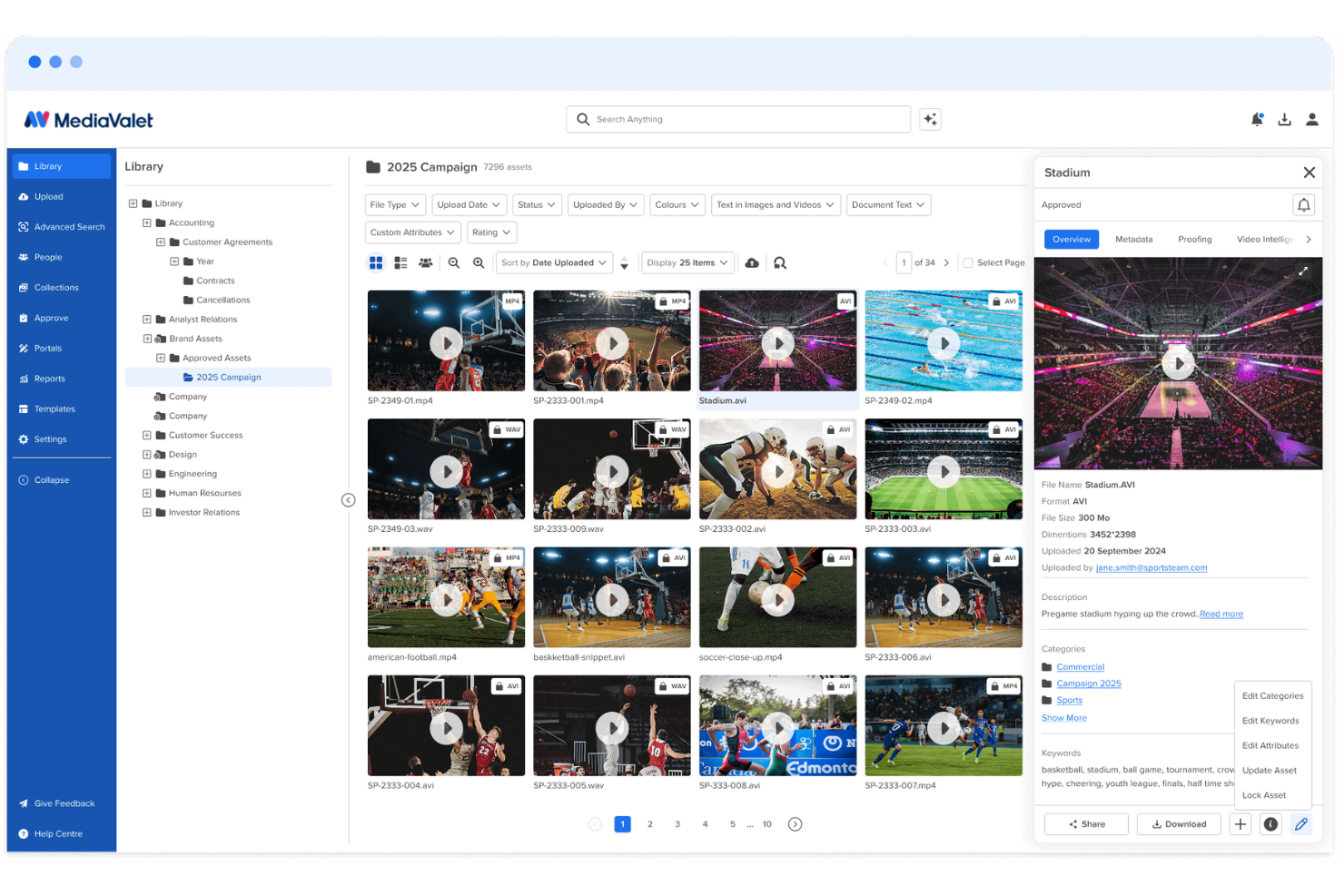
MediaValet is a cloud-native digital asset management platform for enterprise creative teams that need to organize, find, and share large libraries of videos, motion graphics, 3D files, and other media assets. Its AI-powered search, metadata tools, and creative integrations help reduce asset sprawl and keep production teams working from approved, up-to-date files.
Who Is MediaValet Best For?
MediaValet is a strong fit for enterprise creative and marketing teams that manage high volumes of rich media assets across distributed, cross-functional workflows.
Why I Picked MediaValet
I picked MediaValet because it helps animation and creative teams manage large libraries of videos, motion graphics, 3D files, reference assets, and other rich media in one cloud-based DAM. Your team can use AI tags, keywords, categories, metadata, and file format filters to find the right asset quickly instead of digging through folders during production. I also like its Adobe Creative Cloud integration, powered by CI HUB, because designers can search, pull, and update assets directly inside tools like Photoshop, Illustrator, and InDesign. For teams working with high volumes of visual files, these features make MediaValet useful for keeping assets organized, searchable, and ready for reuse.
MediaValet Key Features
Beyond search and creative integrations, MediaValet offers other features that help animation teams manage, share, and protect production assets:
- Audio and video intelligence: Automatically transcribes media files, detects faces, and creates searchable tags from video and audio content.
- Version control: Tracks asset revision history so your team can restore earlier versions when a file needs to be rolled back.
- Branded portals: Creates custom portals for sharing approved asset collections with external collaborators, studios, or vendors.
- Collections: Groups related assets into curated sets that your team can share, download in bulk, or hand off without duplicating files.
MediaValet Integrations
Integrations include Adobe Creative Cloud, Canva, Marq, Asana, AutoDesk AutoCAD, Contentful, Google Drive, Microsoft 365, monday.com, and WordPress.
Pros and Cons
Pros:
- AI tagging improves search across large animation asset libraries
- Branded portals simplify sharing approved assets with external teams
- Adobe integration supports asset access inside creative tools
Cons:
- Initial metadata setup can slow large team adoption
- Search accuracy may need refinement for complex asset libraries

Best for brand consistency

Image Relay provides a digital media asset management system for animation, allowing creators to securely store, organize, and efficiently share their animation materials, resulting in streamlined creative processes and collaboration.
Why I Picked Image Relay:
I chose Image Relay for this list because of its comprehensive approach to digital asset management, which prioritizes brand consistency. Its ability to provide a single source of truth for digital assets ensures that all teams and collaborators work from approved content, which is crucial for maintaining a unified brand presence. I believe Image Relay is best for brand consistency because it simplifies workflows and storytelling, allowing brands to consistently present their narrative to the world.
Standout features & integrations:
Image Relay offers a suite of features that cater to the needs of businesses looking to manage their digital assets effectively. The Asset Library serves as a centralized repository for organizing and securing digital content, while the Product Hub facilitates efficient management of product information. The platform also includes brand-sharing tools and marketing templates to distribute content quickly.
Image Relay integrates with external platforms like Shopify, Canva, and Adobe Suite, Adobe Plugin, Adobe Ext. illustrator, Adobe Ext. InDesign, Adobe Ext. Photoshop, Airtable, and Asana.
Pros and Cons
Pros:
- Integrations with Shopify, Canva, and Adobe Suite save time and ensure brand consistency
- Product Hub for efficient management of product information
- Centralized Asset Library for better organization and security
Cons:
- Specific details about the number of integrations and their extent are not provided
- Lack of detailed pricing information for different tiers or additional costs
- The starting price of $750/month may be high for small businesses

Pimcore
Best for data management

Pimcore is best for managing large volumes of data across various channels.
Why I Picked Pimcore:
I chose Pimcore for its comprehensive approach to data management. Unlike other digital asset management software, Pimcore not only stores and organizes digital media but also integrates with various systems to manage any type and amount of digital assets. I believe it's best for data management because of its ability to handle complex data structures and streamline workflows, making it an ideal solution for animation studios that manage extensive digital assets.
Standout features & integrations:
Pimcore's DAM system stands out with its robust file management, metadata management, and automatic image & video conversion. It supports over 220+ file formats, ensuring compatibility and ease of use. The advanced workflow engine and the ability to publish files to various channels like CMS and webshops make it a central content hub.
Pimcore natively integrates with Microsoft Office, Adobe Creative Cloud, Shopify, NetSuite, Drupal, and Salesforce Marketing Cloud.
Pros and Cons
Pros:
- A centralized platform for various digital asset management needs
- Advanced workflow engine for process automation
- Supports a wide range of file formats
Cons:
- The complexity of features may require a learning curve for new users
- Some features may not be available in the Community Edition
- Pricing is not transparent and requires direct contact

Best for distributed marketing

MarcomCentral combines centralized storage, quick access, and comprehensive distribution options to improve asset management and team collaboration on creative projects.
Why I Picked MarcomCentral:
I selected MarcomCentral because it effectively addresses the challenges of distributed marketing. Its centralized platform allows for consistent branding across multiple teams and locations. I believe MarcomCentral is best for distributed marketing due to its ability to maintain brand integrity while providing localized marketing materials, which is crucial for organizations with widespread operations.
Standout features & integrations:
MarcomCentral's key features include a centralized digital asset repository, on-demand customization of marketing materials, and robust brand management capabilities. These features support efficient marketing operations and ensure brand consistency across all channels.
MarcomCentral’s integrations include Salesforce, Workfront, Microsoft Dynamics, Oracle Eloqua, Marketo, Adobe Creative Cloud, Widen Collective, Okta, OneLogin, WordPress
Pros and Cons
Pros:
- Detailed analytics for asset performance
- Customizable marketing materials
- Centralized asset management
Cons:
- Potential learning curve for new users
- Annual billing cycle
- Higher starting price point

Best for AI-driven asset management

Scaleflex is a digital asset management solution designed to help you organize, optimize, and share media files like images and videos. It's particularly useful for businesses that handle large volumes of digital content, such as animation studios, where efficient asset management is crucial.
Why I picked Scaleflex:
Its AI-powered automation simplifies image recognition and tagging, making it easier to organize extensive libraries of animation assets. Additionally, the built-in editing tools allow you to make quick adjustments directly within the platform, eliminating the need for external software and saving valuable time.
Standout features & integrations:
Features include performance analytics that provide insights into how your assets are performing across different channels, helping you make informed decisions about your content strategy. The platform also offers scalable APIs, allowing for easy integration with various backends and third-party systems.
Integrations include WordPress, Filerobot, Cloudimage, Shopify, Magento, Prestashop, Drupal, Prismic, Amazon S3, Azure, Angular, and React.js.
Pros and Cons
Pros:
- Efficient media optimization
- The platform integrates well with various tools
- AI-powered automation
Cons:
- Some users find the interface complex initially
- Lower-tier plans are limited to one project

Aprimo
Best for marketing operations
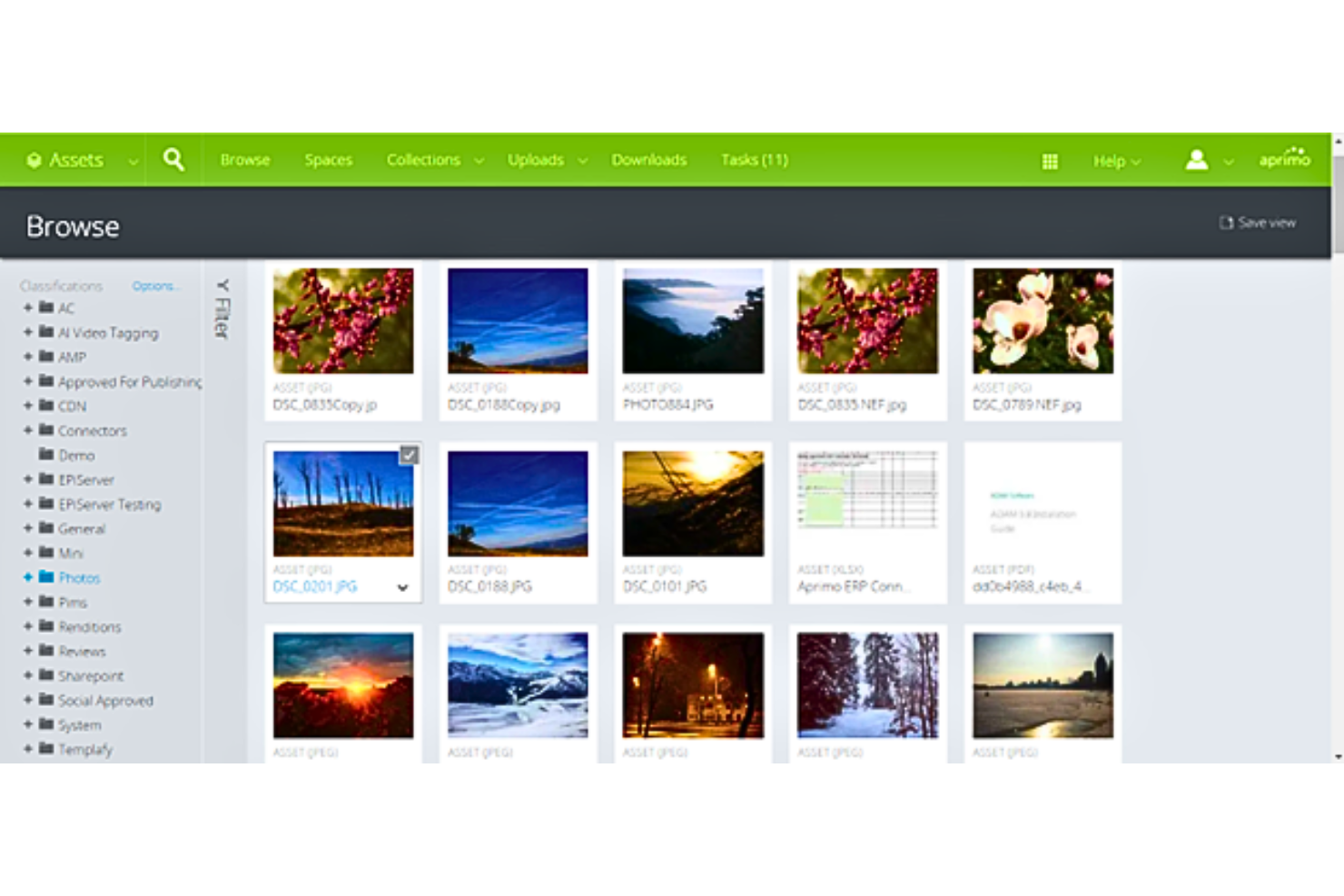
Aprimo provides comprehensive tools for managing, collaborating on, and distributing digital assets, ensuring smooth integration throughout the creative process.
Why I Picked Aprimo:
I selected Aprimo for its robust capabilities in managing marketing operations, which is particularly beneficial for animation studios with vast digital assets. Aprimo stands out due to its AI-driven features and scalability. I determined Aprimo to be best for marketing operations because it offers a centralized hub for brand assets, which is crucial for consistent marketing execution.
Standout features & integrations:
Aprimo boasts AI-powered features that aid in content creation and asset management. It accommodates various content types, including high-resolution 4K video, and provides top-tier workflow capabilities for creative processes and reviews. Additionally, it includes SEO-friendly features that improve content visibility.
Aprimo integrates with Adobe Creative, Cloud, Microsoft Office, Google Drive, Salesforce, Slack, WordPress, Drupal, Marketo, Oracle, Eloqua, and SAP.
Pros and Cons
Pros:
- Scalable solution for different business sizes
- Supports diverse content types, including high-resolution 4K video
- AI-powered content creation and management tools
Cons:
- The requirement to contact for pricing can slow down decision-making processes
- Potential learning curve for new users
- Lack of transparent pricing information


Adobe Experience Manager is known for its powerful capabilities that help with content production and distribution.
Why I Picked Adobe Experience Manager:
I chose Adobe Experience Manager for its ability to facilitate rapid content creation and management, which is essential for animation studios needing to handle large volumes of digital assets efficiently. Its cloud-native platform and integration with Adobe Creative Cloud make it a standout choice for content velocity, ensuring creative teams can collaborate and publish content quickly without compromising quality.
Standout features & integrations:
Key features include asset check-out, asset collections, asset insights, content automation, dynamic media delivery, experience fragment management, robust video support, smart crop, search and metadata, and native connections to Creative Cloud. These features collectively contribute to a streamlined workflow, enabling users to manage, collaborate, and deliver content faster and more efficiently.
Adobe Experience Manager integrates natively with various Adobe Creative Cloud applications, including Photoshop, Illustrator, InDesign, and XD, through Adobe Asset Link.
Pros and Cons
Pros:
- Strong integration with Adobe Creative Cloud
- Cloud-native platform for scalability
- Comprehensive digital asset management
Cons:
- Customization may require additional resources and expertise
- May be complex for smaller teams or projects
- Pricing transparency is not provided on the website


Nuxeo is designed specifically for animation, providing powerful tools for managing, tracking, and optimizing digital assets throughout the creative process, hence improving cooperation and productivity.
Why I Picked Nuxeo:
I chose Nuxeo for its cloud-native, low-code platform that supports rapid deployment and enterprise modernization. Its scalability and performance are vital for managing the complex needs of animation asset management. Nuxeo is best for content services because it effectively manages digital content and rich media assets, utilizing AI to improve content insights and workflows.
Standout features & integrations:
Nuxeo's platform is cloud-native, featuring adaptable AI, scalability, and performance. It offers digital asset management and workflow management, which are crucial for the efficient management of digital media assets.
Nuxeo’s integrations include Microsoft Outlook, Dropbox Business, MongoDB, Google Drive, Box, Elastic Stack, M-Files, Salesforce Sales Cloud, Microsoft 365, and Adobe Creative Cloud.
Pros and Cons
Pros:
- Broad integration capabilities with other enterprise systems
- Adaptable AI for tailored business insights
- Cloud-native platform for secure, scalable content management
Cons:
- Limited native integration extension capabilities
- Backend setup and configuration can be challenging
- High starting price point for some businesses

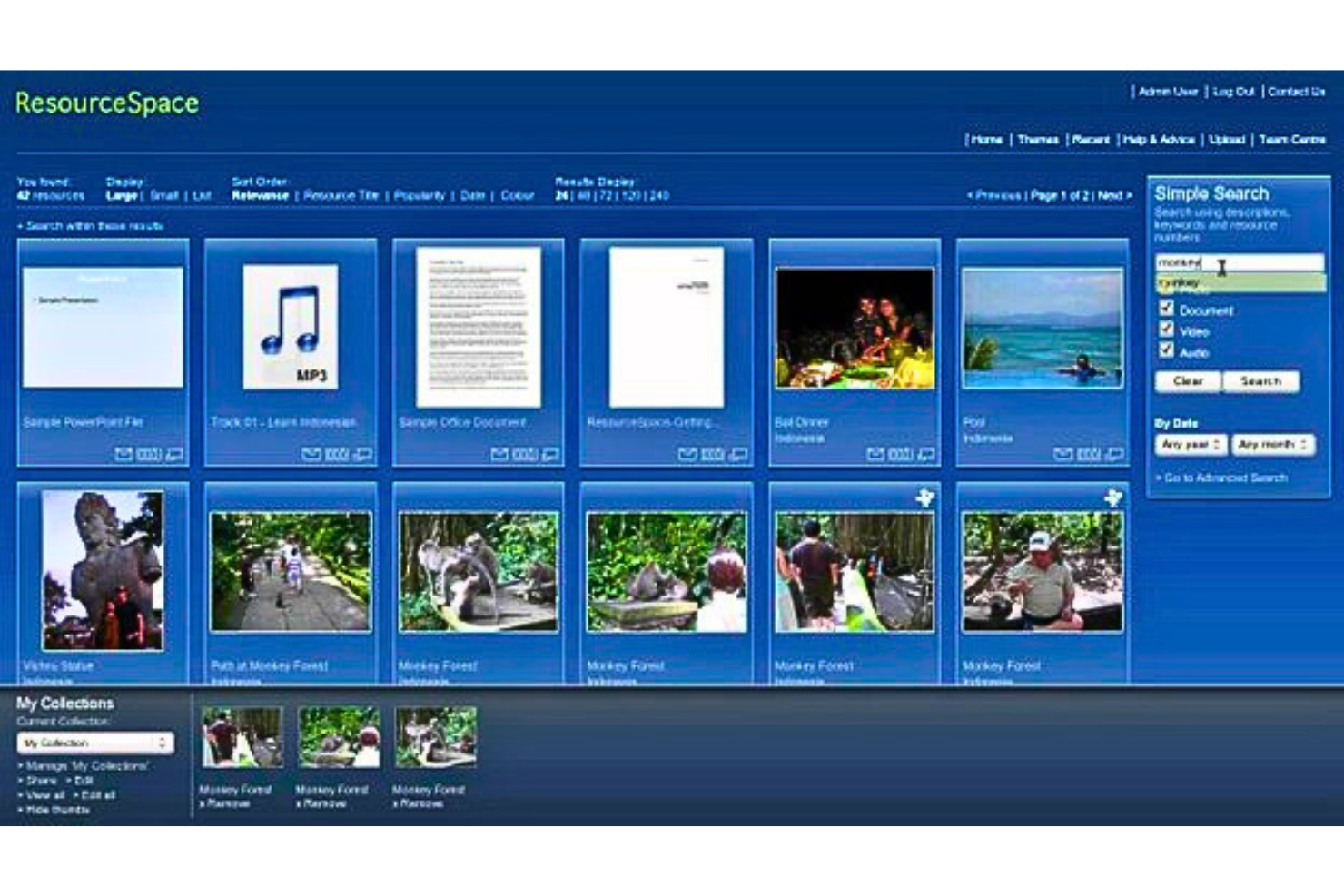
ResourceSpace stands out as the best for open-source digital asset management because it provides a comprehensive suite of features that cater to various sectors, including product marketing, academic institutions, charities, and arts & heritage, without the typical costs associated with proprietary software.
Why I Picked ResourceSpace:
I chose ResourceSpace for this list because of its robust feature set and the flexibility that comes with its open-source nature. It allows for extensive customization and integration, making it a versatile choice for managing digital assets. I believe it is best for open-source digital asset management due to its strong community support, ethical business practices as a Certified B Corporation, and the control it offers users over their digital assets.
Standout features & integrations:
ResourceSpace offers key features such as advanced search capabilities, automatic file conversion, branding customization, metadata and AI tagging, secure sharing options, and workflow and version control. These features are designed to streamline the management of digital assets and improve collaboration within teams.
Resource Space integrates natively with ADFS, Shibboleth, OpenAM, A-Select, CAS, OpenID, WS-Federation, OAuth, PingFederate, Adobe, WordPress, Brandstencil, Rightmarket, Google Cloud, and Vision AI.
Pros and Cons
Pros:
- Positive customer testimonials highlight the software's user-friendliness and support services.
- Offers both cloud and on-premise solutions to fit various organizational needs.
- Open-source software allows for extensive customization.
Cons:
- Pricing for higher tiers and additional features is not transparent and requires direct contact.
- The free plan is limited to 10 users, which may not be suitable for larger organizations.
Animasyon için Diğer Dijital Medya Varlık Yönetimi Yazılımları
Kısa listeme giremeyen ancak yine de göz atmaya değer bazı ek animasyon için dijital medya varlık yönetimi yazılımı seçenekleri şunlardır:
- Extensis Portfolio
For workflow automation
- Northplains
For creative project management
- Razuna
For affordability
- Daminion
For automatic asset tagging
- Cloudinary
For media optimization
- Acquia DAM (Widen)
For Drupal integration
- Brandfolder
For intuitive digital asset management
- Air
For smart search with image recognition
- Filecamp
Good for professional digital proofing
- Canto
Good for centralized content storage
- Frontify
Good for brand management
- Bynder
Good for brand consistency
- 4ALLPORTAL
Good for modular customization
- Brightspot
Good for enterprise-level solutions
- WoodWing Assets
Good for multichannel publishing
- Dash
Good for quick asset sharing
- Libris by PhotoShelter
Good for photographers and visual storytellers
- QBank
Good for streamlined collaboration
- FotoWare
Good for workflow automation
- Cumulus by Canto
Good for advanced search capabilities
- OpenText Media Management
Good for complex digital ecosystems


How I Evaluate Digital Media Asset Management Software for Animation
I split my evaluation into two layers: the core capabilities a tool must have—like shot-level versioning and DCC integrations—and the differentiators that set the best options apart.
Core Functionality (Table Stakes For This List)
When I'm selecting tools for my list, I rank each one on a scale from 0 (does not offer the functionality) to 5 (excels in this area) for each core functionality listed below. Then, I calculate the tool's total score into a percentage. Each tool needs to achieve a minimum total score of 55% to be considered for inclusion.
- Animation Asset Storage & Organization: I check whether the platform handles animation-specific formats like Maya scenes, Blender files, and rendered EXR sequences rather than just generic image or video files.
- Version Control & History: Each tool should track iterative asset versions at the shot or file level so teams can roll back a character rig or compare two cuts of a sequence side by side.
- Review & Approval Workflows: I evaluate whether the tool supports frame-accurate annotation and structured approval routing, the kind of workflow where a supervisor marks up frame 247 and the animator gets a clear task from it.
- Production Tracking: Linking assets to shots, sequences, and milestones matters here. I look for the ability to see which shots in a given episode are approved vs. still in progress.
- Metadata & Search: A studio with thousands of assets needs more than folder browsing. I look for custom metadata schemas and advanced filtering so you can locate every asset tagged to a specific character or scene.
- Pipeline Tool Integrations: The tool should connect with DCC applications your team already uses. Platforms like ftrack and Shotgun built their value on tight hooks into Maya, Nuke, and Houdini, and that kind of connectivity is what I evaluate here.
Once I have a list of tools that meet this criteria, I consider what sets each platform apart.
Differentiating Factors (What Sets Vendors Apart)
Here's how I compare and contrast different vendors:
Standout Features
Customizable pipeline workflows are a major differentiator. I look for tools that let studios define their own shot statuses, task dependencies, and approval chains rather than forcing a rigid default structure. Client review portals also matter—when a director or external stakeholder can leave frame-level feedback in a secure, branded portal, it cuts out messy email threads. AI-powered tagging is worth evaluating too, since it saves hours of manual metadata entry when you're managing thousands of assets across a multi-episode series.
Beyond Features
Security and IP protection carry real weight in animation. I evaluate whether a platform offers granular access controls, watermarking, and MPA/TPN compliance—especially for studios handling unreleased content. Pricing flexibility matters too, since animation projects scale up and down with freelancers and contract artists. I check whether licensing models accommodate short-term seats without locking studios into annual commitments. For distributed teams, I also consider proxy generation and optimized file transfer, which keep remote animators productive even on limited bandwidth.
Animasyon için Dijital Medya Varlık Yönetimi Yazılımı Nasıl Seçilir?
Uzun özellik listeleri ve karmaşık fiyatlandırma yapılarına kendinizi kaptırmak kolaydır. Özel yazılım seçimi sürecinizde ilerlerken odağınızı korumanıza yardımcı olmak için aklınızda bulundurmanız gereken faktörlerin bir kontrol listesi aşağıda yer alıyor:
| Faktör | Dikkat Edilmesi Gerekenler |
|---|---|
| Ölçeklenebilirlik | Yazılım ekibinizle birlikte büyüyebilir mi? Depolama ihtiyaçlarındaki artışı ve daha fazla kullanıcıyı sorunsuz şekilde karşılayıp karşılayamayacağını değerlendirin. |
| Entegrasyonlar | Mevcut araçlarınızla uyumlu çalışıyor mu? Animasyon yazılımlarıyla ve hâlihazırda kullandığınız diğer platformlarla entegre olup olmadığını kontrol edin. |
| Özelleştirilebilirlik | İş akışlarınıza uyacak şekilde uyarlayabilir misiniz? Arayüzü, meta veri alanlarını ve kullanıcı izinlerini özelleştirme seçenekleri arayın. |
| Kullanım kolaylığı | Ekibiniz yazılımı sezgisel bulacak mı? Dik bir öğrenme eğrisi benimsemeyi yavaşlatabilir; bu nedenle kullanıcı dostu bir tasarıma öncelik verin. |
| Uygulama ve kullanıma alma | Ne kadar hızlı kullanmaya başlayabilirsiniz? Ekibinizi kurmak ve eğitmek için gereken zamanı ve kaynakları değerlendirin. Açık yönlendirme ve destek sunan araçları tercih edin. |
| Maliyet | Bütçeniz dahilinde mi? Fiyatlandırma planlarını karşılaştırın ve zamanla birikerek maliyeti artırabilecek gizli ücretlere veya masraflara dikkat edin. |
| Güvenlik önlemleri | Verilerinizi nasıl koruyor? Veri güvenliği alanındaki sektör standartlarına uyduğundan ve şifreleme ile erişim kontrolleri gibi özellikler sunduğundan emin olun. |
| Destek bulunabilirliği | İhtiyacınız olduğunda yardım alabilecek misiniz? Destek ekibiyle iletişim kurmak için 7/24 destek seçeneklerinin yanı sıra sohbet, e-posta veya telefon gibi birden fazla kanal olup olmadığını kontrol edin. |
Animasyon için Dijital Medya Varlık Yönetimi Yazılımlarındaki Trendler
Animasyon teknolojisi için dijital medya varlık yönetimi yazılımlarında gözlemlediğim güncel ve ilginç trendlerden bazıları şunlardır:
- Bulut Tabanlı Hizmetlerle Entegrasyon: Bulut entegrasyonu, dijital medya varlık yönetimi yazılımlarında standart bir özellik hâline geliyor. Bu trend, varlıklara uzaktan erişim ve dünya genelindeki ekipler arasında iş birliği olanağı sağlıyor. Bu önemlidir çünkü animasyon sektöründe giderek yaygınlaşan dağıtık iş akışlarını destekler.
- Yapay Zekâ Kullanımı: Yapay zekâ, rutin görevleri otomatikleştirmek ve arama işlevlerini geliştirmek için sisteme dâhil ediliyor. Yapay zekâ, minimum düzeyde insan müdahalesiyle varlıkları etiketleyip kategorilere ayırabilir; böylece varlıkları bulma süreci daha hızlı ve daha doğru hâle gelir. Bu ilginç bir gelişmedir; çünkü zamandan tasarruf sağlar ve insan hatası olasılığını azaltır.
- Gelişmiş Güvenlik Protokolleri: Fikri mülkiyeti korumak için güvenlik önlemleri güçlendiriliyor. Şifreleme ve çok faktörlü kimlik doğrulama giderek daha yaygın hâle geliyor. Bu trend, yetkisiz erişimi önlemek ve değerli dijital varlıkları korumak açısından önemlidir.
- Gerçek Zamanlı İş Birliği Araçları: Gerçek zamanlı iş birliği özellikleri varlık yönetimi platformlarına entegre ediliyor. Bu araçlar, animasyon projeleri üzerinde anında geri bildirim verilmesini ve yinelemeli çalışmayı mümkün kılar. Bu gelişme ilericidir; çünkü ekip çalışmasını güçlendirir ve proje takvimlerini hızlandırır.
- Özelleştirilebilir Üst Veri Alanları: Animasyon projelerinin özel ihtiyaçlarını karşılamak için özelleştirilebilir üst veri alanları sunuluyor. Bu, varlıkların daha hassas bir şekilde düzenlenmesini ve bulunmasını sağlar. Bu özellik benzersizdir; çünkü ekiplerin sistemi projelerinin özel gereksinimlerine göre uyarlamasına olanak tanır.
Animasyon İçin Dijital Medya Varlık Yönetimi Yazılımı Nedir?
Animasyon için dijital medya varlık yönetimi yazılımı, animasyon varlıklarının verimli bir şekilde düzenlenmesine, depolanmasına ve yönetilmesine yardımcı olan bir araçtır. Animatörler, proje yöneticileri ve yaratıcı ekipler, iş akışını ve iş birliğini geliştirmek için genellikle bu araçları kullanır. Dosya düzenleme, güvenli erişim ve sürüm takibi özellikleri, varlıkların yönetilmesine ve ekip çalışmasının verimli olmasının sağlanmasına yardımcı olur. Genel olarak bu araçlar, ekiplerin varlık yönetiminin ayrıntılarıyla uğraşmak zorunda kalmadan yaratıcılığa odaklanmasını kolaylaştırır.
Özellikler
Animasyon için dijital medya varlık yönetimi yazılımı seçerken aşağıdaki temel özelliklere dikkat edin:
- Dosya düzenleme: Animasyon varlıklarını kolayca bulup yönetebilmek için düzenli bir şekilde saklar.
- Sürüm takibi: Kullanıcıların değişiklikleri izlemesine ve gerektiğinde varlıkların önceki sürümlerine dönmesine olanak tanır.
- Güvenli erişim kontrolleri: Yalnızca yetkili ekip üyelerinin hassas dosyalara erişebilmesini sağlayarak veri güvenliğini artırır.
- İş birliği araçları: Birden fazla kullanıcının projeler üzerinde aynı anda çalışmasına olanak tanıyarak ekip çalışmasını kolaylaştırır.
- Entegrasyon olanakları: İş akışlarını kolaylaştırmak için diğer animasyon ve proje yönetimi araçlarına bağlanır.
- Özelleştirilebilir üst veri alanları: Kullanıcıların daha iyi aranabilirlik için varlıkları ilgili bilgilerle etiketlemesine olanak tanır.
- Bulut tabanlı depolama: Her yerden erişilebilen, uzaktan çalışan ekipleri destekleyen ölçeklenebilir depolama çözümleri sunar.
- Yapay zekâ destekli varlık etiketleme: Yapay zekâ kullanarak varlıkları otomatik olarak etiketler ve manuel veri girişinde zaman kazandırır.
- Sezgisel kullanıcı arayüzü: Yeni kullanıcıların öğrenme sürecini kısaltan kullanıcı dostu bir tasarım sunar.
- Eğitim kaynakları: Kullanıcıların yazılıma hızla hâkim olmasına yardımcı olacak eğitimler ve kılavuzlar sunar.
Faydalar
Animasyon için dijital medya varlık yönetimi yazılımını uygulamak ekibiniz ve işletmeniz için çeşitli faydalar sağlar. Yararlanabileceğiniz birkaç fayda şunlardır:
- Geliştirilmiş iş birliği: Ekip üyeleri, varlıklara ortak erişim ve iş birliği araçları sayesinde verimli bir şekilde birlikte çalışabilir.
- Verimli varlık yönetimi: Dosyaları dijital olarak düzenlemek ve depolamak zamandan tasarruf sağlar ve varlık arama zahmetini azaltır.
- Gelişmiş güvenlik: Güvenli erişim kontrolleri, hassas animasyon dosyalarını yetkisiz erişime karşı korur.
- Ölçeklenebilirlik: Bulut tabanlı depolama, ihtiyaçlarınızla birlikte büyüyerek ekibiniz genişledikçe daha fazla varlık ve kullanıcıya uyum sağlar.
- Zamandan tasarruf: Yapay zekâ destekli varlık etiketleme ve sürüm takibi gibi özellikler manuel çalışmayı azaltır ve proje iş akışlarını hızlandırır.
- Daha iyi proje düzeni: Özelleştirilebilir üst veri alanları, varlıkların hızlı bir şekilde kategorilere ayrılmasına ve bulunmasına yardımcı olarak üretkenliği artırır.
- Artırılmış erişilebilirlik: Bulutta depolanan varlıklara uzaktan erişim, ekibinizin her yerden çalışabilmesini sağlayarak esnekliği artırır.
Maliyetler ve Fiyatlandırma
Animasyon için dijital medya varlık yönetimi yazılımı seçmek, mevcut çeşitli fiyatlandırma modellerinin ve planların anlaşılmasını gerektirir. Maliyetler özelliklere, ekip büyüklüğüne, eklentilere ve daha fazlasına göre değişir. Aşağıdaki tablo, animasyon çözümleri için dijital medya varlık yönetimi yazılımında yaygın planları, ortalama fiyatlarını ve genellikle dahil edilen özellikleri özetlemektedir:
Animasyon için Dijital Medya Varlık Yönetimi Yazılımı Plan Karşılaştırma Tablosu
| Plan Türü | Ortalama Fiyat | Yaygın Özellikler |
|---|---|---|
| Ücretsiz Plan | $0 | Temel depolama, sınırlı kullanıcı erişimi ve temel dosya düzenleme. |
| Kişisel Plan | $5-$25/kullanıcı/ay | Orta düzey depolama, bireysel kullanıcı erişimi, temel iş birliği araçları ve dosya sürümü takibi. |
| İşletme Planı | $30-$75/kullanıcı/ay | Ekip iş birliği özellikleri, gelişmiş depolama seçenekleri, entegrasyon olanakları ve güvenlik kontrolleri. |
| Kurumsal Plan | $100-$200/kullanıcı/ay | Özelleştirilebilir çözümler, kapsamlı depolama, premium destek ve kurumsal sistemlerle tam entegrasyon. |
Animasyon için Dijital Medya Varlık Yönetimi Yazılımı Hakkında SSS
Animasyon için dijital medya varlık yönetimi yazılımı hakkında sık sorulan bazı soruların yanıtları şunlardır:
Bulut tabanlı DAM yazılımı animasyon stüdyoları için iyi bir seçenek midir?
Bulut tabanlı DAM yazılımı, özellikle esneklik ve uzaktan erişim gerektiren animasyon stüdyoları için mükemmel bir seçenek olabilir. Bulut çözümleri, internet bağlantısı olan her yerden erişilebilme avantajı sunar; bu da dağınık ekipler veya serbest çalışanlarla çalışan ekipler için faydalıdır. Ayrıca genellikle büyüyen varlık kitaplıklarına uyum sağlamak için ölçeklenebilir depolama seçenekleri sunarlar.
DAM yazılımı, 3B modeller ve video dosyaları gibi büyük animasyon dosyalarını nasıl işler?
Animasyon için tasarlanmış DAM yazılımı, büyük dosya boyutlarını işlemek üzere geliştirilmiştir. Bu sistemler genellikle yüksek hızlı dosya aktarımı, sıkıştırma seçenekleri ve video dosyalarını tamamen indirmeden akış olarak oynatma olanağı gibi özellikler içerir. Böylece kullanıcılar, boyutlarından bağımsız olarak animasyon dosyalarıyla verimli bir şekilde çalışabilir.
DAM yazılımında hangi güvenlik önlemleri bulunur?
Güvenlik, DAM yazılımının kritik bir unsurudur. Saygın sistemler; kullanıcı kimlik doğrulama, şifreleme ve etkinlik günlükleri de dahil olmak üzere birden çok güvenlik katmanı sunar. Varlıkları kimlerin görüntüleyebileceğini, düzenleyebileceğini veya indirebileceğini kontrol etmek için erişim izinleri ayarlanabilir. Ayrıca birçok DAM sağlayıcısı, verileri yetkisiz erişime karşı korumak için sektör standardı güvenlik protokollerine uyar.
DAM yazılımı, animasyon ekipleri arasındaki iş birliğini nasıl destekler?
Birden fazla ekip üyesinin aynı varlıklara aynı anda erişmesine ve bunlar üzerinde çalışmasına olanak tanıyarak iş birliğini destekler; değişiklikleri takip etmek için iletişim ve sürüm denetimi araçları sağlar.
Dijital medya varlık yönetimi yazılımını uygulamak kolay mıdır?
Uygulama süreci sağlayıcıya göre değişir, ancak birçok sağlayıcı başlamanıza yardımcı olmak için eğitim videoları, ürün tanıtımları ve özel destek gibi kaynaklar sunar. Kesinti süresini en aza indirmek ve ekibinizi hızlı bir şekilde çalışır duruma getirmek için net işe alım süreçlerine sahip çözümleri tercih edin.
Dijital medya varlık yönetimi yazılımı farklı dosya türlerini işleyebilir mi?
Evet, dijital medya varlık yönetimi yazılımlarının çoğu resimler, videolar ve animasyon dosyaları da dahil olmak üzere çok çeşitli dosya türlerini destekler. Bu esneklik, tüm varlıklarınızı tek bir yerde depolayıp yönetebilmenizi sağlar; bu da özellikle farklı medya formatlarıyla çalışan ekipler için faydalıdır.