

2026’da En İyi 10 Ücretsiz Paylaşımlı Masa Rezervasyon Yazılımı

Ücretsiz Ortak Masa Rezervasyon Yazılımı Kısa Listesi


Ücretsiz ortak masa rezervasyon yazılımı, ekibinizin abonelik ücreti ödemeden çalışma alanları rezerve etmesini sağlar ve ücretsiz bir plan veya deneme sürümü aracılığıyla temel masa yönetimi özelliklerine erişim sunar. Esnek oturma düzenlerini yönetmenin, çift rezervasyonları önlemenin ve hibrit ofisinizin bütçenizi artırmadan sorunsuz şekilde çalışmasını sağlamanın yollarını arıyorsanız bu liste tam size göre.
Ekibinizin ihtiyaçlarına en uygun seçeneği karşılaştırıp belirleyebilmeniz için mevcut en iyi ücretsiz ortak masa rezervasyon araçlarını inceleyeceğim.
Why Trust Our Software Recommendations
Our team has been testing and reviewing software since 2012. As project managers ourselves, we know how difficult—and important—it is to choose the right software.
For this guide, we evaluated tools using hands-on testing and independent research, scoring tools using our selection criteria. We also draw on insights from industry thought leaders and practicing project management experts.
Our reviews reflect our human editorial judgment, not a sales pitch.
Expert reviewers:
Ücretsiz Ortak Masa Rezervasyon Yazılımı Karşılaştırma Tablosu
En iyi ücretsiz ortak masa rezervasyon yazılımı seçimlerimle ilgili fiyatlandırma ayrıntıları aşağıdaki karşılaştırma tablosunda özetlenmiştir:
| Tool | Starting Price | Website | |
|---|---|---|---|
| Best for unlimited desk bookings | 4.7 out of 5 | €1.7/user/month Free plan available; 14-day free trial; free demo available | Website |
| Best for touchless desk reservations | 4.5 out of 5 | $51/month 30-day free trial available | Website |
| Best for real-time desk availability | 4.7 out of 5 | $4.60/user/month Free plan + free demo available | Website |
| Best for Slack-based desk booking workflows | 5.0 out of 5 | $2.50/user/month Free trial + free demo available | Website |
| Best for mobile-first desk booking experiences | 4.9 out of 5 | $1.50/user/month 14-day free trial + free demo available | Website |
| Best for visual floor plan desk selection | 5.0 out of 5 | €1.99/user/month Free plan + free demo available | Website |
| Best for predictive AI booking | — | €30/user/year Free plan + free demo available | Website |
| Best for managing multiple office locations | — | Pricing upon request 30-day free trial available | Website |
| Best for GDPR-compliant workspace management | — | €1.65/user/month Free plan + free demo available | Website |
| Best for integrated parking space management | — | €2/place/month Free plan available | Website |
Ücretsiz Ortak Masa Rezervasyon Yazılımı İncelemeleri
Kısa listeme giren ücretsiz ortak masa rezervasyon yazılımlarıyla ilgili ayrıntılı özetlerimi aşağıda bulabilirsiniz. İncelemelerim, size en uygun seçeneği bulmanıza yardımcı olmak için her platformun özelliklerine, en uygun kullanım alanlarına ve fiyatlandırmasına ayrıntılı bir bakış sunuyor.

Dibsido
Best for unlimited desk bookings
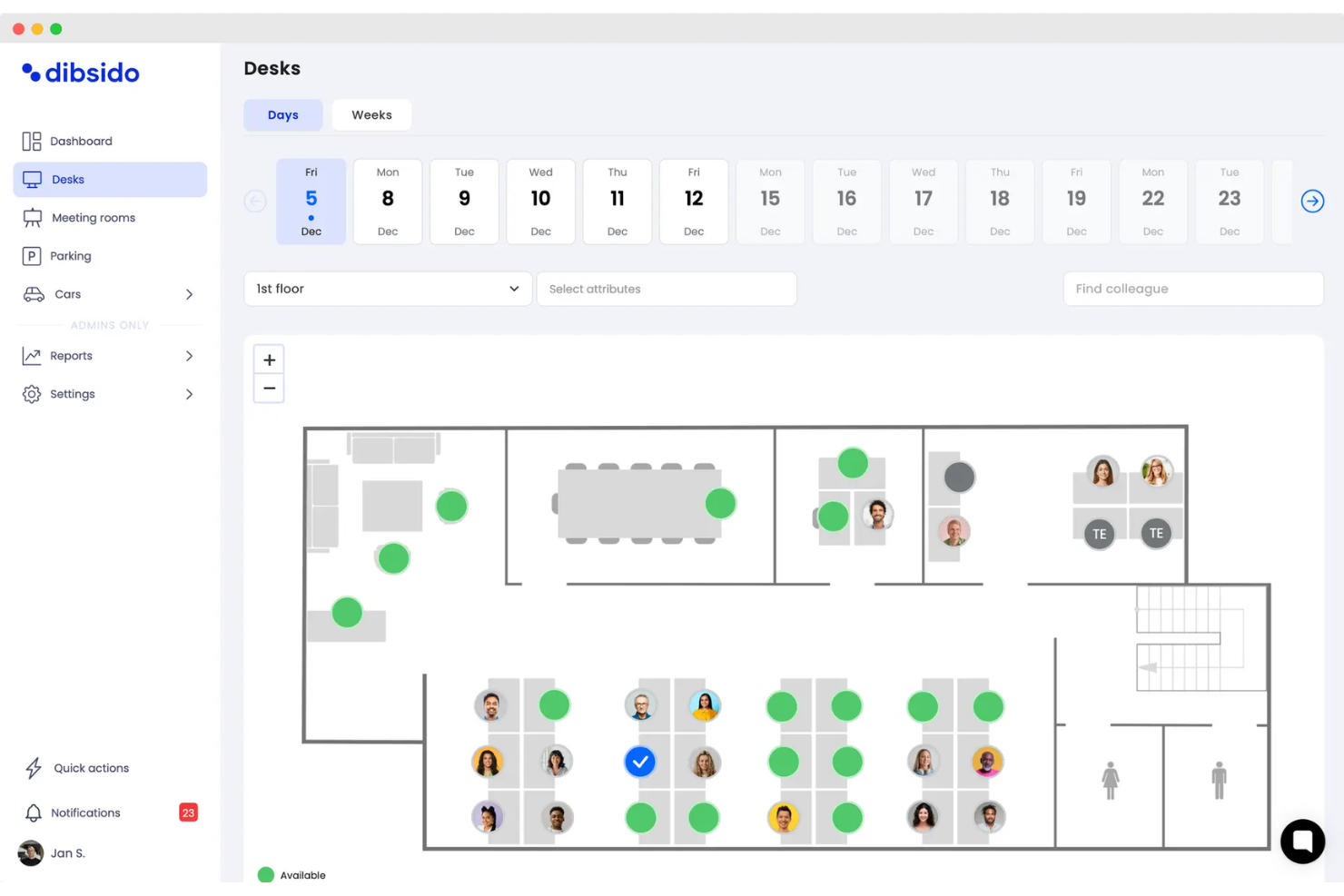
Dibsido is a desk booking software platform for managing workspace reservations, recurring bookings, and resource scheduling with unlimited desks and users.
Who Is Dibsido Best For?
Dibsido is a good fit for small to midsize businesses that need flexible desk and resource booking without user or desk limits.
Why I Picked Dibsido
I picked Dibsido as one of the best because it lets my team book unlimited desks and users without hitting artificial caps. I like that I can set up recurring bookings for regular schedules and manage multiple resources beyond just desks. The platform’s admin dashboard gives me a clear view of all reservations and resource usage in one place.
Dibsido Key Features
- Custom booking forms: Collect specific information from users when they reserve a desk.
- Calendar sync: Connect bookings with Google Calendar or Outlook for scheduling visibility.
- Role-based permissions: Assign different access levels for admins, managers, and users.
- Email notifications: Send automated booking confirmations and reminders to users.
Dibsido Integrations
Integrations include Slack, Microsoft Teams, Google Calendar, Outlook, and Microsoft Entra ID. An API is available for custom integrations.
Pros and Cons
Pros:
- SAML 2.0 SSO and Google Workspace SSO
- Recurring bookings for regular schedules
- Unlimited desks and users on the free plan
Cons:
- Limited analytics on the free plan
- No mobile app for on-the-go booking
Joan
Best for touchless desk reservations
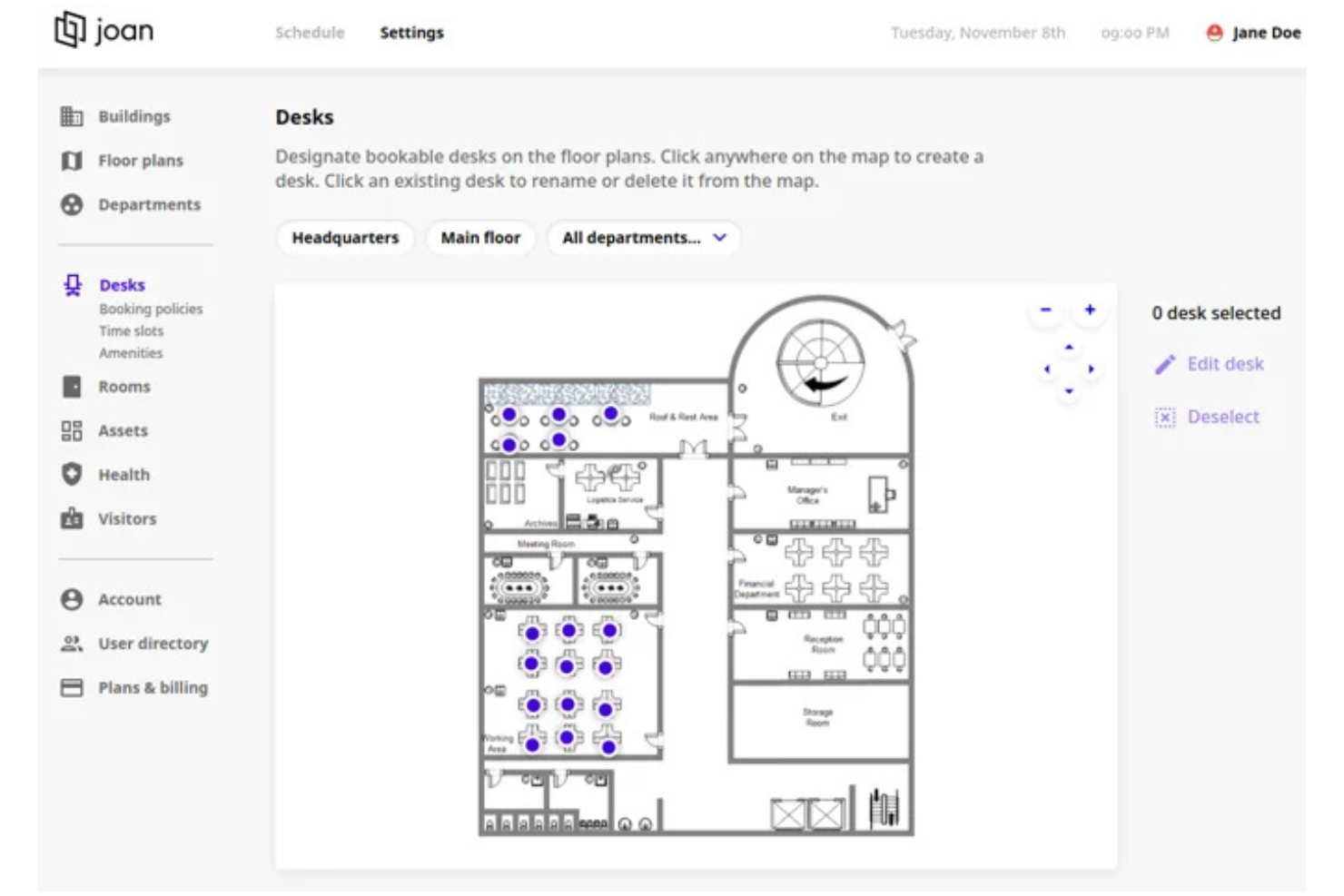
Joan is a hot desk booking app that offers touchless reservations, interactive floor plans, mobile access, and real-time desk availability for teams managing flexible workspaces.
Who Is Joan Best For?
Joan is a good fit for facilities managers and IT teams in mid-sized to large organizations seeking contactless desk booking solutions.
Why I Picked Joan
I picked Joan as one of the best because I like how it enables touchless desk reservations using QR codes and wireless Joan devices. My team is able to manage workspace occupancy in real time and set up interactive floor plans for easy navigation. I also appreciate that Joan’s hardware displays sync instantly with booking changes, which helps us keep everything up to date.
Joan Key Features
- Calendar integrations: Syncs with Google Workspace and Microsoft 365 calendars for unified scheduling.
- Custom booking rules: Lets admins set booking policies and restrictions for desks.
- Occupancy analytics: Tracks workspace usage and generates occupancy reports.
- Mobile app: Allows users to book desks and manage reservations from their phones.
Joan Integrations
Joan offers native integrations with Microsoft Active Directory, Google Calendar, Microsoft Teams, and Slack. An API is available for custom integrations.
Pros and Cons
Pros:
- Custom booking rules for workspace management
- Hardware displays sync instantly with bookings
- Touchless desk booking with QR code support
Cons:
- Hardware devices require separate purchase
- No free plan for unlimited users

PULT
Best for real-time desk availability
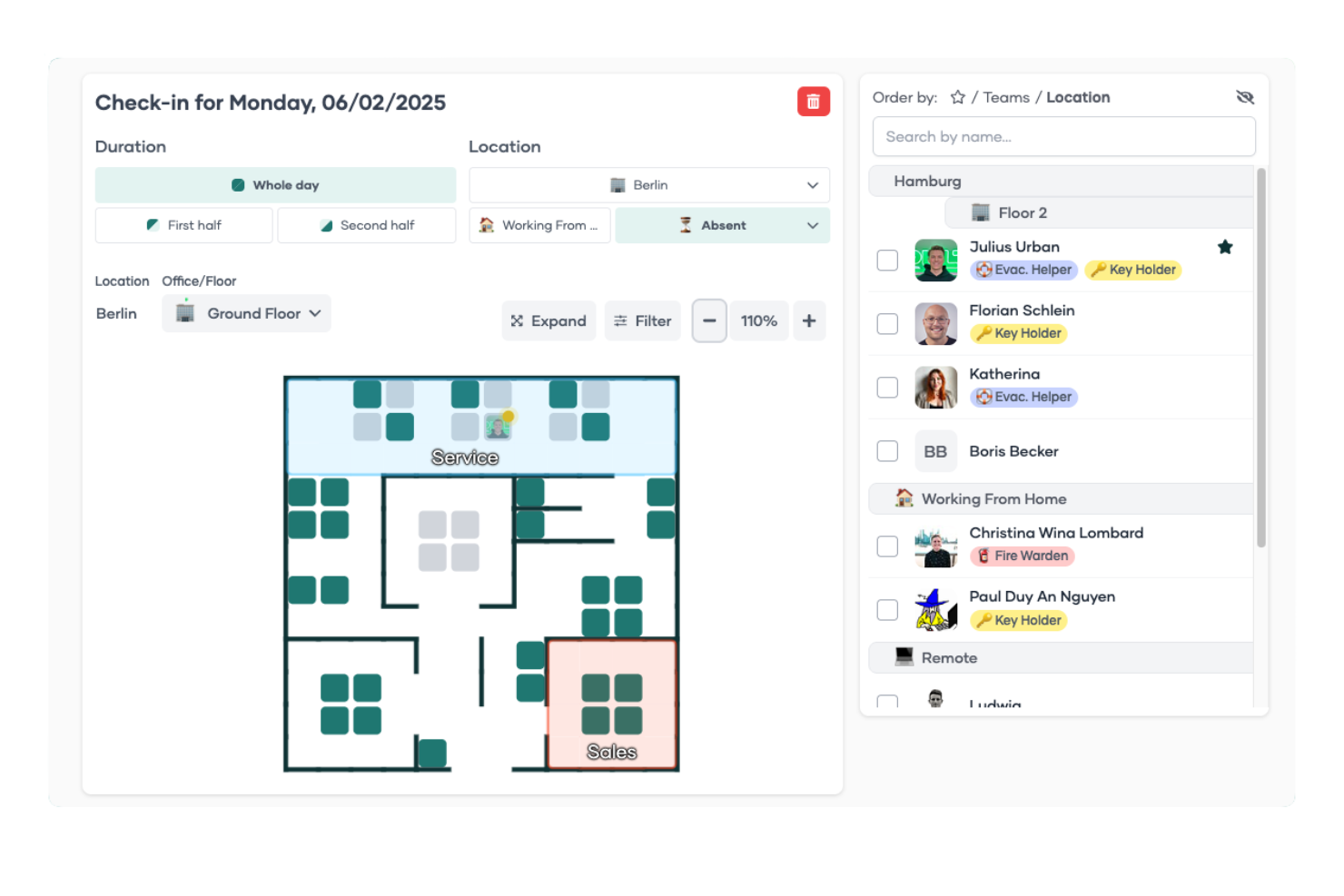
PULT is a desk booking platform for hybrid offices that lets you manage office space reservations, monitor occupancy, and set up interactive floor plans for your team.
Who Is PULT Best For?
PULT is a good fit for hybrid office managers and workplace teams who need to coordinate desk usage across multiple locations.
Why I Picked PULT
I picked PULT as one of the best because I can see real-time desk availability across all office locations, which helps my team avoid double bookings. I like that the interactive floor plan updates instantly as desks are reserved or released. My team also uses the occupancy analytics to spot usage trends and adjust our workspace setup as needed.
PULT Key Features
- Desk check-in via QR code: Users can check in to their reserved desks by scanning a QR code at the workspace.
- Custom booking rules: Admins can set booking restrictions, approval flows, and time limits for reservations.
- Mobile app access: Teams can book, modify, or cancel desk reservations directly from their smartphones.
- Visitor management: The platform includes tools for registering and tracking office visitors.
PULT Integrations
PULT offers native integrations with Slack, Microsoft Teams, Google Calendar, Microsoft Outlook, Personio, HRworks, Workday, BambooHR, Okta, Cisco Meraki, and Fortinet. An API is available for custom integrations.
Pros and Cons
Pros:
- Custom booking rules for admin control
- QR code check-in for reserved desks
- Real-time desk availability updates across locations
Cons:
- No built-in support for parking space booking
- Limited reporting customization options

Officely
Best for Slack-based desk booking workflows
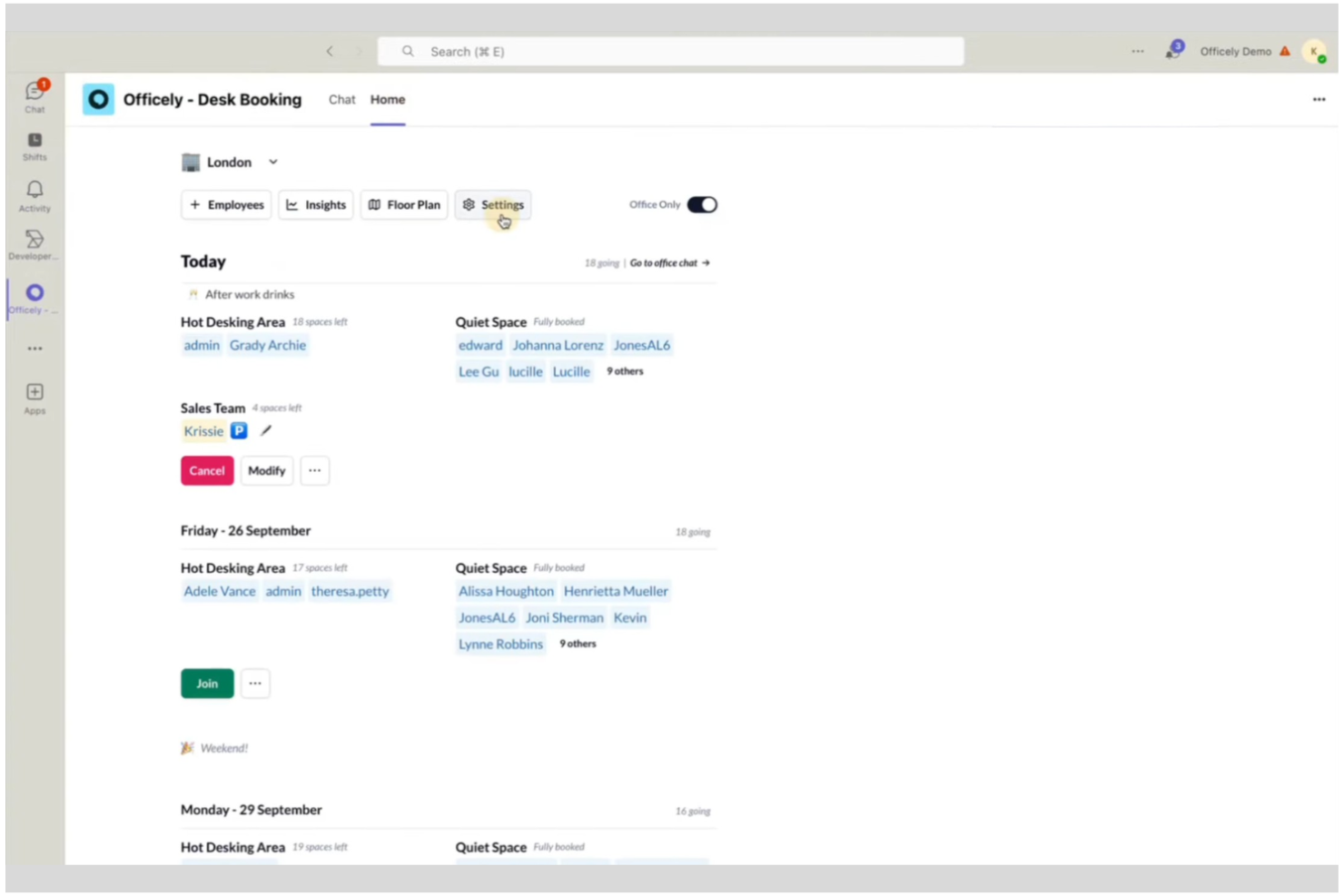
Officely is a desk booking software solution that lets teams reserve desks, manage office attendance, and coordinate hybrid work schedules directly within Slack.
Who Is Officely Best For?
Officely is a good fit for small to midsize teams that already use Slack as their primary communication platform.
Why I Picked Officely
I picked Officely as one of the best because it lets my team book desks, manage office attendance, and coordinate hybrid schedules directly inside Slack. I like that I can set up recurring office days and see who else is coming in, all without leaving Slack. The integration with Slack channels means my team gets real-time updates and reminders about their bookings.
Officely Key Features
- Desk check-in via Slack: Users confirm their desk bookings directly in Slack each day.
- Office capacity controls: Admins set limits on how many people can book desks per day.
- Visitor management: Track and approve external visitors coming into the office.
- Health screening surveys: Collect health declarations from users before they come into the office.
Officely Integrations
Officely offers native integrations with Google Calendar, Microsoft Outlook, and Slack, and provides an API for custom integrations.
Pros and Cons
Pros:
- Real-time office attendance visibility in Slack
- Supports recurring and one-off desk reservations
- Fully integrated with Slack for desk booking
Cons:
- Limited customization of booking rules
- Requires Slack for core functionality

FLYDESK
Best for mobile-first desk booking experiences

FLYDESK is a workspace management platform for hot desk booking that offers mobile apps, interactive floor plans, and real-time availability for flexible work environments.
Who Is FLYDESK Best For?
FLYDESK is a good fit for distributed teams and hybrid workplaces that prioritize mobile access to desk booking and workspace management.
Why I Picked FLYDESK
I picked FLYDESK as one of the best desk booking software because its mobile-first approach lets my team book desks and meeting rooms directly from their phones. I like how the interactive floor plans update in real time, so we always know which spaces are available. The check-in feature using QR codes is especially useful for hybrid teams moving between locations.
FLYDESK Key Features
- Multi-location management: Manage bookings across multiple offices or coworking spaces from one dashboard.
- Role-based access control: Set permissions for admins, managers, and regular users.
- Calendar sync: Connect bookings with Google Calendar and Microsoft Outlook.
- Booking analytics: View usage statistics and booking trends for desks and rooms.
FLYDESK Integrations
FLYDESK offers native integrations with Google Calendar and Microsoft Outlook. An API is available for custom integrations.
Pros and Cons
Pros:
- Role-based permissions for user access control
- Multi-location management from a single dashboard
- QR code check-in for workspace access
Cons:
- Free plan restricts advanced booking options
- Analytics are basic compared to competitors

Best for visual floor plan desk selection
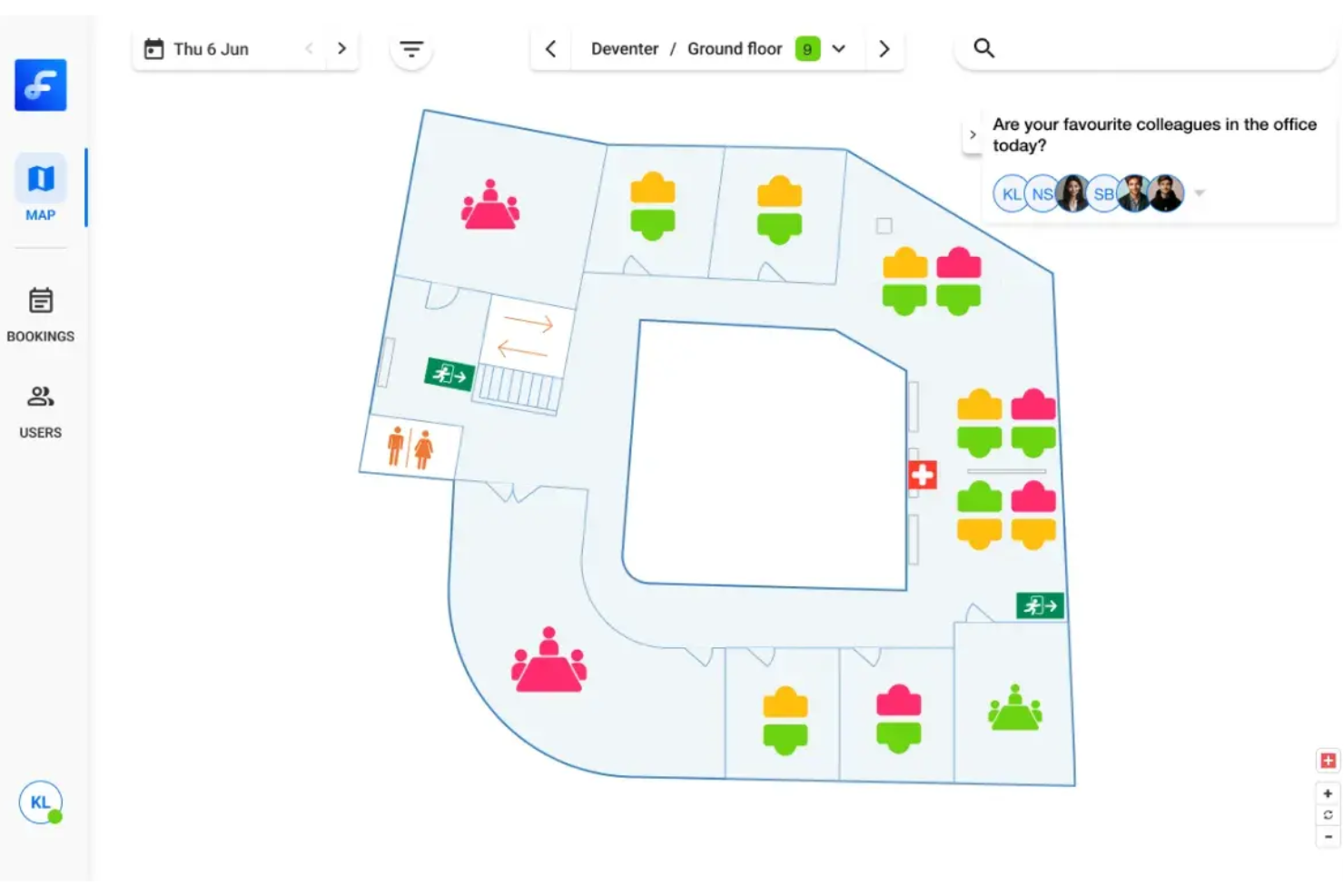
Flexwhere is a desk booking software platform that lets you manage workspace reservations, visualize office layouts, and monitor desk occupancy using interactive floor plans and real-time availability.
Who Is Flexwhere Best For?
Facilities managers and office administrators in mid-sized organizations who need to manage and visualize desk bookings across dynamic office layouts.
Why I Picked Flexwhere
I picked Flexwhere as one of the best because I can quickly select desks from a detailed, interactive floor plan, which is perfect for visualizing office layouts. I like that my team can see real-time desk availability and book spaces directly from the map. The platform also lets us monitor occupancy trends, so we can adjust our workspace setup as needs change.
Flexwhere Key Features
- Mobile app: Book desks and manage reservations from your phone.
- Outlook integration: Sync desk bookings with your Outlook calendar.
- Visitor registration: Register and track office visitors within the platform.
- Custom booking rules: Set booking restrictions and permissions for different user groups.
Flexwhere Integrations
Integrations include Outlook, Microsoft Teams, Google Calendar, and TopDesk.
Pros and Cons
Pros:
- Support for 25 free users
- Real-time colleague location tracking
- Interactive visual floor plan maps
Cons:
- Eight-day booking limit
- One floor plan limit
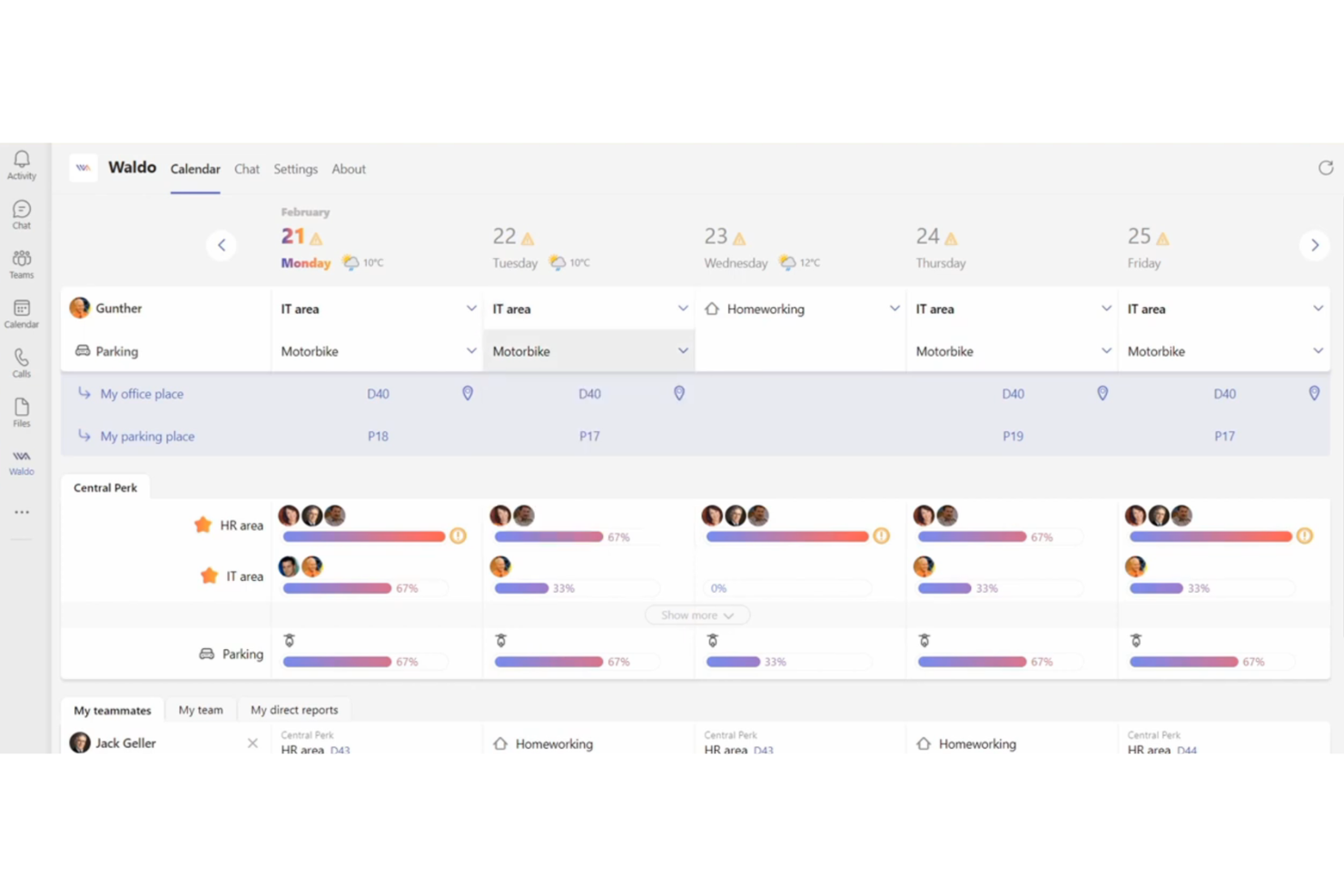
Waldo is a desk booking platform that uses AI to automate workspace reservations, manage meeting rooms, and optimize office layouts for hybrid teams.
Who Is Waldo Best For?
Waldo is a good fit for hybrid teams and office managers at mid-sized companies who want AI-driven desk and meeting room booking.
Why I Picked Waldo
I picked Waldo as one of the best because its predictive AI booking engine automatically suggests and reserves desks based on team schedules and preferences. I like that my team can manage both desk and meeting room bookings in one place. The platform’s smart recommendations help us optimize space usage without manual planning.
Waldo Key Features
- Interactive floor plans: Users can select and book desks directly from a visual office map.
- Mobile app: Book desks and manage reservations from iOS or Android devices.
- Neighborhoods management: Group desks into zones for team-based booking.
- Access control integration: Connects with building systems to manage entry permissions.
Waldo Integrations
Waldo offers native integration with Microsoft Teams and is managed through the Microsoft 365 administration portal. Native integrations with other platforms are not clearly documented.
Pros and Cons
Pros:
- Supports meeting room and desk booking together
- Visual floor plans for easy desk selection
- Predictive AI suggests optimal desk bookings
Cons:
- No public API for custom integrations
- Limited native integrations

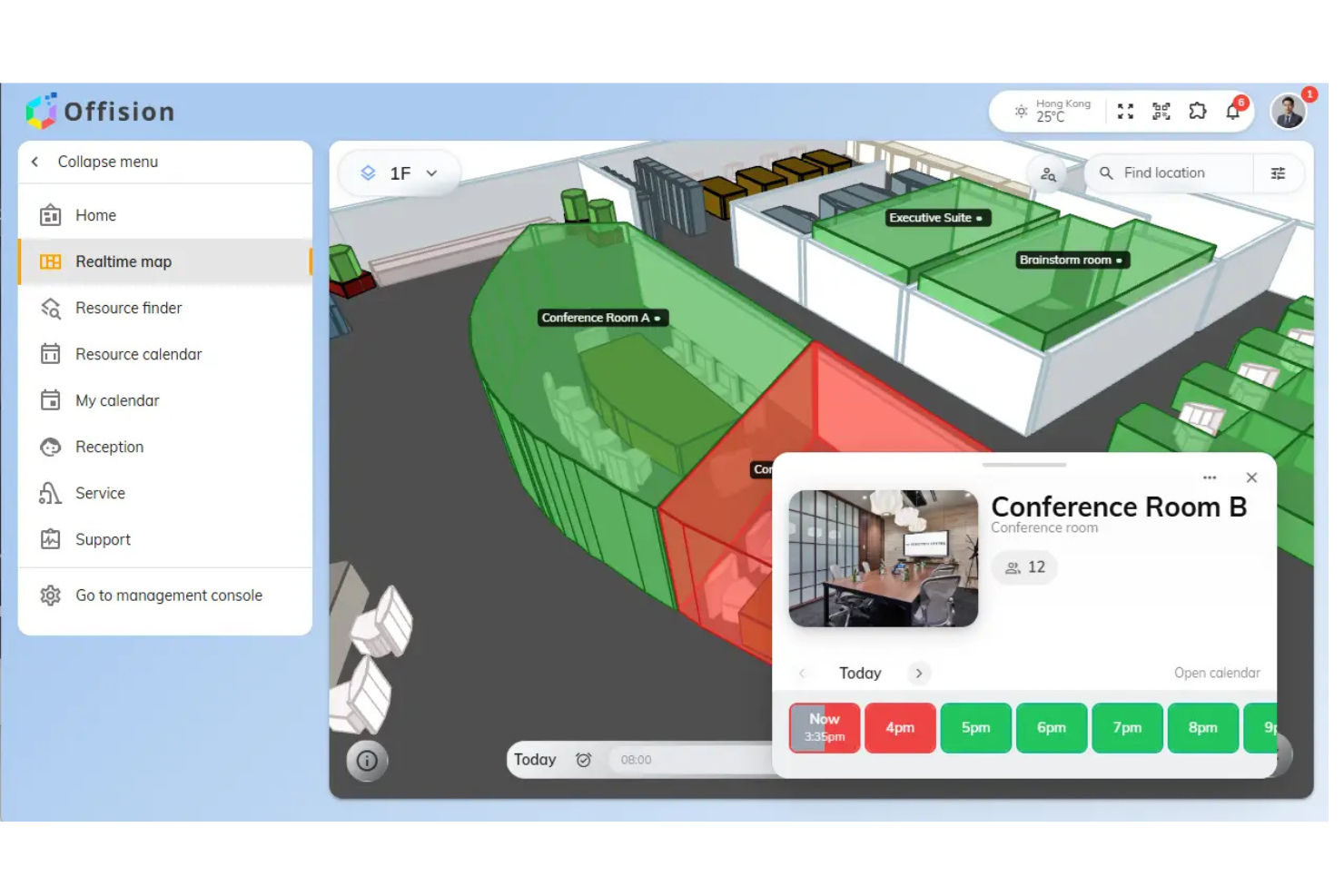
Offision is a workspace management platform for booking desks, meeting rooms, and parking spaces, with features for managing multiple office locations and setting custom booking rules.
Who Is Offision Best For?
Facility managers and admins at organizations with multiple office locations needing centralized desk and space booking.
Why I Picked Offision
I picked Offision as one of the best because I can manage multiple office locations from a single dashboard, which is rare among free hot desk booking tools. I like that I can set custom booking rules for each location and assign different admins to manage specific spaces. My team is able to handle desk, meeting room, and parking reservations across several offices without switching platforms.
Offision Key Features
- Interactive floor plans: Users can select and book desks directly from a visual map.
- Mobile booking app: Book desks and spaces from iOS or Android devices.
- Check-in and check-out system: Track desk usage with QR code or manual check-in.
- Booking history export: Download reservation data for reporting or analysis.
Offision Integrations
Offision offers native integrations with Zoom, Microsoft Teams, Outlook, Microsoft 365, Google Workspace, and Webex.
Pros and Cons
Pros:
- Allows custom booking rules per location
- Manages multiple office locations centrally
- Supports booking desks, rooms, and parking
Cons:
- No free plan, only a free trial
- Pricing is not transparently listed online

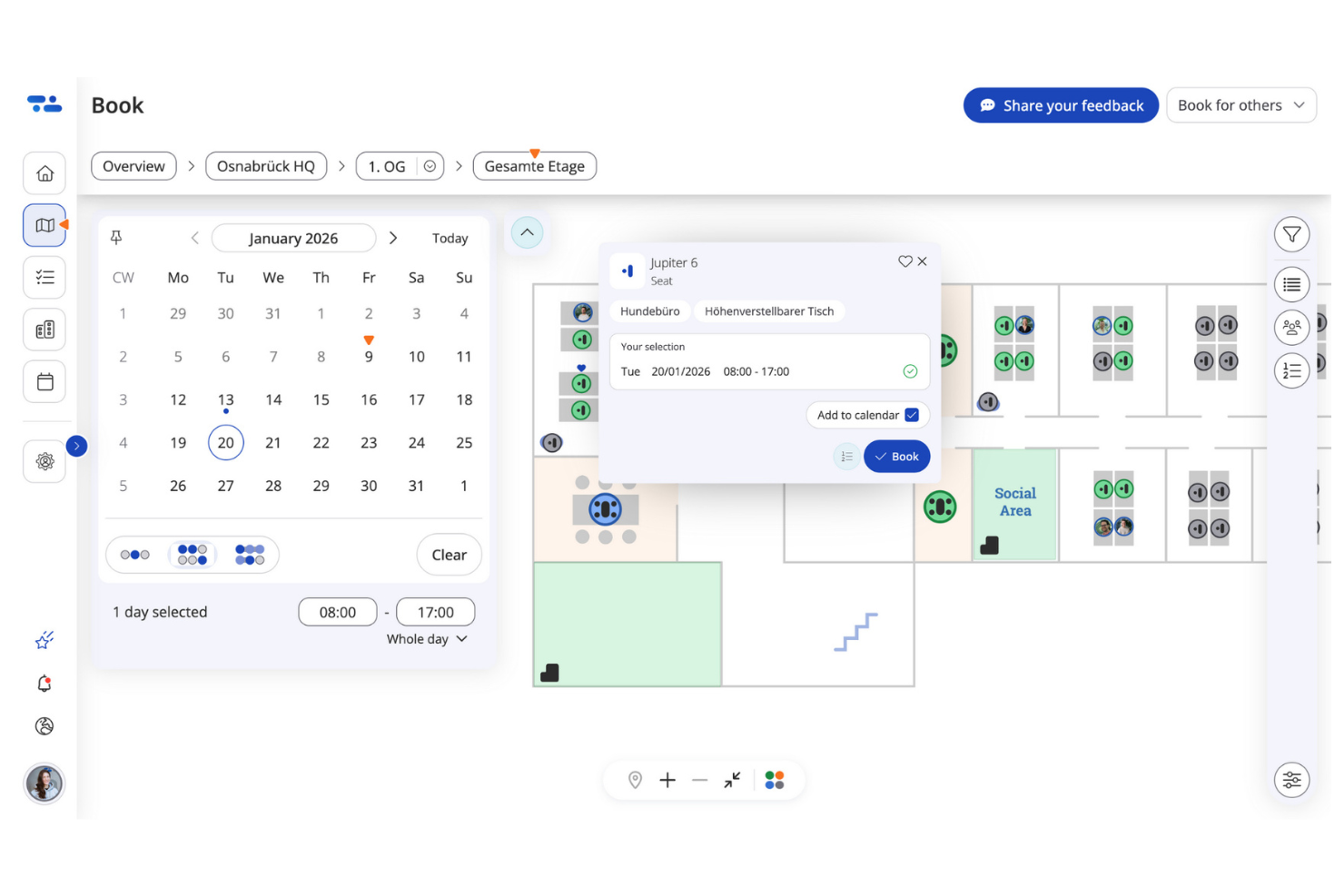
desk.ly is a workspace management platform for booking desks, rooms, and parking spaces, offering interactive floor plans, user management, and compliance features for organizations managing flexible office environments.
Who Is desk.ly Best For?
desk.ly is a good fit for European organizations and HR teams that require GDPR-compliant workspace management and flexible desk booking.
Why I Picked desk.ly
I picked desk.ly as one of the best because it’s built with GDPR compliance at its core, which is essential for European organizations. I like that my team can manage workspace bookings with granular user permissions and anonymized data handling. The interactive floor plan editor lets us visually assign and monitor desks while staying compliant with strict privacy standards.
desk.ly Key Features
- Mobile booking app: Reserve desks and rooms directly from your smartphone.
- QR code check-in: Scan QR codes at desks for fast, contactless check-in.
- Resource booking: Book parking spaces, lockers, and meeting rooms alongside desks.
- Team booking mode: Reserve workspaces for entire teams in one action.
desk.ly Integrations
Desk.ly offers native integrations with Microsoft Outlook, Google Calendar, Microsoft Teams, Personio, and Slack, and provides an API for custom integrations.
Pros and Cons
Pros:
- Native Microsoft Teams booking interface
- Integrated parking space reservation system
- GDPR-compliant data handling
Cons:
- Lack of 3D floor plans
- Limited automated hardware integrations


Sharvy is a workspace and desk booking platform that lets you manage hot desks, meeting rooms, and parking spaces in one system.
Who Is Sharvy Best For?
Facilities managers at midsize companies who need to coordinate both desk and parking space bookings.
Why I Picked Sharvy
I picked Sharvy as one of the best because it’s the only hot desk booking tool I’ve used that also manages parking spaces in the same platform. I like that I can allocate both desks and parking spots to employees from a single dashboard. My team is able to automate space allocation rules and set up booking quotas for different resources, which is especially useful when coordinating hybrid work schedules.
Sharvy Key Features
- Mobile booking app: Reserve desks and spaces directly from your phone.
- Interactive floor plans: Visualize and select available workstations on a digital map.
- Access control integration: Connects with badge systems for automated entry management.
- Automated waitlists: Automatically manage requests when spaces are fully booked.
Sharvy Integrations
Sharvy offers native integrations with Kelio, Lucca, Cegedim, SAP, Power BI, and Tableau. It also connects with access control systems, RFID readers, and Microsoft Teams. An API is available for custom integrations.
Pros and Cons
Pros:
- Integrates with Google Workspace
- Supports automated booking rules and quotas
- Manages both desks and parking spaces
Cons:
- Custom branding options are restricted
- Limited analytics on space utilization trends
Diğer Ücretsiz Ortak Masa Rezervasyon Yazılımları
Kısa listeme girmeyen ancak yine de göz atmaya değer bazı ek ücretsiz ortak masa rezervasyon yazılımı seçeneklerini burada bulabilirsiniz:
- Deskfound
For visual desk planning
- Whatspot
For quick bookings via QR code scanning
- Skedda
For advanced access control settings
- deskbird
For customizable booking rules
- Clearooms
For simple visual overviews
- Archie
For automated check-ins
- Envoy
For visitor management integration
- anny
For modular booking workflows
- Flexopus
For multilingual user interface
- Tidaro
For recurring desk reservations


How I Evaluate Free Hot Desk Booking Software
First, I define what counts as free. For hot desk booking software, I only consider tools with a free-forever plan—coordinating hybrid in-office days for project teams is an ongoing need, not a short-term experiment. I then evaluate each option against the core functionality required to make this list and the differentiators that separate the best from the rest.
Core Functionality (Table Stakes For This List)
In addition to my free offer requirements, I also use a scoring system to select tools for my list. Here's how it works:
I rank each one on a scale from 0 (does not offer the functionality) to 5 (excels in this area) for each core functionality listed below. Then, I calculate the tool's total score into a percentage. Each tool needs to achieve a minimum total score of 65% to be considered for inclusion.
- Desk Reservation System: I check whether users can browse available desks and book them for specific dates and time slots, like reserving a cluster of seats for a sprint week.
- Interactive Floor Maps: A visual map showing real-time availability helps teams pick desks near each other. I look for clickable layouts over static images.
- Calendar & Scheduling Integration: Syncing with Google Calendar or Outlook keeps desk bookings visible alongside standups and retros. I evaluate how well the sync works both ways.
- Team Coordination Visibility: I look for the ability to see which teammates are booked in on a given day, so a scrum master can confirm the whole squad will be co-located.
- Multi-User Access on Free Plan: The free tier needs to support enough seats for a real project team. I evaluate how many users can book independently before an upgrade is required.
- Mobile Booking Access: Plans shift fast, and teams need to book or cancel from a phone. I look for native apps or responsive mobile experiences with full booking capability.
Once I have a list of tools that meet the criteria, I consider what sets each platform apart.
Differentiating Factors (What Sets Vendors Apart)
Here's how I compare and contrast different vendors:
Standout Features
I look for tools that let teams book desks directly from Slack or Microsoft Teams, since that's where most coordination already happens. Recurring reservations are a big plus for teams with set hybrid rhythms, like booking every Wednesday for a weekly planning session. Check-in and auto-release is another feature I evaluate closely—it frees up no-show desks automatically, which keeps space available when someone's plans change last-minute.
Beyond Features
Free plan user limits matter a lot—I check whether the cap supports a full project squad or just a handful of admins. Setup speed is another factor I evaluate, especially for project coordinators who need to upload a floor plan and get the team booking within a day, not weeks. Since desk booking involves employee location data, I also consider how each vendor handles privacy, including GDPR compliance and admin controls over who can see colleague booking details.
Ücretsiz Ortak Masa Rezervasyon Yazılımı Nasıl Seçilir?
Uzun özellik listeleri ve karmaşık fiyatlandırma yapılarına kendinizi kaptırmanız kolaydır. Kendinize özgü yazılım seçim sürecinizi yürütürken odağınızı korumanıza yardımcı olmak için göz önünde bulundurmanız gereken faktörlerin bir kontrol listesini aşağıda bulabilirsiniz:
| Faktör | Dikkat Edilmesi Gerekenler |
|---|---|
| Ölçeklenebilirlik | Araç, ekip büyüklüğünüzü ve gelecekteki büyümenizi destekleyecek mi? Ücretsiz plandaki kullanıcı ve konum sınırlarını kontrol edin. |
| Entegrasyonlar | Mevcut takvimlerinize veya iş birliği araçlarınıza bağlanıyor mu? Yerel entegrasyonları ve API erişimini doğrulayın. |
| Özelleştirilebilirlik | Rezervasyon kurallarını, izinleri veya çalışma alanı düzenlerini politika ve iş akışlarınıza uyacak şekilde uyarlayabiliyor musunuz? |
| Kullanım kolaylığı | Ekibiniz aracı hızlı bir şekilde benimseyecek mi? Açık bir gezinme yapısı, mobil erişim ve minimum eğitim gereksinimi sunan araçları tercih edin. |
| Uygulama ve kullanıma alıştırma | Kurulum ne kadar sürecek? Sorunsuz bir kullanıma sunma süreci için kılavuzların, şablonların ve desteğin mevcut olup olmadığını değerlendirin. |
| Maliyet | Gizli maliyetler veya yükseltme gerektiren durumlar var mı? Ücretsiz plana nelerin dahil olduğunu ve ücretlerin ne zaman uygulanacağını inceleyin. |
| Güvenlik önlemleri | Araç, kullanıcı verilerini ve gizliliği koruyor mu? Şifreleme, erişim denetimleri ve ilgili standartlara uyumluluk özelliklerini arayın. |
| Destek kullanılabilirliği | Ücretsiz planda hangi destek kanalları mevcut? Yanıt sürelerini ve yardım kaynaklarına erişimi göz önünde bulundurun. |
Ücretsiz Ortak Masa Rezervasyon Yazılımı Nedir?
Ücretsiz ortak masa rezervasyon yazılımı, ekiplerin abonelik ücreti ödemeden ortak çalışma alanlarını rezerve etmesini sağlayan dijital bir araçtır. Bu platformlar masa kullanılabilirliğini yönetmeye, esnek oturma düzenlerini desteklemeye ve çalışma alanı kullanımını izlemeye yardımcı olur.
Bu yazılımlar, kimin nerede, ne zaman ve ne kadar süreyle oturacağını koordine etmek için basit bir yönteme ihtiyaç duyan hibrit çalışma modeline sahip kuruluşlar veya dinamik ofis ortamları için tasarlanmıştır.
Özellikler
Paylaşımlı masa rezervasyon yazılımlarında yaygın olarak bulunan özellikleri ve bunların ücretsiz ve ücretli planlarda hangilerinin genellikle sunulduğunu inceleyelim.
Genellikle Ücretsiz Sunulan Paylaşımlı Masa Rezervasyon Yazılımı Özellikleri
- Masa rezervasyon takvimi: Kullanıcıların belirli tarihler ve saatler için masa ayırtmasına olanak tanıyarak ekiplerin ofis ziyaretlerini planlamasına ve çifte rezervasyonları önlemesine yardımcı olur.
- Gerçek zamanlı uygunluk: Hangi masaların boş veya dolu olduğunu göstererek kullanıcıların o anda bilinçli rezervasyon kararları vermesini sağlar.
- Temel kullanıcı yönetimi: Yöneticilerin kullanıcı eklemesine, kaldırmasına veya kullanıcılara roller atamasına olanak tanıyarak yalnızca yetkili kişilerin masa ayırtabilmesini sağlar.
- Mobil erişim: Mobil uyumlu bir arayüz veya uygulama sunarak her yerden kolayca masa ayırtılmasını sağlar.
- Rezervasyon bildirimleri: Rezervasyonları onaylamak, kullanıcılara ayırtılan masaları hatırlatmak veya değişiklikleri bildirmek için e-posta ya da uygulama içi uyarılar gönderir.
- Basit kat planı görünümü: Kullanıcıların çalışma alanı seçeneklerini görselleştirmesine yardımcı olmak için uygun masaların temel bir haritasını veya listesini görüntüler.
- Rezervasyon geçmişi: Daha iyi planlama ve hesap verebilirlik için kullanıcıların ve yöneticilerin geçmiş ve yaklaşan rezervasyonları incelemesine olanak tanır.
- Kendi kendine iptal: Kullanıcıların yönetici müdahalesi olmadan rezervasyonlarını iptal etmesine veya değiştirmesine olanak tanır.
Genellikle Ücretli Sunulan Paylaşımlı Masa Rezervasyon Yazılımı Özellikleri
- Gelişmiş analiz ve raporlama: Masa kullanımı, doluluk eğilimleri ve alan optimizasyonu fırsatları hakkında ayrıntılı bilgiler sunar.
- Takvim araçlarıyla entegrasyon: Daha sorunsuz bir koordinasyon için rezervasyonları Google Calendar, Microsoft Outlook veya diğer planlama platformlarıyla senkronize eder.
- Birden çok konum yönetimi: Tek bir kontrol panelinden birden fazla ofis veya binadaki rezervasyonları ve yönetimi destekler.
- Özel rezervasyon kuralları: Kuruluşların rezervasyon aralıkları, onay iş akışları veya yinelenen rezervasyonlar gibi politikalar belirlemesini sağlar.
- Ziyaretçi yönetimi: Dışarıdan gelen konukları takip eder, ziyaretçi kartları düzenler ve ek güvenlik için resepsiyon sistemleriyle entegre olur.
- Temassız veya QR koduyla giriş: Kullanıcıların fiziksel teması azaltmak için ayırttıkları masalara QR kodları veya mobil cihazlar kullanarak giriş yapmasına olanak tanır.
- Role dayalı erişim denetimi: Yöneticiler, müdürler ve normal kullanıcılar gibi farklı kullanıcı grupları için ayrıntılı izinler sunar.
- Donanım sensörleriyle entegrasyon: Masa durumu güncellemelerini otomatikleştirmek ve doğruluğu artırmak için doluluk sensörlerine veya IoT cihazlarına bağlanır.
- Öncelikli rezervasyon veya bekleme listeleri: Belirli kullanıcıların masaları diğerlerinden önce ayırtmasına veya yoğun talep gören alanlar için bekleme listelerine katılmasına olanak tanır.
- Özel müşteri desteği: Ücretli kullanıcılara öncelikli destek kanalları, kullanıma alma yardımı ve hizmet düzeyi anlaşmaları sunar.
Avantajlar
Ücretsiz paylaşımlı masa rezervasyon yazılımını uygulamak, ekibiniz ve işletmeniz için çeşitli avantajlar sağlar. Yararlanabileceğiniz avantajlardan bazıları şunlardır:
- Maliyet tasarrufu: Hibrit veya esnek ekipler için temel masa yönetimi özelliklerini sunmaya devam ederken abonelik ücretlerinden kaçınmanızı sağlar.
- Çalışma alanı görünürlüğünün iyileştirilmesi: Gerçek zamanlı uygunluk ve kat planı görünümleri, ofise gitmeden önce herkesin hangi masaların boş olduğunu görmesine yardımcı olur.
- Sadeleştirilmiş rezervasyon süreci: Kendi kendine yapılan rezervasyonlar ve mobil erişim, kullanıcıların masaları kendilerinin ayırtmasını, değiştirmesini veya iptal etmesini kolaylaştırır.
- Alan kullanımının iyileştirilmesi: Rezervasyon geçmişi ve kullanım verileri, çalışma alanı talebini anlamanıza ve düzenleri veya politikaları gerektiği şekilde ayarlamanıza yardımcı olur.
- Daha hızlı işe alıştırma: Sezgisel arayüzler ve temel kullanıcı yönetimi, yeni kullanıcıların çok az eğitim veya BT desteğiyle çalışmaya başlamasını sağlar.
- Gelişmiş hesap verebilirlik: Kullanıcı rolleri ve rezervasyon kayıtları, yalnızca yetkili ekip üyelerinin masa ayırtmasını sağlar ve net bir denetim izi sunar.
- Hibrit çalışmayı destekleme: Esnek rezervasyon araçları, ekiplerin ofiste çalışacakları günleri koordine etmesine ve değişen programlara manuel takip olmadan uyum sağlamasına yardımcı olur.
Maliyetler ve Fiyatlandırma
Bu makaleye ücretsiz olarak sunulan en iyi paylaşımlı masa rezervasyon yazılımı seçeneklerini aradığınız için geldiğinizi biliyorum. Ancak ücretsiz planlar yalnızca sınırlı özellikler sunduğundan, gelecekte planınızı yükseltmeniz gerekebilir.
Aşağıdaki tablo, paylaşımlı masa rezervasyon yazılımlarında yaygın olan planları, bunların ortalama fiyatlarını ve genellikle içerdiği özellikleri özetlemektedir:
Sıcak Masa Rezervasyon Yazılımı için Plan Karşılaştırma Tablosu
| Plan Türü | Ortalama Fiyat | Yaygın Özellikler |
|---|---|---|
| Ücretsiz Plan | $0 | Temel masa rezervasyonu, gerçek zamanlı uygunluk, basit kat planı görünümü, mobil erişim ve rezervasyon bildirimleri. |
| Kişisel Plan | $5-$10/kullanıcı/ay | Tüm ücretsiz özellikler, takvim entegrasyonları, sınırlı analizler, öncelikli destek ve özel rezervasyon kuralları. |
| İşletme Planı | $10-$25/kullanıcı/ay | Tüm kişisel plan özellikleri, birden fazla konum yönetimi, gelişmiş analizler, ziyaretçi yönetimi ve role dayalı erişim denetimi. |
| Kurumsal Plan | $25-$50/kullanıcı/ay | Tüm işletme planı özellikleri, özel entegrasyonlar, API erişimi, donanım sensörü desteği, özel işe alıştırma ve gelişmiş güvenlik denetimleri. |
Ücretsiz Sıcak Masa Rezervasyon Yazılımı Hakkında SSS
Ücretsiz sıcak masa rezervasyon yazılımı hakkında sık sorulan bazı soruların yanıtlarını burada bulabilirsiniz:
Ücretsiz sıcak masa rezervasyon yazılımıyla birden fazla ofis konumunu yönetebilir miyim?
Hayır, masa rezervasyon sistemlerinin sunduğu ücretsiz planların çoğu sizi tek bir konumla sınırlar. Birden fazla ofisteki rezervasyonları yönetmeniz gerekiyorsa genellikle ücretli bir plana geçmeniz gerekir.
Ücretsiz planlarda takvim araçlarıyla entegrasyonlar mevcut mu?
Hayır, Google Takvim veya Outlook gibi araçlarla entegrasyonlar genellikle ücretli planlara özeldir. Ücretsiz sürümler genellikle yalnızca temel rezervasyon ve bildirim özelliklerini sunar.
Ücretsiz bir sıcak masa rezervasyon yazılımı planına kaç kullanıcı erişebilir?
Ücretsiz planların çoğu 5 ila 10 kullanıcıyı destekler. Ekibiniz daha büyükse muhtemelen ücretli bir katmanı değerlendirmeniz veya daha yüksek ücretsiz kullanıcı sınırı sunan bir sağlayıcı aramanız gerekir.
Ücretsiz bir sıcak masa rezervasyon yazılımı planında verilerim güvende mi?
Evet, saygın sağlayıcılar ücretsiz planlarda da şifrelenmiş bağlantılar ve kullanıcı kimlik doğrulaması gibi temel güvenlik önlemleri sunar. Ancak gelişmiş güvenlik özellikleri genellikle yalnızca ücretli planlarda kullanılabilir.
Ücretsiz bir planda rezervasyon kurallarını veya izinlerini özelleştirebilir miyim?
Hayır, rezervasyon kuralları ve kullanıcı izinleri için özelleştirme seçenekleri ücretsiz planlarda genellikle sınırlıdır veya kullanılamaz. Ücretli planlar genellikle daha ayrıntılı denetimlerin kilidini açar.