

2026 İçin İncelenen En İyi 10 Risk Yönetimi Yazılımı

10 En İyi Risk Yönetimi Araçları


En iyi risk yönetimi yazılımı riskleri analiz edip belirlemenize, zaman içinde takip etmenize ve onları azaltıp en aza indirmek için stratejiler planlamanıza yardımcı olur. Doğru risk yönetimi aracı olmadan projenizde zaman çizelgenizi aksatacak, bütçenizi zorlayacak ve proje kapsamınızı büyütecek çeşitli sorunlarla karşılaşırsınız.
Proje yönetimindeki 15 yıllık deneyimimi kullanarak 20’den fazla proje risk yönetimi aracını değerlendirdim. Böylece olasılıkları veya etki düzeyleri ne olursa olsun, projenizdeki risklerle başa çıkmak için doğru seçeneği bulabilirsiniz. Aşağıda, seçiminizi yapmanıza yardımcı olacak temel özellikler ve kullanım alanlarıyla birlikte risk yönetimi yazılımı için en iyi tercihlerimi bulabilirsiniz.
Why Trust Our Software Recommendations
Our team has been testing and reviewing software since 2012. As project managers ourselves, we know how difficult—and important—it is to choose the right software.
For this guide, we evaluated tools using hands-on testing and independent research, scoring tools using our selection criteria. We also draw on insights from industry thought leaders and practicing project management experts.
Our reviews reflect our human editorial judgment, not a sales pitch.
Expert reviewers:
Risk Yönetimi Yazılımı Karşılaştırma Tablosu
Bu karşılaştırma tablosu, en iyi risk yönetimi yazılımı seçimlerim için fiyatlandırma ayrıntılarını özetlemektedir:
| Tool | Starting Price | Website | |
|---|---|---|---|
| Best for real-time risk monitoring | 4.1 out of 5 | Pricing upon request Free demo available | Website |
| Best for real-time risk assessments and mitigation | 4.2 out of 5 | Pricing upon request Free demo available | Website |
| Best for keeping risk visible alongside the work | 4.3 out of 5 | $10/user/month Free plan + 14-day trial available | Book Demo |
| Best integrated risk management software for enterprises | 3.5 out of 5 | Pricing upon request Free demo available | Website |
| Best for security and compliance management | 4.2 out of 5 | Pricing upon request Free demo available | Website |
| Best for planning & performing risk audits | 4.6 out of 5 | Pricing upon request Free demo available | Website |
| Best for intelligent transaction observability | 4.3 out of 5 | $10/user/month Free plan available | Website |
| Best for dependency visualization | 4.5 out of 5 | Pricing upon request Free demo available | Website |
| Best for automated incident management | 4.1 out of 5 | Pricing upon request Free demo available | Website |
| Best for automation capabilities | 4.8 out of 5 | $12/month Free demo available | Website |

En İyi Risk Yönetimi Yazılımı İncelemeleri
Listemde yer alan en iyi risk yönetimi sistemlerinin her birinin kısa açıklamasını burada bulabilirsiniz.

SAI360
Best for real-time risk monitoring
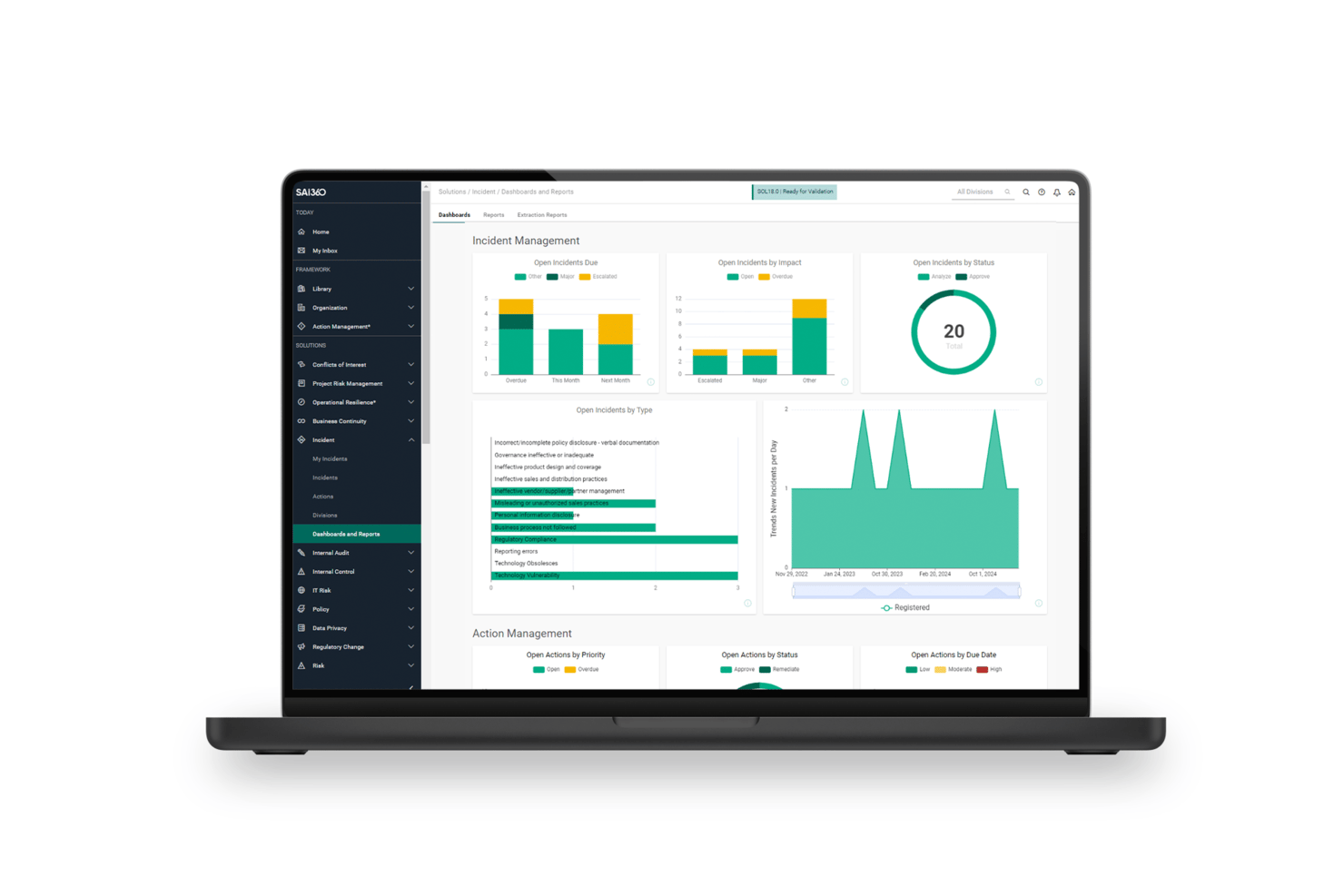
SAI360 is a GRC platform that covers enterprise risk, operational risk, third-party risk, IT/cyber risk, and compliance management through an AI-connected risk register, real-time KRI monitoring, and automated mitigation workflows.
Who Is SAI360 Best For?
SAI360 is a strong fit for risk and compliance teams in regulated industries like banking, healthcare, and manufacturing that need enterprise-wide risk visibility.
Why I Picked SAI360
I've included SAI360 in my top picks because its real-time KRI monitoring is genuinely impressive, tracking risk thresholds across the business and firing automated alerts the moment something breaches. I also love Horizon Scanning, which pulls from 5M+ global sources, scores signals for relevance, and feeds emerging risks directly into the internal register. For regulated industries like banking or healthcare, that kind of continuous external intelligence is hard to replicate with a static register alone.
SAI360 Key Features
- AI-connected risk register: Links related risks, incidents, controls, and indicators across enterprise and operational domains in a single view.
- Monte Carlo simulation: Models Value-at-Risk and financial exposure using probabilistic simulation to support enterprise financial risk decisions.
- Risk and control self-assessments (RCSAs): Structured assessments that capture likelihood, impact, and control effectiveness across business units.
- Automated mitigation workflows: Routes risk responses through configurable approval chains, owner assignments, and corrective action tracking through to closure.
SAI360 Integrations
SAI360 lists 100+ integrations, including ServiceNow, Jira, SAP, Oracle, Power BI, Microsoft 365, SharePoint, and Slack. Professional and Enterprise editions support third-party API integrations, and SAI360 is also available through Zapier.
Pros and Cons
Pros:
- Responsive support assists complex implementations
- AI links risks, controls, and incidents
- Real-time KRI alerts surface emerging exposure
Cons:
- Implementation demands substantial administrative effort
- Advanced dashboards require technical configuration
Best for real-time risk assessments and mitigation

Mitratech's Alyne platform is a cloud-based governance, risk, and compliance (GRC) solution that can help improve your org's risk management. With a focus on integrating key risk management areas, Alyne provides tools and features that help businesses assess and mitigate risks effectively.
Why I Picked Mitratech
I picked Mitratech for its robust risk assessment tools that let you conduct real-time evaluation of potential risks. This feature is essential for identifying vulnerabilities within your organization and letting you take proactive measures.
Another reason I chose Mitratech is its policy management capabilities, which help you maintain compliance with various regulations and standards. This feature is crucial for businesses that operate in highly regulated industries and can help you meet necessary requirements. Furthermore, the platform's AI-driven insights provide valuable analytics for informed decision-making, so you can prioritize risks and allocate resources effectively.
Mitratech Key Features
Mitratech also offers a range of other features that can help your organization with project risk management.
- Automated Workflows: You can streamline your risk identification and mitigation processes, reduce manual effort, and boost efficiency.
- Business Continuity Planning: With tools designed to develop and maintain business continuity plans, you can prepare for and respond to disruptions effectively and minimize downtime and financial loss.
- Compliance Training: Mitratech provides resources and modules to educate your team on compliance requirements, which helps makes sure all processes adhere to relevant regulations and standards.
- Third-Party Vendor Risk Management: This facilitates the assessment and monitoring of risks associated with third-party vendors, so your partnerships do not introduce vulnerabilities into your operations.
Mitratech Integrations
Integrations are not listed publicly on the Mitratech website.
Pros and Cons
Pros:
- Create custom assessments tailored to specific needs
- Built-in compliance management features
- Advanced analytics powered by AI
Cons:
- Integration with existing systems can be challenging
- Lengthy setup and implementation

Wrike
Best for keeping risk visible alongside the work
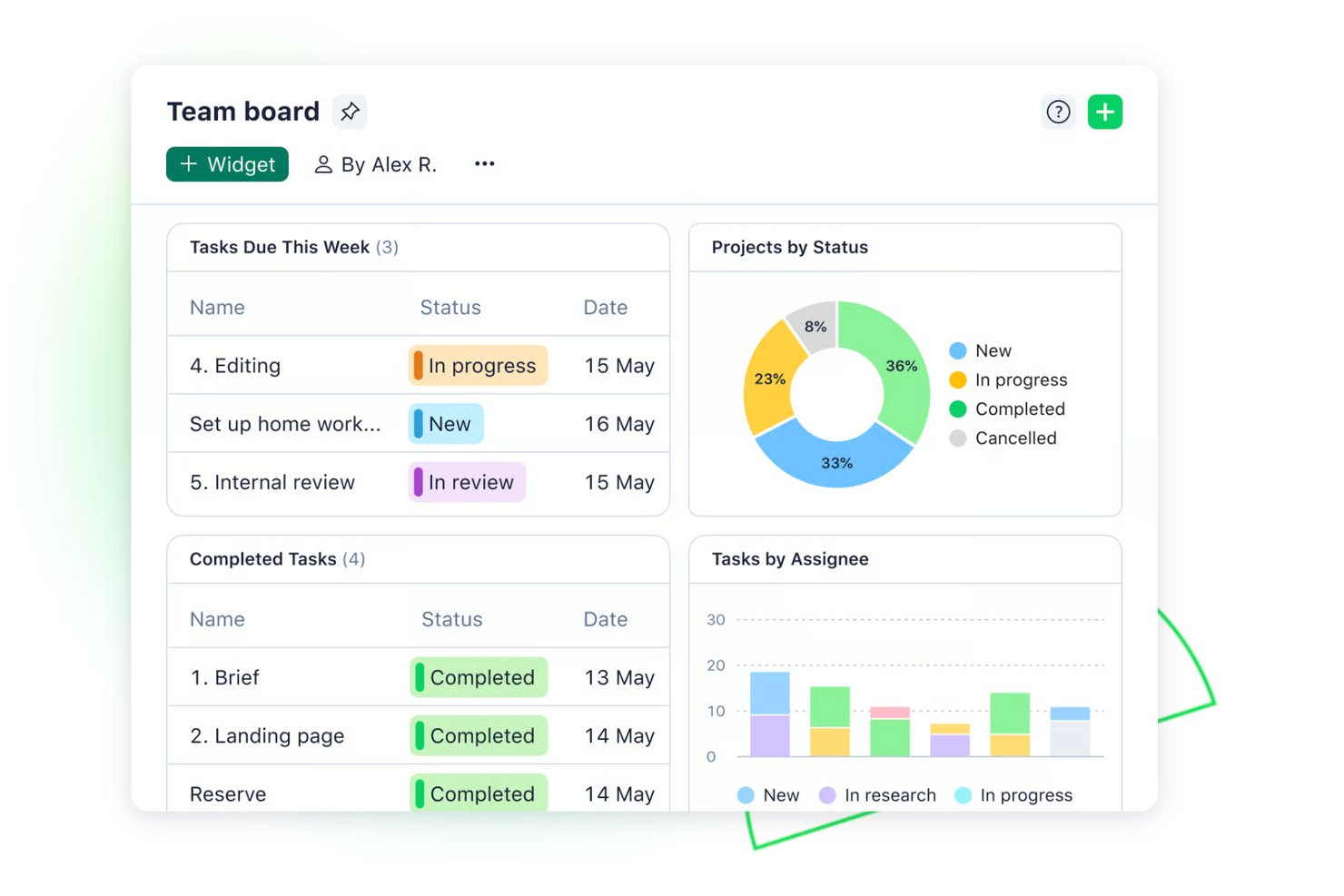
Wrike is a work management platform that layers risk tracking directly into project workflows through RAID-log templates, custom item types, AI-driven deadline risk prediction, and a cross-project RAID Manager dashboard.
Who Is Wrike Best For?
Wrike is a strong fit for cross-functional teams at mid-to-large organizations that want risk tracking embedded in their existing project workflows rather than managed in a separate tool.
Why I Picked Wrike
I picked Wrike as one of the best because it keeps risk tracking inside the same workspace where the actual work lives. Instead of maintaining a separate risk register, you can use RAID-log templates to log risks, assumptions, issues, and decisions directly alongside project tasks. I also like that the AI deadline-risk prediction automatically flags projects as low, medium, or high risk based on task activity, overdue work, and assignee workload, so schedule risk surfaces without any manual analysis.
Wrike Key Features
- RAID-log template: A pre-built template structures risk entries by type, impact, probability, and proximity score, then routes confirmed items into dedicated Risks, Assumptions, Issues, and Decisions subfolders.
- Custom item types: Admins can build a dedicated "Risk" object with its own fields, views, and automation rules directly inside the workspace.
- Weekly project risk report: An automated email flags active projects at medium or high deadline risk, lists contributing factors, and identifies the specific tasks driving high-risk ratings.
- Activity Report: Pinnacle and Apex plans log logins, permission changes, task and status updates, approvals, and data exports, with CSV or Excel export for up to 100,000 events.
Wrike Integrations
Wrike offers 400+ integrations, including Jira, GitHub, Azure DevOps, Power BI, Slack, Microsoft Teams, Salesforce, and HubSpot. Its API supports custom integrations, while the Power BI Connector supports reporting connections on Pinnacle and Apex plans.
Pros and Cons
Pros:
- AI Essentials spans every plan
- RAID templates organize risks, assumptions, and issues
- Risk tracking stays alongside project work
Cons:
- Advanced risk visibility requires higher-tier plans
- Risk analysis lacks quantitative assessment methods
New Product Updates from Wrike

Wrike Adds Advanced Filters to Chart View
Wrike introduces new default filters in Chart view, including relative dates, exclusion conditions, multiple filters per field, and status group filtering. These updates help teams refine project data and reporting. For more information, visit Wrike’s official site.

Best integrated risk management software for enterprises

Corporater is a risk management software that integrates governance, performance, risk, and compliance into a single platform. It offers tailored solutions for various business needs and provides a comprehensive approach to managing risks effectively.
Why I Picked Corporater
Corporater offers tailored solutions for governance monitoring, risk management, and compliance management. These solutions are designed to meet your specific business needs, so your organization can manage risks in a way that aligns with your unique goals and requirements.
Another reason I choose Corporater is its enterprise-grade capabilities, which include flexible configurations and rapid implementation. This means that you can quickly adapt the software to fit your organization's processes and start managing risks without significant delays. The platform's adaptability means it can evolve with your organization's changing needs, so it's a sustainable choice for long-term risk management.
Corporater Key Features
Corporater offers several other key features to support your project risk management processes.
- Customizable Dashboards: You can tailor your risk management interface to display the most relevant data and insights for your team. This allows for more informed decision-making.
- Centralized Risk Register: This lets you maintain a comprehensive record of all identified risks within a centralized repository to maintain easy access and management across projects.
- Automated Incident Management: You can streamline your risk responses with automated workflows that guide your team through your incident resolution processes.
- Risk Planning and Monitoring Tools: This helps with effective risk planning, identification, and ongoing monitoring to keep your projects aligned with strategic objectives.
Corporater Integrations
Integrations are not listed on the Corporater website.
Pros and Cons
Pros:
- Extensive customization for dashboards and reports
- Aligns strategy, operations, and finance effectively
- Advanced capabilities for transforming data into insights
Cons:
- Features are overkill for small businesses
- Requires significant resources for implementation and training
Best for security and compliance management

ManageEngine Log360 is a security information and event management (SIEM) solution designed to help you combat threats and manage security incidents. It offers a range of tools for monitoring, analyzing, and responding to security events, and it's a valuable asset for any organization's risk management strategy.
I recently spoke with Mircea Dima, the founder, CEO, and CTO of AlgoCademy, about how his team uses ManageEngine Log360. "The capability of the tool to centralize the event data and doing automated reactions has been a revolution that has enhanced risk visibility," he says. This has helped with "handling extensive data and different types of security measures," he explains.
Why I Picked ManageEngine Log360
I chose ManageEngine Log360 because of its real-time monitoring capabilities. This feature lets you track and analyze security events as they happen and provides customizable alerts that help you respond quickly to potential threats. Additionally, the incident management system makes sure you receive immediate alerts for security incidents, so your team can take swift action to mitigate risks.
Another reason for my selection is the tool's user and entity behavior analytics (UEBA). This feature uses machine learning to identify unusual user behavior, assess potential risks, and detect insider threats. The compliance reporting functionality is also a standout, as it supports various regulations like PCI DSS and GDPR, which helps your organization maintain compliance and manage regulatory risks.
ManageEngine Log360 Key Features
In addition to strong security and compliance management capabilities, here are several other risk management features offered by ManageEngine Log360.
- Shadow IT Monitoring: You can identify and track unauthorized applications within your network, which helps you manage potential risks associated with unsanctioned software use.
- Cloud Security Monitoring: This protects your cloud accounts from unauthorized access, so sensitive project data remains secure in cloud environments.
- Web Content Filtering: You can block access to malicious websites, safeguard your network from potential threats, and provide a secure browsing environment for your team.
- Real-Time Active Directory Auditing: This lets you monitor security events in active directory environments and get insights into unauthorized changes or suspicious activities that could impact security.
ManageEngine Log360 Integrations
Integrations include ADManager Plus, ADAudit Plus, and Endpoint Central.
Pros and Cons
Pros:
- Comprehensive logging and monitoring capabilities
- Helps detect and respond to security threats
- Helps maintain compliance with industry standards
Cons:
- Limited customization for reports and alerts
- High-volume log processing can cause performance dip
New Product Updates from ManageEngine Log360
ManageEngine Log360 Adds New Log Source Integrations
ManageEngine Log360 adds new log source integrations for Bitdefender GravityZone, CrowdStrike Falcon Event Streams, Okta, and MikroTik to broaden security and network visibility. For more information, visit ManageEngine Log360's official site.
 .

Best for planning & performing risk audits

Hyperproof is a GRC platform that can help improve your compliance operations and risk management. By leveraging an AI-driven centralized system, it supports a wide range of compliance frameworks and is versatile for various industries.
I recently spoke with Ben Waterman, the co-founder and CEO of the wealth management platform Strabo, about how his team uses Hyperproof. "What stood out was how seamlessly it connected compliance tasks with risk management, giving us a clear, centralized view that reduced blind spots in our most recent audit," he says, "it is a critical part of our risk management framework."
Why I Picked Hyperproof
I picked Hyperproof for its exceptional ability to streamline planning and performing risk audits, thanks to its structured frameworks and automation capabilities. With features like automated task assignments and real-time compliance tracking, your team can focus on strategic risk management rather than manual tasks.
Hyperproof's platform supports a variety of compliance standards such as NIST and ISO, so you can easily align your risk management processes with industry requirements. This makes it an ideal choice if your organization wants to improve audit processes and maintain compliance effortlessly.
Hyperproof Key Features
Hyperproof offers several other features that you and your team will find useful for project risk management.
- Custom Fields: You can create custom fields that apply to elements like controls and tasks, which makes the software adaptable to your specific risk management requirements.
- Automated Risk Assessments: You can use predefined templates to streamline the process, which allows for quick risk identification and prioritization.
- Customizable Frameworks: This lets you tailor risk and compliance controls to meet the specific needs of your organization, so you can maintain alignment with unique business requirements.
- Real-Time Reporting: You can access dashboards that provide immediate insights into risk and compliance status, which helps you make informed decisions.
Hyperproof Integrations
Integrations include Azure, AWS, Asana, ADP, Jira, Google Drive, Confluence, Dropbox, and GitHub.
Pros and Cons
Pros:
- Effective vendor risk management tools
- Real-time visibility into compliance status
- Cross-framework control mapping
Cons:
- Limited native analytics
- Complex control lists can cause difficult navigation

Best for intelligent transaction observability

New Relic offers monitoring solutions to help businesses manage risks and maintain optimal performance. It provides tools to observe and analyze your entire stack, from front-end applications to back-end infrastructure.
Why I Picked New Relic
New Relic focuses on intelligent transaction observability, which lets you quickly identify and resolve issues. This is crucial in risk management as it helps maintain uptime and performance across your systems. New Relic also offers anomaly detection and can alert your team to unexpected changes in your system and help mitigate potential risks before they escalate.
Another reason I chose New Relic is tools like cloud cost intelligence and security RX. These tools provide insights into your cloud spending and security vulnerabilities. You can use this to make informed decisions, optimize your resources, and secure your applications.
New Relic Key Features
New Relic also offers several other features that are invaluable for risk management.
- Kubernetes Monitoring: This feature facilitates troubleshooting across Kubernetes environments and offers a multi-dimensional view of performance metrics, events, logs, and traces.
- Dynamic Alerting: You can automatically adjust alerts based on host changes, which reduces the need for manual reconfiguration and ensures timely responses to potential issues.
- Custom Dashboards: You can create customizable dashboards for full-stack visibility and actionable insights.
- Real-Time Inventory and Change Tracking: This offers a searchable inventory of infrastructure components and tracks live changes, so you can quickly diagnose and resolve issues.
New Relic Integrations
Integrations include Jira Service Management, ServiceNow, GitHub, AWS, Google Cloud, Microsoft Azure, and Slack.
Pros and Cons
Pros:
- Extensive monitoring for applications, infrastructure, and cloud services
- Alert system provides timely notifications
- AI features help troubleshoot and predict future issues
Cons:
- Building custom dashboards can be challenging
- Non-critical alerts complicate issue identification

Best for dependency visualization

The Fusion Framework System is a platform designed to bolster risk management and operational resilience. It provides a suite of tools to help organizations maintain continuity, manage crises, and recover from disruptions.
Why I Picked Fusion Framework System
I picked the Fusion Framework System for its exceptional ability to visualize dependencies, a crucial aspect for anyone involved in project risk management. The system lets you to map out upstream and downstream dependencies, which helps you identify potential risks and understand their cascading impacts. This feature makes sure your team can pinpoint single points of failure and address them proactively, which also minimizes the risk of disruptions.
The platform can provide a unified view of these dependencies, which helps you make informed, strategic decisions that bolster your organization's resilience.
Fusion Framework System Key Features
The Fusion Framework System also offers several other features that can help you with project risk management.
- Dynamic Risk Visualization: This lets you view and interact with risk data in a visual format, which makes it easier to identify and assess potential issues.
- Business Continuity Management: The tool provides a comprehensive understanding of business processes so you can maintain ongoing operations.
- IT Disaster Recovery: This helps you address technology-related disruptions and maintain consistent service delivery.
- Crisis and Incident Management: You can effectively respond to crises with detailed planning and quick decision-making.
Fusion Framework System Integrations
Integrations include ServiceNow, xMatters, Everbridge Mass Notification, Argos Risk, MuleSoft, Onsolve, AlertMedia, and Salesforce.
Pros and Cons
Pros:
- Link dependencies across business functions
- High customizability
- Long‑term stability in enterprise deployments
Cons:
- Limits on reporting and analytics
- Requires intensive setup effort

Best for automated incident management

ProcessMAP is a risk management software that offers environmental, health, and safety (EHS) solutions to improve workplace safety and compliance. With its focus on proactive risk management and regulatory compliance, it helps organizations transition from reactive to performance-driven safety measures.
Why I Picked ProcessMAP
ProcessMAP provides automated incident management, which uses AI-driven workflows to streamline incident investigations and reduce response times. This feature lets your team quickly address and resolve safety issues and minimize potential risks. Additionally, the software's compliance monitoring continuously tracks regulatory requirements, so your organization remains in line with standards like ISO 45001.
Another reason I selected ProcessMAP is its document management capabilities, which allow for rapid policy creation and review. This feature not only improves efficiency but also helps maintain consistency across your organization's safety protocols. With predictive risk management, the software identifies potential risks before they escalate, so your team can implement proactive safety measures and maintain a safer work environment.
ProcessMAP Key Features
ProcessMAP offers a range of other features for effective risk and incident management.
- Supplier Quality Management: You can make sure suppliers meet established quality standards, which is crucial for maintaining consistency and compliance in your projects.
- Quality Control: This lets you monitor and maintain quality standards throughout your project processes and prevent deviations that could lead to risks.
- Inspection Management: This lets you manage inspections, maintain compliance, and identify and address potential issues promptly.
- Predictive Analytics: You can forecast potential risks and mitigate them before they escalate and use data-driven insights to inform decision-making.
ProcessMAP Integrations
Integrations are not listed on the ProcessMAP website.
Pros and Cons
Pros:
- Built-in features for managing health and safety
- Real‑time KPI visibility
- Audit logs include cross‑site incident correlations
Cons:
- Configuration is resource-intensive for small teams
- Non-EHS users face steep learning curve

TrackMyRisks
Best for automation capabilities

TrackMyRisks is a platform that helps simplify governance, risk, and compliance processes for businesses. It offers a centralized place to manage compliance and risk and is a valuable tool for organizations across various sectors.
I recently spoke with Mircea Dima, who has used TrackMyRisks in his role as the founder, CEO, and CTO of AlgoCademy. "It enabled me to put risks into proper perspective and share the risks with the stakeholders," he says. This helped him and his team meet their deadlines. "The fact that it can classify and monitor risks...is of great importance in ensuring projects are on course...when it comes to strict deadlines," he explains.
Why I Picked TrackMyRisks
I picked TrackMyRisks for its standout automation capabilities, which are helpful for project risk management. The tool offers automated notifications and alerts so your team stays updated on compliance and risk management tasks without manual intervention.
The tailored dashboard and templated content allow for seamless oversight and document management across multiple accounts. These features reduce administrative burdens and improve your team's ability to manage risk effectively, making TrackMyRisks a compelling choice for organizations that want to improve their risk management processes.
TrackMyRisks Key Features
In addition to strong automation capabilities, TrackMyRisks offers several other features tailored for comprehensive project risk management
- Centralized Document Management: This feature lets your team store and manage critical documents in one secure location, which reduces reliance on disorganized spreadsheets and emails.
- Role-Based User Permissions: You can assign specific access levels to team members to make sure sensitive information is only viewed by authorized personnel.
- Immutable Activity Log: You can track every action taken within the platform with a detailed, unalterable log. This provides transparency and accountability for all users.
- Custom Document Tagging: This lets you easily categorize and retrieve documents with custom tags to simplify organization and searchability.
TrackMyRisks Integrations
Integrations are not listed on the TrackMyRisks website.
Pros and Cons
Pros:
- Real-time monitoring capabilities
- Audit visualizations help track progress and improvements
- Simple setup and quick learning curve
Cons:
- Limited integration options
- Occasional minor performance issues
Diğer Risk Değerlendirme Yazılımları
İşte en iyi listeye giremeyen ancak değerlendirmenizde fayda bulunan birkaç araç daha.
- Acumen Risk
For user experience and usability
- @RISK
For Microsoft Office users
- 6clicks
For AI-driven risk management
- IsoMetrix
For integrated risk management
- SoftComply Risk Manager Plus
For risk management in Jira
- RAIDLOG.com
For custom risk categories & strategies
- Opture
For risk reporting features
- Project Risk Manager
For customizable system parameters
- Pims Risk
For planning risk responses
- ClickUp
For task dependencies in projects
- Captain Compliance
For global data privacy risk management
- Prevalent
For risk scoring with AI insights
- StandardFusion
Risk management software for mid-market
- Jama Software
With dynamic risk assessment
- Resolver
For linking risks to real-time incidents
- LogicGate
For building no-code risk workflows
- Onspring
For managing audits and risks together


How I Evaluate Risk Management Software
I split my evaluation into two layers: baseline criteria every tool must clear, and the differentiators that reveal which platform actually fits your PMO or project delivery context.
Core Functionality (Table Stakes For This List)
When I'm selecting tools for my list, I rank each one on a scale from 0 (does not offer the functionality) to 5 (excels in this area) for each core functionality listed below. Then, I calculate the tool's total score into a percentage. Each tool needs to achieve a minimum total score of 65% to be considered for inclusion.
- Risk Register: I evaluate whether risks can be logged with custom fields like category, owner, and status—not just dumped into a generic task list or spreadsheet view.
- Risk Assessment & Scoring: Each tool should offer probability-impact scoring with a visual matrix or heat map, not just free-text severity notes buried in a comment thread.
- Mitigation & Response Planning: I check for structured action tracking with assignable owners and due dates, so mitigation plans don't stall between sprint reviews.
- Project & Portfolio Integration: Risks need to link directly to projects, tasks, or milestones—tools like Primavera Risk Analysis and Resolver handle this differently, and I evaluate both approaches.
- Risk Monitoring & Alerts: Real-time dashboards and threshold-based notifications matter here, especially for teams managing concurrent projects with shifting dependencies.
- Reporting & Audit Trail: I look for configurable risk reports and a full change history, since stakeholder updates and compliance reviews demand more than a static PDF export.
Once I have a list of tools that meet the criteria, I consider what sets each platform apart.
Differentiating Factors (What Sets Vendors Apart)
Here's how I compare and contrast different vendors:
Standout Features
Monte Carlo simulation is a big differentiator. I look for tools that model schedule and cost uncertainty, giving you confidence levels instead of single-point estimates. Pre-built risk libraries also save real time during project setup, especially when your PMO runs similar project types repeatedly. Risk interdependency mapping matters just as much. A single supplier delay can cascade across workstreams in ways a flat register won't reveal.
Beyond Features
Integrations matter a lot here. I check whether a tool connects natively to your PM stack—Jira, MS Project, Primavera P6—so risk data flows alongside schedules and deliverables. Framework alignment is another factor I evaluate. Teams following ISO 31000 or PMBOK need a tool whose workflows and terminology match their existing process. I also consider deployment and security, especially role-based access controls that limit sensitive risk data to the right stakeholders.
Risk Yönetimi Yazılımı Nasıl Seçilir?
Uzun özellik listeleri ve karmaşık fiyatlandırma yapılarına kendinizi kaptırmanız kolaydır. Kendinize özgü yazılım seçim süreciniz üzerinde çalışırken odağınızı korumanıza yardımcı olmak için aklınızda bulundurmanız gereken faktörlerin kontrol listesi aşağıdadır:
| Faktör | Dikkat Edilmesi Gerekenler |
|---|---|
| Ölçeklenebilirlik | Risk ihtiyaçlarınız geliştikçe yazılım ekibinizle birlikte büyüyecek mi? |
| Entegrasyonlar | Yazılım, ekibinizin hâlihazırda güvendiği araçlarla entegre oluyor mu? |
| Özelleştirilebilirlik | Yazılımı ekibinizin kendine özgü risk yönetimi süreçlerine uyacak şekilde uyarlayabilir misiniz? |
| Kullanım Kolaylığı | Ekibiniz yazılımı sezgisel ve kullanımı kolay bulacak mı? |
| Bütçe | Yazılım, temel ihtiyaçlarınızı karşılarken bütçenize uyuyor mu? |
| Güvenlik Önlemleri | Yazılımın güvenlik önlemleri hassas verileri koruyacak kadar güçlü mü? |
| Destek | İhtiyaç duyduğunuzda yeterli müşteri desteğine erişiminiz olacak mı? |
| Uyumluluk | Yazılım, sektörel uyumluluk standartlarını karşıladığınızdan emin olmanıza yardımcı oluyor mu? |
Risk Yönetimi Yazılımındaki Eğilimler
Araştırmam sırasında farklı risk yönetimi yazılımı sağlayıcılarından sayısız ürün güncellemesi, basın bülteni ve sürüm günlüğü inceledim. Takip ettiğim yeni ortaya çıkan eğilimlerden bazıları şunlar:
- Yapay Zekâ Destekli Risk Değerlendirmeleri: Daha fazla tedarikçi, risk analizi sistemlerini geliştirmek için yapay zekâ kullanıyor ve potansiyel risklere ilişkin daha hızlı ve daha doğru içgörüler sunuyor. Bu, şirketlerin büyük veri kümelerindeki örüntüleri belirlemesine ve kurumsal risk yönetimi için karar alma süreçlerini iyileştirmesine olanak tanıyor.
- Siber Güvenlik Risk Yönetimi Çözümleri: Dijital tehditler arttıkça siber risk yönetimi yazılımları öncelik hâline geliyor. Tedarikçiler, siber güvenlik risklerini izlemek, tespit etmek ve azaltmak için özel özellikleri entegre ediyor; bu da bu araçları BT riskini yönetmek için vazgeçilmez hâle getiriyor.
- Yatırım Riski için Öngörücü Analiz: Yatırım riski yazılımları artık işletmelerin potansiyel finansal riskleri öngörmesine yardımcı olmak için öngörücü analizi içeriyor. Bu özellik, gelecekteki kayıpları azaltmak amacıyla bankacılık risk yönetimi yazılımlarını kullanan bankalar ve yatırım şirketleri için özellikle değerlidir.
- Gelişmiş Uyum Riski Yönetimi: Uyum riski değerlendirme yazılımları da daha gelişmiş hâle geliyor ve şirketlerin düzenleyici gereklilikleri yakından takip etmesine yardımcı olan özellikler sunuyor. Tedarikçiler, mevzuattaki değişiklikleri otomatik olarak izleyen ve işletmelerin her zaman uyumlu kalmasını sağlayan araçlar oluşturmaya odaklanıyor.
- Gerçek Zamanlı Risk İzleme: Entegre risk yönetimi yazılımları artık çeşitli departmanlardaki riskleri gerçek zamanlı olarak takip etmeye ve izlemeye yönelik araçlar sunuyor. Bu, işletmelerin ortaya çıkan tehditlere anında yanıt vermesini sağlıyor ve güçlü bir risk yönetimi programının temel özelliklerinden biri hâline geliyor.
Risk Yönetimi Yazılımı Nedir?
Risk yönetimi yazılımı, potansiyel proje risklerini belirlemenize, değerlendirmenize ve yönetmenize yardımcı olan bir araçtır. Proje zaman çizelgenizi, kapsamınızı veya bütçenizi etkileyebilecek çeşitli risk faktörlerini izlemek ve analiz etmek için tasarlanmıştır.
Risk yönetimi yazılımı yatırım ve finans alanlarında da kullanılır; ancak proje risk yönetimi yazılımı, projenizin ilk aşamalarındaki planlama ve karar alma süreçlerinde kullanılır. İşaretlediğiniz tüm riskler için azaltma planları oluşturmak ve uygulamak amacıyla bu yazılımdan yararlanabilirsiniz. Bu, projenizi korumanıza ve başarıya ulaşma yolunda ilerlemesini sağlamanıza yardımcı olur.
Risk Yönetimi Yazılımının Özellikleri
Proje risk yönetimi yazılımı seçerken aşağıdaki temel özelliklere dikkat edin:
- Risk belirleme: Bu özellik; potansiyel riskleri erken aşamada fark etmenizi, nelerin yanlış gidebileceğini belgelemenizi ve riskler projenizi aksatmadan önce örüntüleri görmenizi sağlayan şablonları, kontrol listelerini ve iş akışlarını içerir.
- Risk değerlendirme matrisleri: Bu özellik, her bir riskin etkisini ve gerçekleşme olasılığını ölçmenize yardımcı olur; böylece öncelikle hangi risklere odaklanmanız gerektiğini belirleyebilirsiniz.
- Gerçek zamanlı raporlama panoları: Risk ortamınıza ilişkin net ve güncel bir görsel genel bakış elde edersiniz. Panolar, eğilimleri fark etmeyi, risk durumunu izlemeyi ve içgörüleri ekibinizle paylaşmayı kolaylaştırır.
- Otomatik bildirimler: Yeni riskler, risk durumundaki değişiklikler veya kritik son tarihlerle ilgili uyarılar sayesinde güncel kalabilirsiniz. Bu, herkesin gelişmelerden haberdar olmasını ve hızlı yanıt vermenizi sağlar.
- İş birliği olanakları: Ekip üyeleri riskleri kaydedebilir, bilgileri güncelleyebilir ve eylemleri birlikte atayabilir. Bu, sorumluluk bilinci oluşturur ve herkesin aynı bilgiye sahip olmasını sağlar.
- Özelleştirilebilir risk kategorileri: Daha iyi izleme ve analiz için yazılımı projenizin veya sektörünüzün ihtiyaçlarına uyarlayabilir ve çalışma biçiminize uygun risk kategorileri tanımlayabilirsiniz.
- Belge ekleme: İlgili belgeleri (ör. sözleşmeler, çizimler veya yazışmalar) belirli risklere ekleyebilir ve daha iyi karar alma ile kayıt tutma için bilgileri merkezileştirebilirsiniz.
- Azaltma eylemlerinin izlenmesi: Bu özellik, risklere yanıt olarak gerçekleştirilen eylemleri izlemenizi ve hiçbir konunun gözden kaçmamasını sağlar. Sorumluluklar atayabilir, son tarihler belirleyebilir ve azaltma çalışmalarının etkinliğini izleyebilirsiniz.
- Denetim ve geçmiş günlükleri: Bu özellik, zaman içinde riskler ve eylemler üzerinde yapılan değişikliklerin kaydını sunar. Şeffaflık sağlar ve gerektiğinde risk yönetimi süreçlerine ilişkin açık kanıtlar göstermenize olanak tanır.
Yaygın Proje Risk Yönetimi Yazılımı Yapay Zekâ Özellikleri
Yukarıda listelenen standart proje risk yönetimi yazılımı özelliklerinin yanı sıra birçok çözüm şu yapay zekâ özelliklerini sunar:
- Otomatik risk tespiti: Proje verilerini, belgeleri ve iletişimleri taramak ve gözden kaçırmış olabileceğiniz yeni veya gizli riskleri ortaya çıkarmak için yapay zekâyı kullanabilirsiniz.
- Tahmine dayalı analiz: Hangi risklerin ortaya çıkma olasılığının en yüksek olduğunu öngörmek ve proaktif şekilde hazırlanmak için geçmiş ve mevcut verileri analiz etmek üzere yapay zekâyı kullanabilirsiniz.
- Doğal dil işleme: Bu özellik, ilgili içeriği otomatik olarak anlayıp çıkararak e-postalardan, sohbet kayıtlarından ve raporlardan risk bilgilerini almanızı sağlar.
- Yapay zekâ destekli risk önceliklendirme: Bu yapay zekâ aracı riskleri değerlendirebilir, potansiyel etkilerini ve gerçekleşme olasılıklarını tartabilir ve önceliklendirilmiş bir sorun listesi sunabilir.
- Akıllı risk azaltma önerileri: Bu yapay zekâ aracı, zamandan tasarruf etmeniz ve riskleri etkili şekilde yönetmek için yeni yollar sunması amacıyla belirli risklere ve proje bağlamına dayalı risk azaltma eylemleri önerebilir.
Risk Yönetimi Yazılımının Faydaları
Risk yönetimi yazılımını uygulamak, ekibiniz ve işletmeniz için çeşitli faydalar sağlayabilir. Yararlanabileceğiniz faydalardan bazıları şunlardır:
- Daha iyi karar alma: Bir risk yönetimi programı kullanarak riskleri değerlendirmek ve bilinçli seçimler yapmak için daha iyi veriler toplayabilirsiniz.
- Basitleştirilmiş uyumluluk: Bir uyumluluk ve risk yönetimi çözümü, ekibinizin düzenlemeleri takip etmesine yardımcı olarak para cezaları ve hukuki sorun riskini azaltabilir.
- Gelişmiş BT güvenliği: BT için risk yönetimi, siber güvenlik tehditlerini belirlemenize ve azaltmanıza, sistemlerinizi olası ihlallere karşı korumanıza özellikle yardımcı olabilir.
- Otomatikleştirilmiş süreçler: Veri toplama ve raporlama gibi risk yönetimi görevlerini otomatikleştirerek ekibinizin daha üst düzey stratejilere odaklanması için zaman kazanabilirsiniz.
- Daha iyi risk görünürlüğü: Kurumsal risk yönetimi çözümü, tüm departmanlardaki riskleri daha net görmenizi sağlayarak sorunları erken fark etmenize yardımcı olur.
- Maliyetlerin azaltılması: Risk azaltma şirketleriyle iş birliği yaparak riskleri yönetme ve bunlara yanıt verme ile ilişkili maliyetleri düşürebilirsiniz.
- Esneklik ve ölçeklenebilirlik: Açık kaynaklı risk yönetimi araçlarıyla çözümü, işletmenizin ihtiyaçları büyüdükçe veya değiştikçe bu ihtiyaçlara uyacak şekilde özelleştirebilirsiniz.
Risk Yönetimi Yazılımı Maliyetleri ve Fiyatlandırması
Özellikle kurumsal seçenekleri değerlendirirken bir araç seçtiğinizde fiyatlandırma her zaman dikkate alınması gereken bir unsurdur. Maliyetler genellikle özelliklere, ekip büyüklüğüne, eklentilere ve daha fazlasına göre değişir. Aşağıdaki tablo, risk yönetimi yazılımı çözümlerinde yaygın planları, bunların ortalama fiyatlarını ve genellikle dahil edilen özellikleri özetlemektedir:
Risk Yönetimi Yazılımı İçin Plan Karşılaştırma Tablosu
| Plan Türü | Ortalama Fiyat | Yaygın Özellikler |
|---|---|---|
| Ücretsiz Plan | $0 | Temel risk raporlaması, sınırlı kullanıcı sayısı, sınırlı veri depolama alanı ve temel uyumluluk araçları. |
| Bireysel Plan | $5-$25/kullanıcı/ay | Risk belirleme, risk takibi, temel uyumluluk yönetimi ve e-posta desteği. |
| İşletme Planı | $30-$75/kullanıcı/ay | Gelişmiş uyumluluk yönetimi, risk analitiği, birden fazla kullanıcı erişimi ve ekip iş birliği. |
| Kurumsal Plan | $100-$250/kullanıcı/ay | Eksiksiz uyumluluk ve risk yönetimi paketi, üçüncü taraf araçlarla entegrasyon, özel raporlama ve özel destek. |
Ek Yazılım İncelemeleri
İster tedarikçi risk yönetimine, ister bilgi riski yönetimine, ister hukuki risk yönetimine ya da mevcut çok sayıdaki risk yönlendirme aracından herhangi birine ihtiyaç duyun, piyasada size uygun bir seçenek mutlaka vardır.
İlgili araç listeleri: