

2026 İçin İncelenen En İyi 10 Belge İş Akışı Yazılımı

10 En İyi Belge İş Akışı Yazılımları Kısa Listesi


Belgeleri yönetmek kolay olmalıdır. Ekibinizin, manuel takibin yol açtığı gecikmeler veya karmaşa olmadan onaylar, sürüm denetimi ve iş birliği için net bir sürece ihtiyacı vardır.
Belge iş akışı yazılımları, her şeyin ilerlemesini sağlamak için tasarlanmıştır. Belgelerin doğru kişilere doğru zamanda ulaşmasını sağlar, ilerlemeyi otomatik olarak takip eder ve gereksiz yazışmaları azaltır.
Bu makalede, doğru seçeneği bulmanıza yardımcı olmak için piyasadaki en iyi belge iş akışı yazılımlarını inceledim. Listem, verimliliği artıran, dosyaları düzenli tutan ve ekibiniz için belge yönetimini kolaylaştıran araçları öne çıkarıyor. Burada seçeneklerinizi inceleyebilir ve ekibiniz için en iyi yazılımı seçebilirsiniz.
Why Trust Our Software Recommendations
Our team has been testing and reviewing software since 2012. As project managers ourselves, we know how difficult—and important—it is to choose the right software.
For this guide, we evaluated tools using hands-on testing and independent research, scoring tools using our selection criteria. We also draw on insights from industry thought leaders and practicing project management experts.
Our reviews reflect our human editorial judgment, not a sales pitch.
Expert reviewers:
Belge İş Akışı Yazılımları Karşılaştırma Tablosu
Aşağıdaki tabloda, en iyi belge iş akışı yazılımı seçimlerim için fiyatlandırma ayrıntıları karşılaştırılıyor.
| Tool | Starting Price | Website | |
|---|---|---|---|
| Best for automated document routing | 4.5 out of 5 | $399/month Free demo available | Website |
| Best for complex, high volume document automation | 4.3 out of 5 | Pricing upon request Free demo available | Website |
| Best for structured workflow tools | 4.7 out of 5 | Pricing upon request 14-day free trial + free demo available | Website |
| Best for multilingual document workflows | 4.8 out of 5 | Pricing upon request Free demo available | Website |
| Best for AI-driven document automation | 4.9 out of 5 | Pricing upon request Free trial available + free demo | Website |
| Best for field data collection | 4.8 out of 5 | $20/user/month 14-day free trial + free demo available | Website |
| Best for contract management and e-signature | 4.6 out of 5 | $10/month Free plan available | Website |
| Best cloud-based or on-premise storage | 4.7 out of 5 | Pricing upon request Free trial available | Website |
| Best with professional services available | 4.2 out of 5 | Pricing upon request Free demo available | Website |
| Best for unlimited workflow creation | 4.2 out of 5 | Pricing upon request Free plan available | Website |
En İyi Belge İş Akışı Yazılımları İncelemeleri
Aşağıda, kısa listeme giren en iyi belge iş akışı yazılımlarının her birine ilişkin ayrıntılı bir genel bakış bulabilirsiniz. En iyi kullanım alanlarını, öne çıkan özelliklerini, avantajlarını ve dezavantajlarını açıkladım. Ayrıca, neler bekleyebileceğiniz hakkında fikir vermek için her platformun arayüzünün ekran görüntüsünü ekledim.

altaFlow
Best for automated document routing
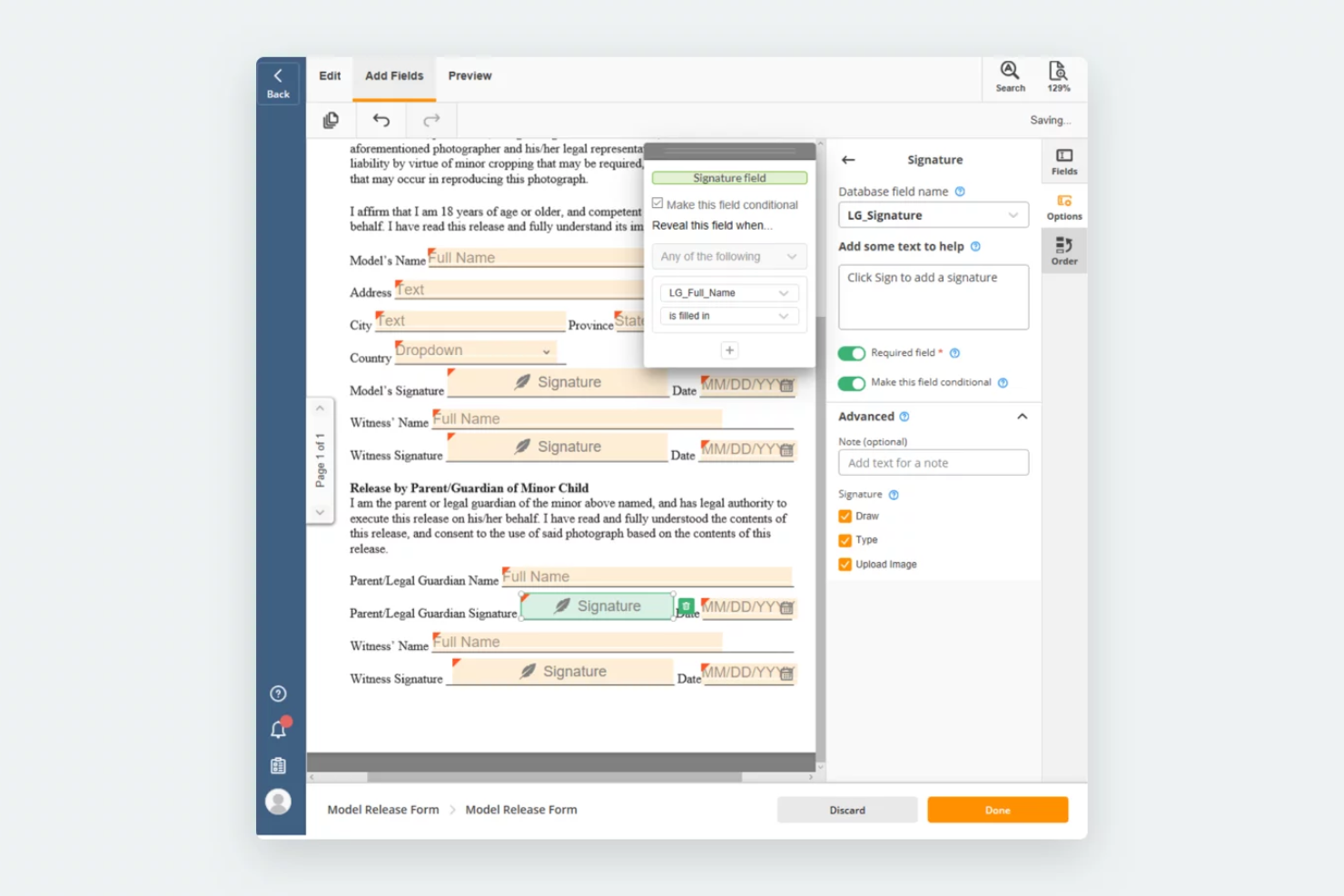
airSlate Workflow is a no-code document workflow automation platform that helps organizations create, route, and manage documents with greater accuracy. It supports industries such as healthcare, legal, education, and finance by providing tools for contract management, electronic signatures, and compliance-driven processes.
Why I picked airSlate Workflow: I chose this tool because of its intelligent automation features that allow documents to move through workflows without manual oversight. Triggers can initiate workflows from systems like CRMs, ensuring tasks are completed on time and records stay up to date. I also liked its “fill” capability, which pre-populates forms and contracts with data from connected systems, reducing errors and saving staff from repetitive entry.
airSlate Workflow Standout Features and Integrations
Standout features include native bi-directional data sync that writes completed document data back to connected systems automatically, a no-code workflow builder for configuring document generation, routing, approvals, and e-signatures, and built-in governance controls such as SSO, role-based access control, audit trails, and configurable data retention policies. E-signature is included in every plan with no per-envelope fees, supporting secure and compliant document workflows across regulated industries.
Integrations include Salesforce, NetSuite, Microsoft Dynamics, and SharePoint.
Pros and Cons
Pros:
- Customizable workflows tailored to organizational needs
- Broad integration options with CRMs and databases
- Accessible for non-technical users with a clear interface
Cons:
- Learning curve for advanced automation setups
- Separate billing per workspace can be costly

Best for complex, high volume document automation
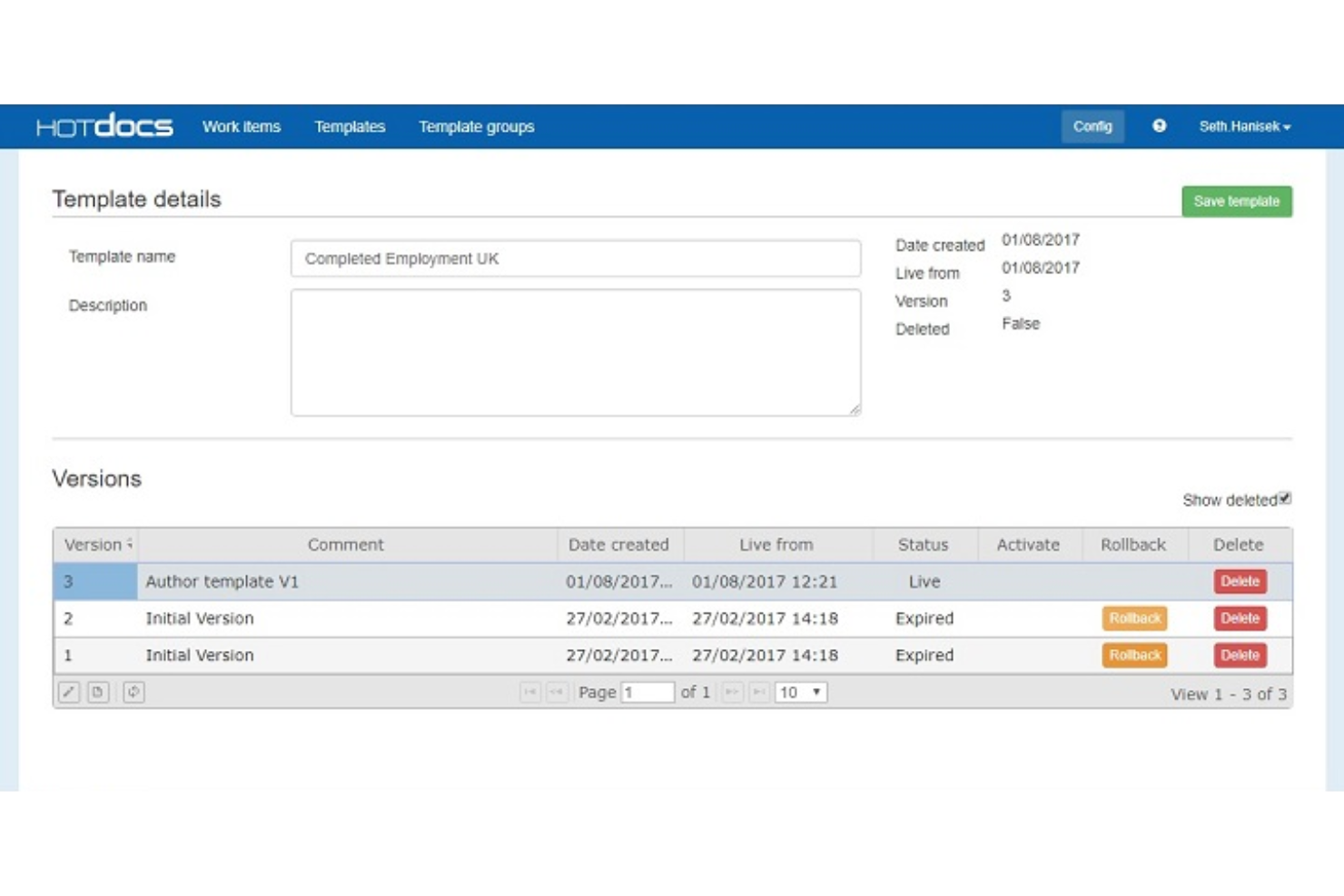
HotDocs is a document automation software solution designed to simplify the creation of complex, customized documents. It's often used in legal, financial, and governmental sectors to automate the production of various documents such as contracts, court forms, loan applications, and sales proposals.
Why I picked HotDocs: HotDocs excels in automating complex document assembly processes. This includes the ability to generate expanding tables and conditional text areas and perform sophisticated calculations within documents. These dynamic elements ensure that documents are not only accurate but also tailored to specific needs without requiring extensive manual adjustments.
HotDocs Standout Features and Integrations
Standout features include conditional logic, which helps users create dynamic documents by incorporating if/then statements. It also provides audit trails and workflow automation for repetitive tasks such as document review, approval, and filing.
Integrations include Salesforce, Microsoft Dynamics, Sage, Microsoft 365, Microsoft Word, Tabs3, CARET Legal, Actionstep, Amicus Attorney, and AbacusLaw.
Pros and Cons
Pros:
- Customizable templates
- Robust document automation capabilities
- Good for end-to-end document management
Cons:
- Can be challenging to learn how to create templates
- Can be pricey for smaller businesses

Best for structured workflow tools

Document360 is a knowledge base platform with workflow automation features designed to help teams create, organize, and manage documentation. It supports a range of use cases, from internal process docs to customer-facing help centers, with robust controls for roles, approvals, and publishing.
Why I Picked Document360: I picked Document360 because it combines intuitive knowledge management with structured workflow tools, making it easy to manage complex documentation projects. Its custom workflow builder helps teams set up approval processes and tailor collaboration across departments. I also liked the AI-assisted search, embedded help widgets, and analytics that give insights into what users are reading—and what content might need refinement.
Document360 Standout Features and Integrations:
Standout features include a custom workflow builder, glossary management, role-based access, embedded help centers, decision tree builder, and analytics with SEO optimization tools.
Integrations include Zendesk, Freshdesk, Intercom, Drift, Slack, GitHub, Make, Salesforce, and Microsoft Teams.
Pros and Cons
Pros:
- Provides robust version control with audit trails
- Offers powerful reporting and analytics
- Smart file management features
Cons:
- Most integrations are only available on higher-tier plans
- Can be pricey for teams on a budget
New Product Updates from Document360

Document360 Adds Feedback APIs, MCP Tools, and Zendesk Authentication
Document360 adds feedback APIs, expanded MCP tools, Zendesk account authentication, and the ability to reopen closed feedback. These updates help teams manage feedback, automate knowledge base tasks, and control integration access. For more information, visit Document360’s official site.
 .
Doxis
Best for multilingual document workflows

Doxis is an enterprise content management and document workflow platform that brings together document capture, AI-powered classification, process automation, team collaboration, and long-term archiving in one unified system.
Who is Doxis Best For?
Doxis is a strong fit for large enterprises and mid-market organizations with complex, document-heavy operations across multiple departments or geographic locations.
Why I Picked Doxis
I picked Doxis as one of the best for multilingual document workflows because it's one of the few platforms I've seen that offers a genuinely global-ready setup out of the box. The platform is available in 13 languages, including Arabic, Chinese, and Russian, so my team's user interfaces and document metadata display in each user's local language. On top of that, its Unicode-capable architecture and multitenant deployment model let international teams work from a single, centrally managed platform without maintaining separate regional instances.
- AI-powered document capture: Extracts metadata, classifies documents, and routes them based on content using built-in OCR and machine learning.
- No-code workflow builder: Business Studio lets you design and deploy custom document processes and content apps without writing any code.
- Version control: Tracks document revisions and stores previous versions, so your team can review change history and restore earlier drafts at any point.
- Audit-proof archiving: Stores finalized documents in a tamper-proof archive that meets records management standards, including retention scheduling and deletion rules.
Doxis Integrations
Doxis offers native connectors for SAP, Salesforce, Microsoft 365, Microsoft SharePoint, Microsoft Outlook, Oracle, and Infor, as well as HR solutions like ADP and directory services like LDAP. A REST API is available for custom integrations. Zapier support is undocumented.
Pros and Cons
Pros:
- Tamper-proof archiving with retention controls and logs
- Flexible options for distributing and customizing components
- AI-driven classification extracts data from documents without manual effort
Cons:
- Data migration often falls behind scheduled timelines
- Primarily suited for enterprise-scale, less so for smaller teams

TrailHQ
Best for AI-driven document automation

Nanonets is an AI-driven platform designed to automate document processing and data extraction workflows, particularly benefiting industries such as finance, healthcare, and logistics.
Why I picked Nanonets: It uses AI to automate complex document processes, such as data capture for invoices and purchase orders. This automation extends to workflows for accounts payable, financial reconciliation, and claims processing in the insurance sector. By utilizing machine learning and Optical Character Recognition (OCR) technology, Nanonets efficiently handles unstructured data, ensuring even the most intricate tasks are managed with precision. This is accompanied by human-in-the-loop AI workflows, which allow you to incorporate human oversight into automated processes where necessary.
Nanonets Standout Features and Integrations
Standout features include insights extraction from unstructured data, GDPR, SOC 2, and HIPAA compliance, and a no-code platform to provide more accessibility to a range of users.
Integrations include Quickbooks, Salesforce, Google Sheets, Dropbox, and Zapier.
Pros and Cons
Pros:
- Simple API for easy integration
- Compatible with multiple programming languages
- Data extraction features
Cons:
- May not be suitable for more extensive machine learning projects with very large datasets
- Compared to more advanced tools, Nanonets offers fewer customization options

Fluix
Best for field data collection

Fluix is a no-code document management and workflow automation platform. It can be used by various types of field teams for data collection and form processing purposes.
Why I picked Fluix: Building forms is simplified by the software’s drag-and-drop interface, so you can create various types of documents to collect data from customers, clients, and partners in the field. It’s a suitable solution for teams performing various types of inspections, field sales teams, and other field service providers. You can have documents signed, add images with geotags, and add annotations to files on the go. Once you’ve collected your data, you can build workflows for your various business processes in the system, and automate repetitive tasks.
Fluix Standout Features and Integrations
Standout features include dynamic values that can be implemented in forms, which can then be used to customize your follow-up workflows. The workflow builder also allows for conditional logic, so you can connect specific rules based on specific values entered in forms. Ready-made and custom templates are also available on the platform, helping you speed up your form creation process.
Integrations include PowerBI, Tableau, Airtable, Smartsheet, Microsoft 365, Dropbox, Google Drive, Trello, monday.com, Asana, Salesforce, Pipedrive, NetSuite, and Slack, among others. Zapier, Integromat, and Automate can all be used to build additional custom integrations.
Pros and Cons
Pros:
- Form building, data collection, and workflow automation in one
- Easy to learn, drag-and-drop interface
- Can be used from any device
Cons:
- Some feature discrepancies between the mobile and desktop app
- Some features come as paid add-ons
Docusign
Best for contract management and e-signature

DocuSign is a company that offers various document management products including e-signature software and contract lifecycle management (CLM) software.
Why I picked DocuSign: A simple one-person plan can help sole proprietors manage their business contracts and sign documents digitally. Meanwhile, an enterprise-level plan can be customized to meet your unique business needs and provide you with 24/7 live support. The software is flexible and suitable for virtually any business size in any industry. It can support your customer, employee, legal, and partnership contract processes. Users can create and store templates for future use, auto-populate fields with data from their CRM or other sources, and set reminders for actions needed.
DocuSign Standout Features and Integrations
Standout features include the ability to manage documents in 14 different languages and facilitate e-signatures in 44 different languages. This is a helpful tool for businesses operating globally or in multilingual areas. Various field types are available for forms, including drop-down selections, approve/decline fields, and drawing fields.
Integrations include Google Workspace, Microsoft Suite, SAP, Oracle, Salesforce, Zoom, Workday, Stripe, Apple, and hundreds more.
Pros and Cons
Pros:
- Ability to create and store templates
- Friendly and easy-to-learn user interface
- Flexible to suit the needs of various industries and company sizes
Cons:
- Limited customizability
- Rules and routing can’t be saved as part of a template

FileHold
Best cloud-based or on-premise storage
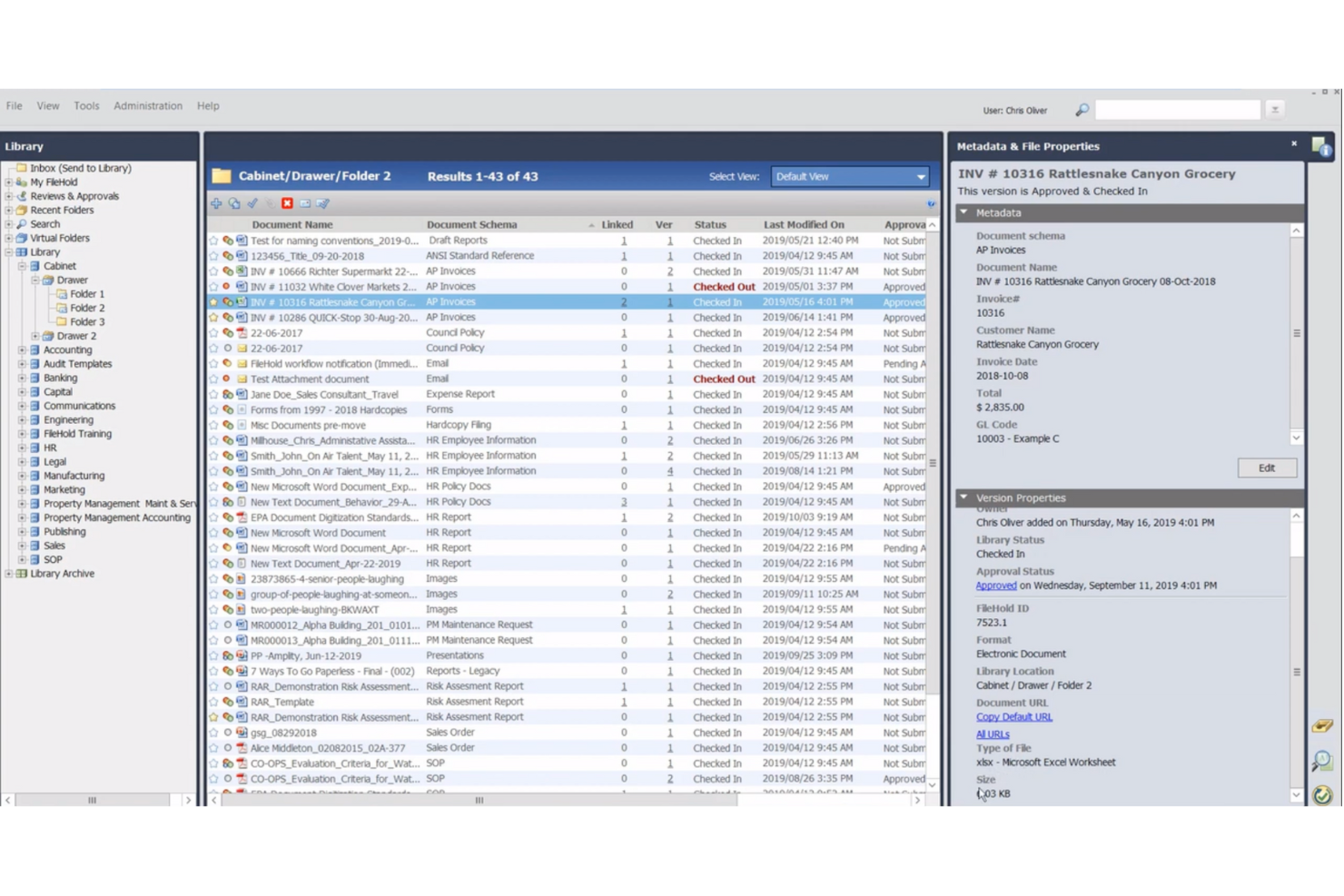
FileHold is a document management system that provides both cloud-based and on-premise storage solutions for your business files. It can support your document scanning, records management, and review and approval workflows.
Why I picked FileHold: Whether you’re looking to outsource your file storage to the cloud or keep it within your control, you can use the software for your document management needs. The software has version controls and user roles for access management and security. You can tag documents and capture metadata for easier search and file management. A calendar view is also available to see where various documents are in their lifecycle, and alert stakeholders when action needs to be taken on documents.
FileHold Standout Features and Integrations
Standout features include language localization of the software, which allows businesses operating in other languages to customize the platform to their needs. Custom branding can also be deployed to match the system to look and feel more like a part of your business. Several add-on features can also be purchased, like guest accounts, multiple document repositories, and custom naming sequence numbering.
Integrations include Adobe Acrobat, DocuSign, Kodak Alaris, Kofax Capture, Microsoft Dynamics, Microsoft Office, QuickBooks, SAP, Sage, and Salesforce, among others. An API is also available to configure additional integrations.
Pros and Cons
Pros:
- Consulting services are also available from the company
- Web-based training hub accessible to all users
- Trial, financing, pay-per-use, and partnership purchase options
Cons:
- Limited workflow customization
- Robust system, comes with a learning curve

OpenText
Best with professional services available

OpenText provides a wide array of software tools for business, including Document Centric Workflow, a cloud-based document management and workflow automation platform.
Why I picked OpenText: Straightforward yet powerful, this software provides both cloud-based document management as well as workflow and approval management capabilities. Users can send files for review or approval directly from the document record, adding any contextual notes before assigning them to a designated stakeholder. Due dates can also be set, ensuring teams stick to their timelines on whatever type of document they’re working on. File access can be managed based on the document, field, template, index level, or application.
OpenText Standout Features and Integrations
Standout features include professional consulting services provided by the company. Small businesses or organizations with limited resources may benefit from outsourcing your document management strategy or aspects of your process. The company’s team of experts can help you implement their solution and ensure compliance with relevant laws and regulations.
Integrations are not currently listed by the software provider.
Pros and Cons
Pros:
- Product training available
- Deployment support available
- Consulting services are also available
Cons:
- One of many software provided by the company (not specialized)
- May be too simplistic for some use cases

Best for unlimited workflow creation

Pneumatic Workflow is a workflow management tool designed to help businesses automate and manage their processes efficiently. It enables users to create, refine, and evolve business processes into repeatable workflows, supporting various functions across different industries.
Why I picked Pneumatic: The software allows for the creation of unlimited workflows, which means businesses can scale their processes without worrying about hitting a cap. The automated workflow feature is also robust, allowing repetitive processes to be set up once and run automatically. This automation extends to task assignment, where tasks are automatically assigned to relevant performers as soon as the preceding task is completed. Additionally, the software's document management capabilities make it easier to manage and track documents within the workflow.
Pneumatic Standout Features and Integrations
Standout features include an AI workflow generator that creates workflows when users describe what they want. It also offers a wide range of customizable workflow templates for functions across various industries. Other features include guest access for collaboration, conditional workflow logic, video-based workflows, and dashboards.
Integrations include Gmail, Slack, Google Sheets, Trello, Google Docs, PandaDoc, Google Forms, Typeform, HubSpot, Google Calendar, Microsoft Outlook, and ClickUp.
Pros and Cons
Pros:
- AI workflow generator
- Real-time notifications
- Customizable workflow templates
Cons:
- May not be ideal for large scaling businesses with complex systems
- Mobile app is less robust than desktop version
Diğer Belge İş Akışı Yazılımları
En iyi belge iş akışı yazılımları listesine giremeyen birkaç seçenek daha şunlardır:
- PandaDoc
For a simple interface
- Amazon WorkDocs
For content syncing
- Kofax
For a modular product selection
- Applied Innovation
Advanced analytics capabilities
- Document Logistix
For flexibility
- DocuPipe
For enabling document-driven AI workflows
- Jotform
For document collaboration
- Doxis AI.dp.
For advanced OCR capabilities
- Jotform Workflows
For no-code workflow automation
- Wrike
For a range of workflows
- GoodDay
For document-task integration
- Microsoft SharePoint
For Microsoft users
- NetDocuments
For email management
- Arena Solutions
For complex electronics and medical device companies
- MasterControl
For companies in regulated industries
- OpenKM
For enterprise content management workflows
- MFiles
Metadata-driven document management
- Meridian
For engineering teams
- docEdge DMS
For feature-packed document management
- Dokkio
For cross-platform document management


How I Evaluate Document Workflow Software
I look at document workflow software in two layers: the baseline each tool must clear—like approval routing and version control—and the differentiators that separate good tools from great ones.
Core Functionality (Table Stakes For This List)
When I'm selecting tools for my list, I rank each one on a scale from 0 (does not offer the functionality) to 5 (excels in this area) for each core functionality listed below. Then, I calculate the tool's total score into a percentage. Each tool needs to achieve a minimum total score of 65% to be considered for inclusion.
- Centralized Document Repository: I evaluate how each tool organizes project artifacts—whether you can tag a deliverable by project phase, filter by stakeholder, and actually find a buried SOW without digging through nested folders.
- Automated Approval Workflows: I look for configurable routing that mirrors real project gates, like sending a change order through a PM, then a sponsor, with conditional paths and escalation reminders built in.
- Version Control & Audit Trail: Every revision to a spec or contract should be traceable. I check whether you can compare versions side by side and pull a clean audit log when a stakeholder questions what changed and when.
- Templates & Reusable Forms: A good tool lets you build dynamic templates for recurring artifacts like RFIs or status reports. I look at whether fields auto-populate and whether templates can be locked down for governance.
- Real-Time Collaboration & E-Signature: I evaluate whether teams can co-edit and sign within the platform. Bouncing a contract out to a separate signing tool mid-workflow adds friction I'd rather avoid.
- Project Management Integrations: I check for native connectors to tools like Jira, Asana, or Smartsheet, and whether documents link directly to tasks or milestones with two-way sync rather than surface-level connections.
Once I have a list of tools that meet the criteria, I consider what sets each platform apart.
Differentiating Factors (What Sets Vendors Apart)
Here's how I compare and contrast different vendors:
Standout Features
I look at whether a platform offers a client portal where external stakeholders can view and sign project documents without needing a paid seat. Workflow analytics also stand out—dashboards that surface approval bottlenecks and cycle times across projects give PMs real data to act on. AI-powered document intelligence is worth evaluating too, particularly for teams reviewing dense contracts or specs where automated clause detection saves hours of manual work.
Beyond Features
Integration depth matters—I check whether a tool connects natively to PM platforms like Jira or Smartsheet with two-way sync, not just a surface-level link. Pricing structure is another factor I weigh, especially how vendors handle guest collaborators. Project teams fluctuate, and paying full-seat pricing for every reviewer or approver adds up fast. I also evaluate security posture, looking for SOC 2 Type II certification, SSO support, and role-based access controls that match how project teams are actually structured.
Belge İş Akışı Yazılımı Nasıl Seçilir?
Uzun özellik listeleri ve karmaşık fiyatlandırma yapılarına kendinizi kaptırmanız kolaydır. Kendinize özgü yazılım seçme süreciniz üzerinde çalışırken odağınızı korumanıza yardımcı olmak için aklınızda bulundurmanız gereken faktörleri içeren bir kontrol listesi hazırladım:
| Faktör | Dikkate Alınması Gerekenler |
| Ölçeklenebilirlik | Yazılımın işletmenizle birlikte büyüyebildiğinden emin olun. Performans sorunları yaşamadan artan belge hacmini, kullanıcı sayısını ve iş akışlarını yönetebilen çözümleri tercih edin. Bulut tabanlı seçenekler genellikle esnek ölçeklendirme olanağı sunar. |
| Entegrasyonlar | İş akışı yazılımınız, ekibinizin hâlihazırda kullandığı CRM, ERP veya bulut depolama platformları (Google Drive, Dropbox) gibi araçlara sorunsuz şekilde bağlanmalıdır. Özel bağlantılar için API desteği bir avantajdır. |
| Özelleştirilebilirlik | Her işletmenin iş akışı ihtiyaçları benzersizdir. Yazılımın şablonları değiştirmenize, özel onay yolları oluşturmanıza ve izinleri süreçlerinize uyacak şekilde ayarlamanıza olanak tanıdığından emin olun. |
| Kullanım Kolaylığı | Karmaşık yazılımlar benimsenmeyi yavaşlatır. Ekibinizin hızlı bir şekilde kullanmaya başlayabilmesi için sezgisel arayüzlere, sürükle ve bırak araçlarına ve asgari eğitim gereksinimlerine sahip çözümleri tercih edin. |
| Bütçe | Fiyatlandırma yapılarını karşılaştırın—abonelik ve tek seferlik satın alma. Gizli ücretlerden kaçınmak için ek kullanıcıların, entegrasyonların ve premium özelliklerin maliyetlerini hesaba katın. |
| Güvenlik Önlemleri | Belgeleriniz hassas veriler içerir. Bilgilerinizi korumak için şifreleme, erişim denetimleri, denetim izleri ve sektör standartlarına (ör. GDPR, HIPAA) uyumluluk sunan çözümleri tercih edin. |
| Otomasyon Yetenekleri | Onayları, bildirimleri ve belge yönlendirmeyi otomatikleştirmek zaman kazandırır. Manuel çabayı en aza indirmek için yapay zekâ destekli özelliklere veya kural tabanlı otomasyona sahip çözümleri tercih edin. |
| İş Birliği Özellikleri | Ekibinizin gerçek zamanlı düzenleme, sürüm denetimi ve yorum takibine ihtiyacı vardır. Yazılımın veri çakışmaları olmadan eş zamanlı iş birliğini desteklediğinden emin olun. |
Belge İş Akışı Yazılımındaki Eğilimler
Araştırmam sırasında farklı belge iş akışı yazılımı sağlayıcılarının sayısız ürün güncellemesini, basın bültenini ve sürüm kaydını inceledim. Takip ettiğim yeni ortaya çıkan eğilimlerden bazıları şunlar:
- Yapay Zekâ Destekli Belge İşleme: Daha fazla araç veri çıkarmak, kalıpları tanımak ve belgelere otomatik olarak etiket eklemek için yapay zekâ kullanıyor. Bu, manuel veri girişini azaltıyor ve işlemeyi hızlandırıyor. Bazı akıllı belge işleme yazılımı araçları ve süreç belgeleme yazılımları yapay zekâ destekli belge sınıflandırma ve otomatik onay özellikleri sunuyor.
- Belge Doğrulama için Blok Zinciri: Bazı platformlar, belge gerçekliğini doğrulamak için blok zinciri tabanlı denetim izleri ekliyor. Bu özellik, özellikle değiştirilemez kayıtların önemli olduğu sözleşmeler, hukuki belgeler ve uyumluluk gereksinimleri yoğun sektörler için kullanışlıdır.
- Kodsuz İş Akışı Oluşturucuları: Sağlayıcılar, ekiplerin BT desteği olmadan iş akışları oluşturmasını ve değiştirmesini kolaylaştırıyor. Sürükle ve bırak arayüzleri, kullanıcıların basit mantık tabanlı kurallarla belge onaylarını, yönlendirmeyi ve bildirimleri yapılandırmasına olanak tanıyor.
- Entegre Elektronik İmza Yetenekleri: Daha fazla belge yönetimi ve toplama aracı, üçüncü taraf entegrasyonlarıyla elektronik imza yazılımına güvenmek yerine artık yerleşik elektronik imza araçlarını içeriyor. Bu, onayları hızlandırıyor ve ek maliyetler olmadan her şeyin tek bir sistemde tutulmasını sağlıyor.
- Ayrıntılı Erişim ve Uyumluluk Denetimleri: Veri güvenliği endişeleri arttıkça sağlayıcılar daha hassas izin ayarları, denetim günlükleri ve uyumluluğa özel özellikler (ör. SOC 2, HIPAA, ISO 27001) ekliyor. Bazı araçlar artık süreyle sınırlı erişime veya konum tabanlı kısıtlamalara da izin veriyor.
Belge iş akışı yazılımı nedir?
Belge iş akışı yazılımı, bir kuruluş içindeki belge akışını yönetmeye ve otomatikleştirmeye yardımcı olan bir araçtır. Belgelerin oluşturulma, incelenme, onaylanma ve saklanma biçimini düzenleyerek manuel ve kâğıt tabanlı süreçlerin yerini dijital süreçlere bırakır. Bu yazılım genellikle belge ilerlemesini takip etme, onay hiyerarşileri oluşturma ve ilgili tarafların katkısı gerektiğinde onları bilgilendirme özelliklerini içerir.
Belge iş akışı araçları, iş süreçlerini kolaylaştırmaya da yardımcı olarak bunları daha verimli ve hataya daha az açık hâle getirebilir. Ekip üyeleri belgelere kolayca erişebildiği ve aynı anda üzerinde çalışabildiği için işletmeler iletişim ve iş birliğinin iyileşmesinden yararlanır. Ayrıca düzenli ve güvenli belge arşivleri tutarak kayıt saklama düzenlemelerine uyumluluğu destekler. Bu nedenle belge iş akışı yazılımı, belgeyle ilgili süreçlerini optimize etmek isteyen her kuruluş için değerli bir varlıktır.
Belge İş Akışı Yazılımının Özellikleri
Belge iş akışı yazılımı seçerken aşağıdaki temel özelliklere dikkat edin:
- Otomatik yönlendirme: Belgeler, tetikleyicilere göre önceden tanımlanmış iş akışlarında ilerler; bu sayede manuel devirler ve onay gecikmeleri azalır.
- Sürüm denetimi: Yapılan değişiklikleri takip eder ve gerektiğinde kullanıcıların önceki belge sürümlerini görüntülemesine, karşılaştırmasına ve geri yüklemesine olanak tanır.
- Role dayalı erişim: Yalnızca yetkili kullanıcıların, izinlerine bağlı olarak belgeleri görüntüleyebilmesini, düzenleyebilmesini veya onaylayabilmesini sağlar.
- E-imza desteği: Kullanıcıların belgeleri dijital olarak imzalamasına olanak tanır ve harici araçlara gerek kalmadan onayları hızlandırır.
- OCR (optik karakter tanıma): Taranmış veya görüntü tabanlı belgeleri aranabilir ve düzenlenebilir metne dönüştürür.
- Denetim izleri: Bir belge üzerinde gerçekleştirilen her işlemi kaydeder; düzenleyici gereklilikler açısından görünürlük ve uyumluluk sağlar.
- Şablon yönetimi: Kullanıcıların tutarlılığı sağlamak için standartlaştırılmış belge şablonları oluşturmasına ve bunları yeniden kullanmasına olanak tanır.
- İş birliği araçları: Birden fazla kullanıcının belgeler üzerinde gerçek zamanlı olarak yorum yapmasını, düzenlemesini ve incelemesini sağlar.
- Koşullu iş akışları: İş akışlarının onay eşikleri veya belge türleri gibi belirli koşullara göre farklı dallara ayrılmasına olanak tanır.
- Veri çıkarma: Belgelerdeki önemli bilgileri otomatik olarak alır ve manuel veri girişini ve hataları azaltır.
Belge İş Akışı Yazılımının Faydaları
Belge iş akışı yazılımını uygulamak, ekibiniz ve işletmeniz için çeşitli faydalar sağlar. Yararlanabileceğiniz birkaç avantaj şunlardır:
- Daha hızlı onaylar: Otomatik yönlendirme ve e-imzalar gecikmeleri azaltarak projelerin ve süreçlerin ilerlemesini sağlar.
- Daha az hata: Sürüm denetimi ve veri çıkarma gibi özellikler, manuel giriş ve iletişim eksikliğinden kaynaklanan hataları azaltmaya yardımcı olur.
- Daha iyi güvenlik: Role dayalı erişim ve denetim izleri, yalnızca yetkili kullanıcıların belgeleri görüntüleyebilmesini veya değiştirebilmesini sağlayarak hassas bilgileri korur.
- Geliştirilmiş iş birliği: Gerçek zamanlı düzenleme, yorum yapma ve bildirimler, ekiplerin belgeler üzerinde birlikte çalışmasını kolaylaştırır.
- Daha kolay uyumluluk: Yerleşik denetim kayıtları ve standartlaştırılmış şablonlar, sektör düzenlemelerine ve kayıt tutma gerekliliklerine uyulmasına yardımcı olur.
- Daha az evrak işi: Dijital iş akışları fiziksel belgelerin yerini alarak baskı, depolama ve idari maliyetleri azaltır.
- Daha fazla görünürlük: Gösterge panelleri ve takip özellikleri, belgelerin süreçte hangi aşamada olduğunu görmenize ve darboğazları belirlemenize olanak tanır.
Belge İş Akışı Yazılımının Maliyetleri ve Fiyatlandırması
Belge iş akışı yazılımını seçmek, mevcut çeşitli fiyatlandırma modellerinin ve planların anlaşılmasını gerektirir. Maliyetler özelliklere, ekip büyüklüğüne, eklentilere ve daha fazlasına göre değişir. Aşağıdaki tablo, belge iş akışı yazılımlarındaki yaygın planları, bunların ortalama fiyatlarını ve genellikle içerdiği özellikleri özetlemektedir:
Belge İş Akışı Yazılımı İçin Plan Karşılaştırma Tablosu
| Plan Türü | Ortalama Fiyat | Yaygın Özellikler |
|---|---|---|
| Ücretsiz Plan | $0 | Temel belge depolama, sınırlı iş akışı otomasyonu, temel iş birliği araçları ve sınırlı kullanıcı erişimi. |
| Kişisel Plan | $5-$15/kullanıcı/ay | Daha fazla depolama alanı, basit onay iş akışları, e-imza desteği, role dayalı izinler ve temel entegrasyonlar. |
| İşletme Planı | $20-$50/kullanıcı/ay | Gelişmiş iş akışı otomasyonu, sınırsız depolama, denetim kayıtları, özel şablonlar ve API erişimi. |
| Kurumsal Plan | $50-$100+/kullanıcı/ay | Yapay zekâ destekli otomasyon, blok zinciri doğrulaması, gelişmiş uyumluluk araçları, özel destek ve çok düzeyli onaylar. |
Belge İş Akışı Yazılımı Hakkında Sık Sorulan Sorular
İşte insanların belge yönetimi hakkında sorduğu yaygın sorulardan bazılarına verilen yanıtlar:
Belge iş akışı nedir?
Belge iş akışı, belgenizin oluşturulmasından düzenlenmesine, onaylanmasına, dağıtılmasına, imzalanmasına ve depolanmasına kadar geçtiği yolculuktur. Belge iş akışlarınızın her aşaması, etkili belge yönetimine ve uyumluluğa katkıda bulunan önemli parçalardır. Uyguladığınız iş akışı süreçleri belgenin türüne, sürece dahil olan kişilere ve genel iş süreçlerinize bağlı olarak değişir. Örneğin, bir sözleşme iş akışı şöyle görünebilir:
\u003col\u003e
\u003cli\u003eSözleşmeyi hazırlayın veya bir sözleşme şablonunu güncelleyin.\u003c/li\u003e
\u003cli\u003eİlgili tarafların iletişim bilgilerini ekleyin.\u003c/li\u003e
\u003cli\u003eOnay için iç paydaşlara gönderin.\u003c/li\u003e
\u003cli\u003eİnceleme için dış paydaşlarla paylaşın.\u003c/li\u003e
\u003cli\u003eBelirli maddeleri veya ayrıntıları müzakere edin.\u003c/li\u003e
\u003cli\u003eDeğiştirilmiş sözleşmeye son hâlini verin.\u003c/li\u003e
\u003cli\u003eİmzalanması için iç paydaşlara gönderin.\u003c/li\u003e
\u003cli\u003eİmzalanması için dış paydaşlara gönderin.\u003c/li\u003e
\u003cli\u003eİmzalanmış, son hâline getirilmiş sözleşmeyi bir belge havuzunda depolayın.\u003c/li\u003e
\u003cli\u003eBelirli maddeleri ileride kullanmak üzere bir madde kitaplığına ekleyin.\u003c/li\u003e
\u003c/ol\u003e
Belgeleri yönetmenin en iyi yolu nedir?
Belgelerinizi yönetmenin veya belge iş akışlarınızı yürütmenin tek bir doğru yolu yoktur. Ancak standartlaştırılmış süreçlere ve belirlenmiş paydaşlara sahip bir belge yönetim sisteminin mevcut olması iyi bir uygulamadır. Ayrıca çalışan eğitimleri uygulayabilir ve dosyaların yönlendirilmesi, depolanması ve yönetilmesine ilişkin protokolü açıklayan belgeler hazırlayabilirsiniz.
En önemli konu, ilgili tüm uyumluluk yasalarına veya düzenlemelerine uyduğunuzdan ve süreçlerinizin verimli olduğundan emin olmaktır. Belge yönetimi yazılımı kullanmak, süreçlerinizin bazı unsurlarını kolaylaştırmaya ve otomatikleştirmeye yardımcı olarak ekibinizin zaman kazanmasını, riskleri ve insan hatası olasılığını azaltmasını sağlayabilir.
Belge iş akışı yazılımı ne tür belgeleri yönetebilir?
Belge iş akışı yazılımıyla üzerinde çalışılabilen ve yönetilebilen belge türleri değişiklik gösterir, ancak aşağıdakilerden herhangi birini içerebilir:
\u003cul\u003e
\u003cli\u003eSözleşmeler ve anlaşmalar\u003c/li\u003e
\u003cli\u003eUyumluluk belgeleri\u003c/li\u003e
\u003cli\u003eTeklifler ve fiyat teklifleri\u003c/li\u003e
\u003cli\u003eRaporlar ve sunumlar\u003c/li\u003e
\u003cli\u003eŞirket politikaları\u003c/li\u003e
\u003cli\u003eİK belgeleri\u003c/li\u003e
\u003cli\u003eFaturalar ve satın alma siparişleri\u003c/li\u003e
\u003cli\u003eTeknik belgeler\u003c/li\u003e
\u003c/ul\u003e
Belge iş akışı yazılımının yaygın özellikleri nelerdir?
Seçim kriterlerimde listelenen temel özelliklere ek olarak, bir belge yönetimi çözümünde bulabileceğiniz diğer yaygın özelliklerden bazıları şunlardır:
\u003col\u003e
\u003cli\u003e\u003cstrong\u003eBelge oluşturma:\u003c/strong\u003e Platform içinde doğrudan yeni belgeler oluşturabilir ve süreci hızlandırmak için şablonlardan ve madde kitaplıklarından yararlanabilirsiniz. Bazı yazılımlarda yapay zekâ destekli taslak oluşturma özellikleri bile bulunabilir.\u003c/li\u003e
\u003cli\u003e\u003cstrong\u003eİş birliği araçları:\u003c/strong\u003e Bir belge üzerinde diğer ekip üyeleriyle birlikte çalışabilmek, belge geliştirme sürecinizi destekleyebilir. Sanal ekip çalışmasını kolaylaştırmak için yorum yapma, etiketleme ve değişiklikleri izleme özellikleri sunulabilir.\u003c/li\u003e
\u003cli\u003e\u003cstrong\u003eOtomatik iş akışları:\u003c/strong\u003e Bu yazılım çözümlerinin çoğunda, ekip üyelerini bir belgeyi düzenleme, onaylama veya imzalama sırası geldiğinde bilgilendiren sürükle ve bırak özellikli iş akışı oluşturucusu, iş akışı şablonları veya özel bildirimler bulunur.\u003c/li\u003e
\u003cli\u003e\u003cstrong\u003eDosya paylaşımı:\u003c/strong\u003e Çoğu araç, dijital belgeleri e-posta, Dropbox, Google Drive veya doğrudan yazılım üzerinden ilgili taraflara güvenli bir şekilde göndermenize olanak tanır. Bulut depolama, belgeleri sanal ortamda paylaşmayı kolaylaştırır.\u003c/li\u003e
\u003cli\u003e\u003cstrong\u003eElektronik imza:\u003c/strong\u003e Elektronik belgeleri imzalama olanağı, belge yönetimi araçlarının yaygın bir özelliğidir. Bu özellik, iç ve dış tarafların sözleşmeleri, anlaşmaları, fiyat tekliflerini ve diğer dosyaları imzalamasına olanak tanır.\u003c/li\u003e
\u003cli\u003e\u003cstrong\u003eSürüm denetimi:\u003c/strong\u003e Belgelerin zaman içinde nasıl değiştiğini takip etmek için birçok yazılım seçeneğinde denetim izleri ve sürüm geçmişleri bulunur. Birçoğu, dosyalarınızda yapılan imzalar, onaylar ve değişikliklere ilişkin uçtan uca bir genel bakış sunar.\u003c/li\u003e
\u003cli\u003e\u003cstrong\u003eBelge yönetimi:\u003c/strong\u003e Bulut tabanlı belge yönetimi çözümlerinin çoğunda, kâğıt belgeleri dijitalleştirmenize yardımcı olacak araçlar bulunur. Ayrıca tüm iş belgelerini düzenli ve kayıt altında tutmak için dizin oluşturma özelliklerine ve aranabilir bir havuza sahiptirler.\u003c/li\u003e
\u003cli\u003e\u003cstrong\u003eGüvenlik özellikleri:\u003c/strong\u003e Son olarak, çoğu araç şifreleme ve erişim izinleri gibi güvenlik özellikleri sunar. Bu özellikler, gelişmiş arama işlevleri ve dosya mimarisiyle birlikte işletmeniz için daha iyi belge yönetişimi sağlar.\u003c/li\u003e
\u003c/ol\u003e
Bir iş akışı sürecini nasıl belgelendiririm?
İş akışı süreçlerinizi belgelendirmek, iş akışı diyagramlarını öğrenmekle başlar. Bu diyagramlar, bir projeyi veya girişimi tamamlamak için atılması gereken tüm adımlara ilişkin görsel bir genel bakış sunar. Genellikle her görevin veya aşamanın bir sonraki aşamayla nasıl bağlantılı olduğunu gösteren bir akış şeması biçiminde hazırlanırlar. İş akışı diyagramı kullanarak iş akışı sürecinizi belgelendirmek için ekibinizle bir araya gelin ve aşağıdaki soruları yanıtlayın:
\u003col\u003e
\u003cli\u003eGirişimin aşamaları nelerdir?\u003c/li\u003e
\u003cli\u003eHer aşamadaki münferit görevler nelerdir?\u003c/li\u003e
\u003cli\u003eHangi girdilerin dönüştürülmesi gerekiyor? Çıktılar nelerdir?\u003c/li\u003e
\u003cli\u003eHer görevi tamamlamaktan kim sorumlu? Yüzme kulvarlarına ihtiyacınız var mı?\u003c/li\u003e
\u003cli\u003eGörevler arasındaki bağımlılıklar nelerdir?\u003c/li\u003e
\u003cli\u003eHer görev ne kadar sürmeli?\u003c/li\u003e
\u003cli\u003eBu süreçteki olası engeller veya darboğazlar nelerdir?\u003c/li\u003e
\u003cli\u003eBu sürecin nihai sonuçları nelerdir?\u003c/li\u003e
\u003c/ol\u003e
Sürecinizi veya sürecin farklı aşamalarını daha ayrıntılı incelemek için gerektiğinde soruları tekrarlayabilirsiniz. Bazı belge iş akışı yazılımlarında, sürecinizin görsel bir temsilini oluşturmanıza yardımcı olacak iş akışı oluşturucuları bulunur. Genellikle yazılımı kullanarak bazı görevleri ve aşamaları otomatikleştirebilirsiniz.
Bazı alternatif iş akışı araçları nelerdir?
İşletmelerin süreçleri verimli bir şekilde yönetmesine yardımcı olmak için tasarlanmış birçok iş akışı aracı türü vardır. Tekrarlayan görevleri otomatikleştirmeniz, onay süreçlerini kolaylaştırmanız veya iş akışlarını görsel olarak haritalandırmanız gerekiyorsa, bu iş için geliştirilmiş bir yazılım mutlaka vardır. İşte bazı alternatif iş akışı yazılımı türleri:
\u003c!– wp:list –\u003e
\u003cul class=\u0022wp-block-list\u0022\u003e
\u003cli style=\u0022list-style-type: none\u0022\u003e
\u003cul class=\u0022wp-block-list\u0022\u003e\u003c!– wp:list-item –\u003e
\u003cli\u003e\u003ca href=\u0022https://thedigitalprojectmanager.com/tools/best-workflow-automation-software/\u0022\u003eİş akışı otomasyonu yazılımı\u003c/a\u003e\u003c/li\u003e
\u003c/ul\u003e
\u003c/li\u003e
\u003c/ul\u003e
\u003c!– /wp:list-item –\u003e \u003c!– wp:list-item –\u003e
\u003cul class=\u0022wp-block-list\u0022\u003e
\u003cli style=\u0022list-style-type: none\u0022\u003e
\u003cul class=\u0022wp-block-list\u0022\u003e
\u003cli\u003e\u003ca href=\u0022https://thedigitalprojectmanager.com/tools/best-approval-workflow-software/\u0022\u003eOnay iş akışı yazılımı\u003c/a\u003e\u003c/li\u003e
\u003c/ul\u003e
\u003c/li\u003e
\u003c/ul\u003e
\u003c!– /wp:list-item –\u003e \u003c!– wp:list-item –\u003e
\u003cul class=\u0022wp-block-list\u0022\u003e
\u003cli style=\u0022list-style-type: none\u0022\u003e
\u003cul class=\u0022wp-block-list\u0022\u003e
\u003cli\u003e\u003ca href=\u0022https://thedigitalprojectmanager.com/tools/best-workflow-diagram-software/\u0022\u003eİş akışı diyagramı yazılımı\u003c/a\u003e\u003c/li\u003e
\u003c/ul\u003e
\u003c/li\u003e
\u003c/ul\u003e
\u003c!– /wp:list-item –\u003e