

Os 10 melhores softwares de gestão de processos para pequenas empresas em 2026

Melhor software de gestão de processos para pequenas empresas — lista restrita


O software de gestão de processos para pequenas empresas ajuda a organizar, automatizar e acompanhar os fluxos de trabalho da sua equipa, para que possa entregar projetos dentro do prazo e manter as operações a funcionar sem problemas. Se está à procura do melhor software de gestão de processos para pequenas empresas, é provável que esteja a gerir prioridades em constante mudança, recursos limitados e a necessidade de manter todos alinhados — sem acrescentar complexidade.
Neste guia, encontrará ferramentas práticas e comprovadas que se adequam às necessidades das pequenas empresas, bem como informações que o ajudarão a escolher a plataforma certa para a dimensão, os objetivos e os desafios diários da sua equipa.
Why Trust Our Software Recommendations
Our team has been testing and reviewing software since 2012. As project managers ourselves, we know how difficult—and important—it is to choose the right software.
For this guide, we evaluated tools using hands-on testing and independent research, scoring tools using our selection criteria. We also draw on insights from industry thought leaders and practicing project management experts.
Our reviews reflect our human editorial judgment, not a sales pitch.
Expert reviewers:
Tabela de comparação: software de gestão de processos para pequenas empresas
Esta tabela de comparação resume os detalhes de preços das minhas principais escolhas de software de gestão de processos para pequenas empresas.
| Tool | Best For | Trial Info | Price | ||
|---|---|---|---|---|---|
| 1 | Best for automating app integrations | Free plan available; 14-day free trial | From $19.99/month (billed annually) | Website | |
| 2 | Best for no-code workflow automation | 14-day free trial + free demo available | From $11/user/month (billed annually) | Website | |
| 3 | Best for customizable workflow templates | 14-day free trial + free demo available | From $17/user/month (billed annually) | Website | |
| 4 | Best for checklist-driven task automation | 14-day free trial; free demo available | Pricing upon request | Website | |
| 5 | Best for building custom business apps | Free plan available; 15-day free trial | Pricing upon request | Website | |
| 6 | Best for client onboarding workflows | 7-day free trial + free demo available | From $190/month/3 seats | Website | |
| 7 | Best for low-code process design | 7-day free trial | From $4,000/month (billed annually) | Website | |
| 8 | Best for database-driven workflow management | Free trial available | From $49/month (billed annually) | Website | |
| 9 | Best for tracking complex workflows | Free plan available | From $8.48/user/month (billed annually) | Website | |
| 10 | Best for kanban-style workflow boards | Free plan + free trial available | From $5/user/month (billed annually) | Website |

Avaliações do melhor software de gestão de processos para pequenas empresas
Apresentamos abaixo os meus resumos detalhados do melhor software de gestão de processos para pequenas empresas que entrou na minha lista restrita. As minhas avaliações oferecem uma análise detalhada das funcionalidades, dos melhores casos de utilização e das integrações de cada plataforma, para o ajudar a encontrar a melhor opção para si.

Zapier
Best for automating app integrations
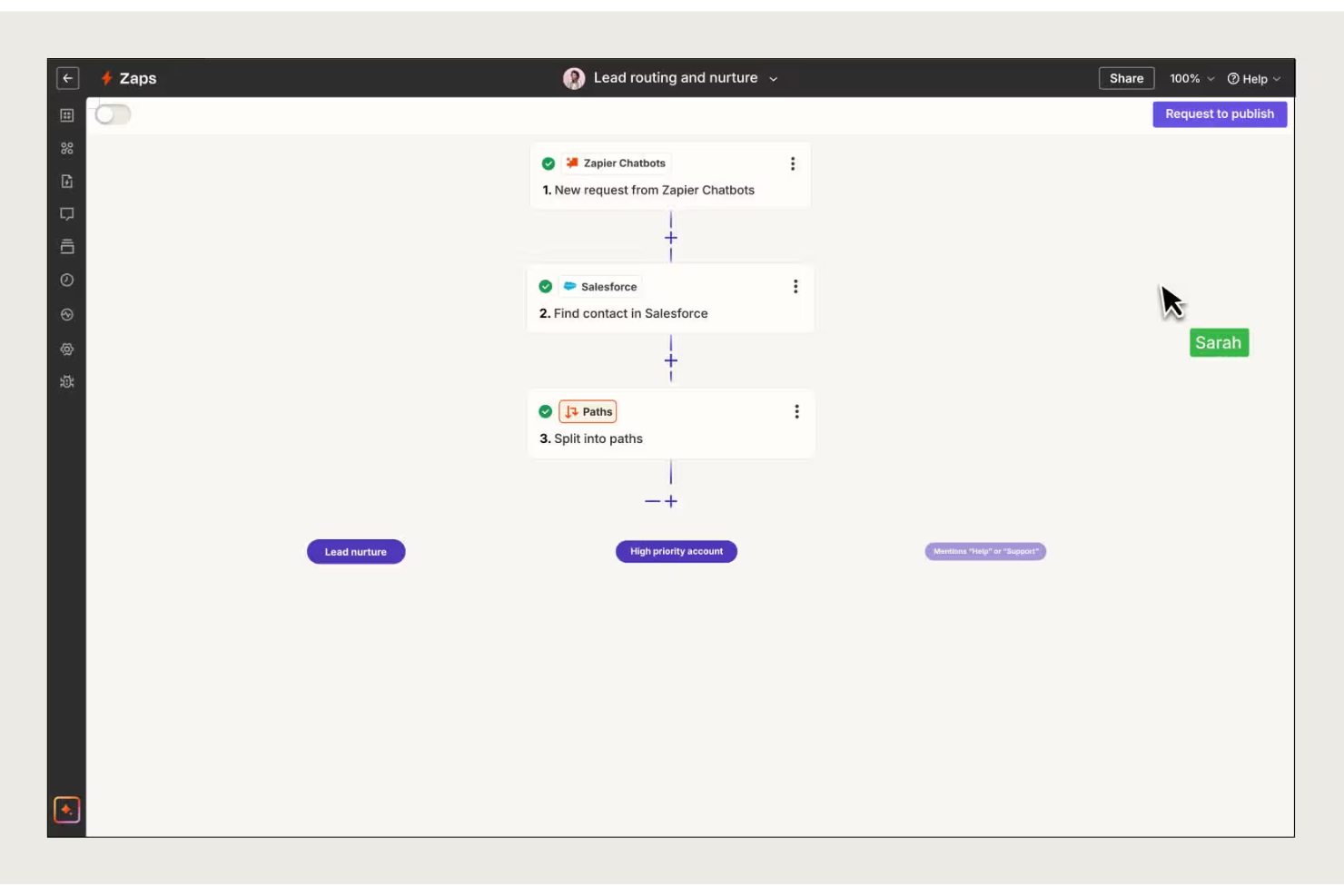
Zapier connects your favorite business apps so small teams, agencies, and service providers can automate repetitive tasks, reduce manual data entry, and keep processes running smoothly without custom code.
Who Is Zapier Best For?
Small business operations and admin teams who need to connect multiple cloud apps without developer support.
Why I Picked Zapier
I picked Zapier as one of the best because I can set up automated workflows—called Zaps—that move data between apps like QuickBooks, Slack, and Google Sheets without writing code. My team uses multi-step Zaps to trigger actions across several tools from a single event. I like that I can schedule tasks, filter data, and even add conditional logic to keep our processes running smoothly.
Zapier Key Features
- Shared folders: Organize and manage Zaps with your team in dedicated folders.
- Zap history: View detailed logs of every Zap run for troubleshooting and auditing.
- App directory: Access thousands of pre-built app connections for quick setup.
- User roles and permissions: Assign different access levels to team members for better control and business management.
Zapier Integrations
Integrations include Google Sheets, Gmail, Slack, Google Calendar, Google Drive, Notion, HubSpot, Facebook Lead Ads, Mailchimp, and Stripe.
Pros and Cons
Pros:
- Built-in filters and logic for process control
- Supports thousands of business app connections
- Automates repetitive tasks across multiple apps
Cons:
- Task limits can restrict high-volume use
- Limited error handling for failed automations
Cflow
Best for no-code workflow automation

Cflow is a cloud-based workflow automation platform built for small businesses and teams who want to digitize, automate, and track business processes across HR, finance, and operations without needing IT support.
Who Is Cflow Best For?
Small business operations managers who want to automate and monitor workflows without coding or IT resources.
Why I Picked Cflow
I picked Cflow as one of the best because I can automate multi-step business processes without writing a single line of code. I like that I can build custom forms, set up approval flows, and trigger notifications using a visual workflow builder. My team uses Cflow to lead our digital transformation by digitizing everything from purchase requests to leave approvals in just a few clicks.
Cflow Key Features
- Role-based access control: Set permissions for users based on their roles in the organization.
- Audit logs: Track every action and change within each workflow for compliance.
- Document management: Attach, store, and manage documents directly within workflows.
- SLA monitoring: Define and monitor service level agreements for process steps.
Cflow Integrations
Integrations include Salesforce, Slack, Trello, Dropbox, QuickBooks, HubSpot CRM, Google Drive, Microsoft Teams, Xero, and Docusign.
Pros and Cons
Pros:
- Lookup fields connect multiple internal workflows
- Automatic mobile app generation for forms
- Parallel branch routing for concurrent approvals
Cons:
- Restricted visual dashboard customization
- Steep learning curve for form editing

Flokzu
Best for customizable workflow templates
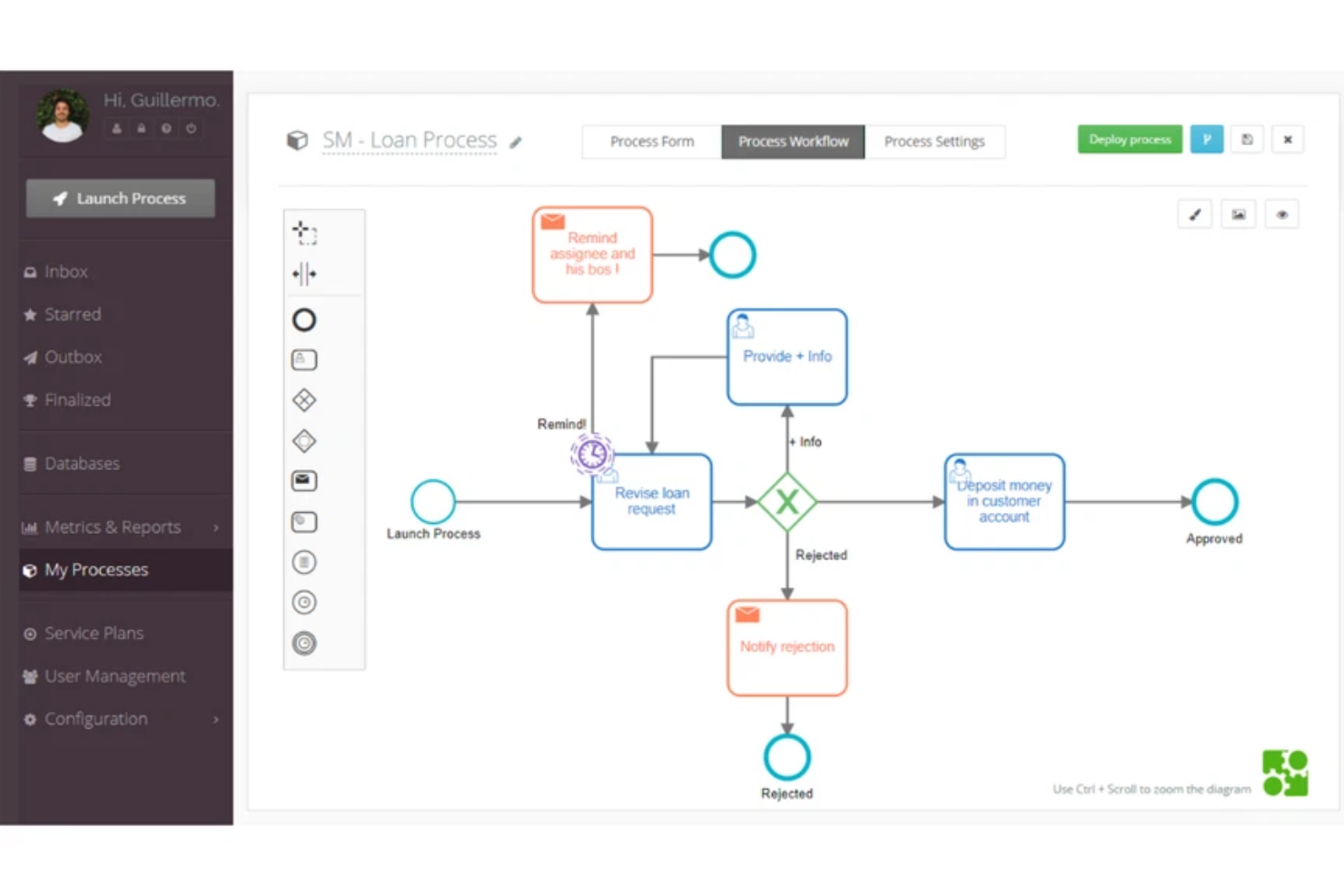
Flokzu is a cloud-based workflow automation platform designed for small businesses and teams who want to map, automate, and optimize their business processes without coding.
Who Is Flokzu Best For?
Small business operations teams who need to automate and customize internal workflows without coding.
Why I Picked Flokzu
I picked Flokzu as one of the best because I can quickly deploy customizable workflow templates for everything from invoice approvals to employee onboarding. I like that I can tweak process steps, forms, and rules without writing code. My team uses the drag-and-drop process designer to adapt workflows as our business changes.
Flokzu Key Features
- Task assignment: Assign tasks to specific users or groups for accountability.
- Document management: Store, attach, and manage documents within each workflow.
- Deadline tracking: Set deadlines and receive notifications for overdue tasks.
- Process analytics dashboard: Visualize workflow performance with built-in charts and reports.
Flokzu Integrations
Integrations include Google Sheets, Microsoft Excel, Salesforce, HubSpot, Slack, Trello, QuickBooks Online, Dropbox, and Microsoft Teams.
Pros and Cons
Pros:
- Audit trail tracks every workflow action
- AI-powered form and script generation
- BPMN 2.0 standard visual process modeling
Cons:
- Restricted reporting filters in basic tiers
- Interface sessions timeout frequently

Best for checklist-driven task automation
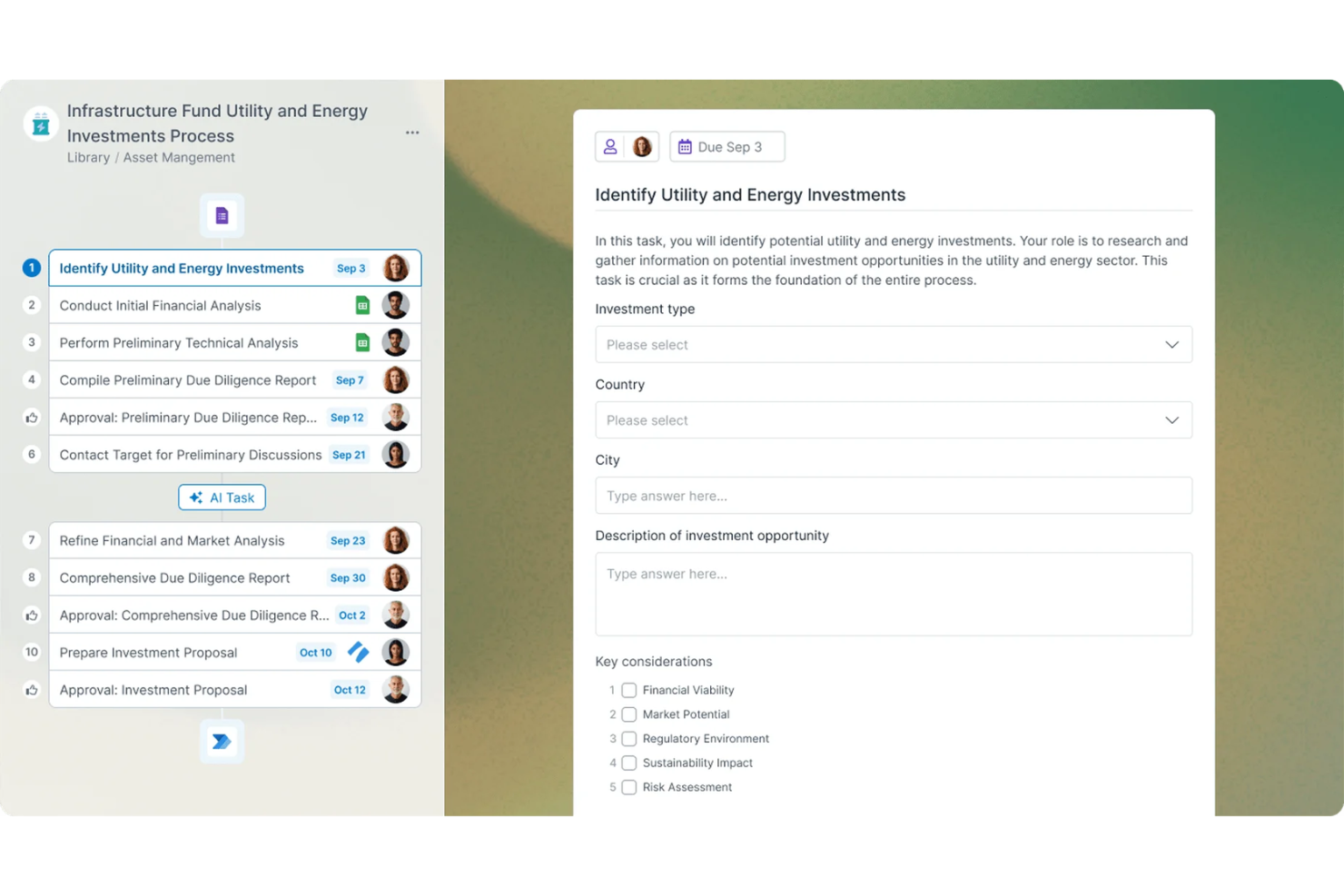
Process Street is a workflow management platform built for small businesses and teams who need to document, automate, and track recurring processes with clear, actionable checklists.
Who Is Process Street Best For?
Process Street is a strong fit for operations managers and small business teams who need structured case management to track recurring tasks.
Why I Picked Process Street
I picked Process Street as one of the best because I can build dynamic checklists that trigger automated actions when tasks are completed. I like using conditional logic to create branching workflows for different scenarios. My team relies on the approvals feature to keep stakeholders informed while keeping task sign-offs organized.
Process Street Key Features
- Task assignments: Assign checklist tasks to specific team members for accountability.
- Form fields: Collect structured data directly within checklists using customizable form fields.
- Template library: Access a library of pre-built workflow templates for common business processes.
- Audit trail: Track every action and change within a checklist for compliance and transparency.
Process Street Integrations
Integrations include Salesforce, Slack, Microsoft Teams, Google Sheets, Jira, HubSpot, Mailchimp, Stripe, and BambooHR.
Pros and Cons
Pros:
- Free guest seats for external collaborators
- Stop tasks enforce strict process order
- Conditional logic creates dynamic checklists
Cons:
- No offline access for mobile checklists
- Limited built-in complex data modeling

Best for building custom business apps
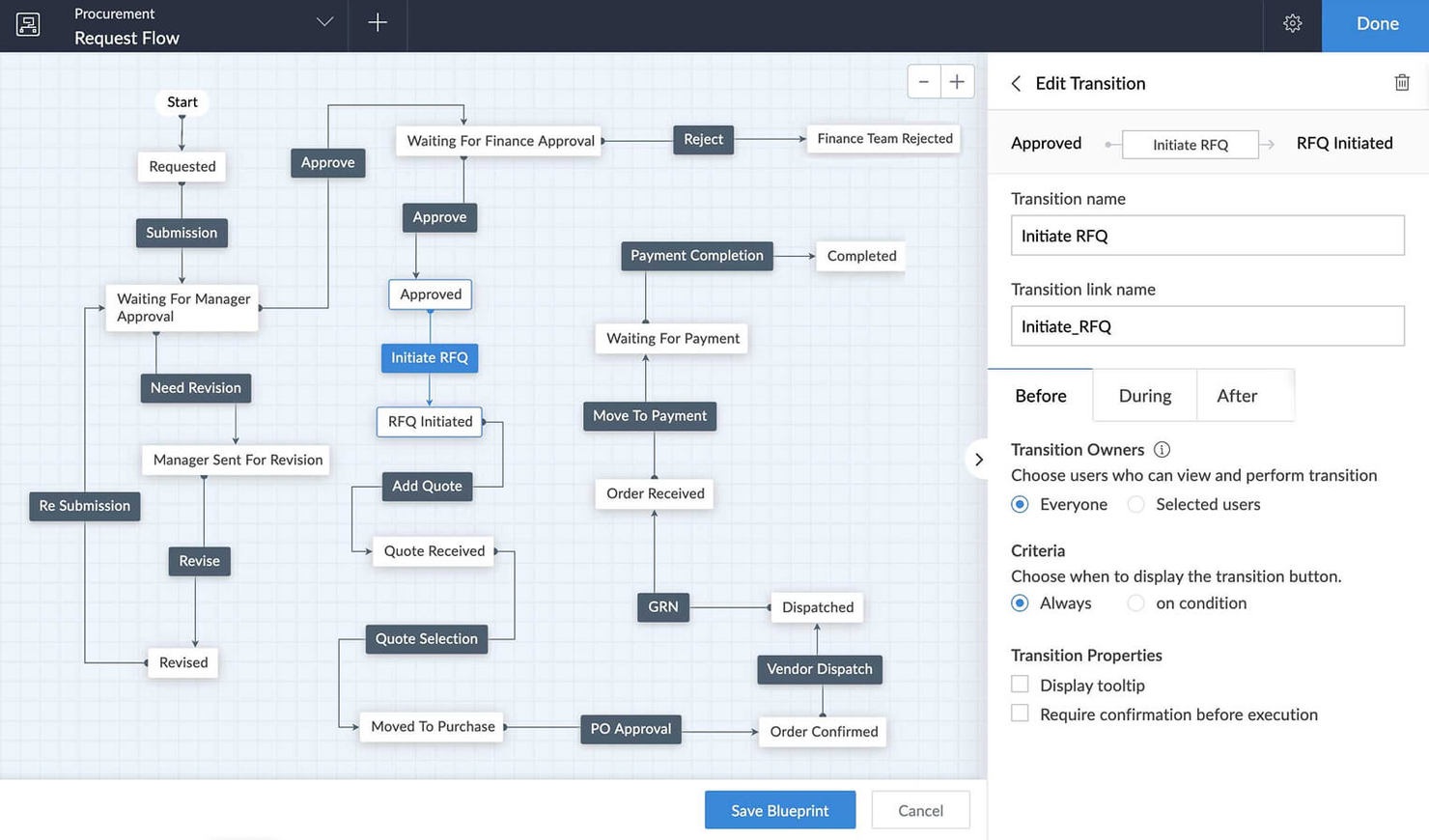
Zoho Creator is a low-code platform for small businesses and teams who want to automate processes, centralize data, and build custom workflows without relying on IT or complex coding.
Who Is Zoho Creator Best For?
Small business owners and operations managers who want to design custom apps to automate unique business processes.
Why I Picked Zoho Creator
I picked Zoho Creator as one of the best because I can quickly build custom business apps with drag-and-drop tools and prebuilt templates. I like that I can automate multi-step workflows and set up approval processes without writing code. My team uses its built-in analytics to improve operational efficiency and spot bottlenecks as we scale.
Zoho Creator Key Features
- Role-based access controls: Assign permissions to users based on their roles in your organization.
- Multi-platform deployment: Launch apps for web, iOS, and Android from a single build.
- Integration with Zoho and third-party apps: Connect workflows to Zoho CRM, Zoho Books, and other popular tools.
- Custom report builder: Design and generate reports using your app’s data to drive better decision-making through enhanced process visibility.
Zoho Creator Integrations
Integrations include Zoho CRM, Zoho Books, Zoho Projects, Zoho Desk, Zoho People, Zoho Analytics, Zoho Invoice, Zoho Inventory, Zoho Mail, and Zoho Sign.
Pros and Cons
Pros:
- Native integration with other Zoho business tools
- Built-in database for centralized business data
- Drag-and-drop app builder for custom workflows
Cons:
- User interface can feel dated to some teams
- Limited advanced workflow logic without scripting

Clustdoc
Best for client onboarding workflows
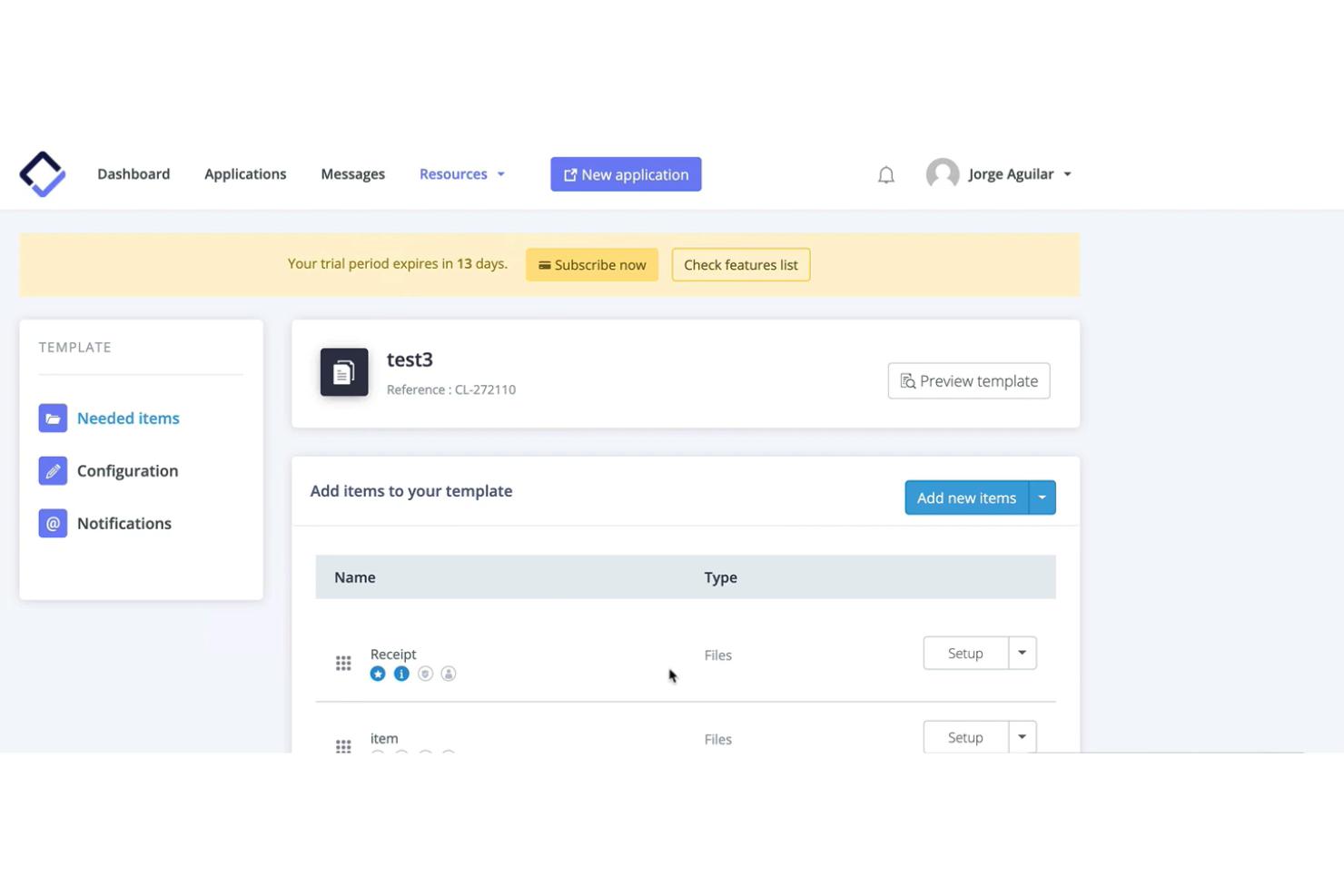
Clustdoc is a workflow automation platform designed for small businesses and professional services teams who need to collect documents, manage client submissions, and simplify onboarding or application processes.
Who Is Clustdoc Best For?
Small business teams in legal, finance, or consulting who need to automate client onboarding and document collection.
Why I Picked Clustdoc
I picked Clustdoc as one of the best because I can build step-by-step onboarding workflows with custom checklists and document requests tailored to each client. I like that my team can automate reminders and approvals, so nothing falls through the cracks. The branded client portal lets us collect forms, signatures, and payments in one place, which keeps everything organized and professional.
Clustdoc Key Features
- Conditional logic workflows: Trigger steps or requests based on client responses.
- Team collaboration tools: Assign tasks and communicate with team members inside the platform.
- Template library: Access ready-made onboarding and document collection templates.
- Audit trail tracking: Monitor every action and change made within each workflow.
Clustdoc Integrations
Native integrations include Google Drive, Dropbox, OneDrive, Docusign, Stripe, and Clustdoc also offers an API for custom integrations.
Pros and Cons
Pros:
- Conditional logic customizes onboarding steps
- Automated reminders reduce manual follow-ups
- Client portal supports secure document uploads
Cons:
- Limited custom branding options
- No built-in time tracking feature

Best for low-code process design
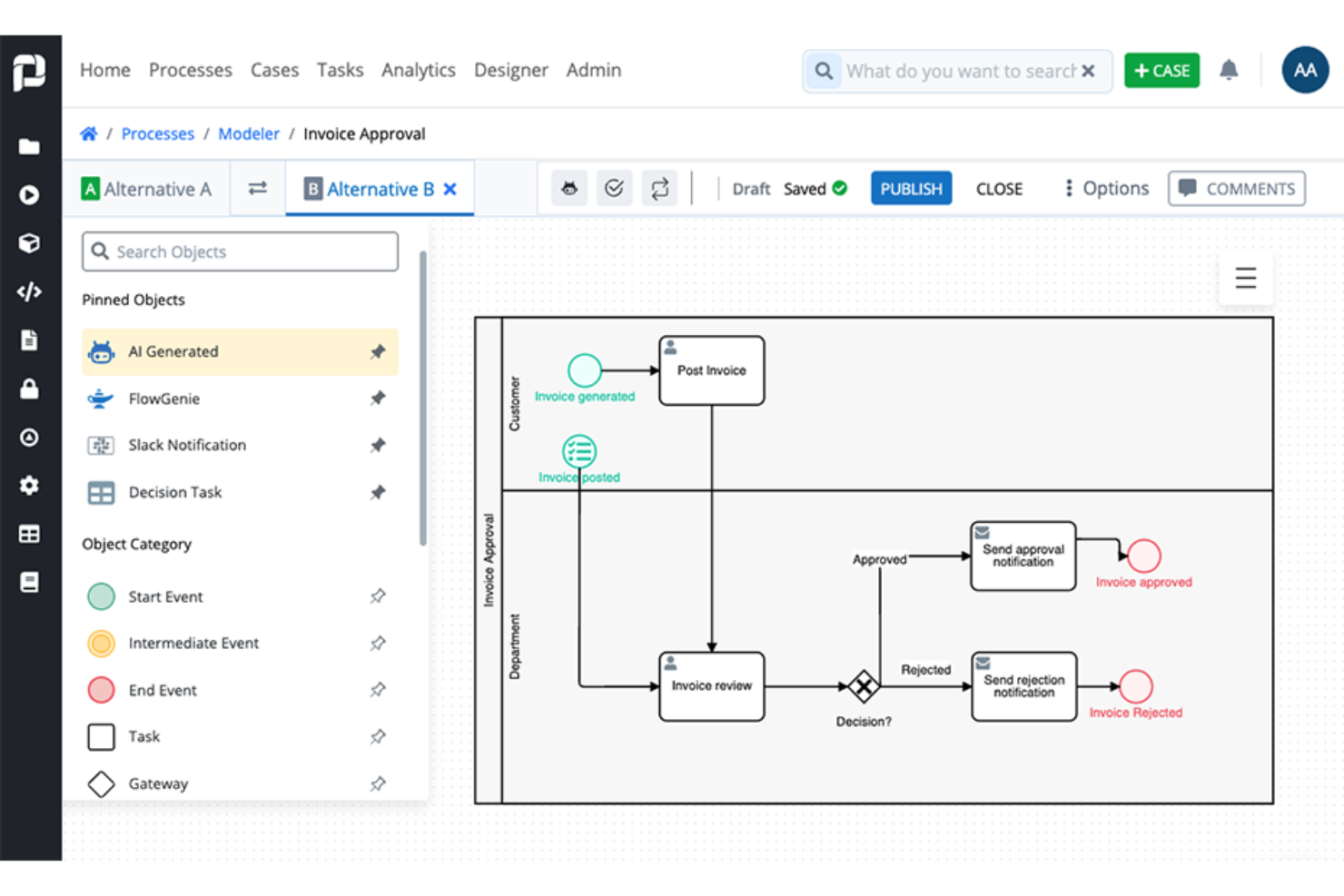
ProcessMaker is a workflow automation platform for operations teams and business analysts who need to map, automate, and optimize complex business processes without heavy IT involvement.
Who Is ProcessMaker Best For?
Mid-sized and enterprise operations teams who need to automate and manage complex, multi-step business processes.
Why I Picked ProcessMaker
I picked ProcessMaker as one of the best because I can visually design and automate complex workflows using its low-code process modeler. I like that I can set up multi-step approvals and conditional routing without heavy IT support. My team uses its drag-and-drop form builder for document processing and standardize data collection.
ProcessMaker Key Features
- Role-based access controls: Set permissions for users based on job function or department.
- Process analytics dashboard: Monitor process performance with real-time visual reports.
- Document management integration: Attach, store, and retrieve documents within workflows.
- REST API support: Connect external systems and automate data exchange.
ProcessMaker Integrations
Integrations include SAP, Salesforce, Microsoft SharePoint, Slack, Google Drive, Box, Dropbox, Oracle, and Jira.
Pros and Cons
Pros:
- Real-time process analytics and dashboards
- Strong e-signature integration
- Built-in approval routing for multi-step processes
Cons:
- Occasional delays in customer support response
- Custom scripting requires technical expertise

Knack
Best for database-driven workflow management
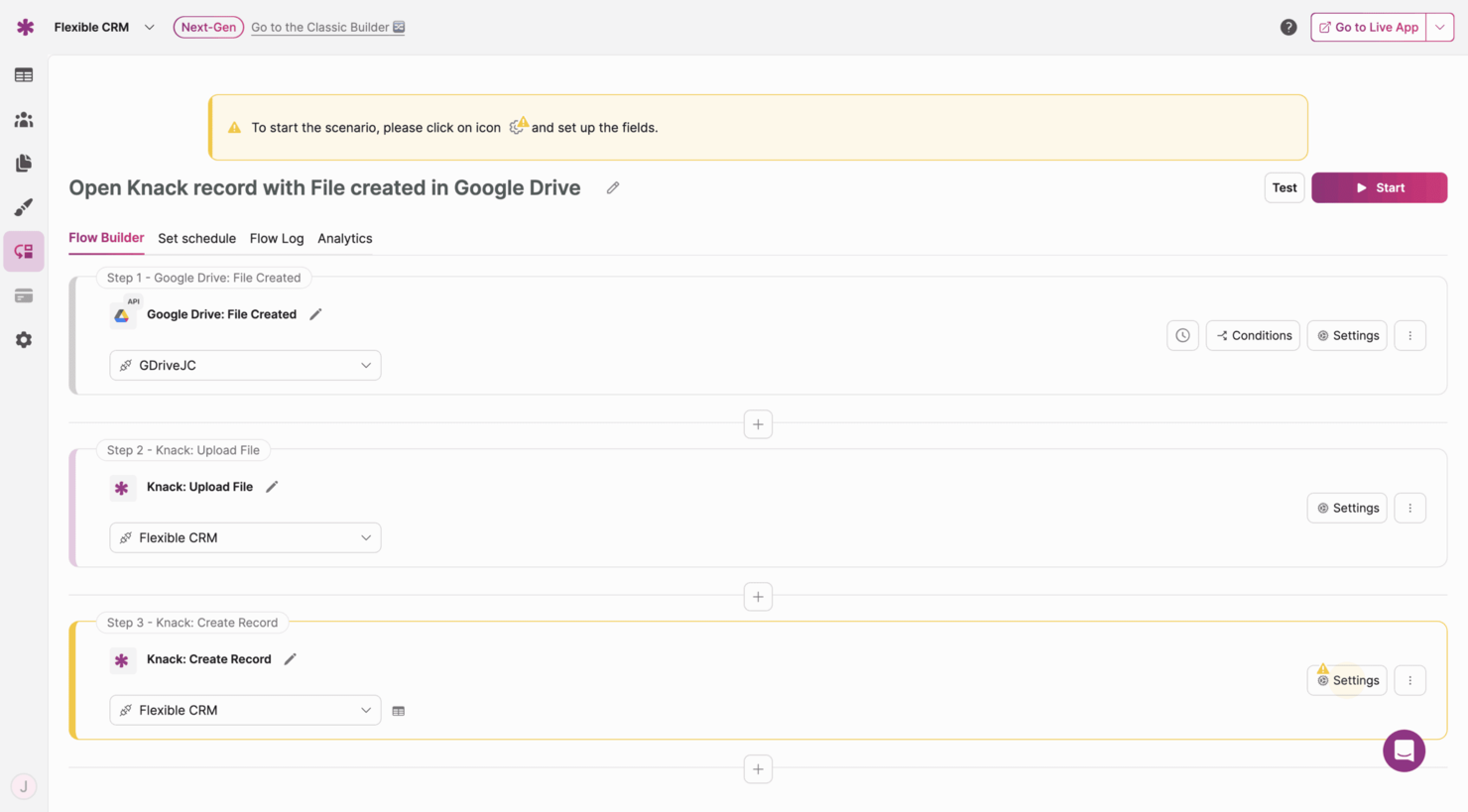
Knack gives small businesses and operations teams a way to build custom workflow apps that connect data, automate processes, and manage tasks without needing to code.
Who Is Knack Best For?
Operations managers and small business owners who need to build custom workflow solutions around their unique data and processes.
Why I Picked Knack
I picked Knack as one of the best because I can design workflow apps that connect directly to my business data, letting me automate approvals, notifications, and status changes without coding. I like that I can build custom dashboards and forms that match my team’s exact process steps. In practice, that means my team is able to manage everything from order tracking to project handoffs in one place, all driven by our own database structure.
Knack Key Features
- Role-based access controls: Set permissions for users and groups to control data visibility.
- Custom notifications: Send automated emails or alerts based on workflow triggers.
- File uploads: Allow users to attach and store documents within records.
- Calendar views: Display tasks, events, or deadlines in a visual calendar format.
Knack Integrations
Integrations include Zapier, Make, Integromat, Webhooks, Google Sheets, Mailchimp, QuickBooks, Salesforce, Slack, and Dropbox. An API is also available for custom integrations.
Pros and Cons
Pros:
- Supports file uploads within workflow records
- Database-centric architecture for relational data
- Custom database builder for unique workflows
Cons:
- Basic front-end design and styling options
- Limited native multi-step automation logic

Jira
Best for tracking complex workflows
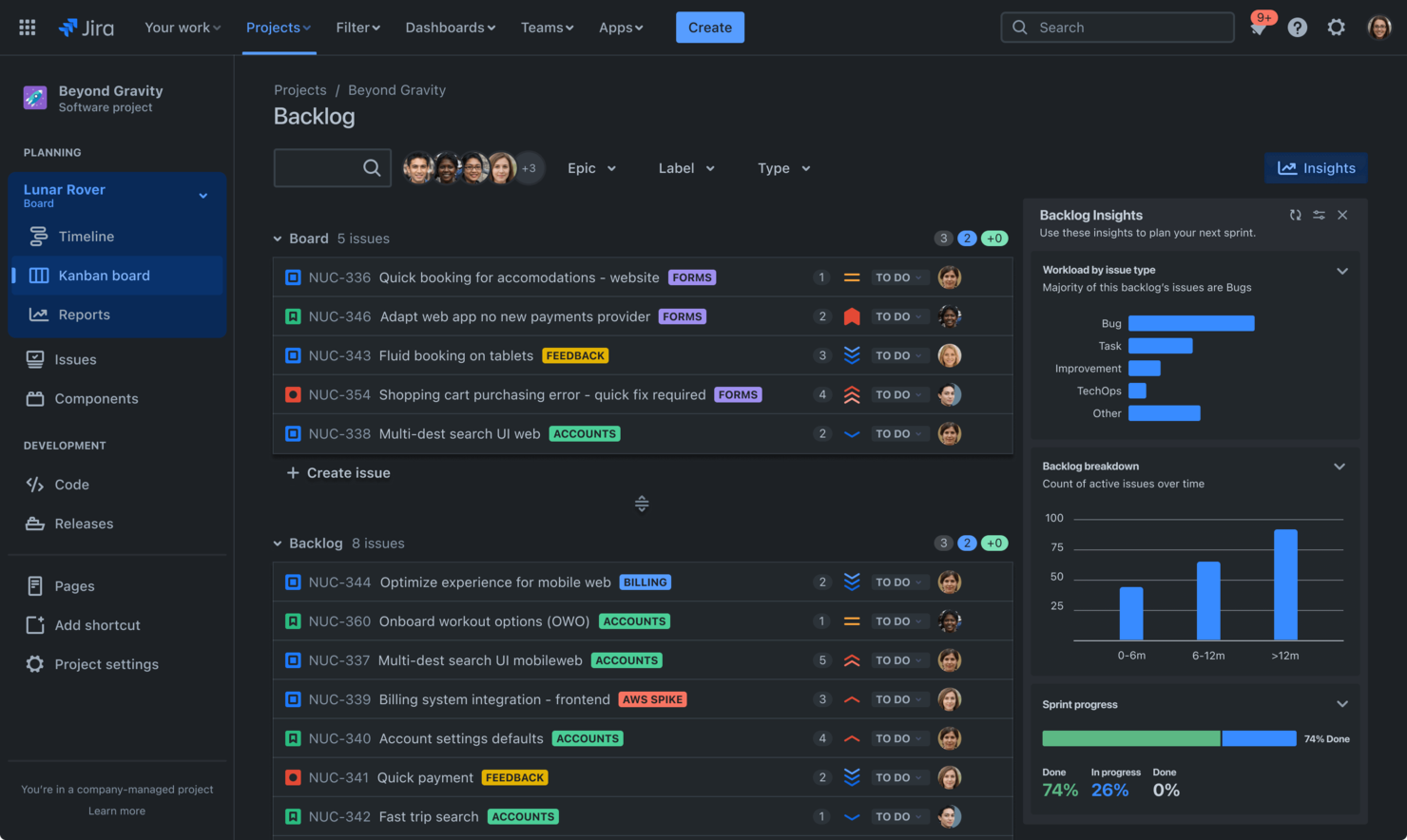
Jira is a project and workflow management platform used by software teams, product managers, and small businesses to organize tasks, track progress, and coordinate complex projects across distributed teams.
Who Is Jira Best For?
Software development teams and technical project managers in small to midsize businesses who need to coordinate complex, multi-step workflows.
Why I Picked Jira
I picked Jira as one of the best because I can map out complex, multi-step workflows using customizable boards and advanced issue types. My team uses built-in automation rules to handle recurring tasks and dependencies, which keeps our projects moving without manual follow-up. I like that I can visualize progress with detailed roadmaps and granular reporting, which helps us stay on top of shifting priorities.
Jira Key Features
- Custom fields: Add and configure fields to capture project-specific data.
- Permissions management: Control user access and actions at a granular level.
- Service desk integration: Connect support tickets directly to project workflows.
- Marketplace apps: Extend functionality with thousands of add-ons from the Atlassian Marketplace.
Jira Integrations
Integrations include Confluence, Trello, Bitbucket, Slack, Microsoft Teams, Google Drive, Zoom, Figma, GitHub, and Loom.
Pros and Cons
Pros:
- Built-in agile boards for sprint planning
- Highly customizable issue and project templates
- Advanced workflow automation for recurring processes
Cons:
- Limited support for non-technical workflows
- Time-consuming configuration for small teams

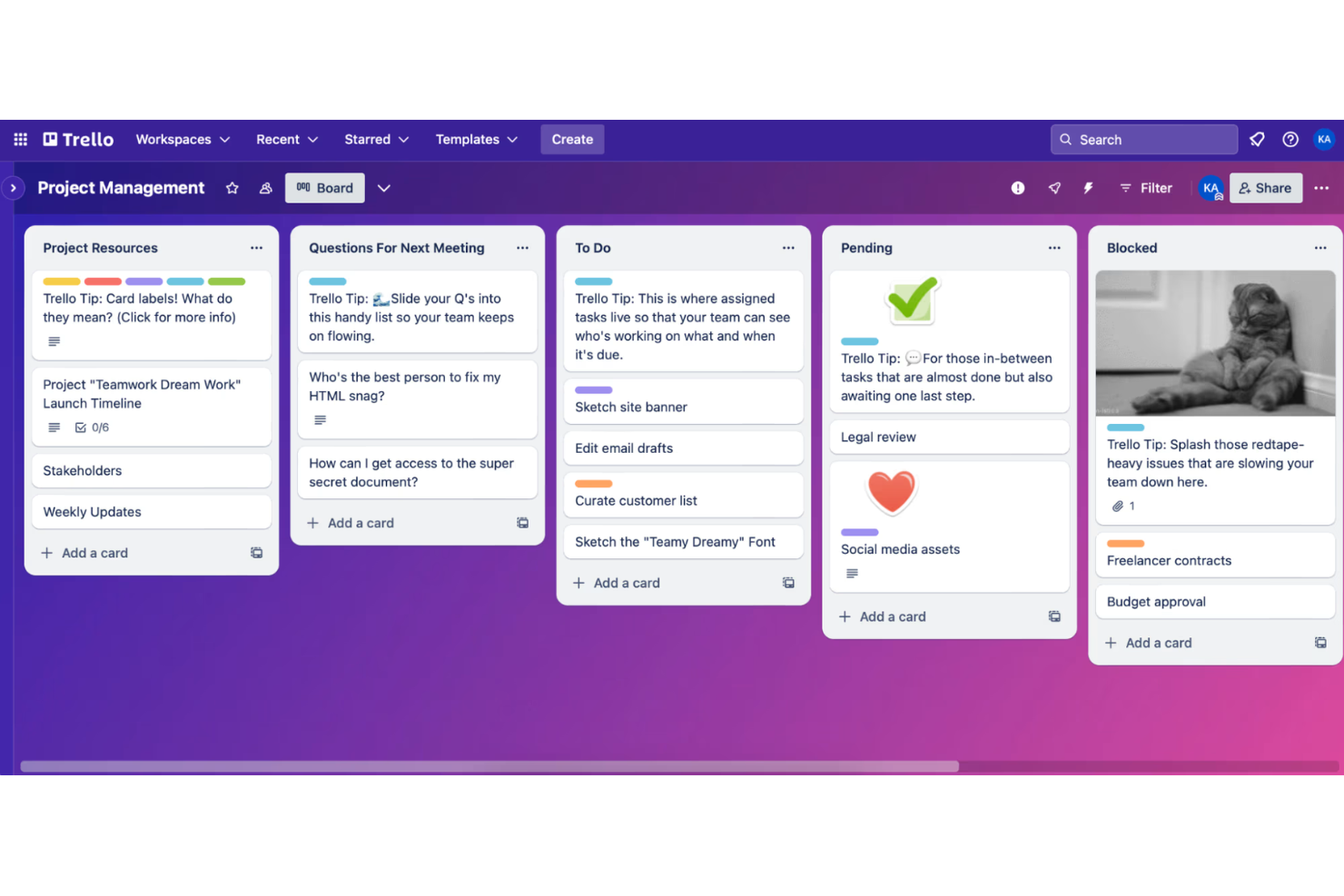
Trello gives small business teams a visual way to organize projects, manage workflows, and track progress using customizable boards, making it easy for marketing, operations, and client service teams to collaborate and stay on top of tasks.
Who Is Trello Best For?
Small business teams in marketing, operations, or client services who want a simple, visual way to manage projects and workflows.
Why I Picked Trello
I picked Trello as one of the best because I can set up kanban boards in minutes and customize lists for each stage of my team’s workflow. I like using Trello’s card system to attach files, add checklists, and assign tasks to specific team members. My team uses Power-Ups to add calendar views and automate repetitive actions right from the board.
Trello Key Features
- Butler automation: Automate card movements, due dates, and notifications with rule-based triggers.
- Board templates: Choose from a library of pre-built workflow templates for different business needs.
- Custom fields: Add dropdowns, dates, or text fields to cards for tailored data tracking.
- Activity log: Track all board and card changes in a detailed timeline.
Trello Integrations
Integrations include Slack, Google Drive, Gmail, Microsoft Teams, Jira, Dropbox, Evernote, Salesforce, and Box.
Pros and Cons
Pros:
- Board templates speed up new project setup
- Card checklists help track task subtasks
- Kanban boards make workflow stages visible
Cons:
- Card comments can get buried in busy boards
- No built-in Gantt or timeline view
Outro software de gestão de processos para pequenas empresas
Eis algumas opções adicionais de software de gestão de processos para pequenas empresas que não entraram na minha lista restrita, mas que ainda vale a pena conhecer:
- Asana
For team task coordination
- Bizagi
For visual process modeling in small teams
- Smartsheet
For spreadsheet-style process planning
- Wrike
For real-time workflow visibility
- monday AI Workspace
For customizable workspaces
- Orderry
For service business job tracking
- Pabbly Connect
For multi-app workflow connections
- UiPath
For robotic task automation
- Bitrix24
For integrated communication tools
- Nintex Process Manager
For documenting procedures


How I Evaluate Process Management Software for Small Business
I evaluate these tools in two layers: the core functionality a small team actually needs—like recurring checklists and process templates—and the differentiators that make one tool the right fit.
Core Functionality (Table Stakes For This List)
When I'm selecting tools for my list, I rank each one on a scale from 0 (does not offer the functionality) to 5 (excels in this area) for each core functionality listed below. Then, I calculate the tool's total score into a percentage. Each tool needs to achieve a minimum total score of 65% to be considered for inclusion.
- Process Mapping & Documentation: I look for visual workflow builders where you can map out a process like employee onboarding or client intake step by step, not just describe it in a text doc.
- Workflow Automation: Each tool should let you set triggers and conditions that move work forward automatically, like routing an approval to a manager when a form is submitted.
- Recurring Task & Checklist Management: I check whether you can save a process as a reusable template, so something like a monthly close or weekly reporting cycle launches with the right steps every time.
- Collaboration & Task Assignment: The tool should support role-based task assignment with comments and mentions, so team members stay aligned within the process instead of chasing updates over email.
- Progress Tracking & Reporting: Dashboards and reports that show where processes stall matter here. I evaluate whether you can spot a bottleneck, like an approval stuck for three days, at a glance.
- Integrations With Business Tools: Small teams rely on connected stacks, so I look at native integrations with tools like Google Workspace, Slack, and QuickBooks, plus support for Zapier or an open API.
Once I have a list of tools that meet the criteria, I consider what sets each platform apart.
Differentiating Factors (What Sets Vendors Apart)
Here's how I compare and contrast different vendors:
Standout Features
Conditional logic branching is a big differentiator. A tool that adjusts the next step based on a form response—like skipping a legal review when a contract falls below a set threshold—saves small teams from manually rerouting work. Embedded forms that capture structured data at kickoff are equally valuable, since they feed variables into later steps without copy-pasting between apps. I also evaluate whether a platform offers guest or client portals, so external stakeholders can submit requests or track progress without needing a paid seat.
Beyond Features
Pricing transparency matters for small teams. I check whether a vendor locks automations or templates behind enterprise tiers, since a five-person team running client onboarding workflows shouldn't need to upgrade just to add conditions. Time-to-value is another factor I weigh—pre-built templates for common processes like employee offboarding or vendor approvals help teams go live in days, not weeks. I also look at support availability on lower-tier plans, because small businesses rarely have a dedicated admin to troubleshoot configuration issues on their own.
Como escolher software de gestão de processos para pequenas empresas
É fácil ficar preso a longas listas de funcionalidades e estruturas de preços complexas. Para o ajudar a manter o foco enquanto analisa o seu processo específico de seleção de software, eis uma lista de fatores a ter em conta:
| Fator | O que deve considerar |
|---|---|
| Escalabilidade | O software conseguirá suportar mais utilizadores, dados ou fluxos de trabalho à medida que a sua empresa cresce? Verifique os limites de utilizadores e as opções de atualização. |
| Integrações | Estabelece ligação nativa às ferramentas que já utiliza (como contabilidade, CRM ou correio eletrónico)? Evite depender exclusivamente de conectores de terceiros. |
| Personalização | Pode adaptar fluxos de trabalho, campos e permissões aos seus processos sem um envolvimento significativo da equipa de TI? |
| Facilidade de utilização | A sua equipa irá adotá-lo rapidamente ou a formação será um obstáculo? Procure uma navegação intuitiva e rótulos claros. |
| Implementação e integração inicial | Quanto tempo demorará a configuração e que recursos serão necessários? Informe-se sobre o apoio à migração, os modelos e a ajuda durante a integração inicial. |
| Custo | Os níveis de preços são transparentes e previsíveis à medida que cresce? Esteja atento a custos ocultos ou complementos obrigatórios. |
| Medidas de segurança | A ferramenta oferece acesso baseado em funções, encriptação de dados e conformidade com as normas relevantes (como o RGPD)? |
| Disponibilidade do apoio | Que canais de apoio são disponibilizados e durante que horários? Considere se precisará de ajuda em direto ou de recursos de autoatendimento. |
O que é software de gestão de processos para pequenas empresas?
O software de gestão de processos para pequenas empresas é uma ferramenta digital que ajuda as equipas a organizar, acompanhar e automatizar fluxos de trabalho e tarefas recorrentes. Centraliza a documentação dos processos, atribui responsabilidades e monitoriza o progresso, permitindo às equipas reduzir o trabalho manual e os erros. Estas plataformas foram concebidas para responder às necessidades e aos orçamentos de startups e organizações mais pequenas, facilitando a gestão das operações diárias e a adaptação à medida que a empresa cresce.
Funcionalidades
Ao selecionar software de gestão de processos para pequenas empresas, procure as seguintes funcionalidades principais:
- Atribuição de tarefas: Atribua tarefas específicas aos membros da equipa, defina prazos e acompanhe a conclusão para garantir a responsabilização e o progresso.
- Automatização de fluxos de trabalho: Automatize passos repetitivos dos seus processos, como aprovações ou notificações, para poupar tempo e reduzir erros manuais.
- Gestão de documentos: Armazene, organize e partilhe ficheiros na plataforma, para que todos tenham acesso às versões mais recentes e aos materiais relacionados.
- Permissões baseadas em funções: Controle quem pode consultar, editar ou aprovar diferentes partes dos seus fluxos de trabalho, de modo a proteger informações sensíveis e manter a organização.
- Acompanhamento do progresso: Visualize o estado das tarefas e dos processos através de painéis, quadros kanban ou barras de progresso, para obter uma supervisão em tempo real.
- Formulários personalizáveis: Crie formulários para recolher dados, pedidos ou feedback diretamente nos seus fluxos de trabalho, adaptados às necessidades da sua empresa.
- Integração com calendários: Sincronize tarefas e prazos com os calendários da equipa, para manter todos alinhados quanto aos próximos marcos e entregáveis.
- Relatórios e análises: Gere relatórios sobre a eficiência dos fluxos de trabalho, os estrangulamentos e o desempenho da equipa, para apoiar melhorias baseadas em dados.
- Acesso móvel: Utilize o software em smartphones ou tablets, para que a sua equipa possa gerir processos e tarefas a partir de qualquer lugar.
- Capacidades de integração: Ligue-se a outras ferramentas empresariais, como plataformas de correio eletrónico, CRM ou contabilidade, para simplificar o fluxo de informação e reduzir o trabalho duplicado.
Vantagens
A implementação de software de gestão de processos para pequenas empresas proporciona várias vantagens à sua equipa e à sua empresa. Eis algumas das que pode esperar:
- Maior visibilidade: Acompanhe tarefas e fluxos de trabalho em tempo real, para saber sempre o que está em curso e o que requer atenção.
- Maior responsabilização: Atribua responsabilidades e prazos, deixando claro quem é responsável por cada passo e reduzindo as tarefas não concluídas.
- Integração mais rápida: Utilize modelos, visitas guiadas e documentação centralizada para ajudar os novos membros da equipa a familiarizarem-se rapidamente com o trabalho.
- Redução do trabalho manual: Automatize tarefas e aprovações repetitivas, libertando a sua equipa para se concentrar em atividades de maior valor.
- Melhor colaboração: Centralize a comunicação, os ficheiros e as atualizações, para que todos se mantenham alinhados e informados ao longo de cada processo.
- Decisões informadas: Aceda a ferramentas de relatórios e análises para identificar estrangulamentos, medir o desempenho e otimizar os fluxos de trabalho.
- Segurança reforçada: Controle o acesso a informações sensíveis através de permissões baseadas em funções e registos de auditoria, protegendo os dados da sua empresa.
Custos e preços
A seleção de software de gestão de processos para pequenas empresas exige uma compreensão dos vários modelos de preços e planos disponíveis. Os custos variam consoante as funcionalidades, o tamanho da equipa, os complementos e outros fatores. A tabela abaixo resume os planos comuns, os respetivos preços médios e as funcionalidades normalmente incluídas nas soluções de software de gestão de processos para pequenas empresas:
Tabela de comparação de planos para software de gestão de processos para pequenas empresas
| Tipo de plano | Preço médio | Funcionalidades comuns |
|---|---|---|
| Plano gratuito | $0 | Gestão básica de tarefas, número limitado de utilizadores, modelos simples de fluxos de trabalho e suporte básico. |
| Plano pessoal | $5-$15/utilizador/mês | Atribuição de tarefas, integração com calendários, automatização limitada, armazenamento de ficheiros e notificações por correio eletrónico. |
| Plano empresarial | $15-$35/utilizador/mês | Automatização avançada de fluxos de trabalho, ferramentas de relatórios, integrações, permissões baseadas em funções e acesso móvel. |
| Plano empresarial de grande escala | $35-$60/utilizador/mês | Integrações personalizadas, segurança reforçada, suporte prioritário, análises avançadas e assistência na integração. |
Perguntas frequentes sobre software de gestão de processos para pequenas empresas
Eis algumas respostas a perguntas comuns sobre software de gestão de processos para pequenas empresas:
O software de gestão de processos empresariais (BPM) é diferente do software de gestão de processos?
Sim, um software de gestão de processos empresariais ou software BPM é diferente de uma ferramenta de gestão de processos:
- O software de gestão de processos centra-se na coordenação de tarefas e na colaboração entre equipas. Foi concebido para ajudar os utilizadores a organizar, atribuir e acompanhar tarefas individuais no âmbito de um projeto.
- Uma plataforma BPM centra-se na automatização de fluxos de trabalho e na otimização sistémica. Foi concebida para modelar, executar e medir processos complexos de ponta a ponta, repetíveis e estruturados.
Em resumo: Se pretende ajudar a sua equipa a manter-se organizada, precisa de software de gestão de processos. Se pretende eliminar o trabalho manual através de uma automatização rigorosa e da integração de dados, está à procura de uma solução BPM.
Como sei se a minha pequena empresa precisa de software de gestão de processos?
Se tem dificuldades em acompanhar tarefas, prazos ou responsabilidades da equipa, ou se os processos manuais estão a atrasar o trabalho, é um bom sinal de que poderá beneficiar de software de gestão de processos. Estas ferramentas ajudam a organizar os fluxos de trabalho e a reduzir os erros à medida que a sua empresa cresce.
O software de gestão de processos pode integrar-se com as minhas ferramentas existentes?
Sim, a maioria dos softwares de gestão de processos para pequenas empresas oferece integrações com ferramentas populares, como o e-mail, calendários, CRM e plataformas de contabilidade. Verifique sempre quais as integrações disponíveis de forma nativa e se irá precisar de conectores de terceiros para o seu conjunto específico de ferramentas.
É difícil configurar software de gestão de processos para uma equipa pequena?
Não, a maioria das soluções de software de gestão de processos foi concebida para uma configuração rápida e inclui recursos de integração inicial, como modelos, visitas guiadas ao produto e vídeos de formação. Normalmente, pode começar sem apoio informático, mas uma personalização mais avançada poderá exigir tempo adicional ou assistência técnica.
Que funcionalidades de segurança devo procurar num software de gestão de processos?
Procure permissões baseadas em funções, encriptação de dados e conformidade com normas como o RGPD. Estas funcionalidades ajudam a proteger informações empresariais sensíveis e a controlar quem pode aceder ou editar diferentes fluxos de trabalho.
Quanto devo esperar pagar por software de gestão de processos para pequenas empresas?
Os preços variam, mas a maioria das pequenas empresas paga entre $5 e $35 por utilizador por mês pelos planos empresariais. Estão disponíveis planos gratuitos com funcionalidades limitadas, enquanto os planos empresariais com segurança e suporte avançados custam mais. Reveja sempre o que está incluído em cada nível.