

As 10 melhores soluções de software de caminho crítico selecionadas para 2026

Melhor seleção de software de caminho crítico


O software de caminho crítico ajuda a mapear, visualizar e gerir a sequência de tarefas que determina o tempo mínimo de conclusão do seu projeto. Se está à procura do melhor software de caminho crítico, é provável que esteja a lidar com prazos em constante mudança, dependências complexas e a pressão para manter os projetos no caminho certo.
A ferramenta certa pode proporcionar-lhe a visibilidade e o controlo de que precisa para coordenar equipas, ajustar planos rapidamente e obter os resultados que a liderança valoriza. Nesta lista, encontrará opções avaliadas por especialistas que apoiam a execução moderna de projetos, para que possa escolher a solução mais adequada ao seu fluxo de trabalho e aos seus desafios.
Why Trust Our Software Recommendations
Our team has been testing and reviewing software since 2012. As project managers ourselves, we know how difficult—and important—it is to choose the right software.
For this guide, we evaluated tools using hands-on testing and independent research, scoring tools using our selection criteria. We also draw on insights from industry thought leaders and practicing project management experts.
Our reviews reflect our human editorial judgment, not a sales pitch.
Expert reviewers:
Tabela de comparação de software de caminho crítico
Esta tabela de comparação resume os detalhes de preços das minhas principais escolhas de software de caminho crítico:
| Tool | Best For | Trial Info | Price | ||
|---|---|---|---|---|---|
| 1 | Best for construction CPM scheduling | Free demo available | Pricing upon request | Website | |
| 2 | Best for DCMA-automated schedule quality checks | Free demo available | Pricing upon request | Website | |
| 3 | Best for MS Project file migration to CPM cloud | Free plan available | From $9.99/user/month (billed annually) | Website | |
| 4 | Best for resource-constrained critical path scheduling | Free demo available | From $800/license | Website | |
| 5 | Best for quantitative schedule risk analysis | 30-day free trial | Pricing upon request | Website | |
| 6 | Best for Microsoft 365 ecosystem scheduling | Not available | Pricing upon request | Website | |
| 7 | Best for real-time critical path dashboards | 30-day free trial + demo available | From $15/user/month (billed annually) | Website | |
| 8 | Best for 4D BIM-linked schedule planning | 14-day free trial | From $932/user (billed annually) | Website | |
| 9 | Best for government and defense schedule analytics | Free demo available | Pricing upon request | Website | |
| 10 | Best for enterprise-scale multi-project CPM scheduling | Free demo available | From $125/user/month | Website |
Análises do melhor software de caminho crítico
Abaixo encontrará os meus resumos detalhados do software de caminho crítico que entrou na minha seleção. As minhas análises apresentam uma visão detalhada das funcionalidades, dos melhores casos de utilização e das integrações de cada software, para o ajudar a encontrar a melhor opção para si.

Planera
Best for construction CPM scheduling
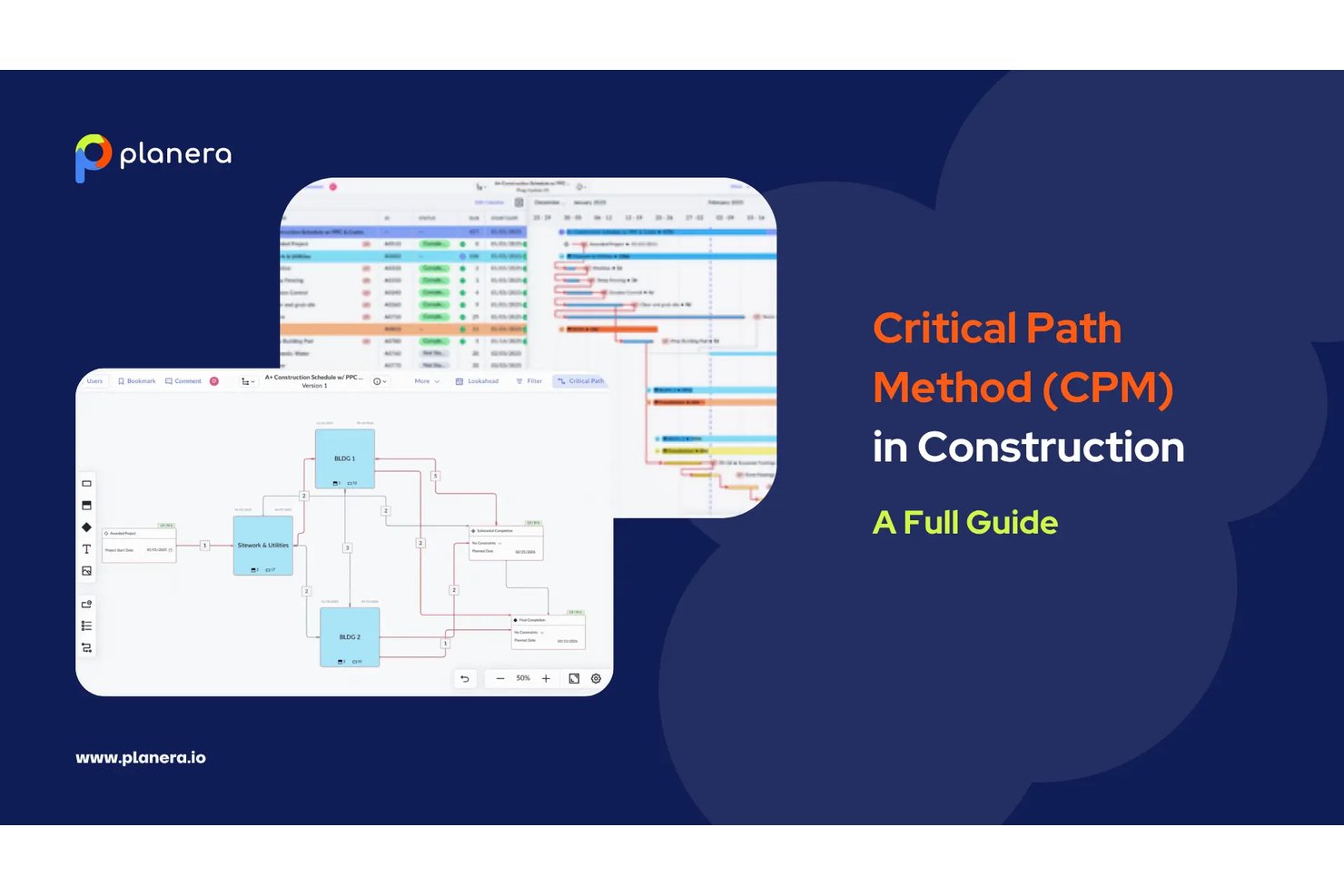
Planera is a construction-native CPM scheduling platform built around a full critical path engine, interactive Gantt charts, a visual CPM Canvas, Monte Carlo risk simulation, and AI-assisted what-if scenario modeling.
Who Is Planera Best For?
Planera is a strong fit for general contractors and construction schedulers who need full CPM depth without the complexity and overhead of Primavera P6.
Why I Picked Planera
Planera earns its spot on my shortlist because it's the only CPM scheduling tool I've found that's built from the ground up for construction, not adapted from generic project management software. I love that it combines a full CPM engine with a visual CPM Canvas, where you can drag activities, wire dependencies, and watch the critical path recalculate in real time. The built-in Monte Carlo simulation is what really sets it apart: you can run probabilistic completion forecasts directly inside the scheduler, without exporting to a separate risk tool.
Planera Key Features
- DCMA 14-point schedule quality check: A built-in validation tool that audits your schedule against 14 industry-standard quality criteria to flag logic errors and compliance issues.
- Field schedule generation: Planera pulls a live field schedule directly from the master CPM plan in seconds, with all logic intact, so field crews always work from current data.
- Version compare: Side-by-side comparison of schedule versions that surfaces deviations between any two snapshots of your plan.
- Resource loading and workload dashboards: Tools for assigning labor and equipment to activities, with visual dashboards that flag bottlenecks and forecast demand across the project.
Planera Integrations
Planera offers native integrations with Procore and Autodesk Construction Cloud. It also supports XER, MPP, XML, and Excel import/export, plus a cloud API for custom integrations.
Pros and Cons
Pros:
- CPM Canvas enables real-time drag-and-drop scheduling
- All four dependency types with float paths
- Monte Carlo risk simulation included natively
Cons:
- No on-premise deployment option available
- No earned value management metrics provided

ALICE
Best for DCMA-automated schedule quality checks
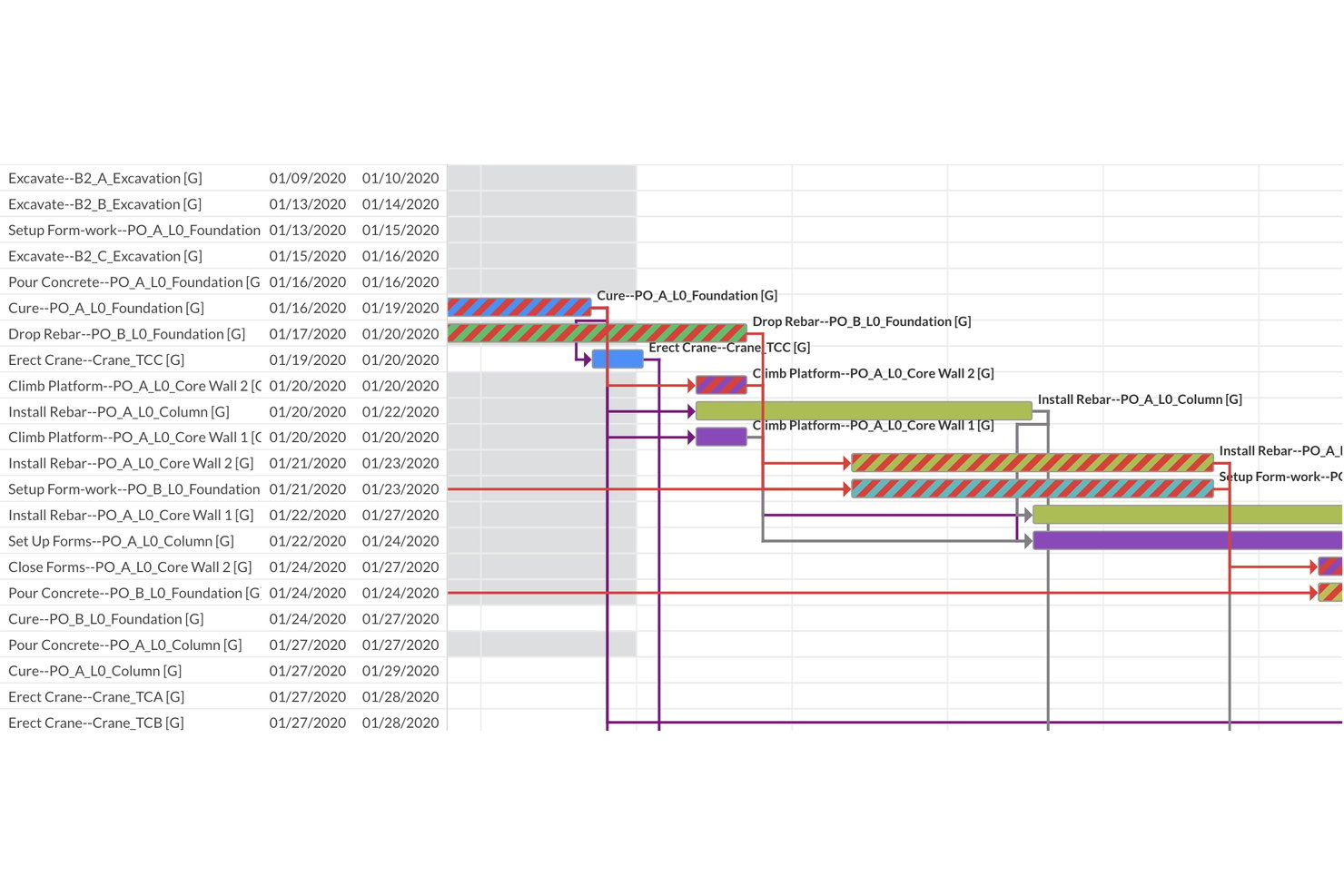
ALICE is a construction-focused critical path scheduling platform that combines AI-driven generative scheduling, constraint-based dependency modeling, Gantt visualization, and automated DCMA 14-Point schedule quality assessment.
Who Is ALICE Best For?
ALICE is built for construction schedulers and PMO directors managing large capital projects who need automated schedule quality validation alongside AI-driven optimization.
Why I Picked ALICE
ALICE earns its spot on my shortlist because its automated DCMA 14-Point Schedule Assessment runs every time you upload or optimize a schedule, instantly flagging logic errors, missing dependencies, negative float, and critical path integrity issues. I picked it specifically for teams where schedule quality isn't optional: the built-in Critical Path Length Index (CPLI) and Baseline Execution Index (BEI) give schedulers quantifiable, audit-ready metrics without manual setup. The generative scheduling engine also runs hundreds of millions of sequencing permutations, so you're not just validating one static critical path but comparing many optimized alternatives.
ALICE Key Features
- Generative scheduling engine: Runs hundreds of millions of sequencing permutations to produce multiple optimized schedules, rather than a single static critical path.
- Gantt Overlay: Places your optimized schedule directly against a saved baseline for visual deviation detection across the full project timeline.
- Portfolio Performance Dashboard: Aggregates all active projects into a single executive view, tracking average completion vs. baseline and flagging projects behind schedule.
- Schedule Insights Agent: A conversational AI interface that lets you query your schedule in natural language to get optimization and recovery recommendations.
ALICE Integrations
ALICE supports integrations with Oracle Primavera P6, Oracle Primavera Cloud, and Microsoft Project through schedule import and export. It also accepts BIM 3D models and 2D drawing files for schedule visualization and 4D planning.
Pros and Cons
Pros:
- AI-powered resource leveling reduces idle time
- Automated DCMA 14-point schedule quality checks
- Generative engine produces multiple optimized critical paths
Cons:
- Cloud-only platform with no on-premise option
- No Monte Carlo simulation for risk analysis

Best for MS Project file migration to CPM cloud
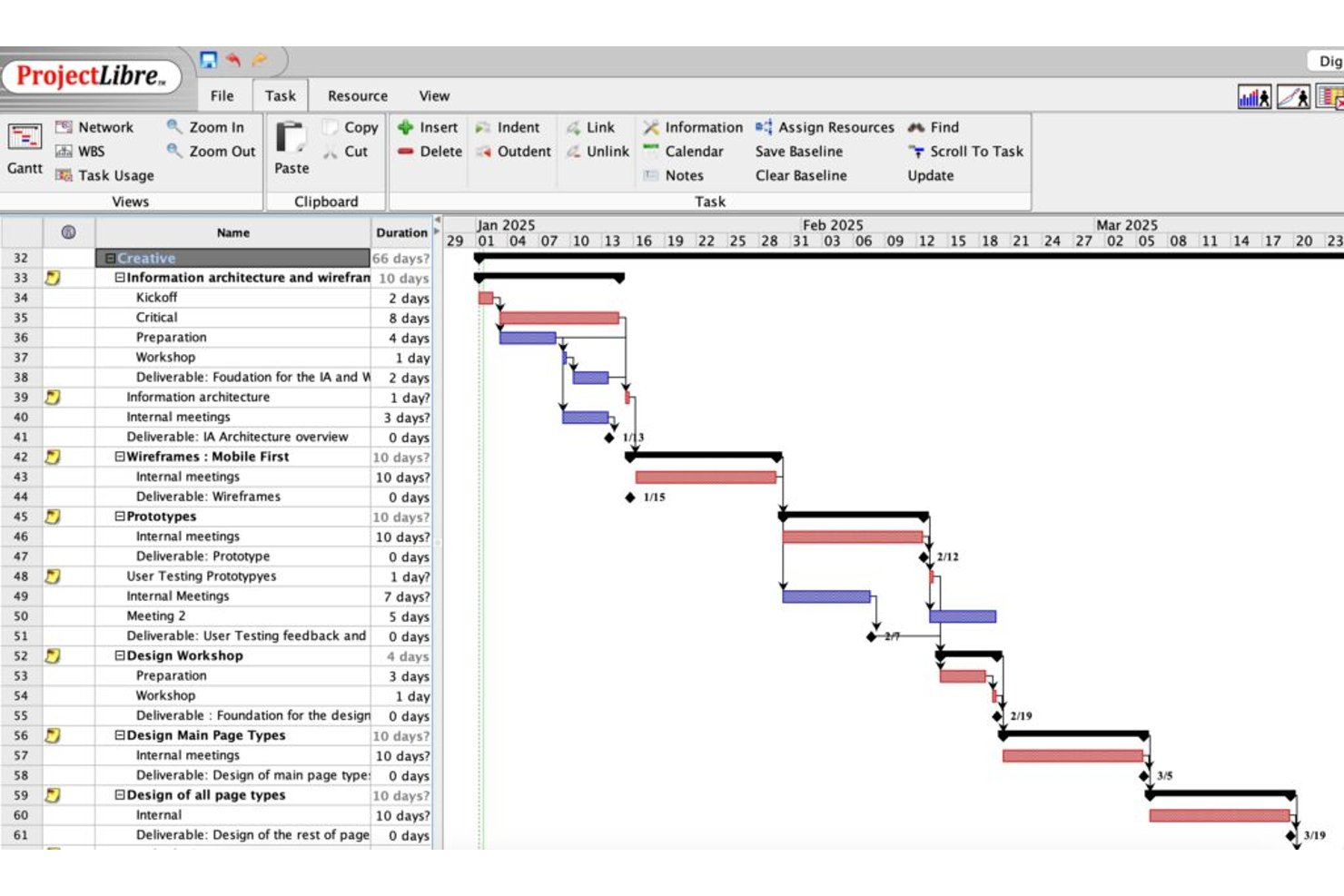
ProjectLibre is a critical path software solution available as both a free open-source desktop application and a cloud platform, offering CPM scheduling, Gantt charts, task dependency mapping, float analysis, baseline tracking, and earned value management.
Who Is ProjectLibre Best For?
ProjectLibre is a strong fit for teams migrating existing MS Project schedules to a cloud-based CPM environment without rebuilding from scratch.
Why I Picked ProjectLibre
I picked ProjectLibre as one of the best because it's the only tool on my list that lets you import an existing .MPP file directly into a cloud CPM environment without rebuilding your schedule from scratch. If your team is running MS Project schedules today, that's a real time-saver. I also like that the Cloud version supports up to 11 baselines alongside live EVM metrics (CPI, SPI, TCPI), which makes tracking schedule performance against multiple reference points genuinely practical.
ProjectLibre Key Features
- Critical path highlighting: Critical path tasks display in red on the Gantt chart, letting you spot the longest dependency chain at a glance.
- Free and total float display: Both free float and total float values appear per task in the task sheet, so you can see exactly how much schedule flexibility each task has.
- DCMA 14-point schedule audit: The Cloud version runs a built-in DCMA schedule quality check against the 14-point standard used in government and defense program management.
- AI Copilot project generation: Enter a natural language prompt and the AI Copilot builds a full project plan—tasks, milestones, dependencies, durations, and Gantt—automatically.
ProjectLibre Integrations
Native integrations are not publicly listed.
Pros and Cons
Pros:
- Cloud version includes Monte Carlo risk analysis
- Supports up to 11 baselines per schedule
- Imports Microsoft Project files without data loss
Cons:
- No mobile app available for on-site access
- No real-time collaboration in desktop version

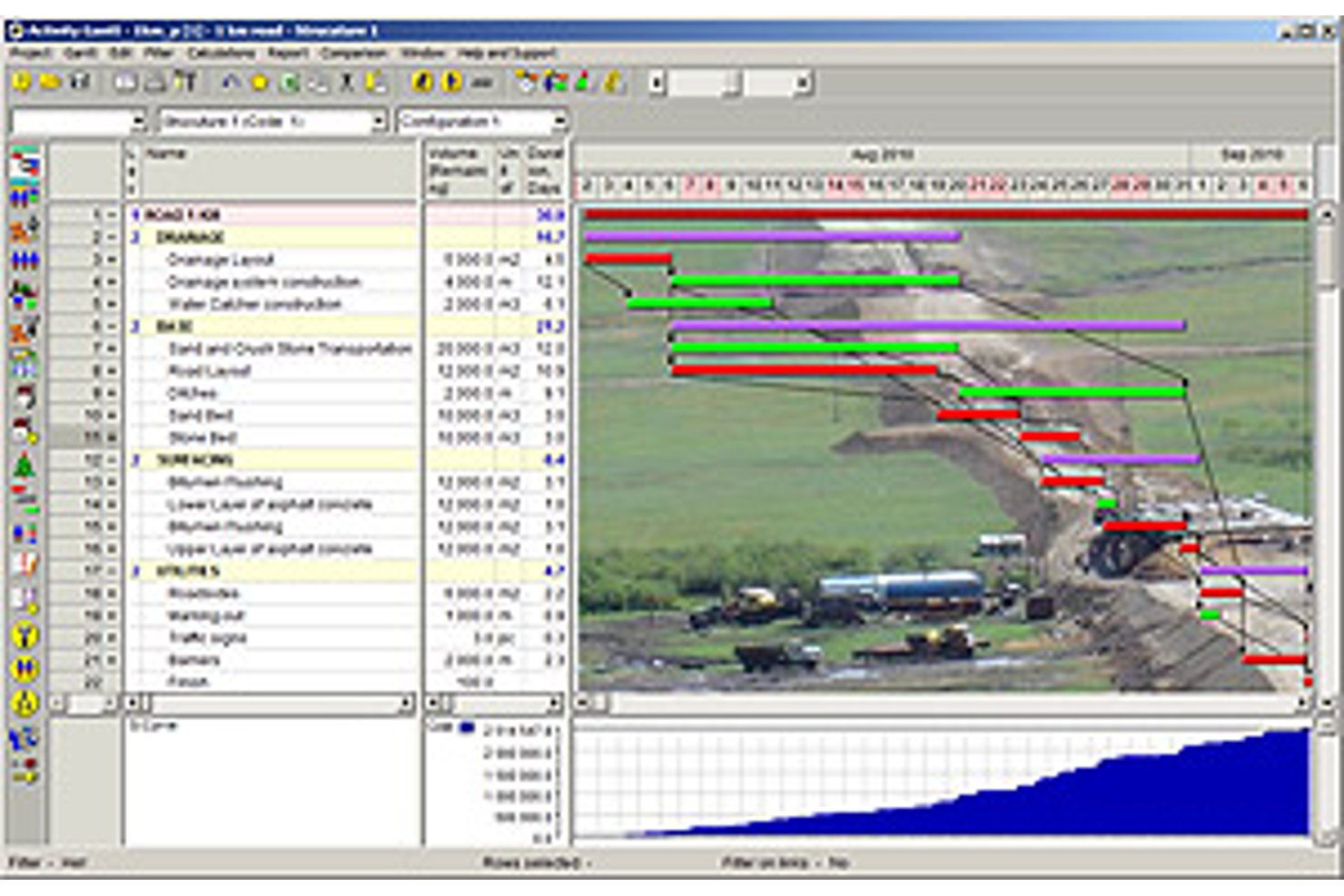
Spider Project is a desktop-based critical path scheduling tool that supports CPM calculation, resource-constrained scheduling, portfolio management, earned value management, and built-in risk simulation across complex, multi-project environments.
Who Is Spider Project Best For?
Spider Project suits schedulers and program managers in construction, engineering, and infrastructure who need resource-constrained critical path scheduling across large, complex project portfolios.
Why I Picked Spider Project
Spider Project earns its spot on my shortlist because no other scheduling tool handles resource-constrained critical path scheduling quite like it. I'm particularly impressed by its Resource Critical Path calculation, which factors in resource availability to identify the true driving sequence, not just the logic-driven one. It also calculates Critical Path Drag, so you can see exactly how much each critical task is adding to your total project duration.
Spider Project Key Features
- Quantity-based scheduling: Automatically calculates activity durations from work volumes (cubic meters, tons) and stored productivity rates, so you don't have to manually estimate task length.
- Unlimited baselines: Stores and compares any number of project snapshots side by side, letting you track how your schedule has shifted over time.
- Earned value management: Calculates CPI, SPI, cost variance, and schedule variance natively across costs, materials, and user-defined fields with trend reporting built in.
- Switch activities: Lets you define conditional branching in your network, so the schedule dynamically selects between competing paths based on user-defined logic.
Spider Project Integrations
Spider Project supports file-based data exchange with Microsoft Project, Primavera P6, Microsoft Excel, CSV, MS SQL Server, and Oracle Database.
Pros and Cons
Pros:
- Unlimited baselines with robust earned value tracking
- Quantity-based scheduling supports construction workflows
- Resource-constrained critical path scheduling is built-in
Cons:
- Physical USB key needed for license use
- Windows desktop only, no cloud version

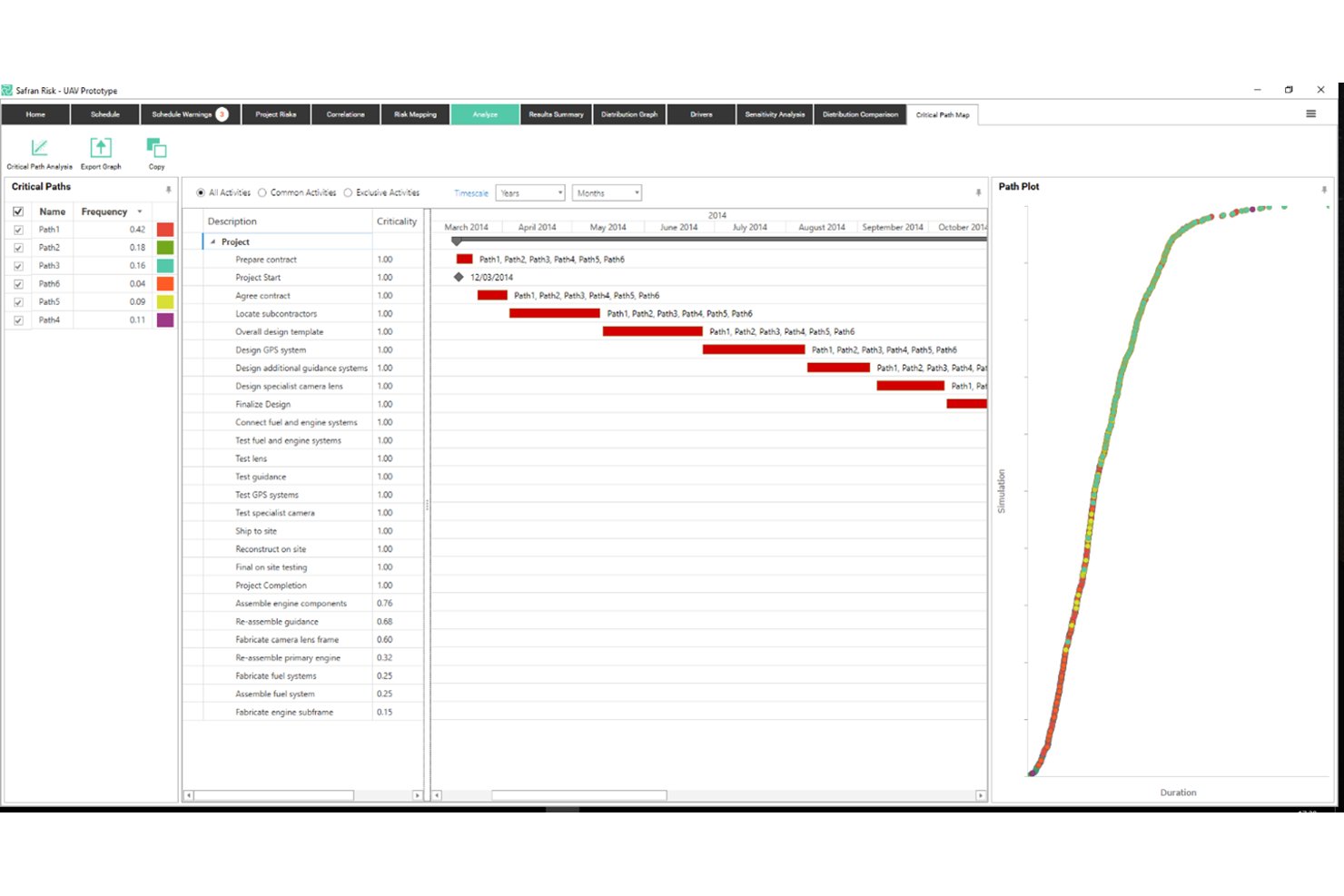
Safran Project is a specialist CPM scheduling platform built for capital-intensive industries, offering real-time critical path calculation, advanced float management, quantitative schedule risk analysis via Monte Carlo simulation, and integrated earned value management.
Who Is Safran Project Best For?
Safran Project is built for schedulers and project controls teams working on capital-intensive projects in oil and gas, engineering, construction, aerospace, and defense.
Why I Picked Safran Project
Safran Project earns its spot on my shortlist because no other tool I've reviewed handles quantitative schedule risk analysis with this level of depth. I'm particularly impressed by the native Monte Carlo simulation via Safran Risk, which runs 97% faster than Primavera Risk Analysis and produces Joint Confidence Levels across both cost and schedule simultaneously. The Split Target constraint is another standout: it lets you deliberately distribute float between project phases, so you get early warning when a specific segment is burning through its buffer before it hits the critical path.
Safran Project Key Features
- Real-time CPM scheduling engine: Automatically recalculates the critical path across unlimited activities the moment any input or logic changes.
- EVM reporting suite: Tracks SPI, CPI, SV, CV, EAC, and VAC against a set baseline, with S-curves and histograms for ANSI/EIA-748A-compliant performance measurement.
- What-if alternative scheduling: Lets you create and compare alternative schedule versions to assess the impact of scope changes on resources and timelines.
- Smart resource leveling: Redistributes workloads across constrained resources at the project or portfolio level without disrupting the critical path.
Safran Project Integrations
Safran Project offers native integrations with Oracle Primavera P6, Microsoft Project, SAP Project System, IFS, and ILAP. It also provides an Integration API for custom connections and supports private-cloud deployment through Safran Cloud.
Pros and Cons
Pros:
- Advanced float analysis with phase distribution
- Real-time critical path updates for large portfolios
- Monte Carlo simulation built into scheduling workflow
Cons:
- No native mobile app for field use
- Interface design appears visually outdated
Best for Microsoft 365 ecosystem scheduling
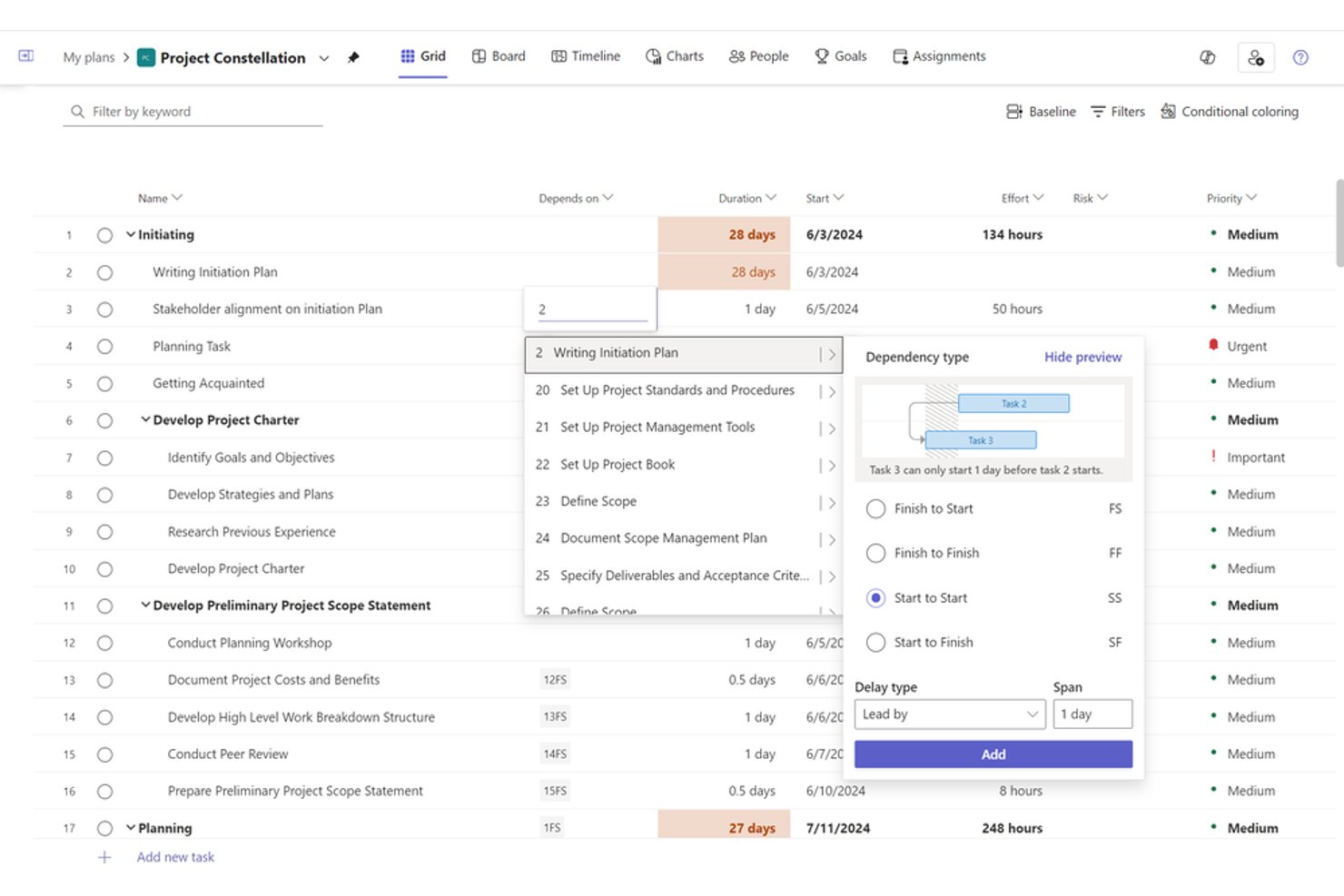
Microsoft Project is a project scheduling and portfolio management tool built around a native CPM engine, offering Gantt charts, task dependency mapping, resource leveling, baseline tracking, and earned value management across both desktop and cloud-based environments.
Who Is Microsoft Project Best For?
Microsoft Project suits PMO directors and engineering program managers at mid-to-large organizations that are already running Microsoft 365 and need enterprise-grade CPM scheduling without leaving that ecosystem.
Why I Picked Microsoft Project
Microsoft Project earns its spot on my shortlist because, if your team already runs on Microsoft 365, the scheduling depth you get without leaving that ecosystem is hard to replicate elsewhere. I particularly like the native CPM engine's ability to calculate multiple simultaneous critical paths across a master project, with red-coded Gantt bars and configurable slack thresholds that flag near-critical tasks before they become actual problems. The up-to-11-baseline support plus built-in EVM metrics like CPI and SPI make it my go-to when a program needs rigorous schedule accountability.
Microsoft Project Key Features
- Auto-scheduling engine: Dynamically recalculates task start and finish dates in real time whenever durations, dependencies, or constraints change.
- Resource leveling: Automatically redistributes work across overallocated resources by delaying non-critical tasks within available float.
- Network Diagram view: Displays all tasks and dependencies as a node-based flowchart, giving you a dependency-focused alternative to the Gantt view.
- Portfolio analysis (Plan 5): Lets PMOs compare, prioritize, and score projects across the portfolio using business driver weighting and demand vs. capacity modeling.
Microsoft Project Integrations
Microsoft Project offers native integrations across the Microsoft ecosystem, including Microsoft Teams, SharePoint, Power BI, Power Automate, Planner, and Dynamics 365. It also provides a REST API for custom integrations and supports Zapier.
Pros and Cons
Pros:
- Supports all four dependency types
- Native earned value and baseline tracking
- Auto-calculates multiple project critical paths
Cons:
- Master project features require enterprise tier
- No built-in Monte Carlo risk analysis

Best for real-time critical path dashboards
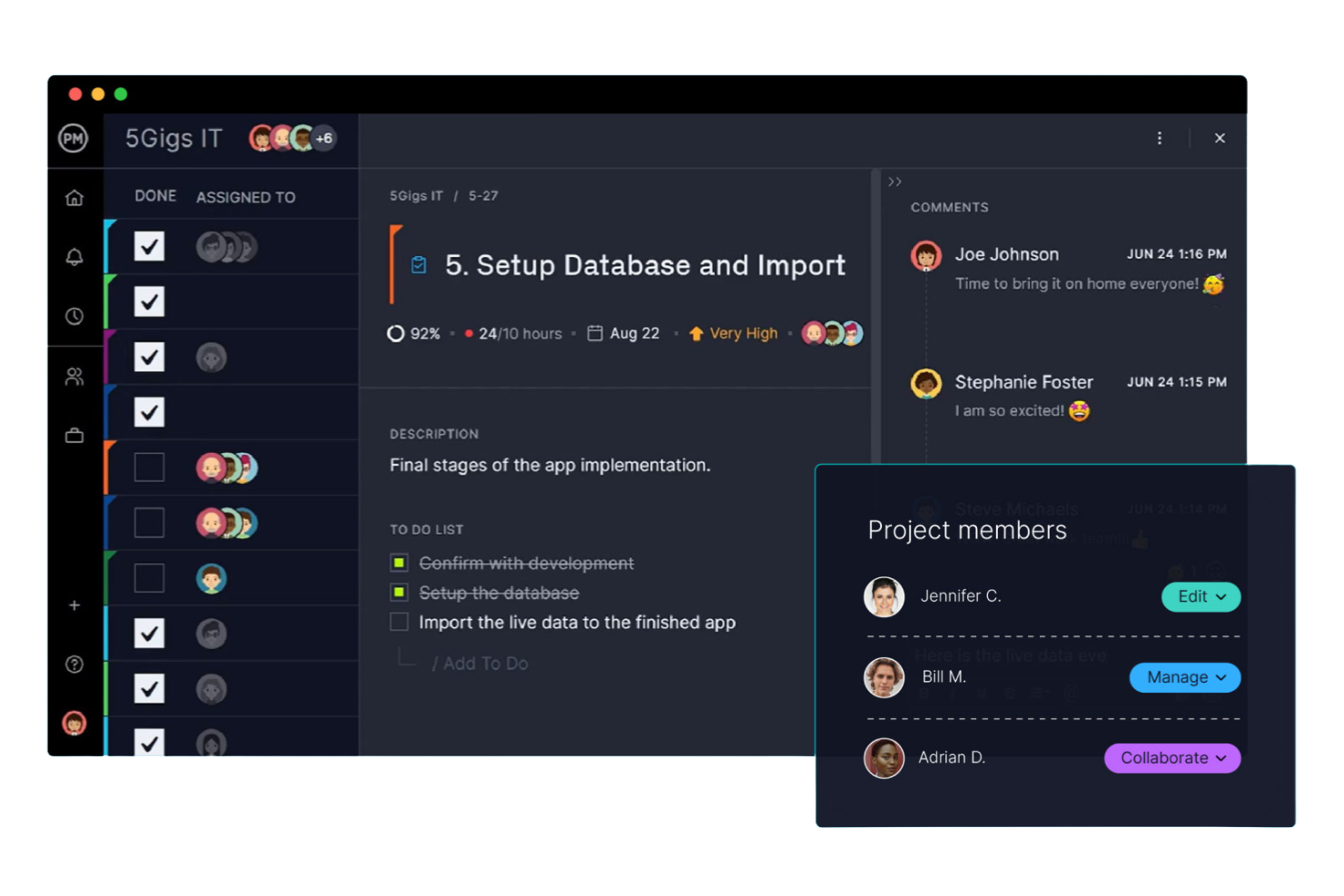
ProjectManager is a project management platform with an interactive Gantt chart that auto-calculates the critical path, supports all four dependency types with lag/lead configuration, and delivers real-time dashboards for baseline tracking and schedule variance reporting.
Who Is ProjectManager Best For?
ProjectManager is a strong fit for PMO directors and IT program managers who need clear critical path visibility and real-time dashboard reporting without the complexity of enterprise scheduling tools.
Why I Picked ProjectManager
ProjectManager earns its spot on my shortlist because its real-time dashboards give you instant schedule health visibility without any manual reporting. I love that the one-click critical path filter highlights critical tasks directly on the Gantt chart, and baseline overlays let you see planned-vs.-actual drift the moment it happens. If you're managing a portfolio of IT or program workstreams, the portfolio dashboard rolls up schedule variance across every project in one view.
ProjectManager Key Features
- All four dependency types: Link tasks using Finish-to-Start, Start-to-Start, Finish-to-Finish, or Start-to-Finish relationships, with lag and lead time configuration on each.
- Float and slack display: When you enable the critical path filter, the Gantt chart surfaces total and free float per task so you can see schedule buffer at a glance.
- Portfolio dashboard: A rollup view aggregates task progress, costs, and workload across multiple projects into a single interface for cross-project visibility.
- AI Project Insights: Available on Business and Enterprise plans, this feature delivers automated progress summaries, risk flags, and resource recommendations without manual reporting.
ProjectManager Integrations
ProjectManager offers native integrations with Microsoft Project, Jira, Azure DevOps, Microsoft Teams, Power BI, and QuickBooks Online. It also provides an API for custom integrations and supports Zapier.
Pros and Cons
Pros:
- Float and slack displayed on Gantt
- Baseline and variance tracking built-in
- Critical path filter highlights tasks instantly
Cons:
- Resource leveling is manual only
- No what-if scenario modeling

Best for 4D BIM-linked schedule planning
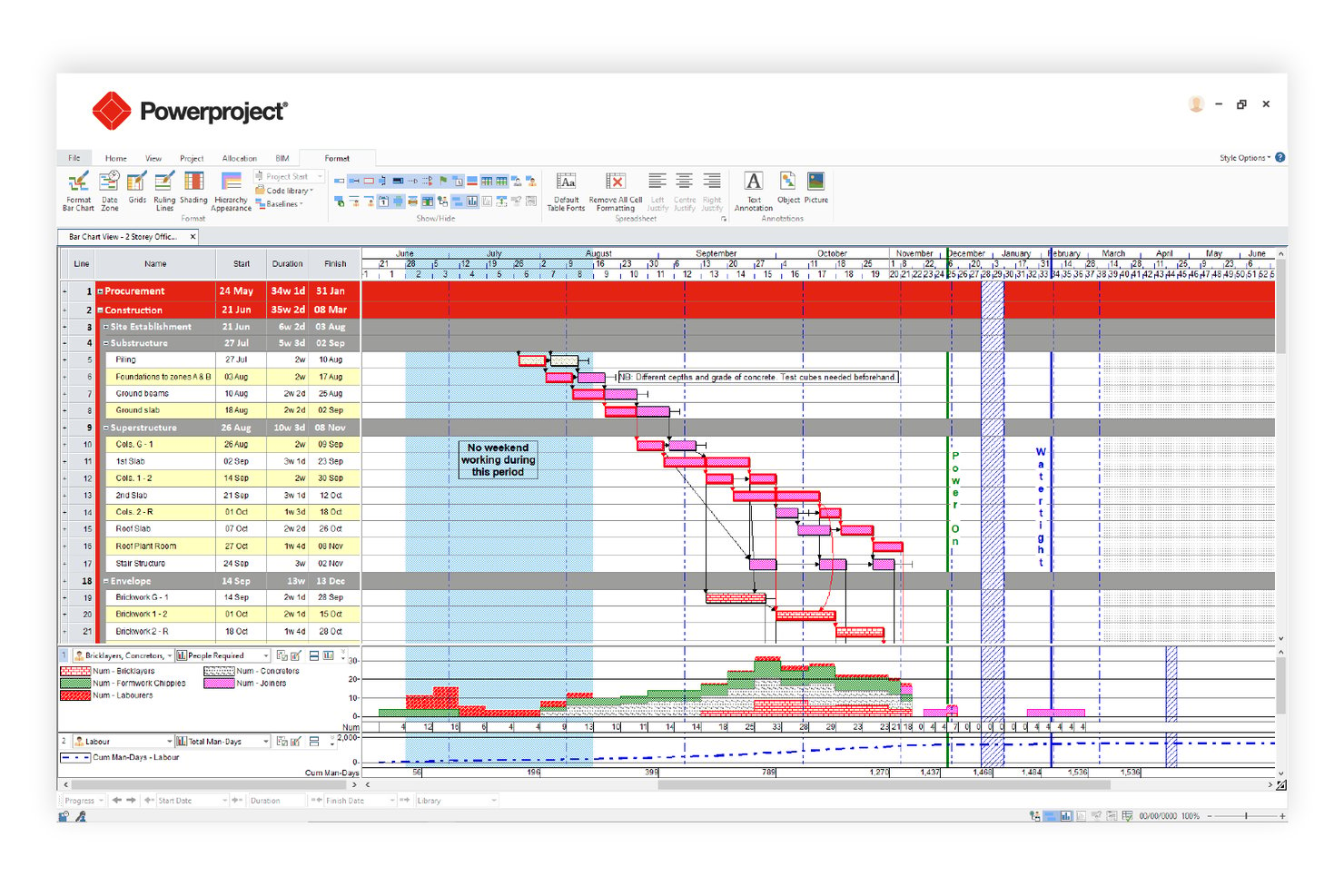
Asta Powerproject is a construction-focused critical path scheduling tool that combines CPM auto-calculation, 4D BIM integration, Monte Carlo risk analysis, multi-baseline tracking, and resource leveling in a single platform.
Who Is Asta Powerproject Best For?
Asta Powerproject is a strong fit for construction and infrastructure project managers who need schedule planning tightly connected to BIM models.
Why I Picked Asta Powerproject
Asta Powerproject earns its spot on my shortlist because no other critical path tool links schedule tasks directly to a 3D BIM model the way it does, letting you simulate construction progression visually before a single shovel hits the ground. I also rate its Monte Carlo Risk Analysis highly: it runs hundreds of iterations and produces a Criticality Index showing exactly which tasks land on the critical path most often across scenarios. Add unlimited baselines with up to 10 visible simultaneously, and you get precise deviation tracking that most CPM tools can't match.
Asta Powerproject Key Features
- Task dependency mapping: Supports all four CPM dependency types—Finish-to-Start, Start-to-Start, Finish-to-Finish, and Start-to-Finish—with lag/lead configuration and multiple logic links between the same task pair.
- Float and slack analysis: Calculates and displays both free float and total float per task, with near-critical threshold alerts and negative float indicators for super-critical tasks.
- Schedule quality check: Validates schedule integrity against pre-configured DCMA and CIOB compliance metrics before submission or client review.
- Asta SiteProgress mobile app: Lets site teams submit real-time progress updates, photo annotations, and quantity-based tracking directly from iOS or Android devices.
Asta Powerproject Integrations
Asta Powerproject offers integrations with Microsoft Project (.MPP), Oracle Primavera P6 (.XER/.XML), Excel, CSV, SQL, and Oracle databases. Asta Powerproject also connects with SAP, Oracle ERP, Procore, Bidcon BIM 5D, and Asta Vision for construction data exchange and reporting.
Pros and Cons
Pros:
- Built-in Monte Carlo risk analysis module
- Unlimited baselines with ten overlaid simultaneously
- Links schedule tasks directly to 3D BIM
Cons:
- No built-in formal risk register feature
- Earned value reporting less detailed than P6

Best for government and defense schedule analytics
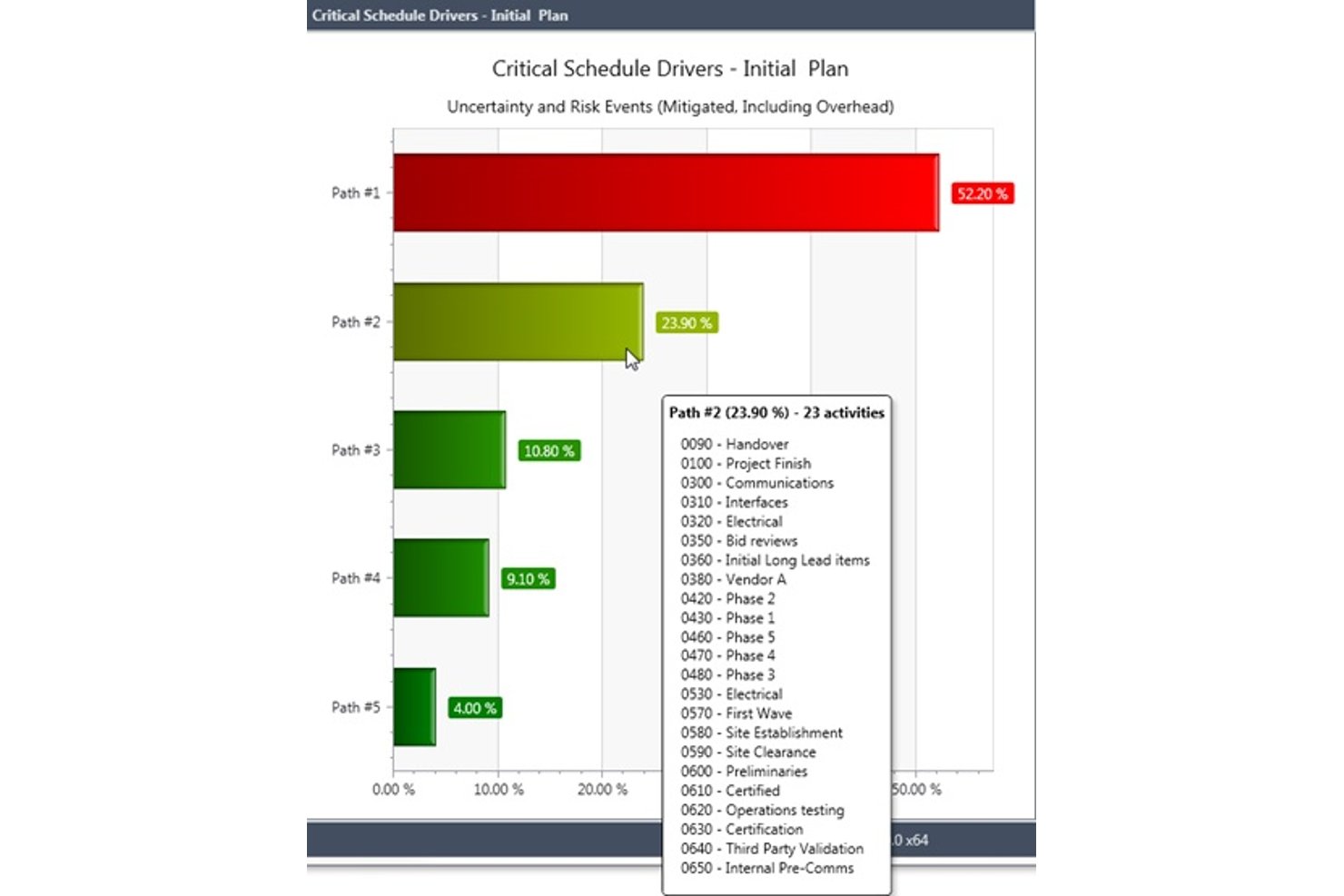
Deltek Acumen is a schedule analytics and risk platform that runs schedule diagnostics, Monte Carlo simulations, forensic delay analysis, and portfolio-level schedule governance on top of schedules built in tools like Primavera P6 and MS Project.
Who Is Deltek Acumen Best For?
Deltek Acumen is built for schedulers and program controls teams in government contracting, defense, aerospace, and EPC construction who need forensic-grade schedule analytics on top of Primavera P6 or MS Project.
Why I Picked Deltek Acumen
Deltek Acumen earns its spot on my shortlist because no other tool comes close to its forensic-grade schedule analytics for government and defense programs. I particularly value its DCMA 14-point diagnostics and half-step delay analysis, which automatically separates progress changes from scope changes between schedule versions—exactly what you need for claims support or audit documentation. On top of that, its Monte Carlo simulation identifies probabilistic critical paths across 500,000+ activity schedules, pinpointing which paths are truly driving risk.
Deltek Acumen Key Features
- Acumen Touchstone schedule governance: Automatically scores subcontractor schedule submissions against configurable quality thresholds, enforces acceptance criteria, and maintains full audit trails across all submissions.
- Dela AI risk identification: Analyzes project type, location, and schedule logic to surface risks automatically and generate prioritized, activity-mapped mitigation strategies.
- Liquidated damages modeling: Configures contract-aware LD caps and calculates delay penalty exposure directly within the schedule risk environment.
- IPMDAR and DOE PARS reporting: Generates IPMDAR SPD/CPD outputs and ingests DOE PARS data for pre-submission schedule and cost analysis aligned to government reporting requirements.
Deltek Acumen Integrations
Deltek Acumen supports integrations with Primavera P6, Microsoft Project, Deltek Open Plan, Safran Project, Asta Powerproject, Phoenix Project Manager, Deltek Cobra, PrismG2, and DOE PARS.
Pros and Cons
Pros:
- Advanced schedule governance for compliance-heavy projects
- Unmatched forensic delay and baseline insights
- Excels at probabilistic critical path analysis
Cons:
- Custom report building requires significant manual effort
- Cannot create or edit schedules directly

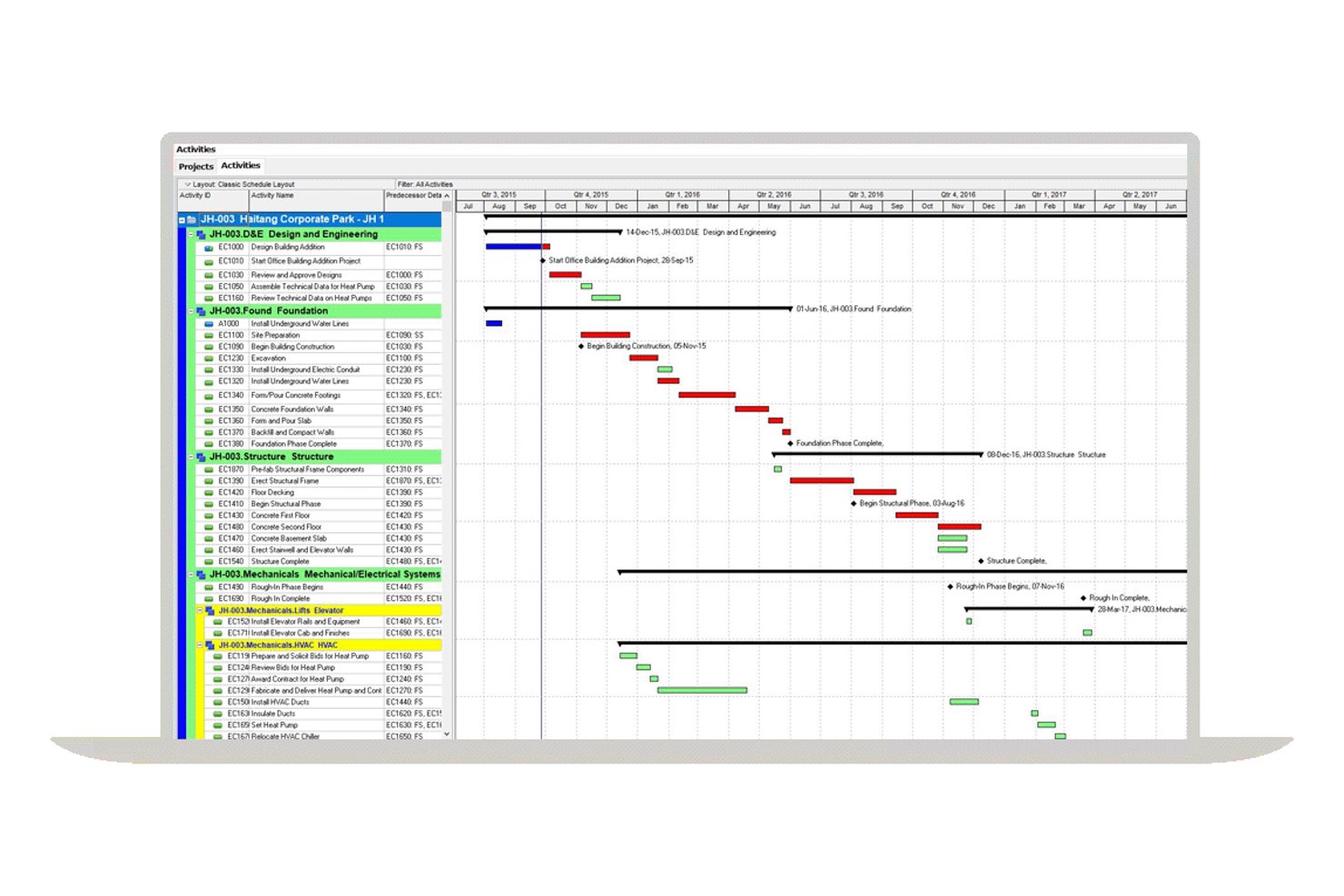
Oracle Primavera P6 is an enterprise CPM scheduling platform built for large-scale, multi-project environments, offering critical path calculation, dependency mapping, float analysis, resource leveling, baseline tracking, and earned value management.
Who Is Oracle Primavera P6 Best For?
Oracle Primavera P6 is the go-to choice for enterprise project controls teams managing large, complex programs in construction, EPC, oil and gas, or infrastructure.
Why I Picked Oracle Primavera P6
Oracle Primavera P6 earns its spot on my shortlist because no other tool matches its depth of multi-project CPM scheduling at enterprise scale. I'm particularly impressed by its support for up to 30 simultaneous critical paths, calculated via forward and backward passes across an entire project portfolio using the Enterprise Project Structure. Its float analytics are equally strong, tracking total float, free float, and negative float per activity, which is exactly what you need for delay analysis across complex, interdependent programs.
Oracle Primavera P6 Key Features
- Resource leveling engine: Automatically redistributes workloads across constrained resources without disrupting the critical path, supporting multi-project leveling across the full EPS hierarchy.
- Work breakdown structure (WBS) hierarchy: Organizes projects into granular WBS levels with summary activities, activity codes, and user-defined fields for detailed classification and filtering.
- Earned value management (EVM): Calculates PV, EV, AC, CPI, and SPI at the project and activity level, tied directly to the project baseline for schedule performance tracking.
- Cross-project dependency mapping: Supports all four dependency types—FS, SS, FF, and SF—with lag and lead configuration, including dependencies across concurrent projects within the EPS hierarchy.
Oracle Primavera P6 Integrations
Oracle Primavera P6 offers native integrations with Oracle Primavera Unifier, Aconex, Oracle Primavera Cloud, and SAP through its Project Integration Framework. P6 also supports Oracle Integration Cloud, Microsoft Project, XER/XML exchange, and REST APIs for custom integrations.
Pros and Cons
Pros:
- Offers deep float and delay analysis tools
- Supports up to 30 simultaneous critical paths
- Handles enterprise-scale multi-project CPM scheduling
Cons:
- Native reporting tools described as limited
- Monte Carlo simulation requires separate add-on
Outro software de caminho crítico
Eis algumas opções adicionais de software de caminho crítico que não entraram na minha seleção, mas que continuam a valer a pena consultar:
- Wrike
For cross-team collaboration features
- InEight
For AI-assisted CPM in capital construction
- Smartsheet
For spreadsheet-style scheduling
- Zoho Projects
For time-tracked CPM on a Zoho stack
- GanttPRO
For interactive Gantt-based CPM planning
- monday.com
For visual project dashboards
- Phoenix Project Manager
For Timescaled Network Diagram scheduling
- Trimble Tilos
For linear infrastructure schedule planning


How I Evaluate Critical Path Software
I split my evaluation into baseline criteria every scheduler-focused tool must meet—like auto CPM calculation and dependency mapping—and differentiators that separate the best fits from the rest.
Core Functionality (Table Stakes For This List)
When I'm selecting tools for my list, I rank each one on a scale from 0 (does not offer the functionality) to 5 (excels in this area) for each core functionality listed below. Then, I calculate the tool's total score into a percentage. Each tool needs to achieve a minimum total score of 65% to be considered for inclusion.
- Critical Path Calculation: I check whether the tool auto-calculates early/late start and finish dates across all tasks—say, a 200-activity construction schedule—without manual workarounds.
- Task Dependency Mapping: All four dependency types (FS, SS, FF, SF) matter, and I look for lag/lead time support for scenarios like curing periods between pours and formwork.
- Gantt Chart Visualization: The Gantt view should visually separate critical from non-critical tasks and let you interact with the schedule directly, not just view a static timeline.
- Float & Slack Analysis: I evaluate whether total and free float are surfaced per task, since spotting near-critical activities early is how schedulers prevent last-minute path shifts.
- Baseline & Schedule Tracking: Setting multiple baselines and comparing planned vs. actual timelines is how I gauge a tool's schedule governance depth—one baseline isn't enough for phased projects.
- What-If Scenario Modeling: I look for the ability to simulate delays or resource changes and see the critical path recalculate in real time, which is essential during owner-requested change orders.
Once I have a list of tools that meet the criteria, I consider what sets each platform apart.
Differentiating Factors (What Sets Vendors Apart)
Here's how I compare and contrast different vendors:
Standout Features
Monte Carlo simulation is a big one—I look for tools that let schedulers run probabilistic analysis on task durations to forecast realistic completion dates instead of relying on single-point estimates. Resource leveling also matters, especially on multi-trade projects where overallocated crews shift the critical path. For PMO directors juggling concurrent programs, portfolio-level CPM that calculates paths across projects is what separates a scheduling tool from a true planning platform.
Beyond Features
I evaluate whether a tool supports .MPP and .XER file imports, since most scheduling teams need to exchange files with clients or contractors who use MS Project or Primavera P6. Deployment matters too—field-based teams on construction sites need mobile and offline access, while regulated industries often require on-premise hosting. I also check for industry-specific templates, because a scheduler building a data center rollout has very different WBS needs than one planning an agile software release.
Como escolher software de caminho crítico
É fácil perder-se em listas extensas de funcionalidades e estruturas de preços complexas. Para o ajudar a manter o foco enquanto analisa o seu processo específico de seleção de software, eis uma lista de fatores a ter em conta:
| Fator | O que considerar |
|---|---|
| Escalabilidade | O software conseguirá lidar com o volume dos seus projetos à medida que a sua equipa ou organização cresce? Verifique os limites de utilizadores, os limites de projetos e o desempenho com grandes conjuntos de dados. |
| Integrações | A ferramenta liga-se de forma nativa às plataformas de gestão de projetos, armazenamento de ficheiros ou comunicação que já utiliza? Confirme a compatibilidade com o seu conjunto tecnológico. |
| Personalização | Pode adaptar os fluxos de trabalho, os campos e as vistas para corresponderem aos processos da sua equipa? Evite sistemas rígidos que o obriguem a alterar a forma como trabalha. |
| Facilidade de utilização | Com que rapidez podem os novos utilizadores familiarizar-se com a ferramenta? Procure uma navegação intuitiva, etiquetas claras e requisitos mínimos de formação. |
| Implementação e integração inicial | De que recursos precisa para começar? Tenha em consideração o tempo, o apoio e a formação necessários para a configuração, migração de dados e adoção pelos utilizadores. |
| Custo | Os níveis de preços são transparentes e previsíveis à medida que as suas necessidades mudam? Esteja atento a taxas ocultas, custos por utilizador ou suplementos obrigatórios. |
| Medidas de segurança | O software cumpre as normas de proteção de dados da sua organização? Procure encriptação, controlos de acesso e certificações de conformidade. |
| Disponibilidade do apoio | Que canais de apoio são disponibilizados e durante que horários? Considere se precisa de ajuda 24 horas por dia, 7 dias por semana, gestores de conta dedicados ou recursos de autoatendimento. |
O que é o software de caminho crítico?
O software de caminho crítico é um tipo de software de gestão de projetos que ajuda as equipas a planear, calendarizar e gerir a sequência de tarefas dependentes que determina a conclusão do projeto. Utiliza o método do caminho crítico para mapear a duração das tarefas, definir as dependências entre tarefas e identificar o caminho mais longo necessário para concluir todo o projeto.
Estas ferramentas permitem criar estruturas detalhadas de decomposição do trabalho, facilitando a organização do trabalho do projeto, a atribuição de responsabilidades e a definição de datas de conclusão precisas. Os gestores de projeto utilizam software de caminho crítico para criar roteiros claros do projeto, monitorizar alterações ao planeamento e manter o controlo sobre cronogramas complexos, acompanhando o progresso em todas as fases.
Funcionalidades
Eis as principais funcionalidades que qualquer bom software de caminho crítico deve ter:
- Mapeamento das dependências entre tarefas: Ligue visualmente as tarefas para mostrar quais as atividades que dependem de outras, facilitando a identificação de estrangulamentos e a correta sequenciação do trabalho.
- Identificação do caminho crítico: Calcule e destaque automaticamente a sequência de tarefas que afeta diretamente a data de conclusão do projeto.
- Visualização em gráfico de Gantt: Apresente os cronogramas, as dependências e os marcos do projeto num formato de gráfico de barras, para um planeamento claro e facilmente percetível.
- Atualizações dinâmicas do cronograma: Ajuste os cronogramas do projeto em tempo real à medida que as tarefas são concluídas ou sofrem atrasos, mantendo o seu plano exato e atualizado.
- Ferramentas de alocação de recursos: Atribua membros da equipa, equipamentos ou orçamento a tarefas específicas e monitorize a distribuição da carga de trabalho ao longo do projeto.
- Acompanhamento do progresso: Monitorize a conclusão das tarefas, atualize os estados e gere relatórios para manter as partes interessadas informadas sobre o estado do projeto.
- Planeamento de cenários: Modele diferentes percursos ou cronogramas do projeto para perceber de que forma as alterações ao âmbito, aos recursos ou aos prazos podem afetar a entrega.
- Funcionalidades de colaboração: Permita que os membros da equipa comentem, partilhem atualizações e trabalhem em conjunto na plataforma para resolver problemas rapidamente.
- Opções de exportação e partilha: Gere e partilhe planos de projeto, relatórios ou diagramas em vários formatos para comunicar com partes interessadas externas à ferramenta.
As soluções de software de caminho crítico normalmente não incluem IA como parte da sua oferta de funcionalidades.
Benefícios
A implementação de software de caminho crítico proporciona vários benefícios à sua equipa e à sua empresa. Eis alguns dos que pode esperar:
- Maior visibilidade do projeto: As ferramentas de mapeamento visual e de cronograma facilitam a visualização das dependências, dos estrangulamentos e do estado geral do projeto num relance.
- Planeamento preciso: Os cálculos automatizados do caminho crítico e as atualizações dinâmicas ajudam a criar cronogramas realistas e a adaptar-se rapidamente às alterações.
- Melhor alocação de recursos: As funcionalidades de gestão de recursos permitem atribuir tarefas e equilibrar as cargas de trabalho, reduzindo o risco de sobrecarregar os membros da equipa.
- Tomada de decisões mais rápida: O planeamento de cenários e o acompanhamento do progresso em tempo real fornecem os dados necessários para efetuar ajustes informados à medida que os projetos evoluem.
- Comunicação melhorada com as partes interessadas: As opções de exportação e partilha, juntamente com as ferramentas de apresentação, ajudam a manter todos alinhados e informados ao longo do projeto.
- Redução dos atrasos do projeto: A identificação precoce das tarefas críticas e das dependências permite abordar os riscos antes de estes afetarem a entrega.
- Colaboração simplificada: As funcionalidades de colaboração integradas apoiam o trabalho em equipa e mantêm todos informados, mesmo em equipas distribuídas.
Custos e preços
A seleção de software de caminho crítico requer uma compreensão dos vários modelos de preços e planos disponíveis. Os custos variam consoante as funcionalidades, a dimensão da equipa, os complementos, entre outros fatores. A tabela abaixo resume os planos comuns, os seus preços médios e as funcionalidades normalmente incluídas nas soluções de software de caminho crítico:
Tabela de comparação de planos de software de caminho crítico
| Tipo de plano | Preço médio | Funcionalidades comuns |
|---|---|---|
| Plano gratuito | $0 | Mapeamento básico de tarefas e dependências, visualizações limitadas de gráficos de Gantt, suporte para um único projeto e opções básicas de exportação. |
| Plano pessoal | $5-$15/user/month | Suporte para vários projetos, atualizações do cronograma, relatórios simples e integrações limitadas. |
| Plano empresarial | $20-$40/user/month | Mapeamento avançado de dependências, alocação de recursos, ferramentas de colaboração, planeamento de cenários e suporte prioritário. |
| Plano empresarial avançado | $50-$100/user/month | Integrações personalizadas, segurança avançada, integração inicial dedicada, funcionalidades de conformidade e controlos de administração. |
Perguntas frequentes
Eis algumas respostas a perguntas comuns sobre software de caminho crítico:
Como é que o software de caminho crítico ajuda no agendamento de projetos?
O software de caminho crítico ajuda ao identificar automaticamente a sequência de tarefas que determina o tempo mínimo de conclusão do seu projeto. Isto permite-lhe ver quais as atividades que não podem ser adiadas sem afetar o prazo, para que possa dar prioridade aos recursos e ajustar os calendários conforme necessário.
O software de caminho crítico consegue lidar com projetos complexos e com várias fases?
Sim, a maioria dos softwares de caminho crítico foi concebida para gerir projetos complexos com várias fases, dependências e equipas. Procure ferramentas que suportem tarefas ilimitadas, dependências entre projetos e vistas personalizáveis para manter os projetos de grande dimensão organizados.
Que tipos de equipas beneficiam mais da utilização de software de caminho crítico?
Os gestores de projetos nos setores da construção, das TI, da engenharia e do desenvolvimento de produtos recorrem frequentemente a software de caminho crítico. Qualquer equipa que gira projetos com tarefas interdependentes, prazos apertados ou recursos limitados pode beneficiar destas ferramentas.
É difícil migrar dados de projetos existentes para um software de caminho crítico?
Não, a maioria das soluções disponibiliza ferramentas de importação, modelos ou apoio à migração para ajudar a transferir dados de folhas de cálculo ou de outras plataformas de gestão de projetos. Verifique a compatibilidade com as suas ferramentas atuais e informe-se sobre o apoio durante a integração.
Quão seguros são os dados armazenados nas plataformas de software de caminho crítico?
A maioria dos fornecedores reputados utiliza encriptação, controlos de acesso e certificações de conformidade para proteger os seus dados. Consulte sempre a documentação de segurança do fornecedor e confirme se esta cumpre os requisitos da sua organização antes de avançar.