

Os 10 melhores softwares de controlo de tempo para serviços profissionais analisados em 2026

Melhor seleção de software de controlo de tempo para serviços profissionais


O tempo é um recurso precioso e, enquanto gestor de projetos, sabe como pode escapar-lhe. Gerir o tempo da sua equipa é essencial para entregar os projetos dentro do prazo e do orçamento. É aqui que o software de controlo de tempo para serviços profissionais pode fazer a diferença.
Estas ferramentas ajudam-no a acompanhar cada hora despendida, fornecendo informações para melhorar a produtividade e reduzir o desperdício. Testei e analisei várias opções para lhe apresentar uma avaliação imparcial das melhores soluções disponíveis.
Neste artigo, ficará a conhecer as minhas principais escolhas, cada uma com funcionalidades únicas para responder a diferentes necessidades. Quer esteja a lidar com prazos apertados ou projetos complexos, encontrará aqui uma ferramenta que pode ajudar a si e à sua equipa a ter sucesso.
Why Trust Our Software Recommendations
Our team has been testing and reviewing software since 2012. As project managers ourselves, we know how difficult—and important—it is to choose the right software.
For this guide, we evaluated tools using hands-on testing and independent research, scoring tools using our selection criteria. We also draw on insights from industry thought leaders and practicing project management experts.
Our reviews reflect our human editorial judgment, not a sales pitch.
Expert reviewers:
Tabela comparativa de software de controlo de tempo para serviços profissionais
Esta tabela comparativa resume os detalhes de preços das minhas principais escolhas de software de controlo de tempo para serviços profissionais:
| Tool | Best For | Trial Info | Price | ||
|---|---|---|---|---|---|
| 1 | Best for AI-powered reporting insights | 14-day free trial | From $10/user/month (billed annually) | Website | |
| 2 | Best for simple interface | Free plan available; 30-day free trial; Free demo available | From $9/user/month | Website | |
| 3 | Best for automatic work time calculation | Free trial available | From $6.42/user/month (billed annually) | Website | |
| 4 | Best for real time project budgeting | Free plan + Free trial + Free demo available | From $6/user/month | Website | |
| 5 | Best for end-to-end profitability tracking | 14-day free trial | From $17/user/month | Website | |
| 6 | Best for GPS-based time tracking | 30-day free trial + free demo available | From $80/month | Website | |
| 7 | Best for browser extensions | Free plan + 7-day trial + demo available | From $3.99/user/month (billed annually) | Website | |
| 8 | Best for automatic time tracking | Free 14-day trial + free demo available | From $9/user/month (billed annually) | Website | |
| 9 | Best for small teams | Free plan + 14-day free trial + free demo available | From $5/user/month | Website | |
| 10 | Best for budget management | Free plan + free trial + free demo available | From $3.99/user/month (billed annually) | Website |


Análise do melhor software de controlo de tempo para serviços profissionais
Seguem-se os meus resumos detalhados do melhor software de controlo de tempo para serviços profissionais incluído na minha seleção. As minhas análises apresentam uma visão aprofundada das principais funcionalidades, vantagens & desvantagens, integrações e casos de utilização ideais de cada ferramenta, ajudando-o a encontrar a melhor opção para si.

Best for AI-powered reporting insights
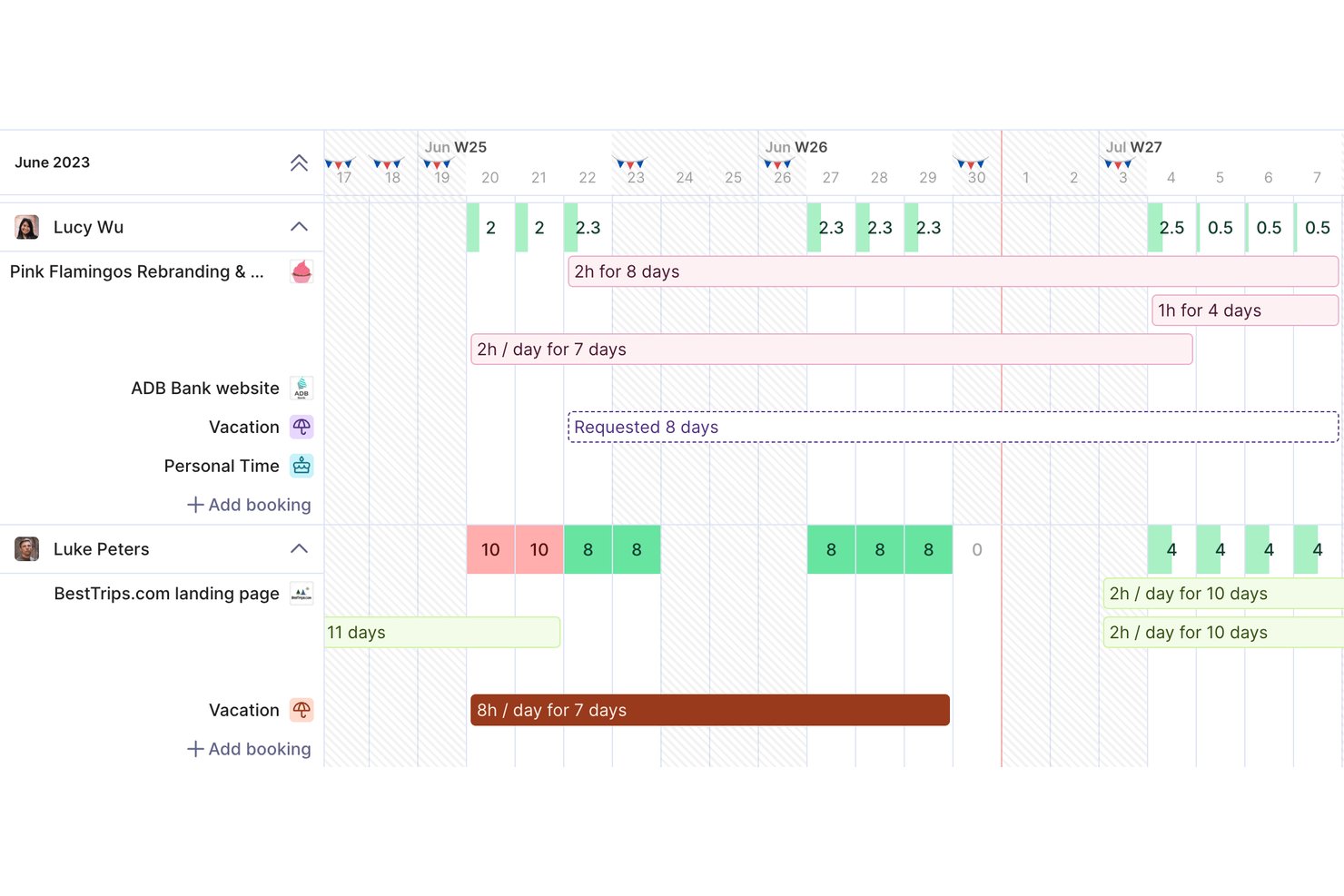
Productive is a professional services management platform that combines time tracking, project budgeting, resource planning, invoicing, and profitability reporting in a single tool built for agencies and consultancies.
Who Is Productive Best For?
Productive is a strong fit for small-to-mid-sized agencies, consultancies, and IT services firms that need to tie billable time directly to project finances.
Why I Picked Productive
Productive earns its spot on my shortlist because of how its AI reporting tools surface financial insights without requiring manual analysis. I love that Report Intelligence reads across multiple datasets and delivers plain-language summaries, so I can immediately see which projects are margin risks. AI Time Tracking also auto-fills timesheets using calendar events and past entries, which keeps utilization data accurate enough to actually trust.
Productive Key Features
- Resource planner: Plan and assign consultant capacity using tentative, repeating, and split bookings.
- Retainer and fixed-fee management: Track recurring retainers and fixed-fee project drawdowns alongside T&M work.
- Multi-currency invoicing: Generate invoices in different currencies to support global client engagements.
- Role-based permissions: Set detailed access controls for user roles, clients, and sensitive financial data.
Productive Integrations
Productive offers native integrations with Xero, HubSpot, Jira, Slack, Sage, Outlook, Google Calendar, and Microsoft 365. It connects with Zapier and provides an API for custom integrations.
Pros and Cons
Pros:
- Real-time budget and profitability views per project
- AI auto-fills timesheets from calendar data
- Tracks billable time and project margins together
Cons:
- Mobile app has limited reporting functionality
- Initial project setup takes considerable time
New Product Updates from Productive
Productive Adds Voice Dictation, Slack Connector, Proposals, and Overtime
Productive adds voice dictation, a Slack Connector, proposal controls, and overtime tracking. These updates support faster AI interactions, client proposals, and time management. For more information, visit Productive’s official site.
Toggl
Best for simple interface
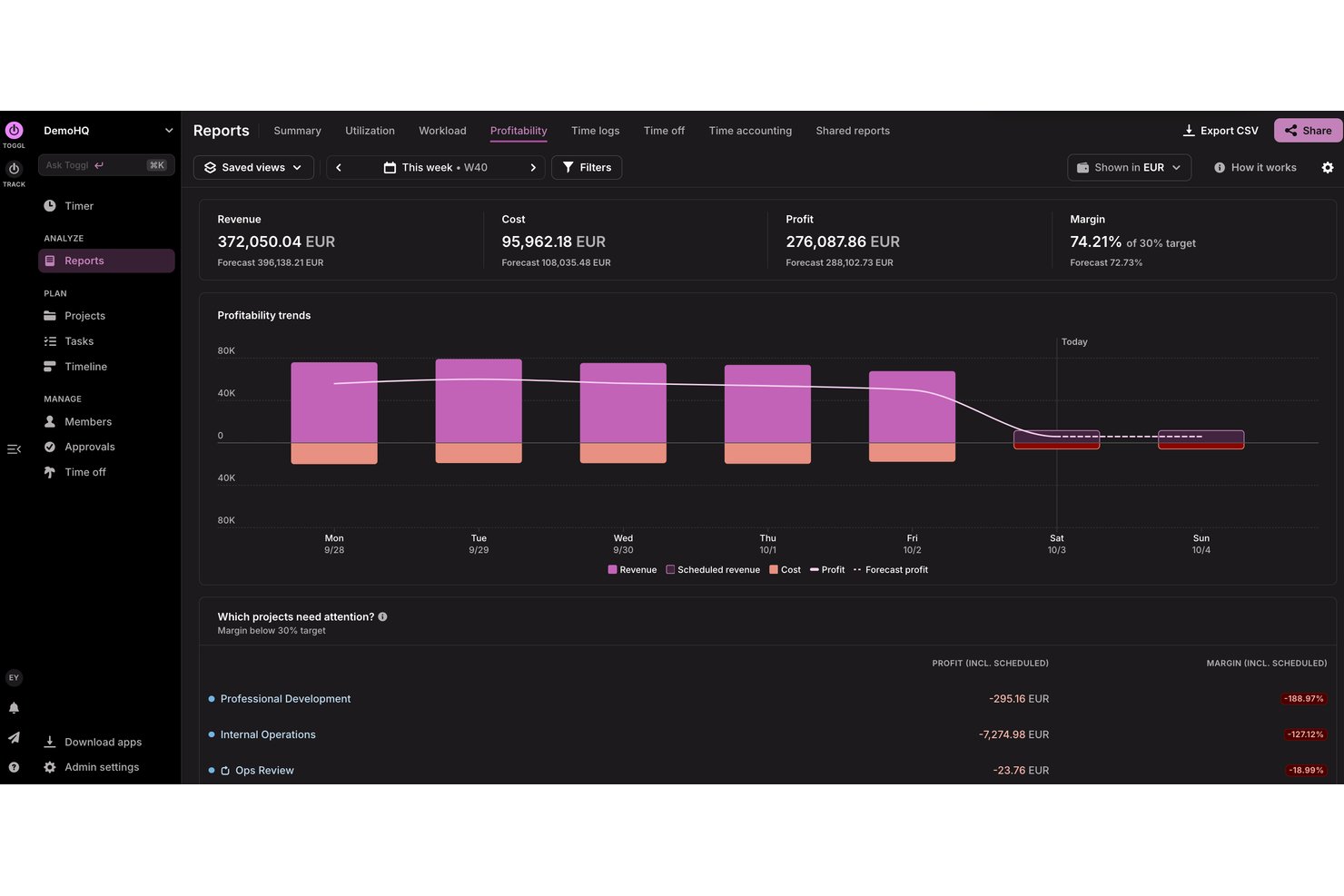
Toggl is a time tracking and capacity planning tool designed for agencies, consultancies, and other professional services teams. It helps users track billable and non-billable hours, build productivity and profitability reports, and plan team capacity so they can deliver client work on time and within budget.
Why I picked Toggl: I picked Toggl for its focus on speed and clarity. Its interface removes friction, timers are easy to start, switch, and categorize, making it ideal for individuals or small teams that want minimal setup. Idle detection and visual reporting help understand how to distribute time without overwhelming users with configuration options.
Standout Features & Integrations:
Features include project tracking, task management, capacity planning, billable rates, and idle detection. You can differentiate between billable and non-billable hours, which helps with accurate billing. The idle detection feature ensures you’re only tracking active work time, while reports help you analyze how time is spent, assess team capacity, and identify project profitability.
Integrations include Asana, Jira, Outlook, Google Calendar, GitHub, Todoist, and more. An API is available for custom integrations, along with MCP support for connecting to Claude, Cursor, and Codex.
Pros and Cons
Pros:
- Idle detection with time adjustment prompts
- Flexible tracking with multiple project views
- Simple to use for teams and freelancers
Cons:
- Lacks advanced billing features
- Periodic sync inconsistencies

DeskTime
Best for automatic work time calculation
DeskTime is an automatic time tracking tool for in-office, hybrid, and remote teams that covers project tracking, productivity monitoring, absence management, shift scheduling, and offline time logging.
Who Is DeskTime Best For?
DeskTime is a good fit for small to mid-sized teams that need a straightforward way to track work hours across in-office, remote, and hybrid setups.
Why I Picked DeskTime
DeskTime is one of my top picks because I love how it handles time calculation without any manual input from your team. The desktop app starts tracking the moment someone turns on their computer and stops when they shut it down, logging productive time, idle time, and breaks automatically. I also like the productivity calculation feature, which maps every app and URL to a productivity status, so you get a real breakdown of how billable hours are actually being spent, not just how long someone was logged in.
DeskTime Key Features
- Project and task time tracking: Assign tracked time directly to specific projects and tasks to see how hours are distributed across client work.
- Absence calendar: Log and manage team time off, including vacation, sick days, and custom leave types, with built-in approval workflows.
- Offline time tracking: Manually log time spent on work done away from the computer, such as client meetings or calls.
- Scheduled reports: Set up automatic report delivery to keep stakeholders updated on team time data without manual exports.
DeskTime Integrations
DeskTime offers a small set of native integrations, including Google Calendar, Outlook Calendar, Trello, GitLab, Asana, and Jira, and it connects with Zapier. An API is also available for custom integrations.
Pros and Cons
Pros:
- Runs silently in the background
- Categorizes time as productive or unproductive
- Tracks app and website usage automatically
Cons:
- Lack of invoicing and advanced billing
- Limited project management and collaboration tools

actiTIME
Best for real time project budgeting
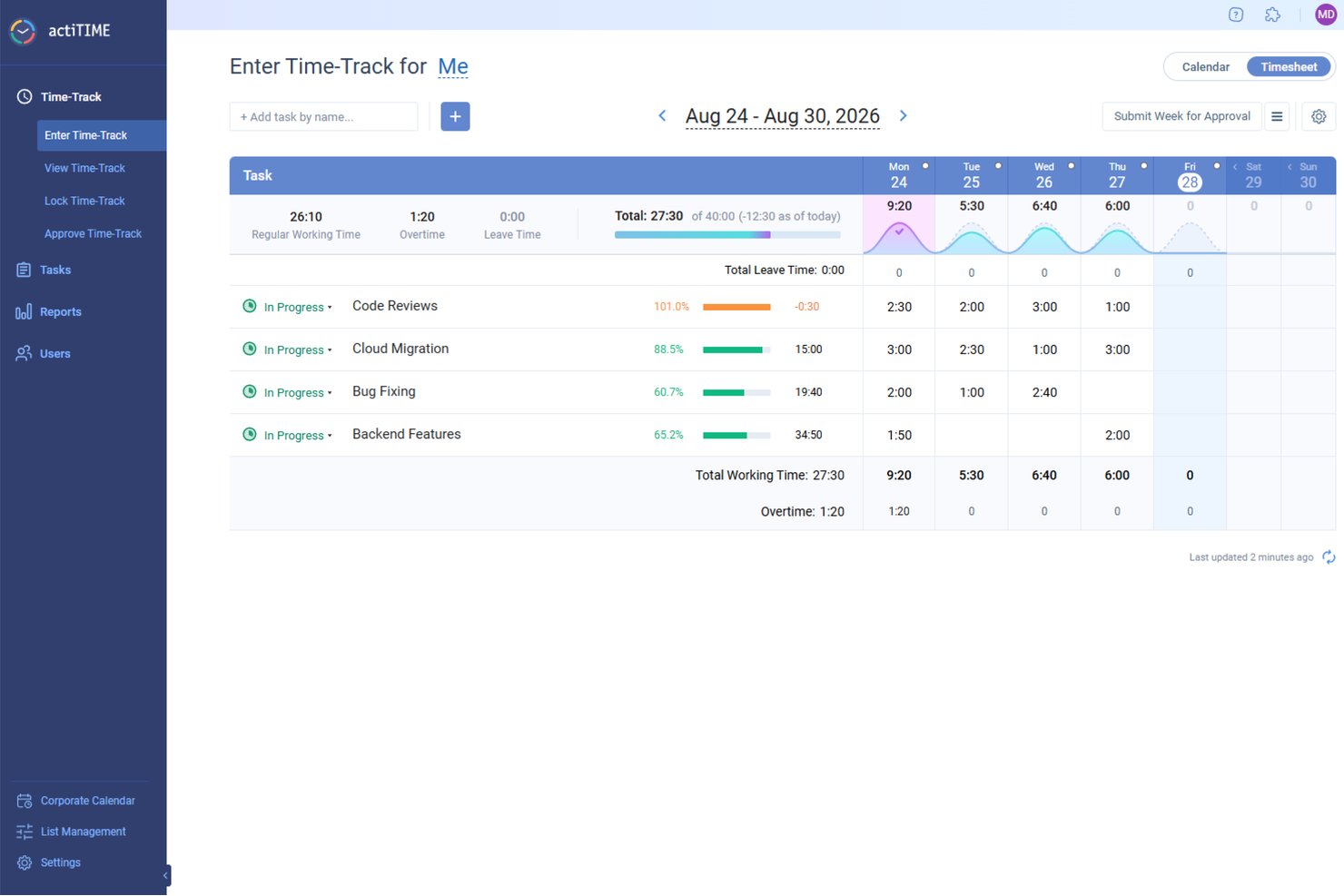
actiTIME offers a comprehensive solution for professionals in need of meticulous time management and project tracking. Ideal for industries such as architecture, consulting, and IT, actiTIME addresses the need for accurate billing and efficient resource allocation. It provides tools to manage projects, budgets, and team activities, ensuring that your business runs smoothly and profitably.
Why I Picked actiTIME
I picked actiTIME because it excels in addressing the specific needs of professional services with its detailed time tracking and project management features. You can easily track billable hours and manage project budgets, which are critical for maintaining profitability and accountability in client services. The tool also offers comprehensive reporting capabilities, allowing you to analyze project performance and make informed decisions.
actiTIME Key Features
In addition to its core functionalities, actiTIME provides several other features that enhance its utility for professional services:
- Budget Tracking: Monitor project budgets in real-time to prevent overspending.
- Leave Management: Manage team availability by tracking time off and absences.
- Billing and Invoicing: Generate invoices based on tracked time and project work.
- Custom Workflows: Tailor workflows to fit specific business processes and requirements.
actiTIME Integrations
Integrations include actiPLANS, QuickBooks, and Zapier.
Pros and Cons
Pros:
- Custom workflows support business processes
- Real-time project budget monitoring tools
- Accurate tracking of billable hours
Cons:
- Integrations limited compared to competitors
- Interface may be confusing for first-time users
New Product Updates from actiTIME

actiTIME Visual Hour Indicator and Time-Track Report Redesign
actiTIME adds a wave-style hour indicator to the Timesheet and Calendar views and refreshes the Time-Track report for smoother navigation and clearer visuals. For more information, visit actiTIME's official site.

Scoro
Best for end-to-end profitability tracking
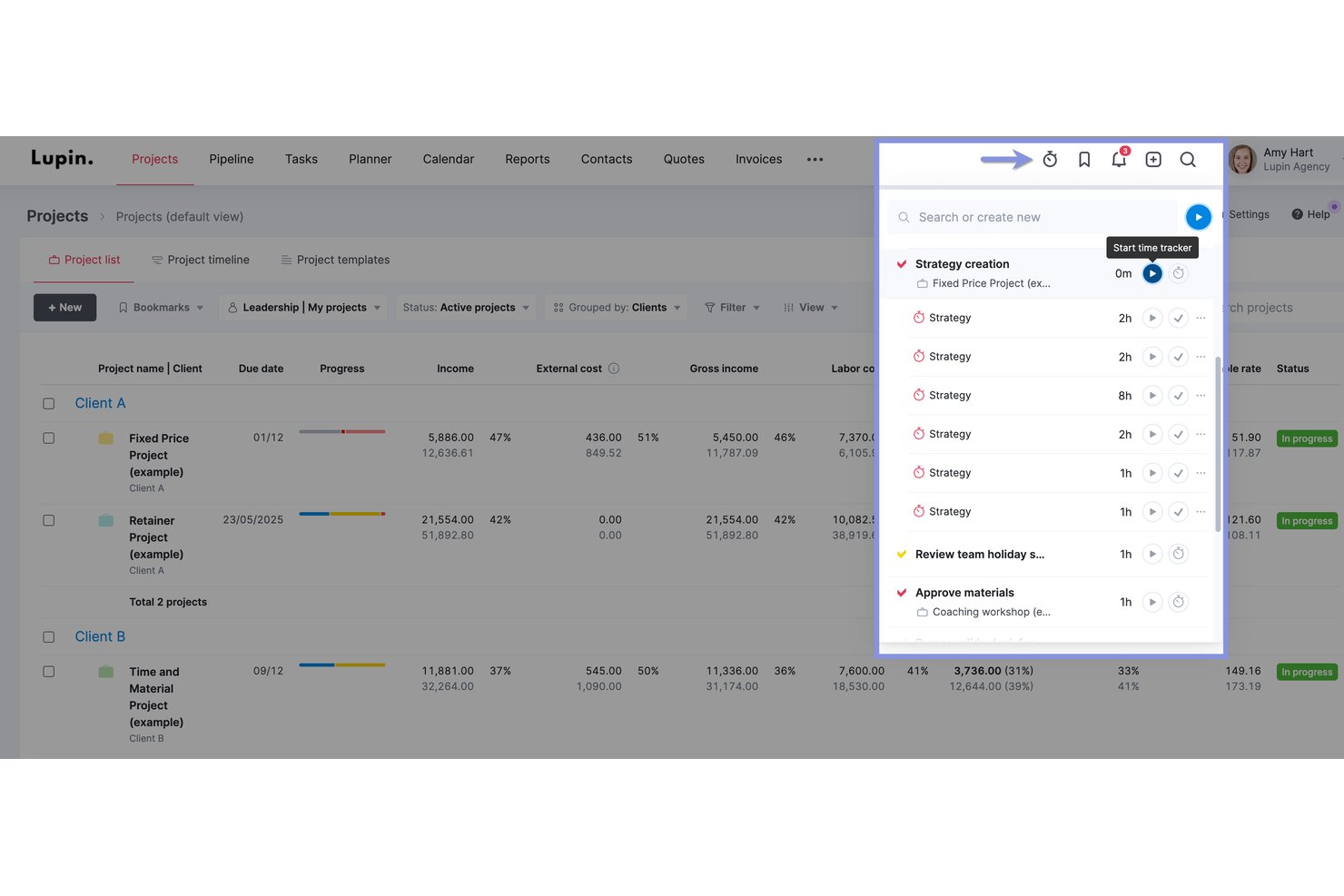
Scoro is a professional services automation (PSA) platform that combines time tracking, project management, resource planning, quoting, invoicing, and financial reporting in a single system.
Who Is Scoro Best For?
Scoro is a strong fit for professional services firms—agencies, consultancies, and IT service teams—that need to connect project delivery directly to financial performance across multiple clients.
Why I Picked Scoro
I picked Scoro as one of the best because its profitability tracking goes deeper than any other tool on my shortlist. I can see real-time budget vs. actual margins broken down by role, service, and task, and compare them against the original quote as a project runs. The portfolio-level P&L view means I'm never chasing numbers across spreadsheets to understand which clients are actually making money.
Scoro Key Features
- Retainer invoicing: Set up recurring invoices that generate automatically each billing period, with support for hour rollover between periods.
- Calendar auto-fill: Timesheets populate automatically from calendar events like meetings and appointments, reducing manual entry.
- Resource capacity heatmap: Visualizes team availability and booking status across roles, with color-coded indicators for overutilization and shortages.
- Multi-entity financial management: Run separate financials for each business entity while maintaining a consolidated group-level reporting view.
Scoro Integrations
Scoro offers 45+ marketplace integrations, including native QuickBooks Online, Xero, Stripe, Salesforce, HubSpot, Google Calendar, Microsoft 365, Slack, and Jira connections. It also provides an open REST API and Zapier.
Pros and Cons
Pros:
- Calendar events auto-fill team timesheets
- Full-featured retainer and fixed-fee billing
- Real-time profit margin tracking for all projects
Cons:
- Client portal only available on top-tier
- Requires five-user minimum on all plans
New Product Updates from Scoro

Scoro Adds Time Mobile App and ELI Improvements
Scoro adds the Scoro Time mobile app for iOS/Android to track time anywhere and expands ELI with attachments, smarter filtering, and trigger-based actions. For more information, visit Scoro's official site.

TimeTrex
Best for GPS-based time tracking
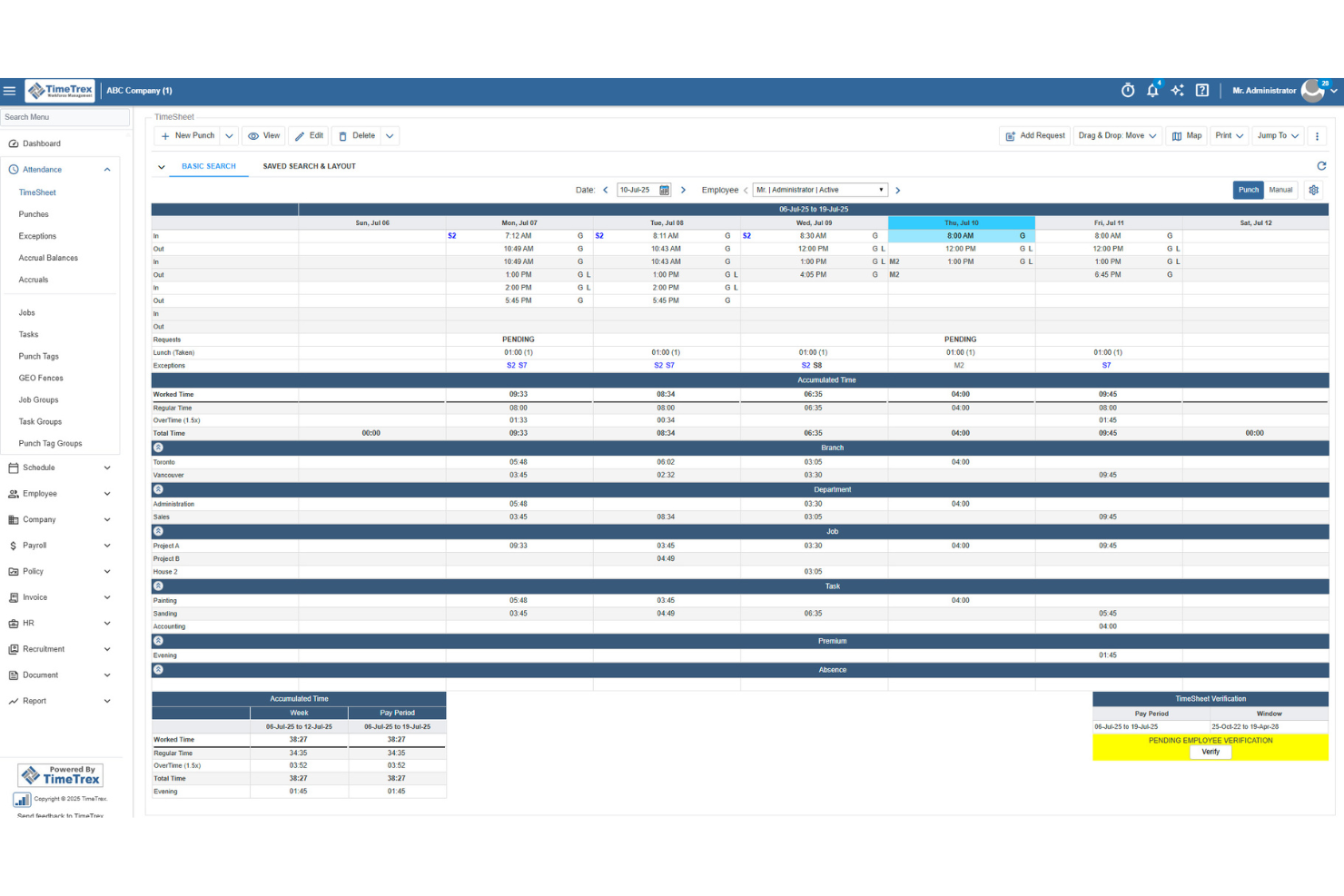
TimeTrex helps professional services teams track billable hours, manage expenses, and turn timesheet data into invoices with less manual work. Its mobile clock-in tools, GPS tracking, and job costing features make it a strong fit for firms managing consultants, field staff, or project-based teams.
Who Is TimeTrex Best For?
TimeTrex Now is a strong fit for mid-sized to large professional services firms that need to manage time tracking, payroll, and compliance in one platform.
Why I Picked TimeTrex
I picked TimeTrex because it helps professional services teams track billable hours from mobile devices while verifying where work happens through GPS tracking and geofencing. I like that employees can clock in from the field, client sites, or remote locations, and managers can review location-based punch data before approving timesheets. TimeTrex also supports job costing, expense tracking, and invoicing, so your team can connect tracked time to project costs and client billing. Its payroll and attendance rules are useful for teams with different schedules, overtime policies, or pay requirements.
TimeTrex Key Features
Some other TimeTrex features help professional services teams manage schedules, payroll, and workforce records alongside tracked time:
- Payroll management: Process payroll using approved time and attendance data, including overtime rules, deductions, paystubs, and tax reports.
- Employee scheduling: Build employee schedules, manage availability, and handle time-off requests from one system.
- Expense tracking: Record project-related expenses, upload receipts, manage approvals, and connect costs to departments or tasks.
- Employee self-service: Let employees view schedules, request leave, access paystubs, and manage personal information.
TimeTrex Integrations
Integrations include ADP, Intuit QuickBooks, Sage, Paychex, Surepay, Ceridian, Meditech, Insync, Millennium, and CompuPay.
Pros and Cons
Pros:
- Expense tools support receipts, approvals, and real-time reporting
- Job costing allocates tracked time across multiple cost centers
- Mobile GPS and geofencing verify off-site employee clock-ins
Cons:
- Interface may feel less intuitive for admin users
- Project management features appear limited beyond job costing
New Product Updates from TimeTrex
TimeTrex Redesigns Workforce Management With New Payroll, Scheduling, and AI Tools
TimeTrex redesigns its workforce management experience with new dashboards, scheduling and timesheet tools, a rebuilt payroll workflow, and expanded AI assistance. These updates give teams more flexible ways to manage schedules, payroll, reporting, and employee data. For more information, visit TimeTrex’s official site.
 .

Clockify
Best for browser extensions

Clockify is time-tracking software designed for individuals and teams to track work hours. Freelancers and small businesses use it to monitor productivity and manage billing.
Why I picked Clockify: Its browser extensions make timer-based tracking accessible. This is ideal for teams that work across multiple tabs, tools, or cloud platforms. Its simple reporting and offline mode add reliability, giving users a flexible way to capture time even when moving between devices or working with an unstable internet connection.
Standout Features & Integrations:
Features include time audits, project templates, and offline mode. These features help you ensure accuracy in time tracking and simplify project setup. The offline mode lets you continue tracking time even without an internet connection.
Integrations include Asana, Trello, Jira, QuickBooks, Slack, monday.com, Basecamp, Freshdesk, Todoist, and GitHub.
Pros and Cons
Pros:
- Offline time tracking
- Helpful time-use insights
- Easy browser extension setup
Cons:
- Basic user access controls
- No advanced invoicing tools

Timely
Best for automatic time tracking

Timely is time-tracking software designed for teams and individuals who want to automate time tracking. It's popular among creative professionals and consultants looking to manage their time without manual input.
Why I picked Timely: It offers automatic time tracking that captures activity in the background, eliminating the need for manual timers. You can focus on your work while Timely records your time spent on different tasks. The memory feature allows you to review and approve logged time, ensuring accuracy. These aspects make Timely a great choice for those who prefer a hands-off approach to time tracking.
Standout Features & Integrations:
Features include project timelines, budgeting tools, and visual reports. You can set budgets for projects and visually track progress, helping you stay on track. The visual reports provide insights into how time and resources are allocated.
Integrations include Asana, Trello, Slack, QuickBooks, Xero, Salesforce, Zapier, Google Calendar, Outlook, and Microsoft Teams.
Pros and Cons
Pros:
- Simple budgeting tools
- Accurate memory feature
- Automatic time capture
Cons:
- Basic invoicing capabilities
- Limited manual tracking options

My Hours
Best for small teams

My Hours is time-tracking software tailored for small teams to manage their projects and billing. It's designed to help businesses track time, manage tasks, and control project budgets.
Why I picked My Hours: My Hours is a strong fit for small teams because it focuses on clarity and control rather than complexity. Its customizable billing rates, approval workflow, and straightforward reporting help smaller groups maintain oversight of project budgets and client work without needing a featured project management suite. It’s great for teams that want structure without heavy configuration.
Standout Features & Integrations:
Features include customizable billing rates, detailed reporting tools, and attendance tracking. You can set different rates for various projects or clients, which helps in precise billing. The reporting tools provide insights into how time is spent across projects.
Integrations include QuickBooks, Trello, Basecamp, Asana, Google Calendar, Slack, Zapier, Xero, Microsoft Teams, and Dropbox.
Pros and Cons
Pros:
- Suitable for remote teams
- Customizable billing rates
- Simple to navigate
Cons:
- Occasional lag in reporting
- Limited offline capabilities

TimeCamp
Best for budget management

TimeCamp is time-tracking software designed to help businesses manage time and expenses effectively. Project managers and finance teams commonly use it to oversee budgets and improve productivity.
Why I picked TimeCamp: I selected TimeCamp because it links time tracking to budgets and project expenses. Its budget alerts, financial reporting, and automated tracking give project managers real-time visibility into how work affects costs. This emphasis on budget control sets it apart from tools that focus on timesheets.
Standout Features & Integrations:
Features include automatic time tracking, invoicing, and attendance management. You can track time without manual entry, saving you effort and reducing errors. The invoicing feature allows you to bill clients from tracked time.
Integrations include Trello, Asana, Slack, Jira, monday.com, QuickBooks, Xero, Salesforce, Microsoft Teams, and Google Calendar.
Pros and Cons
Pros:
- Simple attendance management
- Detailed financial reports
- Automatic time capture
Cons:
- Occasional data syncing issues
- No advanced customization
Outro software de controlo de tempo para serviços profissionais
Eis algumas opções adicionais de software de controlo de tempo para serviços profissionais que não foram incluídas na minha seleção, mas que continuam a merecer atenção:
- Time Doctor
For productivity tracking
- QuickBooks
For accounting integration
- Memtime
For freelancers
- Teamwork
For integrated timesheets
- Deltek Replicon Time
For compliance tracking
- Time Champ
For large teams
- Knack
For custom databases
- Harvest
For integration options
- Big Time
For billing features
- TimeRewards
For expense tracking
- ClickTime
For DCAA-compliant records
- Paymo
For task management
- Wrike
For project visualization
- Connecteam
For mobile workforce
- monday.com
For team collaboration
- BuddyPunch
For employee scheduling
- Click Time
For compliance monitoring


How I Evaluate Professional Services Time Tracking Software
I look at two layers: the core requirements a tool must meet—billable hour tracking, timesheet approvals, client invoicing—and the differentiators that separate the best options from the rest.
Core Functionality (Table Stakes For This List)
When I'm selecting tools for my list, I rank each one on a scale from 0 (does not offer the functionality) to 5 (excels in this area) for each core functionality listed below. Then, I calculate the tool's total score into a percentage. Each tool needs to achieve a minimum total score of 65% to be considered for inclusion.
- Billable Hours Tracking: I check whether each tool lets you log time against specific clients, projects, and tasks with a clear billable vs. non-billable split—like tagging discovery hours as non-billable while tracking implementation work at a client rate.
- Timesheet Approval Workflows: Multi-tier review and approval flows matter here, especially for firms where a project manager approves hours before a finance lead signs off on client-facing entries.
- Client Billing & Invoicing: I evaluate how each tool converts logged hours into invoices, looking for flexible rate structures—per consultant, per role, or per engagement—so you can handle T&M and blended billing models.
- Project Budgeting & Profitability: Each tool should let you set a project budget, track labor costs against it, and surface margin data so you can spot overruns before a fixed-fee engagement goes sideways.
- Resource Utilization Reporting: I look for reports that show actual vs. forecasted utilization by person and project, giving resource managers visibility into who's overbooked and where capacity exists.
- Accounting & PM Integrations: Connections to accounting platforms like QuickBooks, Xero, or Sage Intacct and PM tools like Jira or Asana are key—I evaluate whether sync is native and bidirectional or limited to one-way exports.
Once I have a list of tools that meet this criteria, I consider what sets each platform apart.
Differentiating Factors (What Sets Vendors Apart)
Here's how I compare and contrast different vendors:
Standout Features
Automated time capture is a big differentiator—tools that pull hours from calendars, emails, and apps save consultants from reconstructing their week every Friday. I also evaluate how well a platform handles retainer and fixed-fee engagements alongside T&M work, since most firms juggle all three. Client-facing portals add another layer of value, letting clients review logged hours and approve invoices directly without back-and-forth emails.
Beyond Features
Firm size and service model fit matters—a solo consultant needs a different tool than a 200-person agency with multiple practices and blended billing. I consider how quickly a platform gets teams productive, since configuring rate cards, approval chains, and project templates can stall rollout if onboarding support is thin. Pricing transparency is another factor I weigh, especially whether core capabilities like budgeting and client invoicing are included at entry-level tiers or locked behind expensive upgrades.
Como escolher software de controlo de tempo para serviços profissionais
É fácil ficar preso a listas extensas de funcionalidades e estruturas de preços complexas. Para o ajudar a manter-se concentrado enquanto percorre o seu processo único de seleção de software, eis uma lista de fatores a ter em conta:
| Fator | O que considerar |
|---|---|
| Escalabilidade | O software consegue acompanhar o crescimento da sua empresa? Considere se consegue lidar com um aumento do número de utilizadores ou projetos sem custos ou complicações adicionais. |
| Integrações | Integra-se com as ferramentas que já utiliza? Verifique a compatibilidade com os seus sistemas de gestão de projetos, contabilidade e comunicação. |
| Personalização | Pode adaptar o software aos seus fluxos de trabalho? Procure opções para ajustar painéis, relatórios e taxas de faturação de acordo com as suas necessidades. |
| Facilidade de utilização | A interface é fácil de utilizar? Garanta que a sua equipa consegue navegar facilmente sem necessitar de formação extensa. |
| Implementação e integração inicial | Com que rapidez pode começar? Procure software com processos de configuração simples e recursos de formação disponíveis, como tutoriais ou seminários online. |
| Custo | O preço enquadra-se no seu orçamento? Considere tanto os custos iniciais como as taxas contínuas e verifique se existem encargos ocultos ou armadilhas associadas a preços por escalão. |
| Medidas de segurança | De que forma o software protege os seus dados? Procure funcionalidades como encriptação, atualizações regulares e conformidade com as normas de proteção de dados. |
| Disponibilidade do apoio | Está disponível ajuda quando precisa dela? Considere o horário de apoio do fornecedor, o tempo de resposta e os métodos de contacto disponíveis, como chat ou telefone. |
O que é o software de controlo de tempo para serviços profissionais?
O software de controlo de tempo para serviços profissionais é uma ferramenta que ajuda as empresas a monitorizar e registar o tempo despendido em projetos de clientes. Profissionais como consultores, contabilistas e advogados utilizam estas ferramentas para gerir a faturação e melhorar a produtividade. As funcionalidades de controlo de tempo, faturação e elaboração de relatórios ajudam a garantir uma faturação precisa e uma gestão eficiente dos projetos. De um modo geral, estas ferramentas proporcionam transparência e ajudam a maximizar a utilização dos recursos.
Funcionalidades
Ao selecionar software de controlo de tempo para serviços profissionais, procure as seguintes funcionalidades de controlo de tempo:
- Controlo de tempo: Permite aos utilizadores monitorizar e registar as horas trabalhadas em projetos específicos, garantindo uma faturação precisa e informações sobre a produtividade.
- Faturação: Gera faturas a partir do tempo registado e das despesas, simplificando a faturação dos clientes.
- Controlo de despesas: Ajuda a gerir e categorizar as despesas relacionadas com os projetos, contribuindo para a supervisão financeira e a gestão do orçamento.
- Relatórios: Fornece relatórios detalhados sobre a utilização do tempo e o progresso dos projetos, ajudando os utilizadores a tomar decisões informadas.
- Gestão de projetos: Ajuda a organizar tarefas e cronogramas, melhorando a colaboração da equipa e a execução dos projetos.
- Taxas de faturação personalizáveis: Permite definir taxas diferentes para vários clientes ou projetos, garantindo uma faturação flexível e precisa.
- Capacidades de integração: Liga-se a ferramentas existentes, como software de contabilidade e de gestão de projetos, melhorando a eficiência dos fluxos de trabalho.
- Acesso móvel: Permite o controlo do tempo e a gestão de tarefas em qualquer lugar, proporcionando flexibilidade para o trabalho remoto.
- Medidas de segurança: Garante a proteção dos dados através de encriptação e conformidade com as normas de dados, protegendo informações sensíveis.
Benefícios
A implementação de software de controlo de tempo para serviços profissionais oferece vários benefícios à sua equipa e à sua empresa. Eis alguns dos benefícios que pode esperar:
- Faturação de clientes mais fiável: Registos claros do trabalho ajudam a reduzir disputas e a encurtar os ciclos de faturação, sem ser necessário reconstruir as horas trabalhadas.
- Produtividade melhorada: Informações detalhadas sobre o tempo evidenciam estrangulamentos e ajudam as equipas a concentrarem-se em trabalho de elevado valor.
- Maior supervisão dos projetos: A visibilidade em tempo real do progresso e das cargas de trabalho ajuda os gestores a fazer ajustes para manter os projetos dentro do prazo.
- Maior consciência financeira: As equipas conseguem identificar padrões nas despesas e na utilização de recursos, apoiando melhores decisões orçamentais.
- Transparência reforçada: Uma visibilidade clara das contribuições e das cargas de trabalho promove o alinhamento entre equipas e partes interessadas.
- Melhor apoio para equipas distribuídas: O controlo centralizado ajuda as equipas remotas ou híbridas a manterem-se coordenadas entre diferentes fusos horários.
- Proteção consistente de dados sensíveis: As medidas de proteção integradas ajudam as empresas a manter a confiança e a cumprir os requisitos internos de conformidade.
Custos e preços
A seleção de software de controlo de tempo para serviços profissionais exige uma compreensão dos vários modelos de preços e planos disponíveis. Os custos variam consoante as funcionalidades, a dimensão da equipa, os complementos, entre outros fatores. A tabela abaixo resume os planos comuns, os respetivos preços médios e as funcionalidades normalmente incluídas nas soluções de software de controlo de tempo para serviços profissionais:
Tabela de comparação de planos de software de controlo de tempo para serviços profissionais
| Tipo de plano | Preço médio | Funcionalidades comuns |
|---|---|---|
| SMB/Equipas pequenas | Grátis-$5/user/month | Controlo de tempo básico, projetos limitados, relatórios simples; frequentemente, temporizadores manuais ou funcionalidades limitadas. |
| Mercado intermédio/Equipas em crescimento | $5-$25/user/month | Controlo de tempo + faturação, controlo básico de projetos & despesas, integrações, relatórios padrão, acesso móvel. |
| Empresas/Organizações estabelecidas | $25-$50/user/month | Relatórios avançados, taxas de faturação personalizáveis, integrações completas, controlo de despesas, suporte móvel + de computador. |
| Empresas/Grandes organizações | $50+/user/month (ou preços empresariais personalizados) | Conjunto completo de funcionalidades: segurança & conformidade, integrações personalizadas, análise avançada, suporte dedicado, ferramentas para administração e equipas de grandes dimensões. |
Perguntas frequentes sobre software de controlo de tempos para serviços profissionais
Eis algumas respostas a perguntas comuns sobre software de controlo de tempos para serviços profissionais:
Como é que o software de controlo de tempos para serviços profissionais protege a privacidade dos dados?
Sim, a maioria dos softwares de controlo de tempos dá prioridade à privacidade dos dados através de encriptação e do cumprimento de regulamentos de proteção de dados, como o RGPD. Ao escolher uma ferramenta, verifique as respetivas certificações de segurança e políticas de privacidade, especialmente se a plataforma incluir funcionalidades como relatórios baseados em IA ou registos de tempos integrados. Considere perguntar aos fornecedores sobre as suas práticas de armazenamento de dados, a forma como lidam com violações de segurança e se as respetivas aplicações para computador suportam um acesso seguro. Certifique-se sempre de que a sua equipa recebe formação sobre as melhores práticas de privacidade dos dados, para proteger informações sensíveis.
O software de controlo de tempos para serviços profissionais pode integrar-se com sistemas de processamento salarial?
Sim, muitas das melhores soluções de controlo de tempos oferecem integrações com sistemas de processamento salarial populares, como o QuickBooks e o ADP. Esta integração pode automatizar os cálculos salariais e reduzir os erros de introdução manual de dados, mesmo que a sua equipa exporte dados do Excel ou utilize uma aplicação de controlo de tempos para registar as entradas. Ao avaliar o software, verifique se existem integrações compatíveis com o seu sistema de processamento salarial atual, de modo a ajudar a otimizar os fluxos de trabalho e a manter registos salariais precisos para todos os membros da equipa.
É difícil passar do controlo manual de tempos para um software?
Não, passar do controlo manual de tempos para um sistema baseado em software pode ser simples com um planeamento adequado. Comece por selecionar uma ferramenta fácil de utilizar e alinhada com as necessidades da sua equipa, seja uma plataforma tudo-em-um, um sistema automatizado de controlo de tempos ou algo mais simples, como o ClickUp. Organize sessões de formação e disponibilize recursos para ajudar a sua equipa a adaptar-se ao registo de tempo faturável, à afetação de recursos e ao controlo do tempo dos projetos. Implemente o software gradualmente, permitindo tempo para ajustes. Esta abordagem minimiza as interrupções e ajuda a sua equipa a adotar o novo sistema.
O software de controlo de tempos para serviços profissionais pode ser utilizado por equipas remotas?
Sim, o software de controlo de tempos é útil para equipas remotas. Ajuda a monitorizar a produtividade e a gerir tarefas sem necessidade de supervisão física no controlo do tempo dos colaboradores em diferentes localizações. Procure software com acesso móvel, rastreio por GPS ou extensões do Chrome para facilitar o trabalho remoto. Estas ferramentas também podem apoiar o planeamento de projetos, o acompanhamento da rentabilidade dos projetos e a aprovação de folhas de horas, permitindo que a sua equipa registe o tempo independentemente da localização, facilitando a supervisão do trabalho em curso e a manutenção das melhores práticas de controlo de tempos.