

10 melhores softwares de gestão de projetos de subempreiteiros para 2026

Melhor software de gestão de projetos para subempreiteiros


A gestão de subempreiteiros pode tornar-se complicada, especialmente quando prazos falhados, responsabilidades pouco claras e atualizações dispersas dificultam o acompanhamento dos projetos.
O software de gestão de projetos para subempreiteiros pode dar-lhe mais controlo. Ajuda-o a acompanhar prazos, tarefas e comunicações sem depender de intermináveis contactos de acompanhamento.
Neste artigo, vou apresentar-lhe as melhores ferramentas de gestão de projetos para subempreiteiros que testei. Verá o que cada uma faz melhor, de que forma se integra no seu fluxo de trabalho e onde pode ficar aquém, para que possa encontrar o melhor software para as suas necessidades específicas.
Why Trust Our Software Recommendations
Our team has been testing and reviewing software since 2012. As project managers ourselves, we know how difficult—and important—it is to choose the right software.
For this guide, we evaluated tools using hands-on testing and independent research, scoring tools using our selection criteria. We also draw on insights from industry thought leaders and practicing project management experts.
Our reviews reflect our human editorial judgment, not a sales pitch.
Expert reviewers:
Tabela de comparação de software de gestão de projetos para subempreiteiros
Utilize esta tabela de comparação para consultar os detalhes de preços das minhas principais escolhas de software de gestão de projetos para subempreiteiros.
| Tool | Best For | Trial Info | Price | ||
|---|---|---|---|---|---|
| 1 | Best for end-to-end construction collaboration | Free demo available | Pricing upon request | Website | |
| 2 | Best for flat-rate subcontractor oversight | 30-day free trial | From $49/month (billed annually) | Website | |
| 3 | Best for trade contractor job costing | Free trial + free demo available | From $149/month | Website | |
| 4 | Best for GC-led cost and change tracking | Not available | From $100/user/month | Website | |
| 5 | Best for GC-to-sub payment workflows | Free demo available | From $100/user/month | Website | |
| 6 | Best for BIM-linked construction workflows | Free demo available | Pricing upon request | Website | |
| 7 | Best for free sub portals with bid-to-order tools | Free demo available | From $199/month | Website | |
| 8 | Best for bid-to-contract sub coordination | Free demo available | From $399/month | Website | |
| 9 | Best for enterprise-level sub payment tracking | Free demo available | Pricing upon request | Website | |
| 10 | Best for GC-to-sub billing and contract access | Free demo available | Pricing upon request | Website |
Avaliações do melhor software de gestão de projetos para subempreiteiros
Eis as minhas opiniões detalhadas sobre cada software desta lista, incluindo os seus pontos fortes e as áreas em que apresentam dificuldades.

Procore
Best for end-to-end construction collaboration

Procore is a construction management platform that connects general contractors, subcontractors, and owners through bid management, scheduling, document control, subcontractor invoicing, compliance tracking, and field reporting tools.
Who Is Procore Best For?
Procore suits general contractors and subcontractors managing complex, multi-stakeholder construction projects who need a single platform to handle bids, contracts, schedules, and payments.
Why I Picked Procore
Procore earns its spot on my shortlist because no other tool connects every stage of subcontractor work—from bid invitations to lien waiver generation—inside a single platform. I love how the bid-to-contract workflow lets you compare subcontractor submissions side by side by cost code, then convert a winning bid directly into a committed subcontract without re-entering data. Procore Pay's automatic lien waiver generation is another standout: once an invoice is submitted, the applicable waivers are created from your project's default template and routed to the subcontractor for signature automatically.
Procore Key Features
- Compliance template assignment: Set bond, insurance, and payroll-record requirements at the commitment or invoice level with configurable expiration notifications.
- Side-by-side bid comparison: Review and compare subcontractor submissions by cost code to identify gaps and outliers before awarding work.
- Commitment change order tiers: Configure one-, two-, or three-tier approval workflows for change orders, with approved changes reflected in Committed Costs.
- Site Diary collaborator entries: Subcontractors can submit daily construction reports, working hours, quantities, and photos directly from web, iOS, or Android.
Procore Integrations
Procore documents 500+ integrations and apps overall, including marketplace integrations with Microsoft Project, Oracle Primavera P6, Smartsheet, Sage, DocuSign, Unanet, and GoFormz. An Open API and BIM viewer SDK support custom integrations.
Pros and Cons
Pros:
- Mobile reports keep office teams informed
- Shared project records improve field coordination
- Side-by-side bids simplify subcontractor selection
Cons:
- Schedule coordination can frustrate external teams
- Subcontractor participation often requires training

Best for flat-rate subcontractor oversight
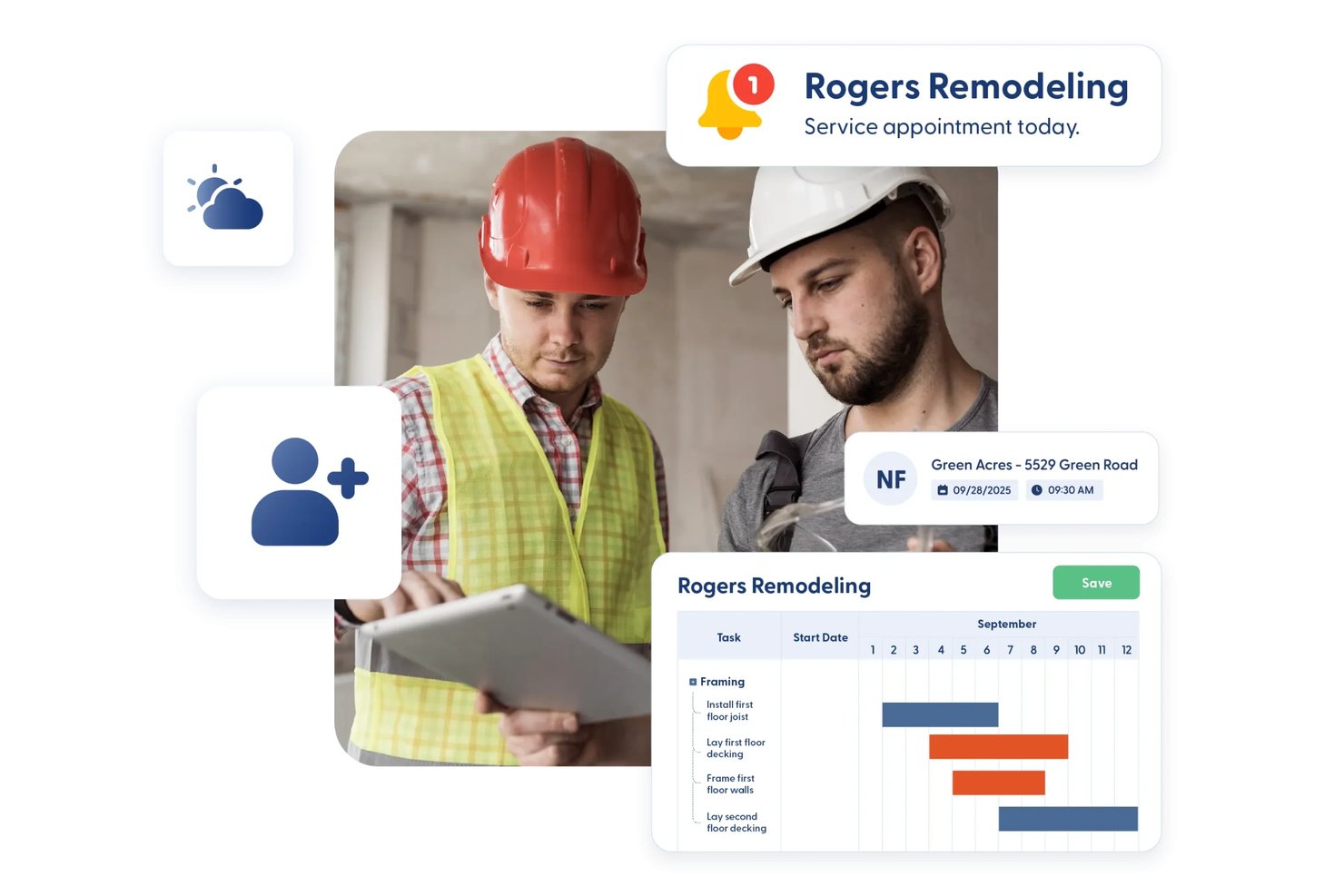
Contractor Foreman is a construction management platform that covers subcontractor scheduling, bid and contract management, compliance document tracking, change orders, and payment oversight across unlimited projects.
Who Is Contractor Foreman Best For?
Contractor Foreman is a strong fit for small-to-mid-sized general contractors who need to manage subcontractor bids, contracts, compliance, and payments under one flat company-wide price.
Why I Picked Contractor Foreman
I picked Contractor Foreman as one of the best because its flat company-wide pricing means you're not paying more as your subcontractor roster grows. I like how the Sub-Contracts module tracks committed costs, billed-to-date, and remaining amounts per subcontractor, so you always know where a contract stands without digging through spreadsheets. The 60-day certificate expiry widget in the Directory also makes it easy to catch lapsing insurance before it becomes a compliance problem on-site.
Contractor Foreman Key Features
- Bid management: Send bid invitations to subcontractors, track responses, compare bids side by side, and convert the winning bid directly into a subcontract.
- Gantt chart scheduling: Build project schedules with critical-path tracking, baseline comparisons, and multi-assignee task support across contractors and employees.
- Lien waiver generation: Create lien waiver templates using merge fields tied to subcontract, project, and contractor data, then download or email the completed PDF.
- QuickBooks sync: Automatically push bills generated from subcontracts to QuickBooks Online or Desktop once the integration is configured.
Contractor Foreman Integrations
Contractor Foreman connects with 50+ systems, including QuickBooks Online, QuickBooks Desktop, Xero, Google Calendar, Outlook Calendar, Microsoft Project, Gusto, Stripe, and CompanyCam. It also supports Zapier.
Pros and Cons
Pros:
- Email contract approvals avoid requiring sub accounts
- 60-day alerts flag expiring subcontractor certificates
- Reviewers praise schedules keeping field teams informed
Cons:
- Menus make subcontractor workflows difficult to locate
- Mobile app can lag behind desktop capabilities

Knowify
Best for trade contractor job costing
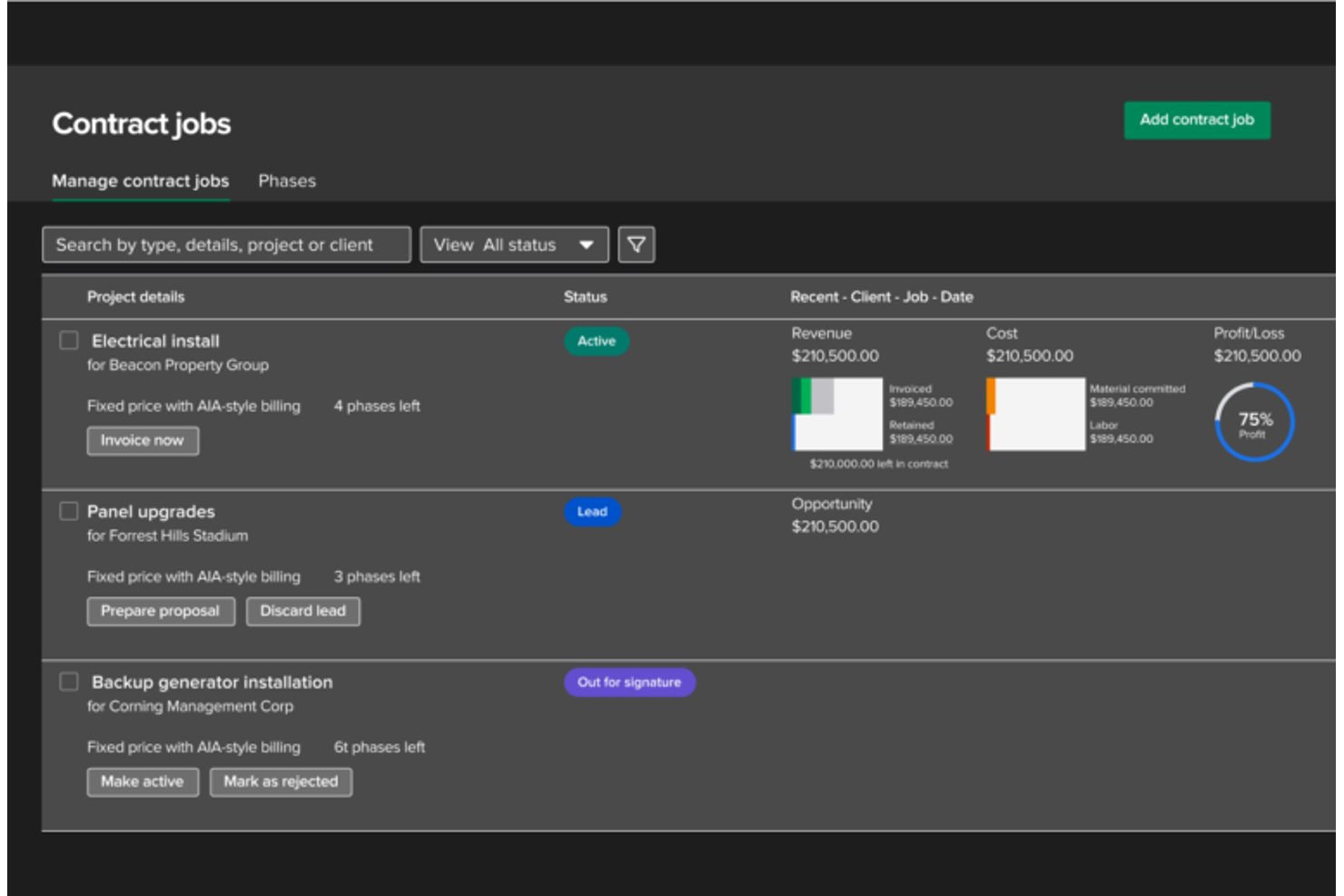
Knowify is a construction project management platform built for trade contractors that combines job costing, subcontractor management, scheduling, invoicing, and compliance document tracking.
Who Is Knowify Best For?
Knowify is a strong fit for trade contractors and specialty subcontractors who need tight job costing and QuickBooks-connected financial tracking across every project phase.
Why I Picked Knowify
I picked Knowify as one of the best because it treats job costing as a first-class feature, not an afterthought. Every bill, subcontractor expense, and change order gets logged against a specific phase and cost category, so you always know exactly where your budget stands on active jobs. I also like that subcontract costs track against purchase orders with approval-authority workflows, which keeps spend accountable without requiring a finance team to babysit every transaction.
Knowify Key Features
- Coordination Hub: Centralizes RFIs, submittals, change orders, and daily logs across all contract jobs in one project view.
- Compliance document storage: Stores subcontractor licenses and insurance certificates with expiration dates and flags missing documents before project inclusion.
- Phase dependencies: Links project phases so that budgeted team members are automatically notified when a predecessor phase triggers.
- AIA pay applications: Generates G702 and G703 pay applications with schedules of values, retainage tracking, and change-order reconciliation.
Knowify Integrations
Knowify has seven documented native integrations, including QuickBooks Online, QuickBooks Desktop, Intuit Enterprise Suite, QuickBooks Time, QuickBooks Online Payroll, QuickBooks Payments, and CompanyCam. It also offers an MCP connector for Claude and ChatGPT, plus Zapier.
Pros and Cons
Pros:
- Keeps RFIs and project documents together
- Links change orders to budgets and billing
- Tracks subcontractor bills against project budgets
Cons:
- Field time entry can glitch or frustrate
- Gantt dependencies can feel clunky
Best for GC-led cost and change tracking
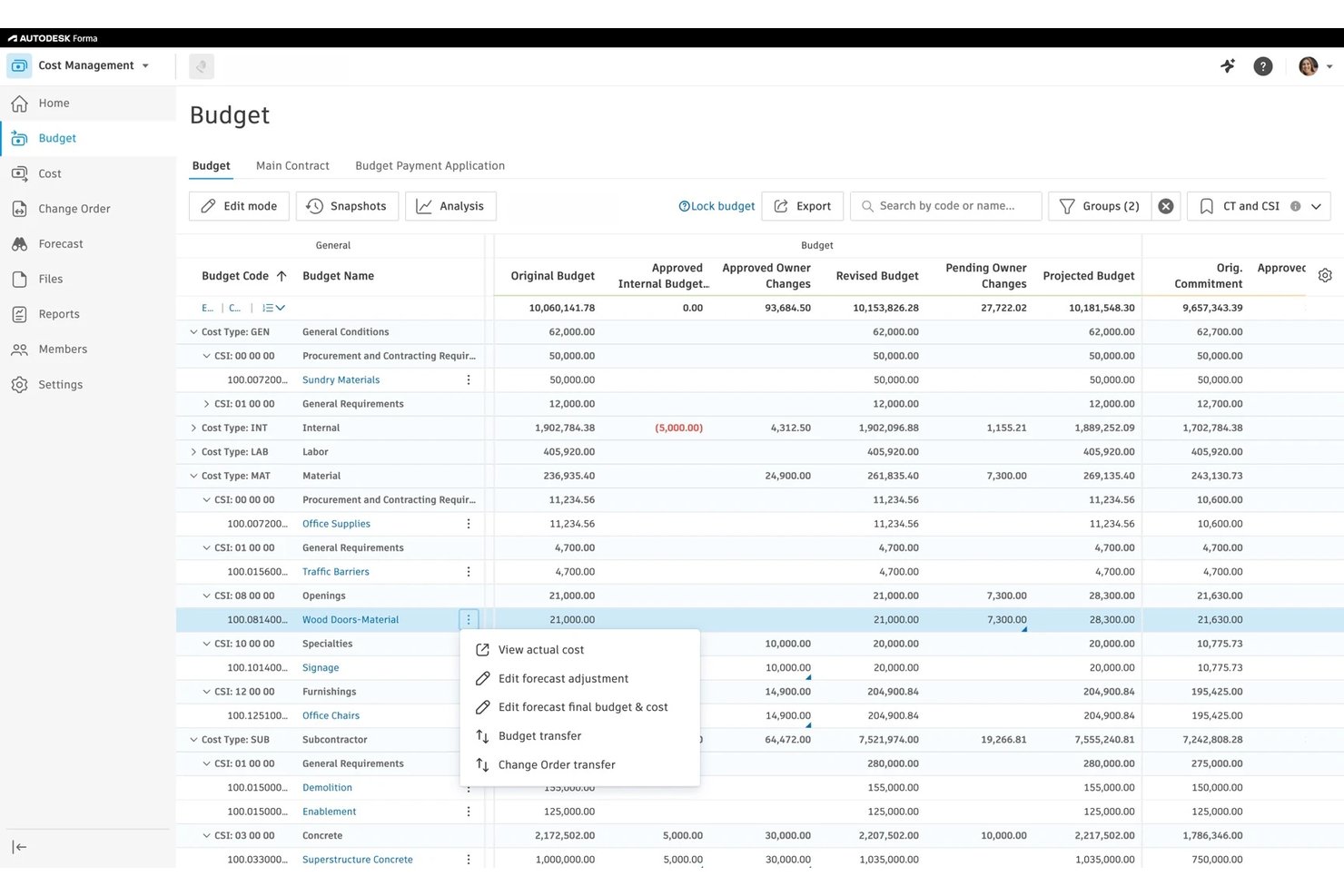
Autodesk Forma Build is a construction project management platform that covers cost management, contract administration, change order tracking, subcontractor scheduling, compliance documentation, and payment applications across office and field teams.
Who Is Autodesk Forma Build Best For?
Forma Build is built for general contractors who need to manage cost, contracts, change orders, and subcontractor payments from a single platform.
Why I Picked Autodesk Forma Build
I picked Autodesk Forma Build as one of the best because it gives GCs a single place to manage subcontractor change orders and costs without losing track of either. When a sub responds to a change order, the scope, cost-item changes, and response due date are all visible in one view, and the collaborative PCO workflow lets suppliers generate and respond to potential change orders directly. I also like that compliance requirements can block a contract from being sent until insurance documents are in order, which keeps cost commitments and compliance tied together.
Autodesk Forma Build Key Features
- Schedule import and version comparison: Import schedules from Primavera P6, Microsoft Project, or Asta Powerproject and compare up to five versions side by side.
- Look-ahead work planning: Filter workplans to one-, two-, or three-week windows in swim-lane or list view to keep trade commitments visible.
- TradeTapp compliance conditions: Block contract issuance automatically when a supplier's risk status, qualification, or insurance program doesn't meet configured criteria.
- Foreign currency cost tracking: Manage supplier contracts, change orders, and payment applications in foreign currencies, with automatic conversion and exchange-rate gain/loss reporting.
Autodesk Forma Build Integrations
Autodesk Forma Build has native integrations with TradeTapp, Forma Data Management, Forma Construction Connect, and Autodesk accounting workflows. Marketplace integrations include Agave and GCPay, while APIs and webhooks support custom connections.
Pros and Cons
Pros:
- Shared drawings and files support GC coordination
- Look-ahead plans expose trade commitments and handoffs
- Subcontractors can review scoped change orders
Cons:
- Subcontractor access depends on assigned subscriptions
- Field crews report limited mobile workflow coverage

PlanGrid
Best for GC-to-sub payment workflows

Forma Build (formerly PlanGrid) is Autodesk's construction project management platform that covers cost management, contract administration, change orders, payment applications, RFIs, field execution, and schedule coordination across office and field teams.
Who Is PlanGrid Best For?
Forma Build works well for general contractors who need to manage subcontractor payment applications, change orders, and project communication from a single platform.
Why I Picked PlanGrid
I've included Forma Build (formerly PlanGrid) in my top picks because its GCPay integration makes GC-to-sub payment workflows genuinely functional. Subcontractors submit payment applications and compliance docs through GCPay, while approved costs sync back into Forma Build's budget overview automatically. I also like that supplier change orders connect directly to budget line items, so GCs can see cost impact before approving.
PlanGrid Key Features
- RFI creation and routing: Create RFIs using configurable forms, assign up to 10 reviewers, and link RFIs to files, tasks, schedules, and potential change orders.
- Work planning: Build three-to-six-week look-ahead plans with trade commitments and plan-reliability metrics connected to the master schedule.
- Quality and safety inspections: Use inspection forms to capture evidence, flag non-conforming work, and track safety observations through resolution.
- Construction IQ risk analysis: Analyze project data with machine learning to identify and prioritize risks across design, quality, safety, and project controls.
Forma Build Integrations
Forma Build offers 400+ integrations through Autodesk’s AECO technology partner ecosystem, including GCPay, P6, Microsoft Project, ASTA, QuickBooks Online, Sage Intacct Construction, Xero, and CMiC. Its API supports custom connections.
Pros and Cons
Pros:
- Change orders expose budget impacts before approval
- Field crews can capture site updates offline
- Drawings and RFIs stay accessible together
Cons:
- Compliance documents lack expiry reminders
- Mobile app lag frustrates field-heavy teams


Forma Build is a construction project management platform by Autodesk that covers cost management, compliance tracking, change orders, payment applications, RFIs, and field workflows in one connected system.
Who Is Autodesk Construction Cloud Best For?
Forma Build is a strong fit for general contractors and construction project owners who manage complex, document-heavy builds and need BIM-linked workflows connecting the office and the field.
Why I Picked Autodesk Construction Cloud
I picked Forma Build as one of the best because its BIM-linked workflows are what set it apart from generic project management tools. When a GC issues an RFI or logs a change order, that item connects directly to the model, the budget, and the submittal log, so subcontractors aren't chasing context across disconnected systems. I also like that compliance document tracking can block a contract from being sent until insurance certificates and required documents are uploaded and unexpired.
Autodesk Construction Cloud Key Features
- Payment application workflows: Route supplier and owner pay apps through configurable multi-step approval workflows with assignable reviewers and response deadlines.
- Look-ahead scheduling: Build 3–6 week work plans that capture trade commitments, measure plan reliability, and link directly to the master schedule.
- Accounting system sync: Connect cost data to ERP systems like Sage 300, Viewpoint Vista, CMiC, and QuickBooks through the Agave integration layer.
- Construction IQ safety tracking: Review counts and types of safety issues assigned to each subcontractor over a selected time period using machine learning analysis.
Autodesk Construction Cloud Integrations
The AECO Technology Partner Ecosystem lists 400+ marketplace integrations, including Agave, Acumatica, Airtable, and Asana. Agave connects Forma Build with Sage 300, Viewpoint Vista, CMiC, Sage Intacct, and QuickBooks; webhooks support custom integrations.
Pros and Cons
Pros:
- Compliance rules flag missing or expired documents
- Centralized documents reduce spreadsheet RFI tracking
- BIM-linked RFIs preserve model context
Cons:
- Mobile syncing can lag on large projects
- External collaborators need Build licences

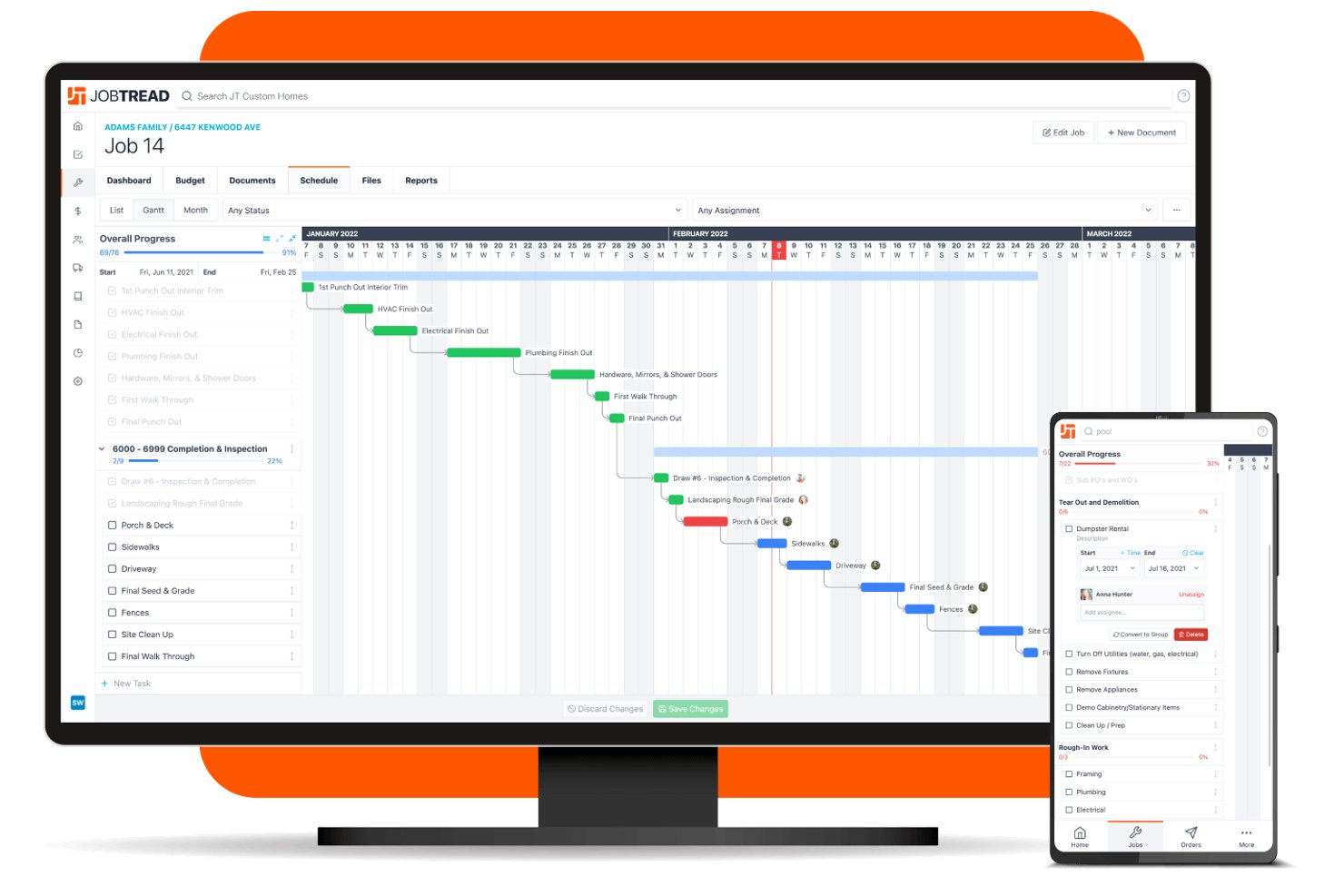
JobTread is construction management software built for general and specialty contractors, covering estimating, subcontractor bid requests, scheduling, job costing, and vendor portals.
Who Is JobTread Best For?
JobTread suits general contractors and specialty trade contractors who want to bring subcontractors into the bid-to-order process without charging them for portal access.
Why I Picked JobTread
I picked JobTread as one of the best because its free subcontractor portals remove the friction that usually slows down the bid-to-order process. Subs receive a unique emailed link, review scope and attachments, enter quantities, upload supporting files, and sign off electronically, without ever creating an account. I also like that once a bid is accepted, I can convert it directly into a vendor order and track it against the job budget, keeping the financial trail intact from first quote to final bill.
JobTread Key Features
- Organization-wide scheduling views: See all tasks across jobs, vendors, and customer accounts in List, Gantt, Month, Week, Day, and Availability views with custom filters.
- Retainage tracking: Set a default retainage percentage at the organization level, adjust it per job, and release withheld amounts with a dedicated retainage-release bill.
- QuickBooks Online sync: Push finalized invoices and bills to QBO, sync document status and payments, and map JobTread cost codes to QBO Products/Services.
- Custom forms builder: Create forms to collect information from employees, customers, subcontractors, and vendors directly within the platform.
JobTread Integrations
JobTread offers integrations with QuickBooks Online, HoundDog, and Zapier. QuickBooks Online syncs invoices, bills, payments, expenses, and cost-code mappings, while the Open API supports custom integrations.
Pros and Cons
Pros:
- Shared schedules track assigned subcontractor tasks
- Bid submissions convert directly into vendor orders
- Free portals reduce subcontractor onboarding friction
Cons:
- Commercial teams report missing RFI workflows
- Subcontractor payments remain a reported gap


CoConstruct is a construction management platform built for residential builders that covers project scheduling, bid management, subcontractor coordination, change orders, and job-level communication.
Who Is CoConstruct Best For?
CoConstruct is a strong fit for residential builders and custom home builders who need to manage the full bid-to-contract cycle with their subcontractors in one place.
Why I Picked CoConstruct
I picked CoConstruct as one of the best because its bid-to-contract workflow is purpose-built for residential builders who coordinate heavily with subs. I love how bid packages can include scopes, attachments, deadlines and automated reminders, with subs able to respond directly by email without needing an active portal account. Trade agreements are sent for electronic approval and version history is retained automatically, so you always have a clear record of what was agreed before work begins.
CoConstruct Key Features
- Subcontractor portal access: Invite subs to a dedicated portal where they can view permitted schedules, files, RFIs, daily logs, and project communications at no cost to them.
- Daily log sharing: Create daily logs with notes, photos, weather data, and attachments, then share them with subs and trigger read-receipt notifications.
- Change order to invoice conversion: Convert approved change orders directly into client invoices, keeping financial records connected across the project lifecycle.
- Compliance document storage: Store subcontractor certifications and insurance documents with expiration dates and reminder options directly within each sub's profile.
CoConstruct Integrations
CoConstruct offers marketplace integrations with QuickBooks, Sage Intacct, Xero, Google Calendar, Outlook, and iCal for accounting and schedule coordination. It also provides an API for custom integrations.
Pros and Cons
Pros:
- Daily logs centralize subcontractor updates and files
- Schedule visibility helps teams spot delays earlier
- Bid packages turn subcontractor quotes into agreements
Cons:
- Compliance records lack documented scheduling blocks
- Subcontractor task permissions remain inconsistently documented
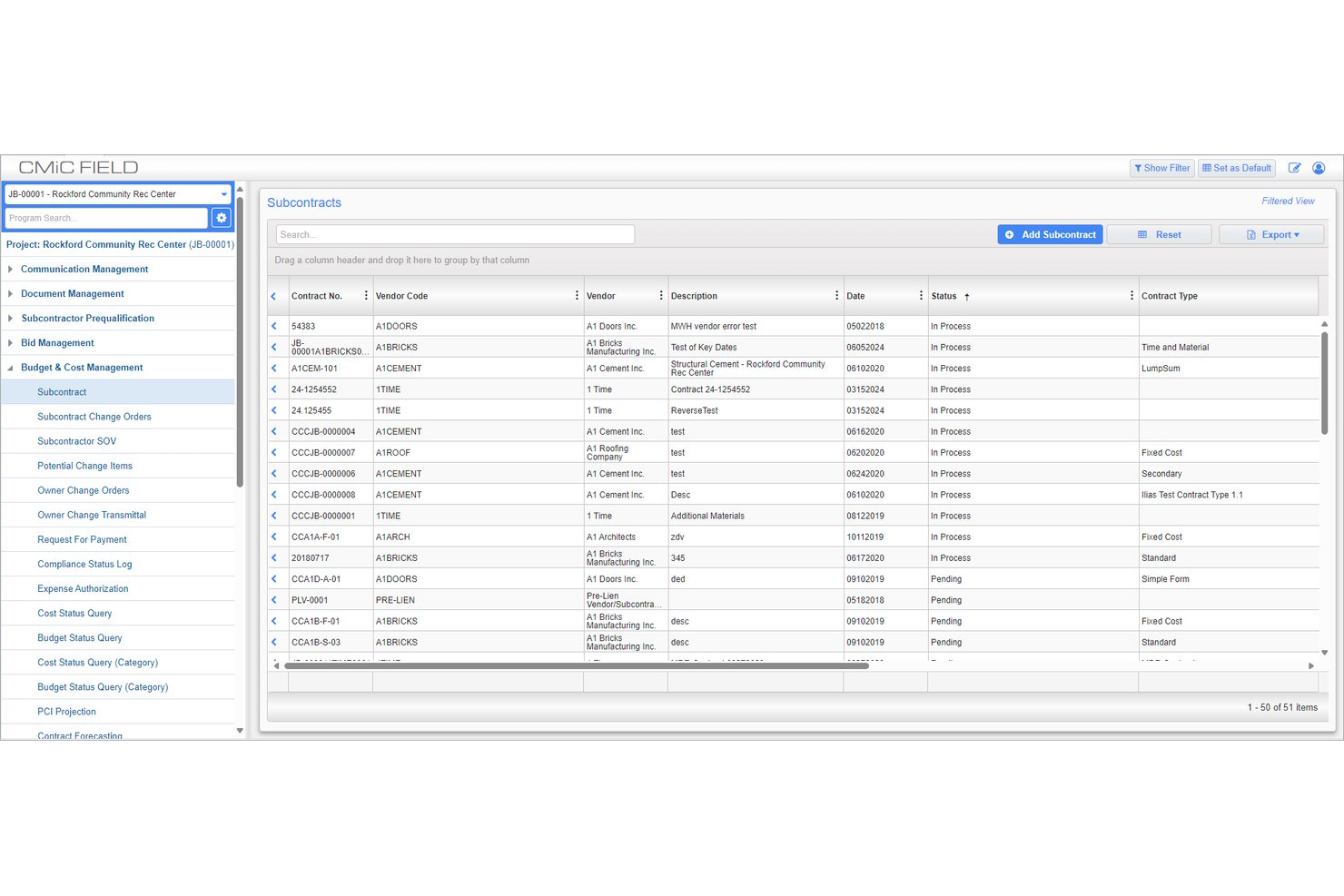
CMiC is a construction ERP that unifies financials and project management, covering subcontract bidding, bid leveling, change orders, payment tracking, and compliance monitoring across trades.
Who Is CMiC Best For?
CMiC suits large general contractors who need subcontractor payment tracking woven directly into their project financials and accounting workflows.
Why I Picked CMiC
I picked CMiC as one of the best because its subcontractor payment tracking is built directly into its financial core, not bolted on as an afterthought. Payment requests flow through a schedule-of-values structure that tracks prior billings and retainage in the same record, and Project Controls ties subcontract values to job costing, forecasting, and billing simultaneously. I've found that kind of tight financial integration is genuinely rare at the enterprise level, where disconnected systems cause the most damage.
CMiC Key Features
- Subcontractor prequalification filtering: Filter bidder invitations by location, CSI codes, prequalification parameters, and other classifications before sending bid packages.
- Bid leveling: View bid responses side by side to compare submissions and identify discrepancies across subcontractors.
- Compliance code tracking: Add, remove, or update compliance codes on subcontract records, with a read-only status indicator tied to set compliance dates.
- NEXUS AI agents: Run AI-enabled task agents across modules for cost-code maintenance, purchase-order matching, and financial reconciliation.
CMiC Integrations
CMiC offers native integrations with Autodesk, Bluebeam, DocuSign, Microsoft Office, and PlanGrid, plus marketplace integrations with Procore, Autodesk ProEst, Oracle Textura, and GCPay. Its Open API and public web services support custom integrations.
Pros and Cons
Pros:
- Prequalification filters bidders by trade and location
- Payment requests track retainage against prior billings
- Reviewers praise connected accounting and project costs
Cons:
- Teams report lengthy training and rollout effort
- Dates lack task dependencies or conflict flags

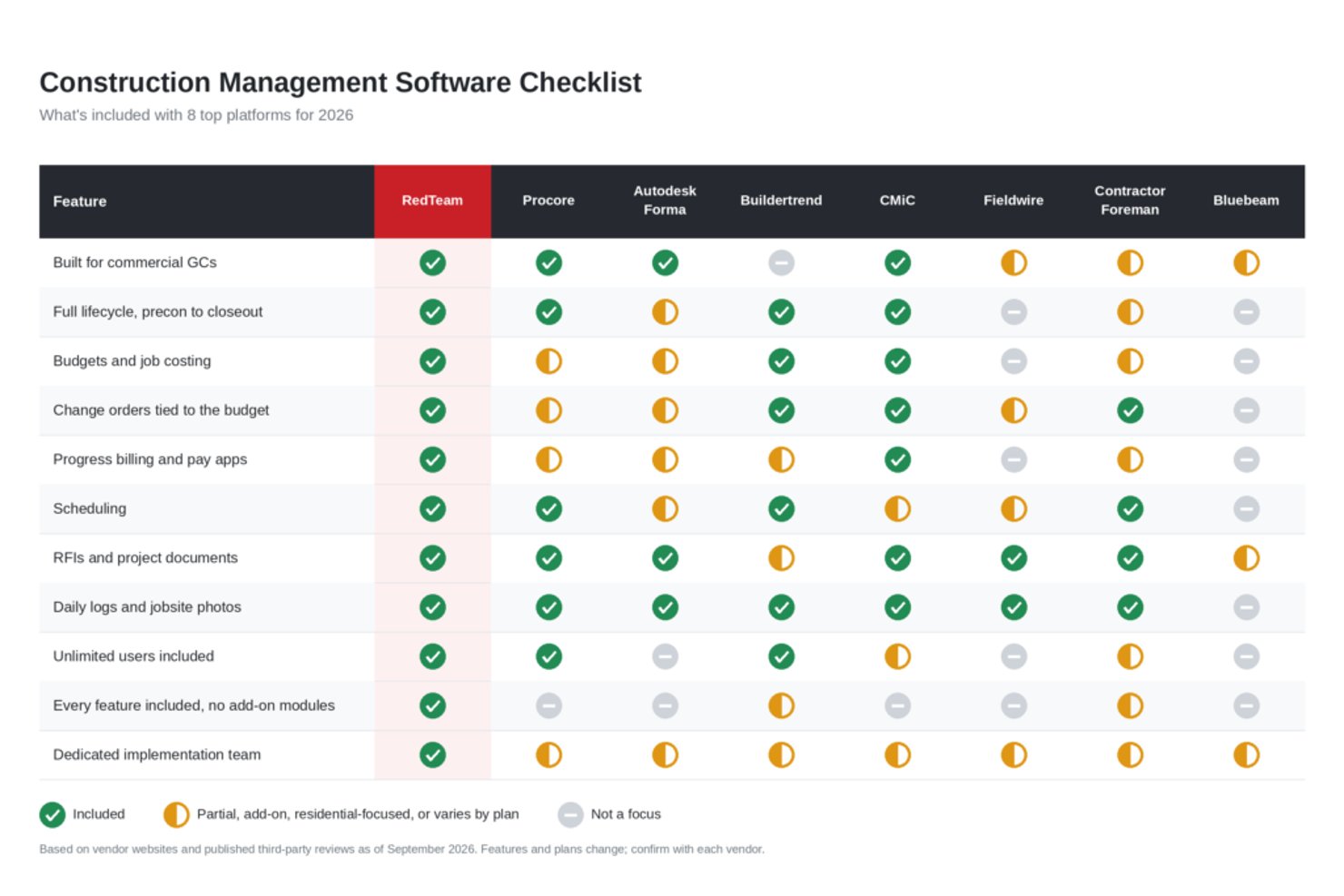
RedTeam is a construction project management platform built for commercial general contractors, covering preconstruction estimating, bid and contract management, subcontractor collaboration, job costing, and field reporting.
Who Is RedTeam Best For?
RedTeam is a strong fit for commercial general contractors who need to manage the full arc from bid invitation to subcontractor billing inside one platform.
Why I Picked RedTeam
I picked RedTeam as one of the best because the GC-to-sub billing workflow is genuinely one of the tightest I've seen. Through TeamPlayer, subcontractors can log in, view their executed contract, and submit AIA-style progress billing with Schedule of Values lines and retainage directly to the GC. I also like that lien-waiver status and open lien-law documents surface automatically on the vendor payment notification, keeping payment and compliance visibility in one place.
RedTeam Key Features
- Bid leveling: Compare vendor quotes side by side, then award a bid package to one vendor or split it across multiple vendors.
- Gantt scheduling with external stakeholder access: Assign and track tasks for project teams that include subcontractors, who can view updates and receive push notifications.
- Credential status tracking: View the compliance status of contract-required credentials, including insurance and W-9 documents, categorized as current, expiring, expired, or not on file.
- Mobile field reporting via Fieldlens: Document jobsite progress from a mobile device, with offline capability that syncs when connectivity is restored.
RedTeam Integrations
RedTeam documents integrations with QuickBooks Online, Sage Intacct, Sage 100 Contractor, Acumatica, and Fieldlens. Accounting integrations may cost extra, and API availability isn’t documented.
Pros and Cons
Pros:
- Job-cost visibility connects work and billing
- Bid-to-contract workflows earn positive reviews
- Subcontractors can follow shared schedules
Cons:
- Credential tracking lacks renewal alerts
- Vendor access requires GC-side setup
Outro software de gestão de projetos para subempreiteiros
Segue-se uma lista de software adicional de gestão de projetos para subempreiteiros que não chegou à lista principal, mas que merece sem dúvida ser analisado.
- Jonas Premier
For construction accounting-led sub payments
- TRUE
For subcontractor job costing
- ClickUp
For configurable subcontractor task tracking
- Buildertrend
For home-building project workflows
- Oracle Aconex
For cross-org document audit trails


How I Evaluate Subcontractor Project Management Software
I split my evaluation into three parts, weighting most how tools schedule subcontractor tasks and share current plans, RFIs, and updates. Next, I look for features like rolling look-ahead schedules. Finally, I consider onboarding, support, and pricing for teams with many external subs.
Core Functionality (Table Stakes For This List)
When I'm selecting tools for my list, I score each one on a scale from 0 (does not offer the functionality) to 5 (excels in this area) for each core functionality listed below. I then convert the total into a percentage to help assess each tool's overall fit, with extra weight on any functionalities I’ve deemed essential.
- Subcontractor Scheduling (Essential): I look for dated, assigned trade tasks that show dependencies and updates, such as whether one crew’s delay affects the next handoff.
- Communication Hub (Essential): I check whether teams can find project documents, RFIs, and updates by job and subcontractor instead of chasing information across channels.
- Compliance Tracking: I assess how teams store insurance, licenses, and certifications, track expiry dates, and flag renewals before a subcontractor’s work begins.
- Bid And Contract Management: I look for a clear path to solicit and compare trade bids, record approvals, and link the selected scope to a contract.
- Change Order Tracking: I check whether scope, cost, and schedule changes have approval steps and stay visible in project records after approval.
- Payment And Invoice Tracking: I evaluate whether invoices and payment applications are tied to contracted budgets, with status visible to the people handling approvals.
Once I have a list of tools that meet the criteria, I consider what sets each platform apart.
Differentiating Factors (What Sets Vendors Apart)
Here's how I compare and contrast different vendors:
Standout Features
I check whether a platform automates lien waiver collection tied to each pay app, since chasing conditional and unconditional waivers manually across dozens of subs delays every payment cycle. Subcontractor prequalification scoring also matters—I evaluate how a tool ranks subs on safety, financials, and past performance before you even open a bid. Rolling look-ahead scheduling is another separator: I look for three-week views that map trade sequencing so a drywall crew isn't mobilizing before framing is signed off.
Beyond Features
I check how easily subs can actually adopt the platform—if field crews need a full license and desktop training just to submit a daily log, uptake drops fast. Free or limited-access portals with a mobile-first design make a real difference when you're onboarding dozens of trades. I also evaluate how each tool connects to existing accounting software like Sage or QuickBooks, because pay app and retention data that doesn't sync means someone in the office is double-entering every invoice. Finally, I look at how proactively a platform flags expiring insurance certificates or missing compliance documents before a sub mobilizes to site.
Como escolher software de gestão de projetos para subempreiteiros
É fácil ficar atolado em longas listas de funcionalidades e estruturas de preços complexas. Para o ajudar a manter-se focado enquanto conduz o seu processo específico de seleção de software, eis uma lista de fatores a ter em conta:
| Fator | O que deve considerar |
| Escalabilidade | Certifique-se de que a ferramenta consegue lidar com mais subempreiteiros, projetos ou membros da equipa à medida que a sua empresa cresce, sem ficar mais lenta nem exigir uma atualização dispendiosa. |
| Integrações | Procure ferramentas que se liguem aos seus sistemas existentes — como contabilidade, planeamento ou armazenamento de documentos — para que a sua equipa não tenha de gerir trabalho duplicado. |
| Personalização | Deve poder adaptar listas de tarefas, fluxos de trabalho ou permissões dos subempreiteiros à forma como a sua equipa trabalha realmente. |
| Facilidade de utilização | Escolha um software que a sua equipa e os subempreiteiros consigam aprender a utilizar rapidamente. Uma interface simples e uma disposição lógica fazem toda a diferença. |
| Orçamento | Analise o que está incluído em cada escalão de preços. Evite ferramentas que cobrem custos adicionais por funcionalidades essenciais, como a partilha de ficheiros ou o acesso dos utilizadores. |
| Medidas de segurança | Certifique-se de que a ferramenta protege os dados dos projetos através de encriptação, controlos de acesso e inícios de sessão seguros — especialmente ao partilhar documentos sensíveis com subempreiteiros. |
| Acesso móvel | Se os seus subempreiteiros trabalham no terreno, vai querer uma aplicação ou um acesso otimizado para dispositivos móveis, para que as atualizações ocorram em tempo real. |
| Ferramentas de elaboração de relatórios | Escolha um sistema que o ajude a acompanhar o desempenho dos subempreiteiros, os prazos e os custos dos trabalhos através de relatórios incorporados ou personalizados. |
Quer necessite de uma solução geral de gestão de subempreiteiros ou de uma ferramenta especializada, como software de gestão de projetos de coberturas, dar prioridade às funcionalidades certas garantirá eficiência, conformidade e uma execução perfeita dos projetos.
Tendências do software de gestão de projetos para subempreiteiros em 2025
Na minha investigação, analisei inúmeras atualizações de produtos, comunicados de imprensa e registos de lançamentos de diferentes fornecedores de software de gestão de projetos para subempreiteiros. Eis algumas das tendências emergentes que estou a acompanhar:
- Análise do desempenho dos subempreiteiros: Algumas ferramentas já acompanham dados como as taxas de conclusão de tarefas e os atrasos por subempreiteiro. Isto ajuda os gestores de projetos a identificar padrões e a tomar melhores decisões relativamente a futuras contratações.
- Portais de autosserviço para subempreiteiros: Atualmente, mais ferramentas disponibilizam portais onde os subempreiteiros podem iniciar sessão, consultar tarefas, enviar atualizações e carregar documentos. Isto reduz a comunicação de ida e volta e dá aos subempreiteiros maior controlo sobre o seu trabalho.
- Acompanhamento da conformidade integrado: Os fornecedores estão a adicionar ferramentas que ajudam a acompanhar certificados de seguro, listas de verificação de segurança e outros documentos de conformidade. Isto ajuda os gestores de projetos a estarem preparados para auditorias e a evitarem atrasos dispendiosos.
- Definições de permissões granulares: As ferramentas estão agora a disponibilizar funções de utilizador mais detalhadas para limitar aquilo que os subempreiteiros podem consultar ou editar. Isto pode ajudar as equipas a manter informações sensíveis privadas, dando simultaneamente aos subempreiteiros apenas o que precisam para desempenhar as suas funções.
- Interfaces visuais de planeamento: As linhas cronológicas ao estilo de Gantt e as ferramentas de planeamento de arrastar e largar estão a tornar-se mais comuns, pois podem facilitar a atribuição de trabalho e o ajuste de datas quando os prazos sofrem alterações.
O que é o software de gestão de projetos para subempreiteiros?
O software de gestão de projetos para subempreiteiros é um tipo de ferramenta que ajuda as equipas a gerir subempreiteiros em diferentes trabalhos e projetos. É normalmente utilizado por gestores de projetos na construção, nos serviços no terreno e noutras indústrias que dependem de mão de obra externa.
As funcionalidades de atribuição de tarefas, acompanhamento do progresso e conformidade ajudam a manter os subempreiteiros dentro dos prazos, a garantir a organização e a cumprir os requisitos.
De um modo geral, estas ferramentas ajudam os gestores de projetos a manter o controlo sobre o trabalho subcontratado sem perder tempo a solicitar atualizações.
Funcionalidades do software de gestão de projetos para subempreiteiros
Ao selecionar um software de gestão de projetos para subempreiteiros, procure as seguintes funcionalidades essenciais:
- Atribuição de tarefas: Permite atribuir e acompanhar tarefas específicas para cada subempreiteiro, garantindo que as responsabilidades são claras.
- Acompanhamento do progresso: Ajuda a monitorizar o trabalho à medida que é concluído, para que possa detetar atrasos antecipadamente.
- Partilha de documentos: Permite carregar e partilhar desenhos, contratos e outros ficheiros diretamente com os subempreiteiros.
- Gestão da conformidade: Acompanha seguros, certificações e outros documentos para ajudar a manter tudo preparado para auditorias.
- Ferramentas de planeamento: Ajudam a planear prazos, atribuir dias de trabalho e ajustar os calendários quando ocorrem alterações.
- Permissões de utilizador: Permitem controlar aquilo que os subempreiteiros podem consultar ou editar na ferramenta.
- Central de comunicação: Mantém mensagens, atualizações e notas num único local, para que as conversas não se percam.
- Registo de tempos: Permite aos subempreiteiros registar as horas trabalhadas, para que possa acompanhar os custos de mão de obra com maior precisão.
- Gestão de faturas: Ajuda a analisar e aprovar as faturas dos subempreiteiros com base no trabalho concluído.
- Relatórios de desempenho: Apresentam métricas como a conclusão dentro do prazo e a precisão das tarefas, para ajudar a avaliar o desempenho dos subempreiteiros.
Benefícios do software de gestão de projetos para subempreiteiros
A implementação de um software de gestão de projetos para subempreiteiros pode proporcionar vários benefícios à sua equipa e à sua empresa. Eis alguns dos benefícios que pode esperar:
- Menos atrasos: O agendamento integrado e o acompanhamento do progresso ajudam a identificar problemas atempadamente e a manter o trabalho dentro do prazo.
- Menos confusão: A atribuição de tarefas e a partilha de documentos tornam claro quem é responsável por cada tarefa e onde encontrar informações importantes.
- Melhor comunicação: As ferramentas centralizadas de mensagens e atualizações mantêm todos informados, sem longas cadeias de e-mails.
- Conformidade melhorada: As funcionalidades de acompanhamento de seguros e licenças ajudam a manter tudo organizado e a evitar penalizações.
- Aprovações mais rápidas: O acompanhamento do tempo e as ferramentas de faturação facilitam a verificação do trabalho e o processamento rápido dos pagamentos.
- Decisões mais informadas: As ferramentas de elaboração de relatórios fornecem dados sobre o desempenho dos subempreiteiros, para que possa escolher com quem voltar a trabalhar.
- Transições mais fáceis: As definições de permissões e os registos de atividade ajudam a sua equipa a gerir os subempreiteiros, mesmo que os responsáveis pelo projeto mudem a meio do trabalho.
Custos e preços do software de gestão de projetos de subempreiteiros
A seleção de software de gestão de projetos de subempreiteiros exige compreender os vários modelos de preços e planos disponíveis. Os custos variam consoante as funcionalidades, o tamanho da equipa, os extras e outros fatores. A tabela abaixo resume os planos mais comuns, os respetivos preços médios e as funcionalidades normalmente incluídas nas soluções de software de gestão de projetos de subempreiteiros:
| Tipo de plano | Preço médio | Funcionalidades comuns |
| Gratuito | $0 | Atribuição de tarefas, relatórios básicos, armazenamento limitado |
| Básico | $10 - $35/utilizador/mês | Agendamento de projetos, acompanhamento do tempo, gestão de documentos |
| Padrão | $35 - $75/utilizador/mês | Fluxos de trabalho personalizados, relatórios avançados, integrações |
| Premium | $75 - $150/utilizador/mês | Gestão de recursos, ferramentas financeiras, suporte prioritário |