

De 10 beste verktøyene for AI-rapportering vurdert i 2026

Oversikt over de beste AI-verktøyene for rapportering


Prosjektrapportering er tidkrevende, detaljkrevende og gir ikke rom for feil. Når du hele tiden må analysere data, ta beslutninger og lage presentasjoner, trenger du et verktøy som forenkler arbeidet i stedet for å gjøre kaoset større. Det er her AI-verktøy for rapportering kommer inn. Disse verktøyene utnytter kunstig intelligens for å hjelpe deg og teamet ditt med å forstå komplekse data og gi innsikt som fører til bedre beslutninger.
Jeg har brukt tid på å gjennomgå ulike AI-verktøy for rapportering for å gi deg objektive og grundig undersøkte anbefalinger. Etter min erfaring kan disse verktøyene utgjøre en stor forskjell i det daglige arbeidet.
I denne artikkelen deler jeg mine beste anbefalinger for AI-verktøy for rapportering. Du får vite hva som skiller hvert verktøy fra de andre, og hvordan de kan passe inn i arbeidsflyten din. La oss se nærmere på løsninger som kan hjelpe deg med å håndtere prosjektene dine mer effektivt.
Why Trust Our Software Recommendations
Our team has been testing and reviewing software since 2012. As project managers ourselves, we know how difficult—and important—it is to choose the right software.
For this guide, we evaluated tools using hands-on testing and independent research, scoring tools using our selection criteria. We also draw on insights from industry thought leaders and practicing project management experts.
Our reviews reflect our human editorial judgment, not a sales pitch.
Expert reviewers:
Sammenligningstabell for AI-verktøy for rapportering
Denne sammenligningstabellen oppsummerer prisdetaljene for mine beste utvalgte AI-verktøy for rapportering:
| Tool | Best For | Trial Info | Price | ||
|---|---|---|---|---|---|
| 1 | Best for custom dashboards | 14-day free trial + free demo available | From $44/month (billed annually) | Website | |
| 2 | Best for real-time insights | 14-day free trial | From $120/month (billed annually) | Website | |
| 3 | Best for SEO tracking | 14-day free trial | From $20/month (billed annually) | Website | |
| 4 | Best for interactive dashboards | 14-day free trial | Pricing upon request | Website | |
| 5 | Best for data visualization | 30-day free trial | From $300/month (billed annually) | Website | |
| 6 | Best for marketing reports | Free demo available | From $812/month (billed annually) | Website | |
| 7 | Best for team collaboration | 30-day free trial | Pricing upon request | Website | |
| 8 | Best with retroactive data transformation | Free plan + free demo available | Pricing upon request | Website | |
| 9 | Best for Microsoft integration | Free plan available | From $14/user/month (billed annually) | Website | |
| 10 | Best for automated reporting | Free demo available | Pricing upon request | Website |
Anmeldelser av de beste AI-verktøyene for rapportering
Nedenfor finner du mine detaljerte oppsummeringer av de beste AI-verktøyene for rapportering som kom med på kortlisten. Anmeldelsene mine gir en grundig gjennomgang av de viktigste funksjonene, fordelene og ulempene, integrasjonene og de ideelle bruksområdene for hvert verktøy, slik at du kan finne det beste alternativet for deg.

DashThis
Best for custom dashboards

DashThis is a reporting tool designed for marketers and agencies who need to create custom dashboards. It helps users consolidate marketing data into one place, making it easier to track performance and share insights with clients.
Why I picked DashThis: DashThis excels at providing AI-powered insights to help you quickly identify marketing wins and issues across your reports and dashboards. You can also create custom dashboards that allow you to present data in a way that suits your specific needs. The tool's drag-and-drop interface makes it easy to build dashboards without needing technical skills. You can automate data updates, ensuring your dashboards always reflect the latest information. DashThis also offers pre-set templates, which can save time for your team.
Standout Features & Integrations
Features include automated data updates that keep your dashboards current, pre-set templates for quick setup, and a drag-and-drop interface for easy customization. You can also schedule reports to be sent to clients automatically. The platform provides a variety of visualization options to suit different reporting needs.
Integrations include Google Analytics, Facebook Ads, Instagram, LinkedIn, Twitter, YouTube, Shopify, Mailchimp, HubSpot, and Google Ads.
Pros and Cons
Pros:
- Scheduled report delivery
- Automated data updates
- Customizable dashboard options
Cons:
- Not ideal for complex data analysis
- Requires learning for new users
- Limited advanced customization
New Product Updates from DashThis
DashThis Adds Spotify Ads Integration
DashThis adds a Spotify Ads integration for bringing campaign spend, reach, impressions, clicks, and video views into dashboards. This helps teams report on audio campaigns alongside other advertising channels. For more information, visit DashThis’s official site.
 .
.
Best for real-time insights

Klips is a dashboard and reporting tool designed for businesses that need to monitor key performance indicators in real-time. It's used by business analysts and managers who require up-to-date data to make informed decisions quickly.
Why I picked Klips: Klips is ideal for real-time insights, offering live dashboards that keep you informed with the latest data. The tool's customizable dashboards let you tailor what metrics you monitor, ensuring they align with your business goals. You can set up alerts to notify your team of any significant changes. Klips also provides a wide range of visualization options to present data effectively.
Standout Features & Integrations
Features include customizable dashboards that let you focus on the metrics that matter most, real-time data updates for immediate insights, and alert notifications for significant changes. The tool offers a variety of visualization options to suit different reporting needs. You can also access historical data for trend analysis.
Integrations include Google Analytics, Salesforce, HubSpot, Dropbox, Mailchimp, QuickBooks, Shopify, Xero, Zendesk, and Twitter.
Pros and Cons
Pros:
- Historical data access
- Wide range of visualizations
- Alert notifications for changes
Cons:
- Limited offline access
- Requires data preparation skills
- Learning curve for new users

Best for SEO tracking

AgencyAnalytics is a reporting platform tailored for digital marketing agencies and SEO professionals. It provides tools to track and report on various marketing metrics, enabling users to create comprehensive SEO reports and dashboards.
Why I picked AgencyAnalytics: AgencyAnalytics excels in SEO tracking, offering features that let you monitor keyword rankings and website performance. You can customize dashboards to fit your clients' needs, which is perfect for agencies. The platform's automated report scheduling saves you time by keeping clients updated without manual effort. It also includes white-label options, allowing you to present reports under your brand.
Standout Features & Integrations
Features include customizable dashboards that let you tailor reports to your clients' needs, automated report scheduling to save time, and white-label options for agency branding. The platform also offers detailed SEO tracking tools to monitor keyword rankings and site performance. You can easily create comprehensive reports that combine multiple data sources.
Integrations include Google Analytics, Google Ads, Facebook Ads, Instagram, Twitter, LinkedIn, Mailchimp, Shopify, Moz, and Ahrefs.
Pros and Cons
Pros:
- Automated report scheduling
- Customizable client dashboards
- Strong SEO tracking tools
Cons:
- High cost for small teams
- Not ideal for non-marketing data
- Requires initial setup time

Tableau
Best for interactive dashboards

Tableau is a business intelligence tool designed for data visualization and analytics. It's popular among data analysts and business professionals who need to create interactive dashboards and reports. The tool excels in transforming complex data into visual insights, which helps in decision-making processes.
Why I picked Tableau: Tableau offers dynamic and interactive dashboards that make data exploration intuitive. You can drag and drop data to build visualizations without needing complex coding skills. Its ability to connect to various data sources sets it apart, allowing you to pull data from almost anywhere. Tableau's focus on visualization ensures you can create detailed and informative reports that engage your audience.
Standout Features & Integrations
Features include real-time data analytics, customizable dashboards, and a wide range of visualization options. You can easily connect to live data sources, ensuring your reports are always up-to-date. The drag-and-drop interface simplifies the process of creating complex data visualizations.
Integrations include Salesforce, Microsoft Excel, Google Analytics, Amazon Redshift, SQL Server, Oracle, SAP, Hadoop, Dropbox, and Box.
Pros and Cons
Pros:
- Real-time data updates
- Wide range of visual options
- Interactive dashboard creation
Cons:
- High cost for small teams
- Requires data preparation
- Steep learning curve

Qlik
Best for data visualization

Qlik is a data analytics platform designed for businesses that need to transform raw data into visual insights. It's popular among data analysts and business intelligence professionals who require powerful visualization tools to enhance decision-making.
Why I picked Qlik: Qlik specializes in data visualization, providing interactive dashboards that allow you to explore data from multiple angles. Its associative data model lets you see connections in your data that might not be obvious otherwise. The tool's drag-and-drop interface simplifies the process of creating complex visualizations. Qlik also offers advanced analytics capabilities that help in uncovering trends and patterns.
Standout Features & Integrations
Features include an associative data engine that helps you discover hidden insights, advanced analytics that enable trend analysis, and a user-friendly interface for building visualizations. The platform supports self-service data exploration, allowing you to dive into data without needing technical expertise. You can also customize dashboards to fit your specific needs.
Integrations include Salesforce, Microsoft Azure, SAP, Oracle, Amazon Redshift, Google BigQuery, Snowflake, Microsoft SQL Server, Dropbox, and Box.
Pros and Cons
Pros:
- Supports self-service exploration
- Associative data model
- Interactive data visualization
Cons:
- Limited offline functionality
- Requires data preparation
- Steep learning curve for beginners

Best for marketing reports

Whatagraph is a reporting tool tailored for marketing teams and agencies that need to create visual data reports. It simplifies data aggregation and presentation, making it easier for marketers to share insights with clients and stakeholders. The tool is designed to turn complex data into easily digestible visual reports.
Why I picked Whatagraph: Whatagraph is ideal for marketing reports due to its ability to pull data from multiple channels into one cohesive report. You can customize templates to fit your branding and reporting needs, which is perfect for agencies. The platform offers automation features that save time by scheduling regular report updates. It also provides white-label options, allowing you to present reports as your own.
Standout Features & Integrations
Features include customizable templates that let you tailor reports to your needs, automated report scheduling to save your team time, and white-label options for agency branding. The drag-and-drop interface makes report creation straightforward. You can also access historical data for trend analysis.
Integrations include Google Analytics, Facebook Ads, Instagram, LinkedIn Ads, Twitter, Shopify, HubSpot, Mailchimp, Google Ads, and YouTube.
Pros and Cons
Pros:
- White-label options for branding
- Automated report scheduling
- Customizable report templates
Cons:
- High cost for small teams
- Not ideal for non-marketing data
- May need tech support for setup
Domo
Best for team collaboration

Domo is a cloud-based business intelligence platform that caters to large enterprises and teams needing real-time data analytics. It supports data-driven decision-making by offering a suite of tools for data visualization, reporting, and collaboration.
Why I picked Domo: Domo excels in team collaboration, providing you with tools to share data insights across your organization effortlessly. Its platform allows users to create interactive dashboards that can be accessed from any device, enhancing team communication. Domo's ability to handle vast amounts of data and deliver insights in real-time is beneficial for large teams. It also offers customizable alerts to keep your team informed about critical changes.
Standout Features & Integrations
Features include real-time data updates that keep your team informed, customizable dashboards that cater to specific needs, and mobile access for on-the-go insights. The platform's drag-and-drop interface simplifies dashboard creation. Domo also offers predictive analytics to help you anticipate future trends.
Integrations include Salesforce, Google Analytics, Slack, Shopify, Amazon Redshift, Snowflake, Microsoft Excel, Box, Dropbox, and Twitter.
Pros and Cons
Pros:
- Predictive analytics capabilities
- Custom alerts for changes
- Mobile access for dashboards
Cons:
- Complex for non-technical users
- High cost for smaller teams
- High learning curve for new users

Best with retroactive data transformation
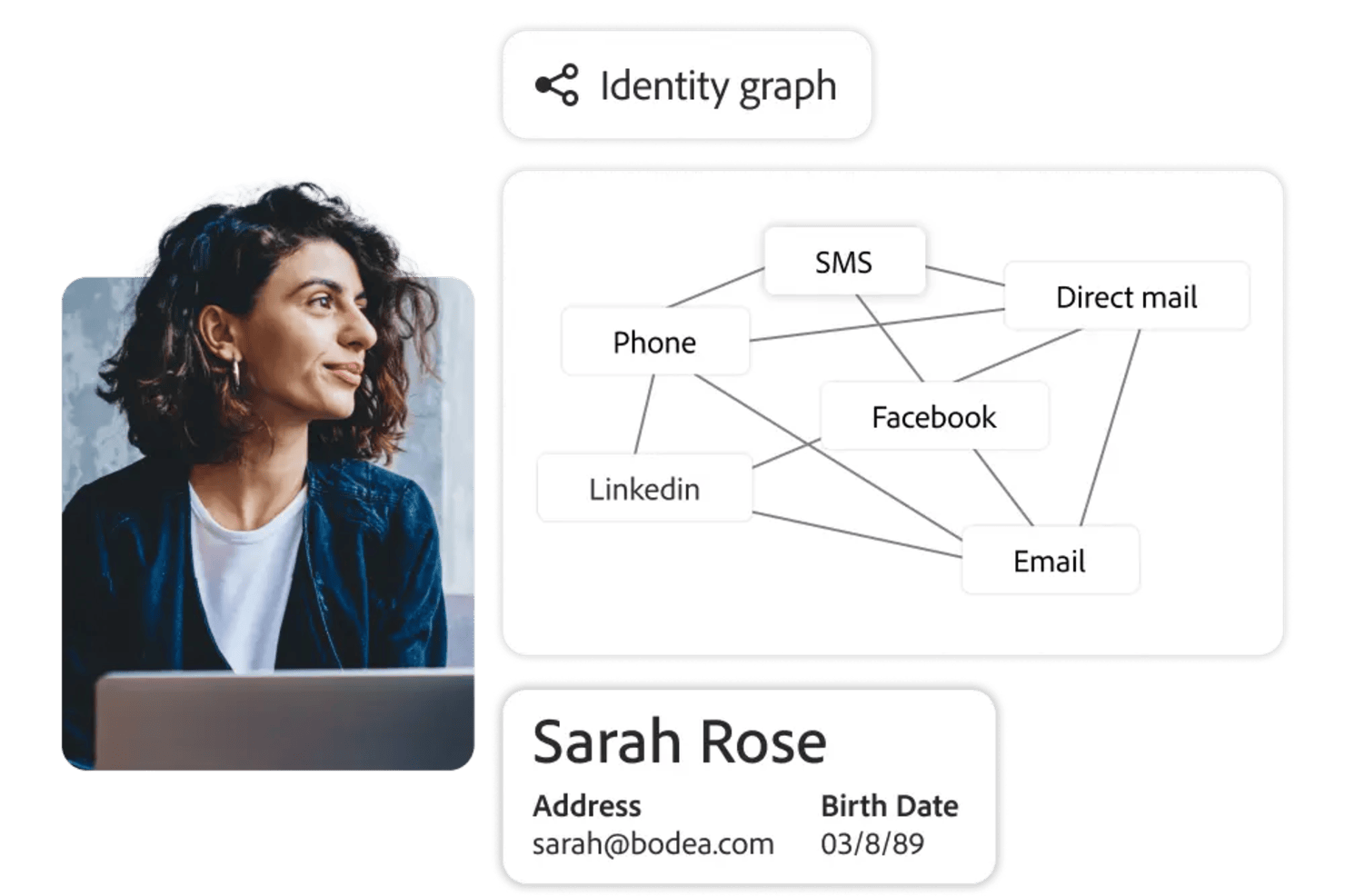
Adobe Customer Journey Analytics is an AI-powered analytics platform for tracking, visualizing, and reporting on customer journeys across multiple channels and data sources.
Who Is Adobe Customer Journey Analytics Best For?
Enterprise analytics teams in retail, finance, or media who need to unify and analyze customer data from multiple digital channels.
Why I Picked Adobe Customer Journey Analytics
I picked Adobe Customer Journey Analytics as one of the best because I can retroactively transform and reprocess historical data without losing fidelity. My team uses the data model editor to redefine dimensions and metrics after data collection, which lets us answer new business questions as they come up. I also like that we can apply new rules or segmentations to past data, so we’re not locked into decisions made at the time of implementation.
Adobe Customer Journey Analytics Key Features
- AI-powered anomaly detection: Automatically surfaces unexpected trends and outliers in your data.
- Cross-channel data stitching: Combines data from web, mobile, and offline sources into unified customer journeys.
- Custom dashboard builder: Lets you create and share interactive dashboards tailored to your reporting needs.
- Scheduled report delivery: Sends automated reports to stakeholders on a recurring schedule.
Adobe Customer Journey Analytics Integrations
Adobe Customer Journey Analytics offers native integrations with Adobe Experience Platform, Adobe Analytics, Adobe Target, Adobe Audience Manager, and Adobe Campaign. It also provides an API for custom integrations and supports connections to cloud data warehouses like Google BigQuery, Amazon Redshift, and Snowflake.
Pros and Cons
Pros:
- Advanced privacy and consent management controls
- Real-time segmentation updates as data streams in
- Retroactive data transformation for historical analysis
Cons:
- Complex setup for cross-channel data sources
- Limited native integrations outside Adobe ecosystem

Power BI
Best for Microsoft integration

Power BI is a business analytics tool designed for transforming raw data into actionable insights. It's widely used by business analysts and IT professionals who need to create reports and dashboards. The tool is known for its integration with Microsoft products, making it easy for teams already using Microsoft Office.
Why I picked Power BI: Power BI integrates smoothly with Microsoft Office applications, which is ideal if your team relies heavily on tools like Excel and SharePoint. This integration allows you to pull and analyze data directly from these sources without extra steps. Power BI's data modeling capabilities enable you to create detailed reports tailored to your needs. The tool's ability to handle large datasets ensures you can analyze your data efficiently.
Standout Features & Integrations
Features include a user-friendly interface that allows for quick report creation, data visualization options that cater to different analysis needs, and the ability to share insights across your organization. The tool offers a drag-and-drop functionality that simplifies the process of building dashboards. You can also customize your reports to match your specific requirements.
Integrations include Microsoft Excel, SharePoint, SQL Server, Azure, Dynamics 365, Google Analytics, Salesforce, Adobe Analytics, OneDrive, and GitHub.
Pros and Cons
Pros:
- Frequent updates and improvements
- Strong data modeling featuresc
- Handles large datasets
Cons:
- Requires data preparation skills
- Complex for non-technical users
- Requires Microsoft account


Rollstack is a platform that automates the creation and updating of presentations and documents, primarily serving data analysts and business teams. It enhances productivity by connecting to live data sources and offering AI-powered insights, making it suitable for various industries like finance and healthcare.
Why I picked Rollstack: Rollstack excels in automated reporting, saving users substantial time by reducing manual slide creation. It connects to multiple data sources, ensuring your presentations are always up-to-date. The platform's AI capabilities help analyze data for more informed decision-making. It also provides enterprise-grade security to protect your data.
Standout Features & Integrations
Features include live data connectivity that keeps your documents current, AI insights that improve data analysis, and enterprise-grade security to protect sensitive information. Scheduled updates ensure your presentations are always ready when you need them. The platform's user-friendly interface simplifies the reporting process.
Integrations include Tableau, Power BI, Looker, Metabase, Google Sheets, Microsoft Excel, Google Slides, Microsoft PowerPoint, Slack, and Dropbox.
Pros and Cons
Pros:
- Enhances data analysis
- Keeps data live and updated
- Reduces manual slide creation
Cons:
- Not ideal for small datasets
- May need tech support for setup
- Learning curve for beginners
Andre AI-verktøy for rapportering
Her er noen flere alternativer for AI-verktøy for rapportering som ikke kom med på kortlisten, men som likevel er verdt å ta en titt på:
- Zoho Analytics
For small businesses
- Heap (by Contentsquare)
For user behavior analytics
- Venngage
For infographic creation


How I Evaluate Loyalty Management Software
I evaluate loyalty platforms on two layers: core functionality every tool must have—like earn/burn rules and omnichannel enrollment—and the differentiators that separate the best options.
Core Functionality (Table Stakes For This List)
When I'm selecting tools for my list, I rank each one on a scale from 0 (does not offer the functionality) to 5 (excels in this area) for each core functionality listed below. Then, I calculate the tool's total score into a percentage. Each tool needs to achieve a minimum total score of 65% to be considered for inclusion.
- Program & Rules Engine: I look for configurable earn-and-burn logic, tiered structures, and behavioral triggers that a loyalty manager can set up without filing dev tickets every time they want to reward a new action.
- Rewards & Redemption Management: The reward catalog should cover points, discounts, gift cards, and partner offers with redemption flows that work across both online checkout and in-store POS.
- Member Profiles & Segmentation: Unified member records matter here—I check whether profiles consolidate transaction history, tier status, and points balances into segments you can actually target with campaigns.
- Omnichannel Enrollment & Engagement: Members sign up through web, app, POS, and email, so I evaluate how each platform handles identity resolution to prevent duplicate accounts across those touchpoints.
- Integrations & APIs: Prebuilt connectors for ecommerce platforms like Shopify and Magento, plus CRM and ESP sync, determine how well the tool fits into an existing marketing stack without custom middleware.
- Analytics & Reporting: I look for dashboards that go beyond enrollment counts to show redemption rates, repeat purchase lift, and segment-level ROI so you can actually prove program value to leadership.
- Referral & Advocacy Tools: Referral mechanics like trackable invite links, configurable reward structures for both referrer and referee, and social sharing options extend the program's reach beyond your existing member base.
- Fraud Prevention & Compliance: Points abuse detection, expiration management, and built-in GDPR/CCPA compliance tools protect both your program economics and your customer data.
Once I have a list of tools that meet this criteria, I consider what sets each platform apart.
Differentiating Factors (What Sets Vendors Apart)
Here's how I compare and contrast different vendors:
Standout Features
Gamification mechanics like challenges, badges, and progress bars give members a reason to engage between purchases—I evaluate whether these elements are built in or require third-party workarounds. Rewarding non-transactional behaviors such as writing reviews or completing profile fields deepens engagement beyond spend-based programs. I also look for AI-powered reward recommendations that surface the right offer to the right member based on predicted behavior, helping retention marketers move past one-size-fits-all promotions.
Beyond Features
Pricing structure matters a lot in this space—some platforms charge per member while others bill on transactions or GMV, so I evaluate how costs scale as your program grows. Industry fit is another factor I weigh, since a platform proven in DTC ecommerce may lack the coalition program support a multi-brand retailer needs. Time-to-launch also varies widely; I check whether vendors offer pre-built templates and dedicated onboarding support to get a program live in weeks rather than months.
Slik velger du et AI-verktøy for rapportering
Det er lett å gå seg vill i lange funksjonslister og kompliserte prismodeller. For å hjelpe deg med å holde fokus mens du går gjennom den unike prosessen med å velge programvare, får du her en sjekkliste over faktorer du bør ha i bakhodet:
| Faktor | Hva bør du vurdere? |
|---|---|
| Skalerbarhet | Vil verktøyet vokse med virksomheten din? Vurder om det kan håndtere økt datamengde og flere brukere etter hvert som selskapet utvider seg. |
| Integrasjoner | Fungerer det med de nåværende systemene dine? Undersøk om det enkelt kan kobles til programvaren du allerede bruker, slik at du unngår datasiloer og manuell dataregistrering. |
| Tilpasningsmuligheter | Kan du tilpasse det etter behovene dine? Se etter muligheter for å tilpasse oversikter og rapporter til teamets arbeidsflyt og preferanser. |
| Brukervennlighet | Er det brukervennlig? Sjekk om grensesnittet er intuitivt, slik at læringskurven for teamet blir kortere og verktøyet kan tas i bruk raskt. |
| Implementering og introduksjon | Hvor raskt kan du komme i gang? Vurder hvor mye tid og hvilke ressurser som kreves til oppsett og opplæring. Se etter verktøy med veiledede introduksjonsprosesser. |
| Kostnad | Er det innenfor budsjettet? Sammenlign prisplaner og se etter skjulte gebyrer. Sørg for at verktøyet gir god verdi for funksjonene du trenger. |
| Sikkerhetstiltak | Hvor sikre er dataene dine? Sørg for at verktøyet overholder standarder for databeskyttelse og tilbyr kryptering og tilgangskontroller for å beskytte informasjonen din. |
| Tilgjengelig kundestøtte | Kan du få hjelp når du trenger det? Se etter tilgjengelige supportkanaler, og vurder kvaliteten på kundeservicen basert på anmeldelser. |
Hva er AI-verktøy for rapportering?
AI-verktøy for rapportering er programvareløsninger som automatiserer innsamling, analyse og presentasjon av data i et visuelt format. De hjelper ved å behandle store datasett raskt, identifisere mønstre og generere innsikt. Denne automatiseringen reduserer manuelt arbeid og lar teamet ditt fokusere på strategiske beslutninger i stedet for databehandling.
AI-verktøy for rapportering brukes vanligvis av dataanalytikere, bedriftsledere og markedsførere for å ta informerte beslutninger. Blant funksjonene finner vi sanntidsoppdateringer av data, tilpassbare dashbord og automatisert rapportering, som hjelper brukerne med å forstå komplekse data raskt og effektivt.
Alt i alt gir disse verktøyene verdifull innsikt som fører til bedre beslutninger og forbedrede forretningsresultater.
Funksjoner i AI-verktøy for rapportering
Når du velger AI-verktøy for rapportering, bør du se etter følgende viktige funksjoner:
- Datavisualisering: Gjør komplekse data om til lettforståelige visuelle fremstillinger, slik at brukerne raskt kan få oversikt over innsikten.
- Sanntidsoppdateringer: Gir oppdaterte data og sørger for at beslutninger baseres på den nyeste informasjonen.
- Tilpassbare dashbord: Lar brukerne tilpasse dashbordene etter spesifikke behov og preferanser, noe som forbedrer brukervennligheten.
- Automatisert rapportering: Sparer tid ved å generere rapporter automatisk og redusere manuelt arbeid.
- Integrasjonsmuligheter: Kobler seg til eksisterende programvaresystemer, effektiviserer dataflyten og reduserer manuell registrering.
- Prediktiv analyse: Gir innsikt i fremtidige trender, slik at brukerne kan forutse endringer og ta proaktive beslutninger.
- Sikkerhetstiltak: Beskytter data med kryptering og tilgangskontroller, slik at sensitiv informasjon forblir sikker.
- Brukervennlig grensesnitt: Forenkler navigeringen og reduserer læringskurven, slik at teamene kan ta verktøyet i bruk raskere.
- Alternativer for egen merkevare: Lar brukerne merke rapporter som sine egne, noe som er spesielt nyttig for byråer som presenterer resultater for kunder.
- Varsler: Holder teamene informert om betydelige endringer, slik at de raskt kan reagere på viktige endringer i dataene.
Fordeler med AI-verktøy for rapportering
Implementering av AI-verktøy for rapportering gir flere fordeler for teamet og virksomheten din. Her er noen av fordelene du kan se frem til:
- Bedre beslutningstaking: Tilgang til sanntidsdata og prediktiv analyse hjelper teamet ditt med å ta informerte valg raskt.
- Tidsbesparelser: Automatisert rapportering reduserer manuelt arbeid og frigjør tid til mer strategiske oppgaver.
- Forbedret datanøyaktighet: Integrasjonsmuligheter sikrer datakonsistens på tvers av plattformer og minimerer feil.
- Økt samarbeid: Tilpassbare dashbord og delt innsikt fremmer samarbeid og samordner mål.
- Bedre datasikkerhet: Sikkerhetstiltak beskytter sensitiv informasjon og gir deg trygghet rundt personvern og datasikkerhet.
- Større fleksibilitet: Brukervennlige grensesnitt og tilpassbare funksjoner lar deg tilpasse verktøyet til dine spesifikke behov.
- Konsekvent merkevareprofil: Alternativer for egen merkevare lar deg presentere rapporter under din egen merkevare og opprettholde et profesjonelt inntrykk overfor kundene.
Kostnader og priser for AI-verktøy for rapportering
Valg av AI-verktøy for rapportering krever en forståelse av de ulike prismodellene og abonnementene som er tilgjengelige. Kostnadene varierer basert på funksjoner, teamstørrelse, tillegg og mer. Tabellen nedenfor oppsummerer vanlige abonnementer, gjennomsnittsprisene deres og typiske funksjoner som er inkludert i løsninger for AI-verktøy for rapportering:
Sammenligningstabell for abonnementer for AI-verktøy for rapportering
| Abonnementstype | Gjennomsnittspris | Vanlige funksjoner |
|---|---|---|
| Gratis abonnement | $0 | Grunnleggende rapportering, begrensede dashbord og standard kundestøtte. |
| Personlig abonnement | $10-$30/bruker/måned | Tilpassbare dashbord, kundestøtte via e-post og grunnleggende dataintegrasjon. |
| Bedriftsabonnement | $50-$100/ bruker/måned | Avansert analyse, funksjoner for teamsamarbeid og prioritert kundestøtte. |
| Virksomhetsabonnement | $150-$300/ bruker/måned | Full dataintegrasjon, dedikert kundeansvarlig og avanserte sikkerhetsfunksjoner. |
Vanlige spørsmål om AI-verktøy for rapportering
Her er noen svar på vanlige spørsmål om AI-verktøy for rapportering:
Hva bør du vurdere før du bruker et AI-verktøy?
Før du bruker et AI-verktøy, bør du vurdere de spesifikke behovene til virksomheten din og datakildene dine. Sørg for at verktøyet integreres godt med de eksisterende systemene dine og overholder standarder for datasikkerhet. Vurder hvor lang tid det tar å lære verktøyet, samt hvilken støtte som er tilgjengelig for å hjelpe teamet ditt med å ta det i bruk på en effektiv måte.
Hvordan kan AI forbedre nøyaktigheten i rapporter?
AI forbedrer nøyaktigheten i rapporter ved å minimere menneskelige feil i databehandling og analyse. Det bruker algoritmer til å identifisere uoverensstemmelser og avvik i dataene, noe som sikrer mer pålitelige resultater. Denne nøyaktigheten hjelper teamet ditt med å ta bedre informerte beslutninger basert på pålitelige data.
Hva er begrensningene ved AI-verktøy for rapportering?
AI-verktøy for rapportering kan være begrenset av hvor god og tilgjengelig dataene er. Hvis dataene er ufullstendige eller unøyaktige, kan innsikten som genereres, være mangelfull. I tillegg kan disse verktøyene kreve betydelig innledende oppsett og integrasjonsarbeid, noe som kan være komplisert for brukere uten teknisk kompetanse.
Hvordan håndterer AI-verktøy for rapportering datasikkerhet?
AI-verktøy for rapportering ivaretar datasikkerheten ved å bruke kryptering, tilgangskontroller og samsvar med regelverk for databeskyttelse. Sørg for at verktøyet du velger, har robuste sikkerhetstiltak på plass for å beskytte sensitiv informasjon mot uautorisert tilgang eller datainnbrudd.