

De 10 beste programmene for forespørsler om tilbud i 2026

Kortliste over RFP-programvare


RFP-programvare er et digitalt verktøy som hjelper deg med å administrere, automatisere og følge opp teamets prosesser for forespørsler om tilbud fra start til slutt. Hvis du ser etter den beste RFP-programvaren, ønsker du sannsynligvis å spare tid, redusere manuelt arbeid og lande flere avtaler, selv når kravene og gjennomgangssyklusene fortsetter å utvikle seg.
Nedenfor finner du en kuratert liste over verktøy som har vist seg å hjelpe prosjektledere og tilbudsteam med å håndtere komplekse krav, holde interessenter samkjørte og levere vinnende tilbud raskere. Bruk denne veiledningen til å sammenligne alternativene dine og velge den beste RFP-programvaren for teamets unike arbeidsflyt.
Hvorfor du kan stole på våre programvareanbefalinger
Teamet vårt har testet og anmeldt programvare siden 2012. Vi er selv prosjektledere, så vi vet hvor vanskelig og hvor viktig det er å velge riktig programvare.
I denne guiden har vi vurdert verktøyene gjennom praktisk testing og uavhengig research og gitt dem poeng ut fra våre utvelgelseskriterier. Vi bygger også på innsikt fra ledende eksperter i bransjen og erfarne prosjektledere.
Anmeldelsene våre bygger på vår egen redaksjonelle vurdering. De er ikke et salgsargument.
Ekspertanmeldere:
Sammenligningstabell for RFP-programvare
Denne sammenligningstabellen oppsummerer prisdetaljene for mine beste utvalg av RFP-programvare
Score legend (out of 5)
- Excellent 4.5–5
- Good 4–4.4
- Average 3–3.9
- Below average 2–2.9
- Poor 1–1.9
| Tool | Starting Price | Website | |||||||
|---|---|---|---|---|---|---|---|---|---|
| Best with automated conflict detection | — | — | 4 | — | 5 | 4 | 3 | Pricing upon request Free demo available | Website |
| Best for zero-maintenance AI content libraries | — | — | 5 | — | 5 | 5 | 4 | $899/month 30-day money-back guarantee | Website |
| Best for complex enterprise project workflows | 3.5 out of 5 | 2 | 4 | 4 | 4 | 3 | 4 | Pricing upon request Free demo available | Website |
| Best for simultaneous multi-user co-authoring | — | 4 | 4 | — | 4 | 5 | 4 | Pricing upon request Free demo available | Website |
| Best for end-to-end document lifecycles | — | 4 | 4 | — | 4 | 4 | 3 | $19/user/month Free plan + 14-day free trial + free demo available | Website |
| Best for end-to-end generative narrative drafting | — | — | 4 | 1 | 4 | 4 | 4 | Pricing upon request Free demo available | Website |
| Best for procurement-led RFP and supplier scoring | 3.7 out of 5 | 4 | 4 | 4 | 4 | 3 | 3 | Pricing upon request Free demo available | Website |
| Best for agent-led tribal knowledge capture | — | — | 4 | — | 5 | 5 | 4 | Pricing upon request Free demo available | Website |
| Best for bias-free vendor scoring at scale | 3.2 out of 5 | 4 | 3 | 4 | 3 | 2 | 3 | Pricing upon request Free demo available | Website |
| Best for government RFP sourcing and evaluation | 3.0 out of 5 | 4 | 1 | 4 | 2 | 3 | 4 | Pricing upon request Free demo available | Website |
Anmeldelser av RFP-programvare
Nedenfor finner du mine detaljerte oppsummeringer av den beste RFP-programvaren som kom med på kortlisten min. Anmeldelsene mine gir et detaljert innblikk i funksjonene, integrasjonene og de beste bruksområdene for hver plattform, slik at du kan finne programvaren som fungerer best for deg.

Best with automated conflict detection
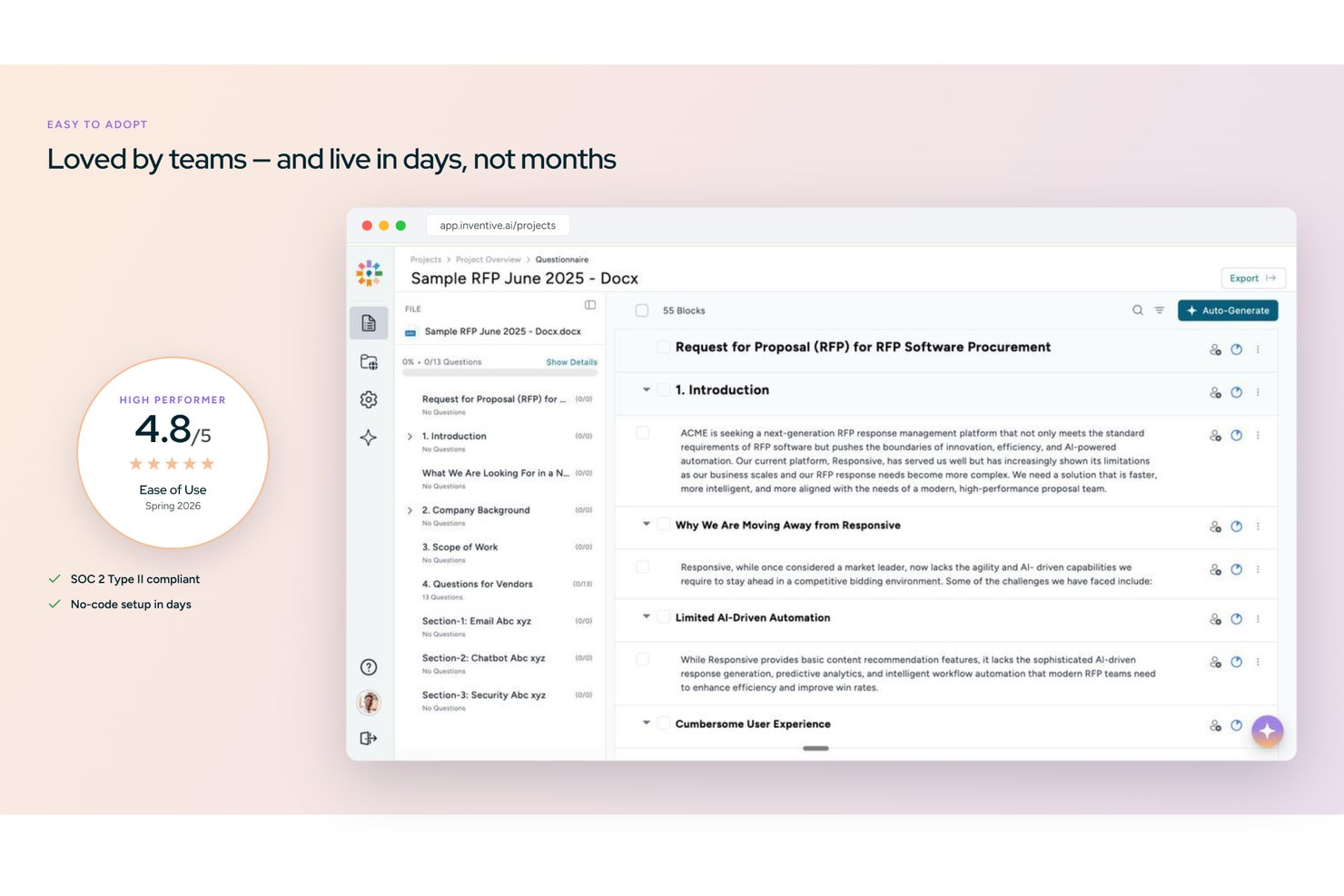
Inventive AI is an AI-native RFP response platform that automates draft generation across RFPs, RFIs, DDQs, and security questionnaires using a centralized knowledge hub, conflict detection, and multi-format import and export.
Who Is Inventive AI Best For?
Inventive AI is a strong fit for proposal and pre-sales teams at mid-market and enterprise companies managing a high volume of RFPs, RFIs, and security questionnaires.
Why I Picked Inventive AI
I picked Inventive AI as one of the best because its AI Content Manager actively catches conflicting information across connected sources before any response goes out. If a pricing page and a product deck give different answers to the same RFP question, the platform flags it inline. I also like the Analyzer Agent, which runs a compliance pass on finished drafts, checking that every requirement is addressed and that tone stays consistent across sections.
Inventive AI Key Features
- Unified knowledge hub: Centralizes company Q&A pairs, product docs, and prior RFPs for AI-driven response generation.
- Analyzer Agent: Runs review cycles to confirm every RFP requirement is addressed and checks tone consistency in drafts.
- Multi-format export: Allows export of completed responses in Word, Excel, PDF, CSV, and branded templates.
- Jira and Salesforce integration: Syncs proposal and project data directly with project management and CRM systems.
Inventive AI Integrations
Inventive AI offers native integrations with Salesforce, Jira, Slack, Microsoft 365, Google Workspace, and HubSpot. An API is available for custom integrations.
Pros and Cons
Pros:
- Knowledge hub flags and refreshes stale answers
- AI drafts responses across RFPs and DDQs
- Conflict detection catches contradictory proposal content automatically
Cons:
- Analytics reporting less mature than established competitors
- Newer platform with a smaller user community

Best for zero-maintenance AI content libraries
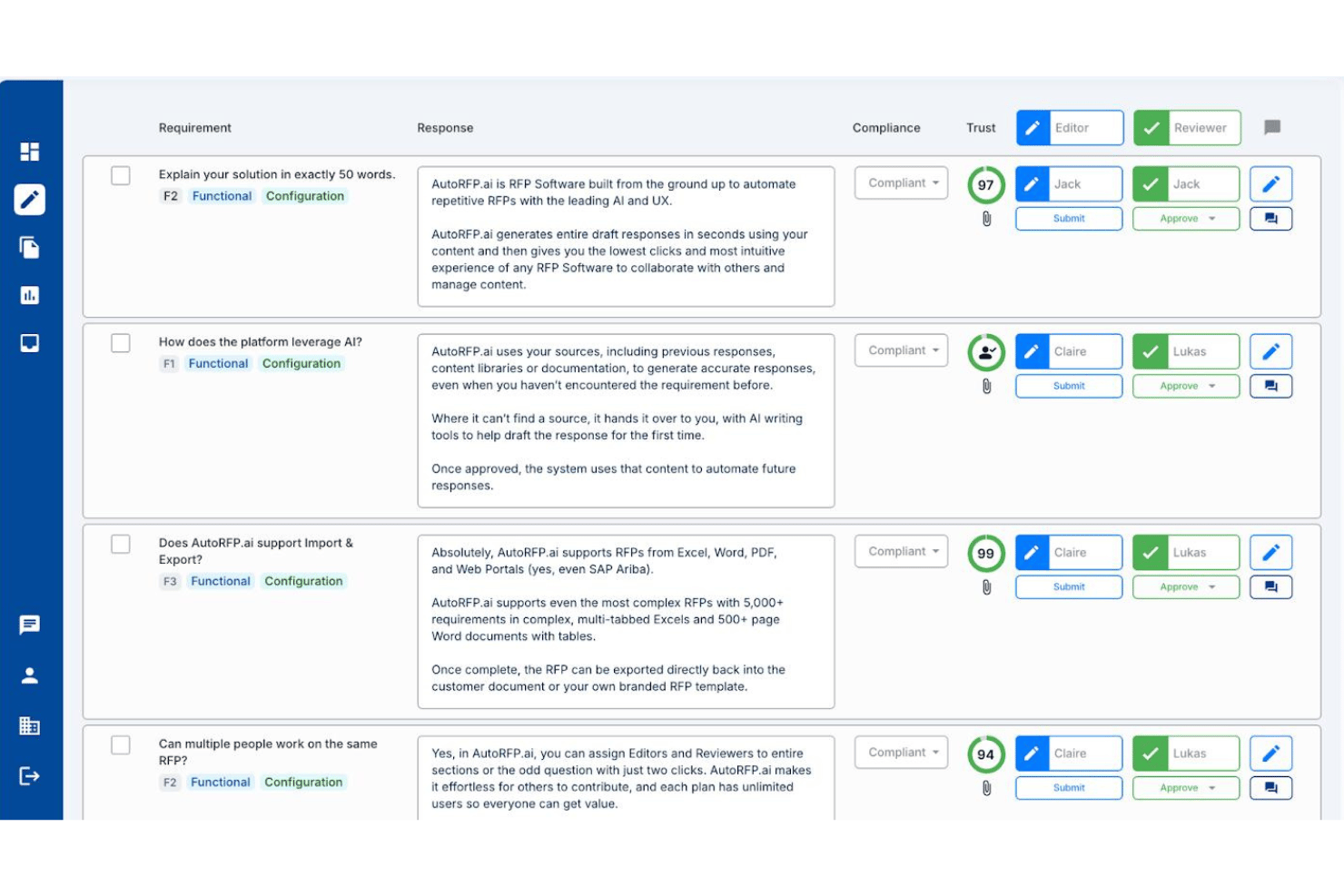
AutoRFP.ai is an AI-native RFP response platform that automates first-draft generation, manages cross-functional SME workflows, and maintains a self-building content library across RFPs, DDQs, and security questionnaires.
Who Is AutoRFP.ai Best For?
AutoRFP.ai suits proposal teams that need AI to handle content library upkeep automatically, without anyone manually maintaining a Q&A database.
Why I Picked AutoRFP.ai
AutoRFP.ai earns its spot on my shortlist because it's the only RFP tool I've seen that genuinely removes the content library maintenance burden. Instead of manually curating a Q&A database, the platform learns from every approved response and syncs automatically from sources like SharePoint, Confluence, and Notion. I also like the Trust Scores attached to every AI draft, which flag confidence levels and cite sources so reviewers aren't guessing at answer quality.
AutoRFP.ai Key Features
- Go/No-Go analysis: Scans incoming RFP documents for deal-breakers and automates bid/no-bid decisions before your team commits any resources.
- Portal Agent with browser extension: Responds directly inside procurement portals like SAP Ariba, Coupa, and Workday via a Chrome or Edge extension, without rebuilding documents.
- Slack and Teams @mention workflow: Lets proposal managers tag SMEs directly inside Slack or Microsoft Teams to collect answers without pulling contributors into a separate platform.
- Multilingual response support: Drafts and localizes responses across 44+ languages, including automatic localization between US and UK English.
AutoRFP.ai Integrations
AutoRFP.ai advertises 18+ integrations, including Salesforce, SharePoint, Confluence, Notion, Slack, Microsoft Teams, Drata, and Vanta. It also supports REST API, webhooks, and MCP Server connections for custom workflows.
Pros and Cons
Pros:
- Trust Scores and citations on every answer
- Fast onboarding with first drafts in 48 hours
- AI content library requires zero maintenance
Cons:
- Outcome analytics don’t track win-loss quality
- No Gantt charts or PM tool integration

Best for complex enterprise project workflows
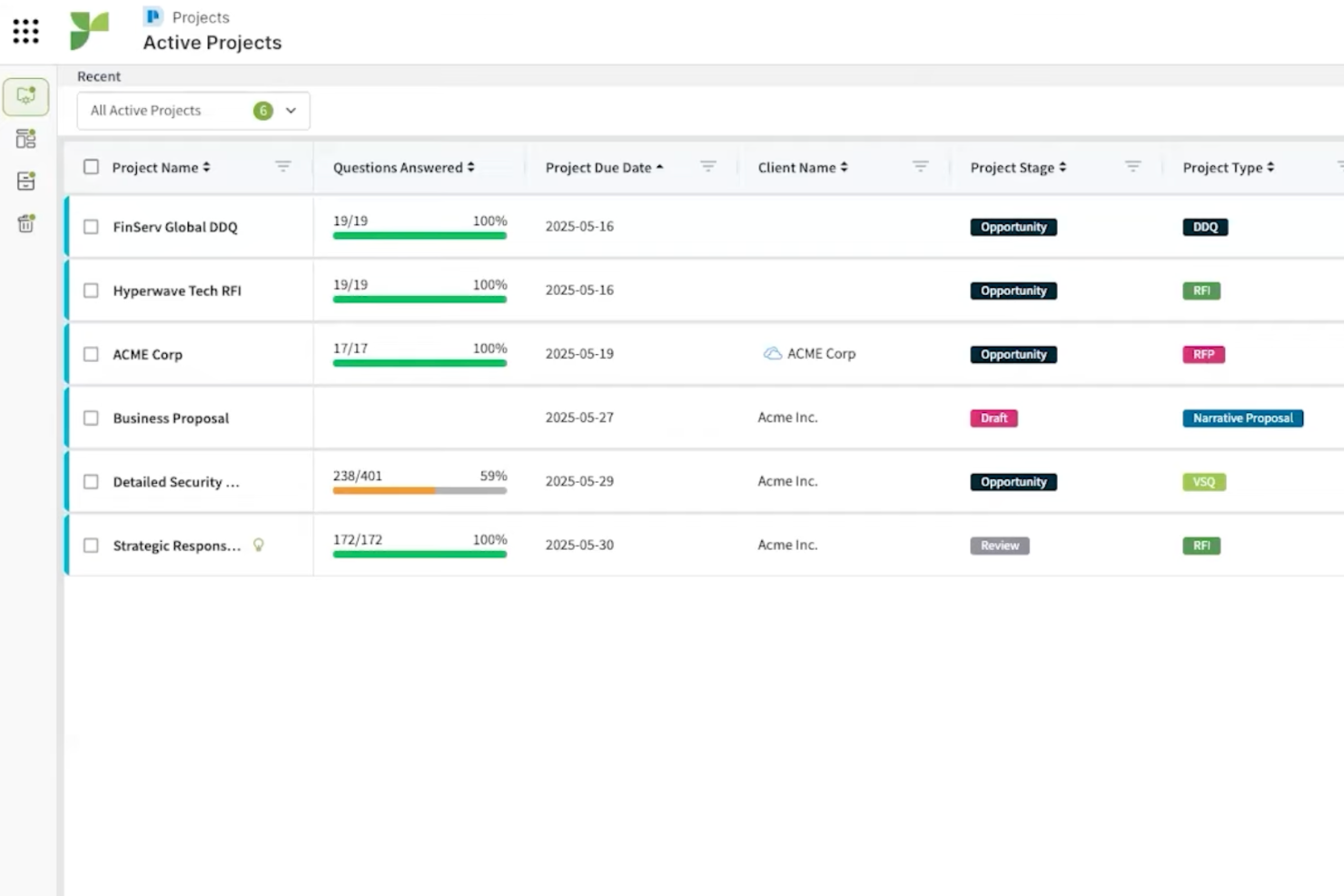
Responsive is an enterprise RFP software platform designed to centralize request management, response workflow automation, integrate with business tools, and support large teams handling high-volume, complex proposals.
Who Is Responsive Best For?
Responsive suits large enterprises and proposal teams managing high-volume, multi-departmental RFP and compliance workflows.
Why I Picked Responsive
I picked Responsive as one of the best RFP response software because it handles complex enterprise project workflows with customizable workspaces, granular permissions, and automated response libraries. I use it to coordinate large teams by assigning tasks across business units, and its workflow automation lets my team simplify review, compliance, and approvals on high-stakes RFPs.
Responsive Key Features
- AI-enabled content suggestion: Suggests relevant answers from your content library as you fill out RFPs.
- Version tracking: Keeps a record of all edits and updates to project documents.
- Built-in e-signature workflow: Lets you collect signatures directly within proposals and responses.
Responsive Integrations
Responsive offers more than 30 native integrations, including Salesforce, Slack, Google Drive, Microsoft 365, HubSpot, Box, OneDrive, SharePoint, and Dropbox, and provides an API for custom integrations.
Pros and Cons
Pros:
- Handles multi-step approval and compliance workflows
- Offers permission controls for large teams
- Supports an automated response library for faster replies
Cons:
- Can be too complex for some SME
- Limited self-service trial or demo options
Best for simultaneous multi-user co-authoring
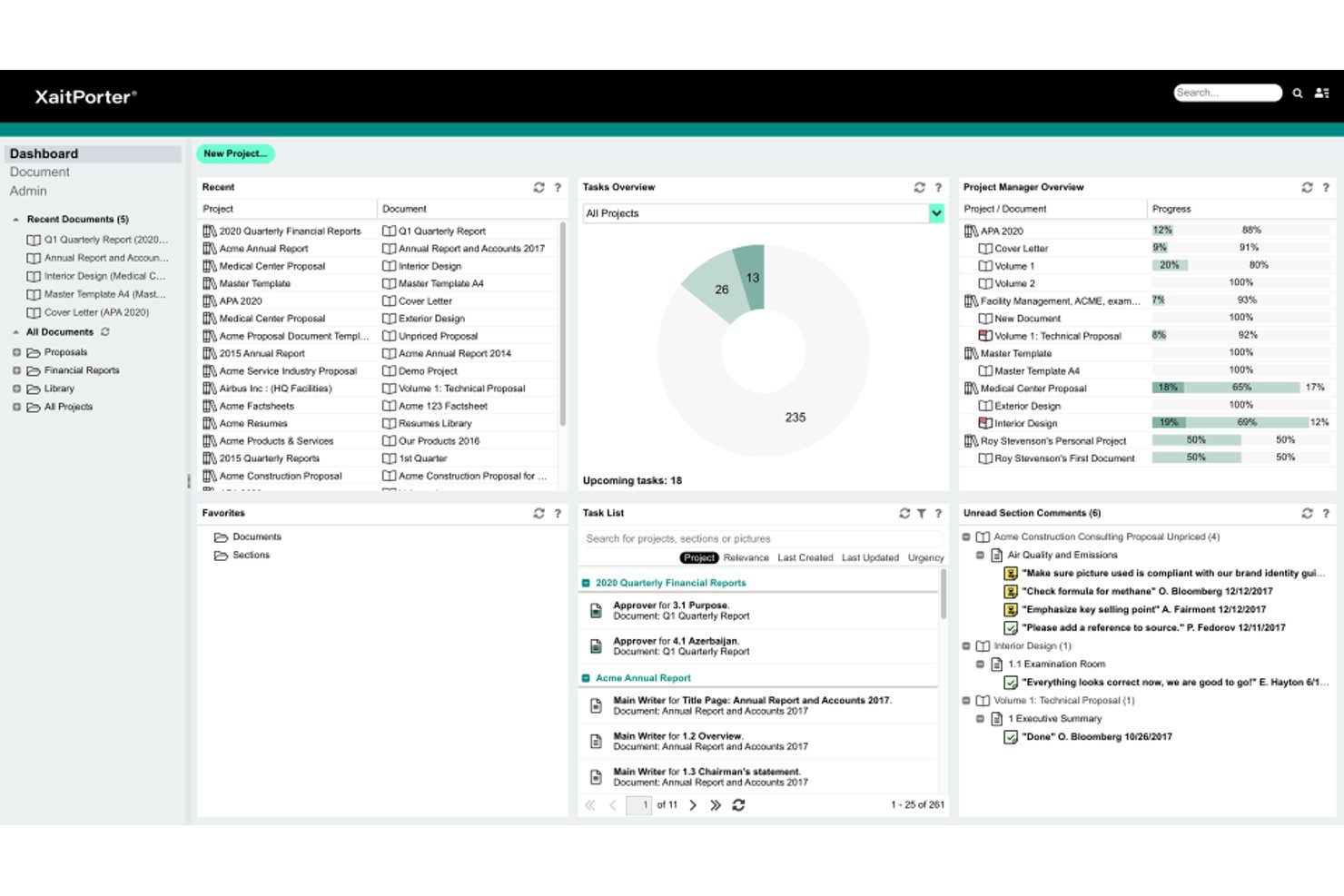
XaitPorter is a proposal and RFP response platform that brings together real-time co-authoring, structured document assembly, AI-powered content reuse, and automated formatting for large, complex bids and tenders.
Who Is XaitPorter Best For?
XaitPorter is a strong fit for enterprise proposal and bid teams managing large, complex tender responses that require many contributors working in parallel.
Why I Picked XaitPorter
XaitPorter earns its spot on my shortlist because no other tool I've seen handles simultaneous multi-user co-authoring at the scale that large tenders actually demand. One documented Aker BP proposal had 34 writers and 41 reviewers, all working in the same document at once, with section-level permissions keeping sensitive content locked down. I also like that XaitAI surfaces pre-approved answers from a shared content library based on writing context, so contributors aren't duplicating effort across sections.
XaitPorter Key Features
- Automated formatting and numbering: XaitPorter automatically handles document formatting, numbering, and indexing so contributors don't need to manage layout manually.
- Section-level permissions: Access to individual document sections can be restricted by role, keeping sensitive content locked to the right contributors.
- Audit trail: Every action in the document is logged, giving project leads a full record of changes, approvals, and contributor activity.
- Salesforce integration: XaitPorter connects directly to Salesforce, letting proposal teams manage RFP work from within their existing CRM.
XaitPorter Integrations
XaitPorter has documented integrations with Salesforce and XaitCPQ, keeping proposal work in the CRM and pricing aligned with proposal content. It also offers an open API for custom connections.
Pros and Cons
Pros:
- Dashboards clarify section ownership and approvals
- Concurrent editing supports large bid teams
- Reusable answer library cuts repeat drafting
Cons:
- AI suggestions need curated, current content
- Tables and formatting can need manual fixes
PandaDoc
Best for end-to-end document lifecycles

PandaDoc is a document automation platform for RFP teams that handles document creation, template management, eSignatures, approval workflows, and collaboration for proposals and contracts.
Who Is PandaDoc Best For?
PandaDoc is a great match for sales and proposal teams at growing businesses who need an all-in-one platform to manage RFP and contract documents.
Why I Picked PandaDoc
I picked PandaDoc as one of the best because I can manage every stage of the RFP document lifecycle in one platform, including creation, workflow routing, and secure eSignatures. My team uses its template and content library features to standardize proposal responses at scale. I rely on its built-in approval workflows to keep contract compliance tight across global teams.
PandaDoc Key Features
- Form builder: Lets you create fillable forms to collect RFP data.
- Document analytics: Tracks when recipients open, view, or interact with documents.
- Bulk send: Send a document to many recipients at once for RFP distribution.
PandaDoc Integrations
PandaDoc offers more than 30 native integrations, including Salesforce, HubSpot, Pipedrive, Zoho CRM, Slack, Dropbox, QuickBooks, PayPal, and Stripe. An API is available for custom integrations.
Pros and Cons
Pros:
- Native CRM integrations for pipeline sync
- Multi-user template library for standardization
- End-to-end document tracking with timestamps
Cons:
- Version control lacks collaboration features
- Limited offline access for editing documents


AutogenAI is an AI proposal writing platform that helps bid and proposal teams qualify opportunities, draft RFP responses, manage submission workflows, and review content against solicitation requirements.
Who Is AutogenAI Best For?
AutogenAI is a strong fit for bid and proposal teams at mid-to-large organizations that respond to high-stakes, complex RFPs and need AI-driven drafting from first outline to submission-ready document.
Why I Picked AutogenAI
I picked AutogenAI as one of the best because it covers the full proposal response arc in a single platform, from using Extract to shred an incoming RFP and surface every requirement, to generating a structured first draft through its Ideator and Editor using your own knowledge library. What I really like is the Gamma Review stage, which checks your finished response against the solicitation's scoring criteria before submission, so gaps don't slip through at the last minute.
AutogenAI Key Features
- Research Assistant: Gathers and analyzes information from your knowledge library and internet sources to inform proposal strategy before you write a word.
- Black Hat Review: Analyzes an incoming RFP to surface how your response can stand out from the competition.
- Storyboard: Turns complex RFP requirements into a structured narrative outline that guides your first draft.
- Salesforce integration: Creates proposals directly from opportunities in Salesforce, keeping your BD pipeline and proposal workflow connected.
AutogenAI Integrations
AutogenAI offers native integrations with SharePoint and Salesforce, plus a public API for custom integrations. It also supports Zapier connections.
Pros and Cons
Pros:
- Organizes proposal reviews and bid tasks
- Finds reusable case studies in the library
- Speeds first drafts for tender responses
Cons:
- Generated drafts can repeat or misstate content
- Doesn’t create or distribute buyer-side solicitations

Gainfront's Sourcing & RFx is a procurement sourcing platform that manages RFI, RFP, and RFQ events from creation through supplier evaluation and award, with AI-generated event frameworks, weighted scoring, and a self-learning response knowledge base.
Who Is Gainfront Best For?
Gainfront is a strong fit for procurement teams that run formal sourcing events and need structured supplier scoring built into the RFP process.
Why I Picked Gainfront
I've included Gainfront in my top picks because it's built specifically around procurement-led sourcing events, where supplier scoring is part of the RFP process itself, not an afterthought. I like how its weighted scoring routes financial sections to finance reviewers and operational sections to operations, then consolidates everything into a single percentage score for side-by-side comparison. Its AI also generates category-aligned event frameworks from sourcing requirements, so teams running RFI, RFP, and RFQ events aren't starting from a blank page.
Gainfront Key Features
- Self-learning knowledge base: Ingests policies, certifications, supplier records, and contract documents, then synthesizes answers across multiple sources using NLP.
- Confidence-tiered answer routing: Automatically flags responses as high, medium, or low confidence, escalating low-confidence questions to an SME with relevant source documents attached.
- Itemized BOM sourcing events: Converts multi-plant bills of material into structured sourcing events linked to reconciled supplier records.
- Risk- and diversity-aware supplier discovery: Filters and invites suppliers based on reliability scores, risk profiles, diversity certifications, and ESG data at the RFP stage.
Gainfront Integrations
Native integrations are not clearly documented. Gainfront describes connections to CRM systems, procurement platforms, supplier databases, external certification registries, and document repositories.
Pros and Cons
Pros:
- RFQ forms helped identify suitable suppliers
- AI reuses accepted answers and flags stale content
- Weighted scoring consolidates cross-functional evaluations
Cons:
- One reviewer found navigation confusing
- Users reported slow performance and occasional bugs


Tribble is an AI-driven knowledge management platform tailored for capturing, organizing, and retrieving tribal knowledge from agent interactions and internal workflows.
Who Is Tribble Best For?
Tribble is a great fit for customer support and operations teams in fast-growing organizations that need to capture and leverage institutional knowledge.
Why I Picked Tribble
I picked Tribble as one of my top choices because I want my agents to be able to capture nuanced, in-the-moment solutions and lessons learned from real cases. I use its agent-driven capture tools to document on-the-job tribal knowledge without disrupting workflow. Tribble’s AI then organizes and surfaces this information so my team can quickly find relevant answers as new projects and RFPs arise.
Tribble Key Features
- AI-powered search: Find relevant knowledge snippets instantly using natural language queries.
- Integration with chat platforms: Capture and retrieve knowledge directly within Slack and Microsoft Teams.
- Automated content suggestions: Surface related articles and solutions during RFP drafting.
Tribble Integrations
Tribble offers native integrations with Salesforce, HubSpot, SharePoint, Google Drive, Confluence, Notion, Slack, Microsoft Teams, Gong, Clari, DocuSign, Box, and OneDrive, and an API is available for custom integrations.
Pros and Cons
Pros:
- Role-based permissions for sensitive RFP content
- AI organizes and tags tribal knowledge fast
- Agents can capture live knowledge during projects
Cons:
- Lacks template support for standardized RFPs
- Requires manual maintenance of the knowledge base

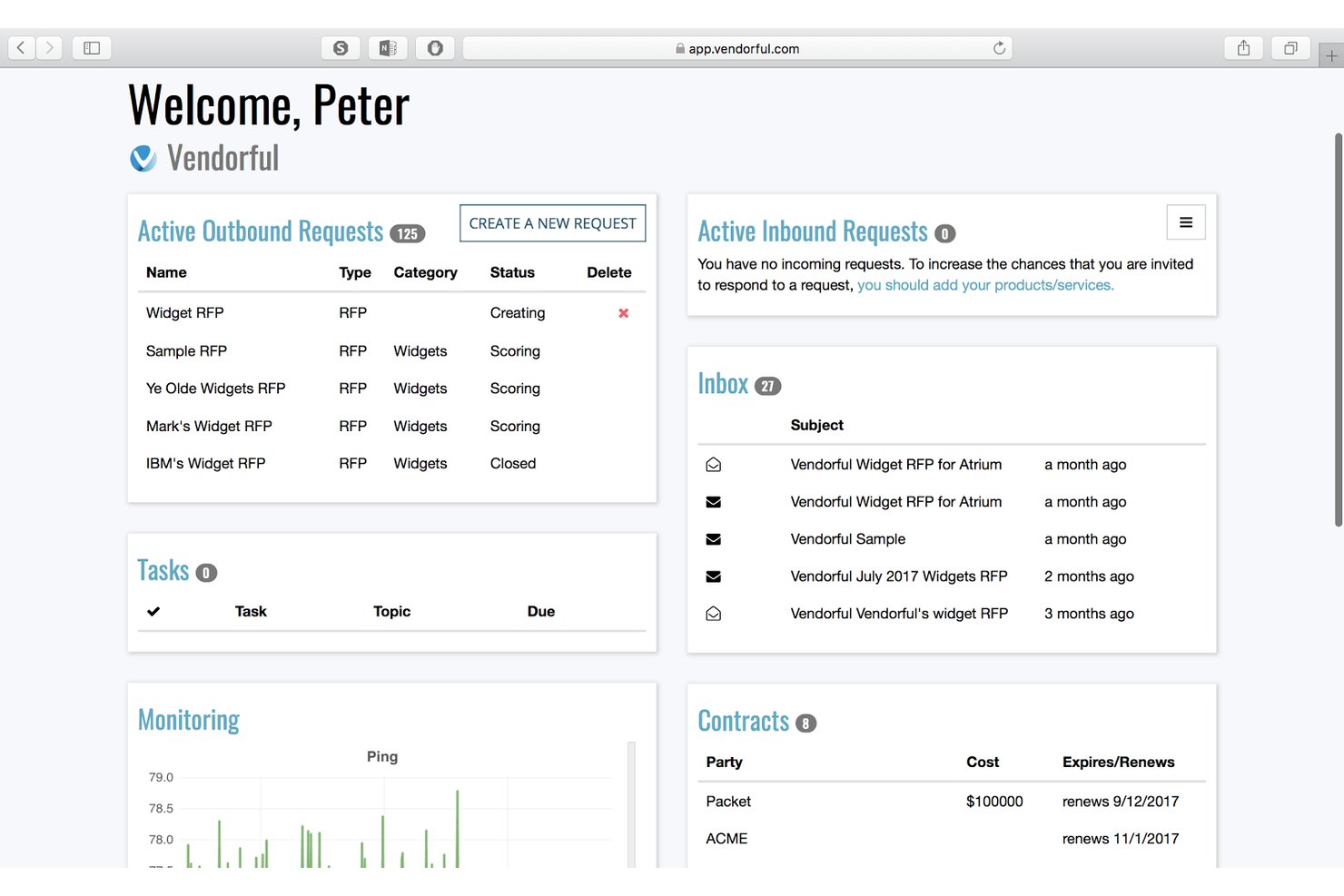
Vendorful is an e-RFX and RFP response management platform that combines a drag-and-drop RFP builder, a reusable content repository, AI-assisted response drafting, blind vendor scoring, and supplier relationship management tools.
Who Is Vendorful Best For?
Vendorful is a strong fit for procurement teams that manage high-volume sourcing events and need a structured, bias-reducing evaluation process across multiple stakeholders.
Why I Picked Vendorful
I picked Vendorful as one of the best because its blind scoring feature is something I genuinely don't see in many RFP tools. When my team runs a sourcing event with multiple evaluators, each person scores vendor responses without knowing which supplier submitted them, which removes the favoritism and anchoring bias that skew results in shared spreadsheets. Pair that with side-by-side weighted scoring and automatic proposal aggregation, and you get an evaluation process that actually holds up at scale.
Vendorful Key Features
- Drag-and-drop RFX builder: Build RFP, RFQ, RFI, and IFB events using a questionnaire builder with reusable templates, weighted questions, and bulk copy-and-paste.
- AI Assistant for response drafting: Generate response suggestions trained on hand-selected content from your knowledge repository, turning writing into an editing task.
- Supplier relationship management: Track supplier data, performance KPIs, contracts, and onboarding workflows in a single connected module.
- Enterprise system integrations: Connect with SAP, Ariba, Coupa, Oracle, and other procurement platforms via REST API or built-in iPaaS options.
Vendorful Integrations
Vendorful integrates with SAP, Ariba, Coupa, Oracle, PeopleSoft, Bravo, BirchStreet, and Archer. It also offers a REST API and built-in iPaaS options for connecting supplier data with other systems.
Pros and Cons
Pros:
- Reusable content speeds questionnaire responses
- Weighted comparisons consolidate team evaluations
- Blind scoring reduces evaluator anchoring
Cons:
- Formal approval routing remains unclear
- AI answers need manual refinement
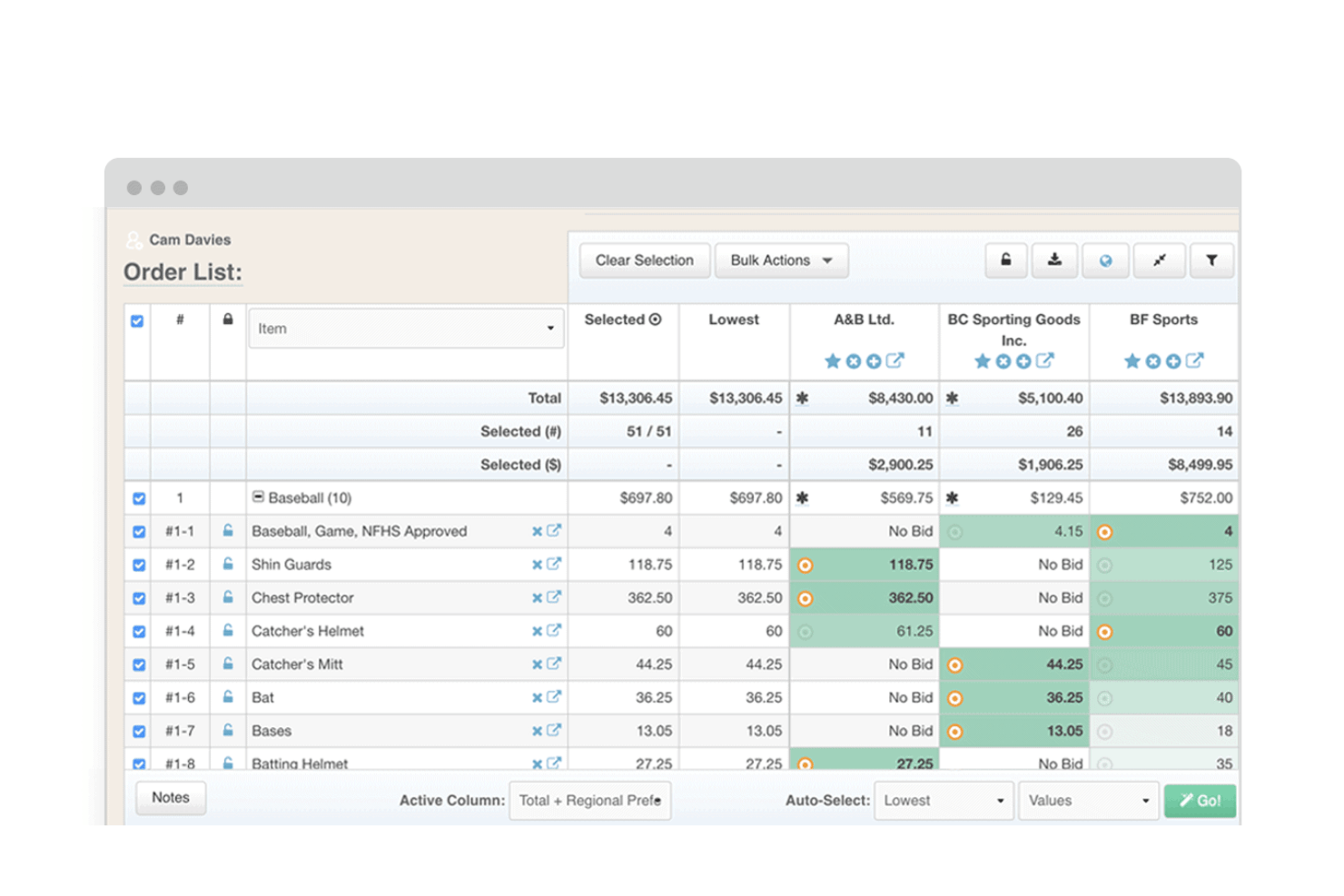
Euna Procurement is a public-sector eProcurement platform that covers sourcing, solicitation creation, supplier outreach, proposal evaluation, and contract and invoice management for government procurement teams.
Who Is Euna Procurement Best For?
Euna Procurement is a strong fit for government and public-sector procurement teams that need to run compliant sourcing processes, from RFP creation and supplier outreach to proposal evaluation and contract management.
Why I Picked Euna Procurement
I picked Euna Procurement as one of the best because it's purpose-built for exactly what government procurement teams do: issuing solicitations and running structured, auditable evaluations. The Solicitation Builder supports reusable templates with dynamic placeholders, stakeholder section assignments, and automatic change logs, so your team can produce compliant RFPs without starting from scratch each time. I also like that the digital scorecards let evaluators capture scores, comments, and pricing comparisons in one shared workspace, which keeps bid evaluations organized and defensible.
Euna Procurement Key Features
- Solicitation broadcasting: Push solicitations to suppliers through the Euna Supplier Network and distribute updates and addenda directly in-platform.
- Supplier registration and profiles: Suppliers self-register and submit commodity codes, certifications, and diversity classifications into centralized, searchable records.
- AI Solicitation Advisor: Reviews and refines solicitation documents using AI before they're published to flag issues and improve compliance.
- Procurement request intake: Receive, assign, prioritize, and approve procurement requests in a centralized queue with automated status updates.
Euna Procurement Integrations
Euna Procurement connects to 25+ ERP systems, including Tyler Munis, Skyward, and Frontline. It also supports APIs and webhooks, with 150+ API routes for custom integrations.
Pros and Cons
Pros:
- Users report time savings over manual procurement
- Centralized bids and deadlines improve tracking
- Scorecards organize evaluator reviews
Cons:
- Closed submissions cannot be revised after deadlines
- No reusable proposal-answer library is documented
Annen RFP-programvare
Her er noen flere alternativer for RFP-programvare som ikke kom med på kortlisten min, men som fortsatt er verdt å se nærmere på:
- Iris
For cited AI drafting with source traceability
- Loopio
For automating RFP response libraries
- Better Proposals
For high-conversion rapid signatures
- Expedience Software
For native Word-based response automation
- Upland Qvidian
For reusable content-driven RFP responses
- VisibleThread
For deterministic compliance matrix shredding


How I Evaluate RFP Software
I split my evaluation into three parts, weighting core functionality most: draft reusable responses and score bids against criteria. Next, I look for standout features such as AI answer drafting. Finally, I consider onboarding, content migration, and pricing value for the team.
Core Functionality (Table Stakes For This List)
When I'm selecting tools for my list, I score each one on a scale from 0 (does not offer the functionality) to 5 (excels in this area) for each core functionality listed below. I then convert the total into a percentage to help assess each tool's overall fit, with extra weight on any functionalities I’ve deemed essential.
- RFP Document Creation (Essential): I look for customizable, reusable templates that structure RFPs, RFIs, and RFQs, including sections teams can adapt for each sourcing project.
- Proposal Response Management (Essential): I assess how teams draft and organize answers, reuse approved content, and coordinate responses when subject-matter experts own different sections.
- Vendor Evaluation: I look for defined criteria, weighted scoring, and consolidated evaluator input to compare bids consistently and document selection decisions.
- Collaboration & Approvals: I check for commenting, revision visibility, and approval routing so contributors and reviewers can complete their steps before submission deadlines.
- RFP Tracking: I consider whether teams can see ownership, deadlines, and status across multiple active RFPs or proposal responses in one place.
- Content Library: I assess how easily teams can search, categorize, and maintain reusable answers and past proposal materials, including version history.
Once I have a list of tools that meet the criteria, I consider what sets each platform apart.
Differentiating Factors (What Sets Vendors Apart)
Here's how I compare and contrast different vendors:
Standout Features
I check whether a tool's AI answer engine actually learns from your past proposals or just offers generic suggestions. The best ones draft first-pass responses that reflect your organization's voice and previous wins. I also evaluate auto-parsing, since manually re-keying questions from a 200-page RFP is a real time sink. Tools like Loopio and Responsive handle this differently, so I compare how cleanly each one extracts and categorizes incoming requirements. Finally, I look at branded proposal output to see if finalized responses export as polished, on-brand deliverables without extra design work.
Beyond Features
I evaluate how well each tool fits a team's existing tech stack, especially CRM and document storage integrations. A proposal tool that syncs with Salesforce or HubSpot keeps response activity tied to pipeline data, while SharePoint or Google Drive connectivity prevents duplicate content libraries. I also look at onboarding support, since migrating years of past proposals into a new content library can stall adoption if the vendor doesn't offer hands-on migration help. Security matters too: role-based permissions and audit trails protect sensitive pricing and legal content, which is non-negotiable for regulated industries.
Slik velger du RFP-programvare
Det er lett å gå seg vill i lange funksjonslister og komplekse prisstrukturer. For å hjelpe deg med å holde fokus mens du arbeider deg gjennom den unike prosessen for valg av programvare, får du her en sjekkliste over faktorer du bør ha i tankene:
| Faktor | Hva du bør vurdere |
|---|---|
| Skalerbarhet | Vil programvaren tilpasse seg etter hvert som volumet og teamstørrelsen øker? Kan den støtte flere avdelinger eller regioner over tid? |
| Integrasjoner | Kan den kobles direkte til CRM-systemet, dokumenthåndteringen og kommunikasjonsplattformene du allerede bruker? |
| Tilpasningsmuligheter | Kan arbeidsflyter, felt og dokumentformater tilpasses de unike prosessene og godkjenningsstrukturene dine? |
| Brukervennlighet | Er brukergrensesnittet enkelt for ikke-tekniske brukere? Kan interessenter samarbeide uten ekstra opplæring eller bistand fra IT? |
| Implementering og opplæring | Hvor lang tid tar oppsettet? Hvilket nivå av leverandørstøtte og hvilke ressurser er tilgjengelige for å veilede utrullingen? |
| Kostnad | Er prisnivåene transparente, uten skjulte gebyrer? Øker kostnadene på en rimelig måte etter hvert som bruken øker? |
| Sikkerhetstiltak | Tilbyr leverandøren kryptering, tilgangskontroller og revisjonsspor som oppfyller standardene dine for databeskyttelse? |
| Tilgjengelig kundestøtte | Hvilke støttekanaler finnes, og er de tilgjengelige i de kritiske prosjektperiodene eller rundt viktige frister? |
Hva er RFP-programvare?
RFP-programvare er et digitalt verktøy som hjelper organisasjoner med å administrere hele prosessen med å svare på eller sende ut forespørsler om tilbud. Den sentraliserer opprettingen av dokumenter, følger opp frister, forbedrer samarbeidet og organiserer tilbudsdata slik at de blir enkle å gjennomgå og sende inn. Denne programvaren reduserer feil, forbedrer koordineringen i teamet og sikrer samsvar med kjøpernes krav under krevende anskaffelsesprosesser.
Funksjoner i RFP-programvare
Ved valg av RFP-programvare bør du se etter følgende viktige funksjoner:
- Sentralisert dokumentlager: Lagre, organiser og administrer alle RFP-er, vedlegg og relaterte materialer på ett sikkert sted for enkel tilgang og versjonskontroll.
- Samarbeidsverktøy: Gjør det mulig for flere interessenter å bidra, kommentere eller gjennomgå svar i samme arbeidsområde, slik at forvirring og dobbeltarbeid reduseres.
- Oppfølging av frister og milepæler: Angi frister, tildel oppgaver og utløs påminnelser for å sikre at ingen deler av svaret blir glemt eller sendt inn for sent.
- Malfunksjoner: Opprett, rediger og gjenbruk svarmaler for å fremskynde tilbudsprosessen og sikre et konsekvent budskap og en enhetlig merkevareprofil.
- Innholdsbibliotek: Lagre godkjente, ferdigskrevne svar, selskapsinformasjon og standardtekst for rask innsetting i nye svar.
- Tilpasset arbeidsflytdesign: Tilpass tildeling av oppgaver og godkjenningsfaser til organisasjonens prosesser for gjennomgang og endelig godkjenning av RFP-er.
- Import- og eksportfunksjonalitet: Hent raskt inn RFP-detaljer fra ulike filformater, og eksporter svar i formatene kunden krever, uten formateringsproblemer.
- Kontroll av brukertillatelser: Definer detaljerte tilgangsnivåer og forfatterrettigheter for hver bruker for å beskytte sensitive data og sikre ansvarlighet.
- Revisjonsspor og aktivitetslogger: Følg endringer, redigeringer og godkjenninger i sanntid for å ivareta samsvar og gi oversiktlig prosjektstyring.
Vanlige AI-funksjoner i RFP-programvare
I tillegg til standardfunksjonene i RFP-programvare som er nevnt ovenfor, tar mange av disse løsningene i bruk AI med funksjoner som:
- Automatiserte svarforslag: AI skanner tidligere svar og biblioteker for å foreslå tilpassede svar på nye RFP-spørsmål umiddelbart, noe som reduserer tiden som brukes på manuell utforming.
- Intelligent innholdstilpasning: AI analyserer RFP-krav og kobler dem sammen med det mest relevante forhåndsgodkjente innholdet eller de rette fagekspertene i organisasjonen.
- Smart dokumenttolkning: AI leser og strukturerer innkommende RFP-dokumenter og henter ut viktige kriterier, frister og samsvarskrav for rask oppsett av svar.
- Kvalitetspoeng for svar: AI gjennomgår utkast og gir svarene poeng for tydelighet, relevans og samsvar, samtidig som mulige svakheter eller uoverensstemmelser flagges i sanntid.
- Prediksjon av vinnersannsynlighet: AI bruker historiske data om vunne og tapte tilbud samt egenskaper ved tilbudet for å anslå sannsynligheten for å vinne en mulighet før ressurser bindes opp.
Fordeler med RFP-programvare
Implementering av RFP-programvare gir flere fordeler for teamet og virksomheten din. Her er noen av fordelene du kan se frem til:
- Raskere svartider: Automatiserte arbeidsflyter, maler og innholdsbiblioteker reduserer manuelt arbeid og fremskynder hele tilbudsprosessen.
- Bedre samsvar: Innebygde revisjonsspor, godkjenningsflyter og strukturert datahåndtering hjelper teamet med å oppfylle kundens og myndighetenes krav.
- Bedre samarbeid: Delte arbeidsområder og rollebaserte tillatelser legger til rette for godt teamarbeid og tydelig ansvar på tvers av avdelinger.
- Mer konsekvent innhold: Malstyring og standardiserte svarbiblioteker sikrer at tilbudene har et konsekvent språk og en jevn kvalitet.
- Enklere fremdriftsoppfølging: Friststyring og statusoppdateringer i sanntid gjør det mulig å følge med på milepæler og håndtere flaskehalser før de blir problemer.
- Redusert risiko for feil: Sentralisert dokumentkontroll og automatisert versjonssporing minimerer feil og behovet for endringer i siste liten.
- Høyere vinnerandel: Smarte rapporter, AI-drevet innsikt og datadrevet veiledning i tilbudsarbeidet gjør det mulig å konsentrere ressursene om de mest lovende RFP-mulighetene.
Kostnader og priser for RFP-programvare
Valg av RFP-programvare krever en forståelse av de ulike prismodellene og abonnementene som er tilgjengelige. Kostnadene varierer basert på funksjoner, teamstørrelse, tillegg og mer. Tabellen nedenfor oppsummerer vanlige abonnementer, gjennomsnittsprisene deres og typiske funksjoner som er inkludert i RFP-programvareløsninger:
Sammenligningstabell for abonnementer for RFP-programvare
| Plantype | Gjennomsnittlig pris | Vanlige funksjoner |
|---|---|---|
| Gratisabonnement | $0 | Grunnleggende dokumentlagring, tilgang for én bruker, begrensede svarsmaler og grunnleggende oppgavehåndtering. |
| Personlig abonnement | $19-$50 per bruker/måned | Flere malalternativer, sporing av tidsfrister, innholdsbibliotek, e-postvarsler og eksportfunksjoner. |
| Forretningsabonnement | $60-$100 per bruker/måned | Avansert samarbeid, tilpasning av arbeidsflyter, analysedashbord, CRM-integrasjoner og prioritert brukerstøtte. |
| Virksomhetsabonnement | $300-$1000+/måned | Tilpassede arbeidsflyter, ubegrenset antall brukere, avanserte tillatelser, SSO, revisjonsspor, dedikert introduksjon og SLA-er. |
Vanlige spørsmål om RFP-programvare
Her er noen svar på vanlige spørsmål om RFP-programvare:
Kan RFP-programvare bidra til å håndtere tidsfrister og oppgavefordeling i teamet?
Ja, de fleste RFP-programmer inkluderer oppgavefordeling, milepælsporing, svarhåndtering og automatiske påminnelser for å holde alle i rute. Dette gjør det enklere å koordinere arbeidet, unngå overskredne tidsfrister og håndtere tilbud med flere bidragsytere.
Hvor sikre er dataene som lagres i RFP-programvare?
De fleste leverandører av RFP-programvare bruker sterk kryptering, SOC 2, strenge tilgangskontroller og revisjonslogger for å beskytte dataene dine. Gå alltid gjennom leverandørens sikkerhetsspørreskjemaer, sertifiseringer og retningslinjer for å sikre at de samsvarer med organisasjonens krav til databeskyttelse.
Er det mulig å integrere RFP-programvare med andre forretningsverktøy?
Ja, mange RFP-løsninger tilbyr integrasjoner med CRM-systemer, dokumenthåndteringssystemer og samarbeidsplattformer. Denne tilkoblingen reduserer manuell dataregistrering, bidrar til å opprettholde én felles sannhetskilde og forenkler RFP-arbeidsflytene på tvers av viktige forretningssystemer.
Støtter RFP-programvareplattformer administrasjon av innholdsbibliotek?
Ja, et innebygd innholdsbibliotek er en standardfunksjon i de fleste RFP-programmer. Det lar deg lagre godkjente svar, tekniske dokumenter og gjenbrukbare ressurser, noe som gjør det mye raskere å utarbeide tilbud og sikrer konsistens på tvers av svarene.
Hva bør jeg se etter når jeg vurderer RFP-programvare for et større team?
Se etter skalerbar brukeradministrasjon, avanserte tillatelser, skybasert tilgang og omfattende introduksjonsressurser. Større team har ofte nytte av tilpassede arbeidsflyter og avansert analyse for å spore aktivitet og resultater på tvers av avdelinger.