

De 10 beste Pomodoro-tidtakerappene gjennomgått i 2026

Kortliste over de beste Pomodoro-timerappene


Føler du deg overveldet av endeløse oppgaver og stadig nærmere tidsfrister? Du er ikke alene. Som prosjektleder kan det være en stor utfordring å balansere prioriteringer og holde teamet fokusert. Det er her en Pomodoro-timerapp kommer til nytte. Italieneren Francesco Cirillo fant opp Pomodoro-teknikken ved hjelp av en kjøkkentimer formet som en tomat. Den hjelper deg med å dele opp arbeidet i håndterbare deler, noe som øker produktiviteten og reduserer utbrenthet.
Etter min erfaring kan det å finne riktig verktøy utgjøre en stor forskjell. Jeg har testet og vurdert ulike Pomodoro-apper uavhengig av leverandørene, slik at du får en objektiv oversikt over de beste tilgjengelige alternativene.
I denne artikkelen får du vite hvilke alternativer som passer ulike behov og preferanser. Enten du ser etter enkelhet eller avanserte funksjoner, finnes det noe her for deg og teamet ditt.
Why Trust Our Software Recommendations
Our team has been testing and reviewing software since 2012. As project managers ourselves, we know how difficult—and important—it is to choose the right software.
For this guide, we evaluated tools using hands-on testing and independent research, scoring tools using our selection criteria. We also draw on insights from industry thought leaders and practicing project management experts.
Our reviews reflect our human editorial judgment, not a sales pitch.
Expert reviewers:
Sammenligningstabell for Pomodoro-timerapper
Denne sammenligningstabellen oppsummerer prisopplysningene for mine beste utvalgte Pomodoro-timerapper.
| Tool | Best For | Trial Info | Price | ||
|---|---|---|---|---|---|
| 1 | Best for gamified productivity | Free plan available | Free to download | Website | |
| 2 | Best for simple and clean design | 7-day free trial + free plan available | From $3/month | Website | |
| 3 | Best for Android users | Free plan available | From $0/month | Website | |
| 4 | Best for iOS device compatibility | Free plan available | From $1.99 | Website | |
| 5 | Best for browser-based use | Free plan available | Free forever | Website | |
| 6 | Best for Chrome integration | Free plan available | Free forever | Website | |
| 7 | Best for focus and mindfulness | 7-day free trial available | From $3.33/month (billed annually) | Website | |
| 8 | Best for task management integration | Free plan available | From $2.16/month (billed annually) | Website | |
| 9 | Best for personalized dashboards | Free plan available | From $0.10/day | Website | |
| 10 | Best for timeline visualization | 14-day free trial available | From $5/month | Website |
Vurdering av de beste Pomodoro-timerappene
Nedenfor finner du mine detaljerte sammendrag av de beste Pomodoro-timerappene som kom med på kortlisten. Vurderingene mine gir en detaljert gjennomgang av de viktigste funksjonene, fordelene og ulempene, integrasjonene og de ideelle bruksområdene for hvert verktøy, slik at du kan finne det som passer best for deg.

Forest
Best for gamified productivity
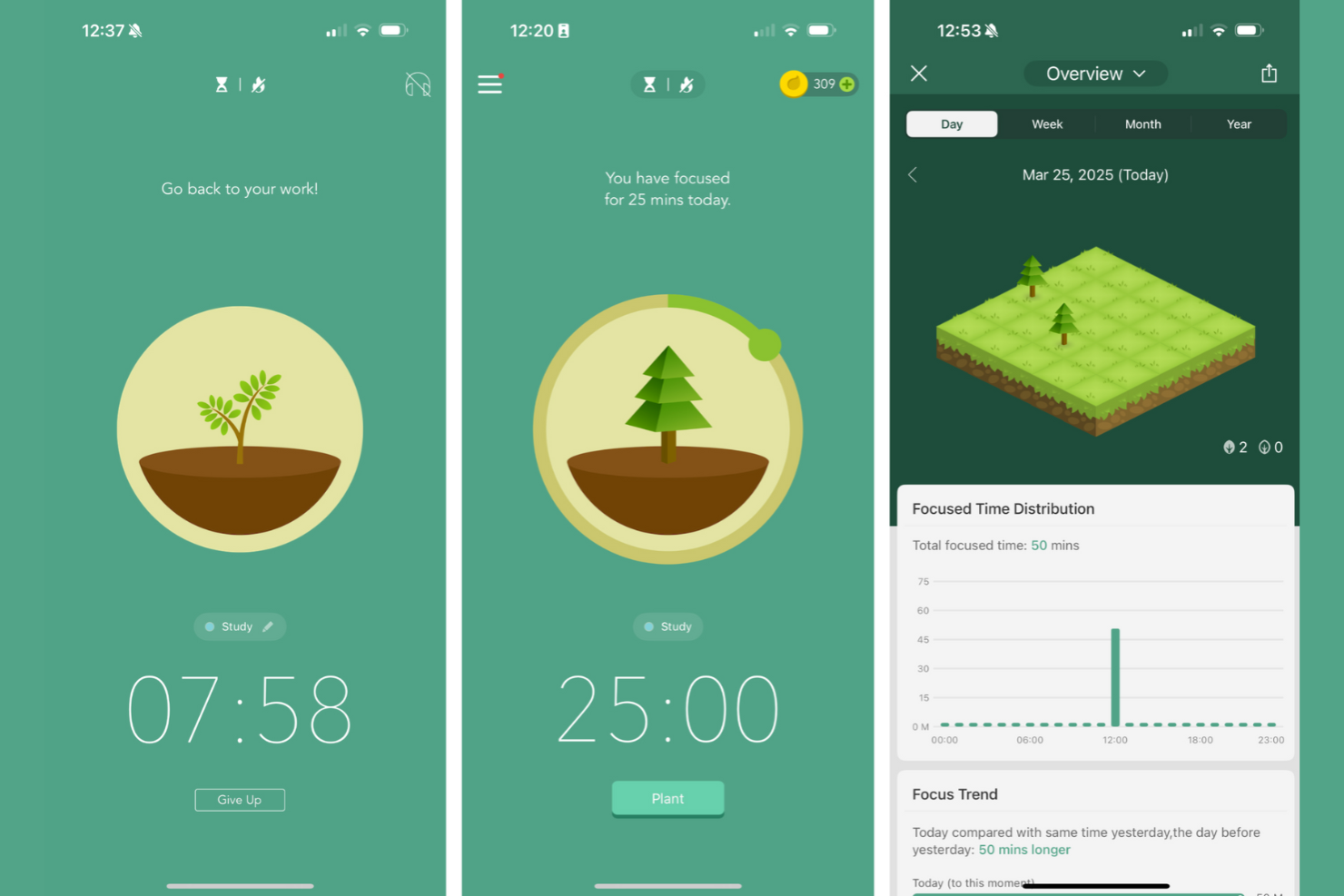
Forest stands out for me because it’s the first Pomodoro app I’ve seen that fully gamifies your focus. I like recommending Forest to anyone tired of traditional timers and looking for a real incentive to stay off their phone or computer.
When I use Forest, the virtual tree-planting mechanic really keeps me present—if I give in to distraction, my tree withers. The blend of focus sessions with visual growth and rewards adds a playful accountability I haven’t found anywhere else.
Forest’s Best For
- People who want a motivational, game-like approach to Pomodoro sessions
- Individuals who struggle with smartphone distractions and want visual accountability
Forest’s Not Great For
- Teams that need detailed time reporting, analytics, or collaboration features
- People looking for advanced customization of Pomodoro intervals and productivity settings
What Sets Forest Apart
Forest takes a completely different approach from most standard Pomodoro timers like Focus Booster or Be Focused. It treats productivity as something that can be reinforced with positive feedback and visual progress, not just tracked by the clock. Forest doesn’t just ask you to start a timer—it connects each focus session to growing a digital tree or even planting a real one, so your work feels part of an ongoing narrative. This model rewards staying present and taps into your motivation in a way I never see with timer-only apps.
Tradeoffs With Forest
Forest optimizes for habit-building and motivation through visual feedback, but that means it sacrifices things like granular time data or robust work tracking. When all the emphasis is on growing your “forest,” you give up the in-depth reporting or customization that more analytics-focused apps provide.
Pros and Cons
Pros:
- Includes visual progress tracking
- Supports real tree planting
- Encourages focus with gamification
Cons:
- Not highly customizable
- Can be distracting for some


I included Pomofocus because it’s the one Pomodoro timer I recommend when teams are feeling overwhelmed by all-in-one productivity platforms and want something that’s just a timer, presented in a focused layout.
What stands out to me is how Pomofocus puts every control—start, pause, reset, and session customization—right on the single dashboard, with nowhere extra to click. I appreciate how your workflow is never interrupted by pop-ups, ads, or unnecessary widgets. If you want a Pomodoro timer that fades into the background and lets you settle into deep work, this is a great option.
Pomofocus’s Best For
- Individuals who want a distraction-free, minimalist Pomodoro timer
- People who need quick, one-click session management without extra features
Pomofocus’s Not Great For
- Teams needing collaboration, reporting, or task-tracking integrations
- Users who expect advanced automation, analytics, or customization options
What Sets Pomofocus Apart
Pomofocus stands out because it strips away every distraction and leans into the pure core of the Pomodoro technique. While other apps like Focus Booster or Toggl Track try to layer on analytics and integration features, Pomofocus bets everything on visual clarity and keeping your timer always front and center.
Instead of helping you track tasks across projects or handle collaboration, Pomofocus expects you to come with your priority already set and just focus on the work session itself. It approaches productivity more like a single-use tool—closer to a kitchen timer than an all-in-one work manager.
Tradeoffs with Pomofocus
By centering everything around simplicity, Pomofocus gives up on serving more organized workflows or deep customization. What usually happens is you get great focus in the moment, but you lose visibility or accountability over bigger-picture goals and outcomes.
Pros and Cons
Pros:
- Includes visual reports for tracking
- Offers integration with Todoist
- Simple and user-friendly interface
Cons:
- Alarm sound issues on iOS
- Has limited free features

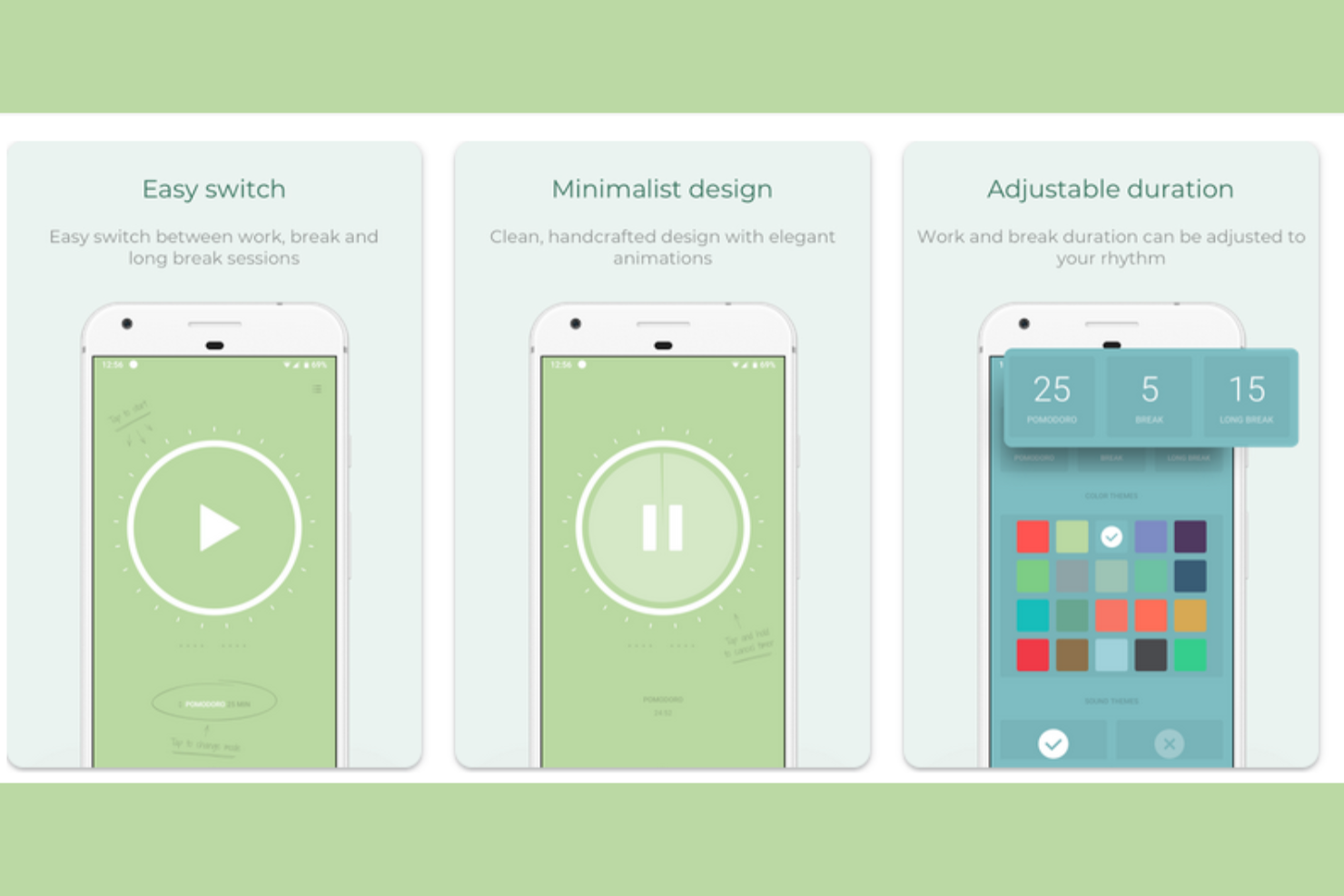
I put Pomodoro Timer on the list because it’s one of the few timer apps that really nails the Android experience. When someone asks me for a timer that blends nicely with Android notifications and widgets, this is the one I point people towards.
The standout is how smoothly it lets me launch and control sessions right from my lock screen or notification shade. I also appreciate its focus on minimalist design without giving up helpful features like customizable intervals.
Pomodoro Timer’s Best For
- Android users who want deep integration with native notifications and widgets
- Individuals who need customizable intervals and a minimalist mobile experience
Pomodoro Timer’s Not Great For
- Teams that want a shared or cloud-synced Pomodoro system
- Users on iOS or those who need built-in cross-device support
What Sets Pomodoro Timer Apart
What I notice about Pomodoro Timer is how tightly it’s designed around Android’s strengths, instead of just being a generic session timer. This app expects you’ll want Pomodoro sessions woven into your phone’s ecosystem—widgets, lock screen controls, persistent notifications—all show that it’s thinking about work as something you manage in quick glances, not by diving into an app every time.
Unlike cross-platform options like Focus Booster, Pomodoro Timer doesn't pretend to be a productivity hub. It's lean, highly mobile-focused, and expects you to value native integration over extra bells and whistles.
Tradeoffs With Pomodoro Timer
Since it optimizes for simplicity and deep Android integration, the trade-off is that you lose out on syncing across devices or rich analytics. What usually happens is it works brilliantly when you’re all-in on a single Android device, but feels limiting if you want broader data or collaboration.
Pros and Cons
Pros:
- Ad-free experience
- Has a minimalistic design
- Includes customizable themes
Cons:
- No iOS or MacOS version
- Limited advanced features

I picked Pomodoro - Focus Timer because it nails the experience for people who care about Apple device syncing. Any time a team needs to switch between iPhone, iPad, and Mac and keep their timers in sync, this is where I send them.
What I appreciate most is how the app uses Apple’s notification features and widgets to keep you connected with your focus goals—no matter which device is in your hand. In practice, this makes it easy to start a focus session on your phone and finish it on your laptop, which helps avoid all the friction that usually comes with context-switching.
Pomodoro - Focus Timer’s Best For
- People who want consistent Pomodoro timing and reminders across iPhone, iPad, and Mac
- Individuals or teams who rely on Apple ecosystem features like widgets and native notifications
Pomodoro - Focus Timer’s Not Great For
- Anyone using Android or looking for cross-platform compatibility outside Apple devices
- Teams that need advanced analytics, reporting, or customization beyond session timing
What Sets Pomodoro - Focus Timer Apart
What jumps out for me with Pomodoro - Focus Timer is how tightly it’s woven into the Apple device ecosystem. Instead of spreading energy across every platform, it assumes you want a unified timer experience on iPhone, iPad, and Mac, so everything feels native and familiar. Where a cross-platform option like Focus To-Do tries to cover Android or web, Pomodoro - Focus Timer leans into Apple’s features—quick syncing, rich notifications, and widget support—so the Pomodoro approach never feels bolted on.
Tradeoffs with Pomodoro - Focus Timer
Focusing on a seamless Apple experience means it doesn’t stretch to serve people outside that ecosystem. This works great for folks all-in on Apple, but the moment someone needs to collaborate across Windows or Android, the workflow just doesn’t keep up.
Pros and Cons
Pros:
- Supports Siri shortcuts
- Includes built-in analytics
- Includes iOS widget support
Cons:
- Not highly customizable
- No desktop or Android version

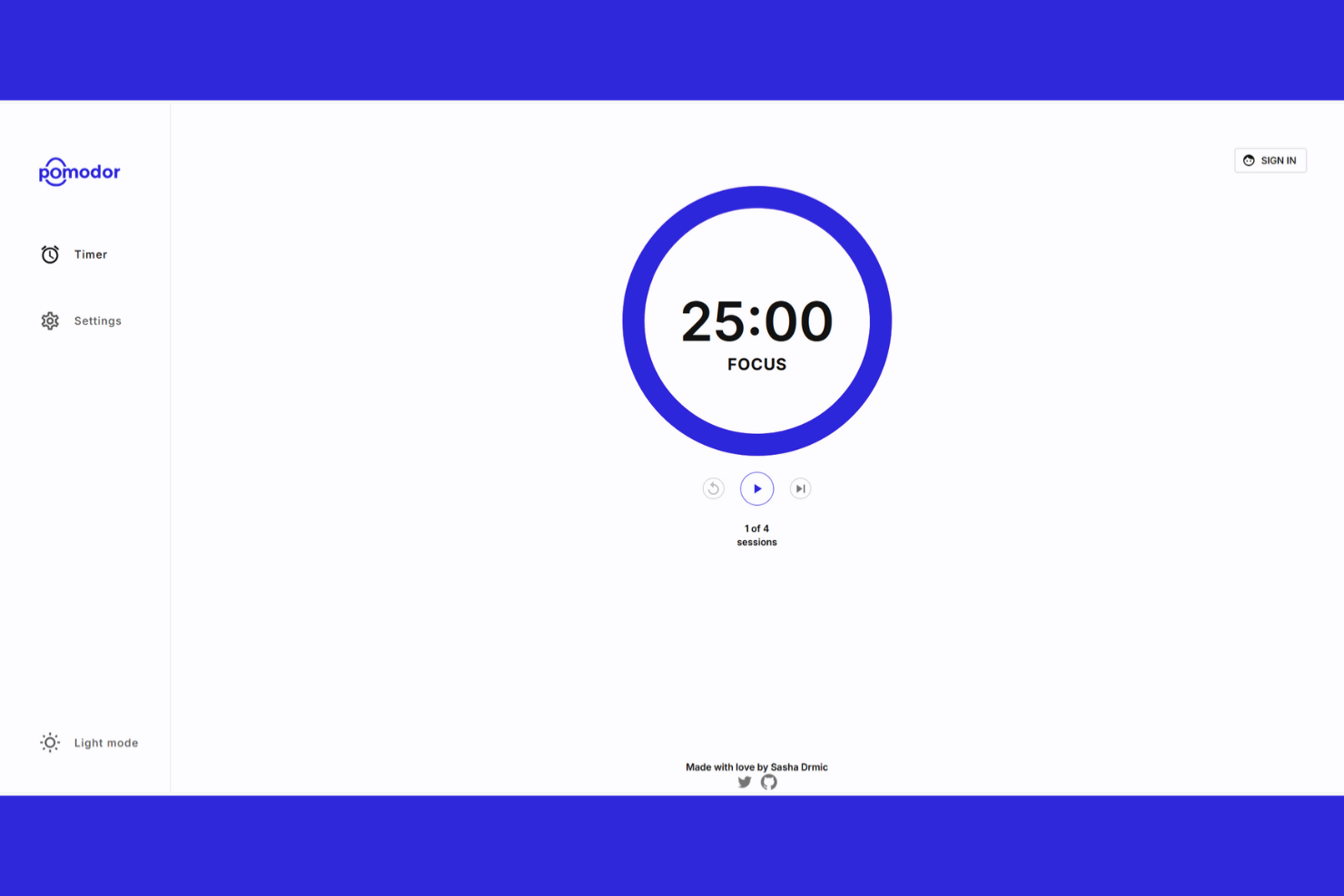
Pomodor makes my shortlist because it’s hands-down the most frictionless option for browser-based pomodoro tracking. I like that you can just open a tab and instantly start timing sessions—no setup or downloads slowing you down.
My favorite part is how you can customize your session and break lengths right from the browser. It’s a good go-to if you want a simple, accessible timer on any device without leaving your workflow.
Pomodor’s Best For
- People who want an instant, browser-based pomodoro timer with no install required
- Anyone who works across multiple devices or doesn’t want to manage another app
Pomodor’s Not Great For
- Teams looking for advanced reporting, analytics, or productivity insights
- Anyone who needs collaboration features or built-in task management
What Sets Pomodor Apart
Pomodor approaches focus work as something that should be instantly accessible, wherever you are and on any device. Unlike apps like Focus To-Do that wrap time tracking inside a to-do list or require downloads, Pomodor strips everything back to its purest form—a lightweight browser tab providing just enough structure for pomodoro, and nothing extra.
I think this design is intentional: it assumes people want to dip in and out without tying themselves to a specific app ecosystem. That kind of lightweight, web-first thinking makes it feel more like a tool you bring into your existing workflow, not one that tries to replace how you organize work.
Tradeoffs with Pomodor
Pomodor prioritizes minimalism above all else, which means there’s no integration with external calendars or daily planning. What usually happens is you get less cohesion between your timed sessions and your overall workflow if you want to track deeper productivity patterns.
Pros and Cons
Pros:
- Quick setup process
- Works on any browser
- No installation needed
Cons:
- No official mobile app for iOS/Android
- Very few features beyond a basic timer

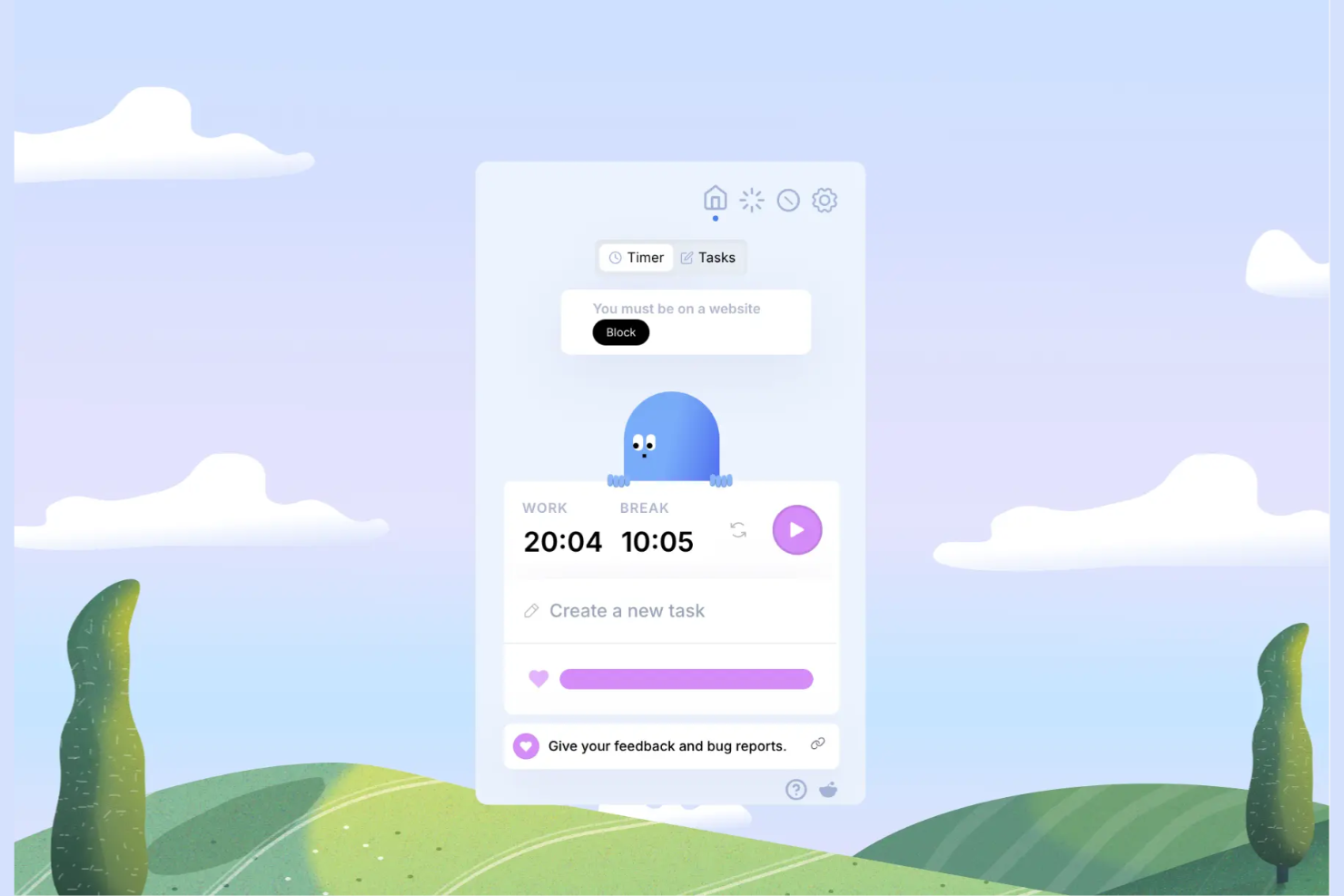
Otto makes my shortlist because its Chrome integration turns the browser into a minimalist Pomodoro workspace with zero friction. It stands out when I need to quickly set intervals, track cycles, and stay in my workflow without switching to a separate app.
What I appreciate is how Otto anchors the timer right in the browser and syncs it with my tabs, letting me see my focus session at a glance. I reach for Otto when jumping between research sites and code repos—there’s no faster way to keep the timer front and center while I work.
Otto’s Best For
- Anyone who works primarily in Google Chrome and wants a timer built into their browsing workflow
- Individuals who need lightweight Pomodoro tracking visible alongside research or web-based tasks
Otto’s Not Great For
- Teams that need shared Pomodoro cycles or collaborative task coordination
- People looking for feature-rich tracking, analytics, or mobile and desktop integration beyond Chrome
What Sets Otto Apart
Otto approaches time management by making the Pomodoro method part of your daily browser use, not a separate context. Unlike classic timer apps like Focus To-Do, Otto assumes your workflow is web-based and keeps everything right in Chrome—no extra windows or distractions. It doesn’t try to build in fancy analytics or multi-device sync. Otto just wants the timer where your attention already is: your browser tabs.
Tradeoffs with Otto
Because Otto is all about simplicity within Chrome, you give up advanced features like reporting or mobile syncing. In practice, this means if you want complex data or access outside your browser, it’s not the right fit.
Pros and Cons
Pros:
- Includes scheduled website blocking
- Lightweight design
- Easy to access in Chrome
Cons:
- Only includes customer support on its Pro plan
- Limited offline use
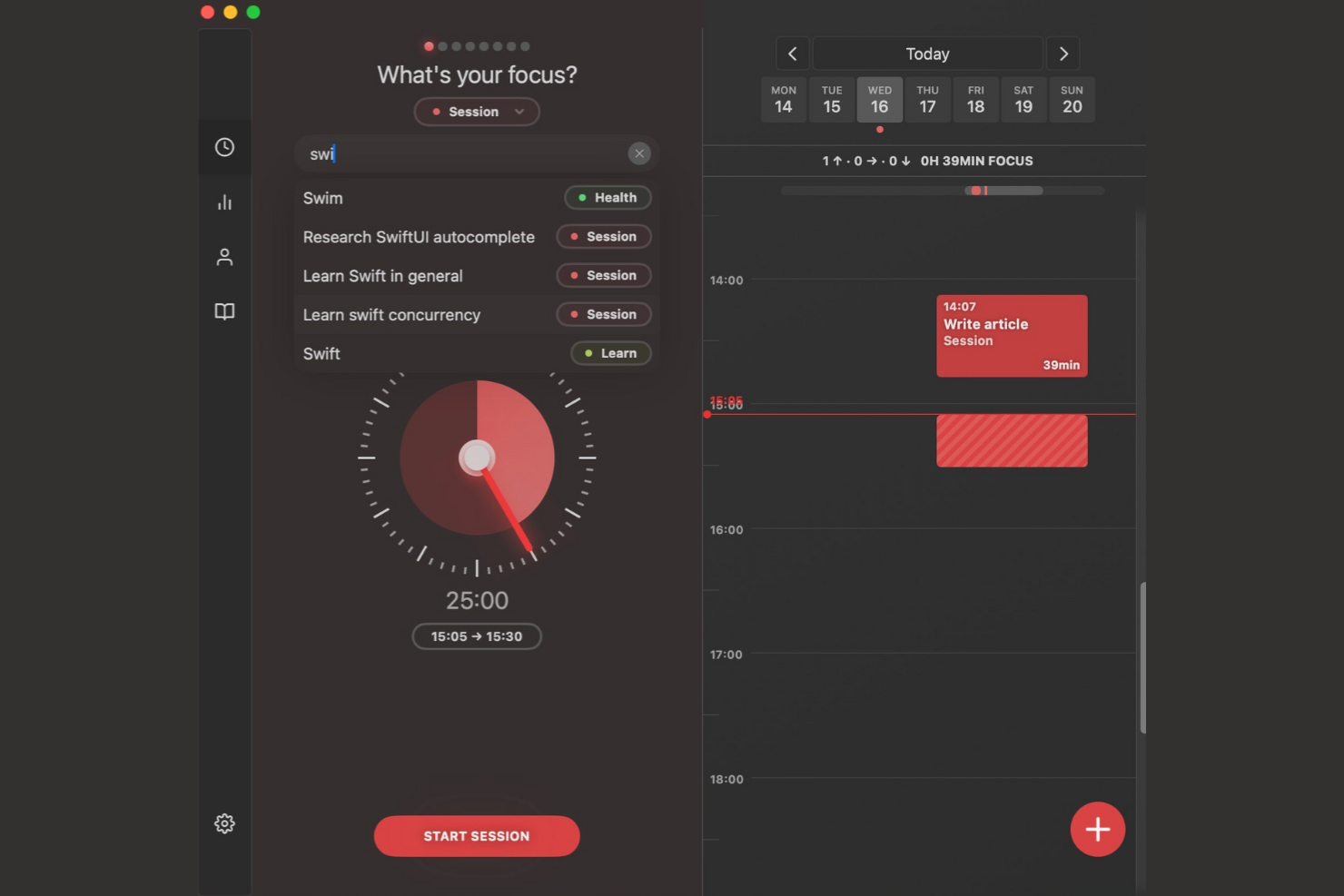
Session Pomodoro makes my shortlist because it’s one of the few Pomodoro timers that prioritizes mindful work and intentional breaks. I pick it when teams—or individuals—struggle to manage distractions and need help building real focus habits, not just tracking intervals.
Where Session stands out is how it weaves in reflection prompts and mood tracking at the end of each session, in a way that actually reinforces healthy work rhythms. I appreciate how the analytics visualize focus patterns and show where breaks make the biggest difference, especially after a week of heavy context switching.
Session Pomodoro’s Best For
- Individuals and teams focused on building mindful work habits
- People who want to track focus patterns and reflect on productivity sessions
Session Pomodoro’s Not Great For
- Users looking for advanced task or project management features
- Teams that need strict scheduling or integration with external platforms
What Sets Session Pomodoro Apart
What stands out to me about Session Pomodoro is how much it prioritizes intentionality around the act of focusing, instead of just tracking sprints. Where most Pomodoro timers are about starting and stopping the clock, Session wraps every work session in a mindfulness loop—prompting reflection, mood logging, and personal check-ins that reinforce the idea of purposeful work.
Compared to something minimalist like Focus Booster, Session is deliberately hands-on with the process, asking you to actively engage with your headspace before and after each session. It doesn’t just want you to finish tasks—it’s framing productivity as a mindful practice.
Tradeoffs with Session Pomodoro
Session leans all-in on focus rituals, which means it can feel slow or unnecessary if you just want a quick Pomodoro timer for blocking work. You trade raw, fast time tracking for a system that expects you to pause, reflect, and make your state of mind part of the workflow.
Pros and Cons
Pros:
- Promotes work-life balance
- Syncs across Apple devices
- Combines focus with mindfulness
Cons:
- Strictly limited free version
- Subscription model for core features


RoundPie makes my shortlist because it stands out when you need Pomodoro tracking to work directly with task management platforms you already use. I always turn to RoundPie when my workflow depends on syncing tasks from Trello or Google Tasks, and I can’t afford to constantly switch between apps.
What I appreciate most is how seamlessly RoundPie pulls tasks into its focus timer, so I see my priorities without extra setup. When I’m balancing sprint work with deep focus, that direct integration is what lets me stay on track and avoid duplication.
RoundPie's Best For
- Task-oriented users who want Pomodoro timers synced with Trello, Google Tasks, or similar tools
- Individuals or teams whose daily workflow depends on deep integration with external task managers
RoundPie's Not Great For
- People who only want a simple, standalone Pomodoro timer without extra features
- Users looking for advanced team analytics or robust reporting built into their focus timer
What sets RoundPie apart
RoundPie approaches the Pomodoro method as a layer added to your existing task management habits instead of building yet another to-do list. What I notice most is how it expects tasks will live elsewhere—like Trello or Google Tasks—and brings focus sessions to those platforms without forcing you to duplicate work or manually sync changes. Unlike apps designed to be self-contained productivity islands, RoundPie assumes people want one timer that fits around their current routines and tools.
Rather than pushing you to adopt a new workflow, it lets you pull focus and time tracking directly into the core systems your team already maintains. This makes it feel lighter and more integrated than something like Focus To-Do, which requires you to manage a separate task list.
Tradeoffs with RoundPie
RoundPie is all about tight integration with external task managers, but that reliance means it’s less useful if you want everything in a single app. If your workflow isn’t built around third-party tools, you end up with more fragmentation than focus.
Pros and Cons
Pros:
- Integrates with various collaboration platforms
- Easy to learn and use
- Encourages quiet team focus time
Cons:
- Pricing details aren't transparent
- Limited offline use


Momentum Dash makes the list because it stands out when motivation and focus need to come from both structure and personal inspiration. I reach for it when a simple Pomodoro timer isn’t enough and I want a workspace that greets me with goal-tracking, daily priorities, and just the right amount of encouragement.
What I appreciate here is how each new tab puts a personalized dashboard front and center—with Pomodoro sessions integrated alongside to-dos and habit reminders. Teams tend to see the biggest value when they crave a focused, visually calming interface that’s more about setting the tone for deep work than just running a timer.
Momentum Dash’s Best For
- Individuals who want both Pomodoro timing and a personalized, inspiring workspace
- Remote workers or freelancers who thrive on daily goal tracking and positive reinforcement
Momentum Dash’s Not Great For
- Teams that need collaborative Pomodoro tracking or shared task management
- People looking for advanced reporting, productivity analytics, or deep customization options
What Sets Momentum Dash Apart
Momentum Dash is designed for people who want their workspace to feel personal, rooted in daily rituals and mood—rather than strict productivity metrics. Where a classic Pomodoro tool like Focus To-Do is all about tracking intervals, Momentum Dash blends timing with daily goals, affirmations, and habit cues right on every new tab.
Unlike utility-heavy timers that sit in the background, Momentum puts inspiration and focus at the center of your browser. It expects you to treat focus as an experience, not just a process, and organizes the workday around that mindset.
Tradeoffs with Momentum Dash
Momentum Dash optimizes for individual motivation and visual inspiration, which means it skips deeper functionality around team coordination or performance tracking. What usually happens in practice is that accountability and advanced workflow features take a back seat, so it’s not a fit once you need structured collaboration.
Pros and Cons
Pros:
- Encourages goal setting
- Displays your to-do list on your homepage
- Inspiring visual design
Cons:
- The Pomodoro timer isn't available in the free plan
- Can be slow on older computers

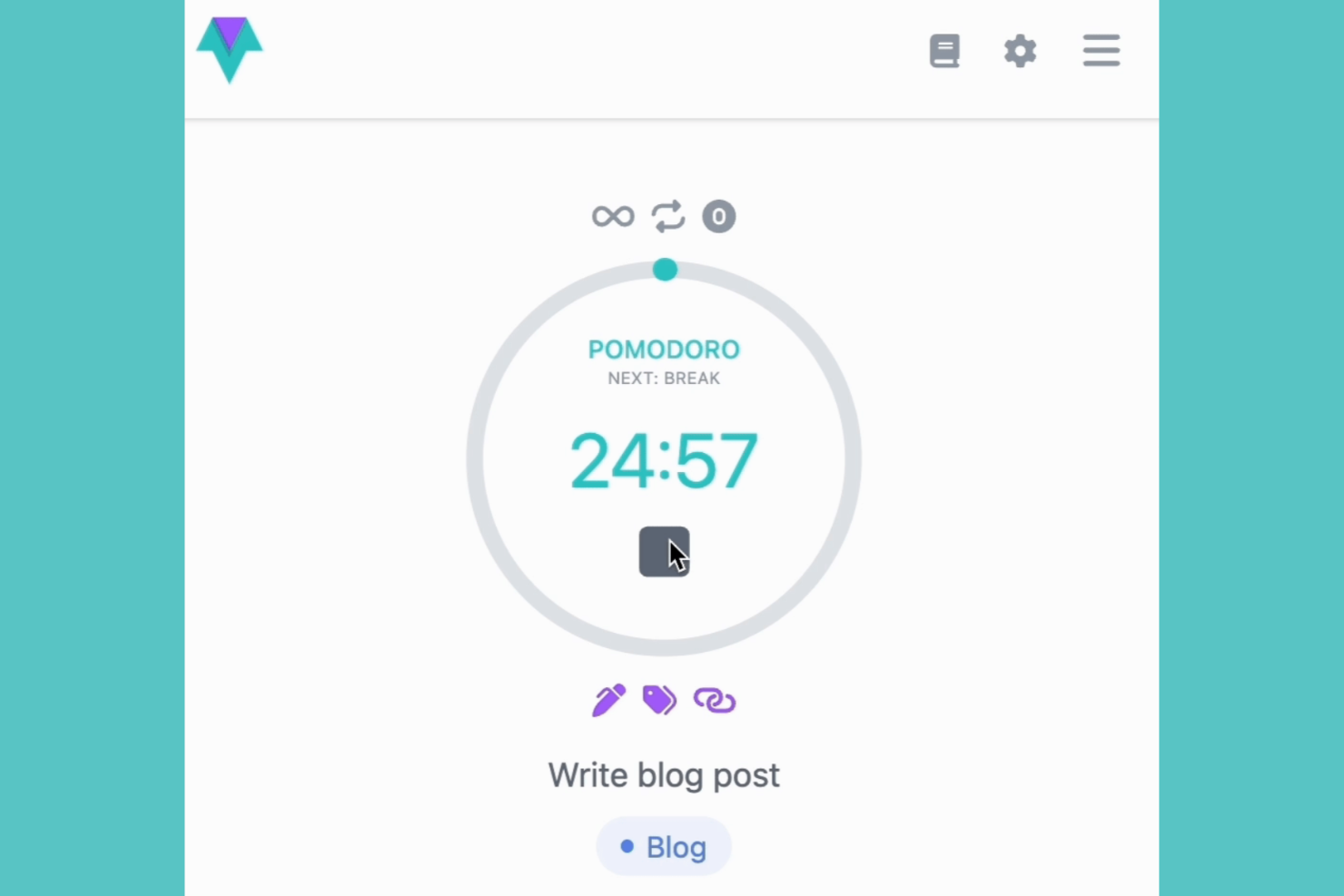
I picked Time Stream for this list after seeing how well it lets you manage focus blocks visually. When I tested it, I noticed that timeline visualization isn't just a cosmetic feature—it's a huge help when you're planning multiple Pomodoro cycles or want to compare work sessions across days.
What stands out to me is the way Time Stream maps each work session and break right onto a visual timeline, making productivity patterns clear at a glance. I think this option is best when you want to see not only when you focus, but the rhythm of your work throughout the day or week.
Time Stream’s Best For
- People who want a clear, visual timeline of their Pomodoro sessions and breaks
- Professionals tracking productivity patterns across multiple days or projects
Time Stream’s Not Great For
- Anyone wanting minimalist, distraction-free Pomodoro timers without extra data
- Users who don’t care about reviewing historical focus trends or time analytics
What Sets Time Stream Apart
Time Stream approaches focus tracking with the philosophy that how and when you work matters as much as what you get done. Unlike most Pomodoro apps that offer simple start-stop timers, Time Stream visualizes each session in a chronological flow, letting you spot trends and context across days. This timeline design reminds me more of time tracking tools like RescueTime, but applied to short work sprints rather than passive monitoring. I notice teams gravitate to Time Stream when they want to actively analyze the rhythm and distribution of their focus in a way that’s just not possible in minimalist timer apps.
Tradeoffs with Time Stream
What usually happens is that Time Stream’s visual approach adds extra complexity, especially if all you need is a fast, lightweight Pomodoro timer. Because it optimizes for insight and visual feedback, it can feel overkill for anyone just looking to hit “start” and work without thinking about the data.
Pros and Cons
Pros:
- Data stays secure with local-only storage
- Helps you reflect on your focus habits
- Provides a clear visual history of your work
Cons:
- No free plan is available
- Limited team features
Andre Pomodoro-timerapper
Her er noen flere alternativer for Pomodoro-sporingsapper som ikke kom med på kortlisten, men som likevel er verdt å sjekke ut:
- Paymo
For time tracking integration
- Reclaim
For automated scheduling
- Pomodoro Grande
For advanced customization


How I Evaluate Pomodoro Timer Apps
I split my evaluation into baseline criteria—things like proper Pomodoro cycle automation and session logging—and differentiators that matter to PMs, like Jira integrations.
Core Functionality (Table Stakes For This List)
When I'm selecting tools for my list, I rank each one on a scale from 0 (does not offer the functionality) to 5 (excels in this area) for each core functionality listed below. Then, I calculate the tool's total score into a percentage. Each tool needs to achieve a minimum total score of 65% to be considered for inclusion.
- Configurable Pomodoro Intervals: I check whether you can adjust work and break durations beyond the standard 25/5, since sprint-heavy days often call for longer 50/10 sessions.
- Automated Break Cycling: The app should auto-trigger short and long breaks in sequence, so you're not manually restarting timers between every Pomodoro during a busy workday.
- Audio and Visual Notifications: I evaluate whether alerts are clear enough to pull your attention back when you're deep in a requirements doc or reviewing a backlog.
- Task-Level Session Tracking: Linking Pomodoros to specific tasks or tickets matters—I look for the ability to tag sessions to items like individual user stories or deliverables.
- Session History and Reporting: I look for logged focus data you can review by day, week, or project, which helps PMs understand where their time actually goes across workstreams.
- Cross-Device Availability: Whether you start a session on your laptop and pick up on mobile between meetings, I check that the app syncs across platforms without losing data.
Once I have a list of tools that meet this criteria, I consider what sets each platform apart.
Differentiating Factors (What Sets Vendors Apart)
Here's how I compare and contrast different vendors:
Standout Features
Calendar integration is a big one—I look for apps that sync focus blocks with Google Calendar or Outlook so your team can see when you're heads-down and avoid scheduling over protected time. Team focus sessions also matter for distributed PMs who want shared Pomodoro sprints across time zones. Built-in distraction blocking during work intervals adds real value, especially during deep planning work where a single Slack ping can derail your flow.
Beyond Features
Pricing structure matters here. Many Pomodoro apps offer free tiers that work for solo use, but I check whether team plans scale reasonably as you add Scrum Masters or coordinators. I also evaluate how each app connects to your existing PM stack—native integrations with Jira, Asana, or ClickUp let you tie focus data directly to sprint work. For teams handling client-sensitive deliverables, data privacy practices like encryption and clear data ownership policies deserve a close look before committing.
Slik velger du en Pomodoro-timerapp
Det er lett å gå seg vill i lange funksjonslister og kompliserte prismodeller. For å hjelpe deg med å holde fokus mens du går gjennom din unike prosess for valg av programvare, har vi laget en sjekkliste over faktorer du bør ha i tankene:
| Faktor | Hva du bør vurdere |
|---|---|
| Skalerbarhet | Vil verktøyet vokse sammen med teamet ditt? Vurder om det støtter et økende antall brukere og komplekse arbeidsflyter etter hvert som behovene dine utvides. |
| Integrasjoner | Kan det kobles til de eksisterende verktøyene dine? Se etter kompatibilitet med oppgavebehandlerne og kalenderne dine for å sikre en smidig arbeidsflyt. |
| Tilpasningsmuligheter | Kan du tilpasse det etter behovene dine? Se etter justerbare innstillinger som lar deg endre lengden på øktene og varslingene slik at de passer arbeidsstilen din. |
| Brukervennlighet | Er det intuitivt for alle? Sørg for at grensesnittet er brukervennlig, slik at teamet kan begynne å bruke det uten en bratt læringskurve. |
| Implementering og innføring | Vil teamet ditt raskt komme i gang? Se etter verktøy som tilbyr veiledninger og støtte for å hjelpe med det innledende oppsettet og innføringen. |
| Kostnad | Passer det budsjettet ditt? Sammenlign prisplanene og se etter skjulte gebyrer for å sikre at løsningen er i tråd med de økonomiske rammene dine. |
| Sikkerhetstiltak | Er dataene dine beskyttet? Kontroller at appen bruker kryptering og overholder sikkerhetsstandarder for å holde informasjonen din trygg. |
| Tilgjengelig kundestøtte | Vil du få hjelp når du trenger det? Vurder hvor tilgjengelige kundestøttekanaler som chat, e-post eller telefon er, slik at problemer kan løses raskt. |
Hva er en Pomodoro-tidtakerapp?
En Pomodoro-tidtakerapp er et digitalt verktøy som hjelper brukere med å administrere tiden sin ved hjelp av Pomodoro-teknikken, som innebærer å dele arbeidet inn i intervaller med korte pauser. Fagpersoner som prosjektledere, skribenter og studenter kan bruke disse verktøyene til å øke fokus og produktivitet. Tilpassbare tidtakere, varsler og rapporteringsfunksjoner hjelper brukerne med å holde oversikt over arbeidsøktene og opprettholde konsentrasjonen. Samlet sett gir disse verktøyene en strukturert måte å håndtere oppgaver på og forbedre arbeidseffektiviteten.
Funksjoner i Pomodoro-tidtakerapper
Når du velger en Pomodoro-tidtakerapp, bør du se etter følgende viktige funksjoner:
- Tilpassbare tidtakere: Angi arbeids- og pauseintervaller som passer til din unike arbeidsflyt og dine preferanser.
- Varsler: Få beskjed når det er på tide å bytte mellom arbeids- og pauseøkter, slik at du holder deg på rett spor.
- Oppgavehåndtering: Organiser og prioriter oppgaver i appen, slik at arbeidsflyten forenkles.
- Fremdriftssporing: Se rapporter og analyser av produktiviteten din, slik at du forstår fokuseringsmønstrene dine.
- Integrasjonsmuligheter: Koble til andre verktøy, for eksempel kalendere og oppgavebehandlere, for å øke den samlede produktiviteten.
- Fokusmodus: Minimer distraksjoner ved å blokkere bestemte apper eller varsler under arbeidsøkter.
- Spillifiseringselementer: Føl deg motivert til å delta regelmessig gjennom morsomme og belønnende aktiviteter.
- Brukervennlig grensesnitt: Naviger enkelt med et intuitivt og brukervennlig design.
- Sikkerhetstiltak: Beskytt dataene dine med kryptering og overholdelse av sikkerhetsstandarder, slik at personvernet ivaretas.
Fordeler med Pomodoro-tidtakerapper
Implementering av en Pomodoro-tidtakerapp gir flere fordeler for teamet og virksomheten din. Her er noen av fordelene du kan se frem til:
- Bedre fokus: Du kan dele oppgaver inn i håndterbare intervaller, noe som bidrar til å opprettholde konsentrasjonen og redusere utsettelse.
- Økt produktivitet: Oppmuntre til effektive arbeidsvaner ved å angi strukturerte arbeids- og pauseperioder.
- Bedre tidsstyring: Du kan få innsikt i hvordan tiden din brukes, noe som gir mulighet for mer effektiv tidsplanlegging og organisering.
- Redusert utbrenthet: Du kan planlegge regelmessige pauser for å bidra til å forebygge tretthet og fremme en sunnere balanse mellom arbeid og fritid.
- Bedre prioritering av oppgaver: Integrer funksjoner for oppgavehåndtering for å organisere og prioritere arbeidet ditt på en effektiv måte.
Kostnader og priser for Pomodoro-tidtakerapp
Når du velger en Pomodoro-tidtakerapp, må du forstå de ulike prismodellene og abonnementene som er tilgjengelige. Kostnadene varierer avhengig av funksjoner, teamstørrelse, tillegg og mer. Tabellen nedenfor oppsummerer vanlige abonnementer, gjennomsnittsprisene deres og typiske funksjoner som inngår i løsninger for tidssporing med Pomodoro-apper:
Sammenligningstabell for abonnementer for Pomodoro-tidtakerapp
| Abonnementstype | Gjennomsnittspris | Vanlige funksjoner |
|---|---|---|
| Gratisabonnement | $0 | Grunnleggende tidtakere, enkel oppgavehåndtering og begrenset rapportering. |
| Personlig abonnement | $5-$10/bruker/måned | Tilpassbare tidtakere, integrasjonsmuligheter og grunnleggende analyser. |
| Bedriftsabonnement | $10-$25/bruker/måned | Avansert rapportering, verktøy for teamsamarbeid og sikkerhetsfunksjoner. |
| Virksomhetsabonnement | $25-$50/bruker/måned | Omfattende analyser, prioritert kundestøtte og fullstendige tilpasningsmuligheter. |
Vanlige spørsmål om Pomodoro-timerapper
Her er noen svar på vanlige spørsmål om Pomodoro-timerapper:
Kan jeg bruke en Pomodoro-timerapp uten nettforbindelse?
Ja, noen Pomodoro-timerapper tilbyr funksjonalitet uten nettforbindelse, men dette varierer fra app til app. Hvis det er viktig for deg å kunne bruke appen uten nettforbindelse, bør du undersøke om appen lagrer data lokalt og synkroniserer når du er på nett igjen. Dette er nyttig hvis du jobber i områder med dårlig internettforbindelse, eller hvis du vil spare på databruken.
Passer Pomodoro-timerapper for bruk i team?
Ja, mange Pomodoro-timerapper er utviklet for både individuell bruk og teambruk. Se etter funksjoner som delte oppgavelister, teamrapportering og samarbeidsverktøy. Disse funksjonene kan hjelpe team med å koordinere arbeidsøkter og pauser, noe som forbedrer den generelle produktiviteten og kommunikasjonen.
Hvordan kan en Pomodoro-timerapp øke teamets produktivitet?
En Pomodoro-timerapp hjelper teamet med å holde fokus ved å dele opp arbeidet i korte økter, vanligvis på 25 minutter, med planlagte pauser imellom. Dette holder alle opplagte og reduserer distraksjoner. Disse fokuserte øktene gjør det mulig å fullføre oppgaver raskere og administrere teamets tid mer effektivt.
Hvordan integreres Pomodoro-timerapper med andre verktøy?
Pomodoro-timerapper integreres ofte med verktøy for oppgavehåndtering, kalendere og kommunikasjonsplattformer. Disse integrasjonene bidrar til å forenkle arbeidsflyter ved at du kan registrere tid direkte i det eksisterende programvareøkosystemet ditt. Sjekk appens integrasjonsalternativer for å sikre kompatibilitet med verktøyene du bruker nå.
Hvordan bidrar Pomodoro-timerapper til å forebygge utbrenthet under lange prosjekter?
Pomodoro-timere oppmuntrer til regelmessige pauser, noe som bidrar til å forebygge mental utmattelse. Ved å minne teamet på å ta en pause og hente seg inn igjen reduserer disse appene stress og bidrar til at alle holder motivasjonen oppe gjennom hele prosjektet.
Er datasikkerhet en bekymring med Pomodoro-timerapper?
Ja, datasikkerhet bør være en vurdering når du velger en Pomodoro-timerapp. Sørg for at appen bruker kryptering og følger beste praksis for sikkerhet for å beskytte dataene dine. Sjekk om den følger standarder som GDPR, spesielt hvis du håndterer sensitiv informasjon.