

14 programvarer for dokumenthåndtering av samsvar i 2026

Kortliste over programvare for håndtering av samsvarsdokumenter


Et system for håndtering av samsvarsdokumenter (DMS) hjelper teamet ditt med å organisere, spore og kontrollere dokumenter som kreves for å overholde lover, forskrifter og interne retningslinjer. Hvis du leter etter riktig plattform, opplever du sannsynligvis økende dokumentasjonskrav på tvers av forretningsprosessene dine, regelverk som stadig endres, og et behov for å holde revisjoner stressfrie. Den rette AI-drevne programvaren kan hjelpe deg med å sentralisere dokumenter, automatisere versjonskontroll og opprettholde tydelige revisjonsspor – uten å tilføre ekstra manuelt arbeid eller skape datasiloer. Et brukervennlig grensesnitt gjør det enklere å navigere i disse systemene. I denne veiledningen finner du en nøye utvalgt liste over løsninger for håndtering av samsvarsdokumenter for 2026, slik at du kan sammenligne funksjoner og ta en velinformert beslutning for organisasjonen din.
Why Trust Our Software Recommendations
Our team has been testing and reviewing software since 2012. As project managers ourselves, we know how difficult—and important—it is to choose the right software.
For this guide, we evaluated tools using hands-on testing and independent research, scoring tools using our selection criteria. We also draw on insights from industry thought leaders and practicing project management experts.
Our reviews reflect our human editorial judgment, not a sales pitch.
Expert reviewers:
Sammenligningstabell for programvare for håndtering av samsvarsdokumenter
Denne sammenligningstabellen oppsummerer prisopplysningene for mine beste utvalgte programmer for håndtering av samsvarsdokumenter:
| Tool | Best For | Trial Info | Price | ||
|---|---|---|---|---|---|
| 1 | Best for multilingual document management | Free demo available | Pricing upon request | Website | |
| 2 | Best for cloud-based document storage | Free demo available | Pricing upon request | Website | |
| 3 | Best for metadata-driven organization | Free demo available | From $65/user/month | Website | |
| 4 | Best for automated document workflows | Free plan available | From $19/user/month (billed annually) | Website | |
| 5 | Best for field safety documentation | Free demo available | Pricing available upon request | Website | |
| 6 | Best for granular access controls | 30-day free trial + free demo available | Pricing upon request | Website | |
| 7 | Best for accreditation management | Free demo available | Pricing upon request | Website | |
| 8 | Best for risk and vendor oversight | Free demo available | Pricing upon request | Website | |
| 9 | Best for life sciences regulatory needs | Free demo available | Pricing upon request | Website | |
| 10 | Best for engineering document control | Free demo available | Pricing upon request | Website |
Anmeldelser av programvare for håndtering av samsvarsdokumenter
Nedenfor finner du mine detaljerte sammendrag av programvaren for håndtering av samsvarsdokumenter som kom med på kortlisten min. Anmeldelsene mine gir en detaljert gjennomgang av funksjonene, de beste bruksområdene og integrasjonene til hver plattform, slik at du kan finne den som passer best for deg.
Doxis
Best for multilingual document management

Doxis is an enterprise content management platform with audit-proof archiving, automated retention management, AI-powered document classification, and GDPR-compliant records management for regulated industries.
Who is Doxis Best For?
Doxis suits large enterprises in regulated industries such as finance, healthcare, and manufacturing that require auditable, policy-driven document control.
Why I Picked Doxis
I've included Doxis in my top picks because of how well it handles compliance document management across international teams. The platform supports 12 official languages covering 135 countries, including Arabic, Chinese, Russian, and Persian, so your teams in Frankfurt, Dubai, or São Paulo all work in the same system without language barriers. I also like that its OCR and AI-powered metadata extraction work across these languages, meaning document classification and indexing stay consistent regardless of the language a document is written in.
Doxis Key Features
- Audit-proof archiving: Stores documents in a tamper-proof archive certified to IDW PS 880 and ISO 16175-2 standards, with a full change log for every record.
- Automated retention management: Configures retention periods and triggers compliant deletion workflows based on document type and regulatory requirements.
- Role-based access control: Assigns granular read, edit, and approval permissions at the document, folder, or process level.
- Multi-stage approval workflows: Documents can be reviewed one after another or by multiple parties simultaneously before finalization.
Doxis Integrations
Doxis offers certified native integrations with SAP, Salesforce, and various Microsoft platforms, including Microsoft 365, SharePoint, Outlook, Teams, and Microsoft Dynamics 365. It also connects to ERP systems like Infor through vendor-independent connectors. A REST API supports custom integrations.
Pros and Cons
Pros:
- Flexible server component distribution and customization
- AI-powered document processing for invoices and contracts
- Audit-proof archiving with retention controls
Cons:
- Data migration from legacy platforms can lag
- Best suited for enterprise-scale, not smaller organizations

DocuWare
Best for cloud-based document storage
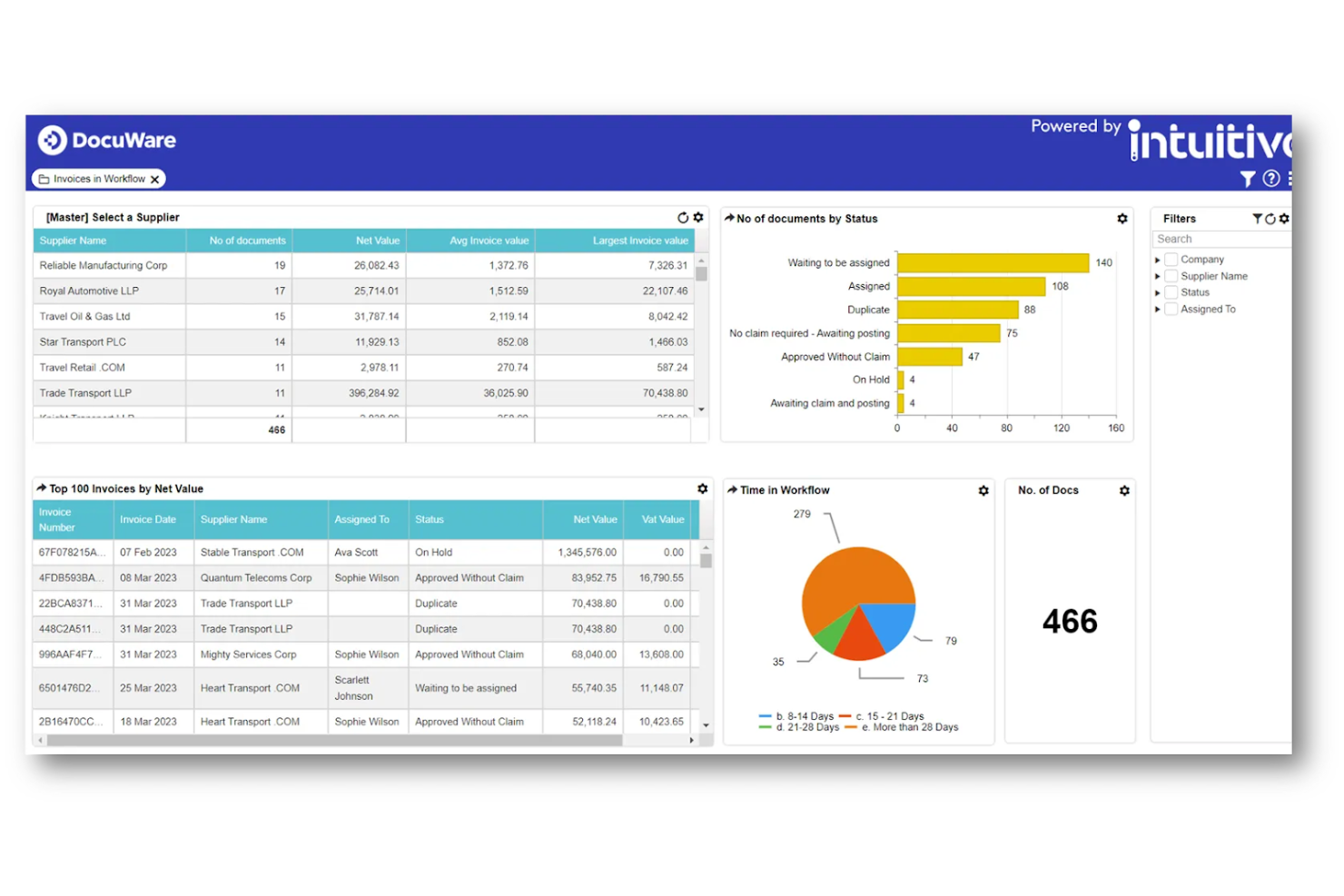
DocuWare is a document management platform designed for organizations that need secure, compliant storage and automated workflows to manage sensitive business documents and meet regulatory requirements.
Who Is DocuWare Best For?
DocuWare is a strong fit for mid-sized to enterprise organizations in regulated industries like healthcare, finance, and manufacturing that need structured document control.
Why I Picked DocuWare
DocuWare earns its spot on my shortlist because its cloud storage architecture is built with compliance in mind. Documents are stored with AES-256 encryption, triply mirrored across data centers in your chosen region (EU or US), and backed up at a second location in the same region—so your audit trail and document history are never at risk. Access control is granular: administrators can define who may read, edit, export, or delete specific documents, which helps when managing sensitive compliance records. DocuWare Cloud supports HIPAA, SOX, GDPR, and NIST out of the box, reducing the need to build compliance controls from scratch.
DocuWare Key Features
- Automated document workflows: Route documents through multi-step approval processes with configurable rules, triggers, and escalation paths.
- Full-text search and indexing: Retrieve any stored document instantly using keyword search across file contents, metadata, and index fields.
- Document retention policies: Set automated retention schedules and deletion rules to meet regulatory requirements for record-keeping.
- Electronic stamps and signatures: Apply legally binding e-signatures and digital stamps directly within the platform to finalize compliance documents.
DocuWare Integrations
Integrations include Microsoft Outlook, Microsoft Teams, SAP, Sage, QuickBooks, Microsoft Dynamics 365, Salesforce, Google Workspace, SharePoint, and DocuSign.
Pros and Cons
Pros:
- Secure web access
- Automates retention
- Good audit logging
Cons:
- Heavy for small biz
- Hard to configure

M-Files
Best for metadata-driven organization
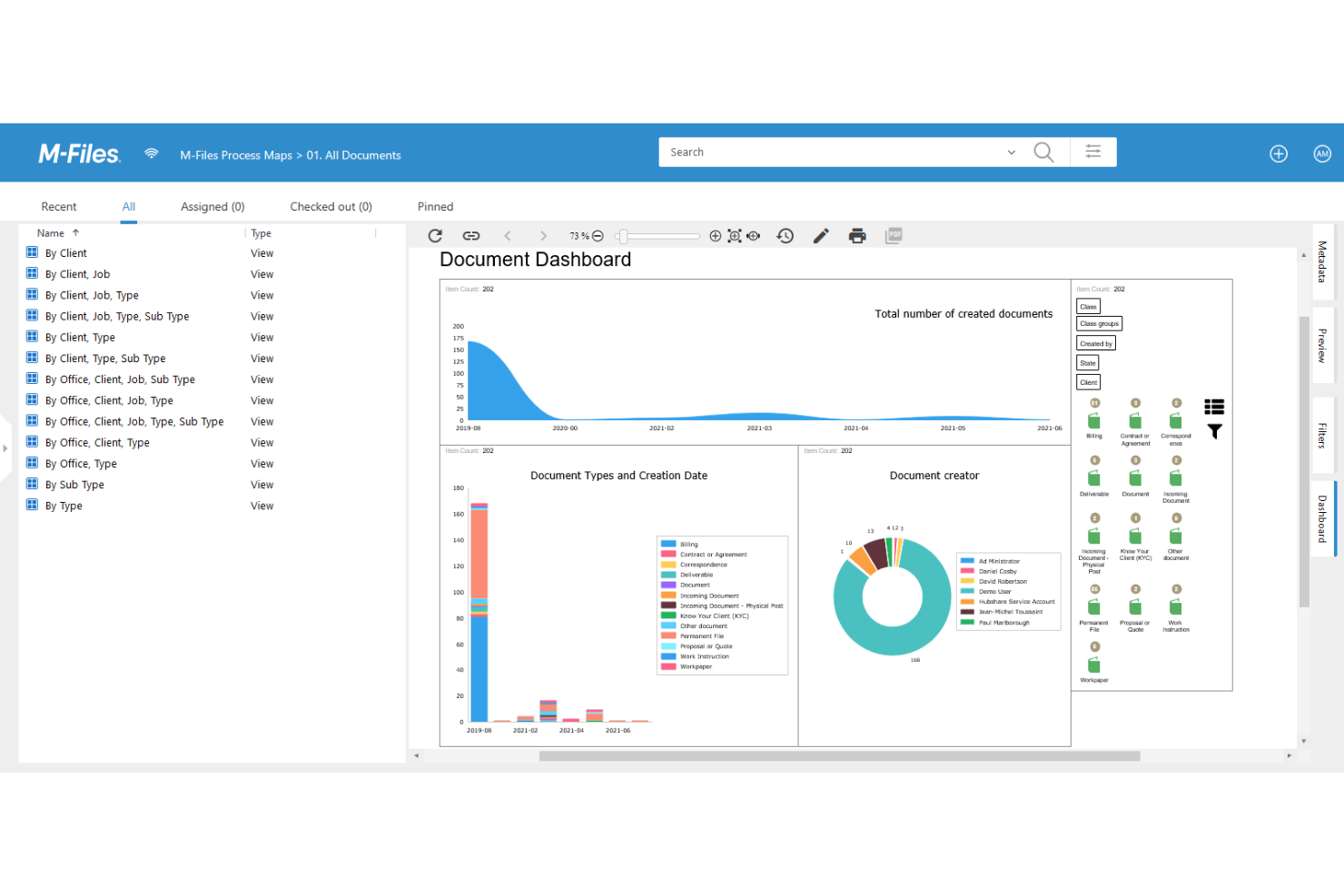
M-Files is a document management platform designed for organizations in regulated industries that need to control, track, and secure compliance documents across complex workflows and teams.
Who Is M-Files Best For?
M-Files is a strong fit for mid-size to enterprise teams in industries like manufacturing, finance, and life sciences that manage large volumes of compliance-critical documents.
Why I Picked M-Files
M-Files earns its spot as one of the best on my shortlist because of how its metadata-driven architecture changes the way compliance documents get organized and found. Instead of relying on folder structures that break down as teams grow, M-Files tags every document with metadata—client, project, document type, workflow status—so my team can retrieve the right version of a compliance record in seconds, regardless of where it's stored. I also like how dynamic permissions tie directly to that metadata, automatically updating access rights as workflow status or team roles change. Additionally, the automated audit trail logs every view, edit, and approval without any manual input, which makes regulatory reporting far less painful.
M-Files Key Features
- Co-authoring: Multiple users can edit, annotate, and comment on the same document simultaneously in real time.
- Automated document retention policies: M-Files applies retention and disposal rules automatically based on document type and regulatory requirements.
- AI-powered metadata tagging: M-Files Aino crawls documents and legacy archives to automatically suggest and apply metadata tags based on content analysis.
- Mobile access: Users can access, view, and manage documents from desktop, browser, or mobile app from any location.
M-Files Integrations
Integrations include Microsoft 365, Microsoft Teams, SharePoint, Salesforce, SAP, Google Workspace, Adobe Sign, DocuSign, and network folders.
Pros and Cons
Pros:
- Offline compliance
- Good version tracks
- ISO 9001 support
Cons:
- Clunky web view
- Expensive licenses
PandaDoc
Best for automated document workflows
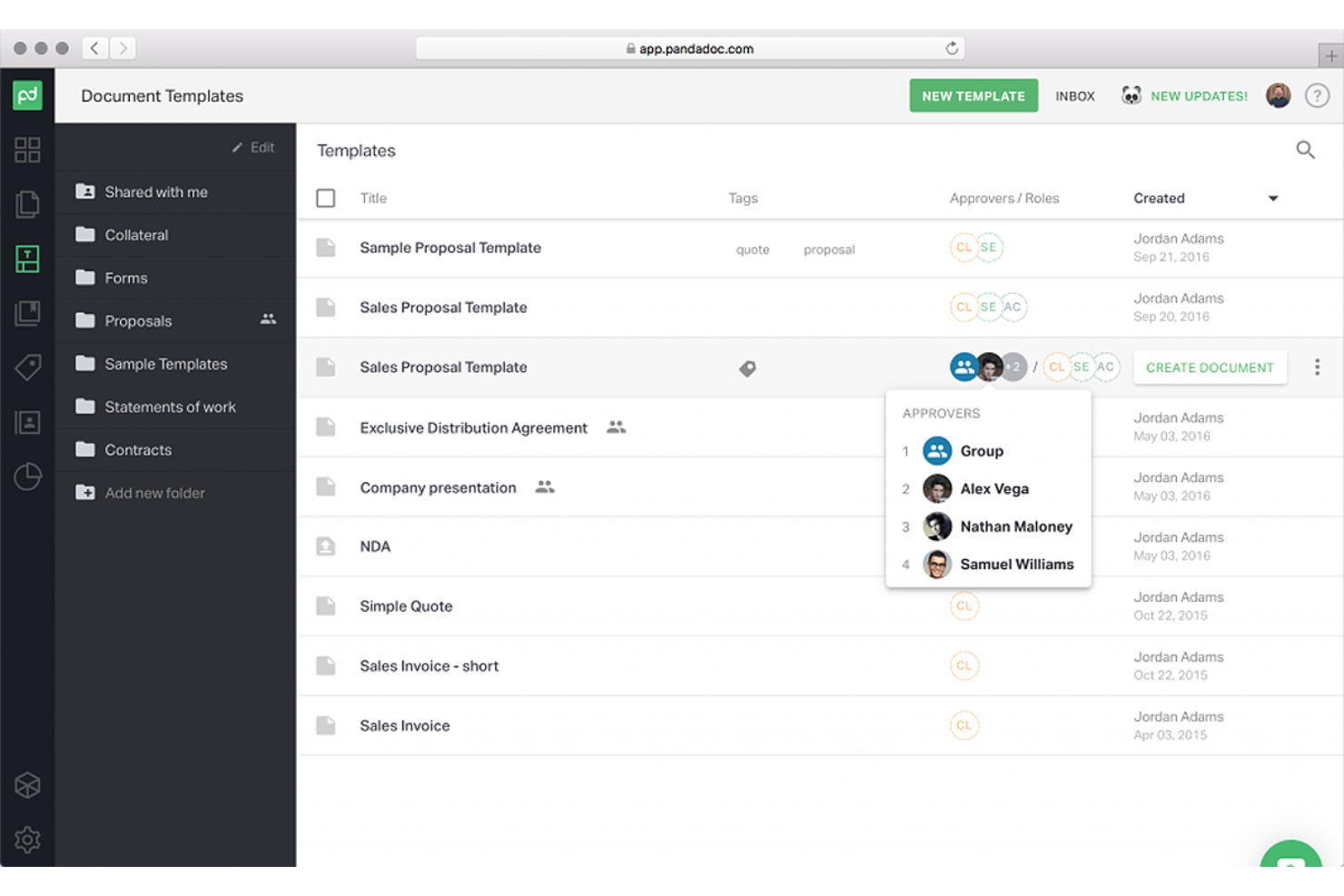
PandaDoc helps compliance teams and regulated businesses manage, track, and secure sensitive documents with features like audit trails, e-signatures, and centralized storage that simplify compliance documentation and approval processes.
Who Is PandaDoc Best For?
PandaDoc is a strong fit for sales, legal, and operations teams in mid-sized businesses that handle high volumes of contracts and compliance documents.
Why I Picked PandaDoc
I picked PandaDoc as one of the best because of how well its automation features handle the repetitive, high-stakes steps in compliance document workflows. The approval workflow feature lets you build multi-step review chains where documents automatically route to the next stakeholder once the previous one signs off—no manual follow-up needed. I also like the automations feature, which triggers actions based on document status changes: for example, once a compliance document is marked "completed," it can automatically move to a designated folder, sync to your CRM, or save a PDF to cloud storage. Pair that with audit trails that log every open, view, and signature event, and you have a clear, timestamped record of every step in the process.
PandaDoc Key Features
- Document templates: Build reusable, pre-approved compliance document templates with locked fields to prevent unauthorized edits.
- Role-based permissions: Control who can view, edit, or send documents by assigning access levels to specific team members.
- Document expiration settings: Set automatic expiration dates on compliance documents to ensure outdated versions can't be signed or accessed.
- Real-time commenting: Leave inline comments directly on document sections to flag compliance issues before finalizing.
PandaDoc Integrations
Integrations include Salesforce, HubSpot, Pipedrive, monday.com, Zoho, QuickBooks Online, Stripe, PayPal, Dropbox, and Google Sheets.
Pros and Cons
Pros:
- Auto-reminders sent
- Good integrations
- Compliant templates
Cons:
- Limited permissions
- Not a true QMS tool
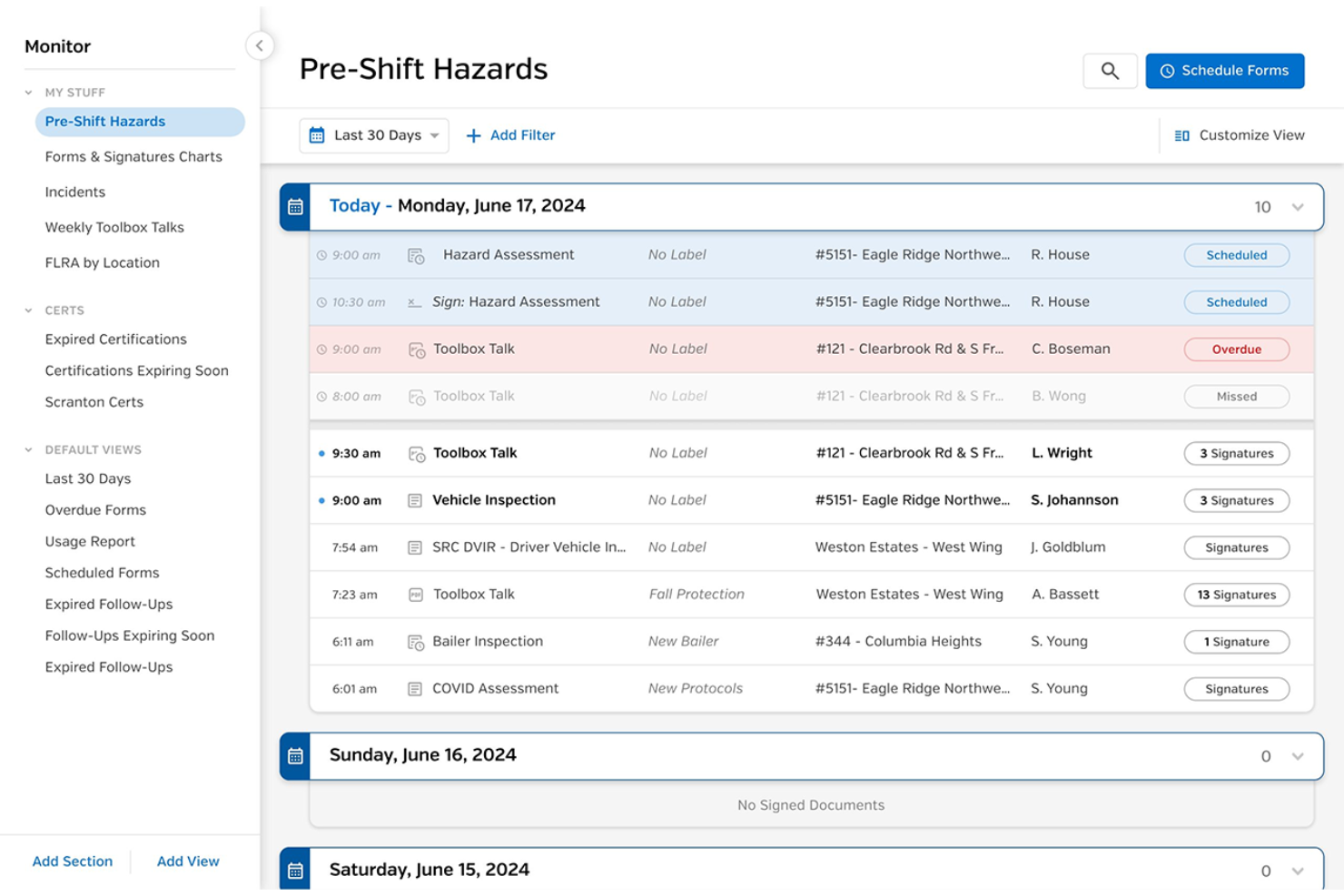
SiteDocs is a digital compliance document management platform designed for construction, manufacturing, and field service teams who need to manage safety forms, track compliance, and centralize documentation in real time.
Who Is SiteDocs Best For?
SiteDocs is a strong fit for safety managers and field supervisors in industries like construction and oil and gas who need mobile-first compliance documentation tools.
Why I Picked SiteDocs
SiteDocs earns its spot on my shortlist because of how well it handles field safety documentation in environments where connectivity isn't guaranteed. I particularly like the offline mode—workers can fill out and sign forms on-site without a network connection, and everything syncs automatically once they're back online. I also use the GPS-stamped digital signatures to confirm that workers are signing documents at the job site, not after the fact. The real-time safety monitor lets me see every form submitted across every location as it happens, so I can flag missing documentation before it becomes a compliance gap.
SiteDocs Key Features
- Custom form builder: Create and deploy safety forms, checklists, and inspection templates tailored to your specific compliance requirements.
- Worker certification tracking: Store and monitor employee certifications, licenses, and training records with expiry date alerts.
- Document version control: Manage and distribute updated safety documents across all sites, ensuring workers always access the current version.
- Corrective action tracking: Log, assign, and follow up on safety issues identified during inspections directly within the platform.
SiteDocs Integrations
Integrations include Procore, Google Drive, OneDrive, Dropbox, Slack and Workato.
Pros and Cons
Pros:
- Fast safety audits
- Cert tracking tools
- Offline mobile use
Cons:
- Limited integrations
- Lacks deep QMS
Docsvault is a document management platform designed for organizations that need to centralize, secure, and control sensitive compliance documents across teams, departments, or regulated industries.
Who Is Docsvault Best For?
Docsvault is a strong fit for small to mid-sized businesses in regulated industries that need structured document control without enterprise-level complexity.
Why I Picked Docsvault
Docsvault earns its spot on my shortlist because of its robust user- and group-based access controls. I like that you can set permissions at both the folder and file level, then layer on ownership overrides so administrators retain control over specific documents even when other users are actively working in the same space. There's also a separate export rights setting, which I find especially useful for compliance—it lets someone view or edit a document without giving them the ability to remove it from the system entirely.
Docsvault Key Features
- Version control: Retain unlimited document versions and revert to or promote any previous version at any time.
- Audit trail and activity logging: Log every action taken on a file or folder, with queryable audit logs filtered by time, user, and location.
- Records retention management: Create retention policies to manage the full document lifecycle, from storage and classification through to authorized disposal.
- Structured filing enforcement: Automate folder structures to ensure every document is filed in the correct location, supporting audit readiness across departments.
Docsvault Integrations
Integrations include Microsoft Office, and Microsoft Outlook.
Pros and Cons
Pros:
- Alerts for reviews
- Strict version control
- Easy to route docs
Cons:
- Mobile app is basic
- Setup takes time
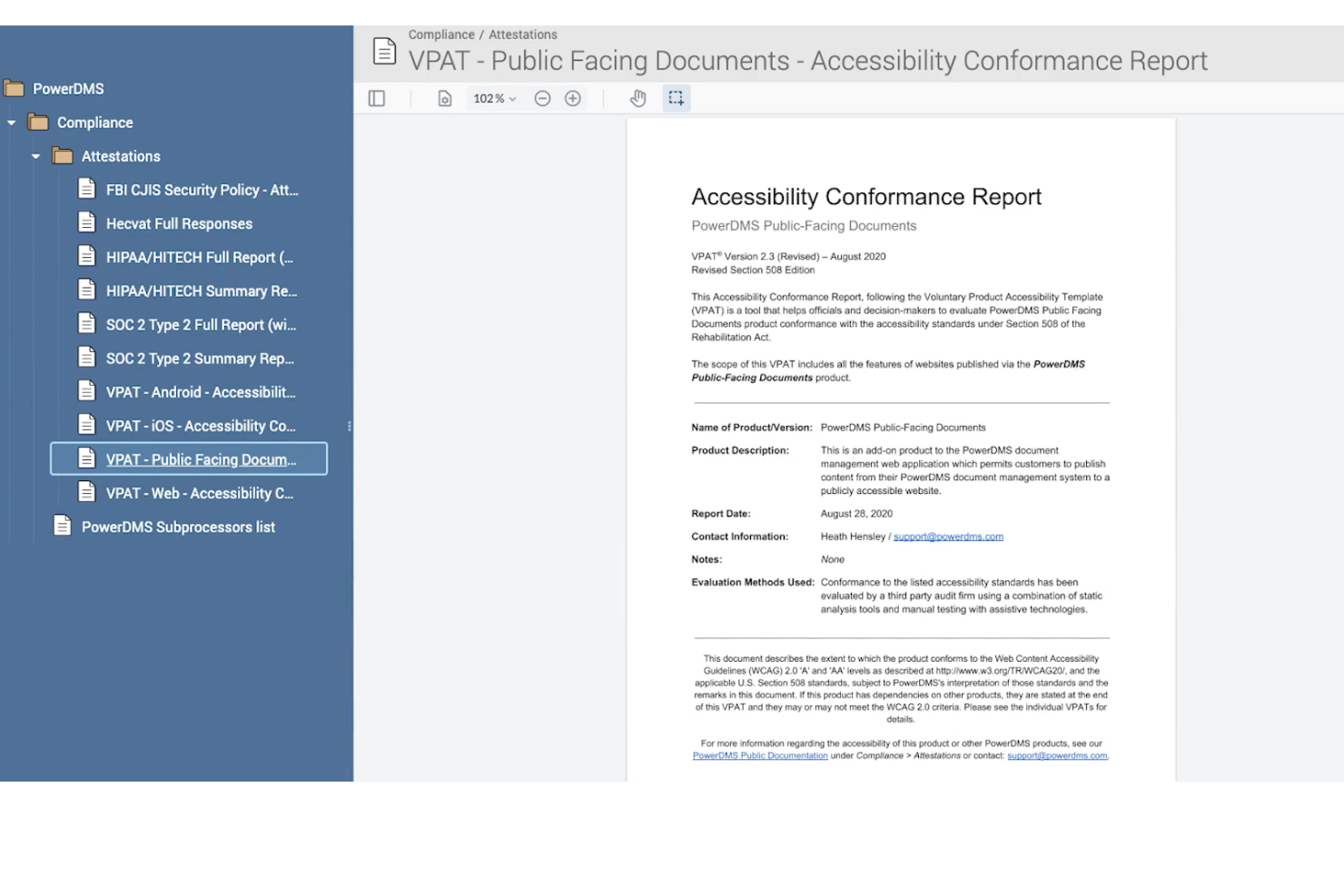
PowerDMS helps public safety agencies, healthcare organizations, and other regulated industries manage compliance documents, policies, and accreditation requirements in one centralized platform that simplifies audits and keeps teams aligned.
Who Is PowerDMS Best For?
PowerDMS is a strong fit for compliance-heavy industries like law enforcement, healthcare, and local government that need to manage accreditation standards alongside their policy documentation.
Why I Picked PowerDMS
PowerDMS earns its spot on my shortlist because it connects policy management to accreditation tracking through its PowerStandards module. I like that you can map your policies and proofs of compliance to specific standard statements from 60+ accrediting bodies, then highlight the exact sections that satisfy each requirement. When a standard or policy changes mid-cycle, automatic alerts flag what's affected so my team isn't scrambling before an on-site. The mock assessment feature lets remote assessors review documents in advance, which reduces the prep work that often piles up before an audit.
PowerDMS Key Features
- Side-by-side comparison: View exactly what's been added, changed, or removed when a policy or standard is updated.
- Task management: Create one-time or recurring tasks to keep compliance activities on track throughout the accreditation cycle.
- Workflow automation: Assign review and approval steps to specific users, roles, or groups using saved workflow templates.
- Digital standards manuals: Subscribe to and access pre-loaded standards manuals from 40+ accrediting bodies directly within the platform.
PowerDMS Integrations
Integrations include Microsoft Office, OneDrive, Google Drive, Lexipol, Guardian Tracking, LEFTA Systems, SafeQual, PowerReady, PowerIA, and Learn.
Pros and Cons
Pros:
- Strong audit logs
- Tracks staff training
- Easy attestations
Cons:
- Expensive add-ons
- Old user interface
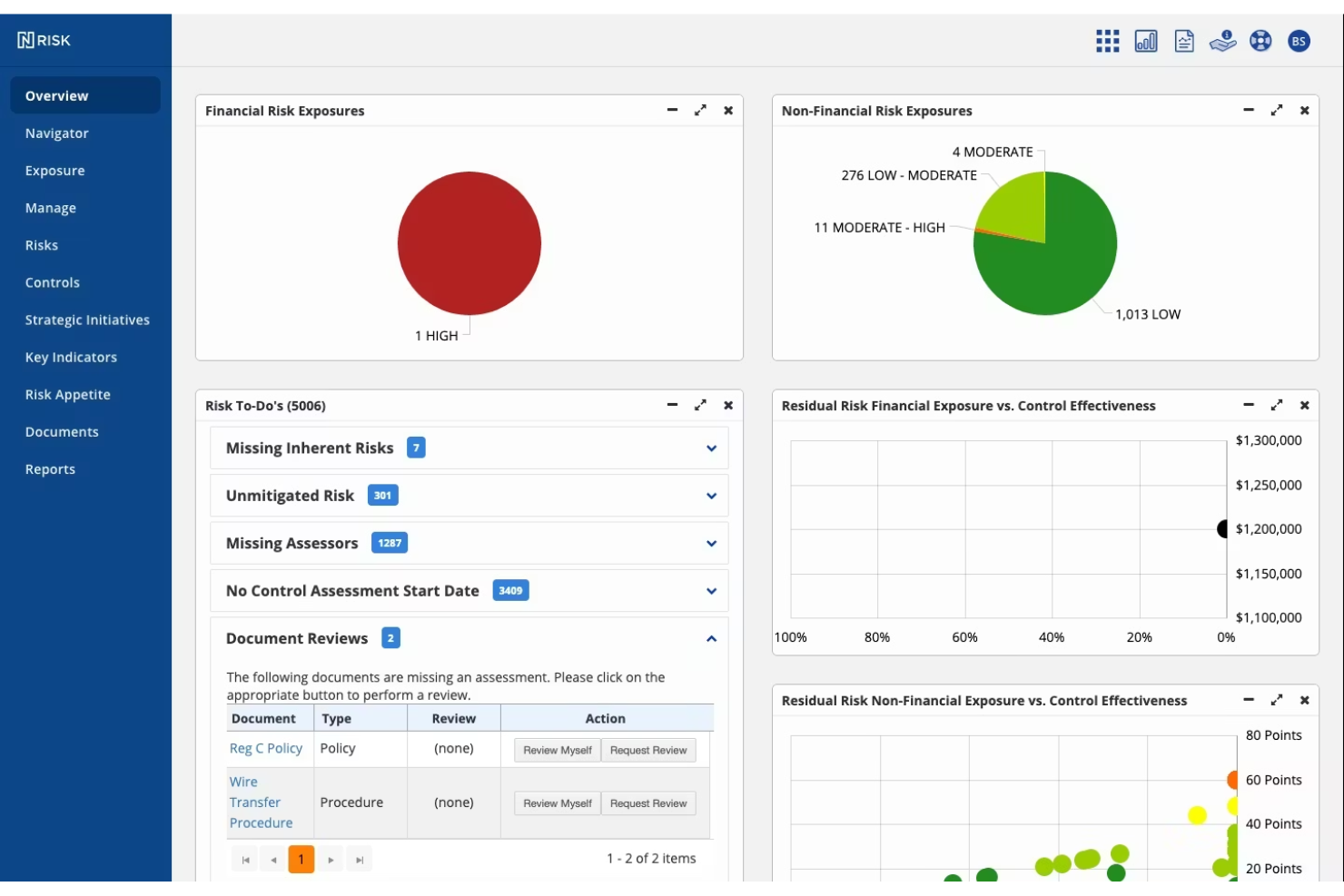
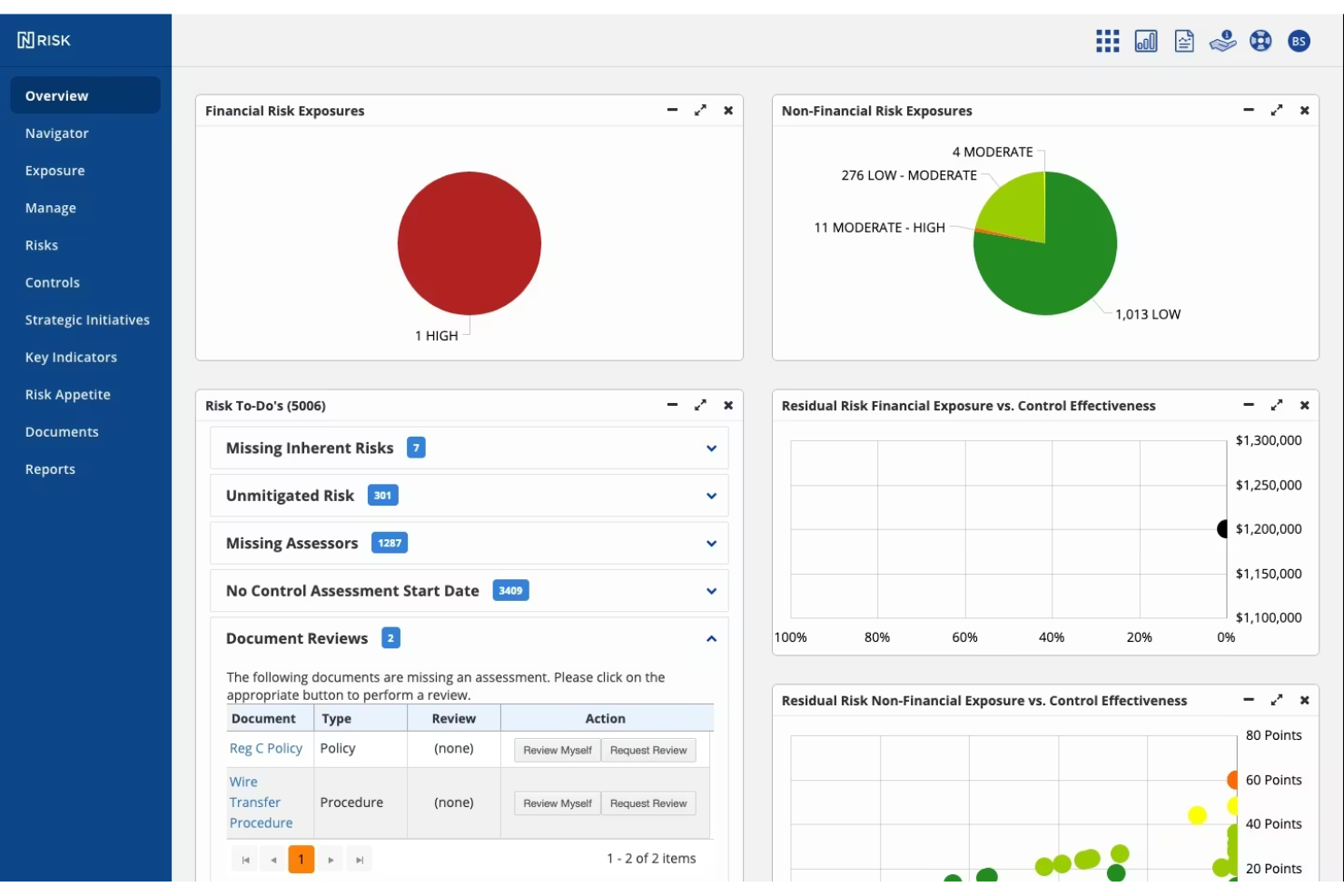
Ncontracts is a compliance document management platform designed for financial institutions and regulated businesses that need to centralize risk, policy, and vendor documentation while staying ahead of regulatory changes.
Who Is Ncontracts Best For?
Ncontracts is a strong fit for compliance and risk teams at banks, credit unions, and other financial services organizations operating in heavily regulated environments.
Why I Picked Ncontracts
Ncontracts earns its spot on my shortlist because of how well it handles risk and vendor oversight within a single compliance-focused platform. I like that vendor due diligence, contract tracking, and risk assessments all live in one place—so my team isn't chasing documents across spreadsheets when an audit hits. The vendor risk management module lets us track third-party relationships against regulatory requirements, flagging gaps before they become findings. I also rely on the findings management tools to document control deficiencies and link them directly to remediation tasks.
Ncontracts Key Features
- Policy management: Manage policies with version control, automated reminders, and board approval tracking in a centralized library.
- Regulatory library: Access a real-time database of nearly 5,000 guidance documents and 6,000+ U.S. and state rules, with search and filtering tools.
- Tailored regulatory alerts: Receive notifications on regulatory changes based on your organization's size, products, services, examiner, and geography.
- Audit management templates: Run internal audits using 65+ pre-built audit and compliance review templates with automated workflows.
Ncontracts Integrations
Native integrations are not currently listed.
Pros and Cons
Pros:
- Exam prep features
- Good board reports
- Risk mapping docs
Cons:
- Complex modules
- UI is a bit clunky
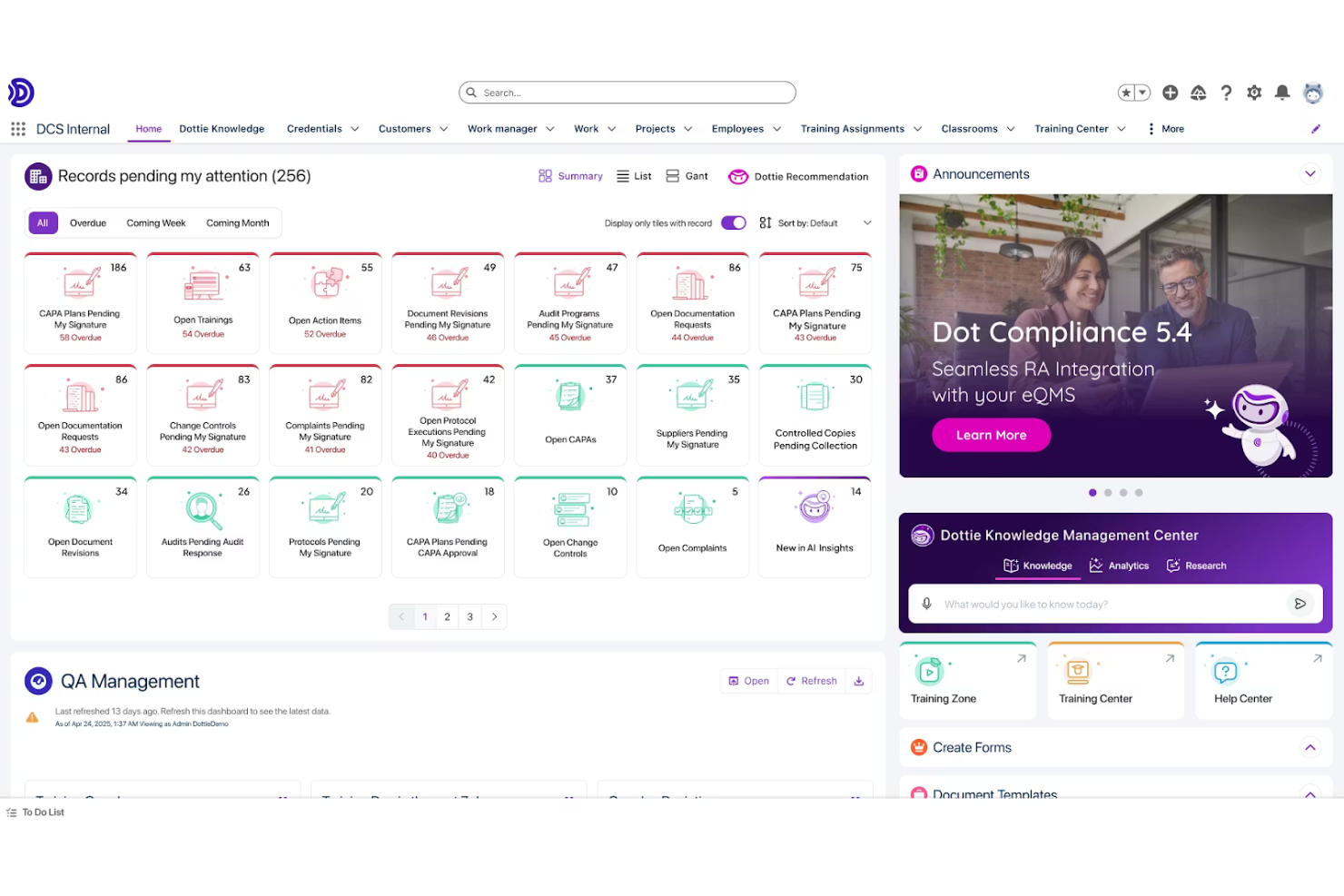
Dot Compliance is a cloud-based compliance document management platform designed for regulated industries that need to manage complex documentation, automate quality processes, and maintain audit-ready records for regulatory inspections.
Who Is Dot Compliance Best For?
Dot Compliance is a strong fit for life sciences companies—including pharma, biotech, and medical device firms—that operate under strict FDA or EMA regulatory requirements.
Why I Picked Dot Compliance
I picked Dot Compliance as one of the best because it's purpose-built for life sciences regulatory needs in a way that generic document management tools simply aren't. The platform natively handles the full document lifecycle—from SOP creation through review, approval, training assignment, and periodic review—with automated workflows that enforce compliance with 21 CFR Part 11, EU Annex 11, and ISO 13485 at every stage. I particularly like that when a revised document gets approved, the system automatically triggers role-based training tasks and links those training records directly to the specific document version, creating a closed-loop audit trail. The regulatory management module also centralizes dossier management, global registration tracking, and regulatory correspondence in one place, which is exactly what pharma and biotech teams need when managing submissions across FDA, EMA, and other regional authorities.
Dot Compliance Key Features
- Periodic review automation: Automatically sends proactive notifications to document owners as review dates approach, based on custom intervals set per document type.
- CAPA management: Initiates corrective and preventive action records directly from audit findings, deviations, or complaints, with built-in root cause analysis tools like 5 Whys and Fishbone diagrams.
- Audit management: Supports end-to-end audit scheduling, checklist execution, and finding tracking for internal, external, and supplier audits within a single workflow.
- Configurable document headers, footers, and watermarks: Auto-generates PDFs with dynamically populated metadata and status-based watermarks (e.g., Draft, Effective) to preserve document integrity outside the system.
Dot Compliance Integrations
Integrations include Salesforce, and an API is available for custom integrations.
Pros and Cons
Pros:
- Strong e-signatures
- Salesforce backed
- Ready to use fast
Cons:
- Overkill for non-med
- UI can be complex

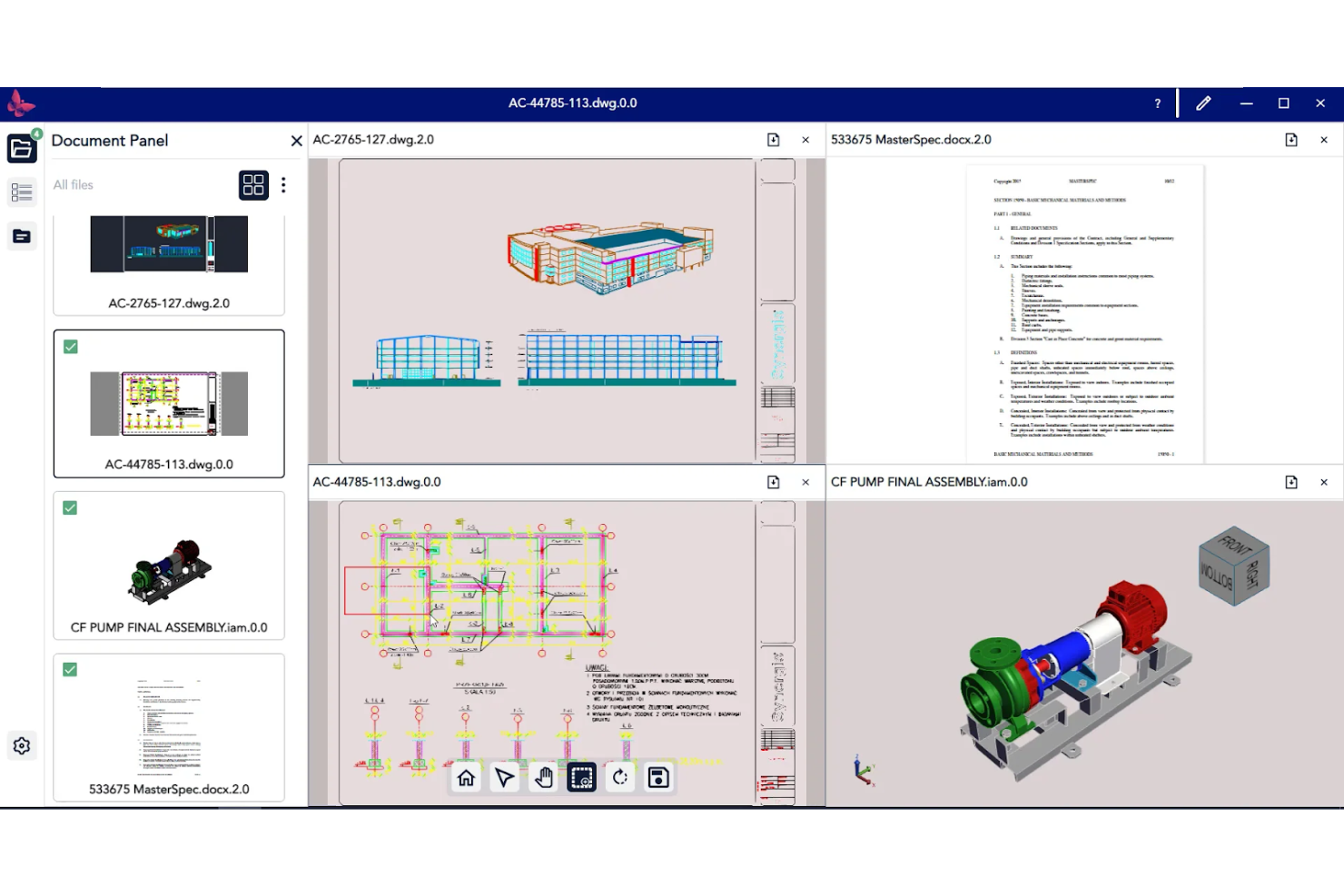
Synergis Software gives engineering, manufacturing, and construction teams a centralized platform to manage, track, and control compliance documents, helping you maintain audit trails, version control, and secure access across complex technical projects.
Who Is Synergis Software Best For?
Synergis Software is a strong fit for engineering and manufacturing teams that need structured document control across technical drawings, specifications, and compliance records.
Why I Picked Synergis Software
Synergis Software earns its spot on my shortlist because of how deeply it's built around the realities of engineering document control. What I find most useful is the version control system—Adept maintains one master record per file and keeps complex CAD reference file relationships intact, so when a drawing changes, every linked file updates with it. That matters a lot when you're managing multi-discipline projects where a single outdated P&ID or assembly drawing can create real safety or compliance risk. I also like the searchable audit trail, which logs every action taken on a document and gives you the traceability you need when regulators come knocking.
Synergis Software Key Features
- Automated workflow routing: Build approval and review workflows that automatically move documents through each step, with time-based alerts and notifications to prevent bottlenecks.
- Granular permission controls: Set document-level permissions that define exactly who can view, mark up, check in/out, approve, or rename files across different user groups.
- Transmittal automation: Locate version-correct documents, bundle reference files, auto-generate cover sheets, and maintain a full record of what was sent and to whom.
- CAD visualization and markup: View and annotate 2D/3D CAD files, PDFs, and Office documents directly in Adept without needing a native CAD license.
Synergis Software Integrations
Integrations include Autodesk AutoCAD, Autodesk Inventor, SOLIDWORKS, MicroStation, Microsoft Office, Microsoft SharePoint, Microsoft Exchange, Oracle, SAP, and ESRI ArcGIS.
Pros and Cons
Pros:
- Good audit logging
- Strict check in/out
- Deep version control
Cons:
- Expensive setup fees
- Hard to implement
Annen programvare for håndtering av samsvarsdokumenter
Her er noen flere alternativer for programvare for håndtering av samsvarsdokumenter som ikke kom med på kortlisten min, men som likevel er verdt å undersøke:
- Compliance.com
For policy and procedure tracking
- ComplianceQuest
For integrated quality management
- Connecteam
For mobile compliance checklists
- Ideagen
For audit trail tracking
- QT9 QMS
For automated training records


How I Evaluate Compliance Document Management Software
I split my evaluation into baseline requirements—like audit trails and approval workflows—and differentiators that separate tools that merely store documents from those built for compliance.
Core Functionality (Table Stakes For This List)
When I'm selecting tools for my list, I rank each one on a scale from 0 (does not offer the functionality) to 5 (excels in this area) for each core functionality listed below. Then, I calculate the tool's total score into a percentage. Each tool needs to achieve a minimum total score of 65% to be considered for inclusion.
- Controlled Document Repository: I check whether the platform organizes documents with structured metadata and classification, not just folders—think tagging by project phase, discipline, or regulation.
- Version Control & Audit Trail: Every revision, approval, and download should be logged with timestamps and user IDs so you can hand an auditor a clean history on demand.
- Approval Workflows: I evaluate whether the tool supports multi-step review routing with e-signatures, like circulating a safety plan through QA, legal, and the project lead before release.
- Access Controls & Permissions: Role-based access matters here—your field engineers and external inspectors shouldn't see the same documents as your compliance director.
- Retention & Policy Management: I look for configurable retention schedules and expiration alerts tied to frameworks like ISO 9001 or HIPAA, not just manual deletion options.
- Compliance Reporting & Search: The platform should let you pull audit-ready reports and locate any document by metadata or full-text search within seconds during a live audit.
Once I have a list of tools that meet the criteria, I consider what sets each platform apart.
Differentiating Factors (What Sets Vendors Apart)
Here's how I compare and contrast different vendors:
Standout Features
AI-powered document intelligence is a major differentiator—I look for tools that auto-classify uploads and extract key data points, which saves hours of manual tagging on document-heavy projects. Regulatory change alerts also matter. When a framework like ISO 45001 gets updated, the platform should flag affected documents before your next audit. For teams with field staff, mobile capture with offline sync means inspectors can upload signed checklists from a job site without waiting for connectivity.
Beyond Features
Security certifications like SOC 2 Type II and ISO 27001 tell me a vendor takes data protection seriously—especially when your documents contain regulated patient data or proprietary engineering specs. I also evaluate how well each platform connects to the tools project teams already use, like Procore, Jira, or SAP, since a disconnected compliance system creates gaps in your audit trail. Deployment flexibility matters too. Some organizations require on-premise hosting to meet internal IT policies, while others need multi-region cloud options for distributed teams.
Slik velger du programvare for håndtering av samsvarsdokumenter
Det er lett å gå seg vill i lange funksjonslister og kompliserte prisstrukturer. For å hjelpe deg med å holde fokus mens du arbeider deg gjennom den unike prosessen med å velge programvare, får du her en sjekkliste over faktorer du bør ha i tankene:
| Faktor | Hva du bør vurdere |
|---|---|
| Skalerbarhet | Vil programvaren håndtere dokumentmengden og veksten i antall brukere over tid? Se etter brukerbegrensninger, lagringsgrenser og muligheter for oppgradering. |
| Integrasjoner | Kan verktøyet kobles direkte til HR-, ERP- eller arbeidsflytsystemene dine? Bekreft at det er kompatibelt med den nåværende teknologiplattformen din. |
| Tilpasningsmuligheter | Kan du tilpasse dokumentarbeidsflyter, maler og tillatelser til organisasjonens retningslinjer og struktur? |
| Brukervennlighet | Vil teamet ditt ta i bruk verktøyet raskt? Se etter tydelig navigasjon, minimalt opplæringsbehov og intuitivt dokumentsøk. |
| Implementering og innføring | Hvor lang tid vil det ta å komme i gang? Spør om støtte ved migrering, ressurser for innføring og vanlig tid før du får verdi. |
| Kostnad | Er prisnivåene tydelige og forutsigbare? Vær oppmerksom på ekstra kostnader for lagring, brukere eller avanserte samsvarsmoduler. |
| Sikkerhetstiltak | Oppfyller programvaren standardene dine for databeskyttelse? Se etter kryptering, revisjonslogger og samsvar med regelverk som GDPR eller HIPAA. |
| Samsvarskrav | Støtter verktøyet de spesifikke regelverkene dine (f.eks. ISO, SOC, HIPAA)? Se etter innebygd kobling mot standarder og støtte for revisjoner. |
Hva er programvare for håndtering av samsvarsdokumenter?
Programvare for håndtering av samsvarsdokumenter er en digital plattform som hjelper organisasjoner med å lagre, organisere og kontrollere tilgangen til alle sikre dokumenter som kreves for overholdelse av regelverk. Disse systemene støtter versjonskontroll, revisjonsspor og sikker deling for å sikre at retningslinjer, prosedyrer og dokumentasjon på samsvar alltid er oppdatert og tilgjengelig for revisjoner eller inspeksjoner, samtidig som de effektiviserer de overordnede dokumentprosessene. Denne programvaren er avgjørende for å opprettholde ansvarlighet, bevare dataintegriteten og oppfylle bransje- eller lovkrav.
Funksjoner
Når du velger programvare for håndtering av samsvarsdokumenter, bør du se etter følgende viktige funksjoner:
- Versjonskontroll for dokumenter: Sporer endringer i dokumenter over tid, slik at brukere kan vise, gjenopprette eller sammenligne tidligere versjoner og opprettholde et tydelig revisjonsspor.
- Håndtering av tilgangstillatelser: Lar administratorer angi brukerroller og kontrollere hvem som kan vise, redigere eller godkjenne bestemte dokumenter, slik at sensitiv informasjon beskyttes.
- Automatisert arbeidsflytruting: Flytter dokumenter gjennom forhåndsdefinerte trinn for gjennomgang og godkjenning, slik at samsvarsprosessene følges og dokumenteres.
- Sporing av revisjonsspor: Registrerer alle handlinger som utføres på et dokument, inkludert redigeringer, godkjenninger og tilgang, og gir en åpen historikk for revisjoner.
- Sporing av bekreftelse av retningslinjer: Registrerer digitale signaturer eller bekreftelser fra brukere for å verifisere at de har lest og forstått nødvendige retningslinjer eller prosedyrer.
- Sentralisert dokumentlager: Lagrer alle samsvarsrelaterte dokumenter på ett enkelt, organisert sted, noe som gjør det enkelt å søke etter, hente frem og administrere filer.
- Varsler om utløp og fornyelse: Varsler brukere når dokumenter skal gjennomgås, fornyes eller utløper, slik at teamene kan ligge i forkant av samsvarsfristene.
- Malfunksjon: Tilbyr standardiserte maler for vanlige samsvarsdokumenter, noe som reduserer manuelt arbeid og sikrer konsistens i hele organisasjonen.
- Rapportering og analyse: Genererer rapporter om dokumentstatus, brukeraktivitet og samsvarsmålinger for å støtte interne gjennomganger og eksterne revisjoner.
Fordeler
Implementering av programvare for håndtering av samsvarsdokumenter gir flere fordeler for teamet og virksomheten din. Her er noen av fordelene du kan se frem til:
- Bedre revisjonsberedskap: Sentralisert lagring, revisjonsspor og versjonskontroll gjør det enklere å forberede seg på og svare på samsvarsrevisjoner.
- Redusert samsvarsrisiko: Automatiserte arbeidsflyter, tilgangskontroller og sporing av bekreftelse av retningslinjer bidrar til å sikre at regulatoriske krav oppfylles konsekvent.
- Raskere gjenfinning av dokumenter: Søkbare lagre og organiserte filstrukturer gjør det mulig for brukere å raskt finne samsvarsdokumenter når de trengs.
- Større ansvarlighet: Digitale signaturer, logger over brukeraktivitet og håndtering av tillatelser skaper tydelige oversikter over hvem som gjorde hva og når.
- Effektivisert håndtering av retningslinjer: Automatiserte gjennomgangssykluser, utløpsvarsler og malhåndtering forenkler prosessen med å oppdatere og distribuere retningslinjer.
- Større datasikkerhet: Rollebasert tilgang og krypteringsfunksjoner beskytter sensitiv samsvarsinformasjon mot uautorisert tilgang eller tap.
- Ensartede dokumentstandarder: Malhåndtering og automatisering av arbeidsflyter bidrar til å opprettholde enhetlighet og nøyaktighet i all samsvarsdokumentasjon.
Kostnader & priser
Valg av programvare for håndtering av samsvarsdokumenter krever en forståelse av de ulike prismodellene og abonnementene som er tilgjengelige. Kostnadene varierer basert på funksjoner, teamstørrelse, tillegg og mer. Tabellen nedenfor oppsummerer vanlige abonnementer, gjennomsnittsprisene deres og typiske funksjoner som inngår i løsninger for programvare for håndtering av samsvarsdokumenter:
Sammenligningstabell for abonnementer for programvare for håndtering av samsvarsdokumenter
| Plantype | Gjennomsnittspris | Vanlige funksjoner |
|---|---|---|
| Gratisabonnement | $0 | Grunnleggende dokumentlagring, begrenset brukertilgang, enkel versjonskontroll og grunnleggende søkefunksjonalitet. |
| Personlig abonnement | $15–$35/per bruker/måned | Tilgang for én bruker, opplasting av dokumenter, versjonshistorikk og grunnleggende samsvarssporing. |
| Forretningsabonnement | $40–$85/per bruker/måned | Tilgang for flere brukere, automatisering av arbeidsflyter, revisjonsspor, sporing av policybekreftelser og rapporteringsverktøy. |
| Virksomhetsabonnement | $90–$200/per bruker/måned | Avansert sikkerhet, tilpassede integrasjoner, rollebaserte tillatelser, dedikert kundestøtte og instrumentpaneler for samsvar. |
Vanlige spørsmål om programvare for håndtering av samsvarsdokumenter
Her er noen svar på vanlige spørsmål om programvare for håndtering av samsvarsdokumenter:
Hvordan støtter programvare for håndtering av samsvarsdokumenter myndighetsrevisjoner?
Programvare for håndtering av samsvarsdokumenter oppretter revisjonsspor, sporer dokumentversjoner og lagrer all dokumentasjon på samsvar på ett sted. Dette gjør det enklere å hente frem nødvendige dokumenter, vise at retningslinjer følges og svare raskt på forespørsler fra revisorer.
Kan programvare for håndtering av samsvarsdokumenter integreres med andre forretningssystemer?
Ja, mange løsninger for håndtering av samsvarsdokumenter tilbyr integrasjoner med HR-, ERP- og arbeidsflytverktøy. Dette gjør det mulig å synkronisere brukerdata, automatisere distribusjon av dokumenter og koble samsvarsprosesser sammen med den øvrige teknologiplattformen.
Hvilke sikkerhetstiltak bør jeg se etter i programvare for håndtering av samsvarsdokumenter?
Se etter funksjoner som rollebasert tilgangskontroll, kryptering og detaljerte aktivitetslogger. Disse sikkerhetstiltakene bidrar til å beskytte sensitive samsvarsdata og sikre at bare autoriserte brukere kan få tilgang til eller endre dokumenter.
Hvordan bidrar automatiserte arbeidsflyter til samsvarshåndtering?
Automatiserte arbeidsflyter sender dokumenter gjennom nødvendige trinn for gjennomgang og godkjenning, reduserer manuelle feil og sikrer at samsvarsprosessene følges og dokumenteres på en konsekvent måte.
Hva bør jeg ta hensyn til når jeg flytter eksisterende dokumenter til et nytt system for håndtering av samsvarsdokumenter?
Planlegg for datatilordning, kompatibilitet mellom filformater og opplæring av brukere. Spør leverandørene om støtte for migrering, importverktøy og om de tilbyr ressurser for innføring som kan hjelpe teamet med en smidig overgang.