

10 beste verktøy for internkommunikasjon i 2026

Kortliste over de beste verktøyene for intern kommunikasjon


Verktøy for intern kommunikasjon er apper og plattformer som hjelper teamet ditt med å dele oppdateringer, meldinger og filer i ett digitalt arbeidsområde. Hvis du leter etter måter å holde alle tilkoblet på, uansett hvor de jobber, vet du hvor fort ting kan falle mellom stolene. Dagens hybride team og fjernteam er avhengige av disse verktøyene for å erstatte rotete e-posttråder, redusere antall møter og holde prosjektene i gang. I denne listen finner du de beste alternativene for ulike teambehov, slik at du kan velge det rette verktøyet for enkle samtaler, sikre diskusjoner eller fullstendig samarbeid med delte dokumenter og oppgaver.
Hvorfor du kan stole på våre programvareanbefalinger
Teamet vårt har testet og anmeldt programvare siden 2012. Vi er selv prosjektledere, så vi vet hvor vanskelig og hvor viktig det er å velge riktig programvare.
I denne guiden har vi vurdert verktøyene gjennom praktisk testing og uavhengig research og gitt dem poeng ut fra våre utvelgelseskriterier. Vi bygger også på innsikt fra ledende eksperter i bransjen og erfarne prosjektledere.
Anmeldelsene våre bygger på vår egen redaksjonelle vurdering. De er ikke et salgsargument.
Ekspertanmeldere:
Sammenligningstabell for verktøy for intern kommunikasjon
Denne sammenligningstabellen oppsummerer prisopplysningene for mine utvalgte verktøy for intern kommunikasjon:
| Tool | Best For | Trial Info | Price | ||
|---|---|---|---|---|---|
| 1 | Best email-style topic headers for async focus | Free plan + free demo available | From $6.67/user/month (billed annually) | Website | |
| 2 | Best free unlimited message history | 7-day free trial + free plan + free demo available | From $2.49/seat/month (billed annually) | Website | |
| 3 | Best AI-powered suggestions for task management | Free plan + free demo available | From $3/user/month (billed annually) | Website | |
| 4 | Best built-in shared to-do lists and reminders | 30-day free trial + free plan available | From $4.50/user/month (billed annually) | Website | |
| 5 | Best built-in workflow automations | 14-day free trial + free plan + free demo available | From $16.20/month (billed annually) | Website | |
| 6 | Best for managing secure, self-hosted messaging | 30-day free trial | Pricing upon request | Website | |
| 7 | Best integration with Microsoft 365 apps | Free plan + 1-month free trial available | From $4/user/month (billed annually) | Website | |
| 8 | Best for open-source communication solutions | Free plan + free demo available | Pricing upon request | Website | |
| 9 | Best threaded messaging to reduce clutter | Free plan available | From $6/user/month (billed annually) | Website | |
| 10 | Best for collaborating within Google Workspace | 14-day free trial available | From $4.60/month (billed annually) | Website |
Anmeldelser av de beste verktøyene for intern kommunikasjon
Nedenfor finner du mine detaljerte sammendrag av de beste verktøyene for intern kommunikasjon som kom med på kortlisten min. Anmeldelsene mine gir en detaljert gjennomgang av funksjonene, integrasjonene og de beste bruksområdene for hver plattform, slik at du kan finne den som passer best for deg.

Zulip
Best email-style topic headers for async focus

Zulip is a team chat software for internal communication that organizes messages by topic in threaded streams, supports group and private conversations, and provides both web and mobile access.
Who Is Zulip Best For?
Distributed tech teams that need organized, topic-driven internal communication for cross-time-zone projects.
Why I Picked Zulip
I picked Zulip as one of the best because my team relies on its email-style topic headers to keep every conversation organized in threaded topics, even when messages are sent hours apart. I like how quick topic search and structured streams help us stay focused on multiple projects at once.
Zulip Key Features
- Stream permissions: Control who can view or join specific conversation streams.
- Message editing: Edit sent messages for clarity or corrections within a time window.
- Emoji and reactions: Respond quickly to messages with emojis and custom reactions.
- Desktop and mobile apps: Access Zulip conversations across Windows, Mac, Linux, iOS, and Android.
Zulip Integrations
Zulip offers native integrations with GitHub, Jira, Trac, Sentry, Nagios, Jenkins, Travis CI, and GitLab. It also provides an API for custom integrations.
Pros and Cons
Pros:
- Open source with strong admin control options
- Topic search works well with large message volumes
- Threaded topics keep discussions avoidably organized
Cons:
- Lacks automated system health monitoring
- Fewer built-in integrations than major competitors
Pumble
Best free unlimited message history

Pumble is a team communication tool that lets users organize conversations by channels, send direct messages, share files, start voice and video calls, and manage notifications across web and mobile apps.
Who Is Pumble Best For?
Growing teams and startups that want budget-friendly internal communication and collaboration without message limits.
Why I Picked Pumble
I picked Pumble as one of the best because my team can reference every past message without worrying about storage limits. I like starting threaded discussions, managing channel permissions, and using built-in voice and video calls for group projects.
Pumble Key Features
- User roles and permissions: Set specific admin and user permissions for better workspace control.
- Channel-based communication: Organize team conversations by topic, project, or department in dedicated channels.
- Group direct messages: Start private group chats for quick side discussions.
- Message pinning: Pin important messages so everyone in the channel can quickly access them.
Pumble Integrations
Pumble offers native integrations with Google Calendar, Google Drive, and Zapier, and provides an API for custom integrations.
Pros and Cons
Pros:
- Includes built-in voice and video calls
- Granular control over channels and notifications
- Unlimited searchable message history for all users
Cons:
- Lacks automated backup utilities
- Fewer integrations compared to major competitors

Chanty
Best AI-powered suggestions for task management
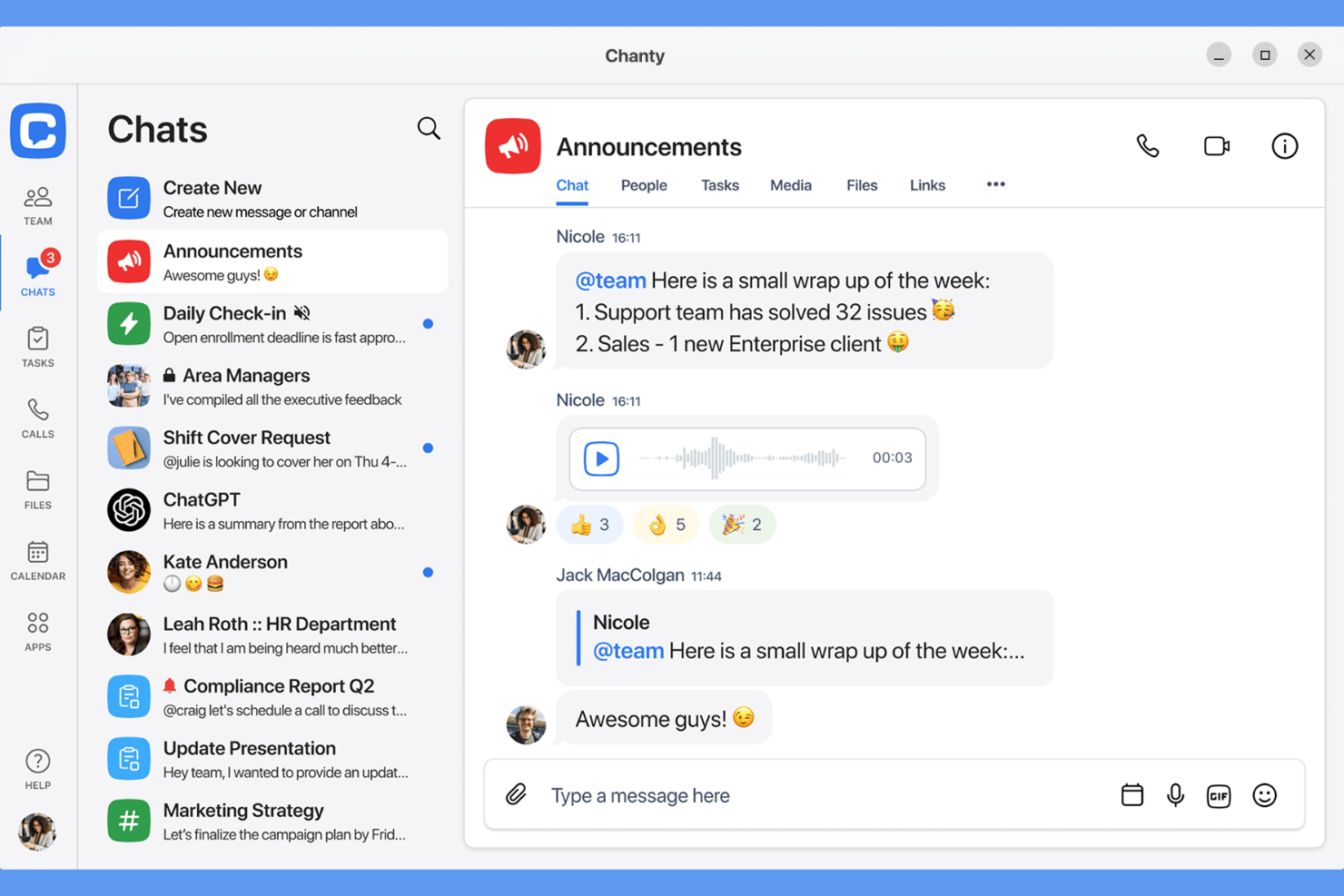
Chanty is a team communication tool for internal collaboration that combines threaded messaging, built-in task management, file sharing, AI-powered suggestions, and searchable conversation history in one app.
Who Is Chanty Best For?
Small businesses and project teams looking for simple, chat-based collaboration with AI-augmented task management features.
Why I Picked Chanty
I picked Chanty as one of the best options because I get AI-generated suggestions that help prioritize tasks in real time. I use Chanty’s chat-to-task feature to turn action items into tasks directly from any conversation, which keeps my collaboration focused.
Chanty Key Features
- Threaded conversations: Keep team messages organized by topic in dedicated threads.
- Audio and video calls: Start direct or group calls instantly within any chat.
- Teambook: View conversations, tasks, and shared files in a single project hub.
- Pin messages: Highlight important messages for easy access at the top of each chat.
Chanty Integrations
Chanty offers native integrations with Google Drive, Dropbox, Trello, GitHub, Asana, Jira, and Zapier. An API is available for custom integrations.
Pros and Cons
Pros:
- Audio and video calling are built into every chat
- Chat-to-task conversion simplifies project tracking
- AI-powered task suggestions
Cons:
- No guest access for non-team collaborators
- Limited admin controls for larger organizations

Flock
Best built-in shared to-do lists and reminders
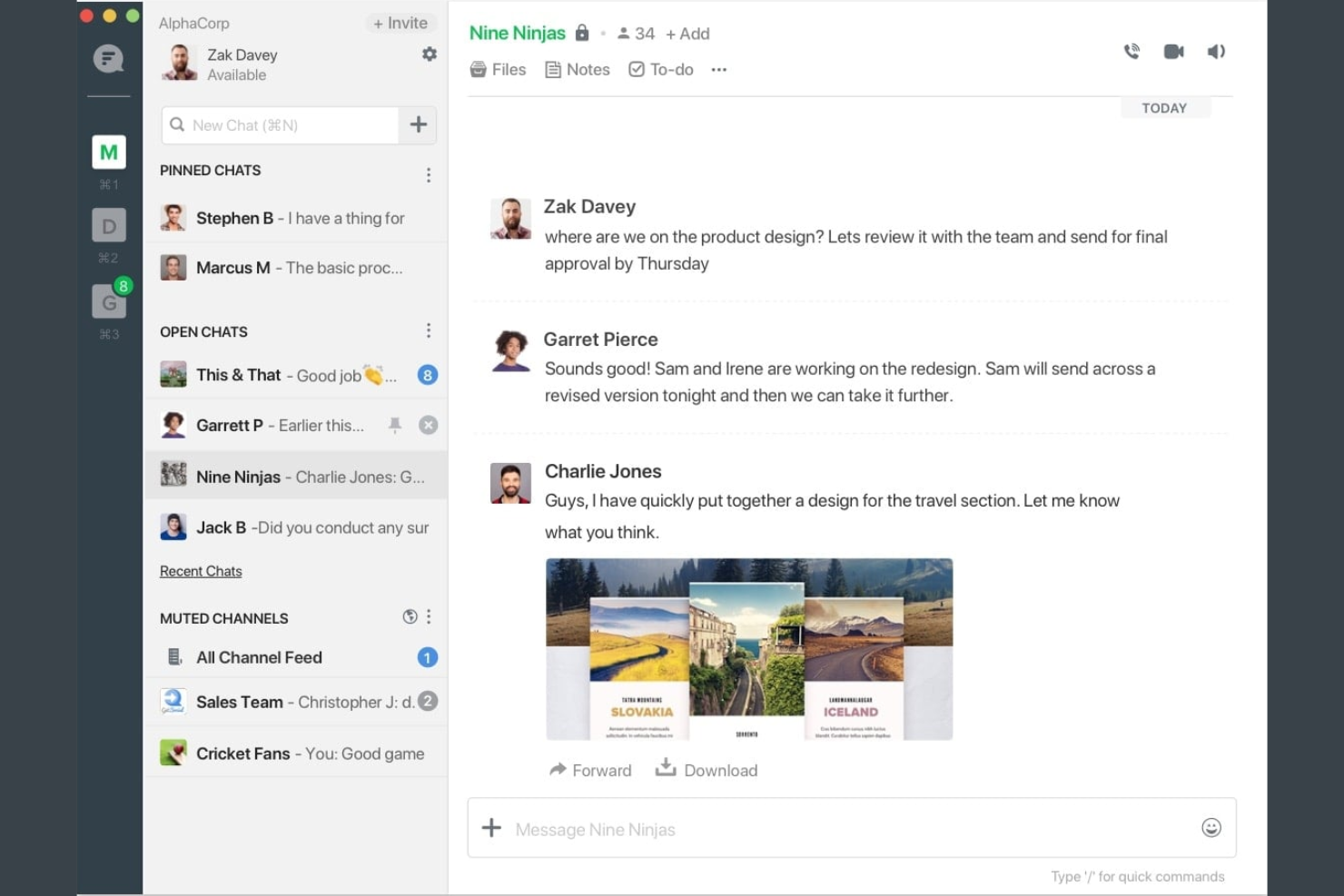
Flock is a team communication platform for internal collaboration that offers group chat, video conferencing, file sharing, polls, notes, and built-in productivity tools all in one app.
Who Is Flock Best For?
Small and midsize teams who want a central hub for messaging, collaboration, and quick shared task management.
Why I Picked Flock
I picked Flock as one of my top tools because I like being able to create shared to-do lists and set reminders right inside a chat. My team quickly runs checklist items without switching between apps, and real-time updates keep everyone aligned.
Flock Key Features
- Channel chat: Communicate with teams in organized public or private channels.
- Video conferencing: Start video calls directly from any chat window.
- File sharing: Upload and share documents, images, and other files within conversations.
- Polls and notes: Create quick polls or collaborative notes to capture feedback and ideas.
Flock Integrations
Flock offers native integrations with Google Drive, Dropbox, Trello, GitHub, Twitter, Asana, and MailChimp. An API is available for custom integrations.
Pros and Cons
Pros:
- Voice, video, and screen sharing in one app
- In-app reminders for group actions and events
- Built-in polls and shared notes for teams
Cons:
- Few advanced controls for large organizations
- Limited search functionality for past conversations

Best built-in workflow automations
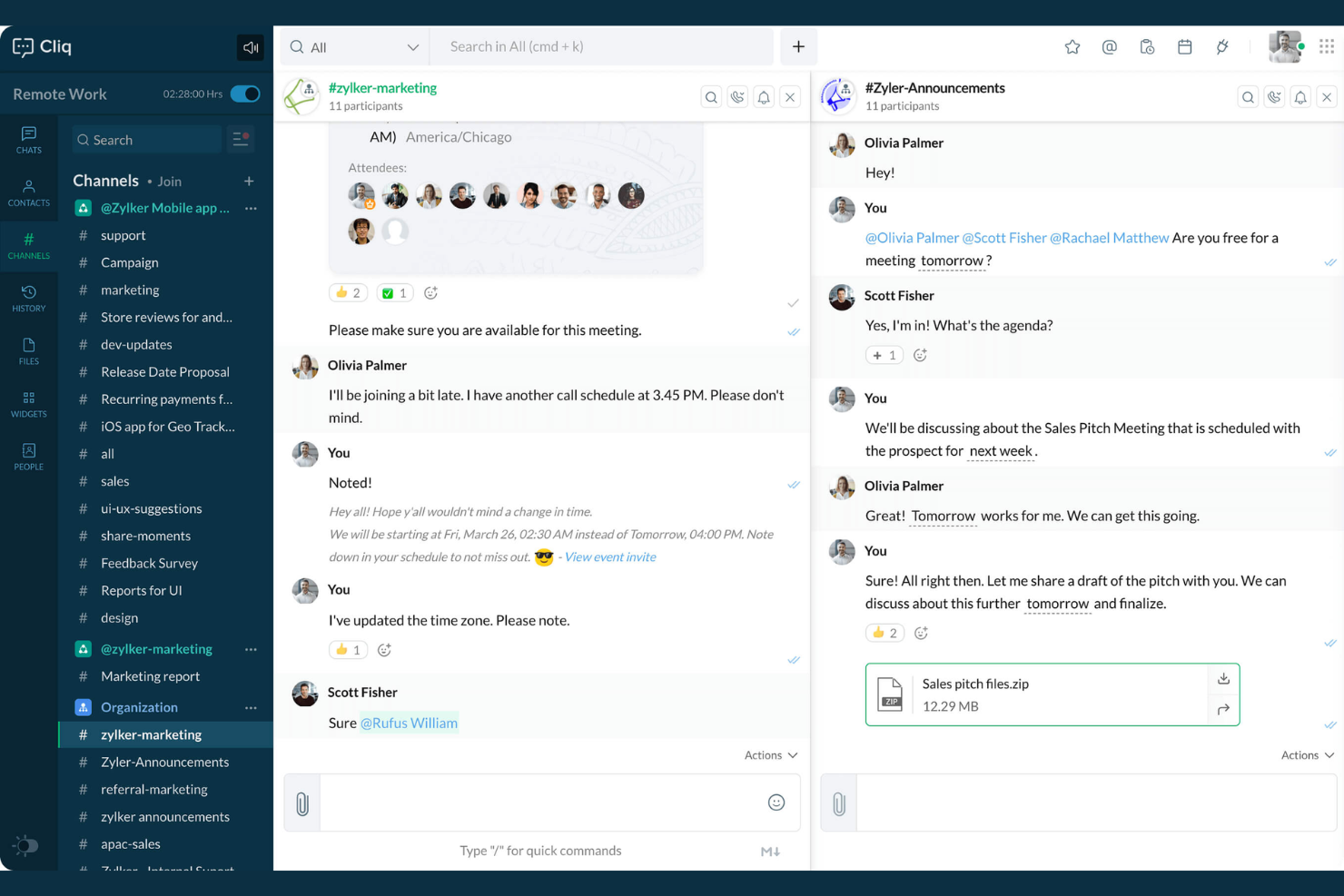
Zoho Cliq is an internal communication software that combines real-time messaging, file sharing, channels, voice and video calls, event scheduling, and built-in tools for team collaboration.
Who Is Zoho Cliq Best For?
Small to mid-sized businesses need centralized chat, automation, and collaboration across distributed or hybrid teams.
Why I Picked Zoho Cliq
I picked Zoho Cliq as one of the best because I can automate repetitive actions with built-in workflows like Bots and Command tasks. My team uses the platform’s message actions and widgets to trigger approval processes and daily reminders right inside our chat streams.
Zoho Cliq Key Features
- Threaded conversations: Organize chat messages by topic for easier navigation.
- Video and audio calls: Start voice or video meetings directly from group or private chats.
- Channel management: Create open or private channels for team and project discussions.
- Message search: Search the full chat history to find any message or file instantly.
Zoho Cliq Integrations
Zoho Cliq offers native integrations with Zoho apps, including Zoho CRM, Zoho Projects, Zoho People, Zoho Desk, and Zoho Connect, plus supports Google Workspace, Trello, GitHub, and Zapier, and provides an API for custom integrations.
Pros and Cons
Pros:
- Built-in video chat for instant meetings
- Channels support structured, topic-based discussions
- Workflow bots automate routine communication tasks
Cons:
- Mobile app notifications are sometimes delayed
- Lacks message archiving tools


Mattermost is an internal communication platform built for technical and operational teams that need private, self-hosted messaging, channel-based chat, file sharing, workflow automation, and real-time collaboration.
Who Is Mattermost Best For?
IT and DevOps teams who need a secure, self-managed communication solution for collaborating on sensitive projects or in highly regulated industries.
Why I Picked Mattermost
I picked Mattermost as one of the best because I can deploy it entirely on my own servers, control all message retention, and use granular user permissions for sensitive discussions. I like that my team can integrate custom bots to automate workflows, too.
Mattermost Key Features
- Channel-based messaging: Organize conversations and projects into topic-specific channels.
- Threaded discussions: Separate message threads for focused conversations within channels.
- Integrated task management: Assign, track, and manage tasks alongside chat functions.
- Full message search: Instantly search all historical messages, files, and users in one interface.
Mattermost Integrations
Mattermost offers native integrations with GitHub, GitLab, Jira, Jenkins, and ServiceNow. It also supports custom integrations via its API and has marketplace extensions for tools like Zoom and PagerDuty.
Pros and Cons
Pros:
- Fine-grained user and team permissions
- Channel and thread-based messaging
- Full control over deployment and data
Cons:
- Requires dedicated server infrastructure management
- Requires technical resources to maintain servers

Best integration with Microsoft 365 apps

Microsoft Teams is an internal communication platform for businesses that brings together chat, audio and video meetings, shared workspaces, file collaboration, and team channels.
Who Is Microsoft Teams Best For?
Microsoft Teams fits organizations that rely on Microsoft 365 for document collaboration, calendar integration, and unified communications across departments or distributed teams.
Why I Picked Microsoft Teams
I picked Microsoft Teams as one of the best because my team can create, edit, and share Word docs or Excel files in real time during chats or meetings. I like how Teams notifications sync instantly with Outlook, keeping everyone on track with meetings and project updates.
Microsoft Teams Key Features
- Channel-based communication: Segment work conversations into dedicated team or project channels.
- Video conferencing: Host virtual meetings with screen sharing, live captions, and recording options.
- Persistent chat history: Access message threads and file attachments anytime within channels and chats.
- Integrated task management: Assign, track, and manage tasks with built-in tools like Planner and To Do.
Microsoft Teams Integrations
Microsoft Teams has native integrations across the Microsoft ecosystem, including Microsoft 365 and Azure. It also offers native integrations with Trello, Dropbox, Salesforce, ServiceNow, GitHub, and Adobe Creative Cloud. An API is available for custom integrations.
Pros and Cons
Pros:
- Persistent chat history for quick information retrieval
- Threaded replies support focused discussions
- Supports native document editing
Cons:
- Limited file sharing outside Microsoft 365 apps
- Lacks data residency location options

Best for open-source communication solutions
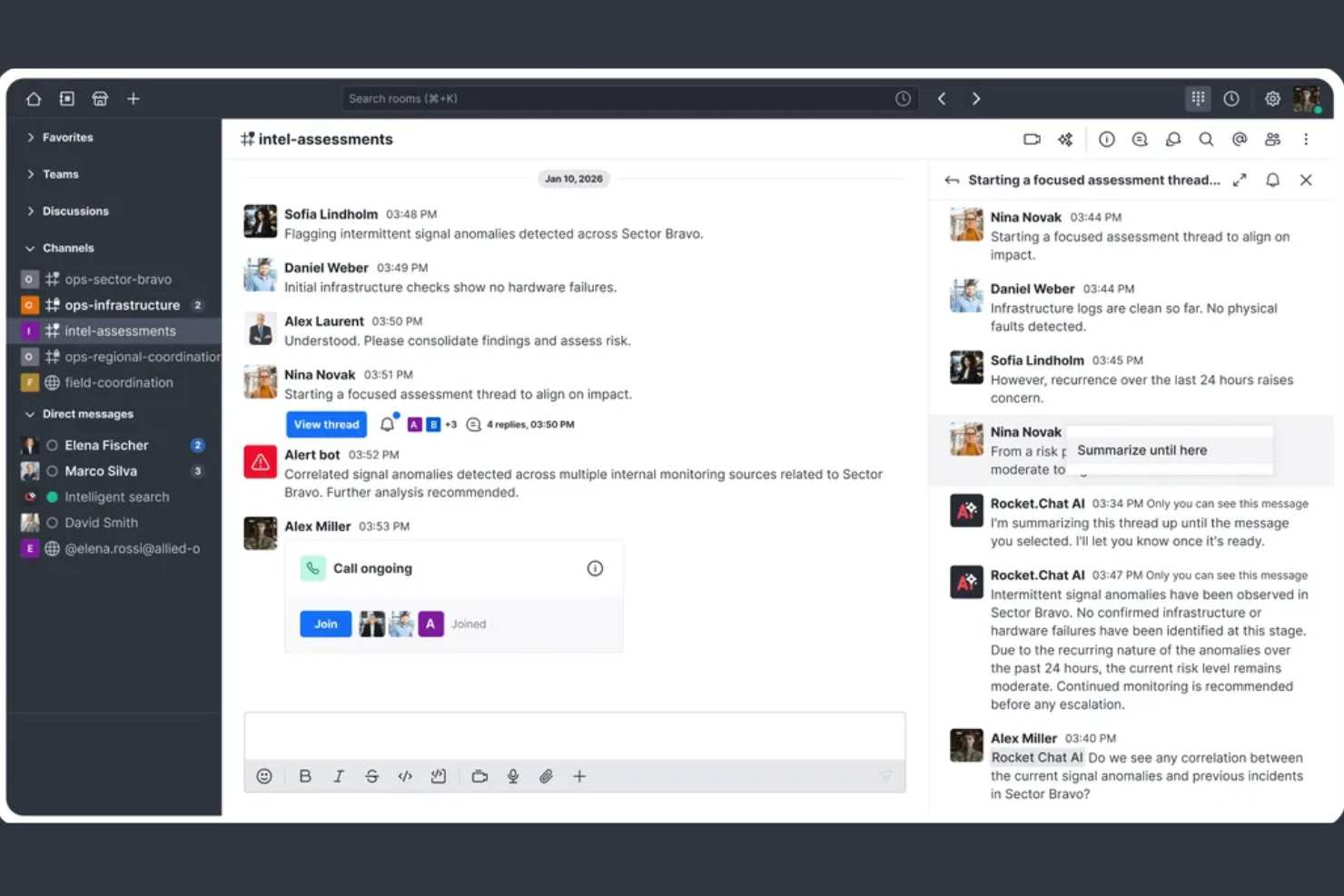
Rocket.Chat is an open-source internal communication platform that enables secure messaging, file sharing, voice and video calls, and extensive customization for teams needing full control over their workplace collaboration.
Who Is Rocket.Chat Best For?
Organizations with strict data privacy needs or those wanting to fully customize their communication environment in highly regulated sectors.
Why I Picked Rocket.Chat
I picked Rocket.Chat as one of the best because I can host it myself, deploy custom extensions, and review the full open-source code. I like having granular data residency control and transparency for sensitive internal messaging.
Rocket.Chat Key Features
- Omnichannel messaging: Manage chat, email, SMS, and social threads from one interface.
- Threaded conversations: Organize discussions and follow-ups within dedicated message threads.
- Role-based permissions: Set specific access and moderation levels for users.
- End-to-end encryption: Protect confidential communications with built-in encryption protocols.
Rocket.Chat Integrations
Rocket.Chat offers native integrations with Atlassian Jira, GitHub, GitLab, Slack, Zapier, Google Workspace, Microsoft 365, Salesforce, and Zendesk. An API is available for custom integrations.
Pros and Cons
Pros:
- Omnichannel inbox for all communications
- Advanced user and workspace permissions
- Open-source platform with self-hosting options
Cons:
- Requires manual server patch management
- Setups and updates require technical expertise

Twist
Best threaded messaging to reduce clutter
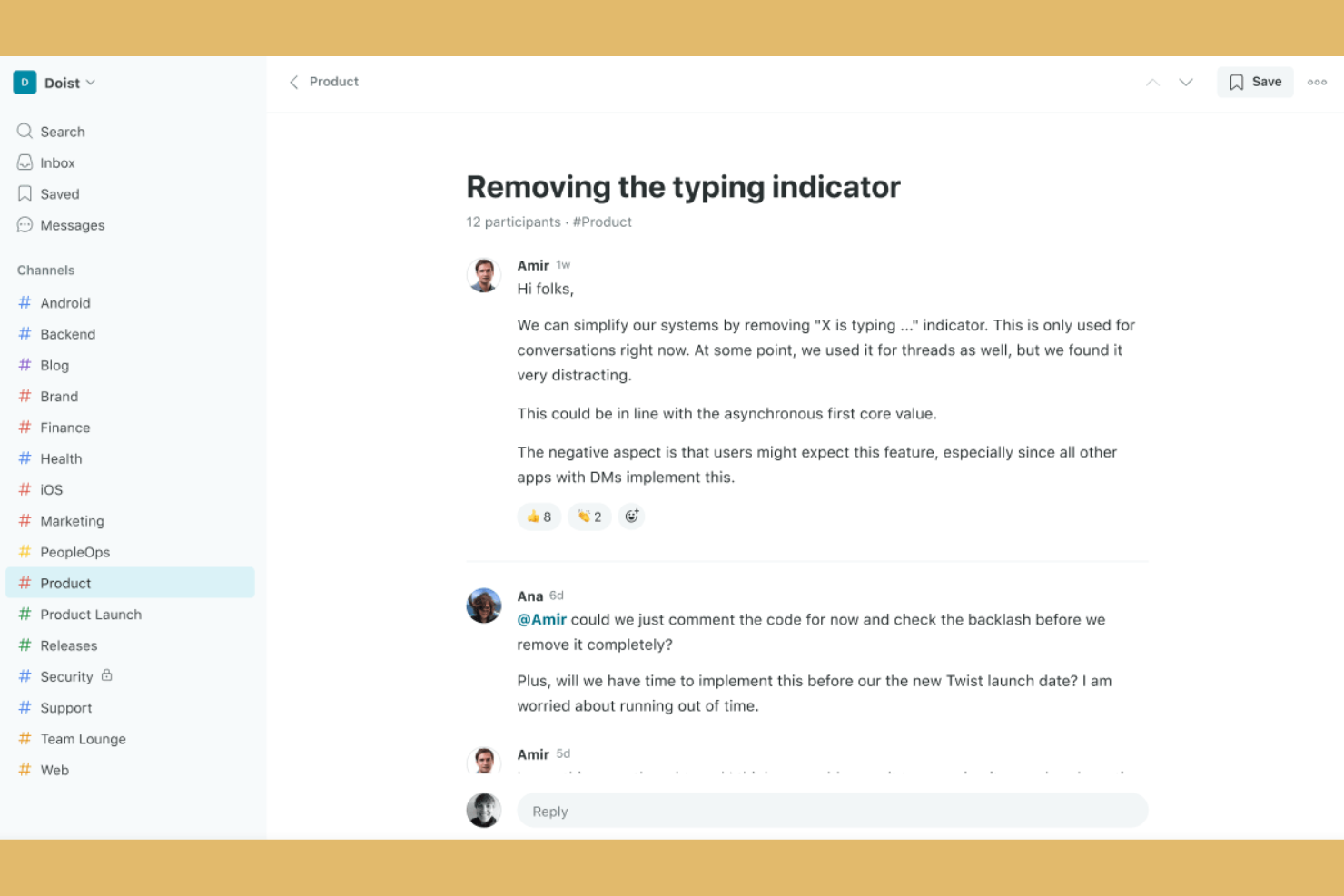
Twist is an internal communication and team collaboration platform that organizes messages in structured threads, enabling focused discussions, sharing of files, and easy cross-team search.
Who Is Twist Best For?
Async-first teams and distributed companies that want organized, distraction-free internal discussions.
Why I Picked Twist
I picked Twist as one of the best because my team can keep conversations clear and organized with persistent threaded messaging. I like how all discussions are broken into threads inside channels, letting us minimize chat noise and track projects with true transparency.
Twist Key Features
- Do not disturb settings: Set notification preferences to block interruptions during focused work.
- Message history search: Instantly search all channels and threads for past conversations and files.
- Guest access: Invite external collaborators to specific channels without giving full workspace access.
- Team directory: View and navigate the organization’s members with searchable team profiles.
Twist Integrations
Twist offers native integrations with Google Drive, GitHub, Todoist, Zapier, and RSS feeds. An API is available for custom integrations.
Pros and Cons
Pros:
- Searchable message history for all threads
- Enables async communication across time zones
- Threaded conversations keep topics organized
Cons:
- Few built-in formatting and emoji options
- Limited notification customization options

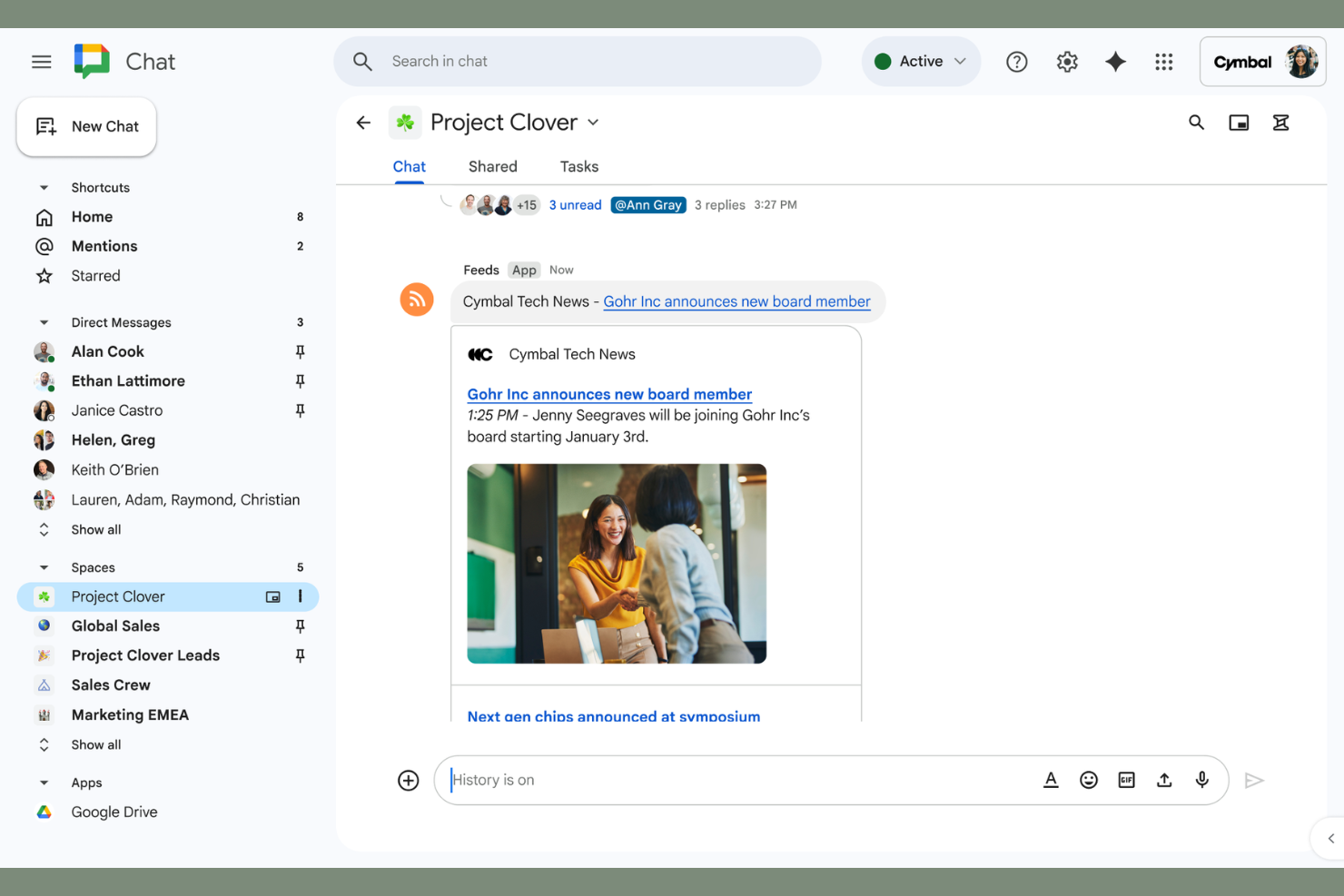
Google Chat is an internal communication platform that offers direct messaging, group conversations, threaded chat in Spaces, chat search, and file sharing for teams using Google Workspace.
Who Is Google Chat Best For?
Google Chat fits teams and organizations already using Google Workspace who want simplified chat, messaging, and collaboration within the Google ecosystem.
Why I Picked Google Chat
I picked Google Chat as one of the best because my team shares Drive files right in chats, launches video calls with Google Meet from messages, and collaborates live on Docs or Sheets inside Google Workspace.
Google Chat Key Features
- Spaces for topic-based discussions: Organize conversations and files by project or topic within dedicated Spaces.
- Message pinning: Pin important messages in group chats or Spaces for ongoing visibility.
- Emoji reactions: Respond instantly to messages with emoji-based reactions.
- Smart replies: Quickly reply to messages using context-aware suggested responses.
Google Chat Integrations
Google Chat has native integrations across the Google Workspace ecosystem, including Gmail, Google Drive, Google Calendar, Google Meet, and Google Docs. An API is available for custom integrations.
Pros and Cons
Pros:
- Quick sharing of Google Workspace files
- Threaded conversations within group chats
- Spaces keep discussions organized by topic
Cons:
- No advanced project tracking features
- Limited chat export and archiving options
Andre verktøy for intern kommunikasjon
Her er noen flere alternativer for verktøy for intern kommunikasjon som ikke kom med på kortlisten min, men som likevel er verdt å se nærmere på:
- Zoom Team Chat
Unified experience with video meetings
- Slack
For organizing chats into focused channels
- Hub
With all-inclusive licensing and onboarding
- ProofHub
Collaborative proofing for creative teams
- Webex
Enterprise-grade video and team messaging
- Troop Messenger
Self-destructing messaging for secure data
- Spike
Email chat hybrid for unified conversations
- Element
Encrypted messaging with decentralization
- MangoApps
All-in-one platform for intranet and chat
- Ryver
Built-in task and workflow management


How I Evaluate Internal Communication Tools
I split my evaluation into two layers: the baseline a cross-functional team relies on daily—threaded channels, file sharing, PM integrations—and the differentiators that make one tool the right fit.
Core Functionality (Table Stakes For This List)
When I'm selecting tools for my list, I rank each one on a scale from 0 (does not offer the functionality) to 5 (excels in this area) for each core functionality listed below. Then, I calculate the tool's total score into a percentage. Each tool needs to achieve a minimum total score of 65% to be considered for inclusion.
- Real-Time Messaging: I evaluate whether the tool supports threaded conversations, mentions, and reactions—features that keep a sprint discussion organized instead of buried in a single chat stream.
- Channels and Group Spaces: Project teams need dedicated spaces per workstream, so I look for public/private channels with clear permissions, guest access, and archiving options.
- File Sharing and Collaboration: I check whether teams can share specs, mockups, or docs inline with previews and version tracking rather than bouncing between the chat tool and a separate drive.
- Video and Voice Communication: Quick huddles replace a lot of unnecessary meetings, so I evaluate whether a tool offers screen sharing, recording, and group calls natively or only through add-ons.
- Search and Message History: When a stakeholder asks why a scope decision was made three months ago, search needs to surface that thread fast—I look for filters by date, person, and channel.
- Third-Party Integrations: I check for native connections to PM tools like Jira, Asana, and Trello, so task updates and notifications flow directly into conversations without manual copy-pasting.
Once I have a list of tools that meet this criteria, I consider what sets each platform apart.
Differentiating Factors (What Sets Vendors Apart)
Here's how I compare and contrast different vendors:
Standout Features
AI-powered thread summaries are a major differentiator—when you're juggling three projects and missed a full day of discussion, a channel recap beats scrolling through hundreds of messages. I also evaluate whether a tool lets you turn a chat message into a task directly inside Jira or Asana. Workflow automation matters here too: I look for triggers that post reminders or status updates when a milestone shifts, keeping the team aligned without manual follow-ups.
Beyond Features
Security and compliance certifications like SOC 2 and ISO 27001 matter when your team handles sensitive product roadmaps or client data. I also evaluate how well a tool fits into the broader PM ecosystem—whether it syncs bi-directionally with platforms like Jira or just pushes one-way notifications. Pricing transparency is another factor I weigh, especially guest user policies that can quietly inflate costs when you're looping in contractors or external stakeholders on a regular basis.
Slik velger du verktøy for intern kommunikasjon
Det er lett å gå seg vill i lange funksjonslister og kompliserte prisstrukturer. For å hjelpe deg med å holde fokus mens du går gjennom den unike prosessen din for valg av programvare, får du her en sjekkliste over faktorer du bør ha i bakhodet:
| Faktor | Hva du bør vurdere |
|---|---|
| Skalerbarhet | Vil verktøyet støtte teamet ditt hvis dere dobler størrelsen? Spør om brukergrenser, kanalbegrensninger og administratorkontroller. |
| Integrasjoner | Kobler det seg direkte til kjernesystemene dine (f.eks. prosjektstyring, kodelagre og kalendere)? Bekreft dette før du kjøper. |
| Tilpasningsmuligheter | Kan du tilpasse varsler, arbeidsflyter og tillatelser slik at de passer teamets prosesser, og ikke bare standardinnstillingene? |
| Brukervennlighet | Vil alle teammedlemmene ta det i bruk raskt? Prøv å gjennomføre en demonstrasjon med personer fra ulike avdelinger og med ulikt teknisk nivå. |
| Implementering og opplæring | Hva kreves for å få alle med? Se etter veiledet oppsett, hjelp med migrering og opplæringsinnhold. |
| Kostnad | Finnes det skjulte kostnader for aktive brukere, arkiver eller premiumfunksjoner? Beregn bruken over tid for å unngå overraskelser. |
| Sikkerhetstiltak | Støtter verktøyet SSL, SSO, detaljerte tillatelser og datakryptering? Vurder hvordan det beskytter sensitive samtaler. |
| Tilgjengelig kundestøtte | Er hjelp tilgjengelig døgnet rundt når det oppstår problemer? Undersøk kundestøttekanaler og svartider, spesielt ved kritiske driftsavbrudd. |
Hva er verktøy for intern kommunikasjon?
Verktøy for intern kommunikasjon er digitale plattformer som gjør det mulig for team å sende meldinger, dele filer og samarbeide i en organisasjon. Disse plattformene fungerer som moderne direktemeldingsverktøy som hjelper team med å organisere diskusjoner, koordinere arbeidsflyter og vedlikeholde dokumentasjon i sentraliserte, søkbare kanaler. De støtter kommunikasjon i sanntid og asynkron kommunikasjon, noe som gjør det enklere å distribuere bedriftsoppdateringer, dele podkaster for bedrifter og sørge for at alle er samkjørte og informerte på tvers av prosjekter, avdelinger eller lokasjoner.
Funksjoner i verktøy for internkommunikasjon
Når du velger verktøy for internkommunikasjon, bør du se etter følgende viktige funksjoner:
- Direktemeldinger: Gjør det mulig for teammedlemmer å ha private samtaler mellom to personer om raske spørsmål, sensitive emner eller sidediskusjoner uten å kringkaste meldinger til en større gruppe.
- Gruppechatkanaler: Lar brukere opprette kanaler eller rom for bestemte team, prosjekter eller emner, slik at samtalene holdes organiserte og er enkle å finne.
- Fildeling: Gjør det enkelt å laste opp, dele og få tilgang til dokumenter, bilder eller andre filer direkte i kommunikasjonsplattformen, ofte med støtte for forhåndsvisninger og versjonshistorikk.
- Søkbar meldingshistorikk: Tilbyr omfattende søkefunksjonalitet slik at brukere raskt kan finne tidligere meldinger, dokumenter eller lenker uten å måtte gå gjennom endeløse chatlogger.
- Varsler og omtaler: Tilbyr tilpassbare varsler for å sikre at teammedlemmer ser viktige oppdateringer eller får umiddelbar oppmerksomhet når det er nødvendig.
- Samtaler i tråder: Støtter oppdeling av diskusjoner i emnespesifikke tråder i en kanal, noe som bidrar til å forhindre forvirring og holde samtalene mer organiserte.
- Tillatelser og tilgangskontroller: Gjør det mulig for administratorer å definere hvem som kan se, publisere eller administrere samtaler og filer, slik at personvern og riktige tilgangsnivåer ivaretas.
- Tilgjengelighet på tvers av plattformer: Gir en konsistent opplevelse på tvers av nettlesere, datamaskiner og mobile enheter, slik at team kan kommunisere hvor som helst.
- Video- og lydsamtaler: Integrerer tale- og videomøter i sanntid, sammen med virtuelle tavleverktøy, for å legge til rette for mer inngående diskusjoner eller raske ansikt-til-ansikt-samtaler.
- Integrasjoner med andre verktøy: Kobler seg til kalendere, systemer for oppgavehåndtering eller fillagring, slik at brukere kan samle arbeidet og motta oppdateringer fra flere plattformer i kommunikasjonsverktøyet.
Fordeler med verktøy for internkommunikasjon
Implementering av verktøy for internkommunikasjon gir flere fordeler for teamet og virksomheten din. Her er noen av fordelene du kan se frem til:
- Raskere beslutningstaking: Sentraliserte samtaler setter fart på samarbeidet og reduserer forsinkelser sammenlignet med tradisjonelle e-posttråder og standard intern e-postkommunikasjon.
- Tydeligere samkjøring i teamet: Emnebaserte kanaler og samtaler i tråder gjør det enkelt for alle å følge prosjektoppdateringer, erstatte lange allmøter og følge opp handlingspunkter.
- Bedre kunnskapsbevaring: Søkbar meldingshistorikk og delte filer hjelper team med å ta vare på ideer, diskusjoner, beslutninger og milepæler for fremtidig bruk.
- Større fleksibilitet ved fjernarbeid: Tilgang på tvers av plattformer og varsler i sanntid holder distribuerte eller hybride team tilkoblet uansett hvor de befinner seg.
- Bedre informasjonssikkerhet: Tillatelser og tilgangskontroller gir administratorer trygghet for at sensitive samtaler og filer forblir beskyttet.
- Mindre kommunikasjonsstøy: Funksjoner som omtaler og detaljerte varsler hjelper teammedlemmer med å fokusere på de mest relevante samtalene.
- Forenklet arbeidsflytintegrasjon: Innebygde integrasjoner med kalendere, oppgavehåndteringsverktøy og fillagringssystemer samler arbeidsflyter på ett sted og gir nyttige datamålinger for å følge med på engasjement.
Kostnader og priser for verktøy for internkommunikasjon
Ved valg av verktøy for internkommunikasjon er det nødvendig å forstå de ulike prismodellene og planene som er tilgjengelige. Kostnadene varierer basert på funksjoner, teamstørrelse, tillegg og mer. Tabellen nedenfor oppsummerer vanlige planer, gjennomsnittsprisene deres og typiske funksjoner som er inkludert i løsninger for verktøy for internkommunikasjon:
Sammenligningstabell for planer for verktøy for internkommunikasjon
| Plantype | Gjennomsnittspris | Vanlige funksjoner |
|---|---|---|
| Gratisplan | $0 | Grunnleggende gruppechat, begrenset fildeling, søkbar historikk med begrensninger samt grunnleggende mobil- og datamaskinapper. |
| Personlig plan | $5–$8/bruker/måned | Ubegrenset meldingsutveksling, utvidet fillagring, søk i meldingshistorikk, grunnleggende integrasjoner og begrenset brukerstøtte. |
| Forretningsplan | $10–$15/bruker/måned | Avansert søk, administratorkontroller, tilpassede tillatelser, prioritert brukerstøtte samt flere integrasjoner og arbeidsflyter. |
| Virksomhetsplan | $20–$30/bruker/måned | Forbedret sikkerhet, verktøy for overholdelse av regelverk, premium-brukerstøtte, avanserte administratorfunksjoner og tilpassbare integrasjoner. |
Vanlige spørsmål om verktøy for intern kommunikasjon
Her er noen svar på vanlige spørsmål om verktøy for intern kommunikasjon:
Hva er de største utfordringene team møter når de tar i bruk verktøy for intern kommunikasjon?
Vanlige utfordringer omfatter å overvinne innledende motstand mot nye arbeidsflyter, fastsette tydelige retningslinjer for kanalbruk og håndtere et overveldende antall varsler. Når organisasjoner utarbeider en strategi for intern kommunikasjon, har de ofte problemer med dype informasjonssiloer og med å opprettholde et sterkt medarbeiderengasjement på tvers av ulike avdelinger, særlig når de skal koordinere en hybrid arbeidsmodell. Planlegging av opplæring, oppmuntring til regelmessige tilbakemeldinger fra medarbeiderne og fastsettelse av tydelige kommunikasjonsnormer kan gjøre det enklere å ta verktøyene i bruk, samtidig som den overordnede bedriftskulturen styrkes og det daglige teamarbeidet forbedres.
Fungerer verktøy for intern kommunikasjon for organisasjoner av alle størrelser?
Ja, de fleste verktøy skalerer godt fra små team til store virksomheter. De er utformet for å dekke ulike kommunikasjonsbehov, enten du administrerer kontoransatte eller førstelinjeansatte som ikke sitter ved et skrivebord. Ved å velge de riktige verktøyene for intern kommunikasjon sikrer du at programvaren tilbyr brukeradministrasjon, tilstrekkelig sikkerhet og fleksible abonnementer som passer teamets nåværende og fremtidige størrelse, slik at effektiv intern kommunikasjon kan finne sted på alle skalaer.
Hvordan kan verktøy for intern kommunikasjon støtte asynkront samarbeid?
Verktøy for intern kommunikasjon muliggjør asynkront arbeid ved at team kan legge igjen meldinger, filer og oppdateringer som andre kan se gjennom og svare på når de har anledning. Dette gjør det enklere å dele informasjon på tvers av ulike tidssoner i den daglige driften. Trådede diskusjoner, moderne samarbeidsverktøy og søkbare historikker bidrar til å holde alle samkjørte uten at de må være pålogget samtidig, slik at plattformen blir et sentralt knutepunkt for kunnskapsdeling og kunnskapsforvaltning.
Hva bør du vurdere når det gjelder sikkerhet for verktøy for intern kommunikasjon?
Kontroller at verktøyet tilbyr kryptering, robust autentisering, tilgangstillatelser og alternativer for samsvar, særlig hvis du kobler det til eksisterende plattformer som SharePoint eller et internt sosialt nettverk. Du bør også undersøke hvordan leverandøren håndterer personvern, hvordan de sikrer sanntidskommunikasjon og om de tilbyr revisjonslogger for å beskytte medarbeiderkommunikasjon og sensitive bedriftsdata.
Kan verktøy for intern kommunikasjon integreres med annen forretningsprogramvare?
Ja, mange verktøy for intern kommunikasjon tilbyr integrasjoner med prosjektstyringsverktøy, produktivitetsapper og plattformer for fillagring. Dette bidrar til å samle oppgaver og bedriftsnyheter på ett sted, slik at team enklere kan administrere arbeidet uten å måtte bytte mellom flere apper. Ved å koble de viktigste kommunikasjonskanalene dine til dette brukervennlige knutepunktet kan du distribuere internkommunikasjon, publisere kunngjøringer til hele virksomheten og kringkaste viktige oppdateringer om medarbeideropplevelsen til hele teamet fra ett sted.