

10 beste programvarer for møtehåndtering i 2026

Kortliste over den beste programvaren for møtehåndtering


Programvare for møtehåndtering hjelper deg med å organisere, planlegge og dokumentere møter, slik at teamet ditt kan holde seg samkjørt og fokusert. Hvis du leter etter de beste løsningene for møtehåndtering, håndterer du sannsynligvis allerede fulle kalendere, spredte agendaer og for mange oppfølgingsoppgaver som blir glemt.
Det riktige verktøyet kan redusere forvirring, forbedre samarbeidet, bruke automatiserte arbeidsflyter til å håndtere repetitive oppgaver og sørge for at møter fører til konkrete handlinger.
Hvorfor du kan stole på våre programvareanbefalinger
Teamet vårt har testet og anmeldt programvare siden 2012. Vi er selv prosjektledere, så vi vet hvor vanskelig og hvor viktig det er å velge riktig programvare.
I denne guiden har vi vurdert verktøyene gjennom praktisk testing og uavhengig research og gitt dem poeng ut fra våre utvelgelseskriterier. Vi bygger også på innsikt fra ledende eksperter i bransjen og erfarne prosjektledere.
Anmeldelsene våre bygger på vår egen redaksjonelle vurdering. De er ikke et salgsargument.
Ekspertanmeldere:
Sammenligningstabell for programvare for møtehåndtering
Denne sammenligningstabellen oppsummerer prisopplysningene for mine beste utvalgte programmer for møtehåndtering:
| Tool | Best For | Trial Info | Price | ||
|---|---|---|---|---|---|
| 1 | Best for collaborative agenda creation | Free plan available | From $7/user/month (billed annually) | Website | |
| 2 | Best for agile team retrospective meetings | Free version available | From $8/active user/month | Website | |
| 3 | Best for instant call highlights and summaries | Free plan + free demo available | From $16/user/month (billed annually) | Website | |
| 4 | Best for AI-powered conversation insights | 14-day free trial + free demo available | From $19/user/month (billed annually) | Website | |
| 5 | Best for live meeting note capture | Free plan available | From $16.99/user/month | Website | |
| 6 | Best for automatic voice transcription | Free plan + free demo available | From $10/user/month (billed annually) | Website | |
| 7 | Best for sharing searchable meeting transcripts | Free plan available | From $8.17/month (billed annually) | Website | |
| 8 | Best for structured meeting workflows | Free trial available | Pricing upon request | Website | |
| 9 | Best for timestamped video meeting notes | Free plan + free trial + free demo available | From $18/user/month (billed annually) | Website | |
| 10 | Best for integrating notes with project tools | Free plan available | From $19/user/month (billed annually) | Website |
Anmeldelser av den beste programvaren for møtehåndtering
Nedenfor finner du mine detaljerte sammendrag av den beste programvaren for møtehåndtering som kom med på kortlisten min. Anmeldelsene mine gir et detaljert innblikk i funksjonene, integrasjonene og de beste bruksområdene for hver plattform, slik at du kan finne den som passer best for deg.
Fellow
Best for collaborative agenda creation
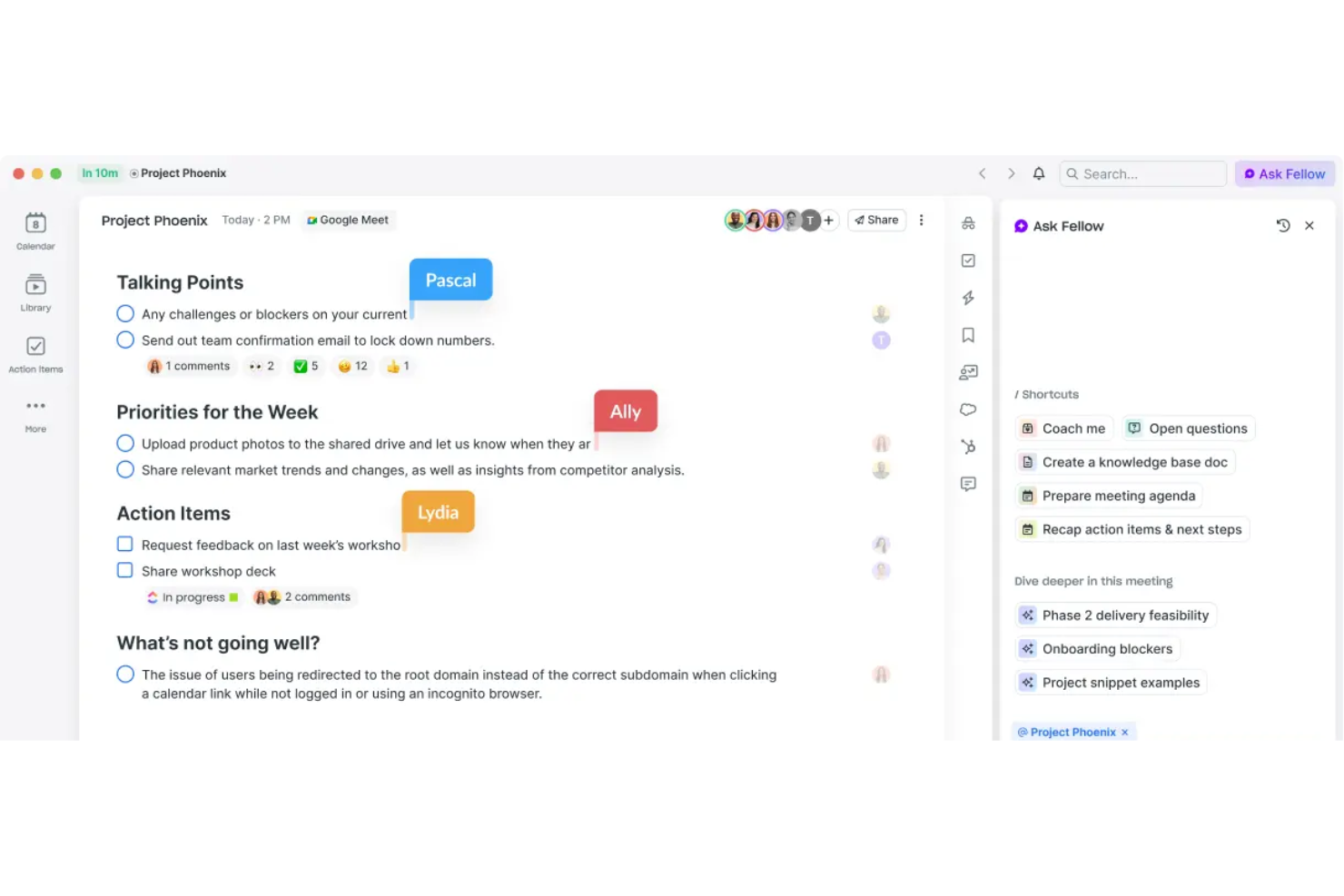
Fellow is an AI meeting assistant that records, transcribes, and summarizes meetings across Zoom, Google Meet, Microsoft Teams, and Slack, while also supporting collaborative agenda creation and action item tracking.
Who Is Fellow Best For?
Fellow is a good fit for managers and team leads at mid-sized tech companies who need to schedule meetings, run frequent one-on-ones, and manage cross-functional syncs.
Why I Picked Fellow
I picked Fellow as one of the best because its collaborative agenda feature genuinely changes how meetings start. Before a meeting, every attendee can contribute talking points directly to a shared agenda, so no one shows up empty-handed.
I also like the pre-meeting briefs, which pull context together automatically, so you walk in prepared. Pair that with action item tracking that syncs to tools like Asana and Jira, and follow-ups actually get done.
Fellow Key Features
- Meeting automations: Automatically record selected meetings, prompt attendees to add agenda items, and send pre-meeting reminders without any manual setup.
- 500+ meeting templates: Access a library of agenda templates for any meeting type, and customize your own to match your team's recurring formats.
- AI recording library: Store all recorded meetings in a centralized, searchable library with role-based access controls so the right people can find the right content.
- Cross-meeting intelligence: Use Fellow's Ask Fellow AI agent to search across all past transcripts and summaries and pull up decisions or context from any previous meeting.
Fellow Integrations
Fellow offers 50+ native integrations, including Slack, Zoom, Google Meet, Microsoft Teams, Asana, Jira, Linear, Salesforce, HubSpot, and Confluence. It connects with Zapier and has an API for custom integrations.
Pros and Cons
Pros:
- Strong one-on-one meeting tracking tools
- Action items auto-distribute after meetings end
- Shared agendas keep every attendee prepared
Cons:
- Templates can be unintuitive to customize
- Searching past meeting notes feels clunky
Parabol
Best for agile team retrospective meetings
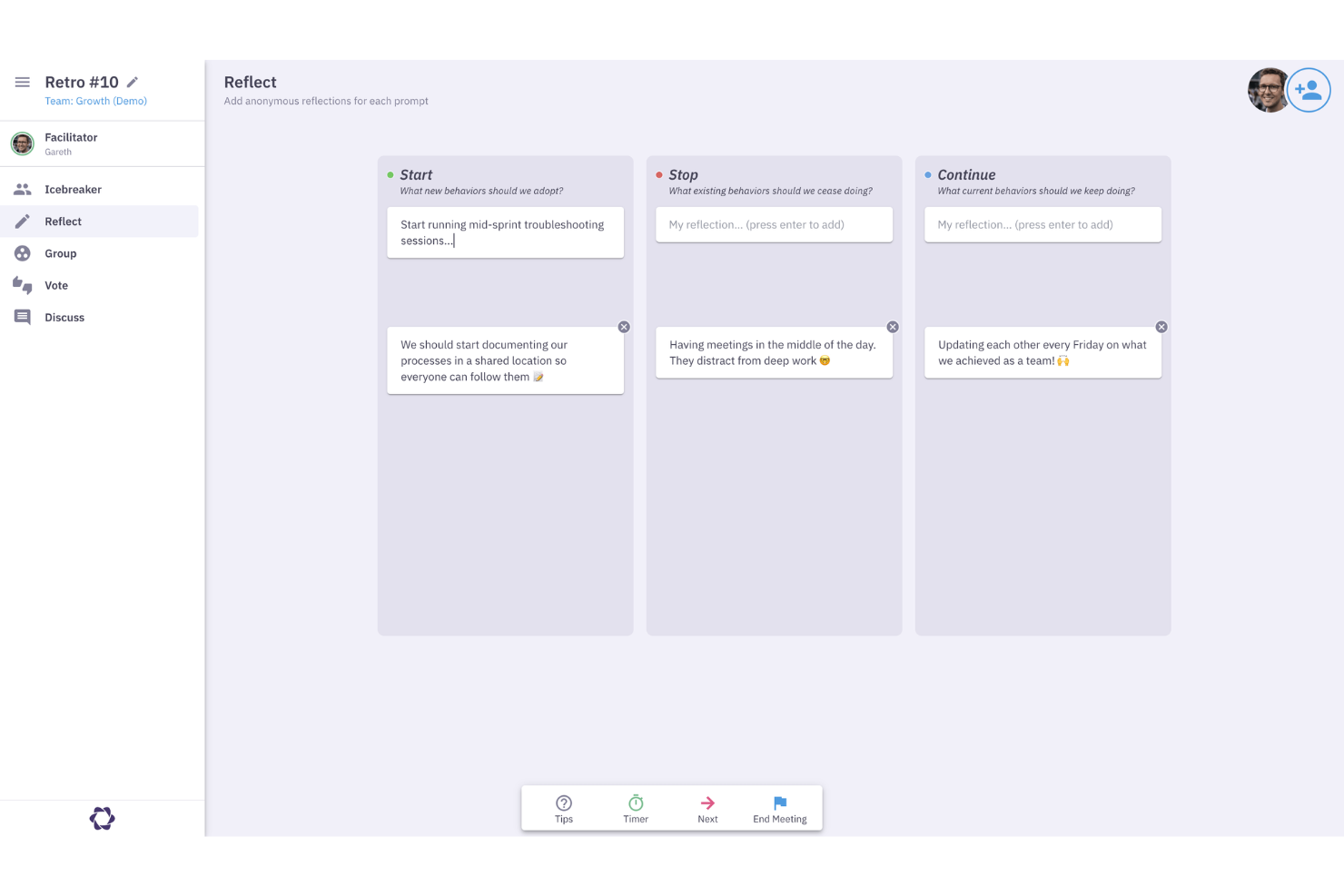
Parabol is an agile meeting tool that structures retrospectives, sprint poker sessions, standups, and team check-ins, with built-in templates, anonymous input, and task capture directly in your backlog management tool.
Who Is Parabol Best For?
Parabol is a natural fit for scrum teams and agile coaches who run regular retrospectives, sprint reviews, and planning sessions across distributed or hybrid environments.
Why I Picked Parabol
I've included Parabol in my top picks because it's the only meeting tool I know that was built specifically around agile ceremonies rather than bolted onto them. I like how the retrospective format enforces structured phases: anonymous input collection, grouping similar reflections, discussion, and task capture, all in one flow.
What gets me is the sprint poker feature, which syncs directly with your backlog tool and updates story points in real time as your team estimates, so you're not duplicating work after the session ends.
Parabol Key Features
- 40+ meeting templates: Choose from pre-built formats for retrospectives and estimation meetings, or build your own from scratch.
- Automated meeting summaries: Parabol generates a summary at the end of every meeting automatically, without manual note-taking.
- Built-in discussion timers: Set time limits on agenda topics to keep conversations focused during live sessions.
- Team health check: Run an anonymous pulse poll at the start of a meeting to capture team sentiment before the discussion begins.
Parabol Integrations
Parabol offers a small set of native integrations focused on backlog management and team communication, including Jira, GitHub, GitLab, Linear, Azure DevOps, Slack, Microsoft Teams, Mattermost, Zoom, and Google Calendar. Jira Server integration is available on the Enterprise tier.
Pros and Cons
Pros:
- Open-source with a self-hosting option available
- Full meeting history stored per team
- Anonymous reflections prevent groupthink during retros
Cons:
- Email summaries are sent regardless of attendance
- Interface only available in English
Fathom
Best for instant call highlights and summaries
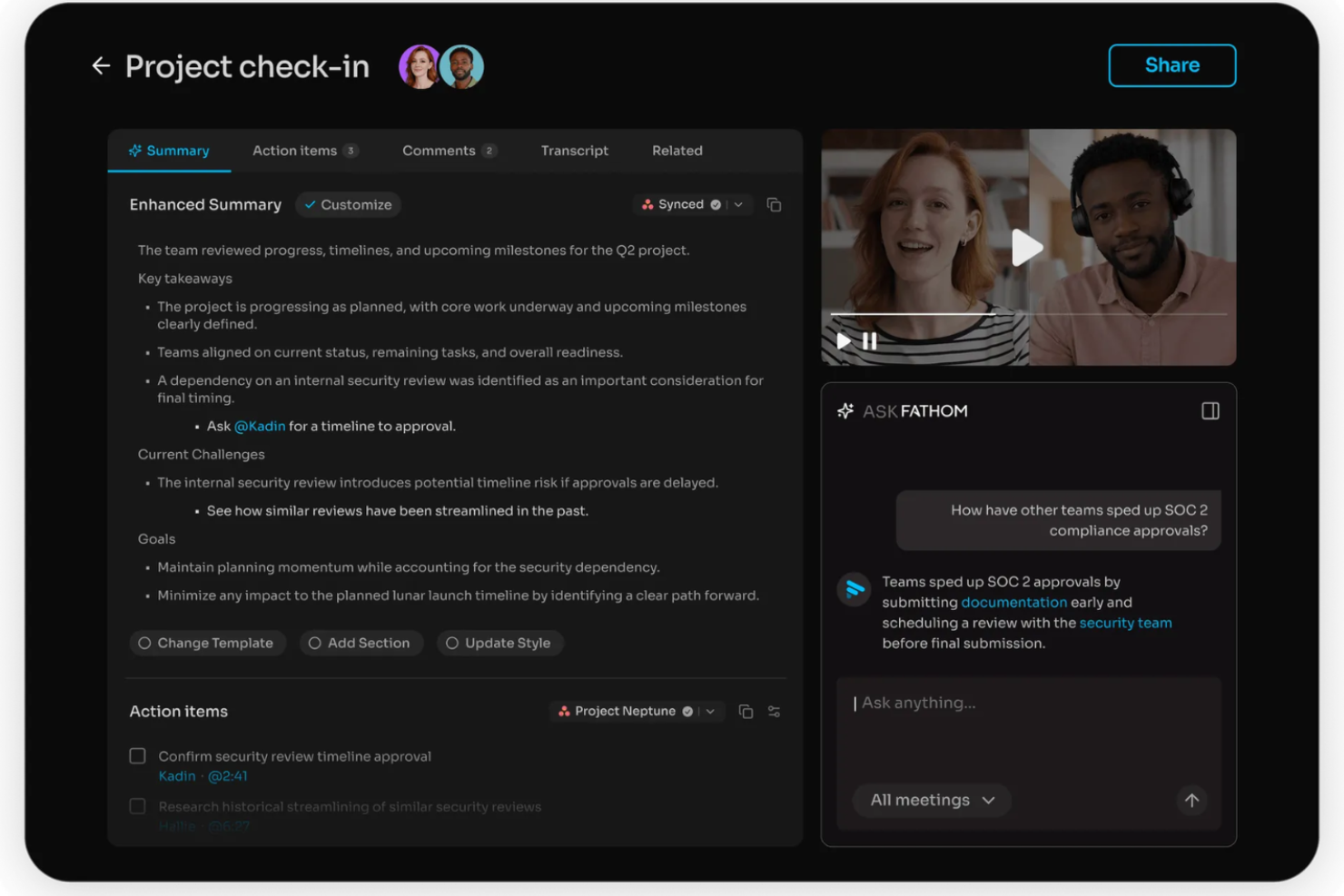
Fathom is an AI notetaker that automatically records, transcribes, and summarizes video calls and extracts action items from every meeting.
Who Is Fathom Best For?
Fathom is a natural fit for sales and customer success teams who run high volumes of video calls or webinars and need a fast, accurate record of each conversation.
Why I Picked Fathom
I picked Fathom as one of the best because it delivers meeting summaries the moment a call ends, with no waiting around. What I really like is the "Ask Fathom" feature, which lets you query past meetings in plain language to pull context fast.
I also find the bot-free recording option genuinely useful: Fathom can capture calls without dropping a visible bot into the meeting.
Fathom Key Features
- In-call highlight marking: Flag key moments during a live call so they're instantly clipped and retrievable after the meeting ends.
- CRM auto-sync: Push meeting notes and summaries directly to connected CRMs like Salesforce and HubSpot without manual data entry.
- Speaker-labeled transcripts: Transcripts identify each speaker by name, making it easy to track who said what across a full conversation.
- Team call library: Store and organize all recorded calls in a shared workspace so your whole team can search and review past meetings.
Fathom Integrations
Fathom offers native integrations with HubSpot, Salesforce, Close CRM, Slack, Asana, Google Meet, Zoom, and Microsoft Teams, along with partner integrations from tools like Pylon, Twine, and GetAccept. It also connects with Zapier and provides an API for custom integrations.
Pros and Cons
Pros:
- HIPAA, SOC 2 Type II, and GDPR compliant
- Shareable clips from any recorded meeting
- Generous free plan with unlimited recordings
Cons:
- Cannot process uploaded audio or video files
- The mobile app is iOS only
Avoma
Best for AI-powered conversation insights
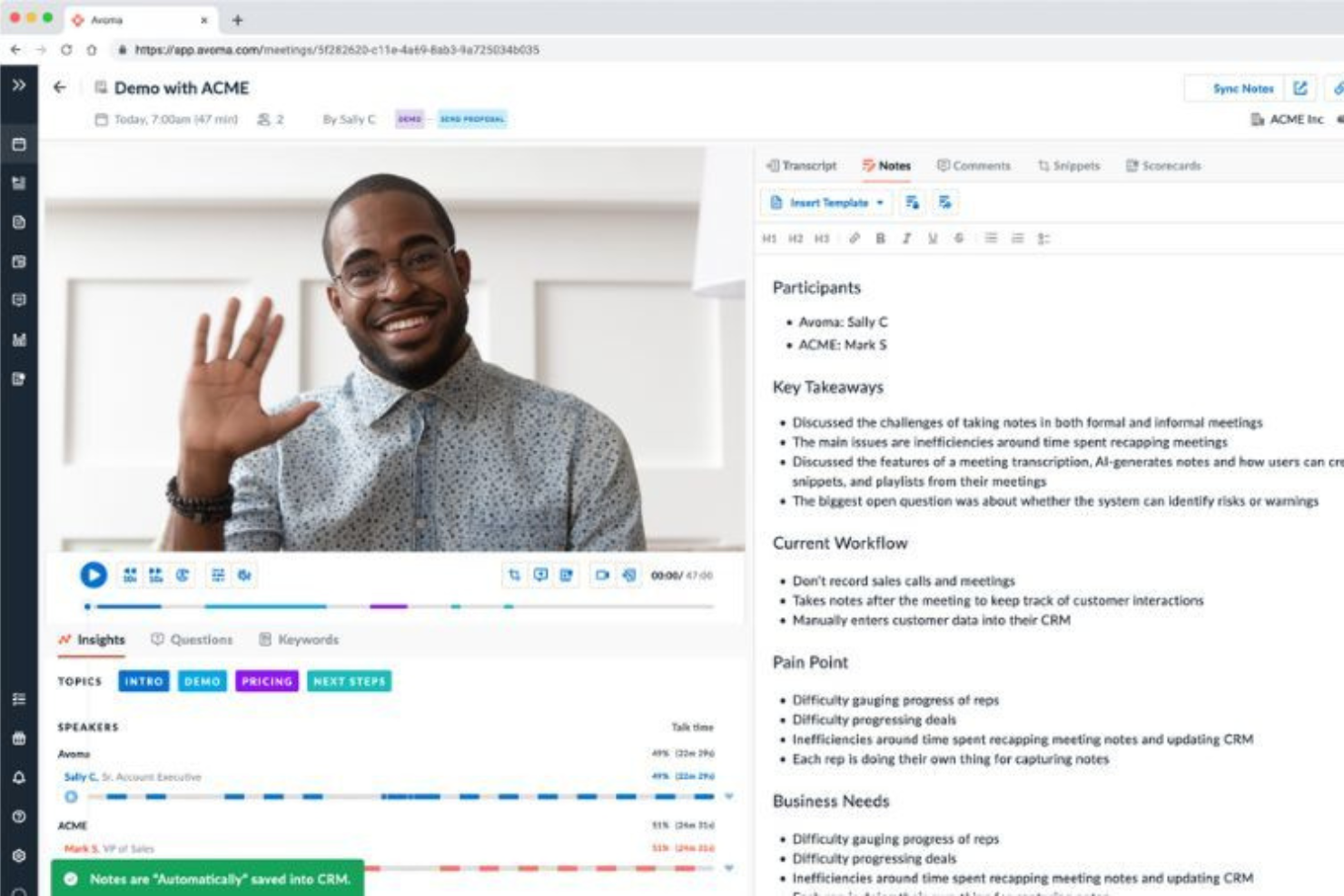
Avoma is an AI meeting assistant that combines call recording, agenda management, automated note-taking, and talk-pattern analysis into one connected workspace.
Who Is Avoma Best For?
Avoma is a strong fit for B2B sales and customer success teams who need structured conversation intelligence across the full deal cycle.
Why I Picked Avoma
I've included Avoma in my top picks because its conversation intelligence goes deeper than most meeting tools. The AI call scoring runs across 100% of recorded calls automatically, which means sales managers get consistent, unbiased coaching data without manually reviewing recordings.
I also really like the custom Smart Trackers, which use semantic matching to track keywords and topics accurately across calls. That kind of nuance makes it much more useful than tools that rely on exact keyword matching.
Avoma Key Features
- AI-generated follow-up emails: Automatically drafts follow-up emails after each recorded meeting, pulling from the transcript and meeting notes.
- Live answer assistant: Surfaces real-time suggested responses during active calls to help reps handle objections on the spot.
- AI sales methodology scoring: Automatically scores calls against frameworks like MEDDIC and SPICED without manual rep input.
- Talk-pattern insights: Breaks down metrics like talk-to-listen ratios and topic trends across your team's recorded calls.
Avoma Integrations
Avoma offers native integrations with Zoom, Google Meet, Microsoft Teams, Salesforce, HubSpot, Pipedrive, Slack, Aircall, RingCentral, and Salesloft. It also connects with Zapier and provides an API for custom integrations.
Pros and Cons
Pros:
- Modular pricing so you buy only what's needed
- Transcription available in 75+ languages
- Automatic CRM field updates after calls
Cons:
- Speaker attribution in transcripts needs improvement
- Primarily built for customer-facing teams

Otter.ai
Best for live meeting note capture
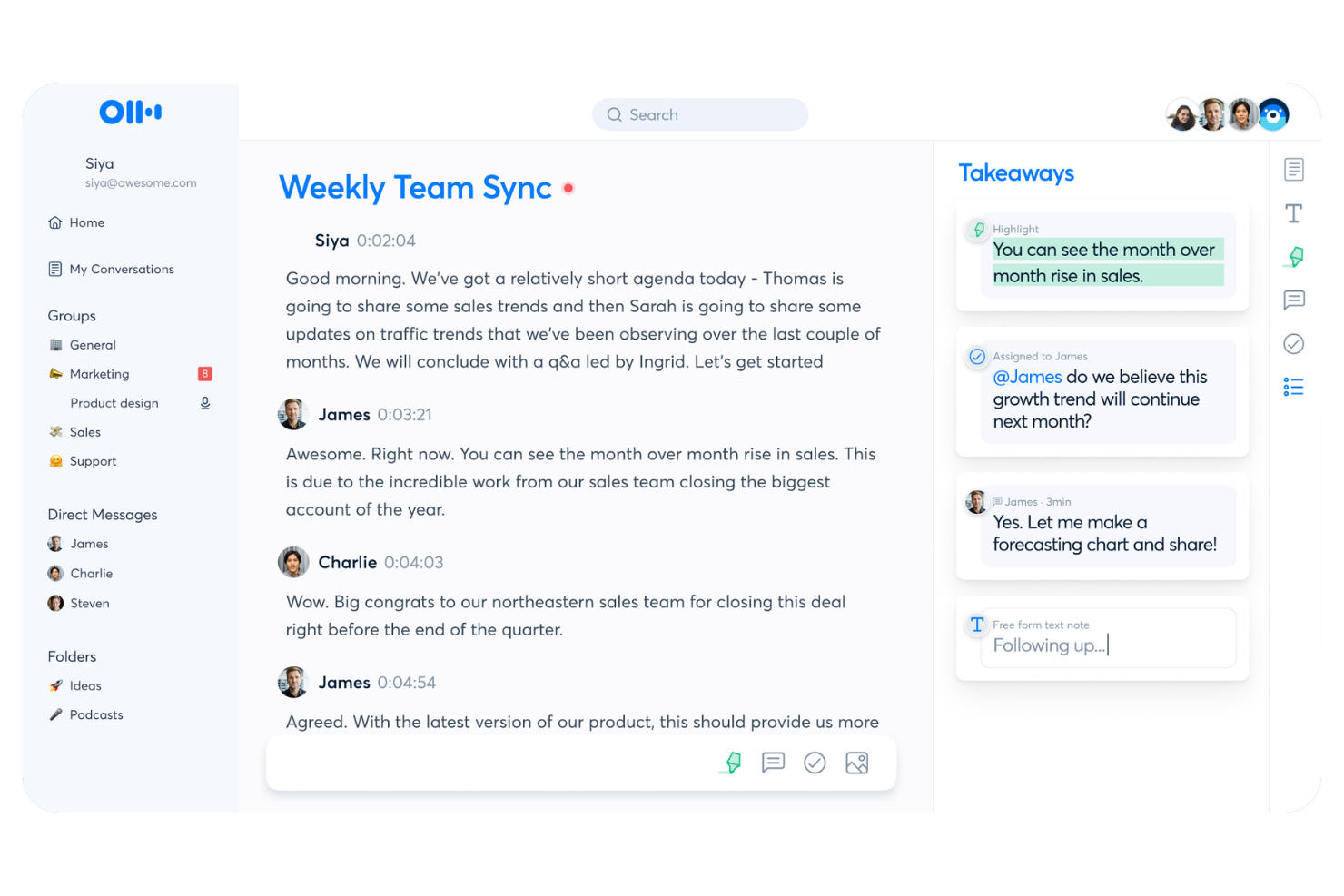
Otter.ai is a meeting notes platform that captures live transcriptions, generates real-time summaries, and lets attendees collaborate on notes directly during the call.
Who Is Otter.ai Best For?
Otter.ai is a strong fit for teams in fast-moving meetings who need to accelerate decision making with a live, shared record of decisions and action items.
Why I Picked Otter.ai
Otter.ai earns its spot on my shortlist because live transcription is where it genuinely shines. While most tools transcribe after the fact, Otter renders words on screen as they're spoken, with speaker labels attached in real time.
I also like the OtterPilot feature, which joins calls automatically and lets attendees read, highlight, and comment on the live transcript mid-meeting. That makes it especially useful for distributed teams where not everyone can follow audio closely.
Otter.ai Key Features
- Automated action item detection: Otter identifies and extracts action items from the transcript so nothing gets lost after the call.
- AI meeting summaries: Generates a condensed summary of the full conversation after each meeting ends.
- Otter AI Chat: Lets you ask questions about past meeting content and pull answers directly from stored transcripts.
- Shared workspace: Organizes all meeting notes into a team workspace where members can search and access past meetings.
Otter.ai Integrations
Otter.ai offers 30+ native integrations, including Zoom, Google Meet, Microsoft Teams, Slack, HubSpot, Salesforce, Notion, Jira, Google Docs, and Asana. It also connects with Zapier and provides an API for custom integrations.
Pros and Cons
Pros:
- Custom vocabulary improves transcription accuracy
- Searchable transcript archive across all meetings
- Mobile app captures in-person meetings
Cons:
- OtterPilot bot visibly joins calls
- Limited post-meeting task automation options

Best for automatic voice transcription
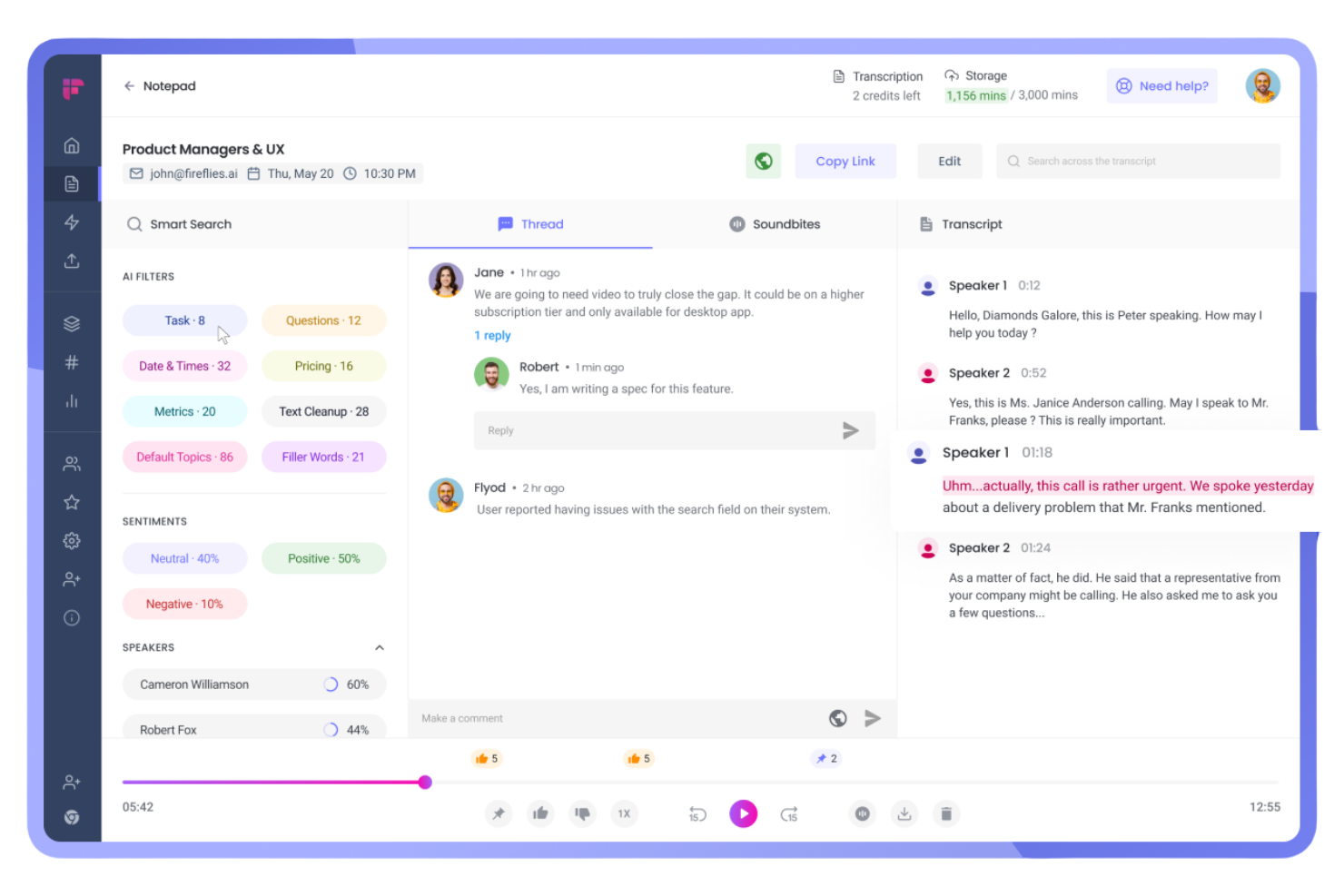
Fireflies.ai is a voice intelligence platform that automatically joins your meetings to record, transcribe, and analyze conversations, with searchable transcripts, topic detection, and AI-generated summaries built in.
Who Is Fireflies.ai Best For?
Fireflies.ai is a strong fit for distributed sales, customer support, and customer success teams who need accurate, searchable records of every client conversation.
Why I Picked Fireflies.ai
I picked Fireflies.ai as one of the best because its transcription accuracy is genuinely hard to beat. It claims 95% accuracy across 100+ languages, with automatic speaker recognition that labels who said what throughout the transcript.
I also like the auto-language detection, which switches languages between meetings without any manual configuration. For teams running back-to-back calls, the AskFred feature lets you query past transcripts by asking plain-language questions instead of scrolling through raw notes.
Fireflies.ai Key Features
- AI meeting summaries: Automatically generate condensed meeting summaries with key discussion points after each call ends.
- Topic tracker: Flags and categorizes specific words or phrases across transcripts so you can filter meetings by subject.
- Soundbites: Lets you clip short audio or video segments from any recorded meeting to share standalone moments.
- Inline collaboration: Add comments and reactions directly on transcript lines so teammates can annotate without leaving the platform.
Fireflies.ai Integrations
Fireflies.ai offers native integrations with 100+ apps, including Zoom, Google Meet, Microsoft Teams, Slack, HubSpot, Salesforce, Notion, Confluence, Asana, and Linear. It also connects with Zapier and provides an API for custom integrations.
Pros and Cons
Pros:
- Sentiment analysis flags meeting tone shifts
- Clips shareable audio soundbites from recordings
- Transcription supports 100+ languages natively
Cons:
- Accuracy drops with overlapping speakers
- Feature density can feel overwhelming

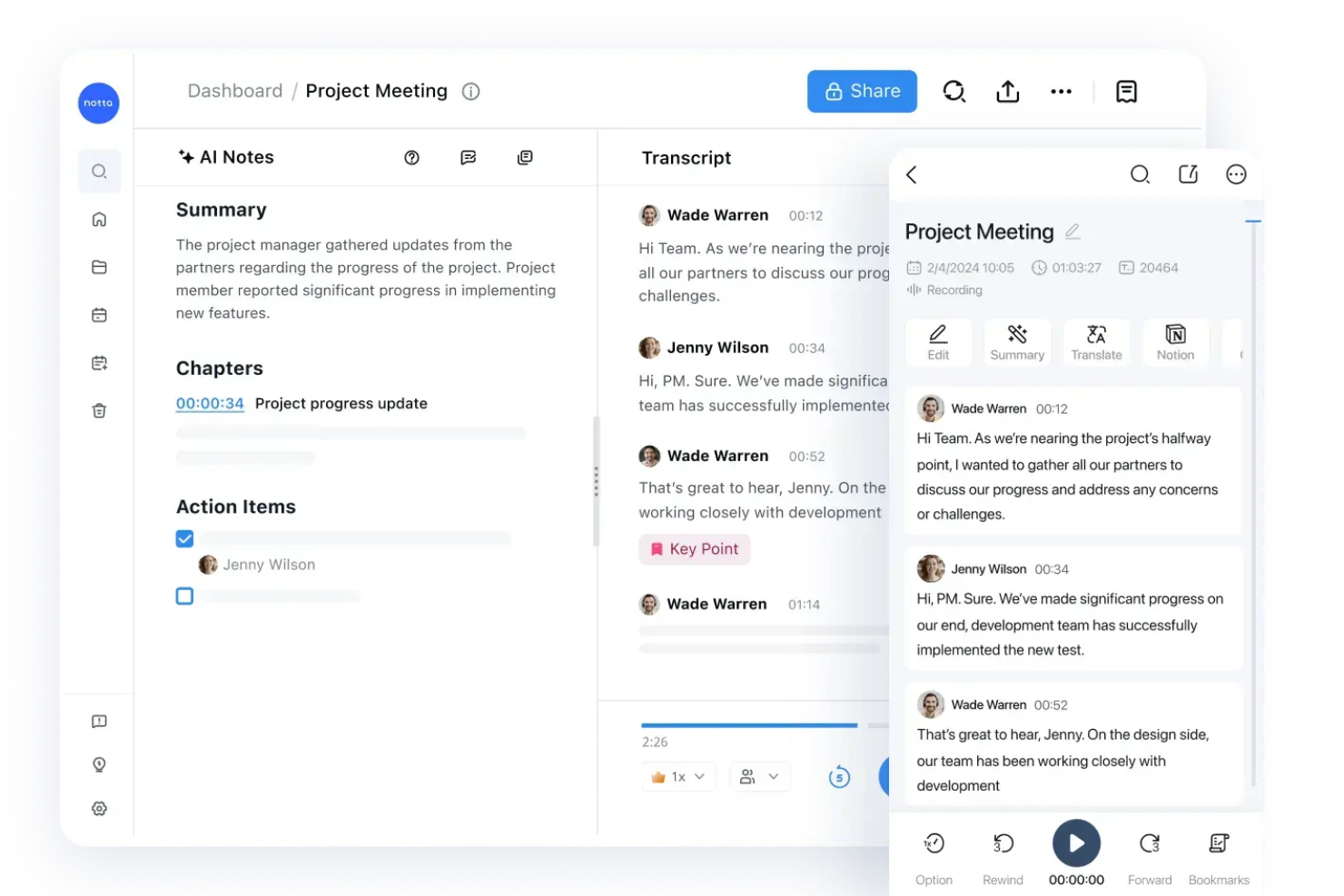
Notta is an AI meeting assistant that records and transcribes live meetings and audio files, then organizes the output into shareable, searchable transcripts with AI-generated summaries and action items.
Who Is Notta Best For?
Notta is a strong fit for async-first teams that need non-attendees to quickly search and reference what was discussed or decided in meetings they missed.
Why I Picked Notta
I've included Notta in my top picks because of how well it handles the entire transcript lifecycle, from capture to sharing. Transcripts are keyword-searchable and timestamped, so anyone who missed a meeting can jump directly to the exact moment something was said.
I also like that you can bookmark specific lines as key points, to-dos, or project notes, and share the transcript with those highlights already visible to recipients.
Notta Key Features
- AI-generated meeting summaries: Notta automatically produces condensed summaries after each meeting, so you don't have to read the full transcript.
- Action item extraction: The AI identifies and pulls action items directly from the transcript into a separate list.
- Multi-language transcription: Notta supports transcription in 58+ languages, including real-time switching between languages mid-meeting.
- Auto-join meeting bot: Notta's bot joins scheduled calls on your behalf and begins recording automatically via calendar sync.
Notta Integrations
Notta offers 20+ native integrations, including Zoom, Google Meet, Microsoft Teams, Webex, Slack, Notion, Google Docs, Salesforce, HubSpot, and ClickUp. It also connects with Zapier and supports calendar syncing with Google Calendar and Outlook Calendar for automated meeting recording.
Pros and Cons
Pros:
- Bilingual transcription for multilingual meetings
- Converts notes into infographics and tables
- Mind map feature aids brainstorming sessions
Cons:
- Free plan limits recordings to three minutes
- Accuracy drops with overlapping speech
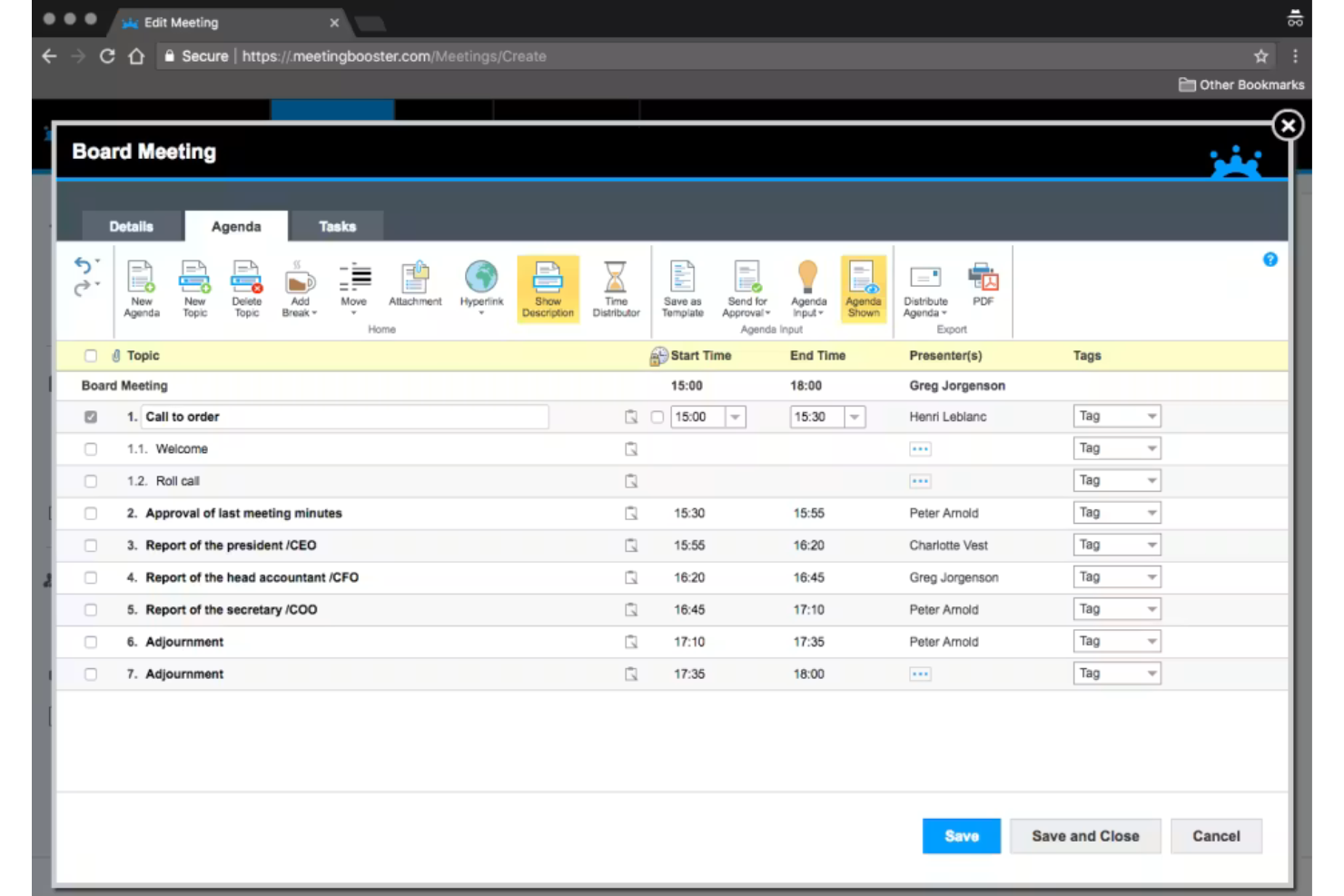
MeetingBooster is a meeting management platform built around agenda creation, structured note-taking, and formal minutes generation, with built-in task tracking and meeting series management for recurring meetings.
Who Is MeetingBooster Best For?
MeetingBooster is a strong fit for organizations in governance-heavy environments, like municipal governments, boards, and committees, where formal minutes, documented decisions, and structured agendas are a standard requirement.
Why I Picked MeetingBooster
I picked MeetingBooster as one of the best because no other tool I've used enforces meeting structure quite this deliberately. I love the Notecard feature, which guides you through a live meeting step by step, capturing notes, decisions, and action items directly against each agenda item in real time.
When the meeting ends, I can select a minutes style, review the draft, and distribute finalized minutes in minutes, without any reformatting. It's the only tool I've used where the agenda, notes, and minutes are truly one connected workflow.
MeetingBooster Key Features
- Agenda approval process: Run agendas through a version-controlled approval workflow before meetings start, so all stakeholders sign off on the structure in advance.
- Meeting analytics: Track attendance, meeting costs, task completion rates, and status reports across meetings to surface patterns over time.
- Attendee-specific note-taking: Assign note-taking responsibilities to specific attendees, with each person capturing notes tied directly to their role in the meeting.
- Decision tools: Use built-in voting, pro/con analysis, and rating tools during a meeting to reach and formally record group decisions.
MeetingBooster Integrations
MeetingBooster integrates natively with Microsoft Outlook, Microsoft Teams, SharePoint, Google Calendar, and Active Directory. It also supports integrations with Jira, Microsoft Planner, Trello, and Slack through its API, and connects with Zapier and Microsoft Power Automate. An API is available for custom integrations.
Pros and Cons
Pros:
- Cross-meeting task tracking with due dates
- Formal minutes auto-generated from notes
- Built-in voting and decision-tracking tools
Cons:
- Sharing roles between the presenter and the note-taker is difficult
- Limited flexibility for posting action items
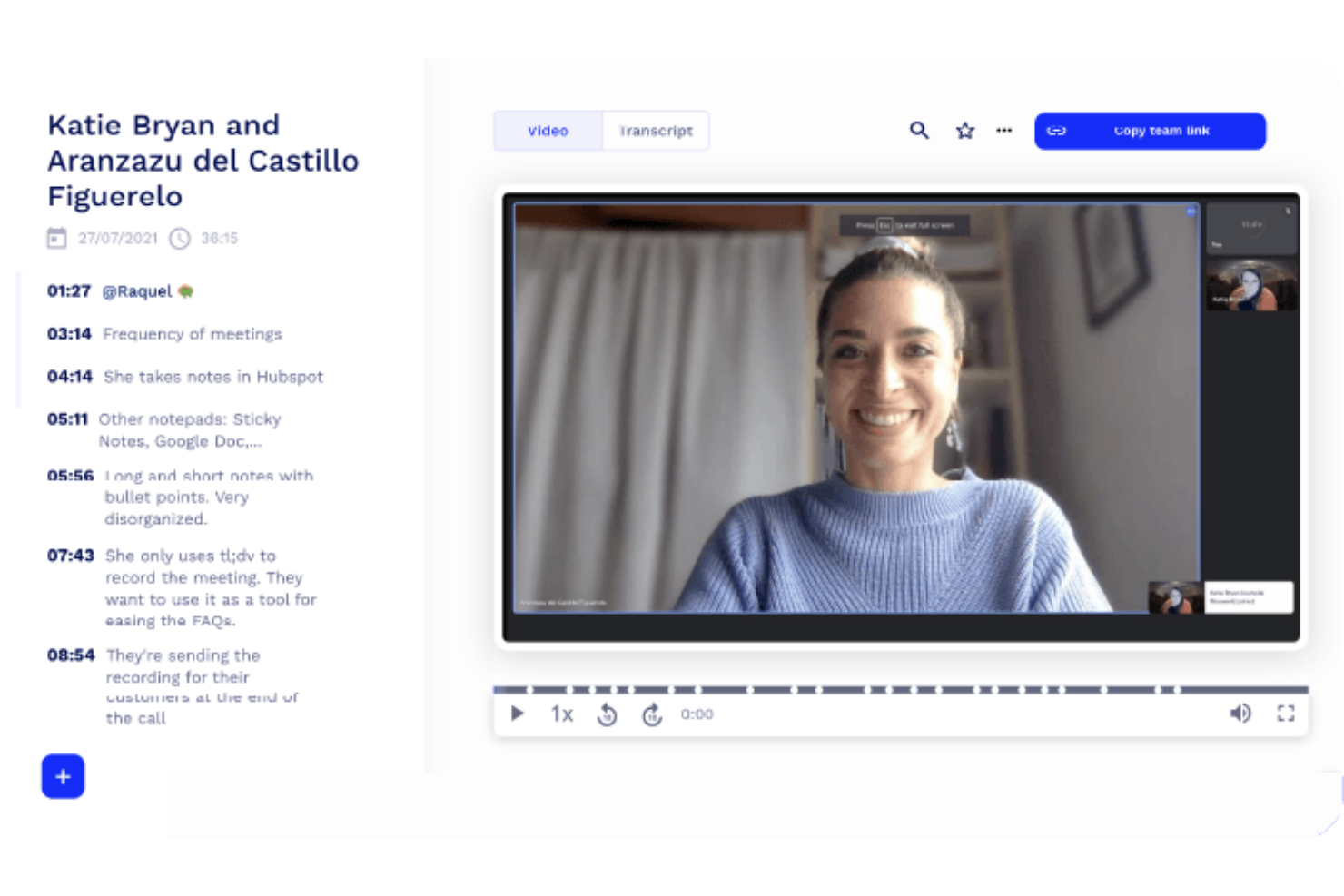
tl;dv is a meeting recorder and note-taking tool that lets you capture video meetings with timestamped highlights, AI-generated summaries, and shareable clips from Zoom, Google Meet, and Microsoft Teams calls.
Who Is tl;dv Best For?
tl;dv is a natural fit for product and research teams who need to clip, timestamp, and share key meeting moments without sitting through full recordings.
Why I Picked tl;dv
tl;dv earns its spot on my shortlist because its timestamped notes are genuinely more usable than what most meeting recorders produce. I like that every AI-generated note links directly to the exact moment in the video, so anyone reviewing the recording can jump straight to context instead of scrubbing through footage.
The clip and reel features let my team cut specific moments and share them async, which I find especially useful when surfacing user research insights for stakeholders who weren't in the room.
tl;dv Key Features
- Multi-meeting AI reports: Query and summarize insights across multiple recorded meetings at once, spotting trends without reviewing individual recordings.
- Customizable note templates: Set up structured summary formats, including sales methodologies like MEDDIC, in your team's preferred language.
- Automatic CRM logging: Pushes call notes and deal outcomes directly to your CRM after each meeting without manual data entry.
- Multilingual transcription: Transcribes and translates meetings in 30+ languages, with full localization available in 7 of them.
tl;dv Integrations
tl;dv offers native integrations with Zoom, Google Meet, Microsoft Teams, Salesforce, HubSpot, Pipedrive, Zoho, Slack, Google Docs, and Notion, with 6,000+ additional apps available through Zapier. An API is also available for custom integrations.
Pros and Cons
Pros:
- Multi-meeting search across all recordings
- Clips and reels from recorded meetings
- One-click timestamps during live calls
Cons:
- Limited quantitative analytics on call data
- Free plan deletes recordings after 3 months
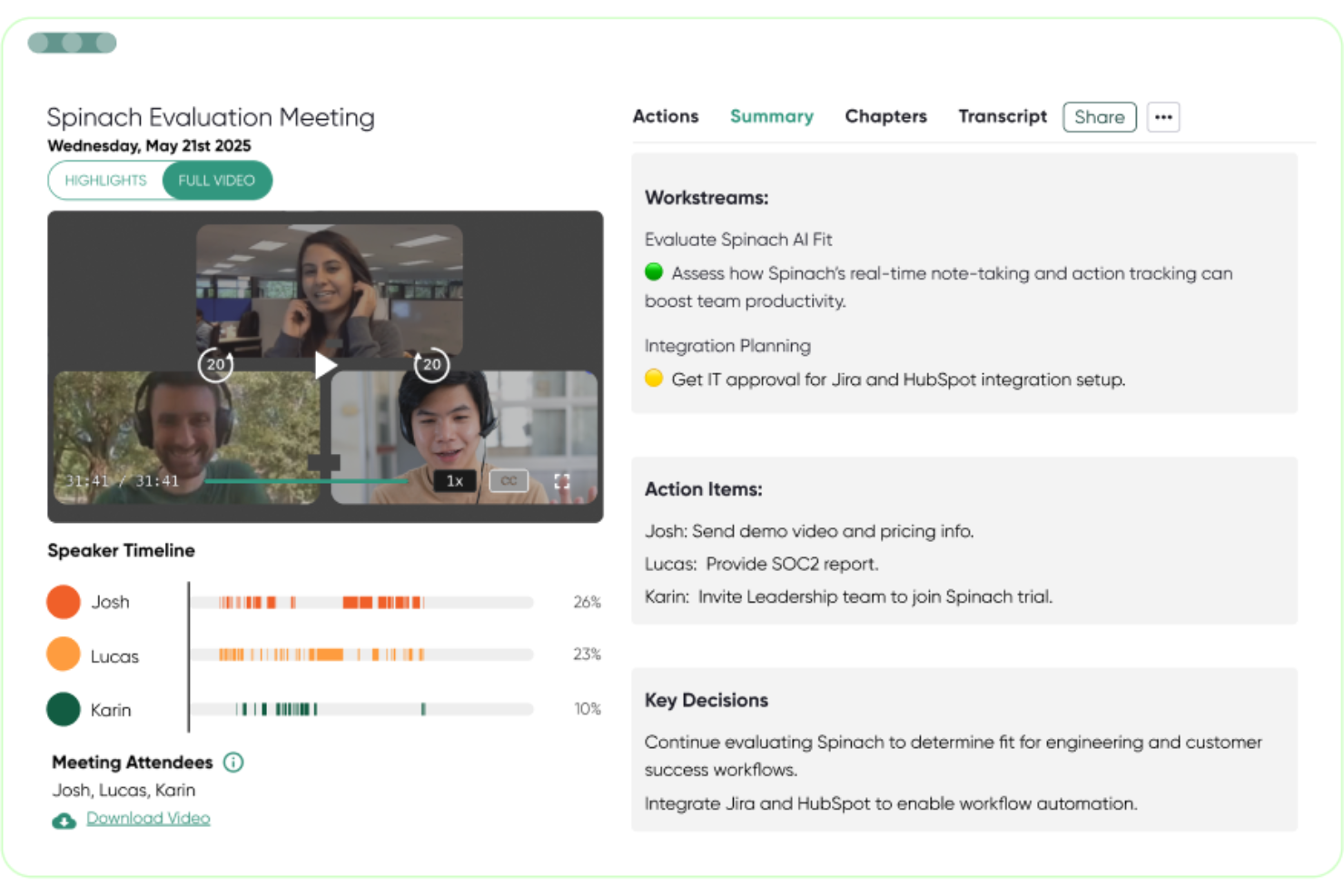
Spinach AI is an AI meeting assistant that automatically records, transcribes, and summarizes meetings, then pushes action items, decisions, and follow-ups directly into your project management tools.
Who Is Spinach AI Best For?
Spinach AI is a strong fit for product and engineering teams who run frequent standups, sprint reviews, and cross-functional syncs inside tools like Jira or Linear.
Why I Picked Spinach AI
Spinach AI earns its spot on my shortlist because of how it closes the gap between what gets discussed in a meeting and what actually gets done. I love that when Spinach AI detects an action item, it can create a ticket in Jira, Linear, or Asana automatically, without anyone copying notes after the call ends.
I also really like the CRM auto-update feature: sales and customer success calls push follow-ups directly into HubSpot or Salesforce the moment the meeting wraps.
Spinach AI Key Features
- Multi-language transcription: Spinach AI transcribes meetings in 100 languages, making it usable across globally distributed teams.
- Recap email generation: At the end of each meeting, Spinach AI drafts and sends a summary email to all participants automatically.
- AI meeting coach: Spinach AI analyzes meeting patterns and surfaces insights to help managers run more effective one-on-ones and team syncs.
- Shared agenda builder: Teams can collaboratively build and contribute to a meeting agenda before the call starts.
Spinach AI Integrations
Spinach AI offers native integrations with Jira, Asana, Trello, Linear, ClickUp, monday.com, Notion, Confluence, Slack, HubSpot, Salesforce, Zoho, and Attio. It also works with Google Meet, Microsoft Teams, and Zoom as meeting sources. Spinach AI connects with Zapier and provides an API for custom integrations.
Pros and Cons
Pros:
- No custom AI agent creation needed
- Tailored specifically for agile meeting types
- Summaries organized by decisions and action items
Cons:
- No option to build AI agents from scratch
- Summary output format can be inconsistent
Annen programvare for møtehåndtering
Her er noen flere alternativer for programvare for møtehåndtering som ikke kom med på kortlisten min, men som likevel er verdt å sjekke ut:


How I Evaluate Meeting Management Software
My evaluation runs two layers deep: the baseline every tool must clear—agenda building, action tracking, PM tool sync—and the differentiators that set the best apart for cross-functional teams.
Core Functionality (Table Stakes For This List)
When I'm selecting tools for my list, I rank each one on a scale from 0 (does not offer the functionality) to 5 (excels in this area) for each core functionality listed below. Then, I calculate the tool's total score into a percentage. Each tool needs to achieve a minimum total score of 65% to be considered for inclusion.
- Agenda Building & Sharing: I look for tools that let teams collaboratively build and distribute agendas before the meeting—like adding timed discussion items to a weekly sprint planning session so everyone shows up prepared.
- Real-Time Collaborative Notes: The tool should support multiple participants capturing notes simultaneously, similar to how a Scrum Master and product owner might tag-team documenting decisions during a backlog grooming session.
- Action Item Tracking: I evaluate how well each platform handles assigning tasks with owners and due dates during a meeting, then surfaces incomplete items in follow-up meetings so nothing falls through the cracks.
- Calendar Integration: Two-way sync with Google Calendar and Outlook is what I check for, ensuring meetings auto-populate with agendas and context without requiring manual setup each time.
- Project Tool Integrations: Each tool's ability to push action items directly into platforms like Jira, Asana, or Monday matters here—I look at whether the sync is bidirectional and whether it pulls in relevant project context.
- Meeting Recording & Transcription: I evaluate whether the tool captures recordings and generates searchable transcripts, making it easy to revisit what was discussed during a stakeholder review or sprint retrospective weeks later.
Once I have a list of tools that meet this criteria, I consider what sets each platform apart.
Differentiating Factors (What Sets Vendors Apart)
Here's how I compare and contrast different vendors:
Standout Features
AI-generated summaries matter because they spare project managers from writing recap emails after every standup or stakeholder sync—I look for tools that automatically extract decisions and next steps. Recurring meeting continuity is another factor I evaluate closely. When unresolved items carry forward from last week's sprint review into this week's agenda, accountability stays visible without manual effort. Meeting analytics also help PMO leaders spot patterns like meeting overload or low action item completion rates across teams.
Beyond Features
Pricing structure is one of the first things I check—specifically whether external stakeholders like clients or vendors can join meetings without eating into paid seats. Integration ecosystem depth also weighs heavily, since a tool that syncs with Jira but not Asana limits its fit for mixed-methodology teams. I evaluate scalability too, looking at whether a platform supports role-based permissions and workspace hierarchies that grow from a single agile squad to a full PMO with multiple programs running in parallel.
Slik velger du programvare for møtehåndtering
Det er lett å gå seg vill i lange funksjonslister og kompliserte prismodeller. For å hjelpe deg med å holde fokus mens du går gjennom den unike prosessen med å velge programvare, får du her en sjekkliste over faktorer du bør ha i mente:
| Faktor | Hva du bør vurdere |
|---|---|
| Skalerbarhet | Vil verktøyet støtte teamet ditt etter hvert som det vokser, og kan det håndtere flere prosjekter eller tilbakevendende møter på tvers av avdelinger? |
| Integrasjoner | Kobler det seg pålitelig til kalenderen, video-, chat- og prosjektstyringsverktøyene dine, slik at det passer inn i arbeidsflyten uten manuelle omveier? |
| Tilpasningsmuligheter | Kan du utforme møtemaler, tillatelser og rapportering slik at de samsvarer med teamets prosesser eller krav til samsvar? |
| Brukervennlighet | Er grensesnittet intuitivt nok for brukere med ulik teknisk kompetanse? Vil de involverte faktisk ta det i bruk i de daglige rutinene sine? |
| Implementering og opplæring | Hvor mye tid og støtte trenger du for å lansere løsningen og lære opp hele teamet? Er opplæringsressursene tilgjengelige for alle brukere? |
| Kostnad | Hvordan passer prisnivåene med antallet brukere, forventet vekst og behovet for funksjoner? Vær oppmerksom på skjulte gebyrer for lagring, samsvar eller analyse. |
| Sikkerhetstiltak | Oppfyller plattformen kravene dine til databeskyttelse, tilgangskontroll og personvern, særlig for konfidensielt eller regulert innhold? |
| Tilgjengelig kundestøtte | Når det oppstår problemer, får du rask hjelp i den primære arbeidstiden din og gjennom foretrukne kanaler? |
Hva er programvare for møtehåndtering?
Programvare for møtehåndtering hjelper team med å organisere, gjennomføre og dokumentere møter ved å samle agendaer, notater, handlingspunkter og oppfølging på ett sted. Disse verktøyene effektiviserer planleggingen, fremmer samarbeid og sikrer ansvarlighet ved å holde viktige beslutninger og oppgaver synlige på tvers av prosjekter.
Programvare for møtehåndtering integreres ofte med kalendere, videoplattformer og prosjektstyringssystemer, slik at møtene fører til konkrete handlinger og resultatene ikke går tapt.
Funksjoner
Når du velger programvare for møtehåndtering, bør du se etter følgende nøkkelfunksjoner:
- Utarbeiding av agenda: Opprett, del og rediger agendaer i fellesskap før møter, slik at alle har oversikt over temaer, mål og ansvarsområder.
- Samarbeidsbasert notatskriving: Ta møtereferater og noter diskusjonspunkter i sanntid med flere bidragsytere, slik at ingenting viktig blir oversett.
- Oppfølging av tiltak: Tildel oppfølgingsoppgaver med ansvarlige og forfallsdatoer under møtet, og følg med på gjennomføringen i senere møter.
- Loggføring av beslutninger: Registrer avtaler og viktige beslutninger i en tilgjengelig og organisert logg for enkel referanse og tydelig ansvarsplassering.
- Kalenderintegrasjon: Synkroniser med Google, Outlook eller andre kalendere for å forenkle planleggingen og gjøre møter synlige for alle relevante deltakere.
- Integrasjon med videokonferanser: Bli med direkte i videosamtaler fra appen, og hent inn detaljer fra plattformer som Zoom, Teams eller Meet.
- Maler for regelmessige møter: Standardiser daglige statusmøter, prosjektgjennomganger eller retrospektiver med forhåndsbygde maler for å spare tid og sikre enhetlighet.
- Vedlegg av dokumenter: Legg til relevante filer, presentasjoner eller støttedokumenter i agendaer eller møtenotater for enkel tilgang før, under og etter møter.
- Tillatelser og tilgangskontroll: Styr hvem som kan se, redigere eller dele agendaer og notater, slik at konfidensialiteten ivaretas når det er nødvendig.
- Søkbare arkiver: Finn raskt tidligere diskusjoner, beslutninger eller notater, slik at teammedlemmer kan se historisk kontekst og unngå å gjenta samtaler.
Vanlige AI-funksjoner i programvare for møtehåndtering
I tillegg til standardfunksjonene i programvare for møtehåndtering som er nevnt ovenfor, inkluderer mange av disse løsningene AI-funksjoner som:
- Automatisk transkribering av møter: AI lytter til møtene dine og genererer nøyaktige, søkbare transkripsjoner, slik at du kan gjennomgå diskusjoner eller dele notater med teammedlemmer som var fraværende.
- AI-genererte sammendrag: Motta umiddelbart korte oppsummeringer av viktige punkter, beslutninger og tiltak, og spar tid på manuell notatskriving og dokumentasjon av oppfølging.
- Smart uthenting av tiltak: AI identifiserer og tildeler tiltak fra samtaler, noe som reduserer risikoen for glemte oppgaver og sikrer ansvarsplassering uten ekstra administrativt arbeid.
- Intelligente agendaforslag: Basert på tidligere møter og prosjektkontekst anbefaler AI relevante temaer eller agendapunkter for å holde møtene fokuserte og produktive.
- Identifisering av talere: AI skiller mellom deltakerne i transkripsjoner og knytter kommentarer og beslutninger til riktige personer for bedre tydelighet og ansvarsplassering.
- Sentimentanalyse: AI vurderer tonen og engasjementsnivået i diskusjoner, slik at ledere kan oppdage mulige problemer eller utviklingstrekk i teamets arbeidsmoral over tid.
Fordeler
Implementering av programvare for møtehåndtering gir flere fordeler for teamet og virksomheten din. Her er noen av fordelene du kan se frem til:
- Bedre organisering: Samler agendaer, notater og tiltak på ett sted, slik at teamene kan følge beslutninger og oppgaver på tvers av alle møter og prosjekter.
- Større ansvarsbevissthet: Tildeler oppfølginger og logger resultater, slik at det blir tydelig hvem som er ansvarlig for hver oppgave eller beslutning, og reduserer antallet manglende forpliktelser.
- Tidsbesparelser: Bruker maler, integrasjoner og noen ganger AI-funksjoner til å automatisere gjentakende forberedelses- og oppfølgingsarbeid, slik at mer tid blir tilgjengelig for faktisk prosjektgjennomføring.
- Ensartede møteresultater: Standardiserer møteformater og prosesser, slik at teamene unngår manglende agendapunkter og sikrer at viktige temaer blir behandlet.
- Bedre prosjektsamsvar: Synkroniserer møteresultater med prosjektstyringsverktøy, slik at tiltak og beslutninger går direkte inn i teamets arbeidsflyter og kan gjennomføres sømløst.
- Forenklet etterlevelse: Tilbyr tilgangskontroller og søkbare arkiver som støtter krav til åpenhet, dokumentasjon eller styring der det er nødvendig.
- Bedre møteinnsikt: Gir analyser og oversikter som hjelper ledere med å tilpasse møtefrekvensen, styre engasjementet og redusere møtebelastningen.
Kostnader og priser
Valg av programvare for møtehåndtering krever en forståelse av de ulike prismodellene og abonnementene som er tilgjengelige. Kostnadene varierer basert på funksjoner, teamstørrelse, tillegg og mer. Tabellen nedenfor oppsummerer vanlige abonnementer, gjennomsnittsprisene deres og typiske funksjoner som er inkludert i løsninger for møtehåndtering:
Sammenligningstabell for planer for programvare for møtehåndtering
| Plantype | Gjennomsnittspris | Vanlige funksjoner |
|---|---|---|
| Gratisplan | $0 | Grunnleggende agendaer, begrenset samarbeid om notater, tilgang for én bruker, begrensede møtemaler og grunnleggende integrasjon. |
| Personlig plan | $5-$15/bruker/måned | Ubegrenset antall møter, personlig agendabibliotek, avansert søk, kalendersynkronisering og enkel sporing av oppgaver. |
| Forretningsplan | $15-$30/bruker/måned | Teamarbeidsområder, automatisering av regelmessige møter, integrasjoner med prosjektstyring, rapporteringsdashbord og kontroll over tillatelser. |
| Virksomhetsplan | $30-$50/bruker/måned | Avansert sikkerhet, støtte for samsvar med regelverk, detaljerte administratorkontroller, dedikert brukerstøtte, egendefinerte roller og revisjonslogger. |
Vanlige spørsmål om programvare for møtehåndtering
Her er noen svar på vanlige spørsmål om programvare for møtehåndtering:
Kan programvare for møtehåndtering bidra til å redusere unødvendige møter?
Ja, mange plattformer tilbyr analyseverktøy og verktøy for regelmessige møter, slik at du kan identifisere møter med lav verdi, følge med på deltakelse og effektivisere møtefrekvensen. Dette hjelper team med å frigjøre tid og fokusere på diskusjoner som gir resultater.
Hvordan støtter programvare for møtehåndtering distribuerte team?
Skybaserte løsninger gjør det mulig for eksterne team eller hybridteam å samarbeide om agendaer, notater og oppgaver i sanntid. Integrasjoner med videokonferanser og chatteapper holder alle tilkoblet før, under og etter møter.
Hva bør jeg se etter når det gjelder sikkerhet og samsvar med regelverk?
Se etter funksjoner som detaljerte tillatelser, datakryptering, revisjonsspor og samsvar med standarder som SOC 2 og GDPR. Dette er spesielt viktig for konfidensielle HR-, juridiske møter eller styremøter.
Kan disse verktøyene fungere med vårt eksisterende prosjektstyringssystem?
Ja, de fleste ledende alternativene tilbyr innebygde integrasjoner med populære plattformer som Asana, Jira eller monday.com. Dette sikrer at oppgaver går fra møter inn i teamets prosess for oppgavestyring, slik at oppfølgingen blir konsekvent.
Finnes det gratis alternativer eller rimeligere alternativer for mindre team eller oppstartsbedrifter?
Ja, de fleste leverandører tilbyr gratisplaner eller rimelige personlige abonnementer med kjernefunksjonalitet. Etter hvert som organisasjonen vokser, kan du ofte oppgradere for å få avanserte funksjoner, sikkerhet og administratorkontroller som større team trenger.