

10 beste programvarer for dokumentinnsamling gjennomgått i 2026

Kortliste over den beste programvaren for dokumentinnsamling


Programvare for dokumentinnsamling hjelper team med å be om, spore og organisere filer på en sikker måte – og eliminerer kaoset med frem-og-tilbake-e-poster, forvirring rundt filversjoner og oversittede frister. Enten du samler inn klientdokumenter, materiale til introduksjon eller interne godkjenninger, gjør det riktige verktøyet det enkelt å sentralisere innsendinger, automatisere påminnelser og opprettholde samsvar.
Jeg testet og vurderte uavhengig de beste verktøyene for dokumentinnsamling for å finne plattformer som er enkle å bruke, sikre og fleksible nok til å håndtere ulike typer arbeidsflyter. Enten du er del av et lite team eller administrerer forespørsler i stor virksomhetsskala, vil denne veiledningen hjelpe deg med å velge en løsning som passer behovene dine.
Why Trust Our Software Recommendations
Our team has been testing and reviewing software since 2012. As project managers ourselves, we know how difficult—and important—it is to choose the right software.
For this guide, we evaluated tools using hands-on testing and independent research, scoring tools using our selection criteria. We also draw on insights from industry thought leaders and practicing project management experts.
Our reviews reflect our human editorial judgment, not a sales pitch.
Expert reviewers:
Sammenligningstabell for programvare for dokumentinnsamling
Denne sammenligningstabellen oppsummerer prisdetaljene for mine beste utvalgte programmer for dokumentinnsamling:
| Tool | Best For | Trial Info | Price | ||
|---|---|---|---|---|---|
| 1 | Best for multilingual document processing | Free demo available | Pricing upon request | Website | |
| 2 | Best for customer interactions | Free demo available | Pricing upon request | Website | |
| 3 | Best for workflow automation | Free demo available | Pricing upon request | Website | |
| 4 | Best for cloud storage | 14-day free trial | From CAD$21/user/month (billed annually) | Website | |
| 5 | Best for team collaboration | Free trial available | From $7/user/month (billed annually) | Website | |
| 6 | Best for document signing | Free plan available | From $19/user/month (billed annually) | Website | |
| 7 | Best for file sharing | Free plan available | From $9.99/person/month (billed annually) | Website | |
| 8 | Best for note organization | Free trial available | From $10.83/user/month (billed annually) | Website | |
| 9 | Best for automated reminders | 14-day free trial + free demo available | From $35/month (billed annually) | Website | |
| 10 | Best for client submissions | 7-day free trial | From $107.50/month (billed annually) | Website |
Vurdering av den beste programvaren for dokumentinnsamling
Nedenfor finner du mine detaljerte sammendrag av den beste programvaren for dokumentinnsamling som kom med på kortlisten. Vurderingene mine gir en detaljert oversikt over de viktigste funksjonene, fordeler og ulemper, integrasjoner og ideelle bruksområder for hvert verktøy, slik at du kan finne det beste alternativet for deg.
Doxis
Best for multilingual document processing
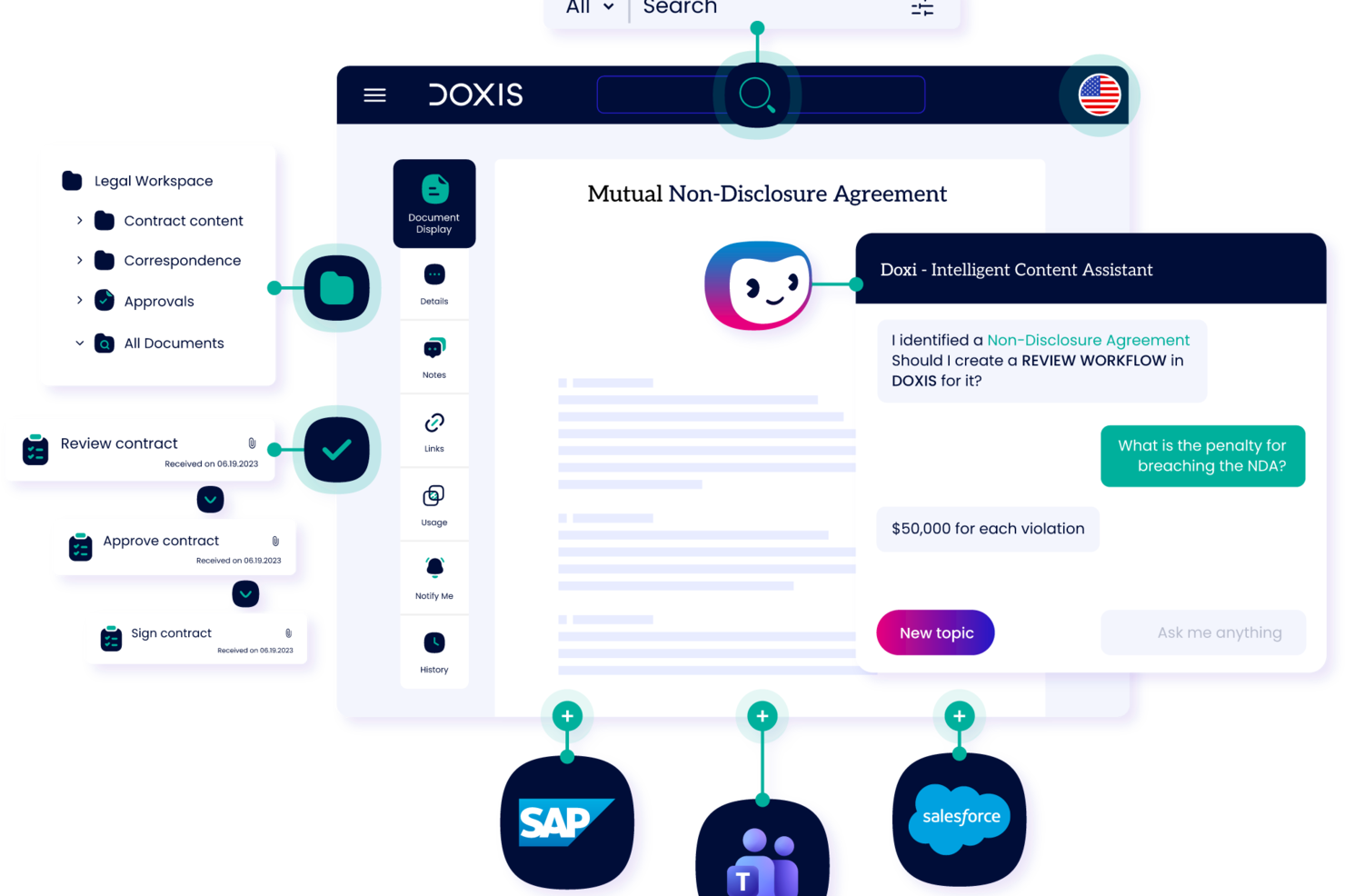
Doxis is an enterprise content management and document intelligence platform that provides document capture, AI-powered classification, digital filing, process automation, and audit-proof archiving throughout the entire document lifecycle.
Who is Doxis Best For?
Doxis suits large enterprises and mid-sized organizations in document-heavy industries like finance, healthcare, and manufacturing that need to manage high volumes of incoming documents across multiple systems.
Why I Picked Doxis
I've included Doxis in my top picks because its multimodal document recognition engine handles documents across languages, formats, and layouts without requiring manual configuration for each. When your team collects documents from international suppliers, customers, or partners, Doxis reads and extracts structured data from those files regardless of the source language. I also like that its AI.dp module uses NLP alongside OCR, which means it understands context inside a document, not just characters on a page. That matters when you're collecting complex, mixed-language documents like customs declarations, freight invoices, or cross-border contracts.
Doxis Key Features
- Inbound mail processing: Captures and routes incoming documents from email, fax, and print channels into the correct filing structure.
- Digital eFiles: Organizes collected documents into structured electronic files by entity type, such as customer, supplier, or case.
- Multi-channel document capture: Ingests documents from scanners, web portals, and connected business systems in a single pipeline.
- Audit-proof archiving: Stores collected documents in a tamper-proof, compliance-ready archive with full version history.
Doxis Integrations
Doxis offers native integrations with SAP, Salesforce, and the Microsoft ecosystem, including Microsoft 365, Microsoft Teams, Microsoft Outlook, Microsoft SharePoint, and Microsoft Dynamics 365. It also integrates with SAP SuccessFactors. The platform uses vendor-independent connectors to connect with ERP, CRM, and HR systems, and an API is available for custom integrations. Zapier support is not clearly documented.
Pros and Cons
Pros:
- Pre-configured content apps serve common departments
- Audit-compliant archiving supports regulated industries
- Natural language search provides contextual answers
Cons:
- Large file handling sometimes triggers bugs
- Suited to enterprises, not smaller teams

Lightico
Best for customer interactions

Lightico is a digital customer interaction platform designed to streamline the processes of collecting documents and signatures from clients. It is primarily used by industries such as finance, insurance, and telecommunications to enhance customer service and operational efficiency.
Why I picked Lightico: It specializes in customer interactions, allowing you to collect e-signatures and documents in real-time while on a call with clients. The platform supports instant document sharing, ensuring a smooth and efficient process. Lightico's secure environment protects sensitive data during transactions. In my experience, these features make it ideal for businesses looking to improve customer engagement and streamline document collection.
Standout Features & Integrations:
Features include the ability to complete transactions in real-time, which keeps your workflow moving smoothly. You can also use the platform to gather customer consent quickly through digital forms. Lightico provides a secure channel for sharing sensitive information, giving you peace of mind during customer interactions.
Integrations include Salesforce, Microsoft Dynamics, SAP, Zendesk, Oracle, Genesys, Twilio, NICE inContact, Avaya, and RingCentral.
Pros and Cons
Pros:
- Quick customer consent via digital forms
- Secure environment for transactions
- Real-time document collection
Cons:
- Learning curve for new users
- May require technical setup

DocuWare
Best for workflow automation

DocuWare is a document management and workflow automation tool designed for businesses looking to digitize and streamline their processes. It serves industries like finance, healthcare, and manufacturing by automating document workflows and improving efficiency.
Why I picked DocuWare: It’s strong in workflow automation, letting you set up digital workflows that cut down manual tasks. You can capture documents from different sources and send them automatically for approval. It also includes tools for document retention and compliance so your team meets regulations. In my experience, these features make it practical for improving efficiency.
Standout Features & Integrations:
Features include intelligent indexing, which quickly organizes your documents for easy retrieval. You can also use mobile access to manage documents on the go, keeping your team connected. The platform provides customizable dashboards that give you insights into workflow performance and document status.
Integrations include Microsoft Office 365, SAP, Salesforce, QuickBooks, Oracle, Outlook, Sage, Microsoft Dynamics, Google Workspace, and SharePoint.
Pros and Cons
Pros:
- Supports compliance and document retention
- Customizable workflow automation
- Effective document capture capabilities
Cons:
- Requires training for full utilization
- Initial setup complexity

Box
Best for cloud storage

Box is a cloud-based content management and file sharing service designed for businesses needing secure and scalable storage solutions. It caters to enterprises across various industries, helping teams collaborate and manage documents efficiently.
Why I picked Box: It gives you cloud storage to keep and access large amounts of data securely. You can set detailed permissions so sensitive information stays protected. Your team can work on documents together in real time with its collaboration tools. In my experience, these features make it dependable for teams that need secure cloud storage.
Standout Features & Integrations:
Features include advanced security controls that help you protect your data with encryption and compliance certifications. You can automate workflows to streamline repetitive tasks, saving time and effort. Box also offers file versioning, allowing you to track changes and revert to previous versions if needed.
Integrations include Microsoft Office 365, Google Workspace, Slack, Salesforce, IBM, Adobe Sign, DocuSign, Okta, ServiceNow, and Zoom.
Pros and Cons
Pros:
- Real-time collaboration tools
- Scalable storage for large enterprises
- Advanced security and compliance features
Cons:
- High learning curve for new users
- Initial setup can be complex

Best for team collaboration

Microsoft SharePoint is a collaboration and document management platform widely used by businesses of all sizes. It helps teams store, organize, and share information securely, enhancing productivity and collaboration across departments.
Why I picked Microsoft SharePoint: It’s built for team collaboration with shared document libraries and real-time co-authoring. You can set up intranet sites to keep your team informed and engaged. Its permission settings let you control who can access sensitive information. In my experience, these features make it dependable for improving communication and collaboration.
Standout Features & Integrations:
Features include the ability to create custom workflows that automate repetitive tasks, saving time and effort. You can also use version history to track changes and restore previous versions if needed. The platform offers advanced search capabilities, making it easy to find documents and information quickly.
Integrations include Microsoft Teams, OneDrive, Outlook, Power BI, Yammer, Dynamics 365, PowerApps, Azure, Salesforce, and Slack.
Pros and Cons
Pros:
- Customizable intranet site creation
- Supports real-time co-authoring
- Rich document management capabilities
Cons:
- Requires ongoing maintenance
- Complex setup for new users
PandaDoc
Best for document signing

PandaDoc is a document automation and management tool primarily used by sales teams, marketing departments, and legal professionals. It simplifies the creation, delivery, and signing of documents, offering a comprehensive solution for handling business paperwork.
Why I picked PandaDoc: It excels in document signing, providing you with features like e-signatures and document tracking. You can create templates to speed up the document creation process, saving time for your team. The platform offers analytics to track document engagement, giving you insights into client interactions. In my experience, these features make PandaDoc a top choice for businesses looking to enhance their document workflow.
Standout Features & Integrations:
Features include the ability to use a content library to store frequently used documents and assets. You can also collaborate on documents in real time, ensuring efficient team communication. PandaDoc provides a drag-and-drop document editor, making it easy to customize documents to your needs.
Integrations include Salesforce, HubSpot, Zoho CRM, Microsoft Dynamics, Pipedrive, Google Drive, Dropbox, Slack, QuickBooks, and Zapier.
Pros and Cons
Pros:
- Detailed document analytics
- Real-time document collaboration
- Extensive template customization
Cons:
- Initial setup requires time
- Limited offline functionality


Dropbox Business is a cloud-based file sharing and storage solution tailored for teams and businesses that need efficient document management. It enables users to store, share, and collaborate on files, making it suitable for a wide range of industries.
Why I picked Dropbox Business: It’s built for file sharing with shared folders and links that make collaboration easy. You can use file requests to gather documents from clients and teammates quickly. It also offers security options like two-factor authentication to protect your data. In my experience, these features make it dependable for secure and efficient file sharing.
Standout Features & Integrations:
Features include smart sync, which lets you access files without taking up space on your device. You can also use the admin console to manage user permissions and monitor activity across your team. The document watermarking feature adds an extra layer of security to your sensitive files.
Integrations include Microsoft Office 365, Slack, Zoom, Adobe Creative Cloud, Salesforce, Trello, Asana, Google Workspace, DocuSign, and Okta.
Pros and Cons
Pros:
- Smart sync for saving device space
- Advanced security with two-factor authentication
- Efficient file request feature
Cons:
- Initial setup can be time-consuming
- Requires constant internet connection


Evernote Business is a note-taking and organization tool designed for teams and businesses that need to manage information efficiently. It helps users capture ideas, organize documents, and collaborate on projects, making it a versatile tool for various industries.
Why I picked Evernote Business: It’s great for organizing notes and documents with notebooks and tags that keep information easy to sort. You can share notes with your team so everyone stays aligned. The search tool is strong and can even find text inside attachments. In my experience, these features make it useful for teams that need organized knowledge management.
Standout Features & Integrations:
Features include the ability to sync across devices, ensuring your notes are accessible anywhere you go. You can use the web clipper to save articles and web pages directly to your notes. The tool also allows you to annotate PDFs, making it easy to add comments and highlights.
Integrations include Google Drive, Slack, Microsoft Teams, Salesforce, Outlook, Gmail, Zapier, Trello, Asana, and Microsoft Office.
Pros and Cons
Pros:
- Web clipper for saving web content
- Syncs across multiple devices
- Effective note categorization options
Cons:
- Requires internet for full features
- Limited offline access


Content Snare is a document collection platform that gives clients a secure, branded portal to upload documents and respond to questions in one place. It's used by accounting firms (tax returns, workpapers, AML/KYC), law firms (client intake, case files), mortgage brokers (loan applications, payslips, ID), and agencies (briefs, brand assets, content). ISO 27001 certified. Auto-saving forms mean clients can complete a request over multiple sessions and automatic reminders that chase clients on your behalf.
Why I picked Content Snare: Automated reminders are a standout feature, ensuring you never miss a deadline. You can create clear checklists for client requests and track progress in a centralized dashboard. The user-friendly interface makes it easy for clients to submit documents without hassle. In my experience, this reduces the back-and-forth emails, saving time for both you and your clients.
Standout Features & Integrations:
Features include creating templates for repetitive requests, ensuring quick and efficient information collection. In-context communication reduces the need for separate email threads, and security is prioritized with military-grade encryption. The platform offers ready-made templates and item-level rejection for better document management.
Integrations include Google Drive, Dropbox, Zapier, Xero, QuickBooks, Slack, Trello, Asana, Monday.com, and Microsoft Teams.
Pros and Cons
Pros:
- Clear checklists for document requests
- User-friendly interface for clients
- Automated reminders reduce manual follow-up
Cons:
- Learning curve for new users
- Limited customization options


Collect is a platform designed to automate client document collection for industries like real estate, mortgage brokerage, and human resources. It provides tools to streamline workflows and enhance efficiency in collecting necessary documents from clients.
Why I picked Collect: It’s built for client submissions with automated document requests and notifications to keep you updated. You can customize forms to fit your needs and brand your client portal. It also protects data with encryption and controlled access. In my experience, these features make it practical for managing client documents efficiently.
Standout Features & Integrations:
Features include workflow automation that reduces manual tasks and enhances productivity. You can set up automatic reminders and SMS notifications to keep clients on track. The platform also supports cloud synchronization, ensuring your data is updated and accessible.
Integrations include API, webhooks, and other popular tools that enhance workflow efficiency.
Pros and Cons
Pros:
- Branding options for client portal
- Customizable client forms
- Automated document requests
Cons:
- Initial setup may be time-consuming
- Requires internet access for full use
Annen programvare for dokumentinnsamling
Her er noen flere alternativer for programvare for dokumentinnsamling som ikke kom med på kortlisten min, men som likevel er verdt å sjekke ut:
- Checkhub
For compliance tracking
- Superdocu
For onboarding processes
- DocuPipe
For structuring incoming documents
- LogicalDOC
For enterprise document control
- Xerox DocuShare
For scalable content management


How I Evaluate Document Collection Software
I split my evaluation into two layers: the baseline every tool must meet—like structured request workflows and status tracking—and the differentiators that set one platform apart.
Core Functionality (Table Stakes For This List)
When I'm selecting tools for my list, I rank each one on a scale from 0 (does not offer the functionality) to 5 (excels in this area) for each core functionality listed below. Then, I calculate the tool's total score into a percentage. Each tool needs to achieve a minimum total score of 65% to be considered for inclusion.
- Document Request Workflows: I look for structured, multi-item request lists you can send to specific recipients—like requesting insurance certificates, signed contracts, and permits from a subcontractor in one go.
- Automated Follow-Up Reminders: Chasing people for missing files is a time sink, so I evaluate whether a tool can send scheduled reminder sequences to recipients with overdue submissions.
- Submission Status Tracking: I check for a dashboard view that shows what's been submitted, what's pending, and what's overdue across all active projects and recipients at a glance.
- Secure File Upload Portal: Recipients should be able to upload files through a secure link or portal without creating an account—especially important when collecting documents from external contractors or clients.
- Centralized Document Storage: Every collected file should land in an organized repository tied to its project or request, not scattered across email threads and chat messages.
- Reusable Request Templates: For recurring project types, I look for saveable checklists or templates—like a standard onboarding packet or a monthly compliance document set—that your team can deploy repeatedly.
Once I have a list of tools that meet this criteria, I consider what sets each platform apart.
Differentiating Factors (What Sets Vendors Apart)
Here's how I compare and contrast different vendors:
Standout Features
Conditional request logic is a big differentiator. I look for tools that adjust required documents based on a recipient's role or project type—like only requesting safety certifications from on-site contractors. Built-in e-signature support also matters because it keeps the entire collect-and-sign cycle in one place. I evaluate whether a platform offers AI-powered document validation to flag incomplete uploads or mismatched file types before your team reviews them manually.
Beyond Features
I check how well a tool integrates with the project management stack you're already using—syncing document statuses with tasks in tools like Asana or Jira keeps everything visible without manual updates. Pricing model matters too, especially whether external recipients can upload files for free. If your team collects documents from dozens of contractors per project, per-recipient fees add up fast. I also evaluate compliance credentials like SOC 2 and GDPR, which become essential when handling sensitive client or vendor files.
Slik velger du programvare for dokumentinnsamling
Det er lett å gå seg vill i lange funksjonslister og kompliserte prismodeller. For å hjelpe deg med å holde fokus mens du går gjennom den unike prosessen din for programvarevalg, er her en sjekkliste over faktorer du bør ha i tankene:
| Faktor | Hva bør du vurdere? |
|---|---|
| Skalerbarhet | Vil programvaren vokse med virksomheten din? Tenk på fremtidige behov, og se etter verktøy som kan håndtere økt datamengde og flere brukere uten ytelsesproblemer. |
| Integrasjoner | Fungerer den med de eksisterende systemene dine? Kontroller kompatibiliteten med dagens verktøy, for eksempel CRM, e-post og prosjektstyringsprogramvare, for å sikre sømløse arbeidsflyter. |
| Tilpasningsmuligheter | Kan du tilpasse programvaren til prosessene dine? Se etter løsninger som tilbyr fleksible maler og innstillinger som passer til dine spesifikke behov for arbeidsflyt. |
| Brukervennlighet | Vil teamet ditt ta den i bruk uten problemer? Et brukervennlig grensesnitt reduserer opplæringstiden og øker produktiviteten. Test demoversjonen for å vurdere hvor enkelt det er å navigere og bruke funksjonene. |
| Implementering og introduksjon | Hvor raskt kan du komme i gang? Vurder hvor lang tid oppsettet tar, og hvilke ressurser som kreves. Se etter programvare med veiledet introduksjon og kundestøtte som gjør overgangen enklere. |
| Kostnad | Er prisene transparente og innenfor budsjettet? Sammenlign abonnementsplaner, engangsavgifter og ekstrakostnader. Vurder rabatter ved årlig fakturering for å spare penger. |
| Sikkerhetstiltak | Hvor godt beskytter den dataene dine? Sørg for at den tilbyr kryptering, tilgangskontroller og samsvar med standarder for databeskyttelse, som GDPR. |
Hva er programvare for dokumentinnsamling?
Programvare for innsamling av dokumenter er et verktøy som hjelper virksomheter med å samle inn, organisere og administrere dokumenter fra kunder og interessenter. Fagpersoner som prosjektledere, regnskapsførere og HR-spesialister bruker disse verktøyene til å forenkle datainnsamlingen og forbedre effektiviteten i arbeidsflyten.
Automatiserte påminnelser, sikker lagring og funksjoner for enkel deling bidrar til effektiv dokumenthåndtering og innsending i tide. Alt i alt øker disse verktøyene produktiviteten ved å redusere manuelle oppgaver og sikre organisert dokumenthåndtering.
Funksjoner i programvare for innsamling av dokumenter
Når du velger programvare for innsamling av dokumenter, bør du se etter følgende viktige funksjoner:
- Automatiserte påminnelser: Sender varsler til kunder i tide for å sikre at de sender inn dokumenter som planlagt, og reduserer behovet for manuell oppfølging.
- Sikker lagring: Beskytter sensitiv informasjon med kryptering og tilgangskontroller, og sikrer samsvar med standarder for databeskyttelse.
- Tilpassbare maler: Gjør det mulig for brukere å opprette og endre maler for å dekke spesifikke behov for datainnsamling, noe som sparer tid på gjentakende oppgaver.
- Samarbeid i sanntid: Gjør det mulig for flere brukere å arbeide med dokumenter samtidig, noe som forbedrer kommunikasjonen og effektiviteten i teamet.
- Datakryptering: Beskytter data under overføring og lagring, noe som gir trygghet for både brukere og kunder.
- Integrasjonsmuligheter: Kobler seg til eksisterende verktøy som CRM- og prosjektstyringssystemer for å effektivisere arbeidsflyter og datahåndtering.
- Mobiltilgang: Gir mulighet til å administrere og samle inn dokumenter mens du er på farten, slik at du kan være fleksibel og produktiv utenfor kontoret.
- Dokumentsporing: Overvåker statusen for innsendinger og godkjenninger, slik at brukerne kan holde seg organiserte og informerte.
- Brukervennlig grensesnitt: Forenkler navigeringen og reduserer læringskurven, noe som oppmuntrer team til å ta løsningen raskt i bruk.
- Automatisering av arbeidsflyt: Automatiserer rutineprosesser, slik at brukerne får mer tid til å fokusere på mer strategiske oppgaver.
Fordeler med programvare for innsamling av dokumenter
Implementering av programvare for innsamling av dokumenter gir flere fordeler for teamet og virksomheten din. Her er noen av fordelene du kan se frem til:
- Tidsbesparelser: Automatiserte påminnelser og automatisering av arbeidsflyt reduserer manuelle oppgaver, slik at teamet får mer tid til å fokusere på prosjekter med høy prioritet.
- Bedre organisering: Sentralisert dokumentlagring og tilpassbare maler bidrar til å holde informasjonen organisert og lett tilgjengelig.
- Forbedret sikkerhet: Datakryptering og sikker lagring beskytter sensitive dokumenter og sikrer samsvar med databeskyttelsesforskrifter.
- Bedre samarbeid: Funksjoner for samarbeid i sanntid gjør det mulig for teammedlemmer å arbeide effektivt sammen, noe som forbedrer kommunikasjonen og produktiviteten.
- Større fleksibilitet: Mobiltilgang gjør det mulig å administrere dokumenter hvor som helst, noe som støtter fjernarbeid og produktivitet mens du er på farten.
- Større effektivitet: Integrasjonsmuligheter effektiviserer datahåndteringen ved å koble seg til eksisterende systemer og redusere dobbeltarbeid.
- Tydelig oversikt: Dokumentsporing gir innsikt i statusen for innsendinger og godkjenninger, slik at teamet holdes informert og kan være proaktivt.
Kostnader og priser for programvare for innsamling av dokumenter
Ved valg av programvare for innsamling av dokumenter er det nødvendig å forstå de ulike prismodellene og abonnementene som er tilgjengelige. Kostnadene varierer basert på funksjoner, teamstørrelse, tillegg og mer. Tabellen nedenfor oppsummerer vanlige abonnementer, gjennomsnittsprisene deres og typiske funksjoner som er inkludert i programvareløsninger for innsamling av dokumenter:
Sammenligningstabell for abonnementer for programvare for innsamling av dokumenter
| Abonnementstype | Gjennomsnittspris | Vanlige funksjoner |
|---|---|---|
| Gratisabonnement | $0 | Grunnleggende dokumentinnsamling, begrenset lagring og grunnleggende sikkerhetsfunksjoner. |
| Personlig abonnement | $5-$15/user/month | Ubegrenset opplasting av dokumenter, tilpassbare maler og prioritert brukerstøtte. |
| Bedriftsabonnement | $20-$50/user/month | Avanserte sikkerhetsfunksjoner, integrasjonsmuligheter og automatisering av arbeidsflyt. |
| Virksomhetsabonnement | $60-$100/user/month | Tilpassbare løsninger, dedikert kontoadministrasjon og forbedrede alternativer for samsvar og sikkerhet. |
Vanlige spørsmål om programvare for dokumentinnsamling
Her er noen svar på vanlige spørsmål om programvare for dokumentinnsamling:
Hvordan integreres programvare for dokumentinnsamling med eksisterende systemer?
Programvare for dokumentinnsamling integreres ofte med verktøy som CRM-systemer, e-postplattformer og skylagringsløsninger. Du bør undersøke om programvaren støtter API-er eller har ferdigbygde integrasjoner med de eksisterende systemene dine. Dette sikrer en smidig arbeidsflyt og hindrer datasiloer. Integrasjon kan spare tid og redusere feil i datahåndteringen.
Hvilke sikkerhetstiltak bør jeg se etter i programvare for dokumentinnsamling?
Sikkerhet er avgjørende for å beskytte sensitiv informasjon. Se etter funksjoner som datakryptering, sikre tilgangskontroller og samsvar med personvernforordninger som GDPR. Kontroller om programvaren tilbyr revisjonsspor for å spore datatilgang. Disse tiltakene bidrar til å beskytte dataene dine mot uautorisert tilgang.
Kan programvare for dokumentinnsamling håndtere store datamengder?
Ja, mange verktøy for dokumentinnsamling er utviklet for å skalere i takt med virksomhetens behov. Det er imidlertid viktig å kontrollere om programvaren kan håndtere den forventede datamengden uten ytelsesproblemer. Vurder programmets lagringsgrenser og om det støtter effektiv databehandling. Dette sikrer at det kan vokse sammen med organisasjonen din.
Hvordan fungerer automatiske påminnelser i programvare for dokumentinnsamling?
Automatiske påminnelser bidrar til å sikre at dokumenter sendes inn i tide, ved å sende varsler til klienter eller teammedlemmer. Vanligvis kan du tilpasse hvor ofte og når disse påminnelsene skal sendes. Denne funksjonen reduserer det manuelle arbeidet med oppfølging og bidrar til å overholde frister. Den er spesielt nyttig ved håndtering av flere innsendinger.
Hvilke typer analyser er tilgjengelige i programvare for dokumentinnsamling?
Analysefunksjoner gir innsikt i dokumentstatus, innsendingstakt og brukeraktivitet. Se etter verktøy som tilbyr oversikter og rapporter for å følge med på nøkkeltall. Ved å forstå disse analysene kan du identifisere flaskehalser og optimalisere prosesser. Det bidrar også til å ta velinformerte beslutninger basert på sanntidsdata.
Hvor tilpasningsbar er programvare for dokumentinnsamling?
Tilpasningsmulighetene varierer mellom ulike programmer, men de fleste lar deg tilpasse maler, arbeidsflyter og brukertillatelser. Kontroller om du kan justere innstillingene slik at de passer til virksomhetens spesifikke behov. Tilpasningsmuligheter sikrer at programvaren samsvarer med prosessene dine og forbedrer brukeropplevelsen. Dette er en viktig faktor for å maksimere verktøyets effektivitet.