

10 beste programvarer for bestilling av møterom i 2026

Beste programvare for bestilling av møterom – kortliste


Programvare for bestilling av møterom lar teamet ditt reservere, administrere og holde oversikt over rom og ressurser for fysiske eller hybride møter. Hvis du drukner i dobbeltbookinger, siste-liten-kamp om ledig plass eller kaos i manuelle kalendere, er disse verktøyene utviklet for å skape orden og oversikt. I denne veiledningen finner du de beste alternativene for teknologidrevne arbeidsplasser der pålitelig planlegging og oppdaterte romdata faktisk betyr noe. Du får en tydelig oversikt over hva hvert alternativ gjør best, slik at du kan velge det som passer best for teamets arbeidsområde og arbeidsflyt.
Hvorfor du kan stole på våre programvareanbefalinger
Teamet vårt har testet og anmeldt programvare siden 2012. Vi er selv prosjektledere, så vi vet hvor vanskelig og hvor viktig det er å velge riktig programvare.
I denne guiden har vi vurdert verktøyene gjennom praktisk testing og uavhengig research og gitt dem poeng ut fra våre utvelgelseskriterier. Vi bygger også på innsikt fra ledende eksperter i bransjen og erfarne prosjektledere.
Anmeldelsene våre bygger på vår egen redaksjonelle vurdering. De er ikke et salgsargument.
Ekspertanmeldere:
Sammenligningstabell for programvare for bestilling av møterom
Denne sammenligningstabellen oppsummerer prisopplysningene for mine utvalgte programmer for bestilling av møterom:
| Tool | Best For | Trial Info | Price | ||
|---|---|---|---|---|---|
| 1 | Best for visual workspace management | Not available | From $3000/year | Website | |
| 2 | Best for floor plan-based interactive scheduling | Free demo available | From $500/month | Website | |
| 3 | Best for on-the-go mobile booking | Free trial + free demo available | From $5/user/month (billed annually) | Website | |
| 4 | Best for single sign-on support | 30-day free trial + free demo available | From $13.50/month (billed annually) | Website | |
| 5 | Best for all-in-one desk, parking, and room booking | Free plan available; 14-day free trial; free demo available | From €1.7/user/month (billed annually) | Website | |
| 6 | Best for workplace security integrations | Free demo available | From $5/bookable resource/month (billed annually) | Website | |
| 7 | Best for interactive floor plan visualization | Free demo available | Pricing upon request | Website | |
| 8 | Best for carbon footprint reporting | Free demo available | From $99/month | Website | |
| 9 | Best for wireless room display integration | 30-day free trial available | From $51/month | Website | |
| 10 | Best for Microsoft Outlook integration | Free demo available | From $5,149/year | Website |


Anmeldelser av den beste programvaren for bestilling av møterom
Nedenfor finner du mine detaljerte sammendrag av den beste programvaren for bestilling av møterom som kom med på kortlisten min. Anmeldelsene mine gir en detaljert gjennomgang av funksjonene, integrasjonene og de beste bruksområdene for hver plattform, slik at du kan finne den som passer best for deg.
Tactic
Best for visual workspace management
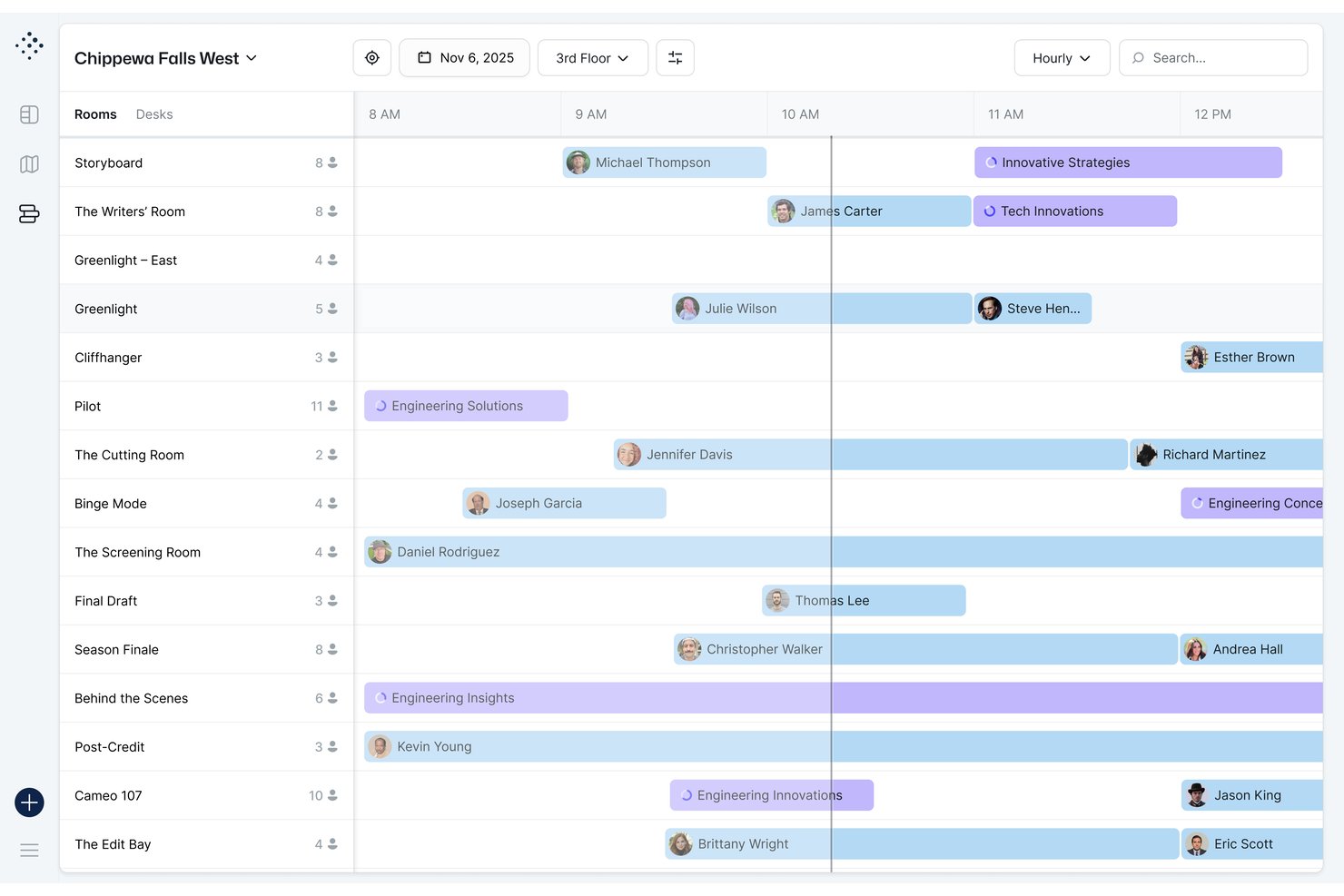
Tactic is a modular workplace management platform that covers meeting room booking, desk reservations, visitor management, and space analytics through interactive floor maps and calendar-connected booking workflows.
Who Is Tactic Best For?
Tactic is a strong fit for midsize companies managing hybrid workforces, particularly facilities and IT operations teams coordinating shared spaces across multiple office locations.
Why I Picked Tactic
Tactic earns its spot on my shortlist because the interactive floor maps show live room status directly on the floor plan, so my team can instantly spot open rooms, check capacity, and see exactly where they're located. I also like the Tessa AI assistant, which lets you book a room by describing what you need in plain language, skipping the manual filter search entirely. The Managed Rooms feature rounds it out, letting you bundle AV or catering into one booking request rather than coordinating that separately.
Tactic Key Features
- Two-way calendar sync: Integrates with Google Calendar and Outlook so reservations update automatically across platforms.
- Role-based permissions: Lets you assign different access levels and booking rights by team, department, or location.
- Office insights dashboard: Reports on room usage patterns, occupancy rates, and peak booking times.
- Visitor management: Handles guest check-in, badge printing, and host notifications from one interface.
Tactic Integrations
Tactic provides native integrations with Google Workspace, Microsoft 365, Outlook, Slack, Microsoft Teams, and Zoom. An API is available for custom integrations.
Pros and Cons
Pros:
- Combines desk and room booking natively
- AI assistant handles natural language booking requests
- Interactive floor maps show live room status
Cons:
- Setup requires manual floor plan digitization
- Analytics reporting less advanced than competitors

elia
Best for floor plan-based interactive scheduling
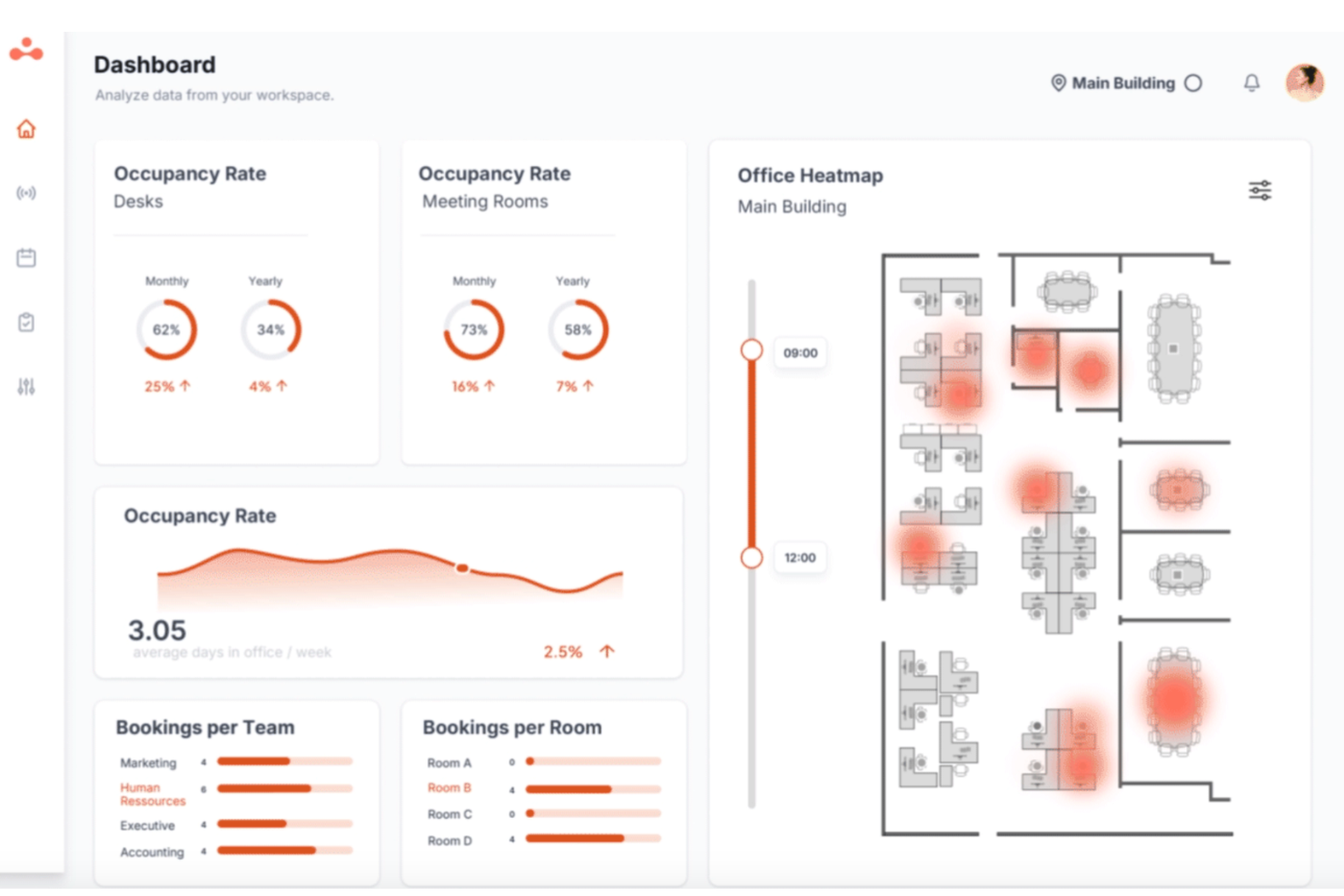
elia is a modular workplace management platform that combines meeting room booking, desk reservations, visitor management, occupancy sensing, and service requests into one system built around interactive floor plans.
Who Is elia Best For?
elia is a strong fit for facilities and office managers who need a single platform to handle room booking, desk reservations, visitor tracking, and space analytics across a physical office.
Why I Picked elia
I picked elia as one of the best because its floor plan-based booking experience is genuinely different from the typical list-and-calendar interfaces most tools offer. I love that admins build drag-and-drop floor plans without any coding, and employees book by clicking directly on a visual map filtered by capacity, equipment, and location. The system also auto-releases rooms when nobody shows up, using occupancy sensors that count entries and exits anonymously, which I find far more reliable than relying on people to cancel.
elia Key Features
- Two-way calendar sync: elia connects with Microsoft 365/Outlook and Google Workspace to keep room bookings updated across both platforms in real time.
- Check-in via multiple methods: Users can confirm a booking through email, Slack, Teams, or by tapping the door display, with badge-linked reservations available to reduce anonymous no-shows.
- Service request linking: Catering, AV setup, and room configuration requests can be attached directly to a booking from within the platform.
- Tiered utilization reporting: Reporting scales by plan, from basic usage summaries on Basic to custom dashboards on Business and AI-driven analytics on Enterprise.
elia Integrations
elia offers native integrations with Microsoft 365/Outlook and Google Workspace/Google Calendar, plus Slack notifications. Its Microsoft Teams app is available through Microsoft Marketplace, while Enterprise customers get API access for custom integrations.
Pros and Cons
Pros:
- Users report quick support responses
- No-show auto-release reduces wasted room time
- Interactive floor plans simplify room finding
Cons:
- Hardware requirements raise implementation complexity
- Recurring booking controls remain unclear

deskbird
Best for on-the-go mobile booking
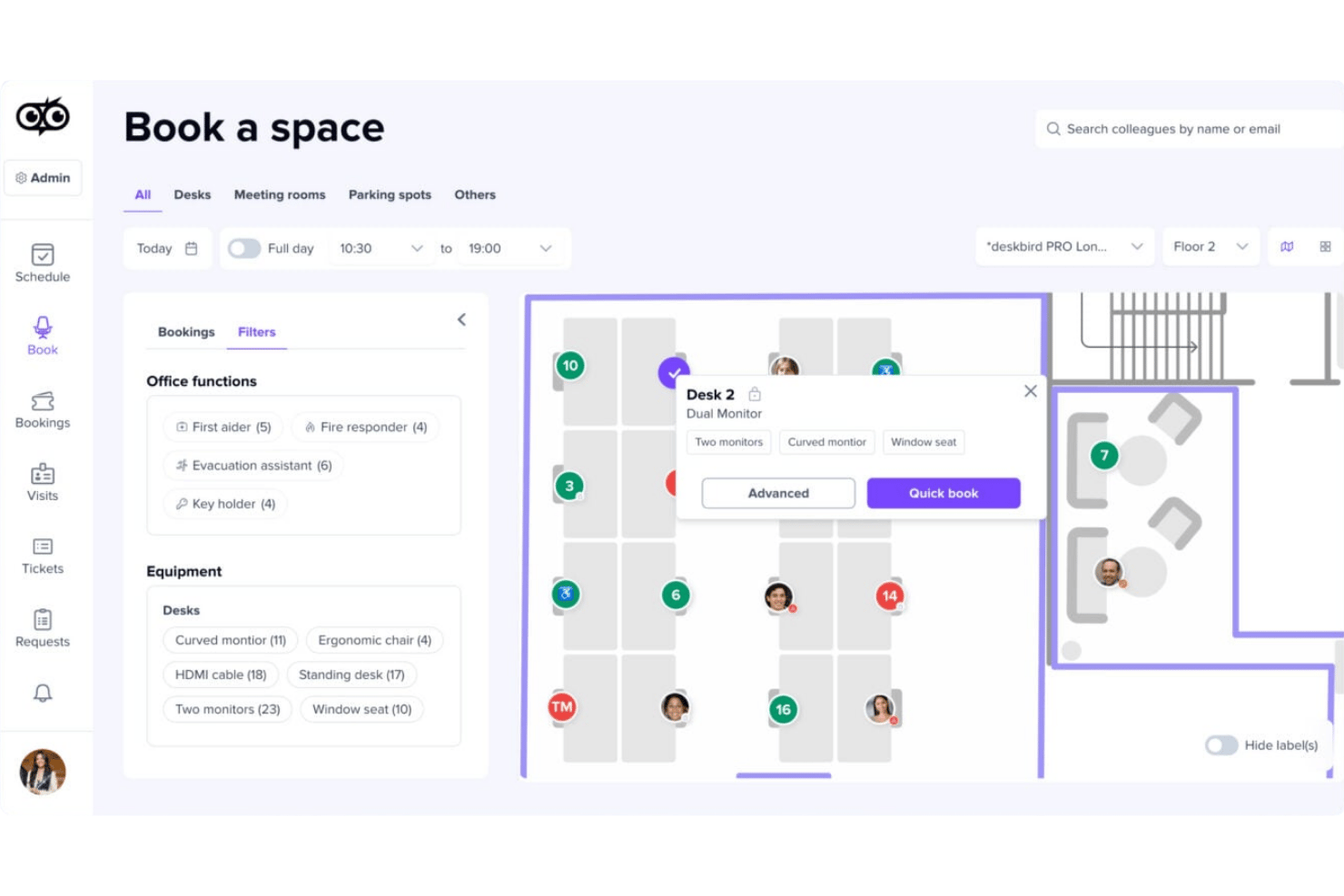
deskbird is a hybrid workplace management platform that combines meeting room booking, desk and parking reservations, interactive floor plans, calendar sync, and room utilization analytics.
Who Is deskbird Best For?
deskbird suits facilities and IT teams at mid-size to enterprise organizations managing hybrid workforces across multiple office locations.
Why I Picked deskbird
deskbird earns its spot on my shortlist because of how many ways it lets me book a room without sitting at a desk. I can grab a room through the native iOS or Android app, check in via QR code at the door, or book directly inside Teams or Outlook on my phone. What I especially like is Kiosk Mode, which runs on any commercial tablet and lets me walk up to a room entrance and book on the spot.
deskbird Key Features
- Recurring meeting room reservations: Schedule and manage repeating bookings for ongoing project meetings directly in the platform.
- Interactive floor plans: View and select available rooms on visual maps with details like capacity and amenities.
- No-show prevention with auto-release: Rooms are released if attendees don’t check in, reducing unused reservations.
- Room utilization analytics: Access dashboards tracking occupancy, booking frequency, and usage data to support workspace planning.
deskbird Integrations
deskbird offers native integrations with Microsoft Outlook, Microsoft Teams, Google Calendar, Slack, BambooHR, HiBob, Personio, and SAP SuccessFactors HCM. An API is available for custom integrations.
Pros and Cons
Pros:
- Tracks parking space data
- Supports instant QR check-in
- Mobile app supports full room booking workflow
Cons:
- Some users report occasional double bookings
- Recurring bookings have limited customization options
Best for single sign-on support
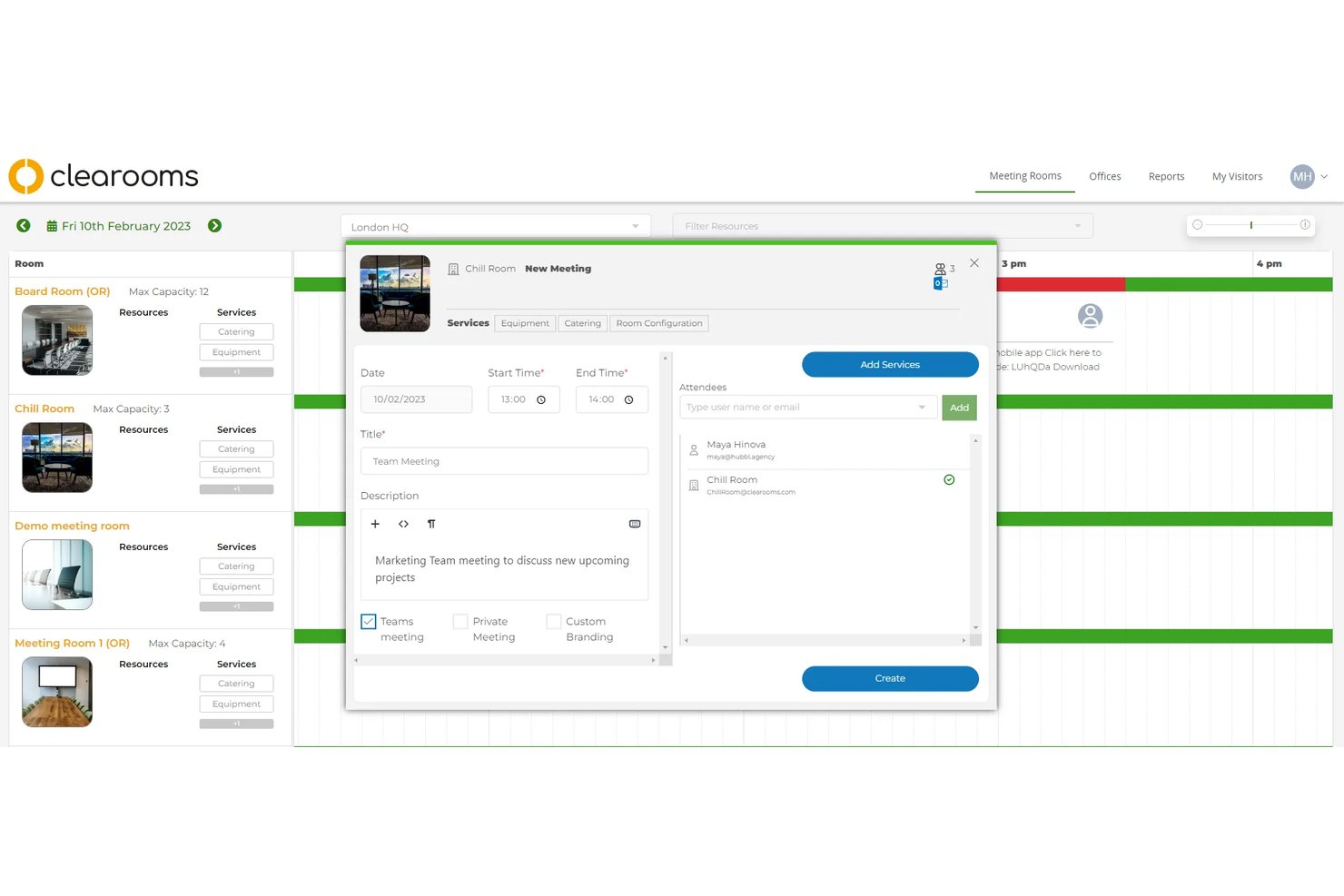
Clearooms is a hybrid workspace booking platform that covers meeting room reservations, hot desk management, visitor check-in, and parking allocation from a single interface with interactive floor plans and calendar sync.
Who Is Clearooms Best For?
Clearooms is a strong fit for IT operations managers and facilities teams at mid-sized companies that need SSO-integrated workspace booking without enterprise-level complexity or pricing.
Why I Picked Clearooms
I've included Clearooms in my top picks because its SSO support covers all the major identity providers (Azure, Okta, JumpCloud, and OneLogin) without gating that access behind a premium tier. In practice, that means my team can roll out room booking across the whole organization without managing a separate login layer. The SCIM provisioning support also makes user lifecycle management automatic, so new hires get access, and departures are removed without any manual updates inside Clearooms.
Clearooms Key Features
- Linked Rooms booking: Book multiple meeting rooms at once for larger or connected events.
- Customizable approval workflows: Designate approvers for specific meeting rooms to review or provide feedback on booking requests.
- Interactive floor plans: Visual floor plans with traffic-light indicators show live room and desk availability.
- Room services module: Add and track catering or refreshment orders for meetings directly in the platform.
Clearooms Integrations
Clearooms offers native integrations with Microsoft 365, Google Workspace, Microsoft Teams, Okta, JumpCloud, OneLogin, Salto, Paxton Net2, and Slack. An API is available for custom integrations.
Pros and Cons
Pros:
- Interactive floor plans support multiple locations
- Automatic user provisioning and deprovisioning via SCIM
- SSO included with no premium tier required
Cons:
- Room sensor integrations not currently supported
- No 3D navigation or wayfinding features

Dibsido
Best for all-in-one desk, parking, and room booking
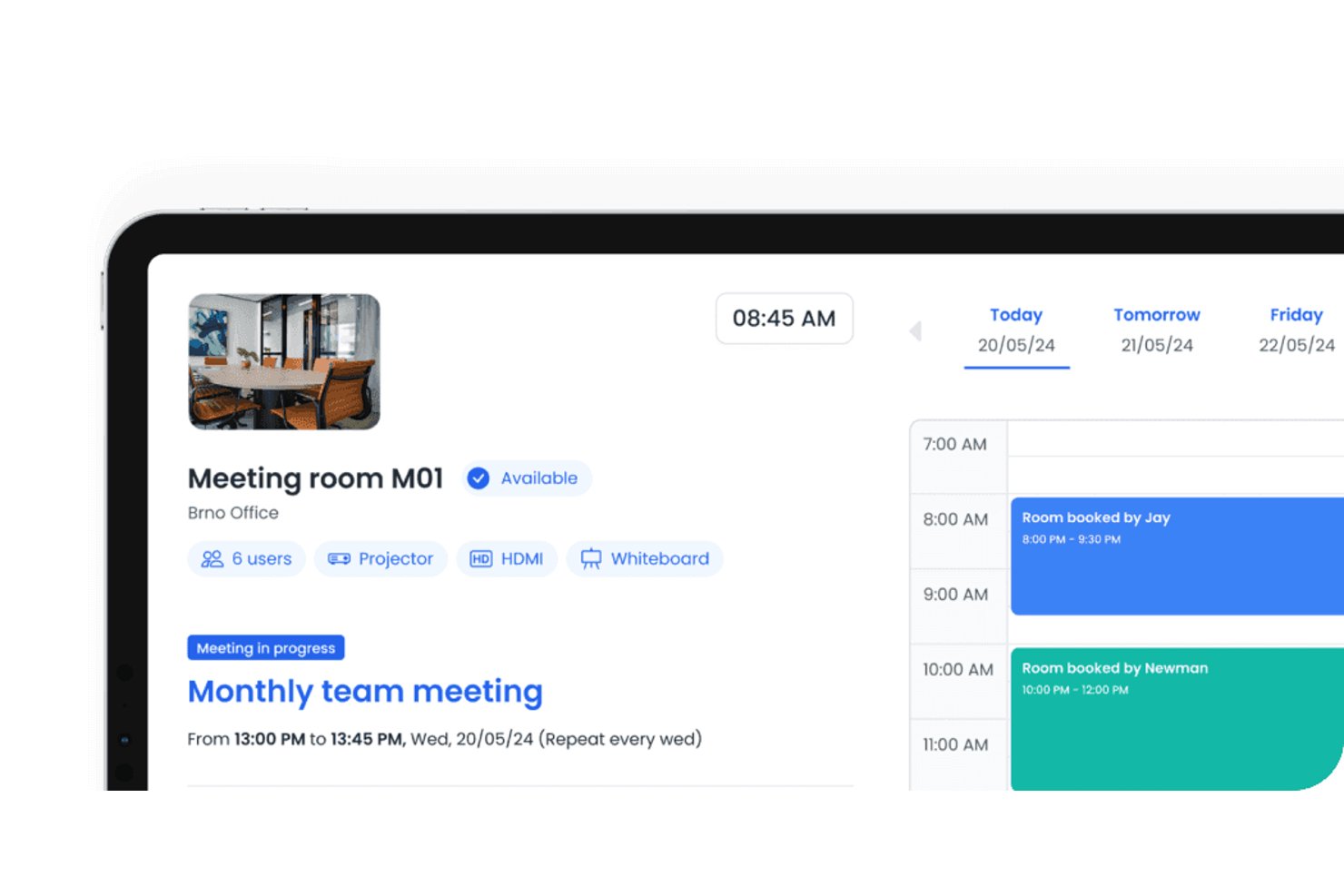
Dibsido is a hybrid workplace booking platform that combines meeting room reservations, desk booking, and parking management in a single app with interactive floor plans, calendar sync, and utilization analytics.
Who Is Dibsido Best For?
Dibsido is a strong fit for office and facilities managers at small to mid-size companies who need desk, parking, and meeting room booking in one place.
Why I Picked Dibsido
I've included Dibsido in my top picks because it's the only tool on this list that manages desks, parking, and meeting rooms from a single interactive floor plan. I particularly like how recurring room reservations work: you set a weekly standup once, and the series extends automatically as your booking window rolls forward, which removes a real administrative headache. Analytics 2.0 adds heatmaps and plain-language recommendations, so you can see which rooms go unused and act on it without digging through raw data.
Dibsido Key Features
- Two-way calendar sync: Dibsido connects with Google Calendar and Microsoft Outlook so bookings made in either platform reflect instantly in both.
- SSO and SCIM provisioning: Supports Microsoft Entra ID, Okta, and SAML 2.0 login, with automatic user setup and removal through SCIM.
- Service requests on bookings: Attach catering or IT support requests directly to a room reservation, with automatic notifications sent to the assigned team.
- QR code check-in and booking: Place a QR code outside any room so people can check in or book on the spot without opening the app.
Dibsido Integrations
Dibsido offers native integrations with Google Calendar, Microsoft Outlook/365, Microsoft Teams, and Slack. It also supports a public API for custom integrations and Zapier.
Pros and Cons
Pros:
- Heatmaps reveal underused meeting spaces
- QR check-in supports room-side booking
- Recurring series suit weekly stand-ups
Cons:
- Room search lacks capacity and amenity filters
- No sensor-based occupancy verification
Envoy
Best for workplace security integrations
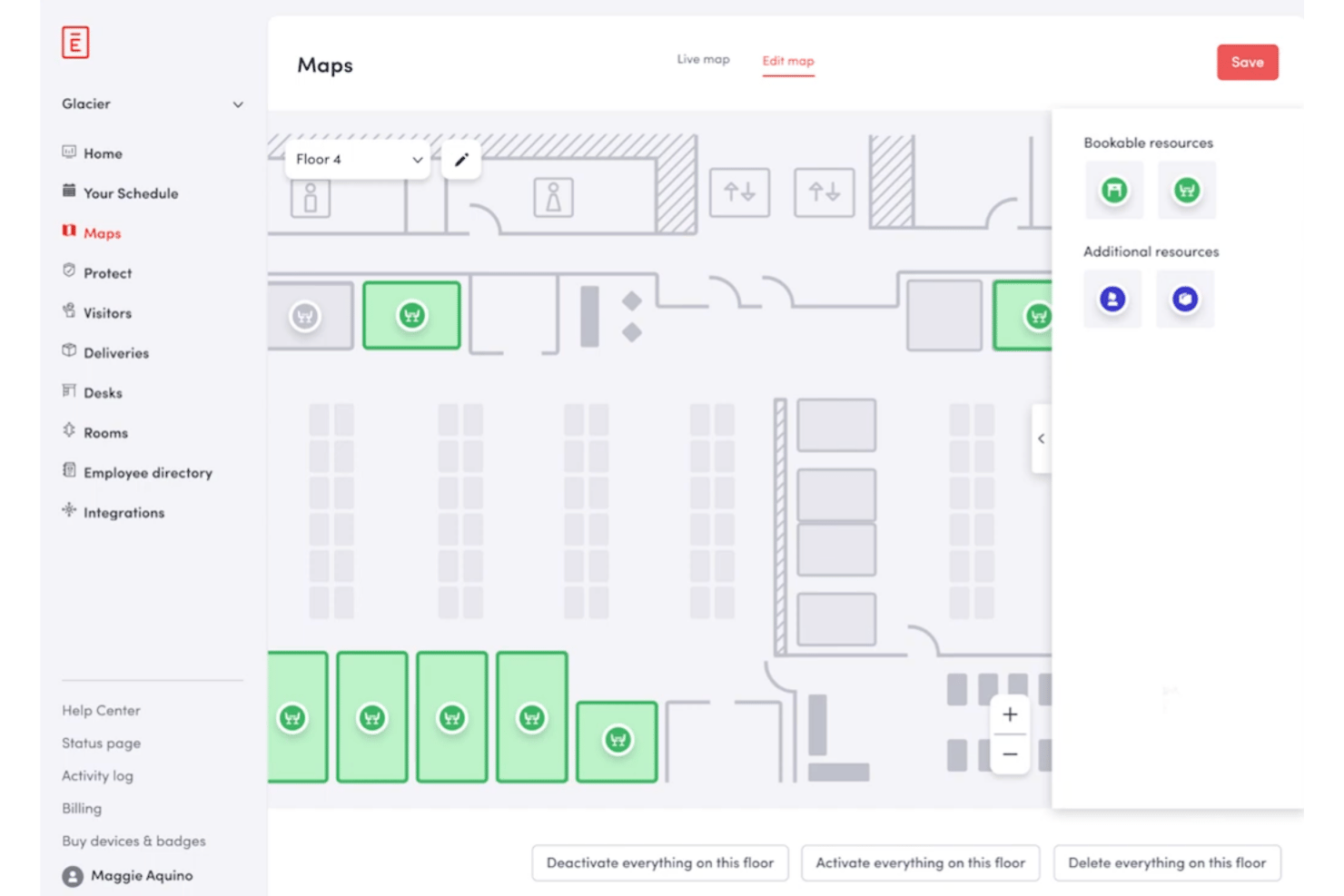
Envoy is a workplace management platform that combines conference room scheduling, desk booking, and visitor management with deep integrations into access control systems, identity providers, and calendar tools like Google Workspace and Microsoft 365.
Who Is Envoy Best For?
Envoy is a strong fit for IT operations and facilities teams at mid-to-large organizations that need room booking connected to access control, SSO, and security infrastructure.
Why I Picked Envoy
I picked Envoy as one of the best because no other room booking tool connects the calendar layer to the physical security layer as tightly. When my team books a conference room, Envoy can trigger door access permissions through systems like Kisi, Brivo, or Verkada, so only listed attendees can physically enter. On the identity side, SSO via Okta or Microsoft Entra ID means room access rights stay in sync with directory provisioning automatically.
Envoy Key Features
- Real-time room availability indicators: Status lights outside each room show if spaces are free, reserved, or occupied.
- Interactive workplace floor maps: Visual maps let users locate and book available rooms by capacity and amenities.
- Automated check-in and end meeting workflows: Check in or end meetings from tablets, Slack, Teams, or the Envoy mobile app.
- Detailed utilization analytics dashboards: Built-in dashboards report on booking frequency, occupancy, and overall room usage data.
Envoy Integrations
Envoy offers native integrations with Google Workspace, Microsoft 365, Slack, Teams, Okta, Kisi, Brivo, Genetec, LenelS2, and Cisco Meraki. An API is available for custom integrations.
Pros and Cons
Pros:
- Auto-release of unclaimed room reservations
- Interactive maps for locating available rooms
- Connects bookings to physical access control
Cons:
- Reporting features locked behind higher plans
- Room panels require iPad hardware

Robin
Best for interactive floor plan visualization
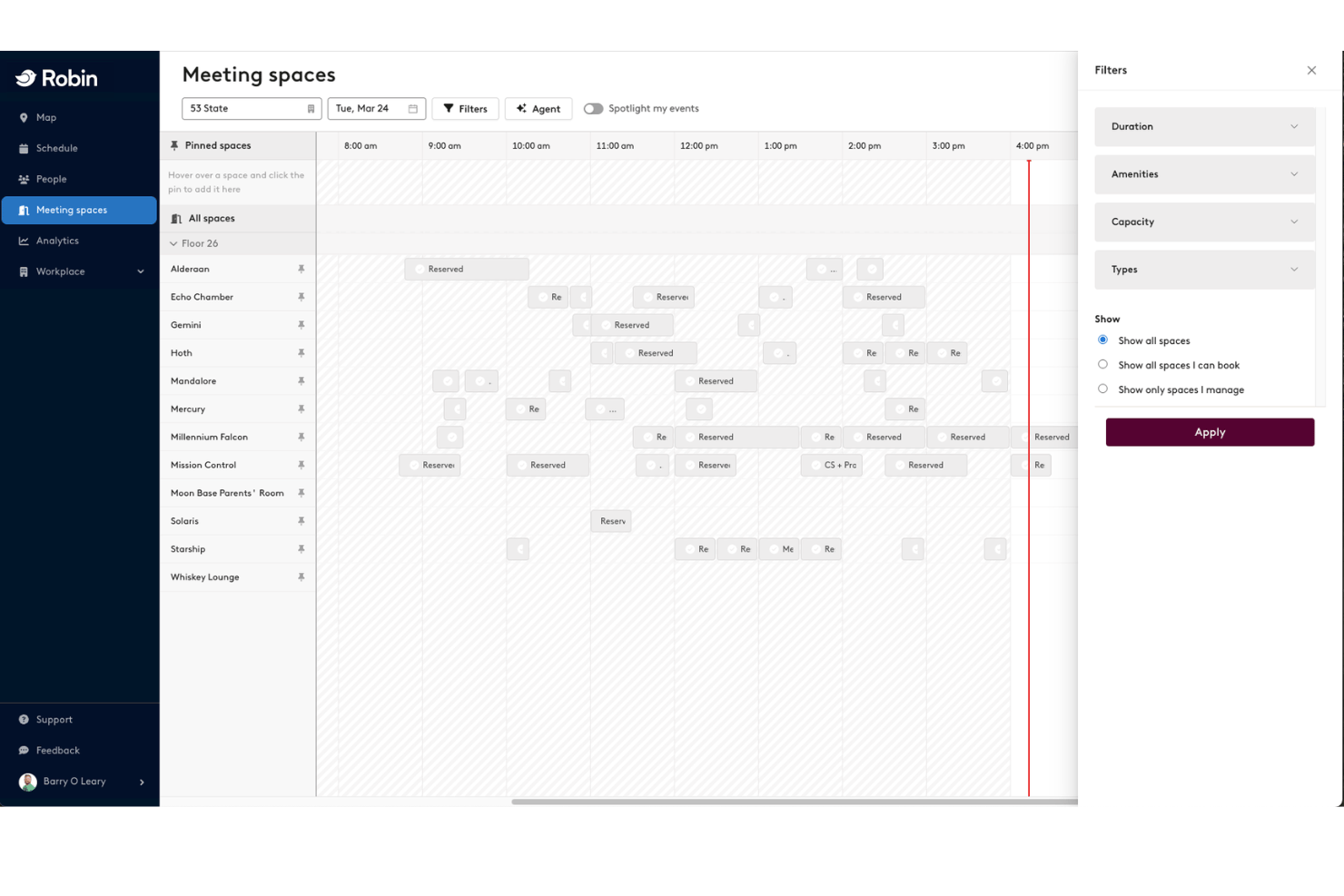
Robin is a workplace scheduling platform that combines meeting room booking, desk reservations, interactive floor maps, visitor management, and space utilization analytics across multi-floor and multi-location office environments.
Who Is Robin Best For?
Robin is a strong fit for facilities and IT teams at mid-market to enterprise organizations managing hybrid workforces across multiple office floors or locations.
Why I Picked Robin
Robin earns its spot on my shortlist because the interactive floor map visualization is genuinely the best I've seen in this category. In practice, my team can view live room availability directly on a visual floor plan, filter by capacity or amenity, and book the right room without leaving the map view. Robin also pushes real-time availability to hallway displays and in-room tablets, so wayfinding is handled at the physical level, not just digitally.
Robin Key Features
- Bidirectional calendar integration: Syncs meetings automatically with Google Workspace, Microsoft 365, and Outlook calendars.
- Automated room release: Frees up reserved rooms when users do not check in via mobile, panel, or badge.
- Custom booking policies: Allow admins to set rules for booking windows, meeting durations, and advance reservations.
- Space utilization analytics: Provides dashboards with occupancy trends, booking data, and exportable reports.
Robin Integrations
Robin offers native integrations with Google Workspace, Microsoft 365, Outlook, Microsoft Teams, Slack, Okta, Crestron, Logitech, and Kisi. An API is available for custom integrations.
Pros and Cons
Pros:
- Abandoned meetings auto-release booked spaces
- Visual room selection directly from map view
- Connects with badge readers
Cons:
- No built-in shift management
- Recurring reservations can create orphaned bookings
YAROOMS
Best for carbon footprint reporting
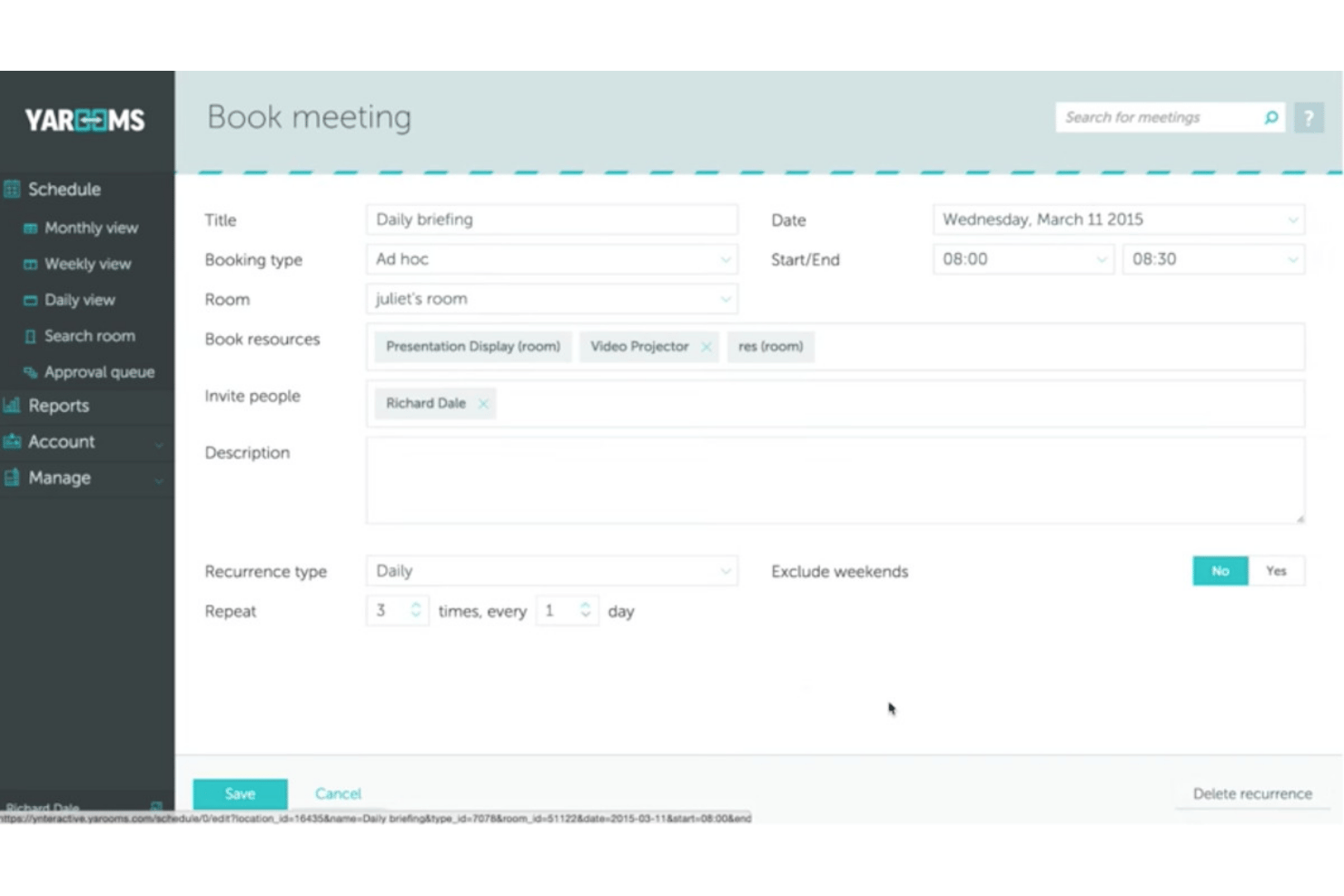
YAROOMS is a meeting room booking platform that combines interactive floor maps, AI-assisted scheduling through Microsoft Teams and Slack, digital door displays, and built-in workplace sustainability tracking.
Who Is YAROOMS Best For?
YAROOMS is a strong fit for facilities and IT operations teams managing hybrid workplaces across multiple office locations.
Why I Picked YAROOMS
I picked YAROOMS as one of the best because it's the only meeting room booking tool I've found that tracks Scope 2 and Scope 3 CO2 emissions directly from room and workspace usage. I can monitor my office's carbon footprint over time and track progress toward net-zero targets, all within the same platform I use to book rooms. The no-show auto-release feature also keeps that data accurate, since unclaimed rooms are freed automatically rather than sitting empty and skewing utilization reports.
YAROOMS Key Features
- Interactive floor maps: Browse, filter, and select rooms by location, amenities, or size using live office maps.
- YARVIS AI assistant: Reserve rooms, find colleagues, or adjust meetings directly from Microsoft Teams or Slack chat.
- Digital room signage: Display real-time room status and manage bookings with hardware-agnostic digital displays.
- Approval workflows: Set custom booking approval rules for rooms based on user, time, or location.
YAROOMS Integrations
YAROOMS offers native integrations with Microsoft 365, Google Workspace, Microsoft Teams, Zoom, Slack, and Google Meet. An API is available for custom integrations.
Pros and Cons
Pros:
- Generates automated sustainability metrics
- Auto-release for unused room reservations
- Tracks Scope 2 and 3 emissions data
Cons:
- Occasional syncing delays with some calendars
- Limited floor plans on base plans
Joan
Best for wireless room display integration
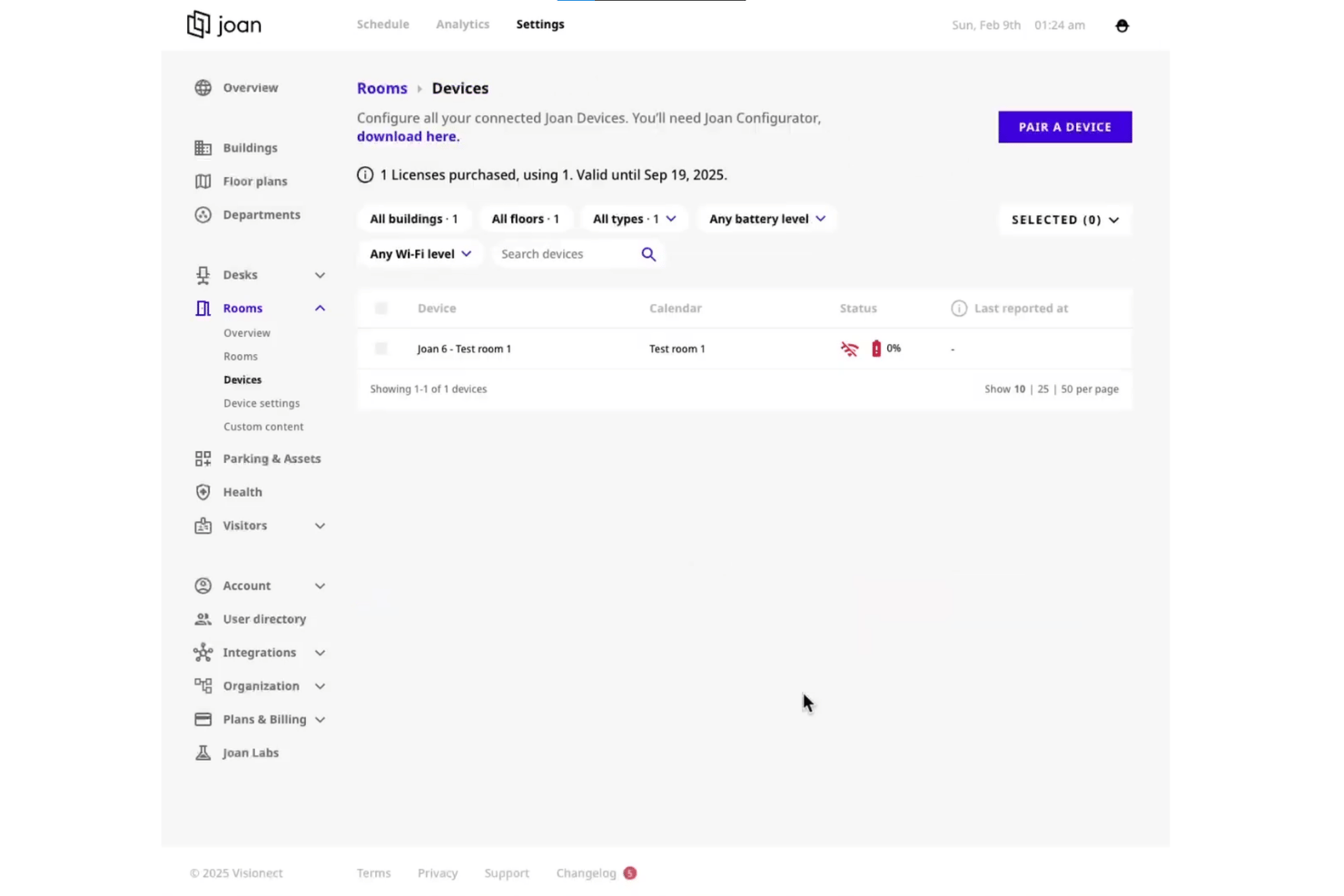
Joan is a meeting room booking platform that pairs scheduling software with wireless e-paper door displays to support room reservations, desk booking, visitor management, and utilization analytics.
Who Is Joan Best For?
Joan is a strong fit for office and facilities managers in mid-sized to enterprise organizations running hybrid work environments across multiple locations.
Why I Picked Joan
Joan earns its spot on my shortlist because its cable-free ePaper displays are genuinely unlike anything else in this category. I love that the Joan 6 Pro mounts anywhere with a self-adhesive magnet (no drilling, no power outlets), and its LED traffic-light ring signals room status from across a hallway without anyone needing to check a screen. The auto-release feature clears unclaimed rooms automatically, so the door display stays accurate without manual intervention.
Joan Key Features
- Calendar sync with Outlook and Google: Instantly updates bookings across all major calendar systems so schedules stay unified.
- Multi-location and multi-floor support: Lets admins manage bookings for several sites and buildings from a central dashboard.
- Mobile app for booking and check-in: Users can reserve rooms or check in using the iOS or Android app, from anywhere.
- Meeting room analytics dashboard: Tracks usage patterns, room occupancy, and booking trends for workspace optimization.
Joan Integrations
Joan offers native integrations with Google Workspace, Microsoft 365, Outlook, Exchange, Microsoft Teams, Slack, Cisco Webex, Okta, Azure Active Directory, and Zapier. An API is available for custom integrations.
Pros and Cons
Pros:
- Hybrid desk and room booking in one platform
- Automatic release of no-show bookings
- Wireless e-paper door displays for rooms
Cons:
- Room analytics customization is limited
- Requires hardware for full functionality

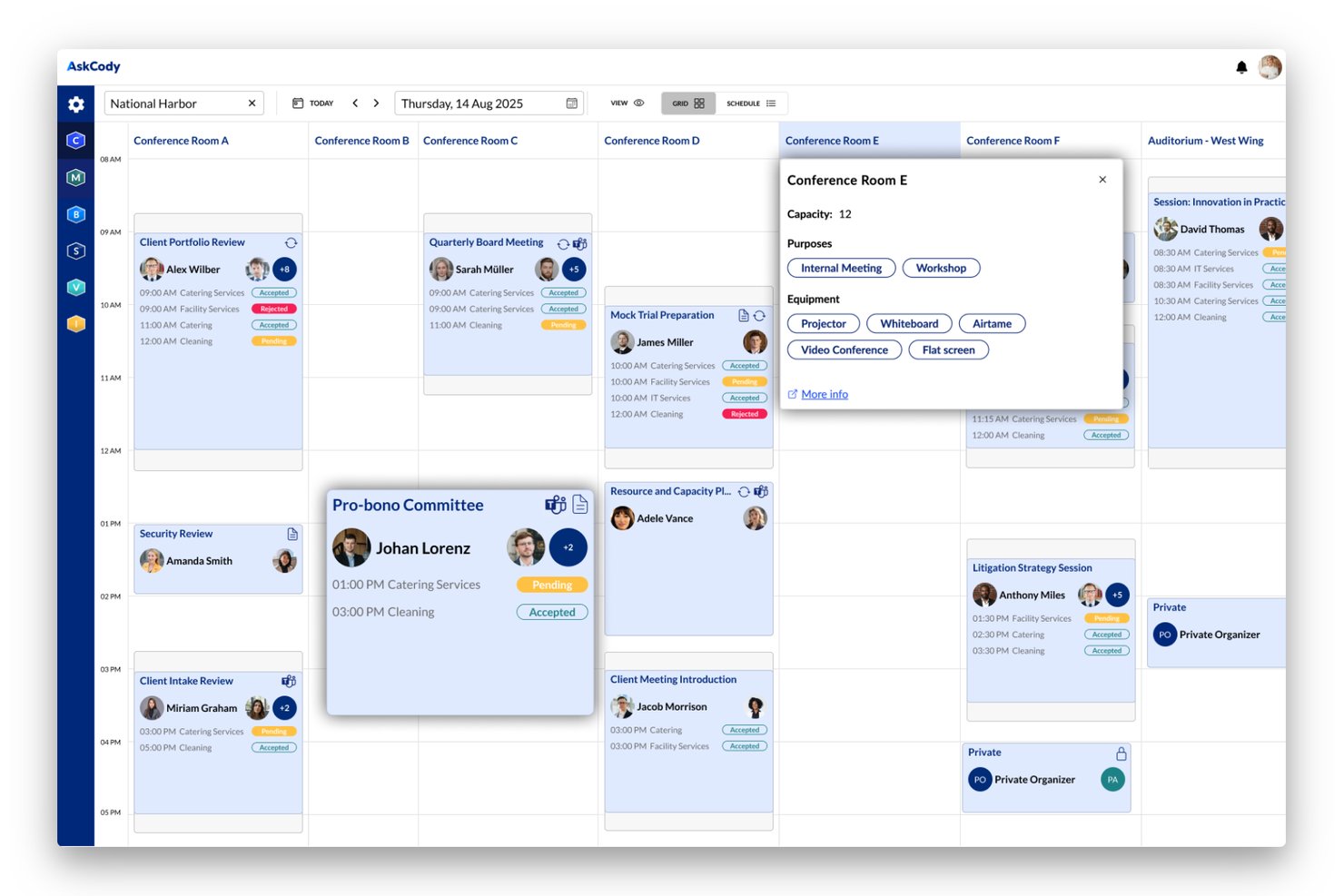
AskCody is a meeting room booking and workspace scheduling platform built natively for Microsoft 365, combining room and desk reservations, visitor management, service coordination, and utilization analytics.
Who Is AskCody Best For?
AskCody is a strong fit for IT and facilities managers at mid-to-large enterprises already standardized on Microsoft 365 and Exchange.
Why I Picked AskCody
AskCody earns its spot on my shortlist because of how deeply it lives inside Microsoft Outlook. You can book rooms, request catering, and manage visitor arrivals without ever leaving the Outlook interface. What I find particularly useful is follow-the-meeting intelligence: when you reschedule a meeting, all attached service requests (catering, AV equipment) update automatically to match the new time.
AskCody Key Features
- Interactive floor maps: Visual maps let users find and reserve rooms or desks with filters for location, capacity, and amenities.
- Room displays: Digital panels outside meeting spaces show current bookings, availability, and support room check-in workflows.
- Utilization analytics: Detailed dashboards provide reporting on space occupancy, booking patterns, and workplace usage trends.
- Visitor management: The system handles guest pre-registration, host notifications, and visitor badge printing for secure access.
AskCody Integrations
AskCody has native integrations across the Microsoft ecosystem, including Microsoft 365, Outlook, Exchange, Teams, Power BI, and Azure Active Directory. An API is available for custom integrations.
Pros and Cons
Pros:
- Powerful analytics for space utilization tracking
- Built-in visitor and facilities management tools
- Deep Microsoft Outlook and Exchange integration
Cons:
- Recurring meeting booking can be inflexible
- Limited support for non-Microsoft environments
Annen programvare for bestilling av møterom
Her er noen flere alternativer for programvare for bestilling av møterom som ikke kom med på kortlisten min, men som likevel er verdt å undersøke:
- Eptura Engage
For advanced analytics and reporting
- Accruent EMS
For large enterprise implementations
- Tidaro
For comprehensive visitor management
- Skedda
For customizable booking policies
- Kadence
For hybrid work coordination
- OfficeSpace
For interactive booking kiosks
- Spacewell
For IoT sensor-driven availability
- Archie
For coworking space management
- Officely
For Slack-based room reservations
- DeskFlex
For custom recurring bookings


How I Evaluate Meeting Room Booking Software
I evaluate meeting room booking tools in two layers: the core workflows every platform must handle—like real-time availability and auto-release—and the differentiators that set the best apart.
Core Functionality (Table Stakes For This List)
When I'm selecting tools for my list, I rank each one on a scale from 0 (does not offer the functionality) to 5 (excels in this area) for each core functionality listed below. Then, I calculate the tool's total score as a percentage. Each tool needs to achieve a minimum total score of 65% to be considered for inclusion.
- Real-Time Availability: I look for live room status that updates instantly, so someone booking a sprint planning room doesn't collide with another team's standup.
- Calendar Integration: Two-way sync with Outlook and Google Calendar matters most—teams should book rooms without leaving their existing calendar workflow.
- Recurring Reservations: I check whether the tool handles repeating bookings with flexibility, like editing a single instance of a weekly sprint ceremony without breaking the series.
- Interactive Floor Maps: Visual floor plans that show room location, capacity, and amenities help teams in multi-floor offices pick the right space without guesswork.
- Check-In & Auto-Release: I evaluate how the platform handles no-shows—tools that auto-release unclaimed rooms after a set window keep ghost bookings from wasting space.
- Utilization Analytics: Reporting on occupancy rates and booking patterns tells you which rooms sit empty and which need to be split or expanded for better use.
Once I have a list of tools that meet the criteria, I consider what sets each platform apart.
Differentiating Factors (What Sets Vendors Apart)
Here's how I compare and contrast different vendors:
Standout Features
Digital room displays mounted outside conference rooms let teams see at a glance whether a space is open and book it on the spot without pulling out a phone. Hybrid meeting support matters too—I look for auto-provisioning of video links for Zoom or Teams the moment a booking is created, so organizers don't scramble for URLs. Smart check-in through sensors or badge taps also separates vendors, since it releases no-show rooms faster than manual confirmation alone.
Beyond Features
Hardware compatibility is a big one—I check whether a platform supports third-party room panels like Crestron or Logitech Tap instead of locking you into proprietary devices. Scalability also matters for teams managing rooms across multiple offices and time zones from one admin console. I look at security posture too, including SSO support via SAML or Azure AD and clear data governance policies around occupancy sensor data.
Slik velger du programvare for bestilling av møterom
Det er lett å gå seg vill i lange funksjonslister og komplekse prismodeller. For å hjelpe deg med å holde fokus når du går gjennom den unike prosessen med å velge programvare, får du her en sjekkliste over faktorer du bør ha i tankene:
| Faktor | Hva bør du vurdere? |
|---|---|
| Skalerbarhet | Kan verktøyet håndtere behovene dine etter hvert som virksomheten vokser – med nye lokasjoner, brukere eller rom? Se etter fleksible administratorkontroller og støtte for flere lokasjoner med tanke på fremtidig utvidelse. |
| Integrasjoner | Kan programvaren kobles til de eksisterende kalenderne, kommunikasjonsplattformene eller adgangskontrollsystemene dine? Prioriter alternativer som passer sømløst inn i arbeidsflytene dine. |
| Tilpasningsmuligheter | Kan du justere bestillingsregler, godkjenningsflyter og brukerroller? Vurder verktøy som støtter organisasjonens unike møtekultur og hierarki. |
| Brukervennlighet | Er grensesnittet intuitivt både for profesjonelle som bestiller rom, og for sporadiske brukere? Kompleksitet kan hindre utbredelse – test med noen typiske brukere før utrulling. |
| Implementering og oppstart | Hvilke ressurser kreves for å komme i gang? Spør om opplæring, hjelp med migrering og tidsplan, særlig hvis løsningen skal rulles ut til flere kontorer eller regioner. |
| Kostnad | Baseres avgiftene på brukere, rom, lokasjoner eller funksjoner? Ta hensyn til både om løsningen passer det kortsiktige budsjettet, og hvordan kostnadene kan endre seg etter hvert som behovene dine utvikler seg. |
| Sikkerhetstiltak | Støtter løsningen SSO, datakryptering og tydelige personvernregler? Sørg for at leverandøren oppfyller organisasjonens krav til sikkerhet og samsvar. |
| Tilgjengelig kundestøtte | Hvor lang responstid har leverandøren, og hvilke supportkanaler er tilgjengelige? Vurder tjenestenivåavtaler, globale åpningstider for kundestøtte og eskaleringsrutiner hvis kontorene arbeider på tvers av tidssoner. |
Hva er programvare for bestilling av møterom?
Programvare for bestilling av møterom er en digital plattform som lar deg reservere, administrere og holde oversikt over møterom og ressurser på arbeidsplassen. Disse systemene gir teamet ditt en oppdatert oversikt over romtilgjengelighet, forhindrer dobbeltbookinger og forenkler oppsettet av tilbakevendende eller hybride møter – samtidig som de hjelper driftsteam med å følge bruksmønstre og optimalisere fordelingen av tilgjengelig plass.
Funksjoner i programvare for bestilling av møterom
Når du velger programvare for bestilling av møterom, bør du se etter følgende viktige funksjoner:
- Tilgjengelighet i sanntid: Se oppdatert status for alle møterom, slik at du umiddelbart kan finne og reservere ledige rom uten overlappende bestillinger.
- Kalenderintegrasjon: Synkroniser bestillinger med Outlook, Google Kalender eller Microsoft 365 for å samle planleggingen og unngå dobbeltbestillinger på tvers av plattformer.
- Støtte for gjentakende reservasjoner: Opprett gjentakende møter – for eksempel daglige prosjektmøter eller sprintgjennomganger – uten å måtte registrere hver bestilling på nytt.
- Interaktive plantegninger: Se visuelle oversikter som viser nøyaktig hvor rommene er, hvilke fasiliteter de tilbyr, og hvilke som er tilgjengelige.
- Innsjekking og automatisk frigivelse: Krev at deltakerne sjekker inn, og frigjør automatisk rom som ikke er tatt i bruk innen et angitt tidspunkt for å redusere bortkastet plass.
- Bruksanalyse: Følg med på rombelegg, bestillingsmønstre og perioder med høy etterspørsel for å optimalisere plassfordelingen og legge bedre planer for eiendomsforvaltning.
- Mobiltilgang: Bestill, endre eller avbestill reservasjoner mens du er på farten, slik at teamene får fleksibilitet når de beveger seg mellom lokasjoner eller arbeider eksternt.
- Rollebaserte tillatelser: Kontroller hvem som kan reservere, godkjenne eller administrere områder, slik at løsningen passer organisasjonens retningslinjer og sikkerhetsbehov.
- Besøkshåndtering: Registrer gjester og knytt dem til møteromsbestillinger for en smidig innsjekkingsprosess i resepsjonen.
- Integrasjon med romdisplayer: Koble til digitale informasjonsskjermer utenfor rommene, som viser status i sanntid og gjør det mulig å bestille eller sjekke inn på stedet.
Vanlige AI-funksjoner i programvare for bestilling av møterom
I tillegg til standardfunksjonene i programvare for bestilling av møterom som er nevnt ovenfor, tar mange av disse løsningene i bruk AI med funksjoner som:
- Smarte romanbefalinger: AI analyserer møtestørrelse, deltakernes preferanser og tidligere bestillingsmønstre for å foreslå de best egnede tilgjengelige rommene for hvert møte.
- Forutsigelse av manglende oppmøte: Maskinlæringsmodeller markerer sannsynlige tilfeller av manglende oppmøte basert på historiske data om deltakelse, slik at rom kan frigjøres eller påminnelser kan sendes proaktivt.
- Automatisk løsning av konflikter: AI identifiserer og løser bestillingskonflikter ved å foreslå alternative tidspunkter eller rom, slik at administratorene trenger å gripe inn mindre manuelt.
- Dynamisk kapasitetsoptimalisering: Algoritmer overvåker brukstrender og justerer automatisk romtilgjengeligheten eller foreslår omorganisering av områder for å maksimere belegget.
- Bestillingsassistenter med naturlig språk: AI-drevne chatboter eller taleassistenter lar brukerne bestille eller endre rom ved hjelp av samtalespråk i chat- eller kalenderapper.
Fordeler med programvare for bestilling av møterom
Implementering av programvare for bestilling av møterom gir flere fordeler for teamet og virksomheten din. Her er noen av fordelene du kan se frem til:
- Færre planleggingskonflikter: Tilgjengelighet i sanntid og toveis kalenderintegrasjoner forhindrer dobbeltbestillinger og eliminerer forvirring rundt romstatus.
- Bedre utnyttelse av arealer: Bruksanalyse og funksjoner for automatisk frigivelse sørger for at rom ikke står tomme på grunn av spøkelsesmøter eller ineffektiv fordeling.
- Tidsbesparelser for ansatte: Interaktive kart, smarte anbefalinger og mobiltilgang gjør det raskt og enkelt å finne og reservere riktig område.
- Bedre støtte for hybridarbeid: Integrasjon med videokonferanseverktøy og AV-filtrering hjelper teamene med å koordinere fysiske og virtuelle møter.
- Forenklet besøkshåndtering: Innebygde verktøy for besøksregistrering og innsjekking knytter gjestenes ankomst til møteplanleggingen og gir en smidigere opplevelse i resepsjonen.
- Bedre innsikt i arbeidsplassen: Data om belegg, etterspørselstopper og brukermønstre gir grunnlag for planlegging av lokaler og langsiktige beslutninger om eiendom.
- Større sikkerhet og bedre etterlevelse: SSO, rollebasert tilgang og tydelig datastyring beskytter brukerdata og sørger for samsvar med organisasjonens retningslinjer.
Kostnader og priser for programvare for bestilling av møterom
Valg av programvare for bestilling av møterom krever en forståelse av de ulike prismodellene og abonnementene som er tilgjengelige. Kostnadene varierer basert på funksjoner, teamstørrelse, tillegg og mer. Tabellen nedenfor oppsummerer vanlige abonnementer, gjennomsnittsprisene deres og typiske funksjoner som inngår i løsninger for programvare for bestilling av møterom:
Sammenligningstabell for programvare for bestilling av møterom
| Plantype | Gjennomsnittspris | Vanlige funksjoner |
|---|---|---|
| Gratisplan | $0 | Grunnleggende bookingverktøy, begrenset antall rom, enkel kalenderintegrasjon og standard brukerstøtte. |
| Personlig plan | $5-$15 per bruker per måned | Tilgang for én bruker, avanserte gjentakende reservasjoner, mobiltilgang og integrasjon med personlige kalendere. |
| Bedriftsplan | $10-$25 per bruker per måned | Administrasjon av flere brukere, interaktive plantegninger, integrasjon med romdisplayer, analyser og støtte for integrasjoner. |
| Foretaksplan | $20-$50 per bruker per måned | Tilpassede roller, støtte for flere lokasjoner, SSO og sikkerhetskontroller, API-tilgang, dedikert implementering og prioritert brukerstøtte. |
Vanlige spørsmål om programvare for møteromsbooking
Her er noen svar på vanlige spørsmål om programvare for møteromsbooking:
Kan programvare for møteromsbooking synkroniseres med eksisterende kalendersystemer?
Ja, et moderne system for møteromsbooking kan integreres med Outlook-kalenderen, Google Kalender eller Microsoft 365. Dette hjelper deg med å unngå dobbeltbookinger, lar brukerne administrere reservasjoner fra kjente planleggingsverktøy og holder timeplanene samkjørte i hele organisasjonen.
Hvordan bidrar bruksanalyser til å optimalisere kontorlokalene?
Analyser som sporer rombruk, viser hvilke rom som brukes mest, fremhever tilfeller der ingen møter opp, og overvåker arealutnyttelsen. Driftsteam kan bruke disse dataene til å identifisere tilgjengelige arealer som er lite brukt, justere planløsninger og ta informerte beslutninger om langsiktig arealforvaltning.
Hva trengs for å ta i bruk digitale romdisplayer?
Du trenger kompatibel maskinvare, for eksempel nettbrett og fester, samt pålitelig Wi-Fi der du planlegger å vise romstatus. Mange plattformer støtter displayer fra tredjeparter, men det er viktig å kontrollere kompatibiliteten før du ruller ut løsningen i stor skala.
Hvordan fungerer funksjoner for innsjekking og automatisk frigivelse?
Innsjekkingsfunksjoner krever at brukerne bekrefter at de er til stede, enten via en app, en QR-kode eller ved å berøre en kortleser. Hvis deltakerne ikke sjekker inn innen et angitt tidsrom, frigjør systemet automatisk rommet slik at andre kan reservere det.
Er det mulig å administrere bookinger på tvers av flere kontorer?
Ja, mange plattformer tilbyr sentraliserte administratorkontroller, stedsbaserte tillatelser og brukerroller, slik at du kan administrere lokaler på tvers av byer eller land fra ett kontrollpanel. Dette er spesielt nyttig for globale eller hybride team.
Hva bør jeg se etter når det gjelder sikkerhet og personvern?
Prioriter løsninger med støtte for SSO, datakryptering og tydelig samsvar med standarder som SOC 2 eller GDPR. Sørg for at det finnes åpne retningslinjer for innsamling av sensordata og rollebaserte kontroller som beskytter de ansattes personvern.