

10 beste programvarer for administrasjon av kontorplasser i 2026

Beste programvare for administrasjon av kontorlokaler


Programvare for administrasjon av kontorlokaler gir deg ett sted der du kan tildele pulter, planlegge flyttinger og holde oversikt over kostnadene for arbeidsplassen og eiendommene dine. Hvis du administrerer team i endring, hybride arbeidsplaner eller porteføljer i vekst, hjelper det riktige verktøyet deg med å tilpasse deg raskt og holde kontroll på etterlevelsen. Denne veiledningen går gjennom den beste programvaren for administrasjon av kontorlokaler, slik at du kan se hvilke løsninger som håndterer plantegninger, ESG-rapportering og analyse – og finne det som passer best til dine behov for arbeidsområde, etterlevelse og rapportering.
Hvorfor du kan stole på våre programvareanbefalinger
Teamet vårt har testet og anmeldt programvare siden 2012. Vi er selv prosjektledere, så vi vet hvor vanskelig og hvor viktig det er å velge riktig programvare.
I denne guiden har vi vurdert verktøyene gjennom praktisk testing og uavhengig research og gitt dem poeng ut fra våre utvelgelseskriterier. Vi bygger også på innsikt fra ledende eksperter i bransjen og erfarne prosjektledere.
Anmeldelsene våre bygger på vår egen redaksjonelle vurdering. De er ikke et salgsargument.
Ekspertanmeldere:
Sammenligningstabell for programvare for administrasjon av kontorlokaler
Denne sammenligningstabellen oppsummerer prisopplysningene for mine beste utvalgte programmer for administrasjon av kontorlokaler:
| Tool | Best For | Trial Info | Price | ||
|---|---|---|---|---|---|
| 1 | Best for ESG reporting tied to real estate spend | Free demo available | Pricing upon request | Website | |
| 2 | Best for unified space analytics and IoT sensor data | Free demo available | Pricing upon request | Website | |
| 3 | Best for real estate portfolio cost and lease tracking | Free demo available | Pricing upon request | Website | |
| 4 | Best for move management and rent proration | Free demo available | Pricing upon request | Website | |
| 5 | Best for AI-driven move planning and hybrid scheduling | Free demo available | Pricing upon request | Website | |
| 6 | Best for visitor and delivery management built in | Free demo available | Pricing upon request | Website | |
| 7 | Best for FedRAMP-authorized workplace IWMS | Free demo available | Pricing upon request | Website | |
| 8 | Best for IWMS-grade real estate portfolio management | Free demo available | Pricing upon request | Website | |
| 9 | Best for space cost and chargeback reporting | Free demo available | Pricing upon request | Website | |
| 10 | Best for regulated-industry workplace management | Free demo available | Pricing upon request | Website |
Anmeldelser av programvare for administrasjon av kontorlokaler
Nedenfor finner du mine detaljerte sammendrag av den beste programvaren for administrasjon av kontorlokaler som kom med på kandidatlisten min. Anmeldelsene mine gir en grundig gjennomgang av funksjonene, de beste bruksområdene og mulighetene til hver plattform, slik at du kan finne den som passer best for deg.
Best for ESG reporting tied to real estate spend
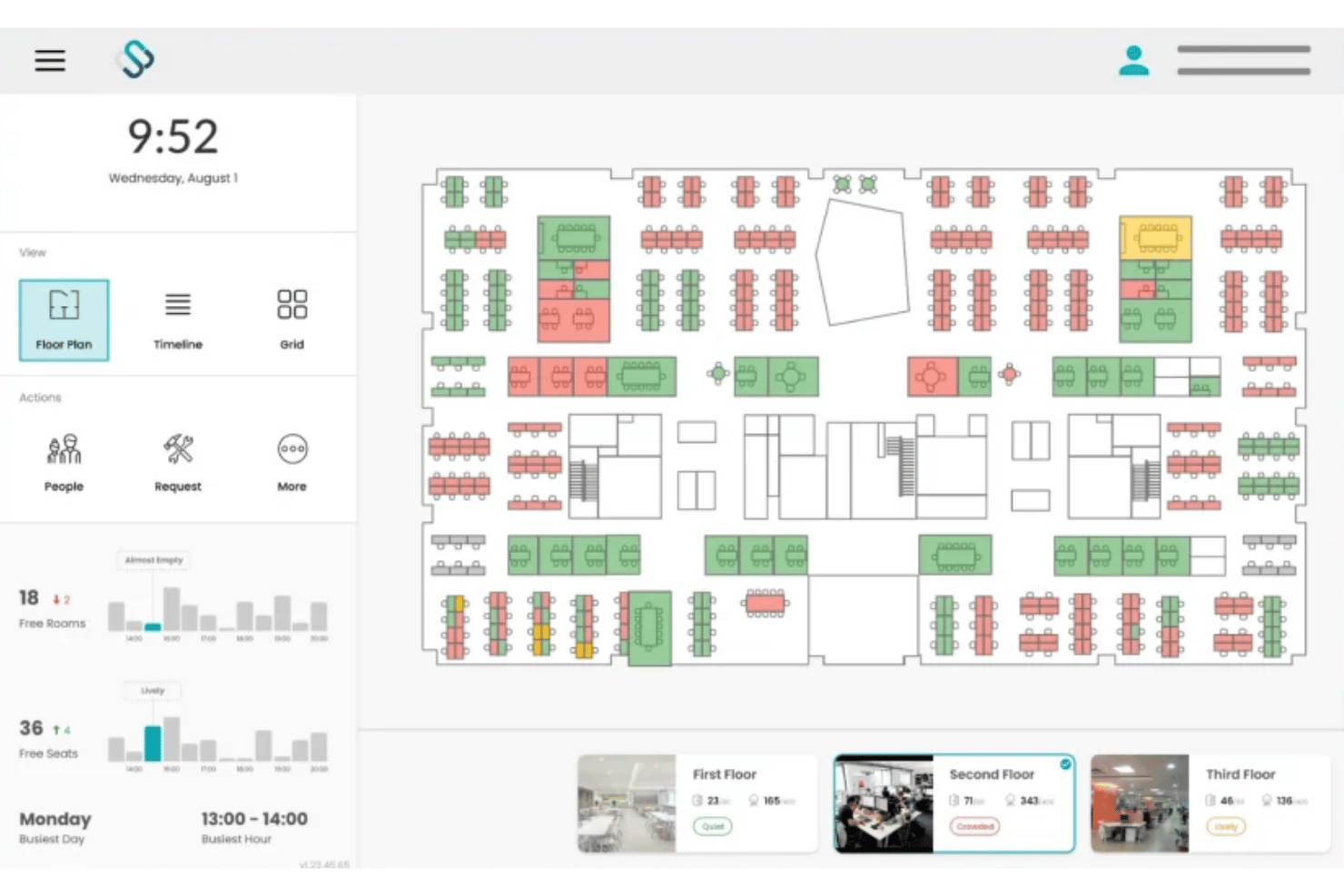
Spacewell is a workplace management platform that combines desk and room booking, interactive floor plan visualization, IoT-based occupancy analytics, and ESG energy reporting across multi-site real estate portfolios.
Who Is Spacewell Best For?
Spacewell is a strong fit for enterprise real estate and facilities teams managing multi-site portfolios where space costs, energy consumption, and ESG reporting need to connect in a single system.
Why I Picked Spacewell
Spacewell earns its spot on my shortlist because the Energy module connects carbon reporting, PV analytics, and ESG dashboards directly to cost centre data across every desk and room reservation. I love that when a real estate director needs to justify consolidating two floors, the platform surfaces both the energy spend and the per-seat cost data in the same view. Space simulations let you model densification or consolidation scenarios before committing, so the ESG case is backed by actual utilization numbers.
Spacewell Key Features
- AI conversational booking: A built-in AI assistant lets users book desks or rooms using natural language across 30+ languages, learning from past booking behaviour to surface relevant suggestions.
- Indoor air quality monitoring: Sensors track CO2, VOC levels, temperature, and humidity in real time, with IAQ data displayed directly on interactive floor plans alongside occupancy status.
- Colleague finder: From the Advanced plan, employees can search for teammates and see their current seat assignments on a live floor plan to coordinate in-office days.
- IoT sensor integration: Spacewell connects to a hardware-agnostic sensor network—including VergeSense, XY Sense, and Cisco Spaces—pulling motion, people-counting, and environmental data into a single occupancy view.
Spacewell Integrations
Spacewell offers native integrations with Microsoft 365, Outlook, Teams, Google Workspace, Zoom, SAP, Oracle, ServiceNow, Workday, VergeSense, XY Sense, and Cisco Spaces. An API is available for custom integrations.
Pros and Cons
Pros:
- Monitors indoor air quality metrics
- Sensor-agnostic platform supports large portfolios
- Connects ESG and space costs
Cons:
- Limits independent mobile app access
- Lacks outdoor parking space tracking

HubStar
Best for unified space analytics and IoT sensor data
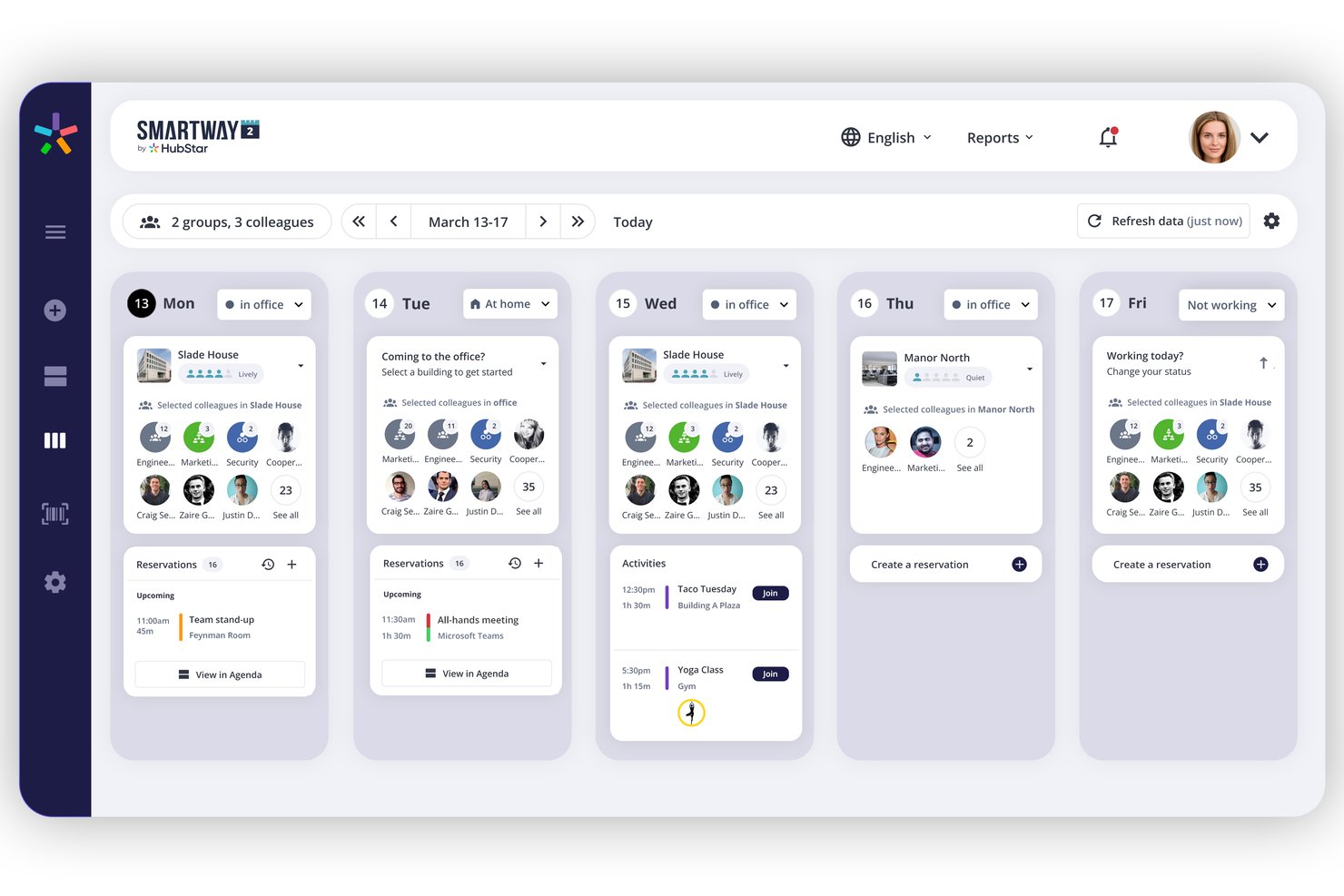
HubStar is a modular workplace management platform that combines desk and room booking, IoT sensor-driven occupancy analytics, interactive floor plan management, and visitor management across multi-site office portfolios.
Who Is HubStar Best For?
HubStar is a strong fit for enterprise facilities and workplace teams managing multi-site portfolios who need occupancy data from IoT sensors, Wi-Fi, and badge systems unified in one platform.
Why I Picked HubStar
HubStar earns its spot on my shortlist because no other platform I've tested pulls occupancy data from this many sources into a single analytics layer. PresenceIQ combines Wi-Fi access point data (Aruba, Cisco), badge scans, proprietary sensors, and third-party IoT devices like VergeSense and Butlr to give you a genuinely complete picture of how space is used. I also like that the analytics aren't just descriptive: the prescriptive tier surfaces specific recommendations for right-sizing neighbourhoods and reconfiguring zones based on real attendance patterns.
HubStar Key Features
- AI digital assistant: Recommends optimal office days per employee based on preferences and history, then auto-books the best available desk or room.
- Visitor management: Handles self-service kiosk check-in, photo capture, NDA signing, badge printing, and real-time visitor tracking within the same platform.
- Neighbourhood and zone management: Assigns teams to specific floor plan zones with configurable booking policies, seating ratios, and booking rules down to individual workstation level.
- BI platform data export: Pushes occupancy and utilization data directly to Power BI, Tableau, Qlik, and ThoughtSpot for external reporting and analysis.
HubStar Integrations
HubStar offers native integrations across the Microsoft ecosystem (Teams, Outlook, Exchange, Azure AD), plus Zoom, Workday, PeopleSoft, Rippling, Okta, Ping Identity, VergeSense, and Wi-Fi providers like Cisco and Aruba, along with BI exports to Power BI, Tableau, Qlik, and ThoughtSpot. An open API is available for custom integrations.
Pros and Cons
Pros:
- Machine learning supports floor plan editing
- AI assistant auto-books optimal desks and rooms
- Aggregates occupancy data from sensors and Wi-Fi
Cons:
- Limits independent mobile app access
- No dedicated move management workflow

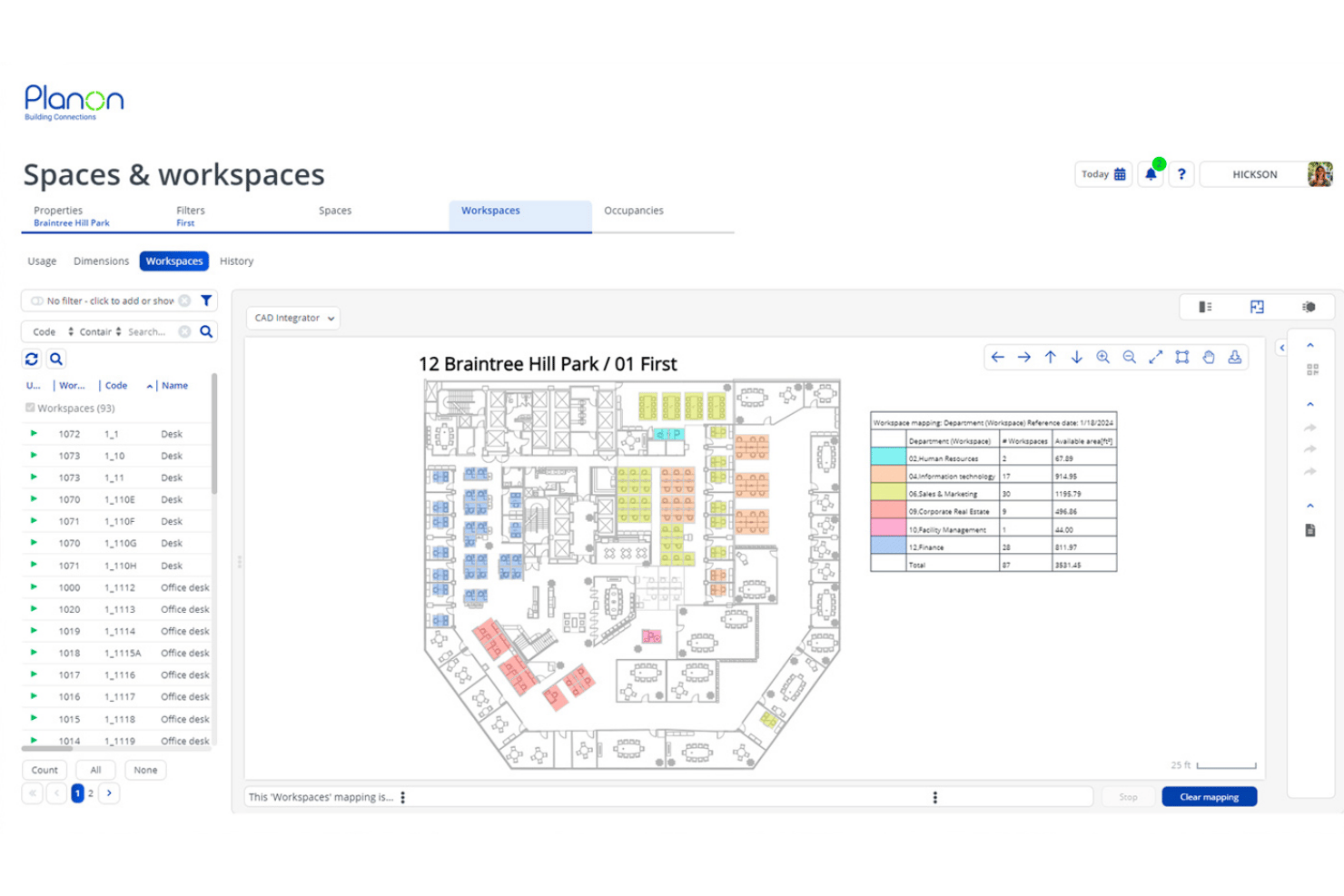
Planon is an enterprise IWMS platform that combines space and desk booking, CAD/BIM-integrated floor plan management, IoT-driven occupancy analytics, lease accounting, and real estate portfolio tracking across multi-site global operations.
Who Is Planon Best For?
Planon is built for enterprise real estate and facilities teams managing large, multi-site portfolios with complex lease accounting and cost tracking requirements.
Why I Picked Planon
Planon earns its spot on my shortlist because no other platform I've tested matches its depth on real estate portfolio cost visibility and lease accounting. I particularly like how it combines IFRS 16/ASC 842-compliant lease tracking with cost-per-seat chargeback analytics, so finance and facilities teams are working from the same numbers. Layer in scenario planning tied directly to CAD floor plans, and you can model a full-floor restack against live lease cost data before a single desk moves.
Planon Key Features
- IoT sensor integration: Connect occupancy sensors, air quality monitors, and building management systems to feed real-time data into utilization dashboards.
- Neighbourhood zoning: Assign teams to defined floor zones with configurable booking policies and departmental capacity caps.
- Visitor management: Self-service visitor check-in, host notifications, and secure visitor flow tracking are built directly into the platform.
- Connect for Analytics: Export workplace data to BI tools like Power BI, Tableau, or Snowflake via API for custom reporting.
Planon Integrations
Planon offers native integrations with Microsoft Outlook, Microsoft Teams, Microsoft Places, Google Calendar, SAP, Oracle, AutoCAD, and Autodesk Revit. An API is available for custom integrations.
Pros and Cons
Pros:
- Built-in scenario planning for space moves
- Advanced occupancy analytics using IoT sensors
- Real-time floor plans with CAD/BIM integration
Cons:
- Lacks outdoor parking space tracking
- Excludes custom-branded visitor badges

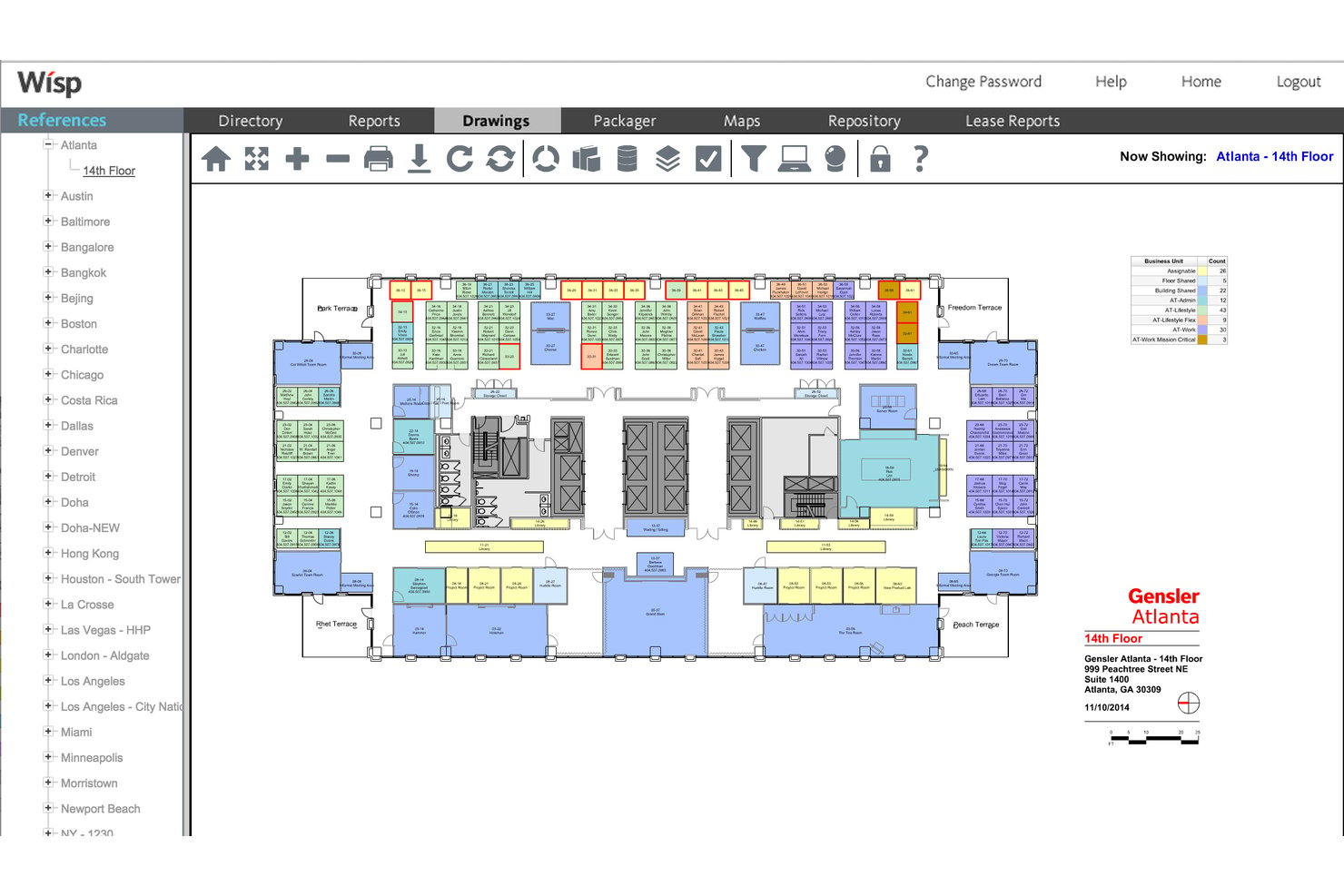
Wisp by Apex42 is an office space management platform built around interactive floor plans, move management, desk reservations, utilization analytics, and multi-site rent proration and chargeback reporting.
Who Is Wisp by Apex42 Best For?
Wisp is a strong fit for enterprise facilities and corporate real estate teams managing multi-site portfolios with high seat churn and complex internal cost allocation needs.
Why I Picked Wisp by Apex42
I've included Wisp by Apex42 in my top picks because its move management and rent proration capabilities are the most developed I've seen in this category. The configurable MAC workflow handles move requests, approvals, and automated floor plan updates end-to-end, and unlimited scenario-based space planning lets teams model full restacks without touching live data. On the cost side, 27-level rent proration means you can charge individual departments for their exact footprint across a multi-site portfolio.
Wisp by Apex42 Key Features
- Interactive floor plans: View and edit multi-site floor plans built from CAD drawings, with colour-coding via Colorizers™ to visualize departments, vacancy, and occupancy across your portfolio.
- Space utilization reporting: Access 50+ pre-built reports with real-time drill-down from portfolio level to individual seat, including sensor-based heatmaps displayed directly on floor plans.
- Desk reservations: Book desks via any device with QR code check-in, auto-release for no-shows, recurring reservation options, and neighbourhood-based restrictions.
- Service request workflow: Submit and manage facilities work orders tied directly to specific spaces on your floor plans, with configurable routing to the appropriate facilities technician.
Wisp by Apex42 Integrations
Wisp offers native integrations with ADP Workforce Now, UKG, Microsoft Entra ID, Brivo, Google Calendar, Microsoft Outlook, Microsoft Teams, and Slack. An API is available for custom integrations.
Pros and Cons
Pros:
- 27-level internal rent proration capability
- Industry-leading move management automation tools
- Unlimited CAD updates provided by the vendor team
Cons:
- Limited custom report-building tools
- Native room booking is less visible than peers
Kadence
Best for AI-driven move planning and hybrid scheduling
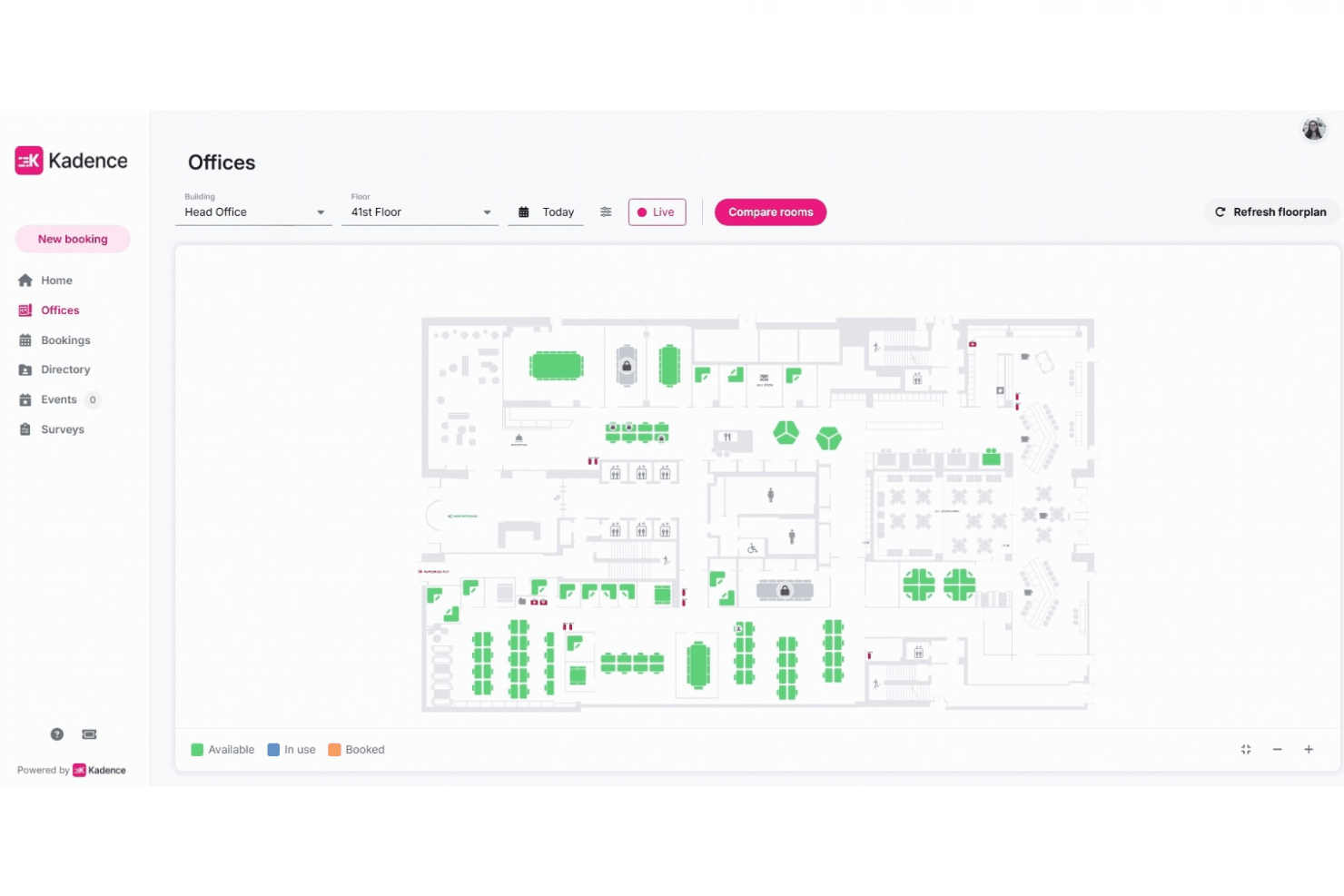
Kadence is an office space management platform that combines desk and room booking, interactive floor plans, visitor management, space utilization analytics, and AI-driven move planning and hybrid scheduling.
Who Is Kadence Best For?
Kadence is a strong fit for facilities and workplace managers at mid-to-large organizations navigating hybrid work models who need AI-driven space planning alongside day-to-day desk and room booking.
Why I Picked Kadence
I picked Kadence as one of the best because its SpaceOps AI agent genuinely changes how move planning works. Instead of managing restacks through spreadsheets, I can describe a scenario in plain language ("reduce our footprint by two floors"), and Kadence generates multiple configurations side by side for comparison. Its HRIS-triggered move execution also automatically updates desk assignments when employees change teams, which removes a painful manual step from any restack project.
Kadence Key Features
- Kadence Sense sensorless occupancy tracking: Aggregates presence signals from Wi-Fi, badge swipes, kiosk check-ins, and room displays to build real-time occupancy data without physical sensor hardware.
- Visitor management: Handles pre-registration, kiosk check-in, badge printing, NDA signing, host notifications, and timestamped visitor logs from within the WorkOps plan.
- Starred colleagues and team day notifications: Lets you follow specific teammates' schedules and receive alerts when they book in, with nudges to coordinate in-office days together.
- Active user billing: Charges only for users who make a booking in a given month, so part-time or infrequent in-office employees don't count against your seat total.
Kadence Integrations
Kadence offers native integrations with Microsoft Teams, Slack, Microsoft Outlook, Google Calendar, Workday, BambooHR, Rippling, Okta, Neat, and LiquidSpace. An API is available for custom integrations.
Pros and Cons
Pros:
- Hybrid team coordination features built-in
- Sensorless occupancy tracking lowers setup costs
- AI-driven move planning saves manual effort
Cons:
- Reporting and analytics depth is limited
- No IWMS or CAFM integration support
New Product Updates from Kadence
Kadence MCP Comes to Popular AI Assistants
Kadence launches MCP support for Claude, ChatGPT, and Microsoft Copilot to manage workplace tasks and access space insights. This brings booking, scheduling, and reporting into the AI assistants teams already use. For more information, visit Kadence’s official site.
 .

Robin
Best for visitor and delivery management built in
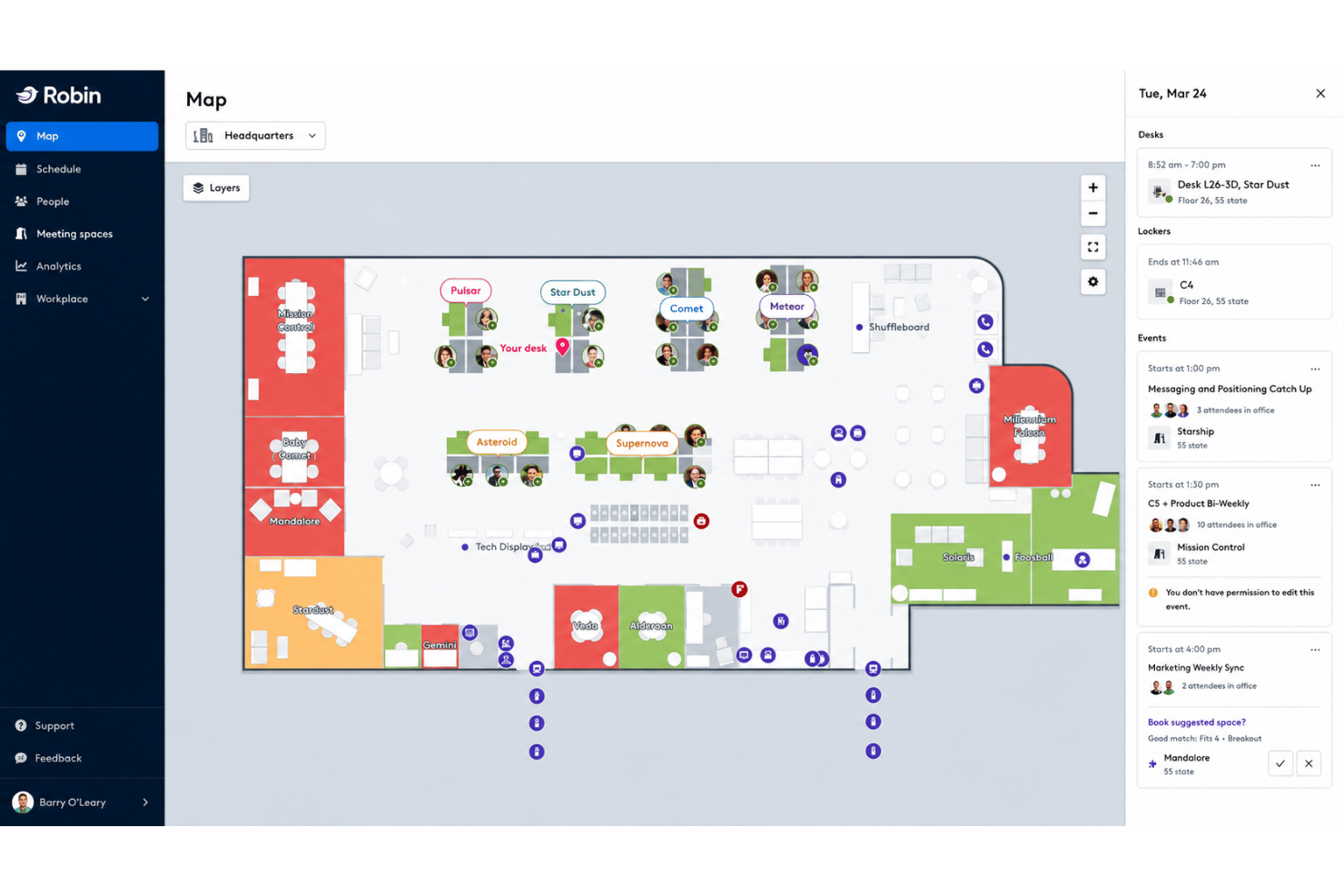
Robin is a workplace management platform that combines desk and room booking, interactive floor plans, space utilization analytics, visitor and delivery management, and hybrid scheduling tools.
Who Is Robin Best For?
Robin is a strong fit for mid-to-large enterprises managing hybrid teams across multiple offices who need visitor and delivery management built into the same platform as their desk and room booking.
Why I Picked Robin
Robin earns its spot on my shortlist because no other platform I've tested wraps visitor and delivery management this tightly into the same workspace. Pre-registration, self-check-in, badge printing, and host notifications via Slack or Teams are all native, and incoming package tracking sits in the same dashboard as your desk and room bookings. I also like that visitor logs and delivery records are searchable alongside booking data, so nothing lives in a separate tool.
Robin Key Features
- AI-suggested desk and room booking: Robin automatically recommends and reserves desks and rooms based on your past booking patterns and team proximity.
- Neighbourhood and zoning controls: Admins can assign teams to specific desk zones and configure department-level booking permissions and capacity rules.
- Multi-source occupancy analytics: Robin pulls data from badge swipes, occupancy sensors, Wi-Fi check-ins, and calendar bookings into a single utilization dashboard.
- Workweek coordination: A team scheduling view shows who's working in-office on which days across the week, synced with Google Calendar working location.
Robin Integrations
Robin offers native integrations with Microsoft 365, Outlook, Teams, Google Calendar, Slack, Zoom, VergeSense, Avigilon, Brivo, Kisi, Okta, OneLogin, and Rippling. An API is available for custom integrations.
Pros and Cons
Pros:
- Multi-source occupancy analytics and scenario planning
- AI-suggested desk booking and auto-reservations
- Visitor and delivery management built-in dashboard
Cons:
- Analytics add-ons require separate purchase
- Floor plan edits can require Robin support

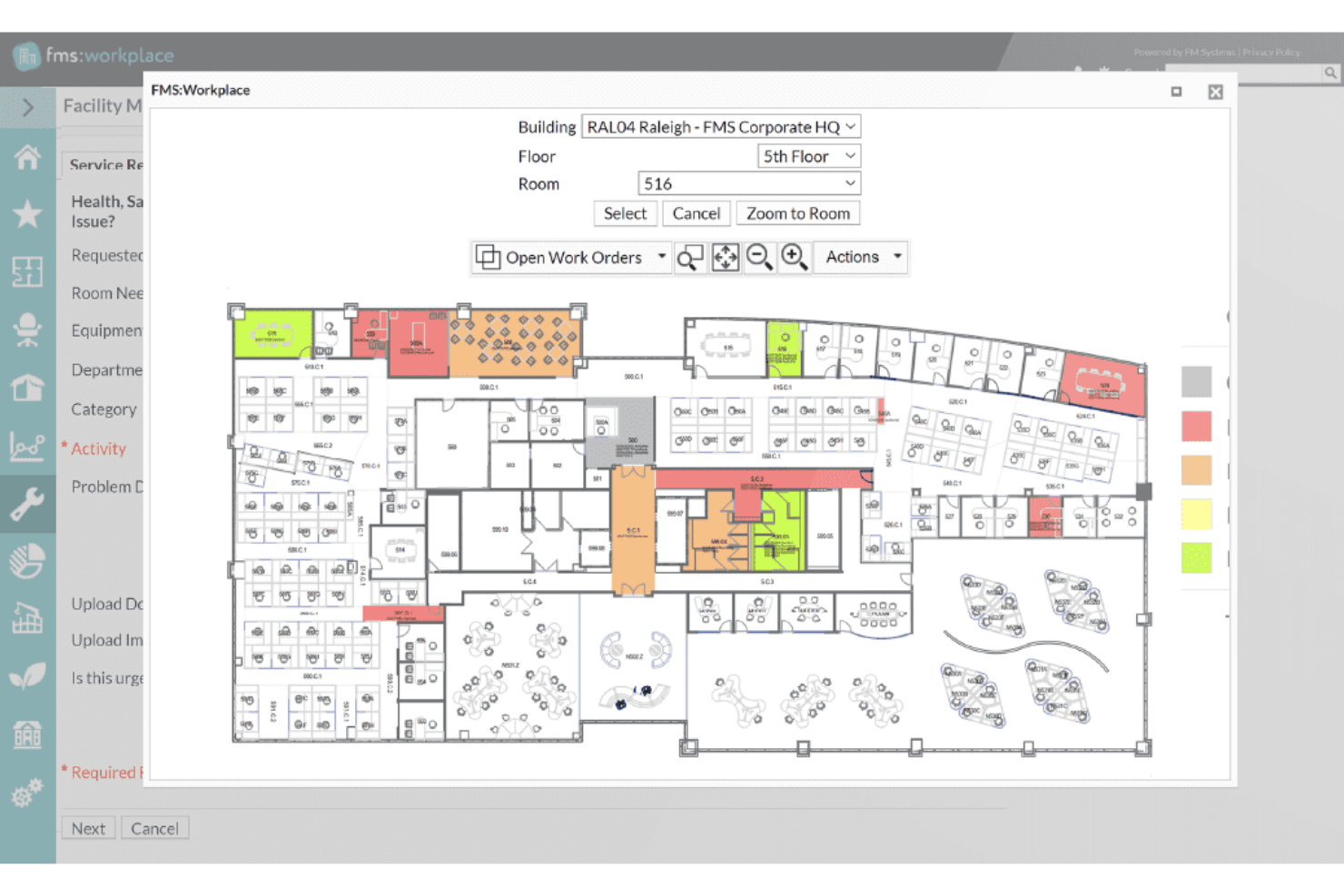
FM:Systems is a modular IWMS platform covering desk and room booking, interactive floor plans, move management, space utilization analytics, visitor management, and IoT sensor integration across single and multi-site portfolios.
Who Is FM:Systems Best For?
FM:Systems is a strong fit for enterprise facilities and real estate teams—especially in government, healthcare, and higher education—that need a FedRAMP-authorized IWMS with built-in sensor integration and multi-site portfolio management.
Why I Picked FM:Systems
FM:Systems earns its spot on my shortlist because it's one of the only office space management platforms with FedRAMP Authority to Operate, making it a legitimate option for federal agencies and regulated environments where most tools simply can't qualify. I'm particularly drawn to its native IoT sensor ecosystem, which feeds real-time occupancy data directly into FMS:Insights without requiring a third-party sensor platform. The strategic scenario planning module is also genuinely impressive, letting facilities teams build drag-and-drop stack plans with cost analysis before committing to a restack or consolidation.
FM:Systems Key Features
- Desk and room booking: Reserve desks, rooms, and services via web, mobile app, Outlook, or physical kiosks, with QR code and sensor-based check-in and auto-release for no-shows.
- Visitor management: Pre-register visitors, enable self-service kiosk check-in, trigger host notifications on arrival, and print badges automatically through the built-in visitor module.
- Multi-source occupancy analytics: FMS:Insights pulls data from sensors, bookings, badge readers, Cisco Spaces Wi-Fi, and financial systems into a single configurable dashboard with weighted KPI scoring.
- AutoCAD and Revit integration: Sync bi-directionally with CAD drawings and BIM models to keep floor plans accurate across space planning, move management, and utilization reporting.
FM:Systems Integrations
FM:Systems offers native integrations with Microsoft 365, Outlook, Teams, AutoCAD, Autodesk Revit, Google Workspace, Slack, Cisco Spaces, Cisco WebEx, and Crestron Fusion. An API is available for custom integrations.
Pros and Cons
Pros:
- FedRAMP authorization for regulated environments
- Strategic scenario planning with cost modelling
- Native sensors for real-time space analytics
Cons:
- Limited custom report building tools
- Excludes built-in physical sensors

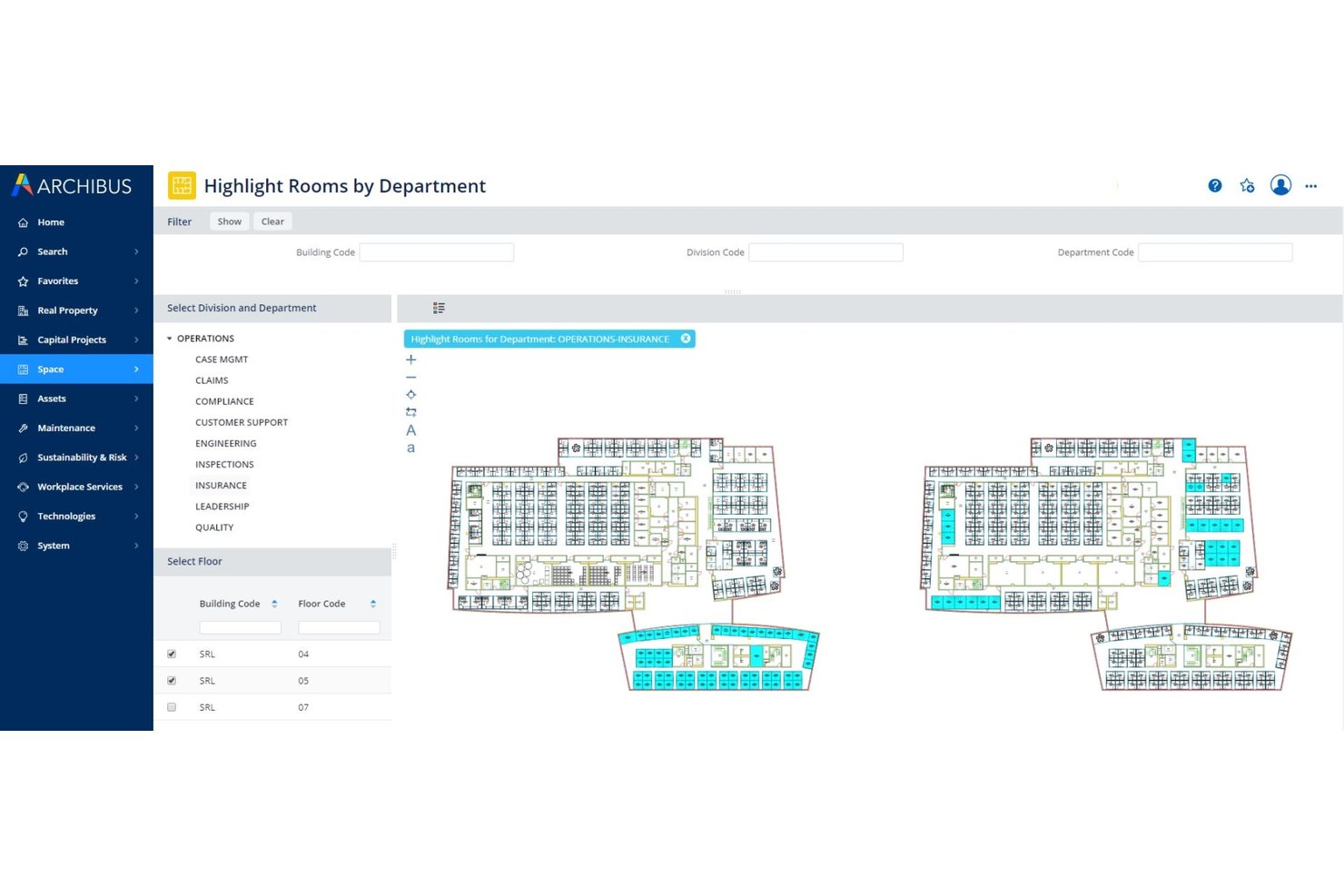
Archibus by Eptura is a full IWMS platform covering space planning, move management, lease administration, asset tracking, and real estate portfolio management across multi-site enterprise environments.
Who Is Archibus by Eptura Best For?
Archibus is built for enterprise facilities and real estate teams managing complex, multi-site portfolios where lease administration, space planning, and move management all need to live in one system.
Why I Picked Archibus by Eptura
Archibus by Eptura earns its spot on my shortlist because no other tool in this category matches its depth for managing a large real estate portfolio end to end. I'm particularly impressed by the lease administration module, which centralizes contract data with automated alerts and interactive portfolio dashboards across global multi-site footprints. Pair that with scenario-based block and stack planning, where you can model full restacks and compare what-if configurations before a single desk moves, and you have a genuine IWMS built for complexity at scale.
Archibus by Eptura Key Features
- BIM viewer: View and interact with Autodesk Revit and BIM 360 models directly within the platform, no Revit expertise required.
- IoT utilization reporting: Pulls real-time occupancy data from VergeSense sensors to generate heat maps and peak utilization reports by room and floor.
- Capital project tracking: Monitors budgets, schedules, and milestones for workplace fit-out and infrastructure projects from within the same platform.
- Sustainability module: Tracks energy usage and emissions across your portfolio with dedicated reporting tools tied to space and asset data.
Archibus by Eptura Integrations
Archibus by Eptura offers native integrations with VergeSense, Autodesk Revit, Autodesk BIM 360, AutoCAD, Workday, Okta, ServiceNow, Snowflake, and has native integrations across the Microsoft ecosystem, including Microsoft 365, Teams, Outlook, Copilot, Places, Power BI, and Azure AD. An open API is available for custom integrations.
Pros and Cons
Pros:
- Real-time occupancy heat maps with sensors
- Industry-leading BIM and CAD plan integration
- Monitors capital project delivery timelines
Cons:
- Lacks native campus exterior mapping
- Partner-only purchasing and support network required

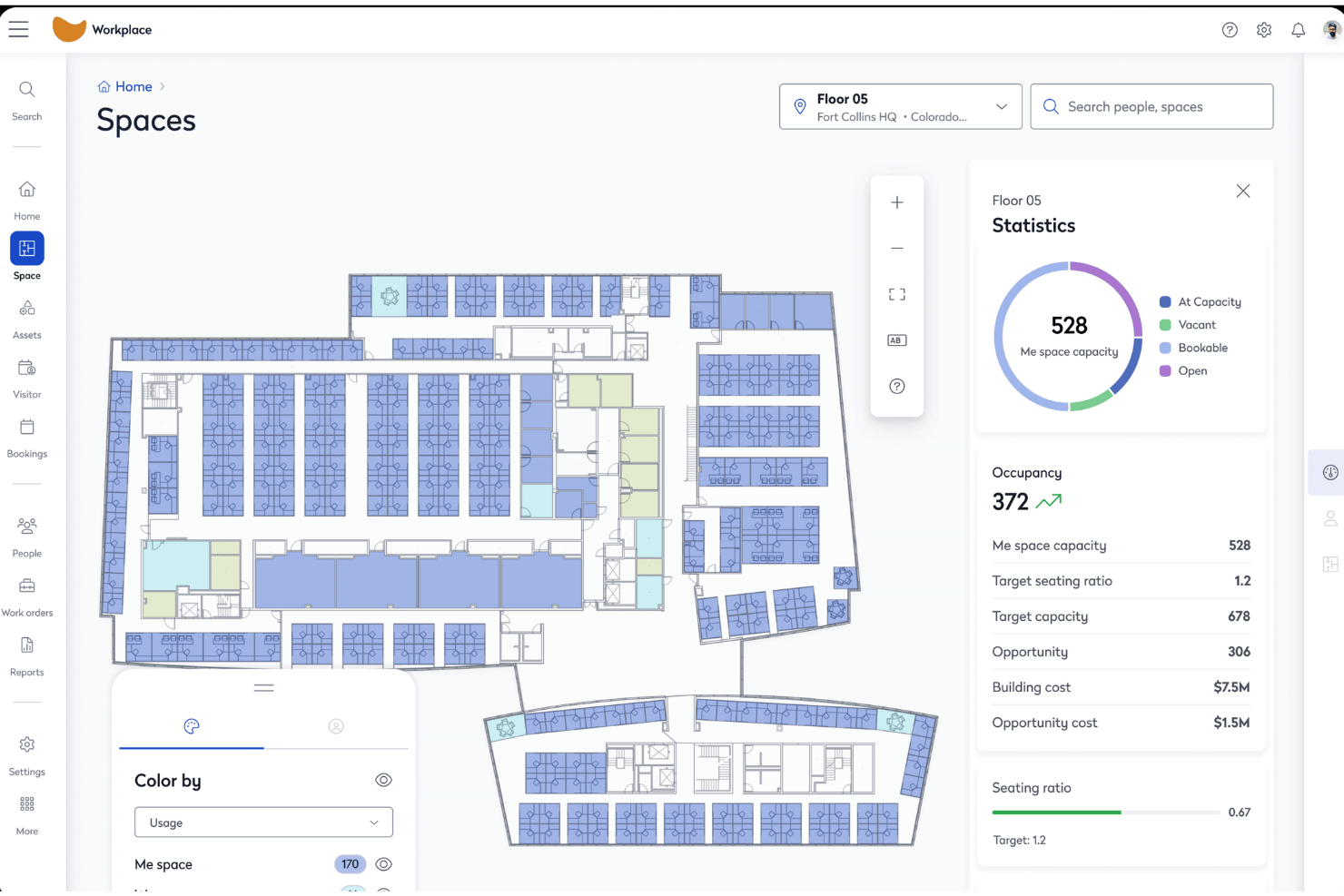
Eptura Workplace is an enterprise office space management platform that combines interactive floor plans, desk and room booking, move management, space utilization analytics, and visitor management across single and multi-site portfolios.
Who Is Eptura Workplace Best For?
Eptura Workplace is a strong fit for enterprise real estate and facilities teams managing large, multi-site portfolios where space cost accountability and chargeback reporting are central to operations.
Why I Picked Eptura Workplace
Eptura Workplace earns its spot on my shortlist because of how well it handles space cost accountability at the portfolio level. I love that it combines lease data management, cost-per-seat tracking, and chargeback reporting in one place, so finance and real estate teams can tie space consumption directly to business units. The Portfolio Insights Agent surfaces these numbers automatically, and Power BI connectors let you pipe them into executive dashboards without manual data pulls.
Eptura Workplace Key Features
- Block and stack planning: Drag-and-drop visual planning tools let you assign teams to floors and zones, model restack scenarios, and compare layout options before committing to any moves.
- Multi-source occupancy tracking: Pulls occupancy data from badge readers, WiFi presence detection, and sensor platforms like VergeSense and Relogix to give you a passive, accurate picture of how space is actually used.
- Visitor management: Pre-registration, on-site check-in, custom badge printing, eSignature capture, watchlists, and emergency roll calls are all handled through the integrated visitor module.
- AI Space Planning Agent: Automatically generates stack plans from real occupancy and headcount data, then surfaces scenario comparisons so your team can act on data rather than guesswork.
Eptura Workplace Integrations
Eptura Workplace offers native integrations with Microsoft 365, Outlook, Teams, Google Calendar, Okta, AutoCAD, Autodesk Revit, VergeSense, Relogix, CoWorkr, ServiceNow, Tableau, and Snowflake. An API is available for custom integrations.
Pros and Cons
Pros:
- Advanced chargeback and cost reporting built-in
- Combines sensor, badge, and booking occupancy data
- Visual block and stack planning enables restacks
Cons:
- No native Slack integration documented
- Admin portal navigation is complex
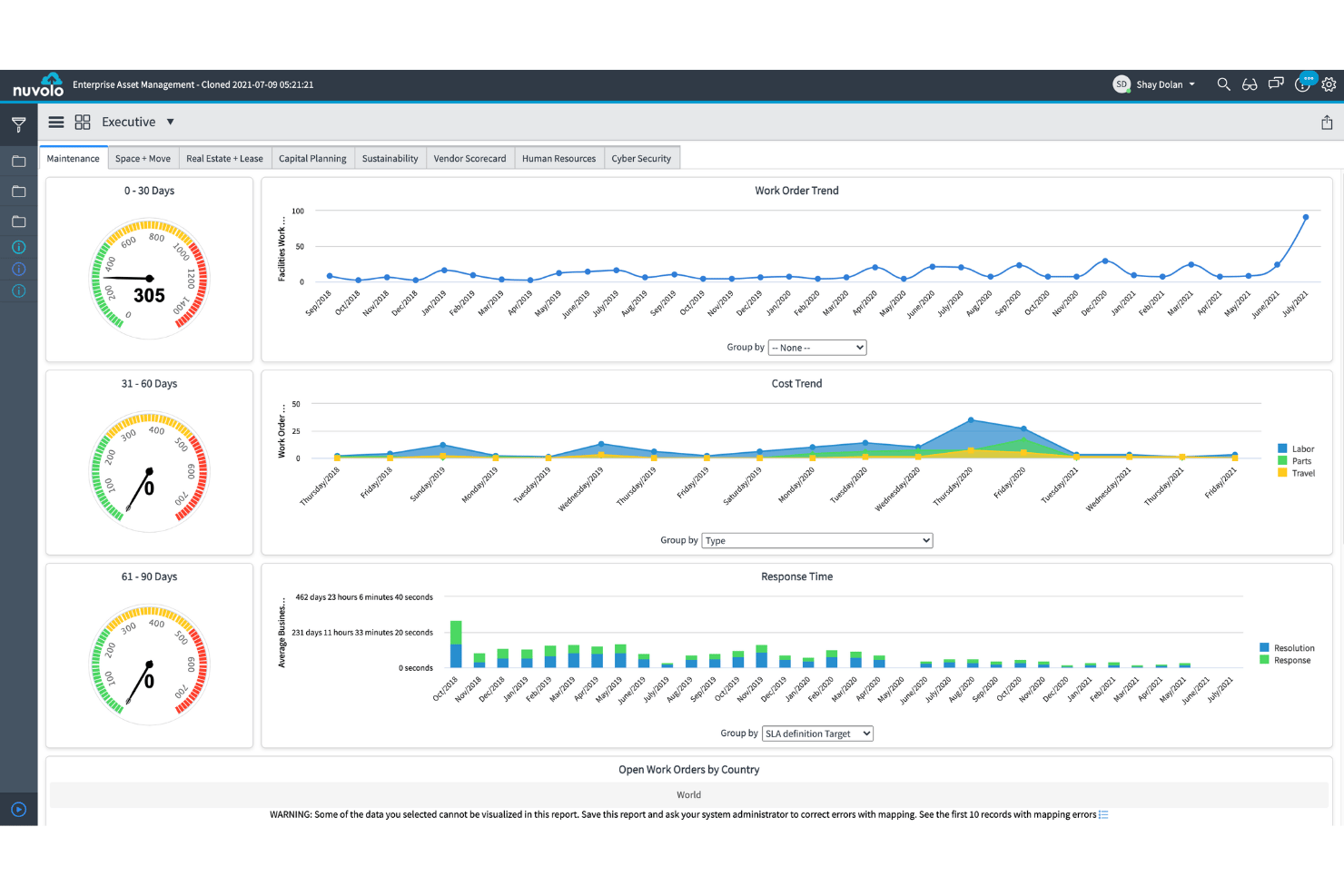
Nuvolo is an IWMS platform built natively on ServiceNow that combines space management, desk and room booking, move management, real estate portfolio tracking, and sustainability reporting in a single connected suite.
Who Is Nuvolo Best For?
Nuvolo is a strong fit for large enterprises in regulated industries—healthcare, life sciences, and government—that are already on ServiceNow and need a fully integrated IWMS with lease accounting, move management, and compliance-grade security in one platform.
Why I Picked Nuvolo
I've included Nuvolo in my top picks because it's purpose-built for large enterprises in regulated industries that need more than a basic booking tool. Its patented CAD interpretation engine syncs directly with AutoCAD and Revit, which means floor plan onboarding at scale (think 3,500+ locations) doesn't require endless manual uploads. Pair that with a dedicated Move Management module that supports multi-scenario campus relocations and automated work order dispatch, and you've got a platform that handles the complexity most workplace tools simply can't.
Nuvolo Key Features
- Lease accounting compliance: Manages owned and leased properties with built-in ASC 842 and IFRS 16 compliance, including critical date alerts and automated renewal notifications.
- Space demand forecasting: Projects future space needs using headcount growth data and sharing ratio tracking to support consolidation or expansion decisions.
- IoT and occupancy sensor integration: Connects to building sensors and IoT devices to feed real-time occupancy data directly into utilization dashboards.
- Visitor management: Handles onsite visitor workflows, kiosk-based check-in, and host notifications within the same reservation management interface.
Nuvolo Integrations
Nuvolo offers native integrations with AutoCAD, Revit, Workday, Oracle PeopleSoft, Microsoft Teams, Slack, Microsoft 365, and Outlook. An API is available for custom integrations.
Pros and Cons
Pros:
- Compliance modules for healthcare and government
- Full move management for complex relocations
- Native CAD sync for automated floor plans
Cons:
- Does not track hardware assets
- Requires separate ServiceNow licensing to use
Annen programvare for administrasjon av kontorlokaler
Her er noen flere alternativer for programvare for administrasjon av kontorlokaler som ikke kom med på kandidatlisten min, men som likevel er verdt å undersøke:
- Tactic
For visitor and workspace booking in one place
- OfficeSpace
For floor plan-led workplace management
- Skedda
For self-serve desk and room booking rules
- deskbird
For hybrid office booking via Slack and Teams
- OfficeRnD Workplace
For hybrid team scheduling and booking
- Appspace
For kiosk and mobile office wayfinding
- Envoy Workplace
For visitor and desk booking in one platform
- Gable
For on-demand coworking and office booking
- Yoffix
For Microsoft 365-native desk and room booking
- Mri Manhattan
For enterprise real estate portfolio management


How I Evaluate Office Space Management Software
My evaluation splits into two layers: the baseline functionality a tool must offer—floor plans, booking, utilization analytics—and the differentiators that separate a niche desk-booking app from a platform that handles portfolio-scale move management and compliance.
Core Functionality (Table Stakes For This List)
When I'm selecting tools for my list, I rank each one on a scale from 0 (does not offer the functionality) to 5 (excels in this area) for each core functionality listed below. I then calculate the tool's total score as a percentage, using 65% as a benchmark to help assess its overall fit for the list.
- Interactive floor plans: I look for multi-site, layered floor plans with CAD or BIM import support and live seat status—not just static images uploaded as PNGs.
- Desk and room booking: Self-service reservation for desks, rooms, and extras like parking or lockers matters, along with mobile check-in and policy controls for neighbourhoods or zones.
- Space utilization analytics: I evaluate whether the platform combines booking data with sensor, badge, or Wi-Fi signals to show real occupancy trends, not just reservation counts.
- Move management: Drag-and-drop stack planning with scenario comparison is what I check for, especially for teams running restacks or multi-floor relocations on tight timelines.
- Employee directory and wayfinding: The directory should sync with your HRIS and link people to their seat assignments on the map so anyone can find a colleague without sending a message first.
- Hybrid scheduling integration: Two-way sync with Outlook, Google Calendar, Teams, or Slack is the baseline, but I also look for team-day coordination views and SSO support.
Once I have a list of tools that meet the criteria, I consider what sets each platform apart.
Differentiating Factors (What Sets Vendors Apart)
Here's how I compare and contrast different vendors:
Standout Features
Scenario planning tools matter most when you're weighing a restack or consolidation. I look for what-if modelling that lets you test hybrid ratio changes against cost and headcount data before committing. Sensor and IoT integration is equally important—I evaluate whether a platform pulls passive occupancy data from badges or Wi-Fi signals, not just reservation counts. Visitor and delivery management rounds out the picture, replacing standalone lobby apps with built-in check-in, host alerts, and package tracking.
Beyond Features
I evaluate how quickly a vendor can digitize your floor plans—some offer full CAD/BIM conversion services, while others expect you to self-serve, which can stall rollout by weeks. Integration depth matters just as much: I check for bidirectional sync with Microsoft 365, Google Workspace, and HRIS platforms like Workday so user provisioning and booking stay automatic. Security posture is another filter, especially SOC 2 Type II certification and data residency options for teams operating across regions. Finally, I look at analytics export—whether dashboards connect to Power BI or Tableau so utilization data feeds into broader portfolio reporting without manual pulls.
Slik velger du programvare for administrasjon av kontorlokaler
Den riktige programvaren for administrasjon av kontorlokaler avhenger av hvilke utfordringer på arbeidsplassen du ønsker å løse først:
| Hvis prioriteten din er … | Se etter … |
|---|---|
| Administrasjon av hybride arbeidsplaner og bestillinger | Kalendersynkronisering og sanntidsstatus for plasser på kartet |
| Oppfølging av eiendomsutgifter og internfakturering | Innebygd fordeling av plasskostnader og rapportering av belegg |
| Håndtering av etterlevelse eller regulerte miljøer | Leverandørstøtte for FedRAMP, SOC 2 eller tilsvarende dokumentasjon |
| Koordinering av store flyttinger eller omorganiseringer | Verktøy for scenariomodellering ved planlegging av flere etasjer |
| Samordning av arbeidsflyter for besøkende, leveranser og bestillinger | Integrerte funksjoner for innsjekking og varsling av verten |
Slik vurderer du kandidatlisten
- Test digitalisering av plantegninger: Last opp et eksempel på en planløsning, og mål hvor raskt de leverer eller hvilken støtte de tilbyr for CAD-/BIM-filer.
- Kontroller analysemulighetene: Kjør en reell beleggsanalyse ved hjelp av bestillingsdataene dine samt data fra adgangskort eller sensorer.
- Be om dokumentasjon på etterlevelse: Be skriftlig om den nyeste SOC 2 Type II-revisjonen eller FedRAMP-statusen.
- Test et flyttescenario: Bruk plattformen deres til å omorganisere tre team i et testmiljø, og eksporter kostnadsprognoser før og etter.
- Velg hva du vil prioritere: Bestem deg mellom rask utrulling (selvbetjeningsverktøy) og et bredt utvalg av integrasjoner samt etterlevelse (løsninger på bedriftsnivå).
Hva er programvare for administrasjon av kontorlokaler?
Programvare for administrasjon av kontorlokaler er en digital plattform som sentraliserer hvordan du fordeler skrivebord, administrerer plantegninger, planlegger bruk av arbeidsområder og overvåker eiendomskostnader. Den hjelper team med å koordinere hybridarbeid, følge med på beleggsgrad og sikre samsvar ved å tilby interaktive kart, bestillingsverktøy og analyser. Denne typen programvare støtter drifts-, IT- og prosjektledere med å holde arbeidsplassressurser synlige og tilpasningsdyktige etter hvert som teamenes behov endres.
Funksjoner i programvare for administrasjon av kontorlokaler
Når du velger programvare for administrasjon av kontorlokaler, bør du se etter følgende viktige funksjoner:
- Interaktive plantegninger: Vis, rediger og administrer digitale plantegninger som viser plassfordeling, fasiliteter og oppdateringer av beleggsgrad i sanntid. Dette hjelper team med å visualisere og planlegge arbeidsområder på tvers av flere lokasjoner.
- Bestilling av skrivebord og rom: Gjør det mulig for ansatte å reservere skrivebord, møterom eller samarbeidsområder gjennom selvbetjeningsverktøy, ofte med innsjekking via mobil, bestillingsregler og områdekontroller.
- Analyser av arealutnyttelse: Overvåk faktisk og reservert bruk av arbeidsområder ved å spore reservasjonsdata, sensorer, Wi-Fi eller adgangskortaktivitet for å gi grunnlag for beslutninger om arealbehov og utforming.
- Flytteadministrasjon: Planlegg kontorflyttinger og omorganiseringer med scenariomodellering, redigering av plantegninger med dra-og-slipp og visualiseringer før og etter, slik at det blir enklere å justere fordelingen av arbeidsområder etter hvert som teamene endres.
- Ansattkatalog og veifinning: Koble personer til tildelte plasser, vis kontaktopplysninger og tilby interaktive kart som hjelper ansatte med å finne kolleger, møterom eller fasiliteter.
- Planlegging av hybridarbeid: Integrer med kalenderplattformer og tilby teambasert planlegging som viser når enkeltpersoner eller grupper planlegger å arbeide på stedet, slik at tilstedeværelse kan koordineres og konflikter reduseres.
- Besøkshåndtering: Registrer gjester, utsted digitale adgangskort, varsle verter og følg med på besøkslogger i samme plattform, slik at separate resepsjonsverktøy kan erstattes.
- Integrasjon med HR- og IT-systemer: Synkroniser ansattdata, plasseringer og brukertillatelser med verktøy som Active Directory, Google Workspace eller HRIS-systemet ditt for å holde informasjonen automatisk oppdatert.
- Sporing og rapportering av arealkostnader: Fordel kostnader knyttet til beleggsgrad på kostnadssentre eller team, generer bruksrapporter og eksporter data for interessenter innen økonomi og drift.
- Sikkerhets- og samsvarskontroller: Beskytt sensitive data gjennom SSO, rollebaserte tillatelser, revisjonsspor og overholdelse av sikkerhetsstandarder som SOC 2 eller FedRAMP, slik at regulatoriske krav og personvernbehov støttes.
Vanlige AI-funksjoner i programvare for administrasjon av kontorlokaler
I tillegg til standardfunksjonene i programvare for administrasjon av kontorlokaler som er nevnt ovenfor, tar mange av disse løsningene i bruk AI med funksjoner som:
- AI-drevet prognostisering av beleggsgrad: Bruker historiske bruksdata og sanntidsdata fra sensorer til å forutsi fremtidig etterspørsel etter arbeidsområder, slik at du kan optimalisere fordelingen av skrivebord og redusere ubrukt areal.
- AI-drevne anbefalinger for arealoptimalisering: Analyserer bestillingsmønstre, teamplaner og bevegelsesdata for å foreslå endringer i utformingen eller omfordeling av plasser som forbedrer samarbeid og arealeffektivitet.
- Automatisk avviksdeteksjon: Overvåker data om beleggsgrad og bestillinger for å flagge uvanlige mønstre – som vedvarende manglende oppmøte eller overbefolkning – slik at du kan løse problemer før de forstyrrer driften.
- Spørreassistenter med naturlig språk: Lar deg stille spørsmål om arealbruk, tilgjengelighet eller bestillingsregler med vanlig språk, mens AI umiddelbart henter frem svar og innsikt fra dataene dine.
- Varsler om prediktivt vedlikehold: Bruker AI til å analysere sensor- og bruksdata og identifisere når møterom eller fellesområder kan trenge rengjøring, reparasjoner eller etterfylling før problemer oppstår.
Fordeler med programvare for administrasjon av kontorlokaler
Implementering av programvare for administrasjon av kontorlokaler gir flere fordeler for teamet og virksomheten din. Her er noen av fordelene du kan se frem til:
- Sentralisert tildeling av arbeidsplasser: Koordiner tildeling av skrivebord, rombestillinger og plantegninger på én plattform, slik at teamet alltid vet hvilke områder som er tilgjengelige, og hvem som sitter hvor.
- Datadrevet innsikt i utnyttelse: Kombiner beleggsanalyse, sensordata og bestillingsoppføringer for å følge den faktiske bruken av arbeidsplassen. Dette gjør det enklere å identifisere underutnyttede områder og begrunne beslutninger om arealbehov.
- Integrert flytte- og scenarioplanlegging: Bruk dra-og-slipp-verktøy og hva-hvis-modellering til å planlegge kontorflyttinger, omorganiseringer eller overganger til hybridarbeid uten å være avhengig av statiske regneark.
- Koordinering av hybridarbeid: Synkroniser tidsplaner med kalenderverktøy som Outlook eller Google Calendar, slik at teamet kan planlegge dager på kontoret og redusere konflikter om arbeidsplasser.
- Besøks- og leveringsadministrasjon: Registrer gjester, utsted digitale adgangspass og varsle verter direkte på plattformen, slik at frittstående apper for innsjekking og varsling kan erstattes.
- Automatisert kostnadssporing og rapportering: Fordel kostnader knyttet til belegg og arbeidsområder på kostnadssteder eller team, og eksporter bruksdata til økonomi- eller eiendomsrapporter.
- Sikkerhets- og samsvarssikring: Administrer hvem som får tilgang til plantegninger og bestillingsdata, med SSO, tilgangskontroller og støtte for standarder som SOC 2 eller FedRAMP der det kreves.
Kostnader og priser for programvare for administrasjon av kontorlokaler
Ved valg av programvare for administrasjon av kontorlokaler er det viktig å forstå de ulike prismodellene og abonnementene som er tilgjengelige. Kostnadene varierer basert på funksjoner, teamstørrelse, tillegg og mer. Tabellen nedenfor oppsummerer vanlige abonnementer, gjennomsnittsprisene deres og typiske funksjoner som er inkludert i løsninger for programvare for administrasjon av kontorlokaler:
Sammenligningstabell for abonnementer for programvare for administrasjon av kontorlokaler
| Abonnementstype | Gjennomsnittspris | Vanlige funksjoner |
|---|---|---|
| Gratisabonnement | $0 | Grunnleggende visning av plantegninger, begrenset bestilling av skrivebord og rom, enkel analyse og støtte via e-post. |
| Personlig abonnement | $5–$25/bruker/måned | Interaktive plantegninger, standardbestilling av skrivebord og rom, bruksrapporter, mobil innsjekking og grunnleggende integrasjoner. |
| Forretningsabonnement | $8–$40/bruker/måned | Avanserte bestillingsregler, analyse av arealutnyttelse, flytteadministrasjon, integrasjoner med HR og IT samt synkronisering av kataloger. |
| Virksomhetsabonnement | $30–$120/bruker/måned | Analyse på tvers av hele eiendomsporteføljen, scenarioplanlegging, tilpassede integrasjoner, SSO, samsvarskontroller og dedikert støtte. |
Vanlige spørsmål om programvare for administrasjon av kontorlokaler
Her er noen svar på vanlige spørsmål om programvare for administrasjon av kontorlokaler:
Hvordan hjelper programvare for administrasjon av kontorlokaler med hybride arbeidsplaner?
Programvare for administrasjon av kontorlokaler kobler bookingsystemer sammen med kalendere i en brukervennlig iOS- eller Android-app, slik at du kan se hvem som planlegger å jobbe på kontoret. Dette hjelper team med å koordinere tilstedeværelse, unngå dobbeltbooking av skrivebord og støtte roterende arbeidsplaner på en hybrid arbeidsplass. Mange verktøy viser tilgjengelighet for sitteplasser i sanntid og synkroniserer med Outlook eller Google Kalender for enkel planlegging, noe som forbedrer medarbeideropplevelsen.
Kan programvare for administrasjon av kontorlokaler håndtere komplekse plantegninger på tvers av flere lokasjoner?
Ja, mange plattformer for programvare for administrasjon av kontorlokaler støtter plantegninger for flere lokasjoner og etasjer, med kart i flere lag og import av CAD- eller BIM-filer for å holde oversikt over hver kvadratmeter. Denne oversikten hjelper de som har ansvar for fasilitetsforvaltning og prosjektledere med å optimalisere arealfordelingen, tilordne plasser, planlegge flyttinger og holde oppsettene oppdatert i organisasjoner i vekst eller på tvers av flere arbeidsmiljøer.
Hvilke integrasjoner bør jeg se etter i programvare for administrasjon av kontorlokaler?
Se etter en alt-i-ett-plattform med integrasjoner for den primære kalenderen din (Google Workspace, Microsoft 365), HRIS, identitetsadministrasjon og sensorer som sporer belegget på kontoret. Omfattende integrasjoner automatiserer klargjøring av brukere, synkroniserer tidsplaner og gir tilgang til reelle bruksdata gjennom arbeidsplassanalyse. Dette hjelper deg med å ta velinformerte beslutninger for bedre arealplanlegging.
Hvor sikker er programvare for administrasjon av kontorlokaler når det gjelder fortrolige kontordata?
De fleste etablerte plattformer sikrer kontormiljøet ditt ved å tilby SSO, detaljerte tillatelser og revisjonslogging. Ved regulert ressursforvaltning bør du se etter SOC 2 Type II- og ISO 27001-sertifiseringer eller kontroller for datalagringssted. Før du velger en leverandør eller tar i bruk nye funksjoner, bør du be om de nyeste samsvarsrapportene deres for å få klarhet i hvordan de beskytter data på tvers av lokasjoner.
Kan jeg bruke programvare for administrasjon av kontorlokaler til kortsiktig eller fleksibel booking av arbeidsplasser?
Ja, du kan bruke de fleste systemer for booking av lokaler til å fastsette regler for fleksible skrivebord, reservasjon av møterom, parkering og andre kontorressurser. Ansatte kan enkelt bestille plasser, mens mobil booking, QR-innsjekking, skjermer i møterom og kart i sanntid støtter kortsiktige reservasjoner og daglige endringer i plassfordelingen.
Hva innebærer det å digitalisere eksisterende plantegninger med programvare for administrasjon av kontorlokaler?
Vanligvis laster du opp oppsett i PDF-, CAD- eller BIM-format. Noen leverandører tilbyr en tilpasset tjeneste for å lage interaktive kart fra filene dine for å forbedre arbeidsplassopplevelsen, mens andre krever at du laster opp filene selv. Jeg anbefaler å sende inn en eksempelplan for å teste kvaliteten. Dette sikrer at kartene samsvarer med arbeidsplassstrategien din, spesielt hvis du trenger kart over flere etasjer eller tilpassede kart.