

10 beste programvareløsninger for møtehåndtering i virksomheter i 2026

10 Kortliste over den beste programvaren for møtehåndtering i virksomheter


Programvare for møtehåndtering i virksomheter hjelper store organisasjoner med å planlegge, koordinere og dokumentere møter på tvers av flere team og interessenter. Hvis du ser etter verktøy som kan håndtere kompleks planlegging, sikker dokumentasjon, oppfølging av tiltak og integrasjon med teknologistakken din, vet du hva som står på spill – tydelige beslutninger, revisjonsspor og samkjøring i hele virksomheten.
Denne veiledningen sammenligner den beste programvaren i 2026, slik at du kan finne løsningen som passer best til organisasjonens behov for sikkerhet, samsvar og samarbeid.
Hvorfor du kan stole på våre programvareanbefalinger
Teamet vårt har testet og anmeldt programvare siden 2012. Vi er selv prosjektledere, så vi vet hvor vanskelig og hvor viktig det er å velge riktig programvare.
I denne guiden har vi vurdert verktøyene gjennom praktisk testing og uavhengig research og gitt dem poeng ut fra våre utvelgelseskriterier. Vi bygger også på innsikt fra ledende eksperter i bransjen og erfarne prosjektledere.
Anmeldelsene våre bygger på vår egen redaksjonelle vurdering. De er ikke et salgsargument.
Ekspertanmeldere:
Sammenligningstabell for programvare for møtehåndtering i virksomheter
Denne sammenligningstabellen oppsummerer prisopplysningene for mine utvalgte løsninger innen programvare for møtehåndtering i virksomheter:
| Tool | Best For | Trial Info | Price | ||
|---|---|---|---|---|---|
| 1 | Best real-time voting for decision making | Free trial + free demo available | Pricing upon request | Website | |
| 2 | Best offline access for remote participation | Free demo available | Pricing upon request | Website | |
| 3 | Best deep integration with Microsoft 365 | Free plan + 1-month free trial available | From $4/user/month (billed annually) | Website | |
| 4 | Best enterprise-level compliance features | Free demo available | Pricing upon request | Website | |
| 5 | Best secure document distribution for directors | Free demo available | Pricing upon request | Website | |
| 6 | Best collaborative note sharing for teams | Free plan available | From $7/user/month (billed annually) | Website | |
| 7 | Best action item tracking for follow-ups | Free demo available | Pricing upon request | Website | |
| 8 | Best advanced meeting minutes templating | 30-day free trial + free demo available | From $4.60/user/month | Website | |
| 9 | Best agenda planning for recurring sessions | 14-day free trial + free plan + free demo available | From $14/user/month (billed annually) | Website | |
| 10 | Best centralized documentation management | Free trial available | Pricing upon request | Website |
Anmeldelser av den beste programvaren for møtehåndtering i virksomheter
Nedenfor finner du mine detaljerte oppsummeringer av den beste programvaren for møtehåndtering i virksomheter som kom med på kortlisten. Anmeldelsene mine gir en detaljert gjennomgang av funksjonene, integrasjonene og de beste bruksområdene for hver plattform, slik at du kan finne den beste løsningen for deg.
OnBoard
Best real-time voting for decision making
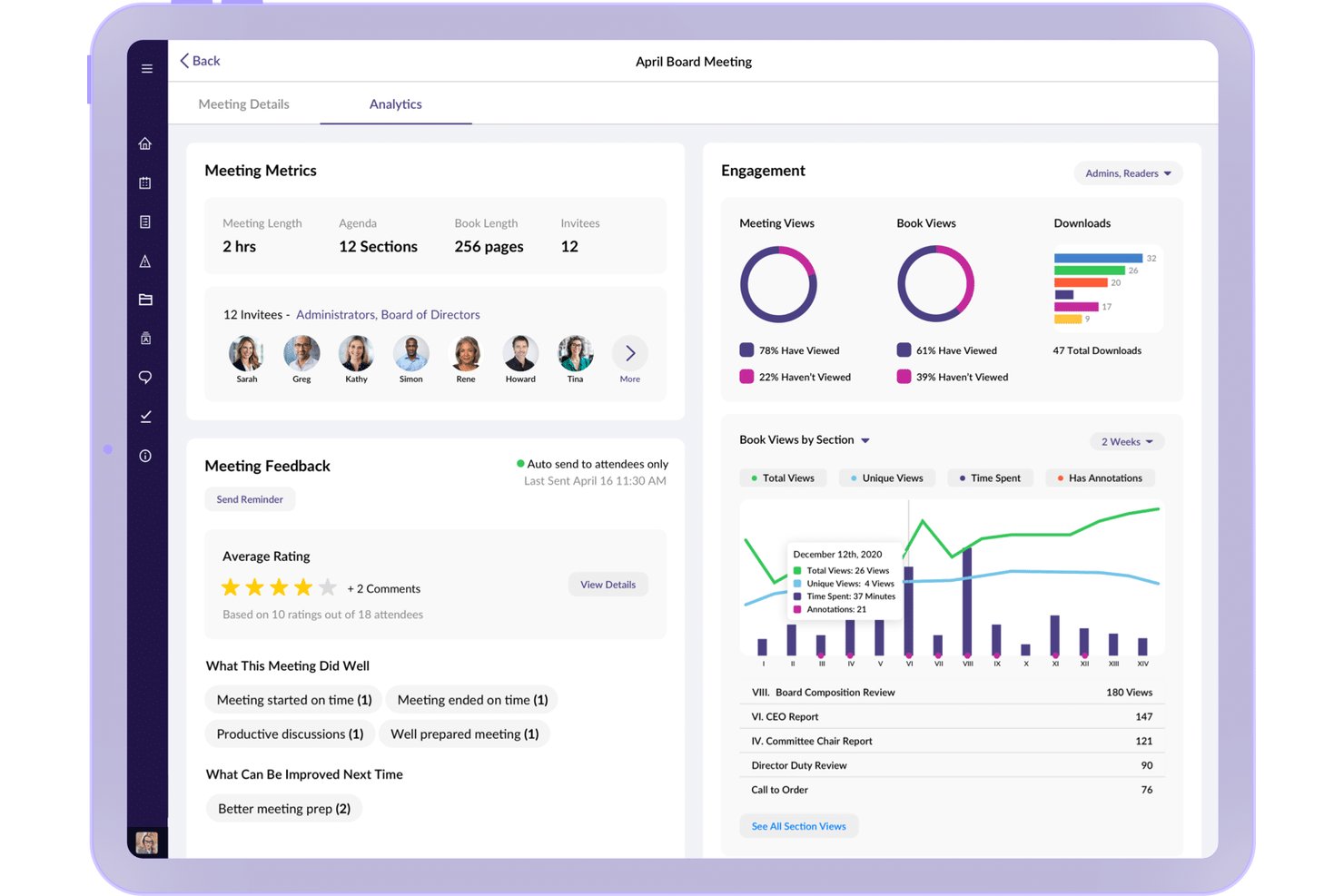
OnBoard is a board portal and governance platform that brings together agenda building, minutes capture, document management, voting and approvals, and board assessments into a single secure environment for boards and steering committees.
Who Is OnBoard Best For?
OnBoard is a strong fit for governance leads, corporate secretaries, and executives managing board or steering committee meetings in regulated industries.
Why I Picked OnBoard
I picked OnBoard as one of the best because its real-time Voting & Approvals module genuinely changes how boards make decisions between scheduled meetings. Rather than waiting for the next quarterly session, I can push a motion to board members for a live vote directly inside the platform, with outcomes automatically captured and tied to the meeting record. The Minutes Builder then pulls those decisions into a formal document, so there's no manual reconciliation after the fact.
OnBoard Key Features
- Agenda builder: Create structured, time-bound agendas with templates and collaborative editing.
- Task management: Assign, track, and manage action items across meetings within the platform.
- Microsoft 365 integration: Edit Word, Excel, and PowerPoint files natively inside OnBoard.
- Secure document library: Organize board materials in a centralized, permission-controlled repository.
OnBoard Integrations
OnBoard offers native integrations with Zoom, Microsoft Teams, DocuSign, Microsoft 365, Okta, and OneLogin. An API is available for custom integrations.
Pros and Cons
Pros:
- Centralized document access and annotation
- Detailed agenda and minutes builder
- Real-time board voting and approvals
Cons:
- Primarily focused on formal board processes
- Limited customization of meeting templates
iBabs
Best offline access for remote participation
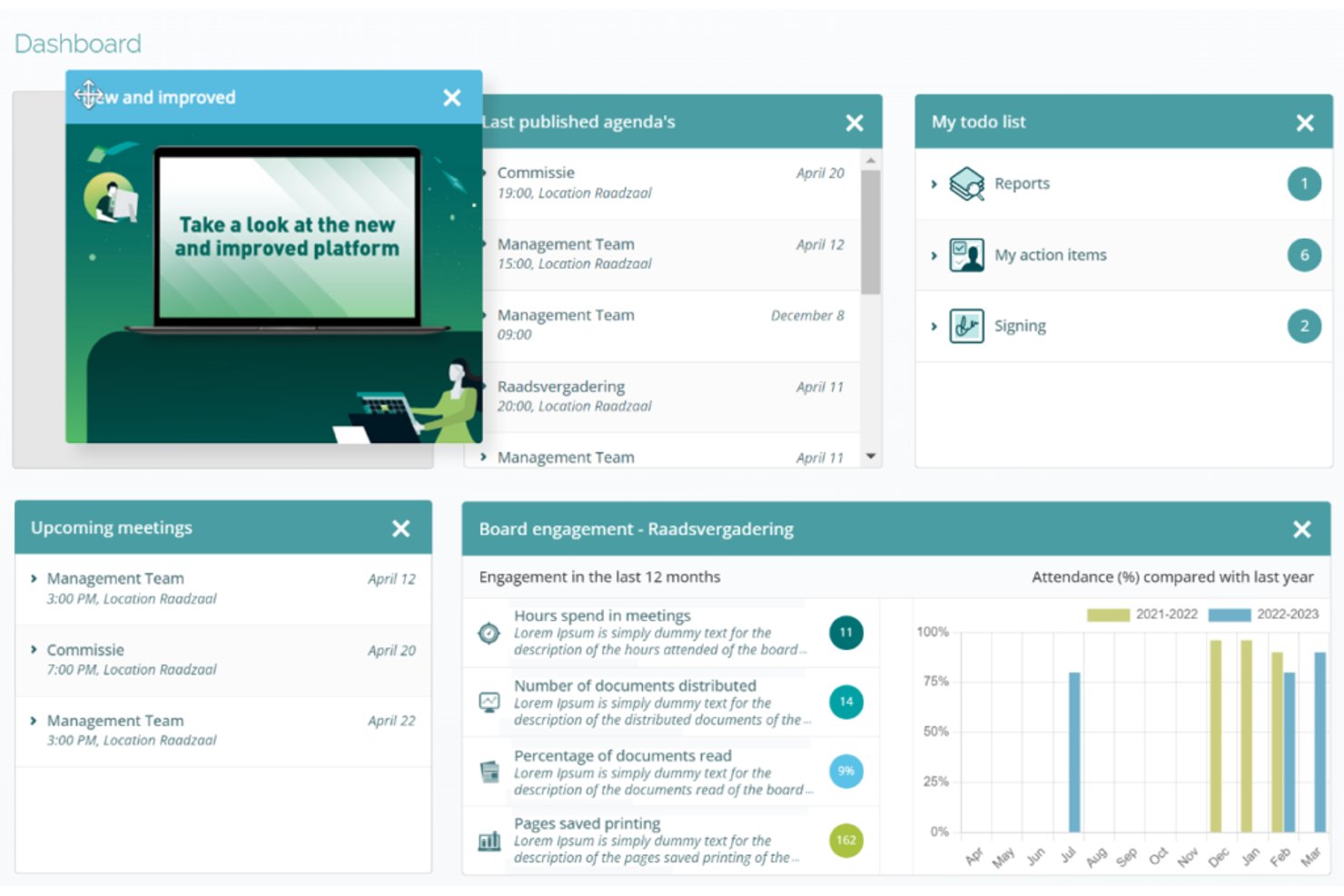
iBabs is a board portal and meeting management platform built for governance-heavy meetings, combining structured agenda creation, document distribution, minutes, voting, digital signatures, and AI-assisted transcription.
Who Is iBabs Best For?
iBabs is a strong fit for public-sector organizations, councils, healthcare bodies, and enterprises that run formal board or steering committee meetings with strict governance requirements.
Why I Picked iBabs
iBabs earns its spot as one of the best on my shortlist because of how well it handles offline access for board members who participate remotely. The native iOS, Android, and Windows apps automatically sync meeting dossiers before a session, so participants can read documents, annotate pages, and cast votes without an active internet connection. I particularly like that this extends to anonymous voting and approval routing, not just passive document review.
iBabs Key Features
- Structured agenda builder: Create detailed, time-allocated agendas for formal meetings and distribute them securely to all participants.
- AI-generated minutes and summaries: Use iBabs Debrief to produce AI-powered transcripts and speaker-attributed minutes.
- Voting and decision logging: Enable manual, live, or anonymous voting and automatically log decisions in meeting records.
- Digital signatures and secure document management: Sign documents within the platform and manage sensitive files with granular access controls.
iBabs Integrations
iBabs offers native integrations with Microsoft 365 (including Outlook and SharePoint), Microsoft Entra ID, Google Workspace, Okta, and SURFconext.
Pros and Cons
Pros:
- AI-generated meeting transcripts and minutes
- Secure voting and digital signature workflows
- Offline access for meetings on all devices
Cons:
- Limited project team meeting features
- No two-way task sync with PM platforms

Best deep integration with Microsoft 365
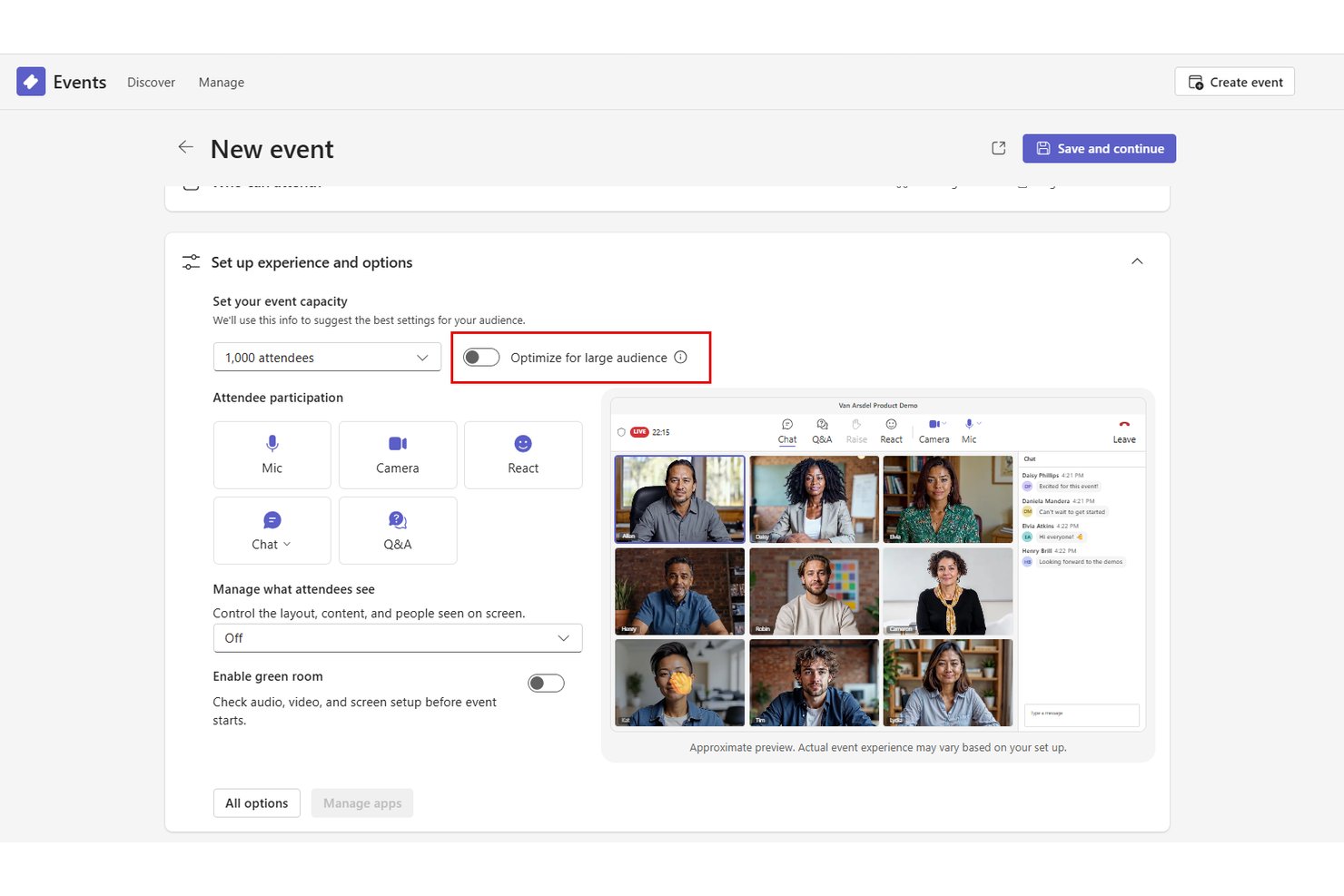
Microsoft Teams is an enterprise collaboration platform that combines video conferencing, AI-powered meeting summaries, action item capture, and scheduling within a channel-based workspace designed to keep meetings connected to ongoing project work.
Who Is Microsoft Teams Best For?
Teams is a strong fit for large enterprises already standardized on Microsoft 365 that want meeting management built into their existing productivity stack.
Why I Picked Microsoft Teams
I picked Microsoft Teams as one of the best because of how tightly its meeting experience is wired into Microsoft 365. Running a steering committee meeting inside a Teams channel means the agenda, shared files, and Planner tasks all live alongside every prior discussion, with no context-switching required. Teams Premium's Intelligent Recap then generates AI-powered summaries and assigned action items automatically after each call.
Microsoft Teams Key Features
- Live translation and interpretation: Participants can access real-time translation for multilingual meetings at scale.
- Room and desk booking: Teams Rooms and Microsoft Places enable workspace and meeting room reservations directly from the app.
- Sensitivity labels and watermarking: Advanced meeting protection options secure confidential content with labels and visible watermarks.
- Microsoft Loop integration: Collaborative pages and task lists can be embedded into meetings for real-time editing and tracking.
Microsoft Teams Integrations
Microsoft Teams has native integrations across the Microsoft ecosystem, including Microsoft 365 and Azure, and also connects with Jira, Trello, Asana, ServiceNow, Zoom, Salesforce, and Slack. An API is available for custom integrations.
Pros and Cons
Pros:
- Real-time collaborative editing with Microsoft Loop
- Advanced enterprise security and compliance controls
- AI-powered meeting transcripts and summaries
Cons:
- Relies heavily on Microsoft 365 adoption
- Agenda templates and approval workflows missing
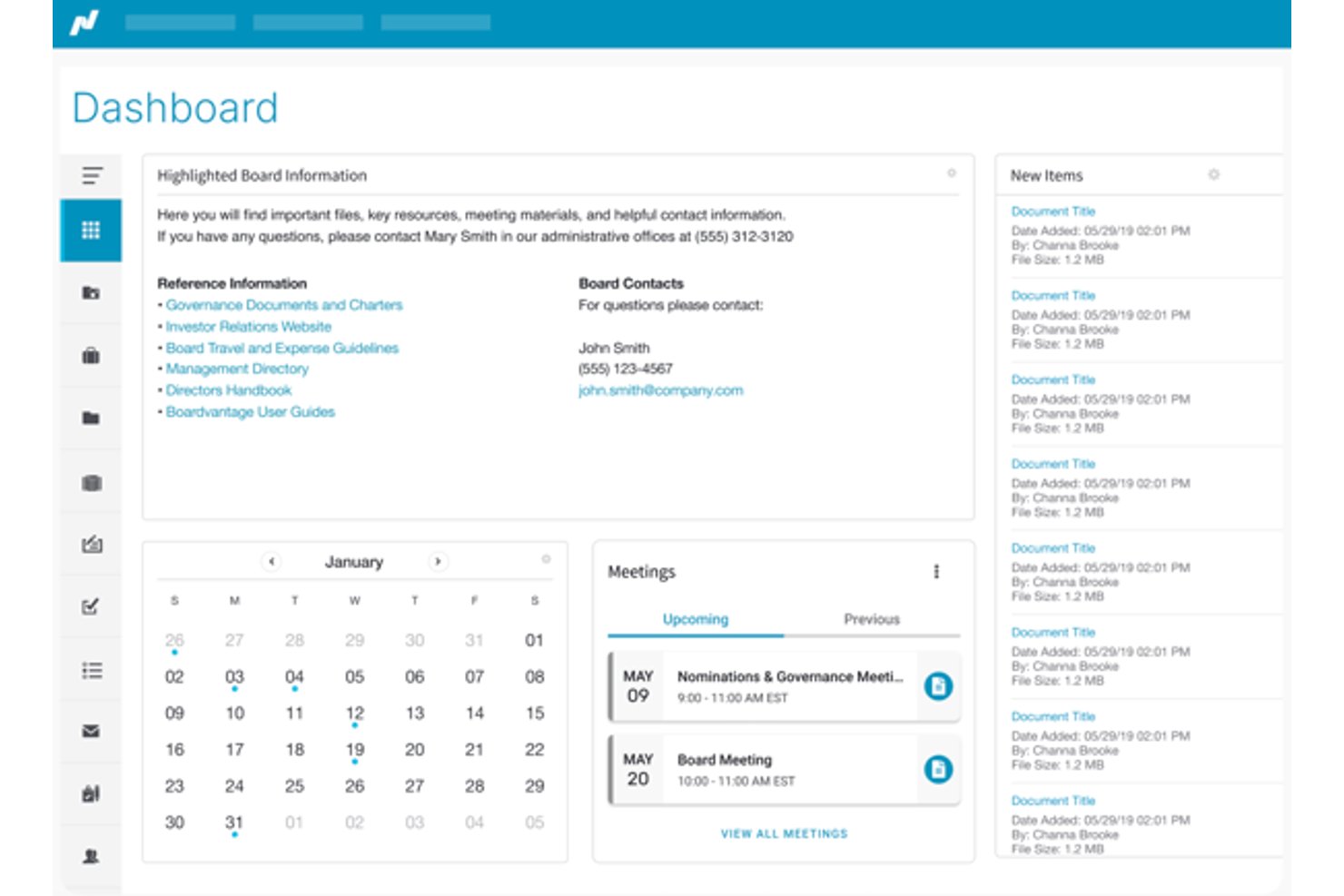
Nasdaq Boardvantage is a board portal built for enterprise governance, combining meeting preparation, secure document distribution, board book assembly, digital approvals, e-signatures, and compliance questionnaires in a single platform.
Who Is Nasdaq Boardvantage Best For?
It's a strong fit for large enterprises and publicly traded companies where corporate secretaries and legal teams manage board and committee meeting governance.
Why I Picked Nasdaq Boardvantage
Nasdaq Boardvantage earns its spot on my shortlist because its compliance infrastructure is genuinely built for high-stakes governance meetings. I'm particularly impressed by the combination of SOC 2 auditing, ISO 27001 certification, granular access controls, and full audit trails, which together cover what most enterprise security teams require before approving a board-level tool. I also find the built-in conflict of interest questionnaires and digital compliance workflows valuable, since those typically require a separate tool or manual process in competing platforms.
Nasdaq Boardvantage Key Features
- Board portal dashboard: Lets users organize meetings, board books, and key documents in a centralized online hub.
- In-app notes and annotations: Directors and admins can annotate board materials and add secure private notes for reference.
- Digital board book assembly: Upload, order, and build complete digital board books for distribution before meetings.
- DocuSign integration: Enables legally binding electronic signatures for board approvals and resolutions directly within the platform.
Nasdaq Boardvantage Integrations
Nasdaq Boardvantage offers native integrations with DocuSign, Microsoft Outlook, and Google Drive.
Pros and Cons
Pros:
- Built-in digital signature and approval flows
- Advanced document permission and access controls
- Board book assembly and distribution workflow
Cons:
- Lacks recurring meeting agenda features
- No real-time meeting collaboration tools

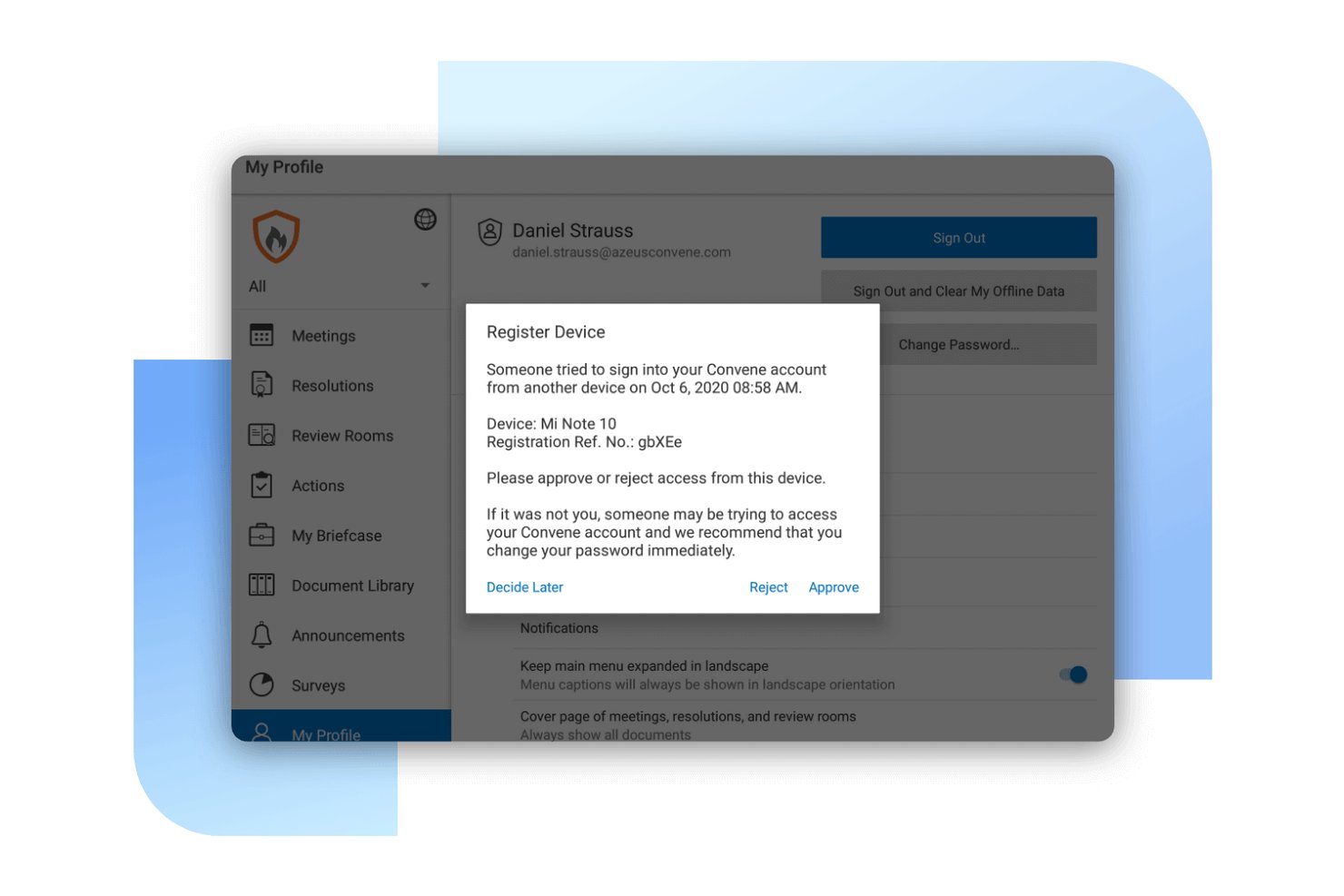
Convene is a board portal and meeting management platform built for governance-focused organizations, combining agenda building, AI-assisted minutes, secure document distribution, voting, and audit-ready compliance tools.
Who Is Convene Best For?
Convene is a strong fit for enterprise organizations running board and steering committee meetings where document security, governance, and compliance are non-negotiable.
Why I Picked Convene
I picked Convene as one of the best because its approach to document security goes well beyond standard access controls. Board packs are decrypted on-the-fly, meaning documents never sit unencrypted on a director's device. Per-document settings let you disable screenshots, restrict downloads, and apply custom watermarks, each tracked in a full audit trail. ISO 27001 certification and SOC 2 Type II compliance back all of this up at the infrastructure level.
Convene Key Features
- Smart agenda builder: Create structured agendas with templates, time allocations, and attachments for each agenda item.
- AI-powered meeting minutes: Automatically capture, summarize, and organize minutes using built-in AI.
- Integrated voting and approvals: Enable directors to vote, sign, and approve documents securely within meetings.
- Cross-platform access: Access meetings and documents from Windows, Mac, iOS, and Android devices.
Convene Integrations
Convene offers native integrations with Outlook, Google Calendar, Zoom, Microsoft Teams, SharePoint, OneDrive, Google Drive, Dropbox, DocuSign, and Adobe Sign. An API is available for custom integrations.
Pros and Cons
Pros:
- Built-in tools for digital meeting minutes
- Role-specific access controls for directors
- AES-256 encrypted document distribution
Cons:
- Occasional delays when syncing offline changes
- Limited flexibility for permission configurations
Fellow
Best collaborative note sharing for teams
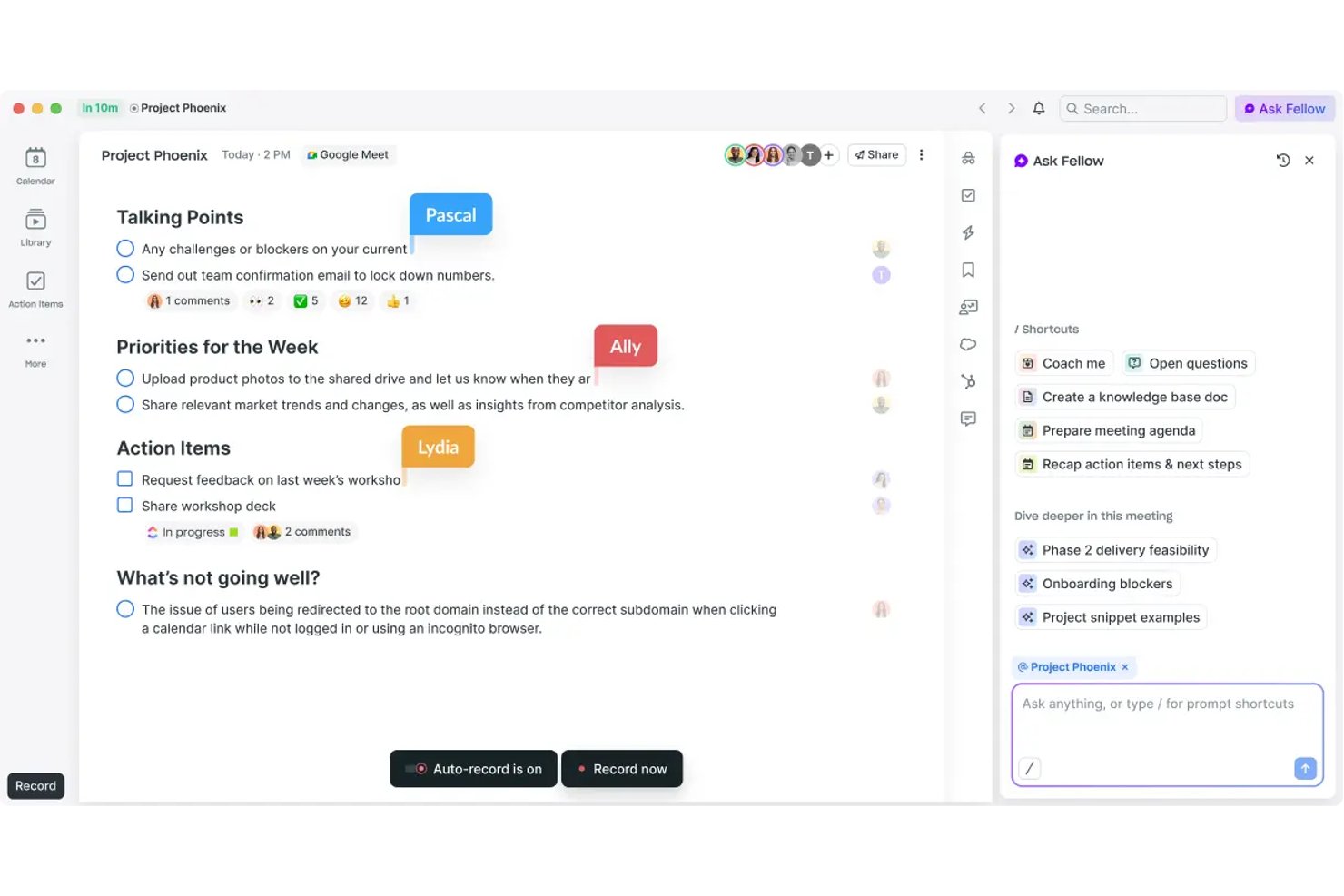
Fellow is an AI meeting management platform that pairs collaborative agenda creation and real-time transcription with action item tracking, 500+ meeting templates, and enterprise-grade security controls across Zoom, Google Meet, and Microsoft Teams.
Who Is Fellow Best For?
Fellow is a strong fit for mid-size to enterprise teams in regulated industries like finance, healthcare, and legal, where meeting compliance and documentation controls are non-negotiable.
Why I Picked Fellow
Fellow earns its spot as one of the best on my shortlist because the collaborative note-taking experience is built for teams, not just individuals. Multiple contributors can edit agendas and notes before, during, and after a meeting. Note locking and version history give you an audit trail of what changed and when. AI-generated summaries and action items pull from the shared transcript, keeping attribution intact across the full meeting record.
Fellow Key Features
- AI meeting assistant: Automatically records, transcribes, and summarizes meetings across Zoom, Teams, and Google Meet.
- Project management integrations: Syncs action items with Asana, Jira, Monday, Linear, and ClickUp.
- Enterprise compliance controls: Provides SOC 2 Type II, HIPAA, GDPR, audit trails, and role-based permissions.
- Recording library: Stores and manages meeting recordings with granular access and retention policies.
Fellow Integrations
Fellow offers 50+ native integrations, including Zoom, Microsoft Teams, Google Meet, Asana, Jira, Monday, Salesforce, HubSpot, Slack, and Notion. API access is available for custom integrations.
Pros and Cons
Pros:
- SOC 2 Type II and HIPAA compliance controls
- AI-generated meeting summaries and action items
- Real-time collaborative agenda and note editing
Cons:
- Limited support for highly structured board meetings
- No built-in meeting scheduling tools

adam.ai
Best action item tracking for follow-ups
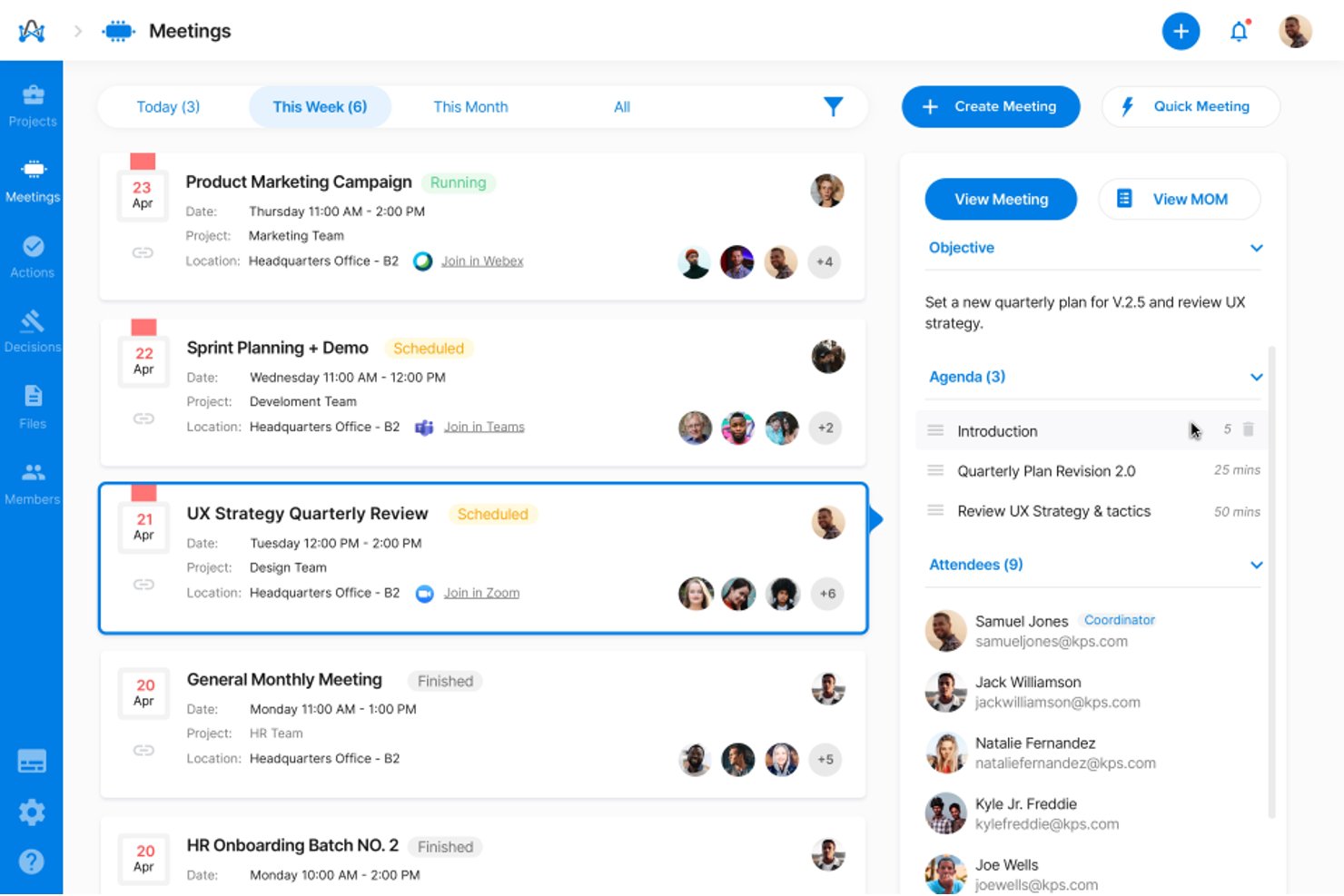
adam.ai is a governance-focused meeting management platform built for enterprise teams, covering agenda building, AI-assisted minutes capture, action item tracking, document management, and board and committee meeting workflows.
Who Is adam.ai Best For?
It's a strong fit for PMO directors and governance leads at mid-to-large enterprises managing board, committee, and steering group meetings with formal oversight requirements.
Why I Picked adam.ai
adam.ai earns its spot on my shortlist because its action tracking goes well beyond a simple task list. I like that you can assign owners and due dates directly inside the meeting, then monitor status across every subsequent session from a dedicated dashboard. iAdam, the built-in AI assistant, automatically surfaces action items from the transcript so nothing gets buried in notes after the call ends.
adam.ai Key Features
- Structured agenda builder: Create, edit, and share detailed agendas with time allocations for recurring meetings.
- Minutes approval workflow: Route meeting minutes for approval and maintain official records with version control.
- Document management: Upload, organize, and reference documents directly within meetings for centralized access.
- Multi-platform integrations: Connect with tools like SharePoint, Confluence, and major video conferencing platforms for unified meeting workflows.
adam.ai Integrations
adam.ai offers native integrations with Microsoft Teams, Zoom, Webex, Google Meet, and more. It connects with Zapier and provides an API for custom integrations.
Pros and Cons
Pros:
- Formal project and board governance support
- Built-in minutes approval and audit workflow
- Tracks action items across recurring meetings
Cons:
- Meeting scheduling less advanced than competitors
- Participant caps on lower tier plans
Beenote
Best advanced meeting minutes templating
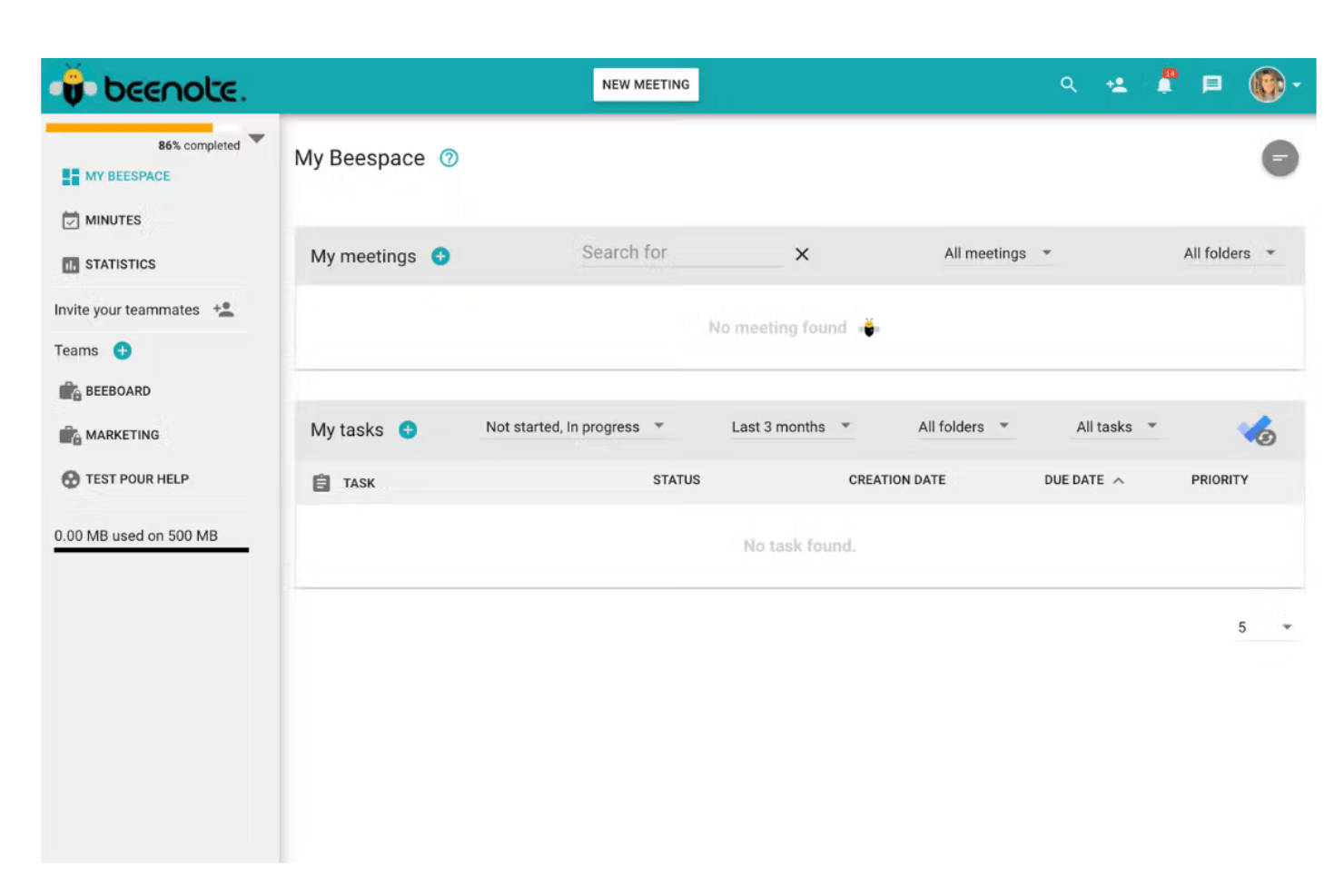
Beenote is a meeting governance platform built around structured agenda creation, real-time collaborative note-taking, automated minutes generation, and decision and action item tracking across teams, committees, and boards of directors.
Who Is Beenote Best For?
Beenote is a natural fit for nonprofits, associations, and mid-market organizations that run formal board meetings, executive committees, or governance-driven project reviews.
Why I Picked Beenote
I picked Beenote as one of the best because its agenda-to-minutes pipeline is genuinely impressive. When you build an agenda in Beenote, that structure becomes the skeleton of your minutes automatically, so by meeting's end, up to 80% of the document is already written. I also like the reusable templates with topic carry-over, which let governance teams run recurring board or committee meetings without rebuilding the agenda from scratch each time.
Beenote Key Features
- Task and decision registers: Track tasks and record decisions across meetings in searchable, persistent registers.
- Electronic voting and advance voting: Enable participants to securely vote on resolutions or decisions within meetings or ahead of time.
- Secretary and private note-taking modes: Allow designated note-takers or board secretaries to keep confidential or internal notes during sensitive sessions.
- Microsoft 365 and Google Workspace integrations: Sync calendars, tasks, and meeting data with leading productivity platforms.
Beenote Integrations
Beenote offers native integrations with Microsoft 365, Microsoft Teams, Outlook, Google Workspace, Google Calendar, Google Tasks, Microsoft To Do, and Antidote.
Pros and Cons
Pros:
- Includes dedicated governance and board modules
- Supports real-time collaborative note editing
- Agenda links automatically to minute-taking
Cons:
- Lacks granular reminder and escalation options
- Does not support bulk document export
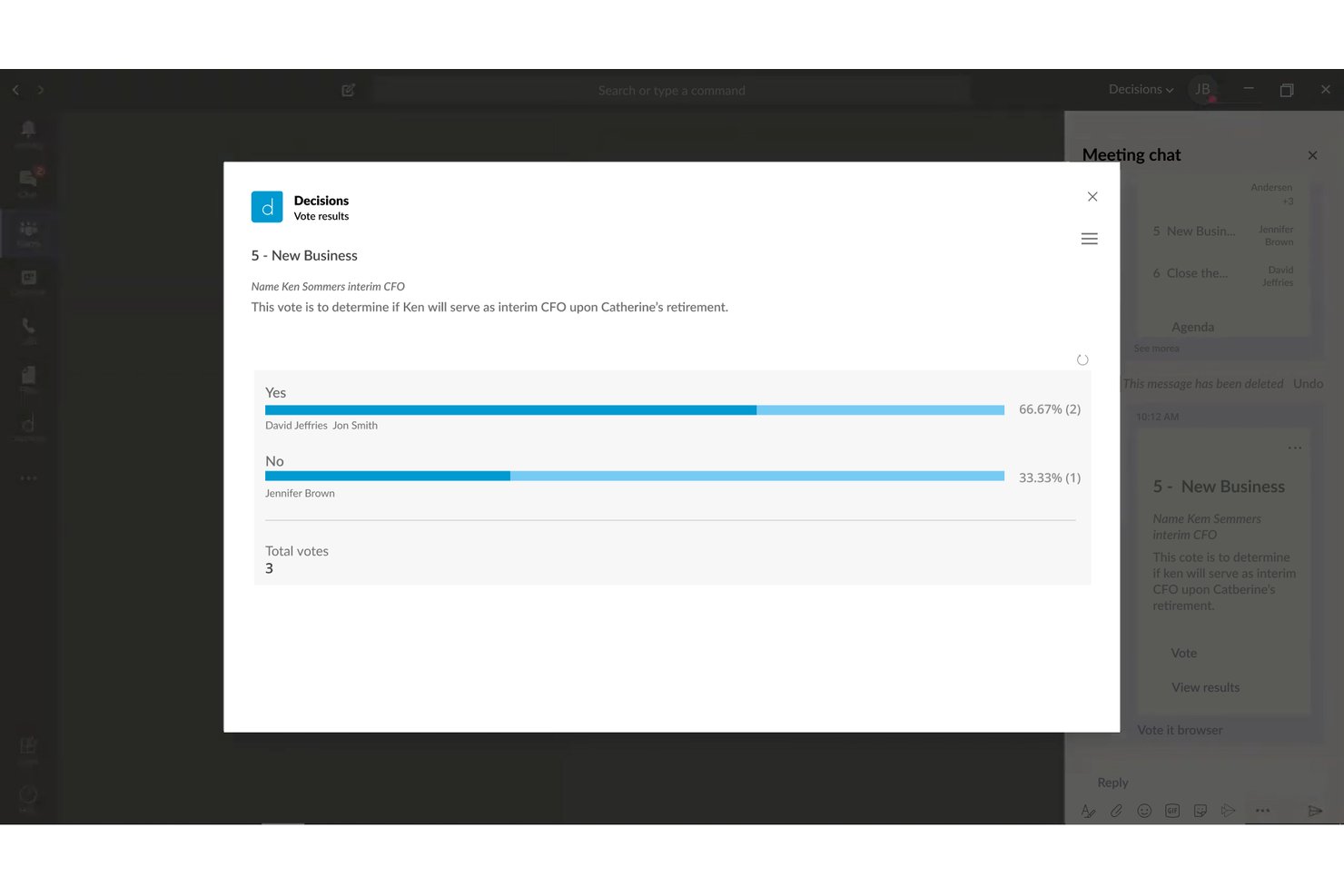
Decisions is a Microsoft 365-native meeting management platform that brings structured agenda building, AI-assisted minutes, decision logging, and action item tracking into Microsoft Teams.
Who Is Decisions Best For?
Decisions is a strong fit for enterprise teams already standardized on Microsoft 365 that need governed, structured meeting processes across PMO and steering committee functions.
Why I Picked Decisions
I've included Decisions in my top picks because of how it handles recurring meeting agendas at the structural level. The AI Agenda Builder generates draft agendas in seconds, and agenda items carry over automatically from session to session, so standing committees or weekly PMO cadences don't start from scratch each week. I also like that attendees can contribute agenda topics before the meeting, which means by the time the call starts, priorities are already aligned.
Decisions Key Features
- AI meeting recap: Summarizes meeting discussions and decisions using intelligent text recognition.
- In-meeting secure voting: Lets participants securely vote on motions or issues during meetings within Teams.
- Microsoft Planner integration: Syncs captured tasks and action items automatically to Microsoft Planner for ongoing tracking.
- SOC 2 and ISO 27001 compliance: Supports enterprise-grade data security, audit trails, and governance standards.
Decisions Integrations
Decisions has native integrations across the Microsoft ecosystem, including Microsoft 365, Teams, Outlook, SharePoint, Planner, OneDrive, Word, Excel, PowerPoint, OneNote, Azure, and more.
Pros and Cons
Pros:
- Secure in-meeting voting and e-signatures
- AI-powered meeting minutes and recaps
- Recurring agendas carry over automatically
Cons:
- No native support for non-Microsoft tools
- Requires license for every attendee
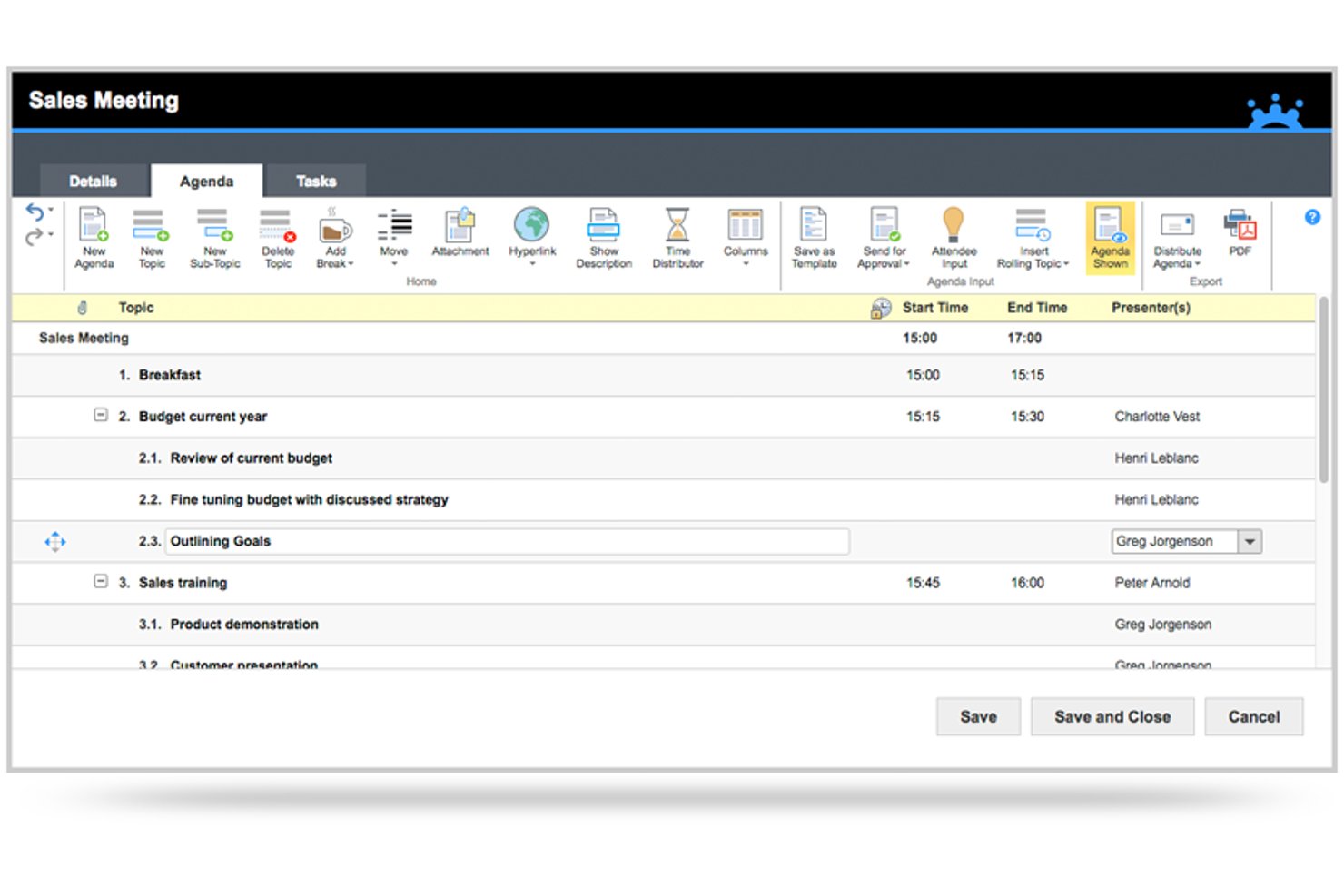
MeetingBooster is an enterprise meeting management platform built around a structured workflow of agenda creation, in-meeting note-taking, auto-generated minutes, task tracking, and meeting series management.
Who Is MeetingBooster Best For?
MeetingBooster is a strong fit for enterprise and mid-market organizations with formal governance requirements, including PMO teams, steering committees, and compliance-driven departments.
Why I Picked MeetingBooster
I picked MeetingBooster as one of the best because no other tool I've used pulls every meeting artifact into a single, structured record the way it does. From the dedicated Agenda Module through to auto-generated, formatted minutes, every decision and action item ends up in one archived document. The Premium approval workflow adds version-controlled sign-off on both agendas and minutes, which is exactly what steering committee records require.
MeetingBooster Key Features
- Meeting analytics dashboard: Track attendance, meeting costs, and task status with built-in reports.
- Meeting series management: Group and organize recurring meetings for boards or committees.
- Microsoft Teams integration: Access agendas and archived minutes directly inside Teams.
- Active Directory synchronization: Manage users and security roles through enterprise directory integration.
MeetingBooster Integrations
MeetingBooster offers native integrations with Outlook, Microsoft Teams, Google Calendar, Office, Lotus Notes, and Yahoo Calendar. Web hooks are available for connecting to external task management systems, and Active Directory synchronization is supported.
Pros and Cons
Pros:
- Outlook and Teams integration for meeting management
- Archiving and approval workflows for minutes
- Dedicated agenda builder with timeboxing
Cons:
- Limited flexibility in task and action item tracking
- No AI-powered transcription or summary tools
Annen programvare for møtehåndtering i virksomheter
Her er noen flere alternativer innen programvare for møtehåndtering i virksomheter som ikke kom med på kortlisten min, men som likevel er verdt å se nærmere på:
- Board Intelligence
For customizable reporting for executives
- Fireflies.ai
For voice-driven search across meeting records
- Govenda
For director engagement tools for boards
- Otter.ai
For automated live transcription for meetings
- Ideals Board
For secure document sharing for enterprises
- Spinach AI
For AI-powered summaries for team meetings
- BoardPro
For workflow automation for board meeting tasks
- AgreeDo
For agenda-to-action item tracking integration


How I Evaluate Enterprise Meeting Management Software
I split my evaluation into baseline requirements—like structured agenda templates and audit trails for steering committees—and differentiators that separate the best from the rest.
Core Functionality (Table Stakes For This List)
When I'm selecting tools for my list, I rank each one on a scale from 0 (does not offer the functionality) to 5 (excels in this area) for each core functionality listed below. Then, I calculate the tool's total score into a percentage. Each tool needs to achieve a minimum total score of 65% to be considered for inclusion.
- Agenda Management: I check whether a tool supports reusable agenda templates with timeboxing—especially for recurring cadences like weekly standups or monthly steering committees.
- Minutes & Notes Capture: Real-time collaborative notes with attendee attribution and version history matter here, since official meeting records need clear audit trails.
- Action Item Tracking: I evaluate how each tool assigns, tracks, and reports on action items across meetings, including owner visibility, due dates, and status dashboards.
- Enterprise Scheduling: Large stakeholder groups spread across time zones need more than a calendar link. I look for multi-calendar coordination and delegation support.
- Integrations With PM Tools: Connecting meetings to project work is where these tools earn their keep. I look for native sync with platforms like Jira, Asana, or Microsoft Project.
- Governance & Security: For PMO directors and governance leads, I evaluate SSO/SAML support, granular role-based permissions, audit logs, and relevant certifications like SOC 2 or ISO 27001.
Once I have a list of tools that meet the criteria, I consider what sets each platform apart.
Differentiating Factors (What Sets Vendors Apart)
Here's how I compare and contrast different vendors:
Standout Features
AI-powered transcription with speaker identification cuts post-meeting documentation time, especially for program managers running back-to-back sessions. Board and governance workflows also matter. Tools like Diligent Boards and OnBoard include voting modules and secure director portals that governance leads depend on. Analytics dashboards round out the picture, showing meeting time trends by team so you can spot overloaded schedules before they stall delivery.
Beyond Features
Security and compliance posture is where I start. I check for certifications like SOC 2 Type II or ISO 27001 and data residency options, since steering committee records often contain sensitive strategic data. Integration depth matters just as much—open APIs and native connectors to tools like SharePoint, Slack, and Okta determine how well a platform fits your existing stack. I also evaluate licensing flexibility, looking at whether vendors let you mix user types like executives, contributors, and view-only guests to keep costs predictable.
Slik velger du programvare for møtehåndtering i virksomheter
Det er lett å gå seg vill i lange funksjonslister og komplekse prisstrukturer. For å hjelpe deg med å holde fokus når du går gjennom den unike prosessen med å velge programvare, får du her en sjekkliste over faktorer du bør ha i mente:
| Faktor | Hva bør du vurdere? |
|---|---|
| Skalerbarhet | Kan programvaren støtte nåværende og fremtidige team, et stort antall brukere og flere avdelinger uten redusert ytelse eller ekstra skjulte kostnader etter hvert som dere vokser? |
| Integrasjoner | Kan den integreres med organisasjonens eksisterende prosjektverktøy, kalendere og kommunikasjonsplattformer med minimale forstyrrelser eller kostbare koblinger? |
| Tilpasningsmuligheter | Er arbeidsflyter, maler, tillatelser og merkevareprofilering fleksible nok til å passe organisasjonens etablerte møtepolicyer og styringskrav? |
| Brukervennlighet | Vil travle ledere, assistenter og distribuerte team raskt kunne ta i bruk verktøyet og håndtere hele møtelivssyklusen – fra agendaer og notater til tiltak – uten flere måneders opplæring eller omfattende IT-støtte? |
| Implementering og innføring | Hvor lang tid vil oppsettet ta? Får dere støtten, opplæringen og ressursene som trengs for å sikre oppslutning og unngå å forstyrre prosjektets arbeidsrytme? |
| Sikkerhetstiltak | Samsvarer verktøyet med interne retningslinjer og krav til kundedata? Se etter sertifiserte plattformer med detaljerte tilgangskontroller og transparente revisjonsspor. |
| Kostnad | Kan du forutsi de totale kostnadene basert på teamstørrelse og bruk? Vær oppmerksom på ekstra kostnader knyttet til lagring, integrasjoner eller administratorlisenser. |
| Krav til samsvar | Må dere oppfylle standarder som SOC 2, ISO 27001 eller GDPR? Bekreft alternativer for datalagring i bestemte geografiske områder og leverandørens vilje til å støtte revisjoner eller levere samsvarsrapporter. |
Hva er programvare for møtehåndtering i virksomheter?
Programvare for møteadministrasjon for virksomheter er alt-i-ett-plattformer utviklet for å hjelpe store organisasjoner med å organisere, dokumentere og følge opp møter på tvers av distribuerte team og interessenter. Disse verktøyene effektiviserer møtearbeidsflyter ved å samle agendaer, referater, beslutninger og oppfølgingspunkter på ett sted, samtidig som de tilbyr varsler, styringskontroller og sikker tilgang for teammedlemmer.
Mange plattformer støtter videosamtaler, samarbeid på digitale tavler, innsjekkingsfunksjoner og andre samarbeidsfunksjoner for å forbedre teamarbeidet både i eksterne og fysiske møter. De inkluderer ofte en mobilapp, integreres med prosjektstyringssystemer og hjelper organisasjoner med å optimalisere møteresultater samtidig som de gir en bedre brukeropplevelse. Mange leverandører tilbyr også opplæringsressurser, for eksempel webinarer, for å hjelpe team med å komme i gang.
Funksjoner i programvare for møteadministrasjon for virksomheter
Når du velger programvare for møteadministrasjon for virksomheter, bør du se etter følgende viktige funksjoner:
- Agendaadministrasjon: Gjør det mulig for team å opprette, dele og gjenbruke strukturerte møteagendaer med tidsfordelinger, vedlegg og innspill fra flere bidragsytere.
- Registrering av referater og notater: Tilbyr samarbeid om notatskriving med angivelse av hvem som deltok, tidsstempler, versjonshistorikk og sikker lagring av offisielle møtereferater.
- Oppfølging av tiltak: Tildeler, overvåker og oppdaterer oppfølgingspunkter eller beslutninger med tydelig ansvar, forfallsdatoer og statusrapportering i sanntid på tvers av team.
- Planlegging for virksomheter: Støtter smart planlegging for store, distribuerte grupper, kalendersynkronisering på tvers av tidssoner og integrasjon med organisasjonens kalendere, for eksempel Outlook eller Google.
- Tilgangskontroller og sikkerhet: Tilbyr detaljerte brukertillatelser, rollebasert tilgang, SSO/SAML og detaljerte revisjonslogger for å beskytte sensitivt møteinnhold.
- Arbeidsflyter for samsvar og styring: Gjør det mulig for organisasjoner å administrere prosesser på styrenivå, avstemninger, godkjenninger og krav til elektroniske signaturer med tanke på overholdelse av regelverk.
- Integrasjon med prosjektstyringsverktøy: Kobler sømløst møtedata til plattformer som Jira, Asana eller Microsoft Teams og synkroniserer oppgaver og beslutninger for å gi full oversikt.
- Avansert analyse: Gir innsikt i møtefrekvens, deltakelsesmønstre og konkrete resultater for å bidra til bedre produktivitet og ansvarlighet i organisasjonen.
- Automatisert distribusjon av referater: Automatiserer delingen av godkjente møtereferater med interessenter, med sporing av lesebekreftelser og oppfølging.
- Flerspråksstøtte: Tilrettelegger for globale organisasjoner ved å tilby grensesnitt, transkripsjon og kommunikasjonsverktøy på flere språk.
Fordeler med programvare for møteadministrasjon for virksomheter
Implementering av programvare for møteadministrasjon for virksomheter gir flere fordeler for teamet og virksomheten din. Her er noen av fordelene du kan se frem til:
- Større ansvarlighet i møter: Tildeling av oppfølgingspunkter og sporing av ansvar sikrer at oppfølging dokumenteres og er synlig på tvers av team.
- Effektivisert styring og samsvar: Sikker dokumentlagring, godkjenninger og revisjonsspor hjelper deg med å oppfylle krav til styrearbeid, regelverk og personvern.
- Sentralisert møtedokumentasjon: Agendaer, referater og beslutninger er tilgjengelige på ett sted, noe som reduserer forvirring og manuell oppfølging.
- Mer effektiv planlegging: Smarte kalenderintegrasjoner og støtte for tidssoner gjør det enklere å organisere møter for distribuerte interessenter.
- Bedre samarbeid på tvers av team: Notatskriving i sanntid og integrasjoner med prosjektverktøy bygger bro mellom avdelinger og holder alle samkjørte.
- Handlingsrettet møteanalyse: Dashbord og rapporter gir innsikt i møtenes ROI, tidsbruk og deltakelse for bedre ressursplanlegging.
- Skalerbarhet for vekst i virksomheten: Støtte for flere leietakere og fleksibel utrulling gjør det mulig å utvide på tvers av globale team og forretningsenheter.
Kostnader og priser for programvare for møteadministrasjon for virksomheter
Valg av programvare for møteadministrasjon for virksomheter krever en forståelse av de ulike prismodellene og abonnementene som er tilgjengelige. Kostnadene varierer basert på funksjoner, teamstørrelse, tillegg og mer. Tabellen nedenfor oppsummerer vanlige abonnementer, gjennomsnittsprisene deres og typiske funksjoner som er inkludert i programvareløsninger for møteadministrasjon for virksomheter:
Sammenligningstabell for abonnementer for programvare for møteadministrasjon for virksomheter
| Plantype | Gjennomsnittspris | Vanlige funksjoner |
|---|---|---|
| Gratisplan | $0 | Grunnleggende oppretting av agendaer, enkel notatskriving, begrenset lagring av møter og tilgang for et lite antall brukere. |
| Personlig plan | $5-$15/per bruker/måned | Individuell planlegging, gjenbrukbare agendamaler, kjerneintegrasjoner, filvedlegg og sporing av enkeltbrukere. |
| Forretningsplan | $15-$40/per bruker/måned | Teamplanlegging, samarbeidende notatføring, tildeling av tiltakspunkter, avanserte integrasjoner og rapportering i dashbord. |
| Storbedriftsplan | $40-$90/per bruker/måned | SSO/SAML, revisjonslogger, arbeidsflyter for samsvar, tilpasset merkevarebygging, prioritert støtte, API-tilgang og ubegrenset lagring. |
Vanlige spørsmål om programvare for møtehåndtering i store virksomheter
Her er noen svar på vanlige spørsmål om programvare for møtehåndtering i store virksomheter:
Hvordan skiller programvare for møtehåndtering i store virksomheter seg fra enkle møteapper?
Programvare for møtehåndtering i store virksomheter tilbyr avanserte funksjoner som arbeidsflyter for styring, rollebaserte tillatelser, samsvarssporing og dype integrasjoner med prosjektstyrings- og sikkerhetssystemer som ikke finnes i enkle møteapper.
Kan programvare for møtehåndtering i store virksomheter integreres med den eksisterende teknologistakken vår?
Ja, de fleste løsninger tilbyr koblinger til verktøy som Google Workspace, Microsoft 365, Slack, Salesforce og prosjektstyringsplattformer, i tillegg til åpne API-er for tilpassede integrasjoner – slik at du kan tilpasse dem til de eksisterende arbeidsflytene dine.
Hvilke sikkerhetstiltak bør jeg forvente fra disse plattformene?
Se etter funksjoner som SOC 2- eller ISO 27001-sertifisering, SSO/SAML-autentisering, kontroller for datalagringssted, detaljerte tillatelser, revisjonslogger og kryptering av sensitivt møteinnhold.
Er det mulig å spore møteeffektivitet eller deltakelse med disse verktøyene?
Ja, mange plattformer inkluderer analysedashbord som viser deltakelse, gjennomføring av tiltakspunkter og trender for møtetid, slik at du kan vurdere og forbedre avkastningen på møtene.
Kan vi administrere styremøter og samsvarsprosesser på samme plattform?
Ja, ledende plattformer støtter arbeidsflyter for styremøter, inkludert godkjenning av agendaer, elektroniske signaturer, vedtak, avstemninger og sikker tilgang for styremedlemmer – noe som gjør samsvarssporing mye enklere.