

10 beste programvareløsninger for dokumentfangst – vurdert i 2026

Beste programvare for dokumentfangst – kortliste


Det kan være en stor hodepine å håndtere dokumenter, særlig når du jonglerer med flere prosjekter. Du trenger en løsning som hjelper teamet ditt med å finne, organisere og dele dokumenter effektivt. Programvare for dokumentfangst kan lette denne byrden ved å gjøre uoversiktlige filer om til organiserte digitale ressurser.
Jeg har brukt tid på å teste ulike verktøy for å gi deg en liste over den beste programvaren for dokumentfangst på markedet. Anmeldelsene mine er uavhengige og grundig undersøkt, og målet er å gi deg en tydelig forståelse av hva hver løsning tilbyr.
I denne artikkelen finner du innsikt i hvordan disse verktøyene kan løse dokumentutfordringene dine. Enten du trenger bedre etterlevelse av regelverk eller enklere tilgang, finnes det noe her for alle prosjektledere.
Hvorfor du kan stole på våre programvareanbefalinger
Teamet vårt har testet og anmeldt programvare siden 2012. Vi er selv prosjektledere, så vi vet hvor vanskelig og hvor viktig det er å velge riktig programvare.
I denne guiden har vi vurdert verktøyene gjennom praktisk testing og uavhengig research og gitt dem poeng ut fra våre utvelgelseskriterier. Vi bygger også på innsikt fra ledende eksperter i bransjen og erfarne prosjektledere.
Anmeldelsene våre bygger på vår egen redaksjonelle vurdering. De er ikke et salgsargument.
Ekspertanmeldere:
Sammenligningstabell for programvare for dokumentfangst
Denne sammenligningstabellen oppsummerer prisopplysningene for mine beste utvalg av programvare for dokumentfangst:
| Tool | Best For | Trial Info | Price | ||
|---|---|---|---|---|---|
| 1 | Best for no-code mobile field data capture | Free trial + free demo available | From $20/user/month (billed annually) | Website | |
| 2 | Best for intelligent data extraction | Free demo available | Pricing upon request | Website | |
| 3 | Best for process automation | Free demo available | From $73/user/month (billed annually) | Website | |
| 4 | Best for mobile field teams | 14-day free trial + free demo available | From $20/user/month | Website | |
| 5 | Best for compliance-focused industries | Free trial available | Pricing upon request | Website | |
| 6 | Best for remote document access | Free demo available | Pricing upon request | Website | |
| 7 | Best for metadata-driven organization | Free demo available | From $65/user/month | Website | |
| 8 | Best for secure document sharing | 14-day free trial + free demo available | Pricing upon request | Website | |
| 9 | Best for enterprise integration | Free trial available | From $7/user/month (billed annually) | Website | |
| 10 | Best for sales document management | Free plan + 14-day free trial + free demo available | From $19/user/month | Website |
Anmeldelse av den beste programvaren for dokumentfangst
Nedenfor finner du mine detaljerte sammendrag av den beste programvaren for dokumentfangst som kom med på kortlisten min. Anmeldelsene mine gir en detaljert gjennomgang av de viktigste funksjonene, fordeler & ulemper, integrasjoner og ideelle bruksområder for hvert verktøy, slik at du kan finne det beste alternativet for deg.
Appenate
Best for no-code mobile field data capture
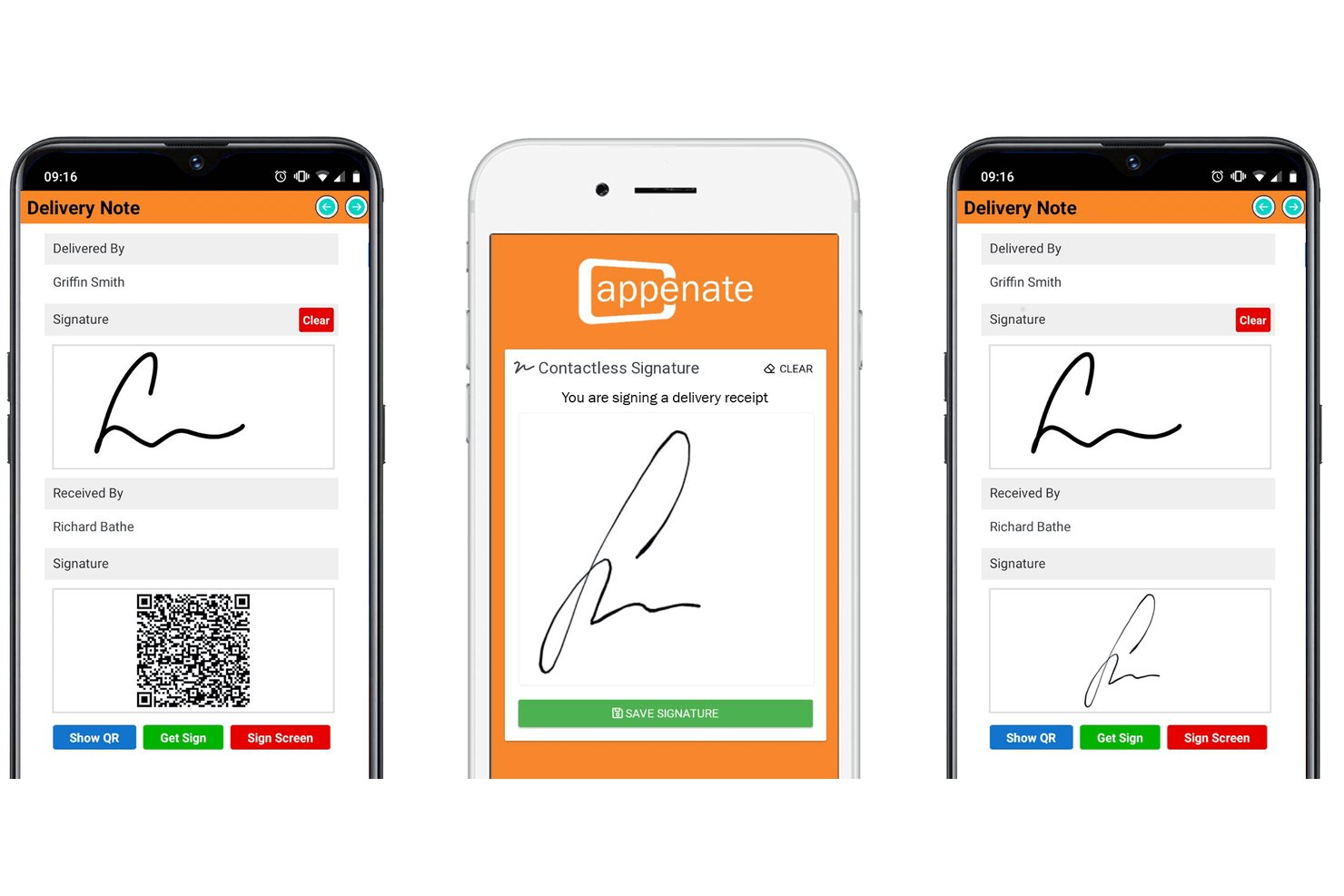
Appenate is a no-code mobile forms platform that lets field teams capture data through photos, OCR, voice input, barcodes, GPS, and signatures on iOS, Android, and Windows devices, with full offline support.
Who Is Appenate Best For?
Appenate is a strong fit for field teams in construction, utilities, and asset-heavy industries that need to capture data on-site without reliable internet access.
Why I Picked Appenate
I picked Appenate as one of the best because it solves a real problem for field teams: capturing structured data from paper documents without a reliable connection. AI Photo Fill lets you snap a photo of any document and have the data extracted and mapped directly into form fields, cutting what used to take 15–20 minutes down to seconds. Add offline-capable mobile capture across iOS, Android, and Windows, and your team can log inspections, signatures, and barcodes on-site whether or not the signal holds.
Appenate Key Features
- AI Voice Fill: Speak your data into form fields—dates, text, and dropdowns—across multiple languages without typing anything.
- Multi-step process forms: Route forms sequentially between team members, with push notifications and accept/reject controls at each step.
- Contactless signature capture: Clients scan a QR code and sign on their own device, with no shared hardware required.
- Cloud storage connectors: Push captured data directly to SharePoint, Google Drive, Box, Dropbox, or Amazon S3 from within the platform.
Appenate Integrations
Appenate offers native integrations with SharePoint, Google Drive, Dropbox, Box, Egnyte, Amazon S3, Salesforce, and Power BI. It also supports custom connections through REST and PUSH APIs, plus data sources such as SQL Server.
Pros and Cons
Pros:
- Supports photos, signatures, barcodes, and GPS
- AI extracts handwritten and printed text
- Captures documents fully offline
Cons:
- Missing version control and retention policies
- No automatic document-type classification
Best for intelligent data extraction

An API-first intelligent document processing platform, Doxis AI.dp. provides OCR, data extraction, document classification, verification, and conversion for more than 50 document types and output formats.
Who is Doxis AI.dp. Best For?
Doxis AI.dp. suits mid-size to enterprise businesses in finance, logistics, retail, and healthcare that process high volumes of documents and need structured data routed into existing systems.
Why I Picked Doxis AI.dp.
I picked Doxis AI.dp. as one of the best because its extraction engine goes well beyond basic OCR. It captures 150+ data fields across 50+ document types, including invoice line items, tax IDs, and employment dates, with results returned in seconds. I also like the human-in-the-loop validation layer, where operators review and correct AI output on complex or low-quality scans, which gets real-world accuracy much closer to 100% than fully automated tools typically achieve.
- Document classification: Sorts and labels incoming documents by type, such as invoices, receipts, contracts, or IDs, before processing begins.
- Data anonymization: Detects and redacts sensitive information, including names, addresses, and ID numbers, within captured documents.
- Fraud detection: Uses pixel-level analysis, EXIF metadata checks, and duplicate detection on captured documents to flag suspicious files.
- Multi-format output: Exports extracted data in JSON, XML, CSV, XLSX, UBL, PDF, or TXT for routing to downstream systems.
Doxis AI.dp. Integrations
Doxis AI.dp. connects to over 200 systems through its plug-and-play integrations, including accounting and ERP systems such as Xero, Oracle NetSuite, SAP, Microsoft Dynamics, and QuickBooks. It also works with Google Drive, Pipedrive, and Make, connects with Zapier via Eden AI, and provides an API and SDK for custom integrations.
Pros and Cons
Pros:
- Provides GDPR-compliant data anonymization
- Includes document fraud detection layers
- Covers over 50 document types
Cons:
- VAT extraction often requires manual correction
- User feedback does not improve models
New Product Updates from Doxis AI.dp.
Doxis AI.dp Improves Dataset Validation and API Controls
Doxis AI.dp improves dataset editing with real-time type validation, better field controls, and save prevention on invalid values, plus new API capabilities. These updates help teams maintain cleaner dataset values and manage rows more reliably. For more information, visit Doxis AI.dp’s official site.
 .

Best for process automation

Laserfiche is an enterprise content management system that helps organizations automate processes and manage documents efficiently. Its main users are businesses looking to streamline operations and improve workflow management.
Why I picked Laserfiche: Laserfiche excels in process automation, making it a valuable tool for businesses that rely on efficient workflows. It offers features like automated document routing, which reduces manual handling of documents. You can also create custom workflows to suit your team's specific needs. The platform's user-friendly interface helps you set up these automations with minimal hassle.
Standout Features & Integrations
Features include electronic forms to collect and process data efficiently, document versioning that tracks changes over time, and audit trails that ensure compliance and transparency. These features work together to enhance your document management processes.
Integrations include Microsoft Office, Salesforce, DocuSign, QuickBooks, SAP, SharePoint, Google Workspace, Adobe Acrobat, AutoCAD, and Box.
Pros and Cons
Pros:
- Offers detailed audit trails
- Supports large-scale document management
- Custom workflows are easy to create
Cons:
- Customization options can be overwhelming
- Learning curve for new users
- Initial setup can be time-consuming

Fluix
Best for mobile field teams

Fluix is a workflow automation and document management tool designed for mobile field teams who need to manage tasks and documents on the go. It supports industries like construction, energy, and aviation by simplifying document handling and task management.
Why I picked Fluix: Fluix is ideal for mobile field teams, offering features that enhance productivity while on the move. It provides offline access, so your team can work without connectivity issues. The tool's form-filling capabilities allow you to capture data efficiently in the field. Additionally, task management features keep your team organized and on track, even in remote locations.
Standout Features & Integrations
Features include digital signatures for secure document approval, real-time data capture that ensures accurate information collection, and customizable workflows that adapt to your team's processes. These features help your team stay productive and efficient in various environments.
Integrations include Salesforce, Google Workspace, Microsoft Office 365, Box, Dropbox, OneDrive, Adobe Acrobat, SharePoint, QuickBooks, and Zapier.
Pros and Cons
Pros:
- Tailored for remote environments
- Digital signatures for secure approvals
- Customizable workflows for field tasks
Cons:
- Limited integration with non-mainstream tools
- Limited advanced analytics features
- Initial setup can be complex

FileHold
Best for compliance-focused industries

FileHold is a document management software designed for industries that require strict compliance and document control, such as healthcare and finance. It helps organizations manage documents, ensure regulatory compliance, and maintain secure records.
Why I picked FileHold: FileHold is particularly suited for compliance-focused industries, offering features that support regulatory adherence. It provides document version control, ensuring you always have the right version at hand. The software also includes audit trails for tracking document history, which is crucial for compliance audits. Additionally, its secure access controls protect sensitive information from unauthorized access.
Standout Features & Integrations
Features include automated document workflows that streamline approval processes, electronic forms that simplify data capture, and advanced search capabilities to quickly locate documents. These features enhance your team's ability to manage documents efficiently.
Integrations include Microsoft Office, SharePoint, Adobe Acrobat, QuickBooks, Salesforce, DocuSign, Google Workspace, Dropbox, SAP, and Box.
Pros and Cons
Pros:
- Offers electronic forms for data capture
- Secure document access controls
- Strong focus on regulatory compliance
Cons:
- Customization options may be overwhelming
- Requires dedicated server setup
- Higher initial costs for small teams

DocuWare
Best for remote document access

DocuWare is a document management and workflow automation solution designed for industries like healthcare, finance, and manufacturing. It helps businesses automate processes, manage documents, and ensure compliance efficiently.
Why I picked DocuWare: DocuWare excels in providing remote document access, making it a top choice for teams needing flexibility. It features intelligent document processing and automated invoice management, which are vital for reducing manual workload. The platform's secure document archiving ensures that your files are safely stored and easily accessible from anywhere. You’ll find that its integration with tools like Microsoft Teams enhances collaboration and accessibility.
Standout Features & Integrations
Features include intelligent document processing that automates data entry, automated invoice management for efficient financial operations, and secure archiving to keep your documents safe. These features ensure that your team can access and manage documents without being tied to a particular location.
Integrations include Microsoft Teams, Outlook, SAP, QuickBooks, Google Workspace, Salesforce, DocuSign, SharePoint, Dropbox, and OneDrive.
Pros and Cons
Pros:
- Offers secure document archiving
- Supports various industries
- Effective in automating processes
Cons:
- No public API available
- May require training for setup
- Pricing details are not transparent

M-Files
Best for metadata-driven organization

M-Files is a document management solution that caters to businesses of all sizes, focusing on organizing and managing information based on metadata. It helps teams improve document accessibility and control across various departments.
Why I picked M-Files: M-Files is designed to enhance metadata-driven organization, which makes it unique among document management tools. It allows you to tag documents with metadata, making it easier to find and categorize files. You can access documents based on what they are, not where they're stored. This feature is particularly useful for teams that handle large volumes of documents and need efficient retrieval methods.
Standout Features & Integrations
Features include advanced document permissions that ensure only authorized users access certain files, automated workflows that reduce manual tasks, and version control that keeps track of document changes. These features are designed to make document management more efficient for your team.
Integrations include Microsoft Office, Salesforce, Google Workspace, SharePoint, DocuSign, QuickBooks, SAP, HubSpot, Autodesk, and Adobe Acrobat.
Pros and Cons
Pros:
- Includes document version control
- Offers advanced permission settings
- Supports metadata-driven searches
Cons:
- The interface can feel cluttered
- Requires training for effective use
- Metadata setup can be complex
Revver
Best for secure document sharing

Revver is a document management solution aimed at businesses that prioritize secure document sharing and collaboration. It helps teams efficiently manage, store, and share documents while ensuring data security.
Why I picked Revver: Revver emphasizes secure document sharing, which is crucial for organizations handling sensitive information. It provides features like encryption and access controls to protect your data. You can easily share documents with external parties without compromising security. The platform's audit trails give you visibility into document access and modifications, enhancing accountability.
Standout Features & Integrations
Features include document version history that allows you to track changes over time, automated workflows that streamline document approvals, and customizable dashboards to monitor document activities. These features help your team stay organized and informed.
Integrations include Microsoft Office 365, Salesforce, QuickBooks, Google Workspace, Dropbox, Box, Adobe Acrobat, Slack, SharePoint, and DocuSign.
Pros and Cons
Pros:
- Supports external collaboration
- Provides detailed audit trails
- Strong focus on data security
Cons:
- Learning curve for new users
- Complex permissions management
- Limited mobile app functionality

Best for enterprise integration

Microsoft SharePoint is a collaboration and document management platform commonly used by large enterprises to facilitate internal communication and document sharing. It streamlines business processes, supports content management, and enhances team collaboration.
Why I picked Microsoft SharePoint: Microsoft SharePoint is tailored for enterprises that need seamless integration within their existing Microsoft ecosystem. It provides document libraries where your team can store and share files securely. The platform's workflow automation allows you to automate repetitive tasks, saving time and reducing errors. Version control ensures that everyone is working on the most up-to-date documents.
Standout Features & Integrations
Features include advanced search capabilities that help you quickly find documents, customizable team sites for personalized collaboration spaces, and content management features that ensure compliance and security. These features enhance your organization's ability to manage and share content effectively.
Integrations include Microsoft Teams, Office 365, OneDrive, Power BI, Yammer, Dynamics 365, PowerApps, Azure, Outlook, and Planner.
Pros and Cons
Pros:
- Offers customizable team sites
- Supports large-scale document management
- Strong integration with Microsoft products
Cons:
- Complexity in permissions management
- Requires training for effective use
- Complex setup for new users
PandaDoc
Best for sales document management

PandaDoc is a document automation software primarily used by sales teams to create, manage, and distribute sales documents efficiently. It streamlines the proposal and contract process, making it easier for businesses to close deals faster.
Why I picked PandaDoc: PandaDoc excels in managing sales documents, offering features that simplify the creation and distribution of proposals and contracts. It provides customizable templates, which save your team time when generating documents. The eSignature feature ensures that signing is quick and legally binding. Additionally, real-time analytics help you track document interactions, giving you insights into client engagement.
Standout Features & Integrations
Features include document collaboration that allows multiple team members to work on a document simultaneously, payment processing to collect payments directly through documents, and a content library that stores reusable document components. These features enhance your team's productivity and document management capabilities.
Integrations include Salesforce, HubSpot, Microsoft Dynamics 365, Pipedrive, Zoho CRM, Google Workspace, Dropbox, Box, Slack, and QuickBooks.
Pros and Cons
Pros:
- Efficient eSignature process
- Real-time analytics for document tracking
- Customizable templates for quick setup
Cons:
- Complex setup for advanced features
- Steep learning curve for new users
- Limited offline functionality
Annen programvare for dokumentfangst
Her er noen flere alternativer for programvare for dokumentfangst som ikke kom med på kortlisten min, men som likevel er verdt å se nærmere på:
- Dropbox Business
For team collaboration
- Hightail
For creative project management
- DocuPipe
For AI capture of unstructured docs
- Egnyte
For secure file sharing
- DocuPhase
For automated workflow management
- Adobe Scan
For mobile document scanning
- PaperScan
For batch document scanning


How I Evaluate Document Capture Software
I split my evaluation into two layers: baseline criteria every tool must clear—like OCR, field capture, and PM integrations—and the differentiators that separate the best fit from the rest.
Core Functionality (Table Stakes For This List)
When I'm selecting tools for my list, I rank each one on a scale from 0 (does not offer the functionality) to 5 (excels in this area) for each core functionality listed below. Then, I calculate the tool's total score into a percentage. Each tool needs to achieve a minimum total score of 65% to be considered for inclusion.
- Multi-Source Document Capture: I check whether a tool can ingest documents from scanners, mobile devices, email inboxes, and cloud drives so field teams and office staff can submit from wherever they work.
- OCR & Data Extraction: Each tool gets evaluated on how well its OCR handles real-world inputs like photographed receipts, scanned contracts, and handwritten notes—and whether it pulls structured data from them.
- Automated Classification & Indexing: I look for the ability to auto-sort incoming documents into categories like invoices, change orders, or submittals and tag them with searchable metadata.
- Workflow Automation & Routing: Captured documents need to move somewhere useful. I evaluate whether the tool routes files through approval chains tied to project stages or stakeholder roles.
- PM & Storage Integrations: Connecting to project management platforms and cloud storage matters. I look at native connectors to tools like Jira, Procore, SharePoint, and Google Drive, plus API availability.
- Secure Storage & Audit Trail: Every tool gets assessed on version control, role-based permissions, and audit logging—features project teams rely on during compliance reviews or contract disputes.
Once I have a list of tools that meet this criteria, I consider what sets each platform apart.
Differentiating Factors (What Sets Vendors Apart)
Here's how I compare and contrast different vendors:
Standout Features
Mobile field capture is a big differentiator—I look for offline-capable apps that let site crews upload delivery tickets or inspection photos without needing connectivity. AI-powered data validation also matters because it can flag mismatches between extracted invoice amounts and approved purchase orders before anyone reviews them. I evaluate collaborative markup tools too, since project teams often need to redline drawings or annotate scanned contracts directly inside the platform.
Beyond Features
Deployment flexibility is something I always consider—some teams need cloud-hosted tools, while others in regulated sectors require on-premise or hybrid options. Compliance matters here too. I check for certifications like SOC 2 Type II and ISO 27001, along with data residency choices for teams running projects across multiple regions. Implementation speed is another factor I weigh, especially how quickly a team can configure OCR templates and approval workflows without heavy IT involvement during onboarding.
Slik velger du programvare for dokumentfangst
Det er lett å gå seg vill i lange funksjonslister og kompliserte prismodeller. For å hjelpe deg med å holde fokus mens du går gjennom den unike prosessen din for valg av programvare, får du her en sjekkliste over faktorer du bør ha i mente:
| Faktor | Hva du bør vurdere |
|---|---|
| Skalerbarhet | Kan programvaren vokse sammen med virksomheten din? Vurder fremtidige behov og om verktøyet kan håndtere økte dokumentmengder uten ytelsesproblemer. |
| Integrasjoner | Fungerer den sammen med verktøyene du allerede bruker? Kontroller kompatibiliteten med de nåværende systemene dine, som CRM eller ERP, for å unngå avbrudd i arbeidsflyten. |
| Tilpasningsmuligheter | Kan du tilpasse den til prosessene dine? Se etter muligheter for å justere arbeidsflyter eller maler slik at de passer med teamets unike arbeidsmåter. |
| Brukervennlighet | Er den brukervennlig for alle teammedlemmer? Vurder læringskurven og om det finnes opplæringsressurser som kan hjelpe teamet med å komme raskt i gang. |
| Implementering og opplæring | Hvor lang tid tar det å komme i gang? Vurder oppsettsprosessen og om det finnes støtte som kan hjelpe med migrering og opplæring. |
| Kostnad | Passer prisen inn i budsjettet ditt? Vær oppmerksom på skjulte gebyrer, for eksempel for ekstra brukere eller mer lagringsplass, og sammenlign med tilsvarende verktøy. |
| Sikkerhetstiltak | Beskytter den dataene dine? Se etter krypteringsstandarder, kontroller for brukertilgang og samsvar med regler for databeskyttelse. |
| Tilgjengelig kundestøtte | Kan du få hjelp når du trenger det? Kontroller om kundestøtte er tilgjengelig døgnet rundt og gjennom flere kanaler, som chat, e-post eller telefon. |
Hva er programvare for dokumentfangst?
Programvare for dokumentfangst er et verktøy som konverterer fysiske og digitale dokumenter til organiserte, søkbare filer. Den brukes ofte av fagpersoner som prosjektledere, regnskapsførere og administratorer som trenger å håndtere store mengder dokumenter effektivt. Funksjoner for skanning, optisk tegngjenkjenning og indeksering bidrar til å organisere, åpne og hente frem dokumenter raskt. Alt i alt sparer disse verktøyene tid og reduserer manuelle feil ved håndtering av dokumenter.
Funksjoner i programvare for dokumentfangst
Når du velger programvare for dokumentfangst, bør du se etter følgende viktige funksjoner:
- Skanningsfunksjoner: Gjør det mulig å digitalisere fysiske dokumenter, slik at de blir enklere å lagre og få tilgang til elektronisk.
- Optisk tegngjenkjenning (OCR): OCR konverterer skannede bilder til redigerbar og søkbar tekst, noe som sparer tid på manuell dataregistrering.
- Indeksering: Denne funksjonen hjelper med å kategorisere dokumenter ved hjelp av tagger eller metadata, noe som gjør dem enklere å søke etter og organisere.
- Automatisering av arbeidsflyt: Automatiserer gjentakende oppgaver som å sende dokumenter til godkjenning, og øker dermed effektiviteten.
- Datasikkerhet: Tilbyr kryptering og tilgangskontroller for å beskytte sensitiv informasjon mot uautorisert tilgang.
- Mobiltilgang: Gjør det mulig å registrere og administrere dokumenter ved hjelp av mobile enheter, slik at du kan arbeide mens du er på farten.
- Versjonskontroll: Sporer endringer og opprettholder dokumenthistorikken, slik at alle arbeider med den nyeste versjonen.
- Samarbeid i sanntid: Gjør det mulig for flere brukere å arbeide med dokumenter samtidig, noe som styrker samarbeidet.
- Integrasjonsstøtte: Sikrer kompatibilitet med eksisterende verktøy som CRM- eller ERP-systemer, slik at arbeidsflyten opprettholdes.
- Tilpassbare maler: Tilbyr forhåndsutformede maler som kan tilpasses bestemte forretningsbehov, og sparer dermed tid ved oppsett.
Fordeler med programvare for dokumentfangst
Implementering av programvare for dokumentfangst gir flere fordeler for teamet og virksomheten din. Her er noen av fordelene du kan se frem til:
- Økt effektivitet: Automatisering av dokumentarbeidsflyter reduserer manuelle oppgaver og frigjør tid til viktigere arbeid.
- Forbedret datanøyaktighet: Optisk tegngjenkjenning minimerer feil ved å konvertere tekst fra bilder til redigerbare formater.
- Bedre organisering: Indeksering og merking av metadata gjør det enkelt å kategorisere og finne dokumenter raskt.
- Bedre samarbeid: Deling og redigering av dokumenter i sanntid hjelper team med å arbeide mer effektivt sammen.
- Kostnadsbesparelser: Digitalisering av dokumenter reduserer behovet for fysisk lagringsplass og tilknyttede utgifter.
- Sikker dokumenthåndtering: Datasikkerhetsfunksjoner som kryptering beskytter sensitiv informasjon mot uautorisert tilgang.
- Tilgang fra hvor som helst: Mobiltilgang gjør det mulig for team å arbeide med dokumenter uansett hvor de befinner seg, og støtter fleksible arbeidsmiljøer.
Kostnader og priser for programvare for dokumentfangst
Valg av programvare for dokumentfangst krever en forståelse av de ulike prismodellene og abonnementene som er tilgjengelige. Kostnadene varierer basert på funksjoner, teamstørrelse, tillegg og mer. Tabellen nedenfor oppsummerer vanlige abonnementer, gjennomsnittsprisene deres og typiske funksjoner som inngår i løsninger for dokumentfangst:
Sammenligningstabell for programvare for dokumentfangst
| Abonnementstype | Gjennomsnittspris | Vanlige funksjoner |
|---|---|---|
| Gratisabonnement | $0 | Grunnleggende skanning, begrenset lagringsplass og enkel deling. |
| Personlig abonnement | $5-$25/bruker/måned | OCR, merking av metadata og mobiltilgang. |
| Bedriftsabonnement | $25-$50/bruker/måned | Automatisering av arbeidsflyt, integrasjonsstøtte og forbedrede sikkerhetsfunksjoner. |
| Foretaksabonnement | $50-$100/bruker/måned | Avansert analyse, tilpassede arbeidsflyter, dedikert brukerstøtte og funksjoner for samsvar. |
Vanlige spørsmål om programvare for dokumentfangst
Her er noen svar på vanlige spørsmål om programvare for dokumentfangst:
Hva er forskjellen mellom skanneprogramvare og programvare for dokumentfangst?
Skanneprogramvare oppretter statiske bilder av dokumenter, for eksempel PDF-filer eller TIFF-filer. Programvare for dokumentfangst går et skritt videre ved å bruke OCR til å gjøre disse filene søkbare og muliggjøre datauttrekking. Denne ekstra funksjonaliteten bidrar til å automatisere oppgaver innen dokumenthåndtering og forbedrer tilgjengeligheten til data.
Hvordan fungerer dokumentskille i programvare for dokumentfangst?
Programvare for dokumentfangst kan skanne flere dokumenter samtidig og automatisk skille dem i individuelle filer. Dette er nyttig ved behandling av store mengder dokumenter i serier, og sparer deg for tiden og arbeidet med å sortere dokumenter manuelt.
Kan programvare for dokumentfangst integreres med eksisterende systemer?
Ja, mange løsninger for dokumentfangst kan integreres med eksisterende dokumenthåndteringssystemer. Dette lar deg rute innfangede dokumenter direkte inn i de eksisterende arbeidsflytene dine, slik at det blir enklere å administrere og hente frem filer på tvers av ulike plattformer.
Hvilke typer skannere er kompatible med programvare for dokumentfangst?
De fleste programmer for dokumentfangst støtter et bredt utvalg av skannere, inkludert populære merker som Kodak, Canon og Epson. Kontroller alltid kompatibilitetslisten for programvaren for å sikre at skanneren din støttes. Dette bidrar til å unngå integrasjonsproblemer.
Hva er avansert datauttrekking (ADE) i programvare for dokumentfangst?
Avansert datauttrekking gjør det mulig for programvaren å identifisere og trekke ut bestemt tekst fra dokumenter. Denne funksjonen gjør dokumenter mer søkbare og kan brukes til å automatisere navnekonvensjoner eller integrere med arbeidsflytprogramvare, noe som effektiviserer dokumenthåndteringen.
Hvordan er OCR-integrasjon nyttig for brukere av programvare for dokumentfangst?
OCR-integrasjon gjør skannede dokumenter om til søkbare og redigerbare filer. Denne funksjonen eliminerer behovet for separat OCR-programvare, effektiviserer dokumenthåndteringen og gjør det enklere å finne bestemt informasjon i dokumentene dine.