

10 beste programmer for tids- og utgiftssporing valgt ut for 2026

10 Kortliste over programvare for tids- & utgiftsregistrering


Programvare for tids- og utgiftsregistrering hjelper teamet ditt med å loggføre arbeidstimer, følge prosjektkostnader og håndtere utgifter på ett sted. Hvis du leter etter det riktige verktøyet, balanserer du sannsynligvis behovet for nøyaktig fakturering, innsyn i sanntid og enkel rapportering – samtidig som du holder teamet fokusert på prosjektleveransen.
Med så mange alternativer er det vanskelig å vite hvilken plattform som passer arbeidsflyten din, integreres med systemene dine og støtter kravene til samsvar. Denne veiledningen bryter ned de beste løsningene for 2026, slik at du kan sammenligne funksjoner, se viktige forskjeller og velge det beste alternativet for virksomheten din.
Why Trust Our Software Recommendations
Our team has been testing and reviewing software since 2012. As project managers ourselves, we know how difficult—and important—it is to choose the right software.
For this guide, we evaluated tools using hands-on testing and independent research, scoring tools using our selection criteria. We also draw on insights from industry thought leaders and practicing project management experts.
Our reviews reflect our human editorial judgment, not a sales pitch.
Expert reviewers:
Sammenligningstabell for programvare for tids- og utgiftsregistrering
Denne sammenligningstabellen oppsummerer prisdetaljene for mine beste utvalg av programvare for tids- og utgiftsregistrering:
| Tool | Best For | Trial Info | Price | ||
|---|---|---|---|---|---|
| 1 | Best as AI for business | Free demo available | From $8/user/month | Website | |
| 2 | Best for advanced payroll integration | 30-day free trial | From $50/month (billed annually) | Website | |
| 3 | Best for project resource reconciliation | Free plan + 7-day free trial available | From $4.99/user/month | Website | |
| 4 | Best for flexible task-based tracking | Free plan + 14-day free trial + free demo available | From $4/user/month (billed annually) | Website | |
| 5 | Best for detailed productivity analytics | 14-day free trial + free plan + free demo available | From $3.99/user/month (billed annually) | Website | |
| 6 | Best for visual project budget tracking | Free trial + free plan available | From $9/user/month (billed annually) | Website | |
| 7 | Best for receipt scanning automation | Not available | From $5/user/month | Website | |
| 8 | Best for architecture and design firms | 30-day free trial + free demo available | From $99/month | Website | |
| 9 | Best for compliance-driven organizations | Free demo available | From $400/month | Website | |
| 10 | Best for automated expense report creation | Free demo available | Pricing upon request | Website |
Anmeldelser av programvare for tids- og utgiftsregistrering
Nedenfor finner du mine detaljerte sammendrag av programvaren for tids- og utgiftsregistrering som kom med på kortlisten min. Anmeldelsene mine gir et detaljert innblikk i funksjonene, integrasjonene og de beste bruksområdene for hver plattform, slik at du kan finne den beste løsningen for deg.

Best as AI for business
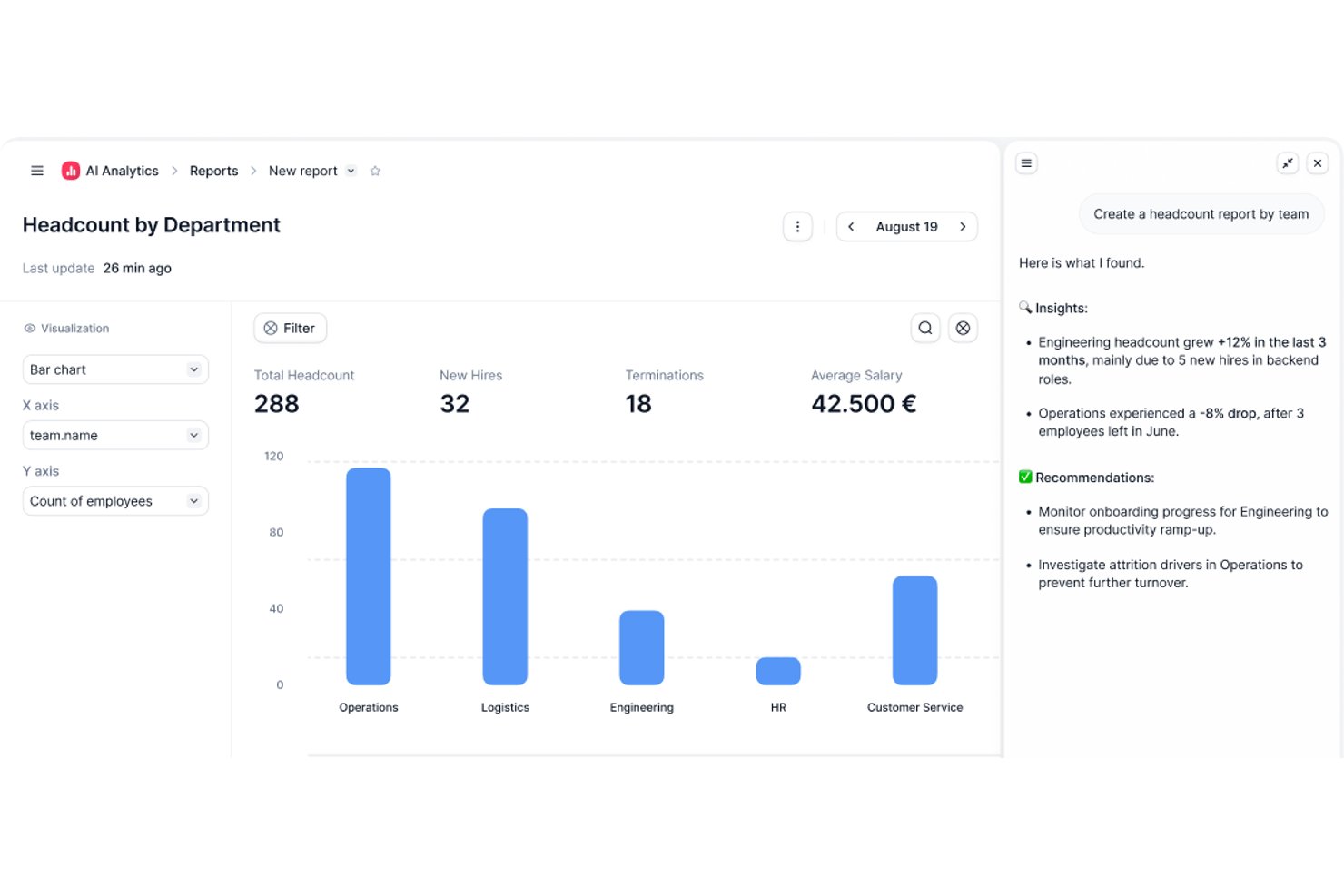
Factorial is an AI-powered HR and finance platform that handles time tracking, expense management, and project oversight alongside broader operations like shift scheduling, reporting, and employee policy Q&A.
Who Is Factorial Best For?
Factorial suits HR and operations teams at growing companies that want AI-assisted tools to handle scheduling, reporting, and employee policy questions alongside time and expense tracking.
Why I Picked Factorial
I've included Factorial in my top picks because it brings AI directly into the day-to-day operations that slow HR and finance teams down most. Its AI assistant, One, can answer employee questions about company policies and pull together expense reports on demand, cutting out a lot of back-and-forth. I also like that the AI handles receipt scanning via OCR, so logging an expense from a mobile photo takes seconds rather than manual data entry.
Factorial Key Features
- Shift scheduling: Managers can set up automated, bulk, and rotating shift schedules for their teams.
- Geolocation tracking: Time records capture where employees are working when they clock in or out.
- Expense policy controls: Automated rules can block expense submissions that fall outside company-defined spending policies.
- Factorial Cards: Companies can issue physical and virtual cards with customizable limits and spending categories, with transactions visible in real time.
Factorial Integrations
Factorial lists marketplace integrations with Microsoft Business Central, SAP Business One, Sage 100, Microsoft Power BI, Slack, Google Workspace, and Zapier. Its API supports API keys, OAuth 2.0, webhooks, and SDKs for custom integrations.
Pros and Cons
Pros:
- Project-linked hours and expenses centralize cost tracking
- OCR cuts manual receipt entry
- Mobile clock-ins help distributed teams log hours
Cons:
- Timesheet approvals lack documented audit history
- Reviewers report limited custom reporting depth

TimeTrex
Best for advanced payroll integration
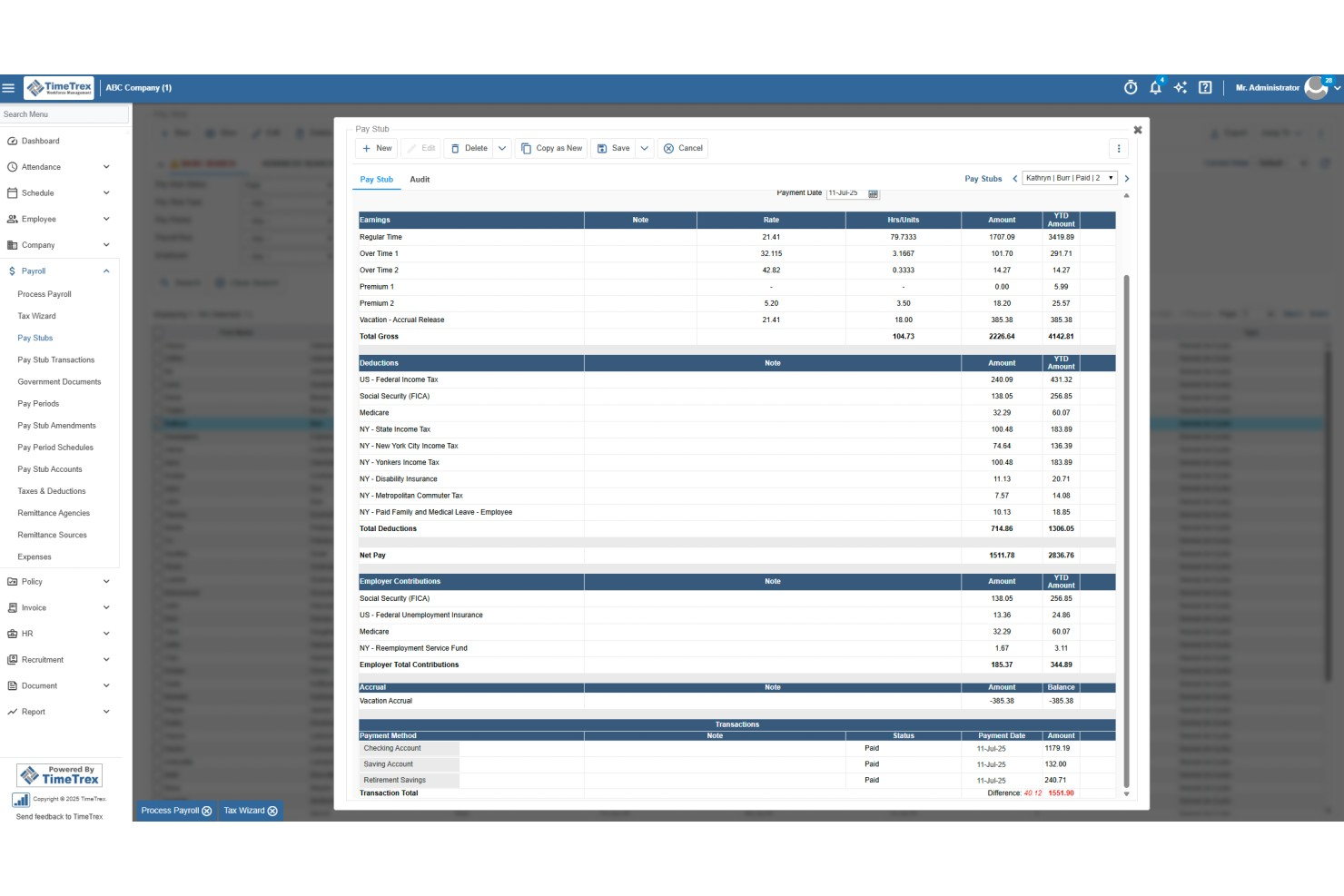
TimeTrex is a workforce management platform that combines time and attendance tracking, employee scheduling, expense management, and payroll processing in a single system.
Who Is TimeTrex Best For?
TimeTrex is a strong fit for mid-sized to enterprise businesses with hourly workforces, multiple locations, and complex payroll or compliance requirements.
Why I Picked TimeTrex
I picked TimeTrex as one of the best for advanced payroll integration because time tracking and payroll processing live in the same system. When your team clocks in and out, that data flows directly into payroll calculations without any manual exports or file transfers. I also like that TimeTrex handles multi-source direct deposit, letting you debit from several bank accounts and route payments to multiple employee accounts in one run. On top of that, the built-in payroll tax engine automatically calculates federal, state, and provincial taxes and generates compliance forms like W-2s, 940s, T4s, and ROEs.
TimeTrex Key Features
- Expense tracking: Log expenses with receipt photo capture, apply expense categories, and route submissions through a configurable approval workflow.
- Job costing: Allocate labor costs across multiple cost centers, departments, branches, and projects within a single time entry.
- Overtime and premium pay rules: Configure custom overtime, holiday, and shift differential pay rules that calculate automatically at payroll.
- Employee self-service portal: Let employees view pay stubs, check accrual balances, and update direct deposit details without HR involvement.
TimeTrex Integrations
TimeTrex offers integrations with payroll and accounting platforms, including ADP, QuickBooks, Sage, Paychex, SurePay, and Ceridian, as well as workforce and HR tools like Meditech, Insync, CompuPay, Tyler Technologies, Vensure Employer Services, Accero, and Chris21. An API is available for custom integrations.
Pros and Cons
Pros:
- Auto reimbursement via built-in payroll
- Mobile receipt capturing on the go
- Job costing tracks labor costs per project
Cons:
- Admin dashboard can feel complex
- Complex initial setup for advanced features
New Product Updates from TimeTrex
TimeTrex Adds Quick Punch App With Offline and QR Support
TimeTrex adds a new Quick Punch app, offline punching, QR code scanning, punch images, configurable messages, and punch warnings or lockouts to improve employee clock-ins across browsers and local computers. For more information, visit TimeTrex’s official site.
 .
.
Clockify
Best for project resource reconciliation
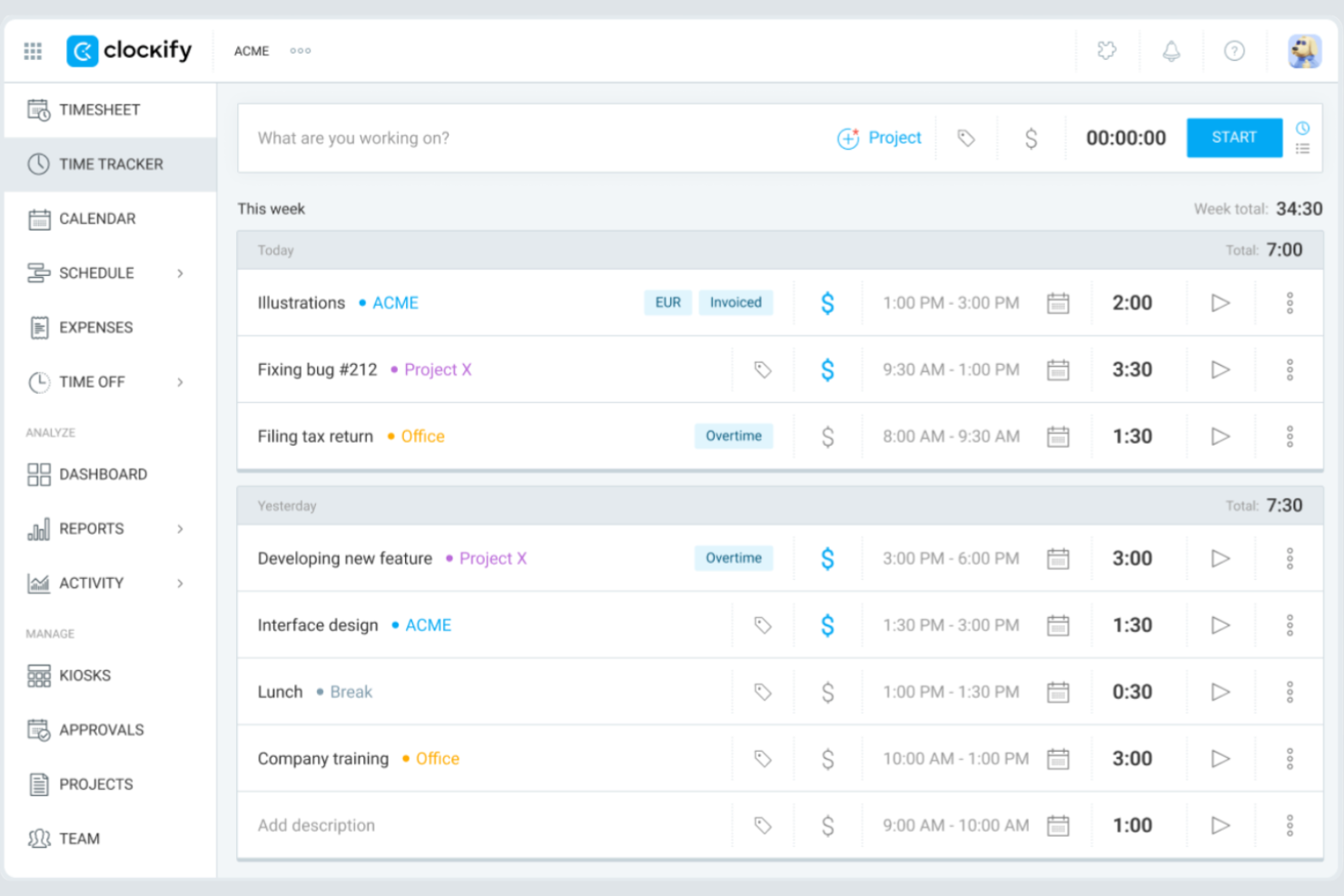
Clockify gives teams of any size a way to track time and expenses without worrying about user limits or hidden costs. It’s especially useful for agencies, consultancies, and distributed teams that need to manage multiple projects and clients on a tight budget. If you want a tool that scales with your team and offers unlimited users on its free plan, Clockify is built for that need.
Why I Picked Clockify
I selected Clockify because it allows digital project managers to reconcile actual task spending against baseline project estimates in real time. Project leads can assign custom billable and cost rates to individual team members or tasks to track gross margins and catch budget overruns before delivery. This makes it ideal for project managers who need to align project resources with strict budget caps while avoiding expensive platform overhead.
Clockify Key Features
Some other features in Clockify that may be useful for teams managing time and expenses include:
- Billable Rates: Assign custom hourly rates to users, projects, or tasks for accurate client billing.
- Expense Tracking: Log and categorize expenses alongside tracked time for each project.
- Timesheet Approvals: Set up workflows for managers to review and approve submitted timesheets.
- Detailed Reporting: Generate exportable reports on time usage, expenses, and project progress.
Clockify Integrations
Integrations include QuickBooks, Jira, Google Calendar, Outlook, Asana, Trello, GitHub, GitLab, Salesforce, and monday.com.
Pros and Cons
Pros:
- Mobile app includes offline time tracking
- Built-in timesheet approval workflows available
- 5 users included in the free plan
Cons:
- No built-in payroll processing tools
- Expense tracking lacks a receipt upload feature

My Hours
Best for flexible task-based tracking

My Hours is designed for teams and freelancers who need flexible, task-level control over their time tracking. The platform lets you organize work by projects and tasks, assign billable rates, and track time in detail for each activity. If your work involves juggling multiple clients or shifting priorities, My Hours gives you the granular tracking needed to keep everything organized and billable.
Why I Picked My Hours
What sets My Hours apart is its focus on flexible, task-based tracking that adapts to different work styles. You can break down projects into individual tasks, assign custom billable rates, and track time for each activity separately. I picked My Hours because it lets you add detailed notes to every time entry, making it easier to justify billable hours and document work for clients. For teams or freelancers who need to manage shifting priorities and multiple clients, this level of task-level control is a strong fit.
My Hours Key Features
Some other features that may be useful for teams and freelancers include:
- Automated Time Reports: Generate detailed reports by project, client, or team member for easy review and export.
- Expense Tracking: Log and categorize expenses alongside time entries for unified project accounting.
- Approval Workflows: Submit timesheets for manager approval before finalizing billable hours.
- Mobile App: Track time and manage tasks from iOS and Android devices.
My Hours Integrations
Integrations include Atlassian Jira, Microsoft Teams, Microsoft Power BI, Asana, Basecamp, monday.com, ClickUp, Microsoft Project, QuickBooks, and Xero.
Pros and Cons
Pros:
- Detailed notes can be added to time entries
- Custom billable rates per project or client
- Task-level time tracking supports granular billing
Cons:
- Lacks automatic time tracking features
- No built-in invoicing or payment processing

TimeCamp
Best for detailed productivity analytics
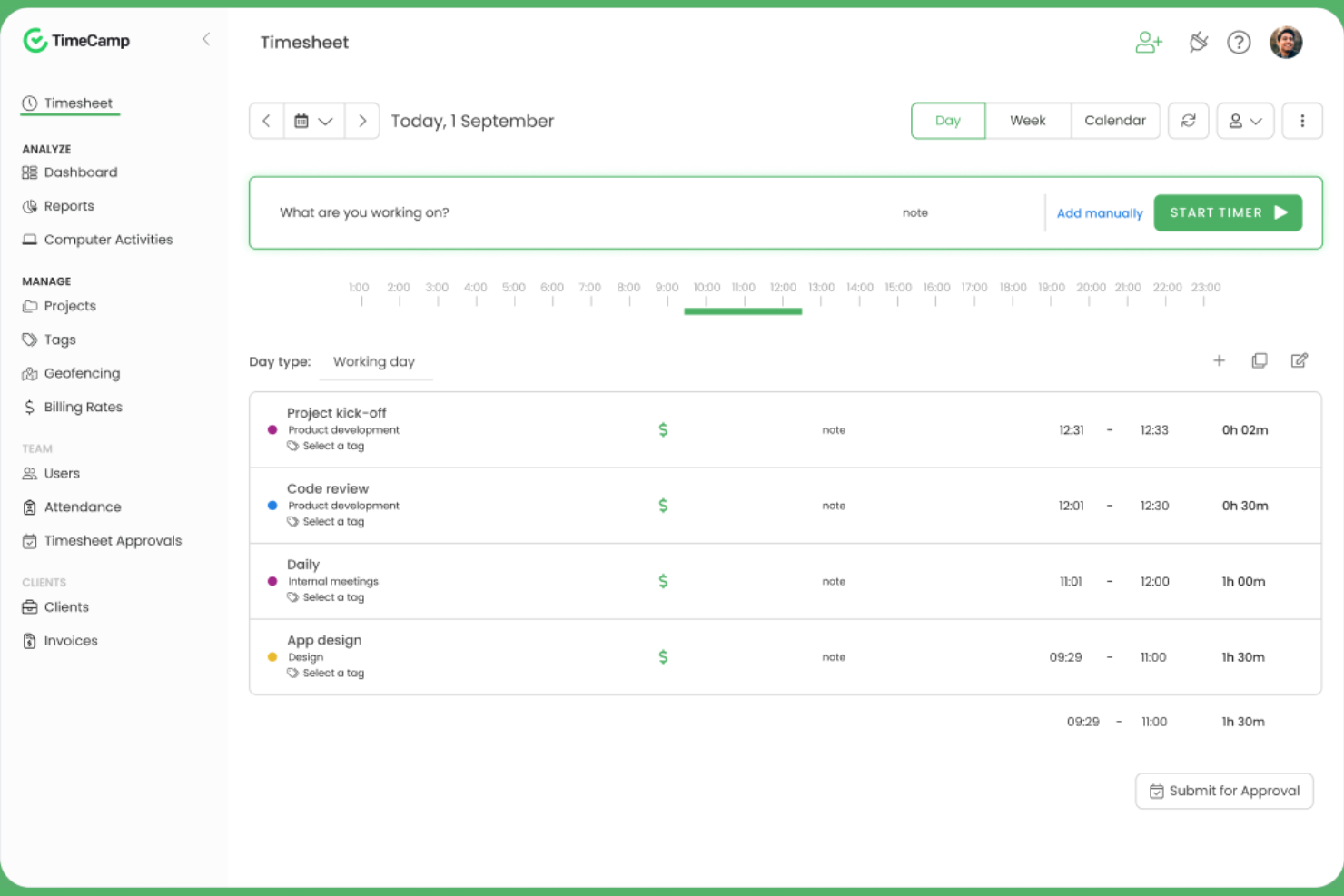
TimeCamp stands out for teams and managers who want to dig deep into how work hours are spent across projects and tasks. Its automatic time tracking and granular productivity analytics help digital agencies, consultancies, and remote teams pinpoint where time goes and identify workflow bottlenecks. If you need detailed reporting to support billing, payroll, or performance reviews, TimeCamp’s analytics-driven approach offers a clear advantage.
Why I Picked TimeCamp
When you need to understand exactly how your team spends their time, TimeCamp’s detailed productivity analytics set it apart from other time tracking tools. The platform automatically tracks time spent on apps, websites, and tasks, then compiles this data into visual reports that highlight trends and inefficiencies. I picked TimeCamp because its reporting features let you break down time usage by project, client, or team member, making it easier to spot bottlenecks and optimize workflows. For teams that want actionable insights from their time tracking data, TimeCamp’s analytics-driven approach is a strong fit.
TimeCamp Key Features
Some other features that may be helpful for teams managing time and expenses include:
- Automatic Attendance Tracking: Monitor employee attendance and time off directly within the platform.
- Billable Hours Calculation: Mark tracked time as billable or non-billable for accurate client invoicing.
- Expense Tracking Module: Log and categorize expenses alongside tracked time for unified reporting.
- Mobile App: Track time and manage tasks from iOS and Android devices.
TimeCamp Integrations
Integrations include Asana, Trello, monday.com, ClickUp, Jira, GitHub, Xero, QuickBooks, Google Calendar, and Slack.
Pros and Cons
Pros:
- Attendance and time-off tracking are built in
- Productivity analysis includes website and app usage
- Automatic time tracking runs in the background
Cons:
- Expense module lacks receipt scanning
- No mileage tracking for field teams

Harvest
Best for visual project budget tracking

Harvest stands out for teams that need to keep a close eye on project budgets with clear, visual insights. It’s a strong fit for agencies, consultancies, and project-based businesses that want to track time, expenses, and budget progress in one place. If you’re looking for a tool that makes it easy to spot budget risks before they become problems, Harvest is designed for that need.
Why I Picked Harvest
Harvest caught my attention because of its strong focus on visual project budget tracking, which is a key need for many project-driven teams. The tool displays budget progress in real time with clear visual indicators, so you can quickly see if a project is at risk of going over budget. I like that you can set budget limits by hours or fees and monitor them as your team logs time and expenses. For anyone who needs to keep budget status front and center, Harvest’s visual approach makes it easy to stay on top of project financials.
Harvest Key Features
Some other features in Harvest that may be useful for teams managing time and expenses include:
- Expense Receipt Uploads: Attach digital receipts directly to expense entries for accurate recordkeeping.
- Automated Reminders: Send automatic reminders to team members to submit timesheets on schedule.
- Invoicing Tools: Generate and send invoices to clients based on tracked time and expenses.
- Mobile Time Tracking: Track time and log expenses from iOS and Android devices.
Harvest Integrations
Integrations include Asana, Jira, Slack, Google Calendar, GitHub, Stripe, Trello, QuickBooks Online, Xero, and Basecamp.
Pros and Cons
Pros:
- Invoicing directly from tracked time and expenses
- Expense receipt uploads for reimbursement tracking
- Visual budget tracking with color-coded alerts
Cons:
- Limited offline functionality on the mobile app
- No mileage tracking for expense entries

Best for receipt scanning automation
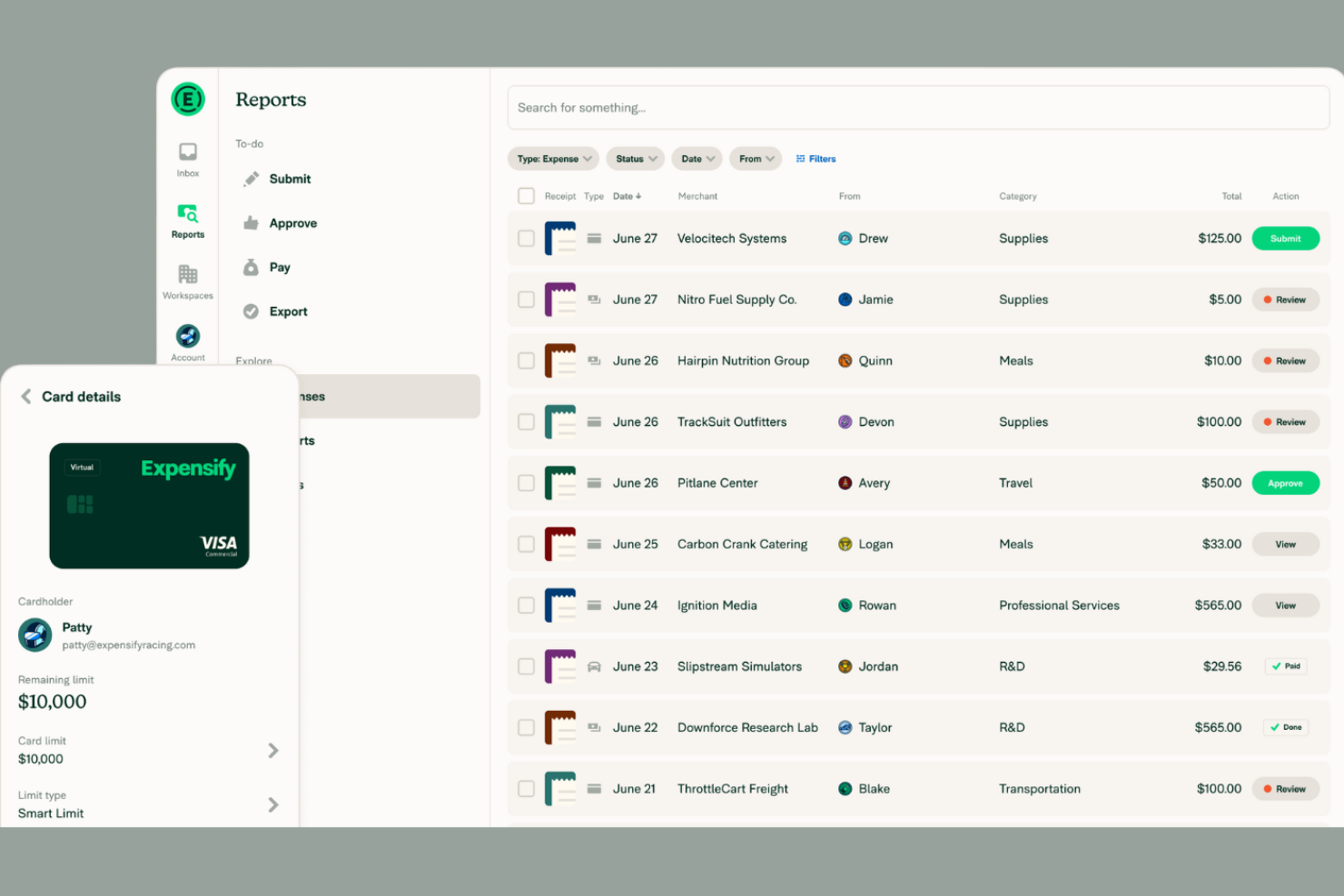
If your team spends too much time manually entering receipts, Expensify offers a way to automate that process with its advanced receipt scanning technology. It’s a strong fit for businesses of any size that want to capture, categorize, and report expenses with minimal manual effort. Expensify’s SmartScan feature quickly turns paper receipts into digital expense entries, helping finance teams and frequent travelers stay organized and audit-ready.
Why I Picked Expensify
Expensify’s receipt scanning automation is a major advantage for teams that process a high volume of expenses. The SmartScan feature reads and extracts data from receipts, automatically matching them to credit card transactions and categorizing expenses. I appreciate that Expensify can also auto-generate expense reports from scanned receipts, reducing manual entry and errors. For businesses that want to speed up reimbursement cycles and improve accuracy, Expensify’s automation tools make it a strong choice.
Expensify Key Features
Some other features that may be useful for teams managing expenses include:
- Corporate Card Management: Issue and manage Expensify Cards for employees with real-time transaction tracking.
- Multi-Level Approval Workflows: Set up custom approval chains for expense reports based on your organization’s policies.
- Mileage Tracking: Log and reimburse business travel mileage directly within the app.
- Policy Enforcement Rules: Automatically flag expenses that violate company spending policies.
Expensify Integrations
Integrations include QuickBooks, Xero, NetSuite, Sage Intacct, Gusto, Workday, ADP, Uber, Lyft, and Oracle.
Pros and Cons
Pros:
- Multi-currency support for global teams
- Corporate card transactions sync in real time
- SmartScan extracts data from receipts automatically
Cons:
- Approval workflow setup can be confusing
- No built-in project time tracking

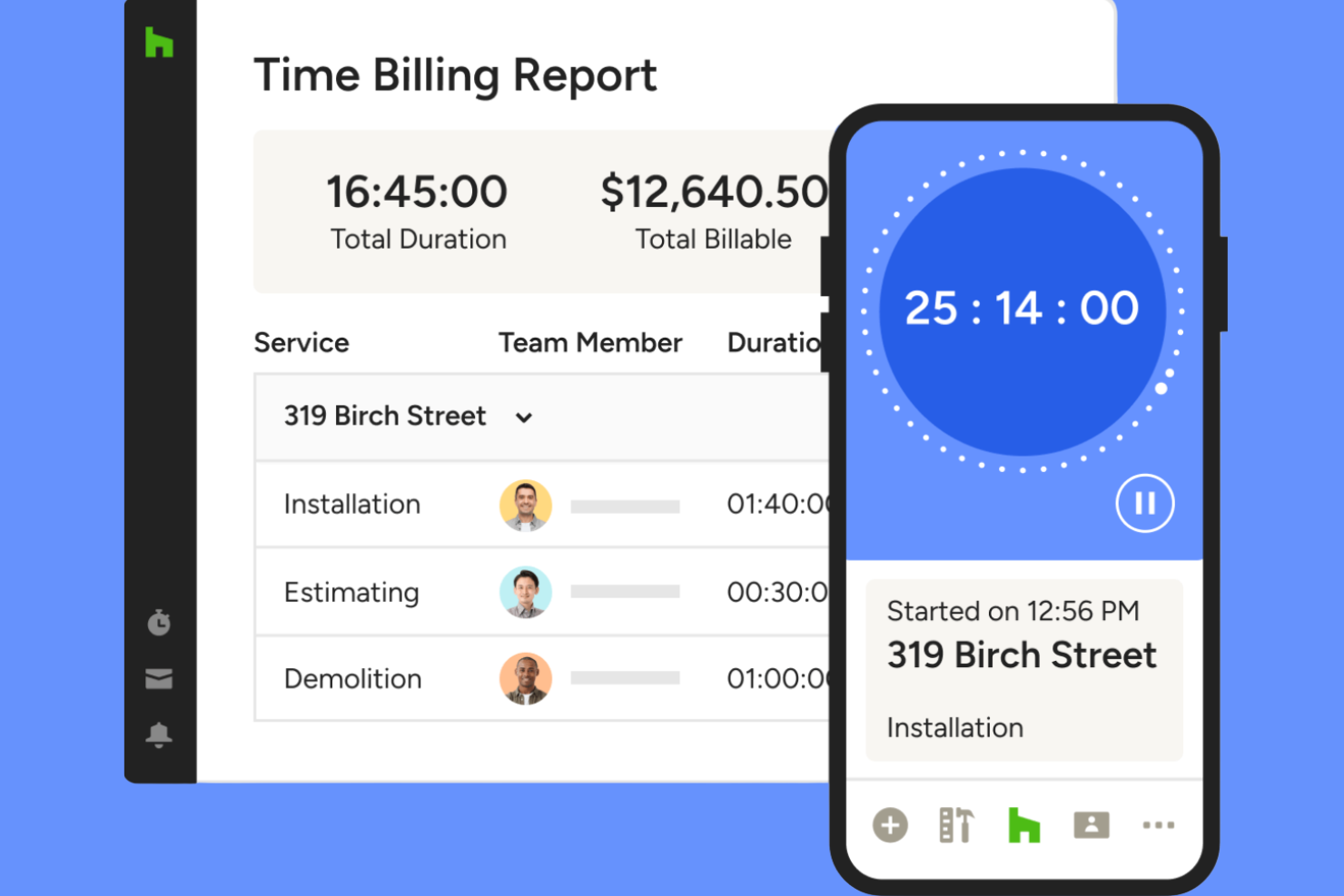
Houzz Pro is tailored for architecture and design firms that need to track project hours and expenses alongside client communications and proposals. It’s especially useful for professionals managing multiple projects, budgets, and client approvals in one place. If your team juggles design work, invoicing, and time tracking, Houzz Pro brings these functions together in a single platform.
Why I Picked Houzz Pro
Houzz Pro stands out for architecture and design firms that need to manage time and expenses within the context of project-based work. The platform lets you log billable hours directly to specific projects and attach expenses to client invoices, which is especially useful for firms handling multiple clients and phases. I like that you can generate branded proposals and invoices from tracked time and expenses, keeping everything client-facing and professional. For teams that need to keep project financials and client communications tightly connected, Houzz Pro offers a focused solution.
Houzz Pro Key Features
Some other features that may be helpful for architecture and design teams include:
- Mobile Time Tracking: Track hours and expenses from any location using the mobile app.
- Customizable Project Templates: Set up repeatable project structures for different types of jobs.
- Client Portal: Give clients access to view project progress, invoices, and shared documents.
- Task Assignment: Assign tasks to team members and monitor their completion within each project.
Houzz Pro Integrations
Integrations include QuickBooks Online, Google Calendar, iCloud, Office 365, Exchange, Outlook, Gmail, and Google Drive.
Pros and Cons
Pros:
- Project-based time tracking for multiple jobs
- Mobile app supports on-site expense capture
- Syncs time entries directly to QuickBooks Online
Cons:
- Limited reporting options for time analysis
- No built-in mileage tracking feature

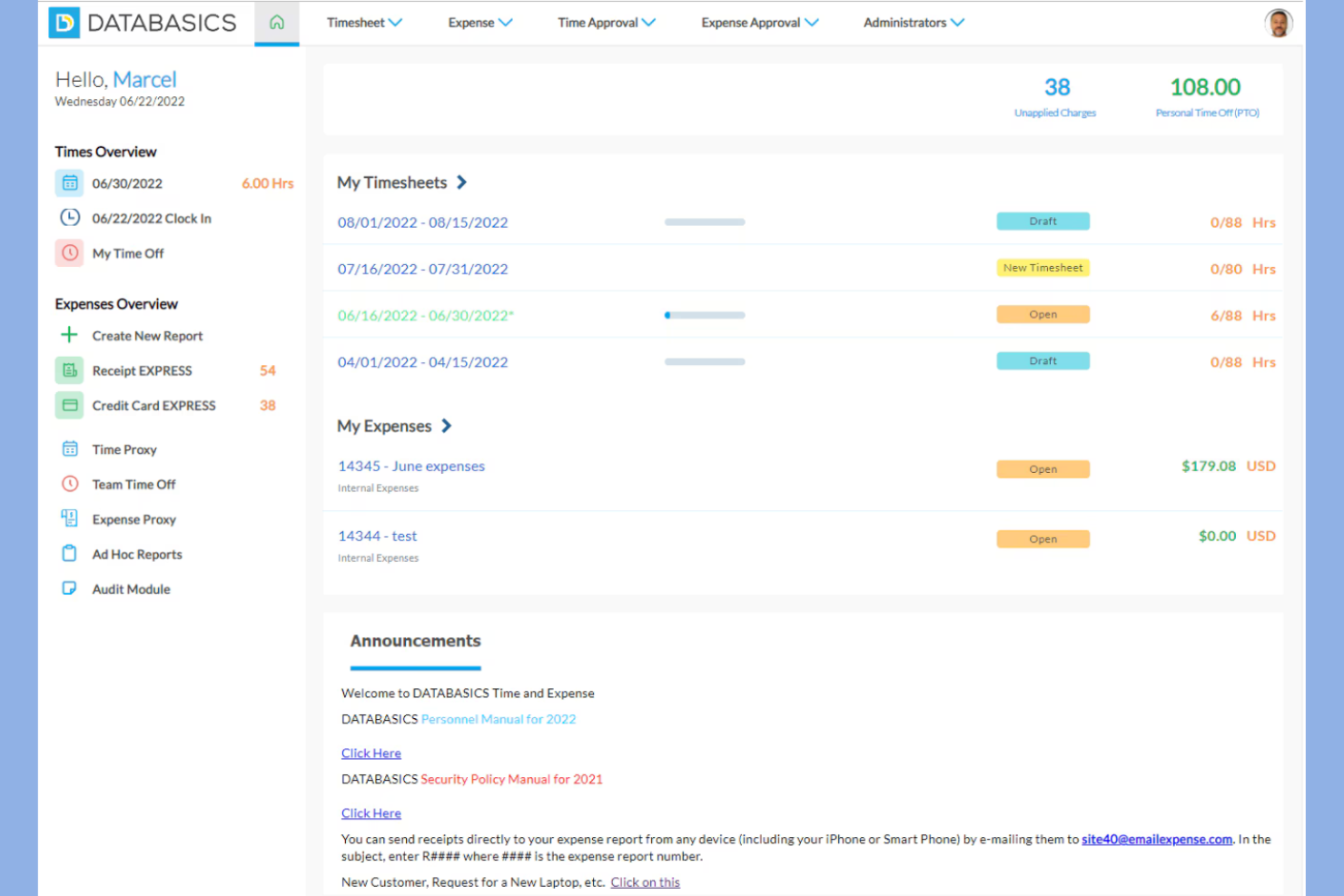
DATABASICS is built for organizations that need to meet strict compliance and audit requirements in their time and expense tracking. It’s especially relevant for government contractors, nonprofits, and enterprises with complex regulatory needs. If your team faces challenges around policy enforcement, audit trails, or multi-level approvals, DATABASICS is designed to address those priorities.
Why I Picked DATABASICS
What sets DATABASICS apart is its focus on compliance-driven organizations that need to meet strict regulatory and audit standards. The platform offers configurable policy enforcement, so you can set up rules that match your organization’s requirements and ensure every entry is compliant. I appreciate that DATABASICS provides detailed audit trails and multi-level approval workflows, which are essential for teams that need to document every step for audits or internal reviews. If your business operates in a highly regulated environment, these features make DATABASICS a strong fit for your time and expense tracking needs.
DATABASICS Key Features
Some other features in DATABASICS that may be useful for compliance-focused teams include:
- Per Diem Management: Set and manage per diem rates for travel expenses based on location and policy.
- Multi-Currency Support: Track and convert expenses in multiple currencies for global teams.
- Mobile App Entry: Submit time and expense entries directly from iOS and Android devices.
- Project-Based Tracking: Allocate time and expenses to specific projects or grants for detailed reporting.
DATABASICS Integrations
Integrations include Sage Intacct, Microsoft Dynamics, Oracle NetSuite, SAP, ADP, Paychex, QuickBooks, Ceridian, UKG, and American Express.
Pros and Cons
Pros:
- Multi-currency support for international teams
- Per diem management for travel compliance
- Audit trails for every time and expense entry
Cons:
- Mobile app interface can feel outdated
- No built-in mileage tracking feature

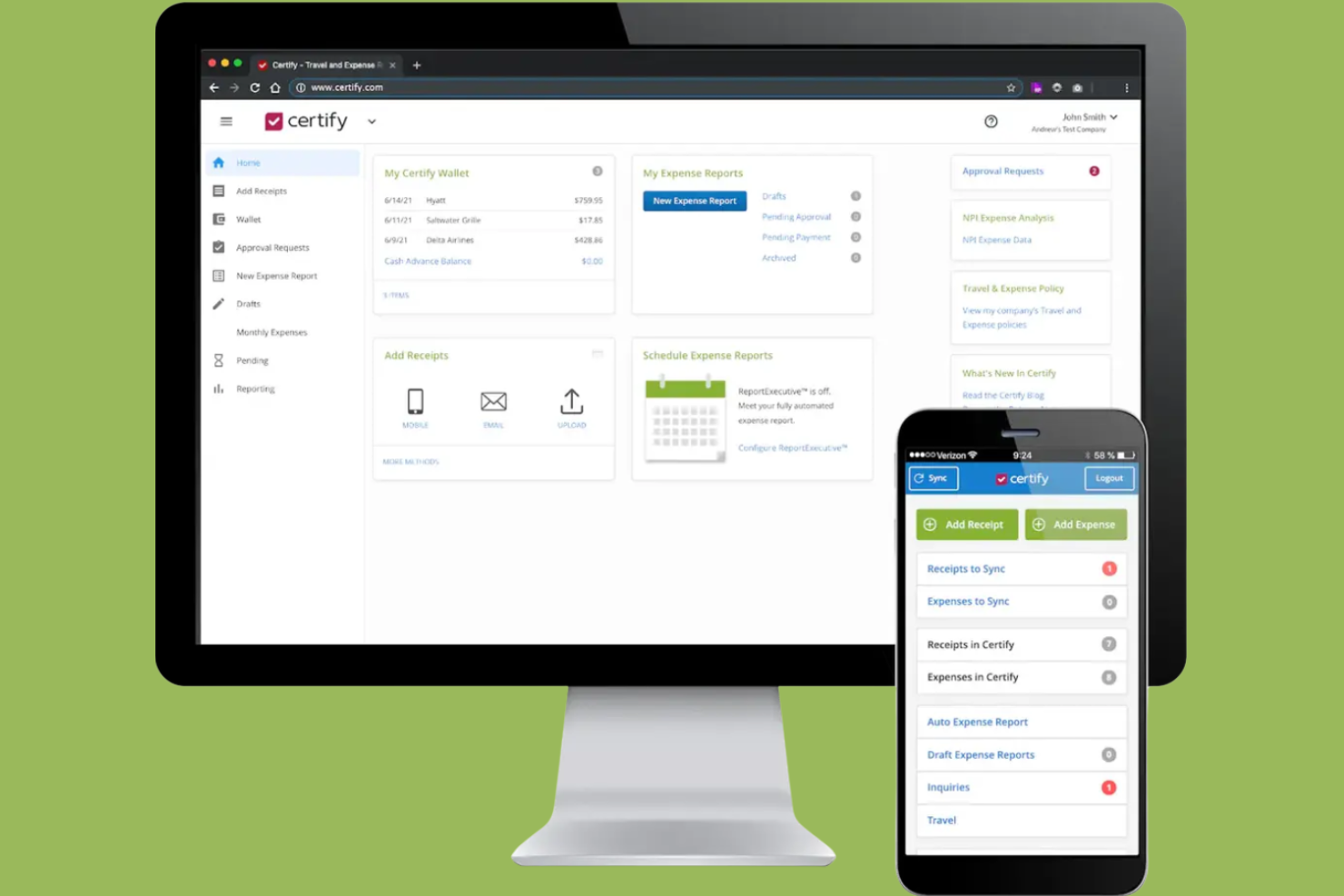
Certify stands out for teams that want to automate expense report creation and approval workflows. It’s especially useful for finance teams and organizations with frequent employee travel or recurring expenses. With features like receipt scanning and policy enforcement, Certify helps reduce manual entry and keeps expense management consistent.
Why I Picked Certify
Automating expense report creation is where Certify really shines for finance teams and frequent travelers. The platform uses receipt scanning and automatic data extraction to build expense reports with minimal manual input. I like that Certify also applies company policy checks during report creation, helping teams avoid compliance issues before submission. If you want to reduce time spent on expense paperwork and improve accuracy, Certify’s automation features are a strong fit.
Certify Key Features
Some other features that may be helpful for finance teams include:
- Automated Reimbursement Processing: Certify can trigger reimbursements directly after expense report approval.
- Credit Card Transaction Import: Syncs corporate card transactions for faster expense matching and reconciliation.
- Multi-Level Approval Routing: Supports custom approval chains based on your organization’s structure.
- Mobile App for Expense Submission: Let users capture and submit expenses from their smartphones.
Certify Integrations
Integrations include Sage Intacct, Amazon Business, Amtrav, Atriis, AWS, CTM, CWT, Direct Travel, Emburse Book, and Egencia.
Pros and Cons
Pros:
- Direct corporate card transaction import is available
- Multi-level approval routing supports complex policies
- Automated receipt scanning reduces manual entry
Cons:
- Limited reporting customization for advanced analytics
- No built-in time tracking functionality
Annen programvare for tids- og utgiftsregistrering
Her er noen flere alternativer for programvare for tids- og utgiftsregistrering som ikke kom med på kortlisten min, men som likevel er verdt å sjekke ut:
- Replicon
For global workforce management
- Minute7
For syncing with QuickBooks
- BigTime
For professional services firms
- Zoho Projects
For integrated project collaboration
- Timesheets.com
For tracking billable hours by client
- TMetric
For granular user permission controls


How I Evaluate Time and Expense Tracking Software
I evaluate these tools in two layers—core requirements like project-based time logging and expense approvals, and differentiators that matter for consulting teams, agencies, and PMOs billing clients.
Core Functionality (Table Stakes For This List)
When I'm selecting tools for my list, I rank each one on a scale from 0 (does not offer the functionality) to 5 (excels in this area) for each core functionality listed below. Then, I calculate the tool's total score into a percentage. Each tool needs to achieve a minimum total score of 65% to be considered for inclusion.
- Project-Based Time Tracking: I check whether hours can be logged against specific projects, tasks, and clients with clear billable/non-billable flags—like splitting a week across three retainer accounts.
- Expense Capture & Management: Each tool should let users record expenses, upload receipts, and tag costs to a project or client so nothing gets lost between a site visit and month-end.
- Timesheet & Expense Approvals: I look for configurable approval workflows where managers can review, approve, or reject entries—especially routing rules based on project or team structure.
- Billable Rates & Invoicing Support: Tools like Harvest and Toggl Track handle billing rates differently, so I evaluate whether a platform supports user-, role-, or project-level rates and can produce or export invoices.
- Project Budget & Cost Tracking: I evaluate how well a tool connects logged time and expenses to project budgets, showing burn rate and actuals vs. estimates before a project goes over scope.
- Reporting & Analytics: The tool should generate reports on utilization, project profitability, and expense breakdowns at the project, client, and team level—not just raw time exports.
Once I have a list of tools that meet the criteria, I consider what sets each platform apart.
Differentiating Factors (What Sets Vendors Apart)
Here's how I compare and contrast different vendors:
Standout Features
Automated time capture is a real differentiator. Tools like Harvest and Clockify offer calendar integrations that pre-fill timesheets, saving consultants from reconstructing their week every Friday. I also evaluate resource capacity planning. Knowing who's overbooked before a sprint starts matters more than finding out after. Client-facing portals are worth noting too, especially for agencies where clients want to see retainer burn-down without emailing their account manager.
Beyond Features
Integration depth matters a lot here. I check whether a tool connects natively with project management platforms like Jira or Asana and accounting systems like QuickBooks or Xero, since broken sync between timesheets and invoicing creates real billing headaches. Pricing transparency is another factor I weigh—some vendors gate expense tracking or invoicing behind higher tiers, which changes the total cost picture fast. I also consider firm-type fit, especially whether a tool supports billing models like T&M, retainer, and fixed-fee that professional services teams actually use.
Slik velger du programvare for tids- og utgiftsregistrering
Det er lett å gå seg vill i lange funksjonslister og komplekse prisstrukturer. For å holde fokus mens du arbeider deg gjennom den unike prosessen med å velge programvare, får du her en sjekkliste over faktorer du bør ha i bakhodet:
| Faktor | Hva du bør vurdere |
| Skalerbarhet | Vil programvaren håndtere teamstørrelsen og den forventede veksten din? Kontroller brukerbegrensninger og hvor fleksible abonnementene er etter hvert som organisasjonen vokser. |
| Integrasjoner | Kobler den seg direkte til lønns-, regnskaps- eller prosjektstyringsverktøyene dine? Bekreft kompatibilitet med den eksisterende teknologistakken din. |
| Tilpasningsmuligheter | Kan du tilpasse kategorier, godkjenningsflyter og rapportering til arbeidsflytene dine? Unngå rigide systemer som tvinger deg til å tilpasse prosessen din. |
| Brukervennlighet | Vil teamet ditt ta løsningen i bruk raskt? Se etter tydelig navigasjon, minimal datainntasting og et oversiktlig grensesnitt som samsvarer med teamets vaner. |
| Implementering og innføring | Hvor lang tid vil det ta å komme i gang? Vurder tilgjengeligheten av støtte til datamigrering, opplæringsressurser og hjelp med innføringen. |
| Kostnad | Er prisnivåene transparente og forutsigbare? Ta med alle brukere, tilleggstjenester og eventuelle gebyrer for overskridelse for å unngå overraskelser i budsjettet. |
| Sikkerhetstiltak | Tilbyr leverandøren kryptering, rollebasert tilgang og revisjonslogger? Sørg for samsvar med organisasjonens standarder for databeskyttelse. |
| Tilgjengelig kundestøtte | Hvilke støttekanaler tilbys, og når er de tilgjengelige? Vurder om du trenger hjelp døgnet rundt eller dedikert kundeoppfølging for teamet ditt. |
Hva er programvare for tids- og utgiftsregistrering?
Programvare for tids- og utgiftsregistrering er en alt-i-ett-løsning som hjelper virksomheter med å registrere de ansattes tid, håndtere utgifter og støtte nøyaktig fakturering på én plattform. Disse verktøyene brukes ofte sammen med regnskapsprogramvare for å fakturere kunder, følge prosjektkostnader og opprettholde økonomisk nøyaktighet.
Ved å kombinere programvare for tidsregistrering med programvare for utgiftshåndtering kan team få bedre oversikt over arbeidstimer, kostnader og den samlede ytelsen. Mange plattformer støtter også ressursstyring og prognoser, noe som hjelper virksomheter med å planlegge arbeidsmengder, fordele ressurser og spare tid på tvers av prosjekter.
Funksjoner i programvare for tids- og utgiftssporing
Når du velger programvare for tids- og utgiftssporing, bør du se etter følgende viktige funksjoner:
- Tidsregistrering: Lar brukerne registrere arbeidede timer for bestemte prosjekter, oppgaver eller kunder, enten manuelt eller med tidtakere, for å sikre nøyaktige oppføringer for lønn eller fakturering.
- Utgiftsregistrering: Gjør det mulig for brukerne å registrere og kategorisere prosjektrelaterte utgifter, legge ved kvitteringer og følge med på forbruket opp mot budsjetter.
- Fakturerbare satser: Støtter tildeling av ulike timesatser til prosjekter, kunder eller roller, noe som gjør det enklere å beregne fakturaer og analysere lønnsomhet.
- Godkjenningsarbeidsflyter: Gjør det mulig for ledere å gjennomgå og godkjenne timelister og utgiftsrapporter før de ferdigstilles eller faktureres.
- Rapportering og analyse: Genererer detaljerte rapporter om tidsbruk, utgifter og fakturerbare timer, slik at team kan følge med på prosjektkostnader og produktivitet.
- Dataeksport: Gir mulighet til å eksportere timelister og utgiftsdata til formater som CSV og PDF, eller direkte til regnskaps- eller lønnssystemer.
- Mobil tilgang: Tilbyr mobilapper eller responsive nettgrensesnitt, slik at brukerne kan registrere tid og utgifter mens de er på farten.
- Integrasjonsmuligheter: Kobler seg til andre forretningsverktøy, for eksempel plattformer for regnskap, lønn eller prosjektstyring, for å effektivisere arbeidsflyter.
- Rollebaserte tillatelser: Lar administratorer kontrollere hvem som kan se, redigere eller godkjenne tids- og utgiftsregistreringer, og støtter dermed datasikkerhet og overholdelse av regler.
- Varsler og påminnelser: Sender automatiske varsler for å minne brukerne på å sende inn timelister eller markere manglende registreringer, noe som reduserer forsinkelser og feil.
Fordeler med programvare for tids- og utgiftssporing
Implementering av programvare for tids- og utgiftssporing gir flere fordeler for teamet og virksomheten din. Her er noen av fordelene du kan se frem til:
- Nøyaktig fakturering: Automatiserte tids- og utgiftsregistreringer sikrer at fakturaene gjenspeiler det faktiske arbeidet og de faktiske kostnadene, og reduserer tvister og tapte inntekter.
- Bedre prosjektinnsikt: Funksjoner for sporing og rapportering i sanntid hjelper team med å følge med på budsjetter, tidsplaner og ressursfordeling på tvers av prosjekter.
- Forenklet overholdelse av regler: Godkjenningsarbeidsflyter og revisjonsspor støtter overholdelse av interne retningslinjer og eksterne forskrifter.
- Effektivisert lønnskjøring og fakturering: Funksjoner for dataeksport og integrasjon gjør det enklere å overføre informasjon til lønns- og regnskapssystemer.
- Større ansvarlighet: Rollebaserte tillatelser og detaljerte logger tydeliggjør hvem som registrerte, godkjente eller endret oppføringer, og støtter åpenhet.
- Raskere godkjenninger: Automatiserte varsler og sentraliserte arbeidsflyter gjør gjennomgangen av timelister og utgiftsrapporter raskere.
- Bedre ressursplanlegging: Analyse- og rapporteringsverktøy gir innsikt i teamets kapasitet og prosjektlønnsomhet, noe som gir et bedre grunnlag for fremtidig planlegging.
Kostnader og priser for programvare for tids- og utgiftssporing
Valg av programvare for tids- og utgiftssporing krever en forståelse av de ulike prismodellene og abonnementene som er tilgjengelige. Kostnadene varierer basert på funksjoner, teamstørrelse, tillegg og mer. Tabellen nedenfor oppsummerer vanlige abonnementer, gjennomsnittsprisene deres og typiske funksjoner som er inkludert i løsninger for tids- og utgiftssporing:
Sammenligningstabell for abonnementer for programvare for tids- og utgiftssporing
| Abonnementstype | Gjennomsnittspris | Vanlige funksjoner |
| Gratisabonnement | $0 | Grunnleggende tidsregistrering, manuell utgiftsregistrering, begrenset rapportering og tilgang for én bruker. |
| Personlig abonnement | $5-$10/bruker/måned | Tids- og utgiftssporing, grunnleggende rapportering, mobil tilgang og begrensede integrasjoner. |
| Bedriftsabonnement | $10-$25/bruker/måned | Støtte for flere brukere, godkjenningsarbeidsflyter, avansert rapportering, integrasjoner og rollebaserte tillatelser. |
| Virksomhetsabonnement | $25-$50/bruker/måned | Tilpassede integrasjoner, dedikert kundestøtte, avansert sikkerhet, revisjonsspor og funksjoner for overholdelse av regler. |
Vanlige spørsmål om programvare for tids- og utgiftsregistrering
Her er svar på vanlige spørsmål om programvare for tids- og utgiftsregistrering:
Kan programvare for tids- og utgiftsregistrering håndtere flere valutaer?
Ja, mange løsninger for tids- og utgiftsregistrering støtter flere valutaer. Dette er spesielt nyttig for team som arbeider med internasjonale kunder eller ansatte som jobber eksternt. Sjekk alltid om programvaren lar deg angi standardvalutaer per prosjekt, og om den automatisk konverterer utgifter for rapportering.
Hvordan fungerer godkjenningsarbeidsflyter i programvare for tids- og utgiftsregistrering?
Godkjenningsarbeidsflyter lar ledere gjennomgå og godkjenne timelister eller utgiftsrapporter før de ferdigstilles. Du kan vanligvis sette opp godkjenninger på flere nivåer, tildele godkjennere etter prosjekt eller avdeling og motta varsler når innsendinger krever oppfølging. Dette bidrar til å forhindre feil og sikrer samsvar med virksomhetens retningslinjer.
Hvilke typer rapporter kan jeg generere med programvare for tids- og utgiftsregistrering?
De fleste plattformer lar deg generere rapporter om fakturerbare timer, prosjektkostnader, utgiftskategorier og medarbeiderutnyttelse. Du kan ofte filtrere etter datoperiode, kunde eller prosjekt og eksportere rapporter i formater som CSV eller PDF. Disse rapportene er nyttige for fakturering, lønnsutbetaling og prosjektanalyse.
Er det mulig å integrere programvare for tids- og utgiftsregistrering med lønns- eller regnskapssystemer?
Ja, mange løsninger tilbyr direkte integrasjoner med populære lønns- og regnskapsplattformer. Dette gjør at du kan synkronisere godkjente timelister og utgifter automatisk, noe som reduserer manuell dataregistrering og minimerer feil. Bekreft alltid at integrasjonen er kompatibel med de eksisterende systemene dine før du velger et verktøy.
Hvilke sikkerhetstiltak bør jeg se etter i programvare for tids- og utgiftsregistrering?
Se etter funksjoner som datakryptering, rollebasert tilgangskontroll og revisjonslogger. Disse sikkerhetstiltakene bidrar til å beskytte sensitive medarbeider- og økonomidata. Hvis organisasjonen din har spesifikke krav til samsvar, bør du se etter sertifiseringer eller sikkerhetsrevisjoner utført av tredjeparter.