I 10 migliori software per il monitoraggio del tempo e la fatturazione recensiti nel 2026

10 I migliori software per il monitoraggio del tempo e la fatturazione


Gestire i progetti significa bilanciare scadenze, budget e coordinamento del team, mantenendo al contempo il lavoro sotto controllo. Il software giusto per il monitoraggio del tempo e la fatturazione può semplificare questo processo e offrire al tuo team un controllo migliore.
Secondo la mia esperienza, gli strumenti per il monitoraggio del tempo rendono più semplice capire come vengono impiegate le ore del team e assicurarsi che i clienti ricevano fatture accurate, permettendoti di concentrarti maggiormente sul lavoro che conta e meno sulle attività amministrative. Dopo aver testato e recensito diverse opzioni, ho preparato un elenco imparziale dei migliori software per il monitoraggio del tempo e la fatturazione disponibili oggi.
In questo articolo troverai le mie migliori scelte, ognuna selezionata per le sue caratteristiche distintive e per la capacità di risolvere problemi concreti. Vediamo più da vicino cosa rende questi strumenti meritevoli di considerazione per il tuo team.
Perché fidarsi dei nostri consigli sui software
Il nostro team testa e recensisce software dal 2012. In quanto project manager noi stessi, sappiamo quanto sia difficile — e importante — scegliere il software giusto.
Per questa guida, abbiamo valutato gli strumenti attraverso test pratici e ricerche indipendenti, assegnando un punteggio agli strumenti in base ai nostri criteri di selezione. Ci basiamo inoltre sulle competenze di leader di pensiero del settore e di professionisti attivi nella gestione dei progetti.
Le nostre recensioni riflettono il nostro giudizio editoriale umano, non un discorso di vendita.
Revisori esperti:
Tabella comparativa dei software per il monitoraggio del tempo e la fatturazione
Questa tabella comparativa riassume i dettagli sui prezzi delle mie migliori selezioni di software per il monitoraggio del tempo e la fatturazione:
| Tool | Best For | Trial Info | Price | ||
|---|---|---|---|---|---|
| 1 | Ideale per report personalizzati e operativi sul tempo | Piano gratuito + prova gratuita di 30 giorni + demo gratuita disponibile | A partire da $9/utente/mese (con fatturazione annuale) | Website | |
| 2 | Ideale per il monitoraggio strutturato del tempo | Piano gratuito + prova gratuita di 30 giorni + demo gratuita disponibile | A partire da $6/utente/mese (con fatturazione annuale) | Website | |
| 3 | Ideale per l'automazione di buste paga e tasse | Prova gratuita di 30 giorni + demo gratuita disponibile | A partire da $50/mese | Website | |
| 4 | Ideale per controlli scalabili dell'ambiente di lavoro | Piano gratuito disponibile | Da $3.99/postazione/mese (fatturato annualmente) | Website | |
| 5 | Ideale per la rilevazione automatica e intelligente delle ore di lavoro | Prova gratuita di 14 giorni + demo gratuita disponibile | A partire da $9/utente/mese (fatturazione annuale) | Website | |
| 6 | Ideale per il monitoraggio illimitato di progetti | Prova gratuita di 14 giorni + piano gratuito + demo gratuita disponibile | Da $8/utente/mese (fatturato annualmente) | Website | |
| 7 | Ideale per freelance e consulenti | Prova gratuita di 14 giorni + piano gratuito + demo gratuita disponibile | Da $3,99/utente/mese (fatturazione annuale) | Website | |
| 8 | Ideale per l'integrazione con Asana | Piano gratuito disponibile | A partire da $8.50/utente/mese (con fatturazione annuale) | Website | |
| 9 | Ideale per l'integrazione con QuickBooks | Prova gratuita + demo gratuita disponibile | A partire da $20/mese + $8/utente/mese (fatturazione annuale) | Website | |
| 10 | Ideale per informazioni sui costi e tempi bruciati in tempo reale | Prova gratuita di 14 giorni + piano gratuito + demo gratuita disponibile | Da $5/utente/mese (fatturazione annuale) | Website |


Recensione dei migliori software per il monitoraggio del tempo e la fatturazione
Di seguito trovi i miei riepiloghi dettagliati dei migliori software per il monitoraggio del tempo e la fatturazione inclusi nella mia selezione. Le mie recensioni offrono uno sguardo approfondito alle caratteristiche principali, ai vantaggi e agli svantaggi, alle integrazioni e ai casi d’uso ideali di ogni strumento, per aiutarti a trovare quello più adatto a te.

Toggl
Ideale per report personalizzati e operativi sul tempo
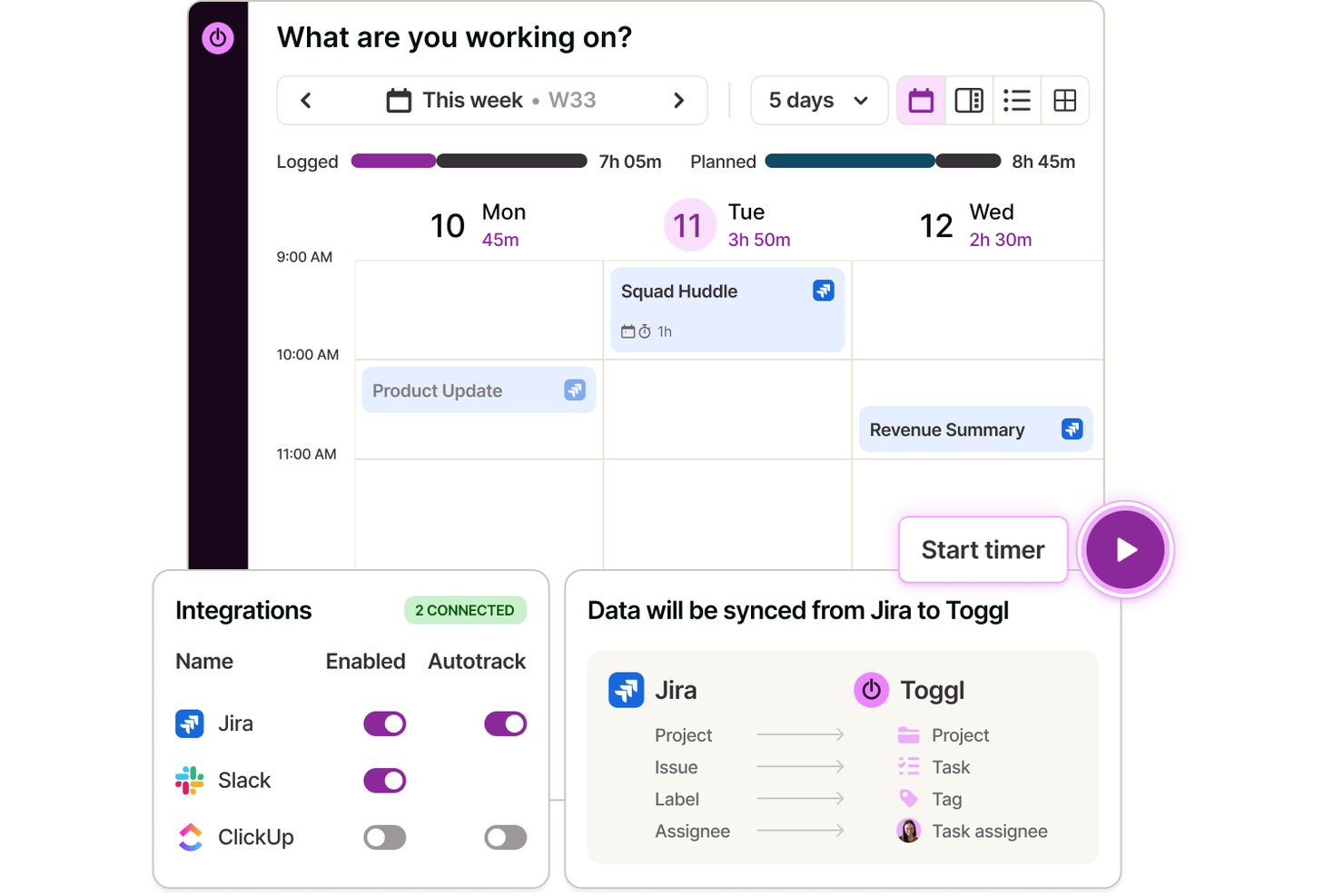
Toggl è un software dedicato al monitoraggio del tempo e alla fatturazione per gestire le ore dettagliate dei progetti, monitorare il lavoro fatturabile tra i clienti, gestire le attività, personalizzare i ruoli del team e generare report sul tempo, sulla redditività e sul carico di lavoro del team.
Per chi è più adatto Toggl?
Team che lavorano per progetti, agenzie e freelance che necessitano di un monitoraggio flessibile e dettagliato del tempo e della pianificazione della capacità tra più clienti e progetti.
Perché ho scelto Toggl
Ho scelto Toggl come una delle migliori soluzioni perché mi affido ai suoi report personalizzati e operativi sul tempo quando devo monitorare il tempo fatturabile per progetto, cliente o attività. Posso segmentare rapidamente i dati ed esportare report dettagliati per la fatturazione e le revisioni del budget.
Funzionalità principali di Toggl
- Rilevamento automatico dell'inattività: Identifica i periodi di inattività per aiutare a mantenere accurate le registrazioni del tempo.
- Monitoraggio su più dispositivi: Consente di monitorare il tempo da desktop, app mobili, estensioni del browser e integrazioni con il calendario.
- Gerarchia di progetti, attività e clienti: Organizza le registrazioni per cliente, progetto e attività per una chiara assegnazione e revisione nelle viste Kanban, Elenco, Calendario e Sequenza temporale
- Assistente IA di Toggl: Fornisce risposte in linguaggio semplice alle domande sulle ore registrate, sulle attività fatturabili e non fatturabili, sui progetti oltre la stima e altro ancora.
Integrazioni di Toggl
Toggl offre integrazioni native con Asana, Jira, Google Calendar, Outlook, GitHub, Todoist e altro ancora. Si connette inoltre a Zapier, fornisce un'API per integrazioni personalizzate e dispone di un MCP per la connessione a Claude, Cursor e Codex
Pros and Cons
Pros:
- Monitoraggio personalizzabile di più progetti e clienti
- Inserimento dettagliato del tempo con report approfonditi
- Tariffe fatturabili flessibili per progetto o utente
Cons:
- Nessuna fatturazione ricorrente o riscossione dei pagamenti
- Non dispone di un'elaborazione delle buste paga integrata

actiTIME
Ideale per il monitoraggio strutturato del tempo
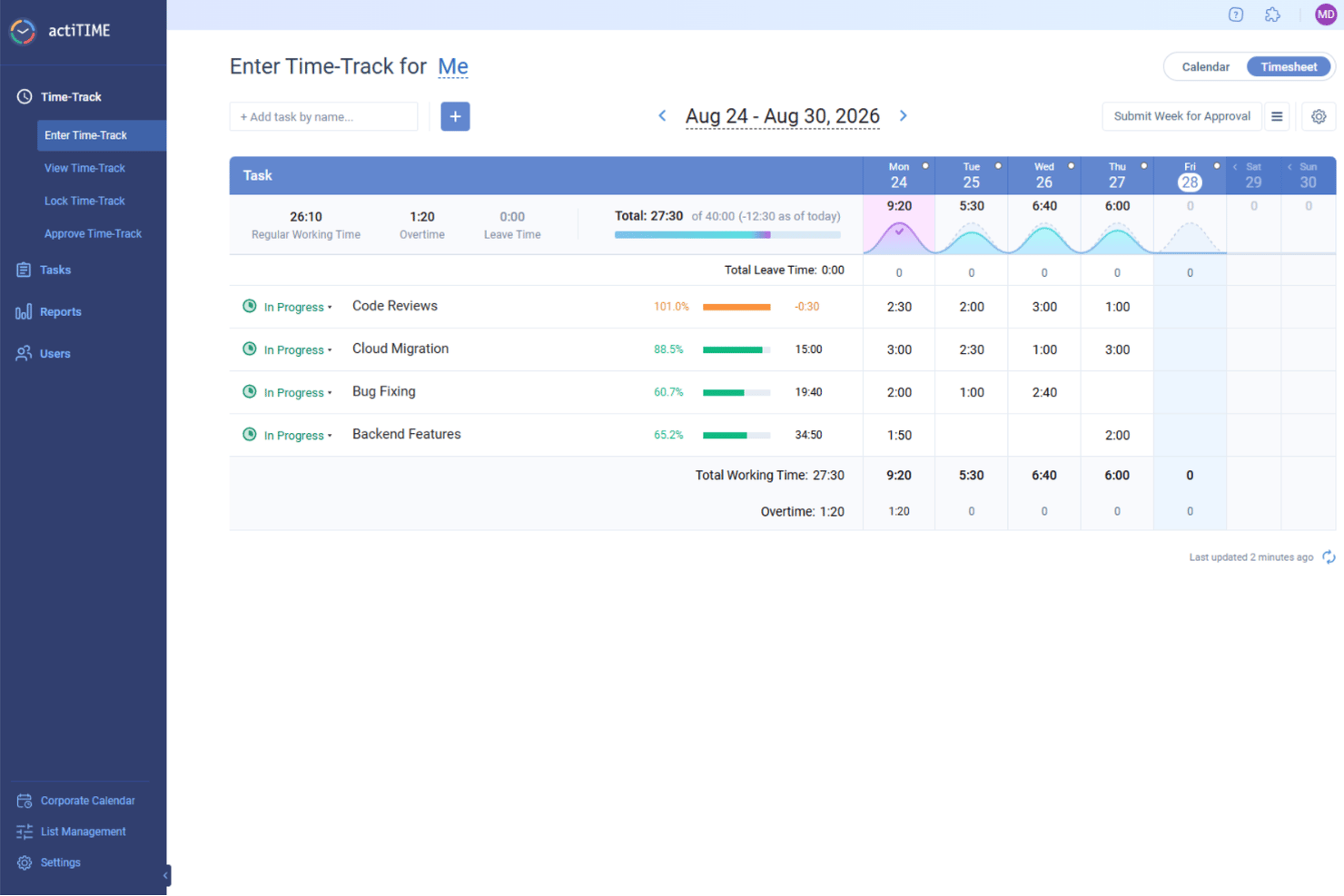
actiTIME è uno strumento versatile basato sul web per il monitoraggio e la gestione del tempo, che ti aiuta a supervisionare la capacità del team e i costi dei progetti. Che tu gestisca progetti di architettura, servizi di consulenza o attività di e-commerce, questo strumento ti aiuta a registrare le ore dedicate a compiti specifici, gestire le richieste di permesso e generare report dettagliati di fatturazione per i clienti. Con actiTIME, il tuo team può concentrarsi sulla realizzazione di un lavoro di qualità, garantendo al contempo una fatturazione precisa e senza complicazioni.
Perché ho scelto actiTIME
Ho scelto actiTIME perché offre un approccio strutturato al monitoraggio del tempo e alla fatturazione, importante per le aziende che puntano a ottimizzare la propria gestione finanziaria. La funzionalità di monitoraggio del tempo del software consente al tuo team di registrare le ore direttamente sui progetti, garantendo trasparenza e responsabilità. Inoltre, le sue funzionalità di fatturazione generano automaticamente le fatture in base al tempo registrato e alle tariffe predefinite, riducendo gli errori manuali e facendo risparmiare tempo. Queste funzionalità sono particolarmente utili se desideri mantenere registri di fatturazione accurati senza dover ricorrere a calcoli manuali complessi.
Funzionalità principali di actiTIME
Oltre ai suoi punti di forza principali, ho anche riscontrato che actiTIME offre diverse altre funzionalità utili per il tuo team:
- Monitoraggio dei progetti: Tieni sotto controllo l'avanzamento dei progetti in tempo reale per rispettare scadenze e budget.
- Gestione dei permessi: Gestisci le richieste e le approvazioni dei permessi dei dipendenti all'interno della piattaforma.
- Flussi di lavoro personalizzati: Adatta i flussi di lavoro ai tuoi processi aziendali specifici, migliorando la produttività.
- Monitoraggio del budget: Tieni sotto controllo i budget dei progetti per evitare spese eccessive e garantire l'efficienza finanziaria.
Integrazioni di actiTIME
Le integrazioni includono QuickBooks e Zapier. È disponibile un'API per le integrazioni personalizzate.
Pros and Cons
Pros:
- Widget di report altamente personalizzabili
- Automatizza il flusso di lavoro della fatturazione
- Monitoraggio del tempo offline da dispositivi mobili
Cons:
- Mancano modelli di progetto avanzati
- Opzioni di integrazione native limitate
New Product Updates from actiTIME

actiTIME Visual Hour Indicator and Time-Track Report Redesign
actiTIME adds a wave-style hour indicator to the Timesheet and Calendar views and refreshes the Time-Track report for smoother navigation and clearer visuals. For more information, visit actiTIME's official site.

TimeTrex
Ideale per l'automazione di buste paga e tasse

TimeTrex è una piattaforma di gestione della forza lavoro che combina rilevamento delle ore lavorate, elaborazione delle buste paga, pianificazione dei turni e gestione delle presenze in un unico sistema. Supporta le timbrature via web, mobile e dispositivi biometrici, aiutando le aziende a tracciare con precisione le ore dei dipendenti e collegare questi dati direttamente alle buste paga e ai costi della manodopera.
Per chi è più adatto TimeTrex?
TimeTrex è particolarmente indicato per aziende di medie e grandi dimensioni che gestiscono lavoratori a ore, soprattutto quelle con più sedi o esigenze più complesse di gestione delle buste paga e della conformità normativa.
Perché ho scelto TimeTrex
TimeTrex si distingue per il modo in cui integra strettamente il rilevamento delle ore con l'elaborazione delle buste paga. Le ore lavorate confluiscono direttamente nel calcolo delle paghe, includendo salari, detrazioni e ritenute fiscali. Supporta inoltre la dichiarazione dei redditi, riducendo così la necessità di sistemi separati o gestione manuale dei dati. Per i team che gestiscono ampi gruppi di lavoratori a ore, questa configurazione rende le buste paga più efficienti e mantiene i dati sulla manodopera coerenti in tutta l'azienda.
Caratteristiche principali di TimeTrex
- Rilevamento delle ore: Registra le ore dei dipendenti tramite web, dispositivi mobili o terminali fisici.
- Elaborazione delle buste paga: Automatizza il calcolo di salari, detrazioni e ritenute fiscali in base alle ore registrate.
- Pianificazione dei turni: Crea e gestisce i turni dei dipendenti, assegna orari e gestisce le disponibilità.
- Gestione delle presenze: Monitora la presenza, traccia le assenze e gestisce la maturazione delle ferie.
- Reportistica e analisi: Genera report su ore lavorate, straordinari e costi della manodopera per decisioni più informate.
Integrazioni di TimeTrex
TimeTrex si integra nativamente con QuickBooks, Sage, ADP e Paychex. Offre inoltre un'API per integrazioni personalizzate.
Pros and Cons
Pros:
- Sincronizzazione automatica tra presenze e buste paga
- Report dettagliati su costi del lavoro e conformità
- Self-service per i dipendenti e strumenti HR integrati
Cons:
- Interfaccia e report possono sembrare datati
- L'automazione fiscale delle buste paga è limitata a determinati paesi
New Product Updates from TimeTrex
TimeTrex Adds Quick Punch App With Offline and QR Support
TimeTrex adds a new Quick Punch app, offline punching, QR code scanning, punch images, configurable messages, and punch warnings or lockouts to improve employee clock-ins across browsers and local computers. For more information, visit TimeTrex’s official site.
 .
.
Clockify
Ideale per controlli scalabili dell'ambiente di lavoro

Clockify è un software per la rilevazione dei tempi e la fatturazione che si rivolge ad aziende di tutte le dimensioni. Aiuta i team a tracciare le ore di lavoro, gestire i progetti e generare report per la fatturazione ai clienti.
Perché ho scelto Clockify: Questo strumento è adatto a team di qualsiasi dimensione perché offre accessi illimitati agli utenti, rendendolo scalabile per aziende in crescita. Puoi monitorare le ore per i diversi progetti senza preoccuparti dei limiti sugli utenti. Clockify offre funzionalità di reportistica dettagliata che ti aiutano ad analizzare la produttività e i costi dei progetti. Ha anche un'interfaccia intuitiva, quindi il tuo team può iniziare subito a tracciare il tempo senza bisogno di formazione aggiuntiva.
Caratteristiche principali e integrazioni:
Funzionalità includono voci di tempo personalizzabili, che ti consentono di regolare e categorizzare il tempo secondo necessità. Il dashboard offre una panoramica visiva del tempo del team, delle attività e dell'avanzamento dei progetti. Puoi anche impostare tariffe orarie diverse per ogni membro del team.
Integrazioni includono Asana, Trello, Jira, QuickBooks, Zapier, Google Calendar, Microsoft Outlook, monday.com e altro ancora.
Pros and Cons
Pros:
- Piano gratuito ricco di funzionalità
- Modifica di massa delle voci di tempo per una rapida gestione
- Controlli scalabili e flessibili per team in crescita
Cons:
- Personalizzazione limitata delle fatture
- Supporto limitato per l'importazione di grandi volumi di dati nelle voci di tempo

Timely
Ideale per la rilevazione automatica e intelligente delle ore di lavoro

Timely è un software di monitoraggio del tempo e fatturazione progettato per i professionisti che necessitano di una rilevazione accurata senza inserimenti manuali. Automatizza la rilevazione delle ore, risultando ideale per freelance e team che vogliono concentrarsi sul lavoro invece che sulla registrazione delle ore.
Perché ho scelto Timely: La funzione di monitoraggio automatico di Timely rileva il tempo impiegato nelle varie attività senza bisogno di inserimenti manuali, riducendo così la possibilità di errori. Puoi rivedere e approvare le ore registrate prima della fatturazione. La timeline visiva ti permette di vedere come il tuo tempo viene distribuito tra i progetti, aiutandoti a gestire il carico di lavoro. Timely offre anche strumenti di budgeting per i progetti, così da poter monitorare i costi e rispettare i limiti di budget.
Funzionalità principali e integrazioni:
Funzionalità includono il monitoraggio tramite memoria, che registra tutte le tue attività lavorative e crea una timeline dettagliata. Il cruscotto di progetto ti offre una panoramica rapida dell’avanzamento e della distribuzione del tempo. Puoi anche impostare notifiche per ricordarti le attività e le scadenze.
Integrazioni includono Slack, Google Calendar, Asana, Trello, Jira, Zapier, Xero e altri ancora.
Pros and Cons
Pros:
- Rilevazione automatica delle ore di lavoro
- Solidi controlli sulla privacy
- Funzionalità timeline basata sulla memoria
Cons:
- Funzionalità di pianificazione delle attività non incluse
- Controllo limitato sull’organizzazione dei dati

My Hours
Ideale per il monitoraggio illimitato di progetti
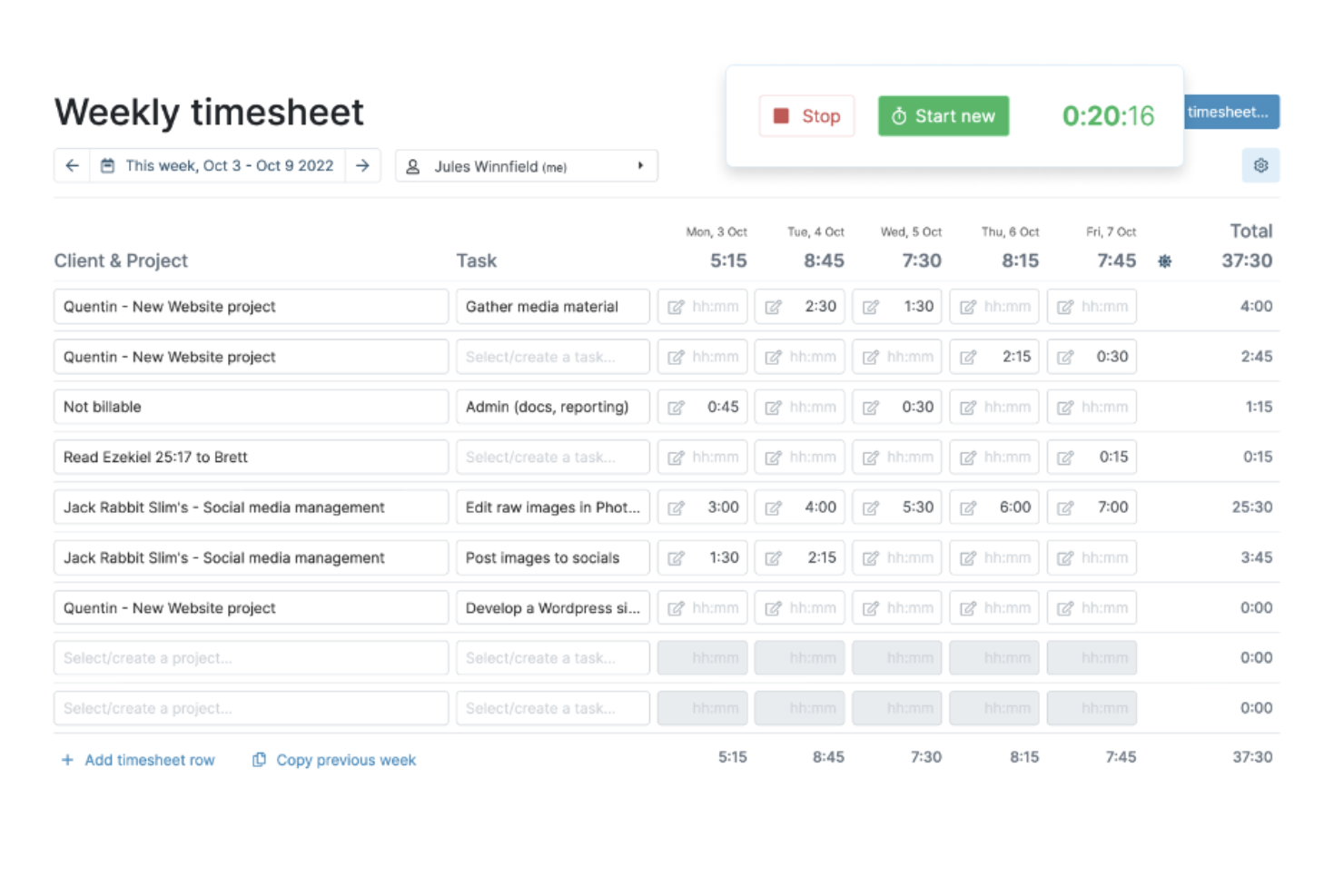
My Hours è un software di monitoraggio del tempo e fatturazione adatto a team che devono gestire più progetti. Permette agli utenti di monitorare il tempo, gestire le attività e gestire la fatturazione dei clienti.
Perché ho scelto My Hours: My Hours è ideale per i team che gestiscono più progetti, offrendo funzionalità come il monitoraggio del tempo sui progetti e il tracciamento delle attività adatte a gestire carichi di lavoro estesi. Puoi creare report dettagliati per analizzare la redditività del progetto. Le funzionalità di gestione delle attività del software aiutano a mantenere l’organizzazione e rispettare le scadenze. Offre anche opzioni di fatturazione personalizzabili, permettendo di adattare le fatture a ciascun cliente.
Funzionalità e integrazioni principali:
Funzionalità includono l’analisi della redditività dei progetti, che aiuta a dare priorità ai progetti in base alle tariffe del lavoro e alle spese. Il monitoraggio delle spese consente di allegare file e generare report per la fatturazione. Il sistema di gestione delle paghe può essere utilizzato per monitorare presenze e assenze, supportando una gestione precisa delle buste paga.
Integrazioni includono QuickBooks, Zapier, Google Calendar, Microsoft Teams, Asana, Jira, Xero e altri.
Pros and Cons
Pros:
- Sistema di organizzazione con raggruppamento delle attività
- Approfondimenti sull'efficienza e sulla redditività
- Struttura delle tariffe flessibile
Cons:
- Supporto limitato al monitoraggio conforme alle normative
- Prestazioni mobili non sempre coerenti

TimeCamp
Ideale per freelance e consulenti
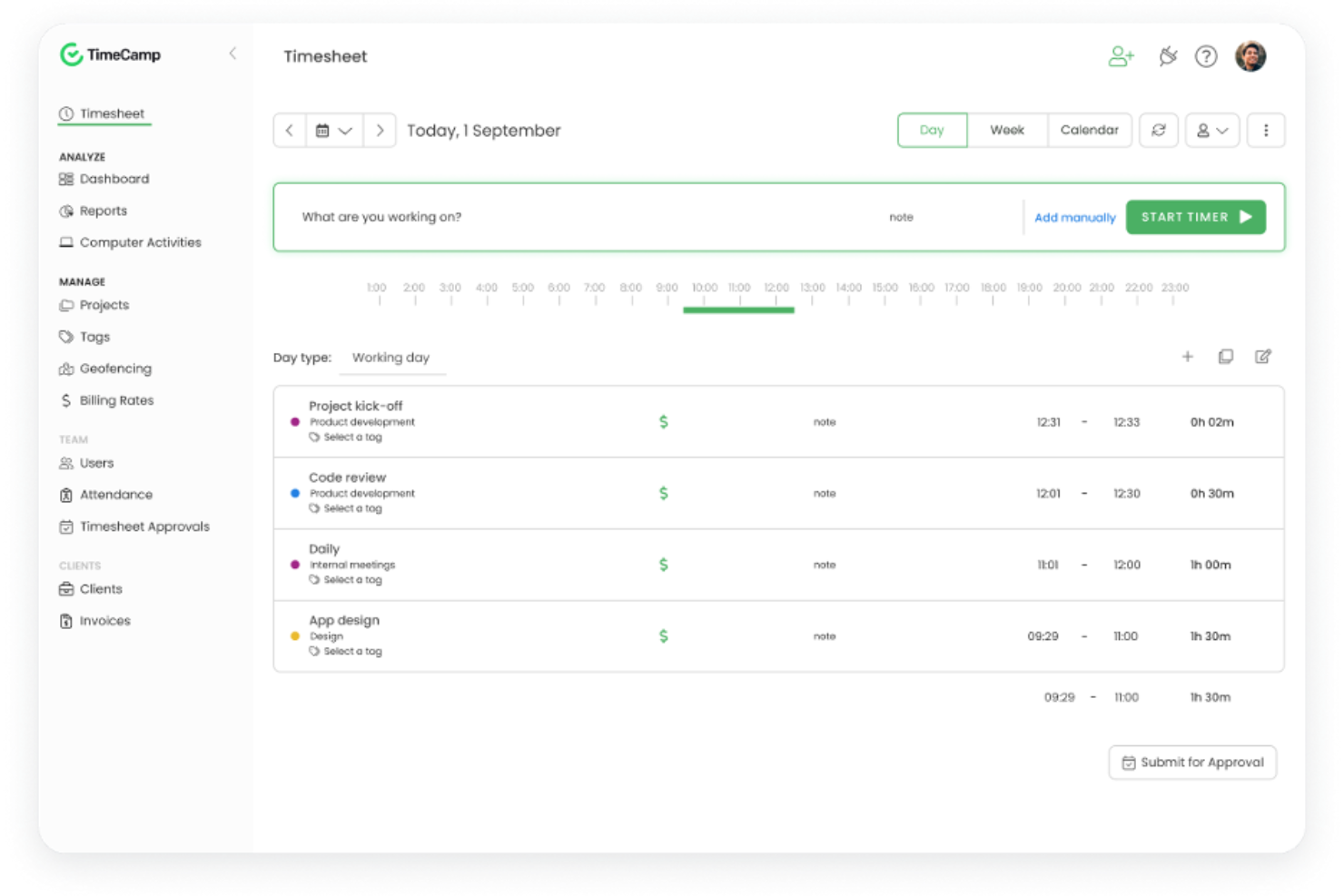
TimeCamp è un software di monitoraggio del tempo e fatturazione progettato per freelance e piccole imprese. Aiuta a monitorare le ore fatturabili, gestire i progetti e generare fatture.
Perché ho scelto TimeCamp: I freelance possono beneficiare della sua capacità di tracciare automaticamente il tempo dedicato alle attività, supportando una fatturazione accurata per ogni minuto lavorato. Puoi categorizzare le registrazioni di tempo per progetto e cliente, organizzando così il carico di lavoro. La funzione di fatturazione ti permette di creare fatture professionali direttamente dalle ore tracciate. TimeCamp offre anche il monitoraggio della produttività, offrendo informazioni su come gestisci il tuo tempo.
Funzionalità principali e integrazioni:
Funzionalità includono il rilevamento dei periodi di inattività, che mette in pausa il monitoraggio quando non viene rilevata alcuna attività. Puoi impostare obiettivi per i progetti per aiutarti a rimanere concentrato e produttivo. La funzione di reportistica offre approfondimenti dettagliati sull'uso del tempo, facilitando una migliore gestione e pianificazione dello stesso.
Integrazioni includono Trello, Asana, Slack, monday.com, Jira, QuickBooks, Xero, GitHub, Google Calendar e altri.
Pros and Cons
Pros:
- Schede attività codificate per colore
- Rilevamento del tempo di inattività
- Valutazione integrata della produttività
Cons:
- Le regole di monitoraggio automatico richiedono aggiustamenti frequenti
- I controlli di accesso sono limitati per gerarchie di team complesse

Everhour
Ideale per l'integrazione con Asana

Everhour è un software di rilevazione del tempo e fatturazione pensato per i team che utilizzano strumenti di gestione dei progetti, come Asana. Consente di monitorare con precisione il tempo, gestire i budget ed emettere fatture, aiutando i team a gestire i propri progetti.
Perché ho scelto Everhour: si integra direttamente con Asana, consentendo di monitorare il tempo senza lasciare il proprio ambiente di gestione dei progetti. Questo può aiutarti a mantenere la concentrazione e a migliorare i flussi di lavoro. Puoi impostare i budget dei progetti e monitorare i progressi in tempo reale per mantenere i progetti sulla buona strada. Everhour offre anche report dettagliati, che possono aiutarti ad analizzare le prestazioni dei progetti e a prendere decisioni consapevoli.
Funzionalità e integrazioni principali:
Le funzionalità includono la possibilità di creare report personalizzati che offrono informazioni sulla produttività del team e sui costi dei progetti. Puoi anche gestire la disponibilità e il carico di lavoro del team per ottimizzare l'allocazione delle risorse. La funzionalità di fatturazione consente di generare fatture direttamente dal tempo monitorato.
Le integrazioni includono Asana, Trello, Basecamp, Jira, ClickUp, GitHub, GitLab, Xero, QuickBooks e altro ancora.
Pros and Cons
Pros:
- Integrazione nativa avanzata con Asana
- Timer incorporati direttamente nelle attività dei progetti
- Strumenti di monitoraggio del budget che si aggiornano in tempo reale
Cons:
- Funzionalità limitate senza una piattaforma di gestione dei progetti collegata
- Funzionalità avanzate di reportistica limitate per i team che necessitano di layout personalizzati

Ideale per l'integrazione con QuickBooks
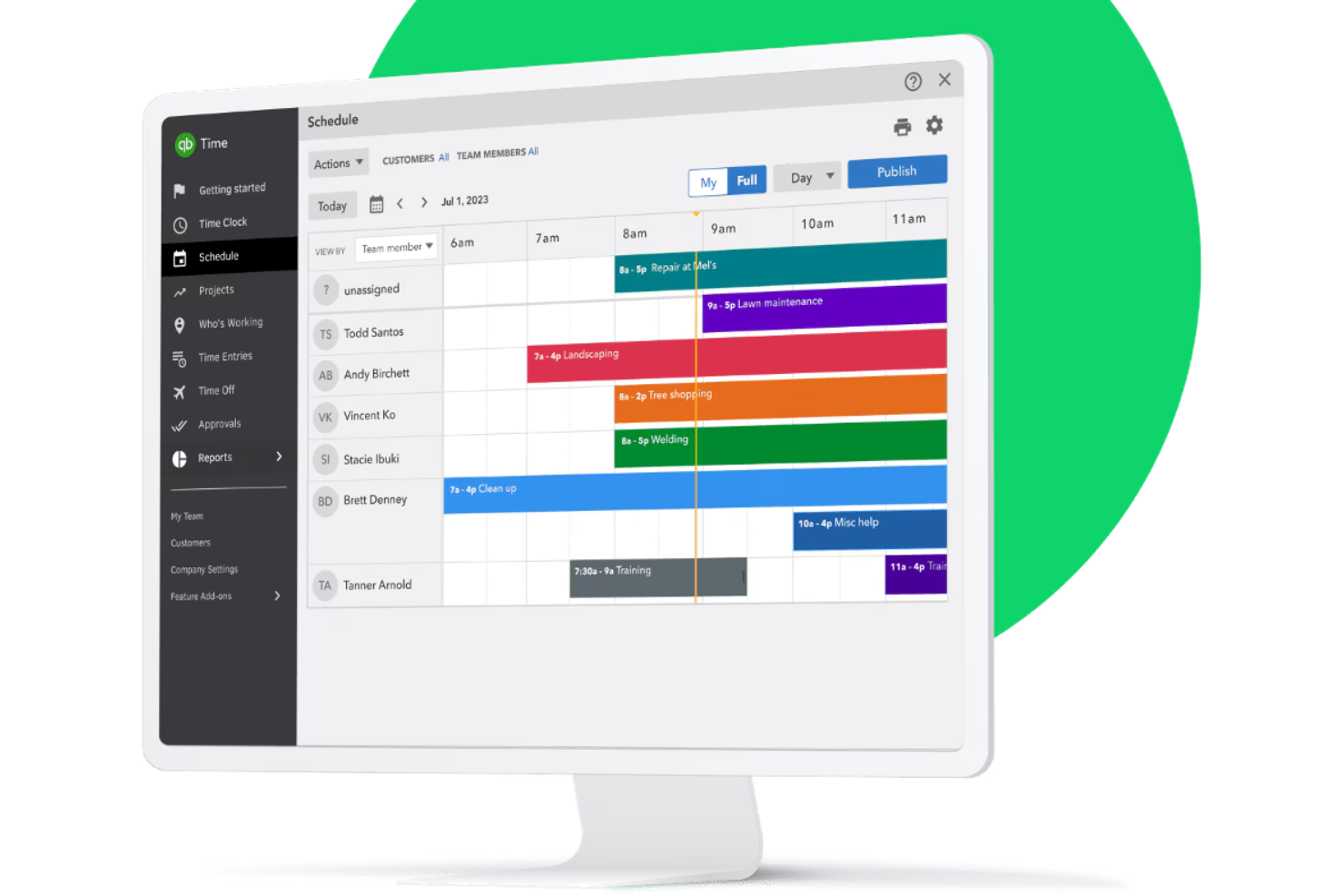
QuickBooks Time è un software di rilevamento delle presenze e di fatturazione progettato per le aziende che già utilizzano QuickBooks per la contabilità. Aiuta i team a monitorare il tempo, gestire le buste paga e coordinare la programmazione in modo efficiente.
Perché ho scelto QuickBooks Time: Si integra con QuickBooks, rendendolo una scelta eccellente per le aziende che già utilizzano QuickBooks per le proprie esigenze contabili. Puoi trasferire i dati di rilevamento del tempo su QuickBooks per una gestione accurata delle buste paga. Con le funzionalità di programmazione, puoi assegnare turni e notificare ai membri del team per mantenere tutti allineati. Il tracciamento GPS supporta il monitoraggio dei dipendenti, permettendoti di verificare la posizione dei dipendenti, utile per le aziende con forza lavoro mobile.
Caratteristiche principali e integrazioni:
Funzionalità includono avvisi personalizzabili che ricordano al tuo team di timbrare ingresso e uscita, aiutando a ridurre il numero di timbrature mancate. La piattaforma offre report dettagliati sui fogli presenze che forniscono informazioni sulla produttività del team. La sua app mobile permette ai dipendenti di registrare il tempo anche fuori sede.
Integrazioni includono Sage Intacct, Namely, Xero e altri.
Pros and Cons
Pros:
- Progettato per l'integrazione con QuickBooks
- Include strumenti adatti ai servizi sul campo
- Offre solide funzionalità di gestione del team
Cons:
- Limitato agli utenti QuickBooks
- I calcoli degli straordinari possono essere incoerenti per team complessi
TMetric
Ideale per informazioni sui costi e tempi bruciati in tempo reale
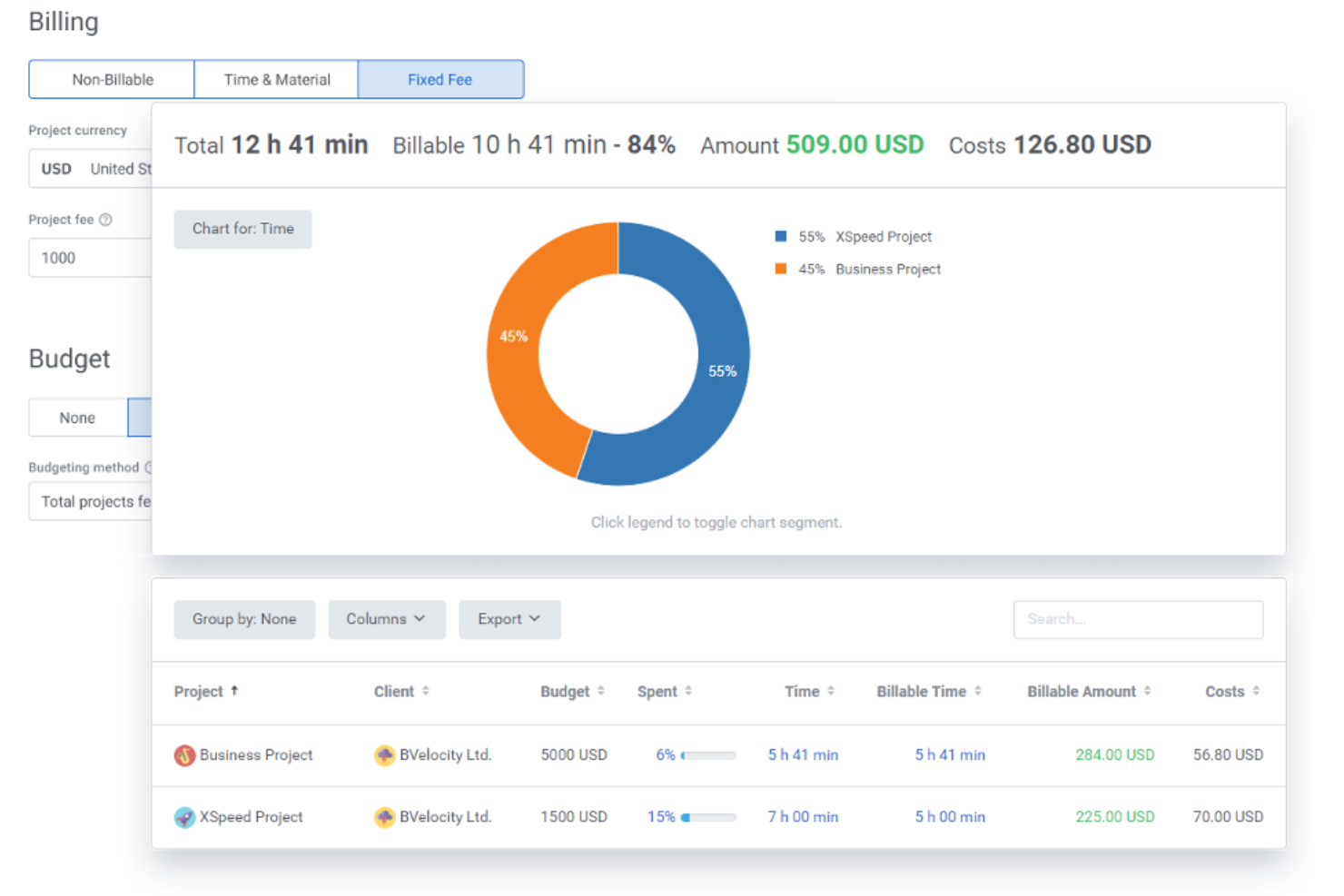
TMetric è un software per la gestione del tempo e la fatturazione pensato per le aziende che devono tenere sotto controllo i budget. Aiuta a tracciare il tempo, monitorare i costi dei progetti e gestire la fatturazione.
Perché ho scelto TMetric: Offre funzionalità dettagliate di monitoraggio del budget che ti permettono di controllare le spese di progetto in tempo reale. Puoi impostare limiti di budget per i progetti e ricevere avvisi quando ti avvicini a tali limiti, aiutandoti a rimanere entro i vincoli finanziari. Il software fornisce anche un monitoraggio dettagliato del tempo. Le capacità di reportistica di TMetric offrono informazioni sulla redditività dei progetti, utili per gestire le prestazioni finanziarie.
Funzionalità e integrazioni di spicco:
Funzionalità includono strumenti di gestione delle attività che ti aiutano a organizzare e dare priorità al lavoro. Il software offre una dashboard per il team in cui puoi visualizzare e gestire le attività del gruppo. Puoi anche tracciare il tempo su diversi dispositivi, offrendoti flessibilità nel registrare le ore.
Integrazioni comprendono Asana, Trello, Jira, GitHub, GitLab, QuickBooks, Salesforce, Google Calendar e altri.
Pros and Cons
Pros:
- Controlli avvio/arresto rapidi per il cambio attività
- Ottimi indicatori di capacità del team
- API semplice per integrazioni personalizzate
Cons:
- Gestione ferie basilare
- Sistema di notifiche limitato
Altri software per il monitoraggio del tempo e la fatturazione
Ecco alcune opzioni aggiuntive di software per il monitoraggio del tempo e la fatturazione che non sono entrate nella mia selezione, ma che vale comunque la pena valutare:
- TimeSolv
Ideale per la fatturazione basata su pratica e contabilità fiduciaria
- Harvest
Ideale per la collaborazione tra piccoli team
- Bill4time
Ideale per modelli tariffari personalizzati
- TimeTracker by eBillity
Ideale per il timekeeping conforme alle norme dei tribunali
- Insightful
Ideale per l’analisi delle attività in tempo reale
- Scoro
Ideale per gestire il processo dal preventivo alla fattura con CRM integrato


Come valuto i software per la rilevazione del tempo e la fatturazione
Valuto ogni strumento su due livelli: le funzionalità di base di cui un project manager ha bisogno per passare dal registro delle ore alla fattura del cliente, e i fattori distintivi che separano i buoni strumenti da quelli eccellenti.
Funzionalità di base (Requisiti minimi per questa lista)
Quando seleziono gli strumenti per la mia lista, valuto ciascuno su una scala da 0 (non offre la funzionalità) a 5 (eccelle in quest'area) per ogni funzionalità di base elencata di seguito. Poi calcolo il punteggio totale dello strumento come percentuale. Ogni strumento deve ottenere un punteggio totale minimo del 65% per essere preso in considerazione.
- Metodi di rilevazione del tempo: Cerco opzioni di inserimento flessibili—timer, inserimento manuale, fogli presenze—e verifico se le registrazioni possono essere associate a specifici progetti, attività e clienti.
- Fatturazione e emissione di fatture: Lo strumento dovrebbe convertire le ore tracciate in fatture pronte per il cliente, supportando modelli personalizzati, voci per le tasse e fatturazione in più valute.
- Organizzazione di progetti e clienti: Valuto come ogni piattaforma struttura il lavoro, cercando una gerarchia chiara dove le registrazioni del tempo si aggregano da attività a progetti e poi a clienti.
- Configurazione delle tariffe fatturabili: La flessibilità nella gestione delle tariffe è importante—gli strumenti dovrebbero gestire modelli a ore, a tariffa fissa e a forfait, con la possibilità di impostare tariffe per utente, progetto o attività.
- Reportistica e monitoraggio dei budget: Controllo la presenza di report che mettano in evidenza l'utilizzo fatturabile, il consumo del budget di progetto e la redditività, così da poter individuare gli sforamenti prima che incidano sui margini.
- Integrazione con pagamenti e contabilità: Connessioni native con piattaforme come QuickBooks, Xero o Stripe chiudono il cerchio dalle ore registrate ai ricavi incassati.
Una volta che ho una lista di strumenti che soddisfano questi criteri, considero cosa distingue ogni piattaforma.
Fattori distintivi (Cosa distingue i fornitori)
Ecco come confronto e metto a confronto i vari fornitori:
Caratteristiche distintive
I flussi di approvazione sono molto importanti quando un team di dieci persone registra ore su più clienti—sono necessari più livelli di revisione dei fogli presenze prima che qualsiasi cosa finisca su una fattura. Controllo anche la presenza di tracciamento di spese e chilometraggio, poiché i costi rimborsabili spesso vengono fatturati insieme alle ore e non dovrebbero richiedere uno strumento separato. La gestione dei forfait è un altro fattore distintivo, soprattutto per le agenzie che gestiscono pacchetti di ore prepagate che necessitano di una visibilità automatica sul consumo.
Oltre le funzionalità
L'integrazione nell'ecosistema è tra le mie priorità—verifico se uno strumento si sincronizza con le piattaforme PM e di contabilità già utilizzate dal team, come Jira, Asana, QuickBooks o Xero. La struttura dei prezzi incide anche sulla mia valutazione, in particolare se i piani crescono in base al numero di utenti o alle funzionalità aggiuntive man mano che il team si espande. Infine, l'accesso da mobile è importante per i consulenti che registrano il tempo in loco o tra una riunione e l'altra, quindi verifico la presenza di app complete con inserimento offline che si sincronizzano appena torna la connettività.
Come scegliere il software per il monitoraggio del tempo e la fatturazione
È facile perdersi in lunghi elenchi di funzionalità e strutture tariffarie complesse. Per aiutarti a rimanere concentrato mentre affronti il tuo specifico processo di selezione del software, ecco una lista di fattori da tenere a mente:
| Fattore | Cosa considerare |
| Scalabilità | Il software crescerà insieme alla tua attività? Considera il numero di utenti supportati e se è in grado di gestire una quantità maggiore di dati con l'espansione del team. Cerca strumenti che offrano modelli di prezzo flessibili per la scalabilità. |
| Integrazioni | Lo strumento si integra con i sistemi esistenti? Verifica la compatibilità con gli strumenti di gestione dei progetti, contabilità e comunicazione per favorire una perfetta integrazione del flusso di lavoro. |
| Personalizzazione | Puoi adattare il software alle tue esigenze specifiche? Cerca opzioni per personalizzare report, dashboard e modelli di fatturazione in modo che rispecchino i processi della tua attività. |
| Facilità d'uso | L'interfaccia è intuitiva? Prova il software per verificare se è facile da usare e se il tuo team riesce a orientarsi senza una formazione approfondita. I sistemi complicati possono rallentare l'adozione e la produttività. |
| Implementazione e onboarding | Quanto velocemente puoi iniziare? Valuta le risorse fornite per l'onboarding, come tutorial e assistenza, per favorire una transizione fluida senza interrompere le tue attività. |
| Costo | Il prezzo rientra nel tuo budget? Confronta i piani tariffari e verifica la presenza di costi nascosti. Considera i costi a lungo termine e valuta se le funzionalità offerte giustificano il prezzo. |
| Misure di sicurezza | Quanto sono sicuri i tuoi dati? Cerca standard di crittografia, opzioni di backup dei dati e conformità alle normative sulla protezione dei dati per proteggere le informazioni sensibili. |
| Disponibilità dell'assistenza | L'aiuto è disponibile quando ne hai bisogno? Verifica la disponibilità delle opzioni di assistenza clienti, come chat dal vivo, telefono e supporto via email, soprattutto durante il tuo orario di lavoro. |
Che cos'è il software per il monitoraggio del tempo e la fatturazione?
Il software per il monitoraggio del tempo e la fatturazione è uno strumento che aiuta le aziende a monitorare le ore lavorate e a generare fatture. Professionisti come freelance, consulenti e titolari di piccole imprese utilizzano questi strumenti per migliorare la precisione della fatturazione e gestire i progetti in modo efficiente. Le funzionalità di monitoraggio del tempo, fatturazione e reportistica supportano una fatturazione accurata e la gestione dei progetti. In definitiva, questi strumenti fanno risparmiare tempo e riducono il carico di lavoro amministrativo.
Funzionalità
Quando scegli un software per il monitoraggio del tempo e la fatturazione, presta attenzione alle seguenti funzionalità chiave:
- Monitoraggio del tempo: Registra automaticamente le ore dedicate alle attività, contribuendo a mantenere una fatturazione accurata e a gestire meglio il tempo.
- Fatturazione: Genera fatture direttamente dal tempo registrato, semplificando il processo di fatturazione e riducendo gli errori manuali.
- Monitoraggio del budget: Monitora le spese dei progetti e ricevi avvisi quando ti avvicini ai limiti di budget, aiutandoti a gestire le finanze.
- Reportistica: Fornisce informazioni sull'utilizzo del tempo e sui costi dei progetti, favorendo il processo decisionale e l'analisi della produttività.
- Gestione delle spese: Tieni traccia delle spese relative ai progetti per supportare una fatturazione accurata e il controllo finanziario.
- Modelli personalizzabili: Adatta le fatture e i report del tempo alle esigenze della tua attività, aumentando professionalità e chiarezza.
- Accesso da dispositivi mobili: Consente di monitorare il tempo e creare fatture ovunque ti trovi, supportando flessibilità e praticità nel lavoro da remoto.
- Integrazioni: Collegati ad altri strumenti, come i software per la gestione dei progetti e la contabilità, migliorando i flussi di lavoro e la condivisione dei dati.
- Avvisi e notifiche: Ricorda agli utenti le attività e le scadenze, aiutando a mantenere i progetti in linea e a ridurre le opportunità di fatturazione mancate.
- Misure di sicurezza: Protegge i dati sensibili con la crittografia e la conformità alle normative sulla protezione dei dati, per garantirti tranquillità.
Vantaggi
L'implementazione di un software per il monitoraggio del tempo e la fatturazione offre diversi vantaggi al tuo team e alla tua attività. Eccone alcuni:
- Maggiore precisione: Il monitoraggio automatico delle ore riduce gli errori manuali e convalida l'accuratezza del tempo fatturabile.
- Risparmio di tempo: Generare fatture direttamente dal tempo registrato riduce le attività amministrative, lasciando più tempo per il lavoro produttivo.
- Migliore controllo finanziario: Il monitoraggio del budget e la gestione delle spese aiutano a tenere sotto stretto controllo i costi dei progetti, evitando gli sforamenti.
- Maggiore produttività: Le funzionalità di reportistica forniscono informazioni su come viene impiegato il tempo, consentendoti di individuare le aree da migliorare.
- Maggiore flessibilità: L'accesso da dispositivi mobili consente di monitorare il tempo e le spese ovunque ti trovi, supportando il lavoro da remoto e in mobilità.
- Professionalità: I modelli personalizzabili per fatture e report aiutano a mantenere un'immagine professionale con i clienti.
- Sicurezza dei dati: Le misure di sicurezza proteggono le informazioni sensibili, garantendoti tranquillità in merito alla privacy dei dati.
Costi e prezzi
La scelta del software per il monitoraggio del tempo e la fatturazione richiede una comprensione dei vari modelli e piani tariffari disponibili. I costi variano in base alle funzionalità, alle dimensioni del team, ai componenti aggiuntivi e ad altri fattori. La tabella seguente riepiloga i piani più comuni, i relativi prezzi medi e le funzionalità tipicamente incluse nelle soluzioni software per il monitoraggio del tempo e la fatturazione:
Tabella comparativa dei piani per il software di monitoraggio del tempo e fatturazione
| Tipo di piano | Prezzo medio | Funzionalità comuni |
| Piano gratuito | $0 | Monitoraggio di base del tempo, progetti limitati e report semplici. |
| Piano personale | $4-$15/utente/mese | Monitoraggio del tempo, fatturazione, gestione dei progetti e report di base. |
| Piano aziendale | $7-$30/utente/mese | Report avanzati, integrazioni, monitoraggio del budget e gestione delle spese. |
| Piano per grandi aziende | $12-$70/utente/mese | Funzionalità personalizzabili, assistenza dedicata, misure di sicurezza e strumenti per la conformità. |
Domande frequenti sul software di monitoraggio del tempo e fatturazione
Ecco alcune risposte alle domande comuni sul software di monitoraggio del tempo e fatturazione:
In che modo il software di monitoraggio del tempo supporta l'accuratezza dei dati?
Il software di monitoraggio del tempo supporta l’accuratezza dei dati registrando automaticamente le ore lavorate e riducendo gli errori di inserimento manuale. Alcuni strumenti offrono funzionalità come il rilevamento dell’inattività e promemoria per registrare l’entrata e l’uscita, che aiutano a mantenere registrazioni accurate. Inoltre, puoi rivedere e modificare le voci per correggere eventuali discrepanze prima di finalizzare i report o le fatture
Il software di monitoraggio del tempo può integrarsi con gli strumenti che già utilizzo?
Sì, molte soluzioni software per il monitoraggio del tempo possono integrarsi con i più diffusi strumenti di gestione dei progetti, contabilità e comunicazione. Verifica le funzionalità di integrazione del software per mantenere la compatibilità con i sistemi attuali. Le integrazioni possono migliorare i flussi di lavoro sincronizzando i dati tra le piattaforme, riducendo gli inserimenti duplicati e aumentando l’efficienza complessiva.
I miei dati sono al sicuro con il software di monitoraggio del tempo?
Sì, la maggior parte dei fornitori affidabili di software per il monitoraggio del tempo applica misure di sicurezza per proteggere i tuoi dati. Cerca un software che offra la crittografia, backup regolari dei dati e conformità alle normative sulla protezione dei dati. È essenziale scegliere un fornitore con una solida reputazione in materia di sicurezza e verificare che le tue informazioni rimangano protette.
Come scelgo il software di monitoraggio del tempo più adatto alla mia azienda?
Per scegliere il software più adatto, inizia identificando le esigenze e i flussi di lavoro specifici del tuo team. Considera fattori come le integrazioni, la facilità d’uso e la scalabilità. Prova alcune opzioni con periodi di prova gratuiti per capire quale si adatta meglio. Presta attenzione alle recensioni degli utenti e alla disponibilità dell’assistenza clienti per garantire un’esperienza senza problemi.