

I 10 migliori software per prenotare le postazioni condivise nel 2026

Migliori software per la prenotazione di postazioni non assegnate - Selezione


Il software per la prenotazione di postazioni non assegnate consente al tuo team di riservare postazioni e spazi di lavoro su richiesta, semplificando la gestione di uffici flessibili. Se stai cercando il miglior software per la prenotazione di postazioni non assegnate, probabilmente devi gestire orari ibridi, esigenze del team in continua evoluzione e la necessità di mantenere il tuo spazio di lavoro efficiente ed equo.
Lo strumento giusto può aiutarti a evitare doppie prenotazioni, offrire a tutti visibilità sulla disponibilità delle postazioni e favorire un rientro in ufficio senza intoppi.
In questa guida troverai un confronto chiaro tra le principali piattaforme per la prenotazione di postazioni non assegnate, così potrai scegliere quella più adatta al flusso di lavoro del tuo team e ai tuoi obiettivi di gestione dello spazio.
Perché fidarsi dei nostri consigli sui software
Il nostro team testa e recensisce software dal 2012. In quanto project manager noi stessi, sappiamo quanto sia difficile — e importante — scegliere il software giusto.
Per questa guida, abbiamo valutato gli strumenti attraverso test pratici e ricerche indipendenti, assegnando un punteggio agli strumenti in base ai nostri criteri di selezione. Ci basiamo inoltre sulle competenze di leader di pensiero del settore e di professionisti attivi nella gestione dei progetti.
Le nostre recensioni riflettono il nostro giudizio editoriale umano, non un discorso di vendita.
Revisori esperti:
Riepilogo dei migliori software per la prenotazione di postazioni non assegnate
Questa tabella comparativa riassume i dettagli dei prezzi delle mie migliori soluzioni software per la prenotazione di postazioni non assegnate, per aiutarti a trovare quella più adatta al tuo budget e alle esigenze della tua azienda.
| Tool | Best For | Trial Info | Price | ||
|---|---|---|---|---|---|
| 1 | Ideale per delegare la gestione delle scrivanie agli ospiti | Demo gratuita disponibile | Prezzo su richiesta | Website | |
| 2 | Ideale per prenotare postazioni in base all'area del team | Demo gratuita disponibile | Prezzi su richiesta | Website | |
| 3 | Ideale per raccomandazioni di scrivanie basate su AI | Piano gratuito + demo gratuita disponibili | Da $500/mese | Website | |
| 4 | Ideale per il monitoraggio dell'occupazione per zona | Demo gratuita disponibile | Prezzo su richiesta | Website | |
| 5 | Ideale per regole di assegnazione automatica delle scrivanie | Piano gratuito + demo gratuita disponibile | Da $5/risorsa prenotabile/anno (fatturazione annuale) | Website | |
| 6 | Ideale per l'accesso a location di coworking in tutto il mondo | Versione gratuita disponibile | Da $32.47/utente/mese (fatturato annualmente) | Website | |
| 7 | Ideale per la visualizzazione interattiva delle planimetrie | Prova gratuita di 30 giorni + demo gratuita disponibile | A partire da £10/mese (fatturato annualmente) | Website | |
| 8 | Ideale per prenotazione istantanea delle scrivanie con un solo tocco | Prova gratuita di 14 giorni + piano gratuito + demo gratuita disponibile | Da $1,90/utente/mese (fatturazione annuale) | Website | |
| 9 | Ideale per analisi avanzate e reportistica | Demo gratuita disponibile | Da £99/mese | Website | |
| 10 | Ideale per prenotazioni di scrivanie orientate al mobile | Demo gratuita disponibile | Prezzo su richiesta | Website |

Recensioni dei software per la prenotazione di postazioni non assegnate
Di seguito trovi i miei riepiloghi dettagliati dei software per la prenotazione di postazioni non assegnate inclusi nella mia selezione. Le mie recensioni offrono uno sguardo approfondito sulle funzionalità, sui casi d’uso migliori e sulle integrazioni di ciascuna piattaforma, per aiutarti a trovare quella più adatta a te.
Ideale per delegare la gestione delle scrivanie agli ospiti
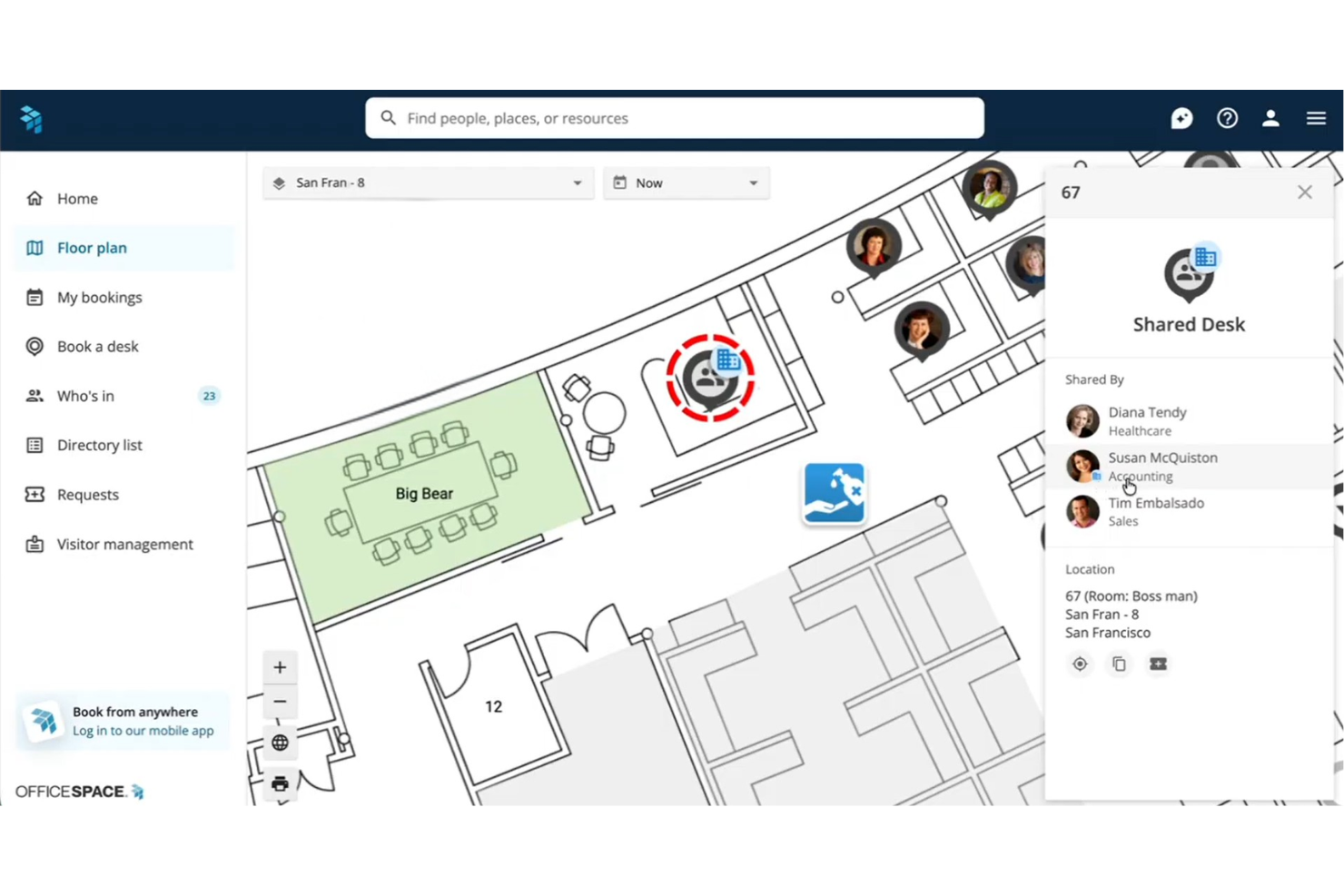
OfficeSpace è una piattaforma aziendale per la prenotazione di postazioni flessibili che combina la navigazione interattiva sulla pianta degli uffici, l'assegnazione delle scrivanie per quartieri, controlli delegati per la prenotazione e analisi di utilizzo sia in uffici singoli che multi-sede.
Per chi è OfficeSpace?
È particolarmente adatta ai team aziendali di gestione degli spazi e delle strutture che devono organizzare la prenotazione ibrida delle postazioni in uffici di grandi dimensioni, dislocati su più sedi, con necessità complesse di permessi e capacità.
Perché ho scelto OfficeSpace
OfficeSpace merita il suo posto nella mia selezione grazie all'approccio dettagliato nella gestione dei permessi per le scrivanie degli ospiti. Apprezzo la possibilità di nominare i Capi Quartiere, membri specifici del team che possono prenotare e gestire le scrivanie per i visitatori senza bisogno di pieno accesso amministrativo. È anche possibile configurare finestre di prenotazione anticipate per gruppi specifici, così ospiti VIP o gruppi di progetto hanno accesso prioritario rispetto all'apertura generale delle postazioni.
Caratteristiche principali di OfficeSpace
- Piante interattive degli uffici: Naviga mappe dinamiche di uffici multi-sede con disponibilità delle scrivanie in tempo reale e servizi di orientamento negli spazi.
- Analisi di utilizzo: Accedi a dashboard che monitorano l'occupazione, i modelli di prenotazione e le tendenze di utilizzo degli spazi con dati provenienti da IoT e sensori.
- Integrazioni con i calendari: Sincronizza le prenotazioni con Google Calendar, Office 365, Outlook, Slack, Teams e altro ancora.
- Check-in automatici: Avvia il check-in alla scrivania tramite scansione badge o presenza WiFi per automatizzare la rilevazione delle presenze e liberare gli spazi non utilizzati.
Integrazioni di OfficeSpace
OfficeSpace offre integrazioni native con Microsoft 365, Google Workspace, Slack, Microsoft Teams, Zoom, Okta, Workday, ADP e PeopleSoft. È disponibile anche un'API per integrazioni personalizzate.
Pros and Cons
Pros:
- Controlli granulari sui permessi per le scrivanie per gruppo utente
- L'orientamento facilita la navigazione in uffici di grandi dimensioni
- Reportistica avanzata sull'utilizzo con supporto per dati da sensori
Cons:
- L'implementazione richiede un significativo intervento IT
- L'aggiornamento della configurazione della pianta può essere lento
New Product Updates from OfficeSpace

OfficeSpace Adds Work Order Status and Cost Reports
OfficeSpace adds Work Order Status and Work Order Cost reports for built-in maintenance reporting. These reports help facilities teams track work order activity and costs without relying on manual spreadsheets. For more information, visit OfficeSpace’s official site.
 .
.
Tactic
Ideale per prenotare postazioni in base all'area del team
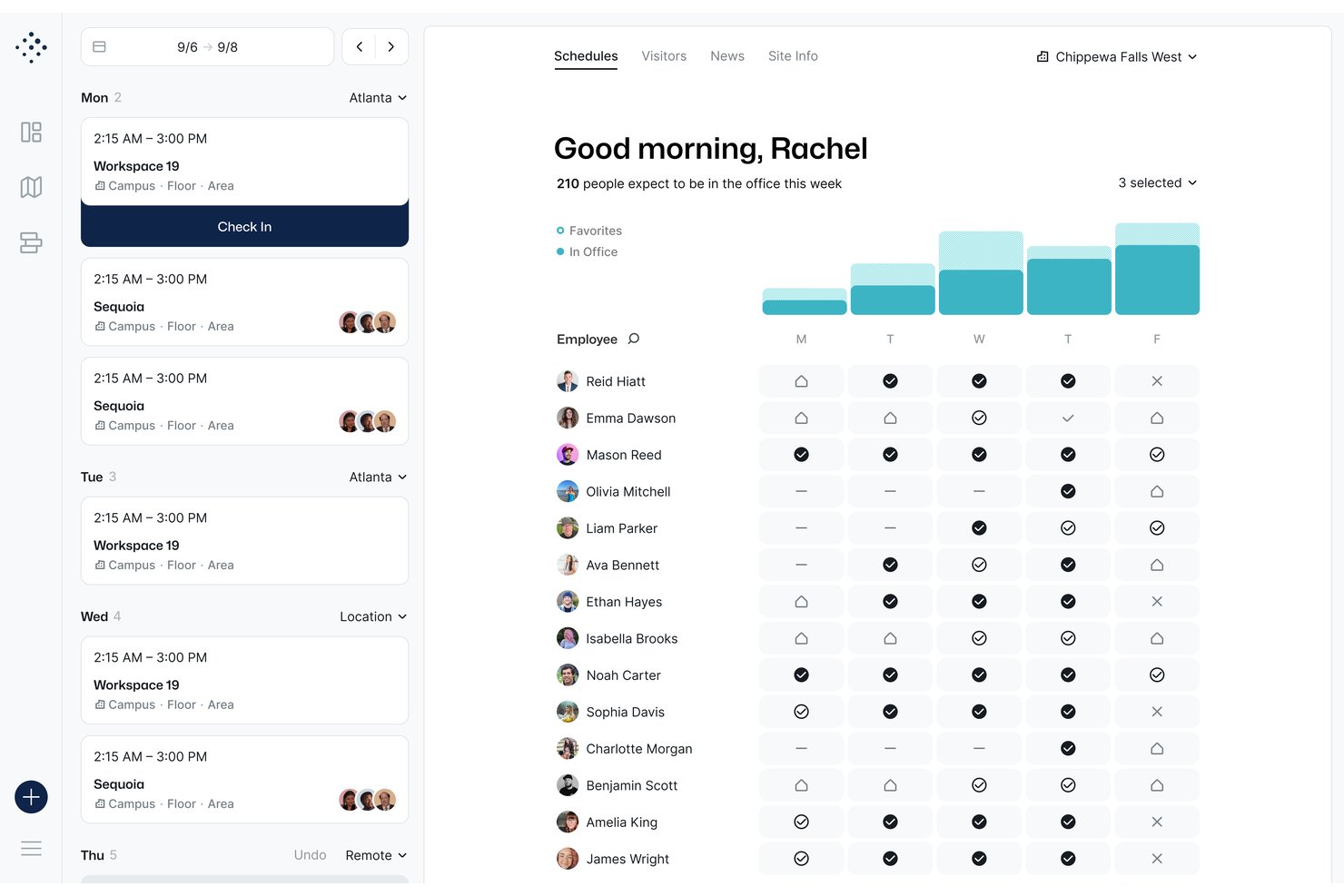
Tactic è una piattaforma di prenotazione delle postazioni flessibili che combina la prenotazione tramite planimetria interattiva, il raggruppamento dei team per area, la prenotazione assistita dall'IA e l'analisi del luogo di lavoro per postazioni, sale e risorse personalizzate.
Per chi è più adatto Tactic?
Tactic è particolarmente adatto alle piccole e medie imprese che gestiscono team ibridi e hanno bisogno di un modo semplice e senza complesse attività amministrative per coordinare le postazioni in sede.
Perché ho scelto Tactic
Tactic è entrato nella mia lista ristretta grazie al modo in cui gestisce le aree dei team. Posso filtrare la planimetria interattiva in base alla zona del team, vedere esattamente dove sono seduti i colleghi e prenotare una postazione proprio accanto a loro con pochi clic. Inoltre, Tessa, l'assistente IA di Tactic, mi permette di cercare le postazioni disponibili vicino al mio team usando il linguaggio naturale, riducendo il tempo che altrimenti passerei a consultare una griglia di disponibilità.
Funzionalità principali di Tactic
- Prenotazione delegata: Gli amministratori e gli assistenti dei dirigenti possono prenotare postazioni o sale per conto di altri utenti o ospiti.
- Check-in automatico alla postazione: Gli utenti possono effettuare il check-in tramite codici QR, Slack, Teams, Wi-Fi o dall'app, mentre le prenotazioni degli utenti assenti vengono liberate automaticamente.
- Integrazione bidirezionale con i calendari: Le prenotazioni si sincronizzano in tempo reale con Google Calendar e Outlook per un coordinamento fluido sul luogo di lavoro.
- Gestione delle risorse personalizzate: È possibile prenotare parcheggi, armadietti o attrezzature insieme alle postazioni da un'unica interfaccia.
Integrazioni di Tactic
Tactic offre integrazioni native con Google Calendar, Outlook, Slack, Microsoft Teams, Microsoft 365 e Microsoft Entra, oltre a supportare SSO e SCIM. È disponibile un'API per le integrazioni personalizzate.
Pros and Cons
Pros:
- La prenotazione per area del team è intuitiva in modo unico
- L'assistente IA semplifica la ricerca delle postazioni
- Il localizzatore dei colleghi mostra in tempo reale dove sono seduti i membri del team
Cons:
- La reportistica analitica non è abbastanza approfondita per i team numerosi
- L'esperienza dell'app mobile è in ritardo rispetto alla versione desktop

elia
Ideale per raccomandazioni di scrivanie basate su AI

elia è una piattaforma per la gestione delle operazioni in ufficio che copre prenotazione di scrivanie e sale, gestione delle presenze, richieste di servizio, gestione dei visitatori e coordinamento dell’ufficio ibrido tramite un’interfaccia con planimetria interattiva.
Per chi è ideale elia?
elia è particolarmente adatta a medie e grandi aziende che gestiscono il lavoro ibrido su più sedi e necessitano di un controllo centralizzato sulle risorse degli spazi di lavoro.
Perché ho scelto elia
Ho scelto elia come una delle migliori opzioni perché la funzione di Analisi e Raccomandazioni AI va oltre la semplice reportistica, segnalando attivamente le scrivanie più adatte sulla base dei modelli di utilizzo e dei dati di occupazione. Questo è particolarmente utile nei grandi uffici, dove i dipendenti faticano a trovare la scrivania giusta per la giornata senza dover consultare manualmente la piantina. In più, i dati provenienti dai sensori di presenza vengono trasmessi direttamente al motore di analisi, rendendo le raccomandazioni realmente basate su segnali di utilizzo reali e anonimi, anziché su supposizioni.
Funzionalità principali di elia
- Planimetria interattiva: Consulta la disponibilità delle scrivanie in tempo reale direttamente su una mappa visiva dell’ufficio e prenota una postazione specifica in pochi clic.
- Prenotazione per aree: Assegna i team a zone designate dell’ufficio così i colleghi possono prenotare scrivanie nella stessa area nei giorni di presenza condivisi.
- Check-in/check-out automatico: Attiva il check-in alla scrivania tramite QR code o app mobile, con rilascio automatico per chi non si presenta, così da liberare le postazioni inutilizzate.
- Prenotazione per colleghi: Prenota scrivanie per conto di altri membri del team o invita i colleghi a prenotare insieme a te per giornate coordinate in sede.
Integrazioni di elia
elia offre integrazioni native con Microsoft 365, Google Workspace e Slack, con la prenotazione delle sale riunioni sincronizzata con Outlook e Google Calendar. L’accesso API e un builder per integrazioni personalizzate con dispositivi IoT e software sono disponibili nel piano Enterprise.
Pros and Cons
Pros:
- Strumento integrato di progettazione planimetria
- Raccolta dati di presenza anonimizzata tramite sensori
- Il piano gratuito include utenti illimitati
Cons:
- Opzioni di stato di pianificazione limitate
- L’app mobile è meno rifinita rispetto alla versione desktop

Ideale per il monitoraggio dell'occupazione per zona
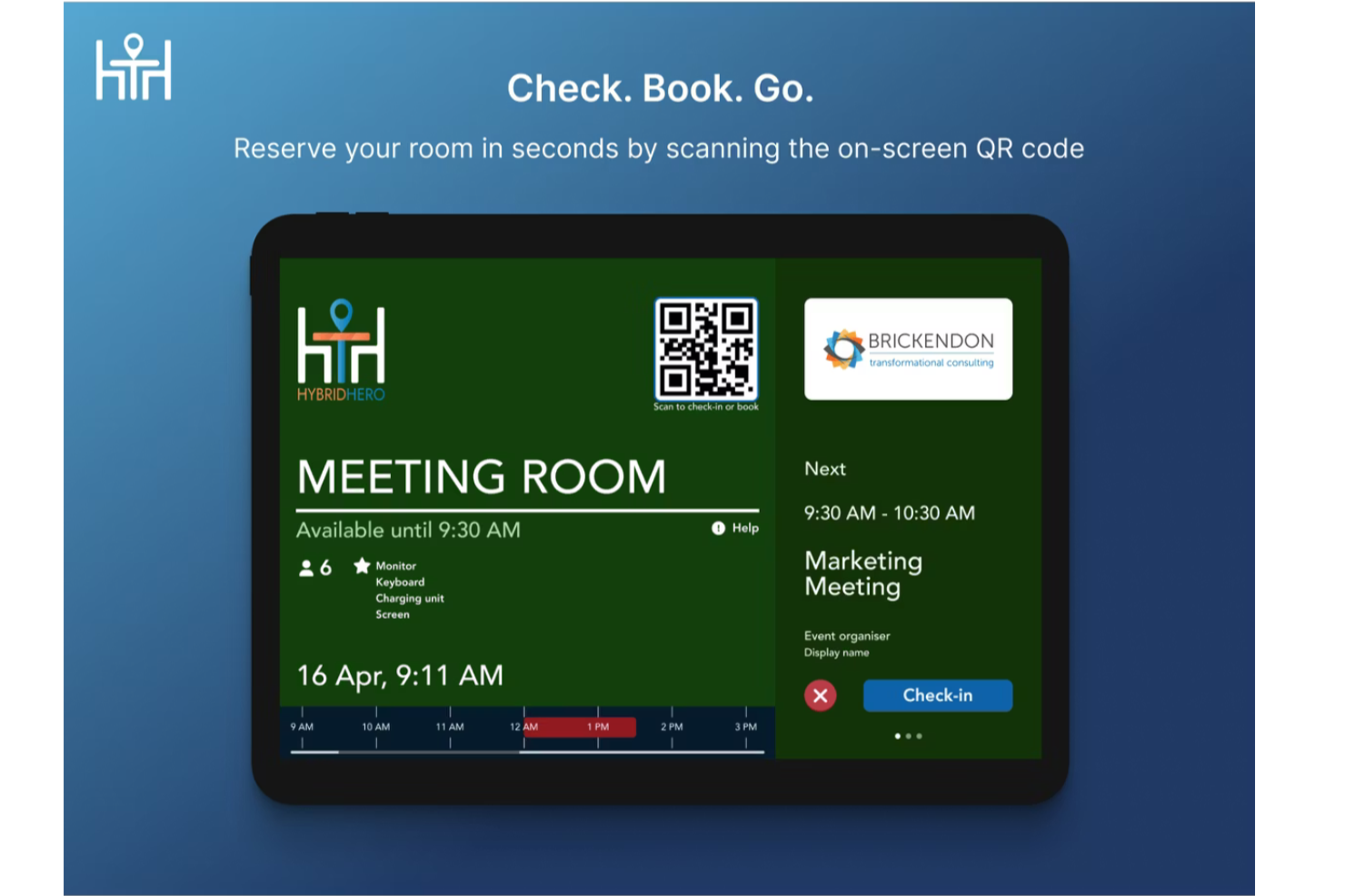
Hybrid Hero è una piattaforma per la prenotazione di scrivanie flessibili che combina planimetrie interattive, configurazione degli spazi di lavoro per quartiere, check-in tramite QR code e analisi dell'occupazione a livello di zona su uffici singoli e multi-sede.
Per Chi è Meglio Hybrid Hero?
Hybrid Hero è adatto ad aziende di medie e grandi dimensioni che gestiscono orari di lavoro ibridi su più sedi o piani d'ufficio.
Perché Ho Scelto Hybrid Hero
Ho incluso Hybrid Hero tra le mie migliori scelte perché i suoi dati sull'occupazione a livello di zona sono veramente dettagliati. Invece di mostrare un unico dato di utilizzo per un intero piano, Hybrid Hero suddivide le mappe di calore dell'occupazione per quartiere o zona, così posso vedere quali aree dell'ufficio sono sovraccariche il martedì e quali rimangono vuote tutta la settimana. Questo livello di visibilità rende una conversazione con COO o CFO sul real estate realmente difendibile. Se a ciò si aggiunge il monitoraggio delle assenze e i report sulle tendenze nei giorni di punta, si ottiene una visione chiara delle performance di ogni zona nel tempo.
Caratteristiche Principali di Hybrid Hero
- Planimetria interattiva: Visualizza la disponibilità in tempo reale delle scrivanie sulla planimetria dell'ufficio e prenota direttamente dalla mappa.
- Check-in tramite QR code: I dipendenti effettuano il check-in alla scrivania tramite QR code e le scrivanie non rivendicate vengono automaticamente rimesse a disposizione.
- Ricerca scrivania per servizi: Filtra le scrivanie disponibili in base a servizi specifici come monitor, scrivanie regolabili in altezza o cabine telefoniche.
- Prenotazione ricorrente della scrivania: Configura prenotazioni ripetute su più giorni o settimane senza doverle effettuare manualmente ogni volta.
Integrazioni di Hybrid Hero
Hybrid Hero offre integrazioni native con l'ecosistema Microsoft, tra cui Microsoft Outlook, Microsoft Teams e Azure AD, oltre a Google Workspace, Okta e Slack. Fornisce anche una REST API e webhook per collegarsi a HRIS, sistemi di controllo accessi e altri sistemi interni. Il supporto a Zapier non è chiaramente documentato.
Pros and Cons
Pros:
- Piattaforma unificata per scrivanie, sale e parcheggi
- Prenotazione AI tramite richieste in linguaggio naturale
- Prezzo a scrivania ideale per rapporti elevati tra scrivanie e dipendenti
Cons:
- Nessuna prova gratuita o piano gratuito disponibile
- L'app mobile può risultare lenta nel caricamento
Envoy
Ideale per regole di assegnazione automatica delle scrivanie

Envoy è una piattaforma di gestione degli ambienti di lavoro per la prenotazione di postazioni flessibili che consente di automatizzare l'assegnazione delle scrivanie, gestire le prenotazioni, impostare politiche di prenotazione e monitorare l'occupazione dell'ufficio da un pannello di controllo centralizzato.
Per chi è ideale Envoy?
I responsabili degli uffici di aziende di medie e grandi dimensioni che necessitano di assegnazione automatica delle scrivanie e gestione centralizzata degli spazi di lavoro.
Perché ho scelto Envoy
Ho scelto Envoy come uno dei migliori perché posso configurare regole di assegnazione automatica delle scrivanie che rispettano le politiche e le preferenze del mio team. Mi piace poter organizzare per quartieri, limitare le prenotazioni in base al team o all'orario e assegnare automaticamente le scrivanie in base alle esigenze dei dipendenti. Il mio team utilizza il pannello di analisi per monitorare l'occupazione e adattare in tempo reale la pianificazione degli spazi.
Funzionalità principali di Envoy
- Visualizzazione della piantina interattiva: Visualizza le scrivanie disponibili e le prenotazioni su una mappa dell'ufficio in tempo reale.
- Prenotazione tramite app mobile: Prenota scrivanie e gestisci le prenotazioni direttamente dal tuo telefono.
- Integrazione gestione visitatori: Traccia e gestisci l'accesso degli ospiti insieme alle prenotazioni delle scrivanie.
- Screening sanitario e di sicurezza: Richiedi ai dipendenti di completare i controlli sanitari prima di prenotare una scrivania.
Integrazioni Envoy
Envoy offre integrazioni native con Google Workspace, Microsoft 365, Slack, Zoom, Okta, Cisco Meraki, Aruba, Salesforce e dispone di un'API per integrazioni personalizzate.
Pros and Cons
Pros:
- Assegnazione automatica delle scrivanie basata su politiche
- Gestione centralizzata del luogo di lavoro e dell'occupazione
- Ottima visibilità sulle tendenze di utilizzo degli uffici
Cons:
- L'usabilità del pannello di controllo può essere incostante
- Flessibilità limitata nella logica di prenotazione personalizzata
Ideale per l'accesso a location di coworking in tutto il mondo

Othership è una piattaforma per la prenotazione di spazi di lavoro che ti permette di riservare scrivanie, sale riunioni e uffici privati in una rete selezionata di location di coworking in diversi paesi.
Per chi è ideale Othership?
Professionisti da remoto e team distribuiti che necessitano di soluzioni flessibili per spazi di lavoro in più città o paesi.
Perché ho scelto Othership
Ho scelto Othership come uno dei migliori perché posso accedere a una rete selezionata di spazi di coworking in dozzine di città in tutto il mondo. Mi piace poter cercare per posizione, servizi disponibili o tipologia di spazio e prenotare subito scrivanie o sale riunioni. Il mio team utilizza la piattaforma per coordinare le giornate di lavoro in presenza quando viaggia o lavora da remoto in diversi paesi.
Funzionalità principali di Othership
- Dashboard di gestione del team: Gestisci membri del team, permessi e utilizzo degli spazi da una dashboard centralizzata.
- Controlli di accesso agli spazi di lavoro: Decidi chi può prenotare, effettuare il check-in o accedere a determinate location.
- Esportazione della cronologia delle prenotazioni: Scarica dati dettagliati sulle prenotazioni per report o monitoraggio delle spese.
- Supporto per app mobile: Prenota, effettua il check-in e gestisci le prenotazioni direttamente dal tuo smartphone.
Integrazioni di Othership
Le integrazioni native non sono chiaramente documentate. La piattaforma supporta integrazioni tramite API per soluzioni personalizzate.
Pros and Cons
Pros:
- Accesso a location di coworking selezionate a livello globale
- Prenotazione semplice in più città
- Gestione delle prenotazioni ottimizzata per dispositivi mobili
Cons:
- Reportistica e analisi d'uso limitate
- Funzionalità di gestione visitatori non integrate

Ideale per la visualizzazione interattiva delle planimetrie

Clearooms è una piattaforma di prenotazione delle postazioni flessibili che permette di gestire le prenotazioni delle scrivanie, la programmazione delle sale riunioni e le planimetrie interattive per ambienti di lavoro flessibili.
Per chi è più adatto Clearooms?
I responsabili delle strutture in uffici di medie e grandi dimensioni che hanno bisogno di una gestione dettagliata e interattiva delle planimetrie per la prenotazione di scrivanie e sale riunioni.
Perché ho scelto Clearooms
Ho scelto Clearooms tra i migliori perché posso caricare dettagliate planimetrie degli uffici e creare mappe interattive per la prenotazione di scrivanie e sale. Mi piace poter assegnare servizi e risorse a ogni spazio, rendendo facile per il mio team trovare la posizione più adatta. Il mio team utilizza l’editor drag-and-drop per aggiornare la disposizione degli spazi quando cambiano le nostre esigenze.
Funzionalità principali di Clearooms
- Prenotazione delle postazioni tramite app mobile: Prenota scrivanie e sale direttamente dallo smartphone.
- Gestione dei visitatori: Registra e monitora gli ospiti che entrano in ufficio.
- Integrazione con Outlook e Google Calendar: Sincronizza le prenotazioni con i tuoi strumenti di calendario esistenti.
- Check-in contactless: Usa i codici QR per il check-in senza contatto alle scrivanie e alle sale.
Integrazioni di Clearooms
Clearooms offre integrazioni native con Google Calendar, Office 365, Microsoft Teams, Slack, Paxton Access, e supporta l’accesso Single Sign-On tramite Azure, Google Workspace, JumpCloud, Microsoft AD FS, Okta e OneLogin. È disponibile anche un'API per integrazioni personalizzate.
Pros and Cons
Pros:
- Editor di planimetrie altamente visivo e interattivo
- Prenotazione semplice di scrivanie e sale tramite mobile
- Monitoraggio e gestione dei visitatori integrati
Cons:
- L’interfaccia può sembrare inizialmente complessa
- Personalizzazione limitata delle regole di prenotazione

Dibsido
Ideale per prenotazione istantanea delle scrivanie con un solo tocco
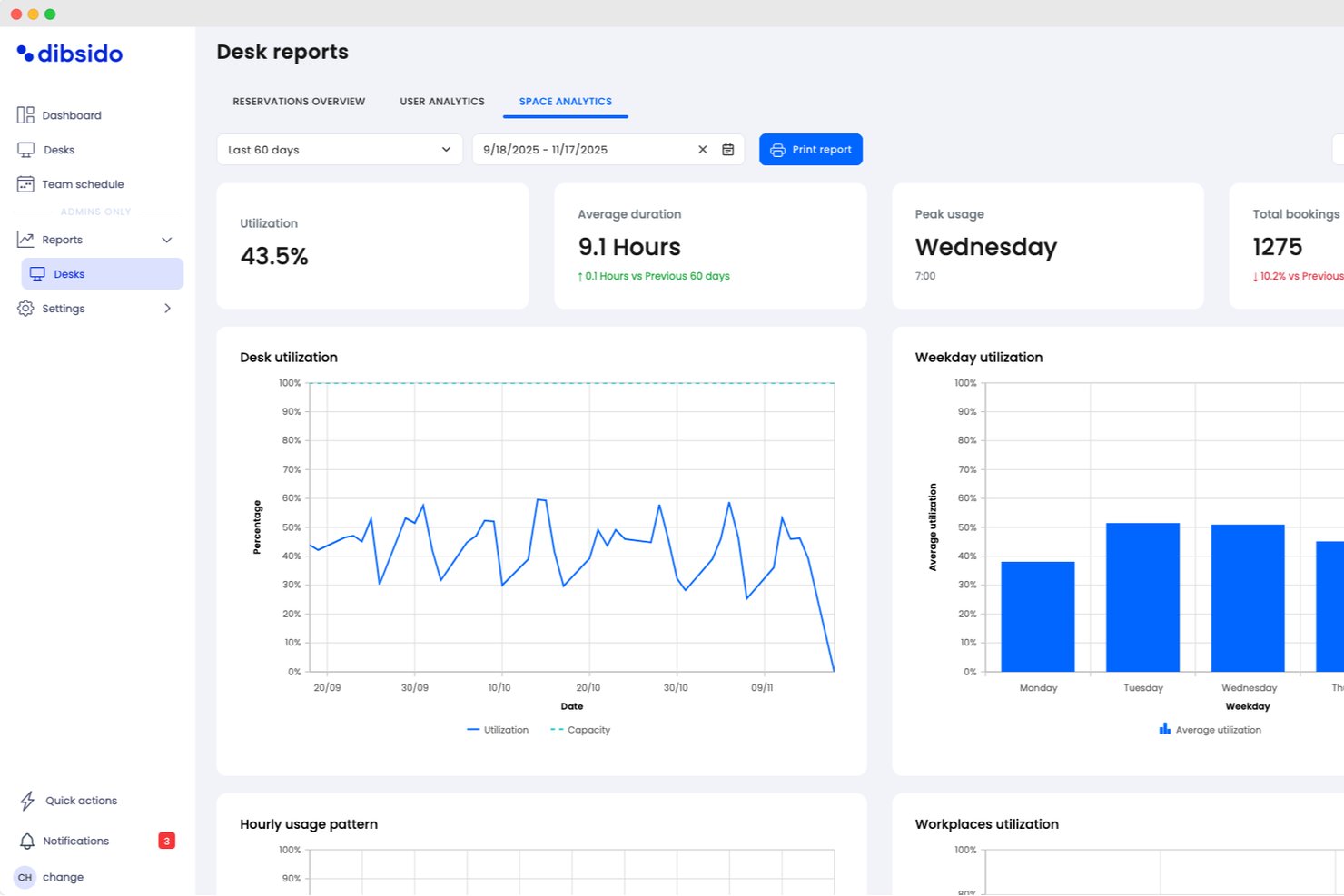
Dibsido è una piattaforma di prenotazione di scrivanie condivise progettata per riservare rapidamente desk, sale riunioni e posti auto con un solo tocco, supportata da planimetrie visuali e app mobile.
Per chi è ideale Dibsido?
Coordinatori di hot desk e office manager di piccole e medie imprese che desiderano prenotare rapidamente spazi di lavoro tramite app.
Perché ho scelto Dibsido
Ho scelto Dibsido tra i migliori perché posso prenotare qualsiasi scrivania disponibile istantaneamente con un solo tocco, anche dal mio telefono. La mappa interattiva dell'ufficio e la funzione di prenotazione con un solo tocco rendono velocissimo ottenere uno spazio non appena ne ho bisogno.
Funzionalità principali di Dibsido
- Interfaccia multilingua: Gli utenti possono cambiare lingua fra le 11 supportate direttamente dall’app.
- Dashboard di analisi per admin: Monitoraggio dei modelli di prenotazione e uso degli spazi tramite report visivi.
- Integrazione con Microsoft Teams: Prenota spazi di lavoro direttamente dall’interfaccia di Teams.
- Gestione dei posti auto: Automatizza le prenotazioni con liste d’attesa che assegnano subito i posti liberati, regole di priorità per le auto aziendali e rapide assegnazioni di posto ai colleghi.
Integrazioni Dibsido
Dibsido offre integrazioni native con Microsoft Teams e Slack, oltre a sincronizzazione bidirezionale del calendario con Microsoft Outlook e Google Calendar. Il Single Sign-On aziendale è supportato tramite Microsoft Entra ID, Google Workspace e SAML 2.0, con API disponibile per integrazioni personalizzate.
Pros and Cons
Pros:
- Annullamento automatico delle prenotazioni inutilizzate di hot desk
- Vista planimetria per selezione dello spazio di lavoro
- Codici QR integrati per il check-in
Cons:
- Controlli amministrativi avanzati limitati
- Funzionalità di analisi e reportistica di base

Cloudbooking è una piattaforma di gestione degli ambienti di lavoro per la prenotazione di postazioni flessibili che offre prenotazione delle scrivanie, programmazione delle sale riunioni, gestione dei visitatori e strumenti avanzati di analisi per monitorare l'utilizzo degli spazi.
Per chi è ideale Cloudbooking?
Responsabili delle strutture in grandi aziende che necessitano di analisi dettagliate sugli spazi e di una gestione centralizzata delle prenotazioni delle scrivanie.
Perché ho scelto Cloudbooking
Ho scelto Cloudbooking come una delle migliori soluzioni perché posso accedere a dati dettagliati sull'utilizzo degli spazi e generare report personalizzati per diversi reparti. Mi piace come la piattaforma permette di visualizzare le tendenze di occupazione e di esportare le analisi per il management. Il mio team utilizza la dashboard per monitorare l’uso delle scrivanie e ottimizzare la disposizione dell’ufficio grazie agli insight in tempo reale.
Caratteristiche principali di Cloudbooking
- Portale per la prenotazione delle scrivanie: Gli utenti possono prenotare le scrivanie tramite un'interfaccia web.
- Planimetrie interattive: Mappe visuali mostrano in tempo reale le scrivanie disponibili e prenotate.
- Integrazione per la gestione dei visitatori: Gestisce il check-in degli ospiti assieme alle prenotazioni degli spazi.
- Accesso tramite app mobile: Prenota le scrivanie e gestisci le prenotazioni da qualsiasi dispositivo mobile.
Integrazioni di Cloudbooking
Cloudbooking offre integrazioni native con Microsoft 365, Outlook, Google Workspace e Active Directory, e mette a disposizione un'API per integrazioni personalizzate.
Pros and Cons
Pros:
- Reportistica avanzata con dettagli sull'utilizzo
- Visualizzazione chiara dell'occupazione degli spazi
- Controllo centralizzato per scrivanie e sale
Cons:
- L'interfaccia può richiedere formazione per l'utilizzo completo
- Opzioni di personalizzazione per le regole di prenotazione limitate


Eptura Engage è una piattaforma di gestione degli spazi di lavoro per la prenotazione di scrivanie flessibili che offre prenotazione delle postazioni, planimetrie interattive, gestione dei visitatori e accesso tramite app mobile per team in sede e ibridi.
A chi è consigliato Eptura Engage?
Responsabili degli spazi di lavoro in organizzazioni di medie e grandi dimensioni che necessitano di una prenotazione delle scrivanie tramite dispositivi mobili per team ibridi.
Perché ho scelto Eptura Engage
Ho scelto Eptura Engage tra i migliori perché posso gestire le prenotazioni delle scrivanie direttamente dal mio telefono, il che è perfetto per i team ibridi in movimento. Mi piacciono le planimetrie interattive e il check-in tramite QR code, che rendono veloce prenotare e trovare le postazioni. Il mio team usa l'app mobile per coordinare i giorni in ufficio e riservare spazi senza dover accedere da desktop.
Caratteristiche chiave di Eptura Engage
- Integrazione con la gestione dei visitatori: Gestisci il check-in degli ospiti insieme alle prenotazioni degli spazi di lavoro.
- Sincronizzazione con Outlook e Google Calendar: Sincronizza le prenotazioni delle postazioni con i tuoi strumenti di calendario esistenti.
- Analisi dell'utilizzo degli spazi: Monitora l'uso degli spazi di lavoro tramite dashboard di reportistica integrata.
- Integrazione con i sistemi di controllo accessi: Collegamento con i sistemi di accesso agli edifici per un ingresso sicuro.
Integrazioni di Eptura Engage
Eptura Engage offre integrazioni native con tutto l’ecosistema Microsoft, inclusi Microsoft 365 e Outlook, oltre a controllo accessi, gestione dei visitatori, sale riunioni con video e sistemi HR. È disponibile un'API per integrazioni personalizzate.
Pros and Cons
Pros:
- Esperienza mobile-first per la prenotazione delle scrivanie
- Ottimo supporto per il coordinamento degli spazi di lavoro ibridi
- Planimetrie interattive per prenotazioni rapide
Cons:
- Flessibilità limitata nella configurazione delle regole di prenotazione
- La dashboard può risultare complessa per i nuovi utenti
Altri software per la prenotazione di postazioni non assegnate
Ecco alcune altre opzioni di software per la prenotazione di postazioni non assegnate che non sono state incluse nella mia selezione, ma che vale comunque la pena prendere in considerazione:
- Robin
Ideale per la gestione degli orari di lavoro ibridi
- Zynq
Ideale per integrare la prenotazione di scrivanie e sale riunioni
- Ronspot
Ideale per politiche di prenotazione personalizzabili
- HotDesk+
Ideale per accesso on-demand agli spazi di lavoro
- Deskfound
Ideale per integrazione con Slack
- Officely
Ideale per prenotare le scrivanie tramite Slack
- DeskFlex
Ideale con integrazione per la gestione dei visitatori
- FloorPlanMapper
Ideale per la mappatura interattiva degli uffici


Come valuto i software di prenotazione per postazioni flessibili
Valuto queste piattaforme su due livelli: le funzionalità di base imprescindibili come la prenotazione, la piantina dei piani e i controlli amministrativi, e poi i fattori distintivi come il raggruppamento dei team e la sincronizzazione con strumenti di progetto che fanno davvero la differenza.
Funzionalità base (requisiti fondamentali per questa lista)
Quando seleziono gli strumenti per la mia lista, ne valuto ciascuno su una scala da 0 (non offre la funzionalità) a 5 (eccelle in quell'area) per ciascuna delle funzionalità chiave elencate di seguito. Poi trasformo il punteggio totale in una percentuale. Ogni strumento deve ottenere un punteggio minimo totale del 65% per poter essere preso in considerazione.
- Prenotazione della postazione in tempo reale: Verifico se gli utenti possono prenotare, modificare e cancellare in autonomia le postazioni su diverse sedi—forse occupando una scrivania nella sede di Londra prima di una riunione di mercoledì.
- Visualizzazione interattiva delle planimetrie: Qui contano le mappe visive con disponibilità aggiornata. Cerco mappe prenotabili con un click, dove un responsabile di progetto può osservare un piano e scegliere postazioni vicine alla sala riunioni.
- Prenotazione e raggruppamento dei team: Per settimane di sprint o workshop trasversali, valuto se lo strumento permette a un manager di riservare in un'unica azione un blocco di scrivanie per una squadra di progetto.
- Integrazione con calendari e strumenti collaborativi: Cerco la sincronizzazione nativa con Google Calendar, Microsoft 365, Slack o Teams, in modo che le prenotazioni compaiano dove il team già pianifica la giornata.
- Regole e politiche di prenotazione amministrativa: Esamino attentamente la possibilità di impostare finestre temporali di prenotazione, imporre l'obbligo di check-in, limitare la capienza giornaliera o riservare certe zone solo a team specifici.
- Analisi sull'utilizzo degli spazi: Dashboard che evidenziano tendenze di occupazione, tassi di assenze e picchi giornalieri aiutano a giustificare decisioni sugli immobili—cerco la possibilità di filtrare per team, piano e intervallo di date.
Una volta individuati gli strumenti che rispettano i criteri, valuto cosa distingue davvero ogni piattaforma.
Fattori differenzianti (cosa rende i fornitori unici)
Ecco come metto a confronto e confronto i vari fornitori:
Funzionalità distintive
Attribuisco molto valore alla funzione "cerca collega". Quando un delivery manager ha bisogno di radunare membri sparsi per una retrospettiva improvvisata, vedere chi è seduto dove su una mappa aggiornata fa risparmiare davvero tempo. Cerco anche la possibilità di prenotare una scrivania insieme a una sala riunioni vicina nello stesso flusso, ideale per sessioni di lavoro complete. La funzione di check-in automatico tramite QR code o geofencing è un altro elemento distintivo, perché rimette in circolo le postazioni non occupate e mantiene accurate le statistiche di utilizzo.
Oltre le funzionalità
Qui conta la profondità dell'integrazione. Valuto se la piattaforma si collega a fornitori SSO e sistemi HRIS così l'IT non deve gestire accessi separati. Controllo anche la presenza di certificazioni di sicurezza come SOC 2 e conformità GDPR, soprattutto per i team che operano su più regioni e fanno transitare dati sulla posizione dei dipendenti. La flessibilità dei prezzi è un altro aspetto importante—mi interessa la possibilità di scegliere modelli per utente o per postazione, così da poter testare con un singolo team di progetto prima di adottare la soluzione in tutta l'organizzazione.
Come scegliere il software per la prenotazione di postazioni non assegnate
È facile perdersi in lunghi elenchi di funzionalità e strutture tariffarie complesse. Per aiutarti a rimanere concentrato mentre affronti il tuo processo di selezione del software, unico per le tue esigenze, ecco una lista di fattori da tenere presenti:
| Fattore | Cosa considerare |
|---|---|
| Scalabilità | Il software sarà in grado di gestire le dimensioni attuali e future dell'ufficio, le sedi e la crescita degli utenti? |
| Integrazioni | Si connette nativamente ai tuoi strumenti di collaborazione, ai sistemi delle risorse umane o alle piattaforme di calendario? |
| Personalizzazione | Puoi adattare le regole di prenotazione, i flussi di approvazione e le planimetrie alle politiche della tua azienda? |
| Facilità d'uso | I dipendenti adotteranno rapidamente lo strumento o avranno bisogno di una formazione approfondita per effettuare le prenotazioni? |
| Implementazione e avviamento | Quanto tempo richiederà la configurazione e quali risorse o quale supporto fornirà il fornitore per l'implementazione? |
| Costo | I livelli di prezzo sono chiari e sono in linea con le tue modalità di utilizzo e i vincoli di budget? |
| Misure di sicurezza | Lo strumento offre SSO, crittografia dei dati e controlli degli accessi per proteggere i dati sensibili sullo spazio di lavoro? |
| Disponibilità dell'assistenza | Quali canali di assistenza sono disponibili e i tempi di risposta sono abbastanza rapidi per le esigenze della tua azienda? |
Cos'è il software per la prenotazione di postazioni non assegnate?
Il software per la prenotazione di postazioni non assegnate è una soluzione per la prenotazione delle postazioni che consente di gestire postazioni condivise e la condivisione delle scrivanie all'interno di ambienti d'ufficio flessibili. Permette ai team di prenotare spazi per uffici condivisi e di gestire l'utilizzo flessibile delle postazioni, con visibilità in tempo reale sulla disponibilità e sull'occupazione.
Questi strumenti supportano la gestione delle postazioni aiutando le organizzazioni a creare un ambiente di lavoro Wi-Fi e un'esperienza lavorativa più intuitivi, soprattutto per i team ibridi che bilanciano il lavoro in ufficio e da remoto.
Funzionalità
Quando scegli un software per la prenotazione delle postazioni flessibili, presta attenzione alle seguenti funzionalità chiave:
- Sistema di prenotazione delle postazioni: Consente agli utenti di prenotare, modificare o annullare le prenotazioni delle postazioni per date e orari specifici, garantendo la disponibilità dello spazio di lavoro e riducendo i conflitti di programmazione.
- Planimetrie interattive: Forniscono una mappa visiva della disposizione dell'ufficio, consentendo agli utenti di selezionare postazioni o aree specifiche in base alla posizione e ai servizi disponibili.
- Disponibilità in tempo reale: Mostra informazioni aggiornate sulle postazioni libere o occupate, aiutando i dipendenti a prendere decisioni informate sulle prenotazioni.
- Prenotazioni ricorrenti: Supporta la pianificazione di prenotazioni regolari per gli utenti che necessitano di uno spazio di lavoro costante in determinati giorni o settimane.
- Prenotazione di aree o zone: Consente ai team o ai reparti di riservare gruppi di postazioni all'interno di zone designate dell'ufficio per favorire una migliore collaborazione.
- Accesso tramite app mobile: Consente agli utenti di gestire le prenotazioni, verificare la disponibilità e ricevere notifiche dai propri smartphone o tablet.
- Registrazione dell'arrivo e della partenza: Richiede agli utenti di confermare il proprio arrivo e la propria partenza, aiutando le organizzazioni a monitorare l'utilizzo effettivo delle postazioni e a prevenire le assenze non segnalate.
- Pannello di analisi per amministratori: Offre strumenti di reportistica per monitorare l'utilizzo dello spazio di lavoro, le tendenze delle prenotazioni e i tassi di occupazione, favorendo decisioni basate sui dati.
- Integrazione con gli strumenti di collaborazione: Si collega a piattaforme come Microsoft Teams o Slack per semplificare i flussi di prenotazione e le notifiche.
- Integrazione con la gestione dei visitatori: Coordina l'accesso degli ospiti e l'assegnazione delle postazioni ai visitatori esterni, migliorando la sicurezza e le operazioni di reception.
Le soluzioni software per la prenotazione delle postazioni flessibili generalmente non includono l'IA tra le funzionalità offerte.
Vantaggi
L'implementazione di un software per la prenotazione delle postazioni flessibili offre diversi vantaggi al tuo team e alla tua azienda. Eccone alcuni:
- Utilizzo ottimizzato degli spazi: La disponibilità delle postazioni in tempo reale e i pannelli di analisi ti aiutano a sfruttare al meglio lo spazio disponibile in ufficio.
- Migliore coordinamento del lavoro ibrido: I sistemi di prenotazione delle postazioni e le planimetrie interattive facilitano la pianificazione delle giornate in ufficio insieme al team.
- Riduzione dei conflitti di programmazione: Le funzionalità di prenotazione e annullamento impediscono le doppie prenotazioni e garantiscono a tutti l'accesso a uno spazio di lavoro quando necessario.
- Esperienza dei dipendenti migliorata: L'accesso tramite app mobile e le integrazioni con gli strumenti di collaborazione semplificano il processo di prenotazione per gli utenti.
- Processo decisionale basato sui dati: I report sull'utilizzo e le analisi dell'occupazione forniscono informazioni utili per la pianificazione futura dell'ufficio e l'allocazione delle risorse.
- Gestione dei visitatori semplificata: L'integrazione con gli strumenti di gestione dei visitatori garantisce agli ospiti spazi di lavoro assegnati e un processo di registrazione dell'arrivo fluido.
- Maggiore flessibilità sul luogo di lavoro: Le opzioni di prenotazione ricorrente e per aree supportano diversi stili di lavoro e le esigenze dei team.
Costi e prezzi
La scelta di un software per la prenotazione delle postazioni flessibili richiede la comprensione dei diversi modelli e piani tariffari disponibili. I prezzi vanno dal software gratuito per la prenotazione delle postazioni flessibili ai piani a pagamento, che variano in base alle funzionalità, alle dimensioni del team, ai componenti aggiuntivi e ad altri fattori. La tabella seguente riassume i piani più comuni, i relativi prezzi medi e le funzionalità generalmente incluse nelle soluzioni software per la prenotazione delle postazioni flessibili:
Tabella comparativa dei piani per il software di prenotazione delle postazioni flessibili
| Tipo di piano | Prezzo medio | Funzionalità comuni |
|---|---|---|
| Piano gratuito | $0 | Prenotazione di base delle postazioni, utenti limitati, visualizzazione semplice della planimetria e assistenza tramite e-mail. |
| Piano personale | $5-$15/utente/mese | Prenotazioni individuali, accesso tramite app mobile, disponibilità in tempo reale e reportistica di base. |
| Piano aziendale | $15-$30/utente/mese | Prenotazioni di team, planimetrie interattive, integrazioni con gli strumenti di collaborazione, controlli per amministratori e analisi. |
| Piano per grandi aziende | $30-$50/utente/mese | Flussi di lavoro personalizzati, sicurezza avanzata, accesso API, assistenza dedicata e reportistica avanzata. |
Domande frequenti sul software di prenotazione delle postazioni condivise
Ecco alcune risposte alle domande più comuni sul software di prenotazione delle postazioni condivise:
In che modo il software di prenotazione delle postazioni condivise supporta i modelli di lavoro ibrido?
Il software di prenotazione delle postazioni condivise consente ai dipendenti di prenotare le postazioni solo quando prevedono di essere in ufficio, facilitando il coordinamento degli orari ibridi ed evitando sprechi di spazio. Questa flessibilità aiuta i team a gestire le presenze variabili e supporta una combinazione di lavoro da remoto e in ufficio.
Il software di prenotazione delle postazioni condivise può integrarsi con gli strumenti che utilizziamo già?
Sì, la maggior parte dei software di prenotazione delle postazioni condivise si integra con piattaforme di collaborazione come Microsoft Teams, Slack e Google Workspace. Queste integrazioni aiutano a semplificare i flussi di prenotazione, sincronizzare i calendari e inviare notifiche direttamente negli strumenti che il team utilizza già.
Quali funzionalità di sicurezza dovrei cercare in un software di prenotazione delle postazioni condivise?
Cerca funzionalità come l’accesso singolo (SSO), la crittografia dei dati e i controlli degli accessi basati sui ruoli. Queste misure di sicurezza aiutano a proteggere i dati sensibili relativi agli spazi di lavoro e garantiscono che solo gli utenti autorizzati possano effettuare o gestire le prenotazioni.
Quanto tempo occorre per implementare un software di prenotazione delle postazioni condivise?
I tempi di implementazione variano, ma molte soluzioni offrono una configurazione rapida con modelli, tour del prodotto e supporto all’avvio. Per la maggior parte dei team, è possibile essere operativi in pochi giorni o al massimo in un paio di settimane, a seconda delle dimensioni dell’ufficio e delle esigenze di personalizzazione.
Il software di prenotazione delle postazioni condivise è adatto ai piccoli uffici?
Sì, il software di prenotazione delle postazioni condivise può essere una soluzione adatta ai piccoli uffici che desiderano ottimizzare lo spazio e offrire postazioni flessibili. Molti fornitori offrono piani gratuiti o a basso costo pensati per i team più piccoli con esigenze di prenotazione di base.