

I 10 migliori software per la pianificazione del calendario per il 2026

Selezione di software per la pianificazione del calendario


Il software per la pianificazione del calendario consente di automatizzare la prenotazione delle riunioni, gestire gli appuntamenti e coordinare i calendari del team in un unico luogo. Se stai cercando il miglior software per la pianificazione del calendario, probabilmente devi gestire orari variabili, riunioni tra diverse funzioni e la necessità di mantenere tutti allineati, senza dover ricorrere a infiniti scambi di e-mail.
Lo strumento giusto può aiutare il tuo team a rimanere organizzato, ridurre i conflitti di pianificazione e collegare il calendario alle piattaforme che già utilizzi. In questo elenco troverai una gamma di opzioni pensate per diversi flussi di lavoro, che ti aiuteranno a evitare la difficoltà di confrontare manualmente le funzionalità.
Perché fidarsi dei nostri consigli sui software
Il nostro team testa e recensisce software dal 2012. In quanto project manager noi stessi, sappiamo quanto sia difficile — e importante — scegliere il software giusto.
Per questa guida, abbiamo valutato gli strumenti attraverso test pratici e ricerche indipendenti, assegnando un punteggio agli strumenti in base ai nostri criteri di selezione. Ci basiamo inoltre sulle competenze di leader di pensiero del settore e di professionisti attivi nella gestione dei progetti.
Le nostre recensioni riflettono il nostro giudizio editoriale umano, non un discorso di vendita.
Revisori esperti:
Tabella comparativa delle app per la pianificazione del calendario
Questa tabella comparativa riassume i dettagli dei prezzi delle mie migliori selezioni di app per la pianificazione del calendario:
| Tool | Best For | Trial Info | Price | ||
|---|---|---|---|---|---|
| 1 | Ideale per automatizzare il coordinamento delle riunioni di team | Prova gratuita di 14 giorni + piano gratuito + demo gratuita disponibile | Da $10/postazione/mese (fatturato annualmente) | Website | |
| 2 | Ideale per la personalizzazione del branding delle pagine di prenotazione | Prova gratuita di 14 giorni e piano gratuito disponibile | Da $14.40/utente/mese | Website | |
| 3 | Ideale per i sondaggi di disponibilità di gruppo | Piano gratuito disponibile | Da $6.95/utente/mese (fatturato annualmente) | Website | |
| 4 | Ideale per la gestione degli appuntamenti con i clienti | Disponibile piano gratuito | Da $5/utente/mese (fatturato annualmente) | Website | |
| 5 | Ideale per l'automazione avanzata dei flussi di lavoro | Prova gratuita di 14 giorni + piano gratuito + demo gratuita disponibile | Da $10/postazione/mese (fatturazione annuale) | Website | |
| 6 | La migliore integrazione con Google Workspace | Prova gratuita di 14 giorni | $7.56/mese | Website | |
| 7 | Ideale per il monitoraggio delle riunioni nel CRM | Prova gratuita di 15 giorni | A partire da $9.99/mese (fatturazione annuale) | Website | |
| 8 | Ideale per prenotazioni con pagamento integrato | Prova gratuita di 7 giorni | Da $16/mese (fatturazione annuale) | Website | |
| 9 | Ideale per una semplice condivisione del link di prenotazione | Piano gratuito disponibile | Da $6.99/utente/mese (fatturato annualmente) | Website | |
| 10 | Ideale per la personalizzazione open-source | Prova gratuita di 14 giorni + piano gratuito + demo gratuita disponibile | Da $12/utente/mese | Website |
Recensioni dei software per la pianificazione del calendario
Di seguito trovi i miei riepiloghi dettagliati dei software per la pianificazione del calendario inclusi nella mia selezione. Le mie recensioni offrono uno sguardo approfondito sulle funzionalità, le integrazioni e i casi d’uso migliori di ogni strumento, per aiutarti a trovare quello più adatto a te.

Calendly
Ideale per automatizzare il coordinamento delle riunioni di team

Se il tuo team ha bisogno di coordinare riunioni senza infiniti scambi di email, Calendly offre una soluzione mirata. Questo strumento è progettato per professionisti e team che vogliono automatizzare la pianificazione e ridurre il continuo andirivieni manuale. Calendly si distingue per la sua capacità di gestire scenari di riunioni complessi, come assegnazioni a rotazione e disponibilità condivisa, risultando quindi ideale per vendite, selezione del personale e ruoli a contatto con i clienti.
Perché ho scelto Calendly
Ho scelto Calendly perché è progettato per automatizzare le fasi più dispendiose in termini di tempo del coordinamento delle riunioni di team. Lo strumento permette di impostare la pianificazione online per la disponibilità condivisa, così le riunioni possono essere assegnate automaticamente a chi è disponibile tramite la rotazione automatica o la pianificazione collettiva. Apprezzo il modo in cui Calendly gestisce i calendari condivisi, particolarmente utile per i team di vendita o assistenza che devono distribuire equamente le riunioni. I suoi promemoria automatici e i link di prenotazione personalizzabili aiutano inoltre a ridurre le assenze e a mantenere tutti allineati.
Funzionalità Principali di Calendly
Altre funzionalità utili di Calendly per i team che gestiscono orari complessi includono:
- Impostazioni del Tempo di Buffer: Aggiungi intervalli di tempo automatici prima o dopo gli incontri per evitare prenotazioni consecutive.
- Pianificazione di Eventi di Gruppo: Crea eventi in cui più invitati possono prenotare lo stesso slot, come webinar o sessioni di formazione.
- Moduli di Accoglienza Personalizzabili: Raccogli informazioni specifiche dagli invitati durante la prenotazione tramite domande personalizzate.
- Rilevamento del Fuso Orario: Regola automaticamente gli orari delle riunioni secondo il fuso orario locale di ciascun partecipante per evitare confusione.
Integrazioni di Calendly
Le integrazioni includono Google Calendar, Microsoft Outlook, Zoom, Salesforce, Slack, HubSpot, Zapier, Microsoft Teams e altri. Calendly offre anche un'API per integrazioni personalizzate.
Pros and Cons
Pros:
- Automatizza la pianificazione a rotazione
- Offre link di prenotazione personalizzabili
- Fornisce promemoria automatici agli invitati
Cons:
- Opzioni di branding limitate nei piani base
- Funzionalità di pianificazione eventi di gruppo limitate

Ideale per la personalizzazione del branding delle pagine di prenotazione

Se hai bisogno di uno strumento di prenotazione che metta il tuo marchio in primo piano, YouCanBookMe è la soluzione pensata per te. Questa piattaforma è particolarmente utile per team e professionisti che desiderano controllare ogni dettaglio dell'aspetto e del messaggio della propria pagina di prenotazione. YouCanBookMe aiuta le aziende a creare un'esperienza di pianificazione personalizzata coerente con il sito web e la comunicazione con i clienti.
Perché ho scelto YouCanBookMe
Il controllo sul branding è una priorità per molte aziende, ed è per questo che ho inserito YouCanBookMe in questo elenco. La piattaforma permette di personalizzare le pagine di prenotazione con i propri colori, loghi e messaggi, così ogni interazione con il cliente rispecchia l'identità del brand. Mi piace che sia possibile personalizzare le email di conferma e le notifiche per adattarle alla voce e allo stile della tua azienda. Per i team che desiderano che il processo di prenotazione rifletta l'identità del brand in ogni fase, YouCanBookMe offre la flessibilità e il livello di dettaglio necessario.
Funzionalità principali di YouCanBookMe
Oltre alle funzionalità di personalizzazione del brand, YouCanBookMe offre diverse altre caratteristiche utili per le esigenze di pianificazione:
- Sincronizzazione Calendario: Si collega a Google Calendar e Microsoft Outlook per aggiornare automaticamente la disponibilità.
- Rilevamento del fuso orario: Regola automaticamente gli orari di prenotazione in base al fuso orario locale del cliente.
- Tempi di buffer: Permette di impostare pause prima o dopo gli appuntamenti per evitare prenotazioni consecutive.
- Pianificazione per team: Supporta opzioni di prenotazione round-robin e collettiva per i team.
Integrazioni di YouCanBookMe
Le integrazioni includono Google Calendar, Microsoft Outlook, Zoom, Microsoft Teams, Slack, HubSpot, Stripe, PayPal e Zapier.
Pros and Cons
Pros:
- Accetta pagamenti direttamente durante la prenotazione
- Supporta appuntamenti ricorrenti
- Moduli di raccolta dati personalizzabili
Cons:
- Per la maggior parte delle integrazioni è richiesto un piano a pagamento
- Nessuna app mobile nativa per la gestione delle prenotazioni

Doodle
Ideale per i sondaggi di disponibilità di gruppo
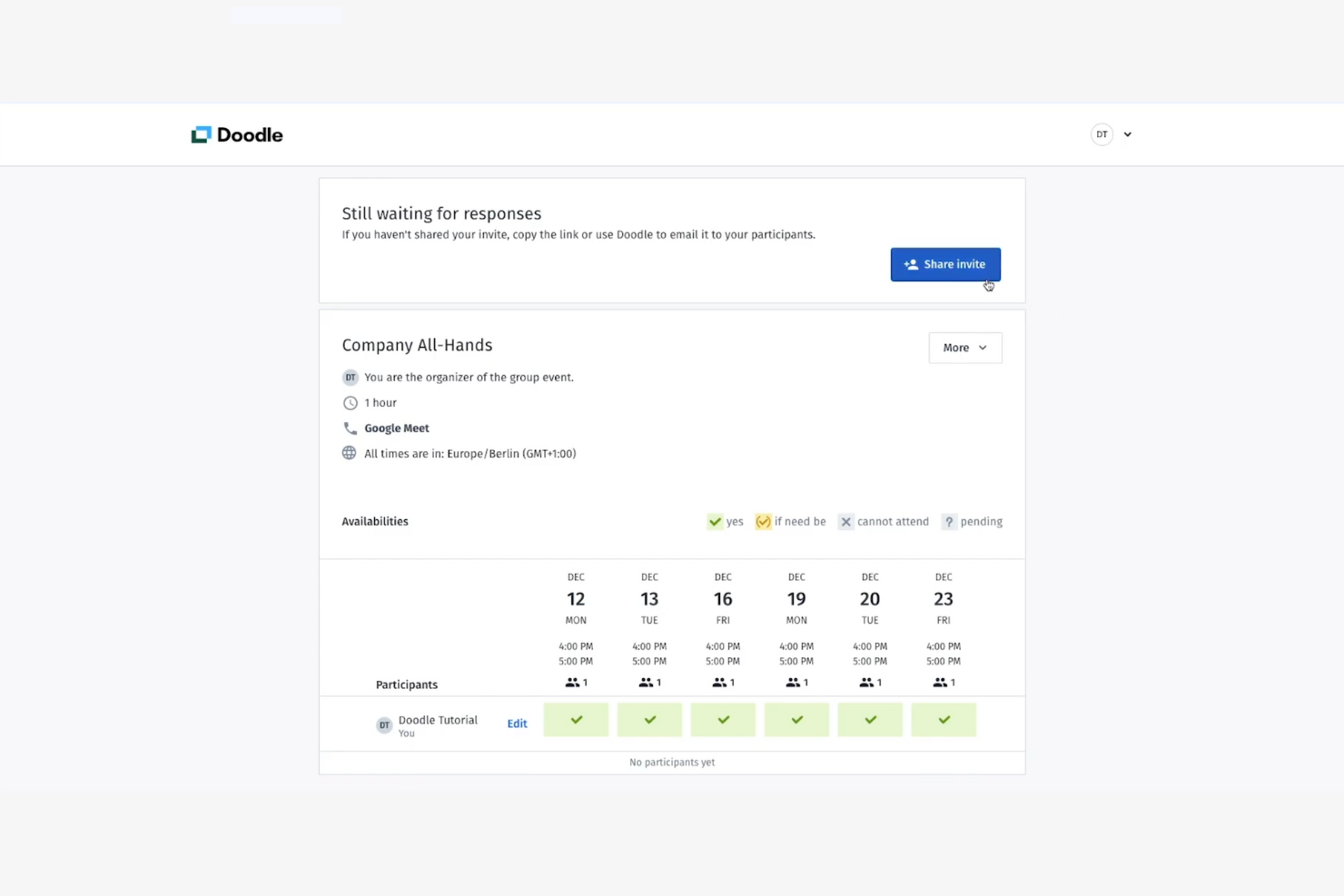
Quando hai bisogno di trovare rapidamente un orario che funzioni per un gruppo, Doodle rende il processo semplice. Questo strumento è particolarmente utile per project manager, team leader e chiunque debba coordinare riunioni in presenza tra più calendari pieni di impegni. La funzione di sondaggio di gruppo di Doodle si distingue in quanto permette ai partecipanti di votare gli orari preferiti, contribuendo a eliminare i conflitti di pianificazione.
Perché ho scelto Doodle
Per i team che devono coordinare incontri con gruppi numerosi, il sondaggio sulla disponibilità di gruppo di Doodle è difficilmente eguagliabile. Lo strumento consente di creare sondaggi in cui i partecipanti possono selezionare tutti gli orari in cui sono disponibili, facilitando l'individuazione delle sovrapposizioni e la scelta della migliore opzione per tutti. Mi piace che Doodle evidenzi automaticamente le fasce orarie più popolari, in modo da non dover contare manualmente le risposte. Questo approccio è particolarmente utile per team interfunzionali o partner esterni che non condividono un sistema di calendario comune.
Funzionalità principali di Doodle
Altre funzionalità di Doodle che aiutano i team a gestire le sfide della pianificazione includono:
- Sincronizzazione calendario: Si collega a Google Calendar, Outlook e ad altre principali piattaforme di calendario per aggiornare automaticamente la tua agenda.
- Pianificazione uno a uno: Ti consente di inviare un link di prenotazione personalizzato per richieste di riunioni dirette senza il sondaggio di gruppo.
- Rilevamento automatico del fuso orario: Adatta le ore del sondaggio al fuso orario locale di ciascun partecipante per evitare confusione.
- Personalizzazione del branding: Permette di aggiungere il logo aziendale e i colori alle pagine di pianificazione per un aspetto più professionale.
Integrazioni di Doodle
Le integrazioni includono Google Calendar, Microsoft Outlook, Microsoft Teams, Zoom, Slack, Google Meet, Webex e altri.
Pros and Cons
Pros:
- Sondaggi di gruppo per votare su più opzioni di orario
- Regolazione automatica del fuso orario
- Nessun account richiesto per gli invitati
Cons:
- Il piano gratuito include il branding Doodle
- Controllo limitato sulla modifica dei sondaggi dopo il lancio

Setmore
Ideale per la gestione degli appuntamenti con i clienti
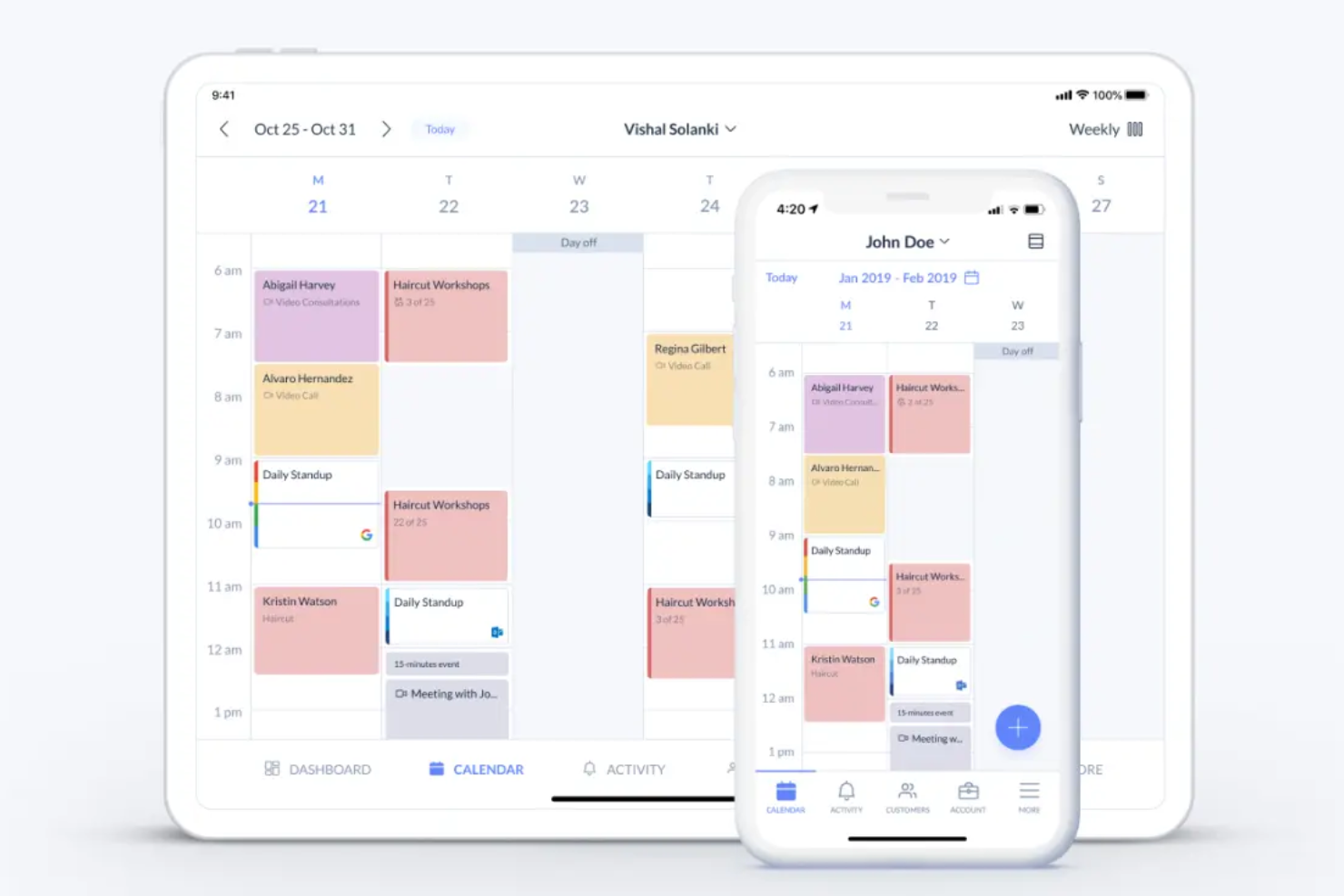
Se la tua azienda si basa sulla prenotazione e la gestione degli appuntamenti con i clienti, Setmore offre una soluzione dedicata pensata per fornitori di servizi e team a contatto con i clienti. La piattaforma è progettata per gestire appuntamenti ricorrenti, pianificazione dello staff e notifiche ai clienti tutto in un unico luogo. Setmore è particolarmente utile per saloni, cliniche e studi di consulenza che devono coordinare più calendari e mantenere i clienti automaticamente aggiornati.
Perché ho scelto Setmore
Gestire gli appuntamenti dei clienti può diventare complicato rapidamente, soprattutto per le aziende con più membri dello staff o molteplici tipologie di servizi. Setmore si distingue perché permette di creare calendari individuali per lo staff, assegnare appuntamenti e gestire prenotazioni ricorrenti da un'unica dashboard. Apprezzo il fatto che la piattaforma invii promemoria automatici sia allo staff che ai clienti, contribuendo così a ridurre le mancate presentazioni. Queste funzionalità rendono Setmore una scelta ideale per i team che devono tenere gli appuntamenti dei clienti organizzati e la comunicazione costante.
Funzionalità principali di Setmore
Altre funzionalità di Setmore che aiutano le aziende nella gestione degli appuntamenti includono:
- Pagina di prenotazione online: consente ai clienti di fissare appuntamenti direttamente tramite una pagina web personalizzabile.
- Gestione dei pagamenti: supporta la riscossione dei pagamenti al momento della prenotazione tramite Stripe o Square.
- Prenotazione di corsi e gruppi: permette di pianificare corsi o sessioni di gruppo con più partecipanti.
- App mobile: offre accesso alla gestione degli appuntamenti e alle notifiche su dispositivi iOS e Android.
Integrazioni di Setmore
Le integrazioni includono Google Calendar, Zoom, Microsoft Teams, Square, PayPal, Stripe, Facebook, Instagram, Slack e altro ancora.
Pros and Cons
Pros:
- Offre tipologie avanzate di appuntamento
- Permette la gestione multi sede e multi staff
- Include opzioni di conformità HIPAA
Cons:
- Funzionalità dell'app mobile limitate
- Segnalati occasionali doppi appuntamenti

OnceHub
Ideale per l'automazione avanzata dei flussi di lavoro
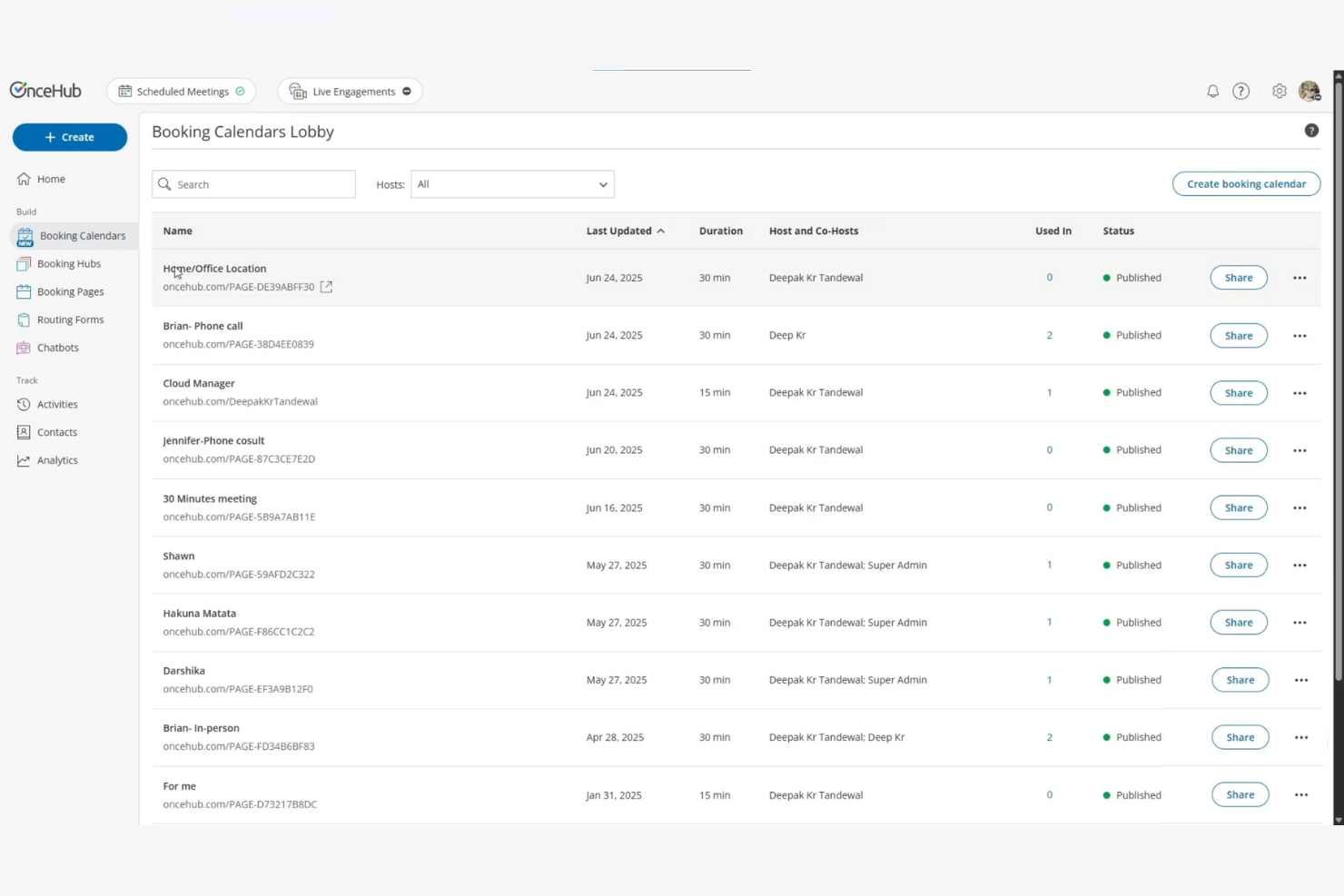
Per i team che necessitano di più della semplice pianificazione di base, OnceHub offre un'automazione avanzata dei flussi di lavoro integrata nella sua piattaforma di calendario. Questo strumento è particolarmente adatto per i team operativi, di vendita e di supporto che vogliono automatizzare processi di prenotazione complessi e indirizzare le riunioni in base a regole personalizzate. OnceHub aiuta le aziende a gestire percorsi di pianificazione in più fasi, automatizzare i follow-up e collegare le prenotazioni ad altri sistemi aziendali.
Perché ho scelto OnceHub
Ciò che distingue OnceHub è la sua attenzione all'automazione avanzata dei flussi di lavoro per la pianificazione. Ho scelto questo strumento perché permette di costruire flussi di prenotazione in più fasi, automatizzare l'assegnazione delle riunioni e avviare azioni basate sulle risposte degli utenti. Puoi impostare logiche condizionali per indirizzare le prenotazioni al membro giusto del team o seguire automaticamente con messaggi personalizzati. Per i team che devono gestire scenari di pianificazione complessi e ridurre il lavoro manuale, OnceHub offre funzionalità di automazione che vanno ben oltre i classici strumenti di calendario.
Funzionalità principali di OnceHub
Altre funzionalità che rendono OnceHub una scelta solida per la pianificazione includono:
- Moduli di prenotazione personalizzati: Permettono di raccogliere informazioni dettagliate dagli invitati prima di confermare gli appuntamenti.
- Gestione dei fusi orari: Rileva automaticamente e si adatta al fuso orario locale di ogni partecipante.
- Pianificazione riunioni di gruppo: Supporta la prenotazione di eventi di gruppo, panel o sessioni con più partecipanti.
- Sincronizzazione calendario: Si collega con Google Calendar, Microsoft Outlook e Office 365 per mantenere gli orari aggiornati.
Integrazioni OnceHub
Le integrazioni includono Salesforce, HubSpot, Microsoft Teams, Zoom, Google Calendar, Outlook Calendar, Slack, Zapier e altro ancora.
Pros and Cons
Pros:
- Automazione dei flussi di lavoro per pianificazioni complesse
- Logica condizionale per indirizzare le prenotazioni
- Offre promemoria automatici e follow-up
Cons:
- Interfaccia utente datata
- Nessun sistema di pagamento integrato

La migliore integrazione con Google Workspace

Se il tuo team si affida già a Google Workspace, le funzionalità di pianificazione appuntamenti di Google Calendar si integrano perfettamente nel tuo flusso di lavoro. Questo strumento è particolarmente utile per le organizzazioni che desiderano gestire prenotazioni interne ed esterne senza uscire dall’ambiente Google. Google Calendar ti aiuta a coordinare riunioni, condividere la disponibilità e automatizzare gli inviti direttamente dall’interfaccia familiare del tuo calendario.
Perché ho scelto Google Calendar
Per i team che già utilizzano Google Workspace, la pianificazione degli appuntamenti su Google Calendar si distingue perché è integrata direttamente negli strumenti che usi ogni giorno. L’ho scelto per la possibilità di creare slot di appuntamento prenotabili, condividere la disponibilità in tempo reale e aggiornare automaticamente gli eventi in tutta l’organizzazione. L’integrazione con Gmail, Google Meet e i calendari condivisi significa che puoi gestire prenotazioni interne ed esterne senza cambiare piattaforma. Questo rende Google Calendar una scelta pratica per le aziende che desiderano che la pianificazione sia un’estensione naturale del flusso di lavoro esistente.
Funzionalità Chiave di Google Calendar
Altre funzionalità che rendono Google Calendar utile per la pianificazione includono:
- Gestione di più calendari: ti consente di creare e gestire calendari separati per diversi team, progetti o risorse.
- Codifica colori degli eventi: ti permette di assegnare colori agli eventi per una rapida organizzazione visiva.
- Accesso tramite app mobile: offre tutte le funzionalità di pianificazione e prenotazione su dispositivi iOS e Android.
- Regolazione automatica del fuso orario: aggiorna gli orari degli eventi in base al fuso orario locale di ciascun partecipante.
Integrazioni di Google Calendar
Le integrazioni includono Gmail, Google Meet, Google Drive, Google Contacts, Google Tasks, Zoom, Microsoft Outlook, Slack, Salesforce e Asana.
Pros and Cons
Pros:
- Integrazione diretta con Gmail e Google Meet
- Calendari condivisi per il coordinamento del team
- Supporta la sincronizzazione cross-platform
Cons:
- Personalizzazione della pagina di prenotazione basilare
- Integrazione limitata al di fuori dell’ecosistema Google

Ideale per il monitoraggio delle riunioni nel CRM

BIGContacts offre una soluzione di pianificazione del calendario pensata per i team che devono tenere traccia delle riunioni insieme alle attività CRM. È particolarmente indicata per team di vendita, account manager e professionisti a contatto con i clienti che desiderano collegare ogni meeting alle schede contatto e alle pipeline di trattative. Collegando la pianificazione alle informazioni del CRM, BIGContacts ti aiuta a mantenere organizzate e operative le interazioni con i clienti.
Perché ho scelto BIGContacts
BIGContacts si distingue per i team che vogliono collegare direttamente la pianificazione delle riunioni ai flussi di lavoro CRM. La piattaforma collega ogni riunione pianificata alle schede contatto, così avrai sempre il contesto delle conversazioni con i clienti e dei follow-up. Mi piace che sia possibile tracciare la cronologia dei meeting, le note e le attività correlate tutto nello stesso sistema, il che aiuta a mantenere organizzate le attività di vendita e gestione degli account. Questo approccio è particolarmente utile per le aziende che basano il proprio business sulla gestione delle relazioni e hanno bisogno di una chiara traccia di ogni interazione con il cliente.
Caratteristiche principali di BIGContacts
Altre funzionalità utili per la pianificazione offerte da BIGContacts includono:
- Promemoria automatici delle riunioni: Invia promemoria via email ai partecipanti prima delle riunioni programmate.
- Visualizzazioni calendario personalizzabili: Permette agli utenti di passare dalla visualizzazione giornaliera, settimanale e mensile.
- Monitoraggio di attività e compiti: Consente di collegare attività e follow-up direttamente alle riunioni.
- Strumenti di importazione ed esportazione contatti: Supporta l'importazione ed esportazione massiva dei dati contatto per facilitare il processo di onboarding e migrazione.
Integrazioni di BIGContacts
Le integrazioni includono QuickBooks, Zapier, Google Calendar e altre ancora.
Pros and Cons
Pros:
- Collega ogni riunione direttamente al CRM
- Traccia la cronologia dei meeting e le note
- Pipeline di vendita visiva con riunioni
Cons:
- Logica di pianificazione di base
- Applicazione esclusivamente web-based

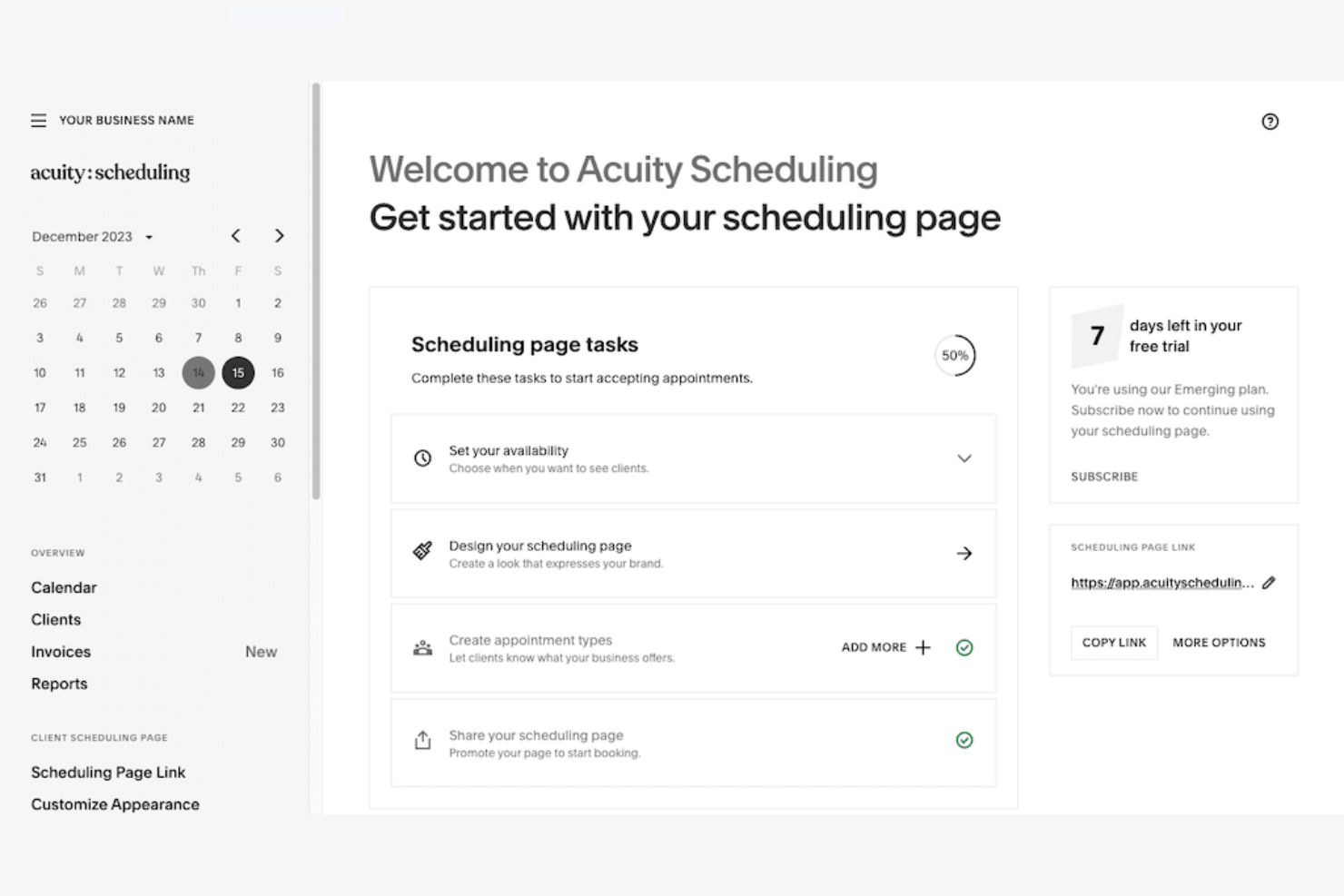
Acuity è pensato per aziende e professionisti che hanno bisogno di accettare pagamenti al momento della prenotazione. È particolarmente adatto a fornitori di servizi come consulenti, coach, saloni e operatori del benessere che desiderano automatizzare pianificazione e incasso in un'unica soluzione. Con Acuity puoi offrire ai clienti la possibilità di prenotare e pagare online gli appuntamenti, riducendo le mancate presentazioni e la fatturazione manuale.
Perché ho scelto Acuity
Ciò che distingue Acuity è il supporto integrato ai pagamenti nelle prenotazioni, fondamentale per le attività che vogliono garantire il ricavo già in fase di prenotazione. La piattaforma permette di richiedere ai clienti il pagamento o una caparra prima di confermare l'appuntamento, riducendo le assenze e le cancellazioni dell'ultimo minuto. Apprezzo il fatto che Acuity supporti diversi processori di pagamento, tra cui Stripe, Square e PayPal, così da poter scegliere l'opzione migliore per la propria attività. Questo approccio focalizzato sull'integrazione dei pagamenti con carta di credito rende Acuity una scelta solida per i fornitori di servizi che vogliono automatizzare sia la gestione degli appuntamenti che l'incasso.
Funzionalità principali di Acuity
Oltre alle funzionalità di pagamento, Acuity offre molte altre opzioni per facilitare la pianificazione degli appuntamenti:
- Moduli di raccolta dati personalizzati: Raccogli informazioni e preferenze dei clienti prima dell'appuntamento tramite moduli su misura.
- Promemoria automatici via email e SMS: Invia ai clienti notifiche puntuali sugli appuntamenti in arrivo per ridurre le assenze.
- Sincronizzazione con il calendario: Si collega a Google Calendar, iCloud, Outlook e Office 365 per mantenere aggiornato il tuo programma.
- Prenotazione di gruppi e corsi: Permette di organizzare e gestire sessioni di gruppo o corsi direttamente dalla bacheca delle prenotazioni.
Integrazioni di Acuity
Le integrazioni includono Google Calendar, Zoom, PayPal, Stripe, Square, QuickBooks, Salesforce, Mailchimp, Zapier e Outlook.
Pros and Cons
Pros:
- Pensato per attività basate sui servizi
- Supporta pacchetti, abbonamenti e buoni regalo
- Integrazione con piattaforme social
Cons:
- Nessun piano gratuito
- Politiche di riprogrammazione e cancellazione poco chiare

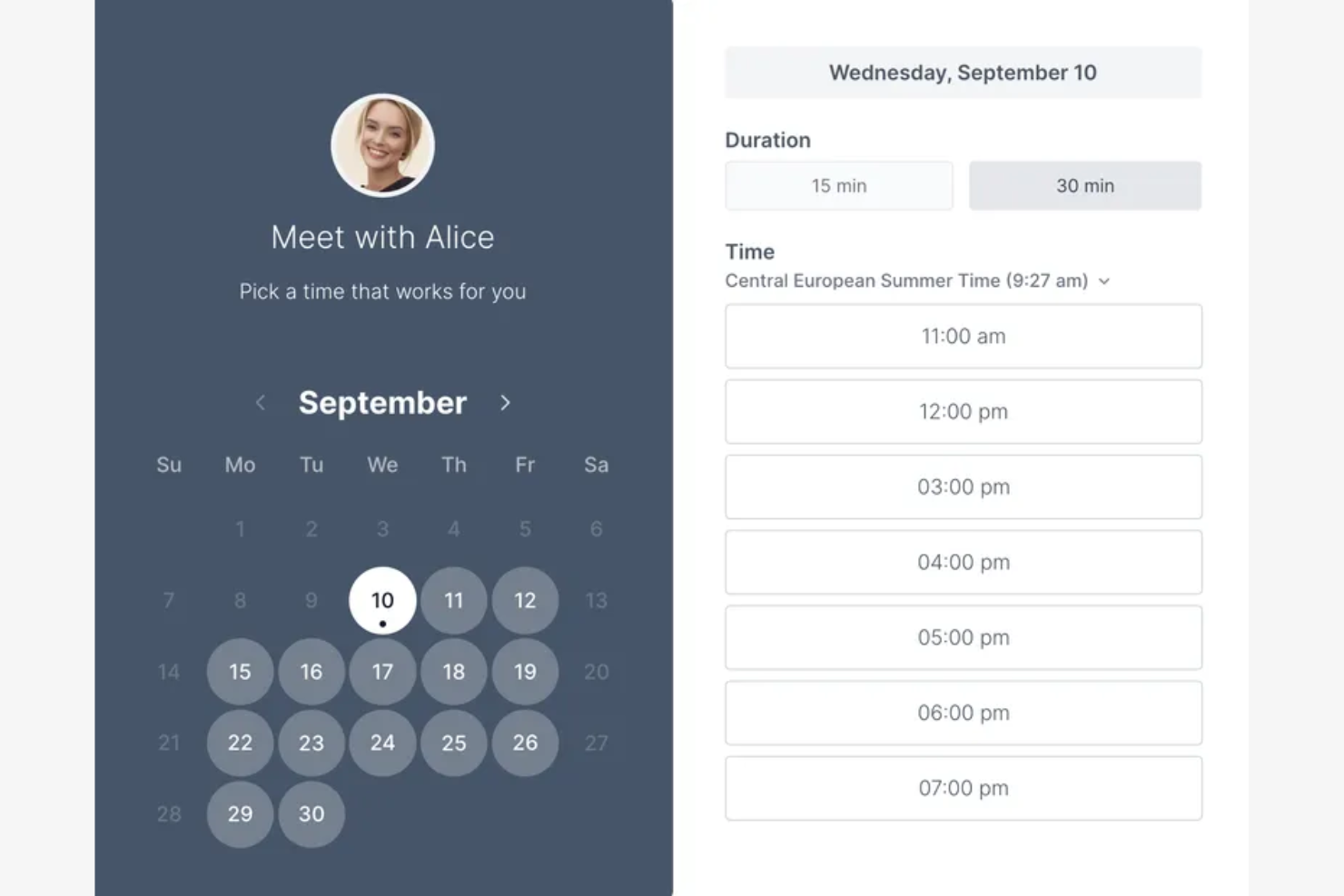
Se desideri un modo semplice e diretto per permettere ai clienti di prenotare in base alla tua disponibilità, Koalendar è stato creato per te. Questo strumento è particolarmente utile per educatori, consulenti e piccole imprese che hanno bisogno di inviare link di prenotazione senza configurazioni aggiuntive. Koalendar elimina la complessità concentrandosi sulla condivisione rapida di link e una facile connessione ai calendari, permettendoti di programmare appuntamenti con il minimo sforzo.
Perché ho scelto Koalendar
Per chiunque abbia bisogno di condividere rapidamente un link di prenotazione, Koalendar si distingue per la sua semplicità. L'ho scelto perché puoi generare un link di prenotazione personalizzato in pochi secondi e inviarlo direttamente a clienti o colleghi. Lo strumento si sincronizza automaticamente con i tuoi calendari collegati per mostrare la disponibilità in tempo reale, così non devi preoccuparti di prenotazioni doppie. Questa attenzione alla condivisione veloce e senza complicazioni rende Koalendar ideale per chi vuole saltare passaggi extra e fissare subito appuntamenti sul calendario.
Funzionalità principali di Koalendar
Altre funzionalità che rendono Koalendar utile per la pianificazione includono:
- Moduli di prenotazione personalizzabili: Permettono di aggiungere domande personalizzate per raccogliere informazioni dagli invitati prima della prenotazione.
- Rilevamento automatico del fuso orario: Adatta gli orari delle riunioni in base al fuso orario locale di ogni partecipante.
- Tempi di buffer tra gli appuntamenti: Consente di impostare pause prima o dopo gli appuntamenti per evitare prenotazioni consecutive senza intervallo.
- Integrazione con Google Meet e Zoom: Genera automaticamente link per videoriunioni negli appuntamenti programmati.
Integrazioni di Koalendar
Le integrazioni includono Google Calendar, Outlook Calendar, Microsoft Teams, Zoom, Google Meet, Slack, Zapier (per workflow personalizzati) e accesso API per integrazioni personalizzate.
Pros and Cons
Pros:
- Interfaccia intuitiva
- Supporto nativo per iCloud
- Offre un'estensione per browser
Cons:
- Funzionalità avanzate disponibili solo nella versione a pagamento
- Opzioni di branding limitate

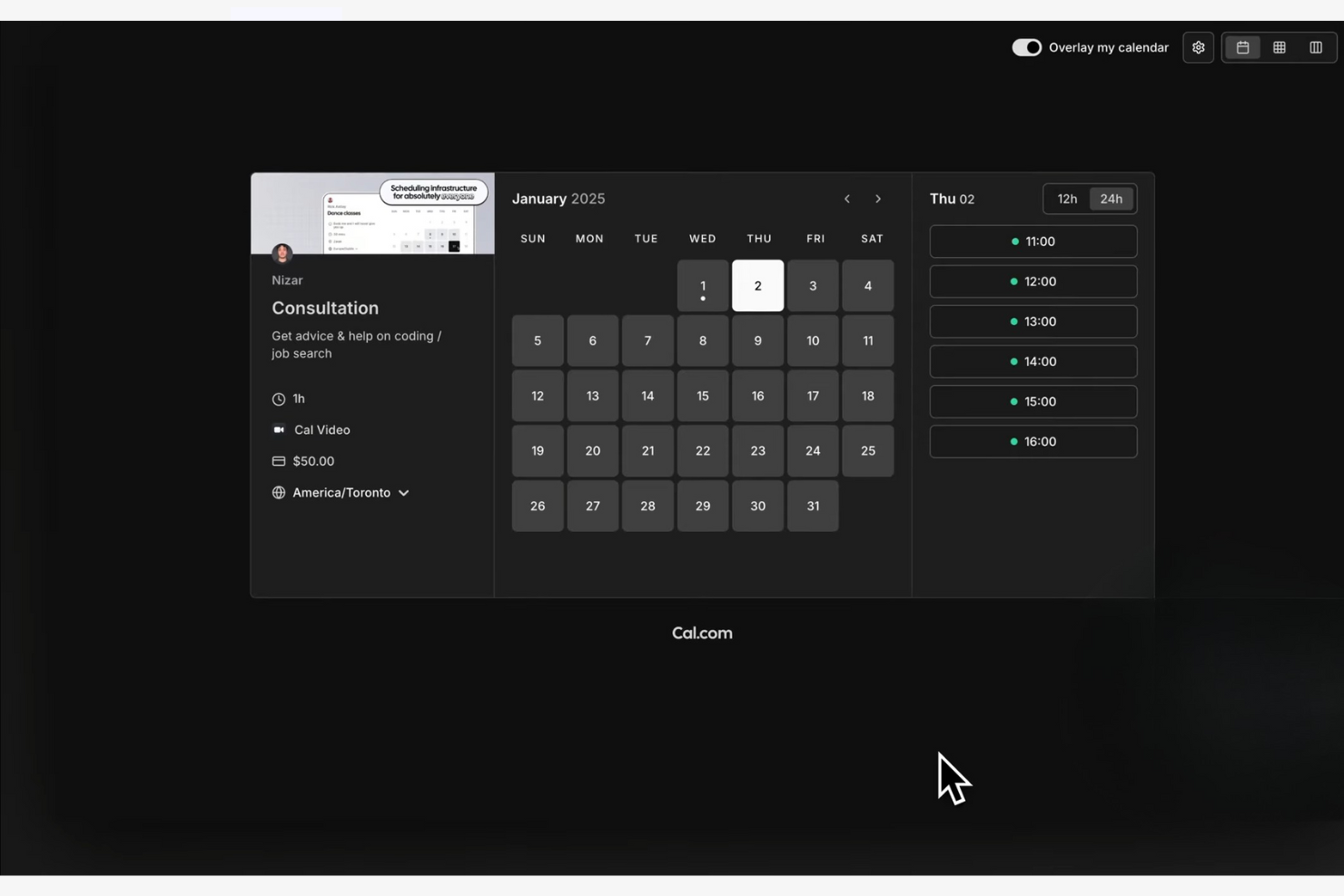
Cal.com si distingue per i team e gli sviluppatori che desiderano un controllo totale sui propri flussi di lavoro di pianificazione. La sua piattaforma open-source è ideale per le aziende con esigenze particolari o che necessitano di un livello di personalizzazione profondo, oltre quello offerto dai classici strumenti SaaS. Cal.com ti aiuta a creare esperienze di prenotazione che rispecchiano il tuo brand, si integrano nel tuo stack e si adattano man mano che le tue esigenze cambiano.
Perché ho scelto Cal.com
Ciò che distingue Cal.com è la sua base open-source, che offre la libertà di personalizzare ogni aspetto dell'esperienza di pianificazione. L'ho scelto perché consente di ospitare autonomamente la piattaforma, modificare il codice sorgente e adattare i flussi di prenotazione secondo il branding o le esigenze operative della tua organizzazione. Cal.com supporta anche plugin personalizzati e integrazioni, così puoi estenderne le funzionalità in base ai tuoi bisogni futuri. Questo livello di flessibilità è raro nei software di pianificazione degli appuntamenti, diventando una scelta vincente per team con esigenze uniche o complesse.
Funzionalità principali di Cal.com
Altre funzionalità che rendono Cal.com interessante per la pianificazione includono:
- Prenotazioni di gruppo: Consente a più partecipanti di prenotare lo stesso orario per eventi come webinar o corsi.
- Pagine di prenotazione personalizzate: Ti permette di progettare, personalizzare e incorporare la tua interfaccia di prenotazione per clienti o membri del team.
- Sincronizzazione multi-calendario: Si collega a Google, Outlook e altri calendari per evitare doppie prenotazioni.
- Webhooks e accesso API: Permette la sincronizzazione dei dati in tempo reale e l'automazione con i tuoi sistemi esistenti.
Integrazioni di Cal.com
Le integrazioni includono Google Calendar, Microsoft Outlook, Zoom, Slack, Salesforce, HubSpot, Stripe, PayPal, Microsoft Teams e Webex. Cal.com offre inoltre un'API per integrazioni personalizzate.
Pros and Cons
Pros:
- Codice open-source per self-hosting
- Piano gratuito generoso
- Opzioni avanzate di personalizzazione
Cons:
- Eccessivo per esigenze di prenotazione semplici
- Assistenza clienti diretta lenta
Altri software per la pianificazione del calendario
Ecco alcune opzioni aggiuntive di software per la pianificazione del calendario che non sono state incluse nella mia selezione, ma che vale comunque la pena valutare:


Come Valuto il Software di Programmazione EMR
Divido la mia valutazione in due livelli: le funzionalità di base di programmazione e le capacità di integrazione EHR che uno strumento deve avere, e i fattori differenzianti che separano le migliori piattaforme dalle altre.
Funzionalità di Base (Requisiti Fondamentali per Questa Lista)
Quando seleziono gli strumenti per la mia lista, ne valuto ciascuno su una scala da 0 (non offre la funzionalità) a 5 (eccelle in quest’area) per ciascuna delle funzionalità di base elencate di seguito. Successivamente, calcolo il punteggio totale dello strumento in percentuale. Ogni strumento deve raggiungere un punteggio totale minimo del 65% per essere considerato per l’inclusione.
- Sincronizzazione Calendario: Verifico se la piattaforma offre la sincronizzazione bidirezionale con Google Calendar e Outlook così che i fornitori evitino prenotazioni doppie tra sedi diverse.
- Auto-prenotazione per Pazienti: Le pagine di prenotazione dovrebbero permettere ai pazienti di selezionare i tipi di visita e programmare in base alle disponibilità in tempo reale dei fornitori, con moduli di accoglienza integrati.
- Programmazione Multi-Fornitore: Gli studi con più professionisti hanno bisogno di una logica di programmazione condivisa, come la turnazione o la disponibilità condivisa, per bilanciare i carichi di lavoro tra i pazienti.
- Gestione Appuntamenti: Valuto come la piattaforma gestisce la creazione, riprogrammazione e cancellazione di visite, oltre a verificare se invia promemoria automatici per ridurre le assenze.
- Integrazioni EHR: Lo strumento di programmazione dovrebbe collegarsi al tuo EHR, al sistema di gestione dello studio e alla piattaforma di telemedicina, così che le prenotazioni fluiscano nei flussi di lavoro clinici.
- Controlli di Programmazione: Cerco la possibilità di configurare tempi di buffer tra appuntamenti, preavviso minimo per le prenotazioni e limiti giornalieri alle visite, per aiutare gli studi a gestire il carico di lavoro dei fornitori.
Una volta che ho una lista di strumenti che soddisfano i criteri, considero cosa distingue ogni piattaforma.
Fattori Differenzianti (Cosa Distingue i Fornitori)
Ecco come confronto e metto a paragone i diversi fornitori:
Funzionalità Distintive
I moduli di instradamento sono un fattore di differenziazione importante. Quando un nuovo paziente si prenota online, domande intelligenti di accoglienza possono indirizzarlo al professionista giusto in base al tipo di visita o alla specialità. Anche l’automazione dei flussi di lavoro ha un peso: verifico se la piattaforma attiva conferme, documentazione pre-visita e messaggi di follow-up senza passaggi manuali. Le analisi e i report completano la mia valutazione. Dashboard che tengono traccia dei tassi di assenza e dell’utilizzazione dei fornitori aiutano i responsabili di studio a individuare lacune nelle prenotazioni e ad adattare i modelli.
Oltre le Funzionalità
Sicurezza e conformità rivestono particolare importanza in ambito sanitario. Cerco piattaforme conformi a HIPAA, con controlli di accesso basati sui ruoli e registri di audit che proteggono i dati dei pazienti in ogni punto di contatto delle prenotazioni. Anche la struttura dei prezzi è fondamentale: un professionista singolo e un gruppo multi-sede hanno esigenze molto diverse, quindi valuto se il prezzo per fornitore rimane ragionevole man mano che lo studio cresce. Anche l’esperienza di implementazione è un fattore. Una console di amministrazione centralizzata che consente ai responsabili di studio di aggiungere nuovi fornitori e configurare i tipi di appuntamento senza il supporto del fornitore fa risparmiare davvero tempo durante il lancio.
Come scegliere il software per la pianificazione del calendario
È facile perdersi in lunghi elenchi di funzionalità e strutture di prezzo complesse. Per aiutarti a rimanere concentrato mentre affronti il tuo specifico processo di scelta del software, ecco una lista di fattori da tenere a mente:
| Fattore | Cosa considerare |
|---|---|
| Scalabilità | Il software supporterà il tuo team mentre cresce, inclusa l'aggiunta di utenti, sedi o nuovi servizi? Verifica i limiti per gli utenti e le possibilità di passaggio a piani superiori. |
| Integrazioni | Lo strumento si collega nativamente ai calendari, al CRM, ai sistemi di videoconferenza o di pagamento esistenti? Le lacune in quest'area possono creare attività manuali. |
| Personalizzazione | Puoi adattare i moduli di prenotazione, le notifiche e il marchio per allinearli ai tuoi flussi di lavoro e all'esperienza dei clienti? Gli strumenti rigidi potrebbero non soddisfare esigenze specifiche. |
| Facilità d'uso | Con quale rapidità i membri del team e i clienti possono iniziare a prenotare senza formazione? Cerca una navigazione chiara e il minor numero possibile di passaggi per programmare o riprogrammare. |
| Implementazione e configurazione iniziale | Quali risorse sono necessarie per iniziare a utilizzare il software? Considera la migrazione dei dati, le guide alla configurazione e l'eventuale necessità di supporto IT o assistenza del fornitore. |
| Costo | I livelli di prezzo sono trasparenti e allineati al tuo utilizzo? Fai attenzione ai costi aggiuntivi per SMS, integrazioni o utenti extra. |
| Misure di sicurezza | Il software offre crittografia, controlli di accesso e conformità agli standard di tutela della privacy dei dati? Questo è particolarmente importante per i dati dei clienti. |
| Disponibilità dell'assistenza | Quali canali di assistenza sono disponibili e in quali orari? Valuta se avrai bisogno di chat dal vivo, assistenza telefonica o solo e-mail, soprattutto per i problemi urgenti. |
Che cos'è il software per la pianificazione del calendario?
Il software per la pianificazione del calendario è uno strumento digitale che aiuta singoli e team a prenotare, gestire e coordinare riunioni o appuntamenti. Automatizza attività come l'invio di inviti, la conferma delle prenotazioni e l'invio di promemoria. Queste piattaforme spesso si sincronizzano con i calendari esistenti, supportano le prenotazioni tramite i social media e possono gestire più utenti o sedi. Centralizzando la pianificazione, riducono il coordinamento manuale e aiutano a mantenere tutti aggiornati.
Funzionalità
Quando scegli un software per la pianificazione del calendario, presta attenzione alle seguenti funzionalità chiave:
- Portale di prenotazione online: consente a clienti o membri del team di fissare appuntamenti direttamente tramite un'interfaccia web, riducendo la necessità di scambiarsi numerose email.
- Sincronizzazione del calendario: si collega a calendari esterni come Google, Outlook o iCloud per aggiornare automaticamente la disponibilità ed evitare doppie prenotazioni.
- Promemoria automatici: invia notifiche via email o SMS ai partecipanti prima delle riunioni o degli appuntamenti programmati, contribuendo a ridurre le assenze.
- Moduli di prenotazione personalizzabili: consente di raccogliere informazioni specifiche dagli invitati durante il processo di prenotazione, come preferenze o dati richiesti.
- Gestione dello spostamento e della cancellazione: permette agli utenti di modificare o annullare facilmente gli appuntamenti, inviando aggiornamenti automatici a tutte le parti coinvolte.
- Prenotazioni di gruppo e ricorrenti: supporta la pianificazione per più partecipanti o la configurazione di riunioni ripetute, facilitando la gestione di corsi, riunioni periodiche del team o sessioni continuative.
- Rilevamento del fuso orario: adatta automaticamente gli orari degli appuntamenti in base alla posizione di ciascun partecipante, aiutando i team distribuiti a evitare confusioni.
- Controlli di accesso e autorizzazioni: consente agli amministratori di stabilire chi può visualizzare, prenotare o modificare i calendari, garantendo la privacy e una corretta gestione dei flussi di lavoro.
- Report e analisi: fornisce informazioni sulle tendenze delle prenotazioni, sui tassi di partecipazione e sull'utilizzo delle risorse per contribuire a ottimizzare le pratiche di pianificazione.
Vantaggi
L'implementazione di un software per la pianificazione del calendario offre diversi vantaggi al team e all'azienda. Ecco alcuni dei benefici che puoi aspettarti:
- Riduzione del coordinamento manuale: le prenotazioni e i promemoria automatici eliminano la necessità di scambiarsi numerose email e telefonate.
- Meno appuntamenti mancati: le notifiche e le conferme automatiche aiutano a garantire che tutti siano informati e puntuali.
- Maggiore visibilità: la sincronizzazione del calendario in tempo reale e i report offrono ai team una visione chiara degli orari, della disponibilità e dell'utilizzo delle risorse.
- Maggiore flessibilità: le semplici opzioni per spostare e cancellare gli appuntamenti consentono agli utenti di adattarsi rapidamente ai cambiamenti senza confusione.
- Esperienza cliente migliorata: i portali di prenotazione online e i moduli personalizzabili semplificano la programmazione degli appuntamenti e la fornitura delle informazioni necessarie da parte dei clienti.
- Maggiore sicurezza dei dati: i controlli di accesso e le autorizzazioni aiutano a proteggere le informazioni sensibili e garantiscono che solo gli utenti autorizzati possano apportare modifiche.
- Supporto per i team distribuiti: il rilevamento del fuso orario e le funzionalità di pianificazione di gruppo facilitano il coordinamento delle riunioni tra sedi diverse.
Costi e prezzi
La scelta di un software per la pianificazione del calendario richiede la comprensione dei vari modelli e piani tariffari disponibili. I costi variano in base alle funzionalità, alle dimensioni del team, ai componenti aggiuntivi e ad altri fattori. La tabella seguente riassume i piani più comuni, i relativi prezzi medi e le funzionalità tipicamente incluse nelle soluzioni software per la pianificazione del calendario:
Tabella comparativa dei piani per il software di pianificazione del calendario
| Tipo di piano | Prezzo medio | Funzionalità comuni |
|---|---|---|
| Piano gratuito | $0 | Prenotazione online di base, sincronizzazione limitata del calendario, promemoria di base e supporto per un solo utente. |
| Piano personale | $5-$15/utente/mese | Appuntamenti illimitati, sincronizzazione del calendario, promemoria automatici, report di base e supporto via email. |
| Piano aziendale | $15-$30/utente/mese | Pianificazione del team, prenotazioni di gruppo, elaborazione dei pagamenti, moduli personalizzabili e integrazioni avanzate. |
| Piano aziendale avanzato | $30-$50/utente/mese | Identità visiva personalizzata, sicurezza avanzata, supporto dedicato, accesso API e funzionalità di conformità. |
Domande frequenti sul software di pianificazione del calendario
Ecco alcune risposte alle domande comuni sul software di pianificazione del calendario:
Il software di pianificazione del calendario può sincronizzarsi con più calendari esterni?
Sì, la maggior parte dei software di pianificazione del calendario può sincronizzarsi con più calendari esterni, come Google, Outlook e iCloud. Questo aiuta a evitare le doppie prenotazioni e garantisce che la tua disponibilità sia sempre aggiornata su tutte le piattaforme.
In che modo il software di pianificazione del calendario gestisce le differenze di fuso orario?
Il software di pianificazione del calendario rileva e adatta automaticamente il fuso orario di ciascun partecipante. Questo riduce la confusione e aiuta i team distribuiti o i clienti a prenotare riunioni in orari comodi per tutti.
È possibile accettare pagamenti tramite il software di pianificazione del calendario?
Sì, molti strumenti di pianificazione del calendario offrono funzionalità di elaborazione dei pagamenti. Puoi riscuotere acconti o pagamenti completi al momento della prenotazione, una soluzione particolarmente utile per le aziende che offrono servizi o per i consulenti.
Quali misure di sicurezza dovrei cercare in un software di pianificazione del calendario?
Cerca funzionalità come la crittografia dei dati, i controlli degli accessi e la conformità agli standard sulla privacy, come il GDPR. Queste misure di sicurezza aiutano a proteggere le informazioni sensibili dei clienti e dell’azienda.
Posso personalizzare i moduli di prenotazione e le notifiche?
Sì, la maggior parte delle soluzioni consente di personalizzare i moduli di prenotazione per raccogliere informazioni specifiche e di configurare le notifiche in linea con il tuo marchio o il tuo stile di comunicazione. Questo aiuta a creare un’esperienza più personalizzata per i tuoi clienti o il tuo team.