

I 10 migliori software di gestione dei progetti farmaceutici recensiti nel 2026

Elenco dei migliori software di gestione dei progetti farmaceutici


La gestione dei progetti farmaceutici può essere un'attività complessa, caratterizzata da scadenze ravvicinate, ostacoli normativi e priorità mutevoli. Servono strumenti che aiutino a gestire la conformità, collaborare in un ambiente sicuro e valutare i rischi, mantenendo al contempo il team allineato. È qui che entrano in gioco i software di gestione dei progetti farmaceutici. Questi strumenti aiutano ad affrontare tali sfide offrendo funzionalità adattate alle esigenze specifiche del settore.
Durante la mia esperienza di test e valutazione dei software, ho individuato soluzioni che possono fare la differenza. In questo articolo condividerò le mie scelte principali per la gestione dei progetti nel settore farmaceutico. Puoi aspettarti una recensione imparziale e approfondita, incentrata su ciò che offre ogni strumento e sui vantaggi che può apportare al tuo team.
Perché fidarsi dei nostri consigli sui software
Il nostro team testa e recensisce software dal 2012. In quanto project manager noi stessi, sappiamo quanto sia difficile — e importante — scegliere il software giusto.
Per questa guida, abbiamo valutato gli strumenti attraverso test pratici e ricerche indipendenti, assegnando un punteggio agli strumenti in base ai nostri criteri di selezione. Ci basiamo inoltre sulle competenze di leader di pensiero del settore e di professionisti attivi nella gestione dei progetti.
Le nostre recensioni riflettono il nostro giudizio editoriale umano, non un discorso di vendita.
Revisori esperti:
Tabella comparativa dei software di gestione dei progetti farmaceutici
Questa tabella comparativa riassume i dettagli dei prezzi delle mie migliori selezioni di software di gestione dei progetti farmaceutici:
| Tool | Best For | Trial Info | Price | ||
|---|---|---|---|---|---|
| 1 | Ideale per supervisione integrata di portafogli e programmi | Prova gratuita + demo gratuita disponibile | A partire da $10/utente/mese (fatturato annualmente) | Website | |
| 2 | Ideale per la gestione delle risorse | Prova gratuita di 30 giorni + demo gratuita disponibile | Da €22.5/mese (fatturazione annuale) | Website | |
| 3 | Ideale per la condivisione di documenti | Prova gratuita di 14 giorni + demo gratuita disponibile | Da $8/utente/mese (fatturato annualmente) | Website | |
| 4 | Ideale per i piccoli team | Prova gratuita di 14 giorni | Da $24,90/utente/mese (fatturato annualmente) | Website | |
| 5 | Ideale per la collaborazione tra team | Prova gratuita disponibile | Da $60/utente/mese | Website | |
| 6 | Ideale per flussi di lavoro personalizzati | Demo gratuita disponibile | Demo gratuita disponibile | Website | |
| 7 | Ideale per la gestione del budget | Demo gratuita disponibile | Prezzi su richiesta | Website | |
| 8 | Ideale per la pianificazione strategica | Demo gratuita disponibile | Demo gratuita disponibile | Website | |
| 9 | Ideale per il tracciamento della conformità | Demo gratuita disponibile | Demo gratuita disponibile | Website | |
| 10 | Ideale per grandi imprese | Demo gratuita disponibile | Prezzo su richiesta | Website |
Recensione dei migliori software di gestione dei progetti farmaceutici
Di seguito trovi i miei riepiloghi dettagliati dei migliori software di gestione dei progetti farmaceutici inclusi nel mio elenco. Le mie recensioni offrono un’analisi approfondita delle funzionalità principali, dei pro e dei contro, delle integrazioni e dei casi d’uso ideali di ogni strumento, per aiutarti a trovare quello più adatto a te.

Celoxis
Ideale per supervisione integrata di portafogli e programmi
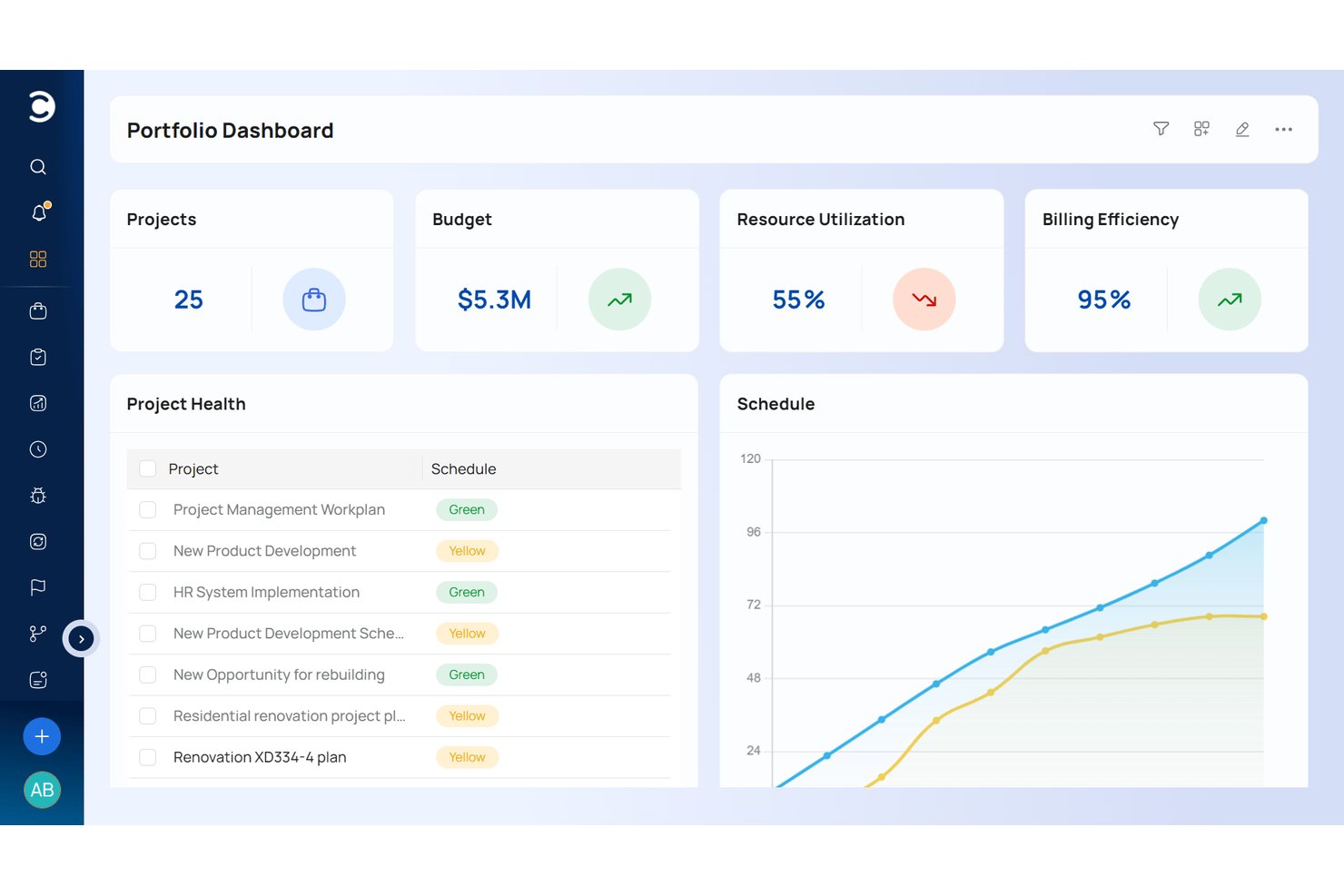
Celoxis è una piattaforma di gestione progetti e portafoglio che combina pianificazione dei progetti basata su Gantt, gestione della capacità delle risorse, monitoraggio finanziario, gestione dei rischi e supervisione multi-portafoglio in un unico sistema.
Per chi è ideale Celoxis?
Celoxis è particolarmente adatto per i PMO di aziende farmaceutiche e biotecnologiche di medie e grandi dimensioni che gestiscono più programmi di sviluppo farmaci contemporaneamente attraverso team cross-funzionali.
Perché ho scelto Celoxis
Celoxis si guadagna un posto nella mia shortlist perché le sue capacità di supervisione del portafoglio sono più approfondite rispetto alla maggior parte degli strumenti presenti in questa fascia di prezzo. Mi piace la funzionalità di pianificazione di scenari what-if che consente al mio team di simulare compromessi tra risorse e budget su diversi programmi di sviluppo farmaci prima di prendere una decisione definitiva. I workspace con isolamento dei dati basato sui ruoli sono un altro punto di forza: i team di R&S, clinici e commerciali possono lavorare all'interno della stessa piattaforma senza esporre i dati tra reparti, aspetto fondamentale nei contesti regolamentati della pipeline.
Funzionalità principali di Celoxis
- Previsione delle tempistiche tramite IA: Prevede il completamento dei progetti e i colli di bottiglia delle risorse utilizzando dati storici e in tempo reale.
- Registro dei rischi integrato: Monitora i rischi per categoria, gravità e piani di risposta, fornendo log pronti per audit.
- Automazione del flusso di lavoro personalizzata: Consente ai team di configurare le fasi di intake, approvazione e gestione delle problematiche per allinearsi alle SOP farmaceutiche.
- Reportistica avanzata con dashboard: Offre visualizzazioni in tempo reale delle milestone degli studi, del rispetto del budget e della salute dei progetti attraverso il portafoglio.
Integrazioni di Celoxis
Celoxis offre integrazioni native con Jira, Salesforce, Slack, Microsoft Teams, Google Drive, Box, Dropbox, Excel, QuickBooks e Zapier. È disponibile un'API per integrazioni personalizzate.
Pros and Cons
Pros:
- Visibilità cross-progetto per portafogli enterprise
- I registri dei rischi integrati supportano il monitoraggio delle misure di mitigazione
- La pianificazione di scenari what-if aiuta nelle decisioni di allocazione delle risorse
Cons:
- Nessun supporto per validazione della compliance GxP specifica per il pharma
- La personalizzazione dei report richiede un notevole tempo di configurazione

Epicflow
Ideale per la gestione delle risorse

Epicflow si guadagna un posto qui per la sua eccellente gestione dell'allocazione delle risorse nei progetti farmaceutici complessi. Vedo regolarmente i PMO del settore farmaceutico sceglierlo quando devono gestire più flussi di progetto e necessitano di una visione reale del carico di lavoro e dei colli di bottiglia. Il vero valore, secondo la mia esperienza, è il caricamento dinamico delle risorse e la previsione automatica man mano che cambiano le priorità.
Apprezzo il fatto che Epicflow offra un'istantanea immediata dei vincoli sulle risorse e dell'impatto dei cambiamenti sulle tempistiche di consegna.
Idealità di Epicflow
- I PMO del settore farmaceutico che gestiscono più flussi di progetto e risorse
- Team che necessitano di allocazione dinamica delle risorse e pianificazione di scenari
Quando Epicflow non è l’ideale
- Piccoli team con requisiti progettuali semplici
- Gruppi che necessitano di gestione documentale integrata o monitoraggio normativo
Cosa distingue Epicflow
Epicflow considera la pianificazione delle risorse come parte centrale del project management, non come un aspetto secondario. Invece di presupporre che si desideri prima mappare le tempistiche o i compiti, inizia mappando persone, competenze e ruoli su tutti i progetti. Rispetto a strumenti come Jira, che si aspettano che tu inserisca il lavoro in schede e sprint predefiniti, Epicflow è ideale quando hai progetti sovrapposti e devi prioritizzare chi fa cosa, e quando, su diversi team.
Compromessi di Epicflow
Epicflow ottimizza la coordinazione delle risorse a livello aziendale, ma questa attenzione significa che le funzionalità di documentazione progettuale e compliance sono limitate. Se hai bisogno di workflow normativi integrati, probabilmente dovrai affiancare un altro strumento.
Pros and Cons
Pros:
- Allocazione delle risorse guidata dall’IA
- Analisi predittiva per la previsione
- Accesso sicuro ai dati con Dataguard
Cons:
- Opzioni di personalizzazione limitate
- Non ideale per piccoli team
- Alcuni utenti trovano l’interfaccia complessa

Workzone
Ideale per la condivisione di documenti
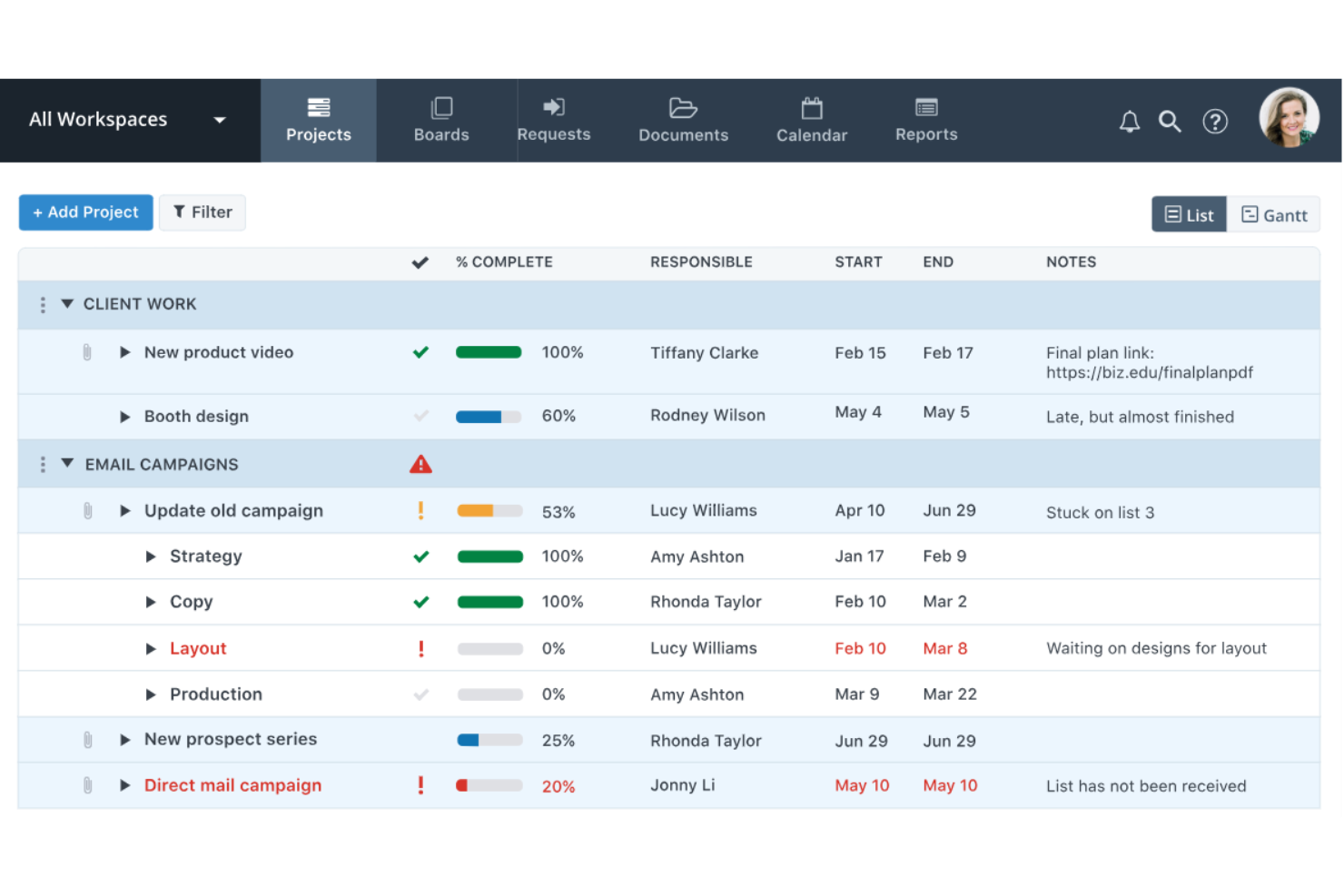
Workzone merita un posto qui per il modo in cui semplifica deliberatamente gli ambienti di progetto ricchi di documentazione. Mi piace il fatto che sia possibile organizzare, versionare e tracciare documenti controllati in cartelle dedicate, una soluzione ideale per i team farmaceutici alle prese con file regolatori. Le autorizzazioni granulari e i flussi di approvazione funzionano bene quando serve una collaborazione controllata e registri di audit impeccabili.
Workzone è ideale per
- Team farmaceutici che gestiscono documenti controllati con cicli di revisione
- Progetti che richiedono audit trail e accesso strutturato alle cartelle
Workzone non è adatto per
- Team focalizzati principalmente su portfolio, gestione risorse o pianificazione Gantt
- Organizzazioni che necessitano di automazioni complesse o logiche di workflow personalizzate
Cosa distingue Workzone
Workzone è progettato per i team che hanno bisogno soprattutto di un controllo documentale strutturato e collaborativo. A differenza di ClickUp, che punta sulla flessibilità delle attività, Workzone prevede l'organizzazione dei file in cartelle specifiche del progetto e l'elaborazione dei documenti tramite revisione e approvazione formali. In pratica, ritengo che questa modalità funzioni meglio negli ambienti regolamentati, dove lo stato del documento, la cronologia e l'accesso controllato sono più importanti della velocità o della pianificazione visuale.
Compromessi con Workzone
Workzone è ottimizzato per la gestione dei documenti, ma si perdono flessibilità nella visualizzazione dei progetti e avanzate automazioni dei workflow, quindi i team che puntano su una pianificazione dinamica o workflow personalizzati potrebbero sentirsi limitati.
Pros and Cons
Pros:
- Condivisione sicura dei file
- Dashboard di progetto chiara
- Liste di attività personalizzabili
Cons:
- Funzionalità di reportistica di base
- Non adatto a team molto numerosi
- Alcuni trovano l'interfaccia datata
New Product Updates from Workzone

Workzone Enterprise Adds Multi-Stage Approval Workflows
Workzone Enterprise now includes Approval Workflows, enabling multi-stage document approvals to standardize complex processes and reduce manual effort. For more information, visit Workzone's official site.
 .
.
Nimble
Ideale per i piccoli team
Nimble si è guadagnato un posto nella mia lista perché è progettato intenzionalmente tenendo conto delle realtà operative dei team più piccoli, specialmente nel settore farmaceutico. Di solito consiglio Nimble ai responsabili di progetto che hanno bisogno di implementare flussi di lavoro controllati e una pianificazione iterativa rapida senza sovraccaricare le proprie risorse.
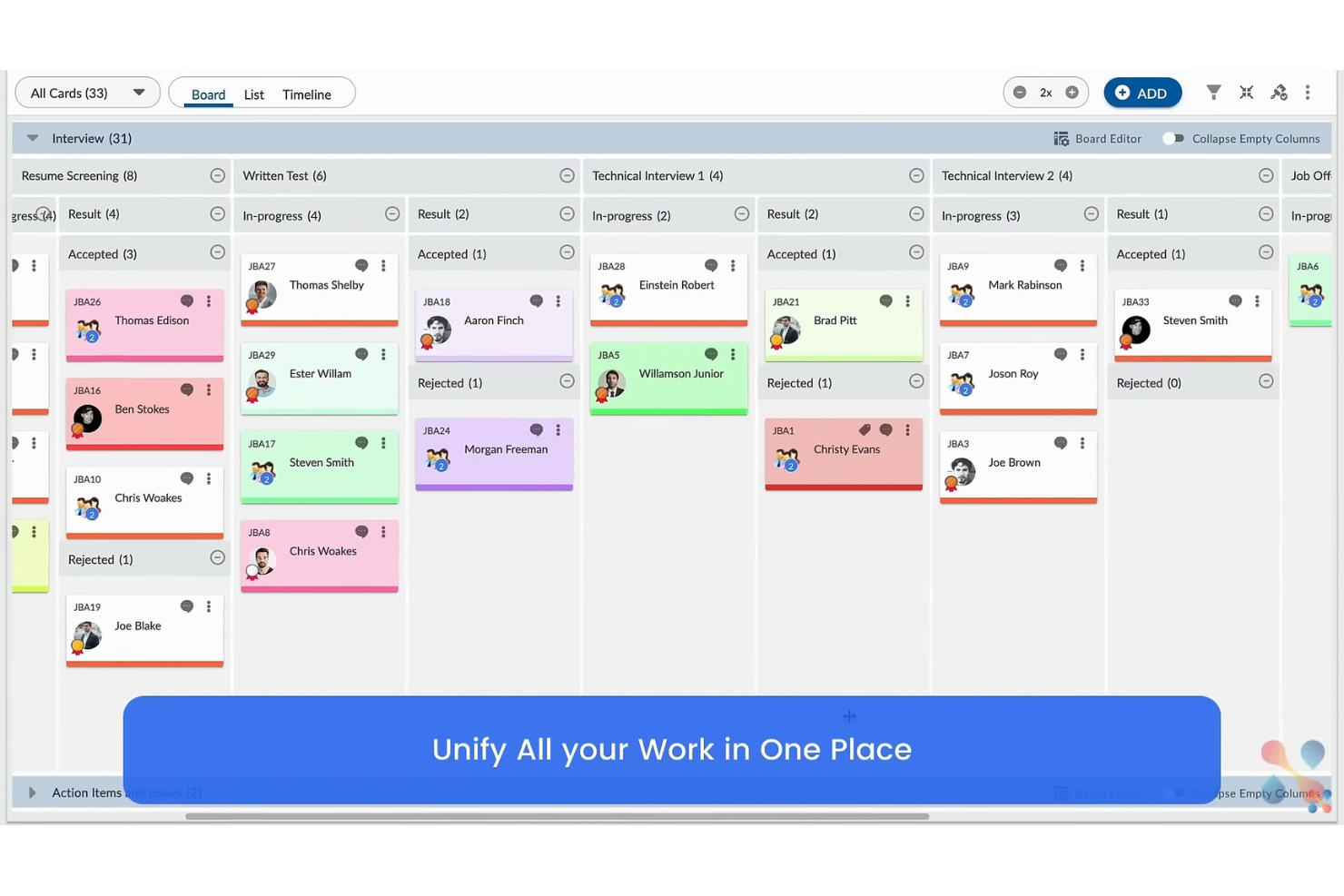
Quello che apprezzo è il supporto per il Kanban visuale, le dashboard in tempo reale e la gestione semplice del backlog. In pratica, i team utilizzano queste funzionalità per mantenere la trasparenza e il controllo sulle consegne regolatorie e le priorità in continuo cambiamento.
Per chi è ideale Nimble
- Piccoli team farmaceutici che gestiscono flussi di lavoro regolamentati
- Organizzazioni che necessitano di Kanban visuale e monitoraggio del backlog
Per chi Nimble non è adatto
- Grandi aziende con governance rigorosa e multilivello
- Team che necessitano di automazioni complesse o gestione di portafoglio
Cosa distingue Nimble
Nimble adotta un approccio 'visual-first' con bacheche Kanban e viste backlog che mantengono il lavoro visibile senza sovraccaricare i team più piccoli. È decisamente più leggero rispetto a uno strumento come Jira, quindi non sei vincolato a modelli complessi o a processi pesanti. Vedo Nimble funzionare bene quando si vuole andare veloci e in modo trasparente, ma mantenendo comunque la giusta struttura per i flussi di lavoro regolamentati nel pharma.
Compromessi con Nimble
Nimble ottimizza per una struttura leggera e visibilità, ma come risultato si perdono opzioni per automazioni avanzate o coordinamento a livello di programma. Le organizzazioni più grandi o gli ambienti multi-team spesso trovano il set di funzionalità limitante.
Pros and Cons
Pros:
- Interfaccia intuitiva per un setup veloce
- Strumenti di collaborazione semplici
- Formazione minima richiesta
Cons:
- Funzionalità avanzate limitate
- Opzioni di reportistica di base
- Potrebbe non essere scalabile per la crescita

Ideale per la collaborazione tra team

Planview Vantage entra nella mia lista per i team farmaceutici che non possono permettersi disconnessioni tra i vari gruppi. Ho visto organizzazioni con team di R&S, normativi e clinici che si affidano a questo strumento quando le interdipendenze tra i progetti diventano troppo complesse per i tracker più semplici.
Quello che apprezzo è la possibilità di taggare, collegare e allineare le deliverable tra le diverse unità aziendali, mentre le visualizzazioni dello stato in tempo reale tengono tutti aggiornati. È progettato per la realtà del lavoro in ambito farmaceutico, dove coordinazione e documentazione precise sono fondamentali.
Ideale per
- Organizzazioni farmaceutiche che gestiscono passaggi tra R&S, normativo e progetti clinici
- Programmi in cui il coordinamento tra team guida i risultati
Non ideale per
- Piccoli team farmaceutici con esigenze di progetto semplici
- Team che desiderano configurazione rapida e minima personalizzazione
Cosa distingue Planview Vantage
Planview Vantage struttura i progetti multi-team attorno a cronoprogrammi e deliverable condivisi invece di inserire tutti in flussi di lavoro separati. A differenza di strumenti come ClickUp, che permettono di creare rapidamente board di progetto isolate, Vantage ti spinge a collegare le attività tra dipartimenti. In pratica, questo si adatta meglio ai programmi farmaceutici in cui le deliverable si spostano tra team normativi, clinici e di ricerca.
Compromessi con Planview Vantage
Planview Vantage è ottimizzato per il coordinamento dei programmi, quindi si rinuncia a una configurazione semplice e a modelli pronti all'uso. Questo aggiunge un onere iniziale e può rallentare i nuovi team che devono partire immediatamente.
Pros and Cons
Pros:
- Dashboard personalizzabili
- Opzioni di reportistica dettagliate
- Gestione delle risorse avanzata
Cons:
- Configurazione iniziale complessa
- Curva di apprendimento ripida
- Funzionalità limitate dell'app mobile

cplace
Ideale per flussi di lavoro personalizzati

cplace ha senso qui grazie alla flessibilità con cui puoi progettare flussi di lavoro che si adattano ai rigorosi processi del settore farmaceutico. Ho visto team impostare piani di progetto end-to-end che si mappano direttamente alle fasi degli studi clinici o ai processi di conformità, con approvazioni e punti di controllo personalizzati.
Quello che apprezzo è l'approccio modulare alla creazione e all’adattamento dei flussi di lavoro, soprattutto quando i requisiti cambiano o i responsabili vogliono tracciamenti personalizzati.
cplace è l’ideale per
- Team farmaceutici che necessitano di flussi di lavoro personalizzati per progetti clinici o regolatori
- Organizzazioni con esigenze di approvazione e conformità complesse ed in continua evoluzione
cplace non è ideale per
- Piccoli team che desiderano una soluzione rapida e pronta all’uso
- Gruppi che non hanno dimestichezza con la configurazione di strumenti modulari per i flussi di lavoro
Cosa distingue cplace
cplace è basato su un approccio modulare che ti consente di creare flussi di lavoro su misura per le esigenze specifiche del progetto o della conformità, invece di obbligarti a seguire un modello fisso come spesso succede con Jira. Vedo i team farmaceutici sceglierlo quando hanno bisogno di un allineamento preciso ai processi regolatori o per riflettere le fasi dello sviluppo clinico. Funziona al meglio quando i modelli pronti all’uso di strumenti come monday.com non bastano.
Compromessi con cplace
cplace ottimizza la progettazione di flussi di lavoro personalizzati, ma questa flessibilità implica che la configurazione richiede più tempo e il contributo di esperti all’inizio. Se vuoi partire subito, potresti sentirti rallentato.
Pros and Cons
Pros:
- Flussi di lavoro altamente personalizzabili
- Metodologie di progetto flessibili
- Architettura modulare per l'adattabilità
Cons:
- Processo di configurazione complesso
- Richiede formazione per un utilizzo completo
- Funzionalità mobile limitata

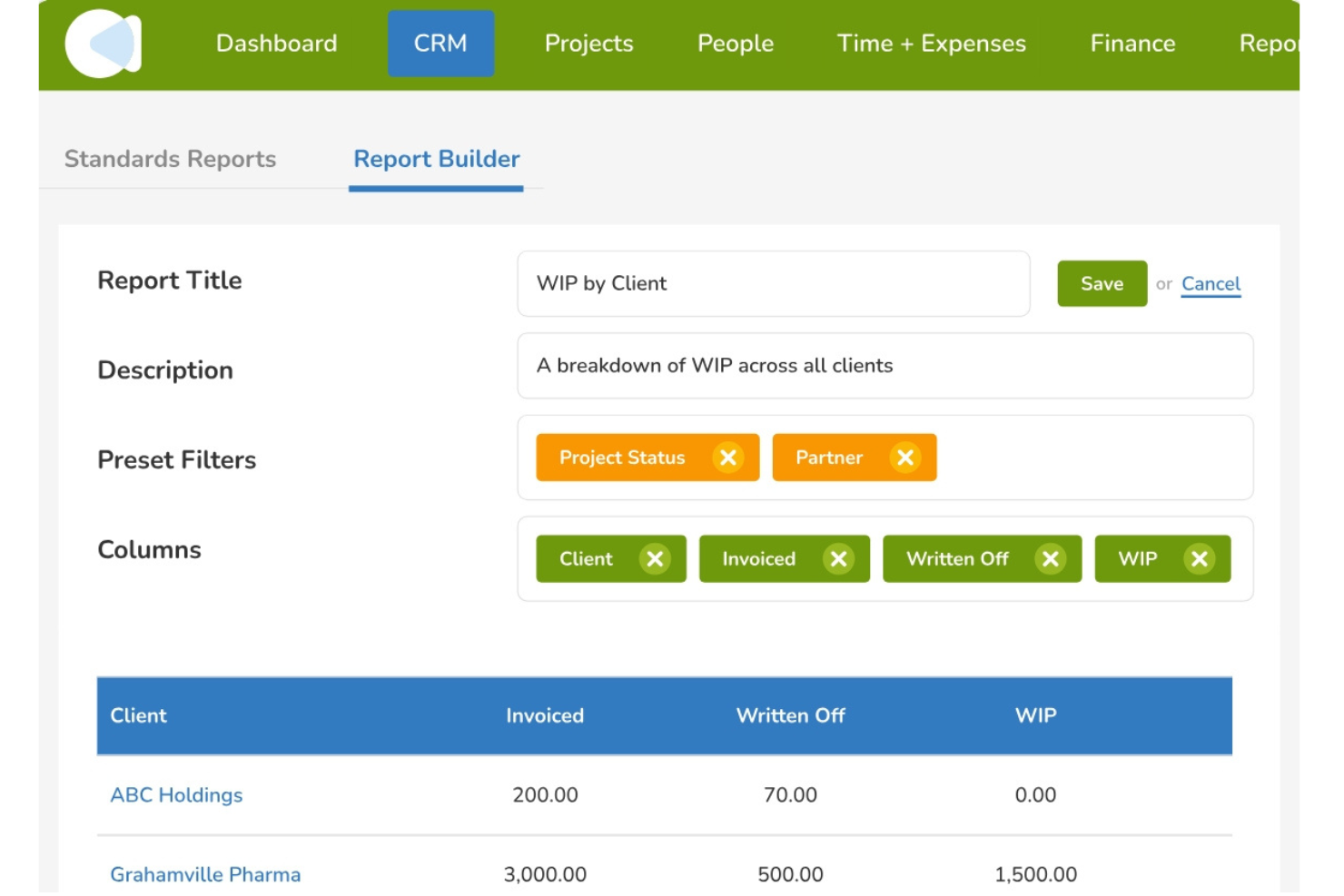
CMap entra nella mia rosa perché i suoi strumenti di controllo del budget vanno ben oltre ciò che vedo in altri software di gestione progetti. Lo consiglio se lavori spesso su progetti per clienti nel settore farmaceutico, dove la supervisione finanziaria precisa è una negoziazione costante. Quello che apprezzo di più è come la previsione, il monitoraggio del margine in tempo reale e l'allocazione dettagliata dei costi rendano la gestione del budget quasi continua—i team riescono normalmente ad accorgersi di eventuali sforamenti in anticipo.
CMap è l'ideale per
- Agenzie farmaceutiche che necessitano di un controllo rigoroso del budget dei progetti per i clienti
- Team che gestiscono la previsione continua dei progetti e il monitoraggio dei profitti
CMap non è adatto per
- Team che desiderano solo una semplice gestione delle attività
- Gruppi senza responsabilità finanziarie o di costing
Cosa distingue CMap
CMap affronta la gestione dei progetti partendo dal presupposto che la visibilità finanziaria sia il punto di partenza, non un ripensamento a posteriori. Imposti budget, previsioni e monitoraggio dei margini come parte integrante della pianificazione del progetto, cosa sorprendentemente rara nella maggior parte degli strumenti che ho utilizzato. Rispetto a soluzioni come monday.com, che pone il focus su compiti e scadenze, CMap ti spinge a considerare il controllo dei costi come il flusso di lavoro centrale.
Compromessi con CMap
CMap ottimizza il rigore finanziario, ma questo significa rinunciare a strumenti di pianificazione e collaborazione più agili e flessibili. Se il tuo team dà la priorità alle conversazioni di progetto e a bacheche visive delle attività, può risultare rigido.
Pros and Cons
Pros:
- Robuste funzionalità di gestione del budget
- Ottimizza la spesa delle risorse
- Centrato sul controllo finanziario
Cons:
- Scalabilità limitata per progetti di grandi dimensioni
- Richiede competenze finanziarie
- Configurazione iniziale complessa

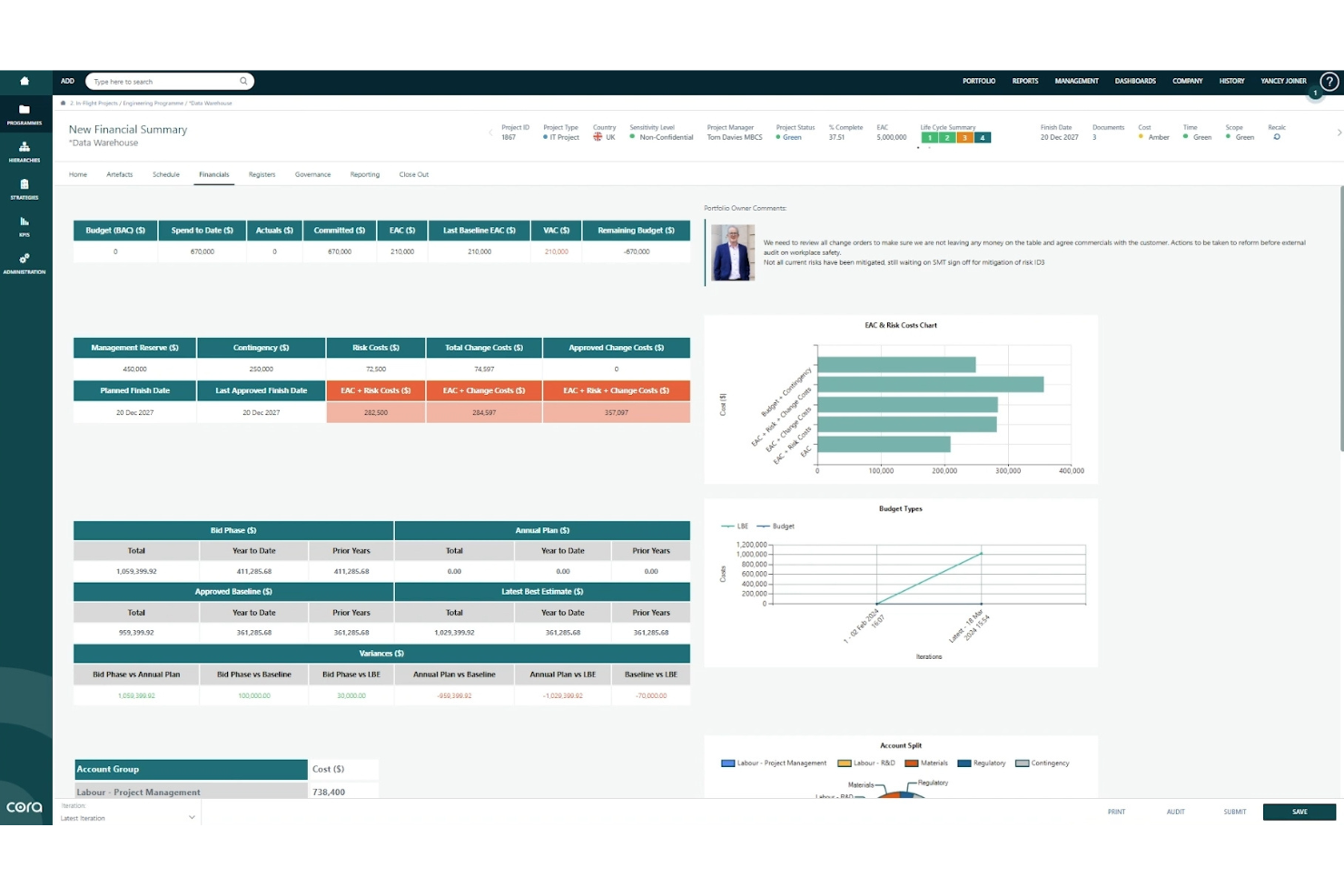
Cora Edge entra nella mia shortlist per il modo in cui collega la pianificazione strategica all'esecuzione nei progetti farmaceutici. Quando vedo organizzazioni che faticano ad allineare le decisioni di portafoglio con l'esecuzione quotidiana dei progetti, questa soluzione fa davvero la differenza. Si ottengono pianificazione di scenari, allineamento degli obiettivi e monitoraggio degli impatti in tempo reale, tutto in un unico posto. Mi piace come questo strumento sia il ponte tra la strategia di alto livello e le operazioni farmaceutiche sul campo.
Ideale per
- PMO farmaceutici che gestiscono portafogli di progetti ampi e complessi
- Organizzazioni che allineano la consegna dei progetti agli obiettivi strategici
Non indicato per
- Team che cercano solo un monitoraggio base dei progetti con configurazione minima
- Piccole aziende farmaceutiche focalizzate su compiti autonomi o semplici liste
Cosa distingue Cora Edge
Cora Edge affronta la gestione dei progetti farmaceutici come parte di un processo strategico più ampio e continuo, piuttosto che come una semplice serie di compiti scollegati. Rispetto a strumenti come ClickUp, noto che Cora Edge ti guida a collegare l'esecuzione quotidiana direttamente alle strategie di più ampio respiro e agli obiettivi del portafoglio. In pratica, ciò è ideale per le organizzazioni in cui le priorità cambiano spesso e i team devono vedere esattamente come il loro lavoro influenzi la direzione aziendale.
Compromessi con Cora Edge
Cora Edge è stato ottimizzato per l'allineamento strategico, ma si sacrifica semplicità e rapidità di onboarding. Se desideri solo un monitoraggio veloce dei progetti, la curva di apprendimento può rappresentare un ostacolo.
Pros and Cons
Pros:
- Dashboard di progetto intuitive
- Gestione efficiente delle risorse
- Supporta le decisioni strategiche
Cons:
- Processo di implementazione complesso
- Richiede una formazione approfondita
- Flessibilità limitata per team piccoli


DDi entra nella mia lista per come affronta specificamente il tracciamento della conformità farmaceutica a livello di progetto. Ciò che offre sono audit trail automatizzati, registri delle attività e valutazioni dei rischi mappati direttamente alle tappe regolatorie. Apprezzo che il sistema segnali in anticipo le non conformità, così puoi concentrarti sui requisiti regolatori in evoluzione, invece che inseguire documenti cartacei. Questo è particolarmente utile quando la documentazione e la tracciabilità sono fondamentali per la supervisione FDA o EMA.
Per cosa è ideale DDi
- Team farmaceutici che necessitano di audit trail di conformità integrati
- Project manager con frequenti necessità di revisione regolatoria
Per cosa DDi non è l’ideale
- Team che desiderano solo un monitoraggio delle attività semplice e leggero
- Progetti al di fuori dei settori regolamentati farmaceutici o delle scienze della vita
Cosa distingue DDi
DDi si distingue perché integra il tracciamento della conformità direttamente nella gestione del lavoro, invece di trattarlo come un’aggiunta alla documentazione. A differenza di strumenti come Asana o ClickUp che aggiungono la conformità come semplice checklist, DDi struttura i flussi di lavoro attorno a tappe regolatorie e dettagliati audit trail per impostazione predefinita. In pratica, questo mantiene le tempistiche strettamente collegate agli standard farmaceutici in evoluzione e offre ai project manager chiarezza durante gli audit.
Compromessi con DDi
DDi ottimizza tracciabilità e supervisione, ma si perde la flessibilità e la rapidità che i team trovano nei software di project management più generici. Se il tuo lavoro non è guidato da regolamentazioni stringenti, l’interfaccia può sembrare pesante.
Pros and Cons
Pros:
- Gestione della conformità solida
- Monitoraggio in tempo reale
- Audit trail trasparente
Cons:
- Processo di configurazione complesso
- Flessibilità limitata per progetti piccoli
- Alcuni utenti lo trovano impegnativo

Planisware
Ideale per grandi imprese
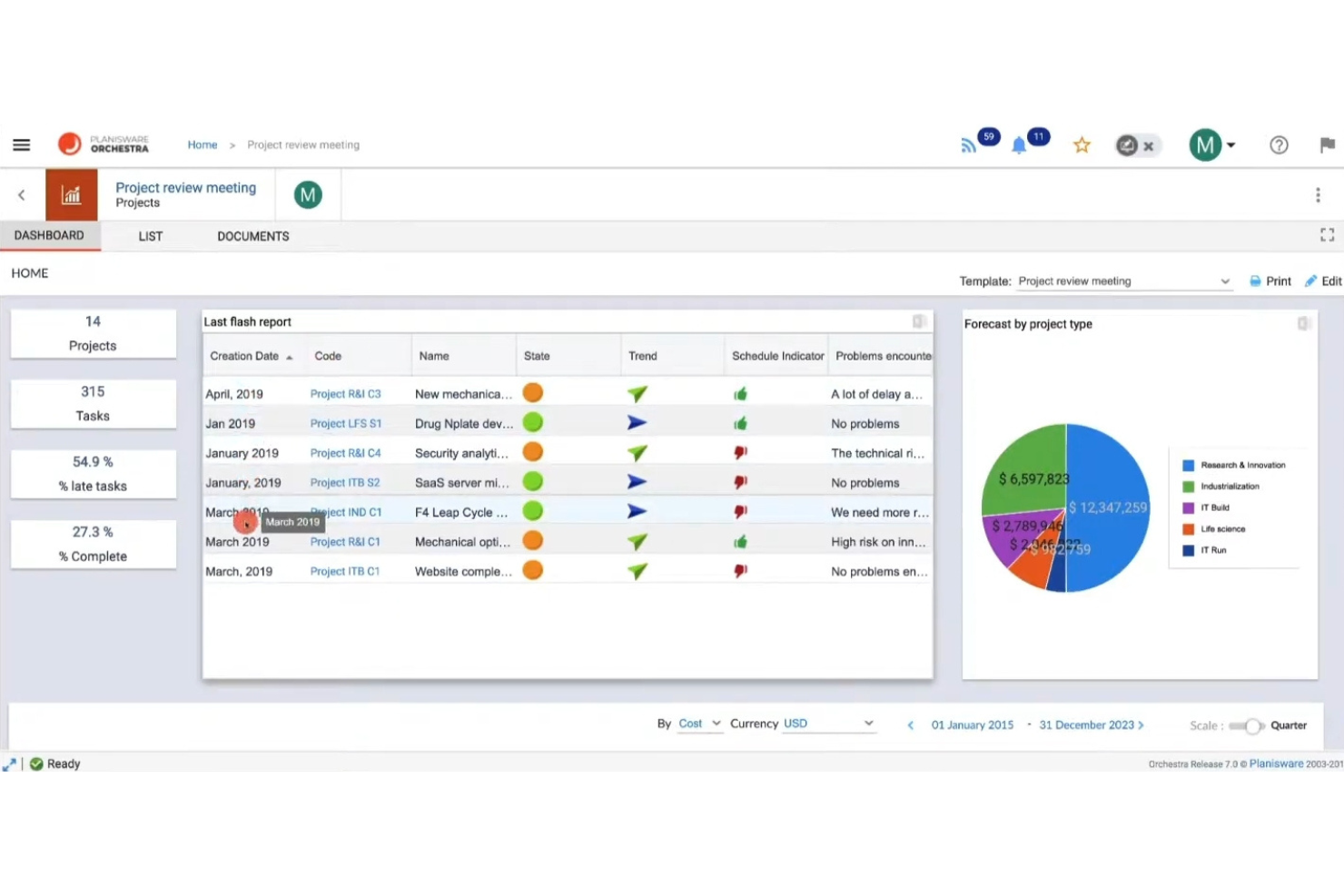
Planisware Orchestra è nella mia lista perché è progettato per orchestrare progetti farmaceutici complessi e trasversali su larga scala. Ho visto grandi team di R&S e regolatori utilizzare la pianificazione di scenari integrata, il Gantt avanzato e la gestione delle risorse di portafoglio per coordinare tutto, dalla scoperta delle molecole agli studi clinici post-marketing.
Quello che apprezzo è quanto siano specializzati i template per il settore farmaceutico, soprattutto per standardizzare i protocolli e garantire una documentazione pronta per le ispezioni in programmi internazionali. Questo sistema funziona al meglio quando serve una supervisione dettagliata su molti progetti in corso e in ambienti ad alta compliance.
Planisware Orchestra: Ideale per
- Grandi aziende farmaceutiche con portafogli multi-progetto complessi
- Team che necessitano di avanzata gestione delle risorse e monitoraggio normativo
Planisware Orchestra: Non ideale per
- Piccoli team di ricerca o startup biotech in fase iniziale
- Gruppi che cercano una configurazione rapida o un monitoraggio progetti leggero
Cosa distingue Planisware Orchestra
Planisware Orchestra è progettato per gestire portafogli farmaceutici ad alto volume con livelli di supervisione che strumenti come monday.com o Asana non affrontano. Invece di essere flessibile per impostazione predefinita, richiede processi standardizzati, monitoraggio dei traguardi e dettaglio normativo per ogni progetto. In pratica, è adatto a grandi aziende farmaceutiche o CRO che si basano su un rigoroso rispetto dei protocolli e su reportistica dettagliata per audit o revisioni degli stakeholder.
Compromessi con Planisware Orchestra
Planisware Orchestra è ottimizzato per il controllo strutturato e i processi, il che significa che i team più piccoli o le pipeline meno formali potrebbero spendere più tempo nella configurazione e nella gestione di interfacce complesse invece di avanzare con i progetti.
Pros and Cons
Pros:
- Gestione portafoglio completa
- Solidi strumenti di pianificazione strategica
- Capacità di reportistica dettagliata
Cons:
- Processo di implementazione complesso
- Curva di apprendimento elevata
- Flessibilità limitata per team piccoli
Altri software di gestione dei progetti farmaceutici
Ecco alcune ulteriori opzioni di software di gestione dei progetti farmaceutici che non sono state incluse nel mio elenco, ma che vale comunque la pena valutare:
- Aurora-ProPlan
Ideale per l'ottimizzazione della pianificazione


Come Valuto i Software di Gestione Progetti Farmaceutici
Divido la mia valutazione in requisiti di base—come la conformità GxP e la pianificazione degli studi clinici—e fattori differenzianti che distinguono uno strumento valido da quello giusto per la tua pipeline.
Funzionalità Principali (Requisiti Fondamentali per Questa Lista)
Quando seleziono gli strumenti per la mia lista, valuto ciascuno su una scala da 0 (non offre la funzionalità) a 5 (eccelle in quest'area) per ogni funzionalità principale elencata di seguito. Quindi, calcolo il punteggio totale dello strumento in percentuale. Ogni strumento deve raggiungere un punteggio minimo totale del 55% per poter essere incluso.
- Strumenti di Pianificazione Studi Clinici: Verifico se la piattaforma offre diagrammi di Gantt e monitoraggio delle milestone costruiti attorno alle fasi dello studio, non solo cronologie generiche adattate al settore farmaceutico.
- Supporto GxP & 21 CFR Parte 11: Tracciabilità delle revisioni, firme elettroniche e ambienti validati sono fondamentali—valuto se lo strumento sia in grado di resistere a un'ispezione.
- Monitoraggio delle Sottomissioni Regolatorie: Gestire le tempistiche FDA o EMA nello stesso spazio di lavoro in cui il team pianifica gli studi è essenziale, quindi cerco workflow dedicati alle consegne regolatorie.
- Gestione Pipeline & Portfolio: Lo sviluppo farmaceutico prevede più composti in fasi diverse. Valuto se uno strumento offre una visibilità a livello di portfolio con budgeting e previsione delle risorse.
- Collaborazione Interfunzionale: I progetti farmaceutici coinvolgono sponsor, CRO e team interni. Cerco autorizzazioni basate sui ruoli e condivisione esterna sicura che mantengano le persone giuste informate.
- Controllo Documentale Farmaceutico: SOP con controllo di versione, workflow di approvazione e completa tracciabilità sono ciò che valuto qui—l'archiviazione disorganizzata di file non basta in un ambiente regolamentato.
Dopo aver selezionato gli strumenti che soddisfano questi criteri, considero ciò che distingue ciascuna piattaforma.
Fattori Differenzianti (Cosa Distingue i Fornitori)
Ecco come confronto i diversi fornitori:
Caratteristiche Distintive
La previsione delle tempistiche tramite intelligenza artificiale è un forte elemento differenziante. Strumenti in grado di modellare ritardi nell'arruolamento o prevedere la probabilità di successo nei vari composti offrono ai responsabili PMO un reale vantaggio nella pianificazione. Valuto inoltre dashboard di studio in tempo reale che mostrino tassi di arruolamento, rispetto delle milestone e consuntivo di budget senza report manuali. Anche l'automazione della fase di avvio degli studi è importante, in particolare per team che gestiscono studi multisito in cui la selezione e la fattibilità dei siti possono causare mesi di ritardo.
Oltre le Caratteristiche
Le integrazioni con l'ecosistema delle scienze della vita sono una considerazione primaria. Uno strumento che si connette a CTMS, eTMF o al sistema EDC mantiene il flusso dei dati di studio senza reinserimenti manuali. Valuto inoltre attentamente il supporto alla convalida—i fornitori che forniscono documentazione IQ/OQ/PQ e guidano attraverso il change control fanno risparmiare mesi di lavoro per la qualificazione. La flessibilità nel deployment completa il quadro. Gli sponsor multinazionali spesso necessitano di opzioni per la residenza dei dati regionali, quindi verifico se la piattaforma offre hosting cloud, cloud privato o on-premise per soddisfare i requisiti locali di sovranità dei dati.
Come scegliere un software di gestione dei progetti farmaceutici
È facile perdersi in lunghi elenchi di funzionalità e strutture tariffarie complesse. Per aiutarti a rimanere concentrato mentre affronti il tuo specifico processo di selezione del software, ecco un elenco di fattori da tenere a mente:
| Fattore | Considerazioni |
|---|---|
| Scalabilità | Valuta se il software può crescere insieme al tuo team. Sarà in grado di gestire un numero maggiore di progetti e utenti man mano che l'organizzazione si espande? Cerca soluzioni che si adattino alle esigenze in cambiamento. |
| Integrazioni | Verifica se lo strumento si collega ai sistemi esistenti, come CRM, ERP o piattaforme di posta elettronica. Un flusso di dati continuo può far risparmiare tempo e ridurre gli errori. |
| Personalizzazione | Valuta quanto sia facile adattare il software ai tuoi flussi di lavoro. Puoi modificare campi, pannelli di controllo e report in modo che rispecchino i tuoi processi? |
| Semplicità d'uso | Assicurati che l'interfaccia sia intuitiva per il tuo team. Una curva di apprendimento ripida può ritardare l'adozione. Cerca strumenti con una navigazione semplice e istruzioni chiare. |
| Implementazione e inserimento | Valuta il tempo e le risorse necessari per iniziare. Il fornitore offre formazione o supporto durante la fase di inserimento? Una configurazione rapida può portare a un ROI più veloce. |
| Costo | Confronta attentamente i piani tariffari. Considera eventuali costi nascosti o contratti a lungo termine. Assicurati che lo strumento rientri nel tuo budget senza sacrificare le funzionalità essenziali. |
| Misure di sicurezza | Verifica che il software soddisfi i tuoi standard di sicurezza. Cerca la crittografia dei dati, i controlli degli accessi degli utenti e la conformità a normative come GDPR o HIPAA. |
| Requisiti di conformità | Determina se lo strumento supporta le normative specifiche del settore. Questo è fondamentale nel settore farmaceutico, dove la non conformità può portare a sanzioni o all'interruzione dei progetti. |
Che cos'è un software di gestione dei progetti farmaceutici?
Il software per la gestione dei progetti farmaceutici è uno strumento progettato per contribuire alla gestione dei progetti nel settore farmaceutico. Viene utilizzato da responsabili di progetto, ricercatori e team responsabili della conformità per migliorare l'efficienza e garantire la conformità. Le funzionalità di pianificazione delle attività, allocazione delle risorse e monitoraggio della conformità aiutano a gestire le tempistiche, ottimizzare le risorse e rispettare le normative.
Questi strumenti offrono un valore complessivo migliorando il coordinamento dei progetti e riducendo i rischi nello sviluppo e nella ricerca farmaceutica.
Funzionalità del software per la gestione dei progetti farmaceutici
Quando selezioni un software per la gestione dei progetti farmaceutici, presta attenzione alle seguenti funzionalità chiave:
- Pianificazione delle attività: aiuta a organizzare e stabilire la priorità delle attività, garantendo che i progetti rispettino il programma e che le scadenze vengano raggiunte.
- Allocazione delle risorse: consente di assegnare le risorse in modo efficiente, ottimizzando la produttività del team e riducendo gli sprechi.
- Monitoraggio della conformità: controlla il rispetto delle normative del settore, riducendo al minimo il rischio di non conformità e delle relative sanzioni.
- Reportistica e analisi: fornisce informazioni sull'avanzamento e sulle prestazioni dei progetti, favorendo decisioni consapevoli.
- Creazione di flussi di lavoro personalizzati: consente di adattare i flussi di lavoro alle esigenze specifiche del progetto, migliorando flessibilità ed efficienza.
- Gestione del budget: aiuta a monitorare e controllare i costi dei progetti, consentendo di rispettare il budget ed evitare imprevisti finanziari.
- Collaborazione in tempo reale: consente al team di comunicare e collaborare in tempo reale, migliorando il coordinamento e la condivisione delle informazioni.
- Misure di sicurezza: protegge i dati sensibili mediante crittografia e controlli degli accessi, garantendo la conformità alle normative sulla privacy.
- Funzionalità di integrazione: si collega ad altri strumenti e sistemi, facilitando il flusso continuo dei dati e riducendo l'inserimento manuale.
- Reportistica automatizzata: genera automaticamente i report, facendo risparmiare tempo e fornendo informazioni aggiornate alle parti interessate.
Vantaggi del software per la gestione dei progetti farmaceutici
L'implementazione di un software per la gestione dei progetti farmaceutici offre numerosi vantaggi al tuo team e alla tua azienda. Ecco alcuni dei vantaggi che puoi aspettarti:
- Maggiore conformità: le funzionalità di monitoraggio della conformità contribuiscono a garantire che i progetti rispettino le normative del settore, riducendo il rischio di multe e ritardi.
- Collaborazione migliorata: gli strumenti di collaborazione in tempo reale consentono al team di comunicare in modo efficace, mantenendo tutti aggiornati e riducendo i problemi di comunicazione.
- Uso efficiente delle risorse: le funzionalità di allocazione delle risorse aiutano a ottimizzare l'uso del tempo e delle competenze del team, aumentando la produttività.
- Decisioni migliori: la reportistica e le analisi forniscono informazioni sull'avanzamento dei progetti, consentendo di prendere rapidamente decisioni consapevoli.
- Controllo dei costi: le funzionalità di gestione del budget aiutano a monitorare le spese, consentendo di rispettare il budget ed evitare imprevisti finanziari.
- Risparmio di tempo: la reportistica automatizzata riduce il lavoro manuale, fornendo aggiornamenti tempestivi alle parti interessate senza lavoro aggiuntivo.
- Sicurezza dei dati: le misure di sicurezza proteggono le informazioni sensibili, garantendo la conformità alle normative sulla privacy e rafforzando la fiducia delle parti interessate.
Costi e prezzi del software per la gestione dei progetti farmaceutici
La selezione di un software per la gestione dei progetti farmaceutici richiede la comprensione dei vari modelli e piani tariffari disponibili. I costi variano in base alle funzionalità, alle dimensioni del team, ai componenti aggiuntivi e ad altri fattori. La tabella seguente riassume i piani comuni, i relativi prezzi medi e le funzionalità generalmente incluse nelle soluzioni software per la gestione dei progetti farmaceutici:
Tabella di confronto dei piani per il software di gestione dei progetti farmaceutici
| Tipo di piano | Prezzo medio | Funzionalità comuni |
|---|---|---|
| Piano gratuito | $0 | Gestione di base delle attività, modelli di progetto limitati e reportistica standard. |
| Piano personale | $10-$25/utente/mese | Gestione avanzata delle attività, allocazione delle risorse e strumenti di collaborazione di base. |
| Piano aziendale | $30-$60/utente/mese | Pianificazione completa dei progetti, monitoraggio della conformità, reportistica avanzata e funzionalità di integrazione. |
| Piano aziendale avanzato | $70-$120/utente/mese | Flussi di lavoro personalizzati, analisi dettagliate, supporto premium e misure di sicurezza avanzate. |
Domande frequenti sul software di gestione dei progetti farmaceutici
Ecco alcune risposte alle domande comuni sul software di gestione dei progetti farmaceutici:
Quanti fattori bisogna considerare nella scelta di un software di gestione dei progetti?
Bisogna considerare i fattori in linea con le esigenze del proprio team e gli strumenti già in uso. Occorre valutare la facilità d’uso, le opzioni di personalizzazione e le funzionalità di integrazione. Questi fattori contribuiscono a garantire che il software si adatti perfettamente ai processi e supporti gli obiettivi del team.
Qual è il ruolo della gestione dei progetti nel settore farmaceutico?
La gestione dei progetti nel settore farmaceutico aiuta ad affrontare la complessità dei processi farmaceutici. Comprende una pianificazione dettagliata, la gestione dei rischi e la collaborazione tra i diversi reparti. Queste pratiche migliorano i risultati dei progetti e accelerano il processo di immissione dei farmaci sul mercato.
Che cos'è il PMO nel settore farmaceutico?
Un Ufficio di gestione dei progetti (PMO) funge da guida per le iniziative strategiche e mantiene gli standard di lavoro. Non si limita a gestire i progetti: contribuisce a garantire che i progetti siano in linea con gli obiettivi aziendali e vengano completati in modo efficiente.
Che cos'è il PMP nel settore farmaceutico?
Il Programma di manutenzione preventiva (PMP) è un approccio strutturato alla manutenzione delle apparecchiature farmaceutiche. Ottimizza le prestazioni e prolunga la vita utile delle apparecchiature, un aspetto fondamentale per mantenere una qualità produttiva costante.
In che modo il software di gestione dei progetti farmaceutici migliora la conformità?
Il software di gestione dei progetti farmaceutici migliora la conformità monitorando i requisiti normativi e garantendo che tutte le attività del progetto rispettino gli standard del settore. Offre funzionalità come il monitoraggio della conformità e i registri di controllo, che aiutano a evitare sanzioni e a garantire il corretto svolgimento delle operazioni.
Cosa bisogna cercare in un fornitore di software di gestione dei progetti farmaceutici?
Occorre cercare fornitori che offrano un solido supporto clienti, modelli di prezzo chiari e una comprovata affidabilità. Bisogna considerare la loro capacità di integrarsi con i sistemi già in uso e il loro impegno per la sicurezza dei dati. Questi fattori garantiscono un’implementazione fluida e un supporto continuo.