

I 10 migliori software di gestione dei clienti per piccole imprese nel 2026

Elenco dei migliori software di gestione dei clienti per piccole imprese


Il software di gestione dei clienti aiuta la tua piccola impresa a organizzare i contatti, monitorare le interazioni e ottimizzare i flussi di lavoro di vendita o assistenza in un unico posto. Se stai cercando il modo migliore per tenere il passo con i clienti, centralizzare la comunicazione e supportare il tuo team mentre la tua impresa cresce, sei nel posto giusto. Con così tante opzioni disponibili, è difficile capire quali strumenti siano davvero adatti alle tue esigenze, al tuo budget e alla realtà delle attività quotidiane.
Questo elenco analizza i migliori software di gestione dei clienti per piccole imprese nel 2026, così potrai confrontare le funzionalità, individuare le differenze principali e prendere una decisione consapevole per il tuo team.
Perché fidarsi dei nostri consigli sui software
Il nostro team testa e recensisce software dal 2012. In quanto project manager noi stessi, sappiamo quanto sia difficile — e importante — scegliere il software giusto.
Per questa guida, abbiamo valutato gli strumenti attraverso test pratici e ricerche indipendenti, assegnando un punteggio agli strumenti in base ai nostri criteri di selezione. Ci basiamo inoltre sulle competenze di leader di pensiero del settore e di professionisti attivi nella gestione dei progetti.
Le nostre recensioni riflettono il nostro giudizio editoriale umano, non un discorso di vendita.
Revisori esperti:
Tabella comparativa: software di gestione dei clienti per piccole imprese
Questa tabella comparativa riassume i dettagli dei prezzi delle mie migliori selezioni di software di gestione dei clienti per piccole imprese.
| Tool | Best For | Trial Info | Price | ||
|---|---|---|---|---|---|
| 1 | Ideale per un'esperienza utente semplice e intuitiva | Prova gratuita di 30 giorni disponibile | A partire da $15/utente/mese | Website | |
| 2 | Ideale per la gestione dei contatti orientata all’azione | Prova gratuita di 21 giorni + demo gratuita disponibile | Da $9.95/utente/mese | Website | |
| 3 | Ottima integrazione con l'ecosistema Microsoft 365 | Prova gratuita di 30 giorni disponibile | Da $65/utente/mese (fatturazione annuale) | Website | |
| 4 | Ideale per l'allineamento tra marketing e vendite | Piano gratuito + demo gratuita disponibile | Da $7/utente/mese (fatturato annualmente) | Website | |
| 5 | Ideale per sequenze di follow-up automatiche | Prova gratuita di 14 giorni + demo gratuita disponibile | Da $299/2 utenti/mese | Website | |
| 6 | Ideale per l'integrazione tra progetti e attività | Prova gratuita di 14 giorni disponibile | Da $29/utente/mese (fatturato annualmente) | Website | |
| 7 | Ideale per strumenti di automazione avanzati | Prova gratuita di 30 giorni + piano gratuito disponibile | Da $25/utente/mese (fatturazione annuale) | Website | |
| 8 | Ideale per la gestione visiva della pipeline di vendita | Prova gratuita di 14 giorni disponibile | Da $14/utente/mese (fatturazione annuale) | Website | |
| 9 | Ideale per il lead scoring basato sull'intelligenza artificiale | Piano gratuito + prova gratuita di 21 giorni disponibile | A partire da $9/utente/mese (fatturazione annuale) | Website | |
| 10 | Ideale per le funzionalità collaborative integrate nel team | Piano gratuito + prova gratuita di 15 giorni + demo gratuita disponibile | Da $49/organizzazione/mese (fatturazione annuale) | Website |
I migliori software di gestione dei clienti per piccole imprese
Di seguito trovi le mie analisi dettagliate dei software di gestione dei clienti per piccole imprese inclusi nel mio elenco. Le mie recensioni offrono una panoramica approfondita delle funzionalità, dei casi d’uso migliori e delle integrazioni di ogni piattaforma, per aiutarti a trovare quella più adatta a te.

Ideale per un'esperienza utente semplice e intuitiva
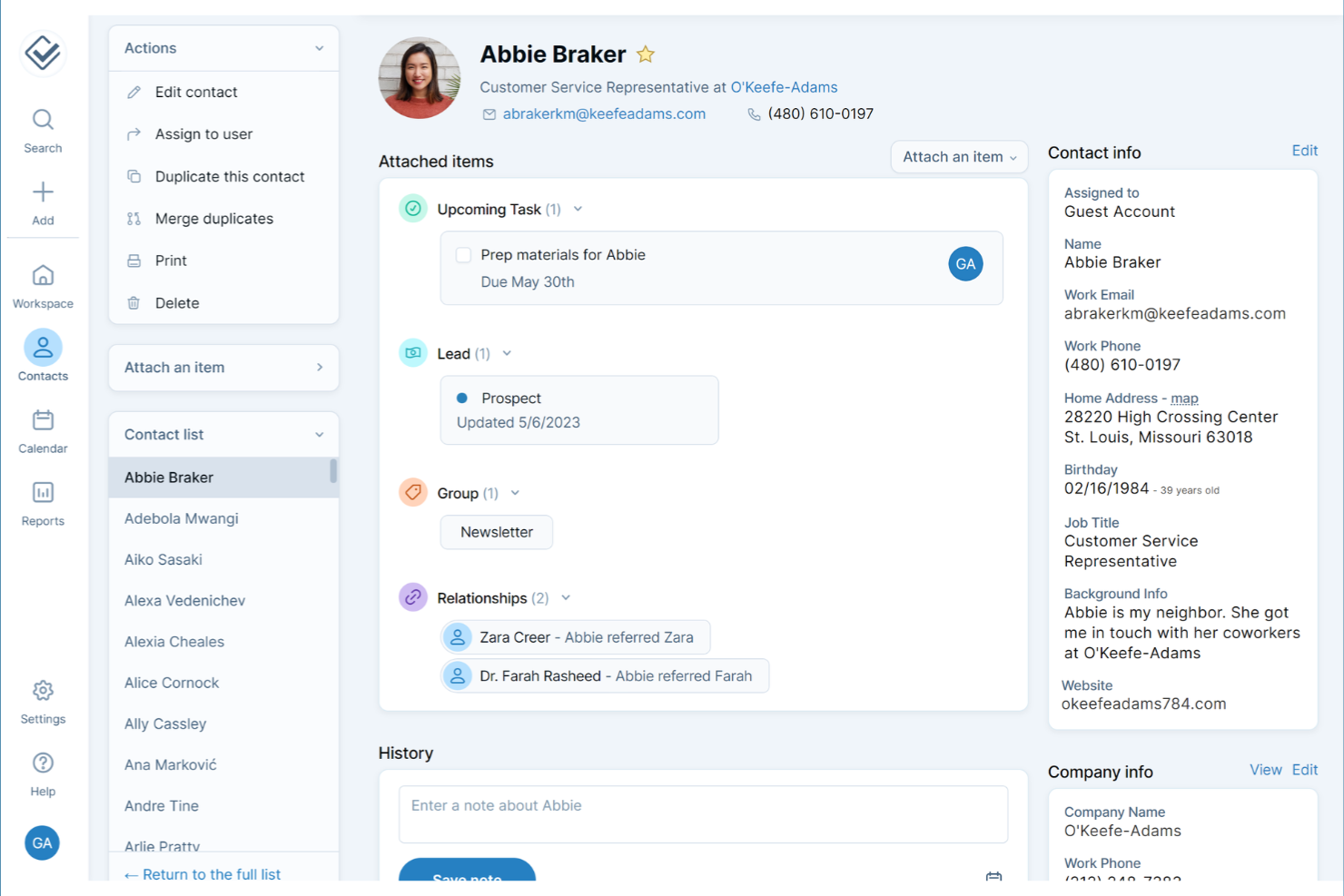
Se cerchi uno strumento di gestione dei clienti che eviti confusione e complessità, Less Annoying CRM è progettato mettendo la semplicità al centro. È ideale per i titolari di piccole imprese e i professionisti indipendenti che vogliono gestire l'intera esperienza del cliente, dai contatti ai ricontatti e alle attività, senza una curva di apprendimento ripida. L'interfaccia mantiene tutto semplice e intuitivo, così puoi concentrarti sulla costruzione delle relazioni con i clienti invece di cercare di capire come funziona il software.
Perché ho scelto Less Annoying CRM
Ciò che distingue Less Annoying CRM è l'attenzione rivolta a un'esperienza utente semplice e intuitiva, che non sovraccarica i piccoli team aziendali. Il pannello di controllo mette in primo piano contatti, attività e ricontatti, così sai sempre cosa richiede attenzione. Apprezzo il fatto che lo strumento mantenga la navigazione essenziale, con tutto a portata di uno o due clic. Per le piccole imprese e le startup che vogliono evitare complessità inutili, Less Annoying CRM semplifica l'organizzazione e la gestione delle relazioni con i clienti.
Funzionalità principali di Less Annoying CRM
Alcune altre funzionalità di Less Annoying CRM che le piccole imprese potrebbero trovare utili includono:
- Calendario e pianificazione degli eventi: Pianifica riunioni, chiamate e scadenze con un calendario integrato che si sincronizza con i tuoi contatti.
- Gestione del processo di vendita: Tieni traccia dei potenziali clienti e delle trattative attraverso processi di vendita personalizzabili per monitorare l'avanzamento delle vendite.
- Strumenti di collaborazione del team: Condividi contatti, note e attività con i membri del team per migliorare il coordinamento.
- Email con agenda giornaliera: Ricevi un'email riepilogativa giornaliera con le attività e gli eventi imminenti.
Integrazioni di Less Annoying CRM
Al momento Less Annoying CRM non elenca integrazioni native. Tuttavia, offre un'API aperta per integrazioni personalizzate.
Pros and Cons
Pros:
- Le schede dei contatti includono campi personalizzati illimitati per i dettagli dei clienti
- Le email con agenda giornaliera aiutano gli utenti a tenere sotto controllo i ricontatti
- Il calendario integrato supporta la pianificazione degli eventi e i promemoria
Cons:
- Mancano integrazioni native con i più diffusi strumenti di contabilità o marketing
- Le opzioni di reportistica sono limitate rispetto ad altri CRM
Ideale per la gestione dei contatti orientata all’azione

Se desideri uno strumento di gestione clienti che mantenga il tuo team concentrato sui prossimi passi, OnePageCRM merita attenzione. È pensato per piccole imprese e team di vendita che hanno bisogno di un modo semplice per trasformare i contatti in attività concrete. Con il suo approccio orientato all’azione, OnePageCRM ti aiuta a evitare che i potenziali clienti vengano trascurati.
Perché ho scelto OnePageCRM
Ciò che differenzia OnePageCRM è il suo focus nel trasformare ogni contatto in un prossimo passo chiaro e concreto. Invece di limitarsi ad archiviare le informazioni dei clienti, la piattaforma ti invita ad assegnare e monitorare azioni di follow-up per ogni contatto, aiutando i team delle piccole imprese a restare proattivi. Apprezzo il modo in cui il metodo Next Action è integrato direttamente nel flusso di lavoro, rendendo semplice la priorità e la gestione delle attività quotidiane con i clienti. Per le piccole aziende che vogliono mantenere slancio con lead e clienti, questo approccio orientato all’azione è una scelta pratica.
Funzionalità principali di OnePageCRM
Altre funzionalità di OnePageCRM che possono risultare utili agli utenti di piccole imprese includono:
- Importazione ed esportazione dei contatti: Importa e esporta rapidamente le liste di contatti usando file CSV o integrazioni.
- Sincronizzazione email e modelli: Collega il tuo account email per inviare, ricevere e tracciare le email direttamente dalla piattaforma.
- Gestione delle trattative: Organizza, monitora e aggiorna le opportunità di vendita con una semplice visualizzazione pipeline.
- App mobile: Accedi a contatti, azioni e trattative ovunque tramite app dedicate per iOS e Android.
Integrazioni di OnePageCRM
Le integrazioni includono Gmail, Outlook, Mailchimp, Zapier, Xero, Google Calendar, Slack, HubSpot e Pipedrive. Inoltre, OnePageCRM offre un'API aperta per integrazioni personalizzate.
Pros and Cons
Pros:
- Le liste di attività orientate all’azione aiutano i team a dare priorità ai follow-up quotidiani
- La visualizzazione pipeline di vendita offre un semplice monitoraggio drag-and-drop delle trattative
- La sincronizzazione email consente di inviare e tracciare i messaggi direttamente dal CRM
Cons:
- Nessuna automazione di marketing integrata per campagne email
- La modifica in blocco dei contatti non è disponibile per tutti i campi dati
Ottima integrazione con l'ecosistema Microsoft 365
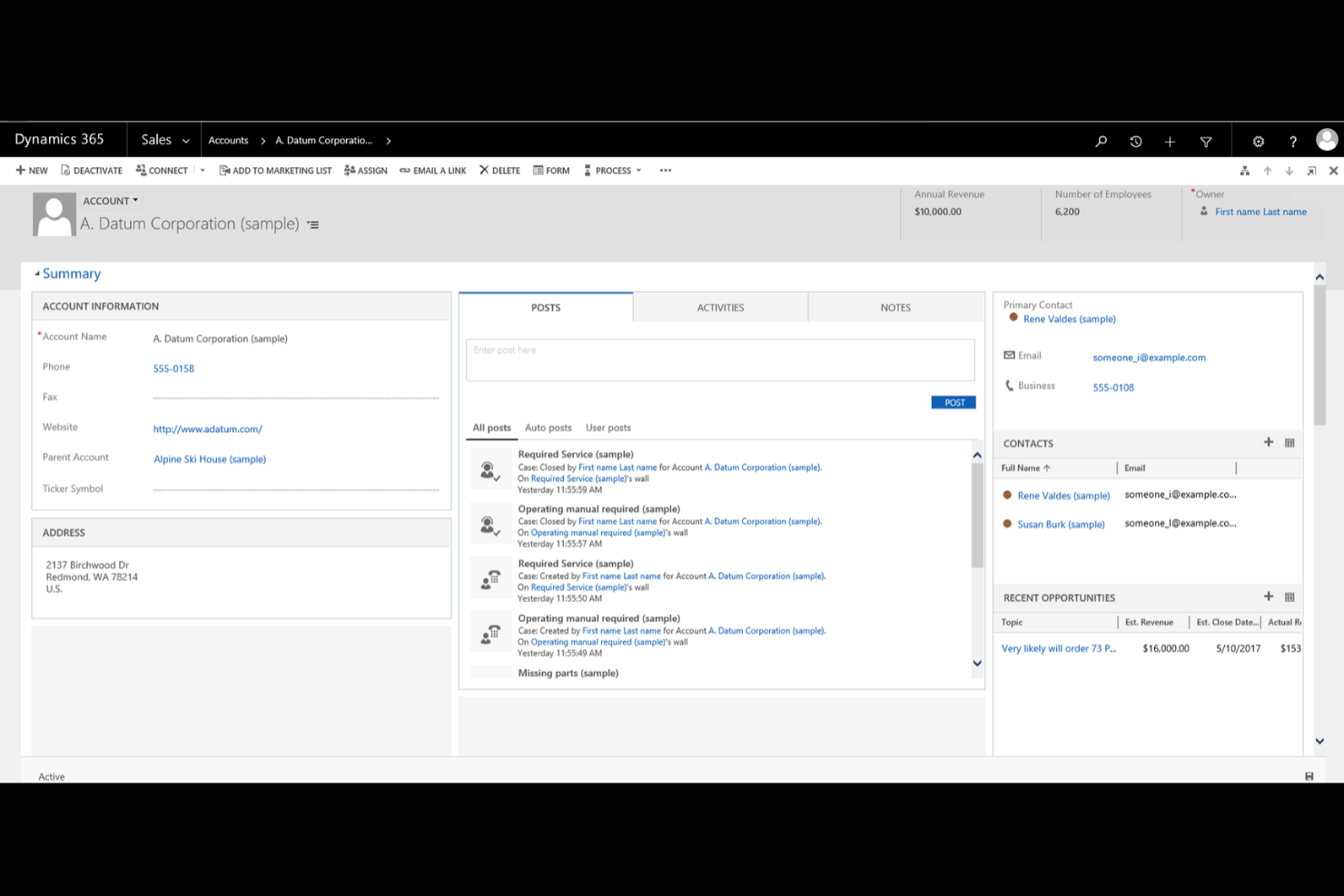
Se la tua azienda utilizza già gli strumenti di Microsoft 365, Microsoft Dynamics 365 offre una piattaforma di gestione dei clienti che si integra perfettamente nei tuoi flussi di lavoro esistenti. È pensata per le piccole imprese che desiderano connettere i dati di vendite, servizio clienti e marketing tra le app Microsoft già conosciute. Grazie all'integrazione profonda con Outlook, Teams ed Excel, Dynamics 365 ti aiuta a gestire le relazioni con i clienti senza dover passare tra sistemi diversi.
Perché ho scelto Microsoft Dynamics 365
Ciò che distingue Microsoft Dynamics 365 per le piccole imprese è la profonda connessione con l'ecosistema Microsoft 365. L'ho scelto perché puoi gestire i dati dei clienti, monitorare le comunicazioni e programmare riunioni direttamente da strumenti familiari come Outlook e Teams. La piattaforma consente inoltre di automatizzare i flussi di lavoro tra Dynamics 365 ed Excel, rendendo più semplice l'aggiornamento dei record e la generazione di report senza l'inserimento manuale dei dati. Per le aziende che utilizzano già le app Microsoft, questo livello di integrazione aiuta a mantenere la gestione dei clienti organizzata ed efficiente.
Funzionalità principali di Microsoft Dynamics 365
Altre funzionalità di Microsoft Dynamics 365 che potrebbero risultare utili agli utenti delle piccole imprese includono:
- Cruscotti personalizzabili: Crea dashboard visuali per monitorare in tempo reale metriche di vendita, servizio e marketing.
- Gestione dei casi: Organizza e risolvi le richieste di assistenza clienti con strumenti integrati di tracciamento dei casi.
- Gestione di lead e opportunità: Acquisisci, qualifica e gestisci lead e opportunità di vendita da un'unica interfaccia.
- Controlli di accesso basati sui ruoli: Imposta permessi e visibilità dei dati in base ai ruoli degli utenti all'interno della tua organizzazione.
Integrazioni di Microsoft Dynamics 365
Le integrazioni includono Microsoft 365, Power BI, LinkedIn Sales Navigator, Outlook, SharePoint, Teams, Azure, Adobe Sign e OneDrive. Microsoft Dynamics 365 offre anche una API per integrazioni personalizzate.
Pros and Cons
Pros:
- Integrazione profonda con Outlook, Teams e altre app Microsoft 365
- I cruscotti personalizzabili permettono di monitorare metriche di vendita e assistenza
- La gestione dei casi integrata supporta flussi di lavoro strutturati per il servizio clienti
Cons:
- La configurazione iniziale può richiedere significative risorse IT
- L'integrazione con strumenti non Microsoft è più limitata rispetto ad alcuni concorrenti

HubSpot
Ideale per l'allineamento tra marketing e vendite
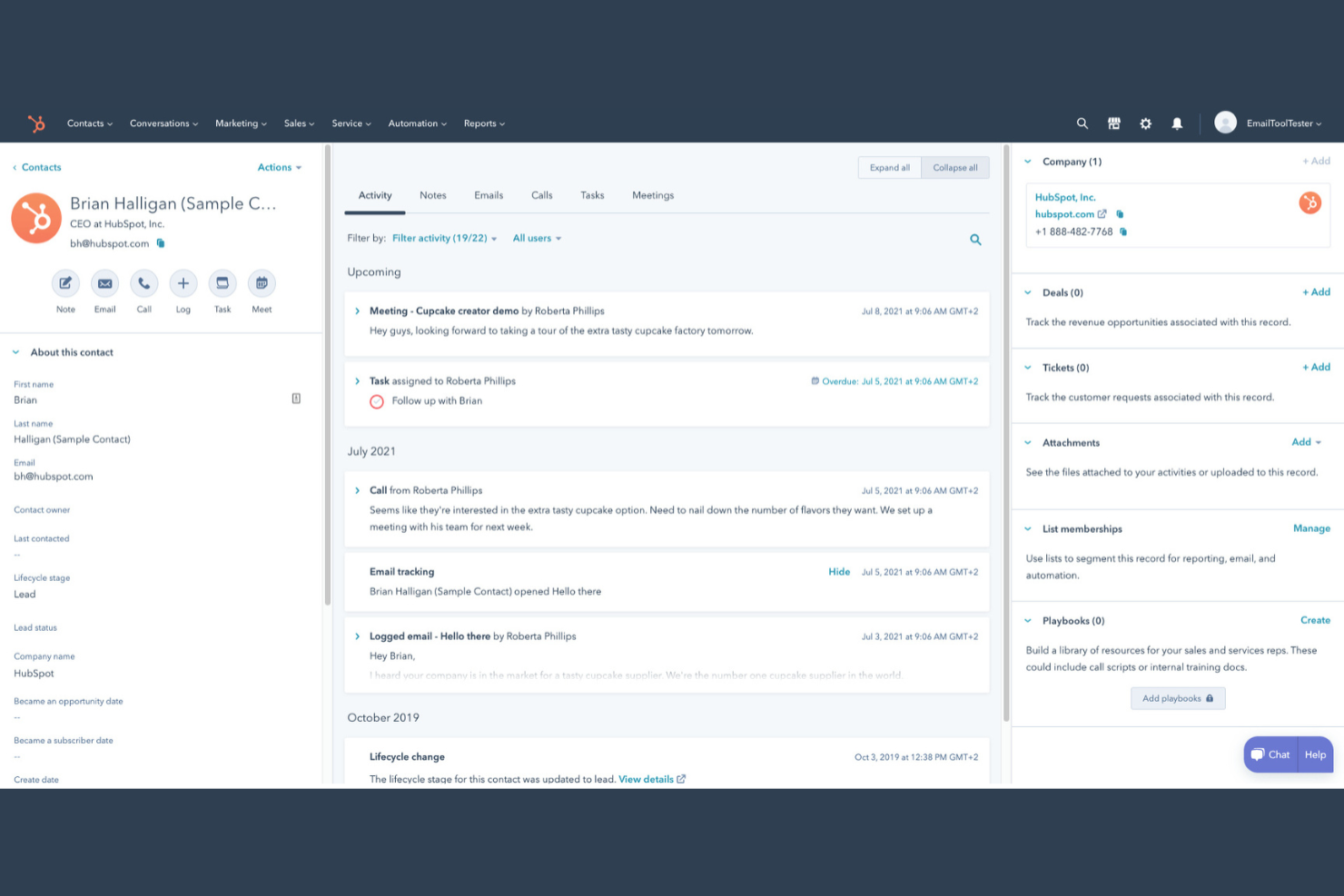
Se cerchi una piattaforma di gestione clienti che colleghi i team di marketing e vendite, HubSpot merita attenzione. Questo strumento è pensato per le piccole imprese che vogliono gestire i contatti, automatizzare le comunicazioni e monitorare le trattative in un unico posto. HubSpot si distingue per il suo approccio unificato ai dati dei clienti, facilitando l’allineamento tra le attività di vendita e marketing.
Perché ho scelto HubSpot
Ho scelto HubSpot perché riunisce le attività di marketing e di vendita in modo particolarmente utile per le piccole imprese che devono gestire le relazioni con i clienti. La piattaforma consente di tracciare ogni interazione con il cliente, dalla prima visita al sito fino alla conclusione della trattativa, tutto in un unico posto. Mi piace la possibilità di automatizzare le campagne di email marketing e di impostare flussi di lavoro per la gestione dei lead che mantengono i team di vendita e marketing sempre allineati. Il database condiviso dei contatti e le pipeline delle trattative di HubSpot aiutano a non perdere mai alcun dettaglio dei clienti mentre il team cresce.
Caratteristiche principali di HubSpot
Altre funzionalità di HubSpot che possono essere utili alle piccole aziende includono:
- Pianificatore di appuntamenti: Prenota appuntamenti direttamente dal sistema CRM e sincronizzali con il tuo calendario.
- Widget di chat dal vivo: Aggiungi la chat in tempo reale al tuo sito web per entrare in contatto con i visitatori e acquisire potenziali clienti.
- Gestione delle attività: Assegna, monitora e stabilisci le priorità delle attività per il tuo team direttamente nella scheda di ciascun cliente.
- Monitoraggio dei documenti: Carica, condividi e monitora il coinvolgimento dei clienti e le interazioni con i documenti di vendita direttamente dalla piattaforma.
Integrazioni di HubSpot
Le integrazioni includono Salesforce, Shopify, WordPress, Slack, Zoom, Microsoft Outlook, Gmail, Mailchimp, SurveyMonkey ed Eventbrite.
Pros and Cons
Pros:
- Centralizza la cronologia della comunicazione con i clienti tra team di marketing e vendite
- Dispone di monitoraggio email integrato e promemoria automatici per i follow-up
- Offre pipeline personalizzabili per monitorare trattative e stato dei clienti
Cons:
- Le funzionalità di automazione avanzata richiedono il passaggio a piani di livello superiore
- La configurazione delle integrazioni può richiedere tempo per chi non ha competenze tecniche
Keap
Ideale per sequenze di follow-up automatiche
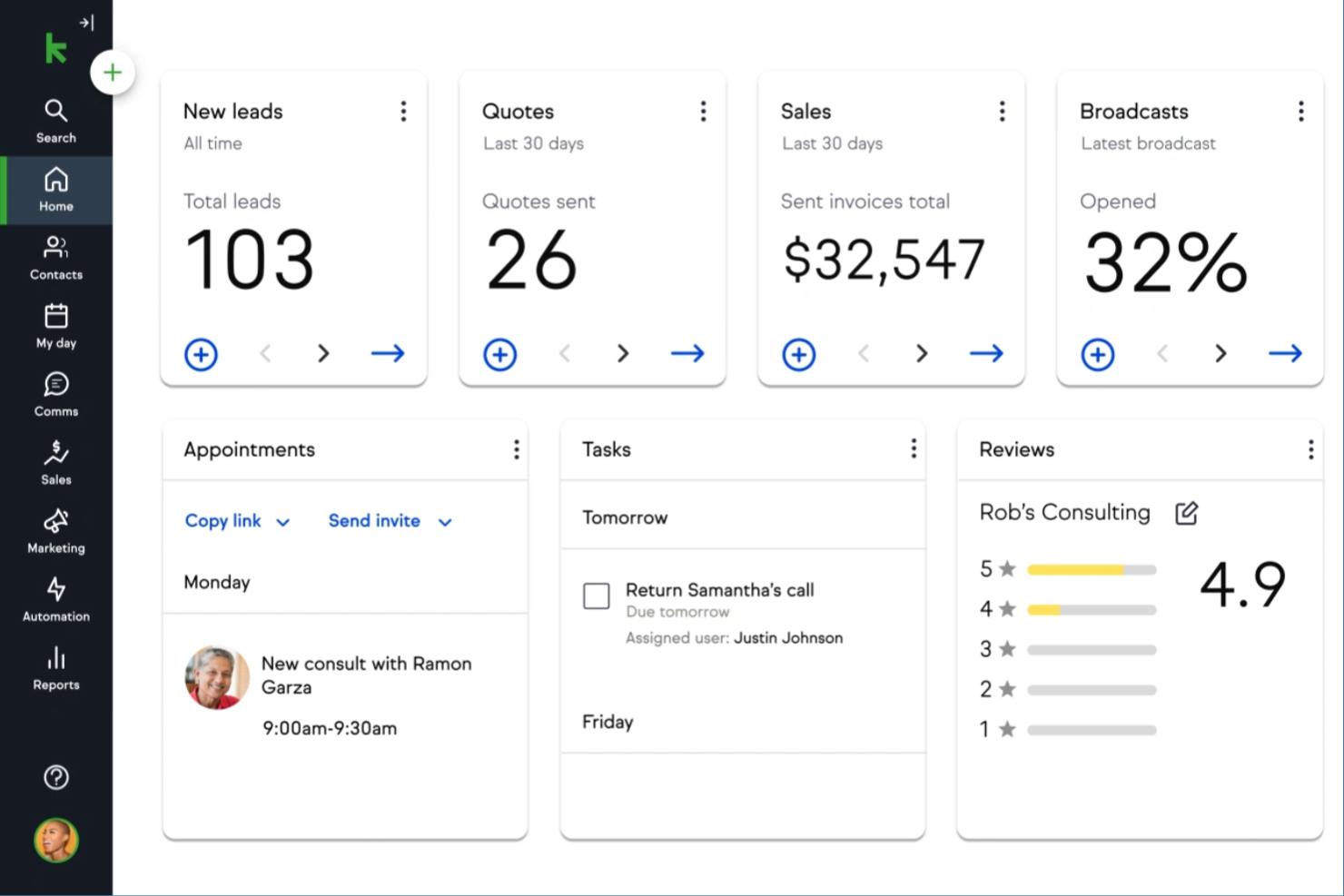
Keap si distingue per le piccole imprese che vogliono automatizzare il follow-up dei clienti e coltivare i lead senza sforzo manuale. È progettato per fornitori di servizi e lavoratori autonomi che hanno bisogno di tenere traccia dei contatti, degli appuntamenti e delle comunicazioni in un unico posto. Con Keap, puoi impostare sequenze automatiche di email e SMS che ti aiutano a rimanere in contatto con i clienti in ogni fase.
Perché ho scelto Keap
Il follow-up automatico è dove Keap offre davvero il meglio nella gestione dei clienti per le piccole imprese. Puoi creare sequenze personalizzate di email e messaggi di testo che si attivano in base alle azioni dei clienti, così non perdi mai l'opportunità di seguire o coltivare un lead. Mi piace anche che Keap ti permetta di impostare promemoria e automatizzare la pianificazione degli appuntamenti, il che aiuta a mantenere le comunicazioni con i clienti puntuali e organizzate. Per le aziende che si affidano a un contatto costante e vogliono ridurre il follow-up manuale, gli strumenti di automazione di Keap sono una scelta vincente.
Funzionalità principali di Keap
Altre funzionalità di Keap che potrebbero risultare utili agli utenti delle piccole imprese includono:
- CRM integrato: Conserva, organizza e segmenta tutti i dettagli dei tuoi contatti clienti in un unico luogo.
- Emissione di fatture e gestione dei pagamenti: Invia fatture e accetta pagamenti direttamente tramite la piattaforma.
- Costruttore di landing page: Crea landing page personalizzate per acquisire lead e far crescere la tua lista contatti.
- Gestione della pipeline di vendita: Monitora accordi e opportunità mentre avanzano nel tuo processo di vendita.
Integrazioni di Keap
Le integrazioni includono QuickBooks, Gmail, Outlook, Zapier, WordPress, Shopify, Facebook Ads, Google Calendar, Stripe e PayPal.
Pros and Cons
Pros:
- Le sequenze automatiche di follow-up possono essere personalizzate per ogni cliente
- Strumenti integrati di fatturazione e pagamento supportano le aziende di servizi
- Il CRM include tag e segmentazione per una comunicazione mirata
Cons:
- Il costruttore di flussi di lavoro può essere complesso per i nuovi utenti
- Il costo aumenta notevolmente man mano che cresce la lista contatti

Ideale per l'integrazione tra progetti e attività

Se la tua piccola impresa ha bisogno di una gestione clienti che si integri direttamente con i flussi di lavoro di progetti e attività, Insightly merita attenzione. Questa piattaforma è progettata per i team che vogliono gestire rapporti con i clienti e consegna dei progetti in un unico posto. Ti aiuta a collegare contatti, vendite e attività di progetto affinché nulla venga trascurato mentre si passa dall’affare alla consegna.
Perché ho scelto Insightly
Ciò che distingue Insightly, secondo me, è il modo in cui integra la gestione di progetti e attività direttamente nel flusso di lavoro della gestione clienti. Puoi convertire opportunità in progetti con un solo clic, mantenendo tutte le informazioni e le attività correlate al cliente collegate durante l’intero processo. Apprezzo il fatto che puoi assegnare attività, impostare traguardi e monitorare l’avanzamento dei progetti direttamente accanto alle schede cliente. Per le piccole imprese che gestiscono sia vendite che consegna progetti, l’approccio integrato di Insightly aiuta a mantenere tutto organizzato e visibile in un’unica piattaforma.
Funzionalità principali di Insightly
Altre funzionalità che i team delle piccole imprese potrebbero trovare preziose in Insightly includono:
- Collegamento delle relazioni: Collega contatti, organizzazioni e opportunità per vedere come persone e informazioni sono collegate fra loro.
- Campi personalizzati e layout delle pagine: Personalizza le schede e le visualizzazioni per adattarle ai processi e alle esigenze di dati della tua attività.
- Modelli e monitoraggio email: Crea modelli email riutilizzabili e monitora quando i messaggi vengono aperti o cliccati.
- Automazione dei flussi di lavoro: Imposta azioni automatiche e notifiche in base a trigger da te definiti.
Integrazioni Insightly
Le integrazioni comprendono Gmail, Outlook, Mailchimp, QuickBooks, Slack, Dropbox, Google Drive, Microsoft Teams, Xero e HubSpot. Insightly offre anche un’API per integrazioni personalizzate.
Pros and Cons
Pros:
- L'automazione dei flussi di lavoro riduce l’inserimento manuale dei dati per i piccoli team
- Campi e layout personalizzabili si adattano a processi aziendali unici
- I modelli email e il monitoraggio supportano le comunicazioni con i clienti
Cons:
- Le funzionalità dell’app mobile sono meno complete rispetto alla versione web
- L’importazione massiva dei dati può richiedere pulizia e mappatura manuale

Ideale per strumenti di automazione avanzati
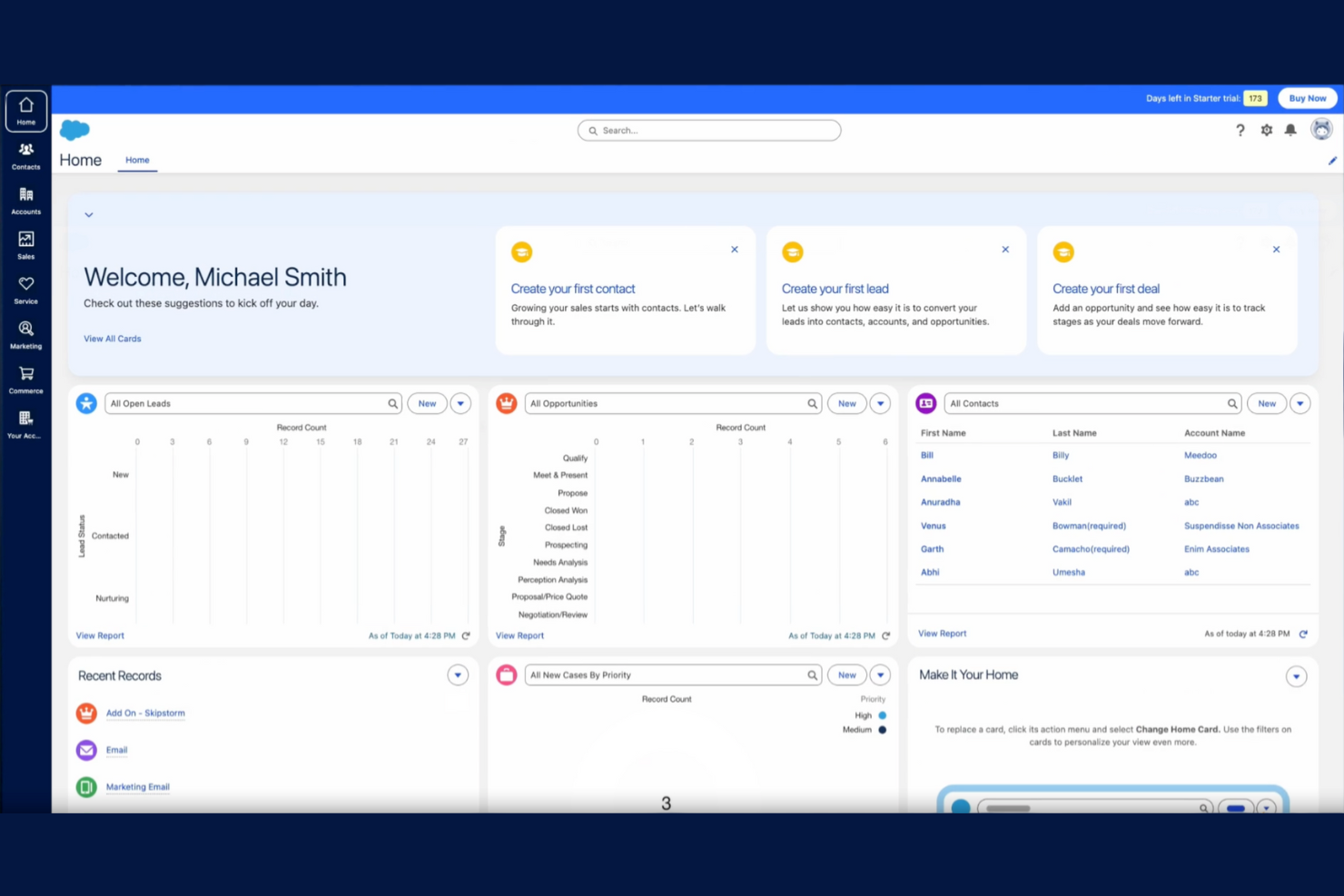
Salesforce offre alle piccole imprese l'accesso a strumenti di automazione solitamente riservati alle organizzazioni più grandi. Se il tuo team ha bisogno di gestire flussi di lavoro complessi con i clienti, automatizzare attività ripetitive o configurare processi di vendita personalizzati, Salesforce mette a disposizione una piattaforma flessibile per farlo. Le sue funzionalità di automazione avanzate aiutano le piccole aziende a gestire elenchi di clienti in crescita e cicli di vendita in evoluzione senza perdere di vista dettagli importanti.
Perché ho scelto Salesforce
Quello che distingue Salesforce come CRM per piccole imprese sono le sue avanzate capacità di automazione che vanno ben oltre il semplice monitoraggio dei clienti. Hai la possibilità di creare flussi di lavoro personalizzati per automatizzare l'assegnazione dei lead, i promemoria di follow-up e i processi di approvazione, aiutando così i team a rimanere organizzati man mano che aumenta il volume dei clienti. Apprezzo come gli strumenti di automazione di Salesforce ti permettano di impostare trigger e azioni basati sul comportamento dei clienti, così da non lasciarsi sfuggire nulla. Per le piccole aziende pronte a crescere, queste funzionalità intuitive consentono di gestire più clienti senza aggiungere lavoro manuale.
Funzionalità principali di Salesforce
Altre funzionalità che le piccole imprese possono trovare utili in Salesforce includono:
- Gestione delle opportunità: Monitora e ottimizza ogni fase della pipeline di vendita e aggiorna in tempo reale l'avanzamento delle trattative.
- Gestione di contatti e account: Conserva tutte le informazioni dettagliate sui clienti, le note e la cronologia delle comunicazioni in un unico posto.
- Dashboard personalizzabili: Crea dashboard visive per monitorare le performance di vendita, le previsioni e l'attività dei clienti.
- Accesso da app mobile: Gestisci dati dei clienti e attività di vendita ovunque ti trovi tramite l'app mobile di Salesforce.
Integrazioni Salesforce
Le integrazioni includono Outlook, Gmail, Slack, Mailchimp, HubSpot, QuickBooks, DocuSign, Zoom, LinkedIn Sales Navigator e Google Drive. Salesforce offre anche un'API per integrazioni personalizzate.
Pros and Cons
Pros:
- L'automazione avanzata dei flussi di lavoro riduce la gestione manuale dei clienti
- Campi e layout altamente personalizzabili per esigenze specifiche del business
- Gli strumenti di reportistica integrati supportano analisi dettagliate di vendite e clienti
Cons:
- La configurazione iniziale può richiedere un investimento di tempo significativo
- I costi di abbonamento sono superiori rispetto a molte alternative per piccole imprese

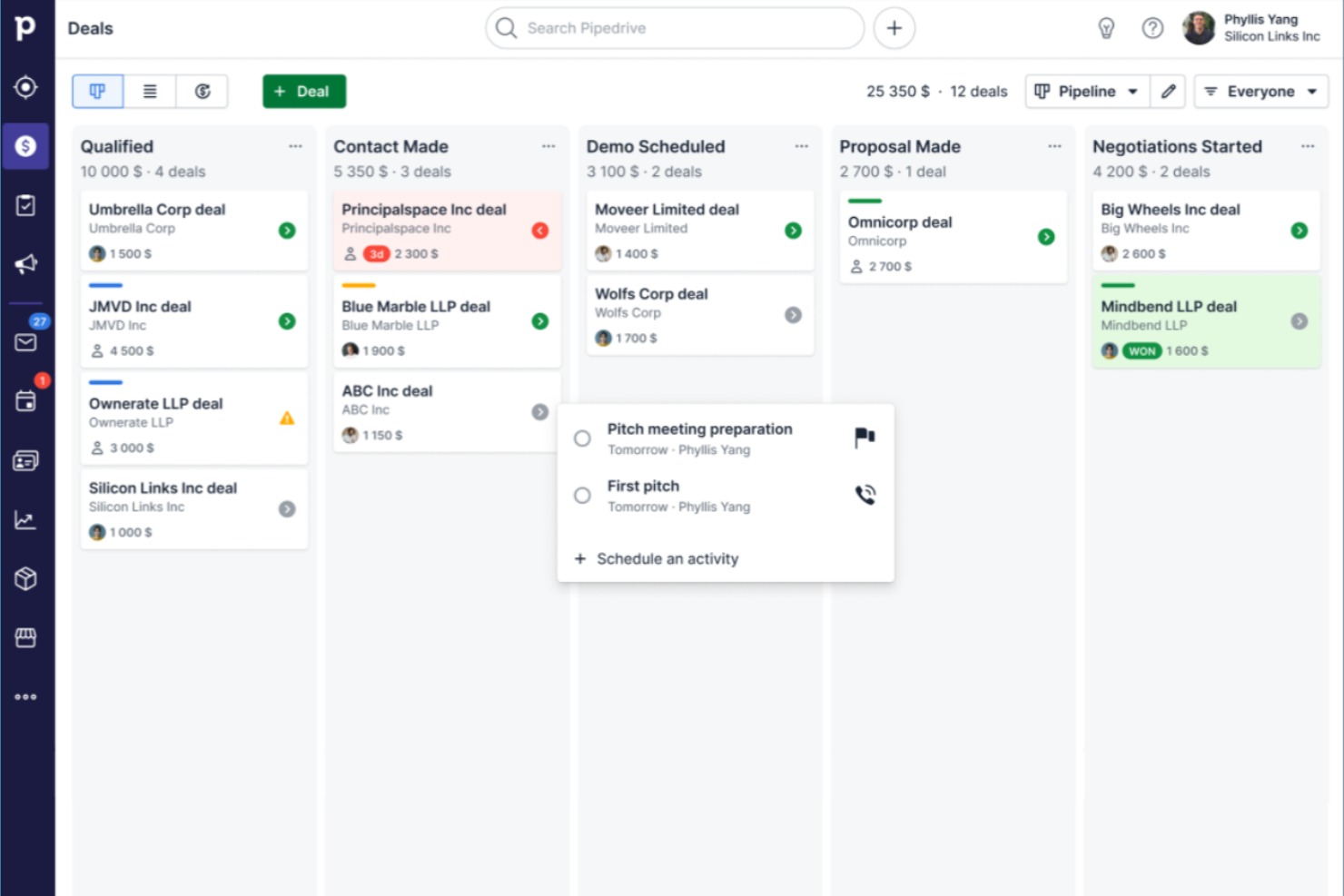
I team orientati alle vendite che desiderano un modo chiaro e visivo per gestire le trattative spesso scelgono Pipedrive. Questo CRM è progettato per le piccole imprese che hanno bisogno di monitorare lead, attività e avanzamento attraverso fasi della pipeline personalizzabili. La sua interfaccia drag-and-drop aiuta a individuare rapidamente i colli di bottiglia e a mantenere attivo il processo di vendita.
Perché ho scelto Pipedrive
Ciò che mi ha attratto di Pipedrive è il suo focus sulla gestione visiva della pipeline di vendita, particolarmente preziosa per le piccole imprese che necessitano di tenere organizzate le trattative e farle avanzare. La pipeline drag-and-drop consente di vedere a colpo d’occhio la fase di ogni trattativa e aggiornarne rapidamente l’avanzamento man mano che cambiano le situazioni. Apprezzo il fatto che sia possibile personalizzare le fasi della pipeline per adattarle al proprio processo di vendita, rendendo semplice modificare il sistema man mano che l’azienda cresce. Per i team che desiderano una panoramica chiara e operativa dell’attività di vendita, l’approccio visivo di Pipedrive è davvero distintivo.
Funzionalità principali di Pipedrive
Altre funzionalità di Pipedrive che i team delle piccole imprese potrebbero trovare utili includono:
- Integrazione email: Collega il tuo account email per inviare, ricevere e tracciare i messaggi direttamente all’interno di Pipedrive.
- Promemoria attività: Imposta promemoria per chiamate, incontri e follow-up per mantenere attive le trattative.
- Gestione di contatti e organizzazioni: Archivia e organizza in un unico posto le informazioni dettagliate su clienti e aziende.
- Report personalizzabili: Genera e personalizza report su vendite e attività per monitorare le prestazioni del team.
Integrazioni di Pipedrive
Le integrazioni includono Gmail, Outlook, Mailchimp, Trello, Slack, Zapier, Google Calendar, HubSpot, QuickBooks e Microsoft Teams. Pipedrive offre anche un'API aperta per integrazioni personalizzate.
Pros and Cons
Pros:
- Le pipeline visive rendono semplice monitorare l’avanzamento delle trattative
- La sincronizzazione dell'email consente di tracciare le conversazioni all’interno di ogni trattativa
- I promemoria delle attività aiutano i team a non dimenticare i follow-up
Cons:
- Le funzionalità di reporting sono limitate nei piani di fascia bassa
- L’automazione dei flussi di lavoro è disponibile solo nei piani più costosi
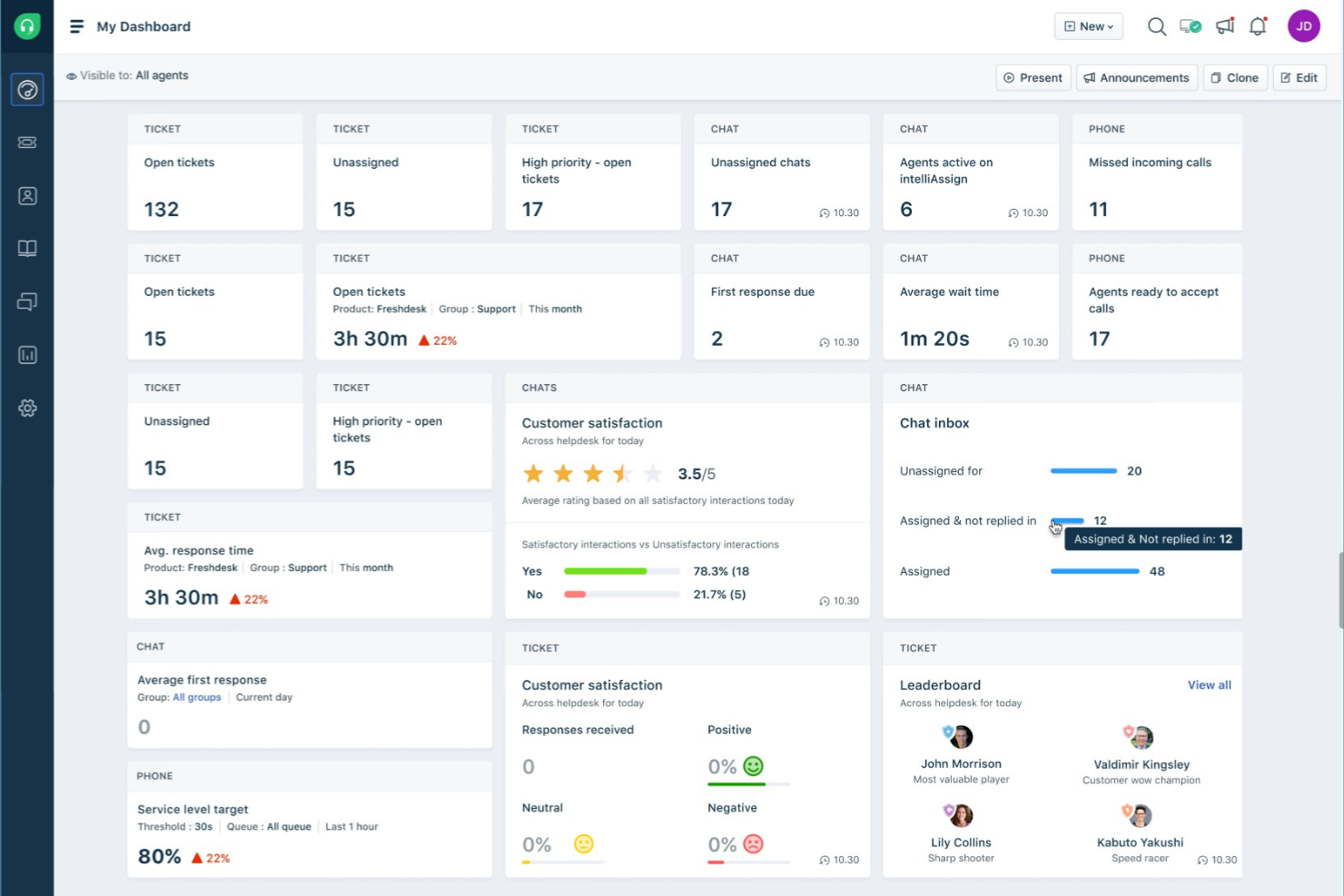
Freshworks CRM si distingue per le piccole imprese che desiderano dare priorità ai lead utilizzando approfondimenti basati sull'IA. È pensato per i team di vendita e i professionisti orientati al cliente che hanno bisogno di identificare e agire rapidamente sulle opportunità più promettenti. Con il suo sistema di lead scoring potenziato dall'intelligenza artificiale, Freshworks CRM ti aiuta a concentrare gli sforzi dove contano di più.
Perché ho scelto Freshworks CRM
Ciò che mi ha colpito di Freshworks CRM è il suo utilizzo avanzato dell'IA per aiutare le piccole aziende a concentrarsi sui lead giusti. Il lead scoring intelligente analizza automaticamente il comportamento e il coinvolgimento dei contatti, classificando i lead così che il tuo team possa dare priorità alle attività di contatto. Apprezzo anche la funzione di punteggio predittivo dei contatti, che ti aiuta a individuare le trattative più vicine alla chiusura. Per le piccole imprese che devono massimizzare le risorse di vendita limitate, queste funzionalità basate sull'IA possono davvero fare la differenza nella gestione e conversione dei lead.
Funzionalità principali di Freshworks CRM
Altre funzionalità che i team delle piccole imprese possono trovare utili in Freshworks CRM includono:
- Telefono ed email integrati: Effettua chiamate e invia email direttamente dal CRM, con registrazione automatica di tutte le comunicazioni.
- Automazione dei flussi di lavoro: Imposta regole per automatizzare attività ripetitive come solleciti e inserimento dati.
- Pipeline di vendita personalizzabili: Progetta pipeline multiple adatte a diversi processi di vendita o linee di business.
- App per dispositivi mobili: Accedi a contatti, trattative e attività ovunque tu sia tramite dispositivi iOS e Android.
Integrazioni di Freshworks CRM
Le integrazioni includono Gmail, Outlook, Mailchimp, Zapier, Slack, Google Calendar, QuickBooks, Shopify, Microsoft Teams e Zoom.
Pros and Cons
Pros:
- Il lead scoring con IA aiuta a dare priorità alle opportunità di vendita a maggior potenziale
- Strumenti di telefono ed email integrati centralizzano le comunicazioni con i clienti
- L'automazione dei flussi di lavoro riduce le attività manuali di sollecito e inserimento dati
Cons:
- Le funzionalità avanzate sono disponibili solo nei piani di livello superiore
- Le opzioni di importazione ed esportazione di dati in blocco sono meno flessibili rispetto ad alternative
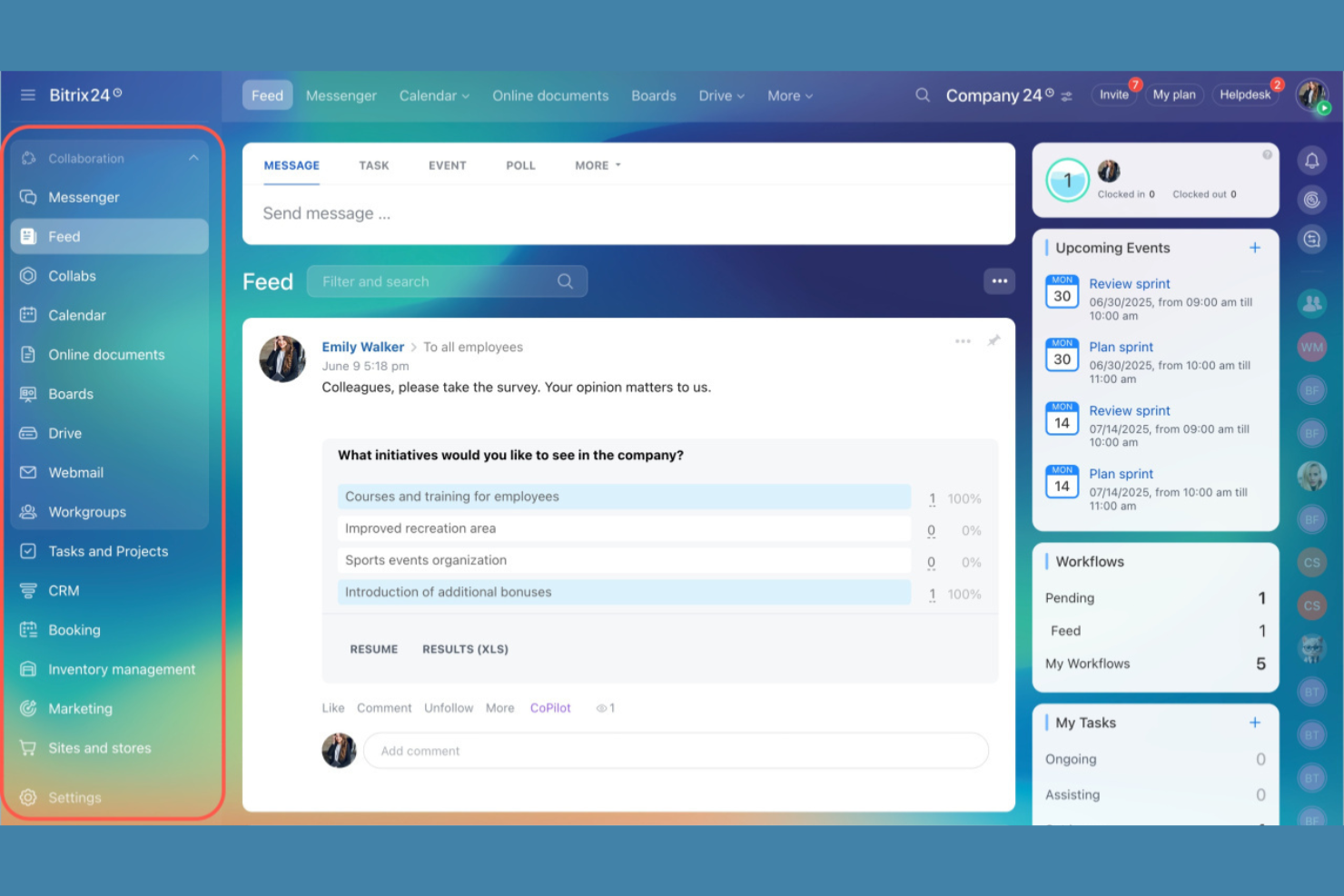
Se la tua piccola impresa ha bisogno di un software di gestione clienti con chat di gruppo integrata, condivisione documenti e spazi di lavoro per progetti, Bitrix24 merita attenzione. È progettato per team che desiderano gestire le relazioni con i clienti e la collaborazione interna da un'unica piattaforma. Fornitori di servizi, agenzie e team distribuiti possono usare Bitrix24 per mantenere info dei clienti, conversazioni e attività tutte in un unico posto.
Perché ho scelto Bitrix24
Ciò che distingue Bitrix24 per le piccole imprese è il suo focus sulla collaborazione di squadra incorporato direttamente nell’esperienza di gestione clienti. Hai chat di gruppo, calendari condivisi e gestione dei documenti insieme alle schede cliente, così il tuo team può coordinare il lavoro senza dover cambiare strumento. Apprezzo come Bitrix24 permetta di assegnare compiti, condividere file e discutere i progetti dei clienti direttamente all’interno della piattaforma. Questo approccio aiuta i piccoli team a restare organizzati e reattivi, specialmente quando il lavoro sui clienti richiede il contributo di più persone.
Caratteristiche principali di Bitrix24
Altre funzionalità di Bitrix24 che possono essere utili alle piccole imprese includono:
- Gestione del database clienti: archivia, organizza e cerca tutte le informazioni sui clienti in un database centralizzato.
- Visualizzazione del ciclo di vendita: monitora le trattative e segui l'avanzamento tramite pipeline di vendita personalizzabili.
- Generatore di moduli web: crea e incorpora moduli personalizzati per acquisire lead direttamente nel CRM.
- Strumenti di monitoraggio del tempo: registra le ore dedicate a progetti e attività dei clienti per una migliore rendicontazione.
Integrazioni Bitrix24
Le integrazioni includono Microsoft Office 365, Google Workspace, Mailchimp, Slack, Zoom, Dropbox, OneDrive, Facebook, Instagram e WhatsApp. Bitrix24 offre anche un'API aperta per integrazioni personalizzate.
Pros and Cons
Pros:
- Chat e videochiamate integrate supportano la collaborazione di squadra in tempo reale
- Strumenti di gestione attività e progetti inclusi con le funzionalità CRM
- Condivisione e archiviazione documenti disponibili sulla piattaforma
Cons:
- La configurazione dell'integrazione email può risultare complessa per i nuovi utenti
- L'interfaccia può sembrare affollata quando molte funzionalità sono abilitate contemporaneamente
Altri software di gestione dei clienti per piccole imprese
Ecco alcune opzioni aggiuntive di software di gestione dei clienti per piccole imprese che non sono state incluse nel mio elenco, ma che vale comunque la pena prendere in considerazione:
- monday CRM
Ideale per board di workflow personalizzabili
- Zoho CRM
Ideale per tracciare comunicazioni multicanale
- Rednote CRM
Ideale per l'integrazione con WhatsApp


Come valuto i software di gestione dei clienti per le piccole imprese
Divido la mia valutazione in funzionalità di base che ogni strumento deve coprire e fattori distintivi che separano una piattaforma valida da una che una piccola agenzia o un consulente utilizzerà davvero con costanza.
Funzionalità fondamentali (Requisiti essenziali per questo elenco)
Quando seleziono gli strumenti per il mio elenco, assegno a ciascuno un punteggio su una scala da 0 (non offre la funzionalità) a 5 (eccelle in quest'area) per ogni funzionalità fondamentale indicata di seguito. Calcolo quindi il punteggio totale dello strumento trasformandolo in una percentuale, utilizzando il 65% come parametro di riferimento per valutarne l'idoneità complessiva per l'elenco.
- Database dei clienti: verifico se lo strumento memorizza schede di contatto complete con note, tag, campi personalizzati e una cronologia delle interazioni precedenti collegata a progetti e fatture.
- Gestione di progetti e attività: ogni strumento dovrebbe consentire di creare attività e progetti collegati direttamente alle schede dei clienti, con assegnatari, scadenze e visualizzazioni come Kanban o Gantt.
- Comunicazione con i clienti: cerco la sincronizzazione bidirezionale delle email o la messaggistica integrata che raggruppi le conversazioni in base a clienti e progetti specifici, invece di lasciarle in una casella di posta separata.
- Portale clienti: la piattaforma dovrebbe offrire uno spazio di lavoro condiviso in cui i clienti possano visualizzare i progressi, caricare file, lasciare commenti o approvare i materiali senza dover disporre di una licenza completa.
- Fatturazione ed emissione delle fatture: valuto se la fatturazione è collegata agli account dei clienti o al tempo registrato, con supporto per gateway di pagamento come Stripe o PayPal per completare il processo di riscossione.
- Automazione e flusso di lavoro: gli strumenti ottengono valutazioni più alte quando includono un generatore di flussi di lavoro con trigger e condizioni, come l'assegnazione automatica delle attività di onboarding quando viene creata una nuova scheda cliente.
Una volta ottenuto un elenco di strumenti che soddisfano i criteri, considero ciò che distingue ogni piattaforma.
Fattori distintivi (Ciò che distingue i fornitori)
Ecco come confronto e metto in evidenza le differenze tra i vari fornitori:
Funzionalità distintive
Cerco il monitoraggio integrato del tempo che trasformi direttamente le ore registrate in fatture per i clienti. Strumenti come HoneyBook e Dubsado gestiscono questa funzione nativamente, mentre altri richiedono un'integrazione di terze parti. Anche gli strumenti per proposte e firme elettroniche sono importanti, perché consentono di passare da un contratto firmato a un progetto attivo senza uscire dalla piattaforma. Inoltre, verifico se il portale clienti supporta il branding personalizzato, così che i clienti vedano il tuo logo e i tuoi colori invece di quelli del fornitore.
Oltre le funzionalità
Verifico se i clienti e gli utenti del portale vengono conteggiati come postazioni a pagamento, poiché le agenzie che invitano decine di collaboratori esterni possono vedere i costi aumentare rapidamente con i piani basati sul numero di utenti. La trasparenza dei prezzi è importante tanto quanto il prezzo indicato. Valuto inoltre quanto rapidamente un piccolo team senza personale IT dedicato possa diventare operativo. I modelli predefiniti per le sequenze di onboarding o i flussi di lavoro per la fatturazione riducono i tempi di configurazione da settimane a giorni. Infine, le integrazioni native con QuickBooks, Xero, Stripe e Google Calendar sono quasi indispensabili per mantenere sincronizzati i dati dei clienti, i pagamenti e la pianificazione senza dover collegare gli strumenti alla meno peggio tramite soluzioni alternative.
Come scegliere un software di gestione dei clienti per una piccola impresa
È facile perdersi in lunghi elenchi di funzionalità e strutture di prezzo complesse. Per aiutarti a rimanere concentrato mentre affronti il tuo processo di selezione del software, unico e specifico per le tue esigenze, ecco un elenco di fattori da tenere a mente:
| Fattore | Cosa considerare |
|---|---|
| Scalabilità | Il software supporterà la tua attività man mano che acquisisci più clienti, utenti o servizi? Verifica i limiti degli utenti, i limiti sui dati e le possibilità di aggiornamento. |
| Integrazioni | Lo strumento si collega nativamente alle piattaforme esistenti per email, calendario, contabilità o marketing? Eventuali lacune possono creare attività manuali. |
| Personalizzazione | Puoi adattare campi, flussi di lavoro e dashboard per allinearli ai tuoi processi? I sistemi rigidi potrebbero costringerti ad adattare il tuo flusso di lavoro. |
| Semplicità d'uso | Quanto velocemente il tuo team può imparare a utilizzare e adottare lo strumento? Cerca una navigazione chiara, esigenze formative minime e un'interfaccia intuitiva. |
| Implementazione e inserimento iniziale | Quali risorse e quanto tempo sono necessari per iniziare a lavorare? Considera la migrazione dei dati, la formazione e il supporto del fornitore durante la configurazione. |
| Costo | I livelli di prezzo sono trasparenti e prevedibili man mano che il team cresce? Fai attenzione ai costi aggiuntivi, al numero minimo di utenti o ai contratti annuali obbligatori. |
| Misure di sicurezza | Il software offre crittografia, autorizzazioni degli utenti e conformità agli standard pertinenti? Informati sulle politiche relative alla residenza dei dati e ai backup. |
| Disponibilità del supporto | Quali canali di supporto sono disponibili e in quali orari? Se il tuo team lavora al di fuori del normale orario d'ufficio, il supporto 24/7 potrebbe essere fondamentale. |
Che cos'è il software di gestione dei clienti per le piccole imprese?
Il software di gestione dei clienti è uno strumento digitale che ti aiuta a organizzare, monitorare e gestire tutte le interazioni e le informazioni relative ai tuoi clienti. Centralizza i dati di contatto, la cronologia delle comunicazioni, le attività e le attività di vendita in un unico posto, così non devi destreggiarti tra fogli di calcolo, conversazioni nella posta in arrivo e post-it per ricostruire il quadro completo.
Per le piccole imprese, questi strumenti fanno molto più che archiviare dati. Creano una struttura per le attività di ricontatto, il monitoraggio delle opportunità e l'erogazione di un servizio coerente, anche con un team ridotto. Invece di affidarti alla memoria o a processi informali, ottieni una visibilità condivisa sullo stato dei clienti, sulle responsabilità e sui passaggi successivi. Il sistema giusto favorisce relazioni più solide, un seguito più affidabile e processi scalabili, così la crescita non significa automaticamente caos.
Funzionalità del software di gestione dei clienti per le piccole imprese
Quando scegli un software di gestione dei clienti per una piccola impresa, presta attenzione alle seguenti funzionalità principali:
- Gestione dei contatti: Archivia, organizza e aggiorna i dati di contatto dei clienti, le note e i documenti correlati in un database centralizzato.
- Monitoraggio delle interazioni: Registra chiamate, email, riunioni e altre comunicazioni per mantenere una cronologia completa delle interazioni con i clienti.
- Gestione delle attività: Assegna, pianifica e monitora le attività o i ricontatti relativi a ciascun cliente per garantire interventi tempestivi.
- Gestione del flusso di vendita: Visualizza e gestisci le opportunità di vendita o le fasi dei progetti, monitorando i progressi dal contatto iniziale alla conclusione.
- Archiviazione dei documenti: Carica, condividi e gestisci contratti, proposte e altri file relativi ai clienti in modo sicuro all'interno della piattaforma.
- Integrazione del calendario: Sincronizza appuntamenti, scadenze e promemoria con il calendario esistente per evitare riunioni o ricontatti mancati.
- Report e analisi: Genera report sull'attività dei clienti, sulle prestazioni di vendita e sulla produttività del team per orientare le decisioni aziendali; gli strumenti di gestione dei clienti basati sull'intelligenza artificiale aggiungono informazioni predittive sulle esigenze e sul comportamento dei clienti.
- Controlli degli accessi basati sui ruoli: Imposta le autorizzazioni in modo che i membri del team possano accedere solo ai dati dei clienti e alle funzionalità pertinenti ai loro ruoli.
- Campi e tag personalizzati: Aggiungi campi dati o tag personalizzati per adattare il sistema alle tue specifiche esigenze di monitoraggio dei clienti.
- Accesso da dispositivi mobili: Utilizza un'app mobile o un'interfaccia web reattiva per gestire le informazioni sui clienti e le attività ovunque ti trovi.
Vantaggi del software di gestione dei clienti per una piccola impresa
L'implementazione di un software di gestione dei clienti per una piccola impresa offre numerosi vantaggi al tuo team e alla tua attività. Eccone alcuni di cui potrai beneficiare:
- Informazioni centralizzate sui clienti: conserva tutti i dati di contatto, la cronologia delle comunicazioni e i documenti in un'unica posizione accessibile a tutto il team.
- Ricontatti più efficaci: usa la gestione delle attività e i promemoria per assicurarti che nessuna richiesta o opportunità del cliente venga trascurata.
- Relazioni più solide con i clienti: monitora ogni interazione e personalizza le comunicazioni sulla base di una cronologia completa del cliente.
- Maggiore responsabilizzazione del team: assegna le attività, monitora i progressi e imposta autorizzazioni basate sui ruoli per chiarire le responsabilità e proteggere i dati sensibili.
- Migliore processo decisionale: accedi a report e analisi in tempo reale per comprendere l'attività dei clienti, le prestazioni di vendita e il carico di lavoro del team.
- Inserimento più rapido: sfrutta modelli, tour del prodotto e strumenti di importazione dei dati per consentire ai nuovi membri del team di diventare rapidamente operativi.
- Mobilità avanzata: gestisci le informazioni sui clienti e le attività da qualsiasi luogo utilizzando l'accesso da dispositivi mobili o piattaforme basate sul cloud.
Costi e prezzi dei software di gestione dei clienti per le piccole imprese
La scelta di un software di gestione dei clienti per una piccola impresa richiede la comprensione dei vari modelli di prezzo e dei piani disponibili. I costi variano in base alle funzionalità, alle dimensioni del team, ai componenti aggiuntivi e ad altri fattori. La tabella seguente riassume i piani più comuni, i relativi prezzi medi e le funzionalità tipicamente incluse nelle soluzioni software di gestione dei clienti per piccole imprese:
Tabella comparativa dei piani dei software di gestione dei clienti per le SMB
| Tipo di piano | Prezzo medio | Funzionalità comuni |
|---|---|---|
| Piano gratuito | $0 | Gestione di base dei contatti, monitoraggio limitato delle attività, reportistica di base e supporto via e-mail. |
| Piano personale | $5-$25/user/month | Gestione dei contatti e delle trattative, integrazione del calendario, automazione semplice e opzioni di personalizzazione limitate. |
| Piano aziendale | $25-$60/user/month | Reportistica avanzata, automazione dei flussi di lavoro, archiviazione dei documenti, integrazioni con altri strumenti e accesso da dispositivi mobili. |
| Piano per grandi aziende | $60-$120/user/month | Ruoli e autorizzazioni personalizzati, sicurezza avanzata, supporto prioritario, accesso API e assistenza per l'inserimento. |
Domande frequenti sui software di gestione dei clienti per le SMB
Ecco alcune risposte alle domande comuni sui software di gestione dei clienti per le piccole imprese:
Come faccio a sapere se la mia piccola impresa ha bisogno di un software di gestione dei clienti?
Se fai fatica a tenere traccia dei dati dei clienti, dei ricontatti o della cronologia delle comunicazioni utilizzando solo fogli di calcolo o e-mail, è il momento di prendere in considerazione un software di gestione dei clienti. Questi strumenti ti aiutano a organizzare le informazioni, automatizzare i promemoria e assicurarti che nulla venga trascurato man mano che la tua base clienti cresce.
Il software di gestione dei clienti può integrarsi con gli strumenti che già utilizzo?
Sì, la maggior parte dei software di gestione dei clienti per le piccole imprese offre integrazioni con le piattaforme più diffuse per e-mail, calendari, contabilità e marketing. Prima di scegliere una soluzione, verifica che si colleghi agli strumenti già utilizzati dal tuo team, così da evitare l’inserimento manuale dei dati e interruzioni nei flussi di lavoro.
Qual è la differenza tra il software di gestione dei clienti e il CRM?
Il software di gestione dei clienti si concentra sull’organizzazione delle informazioni sui clienti, sul monitoraggio delle interazioni e sulla gestione delle attività. I sistemi CRM (gestione delle relazioni con i clienti) spesso includono queste funzionalità, ma possono offrire anche strumenti avanzati per vendite, marketing e analisi, progettati per organizzazioni più grandi o complesse.
Il software di gestione dei clienti è sicuro per archiviare dati sensibili dei clienti?
Sì, i software di gestione dei clienti affidabili utilizzano la crittografia, i controlli di accesso e aggiornamenti regolari della sicurezza per proteggere i tuoi dati. Esamina sempre le politiche di sicurezza e le certificazioni di conformità del fornitore per assicurarti che soddisfino i requisiti di privacy e normativi della tua azienda.
Quanto tempo occorre per implementare un software di gestione dei clienti?
I tempi di implementazione variano in base allo strumento e alle dimensioni del team. Molte piccole imprese possono iniziare nel giro di pochi giorni utilizzando modelli, tour del prodotto e strumenti di importazione dei dati. Le configurazioni più complesse, con flussi di lavoro o integrazioni personalizzati, possono richiedere alcune settimane per essere configurate completamente e consentire al team di completare l’inserimento.