

I 10 migliori software per la generazione di documenti recensiti nel 2026

Elenco dei migliori software per la generazione di documenti


Gestire progetti digitali spesso significa occuparsi di pratiche burocratiche e attività ripetitive. Tuttavia, creare, modificare e organizzare documenti può richiedere molto del tuo tempo prezioso. È qui che il software per la generazione di documenti diventa essenziale, offrendo un modo per automatizzare e semplificare queste attività, così da poter utilizzare meglio il tuo tempo.
Nella mia esperienza di test e valutazione di diversi strumenti, il software giusto può migliorare significativamente la produttività del tuo team. Pertanto, questo articolo offre uno sguardo imparziale alle opzioni migliori, mettendone in evidenza le funzionalità, la facilità d'uso e gli elementi distintivi di ciascuna.
L'obiettivo è aiutarti a trovare la soluzione più adatta alle tue esigenze, così da poterti concentrare sulla realizzazione di progetti di successo.
Perché fidarsi dei nostri consigli sui software
Il nostro team testa e recensisce software dal 2012. In quanto project manager noi stessi, sappiamo quanto sia difficile — e importante — scegliere il software giusto.
Per questa guida, abbiamo valutato gli strumenti attraverso test pratici e ricerche indipendenti, assegnando un punteggio agli strumenti in base ai nostri criteri di selezione. Ci basiamo inoltre sulle competenze di leader di pensiero del settore e di professionisti attivi nella gestione dei progetti.
Le nostre recensioni riflettono il nostro giudizio editoriale umano, non un discorso di vendita.
Revisori esperti:
Tabella comparativa dei software per la generazione di documenti
Questa tabella comparativa riassume i dettagli dei prezzi delle mie migliori selezioni di software per la generazione di documenti:
| Tool | Best For | Trial Info | Price | ||
|---|---|---|---|---|---|
| 1 | Ideale per automatizzare la creazione di guide | Prova gratuita di 10 giorni + demo gratuita disponibile | Da $40/mese (fatturato annualmente) | Website | |
| 2 | Ideale per moduli web dinamici nella raccolta dati | Demo gratuita disponibile | Da $399/mese (fatturato annualmente) | Website | |
| 3 | Ideale per l'intelligenza documentale potenziata dall'IA | Demo gratuita disponibile | Prezzo su richiesta | Website | |
| 4 | Ideale per le firme elettroniche | Piano gratuito disponibile | Da $10/utente/mese | Website | |
| 5 | Ideale per il supporto multilingue | Prova gratuita disponibile | Da $49/utente/mese | Website | |
| 6 | Ideale per acquisizione tramite moduli e approvazioni integrate | Piano gratuito disponibile | Da $14,99/mese (fatturazione annuale) | Website | |
| 7 | Ideale per la collaborazione di squadra | Prova gratuita di 7 giorni + piano gratuito disponibile | A partire da $5.42/utente/mese | Website | |
| 8 | Ideale per ridurre i tempi di preparazione dei documenti | Demo gratuita disponibile | Prezzo su richiesta | Website | |
| 9 | Ideale per i team di vendita | Piano gratuito disponibile + prova gratuita di 14 giorni disponibile | Da $19/utente/mese (con fatturazione annuale) | Website | |
| 10 | Ideale per moduli personalizzati | Demo gratuita disponibile | Da $83/mese (fatturato annualmente) | Website |
Recensioni dei migliori software per la generazione di documenti
Di seguito trovi i miei riepiloghi dettagliati dei migliori software per la generazione di documenti inclusi nella mia selezione. Le mie recensioni offrono uno sguardo approfondito alle funzionalità principali, ai pro e contro, alle integrazioni e ai casi d’uso ideali di ogni strumento, per aiutarti a trovare quello più adatto a te.


TruPeer si rivolge alle aziende che desiderano semplificare e migliorare i processi di generazione di documenti e creazione di video. Grazie alle sue capacità basate sull’IA, trasforma le registrazioni dello schermo in guide e video professionali, risultando una soluzione interessante per settori orientati alla formazione, al marketing e al successo del cliente. Automatizzando compiti complessi come il miglioramento degli script e la traduzione multilingue, TruPeer affronta la sfida di creare contenuti coerenti e di alta qualità in tempi rapidi.
Perché ho scelto TruPeer
Ho scelto TruPeer per la sua capacità unica di automatizzare la creazione di guide e video passo-passo a partire da semplici registrazioni dello schermo. Questa funzione, unita ad avatar AI personalizzabili e voci fuori campo di qualità professionale, consente al tuo team di produrre contenuti professionali senza necessità di competenze avanzate di montaggio. TruPeer supporta inoltre la traduzione in oltre 65 lingue, una risorsa preziosa per team globali che vogliono mantenere coerenza tra diversi mercati. La knowledge base centralizzata con ricerca video tramite IA garantisce che tutti i tuoi contenuti siano facili da trovare e da consultare.
Funzionalità principali di TruPeer
Oltre alle sue eccellenti capacità di creazione di guide, TruPeer offre anche diverse altre funzionalità:
- Effetti zoom automatizzati: Questa funzione migliora automaticamente le registrazioni dello schermo concentrandosi sulle aree chiave, assicurando che il tuo pubblico non perda dettagli importanti.
- Opzioni di personalizzazione del brand: Personalizza i tuoi documenti e video con i colori e i loghi del tuo marchio, mantenendo un’immagine coerente in tutti i contenuti.
- Analytics sull’engagement: Monitora come il tuo pubblico interagisce con i contenuti, fornendo informazioni utili per affinare strategie di documentazione e video.
- Sicurezza e conformità: Con la conformità agli standard ISO 27001 e SOC2, TruPeer assicura che i tuoi dati siano protetti, una caratteristica fondamentale per le aziende che gestiscono informazioni sensibili.
Integrazioni di TruPeer
Le integrazioni includono Monday.com, Make, Medium, Google Analytics, Repurpose.ai, Bigtincan, Cal.com, SurveyMonkey e Pipedrive.
Pros and Cons
Pros:
- Documentazione passo-passo automatizzata
- Supporta la creazione di contenuti multilingue
- Solidi controlli di branding e formattazione
Cons:
- Modifica manuale avanzata limitata
- Workflow di registrazione dipendente da Chrome

altaFlow
Ideale per moduli web dinamici nella raccolta dati

altaFlow offre una piattaforma di generazione documentale progettata per team che necessitano di automatizzare flussi di lavoro complessi e integrare dati da più fonti. È particolarmente adatta per organizzazioni in settori regolamentati o che gestiscono grandi volumi di moduli e contratti. Grazie alla sua attenzione all'automazione e all'integrazione, altaFlow aiuta le aziende a ridurre l'inserimento manuale dei dati e a semplificare i processi documentali.
Per chi è ideale altaFlow?
altaFlow è un'ottima scelta per organizzazioni di medie e grandi dimensioni in settori regolamentati che devono automatizzare i flussi di lavoro documentali e integrare dati tra diversi sistemi aziendali.
Perché ho scelto altaFlow
Per la generazione documentale, ho scelto altaFlow per i suoi avanzati moduli web dinamici che rendono la raccolta dei dati flessibile e personalizzabile. La piattaforma consente di creare moduli che si adattano agli input degli utenti, caratteristica particolarmente utile per organizzazioni che gestiscono requisiti di dati complessi o variabili. Apprezzo come i moduli di altaFlow possano attivare la creazione automatizzata di documenti in base ai dati raccolti, riducendo passaggi manuali ed errori. Questo focus sulla raccolta dinamica dei dati la distingue per i team che devono generare documenti accurati e personalizzati provenienti da fonti diverse.
Caratteristiche principali di altaFlow
Altre funzionalità di altaFlow che supportano la generazione documentale includono:
- Instradamento automatico dei flussi di lavoro: Instrada documenti e attività in modo automatico in base a regole predefinite e azioni degli utenti.
- Gestione dei modelli: Conserva, modifica e riutilizza modelli di documenti per mantenere la coerenza in tutta l'organizzazione.
- Integrazione firma elettronica: Raccogli firme elettroniche legalmente vincolanti direttamente all'interno dei documenti generati.
- Tracciabilità delle revisioni: Tieni traccia di ogni modifica e azione compiuta sui documenti per conformità e trasparenza.
Integrazioni di altaFlow
Le integrazioni includono Salesforce, NetSuite, SharePoint e HubSpot.
Pros and Cons
Pros:
- Editor di modelli drag-and-drop per documenti
- Logica condizionale per flussi documentali dinamici
- Tracciabilità e controllo versione in tempo reale
Cons:
- L'accesso API richiede accordi personalizzati
- La tariffazione a crediti può limitare l'uso ad alto volume
Doxis
Ideale per l'intelligenza documentale potenziata dall'IA
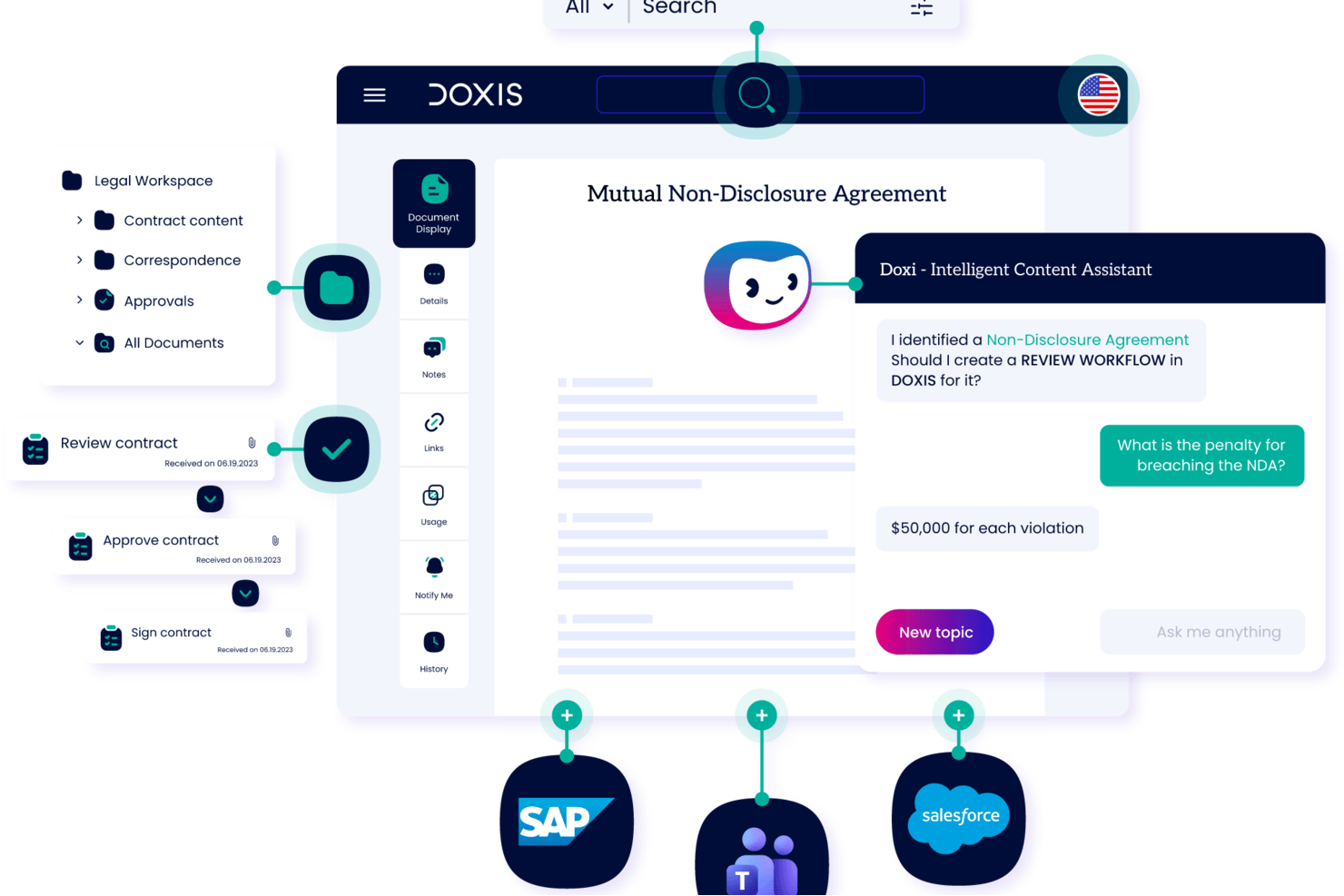
Doxis è una piattaforma di servizi di gestione dei contenuti aziendali che combina la generazione di documenti, l'elaborazione intelligente dei documenti, l'estrazione dei dati tramite intelligenza artificiale e l'automazione dei workflow nelle piattaforme SAP, Salesforce e Microsoft.
Per chi è più adatto Doxis?
Doxis è progettato per grandi aziende in settori regolamentati come servizi finanziari, assicurazioni e manifatturiero che necessitano di intelligenza documentale su larga scala.
Perché ho scelto Doxis
Doxis merita un posto tra i migliori nella mia selezione perché la sua intelligenza documentale basata su IA va ben oltre la semplice generazione standard. Mi piace in particolare Ask Doxis, un assistente IA che consente agli utenti di interrogare direttamente il contenuto dei documenti, e Doxis AI.dp, che classifica i documenti in arrivo ed estrae dati strutturati prima di inserirli nei modelli di output. Il risultato è un flusso di lavoro di generazione in cui acquisizione dei dati ed emissione dei documenti sono gestite come un unico processo connesso.
Caratteristiche principali di Doxis
- Libreria di modelli: Conserva e riutilizza modelli standardizzati per documenti aziendali ricorrenti e deliverable di processo.
- Controllo delle versioni: Gestisci le versioni dei documenti e mantieni tracce di audit per ogni modello e file generato.
- Controlli di accesso basati sui ruoli: Imposta permessi granulari per la visualizzazione, modifica e approvazione dei contenuti tra i team.
- Integrazione con SAP e Microsoft: Si collega direttamente alle piattaforme SAP e Microsoft per un accesso ai dati e un'archiviazione documentale senza interruzioni.
Integrazioni Doxis
Doxis offre integrazioni native con SAP, Salesforce, Microsoft 365, Sage, ADP, Oracle, AutoCad, Solid Edge e Microsoft Dynamics 365, e fornisce una API per integrazioni personalizzate.
Pros and Cons
Pros:
- Classifica e smista i documenti senza intervento manuale
- Supporta generazione massiva di documenti in batch
- Controlli di accesso granulari per la governance dei documenti
Cons:
- Configurazione iniziale complessa per l'impostazione dei modelli
- Curva di apprendimento più ripida per team leggeri
Docusign
Ideale per le firme elettroniche

DocuSign è una piattaforma di firma elettronica utilizzata da aziende nei settori immobiliare, legale, finanziario e in altri ambiti. Consente la firma sicura e la gestione semplice di accordi e contratti, aiutando i team a gestire le transazioni documentali in modo più efficiente.
Perché ho scelto DocuSign: DocuSign rende semplice per te e il tuo team gestire le firme elettroniche. Puoi monitorare lo stato dei documenti in tempo reale, così sai quando viene firmato qualcosa. Funziona con molti tipi di file, offrendoti flessibilità. La sicurezza integrata aiuta a mantenere le tue informazioni protette.
Funzionalità distintive e integrazioni
Funzionalità includono il monitoraggio dello stato in tempo reale, che ti fornisce aggiornamenti sull'avanzamento dei documenti. Supporta diversi formati di documento, offrendo flessibilità su cosa puoi caricare e gestire. Funzionalità di sicurezza come crittografia e registri di controllo garantiscono che i tuoi documenti siano protetti durante l'intero processo.
Integrazioni includono Salesforce, Microsoft Office 365, Google Workspace, Dropbox, Box, SAP, Oracle, Slack, Zoom e NetSuite.
Pros and Cons
Pros:
- Potenti funzioni di sicurezza
- Monitoraggio dei documenti in tempo reale
- Ampio supporto ai formati
Cons:
- Funzionalità limitate offline
- Configurazione iniziale complessa
Docmosis
Ideale per il supporto multilingue
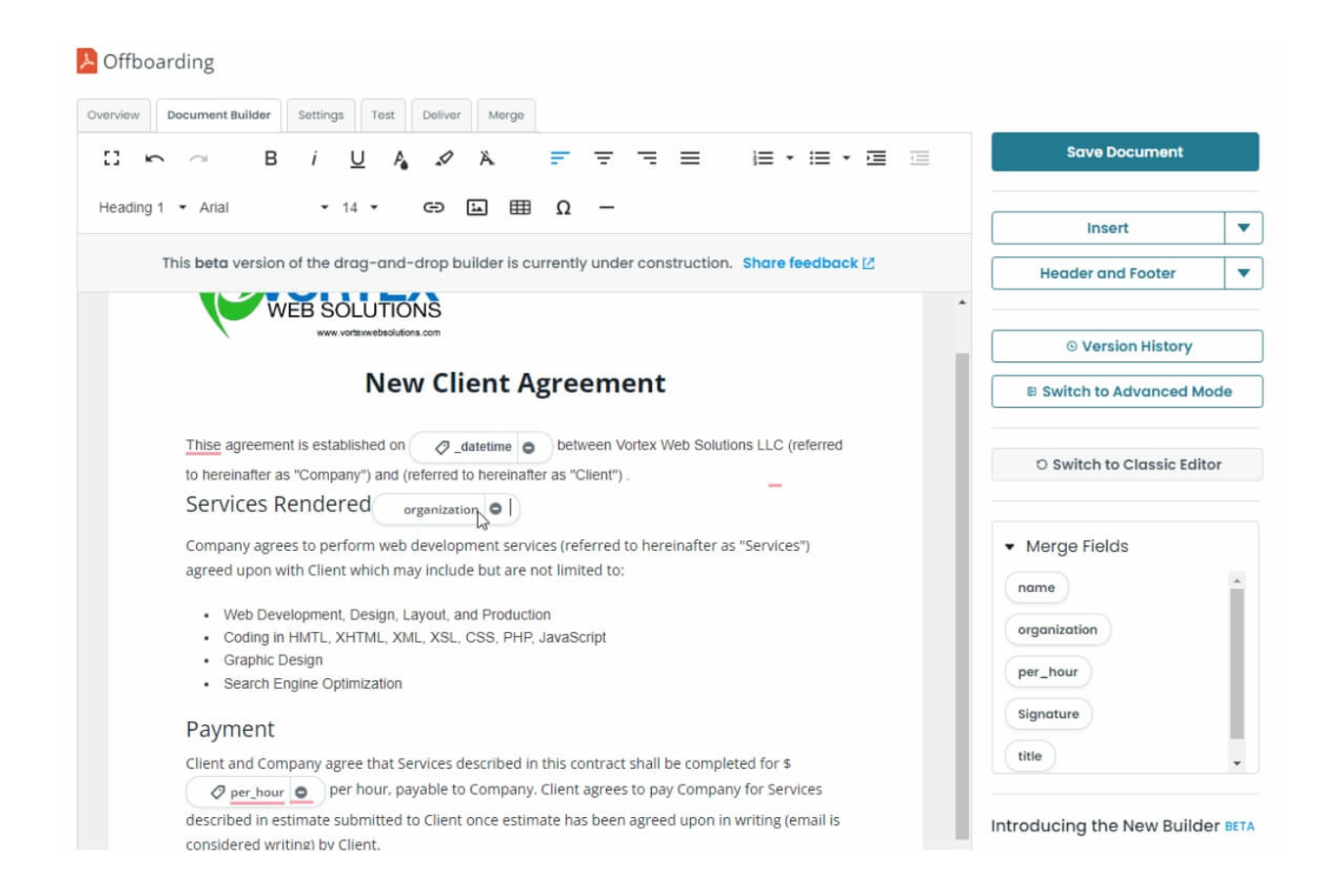
Docmosis è uno strumento di generazione di documenti progettato per sviluppatori e team che necessitano di creare documenti in più lingue. Funziona bene in settori come sanità, legale e finanza, e puoi integrarlo facilmente nelle tue applicazioni esistenti.
Perché ho scelto Docmosis: Docmosis permette al tuo team di creare documenti in lingue diverse senza passaggi aggiuntivi. Il suo sistema di modelli ti aiuta a mantenere la coerenza. Puoi collegarlo alla tua configurazione attuale usando un’API flessibile. Gestisce anche formattazioni complesse, così i tuoi documenti risultano puliti e precisi.
Funzionalità principali e integrazioni
Funzionalità comprendono un editor di modelli che semplifica la creazione di documenti con un’interfaccia WYSIWYG. La logica condizionale ti consente di creare documenti dinamici che si adattano all’input dell’utente. La funzione di elaborazione in batch ti aiuta a generare grandi volumi di documenti in modo efficiente.
Integrazioni includono Salesforce, Microsoft Dynamics, Google Workspace, Dropbox, Box, Slack, SAP, Oracle, QuickBooks e HubSpot.
Pros and Cons
Pros:
- Supporta più lingue
- Gestione dei modelli semplice
- Gestisce formattazioni complesse
Cons:
- Complessità nell'impostazione iniziale
- Richiede competenze tecniche

Ideale per acquisizione tramite moduli e approvazioni integrate

Adobe Acrobat può supportare i flussi di lavoro per la generazione di documenti, ma principalmente come livello finale di formattazione, raccolta di input e distribuzione, piuttosto che come sistema per la generazione dinamica di documenti da dati strutturati. È particolarmente adatto per creare modelli controllati, raccogliere dati tramite moduli e produrre output PDF coerenti con garanzie di sicurezza e conformità. Per i team che si affidano a documenti standardizzati e cicli di revisione umana, aiuta a mantenere coerenza e tracciabilità.
Per chi è più indicato Adobe Acrobat?
Adobe Acrobat è ideale per team IT, legali e operativi in organizzazioni di medie e grandi dimensioni che necessitano di flussi di lavoro documentali sicuri e collaborativi. Funziona al meglio in ambienti in cui i documenti vengono assemblati da modelli e revisionati da persone, piuttosto che generati automaticamente da database o sistemi aziendali.
Perché ho scelto Adobe Acrobat
Si distingue per i team che devono gestire flussi di lavoro documentali su file condivisi, specialmente quando revisione, annotazione e distribuzione controllata fanno parte del processo. Le sue integrazioni con l’archiviazione cloud e i sistemi di contenuto facilitano l’organizzazione e il recupero dei documenti, mentre i commenti e i tag all’interno dei documenti aiutano a catturare il contesto durante le revisioni. Questo lo rende più efficace come livello di coordinamento per i flussi di lavoro documentali che come sistema per la generazione programmata di documenti.
Funzionalità principali di Adobe Acrobat
- Creazione di moduli PDF: Crea moduli interattivi con campi compilabili, menu a discesa e firme digitali.
- Elaborazione documenti in batch: Automatizza attività ripetitive come la conversione, la combinazione o l’aggiunta di watermark a più file contemporaneamente.
- Strumenti di redazione: Rimuove in modo permanente le informazioni sensibili dai documenti prima della condivisione.
- Controllo delle versioni: Traccia le revisioni dei documenti e conserva l’accesso alle versioni precedenti all’interno di spazi di lavoro condivisi.
Integrazioni Adobe Acrobat
Adobe Acrobat offre integrazioni native con Microsoft 365, SharePoint, Google Drive, Dropbox, Box e OneDrive. È disponibile un’API per integrazioni personalizzate.
Pros and Cons
Pros:
- Offre strumenti avanzati di modifica PDF e di redazione
- Fornisce tracciabilità delle attività per l’audit dei documenti
- Consente la raccolta sicura di firme elettroniche all’interno dei documenti
Cons:
- Non è progettato per la generazione di documenti ad alto volume e basata sui dati
- La generazione tramite API richiede configurazioni aggiuntive e non è centrale nel prodotto

Ideale per la collaborazione di squadra
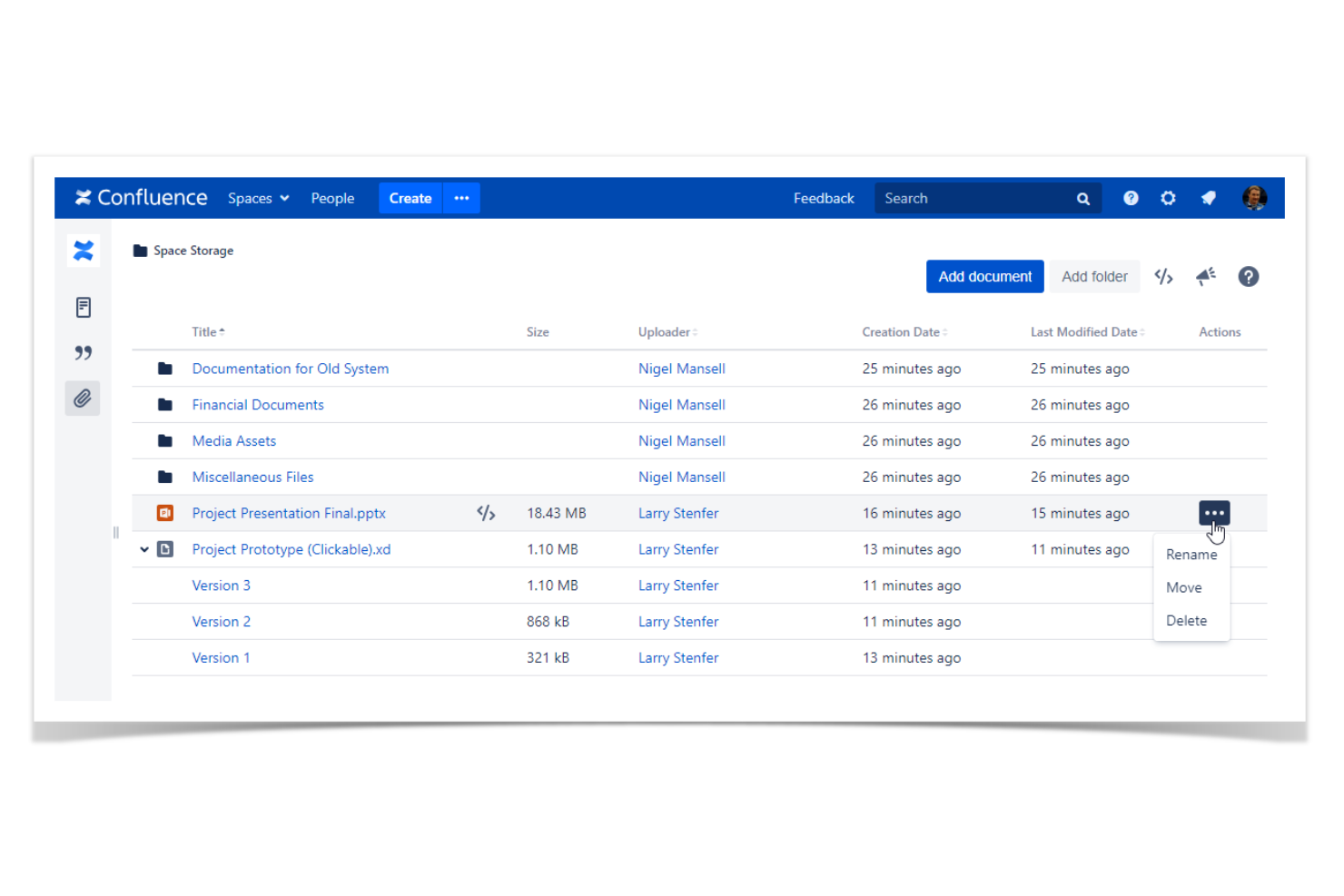
Confluence è una piattaforma per la collaborazione e la gestione della conoscenza progettata per i team che necessitano di uno spazio centralizzato per la documentazione e la comunicazione dei progetti. Aiuta le aziende a organizzare, condividere e collaborare sui contenuti, rendendolo uno strumento prezioso per la gestione dei progetti e il coordinamento dei team.
Perché ho scelto Confluence: Confluence aiuta il tuo team a lavorare insieme con spazi condivisi e modifica in tempo reale. Il versionamento delle pagine traccia le modifiche, così tutti rimangono aggiornati. Puoi usare modelli per creare e organizzare i contenuti, mantenendo coerenza. Si integra inoltre con altri strumenti Atlassian per supportare il lavoro sui progetti.
Caratteristiche principali & Integrazioni
Funzionalità includono un editor di contenuti avanzato che consente di creare e formattare facilmente i documenti. Il versionamento delle pagine tiene traccia delle modifiche e mantiene la cronologia per consultazioni future. La modifica collaborativa permette a più membri del team di lavorare sullo stesso documento contemporaneamente, migliorando la produttività.
Integrazioni includono Jira, Trello, Slack, Microsoft Teams, Google Drive, Dropbox, Salesforce, Zoom, GitHub e Microsoft Office 365.
Pros and Cons
Pros:
- Solido controllo delle versioni
- Capacità di modifica collaborativa
- Ampia libreria di modelli
Cons:
- Curva di apprendimento ripida
- Funzionalità offline limitate

Ideale per ridurre i tempi di preparazione dei documenti
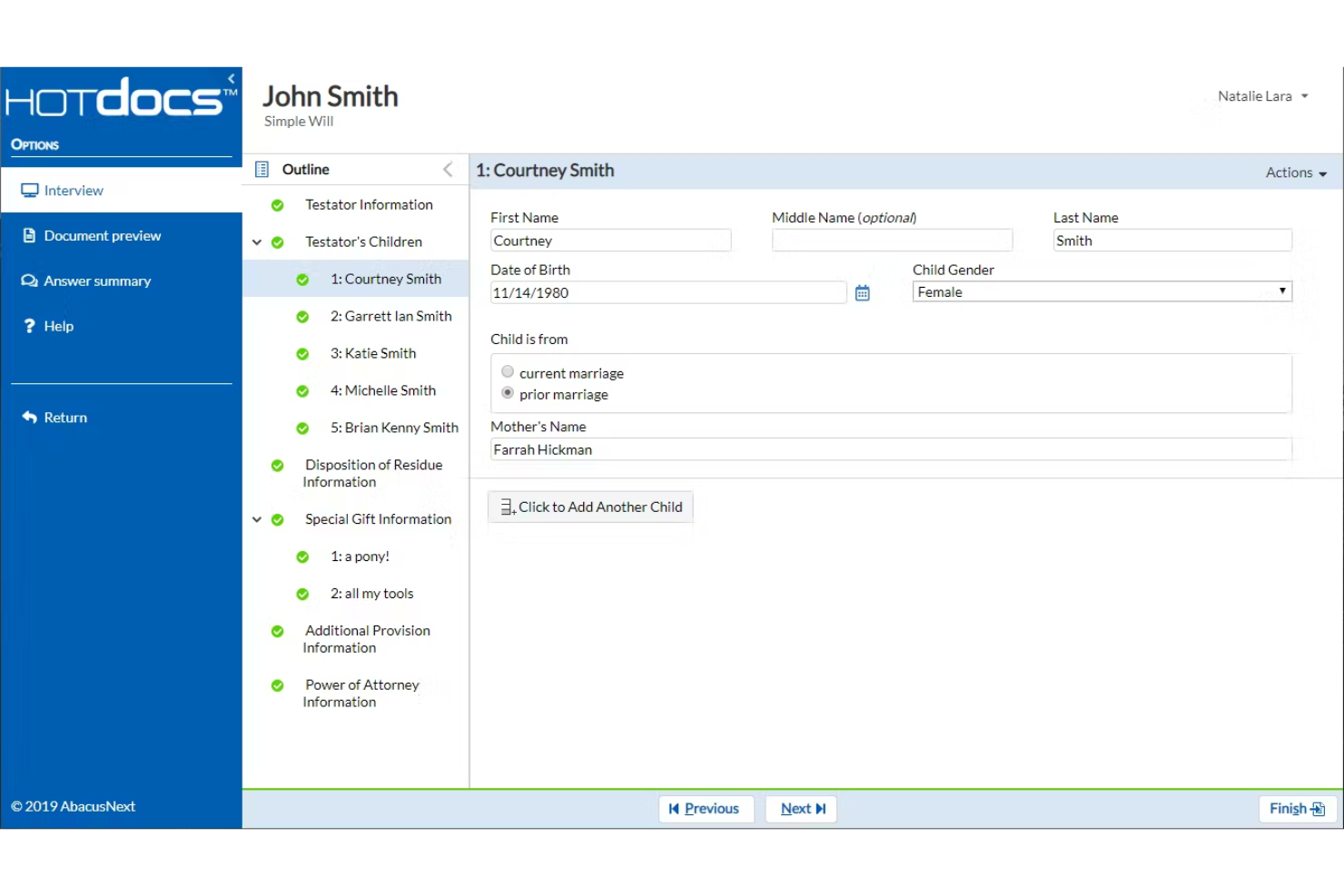
Mitratech HotDocs è una piattaforma di generazione documentale progettata per automatizzare la creazione di documenti utilizzati frequentemente. Aiuta i team legali, di conformità e aziendali a risparmiare tempo trasformando i documenti standard in modelli intelligenti, mantenendo al contempo accuratezza e conformità normativa. Questo lo rende particolarmente utile per le organizzazioni che gestiscono flussi di lavoro complessi e grandi volumi di contenuti legali.
Perché ho scelto Mitratech HotDocs: Ho scelto Mitratech HotDocs perché può ridurre significativamente il tempo necessario per preparare i documenti legali migliorando l’accuratezza. Convertendo i moduli ripetitivi in modelli intelligenti, minimizza l’inserimento manuale dei dati e il rischio di errore umano. Mi piace anche il fatto che centralizzi le versioni dei documenti, facilitando il mantenimento della conformità e assicurando che il team lavori sempre con il materiale più aggiornato e approvato.
Funzionalità principali e integrazioni
Funzionalità includono modelli intelligenti che si adattano a diversi casi d’uso, controllo centralizzato delle versioni per una migliore conformità e strumenti integrati che riducono gli errori durante l’assemblaggio dei documenti. HotDocs offre anche dashboard dinamiche e gestione sicura dei modelli per mantenere i flussi di lavoro organizzati.
Integrazioni includono iManage, Mitratech TeamConnect, Managed Bill Review, AdvanceLaw, CaseCloud, LegalHold, InvoiceIQ, TAP per l’automazione dei flussi di lavoro, Alyne, Prevalent, Mitratech Mineral e Mitratech AssureHire.
Pros and Cons
Pros:
- Modelli intelligenti riducono il lavoro manuale ripetitivo
- Strumenti integrati di conformità per l’accuratezza dei documenti
- Controllo centralizzato delle versioni per aggiornamenti coerenti
Cons:
- Opzioni di personalizzazione limitate nel pacchetto base
- La configurazione può essere complessa per i nuovi utenti
PandaDoc
Ideale per i team di vendita

PandaDoc è una piattaforma di gestione dei documenti progettata per i team di vendita, che consente di creare, gestire e firmare elettronicamente i documenti in modo efficiente. Supporta il processo di vendita con funzionalità come la generazione di documenti, gli strumenti CPQ e le sale per trattative collaborative.
Perché ho scelto PandaDoc: PandaDoc aiuta il tuo team di vendita a gestire i documenti più facilmente. La sua funzionalità CPQ supporta prezzi e preventivi accurati. Le sale per trattative consentono al tuo team di collaborare sui documenti di vendita. Puoi personalizzare i contenuti per ogni cliente e gli strumenti di monitoraggio mostrano come i destinatari interagiscono con i tuoi file.
Funzionalità distintive e integrazioni
Le funzionalità includono ordini di firma personalizzabili, verifica dell'identità e registri di controllo. Le metriche dei documenti aiutano a monitorare le prestazioni e i gateway di pagamento integrati semplificano le transazioni. La piattaforma supporta inoltre l'automazione dei flussi di lavoro per processi efficienti.
Le integrazioni includono Salesforce, HubSpot, Google Workspace, Slack, Stripe, PayPal, Microsoft Dynamics, Zoho CRM, Pipedrive e QuickBooks.
Pros and Cons
Pros:
- Flussi di lavoro di firma personalizzabili
- Opzioni di pagamento integrate
- Personalizzazione intelligente dei contenuti
Cons:
- Accesso offline limitato
- Occasionali problemi di integrazione


Formstack Documents è uno strumento di automazione dei documenti progettato per le aziende che necessitano di creare moduli personalizzati e generare documenti. Aiuta settori come sanità, finanza ed istruzione ad automatizzare la gestione della documentazione e a gestire in modo efficiente la raccolta dei dati.
Perché ho scelto Formstack Documents: Formstack Documents ti permette di creare moduli personalizzati che soddisfano le esigenze del tuo team. Puoi utilizzare il costruttore drag-and-drop per configurarli rapidamente. Riduce il lavoro manuale generando automaticamente i documenti. La logica condizionale fa sì che i tuoi moduli si adattino in base a come vengono compilati dagli utenti.
Funzionalità principali & Integrazioni
Funzionalità includono un generatore di moduli drag-and-drop che consente di personalizzare facilmente i moduli. La logica condizionale permette di adattare i moduli alle risposte specifiche degli utenti. I flussi di lavoro automatizzati semplificano la generazione e la consegna dei documenti.
Integrazioni includono Salesforce, Google Drive, Dropbox, Box, Microsoft Dynamics, Zapier, Stripe, PayPal, Mailchimp e Slack.
Pros and Cons
Pros:
- Generatore moduli personalizzabile
- Logica condizionale dinamica
- Flussi di lavoro automatizzati
Cons:
- Curva di apprendimento per principianti
- Problemi occasionali con le integrazioni
Altri software per la generazione di documenti
Ecco alcune altre opzioni di software per la generazione di documenti che non sono entrate nella mia selezione, ma che vale comunque la pena valutare:


Come valuto i software per la generazione di documenti
Divido la mia valutazione tra capacità di base—popolamento automatico di charter, SOW o report di stato—e i fattori differenzianti che distinguono gli strumenti pensati per i team di progetto dalle alternative generiche.
Funzionalità principali (Prerequisiti per questa lista)
Quando seleziono gli strumenti per la mia lista, ne valuto ciascuno su una scala da 0 (non offre la funzionalità) a 5 (eccelle in quest'area) per ogni funzionalità base elencata di seguito. Poi calcolo il punteggio totale in percentuale. Ogni strumento deve raggiungere un punteggio minimo totale del 65% per essere considerato per l'inclusione.
- Creazione e gestione di modelli: Cerco una libreria di modelli strutturata in cui sia possibile creare, versionare e riutilizzare i deliverable di progetto come charter, SOW e report di chiusura senza ripartire da zero ogni volta.
- Unione dinamica dei dati: Ogni strumento dovrebbe consentire di mappare i campi di unione a fonti dati in tempo reale, in modo che documenti come report di stato si popolino automaticamente con nomi di progetto, milestone, date e dettagli dei responsabili.
- Logica condizionale sui contenuti: Valuto se lo strumento supporta blocchi di contenuto basati su regole—ad esempio, mostrare una sezione rischio solo quando il progetto è segnalato come ad alto rischio, o modificare i termini di pagamento in base al tipo di cliente.
- Output in più formati: Generare PDF curati per la consegna al cliente e file DOCX modificabili per la revisione interna è la base. Controllo anche la presenza di formati aggiuntivi come HTML e PPTX.
- Integrazioni PM e fonti dati: Lo strumento dovrebbe connettersi alle piattaforme già usate dal team. Cerco integrazioni native con strumenti come Jira, Asana, Smartsheet, Salesforce o Google Drive per estrarre direttamente i dati di progetto.
- Collaborazione e workflow di firma elettronica: Valuto se la piattaforma supporta revisioni multiutente, percorsi di approvazione e firme elettroniche integrate o integrate per la finalizzazione di documenti come SOW o ordini di modifica.
Una volta formata una lista di strumenti che soddisfano questi criteri, considero cosa rende unica ogni piattaforma.
Fattori differenzianti (Cosa distingue i fornitori)
Ecco come confronto e metto in contrasto i diversi fornitori:
Funzionalità distintive
La redazione assistita dall'intelligenza artificiale è un grande elemento distintivo—gli strumenti che generano sintesi esecutive o narrazioni di stato dai dati grezzi del progetto fanno risparmiare tempo reale ai PM durante i cicli di reporting. Valuto anche la capacità di generazione in massa, soprattutto per i PMO che devono elaborare report mensili su decine di progetti. Anche la presenza di un costruttore di workflow no-code è importante. Verifico se un PM può impostare un trigger per documenti, come la generazione automatica di un ordine di modifica al variare dello scope, senza dover aprire una richiesta all'IT.
Oltre le funzionalità
La profondità dell'integrazione conta più del semplice numero. Controllo se uno strumento offre sincronizzazione bidirezionale con piattaforme PM come Jira o Asana, e non solo una connessione in sola lettura. I modelli di prezzo variano molto—alcuni fornitori fanno pagare per utente, altri per documento generato, il che cambia i calcoli per i PMO che producono centinaia di report mensili. Valuto anche l'approccio alla sicurezza, in particolare il supporto SSO, l'accesso basato sui ruoli e la conformità SOC 2, dato che i documenti di progetto spesso contengono dati sensibili di clienti e termini contrattuali.
Come scegliere il software per la generazione di documenti
È facile perdersi in lunghi elenchi di funzionalità e strutture tariffarie complesse. Per aiutarti a rimanere concentrato mentre affronti il tuo processo personalizzato di selezione del software, ecco una lista di controllo dei fattori da tenere a mente:
| Fattore | Cosa considerare |
|---|---|
| Scalabilità | Assicurati che il software possa crescere insieme al tuo team. Cerca soluzioni in grado di gestire volumi crescenti di documenti senza compromettere le prestazioni. |
| Integrazioni | Verifica se il software funziona con gli strumenti che già utilizzi, come CRM, ERP o sistemi di archiviazione cloud. Una buona integrazione può far risparmiare tempo e ridurre l'inserimento manuale dei dati. |
| Personalizzazione | Cerca strumenti che consentano di adattare modelli e flussi di lavoro alle tue esigenze specifiche. La personalizzazione aiuta a mantenere la coerenza del brand tra i documenti |
| Facilità d'uso | Dai la priorità a interfacce intuitive che riducano al minimo la curva di apprendimento. Il tuo team dovrebbe poter navigare e utilizzare il software in modo efficace con una formazione minima |
| Budget | Considera il costo totale di proprietà, comprese le tariffe di abbonamento, i costi di configurazione e i potenziali componenti aggiuntivi. Assicurati che rientri nei limiti del tuo budget |
| Misure di sicurezza | Verifica che il software offra una crittografia efficace e sia conforme alle normative sulla protezione dei dati come il GDPR. La sicurezza è fondamentale per gestire documenti sensibili. |
| Opzioni di supporto | Valuta la disponibilità dell'assistenza clienti e di risorse come tutorial, FAQ e chat dal vivo. Un buon supporto può essere prezioso durante l'implementazione e la risoluzione dei problemi |
| Funzionalità | Individua le funzionalità essenziali, come firme elettroniche, automazione dei documenti e gestione dei modelli. Assicurati che il software soddisfi i tuoi requisiti principali. |
Tendenze nel software per la generazione di documenti
Durante la mia ricerca, ho raccolto innumerevoli aggiornamenti dei prodotti, comunicati stampa e registri delle versioni di diversi fornitori di software per la generazione di documenti. Ecco alcune delle tendenze emergenti che sto tenendo d'occhio:
- Creazione di documenti basata sull'IA: L'IA viene utilizzata per migliorare la creazione dei documenti con funzionalità come il testo predittivo e i suggerimenti sui contenuti. Questo aiuta gli utenti a generare documenti più velocemente e con meno errori. Alcuni fornitori integrano l'IA per analizzare i documenti precedenti e suggerire miglioramenti.
- Collaborazione in tempo reale: Sempre più strumenti offrono la collaborazione in tempo reale, consentendo ai team di lavorare contemporaneamente sui documenti. Questa funzionalità sta diventando fondamentale per i team che lavorano da remoto e devono modificare e revisionare insieme i documenti, migliorando l'efficienza e la comunicazione.
- Analisi avanzate: L'analisi dei documenti fornisce informazioni su come vengono utilizzati e consultati. Questa tendenza aiuta le aziende a comprendere le prestazioni e il coinvolgimento legati ai documenti, consentendo di prendere decisioni migliori. I fornitori stanno aggiungendo dashboard per visualizzare queste metriche.
- Integrazione del riconoscimento vocale: Le funzionalità di conversione da voce a testo vengono integrate negli strumenti per la redazione dei documenti. Questa tendenza consente agli utenti di dettare i documenti, rendendo il processo più rapido e accessibile, soprattutto per i professionisti in movimento.
- Tecnologia blockchain per la sicurezza: La tecnologia blockchain viene analizzata per migliorare la sicurezza e la verifica dei documenti. Questa tendenza garantisce che i documenti siano a prova di manomissione e fornisce una traccia di controllo trasparente, particolarmente utile nei settori legale e finanziario.
Che cos'è il software per la generazione di documenti?
Il software per la generazione di documenti viene utilizzato per creare automaticamente documenti a partire da modelli predefiniti e dati inseriti. I professionisti del marketing, i team legali e i professionisti delle vendite lo utilizzano per velocizzare il proprio lavoro e mantenere coerenti i documenti.
Funzionalità come la gestione dei modelli, la collaborazione in tempo reale e l'analisi rendono più efficiente la creazione dei documenti e forniscono informazioni utili. Questo consente di risparmiare tempo, ridurre gli errori e lasciare che il tuo team si concentri su attività più importanti.
Funzionalità del software per la generazione di documenti
Quando scegli un software per la generazione di documenti, presta attenzione alle seguenti funzionalità chiave:
- Gestione dei modelli: consente di creare e archiviare modelli per una formattazione e uno stile coerenti dei documenti.
- Collaborazione in tempo reale: consente a più utenti di lavorare contemporaneamente su un documento, migliorando la produttività e la comunicazione del team.
- Integrazione della firma elettronica: facilita la firma digitale dei documenti, semplificando i processi di approvazione e riducendo l'uso della carta.
- Automazione dei dati: compila automaticamente i documenti con i dati provenienti dai sistemi integrati, riducendo al minimo l'inserimento manuale e gli errori.
- Controllo delle versioni: tiene traccia delle modifiche ai documenti e conserva uno storico, garantendo trasparenza e facilità di ripristino, se necessario.
- Dashboard di analisi: fornisce informazioni sulle prestazioni dei documenti e sul coinvolgimento degli utenti, aiutando i team a prendere decisioni basate sui dati.
- Supporto multilingue: consente di generare documenti in diverse lingue, rispondendo alle esigenze di team eterogenei e dei mercati internazionali.
- Conformità in materia di sicurezza: garantisce che i documenti siano archiviati e condivisi in modo sicuro, nel rispetto delle normative sulla protezione dei dati.
- Logica condizionale: consente ai documenti di adattarsi in base agli input degli utenti, rendendoli più dinamici e reattivi a esigenze specifiche.
6 vantaggi del software per la generazione di documenti
L'implementazione di un software per la generazione di documenti offre diversi vantaggi al team e all'azienda. Ecco sei dei vantaggi che puoi aspettarti:
- Risparmio di tempo: automatizza attività ripetitive come la creazione di documenti e l'inserimento dei dati, liberando tempo per attività più strategiche.
- Riduzione degli errori: utilizza modelli e l'automazione dei dati per ridurre al minimo gli errori di inserimento manuale, garantendo documenti coerenti e accurati.
- Collaborazione migliorata: gli strumenti di collaborazione in tempo reale consentono ai membri del team di lavorare insieme in modo efficiente, migliorando la comunicazione e la produttività.
- Maggiore conformità: le funzionalità di sicurezza e le impostazioni di conformità garantiscono che i documenti rispettino gli standard normativi, proteggendo le informazioni sensibili.
- Efficienza dei costi: riduce l'uso della carta e i processi manuali, consentendo di risparmiare sui costi di gestione dei documenti.
- Scalabilità: si adatta alle esigenze in crescita, consentendo di gestire volumi sempre maggiori di documenti senza compromettere le prestazioni.
Costi e prezzi del software per la generazione di documenti
La scelta di un software per la generazione di documenti richiede la comprensione dei vari modelli di prezzo e dei piani disponibili. I costi variano in base alle funzionalità, alle dimensioni del team, ai componenti aggiuntivi e ad altri fattori. La tabella seguente riassume i piani più comuni, i relativi prezzi medi e le funzionalità tipicamente incluse nelle soluzioni software per la generazione di documenti:
Tabella comparativa dei piani per il software di generazione di documenti
| Tipo di piano | Prezzo medio | Funzionalità comuni |
|---|---|---|
| Piano gratuito | $0 | Modelli di documenti di base, spazio di archiviazione limitato e assistenza di base. |
| Piano personale | $5-25/utente/mese | Modelli personalizzati, analisi di base, firme elettroniche e assistenza prioritaria via e-mail |
| Piano aziendale | $25-$50/utente/mese | Modelli avanzati, collaborazione in tempo reale, integrazioni con sistemi CRM e analisi avanzate. |
| Piano aziendale | $50-$100/utente/mese | Flussi di lavoro personalizzati, un responsabile dell'account dedicato, funzionalità di sicurezza avanzate e accesso API. |
Domande frequenti sui software per la generazione di documenti
Ecco alcune risposte alle domande più comuni sui software per la generazione di documenti:
In che modo i software per la generazione di documenti consentono alle aziende di risparmiare?
I software per la generazione di documenti consentono di risparmiare automatizzando attività ripetitive come la creazione di documenti e l’inserimento dei dati. Questo riduce il lavoro manuale e contribuisce a evitare gli errori, diminuendo così i costi. Inoltre, aiutano il team a lavorare in modo più efficiente, liberando tempo da dedicare ad attività che favoriscono la crescita e i ricavi.
I software per la generazione di documenti sono sicuri?
Sì, molti strumenti per la generazione di documenti includono funzionalità di sicurezza come la crittografia e la conformità alle leggi sulla protezione dei dati, come il GDPR. Queste funzionalità contribuiscono a proteggere i documenti dagli accessi non autorizzati. Se lavori con informazioni sensibili, è importante scegliere un software che dia priorità alla sicurezza.
I software per la generazione di documenti possono integrarsi con altri strumenti?
La maggior parte dei software per la generazione di documenti si integra con strumenti come i sistemi CRM, i servizi di archiviazione cloud e le piattaforme per la firma elettronica. Queste connessioni aiutano ad automatizzare i flussi di lavoro e a mantenere coerenti i dati tra le app, risparmiando tempo e riducendo l’inserimento manuale.
Quale tipo di assistenza è disponibile per i software per la generazione di documenti?
Le opzioni di assistenza dipendono dal fornitore, ma spesso includono tutorial, domande frequenti, chat dal vivo e assistenza via e-mail. Alcuni offrono anche account manager dedicati o piani di assistenza premium. È utile scegliere un fornitore con un’assistenza efficace, così da poter risolvere rapidamente i problemi e sfruttare al meglio il software.
Quanto sono personalizzabili gli strumenti per la generazione di documenti?
Molti strumenti per la generazione di documenti consentono di personalizzare i modelli, aggiungere elementi del marchio e configurare flussi di lavoro flessibili. Questo aiuta ad adattare il software alle esigenze specifiche e a mantenere i documenti coerenti con il marchio. La personalizzazione è particolarmente utile se il team segue processi o ha requisiti specifici.
Quali sono i costi tipici associati ai software per la generazione di documenti?
I costi variano in base alle funzionalità, al numero di utenti e ai servizi aggiuntivi inclusi. Molti fornitori offrono prezzi a livelli, con piani gratuiti dotati di funzionalità limitate e piani a pagamento che includono opzioni più avanzate. Per ottenere il miglior rapporto qualità-prezzo, è importante scegliere un software adatto alle esigenze e al budget del team.