

I 10 migliori assistenti virtuali basati sull’IA nel 2026

Elenco dei migliori assistenti virtuali basati sull'intelligenza artificiale


Gli assistenti virtuali basati sull'intelligenza artificiale sono strumenti digitali che gestiscono attività, rispondono alle domande e automatizzano i flussi di lavoro utilizzando l'intelligenza artificiale. Se stai cercando un modo per risparmiare tempo e mantenere i progetti in linea con i programmi, trovare l'opzione giusta può fare la differenza. Questa guida elimina clamore e complessità per aiutarti a confrontare i migliori assistenti virtuali basati sull'intelligenza artificiale disponibili oggi, così potrai scegliere in modo più consapevole e mantenere il tuo team concentrato su ciò che conta di più.
Perché fidarsi dei nostri consigli sui software
Il nostro team testa e recensisce software dal 2012. In quanto project manager noi stessi, sappiamo quanto sia difficile — e importante — scegliere il software giusto.
Per questa guida, abbiamo valutato gli strumenti attraverso test pratici e ricerche indipendenti, assegnando un punteggio agli strumenti in base ai nostri criteri di selezione. Ci basiamo inoltre sulle competenze di leader di pensiero del settore e di professionisti attivi nella gestione dei progetti.
Le nostre recensioni riflettono il nostro giudizio editoriale umano, non un discorso di vendita.
Revisori esperti:
Tabella di confronto degli assistenti virtuali basati sull'intelligenza artificiale
Questa tabella di confronto riassume i dettagli sui prezzi delle mie migliori selezioni di assistenti virtuali aziendali basati sull’intelligenza artificiale.
| Tool | Best For | Trial Info | Price | ||
|---|---|---|---|---|---|
| 1 | Ideale per registrazioni di riunioni soggette a governance | Piano gratuito disponibile | A partire da $7/utente/mese (con fatturazione annuale) | Website | |
| 2 | Ideale per creare bozze a partire dal contesto dell'area di lavoro | Piano gratuito disponibile | A partire da $20/utente/mese | Website | |
| 3 | Ideale per l'intelligenza artificiale nelle app di Workspace | Prova gratuita di 14 giorni | A partire da $7/utente/mese | Website | |
| 4 | Ideale per la trascrizione delle riunioni in tempo reale | Piano gratuito disponibile | A partire da $16.99/utente/mese | Website | |
| 5 | Ideale per usare l'intelligenza artificiale nelle app di Office | Prova gratuita di 1 mese | A partire da $30/utente/mese (con fatturazione annuale) | Website | |
| 6 | Ideale per la creazione di attività tramite voce | Piano gratuito disponibile | A partire da $9/utente/mese | Website | |
| 7 | Ideale per la pianificazione automatica quotidiana a blocchi di tempo | Prova gratuita disponibile | A partire da $19/utente/mese (con fatturazione annuale) | Website | |
| 8 | Ideale per prevedere i rischi di consegna dei progetti | Prova gratuita di 14 giorni | A partire da $10/utente/mese (con fatturazione annuale) | Website | |
| 9 | Ideale per agenti AI collaborativi basati sui ruoli | Demo gratuita disponibile | Prezzi su richiesta | Website | |
| 10 | Ideale per azioni nell'area di lavoro sensibili al contesto | Prova gratuita di 14 giorni | Da $9/utente/mese (con fatturazione annuale) | Website |
Recensioni dei migliori assistenti virtuali basati sull'intelligenza artificiale
Di seguito trovi le mie analisi dettagliate dei migliori assistenti virtuali basati sull’intelligenza artificiale inclusi nel mio elenco ristretto. Le mie recensioni offrono una panoramica approfondita delle funzionalità, delle capacità e dei casi d’uso ideali di ogni strumento, per aiutarti a trovare quello più adatto alle tue esigenze.

Fellow
Ideale per registrazioni di riunioni soggette a governance
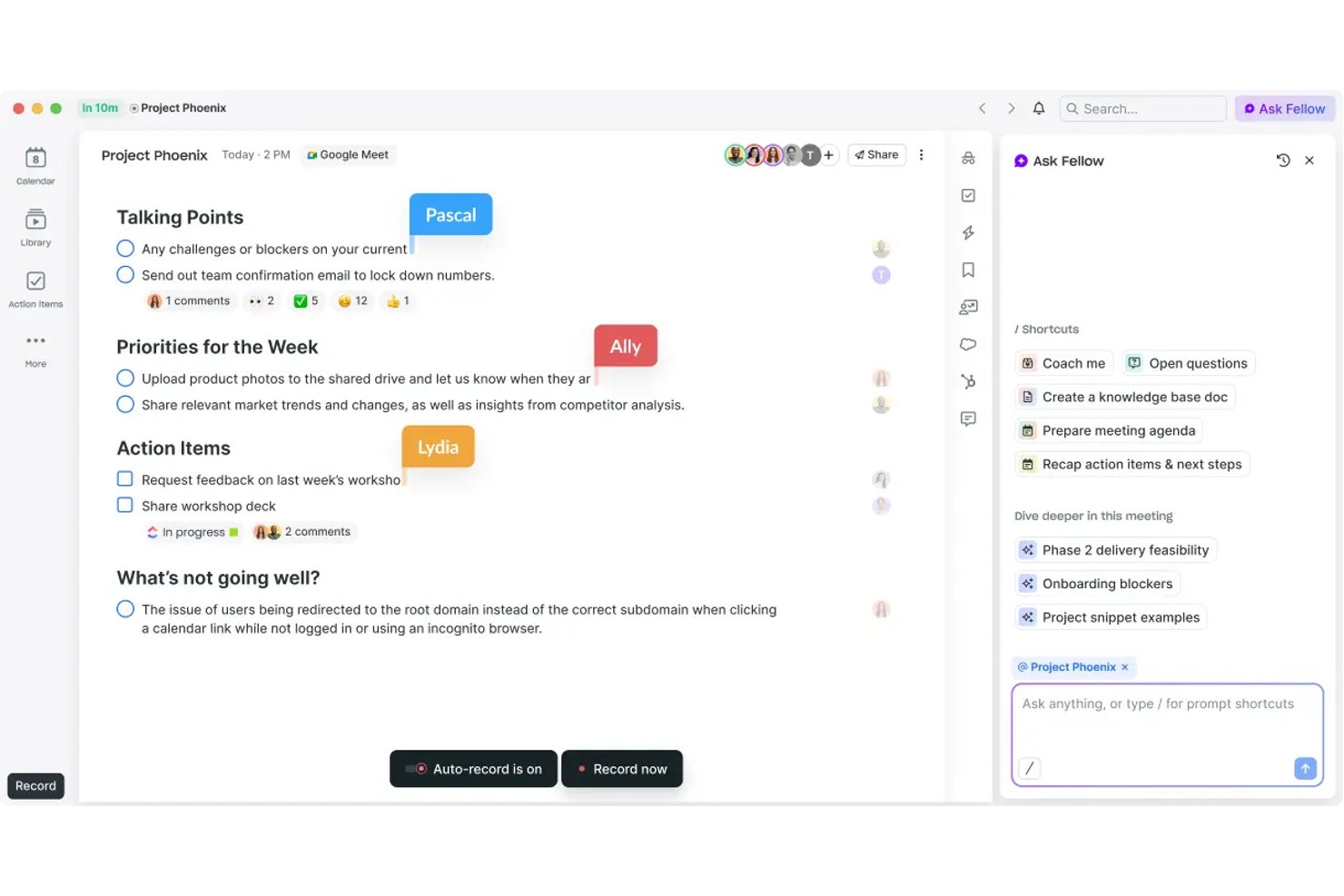
Fellow è un assistente IA per riunioni creato per i team che mettono la governance al primo posto, con registrazione con bot e senza bot, trascrizione in 99 lingue, acquisizione delle attività da svolgere e una raccolta di riunioni consultabile tramite ricerca su Zoom, Microsoft Teams e Google Meet.
Per chi è più adatto Fellow?
Fellow è particolarmente adatto ai team aziendali di settori regolamentati, come finanza, sanità e legale, dove la conformità delle riunioni, le tracce di controllo e la governance dei dati non sono facoltative.
Perché ho scelto Fellow
Fellow merita un posto tra le migliori soluzioni della mia selezione perché gestisce le registrazioni delle riunioni soggette a governance con grande rigore. Posso mettere in pausa e riprendere la registrazione durante la chiamata, eliminando completamente i segmenti messi in pausa, e applicare la redazione MNPI alle trascrizioni prima della loro distribuzione. Funzionalità come l'acquisizione del consenso, la conservazione a zero giorni e una traccia di controllo pronta per la SEC Rule 17a-4 lo distinguono da ogni altro assistente IA per riunioni che abbia utilizzato.
Funzionalità principali di Fellow
- IA conversazionale Chiedi a Fellow: Consente di interrogare riunioni e note passate usando il linguaggio naturale.
- Redazione IA dell'ordine del giorno: Genera automaticamente ordini del giorno strutturati a partire dai dettagli dell'invito o dalle conversazioni precedenti.
- Integrazioni per la gestione dei progetti: Si collega nativamente a strumenti come Asana, Jira, Linear e ClickUp per sincronizzare direttamente le attività da svolgere.
- Pannello di analisi dell'area di lavoro: Tiene traccia del volume delle riunioni, della partecipazione e dell'attività di presa di appunti tra i team.
Integrazioni di Fellow
Fellow offre oltre 50 integrazioni native, tra cui Asana, Jira, Linear, ClickUp, Monday.com, Trello, GitHub, Slack, Microsoft Teams, Google Workspace e Salesforce. È disponibile un'API per le integrazioni personalizzate.
Pros and Cons
Pros:
- La redazione MNPI mantiene le trascrizioni sensibili pronte per il controllo
- Chiedi a Fellow risponde alle domande sulle riunioni formulate in linguaggio naturale
- La registrazione senza bot evita che partecipanti non invitati si uniscano alle chiamate
Cons:
- L'IA è limitata esclusivamente ai flussi di lavoro delle riunioni
- Le funzionalità dell'app mobile sono inferiori rispetto alla versione per computer
Ideale per creare bozze a partire dal contesto dell'area di lavoro
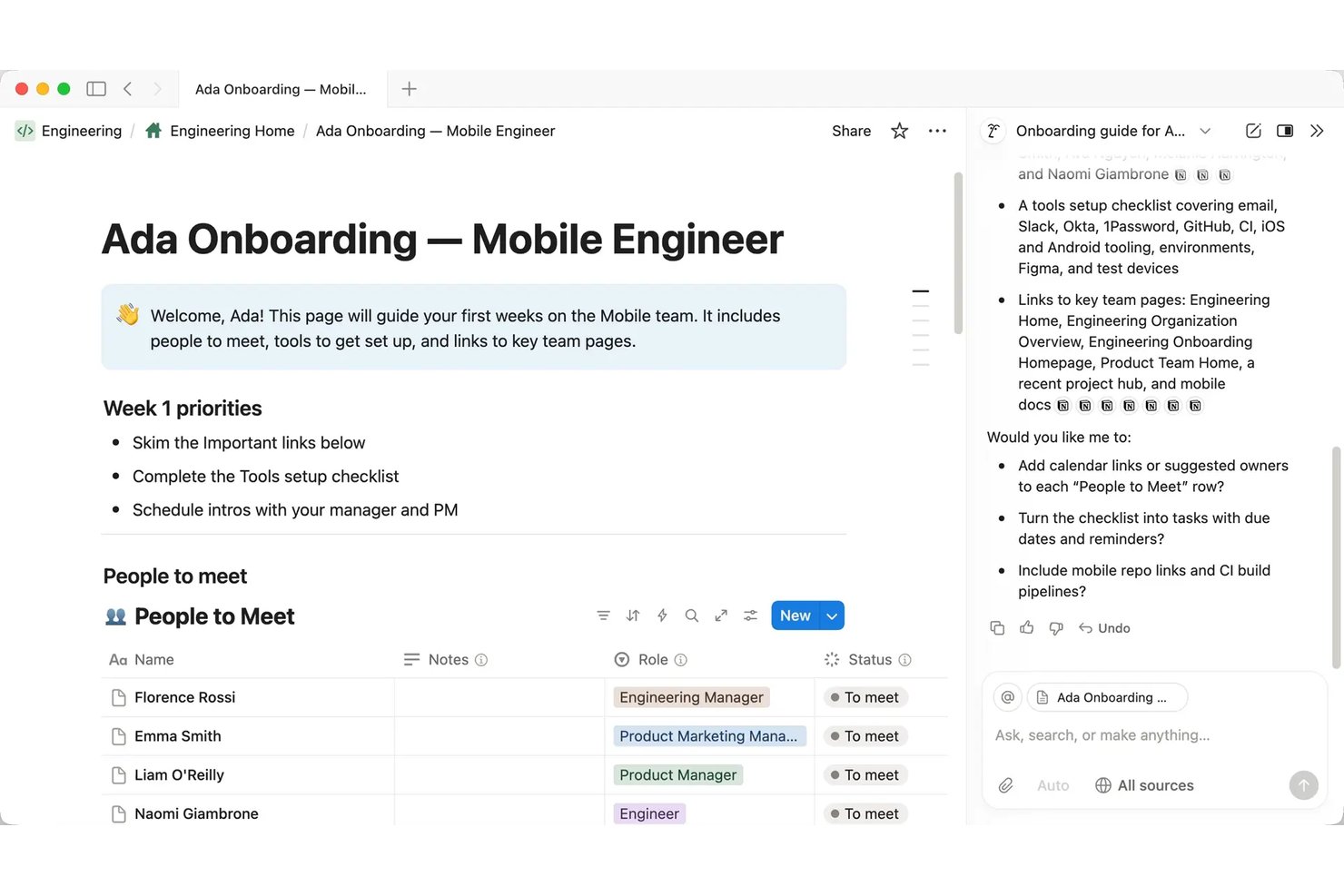
Notion AI è un assistente AI nativo dell'area di lavoro integrato in Notion che gestisce la stesura di documenti, la trascrizione e il riepilogo delle riunioni, l'automazione di attività in più passaggi e il recupero di informazioni tra diverse app attraverso un'interfaccia conversazionale.
Per chi è più adatto Notion AI?
Notion AI è particolarmente adatto ai responsabili di progetto e ai team interfunzionali che gestiscono già documentazione, wiki e monitoraggio dei progetti all'interno di Notion.
Perché ho scelto Notion AI
Ho scelto Notion AI come una delle soluzioni migliori perché l'AI elabora le bozze a partire dai contenuti effettivi della tua area di lavoro, non da una pagina vuota. Quando gli chiedo di scrivere un rapporto sullo stato di un progetto, attinge agli appunti delle riunioni, ai database delle attività e ai brief già presenti nella mia area di lavoro. Le Note riunione AI gestiscono automaticamente la trascrizione, quindi il contesto di cui ho bisogno è già acquisito prima che inizi a scrivere. La funzione Compilazione automatica estende questa capacità compilando direttamente dai contenuti documentati i campi del database, come stato del progetto, responsabile e priorità.
Funzionalità principali di Notion AI
- Ricerca aziendale (beta): Consente di interrogare Slack, Google Drive, GitHub, Microsoft Teams, Jira e altro ancora direttamente da Notion.
- Agenti personalizzati: Automatizza i flussi di lavoro del team in più passaggi con azioni degli agenti pianificate o attivate da eventi nella tua area di lavoro.
- Modalità di ricerca (beta): Fornisce ricerche approfondite, corredate da fonti, sull'area di lavoro e sul web senza dover uscire da Notion.
- Architettura indipendente dal modello: Ti consente di cambiare modelli o fornitori di AI per qualsiasi flusso di lavoro degli agenti.
Integrazioni di Notion AI
Notion AI offre integrazioni native con Slack, Google Drive, GitHub, Microsoft Teams, Jira, Box, OneDrive e Salesforce. Si collega inoltre a Zapier e fornisce un'API per integrazioni personalizzate.
Pros and Cons
Pros:
- Crea automaticamente bozze a partire dai contenuti esistenti dell'area di lavoro
- Riassume gli appunti delle riunioni senza uscire da Notion
- Gli agenti AI eseguono autonomamente flussi di lavoro in più passaggi
Cons:
- Meno efficace al di fuori dell'ecosistema dell'area di lavoro Notion
- Nessuna interfaccia vocale per l'interazione a mani libere

Ideale per l'intelligenza artificiale nelle app di Workspace
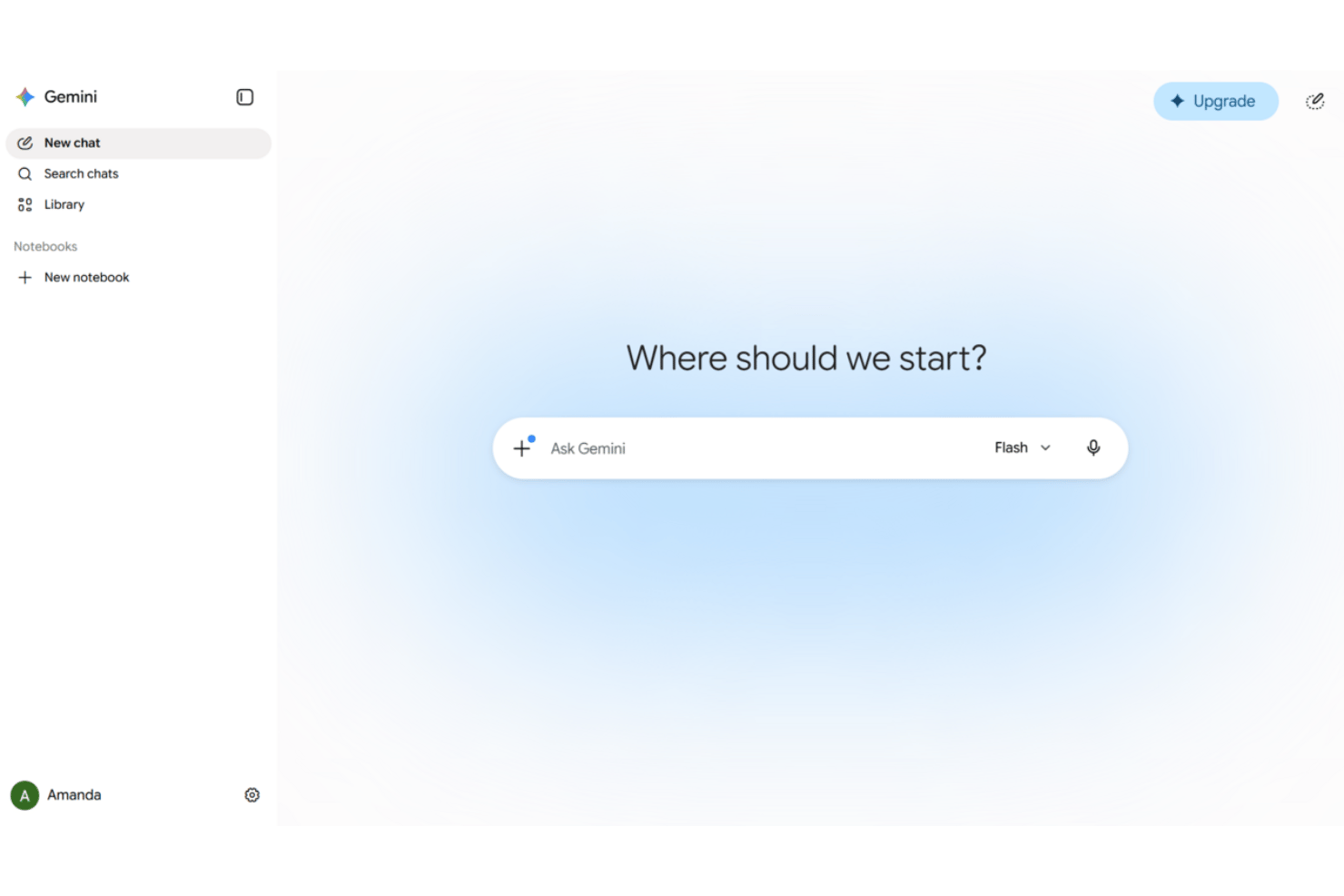
Google Gemini è un assistente virtuale basato sull'intelligenza artificiale integrato nelle app di Google Workspace—Gmail, Documenti, Fogli, Meet e Drive—che offre chat conversazionale, redazione di documenti, presa di appunti durante le riunioni e automazione agentica tra gli strumenti aziendali connessi.
Per chi è più adatto Google Gemini?
Google Gemini è ideale per i team di progetto che gestiscono già il proprio lavoro all'interno di Google Workspace e desiderano assistenza basata sull'intelligenza artificiale senza dover cambiare strumenti.
Perché ho scelto Google Gemini
Google Gemini è entrato nella mia selezione perché funziona in modo naturale come assistente basato sull'intelligenza artificiale all'interno degli strumenti che i team di progetto utilizzano già. Uso Gemini in Meet per acquisire automaticamente appunti e attività senza bisogno di un componente aggiuntivo di terze parti, mentre in Gmail posso consultare Drive e il mio calendario dalla stessa barra laterale mentre compongo una risposta. Workspace Studio è il punto in cui diventa davvero utile per i flussi di lavoro di gestione dei progetti: ho creato flussi che automatizzano la preparazione delle riunioni e inoltrano le email di follow-up senza scrivere codice.
Funzionalità principali di Google Gemini
- Input e output multimodali: Accetta ed elabora voce, testo, immagini e video nelle app di Workspace supportate.
- Gemini Notebook per la sintesi delle ricerche: Consente di raccogliere, organizzare e riepilogare informazioni provenienti da più fonti in un unico spazio di lavoro assistito dall'intelligenza artificiale.
- Automazione agentica con connettori predefiniti: Si collega a piattaforme come Salesforce, Jira, SAP e Microsoft 365 per automatizzare le azioni sui dati.
- Conformità integrata e prevenzione della perdita di dati: Include misure avanzate per la tutela della privacy e controlli DLP conformi agli standard aziendali.
Integrazioni di Google Gemini
Google Gemini offre integrazioni native con Gmail, Google Drive, Google Calendar, Google Meet, Salesforce, Jira, SAP e Microsoft 365. È disponibile un'API per le integrazioni personalizzate.
Pros and Cons
Pros:
- Profondamente integrato in tutte le app di Workspace
- Acquisisce automaticamente appunti e attività delle riunioni
- Riepiloga lunghe conversazioni email e documenti di Drive
Cons:
- Meno utile al di fuori dell'ecosistema Google
- Le funzionalità agentiche richiedono piani a pagamento di livello superiore

Otter.ai
Ideale per la trascrizione delle riunioni in tempo reale
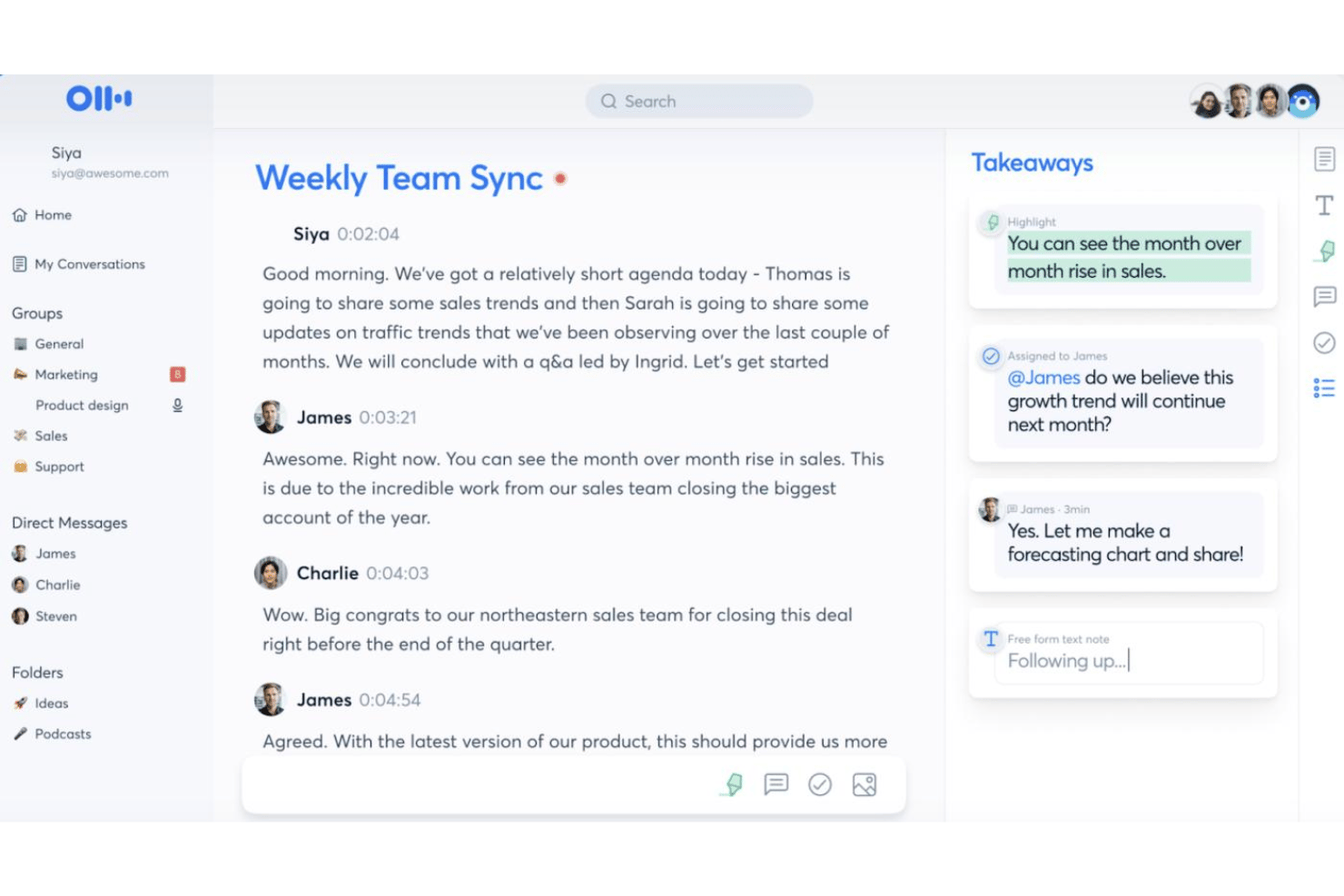
Otter.ai è un assistente per riunioni basato sull'IA che combina la trascrizione in tempo reale, i riepiloghi automatici delle riunioni, la registrazione delle attività da svolgere e un'interfaccia di chat con IA che consente di effettuare ricerche nell'intera cronologia delle riunioni.
Per chi è più adatto Otter.ai?
Otter.ai è particolarmente adatto ai team che gestiscono un elevato numero di riunioni e hanno bisogno di trascrizioni accurate e ricercabili senza dover prendere appunti manualmente.
Perché ho scelto Otter.ai
Otter.ai si è guadagnato un posto nella mia rosa dei preferiti perché la sua trascrizione in tempo reale va oltre la semplice acquisizione delle parole. L'agente per riunioni con IA partecipa alle chiamate e risponde alle domande in tempo reale utilizzando l'intera cronologia delle riunioni, così non ti limiti a registrare una riunione, ma crei una base di conoscenza ricercabile. Apprezzo anche l'acquisizione automatica delle diapositive, che sincronizza le diapositive del relatore direttamente nella trascrizione, così il contesto completo di qualsiasi riunione viene conservato in un unico luogo.
Funzionalità principali di Otter.ai
- Chat per riunioni basata sull'IA: interagisci con le trascrizioni delle riunioni tramite un'interfaccia conversazionale per cercare dettagli o richiedere riepiloghi.
- Vocabolario personalizzato: aggiungi termini di settore, acronimi e nomi specifici per migliorare la precisione della trascrizione.
- Collaborazione nell'area di lavoro: condividi trascrizioni e note delle riunioni con i colleghi in tempo reale all'interno di un'area di lavoro condivisa.
- Integrazioni di terze parti: connettiti ad app come Slack, Salesforce, HubSpot, Notion e Google Workspace per ampliare il supporto ai flussi di lavoro.
Integrazioni di Otter.ai
Otter.ai offre integrazioni native con Zoom, Microsoft Teams, Google Meet, Slack, Salesforce, HubSpot e Google Workspace. Si integra anche con Notion e si connette a Zapier. È disponibile un'API per integrazioni personalizzate.
Pros and Cons
Pros:
- La precisione della trascrizione in tempo reale è costantemente elevata
- Ricerche tramite chat con IA nell'intera cronologia delle riunioni
- Acquisizione automatica delle attività da svolgere durante le riunioni in tempo reale
Cons:
- Automazione limitata dei flussi di lavoro per la gestione dei progetti
- Le risposte dell'IA sono limitate esclusivamente ai contenuti delle riunioni

Ideale per usare l'intelligenza artificiale nelle app di Office
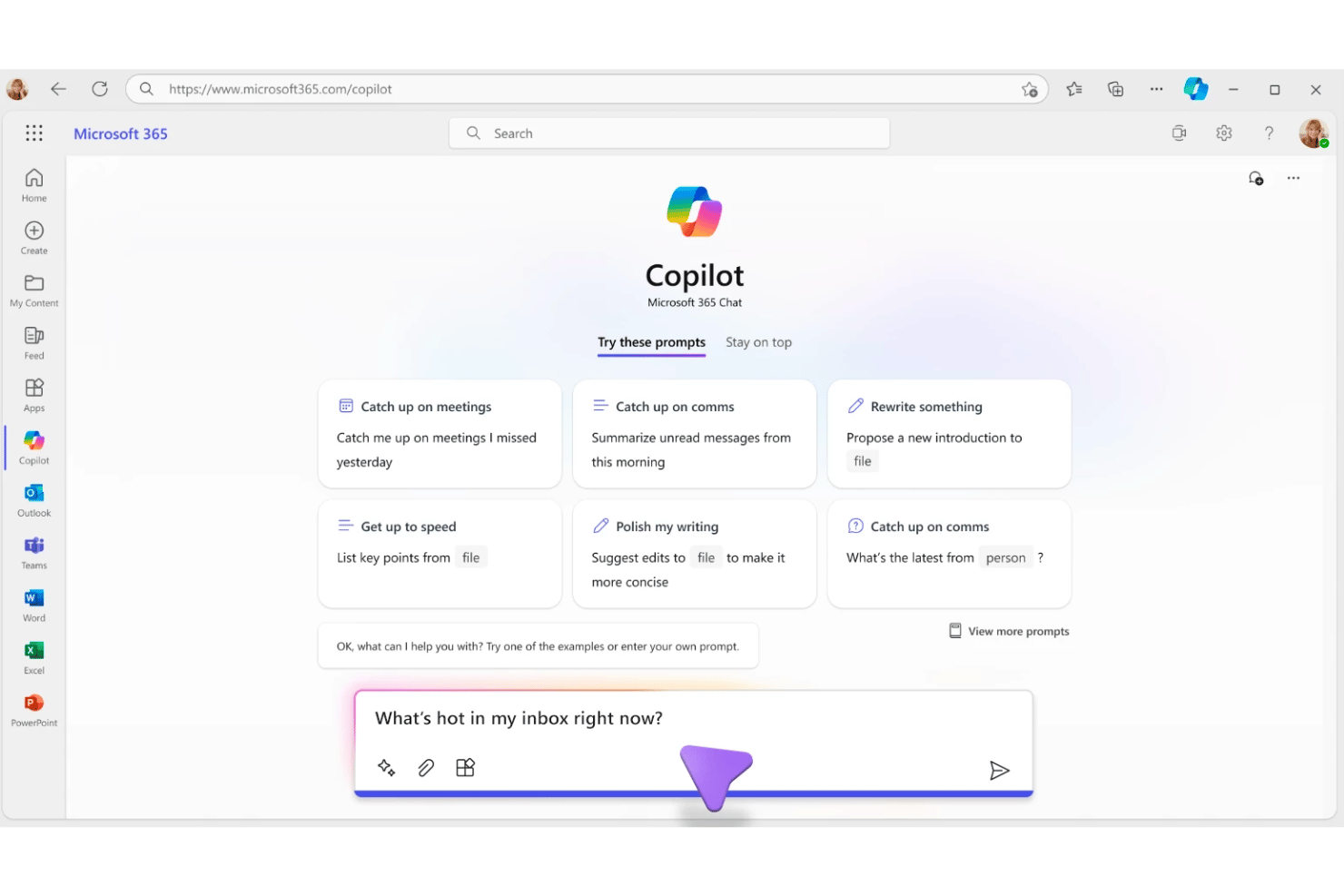
Microsoft 365 Copilot è un assistente di intelligenza artificiale generativa integrato nella suite Microsoft 365, che combina chat in linguaggio naturale, redazione di documenti, riepilogo delle riunioni e automazione delle attività in Word, Excel, PowerPoint, Outlook e Teams.
Per chi è più adatto Microsoft 365 Copilot?
È una scelta naturale per i team aziendali e del mercato intermedio che operano già nell'ecosistema Microsoft 365 e desiderano integrare l'intelligenza artificiale direttamente nei flussi di lavoro esistenti.
Perché ho scelto Microsoft 365 Copilot
Ho scelto Microsoft 365 Copilot come uno dei migliori perché nessun altro assistente di intelligenza artificiale è integrato così profondamente nelle app in cui si svolge effettivamente il lavoro dei progetti. Uso Work IQ per recuperare contemporaneamente il contesto da email, trascrizioni delle riunioni e file, quindi interrogo tutto in un'unica conversazione di Copilot Chat. Il routing intelligente dei modelli seleziona automaticamente il modello linguistico di grandi dimensioni più adatto per ogni attività, così ottengo risposte con capacità di ragionamento per le richieste complesse e risposte rapide per le consultazioni veloci.
Funzionalità principali di Microsoft 365 Copilot
- Ricerca aziendale universale: individua istantaneamente le informazioni nelle email, nei file, nelle riunioni e nelle conversazioni.
- Blocchi appunti di Copilot: aggrega file, chat e note, consentendo di generare riepiloghi o resoconti su richiesta.
- Integrazione con Agent Store: consente di distribuire agenti di intelligenza artificiale pronti all'uso di Microsoft e dei partner oppure di crearne di personalizzati.
- Personalizzazione basata sul ruolo: adatta i suggerimenti e le risposte contestuali in base alla funzione lavorativa e all'attività del progetto.
Integrazioni di Microsoft 365 Copilot
Microsoft 365 Copilot offre integrazioni native nell'ecosistema Microsoft, tra cui Microsoft 365, Teams, Outlook, Word, Excel, PowerPoint, SharePoint e Azure. Offre inoltre un catalogo di integrazioni dei partner tramite Agent Store e mette a disposizione un'API per le integrazioni personalizzate.
Pros and Cons
Pros:
- Contesto approfondito in tutte le app di Microsoft 365
- Riassume istantaneamente le riunioni di Teams e le attività da svolgere
- Redige documenti ed email senza dover cambiare strumento
Cons:
- Le risposte possono sembrare generiche senza il contesto del progetto
- Interazione vocale limitata rispetto agli assistenti autonomi

Ideale per la creazione di attività tramite voce
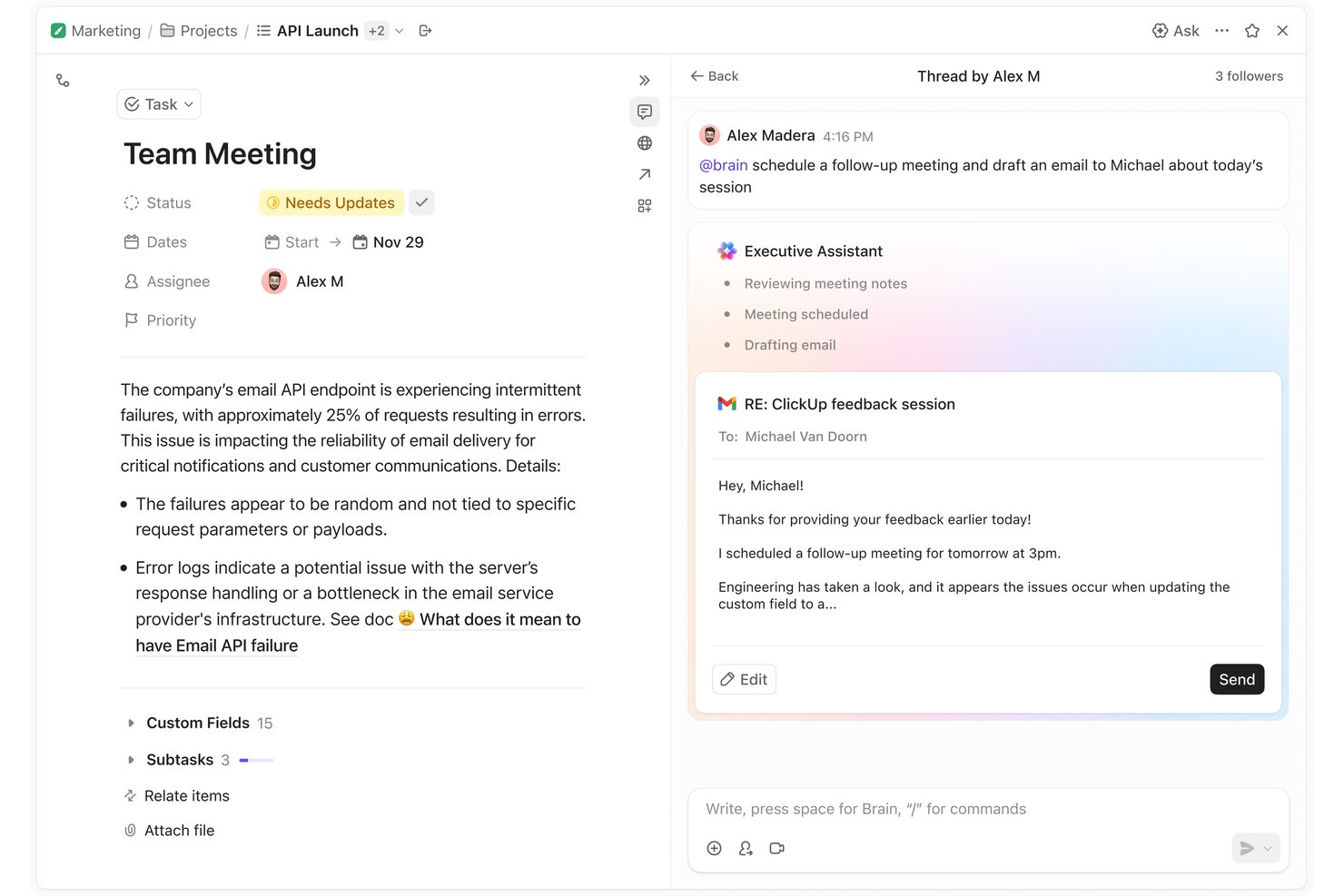
ClickUp Brain è un assistente virtuale basato sull'IA integrato nella piattaforma di gestione del lavoro ClickUp, che combina l'IA multimodello (GPT, Claude, Gemini), l'input vocale, gli agenti autonomi, la memoria contestuale e la stesura di documenti.
Per chi è più adatto ClickUp Brain?
È particolarmente adatto ai responsabili di progetto e ai team interfunzionali che gestiscono già il proprio lavoro in ClickUp e desiderano un'IA in grado di agire direttamente sui dati aggiornati dei progetti.
Perché ho scelto ClickUp Brain
Ho scelto ClickUp Brain come una delle soluzioni migliori perché la sua funzionalità di conversione da voce a testo nell'app desktop è progettata per sostituire completamente la tastiera, non solo per affiancarla. Posso dettare una nuova attività, aggiungere il contesto e assegnarla a un collega senza digitare una sola parola. Poiché Brain² mantiene il contesto aggiornato in tutto il mio spazio di lavoro, le attività create tramite voce vengono inserite nel progetto corretto con i dettagli giusti già associati.
Funzionalità principali di ClickUp Brain
- Superagenti: colleghi di lavoro basati sull'IA a cui è possibile assegnare attività, programmarle e fare riferimento direttamente all'interno dello spazio di lavoro.
- Cervello aziendale autoaggiornante: memoria persistente che acquisisce e adatta i flussi di lavoro, lo stile di comunicazione e il contesto dei progetti del team.
- Motore IA multimodello: indirizza istantaneamente le domande a GPT, Claude o Gemini per ottimizzare le risposte a ogni interazione.
- Ricerca connessa: interroga in tempo reale i dati dello spazio di lavoro e le piattaforme integrate come Slack, Google Drive, Jira e Confluence.
Integrazioni di ClickUp Brain
ClickUp Brain offre integrazioni native con Slack, Google Drive, Jira, GitHub, Confluence, Dropbox, Box, OneDrive, Microsoft Teams e Gmail. È disponibile un'API per creare integrazioni personalizzate.
Pros and Cons
Pros:
- Creazione di attività tramite voce direttamente nello spazio di lavoro
- Interroga i dati aggiornati dei progetti senza cambiare applicazione
- Riassume documenti e conversazioni all'interno di ClickUp
Cons:
- Brain funziona solo all'interno dell'ecosistema ClickUp
- La velocità di risposta diminuisce con le richieste complesse sullo spazio di lavoro

Motion
Ideale per la pianificazione automatica quotidiana a blocchi di tempo
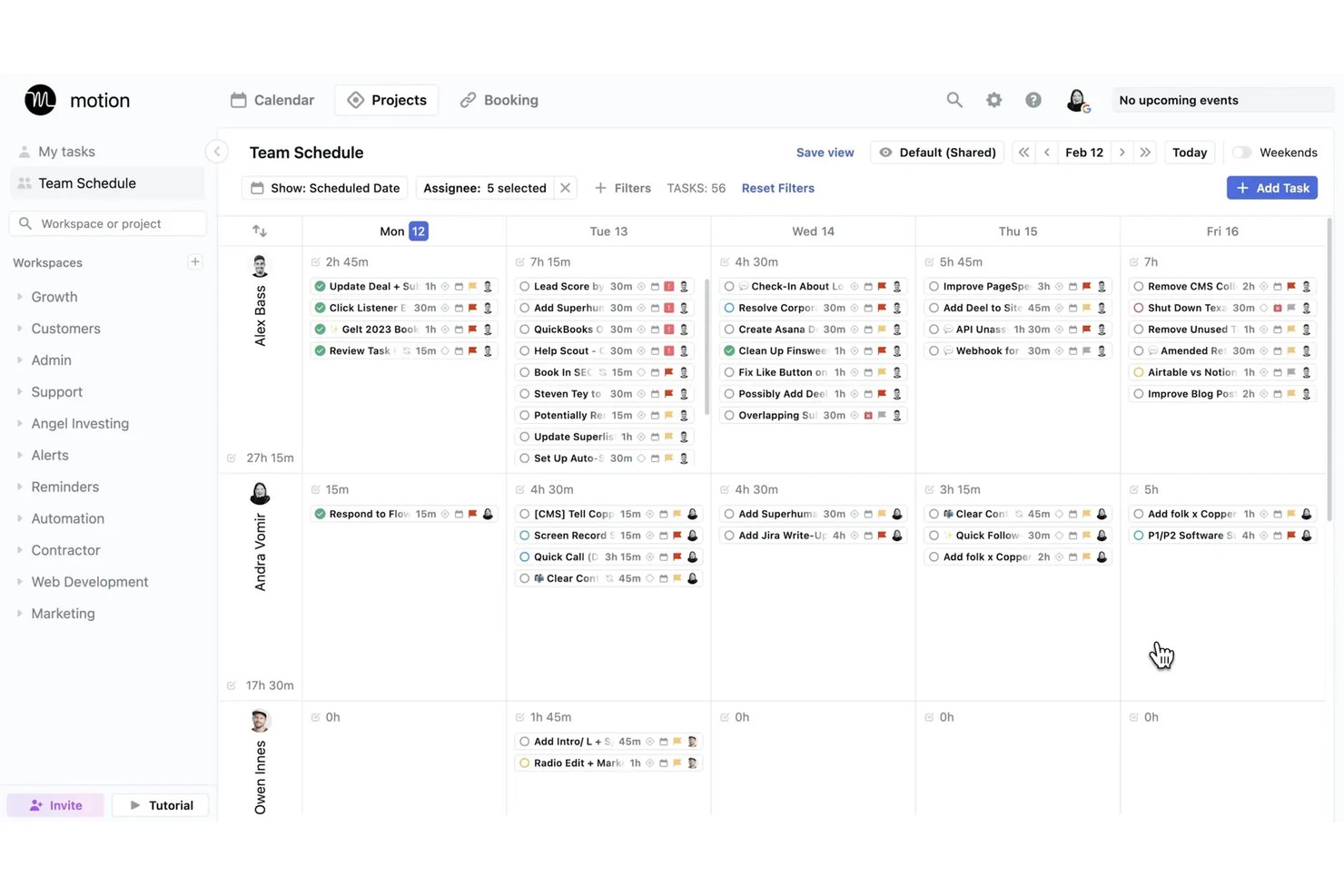
Motion è una piattaforma di assistente virtuale basata sull'IA che pianifica automaticamente le attività, gestisce i calendari, trascrive le riunioni e genera progetti e documenti attraverso una suite di agenti IA specifici per ruolo.
Per chi è più adatto Motion?
Motion è particolarmente adatto ai project manager e ai piccoli team che hanno bisogno dell'IA per gestire le decisioni quotidiane di prioritizzazione e pianificazione, che sottraggono tempo al lavoro concentrato.
Perché ho scelto Motion
Ho scelto Motion come uno dei migliori strumenti perché il suo motore di pianificazione automatica a blocchi di tempo elimina concretamente il lavoro quotidiano necessario per decidere su cosa lavorare e quando. Quando una nuova riunione compare nel mio calendario o una scadenza cambia, Motion ricalcola l'intero programma in pochi secondi, invece di lasciarmi riorganizzare manualmente le attività. Mi affido anche all'assistente IA per gli appunti, che acquisisce gli elementi d'azione durante le riunioni e li reinserisce direttamente nel mio piano delle attività programmate.
Funzionalità principali di Motion
- Assistente IA per i documenti: Trasforma note e documentazione di progetto in attività, progetti o link condivisibili.
- Assistente IA per gli appunti delle riunioni: Trascrive e riassume le riunioni, quindi genera automaticamente gli elementi d'azione.
- Dipendenti IA: Implementa agenti IA specializzati per attività come l'assistenza alla direzione, le vendite o la gestione dei progetti.
- Vista Gantt: Visualizza le tempistiche dei progetti, le dipendenze e i progressi di tutti i progetti attivi.
Integrazioni di Motion
Motion offre integrazioni native con Google Calendar, Outlook, Office 365, iCloud, Zoom, Google Meet, Microsoft Teams, Slack, HubSpot e Salesforce. Supporta inoltre Zapier e fornisce un'API per integrazioni personalizzate.
Pros and Cons
Pros:
- Ripianifica automaticamente le attività quando cambiano le priorità
- Gli appunti IA delle riunioni acquisiscono automaticamente gli elementi d'azione
- Agenti IA dedicati per attività specifiche in base al ruolo
Cons:
- Esperienza dell'app mobile limitata rispetto alla versione desktop
- La pianificazione IA funziona meglio per i singoli utenti
Ideale per prevedere i rischi di consegna dei progetti
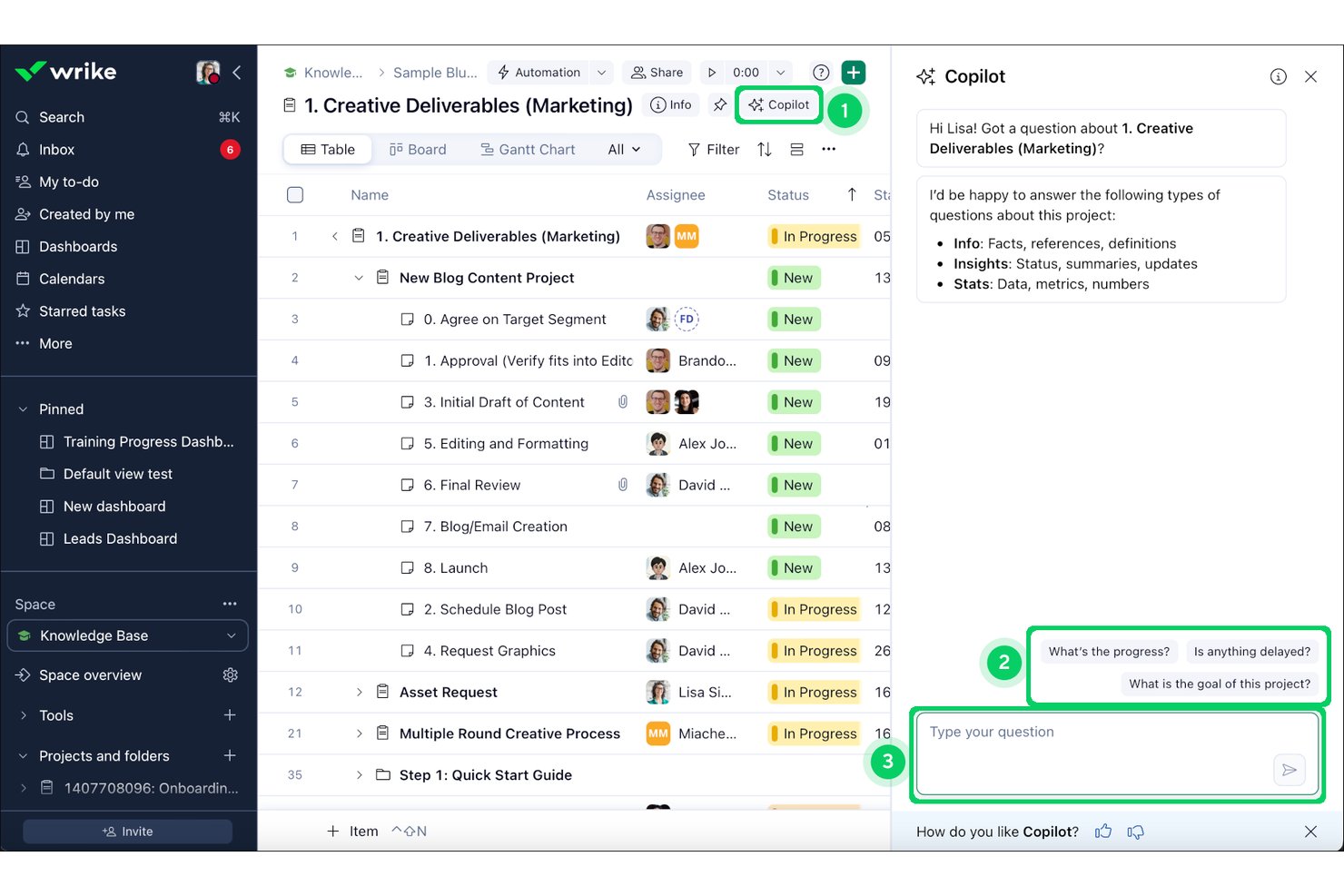
Wrike Copilot è un assistente IA integrato nella piattaforma Wrike che consente ai team di progetto di interrogare i dati di progetto in tempo reale, riepilogare le conversazioni nei commenti, generare aggiornamenti sullo stato e mettere in evidenza i rischi attraverso una conversazione in linguaggio naturale.
Per chi è più indicato Wrike Copilot?
È una soluzione particolarmente adatta ai team PMO aziendali e ai direttori di programma che gestiscono portafogli complessi e composti da più team all'interno dell'ecosistema Wrike.
Perché ho scelto Wrike Copilot
Ho scelto Wrike Copilot come una delle migliori soluzioni per il modo in cui utilizza il grafo di analisi del lavoro, basato su 500 miliardi di punti dati storici, per segnalare in modo proattivo le milestone a rischio prima che diventino ostacoli. Quando chiedo a Copilot informazioni sui rischi degli sprint, individua in tempo reale risorse sovraccariche, dipendenze bloccate e milestone in ritardo. Questo livello di analisi proattiva è ciò che lo distingue dagli assistenti IA che rispondono solo a ciò che sai già di dover chiedere.
Caratteristiche principali di Wrike Copilot
- Interfaccia di chat in linguaggio naturale con conversazioni multiple: Consente di interagire con i dati e gli aggiornamenti dei progetti in tempo reale all'interno di Wrike.
- Riepilogo di documenti e commenti basato sull'IA: Riassume conversazioni e documenti lunghi direttamente all'interno di attività e progetti.
- Integrazioni native per la gestione dei progetti: Si connette a strumenti come Slack, Teams, Google Workspace, Salesforce e altri ancora per la gestione dei progetti su più piattaforme.
- Memoria contestuale basata sui ruoli: Fornisce risposte e informazioni basate sul contesto specifico della cartella, del progetto o dell'utente selezionato.
Integrazioni di Wrike Copilot
Wrike Copilot offre centinaia di integrazioni native tramite le integrazioni integrate e il marketplace di Wrike, tra cui Google Workspace, Microsoft 365, Salesforce, Slack, Jira, GitHub, Adobe Creative Cloud, Zoom, Box e Dropbox. Supporta inoltre Zapier e fornisce un'API per le integrazioni personalizzate.
Pros and Cons
Pros:
- Prevede i rischi di consegna utilizzando i dati storici dei progetti
- Riassume lunghe conversazioni nei commenti all'interno delle attività
- Redige aggiornamenti sullo stato a partire dai dati di progetto in tempo reale
Cons:
- Limitato esclusivamente alla piattaforma Wrike
- Nessun input vocale per le richieste all'IA
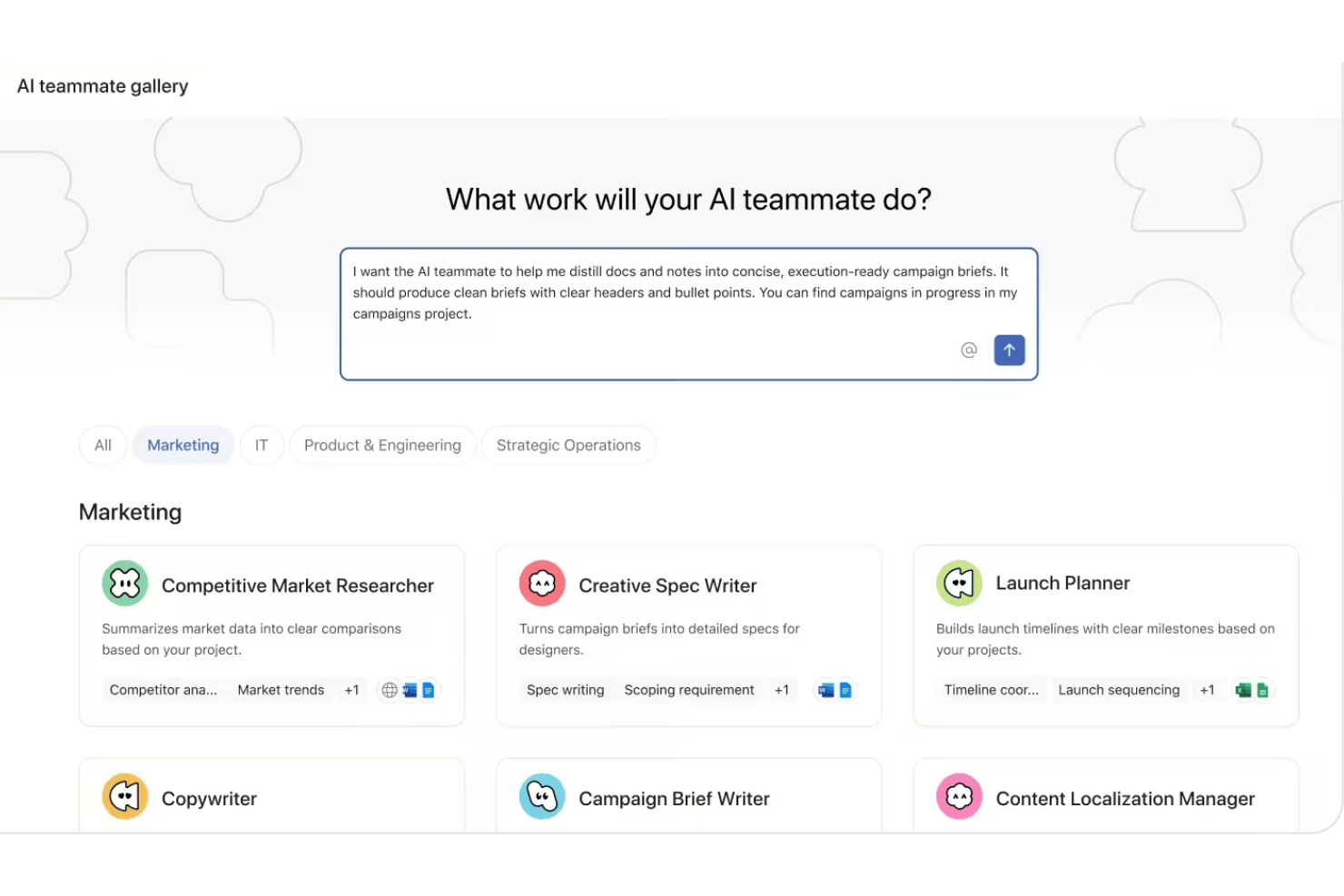
Asana AI Teammates è un livello di agenti AI basati sui ruoli integrato nella piattaforma di gestione del lavoro Asana, che consente ai team di progetto di assegnare attività agli agenti AI, automatizzare le attività amministrative dei progetti e redigere e riassumere la documentazione di progetto.
Per chi è più adatto Asana AI Teammates?
È particolarmente adatto ai team di medie e grandi aziende con strutture PMO consolidate che necessitano di agenti AI operativi contemporaneamente in più funzioni.
Perché ho scelto Asana AI Teammates
Asana AI Teammates si è guadagnato un posto nella mia lista ristretta grazie al modo in cui gli agenti sono strutturati intorno a funzioni lavorative reali, anziché a tipologie generiche di attività. Apprezzo in particolare gli agenti Sprint Coach e Status Reporter, ai quali il mio team può assegnare direttamente il lavoro all'interno dei progetti Asana, proprio come farebbe con un membro umano del team. Ciò che lo rende davvero diverso è il Work Graph, che fornisce a ogni agente un contesto persistente in tutti i progetti collegati, evitando così di dover partire da zero a ogni interazione.
Funzionalità principali di Asana AI Teammates
- Creazione di compagni di squadra personalizzati: crea agenti AI personalizzati per flussi di lavoro specifici utilizzando una semplice interfaccia senza codice.
- Contesto del Work Graph: gli agenti AI accedono ai dati strutturati di progetti, obiettivi e team, attingendo al Work Graph di Asana per ottenere il contesto.
- Lettura degli allegati: gli agenti possono leggere ed elaborare gli allegati dei documenti per riassumere o estrarre dettagli del progetto.
- Governance di livello aziendale: gli amministratori controllano l'accesso ai dati, le autorizzazioni e i registri di controllo relativi a tutte le azioni dei compagni di squadra AI.
Integrazioni di Asana AI Teammates
Asana AI Teammates offre integrazioni native con Jira, Microsoft 365, Google Workspace, Slack, Salesforce, Tableau e Power BI. È disponibile un'API per le integrazioni personalizzate.
Pros and Cons
Pros:
- Gli agenti operano nativamente all'interno dei progetti Asana attivi
- Gli agenti specifici per ruolo coprono funzioni di progetto distinte
- I checkpoint umani mantengono le azioni dell'AI sotto controllo
Cons:
- Attualmente è limitato agli abbonati al piano AI Studio Pro
- È ancora in fase beta e la disponibilità generale non è stata confermata

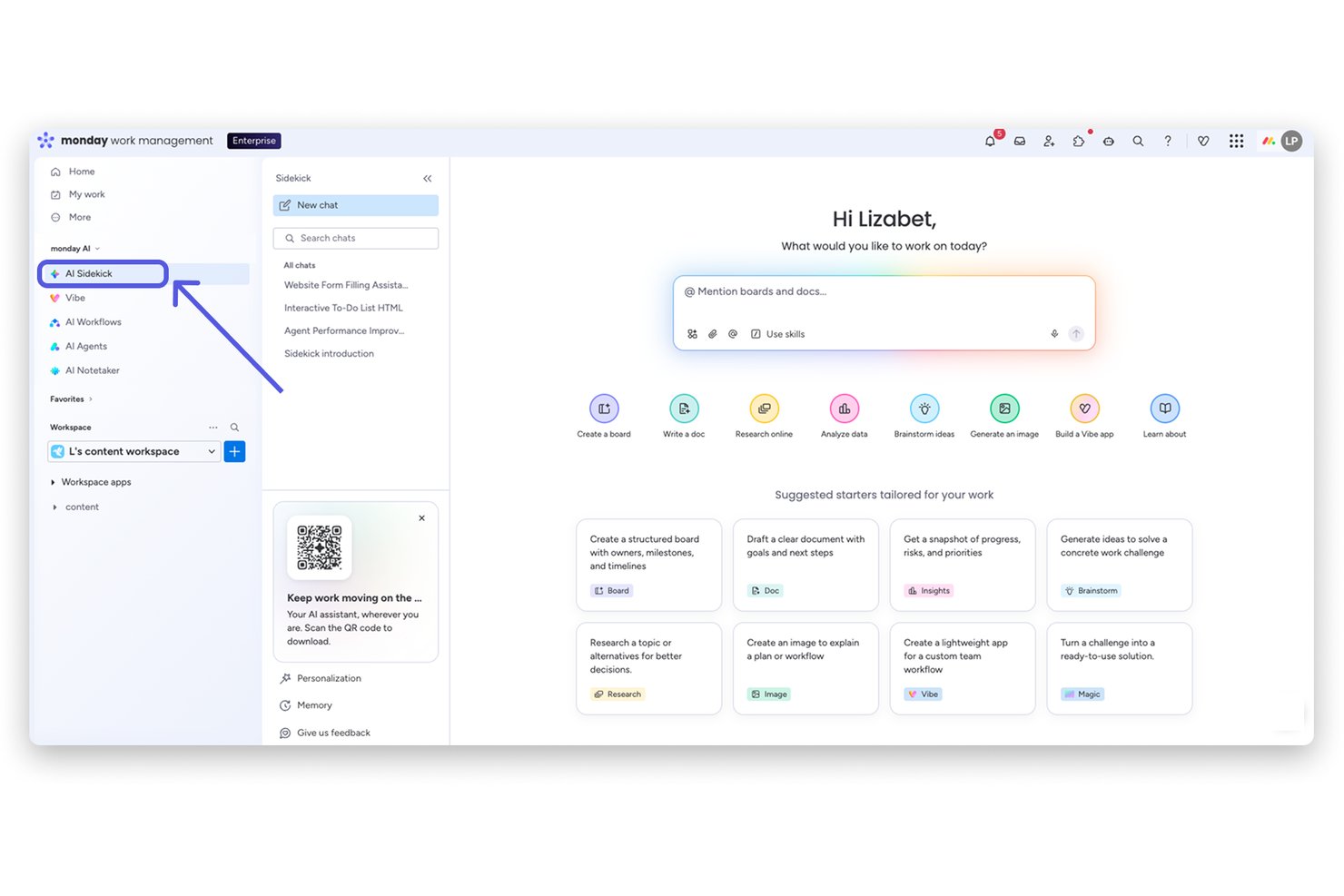
monday sidekick è un assistente IA integrato direttamente nella piattaforma monday.com che consente di creare flussi di lavoro, automatizzare attività, generare documenti e ottenere informazioni sui progetti attraverso conversazioni in linguaggio naturale all'interno della propria area di lavoro.
A chi è più adatto monday sidekick?
monday sidekick è particolarmente adatto a responsabili di progetto e team interfunzionali che gestiscono già il proprio lavoro all'interno di monday.com e desiderano integrare l'IA nei flussi di lavoro esistenti.
Perché ho scelto monday sidekick
monday sidekick merita un posto nella mia selezione perché non si limita a rispondere alle domande: agisce direttamente sui dati della tua area di lavoro. Apprezzo in particolare la funzionalità Routine, che consente di programmare attività IA ricorrenti, come riepiloghi settimanali delle bacheche o controlli dello stato, senza dover fornire istruzioni manualmente ogni volta. Quando chiedo a Sidekick di creare un piano di progetto, genera elementi, assegna i responsabili e imposta le scadenze direttamente nelle mie bacheche reali, non in un documento separato e scollegato dal luogo in cui viene svolto il lavoro.
Funzionalità principali di monday sidekick
- Motore IA multimodello: consente agli utenti di utilizzare Claude, GPT, Gemini e altri modelli IA avanzati per richieste e risultati relativi ai progetti.
- Assistente IA mobile: offre funzionalità di IA conversazionale e comandi vocali su dispositivi mobili per gestire i progetti anche in movimento.
- Routine IA programmate: automatizza attività ricorrenti come riepiloghi delle bacheche, aggiornamenti dello stato o estrazioni di dati secondo una frequenza stabilita.
- Pannello Canvas con contesto dell'area di lavoro: mette a disposizione un documento modificabile accanto alla chat per redigere, riepilogare e organizzare i contenuti dei progetti.
Integrazioni di monday sidekick
monday sidekick offre integrazioni native con Slack, Google Workspace, Microsoft Teams, Salesforce, HubSpot, Zoom, GitHub, Zendesk e Trello. Supporta inoltre Zapier e mette a disposizione un'API per integrazioni personalizzate.
Pros and Cons
Pros:
- Agisce direttamente sui dati aggiornati delle bacheche
- Consente di scegliere tra più modelli IA
- Esegue routine IA programmate senza bisogno di istruzioni manuali
Cons:
- Non riesce a recuperare il contesto dagli strumenti esterni
- Le richieste complesse in più passaggi a volte producono errori
Altri assistenti virtuali basati sull'intelligenza artificiale
Ecco alcune opzioni aggiuntive di assistenti virtuali basati sull’intelligenza artificiale che non sono entrate nel mio elenco ristretto, ma che vale comunque la pena prendere in considerazione:
- Fireflies.ai
Ideale per l'analisi dell'intelligenza conversazionale
- Atlassian Rovo
Ideale per la ricerca di conoscenze aziendali tra app
- Fathom
Ideale per riepiloghi personalizzabili delle riunioni
- Granola
Ideale per il perfezionamento collaborativo delle note senza bot
- Zoom AI Companion
Ideale per l'assistenza durante le riunioni integrata nella piattaforma


How I Evaluate AI Virtual Assistants
An AI virtual assistant needs to do more than surface a chatbot—it should handle things like drafting status updates, capturing action items, or flagging blockers without you having to dig for answers. I split my evaluation into two layers: the core functionality a tool must have to qualify, and the differentiating factors that separate one option from another.
Core Functionality (Table Stakes For This List)
When I'm selecting tools for my list, I rank each one on a scale from 0 (does not offer the functionality) to 5 (excels in this area) for each core functionality listed below. Then, I calculate the tool's total score into a percentage. Each tool needs to achieve a minimum total score of 65% to be considered for inclusion.
- Conversational Interface: I evaluate whether you can ask things like "What's overdue on Project X?" and get useful, contextual answers in a multi-turn exchange.
- Generative AI Engine: The AI should produce contextual outputs—like sprint summaries or risk assessments—not just template-based responses from a library.
- Task & Meeting Automation: I look for tools that create tasks from meeting notes, send follow-up reminders, and handle scheduling without manual input.
- Project Tool Integrations: Connections to platforms like Jira, Slack, and Google Calendar matter so the assistant can pull and act on real project data.
- Contextual Memory: I check whether the assistant remembers past interactions and project details across sessions, so you're not re-explaining context each time.
- Summarization & Drafting: The tool should condense meeting transcripts or long threads into briefs and draft artifacts like status reports or stakeholder updates.
Once I have a list of tools that meet the criteria, I consider what sets each platform apart.
Differentiating Factors (What Sets Vendors Apart)
Here's how I compare and contrast different vendors:
Standout Features
Proactive intelligence is a big differentiator—I look for assistants that flag at-risk tasks or nudge you about approaching deadlines before you have to ask. Custom workflow automation also matters, especially tools that let you build multi-step flows like auto-assigning tasks when a sprint kicks off, without needing engineering support. I also evaluate how well an assistant retains context across sessions so it can reference past project decisions without you repeating yourself.
Beyond Features
Integration ecosystem is one of the first things I evaluate—an assistant that can't pull data from your existing stack (Jira, Confluence, Slack, Google Calendar) will create more busywork than it eliminates. Security and compliance controls also deserve close attention, especially LLM data usage policies and audit logging, since these tools often process sensitive project data. I also consider time-to-value: how quickly your team can get a working setup without weeks of fine-tuning or heavy vendor onboarding.
Come scegliere gli assistenti virtuali basati sull'intelligenza artificiale
È facile perdersi in lunghi elenchi di funzionalità e strutture tariffarie complesse. Per aiutarti a rimanere concentrato mentre affronti il tuo specifico processo di selezione del software, ecco una lista di controllo dei fattori da tenere presenti:
| Fattore | Cosa considerare |
|---|---|
| Scalabilità | L'assistente è in grado di gestire i volumi attuali e futuri dei tuoi progetti, team e reparti? Presta attenzione agli aumenti dei costi o ai rallentamenti quando aggiungi utenti o progetti. |
| Integrazioni | Quanto è profonda la sua connessione con gli strumenti di gestione dei progetti, chat, calendario e documenti? Le integrazioni native e solide riducono il lavoro manuale e i flussi di lavoro scollegati. |
| Personalizzazione | Puoi adattare automazioni, flussi di lavoro e risposte alle routine e alle esigenze di reportistica del tuo team? Cerca regole flessibili e opzioni a basso codice/senza codice. |
| Facilità d'uso | Il tuo team lo utilizzerà davvero o l'interfaccia rende frustrante l'avvio? Dai priorità alle opzioni con configurazione intuitiva, menu chiari e indicazioni utili. |
| Implementazione e avvio | Quanto tempo occorre prima di vedere i risultati? Verifica la disponibilità di bot modello, risorse di formazione o assistenza dedicata per accelerare l'avvio senza sovraccaricare gli amministratori. |
| Costo | Il prezzo cresce in base all'utilizzo effettivo o alle dimensioni del team? Considera componenti aggiuntivi, requisiti minimi e l'eventuale disponibilità delle funzionalità avanzate solo nei piani superiori. |
| Misure di sicurezza | I dati sensibili dei progetti resteranno protetti? Cerca crittografia, accesso basato sui ruoli, registri di controllo e strumenti di gestione dell'utilizzo dei dati da parte degli LLM. |
| Disponibilità dell'assistenza | Se si verificano problemi, puoi contattare facilmente l'assistenza? Verifica i tempi previsti dagli SLA, l'assistenza integrata nell'app o la chat dal vivo per evitare ritardi nei progetti se lo strumento dovesse riscontrare problemi. |
Cosa sono gli assistenti virtuali basati sull'intelligenza artificiale?
Gli assistenti virtuali basati sull'intelligenza artificiale sono strumenti digitali che utilizzano l'intelligenza artificiale per automatizzare le attività, rispondere alle domande e gestire i flussi di lavoro tramite il linguaggio naturale. Questi assistenti gestiscono ogni tipo di attività, dalla pianificazione delle riunioni alla presa di appunti fino alla stesura degli aggiornamenti sui progetti, aiutando i team a lavorare in modo più efficiente senza un input manuale costante. Si connettono alle tue app principali, comprendono il contesto del progetto e personalizzano il supporto in base alle tue esigenze.
Funzionalità degli assistenti virtuali basati sull'intelligenza artificiale
Quando scegli un assistente virtuale basato sull'intelligenza artificiale, presta attenzione alle seguenti funzionalità chiave:
- Interfaccia conversazionale: Consente di interagire utilizzando comandi vocali o tramite chat, facilitando la ricezione di aggiornamenti, l'assegnazione di attività o la formulazione di domande relative al progetto in linguaggio naturale.
- Risposte generate dall'IA: Utilizza un modello linguistico di grandi dimensioni per creare riepiloghi, redigere documenti di progetto e fornire raccomandazioni personalizzate in base al contesto.
- Automazione delle attività: Crea automaticamente attività, imposta promemoria, invia messaggi di follow-up e pianifica riunioni, il tutto attivato dalle conversazioni o dall'attività del progetto.
- Integrazioni con gli strumenti di progetto: Si connette senza problemi a piattaforme come Jira, Asana, Slack e Google Workspace per visualizzare e aggiornare le informazioni sul progetto direttamente nel flusso di lavoro.
- Memoria contestuale: Ricorda i dettagli principali delle interazioni precedenti, fornendo suggerimenti più pertinenti, evitando domande ridondanti e adattandosi ai progetti in corso.
- Riepilogo dei documenti: Riduce documenti, messaggi o note di riunioni lunghi a riepiloghi concisi, facendoti risparmiare tempo durante la revisione degli aggiornamenti o la preparazione dei report.
- Personalizzazione: Apprende il tuo stile di comunicazione, le tue preferenze e i progetti ricorrenti, personalizzando risposte e suggerimenti in base al tuo modo unico di lavorare.
- Estrazione delle attività da svolgere: Individua e acquisisce decisioni, passaggi successivi e attività da svolgere dalle conversazioni, facilitando il follow-up e garantendo la responsabilità.
- Misure di sicurezza: Protegge i dati sensibili con crittografia, controlli degli accessi e opzioni di conformità, mantenendo al sicuro le informazioni del progetto.
- Accessibilità da dispositivi mobili: Offre applicazioni mobili o un design reattivo, consentendoti di utilizzare l'assistente ovunque ti trovi e garantendo supporto in qualsiasi luogo di lavoro.
Vantaggi degli assistenti virtuali basati sull'IA
L'implementazione di assistenti virtuali basati sull'IA offre diversi vantaggi al tuo team e alla tua azienda. Ecco alcuni dei benefici che puoi aspettarti:
- Riduzione del carico amministrativo: Automatizza attività di routine come note delle riunioni, follow-up e aggiornamenti sullo stato, consentendo ai team di dedicare meno tempo al lavoro amministrativo manuale.
- Decisioni di progetto più rapide: Mette immediatamente a disposizione dati chiave del progetto, ostacoli e attività da svolgere tramite domande in linguaggio naturale e il riepilogo dei documenti.
- Monitoraggio coerente delle attività: Acquisisce e organizza assegnazioni e decisioni dalle conversazioni, mantenendo i team allineati e riducendo al minimo le attività da svolgere dimenticate.
- Supporto personalizzato al progetto: Apprende il flusso di lavoro e le preferenze di comunicazione del tuo team, personalizzando suggerimenti e risposte per ogni utente o progetto.
- Collaborazione migliorata: Si connette agli strumenti principali del progetto e comunica gli aggiornamenti tra i vari canali, facilitando il coordinamento dei team distribuiti.
- Accessibilità in mobilità: Offre opzioni mobili e vocali, consentendo a responsabili di progetto e parti interessate di ricevere supporto ovunque e in qualsiasi momento si svolga il lavoro.
- Maggiore sicurezza dei dati: Protegge le informazioni del progetto e dell'azienda tramite crittografia, controlli degli accessi e misure di sicurezza predisposte per la conformità.
Costi e prezzi degli assistenti virtuali basati sull'IA
La scelta di assistenti virtuali basati sull'IA richiede una conoscenza dei vari modelli di prezzo e dei piani disponibili. I costi variano in base alle funzionalità, alle dimensioni del team, ai componenti aggiuntivi e ad altri fattori. La tabella seguente riassume i piani più comuni, i relativi prezzi medi e le funzionalità tipicamente incluse nelle soluzioni di assistenti virtuali basati sull'IA:
Tabella di confronto dei piani per gli assistenti virtuali basati sull'IA
| Tipo di piano | Prezzo medio | Funzionalità comuni |
|---|---|---|
| Piano gratuito | $0 | Funzionalità di chat di base, automazione limitata delle attività e supporto standard. |
| Piano personale | $5–$25/user/month | Chat a più turni, riepilogo dei documenti, integrazioni semplici e automazione personale delle attività. |
| Piano aziendale | $20–$60/user/month | Strumenti di collaborazione del team, integrazioni con gli strumenti di progetto, automazione dei flussi di lavoro e controlli amministrativi. |
| Piano per grandi aziende | $50–$150/user/month | Sicurezza avanzata, supporto alla conformità, flussi di lavoro personalizzati, accesso API, inserimento iniziale dedicato e supporto prioritario. |
Domande frequenti sugli assistenti virtuali AI
Ecco alcune risposte alle domande comuni sugli assistenti virtuali AI:
In che modo gli assistenti virtuali AI si integrano con gli strumenti di gestione dei progetti esistenti?
La maggior parte degli assistenti virtuali AI si collega direttamente a piattaforme di progetto come Jira, Asana o Trello utilizzando integrazioni o API integrate. Ciò consente loro di recuperare i dati del progetto, aggiornare lo stato e automatizzare le attività mentre lavori, riducendo al minimo le interruzioni dei tuoi flussi di lavoro.
Gli assistenti virtuali AI possono gestire informazioni riservate o sensibili?
Sì, a condizione che la soluzione offra misure di sicurezza come crittografia, opzioni di conformità e controlli degli accessi. È importante verificare le politiche sulla privacy e le certificazioni di sicurezza di ogni strumento per assicurarsi che soddisfino i requisiti della tua azienda.
Quali tipi di attività possono automatizzare gli assistenti virtuali AI?
Gli assistenti virtuali AI gestiscono la pianificazione delle riunioni, la registrazione delle attività da svolgere, le notifiche dei promemoria, la stesura dei report e gli aggiornamenti di stato, il tutto attivato dal tuo input in linguaggio naturale o dalle modifiche in corso al progetto.
Gli assistenti virtuali AI richiedono molta configurazione o formazione?
No, la maggior parte degli assistenti moderni offre una configurazione con poco codice o senza codice e include guide o modelli per l’avvio. Alcuni strumenti personalizzano persino i suggerimenti man mano che apprendono i tuoi processi nel tempo, riducendo la configurazione manuale.
Gli assistenti virtuali AI sono adatti ai team che lavorano in sedi diverse?
Sì, questi assistenti sono progettati per supportare i team distribuiti. Sincronizzano i dati tra i dispositivi, comunicano gli aggiornamenti in tempo reale e funzionano con le principali piattaforme di messaggistica e collaborazione.