

Le 10 migliori alternative a Time Doctor per i team da remoto nel 2026

Elenco delle migliori alternative a Time Doctor


Gestire la produttività del tuo team può essere una vera sfida. Se Time Doctor non soddisfa le tue esigenze, potresti cercare delle alternative per aumentare la redditività. Forse il problema riguarda le funzionalità, i prezzi o semplicemente l'esperienza utente, che non è del tutto adatta a te.
Secondo la mia esperienza, trovare lo strumento giusto può fare una grande differenza. Il software per il monitoraggio del tempo dovrebbe semplificarti il lavoro, non aggiungere ulteriori difficoltà. Per questo ho testato e recensito diverse opzioni, così da trovare quella più adatta a te e al tuo team.
In questo articolo condividerò le mie migliori alternative a Time Doctor. Avrai una panoramica imparziale delle funzionalità e dei vantaggi di ogni strumento. Troviamo la soluzione giusta per aiutare il tuo team a lavorare in modo più intelligente.
Che cos'è Time Doctor?
Time Doctor è un software per il monitoraggio del tempo e della produttività, progettato per aiutarti a monitorare le ore lavorate e aumentare l'efficienza. Viene spesso utilizzato da professionisti come project manager, freelance e team remoti che devono tenere traccia del tempo dedicato alle attività.
Grazie a funzionalità come il semplice monitoraggio del tempo, i report sulla produttività e gli avvisi sulle distrazioni, Time Doctor aiuta te e il tuo team a rimanere concentrati e responsabili. Nel complesso, Time Doctor offre informazioni preziose su come il tuo team impiega il proprio tempo, aiutandoti a prendere decisioni consapevoli.
Riepilogo delle migliori alternative a Time Doctor
Questa tabella comparativa riassume i dettagli dei prezzi delle mie migliori alternative a Time Doctor, per aiutarti a trovare quella più adatta al tuo budget e alle esigenze della tua attività.
| Tool | Best For | Trial Info | Price | ||
|---|---|---|---|---|---|
| 1 | Ideale per il monitoraggio visivo delle attività | Prova gratuita disponibile | Da $7/utente/mese | Website | |
| 2 | Ideale per il monitoraggio dei team attento alla privacy | Prova gratuita di 14 giorni | A partire da $3.99/utente/mese (con fatturazione annuale) | Website | |
| 3 | Ideale per la registrazione non invasiva del tempo dedicato ai progetti | Piano gratuito + prova gratuita di 7 giorni disponibile | A partire da $3.99/utente/mese (fatturato annualmente) | Website | |
| 4 | Ideale per l'integrazione con la contabilità | Prova gratuita + demo gratuita disponibili | Da $20/mese + $8/utente/mese (fatturazione annuale) | Website | |
| 5 | Ideale per la collaborazione nei team | Prova gratuita di 14 giorni + piano gratuito + demo gratuita disponibile | Da $8/utente/mese (fatturazione annuale) | Website | |
| 6 | Ideale per la rilevazione presenze tramite riconoscimento facciale | Prova gratuita di 14 giorni + piano gratuito + demo gratuita disponibili | A partire da $4.49/utente/mese (fatturazione annuale) | Website | |
| 7 | Ideale per l’integrazione nella gestione dei progetti | Prova gratuita di 14 giorni + piano gratuito + demo gratuita disponibile | Da $5/utente/mese (fatturazione annuale) | Website | |
| 8 | Ideale per approfondimenti sulla produttività in tempo reale | Demo gratuita + prova gratuita di 7 giorni disponibile | Da $4/utente/mese (fatturato annualmente) | Website | |
| 9 | Ideale per monitorare oltre 60 attività | Demo gratuita disponibile | A partire da $15/utente/mese (fatturato annualmente) | Website | |
| 10 | Ideale per l'utilizzo offline | Demo gratuita + prova gratuita di 30 giorni disponibile | Da $7/mese (fatturazione annuale) | Website |

Perché fidarsi dei nostri consigli sui software
Il nostro team testa e recensisce software dal 2012. In quanto project manager noi stessi, sappiamo quanto sia difficile — e importante — scegliere il software giusto.
Per questa guida, abbiamo valutato gli strumenti attraverso test pratici e ricerche indipendenti, assegnando un punteggio agli strumenti in base ai nostri criteri di selezione. Ci basiamo inoltre sulle competenze di leader di pensiero del settore e di professionisti attivi nella gestione dei progetti.
Le nostre recensioni riflettono il nostro giudizio editoriale umano, non un discorso di vendita.
Revisori esperti:
Recensioni delle migliori alternative a Time Doctor
Di seguito trovi i miei riepiloghi dettagliati delle migliori alternative a Time Doctor incluse nel mio elenco. Le mie recensioni offrono un’analisi approfondita delle funzionalità principali, dei vantaggi e degli svantaggi, delle integrazioni e dei casi d’uso ideali di ogni strumento, per aiutarti a trovare quello più adatto a te.

Apploye
Ideale per il monitoraggio visivo delle attività

Se cerchi uno strumento che supporti la produttività del tuo team rispondendo allo stesso tempo alle esigenze di gestione del personale, Apploye potrebbe essere un'opzione pratica. Progettato per settori come agenzie, freelance e call center, aiuta i team nella gestione del monitoraggio del tempo e nella supervisione dei progetti, offrendo il monitoraggio visivo delle attività per comprendere meglio come procede il lavoro. Apploye contribuisce anche a risolvere problemi come gap di produttività e calcoli delle buste paga, grazie a funzionalità che permettono una tracciatura più chiara delle ore lavorative e delle attività svolte.
Perché ho scelto Apploye
Ho scelto Apploye come alternativa a Time Doctor per il suo monitoraggio visivo delle attività, che aiuta i team a capire come procede il lavoro tramite screenshot e tracciamento dell'attività. La piattaforma registra automaticamente le ore di lavoro e monitora l'uso delle app, dei siti web e i livelli di attività, così i responsabili possono verificare come viene impiegato il tempo tra attività e progetti. Queste funzionalità rendono più semplice monitorare la produttività e gestire i team da remoto senza fare affidamento sull'inserimento manuale delle ore.
Caratteristiche principali di Apploye
Oltre al monitoraggio visivo delle attività, Apploye offre:
- Monitoraggio tramite screenshot: Questa funzione cattura regolarmente degli screenshot fornendo una registrazione visiva delle attività del team.
- Elaborazione automatica delle buste paga: Semplifica la gestione delle paghe generandole automaticamente in base alle ore tracciate.
- Tracciamento offline: Consente di rilevare il tempo di lavoro anche senza connessione internet, garantendo che nessun dato vada perso.
- Timer Pomodoro: Aiuta il team a gestire intervalli di lavoro e pause per aumentare la produttività.
Integrazioni Apploye
Le integrazioni includono ClickUp, Trello, Jira, Asana e molte altre. Apploye offre anche una API per integrazioni personalizzate.
Pros and Cons
Pros:
- Il monitoraggio automatico del tempo riduce l'inserimento manuale dei dati
- Controlla i dipendenti in modo efficace senza risultare troppo invasivo
- Monitora chiaramente l'attività del team per la produttività da remoto
Cons:
- Il rilevamento dell'attività talvolta rappresenta in modo errato il reale coinvolgimento nel lavoro
- Il rilevamento dell'inattività si attiva in modo errato durante le conversazioni di team

Ideale per il monitoraggio dei team attento alla privacy
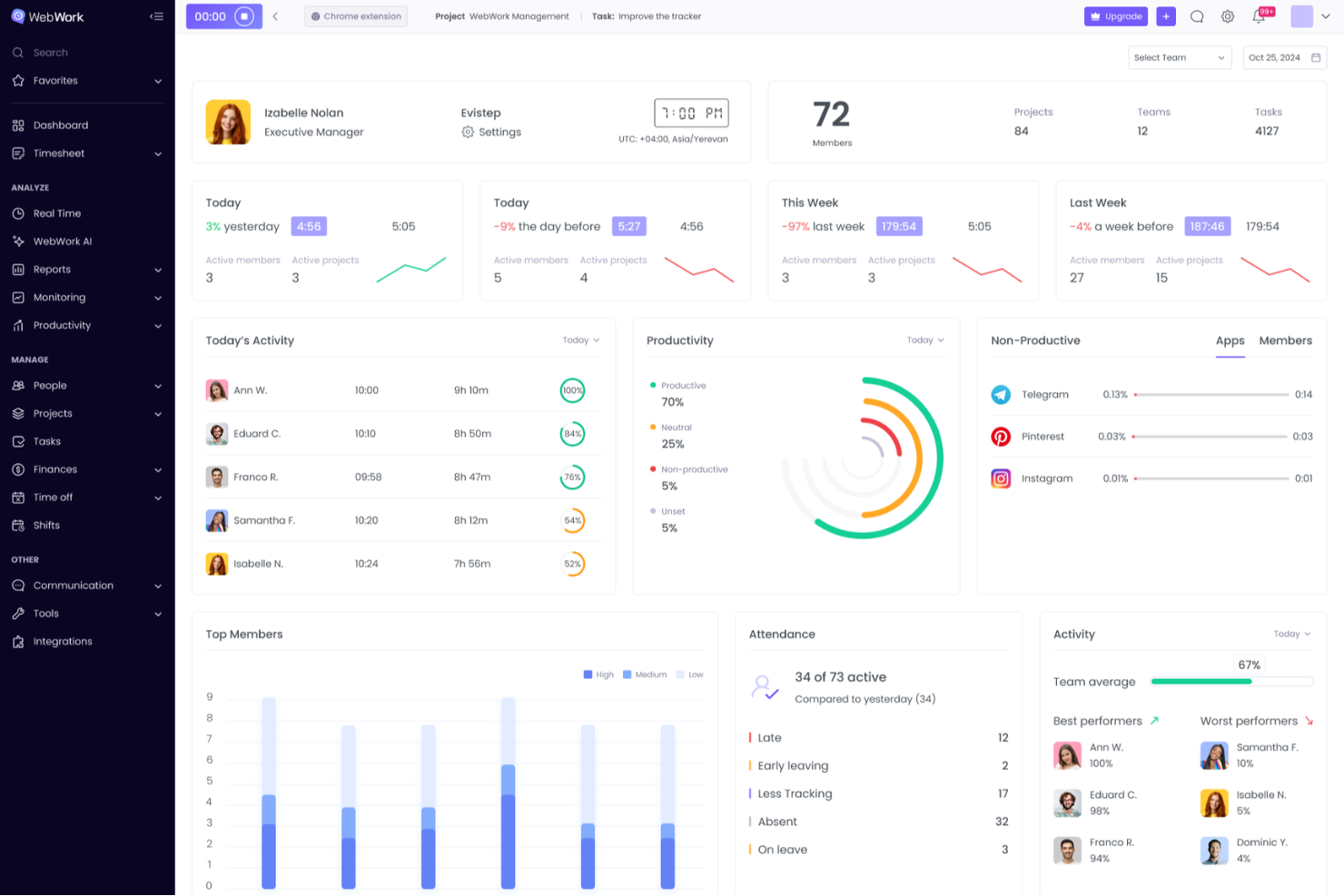
WebWork Time Tracker è una piattaforma per il monitoraggio del tempo e il controllo dei dipendenti che combina il monitoraggio automatizzato, il controllo della produttività, la gestione di progetti e attività e le funzionalità per le buste paga, per team remoti, ibridi e operanti in ufficio.
Per chi è più adatto WebWork Time Tracker?
WebWork Time Tracker è una soluzione particolarmente adatta ai responsabili di team remoti e ai responsabili delle operazioni che necessitano di un monitoraggio dettagliato senza far sentire i dipendenti sorvegliati.
Perché ho scelto WebWork Time Tracker
Ho incluso WebWork Time Tracker tra le mie scelte principali perché offre ai team un controllo reale sul funzionamento effettivo del monitoraggio. Apprezzo in particolare la possibilità di sfocare le schermate in base alla categoria dell'app, così le finestre sensibili, come quelle di un gestore di password o di una scheda del browser personale, non vengono mai mostrate chiaramente. La modalità di monitoraggio silenzioso opera in background sui dispositivi aziendali senza continui messaggi pop-up, mentre l'accesso basato sui ruoli consente ai dipendenti di visualizzare solo i propri dati e non quelli dei colleghi.
Funzionalità principali di WebWork Time Tracker
- Monitoraggio del tempo offline: registra il tempo di lavoro senza connessione Internet e sincronizza automaticamente i dati quando torni online.
- GPS e geofencing: monitora la posizione del team tramite app mobili e può registrare automaticamente l'entrata e l'uscita delle persone quando entrano o escono da un luogo di lavoro designato.
- Sincronizzazione bidirezionale con gli strumenti di gestione dei progetti: si integra in tempo reale con Jira, Asana e ClickUp, trasferendo il tempo monitorato direttamente nei registri di lavoro nativi e aggiornando lo stato delle attività quando i timer vengono avviati o arrestati.
- Pagamenti automatizzati delle buste paga: elabora i pagamenti del team tramite partner come PayPal, Stripe, Wise, Gusto e Deel direttamente dalla piattaforma.
Integrazioni di WebWork Time Tracker
WebWork Time Tracker offre oltre 10 integrazioni native, tra cui Jira, Asana, ClickUp, Trello, GitHub, Notion, QuickBooks, Gusto e Deel. Supporta inoltre connessioni personalizzate tramite la propria API e Zapier.
Pros and Cons
Pros:
- Le schermate sfocate proteggono il lavoro sensibile
- Il monitoraggio offline conserva le ore di lavoro svolte senza connessione
- Il GPS supporta team distribuiti e sul campo
Cons:
- I punteggi dell'attività sottovalutano il lavoro cognitivo con pochi input
- Il monitoraggio può suscitare preoccupazioni sulla privacy dei dipendenti

Clockify
Ideale per la registrazione non invasiva del tempo dedicato ai progetti

Clockify è un software di monitoraggio del tempo progettato per liberi professionisti, piccole imprese e grandi aziende. Ti aiuta a monitorare le ore lavorate, gestire i progetti e analizzare la produttività.
Perché è una buona alternativa a Time Doctor: Ho selezionato Clockify come alternativa a Time Doctor perché offre un monitoraggio affidabile del tempo dedicato ai progetti senza funzionalità invasive di monitoraggio dei dipendenti, come acquisizioni continue tramite webcam o registrazione dei tasti premuti. La sua interfaccia intuitiva consente ai membri del team di avviare semplici timer, registrare manualmente le ore o utilizzare il monitoraggio automatico dal desktop, rispettando al contempo la privacy degli utenti. Questo approccio trasparente aiuta i team a mantenere budget di progetto e fogli presenze fatturabili accurati senza compromettere la fiducia o il morale del team.
Funzionalità e integrazioni principali:
Le funzionalità includono il monitoraggio del tempo, la reportistica e la gestione dei progetti. Puoi monitorare facilmente il tempo dedicato a progetti e attività, aiutandoti a rimanere organizzato. Gli strumenti di reportistica forniscono informazioni sulle prestazioni del team e sulle tendenze della produttività. Le funzionalità di gestione dei progetti consentono di allocare le risorse e monitorare i progressi in modo efficiente.
Le integrazioni includono Trello, Asana, Jira, Basecamp, Slack, QuickBooks, GitHub, monday.com, Todoist, Microsoft Teams e altro.
Pros and Cons
Pros:
- Accesso gratuito per cinque utenti
- Opzioni flessibili per il monitoraggio del tempo
- Adatto a team di qualsiasi dimensione
Cons:
- Strumenti di fatturazione di base
- Mancano strumenti avanzati per la pianificazione dei turni

Ideale per l'integrazione con la contabilità

QuickBooks Time è una soluzione di rilevazione delle presenze con supporto per Android ed è pensata per aziende di tutte le dimensioni, dai liberi professionisti alle grandi imprese. Ti aiuta a tracciare le ore dei dipendenti, gestire le buste paga e migliorare la gestione dei progetti.
Perché è una buona alternativa a Time Doctor: QuickBooks Time offre una perfetta integrazione contabile, risultando ideale per le aziende che già utilizzano QuickBooks per la gestione finanziaria. Include il monitoraggio GPS, ottimo per i team che lavorano sul campo. Grazie a funzionalità come la programmazione e la gestione delle assenze, si possono facilmente coordinare le attività del team. Queste capacità rendono QuickBooks Time una soluzione di rilevazione delle presenze completa.
Funzionalità e integrazioni di spicco:
Funzionalità includono rilevazione delle presenze tramite dispositivi mobili, analisi dei costi per commessa e notifiche. Puoi monitorare i progetti in movimento grazie alle app mobili, particolarmente utili per i team da remoto. L'analisi dei costi ti aiuta a comprendere meglio le spese di progetto e le notifiche ti tengono aggiornato sugli invii dei fogli presenze.
Integrazioni includono QuickBooks Online, Xero, Square, Gusto, Expensify, Deputy, BambooHR, ADP, Paychex e altri.
Pros and Cons
Pros:
- Integrazione QuickBooks semplice
- Monitoraggio GPS per team sul campo
- Strumenti di programmazione efficienti
Cons:
- Nessun flusso di approvazione multilivello
- Occasionale blocco dell'app

My Hours
Ideale per la collaborazione nei team

My Hours è un software di monitoraggio del tempo progettato per liberi professionisti, piccole imprese e team. Offre una piattaforma gratuita che ti aiuta a tracciare le ore di lavoro, gestire i progetti e collaborare efficacemente con il tuo team.
Perché è una buona alternativa a Time Doctor: My Hours offre una forte attenzione alla collaborazione di squadra, rendendolo ideale per le squadre che devono lavorare a stretto contatto. Puoi registrare le ore fatturabili e gestire i budget di progetto con facilità. Lo strumento fornisce anche report dettagliati per aiutarti ad analizzare le prestazioni del team. Queste caratteristiche rendono My Hours una scelta eccellente per i team che vogliono migliorare la collaborazione e la produttività dei dipendenti.
Caratteristiche e integrazioni principali:
Caratteristiche includono la gestione di progetti e tempi, fatturazione e reportistica. Puoi creare e gestire facilmente i progetti per tenere traccia di attività e scadenze. La funzione di fatturazione permette di generare fatture accurate basate sul tempo registrato, semplificando la fatturazione ai clienti. La reportistica offre approfondimenti su come viene impiegato il tempo, aiutandoti a prendere decisioni informate.
Integrazioni includono QuickBooks, Asana, Trello, Basecamp, monday.com, Xero, Zapier, FreshBooks, Slack, Google Calendar e altri.
Pros and Cons
Pros:
- Elevata attenzione alla collaborazione di squadra
- Report dettagliati sulle prestazioni
- Adatto a piccole imprese
Cons:
- Funzionalità basilari dell’app mobile
- Difficile assegnare nuovi progetti

Jibble
Ideale per la rilevazione presenze tramite riconoscimento facciale

Jibble è un software per la rilevazione delle presenze e delle ore di lavoro progettato per aziende di tutte le dimensioni. Ti aiuta a monitorare le ore dei dipendenti, gestire i fogli presenze e controllare l’assenteismo in modo efficiente.
Perché è una valida alternativa a Time Doctor: Jibble offre la rilevazione presenze tramite riconoscimento facciale, fornendo un metodo sicuro e preciso per timbrare l’entrata e l’uscita. Questa funzione riduce al minimo il rischio di frodi sugli orari e garantisce che solo il personale autorizzato possa registrare le ore di lavoro. Puoi monitorare le presenze in tempo reale, il che è ideale per la gestione di grandi team. Queste funzionalità rendono Jibble una scelta affidabile per le aziende che vogliono puntare su sicurezza e precisione nel rilevamento del tempo.
Funzionalità e integrazioni principali:
Funzionalità includono monitoraggio GPS, gestione dei fogli presenze e rilevamento delle attività. Il GPS con geofencing permette di verificare la posizione dei dipendenti al momento della timbratura, rispettando il loro tempo libero: è utile soprattutto per i team sul campo. La gestione delle ore facilita la preparazione delle buste paga registrando con precisione le ore lavorate. Il monitoraggio delle attività aiuta a capire come viene impiegato il tempo sulle diverse attività.
Integrazioni disponibili con Slack, Microsoft Teams, Asana, Trello, Google Calendar, Zapier, QuickBooks, Xero, Gusto, BambooHR e altri ancora.
Pros and Cons
Pros:
- Riconoscimento facciale per la rilevazione presenze
- Monitoraggio GPS per i team sul campo
- Gestione del tempo precisa
Cons:
- Formati di esportazione/report limitati
- Nessuna chat/comunicazione integrata
TMetric
Ideale per l’integrazione nella gestione dei progetti
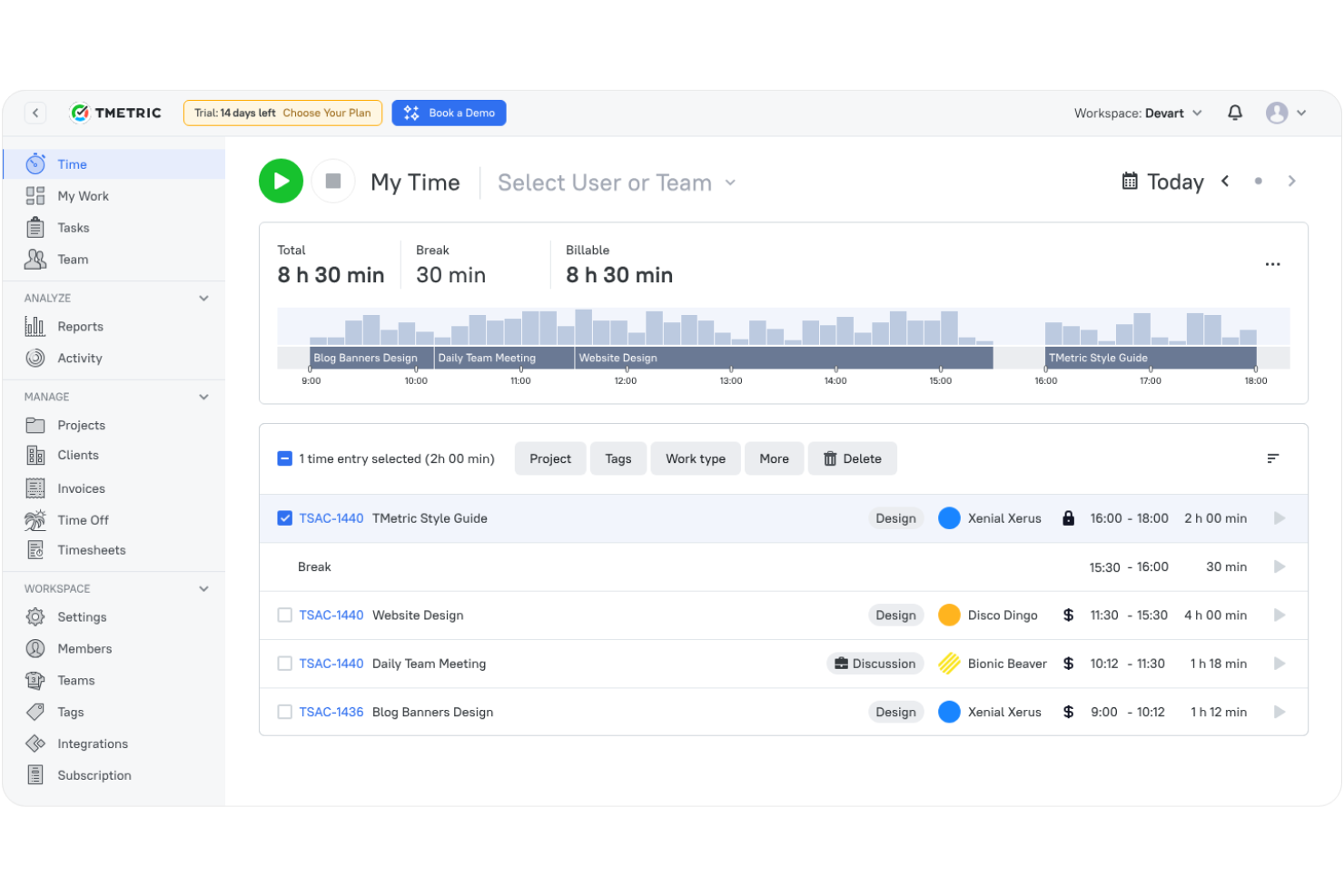
TMetric è un software di monitoraggio del tempo progettato per freelancer, piccoli team e grandi aziende. Ti aiuta a gestire i progetti, monitorare le ore di lavoro e analizzare in modo efficace la produttività.
Perché è una buona alternativa a Time Doctor: TMetric offre una solida integrazione con la gestione dei progetti, consentendoti di coordinare agevolmente attività e monitoraggio del tempo. Puoi seguire l’avanzamento dei progetti e allocare le risorse in modo efficiente. Con funzionalità come il monitoraggio del tempo fatturabile, puoi garantire una fatturazione accurata ai clienti. Queste capacità rendono TMetric una scelta versatile per i team che necessitano di strumenti integrati per la gestione dei progetti.
Funzionalità principali e integrazioni:
Funzionalità includono gestione delle attività, fatturazione e report dettagliati. La gestione delle attività ti aiuta a organizzare e dare priorità al lavoro in modo efficiente. La fatturazione ti permette di generare fatture accurate per i clienti basate sul tempo tracciato. I report dettagliati forniscono approfondimenti sulla produttività del team e sull’avanzamento dei progetti.
Integrazioni includono Asana, Trello, Jira, GitHub, QuickBooks, Todoist, Redmine, Wrike, Salesforce e altre ancora.
Pros and Cons
Pros:
- Solida integrazione per la gestione dei progetti
- Monitoraggio accurato del tempo fatturabile
- Strumenti efficaci per la gestione del tempo
Cons:
- Funzionalità dell’app mobile limitate
- I report richiedono una pulizia manuale
Ideale per approfondimenti sulla produttività in tempo reale
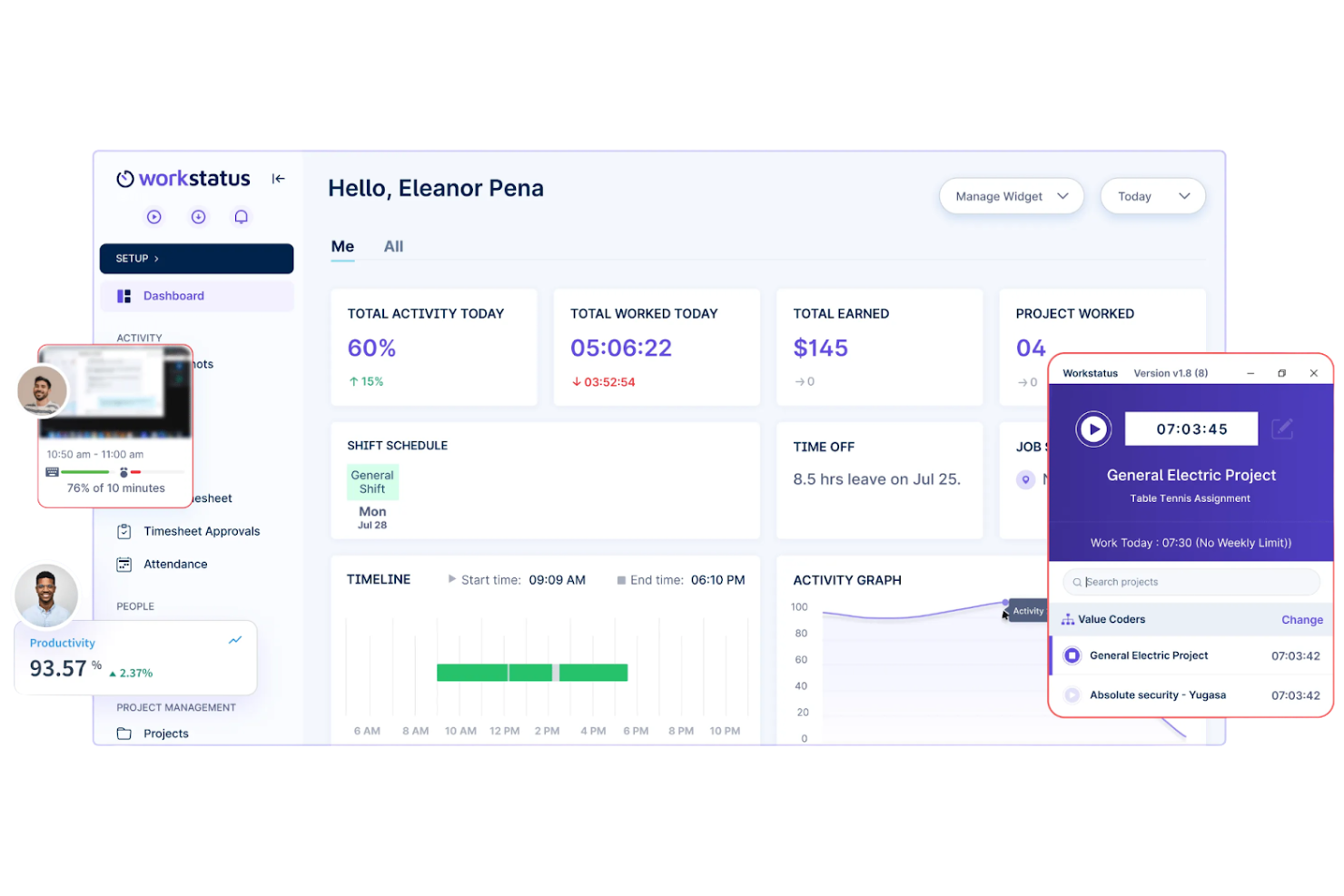
Workstatus è uno strumento di monitoraggio del tempo e gestione della forza lavoro rivolto ad aziende di tutte le dimensioni, inclusi team da remoto e liberi professionisti. Aiuta a monitorare la produttività, a gestire progetti e a tracciare le ore di lavoro dei dipendenti.
Perché è una buona alternativa a Time Doctor: Workstatus offre approfondimenti sulla produttività in tempo reale, consentendo di vedere come la tua squadra utilizza il proprio tempo. Con funzionalità come il monitoraggio delle attività e screenshot automatici, puoi assicurarti che le attività vengano svolte in modo efficiente. Lo strumento offre anche il tracciamento GPS per i team in movimento, rendendolo versatile per diversi ambienti di lavoro. Queste caratteristiche rendono Workstatus una scelta interessante se hai bisogno di dati in tempo reale sulle prestazioni del gruppo.
Caratteristiche principali e integrazioni:
Funzionalità includono il monitoraggio della produttività, la gestione dei timesheet e il controllo GPS. Il monitoraggio della produttività mostra i tempi di attività e inattività, aiutandoti a valutare l'efficienza del team. La gestione del tempo semplifica l'elaborazione delle buste paga monitorando con precisione le ore lavorate. Il controllo GPS fornisce dati basati sulla posizione, ideale per i gruppi operativi sul territorio.
Integrazioni includono Slack, Trello, Asana, Zapier, HubSpot, QuickBooks, Google Workspace, Jira, Basecamp e altri ancora.
Pros and Cons
Pros:
- Monitoraggio della produttività in tempo reale
- Screenshot automatici
- Tracciamento GPS per team sul campo
Cons:
- Personalizzazione limitata della dashboard
- Aggiornamento lento dei dati GPS


Veriato è uno strumento di monitoraggio dei dipendenti e analisi della produttività progettato per aziende di varie dimensioni. Ti aiuta a monitorare le attività dei dipendenti, analizzare la produttività e garantire la conformità alle policy.
Perché è una buona alternativa a Time Doctor: Veriato offre ampie funzionalità di monitoraggio, coprendo oltre 60 attività diverse, che forniscono una visione completa del comportamento dei dipendenti. Puoi monitorare i tasti digitati, le e-mail e l'utilizzo delle applicazioni web per garantire produttività e sicurezza. Il software offre anche il rilevamento delle minacce interne, aiutandoti a proteggere le informazioni sensibili. Queste funzionalità rendono Veriato una scelta eccellente per le organizzazioni che si concentrano sul monitoraggio dettagliato e sulla sicurezza.
Funzionalità e integrazioni principali:
Le funzionalità includono analisi del comportamento degli utenti, dashboard delle attività e avvisi in tempo reale. L'analisi del comportamento degli utenti ti aiuta a comprendere i modelli e a identificare potenziali problemi. Le dashboard delle attività forniscono una panoramica visiva delle metriche di produttività. Gli avvisi in tempo reale ti notificano qualsiasi attività sospetta, consentendo una risposta rapida.
Le integrazioni includono Microsoft 365, Salesforce, Dropbox, Microsoft Teams, Azure, AWS, Okta e altro.
Pros and Cons
Pros:
- Monitoraggio esteso delle attività
- Notifiche di avviso in tempo reale
- Funzionalità di sicurezza complete
Cons:
- Configurazione iniziale complessa
- Nessun supporto per dispositivi iOS

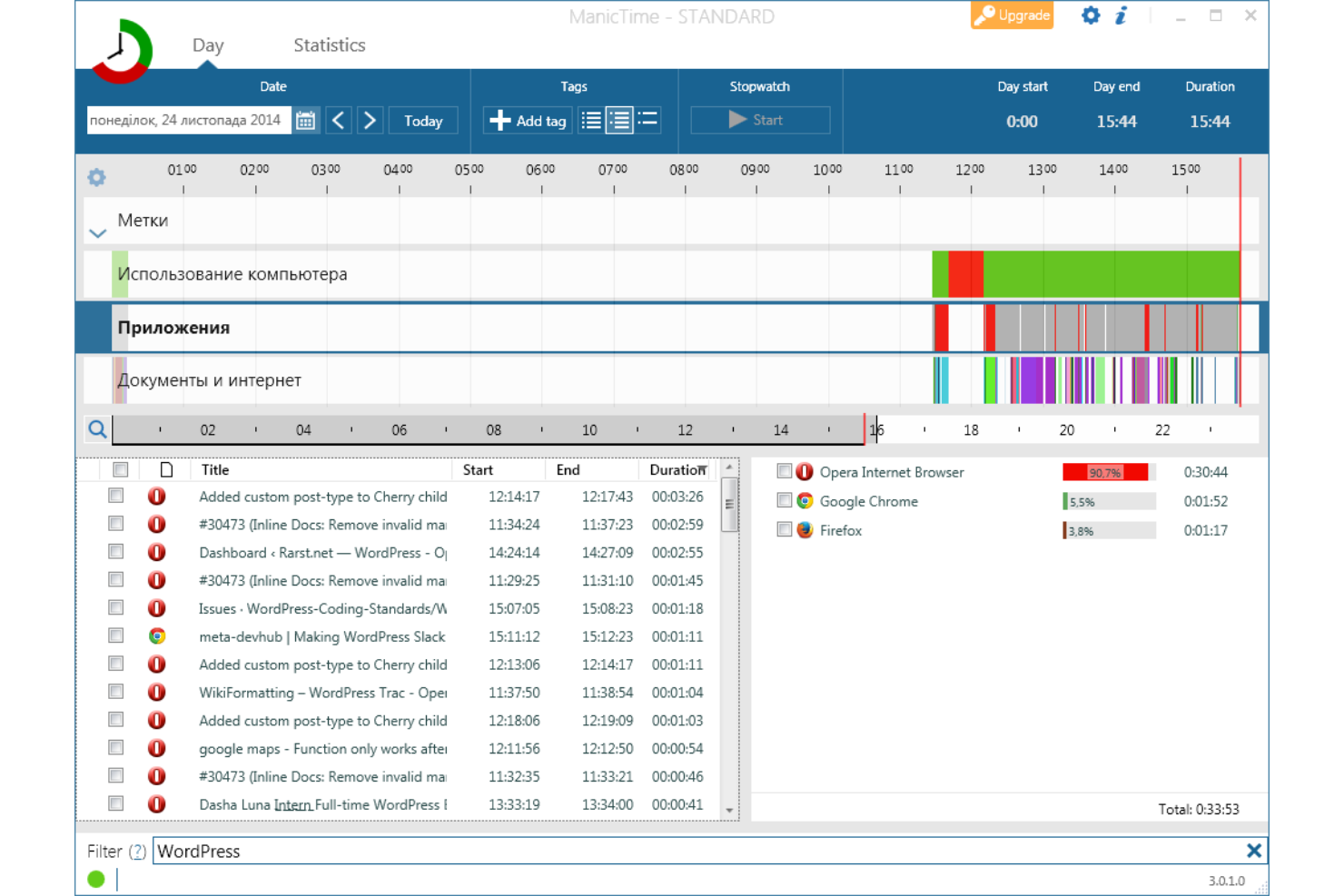
ManicTime è un software di monitoraggio del tempo adatto a freelancer, piccole imprese e grandi organizzazioni. Ti aiuta a tracciare l'utilizzo del computer, gestire progetti e analizzare la produttività senza richiedere un inserimento manuale costante.
Perché è una buona alternativa a Time Doctor: ManicTime eccelle grazie alle sue funzionalità di monitoraggio automatico, catturando in background ogni dettaglio dell'utilizzo del computer. Questa funzione garantisce che non venga persa nessuna attività, risparmiando tempo e fatica. Grazie alla modalità offline, puoi monitorare il tempo anche quando non sei connesso a Internet. Queste caratteristiche rendono ManicTime una scelta solida per chi ha bisogno di report dettagliati senza aggiornamenti manuali continui.
Funzionalità e integrazioni principali:
Funzionalità includono visualizzazione a timeline, tagging e report dettagliati. La visualizzazione a timeline offre una rappresentazione visiva delle tue attività giornaliere, rendendo facile individuare i tuoi pattern di produttività. Il tagging ti permette di categorizzare le registrazioni di tempo per una migliore organizzazione e i report dettagliati offrono una panoramica sulle tue abitudini lavorative.
Integrazioni includono Asana, Jira, Basecamp, GitHub, Microsoft Excel, QuickBooks, FreshBooks, Office 365 e altro ancora.
Pros and Cons
Pros:
- Il tracciamento automatico fa risparmiare tempo
- Funziona efficacemente offline, agevolando i flussi di lavoro da remoto
- Report visivi dettagliati
Cons:
- Funzionalità limitate dell'app mobile
- Strumenti di gestione progetti basilari
Altre alternative a Time Doctor
Ecco alcune ulteriori alternative a Time Doctor che non sono state incluse nel mio elenco, ma che vale comunque la pena prendere in considerazione:
- Insightful
Ideale per l’analisi delle attività in tempo reale
- Toggl
Ideale per un'interfaccia intuitiva
- Monitask
Ideale per screenshot come prova del lavoro svolto
- Connecteam
Ideale per la gestione di team senza postazione fissa
- DeskTime
Ideale per il monitoraggio automatico del tempo


Come valuto le alternative a Time Doctor
Divido la mia valutazione in due livelli: la base che uno strumento deve soddisfare — monitoraggio del tempo, assegnazione dei progetti e monitoraggio della produttività — e i fattori distintivi che separano le opzioni migliori.
Funzionalità principali (requisiti imprescindibili per questo elenco)
Quando seleziono gli strumenti per il mio elenco, assegno a ciascuno un punteggio su una scala da 0 (non offre la funzionalità) a 5 (eccelle in quest'area) per ogni funzionalità principale elencata di seguito. Poi converto il punteggio totale dello strumento in una percentuale. Ogni strumento deve raggiungere un punteggio totale minimo del 65% per essere preso in considerazione.
- Monitoraggio automatizzato del tempo: verifico se uno strumento offre timer integrati, rilevamento dell'inattività e monitoraggio automatico, così i team non devono registrare manualmente ogni chiamata con un cliente o attività dello sprint.
- Assegnazione a livello di progetto e attività: ogni strumento dovrebbe consentire di assegnare le ore monitorate a progetti, attività e clienti specifici, ad esempio suddividendo il tempo tra tre contratti continuativi nella stessa giornata.
- Monitoraggio della produttività: valuto se la piattaforma monitora l'utilizzo di applicazioni e URL, i livelli di attività o le schermate, e quanto controllo hanno responsabili e dipendenti su queste impostazioni.
- Fogli presenze e report: cerco fogli presenze personalizzabili, flussi di approvazione e report in grado di suddividere le ore per membro del team, progetto o intervallo di date, utili per le riunioni settimanali del team o le revisioni con i clienti.
- Supporto alla fatturazione e alle paghe: lo strumento dovrebbe supportare la configurazione delle tariffe fatturabili e integrarsi con i sistemi paghe o di fatturazione, in modo che le ore monitorate si traducano direttamente in fatture accurate per i clienti o nell'elaborazione corretta delle paghe.
- Integrazioni con gli strumenti di gestione dei progetti: i concorrenti più validi si sincronizzano nativamente con strumenti come Jira, Asana o ClickUp, importando le attività e consentendo ai membri del team di avviare i timer senza uscire dal proprio spazio di lavoro per la gestione dei progetti.
Una volta ottenuto un elenco di strumenti che soddisfano questo criterio, valuto ciò che distingue ogni piattaforma.
Fattori distintivi (ciò che differenzia i fornitori)
Ecco come confronto i diversi fornitori:
Funzionalità di rilievo
I controlli sulla privacy sono molto importanti in questo ambito. Cerco strumenti che consentano ai responsabili di regolare il livello di monitoraggio — schermate sfocate, monitoraggio basato sul consenso o possibilità di disabilitare completamente l'acquisizione delle schermate — così i team si sentono considerati affidabili anziché sorvegliati. Il monitoraggio del tempo offline è un altro fattore distintivo che valuto, soprattutto per i team ibridi che perdono la connessione durante gli spostamenti o il lavoro sul campo. Anche la previsione del budget e della capacità distingue le opzioni migliori; gli strumenti che mostrano i tassi di consumo in tempo reale rispetto ai budget dei progetti aiutano i responsabili di progetto a individuare un eccesso di servizio prima che incida sulla fattura.
Oltre le funzionalità
La privacy dei dati e le certificazioni di conformità hanno un peso considerevole nella mia valutazione, soprattutto per i team distribuiti che operano in regioni soggette a normative diverse. Verifico se un fornitore offre opzioni di residenza dei dati e flussi di lavoro per il consenso dei lavoratori. Anche la struttura dei prezzi è importante: analizzo come vengono distribuite le funzionalità tra i diversi piani, poiché molti strumenti riservano le schermate o le integrazioni ai piani superiori, facendo aumentare rapidamente i costi quando il team cresce. Il supporto multipiattaforma completa il quadro; uno strumento deve offrire supporto nativo per desktop, dispositivi mobili ed estensioni del browser, così nessuno del team rimane senza un modo per monitorare il tempo.
Perché cercare un'alternativa a Time Doctor?
Sebbene Time Doctor sia una buona scelta come software per il monitoraggio del tempo e della produttività, ci sono diversi motivi per cui alcuni utenti cercano soluzioni alternative. Potresti cercare un'alternativa a Time Doctor perché:
- Hai bisogno di funzionalità di reportistica più avanzate
- Il tuo team necessita di funzionalità di monitoraggio offline
- Vuoi una migliore integrazione con gli strumenti esistenti
- Hai bisogno di una soluzione per team più numerosi
- Ti serve un'opzione più conveniente
- Il tuo team ha bisogno di un'interfaccia utente più semplice
Se ti riconosci in una di queste situazioni, sei nel posto giusto. Il mio elenco contiene diverse app per il monitoraggio del tempo e opzioni di software per la produttività più adatte ai team che affrontano queste difficoltà con Time Doctor e cercano soluzioni alternative.
Funzionalità principali di Time Doctor
Ecco alcune delle caratteristiche principali di Time Doctor, per aiutarti a confrontare ciò che offrono le soluzioni alternative:
- Funzionalità di monitoraggio del tempo: Monitora il tempo dedicato alle attività e ai progetti, consentendoti di analizzare e ottimizzare la produttività.
- Report sulla produttività: Fornisce analisi dettagliate sulle prestazioni dei dipendenti, aiutandoti a individuare le aree di miglioramento.
- Gestione delle attività: Ti consente di assegnare e gestire le attività in modo efficace, assicurandoti che i membri del tuo team rimangano concentrati sui loro obiettivi.
- Screenshot e registrazione dello schermo: Cattura i livelli di attività dei dipendenti per garantire responsabilità e conformità.
- Avvisi di inattività: Notifica ai responsabili quando i dipendenti perdono la concentrazione, aiutandoti a mantenere la produttività.
- Integrazioni: Funziona con oltre 60 applicazioni, migliorando il tuo flusso di lavoro.
- Dashboard per dirigenti: Offre visibilità sulla produttività del team e sulle metriche delle prestazioni, supportando il processo decisionale.
- Metriche sull'equilibrio tra vita privata e lavoro: Aiuta a mantenere carichi di lavoro equilibrati per prevenire il burnout e garantire il benessere dei dipendenti.
- App mobile: Consente il monitoraggio in movimento, assicurandoti di poter controllare il lavoro da qualsiasi luogo.
- Gestione dei clienti: Monitora il tempo dedicato ai progetti dei clienti, rendendo la fatturazione più accurata ed efficiente.
Cosa succede ora:
Se stai cercando un software per il monitoraggio del tempo e della produttività, contatta gratuitamente un consulente di SoftwareSelect per ricevere consigli.
Compili un modulo e partecipi a una breve conversazione durante la quale verranno analizzate nel dettaglio le tue esigenze. In seguito riceverai una selezione di software da valutare. Ti supporteranno anche durante l'intero processo di acquisto, comprese le trattative sul prezzo.