

10 alternative a QuickBooks Time per gli orologi marcatempo nel 2026

Elenco delle migliori alternative a QuickBooks Time


Una valida alternativa a QuickBooks Time offre un monitoraggio affidabile del tempo, funzionalità facili da usare e intuitive e integrazioni con gli strumenti su cui il tuo team fa già affidamento. Se stai cercando alternative a QuickBooks Time, probabilmente stai affrontando difficoltà nel monitorare le ore lavorate dai vari team, gestire il rilevamento delle presenze o hai bisogno di funzionalità più flessibili per il tuo flusso di lavoro. Questo elenco restringe la scelta alle migliori opzioni, così puoi confrontare rapidamente i principali strumenti e le app per il monitoraggio del tempo e trovare una soluzione che ti aiuti a migliorare la gestione del tempo. Troverai riepiloghi concisi e indicazioni pratiche per ottimizzare i tuoi processi e prendere una decisione consapevole.
Che cos'è QuickBooks Time?
QuickBooks Time è una soluzione software per il monitoraggio del tempo progettata per titolari di aziende, piccole imprese e team che devono monitorare le ore lavorate dai dipendenti, gestire la pianificazione del personale e semplificare le buste paga. Funziona come strumento di monitoraggio del tempo e consente al team di registrare entrate e uscite da qualsiasi luogo, creare registrazioni accurate delle ore e gestire i fogli presenze in tempo reale. QuickBooks Time supporta inoltre il monitoraggio delle assenze (inclusi i permessi retribuiti), il rilevamento delle presenze e report dettagliati sul tempo.
Tabella comparativa delle alternative a QuickBooks Time
Questa tabella comparativa riassume i dettagli dei prezzi delle principali alternative a QuickBooks Time che ho selezionato:
| Tool | Best For | Trial Info | Price | ||
|---|---|---|---|---|---|
| 1 | Ideale per flussi di approvazione personalizzabili | Demo gratuita + prova gratuita di 14 giorni disponibile | Da $4.49/utente/mese | Website | |
| 2 | Ideale per il monitoraggio del tempo e del budget della forza lavoro con assistenza dell'IA | Prova gratuita di 14 giorni | Da $3.99/utente/mese (con fatturazione annuale) | Website | |
| 3 | Ideale per il monitoraggio delle ore a livello di reparto | Prova gratuita di 30 giorni | A partire da $50/mese | Website | |
| 4 | La soluzione migliore per un monitoraggio conveniente dei progetti | Piano gratuito + prova gratuita di 7 giorni disponibile | A partire da $3.99/utente/mese (fatturato annualmente) | Website | |
| 5 | Ideale per la rilevazione automatica del tempo con IA | Prova gratuita di 14 giorni + demo gratuita disponibile | Da $9/utente/mese (fatturazione annuale) | Website | |
| 6 | Ideale per il monitoraggio presenze verificato | Prova gratuita di 14 giorni + piano gratuito + demo gratuita disponibile | Da $4.49/utente/mese (fatturazione annuale) | Website | |
| 7 | Ideale per il tracciamento automatico del tempo per attività | Prova gratuita di 14 giorni + piano gratuito + demo gratuita disponibile | Da $3,99/utente/mese (fatturazione annuale) | Website | |
| 8 | Ideale per monitorare la produttività del team | Prova gratuita di 14 giorni + demo gratuita disponibile | Da $6,67/utente/mese (fatturati annualmente) | Website | |
| 9 | Ottimo per fatturazione e monitoraggio delle spese | Prova gratuita di 30 giorni + piano gratuito + demo gratuita disponibile | Da $9/utente/mese (fatturazione annuale) | Website | |
| 10 | Ideale per il monitoraggio dei team sul campo | Prova gratuita di 14 giorni disponibile | Da $3.66/utente/mese (fatturato annualmente) | Website |

Perché fidarsi dei nostri consigli sui software
Il nostro team testa e recensisce software dal 2012. In quanto project manager noi stessi, sappiamo quanto sia difficile — e importante — scegliere il software giusto.
Per questa guida, abbiamo valutato gli strumenti attraverso test pratici e ricerche indipendenti, assegnando un punteggio agli strumenti in base ai nostri criteri di selezione. Ci basiamo inoltre sulle competenze di leader di pensiero del settore e di professionisti attivi nella gestione dei progetti.
Le nostre recensioni riflettono il nostro giudizio editoriale umano, non un discorso di vendita.
Revisori esperti:
Recensioni delle migliori alternative a QuickBooks Time
Di seguito trovi i miei riepiloghi dettagliati delle alternative a QuickBooks Time che sono entrate nel mio elenco. Le mie recensioni offrono uno sguardo approfondito alle funzionalità, ai casi d’uso più adatti e alle integrazioni di ciascun software per il monitoraggio del tempo, per aiutarti a trovare quello migliore per te.

Ideale per flussi di approvazione personalizzabili

Buddy Punch offre ai team un modo flessibile per tracciare le ore lavorative, gestire le presenze e organizzare le pianificazioni tutto in un'unica piattaforma. È una soluzione adatta alle aziende che cercano un'alternativa a QuickBooks Time facile da usare, con forti opzioni di personalizzazione e integrazioni affidabili con la gestione delle retribuzioni.
Per chi è ideale Buddy Punch?
Responsabili delle risorse umane e responsabili operativi di piccole e medie imprese che necessitano di un controllo dettagliato sulle approvazioni di assenze e presenze.
Perché Buddy Punch è una valida alternativa a QuickBooks Time
Ho scelto Buddy Punch proprio per la flessibilità del suo flusso di approvazione: puoi impostare flussi di approvazione multi-step, assegnare responsabili specifici come approvatori e configurare regole diverse per dipartimenti o sedi diverse. In pratica, ciò significa che il mio team può gestire le richieste di ferie e le approvazioni dei fogli presenze senza dover passare tutto attraverso una sola persona. Apprezzo anche il fatto che Buddy Punch permetta di inserire regole di notifica direttamente nel flusso di lavoro, così gli approvatori vengono avvisati automaticamente quando serve un'azione. Per le aziende che gestiscono più team con esigenze di approvazione diverse, questo livello di controllo è difficile da trovare nella maggior parte delle alternative a QuickBooks Time.
Caratteristiche principali di Buddy Punch
- Tracciamento GPS: Registra le posizioni dei dipendenti al momento di ciascun ingresso o uscita.
- Riconoscimento facciale: Verifica l'identità del dipendente al momento del clock-in per prevenire il fenomeno dell'impersonificazione.
- Codici attività: Assegna le registrazioni orarie a specifici progetti, clienti o centri di costo.
- Avvisi di straordinario: Segnala automaticamente i dipendenti che si stanno avvicinando alle soglie di straordinario.
Integrazioni di Buddy Punch
Buddy Punch offre integrazioni native con QuickBooks, ADP, Gusto, Paychex, Zapier e Workday. È disponibile un'API per integrazioni personalizzate.
Pros and Cons
Pros:
- Flussi di approvazione altamente personalizzabili per ferie e permessi
- Metodi di entrata flessibili per team eterogenei
- Strumenti integrati di pianificazione e cambio turno
Cons:
- Le funzionalità dell’app mobile possono essere incoerenti
- Opzioni limitate di reportistica avanzata per le retribuzioni

Ideale per il monitoraggio del tempo e del budget della forza lavoro con assistenza dell'IA
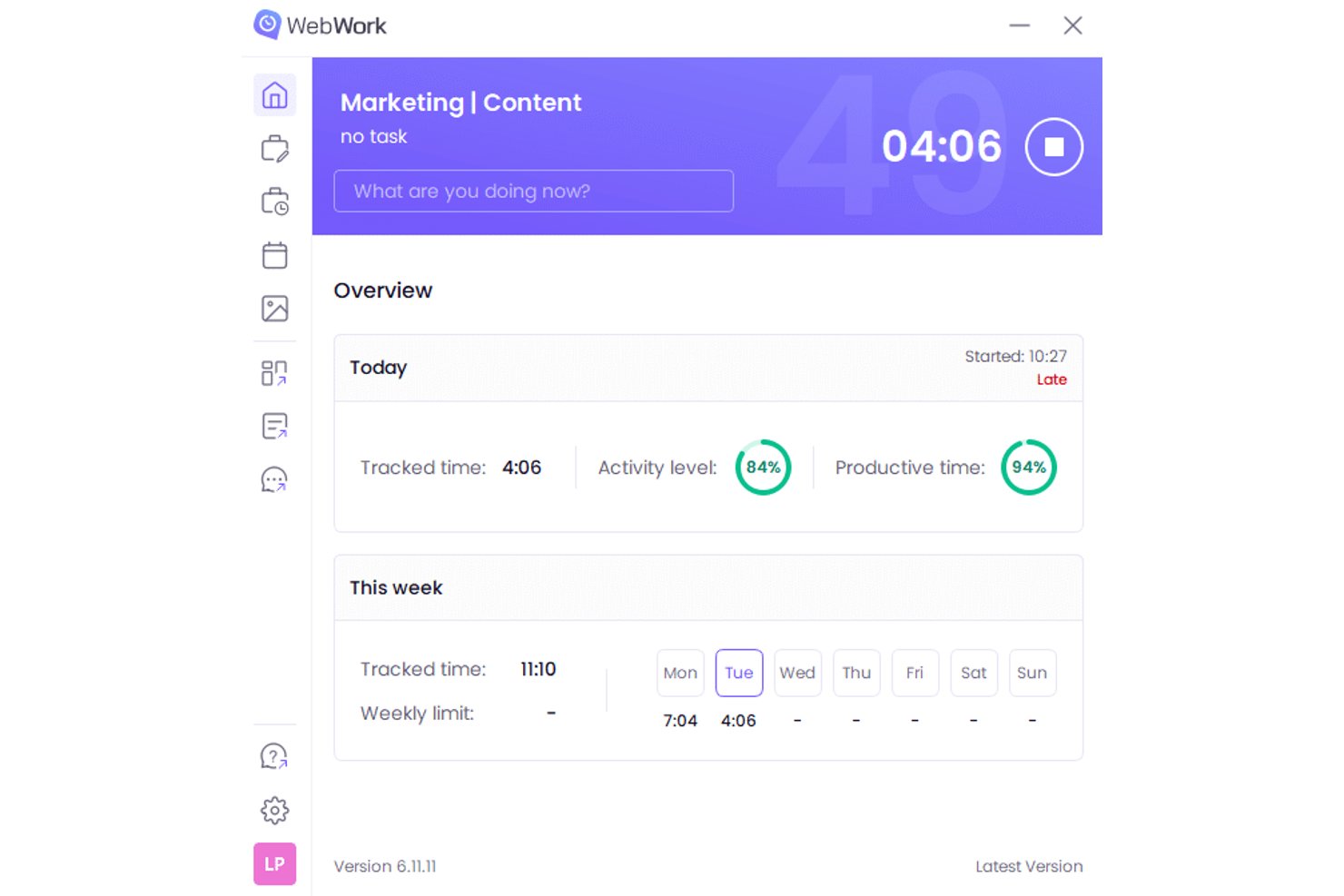
WebWork Time Tracker è una piattaforma per il monitoraggio del tempo dedicata a team tecnologici, agenzie e aziende che devono monitorare le ore di lavoro, la produttività, l'avanzamento dei progetti e i budget in un unico posto.
Per chi è più adatto WebWork Time Tracker?
WebWork Time Tracker è adatto a team tecnologici e agenzie che necessitano di una visibilità, con assistenza dell'IA, sulle ore del personale, sui budget dei progetti e sulla produttività della forza lavoro.
Perché ho scelto WebWork Time Tracker
Ho scelto WebWork Time Tracker perché il monitoraggio del tempo e del budget della forza lavoro, con assistenza dell'IA, aiuta il mio team a collegare le ore registrate ai costi dei progetti. Utilizzo i report sulla produttività, il monitoraggio delle attività e gli avvisi sul budget per individuare gli sforamenti mentre il lavoro è ancora in corso. Questo mi fornisce elementi più chiari per adeguare l'ambito, il personale o le previsioni di consegna.
Funzionalità principali di WebWork Time Tracker
- Schermate: Acquisisce schermate periodiche durante le sessioni di lavoro monitorate.
- Fogli presenze: Consente agli utenti di esaminare, modificare ed esportare le registrazioni del tempo.
- Monitoraggio delle presenze: Registra entrate, pause, assenze e orari di lavoro.
- Gestione delle attività: Assegna attività, imposta scadenze e monitora lo stato di completamento.
Integrazioni di WebWork Time Tracker
WebWork Time Tracker offre integrazioni native con Google Workspace, Slack, Jira, ClickUp, Asana, QuickBooks, Xero, Gusto e Microsoft Teams, oltre a Zapier. Sono disponibili un'API pubblica e webhook per le integrazioni personalizzate, con accesso all'API limitato agli utenti Premium.
Pros and Cons
Pros:
- Gli avvisi sul budget segnalano tempestivamente gli sforamenti dei progetti
- I report dettagliati collegano le ore alle attività
- È possibile controllare la frequenza delle schermate
Cons:
- L'app mobile non include le funzionalità di monitoraggio desktop
- Il monitoraggio tramite schermate può risultare invasivo

TimeTrex
Ideale per il monitoraggio delle ore a livello di reparto
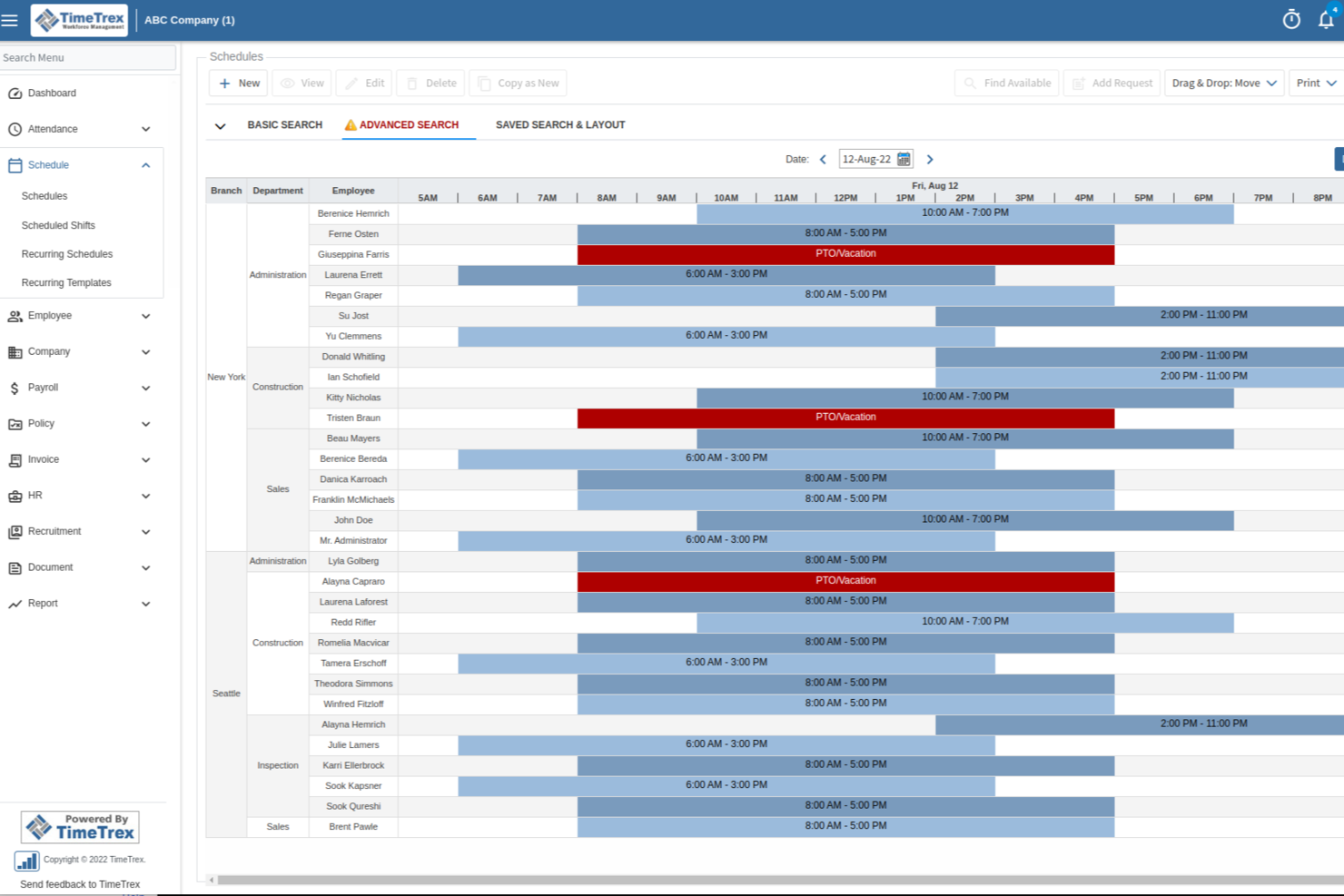
TimeTrex offre alle aziende in crescita un modo per gestire il monitoraggio delle ore, la pianificazione e le buste paga su un'unica piattaforma. Se cerchi un maggiore controllo e opzioni più avanzate rispetto a QuickBooks Time, questo strumento ti aiuta a gestire la conformità e le esigenze complesse della forza lavoro in un unico luogo.
Per chi è più adatto TimeTrex?
TimeTrex è ideale per le aziende che gestiscono dipendenti retribuiti a ore distribuiti in diverse sedi o filiali.
Perché TimeTrex è una buona alternativa a QuickBooks Time
Ho scelto TimeTrex in particolare per la sua efficacia nella gestione di team distribuiti su più sedi. Ogni sede può avere le proprie regole per la rilevazione delle ore e delle presenze, mentre i responsabili di ciascuna sede vedono solo le informazioni pertinenti grazie ai controlli di accesso basati sui ruoli. Apprezzo anche la funzione di georecinzione, che consente di definire zone specifiche in modo che i dipendenti possano registrare l'ingresso solo da luoghi autorizzati. Per le aziende che gestiscono punti vendita, magazzini o filiali di assistenza, una struttura organizzata a livello di sede è difficile da trovare in uno strumento come QuickBooks Time.
Funzionalità principali di TimeTrex
- Calcolo dei costi dei progetti: Assegna il lavoro e le spese a progetti o attività specifici e monitora la redditività in tempo reale per ogni incarico.
- Portale ad accesso autonomo per i dipendenti: I dipendenti possono inviare richieste di ferie, consultare i cedolini e aggiornare autonomamente i propri dati senza coinvolgere le risorse umane.
- Gestione delle buste paga a livello statale e internazionale: Applica automaticamente le corrette regole fiscali e normative sul lavoro ai dipendenti che lavorano in diversi stati o paesi.
- Assistente basato sull'IA: Risponde in tempo reale alle domande di dipendenti e responsabili e contribuisce ad automatizzare le attività ordinarie di gestione della forza lavoro.
Integrazioni di TimeTrex
TimeTrex offre integrazioni native con ADP, QuickBooks, Sage, Paychex, Surepay, Ceridian, Meditech e altri. Fornisce inoltre un'API per integrazioni personalizzate.
Pros and Cons
Pros:
- Monitora facilmente le presenze in più sedi
- Supporta opzioni di rilevazione delle ore biometriche e da dispositivi mobili
- Include strumenti integrati per buste paga e pianificazione
Cons:
- L'interfaccia dell'app mobile appare datata
- Il processo di configurazione può richiedere molto tempo
New Product Updates from TimeTrex
TimeTrex Adds Quick Punch App With Offline and QR Support
TimeTrex adds a new Quick Punch app, offline punching, QR code scanning, punch images, configurable messages, and punch warnings or lockouts to improve employee clock-ins across browsers and local computers. For more information, visit TimeTrex’s official site.
 .
.
Clockify
La soluzione migliore per un monitoraggio conveniente dei progetti

Clockify aiuta i team digitali, le società di consulenza e le agenzie a monitorare le ore su un numero illimitato di progetti, senza limiti in termini di complessità o numero di clienti. Se hai bisogno di una visibilità chiara sul tempo fatturabile, sull'avanzamento dei progetti e sulla responsabilità per un portafoglio di attività diversificato, Clockify offre tutti gli elementi essenziali.
Per chi è più adatto Clockify?
Clockify è adatto a liberi professionisti, startup e agenzie che gestiscono un elevato numero di clienti e hanno bisogno di un monitoraggio semplice dei progetti o del tempo fatturabile, senza preoccuparsi di raggiungere un limite di progetti.
Perché Clockify è una buona alternativa a QuickBooks Time
Ho scelto Clockify soprattutto perché è uno strumento conveniente per il monitoraggio del tempo. Questo è importante quando gestisci un'agenzia in crescita, dove aggiungere nuovi lavori per i clienti in QuickBooks Time o Harvest ti costringerebbe rapidamente a passare a un piano più costoso. Apprezzo anche il fatto che Clockify permetta di impostare tariffe orarie per progetto, così i report sulla redditività e il tempo fatturabile rimangono accurati senza necessità di rettifiche manuali. La funzione di monitoraggio del budget del progetto offre al mio team una visione in tempo reale delle ore consumate rispetto alla stima totale, il che è davvero utile per rimanere nell'ambito previsto e gestire l'utilizzo delle risorse.
Funzionalità principali di Clockify
- Monitoraggio del tempo: Avvia e arresta un timer da qualsiasi dispositivo oppure registra il tempo manualmente utilizzando la vista del foglio presenze.
- Monitoraggio delle presenze: Monitora gli orari di entrata e uscita per tenere sotto controllo la disponibilità del team e le pause tra diverse sedi.
- Modalità chiosco: Consenti ai team sul campo o che utilizzano dispositivi condivisi di registrare l'ingresso da un terminale fisso utilizzando un PIN.
- Dashboard dei report: Genera report dettagliati sul tempo, filtrati per progetto, cliente, membro del team o intervallo di date.
Integrazioni di Clockify
Le integrazioni includono Jira, Asana, Trello, Monday, QuickBooks, Google Calendar, Outlook, Airtable, Notion e Salesforce.
Pros and Cons
Pros:
- Fino a cinque utenti gratuiti
- Possibilità di creare programmi di progetto condivisi
- Assistenza clienti dal vivo 24 ore su 24, 7 giorni su 7
Cons:
- Nessuna elaborazione integrata delle buste paga
- Opzioni limitate per il monitoraggio del tempo offline

Timely
Ideale per la rilevazione automatica del tempo con IA

Timely è un software di rilevazione del tempo progettato per team e professionisti che desiderano registrazioni accurate e in tempo reale senza inserimenti manuali. È particolarmente adatto ad agenzie digitali e lavoratori della conoscenza che vogliono automatizzare la rilevazione del tempo e ottenere informazioni affidabili sui progetti.
Per chi è Timely?
Timely è una scelta intelligente per team digitali e consulenze che desiderano una rilevazione del tempo completamente automatizzata e potenziata dall’IA su progetti per clienti e lavori interni.
Perché Timely è una valida alternativa a QuickBooks Time
Ho scelto Timely perché elimina la necessità di inserire manualmente i tempi. Il suo Memory Tracker funziona in background e registra automaticamente tutto ciò su cui lavorano i membri del team tra app, riunioni e documenti. Posso quindi rivedere quei registri e approvare i timesheet generati dall’IA in blocco, invece di inseguire le persone per le registrazioni a fine settimana. Per i team a contatto con il cliente, dove la registrazione accurata del tempo incide direttamente sulla fatturazione, questa acquisizione automatica rappresenta un vero vantaggio rispetto agli strumenti di rilevazione che si affidano esclusivamente a timer manuali.
Funzionalità principali di Timely
- Dashboard progetto: Visualizza tutti i progetti attivi in un unico posto, compresi budget, tariffe fatturabili e costi orari.
- Tempo bloccato: Blocca le registrazioni inviate per evitare modifiche e mantenere l’accuratezza dei timesheet approvati.
- Monitoraggio straordinari e sotto orario: Controlla quando i membri del team superano o non raggiungono le ore previste.
- Esportazione dei report: Esporta report live o istantanee per condividere dati di tempo di progetto e di team esternamente.
Integrazioni di Timely
Le integrazioni includono Asana, Trello, Jira, Slack, Zoom, HubSpot, Salesforce, QuickBooks, GitHub e WordPress.
Pros and Cons
Pros:
- Timesheet automatici generati dall’IA
- Registra l’attività tra app e riunioni
- Integrazione calendario per tracciare riunioni ed eventi
Cons:
- Nessun piano gratuito disponibile
- È necessaria l’approvazione manuale per i timesheet dell’IA

Jibble
Ideale per il monitoraggio presenze verificato

Jibble è una piattaforma cloud per la gestione di presenze e orari pensata per le aziende che richiedono un sistema sicuro e automatizzato di gestione dei timesheet. Lo trovo particolarmente adatto se il tuo team lavora in sedi diverse, ha turni complessi o necessita di una rigorosa conformità nel monitoraggio della forza lavoro.
Per chi è ideale Jibble?
Jibble è una soluzione adatta per le medie imprese che hanno bisogno di un controllo presenze verificato e basato sulla posizione per lavoratori senza postazione fissa o in mobilità.
Perché Jibble è una valida alternativa a QuickBooks Time
Ho scelto Jibble soprattutto per i team in cui la verifica delle presenze è imprescindibile. La funzione di timbratura con riconoscimento facciale conferma l’identità di ogni dipendente, eliminando il rischio del cosiddetto 'buddy punching'. Mi affido inoltre alle opzioni chiosco nelle sedi dove l’uso del telefono non è pratico. Per i manager che gestiscono numerosi turni, questi livelli di verifica garantiscono un'integrità in tempo reale che la maggior parte dei tool di rilevazione non offre. In più, grazie a un piano gratuito solido, è semplice testare la facilità d’uso prima di decidere se acquistarlo.
Funzionalità chiave di Jibble
- Fatturazione: Converte le ore fatturabili registrate direttamente in fatture per i clienti senza uscire dalla piattaforma.
- Pianificazione turni: Imposta e pubblica gli orari di lavoro dei dipendenti per mantenere chiara la distribuzione dei turni.
- Gestione assenze: Configura le politiche di permesso, monitora i maturati e gestisci le richieste di ferie del team.
- Monitoraggio attività: Visualizza in tempo reale chi è attualmente in servizio e a quale attività o progetto sta lavorando.
Integrazioni di Jibble
Jibble offre integrazioni native con QuickBooks, Xero, Deel, Slack, Microsoft Teams, Google Workspace e Zapier. È disponibile un’API per integrazioni personalizzate.
Pros and Cons
Pros:
- Rileva la presenza tramite riconoscimento facciale
- Supporta la pianificazione dei turni e l’analisi dei costi di commessa
- Fornisce log di controllo per la conformità dei timesheet
Cons:
- Automazione limitata per il calcolo degli straordinari
- Opzioni di integrazione limitate per la fatturazione dei progetti

TimeCamp
Ideale per il tracciamento automatico del tempo per attività
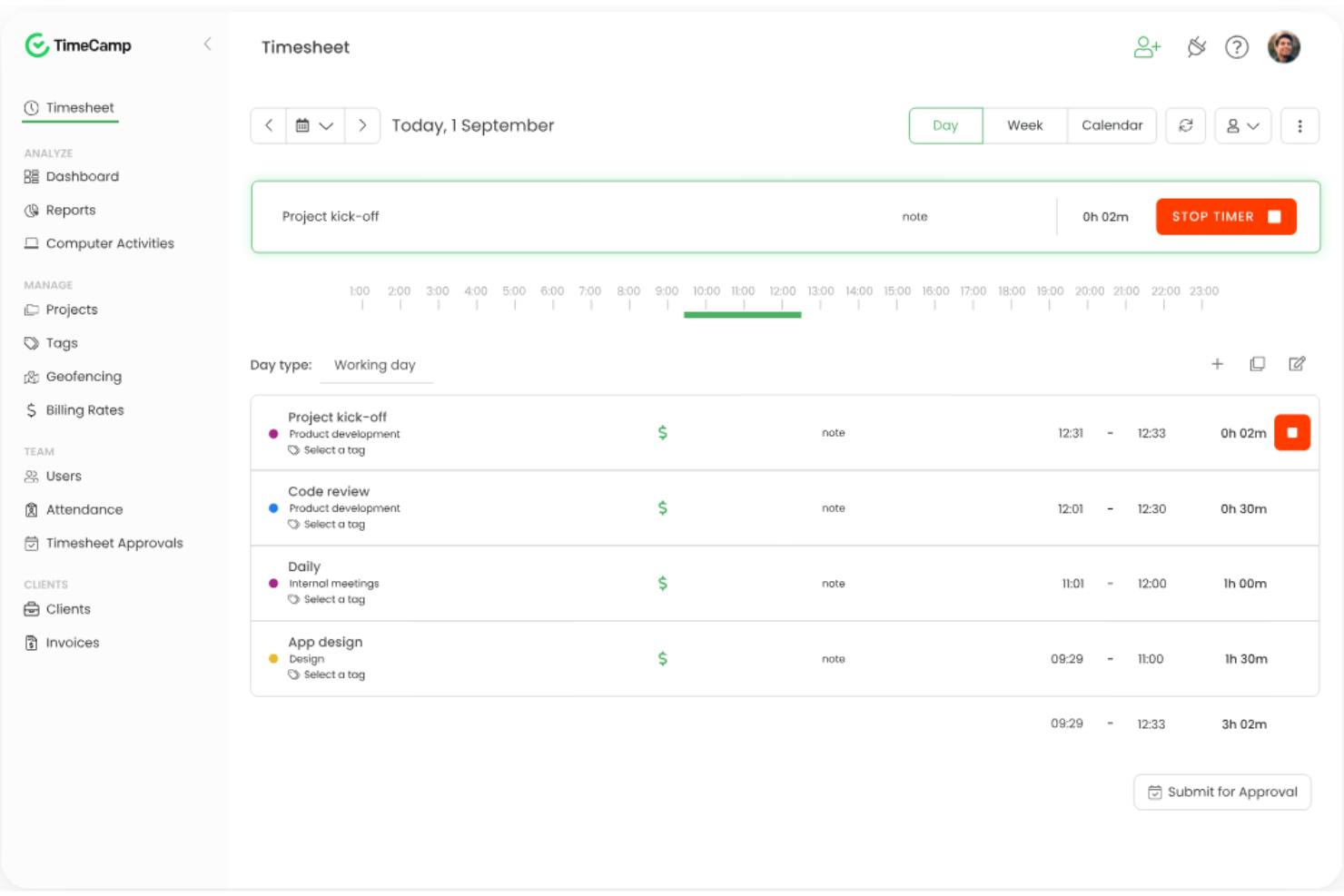
TimeCamp è una soluzione cloud per la rilevazione dei tempi, pensata per i team che necessitano di report dettagliati a livello di attività e di una gestione efficace delle ore fatturabili. La considero particolarmente adatta ad agenzie digitali, società di consulenza e piccole imprese che desiderano collegare le registrazioni temporali a veri lavori per clienti o progetti interni.
Per chi è più indicato TimeCamp?
TimeCamp è ideale per team da remoto, società di consulenza o aziende di servizi professionali che necessitano di dati dettagliati e basati sui compiti, sia per progetti sia per clienti.
Perché TimeCamp è una valida alternativa a QuickBooks Time
Ho scelto TimeCamp perché il suo tracciamento automatico delle ore rileva le ore lavorate in background, senza che sia necessario avviare e fermare manualmente i timer. Monitora l'attività su siti web, app e documenti, collegando poi queste attività ai compiti e ai progetti automaticamente. Così posso ottenere dati accurati sui tempi per ogni singola attività, senza dover contare sulla memoria del mio team per registrare le ore. Questo livello di precisione fa davvero la differenza per la fatturazione ai clienti o per i report sui costi di progetto.
Caratteristiche principali di TimeCamp
- Approvazione dei timesheet: Invia i fogli ore alla revisione del responsabile e segnala le registrazioni da correggere prima dell'approvazione.
- Ore fatturabili e tariffe di fatturazione: Imposta tariffe orarie fatturabili per ciascun progetto o utente e separa le ore fatturabili da quelle non fatturabili.
- Budget e preventivi: Confronta le ore registrate con le stime di progetto e ricevi avvisi quando il budget si avvicina al limite.
- Monitoraggio delle spese: Registra i costi legati al progetto insieme alle ore lavorate per avere una panoramica completa delle spese di progetto in un unico posto.
Integrazioni di TimeCamp
Le integrazioni includono Asana, Jira, Trello, Slack, monday.com, Zendesk, Salesforce, QuickBooks Online, Google Calendar e GitLab.
Pros and Cons
Pros:
- Rilevamento automatico del tempo in background
- Collega direttamente il tempo alle tariffe di fatturazione
- Approvazione dei timesheet con un clic per i manager
Cons:
- Non supporta modifiche di massa sui timesheet
- Nessun tracciamento GPS sulle app mobile

Ideale per monitorare la produttività del team
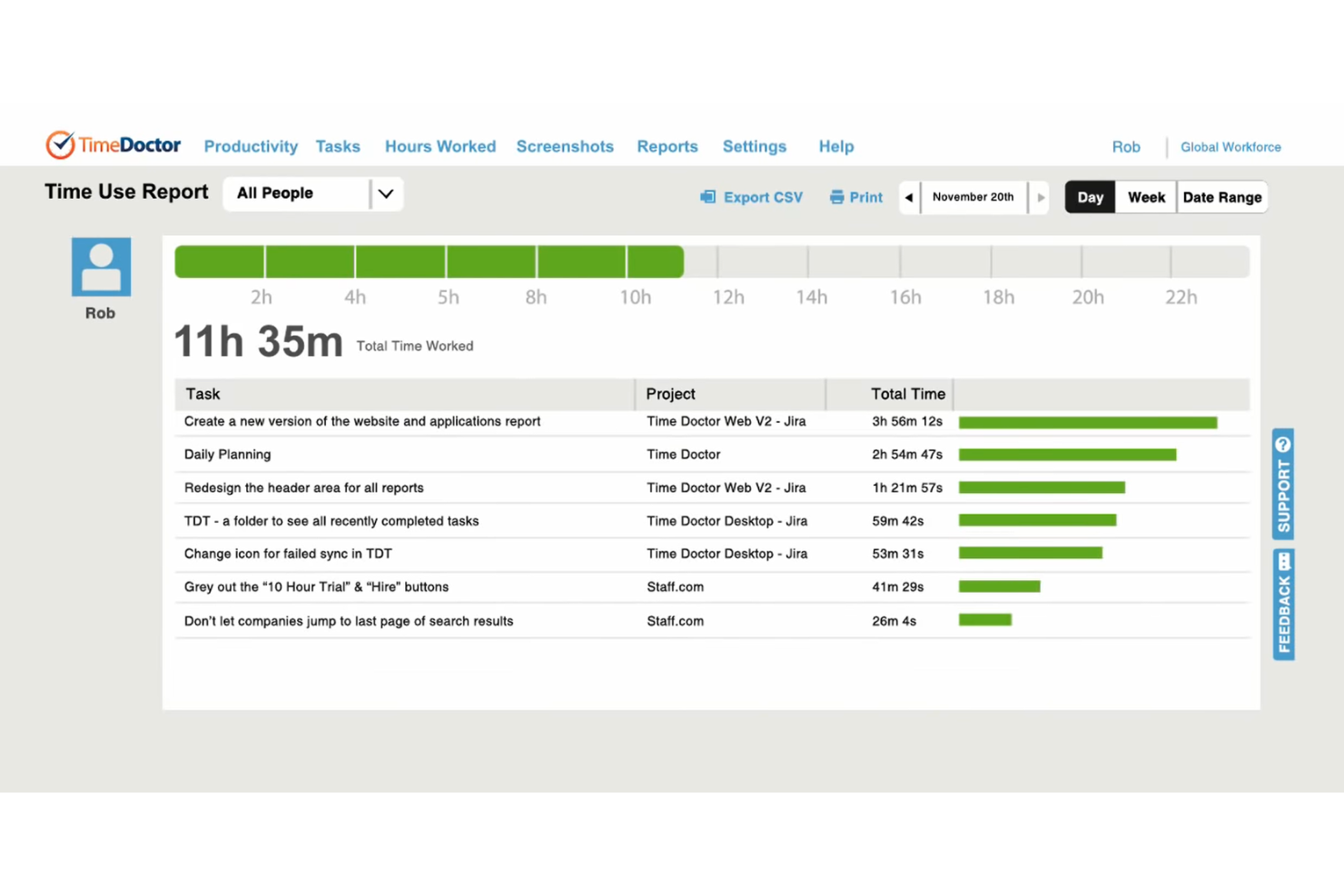
Time Doctor offre a manager e team distribuiti una panoramica dettagliata sulle ore di lavoro, sui livelli di attività e sull'utilizzo di app o siti web. È una scelta pratica se desideri monitorare la produttività, gestire dipendenti da remoto o tracciare le ore fatturabili in un unico sistema.
Per chi è adatto Time Doctor?
Time Doctor è ideale per aziende tecnologiche remote-first e società di servizi che tracciano lavoro fatturabile e produttività dei dipendenti in più sedi.
Perché Time Doctor è una valida alternativa a QuickBooks Time
Ho scelto Time Doctor perché va oltre la semplice registrazione delle ore: fornisce un quadro reale di come viene svolto il lavoro. La funzione di monitoraggio delle attività registra l'utilizzo di app e siti web durante la giornata, così posso vedere se le ore registrate su un progetto riflettono lavoro concentrato o distrazione. Trovo anche utile la funzione di cattura screenshot per la responsabilità verso i clienti: gli screenshot periodici offrono prove verificabili del lavoro svolto durante le ore fatturabili. Per i team distribuiti, dove la visibilità sui risultati è una sfida costante, questo livello di dettaglio è davvero difficile da trovare altrove.
Funzionalità principali di Time Doctor
- Gestione payroll: Genera report per le paghe basati sulle ore tracciate e sulle tariffe orarie direttamente dalla piattaforma.
- Monitoraggio del tempo per progetti e attività: Assegna il tempo tracciato a progetti o compiti specifici per una contabilizzazione accurata dei lavori.
- Gestione di orari di lavoro e turni: Imposta orari e turni di lavoro per segnalare il tempo tracciato al di fuori delle finestre previste.
- Report di produttività: Visualizza suddivisioni a livello di team e individuale del tempo trascorso sui progetti in qualsiasi intervallo di date.
Integrazioni di Time Doctor
Le integrazioni includono Asana, Trello, monday.com, Jira, Salesforce, HubSpot, Zendesk, Freshdesk, PayPal Payouts e ADP.
Pros and Cons
Pros:
- Si integra con strumenti di project management
- Identifica l'utilizzo di siti web poco produttivi
- Offre metriche di produttività personalizzabili
Cons:
- Nessuna app solo mobile per il tracciamento
- Personalizzazione limitata dei report

Harvest
Ottimo per fatturazione e monitoraggio delle spese

Harvest è uno strumento di monitoraggio del tempo basato sul web, pensato per agenzie, società di consulenza e aziende di servizi che necessitano di una chiara visione delle ore fatturabili e dei budget di progetto. Lo considero una scelta eccellente per i team che desiderano semplificare la registrazione del tempo sul lavoro dei clienti, gestire più progetti e controllare la produttività.
Per chi è più adatto Harvest?
Harvest è ideale per società di consulenza e agenzie digitali che necessitano di timesheet unificati, fatturazione e monitoraggio delle spese nei progetti per i clienti.
Perché Harvest è una valida alternativa a QuickBooks Time
Ho scelto Harvest perché combina le funzionalità di monitoraggio del tempo con fatturazione integrata e tracciamento delle spese, eliminando la necessità di utilizzare più strumenti. Quando il mio team termina una fase del progetto, posso convertire direttamente le ore fatturabili in una fattura per il cliente senza inserimento manuale dei dati. Harvest mi consente inoltre di associare le spese a specifici progetti, così la fatturazione riflette sempre il costo totale del lavoro. Questa stretta connessione tra monitoraggio del tempo, spese e fatture lo rende davvero utile per piccole imprese e team che lavorano direttamente con i clienti.
Funzionalità principali di Harvest
- Approvazione dei timesheet: Rivedi e approva i timesheet inviati dal tuo team prima di utilizzarli per la fatturazione o i report.
- Report sulla capacità: Visualizza il carico di lavoro del team a colpo d'occhio per individuare chi è sovra- o sotto-utilizzato nei vari progetti.
- Promemoria automatici: Pianifica promemoria per il monitoraggio del tempo per ricordare ai membri del team di registrare regolarmente le ore lavorate.
- Monitoraggio del budget: Tieni sotto controllo i budget dei progetti in tempo reale man mano che vengono registrate le ore sui limiti di costo impostati.
Integrazioni di Harvest
Le integrazioni includono Asana, Slack, QuickBooks Online, GitHub, Trello, Jira, Zendesk, monday.com, Notion e Stripe.
Pros and Cons
Pros:
- Creazione automatica della fattura dalle ore registrate
- Tracciamento delle spese integrato per progetti clienti
- Avvisi di superamento budget di progetto con aggiornamenti in tempo reale
Cons:
- Richiede integrazioni per la gestione della pianificazione
- Non permette la cattura automatica delle attività

Timeero
Ideale per il monitoraggio dei team sul campo

Timeero è uno strumento di rilevazione delle presenze su dispositivi mobili e web pensato per le aziende con lavoratori sempre in movimento. Penso che i team nei settori delle costruzioni, dei servizi a domicilio o qualsiasi organizzazione con personale sul campo apprezzeranno la possibilità di eliminare le incertezze nel monitoraggio di ore, percorsi e presenze.
A Chi è Destinato Timeero?
Timeero è ideale per team di servizi esterni e aziende che devono monitorare posizione, percorsi e chilometraggio dei dipendenti su più sedi di lavoro tramite un'app mobile facile da usare.
Perché Timeero è una Buona Alternativa a QuickBooks Time
Ho scelto Timeero perché gestisce il tracciamento GPS e il calcolo del chilometraggio per le operazioni sul campo meglio della maggior parte dei fornitori di questo settore. La funzionalità di traccia GPS a briciole registra il percorso esatto che ogni dipendente percorre durante il turno, permettendomi di verificare i tragitti senza dovermi affidare ai report manuali delle presenze. Trovo anche utile la funzione per i chilometri, che rende semplici i calcoli per i rimborsi. Per i team che gestiscono tecnici o autisti, copre efficacemente le lacune nella responsabilità sul campo.
Funzionalità Principali di Timeero
- Geofencing: Imposta limiti geografici che attivano promemoria automatici di entrata/uscita o che impediscono la timbratura al di fuori di una sede di lavoro designata.
- Tracciamento segmentato: Distingue automaticamente il tempo di guida da quello svolto sul posto durante tutto il turno senza richiedere timbrature manuali tra un lavoro e l'altro.
- Pianificazione dei turni: Crea e assegna i turni che i membri del team possono accettare o rifiutare direttamente dall'app mobile.
- Riconoscimento facciale: Verifica l'identità del dipendente all'ingresso per prevenire la timbratura da parte di colleghi sul campo.
Integrazioni di Timeero
Le integrazioni includono QuickBooks, Gusto, ADP, Paycor, Paychex, Paylocity, Xero, Rippling, Sage Intacct e PIMSY.
Pros and Cons
Pros:
- Traccia il percorso esatto dei veicoli in tempo reale
- Impedisce l’anticipo della timbratura nelle sedi di lavoro
- Mostra visualizzazioni della mappa in tempo reale
Cons:
- Limita il geofencing ai piani superiori
- Funzionalità di pianificazione basilari
Altre alternative a QuickBooks Time
Ecco alcune alternative aggiuntive a QuickBooks Time che non sono entrate nel mio elenco, ma che vale comunque la pena prendere in considerazione:


Come valuto le alternative a QuickBooks Time
Divido la mia valutazione in due livelli: criteri di base che uno strumento deve soddisfare — monitoraggio del tempo sui progetti, flussi di approvazione, sincronizzazione con le buste paga — e fattori distintivi come il GPS o gli avvisi sul budget.
Funzionalità fondamentali (requisiti essenziali per questo elenco)
Quando seleziono gli strumenti per il mio elenco, assegno a ciascuno un punteggio su una scala da 0 (non offre la funzionalità) a 5 (eccelle in quest'area) per ognuna delle funzionalità fondamentali elencate di seguito. Poi converto il punteggio totale dello strumento in una percentuale. Ogni strumento deve raggiungere un punteggio totale minimo del 65% per essere preso in considerazione.
- Monitoraggio del tempo: verifico se uno strumento supporta sia i cronometri sia l'inserimento manuale associato a progetti o clienti specifici, ad esempio per registrare le ore relative a un contratto continuativo anziché a un'attività occasionale.
- Gestione dei fogli presenze: i flussi di approvazione sono importanti, quindi cerco cicli di invio configurabili, fasi di revisione da parte dei responsabili e cronologia delle modifiche per mantenere i dati ordinati.
- Assegnazione di progetti e attività: ogni strumento dovrebbe consentire di associare le ore a progetti, attività e codici fatturabili, ad esempio suddividendo la giornata di uno sviluppatore tra tre incarichi per clienti diversi con tariffe differenti.
- Pianificazione e gestione dei turni: valuto quanto bene la piattaforma gestisce la creazione dei turni, la disponibilità della squadra e il rilevamento dei conflitti per le squadre che coordinano tempistiche di progetto sovrapposte.
- Rapporti e analisi: i rapporti dovrebbero includere il tasso di utilizzo, i costi del personale e la redditività dei progetti, con filtri ed esportazioni, non limitarsi a riversare in un foglio di calcolo i totali grezzi delle ore.
- Integrazioni con paghe e contabilità: cerco connessioni native a piattaforme come QuickBooks, Xero, ADP o Gusto, in modo che le ore approvate confluiscano nelle buste paga o nella fatturazione senza doverle reinserire manualmente.
Una volta ottenuto un elenco di strumenti che soddisfano questi criteri, considero ciò che distingue ogni piattaforma dalle altre.
Fattori distintivi (ciò che differenzia i fornitori)
Ecco come confronto i diversi fornitori:
Funzionalità distintive
Gli avvisi sul budget in tempo reale sono un importante fattore distintivo: voglio sapere se uno strumento avvisa quando le ore registrate superano il budget di un progetto prima che sia troppo tardi. Anche il GPS e la delimitazione geografica attirano la mia attenzione, soprattutto per le squadre che gestiscono squadre sul campo distribuite su più cantieri, dove le timbrature manuali sono poco affidabili. La pianificazione della capacità delle risorse completa il quadro. Cerco strumenti che visualizzino i carichi di lavoro, così da poter individuare le assegnazioni eccessive e ridistribuire le ore prima che un'iterazione accumuli ritardi.
Oltre le funzionalità
Il modello di tariffazione è importante quando si cresce: valuto se un fornitore applica un costo per utente o offre piani a tariffa fissa, poiché un'agenzia di 40 persone ha una struttura dei costi molto diversa da quella di una società di consulenza di cinque persone. La profondità delle integrazioni è altrettanto importante. Uno strumento che sincronizza i fogli presenze approvati con il sistema esistente di gestione dei progetti e con la piattaforma contabile fa risparmiare ore di riconciliazione manuale a ogni ciclo di paga. Considero anche quanto bene un fornitore supporta la migrazione da QuickBooks Time, comprese le opzioni di importazione dei dati e le risorse per l'inserimento che riducono la curva di apprendimento durante la transizione.
Perché cercare un'alternativa a QuickBooks Time?
Sebbene QuickBooks Time sia una buona scelta per il monitoraggio del tempo, esistono diversi motivi per cui alcuni titolari di aziende e piccole imprese cercano soluzioni alternative. Potresti cercare un'alternativa a QuickBooks Time perché…
- Hai bisogno di un monitoraggio automatico avanzato del tempo
- Desideri strumenti più flessibili per la gestione del budget dei progetti
- Cerchi un'integrazione più completa con prodotti non Intuit
- Sei frustrato dalle prestazioni o dall'affidabilità dell'app mobile
- Desideri un onboarding e un'amministrazione del team più semplici
- Incontri limitazioni relative alla conformità internazionale o alla localizzazione
Se ti riconosci in una di queste situazioni, sei nel posto giusto. Il mio elenco comprende diverse opzioni per il monitoraggio del tempo, con funzionalità e piani tariffari differenti, più adatti ai team che affrontano queste difficoltà con QuickBooks Time e cercano soluzioni alternative.
Funzionalità principali di QuickBooks Time
Ecco alcune delle funzionalità principali di QuickBooks Time, che ti aiuteranno a mettere a confronto ciò che offrono le soluzioni alternative:
- Timbratura: I membri del team e i collaboratori freelance registrano l’entrata e l’uscita utilizzando una dashboard web, un’app desktop o un’app mobile, consentendo un monitoraggio accurato del tempo sia in ufficio, sia a casa o in movimento.
- Geofencing: Configura confini geografici che inviano notifiche per ricordare ai dipendenti di utilizzare il rilevatore delle ore quando entrano o escono da specifici luoghi di lavoro, contribuendo a prevenire le timbrature mancanti per i team sul campo.
- Pianificazione: Crea e condividi i turni settimanali, assegna il lavoro a singole persone o gruppi e informa i dipendenti delle modifiche in tempo reale.
- App mobile: Offri app complete per Android e iOS che consentono ai dipendenti di registrare le ore lavorate, visualizzare i turni e richiedere permessi da qualsiasi luogo.
- Integrazione con le buste paga: Automatizza il flusso di lavoro sincronizzando direttamente i fogli ore approvati con QuickBooks Online, QuickBooks Desktop o fornitori di servizi paghe compatibili.
- Monitoraggio GPS: Monitora la posizione dei lavoratori quando stanno registrando l’orario per verificare il tempo trascorso in specifici luoghi di lavoro e facilitare la gestione della forza lavoro sul campo.
- Reportistica in tempo reale: Accedi a dati aggiornati sulle ore lavorate, gli straordinari, le pause e la redditività utilizzando dashboard personalizzabili e report esportabili sulle ore.
- Codici di lavoro o attività: Assegna il lavoro a specifiche commesse, clienti o attività all’interno del software di monitoraggio delle ore, facilitando il controllo dei costi di progetto, delle ore fatturabili e dell’allocazione delle risorse.
- Avvisi sugli straordinari: Configura avvisi automatici per quando i dipendenti si avvicinano o superano i limiti degli straordinari, favorendo la conformità alle normative sul lavoro e una migliore gestione del tempo.
- Gestione delle assenze: Richiedi, approva e monitora PTO, congedi per malattia e altre assenze, consolidando tutto il monitoraggio delle presenze in un unico sistema.