

10 migliori alternative a Clockify per le ore fatturabili nel 2026

Migliori alternative a Clockify: selezione


Una valida alternativa a Clockify offre un monitoraggio affidabile del tempo, report flessibili e integrazioni adatte al flusso di lavoro del tuo team. Se stai cercando le migliori alternative a Clockify, probabilmente cerchi strumenti in grado di gestire esigenze di progetto in continua evoluzione, supportare una fatturazione accurata o offrire funzionalità che Clockify non include.
Con così tante opzioni disponibili, è difficile sapere quale piattaforma ti aiuterà davvero a gestire tempi, progetti e team senza aggiungere complicazioni.
Questo elenco analizza le migliori alternative per il 2026, così potrai confrontare le funzionalità, capire cosa distingue ogni strumento e scegliere quello più adatto alle sfide concrete del tuo team.
Che cos'è Clockify?
Clockify è uno strumento di monitoraggio del tempo basato sul cloud che aiuta team e singoli utenti a registrare le ore lavorate, seguire l'avanzamento dei progetti e generare report dettagliati. Supporta l'inserimento manuale e automatico del tempo, l'organizzazione di progetti e attività e si integra con le più diffuse piattaforme di gestione dei progetti e produttività.
Responsabili di progetto, freelance e aziende utilizzano Clockify per monitorare la produttività, gestire le ore fatturabili e migliorare la visibilità all'interno di team distribuiti.
Riepilogo delle migliori alternative a Clockify
Questa tabella comparativa riassume i dettagli dei prezzi delle mie migliori alternative a Clockify, per aiutarti a trovare quella più adatta al tuo budget e alle esigenze della tua azienda.
| Tool | Best For | Trial Info | Price | ||
|---|---|---|---|---|---|
| 1 | Ideale per il monitoraggio dettagliato della conformità | Prova gratuita di 14 giorni | A partire da $3.99/utente/mese (con fatturazione annuale) | Website | |
| 2 | Ideale per l’integrazione con il sistema buste paga | Prova gratuita + demo gratuita disponibile | Da $20/mese + $8/utente/mese (fatturazione annuale) | Website | |
| 3 | Ideale per la gestione della fatturazione dei clienti | Prova gratuita di 14 giorni + piano gratuito + demo gratuita disponibile | Da $8/utente/mese (fatturazione annuale) | Website | |
| 4 | Ideale per timbrature con riconoscimento facciale | Prova gratuita di 14 giorni + piano gratuito + demo gratuita disponibile | Da $4.49/utente/mese (fatturato annualmente) | Website | |
| 5 | Ideale per il monitoraggio automatico delle attività | Prova gratuita di 14 giorni + piano gratuito + demo gratuita disponibile | Da $3.99/utente/mese (fatturazione annuale) | Website | |
| 6 | Ideale per team mobili con GPS integrato | Prova gratuita di 14 giorni + demo gratuita disponibile | Da $40/mese | Website | |
| 7 | Ideale per la gestione di spese e fatturazione | Piano gratuito + prova gratuita di 30 giorni disponibile | A partire da $9/postazione/mese (fatturazione annuale) | Website | |
| 8 | Ideale per un uso desktop leggero | Piano gratuito + prova gratuita di 14 giorni disponibile | A partire da $9/mese (fatturazione annuale) | Website | |
| 9 | Ideale per le funzionalità di conformità globale | Demo gratuita disponibile | Prezzo su richiesta | Website | |
| 10 | Ideale per professionisti legali e contabili | Prova gratuita di 14 giorni + demo gratuita disponibile | Da $11.20/utente/mese (fatturato annualmente) | Website |
Perché fidarsi dei nostri consigli sui software
Il nostro team testa e recensisce software dal 2012. In quanto project manager noi stessi, sappiamo quanto sia difficile — e importante — scegliere il software giusto.
Per questa guida, abbiamo valutato gli strumenti attraverso test pratici e ricerche indipendenti, assegnando un punteggio agli strumenti in base ai nostri criteri di selezione. Ci basiamo inoltre sulle competenze di leader di pensiero del settore e di professionisti attivi nella gestione dei progetti.
Le nostre recensioni riflettono il nostro giudizio editoriale umano, non un discorso di vendita.
Revisori esperti:
Recensioni delle migliori alternative a Clockify
Di seguito trovi i miei riepiloghi dettagliati delle alternative a Clockify incluse nella mia selezione. Le mie recensioni offrono un’analisi approfondita delle funzionalità, dei casi d’uso ideali e delle integrazioni di ogni strumento, per aiutarti a trovare quello più adatto a te.

Ideale per il monitoraggio dettagliato della conformità
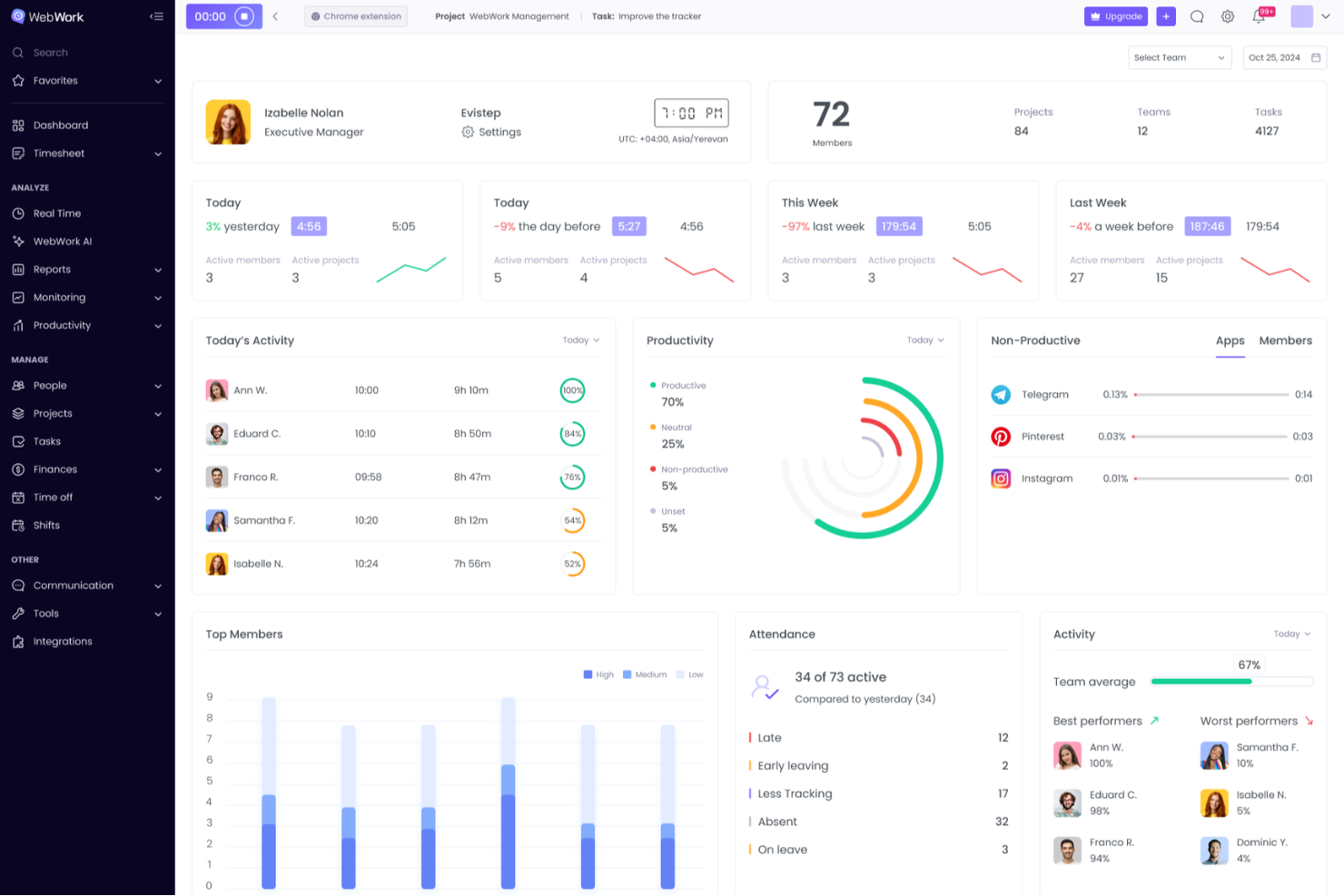
WebWork Time Tracker è un software per il monitoraggio del tempo destinato a team remoti, agenzie e aziende in crescita che necessitano di registrazioni più chiare delle ore lavorate, visibilità sulle presenze, informazioni sulla produttività e controllo dei costi dei progetti.
Per chi è più adatto WebWork Time Tracker?
WebWork Time Tracker è adatto ai team focalizzati sulla conformità che necessitano di registrazioni dettagliate delle attività, supervisione delle presenze e dati verificabili sulle ore lavorate nelle operazioni da remoto.
Perché ho scelto WebWork Time Tracker
Ho scelto WebWork Time Tracker perché supporta il monitoraggio dettagliato per la conformità tramite screenshot, livelli di attività e registrazioni dell'utilizzo di app o siti web. Utilizzo i suoi dati sulle presenze e i report dettagliati per verificare le ore, analizzare i registri di lavoro contestati e documentare l'attività dei team remoti ai fini degli audit.
Funzionalità principali di WebWork Time Tracker
- Monitoraggio automatico del tempo: Registra le ore lavorate su desktop, web, dispositivi mobili e Chrome.
- Registri delle ore: Organizza le ore per persona, progetto e attività.
- Calcoli delle buste paga: Calcola la retribuzione in base alle ore approvate e alle tariffe orarie.
- Generazione delle fatture: Converte le ore fatturabili in fatture per i clienti.
Integrazioni di WebWork Time Tracker
WebWork Time Tracker offre integrazioni con Google Workspace, Slack, Trello, Asana, Jira, ClickUp, Notion, Google Calendar e Outlook Calendar, oltre a Make e Zapier. Fornisce inoltre un'API pubblica e webhook per integrazioni personalizzate, con accesso API disponibile nel piano Premium.
Pros and Cons
Pros:
- Gli screenshot dettagliati supportano gli audit di conformità
- I report sulle presenze verificano le ore lavorate contestate
- I registri delle attività evidenziano l'utilizzo improduttivo delle applicazioni
Cons:
- Il monitoraggio frequente può risultare invasivo
- I report possono richiedere un'interpretazione da parte dell'amministratore

Ideale per l’integrazione con il sistema buste paga
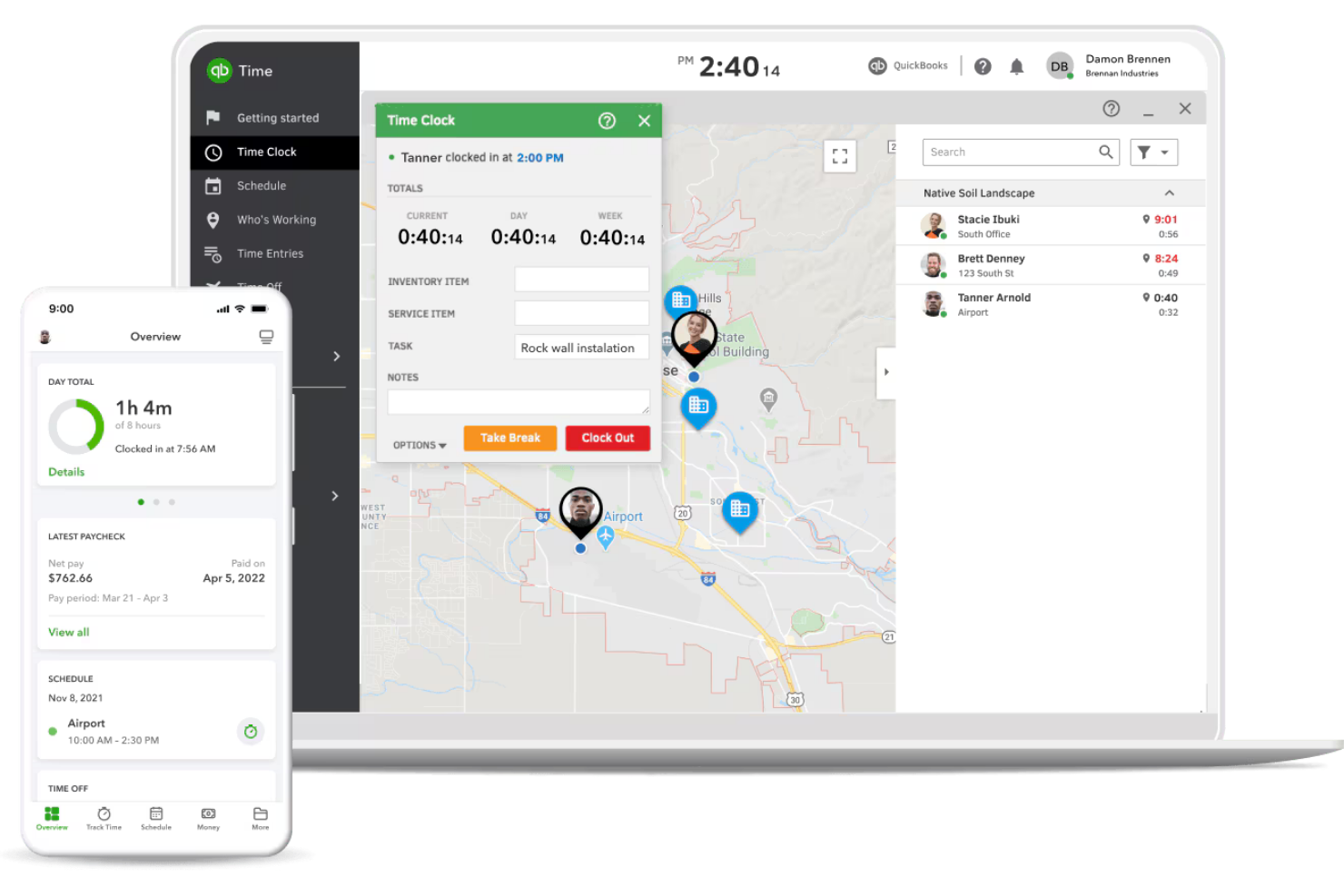
Per i team che necessitano di una rilevazione delle ore strettamente collegata all’elaborazione delle buste paga, QuickBooks Time offre un collegamento diretto tra le ore dei dipendenti e la gestione degli stipendi. Questo strumento è particolarmente utile per aziende con lavoratori a ore, squadre sul campo o chiunque già utilizzi QuickBooks per la contabilità. A differenza di Clockify, QuickBooks Time si distingue automatizzando la sincronizzazione dei timesheet con il sistema di buste paga, riducendo l’inserimento manuale e gli errori nei cedolini.
Perché QuickBooks Time è una valida alternativa a Clockify
Se l’integrazione con il sistema di buste paga è la tua massima priorità, QuickBooks Time è progettato appositamente per collegare la rilevazione delle ore all’elaborazione degli stipendi. Ho scelto QuickBooks Time perché sincronizza automaticamente le ore dei dipendenti con QuickBooks Payroll, contribuendo a ridurre inserimenti manuali e possibili errori nei pagamenti. La piattaforma supporta anche il monitoraggio GPS e le timbrature da dispositivi mobili, rendendola particolarmente adatta per aziende con squadre sul campo o lavoratori da remoto. Per chiunque desideri trasformare i timesheet in buste paga senza passaggi aggiuntivi, QuickBooks Time offre una soluzione diretta che Clockify non è in grado di eguagliare.
Funzionalità principali di QuickBooks Time
Altre funzionalità utili di QuickBooks Time per il tuo team includono:
- Gestione di Lavori e Turni: Assegna lavori e turni ai dipendenti e visualizza i programmi in formato calendario.
- Geofencing: Imposta promemoria basati sulla posizione affinché i dipendenti effettuino la timbratura in entrata o in uscita quando entrano o lasciano un cantiere.
- Gestione delle Assenze: Traccia e approva le richieste di assenza dei dipendenti direttamente dalla piattaforma.
- Reportistica in tempo reale: Genera report aggiornati su ore lavorate, allocazione del tempo ai progetti e costi del lavoro.
Integrazioni di QuickBooks Time
Le integrazioni includono QuickBooks Online, Gusto, ADP, Square, Clover, Xero, Sage, Salesforce e Buildertrend.
Pros and Cons
Pros:
- Ottimi strumenti GPS e geofencing
- Esportazione dati buste paga senza complicazioni
- Ottimo per squadre operative sul campo
Cons:
- Avvisi sulla posizione invasivi
- Occasionali problemi di sincronizzazione dati

My Hours
Ideale per la gestione della fatturazione dei clienti

Se stai cercando uno strumento di monitoraggio del tempo che mette la fatturazione dei clienti in primo piano, My Hours merita un'attenzione particolare. È progettato per freelance, agenzie e team basati sui servizi che devono gestire ore fatturabili, budget di progetto e fatturazione tutto in un unico posto. My Hours si distingue da Clockify offrendo funzionalità di fatturazione più avanzate e opzioni di gestione dei clienti più flessibili.
Perché My Hours è una buona alternativa a Clockify
Per i team e i freelance che necessitano di un controllo maggiore sulla fatturazione dei clienti, My Hours offre funzionalità che vanno oltre il semplice monitoraggio del tempo. Puoi assegnare tariffe fatturabili a specifici progetti o clienti, generare fatture dettagliate direttamente dalle ore tracciate e monitorare i budget dei progetti in tempo reale. Mi piace il fatto che My Hours ti permetta di gestire più clienti e scenari di fatturazione senza lavoro manuale aggiuntivo. Se desideri uno strumento di monitoraggio del tempo creato per la gestione della fatturazione dei clienti, My Hours è una valida alternativa a Clockify.
Funzionalità principali di My Hours
Altre funzionalità di My Hours che potrebbero essere utili per il tuo flusso di lavoro includono:
- Organizzazione dei compiti: Suddividi i progetti in attività e sotto-attività per un monitoraggio più dettagliato.
- Gestione del team: Assegna ruoli e permessi ai membri del team per un migliore controllo.
- Report personalizzabili: Genera ed esporta report dettagliati basati su progetti, clienti o membri del team.
- App mobile: Monitora il tempo e gestisci i progetti ovunque tu sia con l'app mobile dedicata.
Integrazioni di My Hours
Le integrazioni includono QuickBooks Online, Xero, Jira, Asana, Monday.com, ClickUp, Basecamp, Microsoft Teams e FreshBooks.
Pros and Cons
Pros:
- Monitoraggio dettagliato del budget di progetto
- Generazione facile delle fatture
- Interfaccia pulita e semplice
Cons:
- Nessuna cattura automatica del tempo
- Manca il monitoraggio offline del tempo

Jibble
Ideale per timbrature con riconoscimento facciale
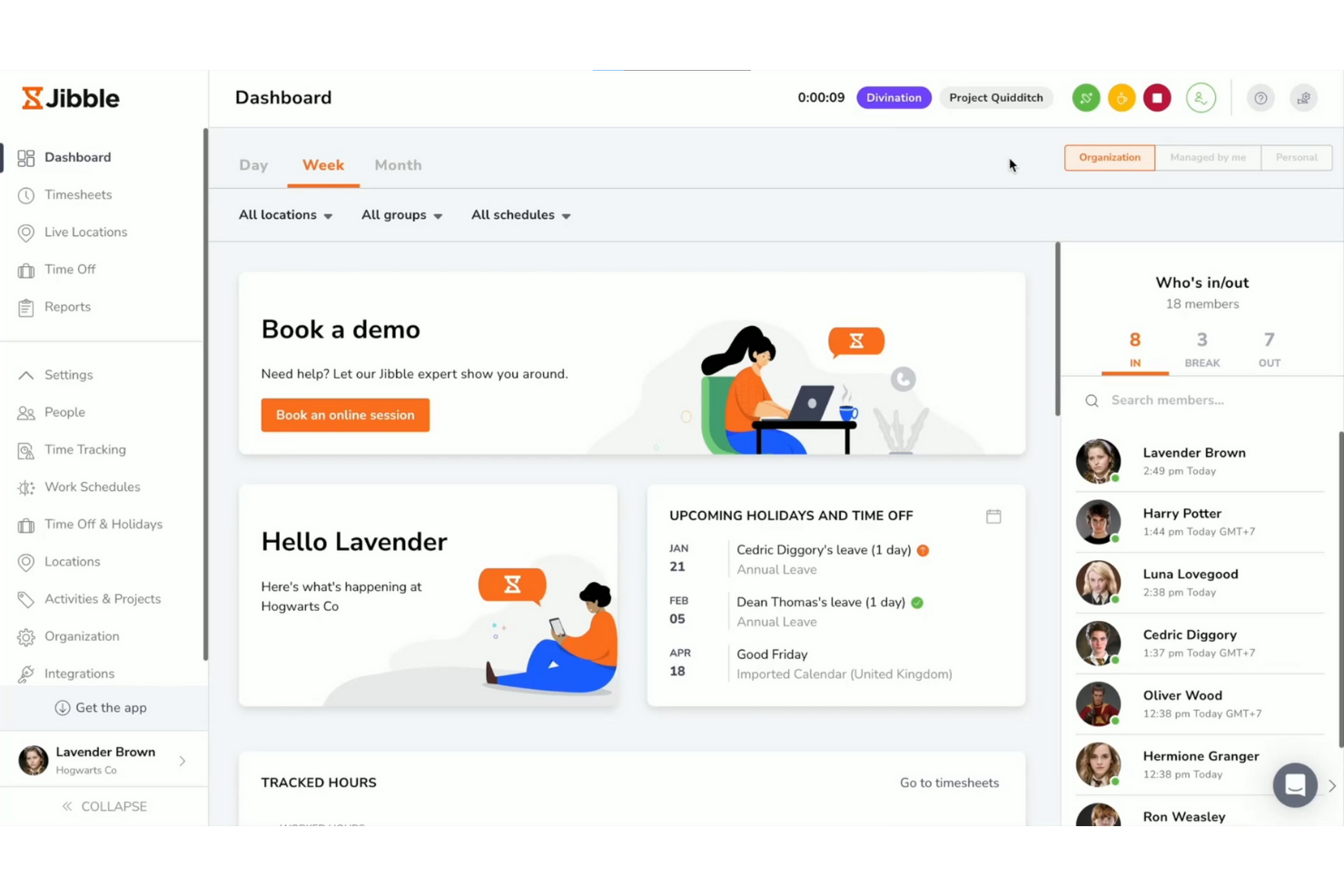
I team che necessitano di una rilevazione delle presenze sicura e affidabile potrebbero prendere in considerazione Jibble. Questo strumento è progettato per aziende che richiedono timbrature con riconoscimento facciale, risultando particolarmente utile per ambienti di lavoro a turni, negozi e squadre sul campo. Jibble aiuta a ridurre il fenomeno del buddy punching e il furto di ore, verificando ogni timbratura con dati biometrici.
Perché Jibble è una buona alternativa a Clockify
A differenza della maggior parte degli strumenti di rilevazione delle presenze, Jibble mette il riconoscimento facciale al centro del processo di timbratura. Questo approccio aiuta a prevenire il buddy punching e garantisce che solo i membri autorizzati del team possano registrare le proprie ore. Apprezzo il fatto che Jibble supporti sia il riconoscimento facciale da dispositivi mobili che da chioschi, rendendolo flessibile per diversi ambienti lavorativi. Se hai bisogno di una soluzione che dia priorità alla presenza sicura e verificabile, Jibble offre funzionalità che vanno oltre ciò che fornisce Clockify.
Caratteristiche principali di Jibble
Altre funzionalità di Jibble che potrebbero interessarti includono:
- Monitoraggio della geolocalizzazione: Monitora dove i membri del team timbrano entrata e uscita utilizzando i dati GPS.
- Timesheet automatici: Genera automaticamente i timesheet in base ai dati delle timbrature.
- Calcolo delle ore straordinarie: Calcola le ore di straordinario secondo le regole della tua organizzazione.
- Gestione delle assenze: Gestisci e monitora le richieste di permesso dei dipendenti direttamente sulla piattaforma.
Integrazioni di Jibble
Le integrazioni includono Microsoft Teams, Slack, QuickBooks Online, Xero, Deel, ADP, Asana, Trello e Google Sheets.
Pros and Cons
Pros:
- Eccellente tracciamento della posizione GPS
- Ottimo per cantieri e lavori fisici
- Modalità chiosco compatibile con tablet
Cons:
- L'app mobile consuma molta batteria
- Impostazioni dei permessi amministratore complesse

TimeCamp
Ideale per il monitoraggio automatico delle attività

TimeCamp adotta un approccio diverso al monitoraggio del tempo, concentrandosi sul rilevamento automatico delle attività. Questo strumento è particolarmente utile per team e liberi professionisti che desiderano registrare le ore di lavoro senza input manuale o timer. Se hai bisogno di dettagliati resoconti dell’attività al computer e dell’uso delle app per una fatturazione accurata dei progetti o l’analisi della produttività, TimeCamp offre funzionalità che non troverai nella maggior parte degli strumenti standard di tracciamento del tempo.
Perché TimeCamp è una buona alternativa a Clockify
A differenza della maggior parte degli strumenti di monitoraggio del tempo, TimeCamp registra automaticamente le attività al computer e l’uso delle applicazioni in background. Ho scelto TimeCamp perché elimina la necessità di timer manuali, permettendoti di catturare ogni minuto trascorso sui progetti senza sforzi aggiuntivi. Lo strumento inoltre categorizza le attività per progetto o cliente, così avrai un’analisi chiara e dettagliata di come viene impiegato il tempo. Se desideri un approccio senza intervento al monitoraggio delle ore lavorative, TimeCamp offre un’automazione che lo distingue da Clockify.
Funzionalità principali di TimeCamp
Altre funzionalità di TimeCamp che possono essere utili al tuo team includono:
- Approvazione dei timesheet: I responsabili possono revisionare e approvare i timesheet inviati prima dell’elaborazione delle buste paga.
- Monitoraggio ore fatturabili e non fatturabili: Segna le ore registrate come fatturabili o non fatturabili per una fatturazione al cliente più accurata.
- Budget di progetto: Imposta i budget di progetto e monitora le ore registrate in rapporto a quei limiti.
- Monitoraggio presenze: Registra gli orari di inizio e fine lavoro dei dipendenti a supporto della gestione di presenze e permessi.
Integrazioni di TimeCamp
Le integrazioni includono Trello, Asana, Monday.com, Jira, Zendesk, QuickBooks, Xero, Salesforce, Azure DevOps e ClickUp.
Pros and Cons
Pros:
- Traccia l'utilizzo di app e siti web
- Reporting del profitto dettagliato
- Ottime funzionalità per la fatturazione ai clienti
Cons:
- L’interfaccia può risultare opprimente
- L’auto-tracker può commettere errori

Ideale per team mobili con GPS integrato
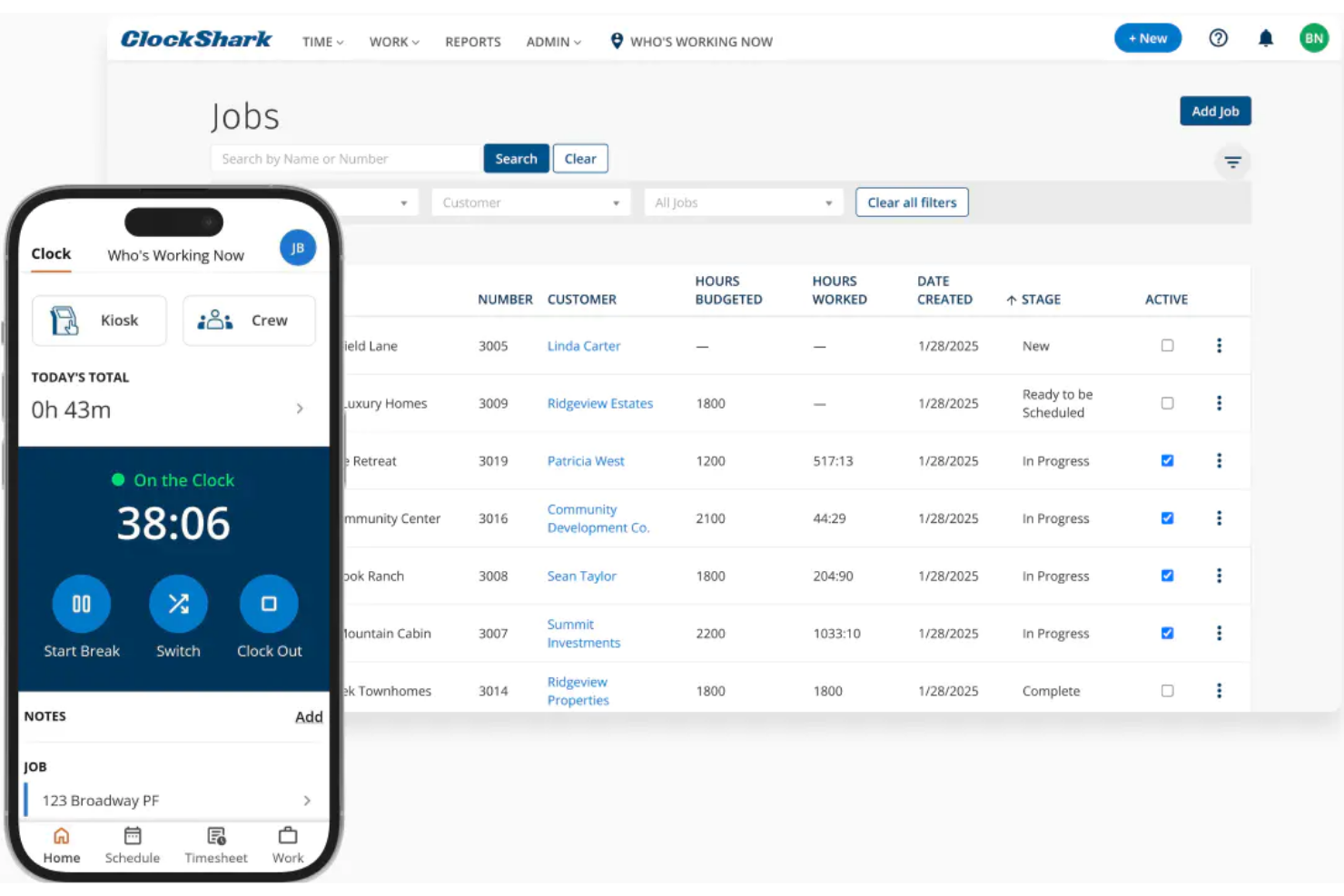
Per i team che lavorano sul campo o si spostano tra diversi cantieri, ClockShark offre un rilevamento orari abilitato al GPS pensato per squadre mobili. È una scelta ideale per aziende di costruzioni, mestieri e servizi che devono verificare in tempo reale la posizione dei lavoratori e la presenza sul lavoro. A differenza di Clockify, le funzioni GPS di ClockShark ti aiutano a monitorare i team mobili e a ridurre i casi di furto di tempo mentre sono in movimento.
Perché ClockShark è una valida alternativa a Clockify
Se il tuo team trascorre la maggior parte del tempo in movimento, il tracciamento con GPS di ClockShark si distingue come una soluzione pratica. Ho scelto ClockShark perché ti permette di vedere dove i dipendenti timbrano in ingresso e in uscita e persino di visualizzare i loro percorsi durante la giornata. La funzione di geofencing aiuta a garantire che i lavoratori siano effettivamente sul posto quando registrano le ore, qualcosa che Clockify non offre in modo nativo. Per le aziende che necessitano di responsabilizzazione geografica, l’approccio mobile-first di ClockShark risponde alle sfide legate alla gestione di team distribuiti sul campo.
Funzionalità principali di ClockShark
Altre funzionalità di ClockShark che potrebbero essere utili per la tua azienda includono:
- Programmazione drag-and-drop: Assegna turni e lavori ai dipendenti con una semplice interfaccia drag-and-drop.
- Codici lavoro e attività: Monitora il tempo in base a lavori o compiti specifici per reportistica più dettagliata.
- Gestione ferie e malattia: Gestisci richieste e approvazioni di permessi retribuiti direttamente dalla piattaforma.
- Strumenti di esportazione per paghe: Esporta i dati dei fogli presenze in formati compatibili con i principali sistemi di gestione paghe.
Integrazioni di ClockShark
Le integrazioni includono QuickBooks, Sage 100, Xero, Jobber, Zapier, Procore, ADP e TSheets.
Pros and Cons
Pros:
- Programmazione a trascinamento per il lavoro sul campo
- Ottima app mobile per le squadre
- Messaggistica di squadra integrata
Cons:
- Esperienza debole su browser desktop
- Privo di funzioni avanzate di fatturazione

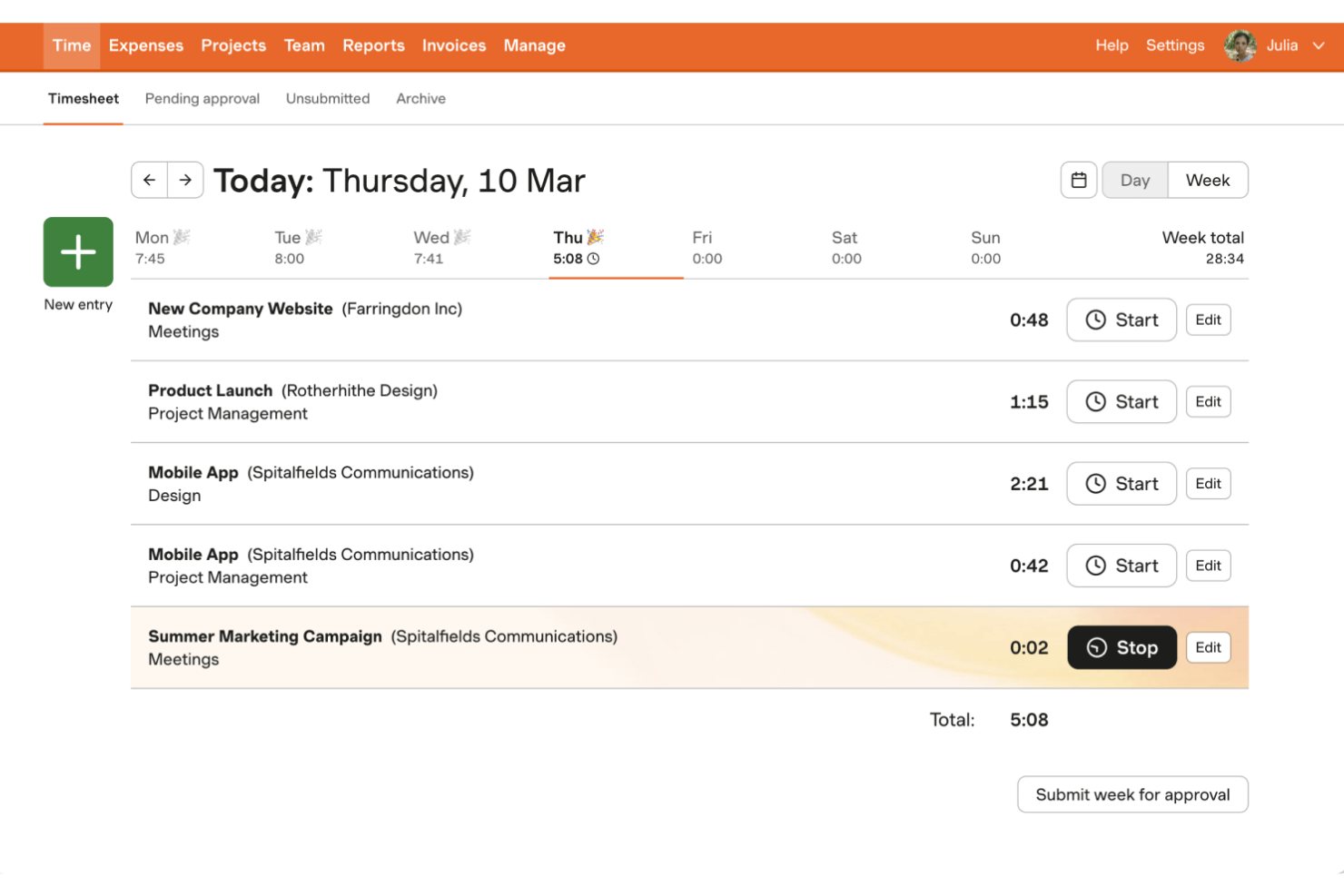
Se hai bisogno di uno strumento di rilevamento del tempo che gestisca anche spese e fatturazione, Harvest merita un’attenta valutazione. È progettato per agenzie, società di consulenza e team che lavorano su progetti e desiderano tracciare le ore fatturabili trasformandole in fatture senza dover cambiare piattaforma. A differenza di Clockify, Harvest combina il rilevamento del tempo con la registrazione integrata delle spese e la fatturazione ai clienti, facilitando la gestione dell’intero ciclo di fatturazione in un unico luogo.
Perché Harvest è una valida alternativa a Clockify
Per i team che hanno bisogno di qualcosa in più rispetto al solo rilevamento del tempo, Harvest si distingue combinando la gestione delle spese e delle fatture in un’unica piattaforma. Ho scelto Harvest perché consente di registrare le spese insieme alle ore tracciate e generare poi fatture direttamente dai fogli ore e dai registri delle spese. Lo strumento permette anche di allegare le ricevute alle spese, contribuendo a rendere la fatturazione ai clienti trasparente e organizzata. Se vuoi gestire l’intero processo di fatturazione senza destreggiarti tra più strumenti, Harvest offre un monitoraggio finanziario che Clockify non fornisce.
Caratteristiche principali di Harvest
Altre funzionalità di Harvest che possono essere utili al tuo team includono:
- Monitoraggio del budget di progetto: Imposta e controlla i budget dei progetti per mantenere sotto controllo le spese.
- Pianificazione della capacità del team: Visualizza la disponibilità dei membri del team e assegna le ore sui vari progetti.
- Promemoria automatici: Invia promemoria automatici ai membri del team per consegnare i fogli ore.
- Dashboard di reportistica visiva: Accedi a dashboard che mostrano in modo visivo i dati di tempo e costi per progetto, cliente o team.
Integrazioni di Harvest
Le integrazioni includono Asana, Trello, Slack, Zendesk, QuickBooks Online, Xero, Basecamp, Stripe, PayPal e Google Calendar.
Pros and Cons
Pros:
- Gestione efficace delle ricevute delle spese
- Eccellente sincronizzazione con app di terze parti
- Collegamenti integrati ai gateway di pagamento
Cons:
- Creazione di report personalizzati limitata
- Nessuna modalità desktop offline

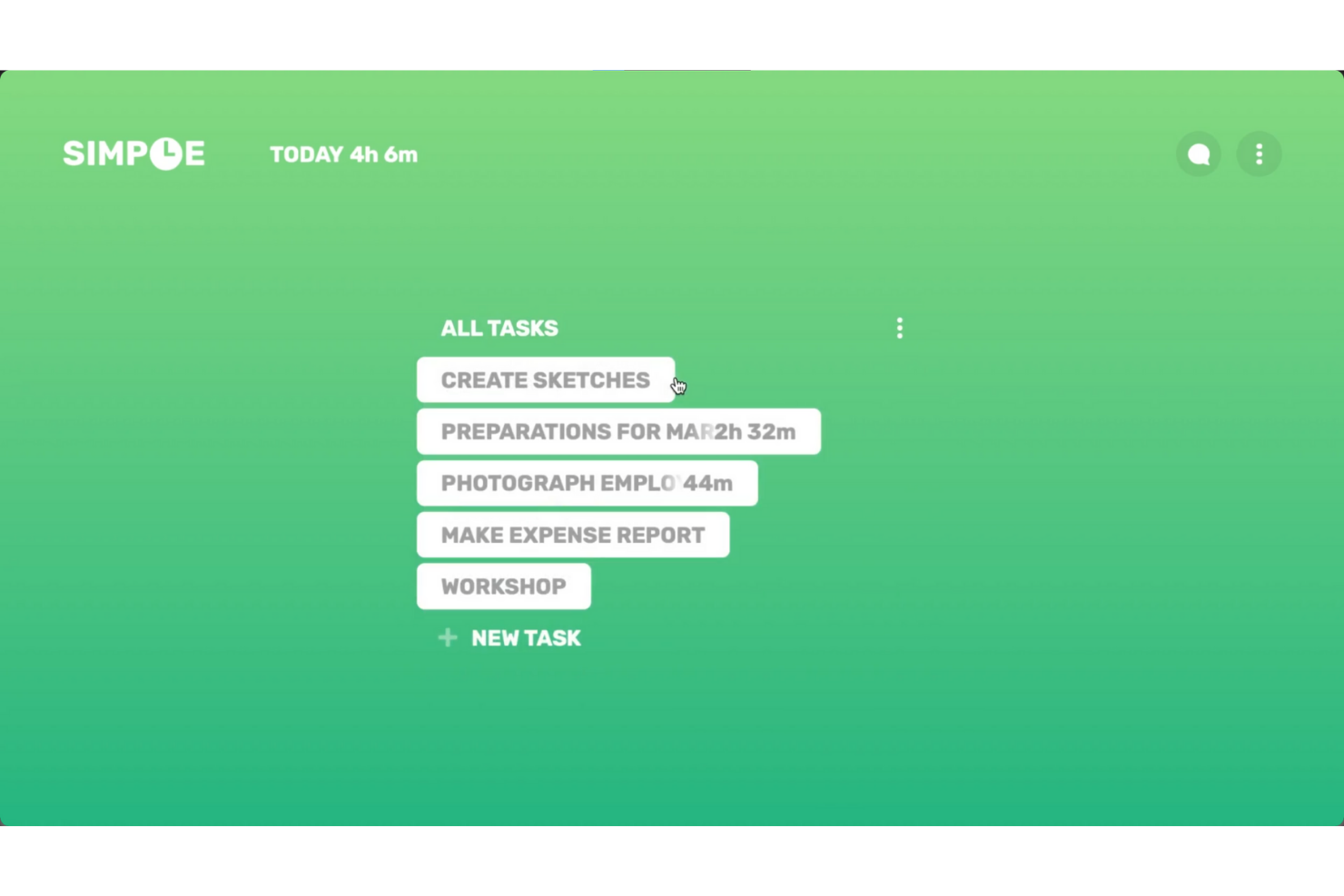
Se stai cercando un modo semplice per monitorare il tempo sul tuo desktop, Simple Time Tracker merita attenzione. Questo strumento è pensato per freelance, professionisti individuali e piccoli team che vogliono una soluzione leggera e senza fronzoli, evitando la complessità di piattaforme più grandi come Clockify. Simple Time Tracker si distingue per la sua interfaccia minimale e l’attenzione al monitoraggio rapido e senza distrazioni direttamente dal desktop.
Perché Simple Time Tracker è una valida alternativa a Clockify
Per chi desidera una soluzione desktop leggera, Simple Time Tracker offre un’alternativa mirata alle funzionalità più ampie di Clockify. Puoi avviare e fermare i timer con un solo clic e passare rapidamente tra le attività senza dover navigare in menù aggiuntivi. Apprezzo che lo strumento mantenga tutto sul desktop, così non devi affidarti a browser web o a un account cloud per tracciare il tempo. Se dai valore alla semplicità e vuoi evitare funzionalità superflue, Simple Time Tracker è una scelta valida.
Funzionalità principali di Simple Time Tracker
Altre funzioni di Simple Time Tracker che potrebbero interessarti includono:
- Esportazione CSV: Esporta i dati di tempo monitorato in file CSV per report o analisi.
- Tag: Assegna tag alle registrazioni di tempo per organizzare e categorizzare il lavoro.
- Inserimento manuale delle ore: Aggiungi o modifica manualmente le registrazioni di tempo per maggiore flessibilità.
- Rilevamento inattività: Rileva e segnala automaticamente i periodi di inattività durante il monitoraggio.
Integrazioni di Simple Time Tracker
Attualmente Simple Time Tracker non offre integrazioni native elencate.
Pros and Cons
Pros:
- Non è richiesto un account utente
- Assoluta privacy dei dati utente
- Monitoraggio veloce tramite widget
Cons:
- Nessuna funzione di fatturazione o creazione di fatture
- Funzionalità di reportistica molto basilari
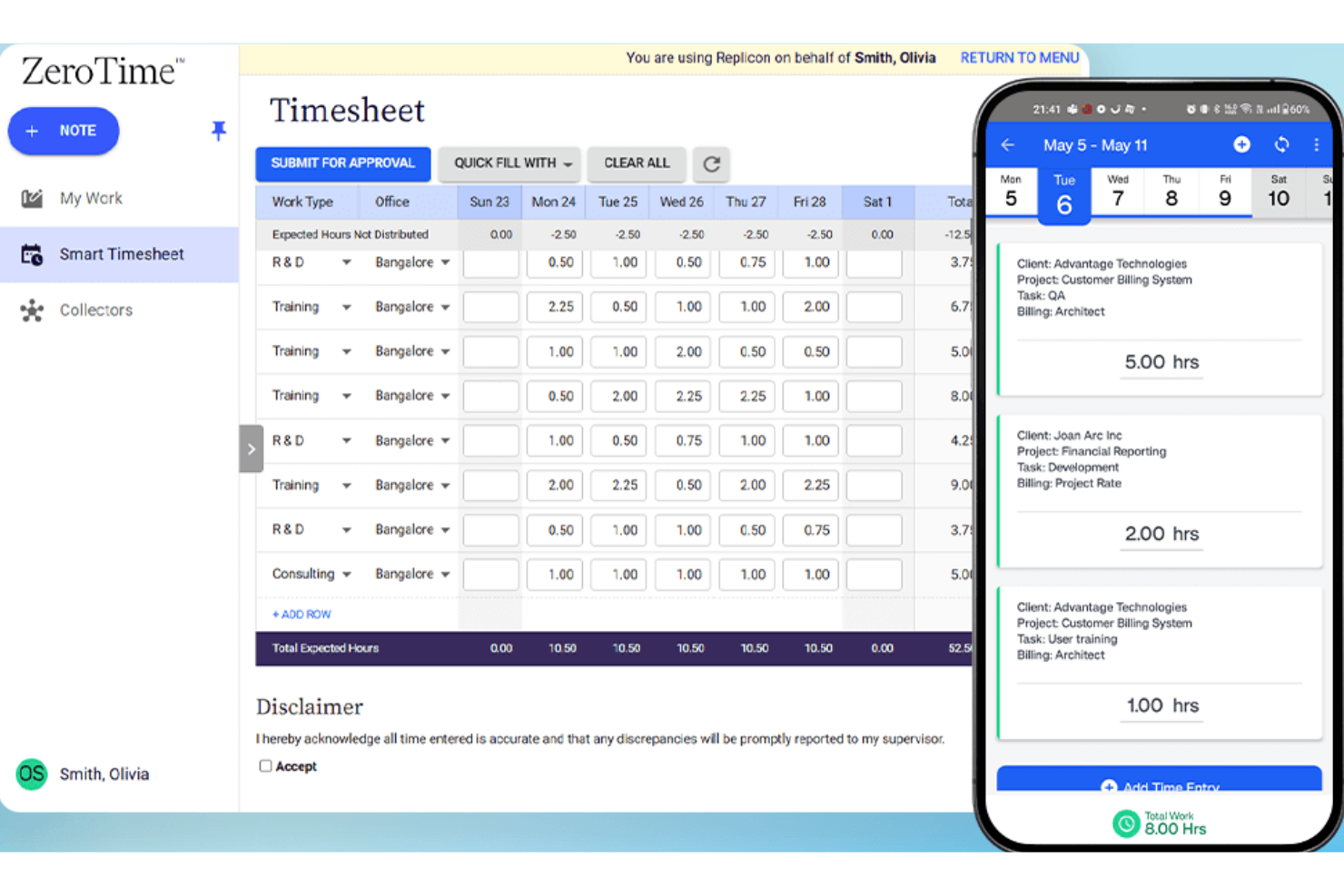
Se il tuo team opera in più paesi o regioni, Replicon è un software di rilevazione delle presenze progettato per aiutarti a gestire il monitoraggio del tempo con la conformità globale in mente. È particolarmente utile per le organizzazioni multinazionali e i team HR che devono districarsi tra normative sul lavoro complesse, regole sugli straordinari e regolamenti locali. A differenza di Clockify, Replicon offre funzionalità avanzate di conformità che aiutano ad automatizzare l'applicazione delle policy e ridurre il rischio di errori nella gestione della forza lavoro internazionale.
Perché Replicon è una valida alternativa a Clockify
Quando la conformità con le leggi internazionali sul lavoro è una priorità nella gestione del tempo, Replicon offre funzionalità di rilevazione presenze che vanno oltre quelle di Clockify. Ho scelto Replicon perché applica automaticamente le norme locali sugli straordinari, i requisiti delle pause e i calendari delle festività in base alla posizione di ciascun dipendente, assicurando una corretta rilevazione delle ore. La piattaforma include anche registri di controllo e report di conformità, che aiutano i team HR a documentare il rispetto delle normative regionali. Per le organizzazioni che gestiscono una forza lavoro globale, l'automazione della conformità di Replicon può ridurre il lavoro manuale e il rischio di costosi errori.
Caratteristiche principali di Replicon
Altre funzionalità di Replicon che potrebbero essere utili per il tuo team includono:
- Convalida delle presenze tramite AI: Controlla automaticamente i timesheet alla ricerca di errori o dati mancanti prima dell’invio.
- Modulo di gestione delle risorse: Assegna risorse ai progetti e ne traccia l’allocazione in tempo reale.
- App mobile per la rilevazione delle ore: Permette agli utenti di registrare le ore, inviare i timesheet e gestire le approvazioni dai dispositivi mobili.
- Flussi di approvazione personalizzabili: Ti consente di impostare processi di approvazione su più livelli per timesheet e spese.
Integrazioni di Replicon
Le integrazioni includono un'API aperta, Salesforce, ServiceNow, Workday, Oracle NetSuite, SAP, Microsoft Dynamics, Jira, Sage Intacct e ADP.
Pros and Cons
Pros:
- Approvazioni dei timesheet basate su AI
- Piattaforma cloud altamente scalabile
- Piattaforma cloud altamente scalabile
Cons:
- L’interfaccia risulta troppo aziendale
- Completamente inadatto alle piccole imprese

Se stai cercando uno strumento di monitoraggio del tempo pensato per studi legali e contabili, eBillity merita un approfondimento. Questa piattaforma è rivolta a professionisti che necessitano di un monitoraggio dettagliato e fatturabile del tempo, gestione delle spese e funzionalità di conformità personalizzate per la fatturazione ai clienti. eBillity si distingue per strumenti specifici per il settore legale come i codici attività ABA e il supporto alla gestione fiduciaria, elementi che non troverai nella maggior parte delle soluzioni di monitoraggio del tempo generiche.
Perché eBillity è una valida alternativa a Clockify
Per i professionisti legali e contabili, eBillity offre funzionalità specializzate che vanno oltre ciò che forniscono gli strumenti di tracciamento del tempo generici. Ho scelto eBillity perché supporta i codici attività ABA, la contabilità fiduciaria e una fatturazione dettagliata ai clienti—funzionalità fondamentali per la conformità e la precisione delle fatture in questi settori. La piattaforma include anche monitoraggio delle spese e verifica dei conflitti, strumenti che aiutano gli studi a gestire con maggiore precisione le ore fatturabili e le pratiche dei clienti. Se il tuo lavoro richiede strumenti di conformità e fatturazione specifici per l’industria, eBillity è una forte alternativa a Clockify.
Funzionalità principali di eBillity
Altre caratteristiche di eBillity che potrebbero interessarti includono:
- Monitoraggio del tempo da mobile: Traccia ore fatturabili e spese da smartphone o tablet.
- Promemoria automatici: Imposta promemoria per la registrazione del tempo e le approvazioni per mantenere accurate le registrazioni.
- Fatturazione personalizzabile: Crea e invia fatture con il tuo marchio e le tue preferenze di fatturazione.
- Integrazione con la contabilità paghe: Sincronizza il tempo tracciato direttamente con i sistemi di gestione delle paghe per un’elaborazione più rapida.
Integrazioni eBillity
Le integrazioni includono QuickBooks, Xero, Sage Intacct, Clio, Gusto, ADP, Salesforce e Microsoft 365.
Pros and Cons
Pros:
- Potenti strumenti di tracciamento delle spese
- Approvazioni dei fogli presenza flessibili
- Eccellenti portali di fatturazione clienti
Cons:
- Applicazione mobile macchinosa
- Costoso per le piccole imprese
Altre alternative a Clockify
Ecco alcune ulteriori alternative a Clockify che non sono entrate nella mia selezione, ma che vale comunque la pena prendere in considerazione:
- Apploye
Ideale per il monitoraggio dei dipendenti da remoto
- Scoro
Ideale per la gestione progetti integrata
- Timely
Ideale per la registrazione dei tempi con l'IA
- TrackingTime
Ideale per le funzionalità di collaborazione del team


Come valuto le alternative a Clockify
Valuto ogni strumento su due livelli: requisiti di base come il monitoraggio delle tariffe fatturabili e l'approvazione dei timesheet, poi i fattori distintivi come la fatturazione, la pianificazione delle capacità e la profondità delle integrazioni.
Funzionalità principali (requisiti minimi per questa lista)
Quando seleziono gli strumenti per la mia lista, valuto ciascuno su una scala da 0 (non offre la funzionalità) a 5 (eccelle in questo ambito) per ogni funzionalità principale elencata di seguito. Poi calcolo il punteggio totale dello strumento in percentuale. Ogni strumento deve raggiungere un punteggio totale minimo del 65% per essere considerato per l'inclusione.
- Monitoraggio del tempo: Cerco sia un timer in tempo reale che opzioni di inserimento manuale, e verifico se le registrazioni possono essere associate a compiti specifici invece di essere solo ore indipendenti.
- Organizzazione di progetti e attività: Ogni strumento dovrebbe permettere di categorizzare il tempo per progetti, attività e clienti, così le ore registrate non finiscono in un elenco piatto e non ordinabile.
- Gestione dei timesheet: Valuto se lo strumento offre visualizzazioni settimanali o giornaliere dei timesheet con flussi di invio e approvazione, simili a quelli che trovi in Harvest o Toggl Track.
- Ore fatturabili e configurazione delle tariffe: Gli strumenti devono supportare la possibilità di marcare le ore come fatturabili/non fatturabili e tariffe configurabili, specialmente tariffe per progetto o per utente per le agenzie che gestiscono più contratti con clienti diversi.
- Reportistica ed esportazione dei dati: Controllo la presenza di report filtrabili per progetto, membro del team e cliente, con opzioni di esportazione come CSV o PDF, dato che la maggior parte dei team ha bisogno di estrarre dati in fogli di calcolo o condividere riepiloghi con gli stakeholder.
- Accesso al team e integrazioni: Lo strumento dovrebbe supportare aree di lavoro multiutente con permessi basati sui ruoli e la connessione agli strumenti di gestione progetti già in uso dal team, che sia Jira, Asana o ClickUp.
Una volta che ho una lista di strumenti che soddisfano questi criteri, considero cosa differenzia ciascuna piattaforma.
Fattori distintivi (cosa distingue i fornitori)
Ecco come confronto e metto a confronto i diversi fornitori:
Funzionalità distintive
Il monitoraggio del budget con avvisi automatici è un grande elemento distintivo. Quando un progetto cliente si avvicina al limite delle ore, vuoi saperlo prima di superarlo. Valuto anche se uno strumento può generare fatture direttamente dal tempo tracciato. Questo evita ad agenzie e liberi professionisti di trasferire manualmente i dati in un software di fatturazione separato. Anche la pianificazione della capacità delle risorse è importante. Strumenti come Teamwork e Harvest offrono viste sul carico di lavoro che aiutano a individuare sovrallocazioni prima che danneggino uno sprint.
Oltre le funzionalità
La struttura dei prezzi è molto importante qui perché il generoso piano gratuito di Clockify fissa uno standard elevato. Verifico se le alternative offrono piani gratuiti comparabili o prezzi trasparenti per utente che non sorprende un team in crescita. Anche la profondità delle integrazioni è un altro fattore che considero. Un rilevatore di tempo che si sincronizza con gli strumenti PM e contabili già in uso—Jira, QuickBooks, Xero—elimina la doppia registrazione. Considero anche la tipologia di team a cui si adatta, dato che strumenti come Toggl Track e Harvest sono rivolti a scale e flussi di lavoro diversi rispetto a piattaforme orientate all'impresa come Replicon.
Perché cercare un'alternativa a Clockify?
Sebbene Clockify sia una buona scelta come strumento di monitoraggio del tempo, ci sono diversi motivi per cui alcuni utenti cercano soluzioni alternative. Potresti cercare un'alternativa a Clockify perché…
- Hai bisogno del monitoraggio GPS per team mobili o sul campo
- Desideri funzionalità integrate per la pianificazione o la programmazione dei turni
- Hai bisogno di integrazioni più avanzate per paghe o fatturazione
- Hai bisogno del geofencing per verificare la presenza sul posto
- Desideri controlli più dettagliati per la gestione delle ferie e dei permessi
Se ti riconosci in una di queste situazioni, sei nel posto giusto. Il mio elenco contiene diverse opzioni di strumenti per il monitoraggio del tempo più adatte ai team che affrontano queste difficoltà con Clockify e cercano soluzioni alternative.
Funzionalità principali di Clockify
Ecco alcune delle funzionalità principali di Clockify, per aiutarti a confrontare ciò che offrono le soluzioni alternative:
- Monitoraggio del tempo con opzioni di inserimento manuale e automatico
- Monitoraggio di progetti e attività per suddivisioni dettagliate del lavoro
- Approvazioni dei fogli presenze e registri di controllo
- Dashboard per report e analisi
- Monitoraggio delle ore fatturabili e gestione delle tariffe
- Gestione del team con ruoli e autorizzazioni degli utenti
- Vista calendario per visualizzare il tempo monitorato
- App mobili per iOS e Android
- Integrazioni con i più diffusi strumenti di gestione dei progetti e produttività
- Opzioni di esportazione per paghe e fatturazione