

Le 10 migliori alternative a Scribe per creare procedure operative standard nel 2026

Elenco delle migliori alternative a Scribe


Se gestisci progetti, sai quanto può essere difficile mantenere organizzata la documentazione. Scribe è uno strumento utile, ma potrebbe non adattarsi sempre al flusso di lavoro del tuo team o aiutare tutti a rimanere aggiornati.
Esplorare le alternative può far emergere soluzioni più adatte alle sfide della tua azienda. Questo articolo ti guiderà attraverso le migliori alternative a Scribe, sulla base di test e valutazioni approfonditi.
Scoprirai strumenti che potrebbero offrire esattamente le funzionalità che ti mancano o semplificare processi che prima sembravano troppo complessi. Troviamo insieme la soluzione perfetta per il tuo team.
Che cos'è Scribe?
Scribe è uno strumento per documentare i processi che ti aiuta a catturare e condividere facilmente i flussi di lavoro. Viene spesso utilizzato da project manager, responsabili di team e formatori che devono mantenere la documentazione organizzata e accessibile. Grazie a funzionalità come la creazione di guide passo passo, l'acquisizione di schermate e gli aggiornamenti automatici, Scribe aiuta a mantenere una documentazione chiara e concisa. Nel complesso, Scribe offre un modo semplice per documentare i processi, facilitando il coordinamento del tuo team.
Tabella di confronto delle alternative a Scribe
Questa tabella di confronto riassume i dettagli dei prezzi delle migliori alternative a Scribe che ho selezionato.
| Tool | Best For | Trial Info | Price | ||
|---|---|---|---|---|---|
| 1 | Ideale per guide di flussi di lavoro narrate dall’AI | Piano gratuito disponibile | Da $29/utente/mese (fatturazione annuale) | Website | |
| 2 | Ideale per documenti di formazione centralizzati | Demo gratuita disponibile | Prezzo su richiesta | Website | |
| 3 | Ideale per demo di prodotto interattive | Prova gratuita di 14 giorni + piano gratuito + demo gratuita disponibile | Da $38/creatore/mese (fatturato annualmente) | Website | |
| 4 | Ideale per la creazione video con intelligenza artificiale | Prova gratuita di 7 giorni + piano gratuito + demo gratuita disponibile | Da $18/creatore/mese (fatturazione annuale) | Website | |
| 5 | Ideale per la messaggistica video di team | Demo gratuita disponibile | $18/mese | Website | |
| 6 | Ideale per ambienti regolamentati | Prova gratuita di 7 giorni disponibile | Da $44/utente/dispositivo/mese (fatturato annualmente) | Website | |
| 7 | Ideale per guide di processo integrabili | Piano gratuito disponibile | A partire da $10/postazione/mese (fatturato annualmente) | Website | |
| 8 | Ideale per la condivisione delle guide con un solo clic | Prova gratuita di 14 giorni + piano gratuito disponibile | A partire da $18/mese (fatturazione annuale) | Website | |
| 9 | Ideale per tutorial in più formati | Prova gratuita disponibile | Da $200/mese | Website | |
| 10 | Ideale per la cattura dei processi in tempo reale | Piano gratuito + demo gratuita disponibile | A partire da $22/utente/mese (fatturazione annuale) | Website |
Perché fidarsi dei nostri consigli sui software
Il nostro team testa e recensisce software dal 2012. In quanto project manager noi stessi, sappiamo quanto sia difficile — e importante — scegliere il software giusto.
Per questa guida, abbiamo valutato gli strumenti attraverso test pratici e ricerche indipendenti, assegnando un punteggio agli strumenti in base ai nostri criteri di selezione. Ci basiamo inoltre sulle competenze di leader di pensiero del settore e di professionisti attivi nella gestione dei progetti.
Le nostre recensioni riflettono il nostro giudizio editoriale umano, non un discorso di vendita.
Revisori esperti:
Recensioni delle migliori alternative a Scribe
Di seguito trovi riepiloghi dettagliati delle migliori alternative a Scribe presenti nel nostro elenco. Le nostre recensioni offrono uno sguardo approfondito alle funzionalità principali, ai pro e ai contro, alle integrazioni e ai casi d’uso ideali di ogni strumento, aiutandoti a trovare quello più adatto a te.

Ideale per guide di flussi di lavoro narrate dall’AI
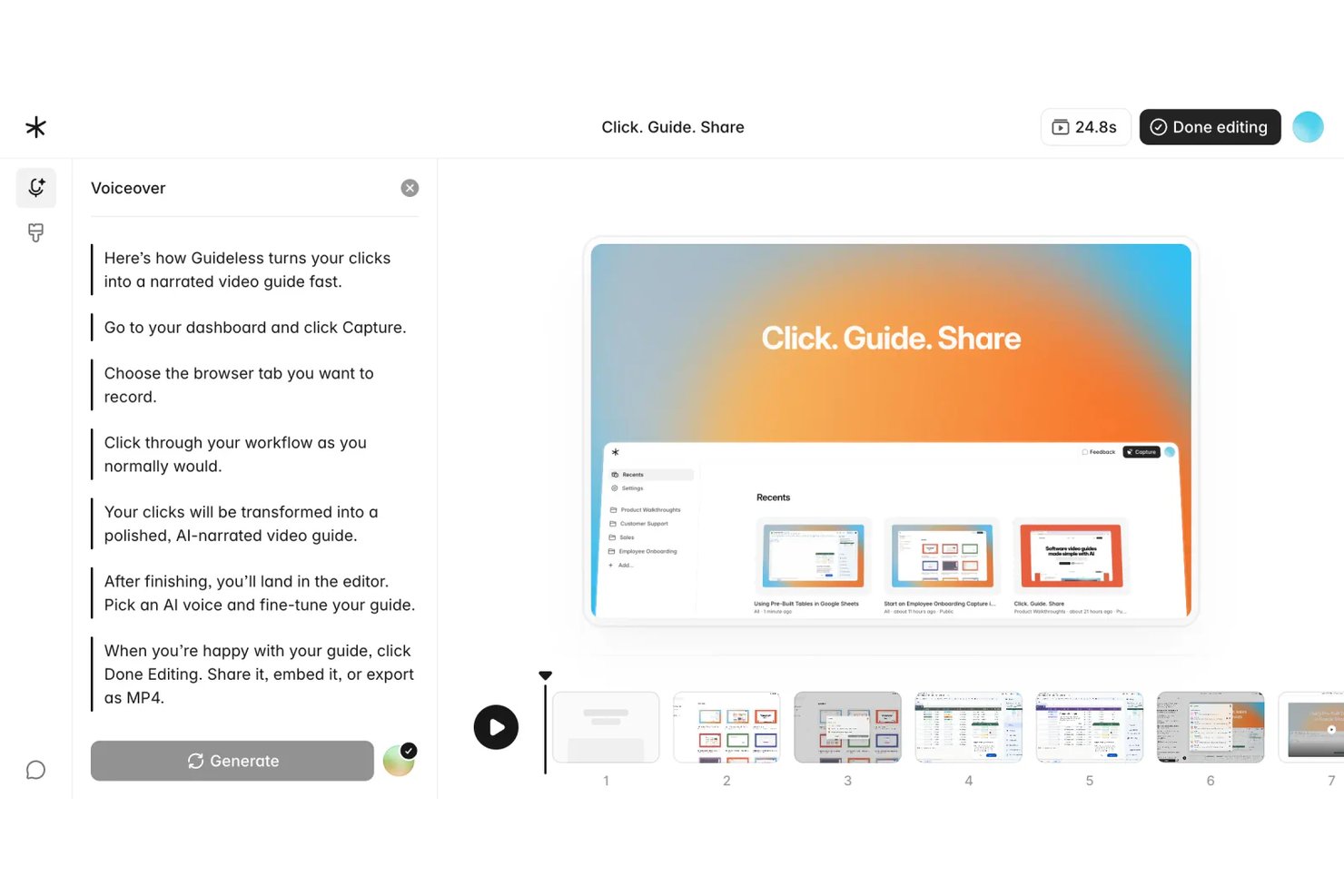
Guideless è uno strumento di creazione guide basato su browser che trasforma registrazioni di flussi di lavoro dal vivo in video con narrazione AI, rendendolo ideale per i team operativi e di progetto che necessitano di documentazione di processo coinvolgente e facile da aggiornare senza registrazione manuale dello schermo.
Per chi è Guideless?
Guideless è adatto a team SaaS e tech di piccole e medie dimensioni il cui flusso di lavoro è completamente nel browser e che necessitano di contenuti formativi curati senza un processo di produzione video dedicato.
Perché Guideless è una delle migliori alternative a Scribe recensite
Ho scelto Guideless tra i migliori perché si spinge dove Scribe non arriva: genera video con narrazione AI direttamente dalle acquisizioni dei flussi di lavoro sul browser. Se Scribe produce passaggi come schermate statiche, Guideless abbina a ogni azione catturata istruzioni scritte dall’IA, una voce narrante dal suono naturale e effetti di zoom intelligenti. Apprezzo particolarmente l’editor rigenerativo, che consente di aggiornare solo i passaggi modificati e ricostruire la narrazione senza dover registrare nuovamente l’intera guida.
Funzionalità principali di Guideless
- Acquisizione flussi di lavoro browser: Registra automaticamente ogni passaggio in qualsiasi web app tramite un’estensione Chrome.
- Offuscamento dati sensibili: Sfoca informazioni riservate o sensibili nelle schermate durante il processo di creazione guida.
- Esportazione in MP4, PDF e Markdown: Scarica le guide in formato video e documento per condivisione e archiviazione.
- Personalizzazione kit di brand: Applica temi, loghi e colori della tua organizzazione a tutte le guide per coerenza nel branding.
Integrazioni Guideless
Guideless offre integrazioni native con Notion, Confluence e Slack. È disponibile un’API per integrazioni personalizzate.
Pros and Cons
Pros:
- La voce narrante AI elimina la registrazione manuale della narrazione
- Le guide vengono esportate direttamente come video MP4
- L’editor rigenerativo aggiorna solo i passaggi modificati
Cons:
- La cattura solo da browser limita i flussi di lavoro sulle app desktop
- Piattaforma più recente con libreria di template ridotta

Trainual
Ideale per documenti di formazione centralizzati

Trainual è un software di gestione della formazione che aiuta le piccole imprese a organizzare e condividere le proprie procedure operative standard e le policy aziendali. Serve ai team che vogliono perfezionare i loro processi di onboarding e formazione.
Perché è una valida alternativa a Scribe: Trainual centralizza i tuoi documenti formativi, rendendo facile accedervi e aggiornarli quando necessario. Grazie ai modelli personalizzabili e alle assegnazioni basate sui ruoli, puoi adattare i contenuti a specifici membri del team. La piattaforma consente anche di monitorare i progressi, così tutti nel workspace rimangono aggiornati.
Funzionalità e integrazioni principali:
Le funzionalità includono creazione di documenti con drag-and-drop, quiz per testare la conoscenza, e notifiche automatiche per gli aggiornamenti. Puoi anche usare la funzione di ricerca per trovare documenti specifici. Questo facilita il mantenimento dell'informazione e della conformità alle policy aziendali all'interno del tuo team.
Le integrazioni includono ADP Run, Paycom, Zapier, Dayforce, Figma e altre.
Pros and Cons
Pros:
- Hub centrale per playbook, policy e procedure
- Assegnazioni basate sui ruoli automatizzano l'onboarding dei dipendenti
- Quiz integrati per confermare la comprensione del materiale formativo
Cons:
- Nessuna guida interattiva in tempo reale o walkthrough in-app
- L'organizzazione manuale dei contenuti può rallentare l'impostazione

Supademo
Ideale per demo di prodotto interattive
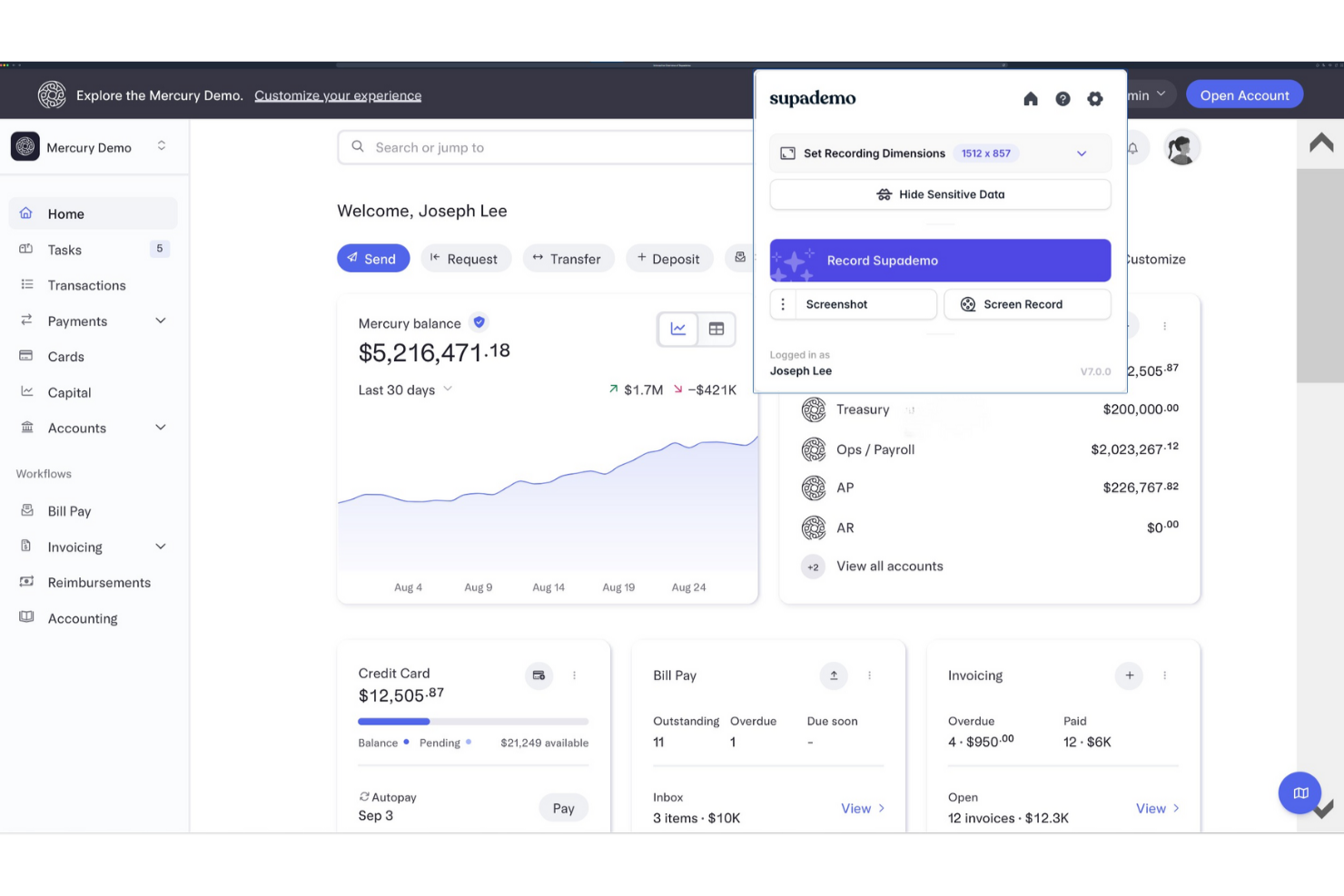
Supademo è una piattaforma per la creazione di demo interattive di prodotto, pensata principalmente per i team di vendita e customer success. Aiuta le aziende a mostrare in modo efficace i propri prodotti ai potenziali clienti.
Perché è una valida alternativa a Scribe: Supademo offre demo interattive che coinvolgono il pubblico con elementi cliccabili e walkthrough guidati. Puoi personalizzare facilmente le demo per mettere in risalto funzionalità specifiche, rendendole rilevanti per le diverse esigenze degli utenti. La piattaforma traccia anche le interazioni degli utenti, fornendo informazioni su cosa cattura la loro attenzione. Queste funzionalità rendono Supademo ideale per i team che vogliono presentare dimostrazioni di prodotto coinvolgenti e informative.
Funzionalità principali e integrazioni:
Funzionalità includono modelli di demo personalizzabili, analisi del coinvolgimento degli utenti e la possibilità di incorporare le demo nei siti web. Puoi anche creare scenari ramificati per personalizzare l’esperienza demo in base al pubblico. Questa flessibilità aiuta il tuo team a offrire presentazioni mirate ed efficaci.
Integrazioni includono Calendly, Slack, SurveyMonkey, HubSpot, Salesforce, Google Forms e altro ancora.
Pros and Cons
Pros:
- L’IA converte le registrazioni in demo interattive
- Incorpora le demo su siti web e app
- Le analisi rivelano i clic e gli abbandoni degli spettatori
Cons:
- Mancano controlli avanzati di editing video
- La gamma di funzionalità è ancora in evoluzione per le aziende

Guidde
Ideale per la creazione video con intelligenza artificiale
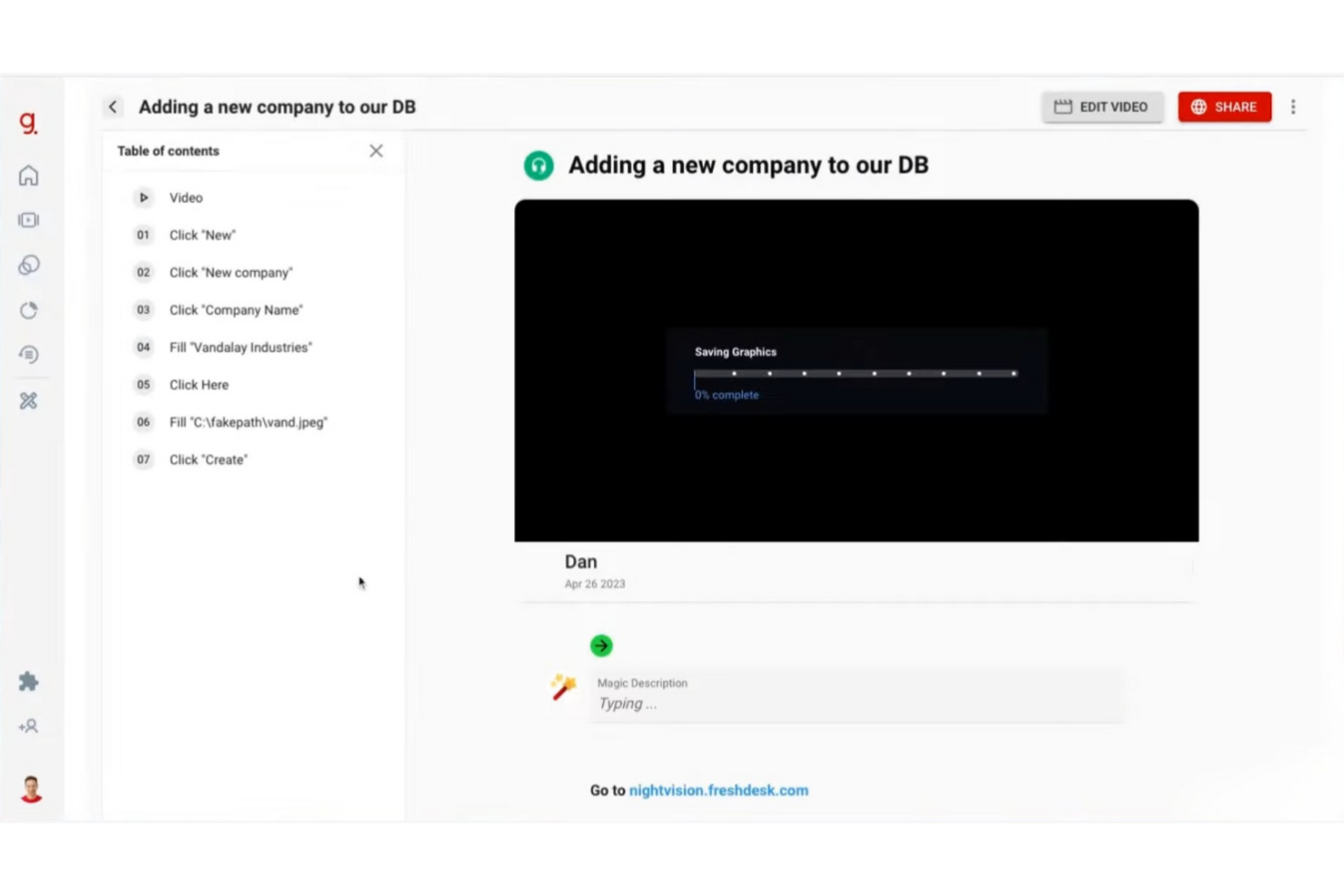
Guidde è una piattaforma basata sull'intelligenza artificiale che semplifica la creazione di documentazione video, rivolta ad aziende e team che necessitano di realizzare tutorial e guide in modo efficiente. Serve principalmente alle imprese per rafforzare l'onboarding dei dipendenti e la formazione dei clienti.
Perché è una valida alternativa a Scribe: Guidde si distingue per i suoi strumenti AI che trasformano le acquisizioni dei flussi di lavoro in tutorial video modificati. La funzione Magic Mic aggiunge una narrazione generata dall'AI alle tue guide per una migliore esperienza di apprendimento. Puoi inoltre trasmettere i tuoi contenuti sia ai dipendenti che ai clienti, rendendola adatta a diverse esigenze. Queste capacità la rendono una scelta solida se cerchi qualcosa di più della documentazione tradizionale.
Funzionalità distintive e integrazioni:
Le funzionalità includono lo strumento Magic Capture per registrare i flussi di lavoro, storyline generate dall'AI e voci fuori campo personalizzabili con oltre 200 opzioni. Puoi creare rapidamente tutorial professionali, ideale per i team che devono pubblicare aggiornamenti frequentemente. La piattaforma offre anche opzioni intelligenti per la condivisione dei contenuti.
Le integrazioni includono GitLab, ClickUp, Zendesk, Notion, Slack, Zoom e molte altre.
Pros and Cons
Pros:
- L'intelligenza artificiale trasforma le registrazioni in tutorial rifiniti
- I template con brand mantengono la documentazione video coerente
- Supporta sia video che istruzioni per passaggi
Cons:
- Analisi limitate rispetto alle piattaforme enterprise
- Limiti sul numero di passaggi per guida

Loom
Ideale per la messaggistica video di team
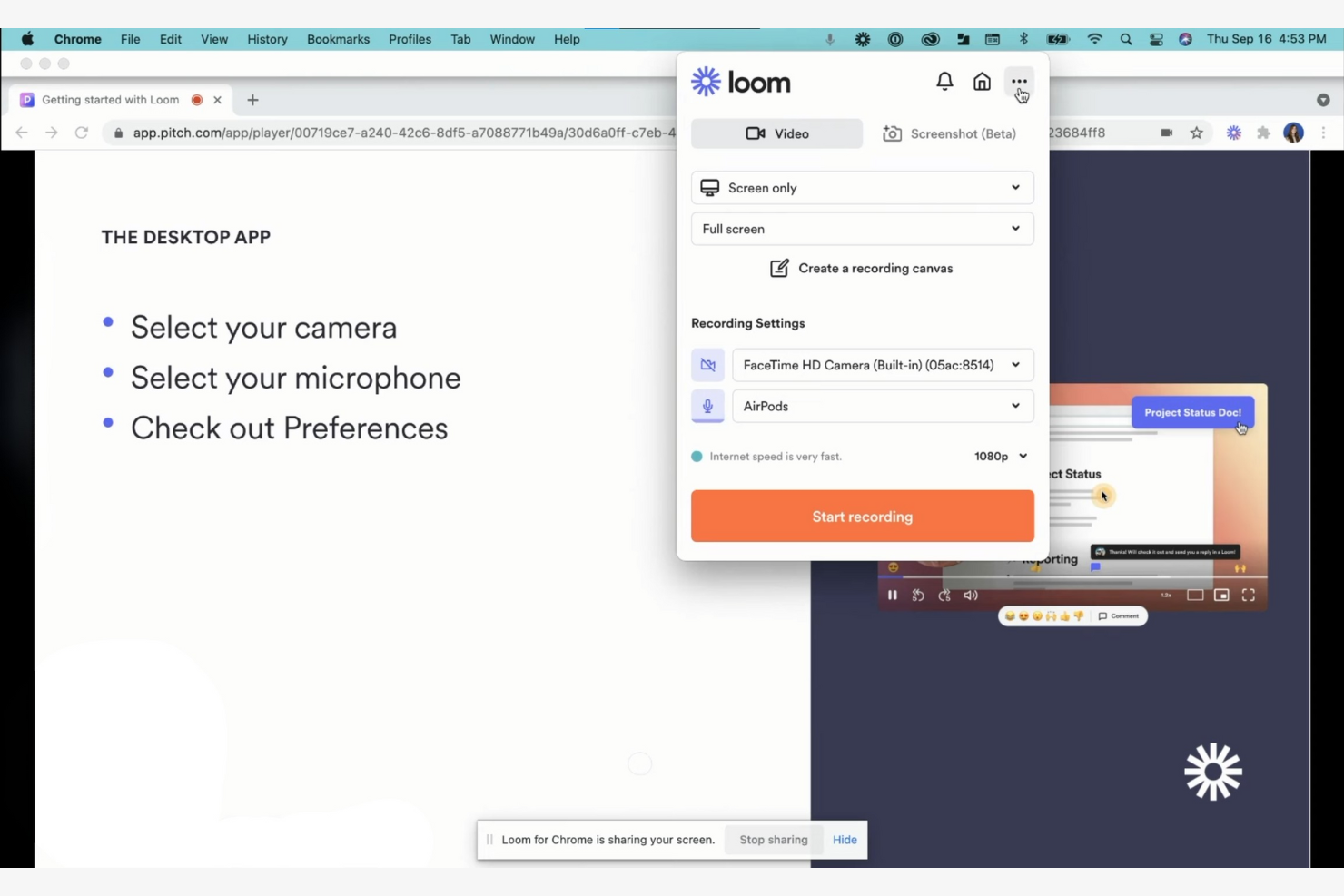
Loom è uno strumento di messaggistica video pensato per team e aziende che necessitano di comunicare tramite video. Gli utenti possono registrare, condividere e visualizzare messaggi video per supportare una migliore collaborazione e comunicazione a distanza.
Perché è una valida alternativa a Scribe: Loom offre un approccio unico alla comunicazione grazie alle sue capacità di messaggistica video. Puoi registrare contemporaneamente schermo, voce e volto, rendendo semplice trasmettere informazioni complesse in modo rapido. La funzione di condivisione istantanea permette al tuo team di visualizzare i messaggi senza attese, mantenendo tutti allineati. Queste caratteristiche lo rendono ideale per i team che danno priorità alla comunicazione in tempo reale e allo storytelling visivo.
Funzionalità e integrazioni principali:
Funzionalità includono la registrazione di video in HD, l'aggiunta di pulsanti call-to-action e l'utilizzo degli approfondimenti sugli spettatori per monitorare il coinvolgimento. Puoi anche tagliare e modificare i video direttamente sulla piattaforma, rendendo semplice perfezionare i contenuti. L'interfaccia intuitiva dello strumento consente di iniziare a creare video con una configurazione minima.
Integrazioni comprendono Slack, Salesforce, Jira, Confluence, Calendly, Zoom e altri.
Pros and Cons
Pros:
- Link condivisibili istantaneamente sostituiscono molte riunioni
- Registra insieme schermo, videocamera e microfono
- L'analisi degli spettatori mostra il coinvolgimento e la visualizzazione completa
Cons:
- La versione gratuita limita durata e funzionalità delle registrazioni
- Qualità video talvolta bassa

Ideale per ambienti regolamentati

FlowShare è un software di documentazione progettato per ambienti regolamentati che automatizza la creazione di guide passo-passo. Serve principalmente alle aziende che necessitano di una documentazione efficiente per formazione e conformità.
Perché è una buona alternativa a Scribe: FlowShare cattura le azioni dell’utente in background, creando guide mentre lavori. Questa funzionalità è adatta ad ambienti regolamentati dove l’accuratezza della documentazione è essenziale. Con opzioni per il branding aziendale e la modifica in blocco, puoi personalizzare le guide secondo le esigenze della tua organizzazione. L’esportazione in più formati offre flessibilità per diverse necessità documentali.
Funzionalità eccezionali e integrazioni:
Le funzionalità includono la cattura automatica delle azioni, impostazioni di identità aziendale per il branding e oscuramento in blocco dei dati sensibili. Puoi anche esportare le guide in formato PDF, PPTX e HTML. Questa versatilità aiuta il tuo team a mantenere una documentazione coerente e professionale.
Le integrazioni includono Confluence, SharePoint, WordPress, Guru, e altri.
Pros and Cons
Pros:
- L’app desktop registra automaticamente ogni azione sullo schermo
- Esporta le guide in PDF, PPTX e HTML
- L’accesso offline si adatta ad ambienti rigidamente regolamentati
Cons:
- Disponibile solo su desktop Microsoft Windows
- Limitazioni nel formato

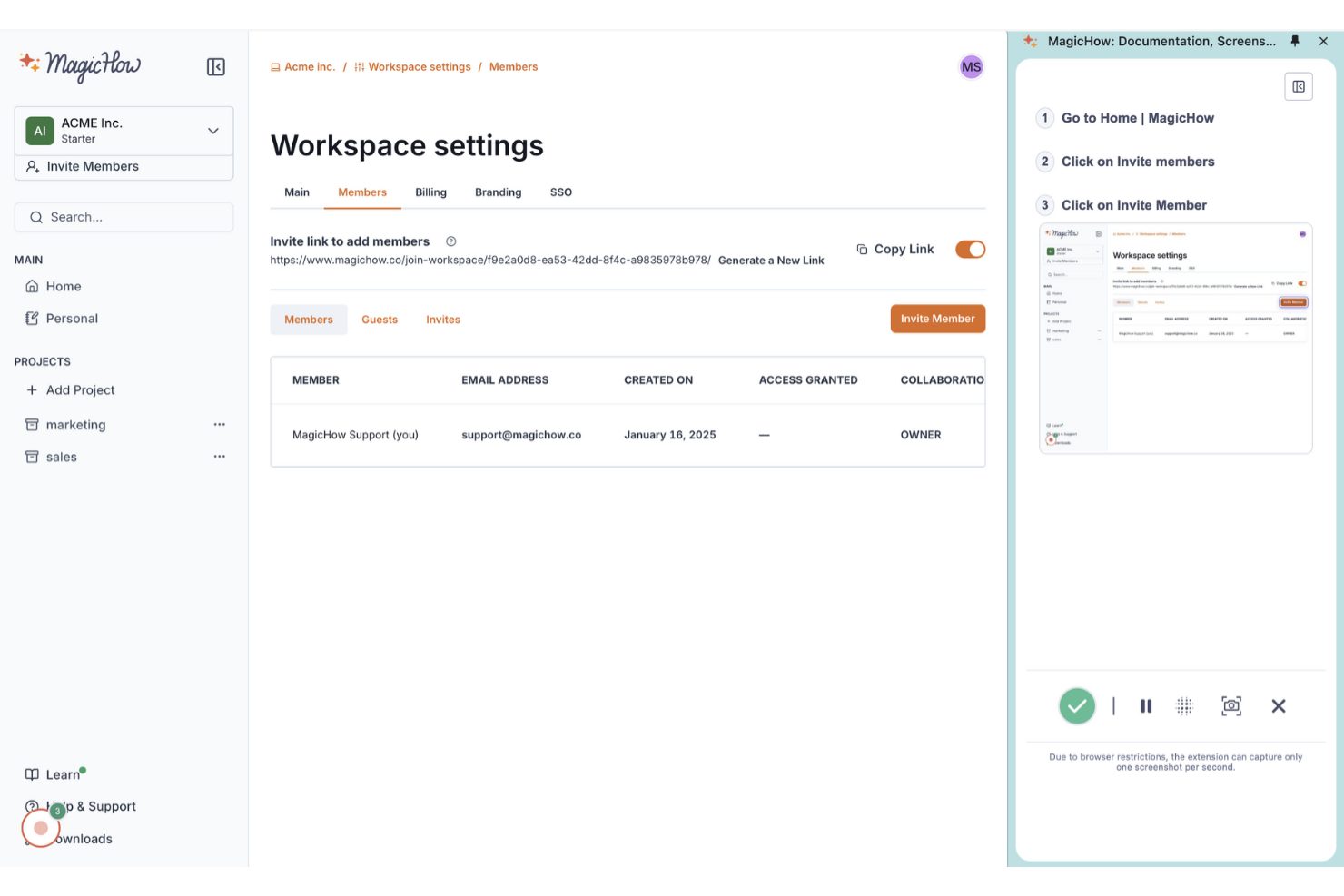
MagicHow è uno strumento intuitivo per creare guide passo-passo, istruzioni e manuali, pensato per i team che devono documentare i processi in modo efficiente. Si rivolge alle aziende che desiderano semplificare le pratiche di documentazione senza necessità di competenze specialistiche.
Perché è una valida alternativa a Scribe: MagicHow consente la creazione rapida di guide, facendo risparmiare tempo al tuo team sulla documentazione. La registrazione automatica dei processi e la facile modifica dei contenuti permettono di produrre e personalizzare rapidamente guide illimitate, mentre le opzioni di condivisione tramite link, PDF e HTML rendono semplice la distribuzione.
Funzionalità principali e integrazioni:
Le funzionalità includono compatibilità con desktop e browser, guide personalizzabili e la possibilità di incorporare contenuti su varie piattaforme. È anche possibile condividere le guide in diversi formati, offrendo flessibilità nelle modalità di distribuzione delle informazioni. Questa versatilità aiuta il tuo team a mantenere una documentazione chiara e accessibile.
Le integrazioni includono Confluence, Notion, WordPress e altro.
Pros and Cons
Pros:
- Piano base gratuito per piccoli team
- L'estensione Chrome registra automaticamente i flussi di lavoro nel browser
- Esporta le guide in link condivisibili e PDF
Cons:
- Analisi limitate rispetto a concorrenti più maturi
- Ecosistema più ridotto con meno integrazioni approfondite


Dubble è uno strumento per creare guide passo-passo, tutorial e risorse di onboarding catturando le azioni dell’utente. È ideale per i team che necessitano di una documentazione dei processi rapida ed efficiente senza inserimento manuale.
Perché è una valida alternativa a Scribe: Dubble offre documentazione istantanea registrando le tue azioni e convertendole in guide. Funzionalità come la cattura automatica degli screenshot e gli strumenti di modifica permettono di creare una documentazione dettagliata con un intervento manuale minimo. Puoi inoltre condividere le guide con un solo clic, rendendo la collaborazione semplice. Queste funzionalità rendono Dubble adatto ai team che danno priorità alla velocità e alla semplicità nella documentazione.
Funzionalità distintive e integrazioni:
Le funzionalità includono modifica rapida, con opzioni per aggiornare descrizioni e screenshot, e la capacità di oscurare informazioni sensibili. Puoi anche condividere facilmente le guide, poiché Dubble supporta vari formati, inclusi contenuti ricchi e markdown. Questa flessibilità aiuta il tuo team a mantenere la documentazione aggiornata e accessibile.
Le integrazioni includono Notion, Confluence, Google Docs e altri.
Pros and Cons
Pros:
- L'estensione Chrome trasforma le azioni in documentazione
- Esporta le guide in formato Markdown per sviluppatori
- Supporta screenshot, video e testo dei passaggi
Cons:
- Le funzionalità collaborative sono basilari
- Ideale per app web; flussi di lavoro desktop o non browser sono limitati

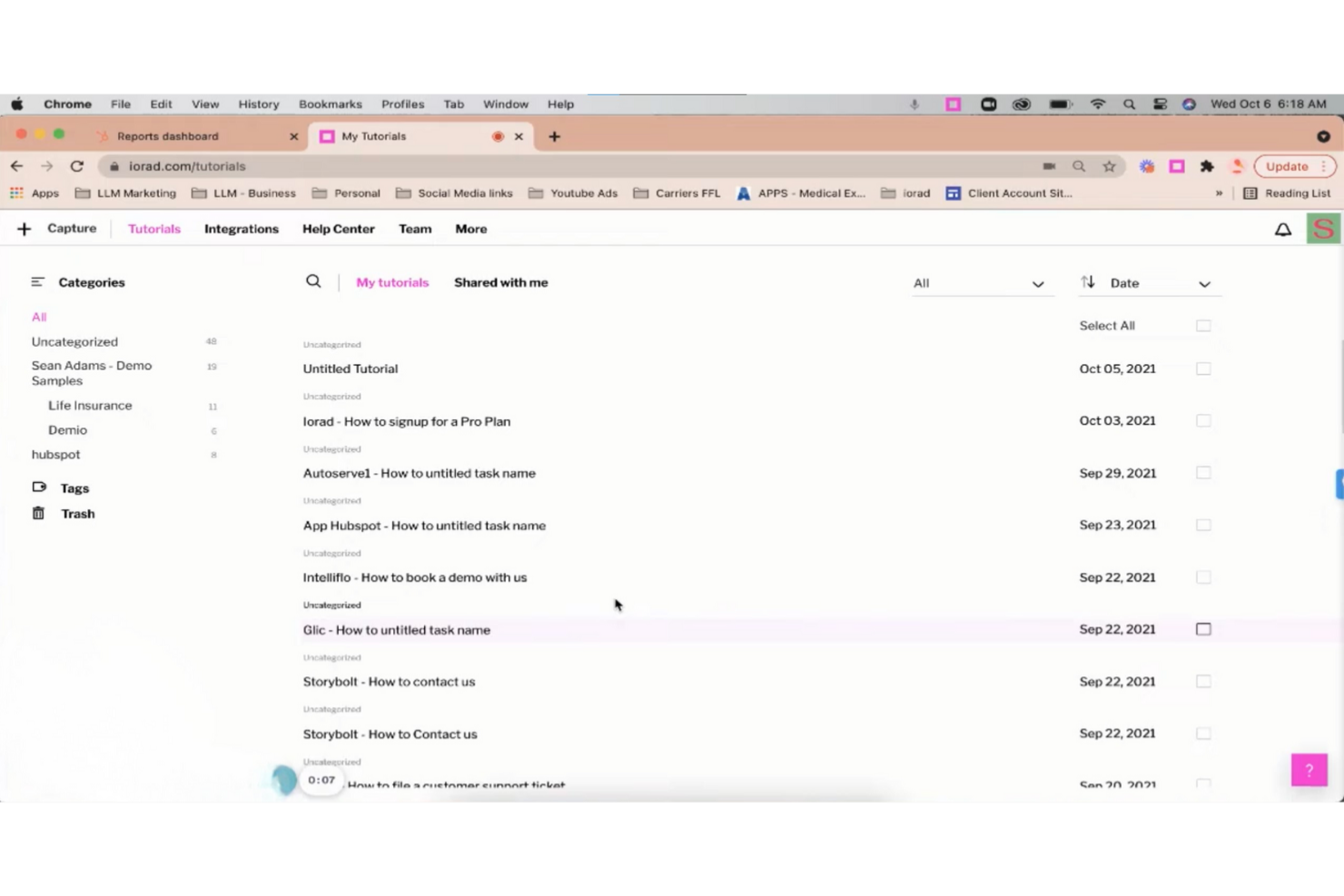
iorad è uno strumento digitale per educatori e formatori che consente di catturare e spiegare flussi di lavoro attraverso tutorial interattivi e guide pratiche, semplificando processi complessi.
Perché è una valida alternativa a Scribe: iorad offre un approccio interattivo alla creazione di tutorial, con funzionalità come walkthrough passo-passo e possibilità di evidenziare i clic. Puoi incorporare i tutorial direttamente nei siti web o condividerli tramite un link, rendendoli facilmente accessibili al tuo pubblico. La piattaforma offre anche modifiche in tempo reale, così puoi aggiornare i contenuti quando i processi cambiano. Queste caratteristiche rendono iorad ideale per team che cercano contenuti istruttivi dinamici e coinvolgenti.
Funzionalità principali e integrazioni:
Le funzionalità includono la cattura automatica dei passaggi, la possibilità di aggiungere voiceover e temi personalizzabili. Puoi anche esportare i tutorial in diversi formati, come PDF e HTML, offrendo flessibilità nel modo in cui condividi le informazioni. Questo aiuta il tuo team ad accedere e utilizzare efficacemente i tutorial.
Le integrazioni includono Slack, ServiceNow, Confluence, YouTube, HubSpot e molto altro.
Pros and Cons
Pros:
- Simulazioni interattive permettono agli utenti di esercitarsi con i flussi di lavoro
- L'estensione per Chrome cattura automaticamente i tutorial sul browser
- Esporta tutorial in PDF per l'utilizzo offline
Cons:
- L'interfaccia può sembrare complessa ai creatori con poca esperienza tecnica
- Personalizzazione avanzata richiede formazione

Tango
Ideale per la cattura dei processi in tempo reale

Tango è uno strumento di documentazione dei processi rivolto a project manager e team che hanno bisogno di catturare i flussi di lavoro in modo efficiente. Supporta la creazione di guide passo-passo per migliorare la collaborazione e la condivisione della conoscenza all'interno del team.
Perché è una valida alternativa a Scribe: Tango offre la cattura dei processi in tempo reale, permettendoti di documentare i flussi di lavoro mentre li esegui. Questa funzione fa risparmiare tempo e riduce gli errori, catturando automaticamente i passaggi. A differenza di Scribe, la cattura in tempo reale di Tango consente di produrre guide dettagliate durante il lavoro, rendendolo particolarmente utile per i team che devono documentare i processi direttamente durante le attività.
Funzionalità e integrazioni principali:
Le funzionalità includono la cattura in tempo reale, la generazione automatica di screenshot e descrizioni personalizzabili per ogni passaggio. È possibile modificare e organizzare la documentazione, rendendo facile aggiornare i processi man mano che evolvono. Lo strumento offre anche un'interfaccia intuitiva che consente di iniziare rapidamente senza una lunga curva di apprendimento.
Le integrazioni includono Salesforce, HubSpot, DocuSign, Zoom, Gmail e molte altre.
Pros and Cons
Pros:
- L'estensione del browser registra flussi di lavoro basati sui clic
- Gli screenshot automatici generano guide dettagliate dei passaggi
- Le guide incorporabili si integrano con gli strumenti esistenti
Cons:
- Il piano gratuito limita il numero di flussi di lavoro
- Nessuna app mobile per la cattura su dispositivo
Altre alternative a Scribe
Ecco alcune alternative aggiuntive a Scribe che non sono entrate nel mio elenco, ma che vale comunque la pena prendere in considerazione:
- UserGuiding
Ideale per strumenti di onboarding utenti
- Trupeer
Ideale per ottenere video e documentazione da un'unica registrazione
- Fluency
Ideale per la documentazione multilingue
- Fleeq
Ideale per contenuti formativi basati su video
- Glitter AI
Ideale per la documentazione dei processi con l'IA


Come valuto le alternative a Scribe
Analizzo ogni strumento tramite due prospettive: i requisiti fondamentali come la cattura automatica dei passaggi e la modifica delle guide, e i fattori differenzianti come il testo generato dall'AI, l'analitica e le integrazioni con l'ecosistema della gestione progetti.
Funzionalità di base (Prerequisiti per questa lista)
Quando seleziono gli strumenti per la mia lista, valuto ognuno su una scala da 0 (funzionalità assente) a 5 (eccellenza in quest'area) per ciascuna delle funzionalità di base elencate qui sotto. Poi, calcolo il punteggio totale dello strumento in percentuale. Ogni strumento deve raggiungere un punteggio totale minimo del 65% per essere incluso.
- Cattura automatica dei passaggi: Valuto quanto bene ogni strumento registra clic, scorrimenti e digitazioni in passaggi strutturati—come documentare il flusso di creazione di un ticket Jira senza dover fare screenshot manuali di ogni campo.
- Annotazione degli screenshot: La gamma di strumenti di annotazione è importante, quindi verifico la presenza di frecce, riquadri di richiamo, evidenziazioni e riquadri per chiarire passaggi come la navigazione di una board sprint o la configurazione di una dashboard.
- Modifica e personalizzazione delle guide: Guardo quanto controllo hai sul contenuto generato—riordinare i passaggi, riscrivere descrizioni, aggiungere il marchio aziendale—così le tue SOP risultano consistenti in tutta la documentazione di progetto.
- Condivisione ed esportazione in più formati: Che ti serva un PDF da condividere con gli stakeholder o una guida incorporata in Confluence, valuto la gamma di formati di output e le opzioni di condivisione che ogni strumento supporta.
- Redazione di dati sensibili: Gli strumenti dovrebbero permettere di sfocare o mascherare credenziali, nomi di clienti o dati finanziari negli screenshot prima di condividere la documentazione di processo con consulenti esterni o team trasversali.
- Integrazioni con strumenti di lavoro: Verifico la presenza di connessioni native a piattaforme come Jira, Slack, Notion e Confluence così che le guide arrivino là dove il team di progetto già lavora anziché rimanere isolate.
Dopo aver stilato una lista di strumenti che soddisfano questi criteri, considero ciò che distingue le diverse piattaforme.
Fattori differenzianti (Cosa distingue i fornitori)
Ecco come confronto le offerte dei diversi fornitori:
Funzionalità distintive
Le descrizioni dei passaggi generate dall'AI fanno risparmiare tempo reale—quando devi documentare una retrospettiva sprint da 20 passaggi, modificare un testo generato automaticamente è molto più veloce che scrivere da zero. Cerco inoltre una libreria centralizzata delle guide dove i team possano organizzare le SOP per progetto o dipartimento, fondamentale quando la documentazione cresce oltre poche guide. L'analitica che traccia le visualizzazioni e i tassi di completamento aiuta i responsabili PMO a verificare se le guide di onboarding vengono davvero utilizzate o ignorate.
Oltre le funzionalità
Sicurezza e conformità sono fondamentali quando le guide contengono dati dei clienti o credenziali interne—verifico la conformità SOC 2 e il supporto SSO, specialmente per i PMO aziendali che condividono documentazione tra più fornitori. La struttura dei prezzi è un altro elemento chiave; una versione gratuita permette a singoli project manager di valutare lo strumento prima di proporlo a tutto il team. Valuto anche il time-to-value, ossia quanto velocemente un nuovo utente può installare l'estensione, documentare un processo e condividere una guida completa già dal primo giorno.
Perché cercare un'alternativa a Scribe?
Sebbene Scribe sia una buona scelta per documentare i processi, diversi motivi spingono alcuni utenti a cercare soluzioni alternative. Potresti cercare un'alternativa a Scribe perché…
- Hai bisogno di più opzioni di personalizzazione
- Il tuo team richiede l'accesso offline
- Vuoi una migliore integrazione con gli strumenti esistenti
- La tua organizzazione ha bisogno del supporto multilingue
- Ti servono funzionalità avanzate per l'analisi
- Il tuo team si sta espandendo rapidamente con nuove assunzioni e ha bisogno di scalabilità
Se ti riconosci in una di queste situazioni, sei nel posto giusto. Il nostro elenco include diverse opzioni di strumenti completi per documentare i processi, più adatte ai team che affrontano queste difficoltà con Scribe e cercano soluzioni alternative.
Funzionalità principali di Scribe
Ecco alcune delle funzionalità principali di Scribe, che ti aiuteranno a mettere a confronto ciò che offrono le soluzioni alternative:
- Cattura automatica: Registra automaticamente i processi dalle app web, desktop e mobili, facendo risparmiare al tuo team tempo nella documentazione manuale.
- Personalizzazione: Personalizza le guide con contenuti generati dall'IA, il branding aziendale e opzioni di formattazione per adattarle alle esigenze del tuo team.
- Modifica degli screenshot: Modifica gli screenshot per concentrarti sulle informazioni chiave, migliorando la chiarezza per il tuo pubblico.
- Opzioni di condivisione: Condividi le guide tramite e-mail o link, incorporale nelle pagine web oppure esportale come file PDF e HTML per mantenere i contenuti accessibili.
- Approfondimenti sul coinvolgimento: Monitora le visualizzazioni e i completamenti delle guide, oltre ad altre metriche, per mantenere i tuoi contenuti pertinenti e aggiornati.
- Pagine: Combina più guide in un unico documento con testo, video e screenshot per una documentazione estesa dei processi.
- Scribe Sidekick: Offre accesso alle informazioni su richiesta, riducendo le domande ripetitive e le interruzioni.
- Oscuramento automatico: Oscura automaticamente o manualmente le informazioni sensibili in modo sicuro per proteggere la privacy dei dati.